5 things you didn’t know about the new Tau VMs

Google Cloud Compute VMs are built on the same global infrastructure that runs Google’s search engine, Gmail, YouTube and other services. And over the years, we’ve continued to launch more and more Compute family and VMs types to serve your workload needs at the price point you’re looking for. When you take a bird’s eye look at our Compute offerings, you’ll notice the following family types:General Purpose(E2/N2/N2D/N1): Virtual machines well suited when you need a balance between customization, performance, and total cost of ownership.Compute Optimized (C2/C2D): Performance sensitive workloads where CPU frequency and consistency are required, or applications that require more powerful cores and a higher core:memory ratios.Memory Optimized(M1/M2): Virtual machines for the largest memory requirements for business critical workloads.Accelerator Optimized(A2): These are the highest performance GPUs for ML, HPC, and massive parallelized computation.As their names might suggest, each family is optimized for specific workload requirements. While they cover use cases like dev/test, enterprise apps, HPC, and large in-memory databases, many customers still have compute requirements for scale-out workloads, like large scale Java apps, web-tier applications, and data analytics. They want focused VM features  without breaking the bank or sacrificing developer productivity. The Tau VM family is the new VM family that extends Compute Engine’s VM offerings for those looking for cost-effective performance for scale-out workloads with full x86 compatibility. Check out the official blog post and my video below to get a quick intro to the new Tau VM family and T2D, its first instance type. If you’re like me and still want help understanding when to use T2D VMs and how they stack up, here are 5 Tau VM facts that should help:1.  T2D VMs are built on the latest 3rd generation AMD EPYCTM processorsAMD EPYC processors are x86-64 microprocessors based on AMD’s Zen microarchitecture (introduced in 2017). The third generation, Milan, came out in March 2021, building upon the previous generation with additional compute density and performance for the cloud. At our data centers, we’re able to get more performance per socket per rack, and pass that over to workloads running on T2D VMs. The AMD EPYC processor-based VMs also preserve x86 compatibility so that you don’t need to utilize technical resources and time redesigning applications and instead can immediately take full advantage of x86 processing speed and ecosystem depth. 2. T2D VMs are well suited for cloud-native and scale-out workloadsCloud-native workloads have led to the continued proliferation of distributed architectures. Data analytics and media streaming, for example, often leverage scale-out (horizontally scalable) multi-tier architectures. That means when additional processing power is needed, you can scale out by statically adding or removing resources to meet changing application demands. As cluster sizes increase, the communication requirements between compute notes rise quickly. AMD EPYC processors are built using the Zen 3 architecture, which uses a new “unified complex” design that dramatically reduces core-to-core and core-to-cache latencies. This reduces communication penalties when you need fast scale-out across compute nodes.T2D VMs offer the ideal combination of performance and price for your scale-out workloads including web servers, containerized microservices, media transcoding, and large-scale Java applications. T2D VMs will come in predefined VM shapes, with up to 60 vCPUs per VM, and 4 GB of memory per vCPU, and offer up to 32 Gbps networking.3. T2D VMs win against other major cloud providers on absolute performance and price-performanceLet’s take an example. A 32vCPU VM with 128GB RAM will be priced at $1.3520 per hour for on-demand usage in us-central1. This makes T2D the lowest cost solution for scale-out workloads, with 56% higher absolute performance and 42% higher price-performance compared to general-purpose VMs of any of the leading public cloud vendors. You can check out how we collected these benchmark results and how to reproduce them here.* Results are based on estimated SPECrate®2017_int_base run on production VMs of two other leading cloud vendors and pre-production Google Cloud Tau VMs using vendor recommended compilers. View testing detailshere. SPECrate is a trademark of the Standard Performance Evaluation Corporation. More information available at www.spec.org4. Google Kubernetes Engine support from day oneGoogle Kubernetes Engine (GKE) supports Tau VMs, helping you optimize price-performance for your containerized workloads. You can add T2D nodes to your GKE clusters by specifying the T2D machine type in your GKE node pools.This is useful if you’re leveraging GKE’s cluster autoscaler, for example, which resizes the number of nodes in a given node pool, based on the demands of your workloads (another example of horizontal scaling). You specify a minimum and maximum size for the node pool, and the rest is automatic. T2D VMs in this case would provide scale-out performance and low latency during autoscaling events.In addition, cluster autoscaler considers the relative cost of the instance types in the various pools, and attempts to expand the least expensive possible node pool. Coupled with the T2D VMs price-performance ratio, you can experience a lower total cost of ownership without sacrificing performance and scale. 5. We worked with pre-selected customers to test Tau VM performanceSnap, Inc. is continuing to improve their scale-out compute infrastructure for key capabilities like AR, Lenses, Spotlight, and Maps. After testing the T2D VMs with Google Kubernetes Engine, they saw the potential for a double-digit performance gain in the companies’ real-world workloads. Likewise, Twitter shared their excitement about the price-performance enhancements critical for their infrastructure used to serve the global public conversation. If you’re interested in signing up to try out the Tau VMs (slated for Q3 2021), you can sign up here. Want to connect? Find me online at @stephr_wong. Related ArticleNew Tau VMs deliver leading price-performance for scale-out workloadsCompute Engine’s new Tau VMs based on AMD EPYC processors provide leading price/performance for scale-out workloads on an x86-based archi…Read Article
Quelle: Google Cloud Platform
The BigQuery admin reference guide: Resource Hierarchy

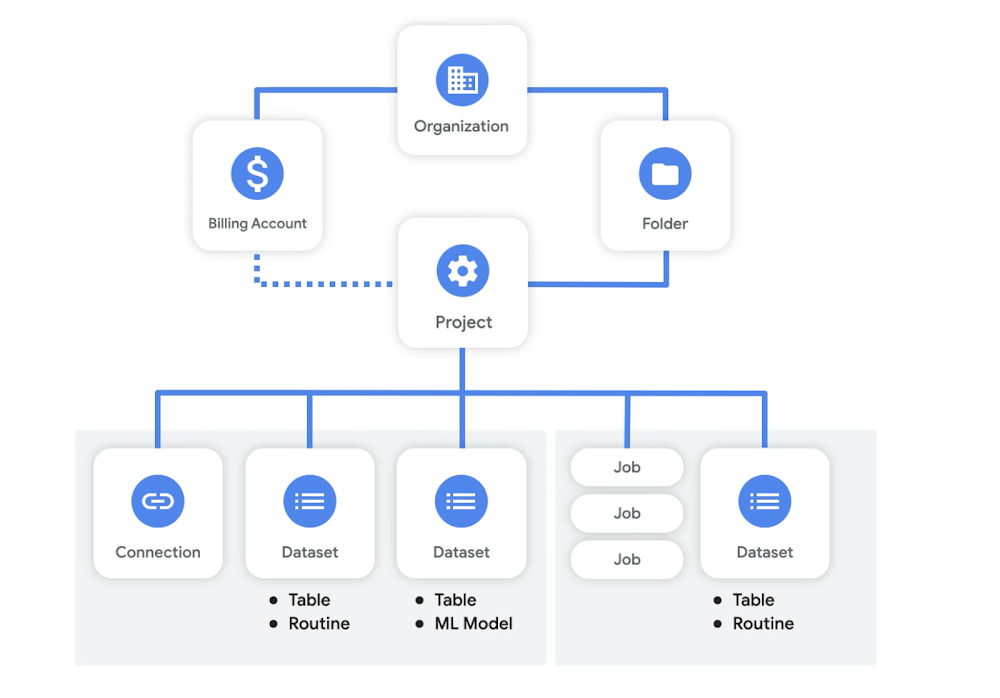
Starting this week, we’re adding new content to the BigQuery Spotlight Youtube series. Throughout the summer we’ll be adding new videos and blog posts focused on helping new BigQuery architects and administrators master the fundamentals. You can find complimentary material for the topics discussed in the official BigQuery documentation, which is linked below. First up, the BigQuery Resource Model!BigQuery, like other Google Cloud resources, is organized hierarchically where the Organization node is the root node, the Projects are the children of the Organization, and Datasets are descendants of Projects. In this post, we will look closer at the BigQuery resource model and discuss key considerations for architecting your deployment based on business needs. BigQuery core Resource Model Organizations, folders & billing accountsThe Organization resource is the root node of the Google Cloud resource hierarchy. It represents a company and is closely associated with your organization’s domain by being linked to one Google Workspace or Cloud Identity account. While an Organization is not required to get started using BigQuery, it is recommended. With an Organization resource, projects belong to your organization instead of the employee who created the project. Furthermore, organization administrators have central control of all resources. Folders are an additional grouping mechanism on top of Projects. They can be seen as sub-organizations within the Organization. Folders can be used to model different legal entities, departments, and teams within a company. Folders act as apolicy inheritance point – IAM roles granted on a folder are automatically inherited by all Projects and folders included in that folder. For BigQuery flat-rate customers, slots (units of CPU) can be assigned to Organizations, Folders or Projects where they are distributed fairly among projects to handle job workloadsA Billing Account is required to use BigQuery, unless you are using the BigQuery sandbox. Many times, different teams will want to be billed individually for consuming resources in Google Cloud. Therefore, each billing group will have its own billing account, which results in a single invoice and is tied to a Google Payments profile.  ProjectsA Project is required to use BigQuery and forms the basis for using all Google Cloud services. Projects are analogous to databases in other systems.A project is used both for storing data and for running jobs on, or querying, data. And because storage and compute are separate, these don’t need to be the same project. You can store your data in one project and query it from another, this includes combining data stored in multiple projects in a single query. A project can have only one billing account, the project will be billed for data stored in the project and jobs run in the project. Watch out for per-project limitations and quotas. DatasetsDatasets are top-level containers, within a project, that are used to organize and control access to tables, views, routines and machine learning models. A table must belong to a dataset, so you need to create at least one dataset before loading data into BigQuery.Your data will be stored in the geographic location that you chose at the dataset’s creation time. After a dataset has been created, the location can’t be changed. One important consideration is that you will not be able to query across multiple locations, you can read details on location considerations here. Many users chose to store their data in a multi-region location, however some chose to set a specific region that is close to on-premise databases or ETL jobs.Access controlsAccess to data within BigQuery can be controlled at different levels in the resource model, including the Project, Dataset, Table or even column. However, it’s often easier to control access higher in the hierarchy for simpler management.  Examples of common BigQuery project structures:By now you probably realize that deciding on a Project structure can have a big influence on data governance, billing and even query efficiency. Many customers chose to deploy some notion of data lakes and data marts by leveraging different Project hierarchies. This is mainly a result of cheap data storage, more advanced SQL offerings which allow for ELT workloads and in-database transformations, plus the separation of storage and compute inside of BigQueryCentral data lake, department data martsWith this structure, there is a common project that stores raw data in BigQuery (Unified Storage project), also referred to as a Data Lake. It’s common for a centralized data platform team to create a pipeline that actually ingest data from various sources into BigQuery within this project. Each department or team would then have their own datamart projects (e.g. Department A Compute) where they can query the data, save results and create aggregate views.How it works:Central data engineering team is granted permission to ingest and edit data in the storage projectDepartment analysts are granted BigQuery Data Viewer role for specific datasets in the Unified Storage projectDepartment analysts are also granted BigQuery Data Editor role and BigQuery Job User role for their department’s compute projectEach compute project would be connected to the team’s billing accountThis is especially useful for when:Each business unit wants to be billed individually for their queriesThere is a centralized platform or data engineering team that ingests data into BigQuery across business unitsDifferent business units access their data in their own tools or directly in the consoleYou need to avoid too many concurrent queries running in the same project (due to per-project quotas)Department data lakes, one common data warehouse projectWith this option, data for each department is ingested into separate projects – essentially giving each department their own data lake. Analysts are then able to query these datasets or create aggregate views in a central data warehouse project, which can also easily be connected to a business intelligence tool.How it works:Data engineers who are responsible for ingesting specific data sources are granted BQ Data Editor and BQ Job User roles in their department’s storage projectAnalysts are granted BQ Data Viewer role to underlying data at the project level, for example an HR analyst might be granted data viewer access to the entire HR storage projectService accounts that are used to connect BigQuery to external business intelligence tools can be also be granted data viewer access to specific projects that contain datasets to be used in visualizationsAnalysts and Service Account are then granted BQ Job User and BQ Data Editor roles in the Central Data Warehouse projectThis is especially useful for when:It’s easier to manage raw data access at the project / department levelCentral analytics team would rather have a single project for compute, which could make monitoring queries simpler Users are accessing data from a centralized business intelligence toolSlots can be assigned to the data warehouse project to handle all queries from analysts and external toolsNote that this structure may result in a lot of concurrent queries, so watch out for per-project limitations. This structure works best for flare-rate customers with lifted concurrency limits.  Department data lakes and department data martsHere, we combine the previous approaches and create a data lake or storage project for each department. Additionally, each department might have their own datamart project where analysts can run queries.How it works:Department data engineers are granted BQ Data Editor and BQ Job User roles for their department’s data lake projectDepartment data analysts are granted BQ Viewer roles for their department’s data lake projectDepartment data analysts are granted BQ Data Editor and BQ Job User roles for their department’s data mart projectAuthorized views and authorized user defined functions can be leveraged to give data analysts access to data in projects where they themselves don’t have accessThis is especially useful for when:Each business unit wants to be billed individually both for data storage and computeDifferent business units access their data in their own tools or directly in the consoleYou need to avoid too many concurrent queries running in the same projectIt’s easier to manage raw data access at the project / department levelNow you should be well on your way to beginning to architect your BigQuery Data Warehouse! Be sure to keep an eye out for more in this series by following me on LinkedIn and Twitter!Related ArticleSpring forward with BigQuery user-friendly SQLThe newest set of user-friendly SQL features in BigQuery are designed to enable you to load and query more data with greater precision, a…Read Article
Quelle: Google Cloud Platform

Getting started with MLOps: Selecting the right capabilities for your use case

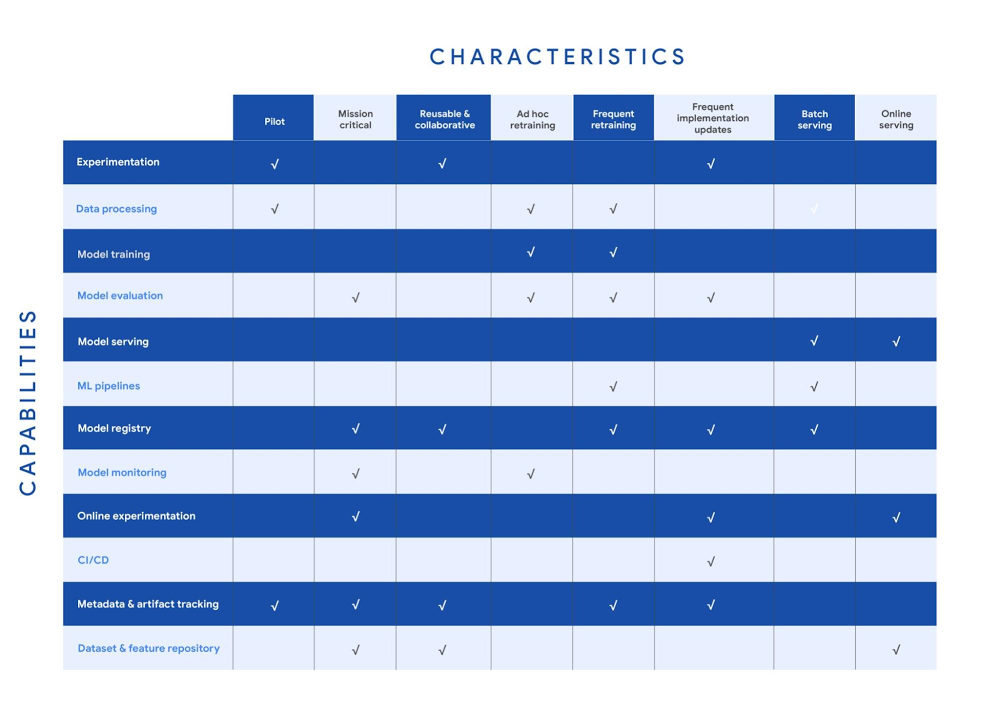
Establishing a mature MLOps practice to build and operationalize ML systems can take years to get right.  We recently published our MLOps framework to help organizations come up to speed faster in this important domain.  As you start your MLOps journey, you might not need to implement all of these processes and capabilities. Some will have a higher priority than others, depending on the type of workload and business value that they create for you, balanced against the cost of building or buying processes or capabilities. To help ML practitioners translate the framework into actionable steps, this blog post highlights some of the factors that influence where to begin, based on our experience in working with customers. The following table shows the recommended capabilities (indicated by check marks) based on the characteristics of your use case, but remember that each use case is unique and might have exceptions. (For definitions of the capabilities, see the MLOps framework.)MLOps capabilities by use case characteristicsYour use case might have multiple characteristics. For example, consider a recommender system that’s retrained frequently and that serves batch predictions. In that case, you need the data processing, model training, model evaluation, ML pipelines, model registry, and metadata and artifact tracking capabilities for frequent retraining. You also need a model serving capability for batch serving.In the following sections, we provide details about each of the characteristics and the capabilities that we recommend for them.PilotExample: A research project for experimenting with a new natural language model for sentiment analysis.For testing a proof of concept, your focus is typically on data preparation, feature engineering, model prototyping, and validation. You perform these tasks using the experimentation and data processing capabilities. Data scientists want to set up experiments quickly and easily and track and compare them. Therefore, you need the ML metadata and artifact tracking capability in order to debug, to provide traceability and lineage, to share and track experimentation configurations, and to manage ML artifacts. For large-scale pilots, you might also require dedicated model training and evaluation capabilities.Mission-criticalExample: An equities trading model where model performance degradation in production can put millions of dollars at stake.In a mission-critical use case, failure with the training process or production model has a significant negative impact on the business (a legal, ethical, reputational, or financial risk). The model evaluation capability is important to identify bias and fairness, as well as to provide explainability of the model. Additionally, monitoring is essential to assess the quality of the model during training and to assess how it performs in production. Online experimentation lets you test newly trained models against the one in production using a controlled environment before you replace the deployed model. Such use cases also need a robust model governance process to store, evaluate, check, release, and report on models and to protect against risks. You can enable model governance by using the model registry and metadata and artifact tracking capabilities. Additionally, datasets and feature repositories provide you with high-quality data assets that are consistent and versioned.Reusable and collaborativeExample: Customer Analytic Record (CAR) features that are used across various propensity modeling use cases.Reusable and collaborative assets allow your organization to share, discover, and reuse AI data, source code, and artifacts. A feature store helps you standardize the processes of registering, storing, and accessing features for training and serving ML models. Once features are curated and stored, they can be discovered and reused by multiple data science teams. Having a feature store helps you avoid reengineering features that already exist, and saves time on experimentation. You can also use tools to unify data annotation and categorization. Finally, by using ML metadata and artifacts tracking, you help provide consistency, testability, security and repeatability of the ML workflows. Ad hoc retrainingExample: An object detection model to detect various car parts, which needs to be retrained only when new parts are introduced. In ad hoc retraining, models are fairly static and you do not retrain them except when the model performance degrades. In these cases, you need data processing, model training, and model evaluation capabilities to train the models. Additionally, because your models are not updated for long periods, you need model monitoring. Model monitoring detects data skews, including schema anomalies, as well as data and concept drifts and shifts. Monitoring also lets you continuously evaluate your model performance, and it alerts you when performance decreases or when data issues are detected. Frequent retrainingExample: A fraud detection model that’s trained daily in order to capture recent fraud patterns.Use cases for frequent retraining are ones where model performance relies on changes in the training data. The retraining might be based on time intervals (for example, daily or weekly), or it could be triggered based on events like when new training data becomes available. For this scenario, you need ML pipelines to connect multiple steps like data extraction, preprocessing, and model training. You also need the model evaluation capability to ensure that the accuracy of the newly trained model meets your business requirements. As the number of models you train grows, both a model registry and metadata and artifact tracking help you keep track of the training jobs and model versions.Frequent implementation updatesExample: A promotion model with frequent changes to the architecture to maximize conversion rate.Frequent implementation updates involve changes to the training process itself. That might mean switching to a different ML framework, such as changing the model architecture (for example, LSTM to Attention) or adding a data transformation step in your training pipeline. Such changes in the foundation of your ML workflow require controls to ensure that the new code is functional and that the new model matches or outperforms the previous one. Additionally, the CI/CD process accelerates the time from ML experimentation to production, as well as reducing the possibility for human error. Because the changes are significant, online experimentation is necessary to ensure that the new release is performing as expected. You also need other capabilities such as experimentation, model evaluation, model registry, and metadata and artifact tracking to help you operationalize and track your implementation updates. Batch servingExample: A model that serves weekly recommendations to a user who has just signed up for a video-streaming service.For batch predictions, there is no need to score in real time. You precompute the scores and you store them for later consumption, so latency is less of a concern than in online serving. However, because you process a large amount of data at a time, throughput is important. Often batch serving is a step in a larger ETL workflow that extracts, pre-processes, scores, and stores data. Therefore, you need the data processing capability and ML pipelines for orchestration. In addition, a model registry can provide your batch serving process with the latest validated model to use for scoring.Online servingExample: A RESTful microservice that uses a model to translate text between multiple languages. Online inference requires tooling and systems in order to meet latency requirements. The system often needs to retrieve features, to perform inference, and then to return the results according to your serving configurations. A feature repository lets you retrieve features in near real time, and model serving allows you to easily deploy models as an endpoint. Additionally, online experiments help you test new models with a small sample of the serving traffic before you roll the model out to production (for example, by performing A/B testing).Get started with MLOps using Vertex AIWe recentlyannouncedVertex AI, our unified machine learning platform that helps you implement MLOps to efficiently build and manage ML projects throughout the development lifecycle. You can get started using the following resources: MLOps: Continuous delivery and automation pipelines in machine learningGetting started with Vertex AIBest practices for implementing machine learning on Google CloudAcknowledgements: I’d like to thank all the subject matter experts who contributed,  including Alessio Bagnaresi, Alexander Del Toro, Alexander Shires, Erin Kiernan, Erwin Huizenga, Hamsa Buvaraghan, Jo Maitland, Ivan Nardini, Michael Menzel, Nate Keating, Nathan Faggian, Nitin Aggarwal, Olivia Burgess, Satish Iyer, Tuba Islam, and Turan Bulmus. A special thanks to the team that helped create this, Donna Schut, Khalid Salama, and Lara Suzuki, and Mike Pope for his ongoing support.Related ArticleGoogle Cloud unveils Vertex AI, one platform, every ML tool you needGoogle Cloud launches Vertex AI, a managed platform for experimentation, versioning and deploying ML models into production.Read Article
Quelle: Google Cloud Platform

Cloud Career Jump Start: our virtual certification readiness program

It’s no question that the cloud computing industry is booming and cloud experts are in high demand.  In 2020, 67 percent of organizations surveyed in the IDG Cloud Computing Report added new cloud roles and functions (source). So there are plenty of cloud jobs out there, but if you don’t have years of experience, you might find it difficult to get one. This is especially true for members of underrepresented communities, who face other kinds of systemic barriers in education and employment.To help meet this demand and democratize opportunity, Google Cloud is introducing its first virtual Certification Journey Learning program for underrepresented communities across the United States—Cloud Career Jump Start. The program is free of charge for participants, and includes technical and professional skill development and resources with an aim to provide a readiness path to certification via the Google Cloud Associate Cloud Engineer Exam. Google Cloud’s Certification Journey Learning ProgramThe program offers free access to the Google Cloud Associate Cloud Engineer training, which provides support preparations for the Certification Exam. This industry-recognized certification helps job applicants validate their cloud expertise, elevate their career, and transform businesses with Google Cloud technology. Learn more about the exam by watching the Certification Prep: Associate Cloud Engineer webinar. Designed specifically for Computer Science or Information Systems-related majors (or relevant experience), the 12-week program offers:Exclusive free access to Google Cloud Associate Cloud Engineer-related training to support preparations for the Certification Exam. Guided progress through the certification prep training on Qwiklabs. Office hours hosted by Google Cloud technical experts. Technical workshops, including sessions with Googlers who earned cloud industry certifications and have built impactful careers in cloud tech, such as Google Cloud’s Kelsey Hightower (a Principal Developer Advocate) and Jewel Langevine (a Solution Engineer). Earn your Associate Cloud Engineer Certification Curious if you qualify to apply for the program? We’ve put together a guide below to help: What does an associate cloud engineer do? Associate Cloud Engineers deploy applications, monitor operations, and manage enterprise solutions. They also use the Google Cloud Console and the command-line interface to perform common platform-based tasks, to maintain one or more deployed solutions that leverage Google-managed or self-managed services on Google Cloud.Who’s eligible? We are encouraging applicants from groups that have been historically underrepresented in tech including Black, Latinx, Native American & Indigenous communities. Applicants should have six or more months of hands-on experience in a Computer Information Systems-related major, and/or relevant experience through online courses, boot camps, hackathons or internships. Although the ability to program is not required, familiarity with the following IT concepts is highly recommended: virtual machines, operating systems, storage and file systems, networking, databases, programming, and working with Linux at the command line.How do you know if you are ready for the program? To get an idea of what the program will cover:Watch the Certification Prep: Associate Cloud Engineer webinarComplete the Skill IQ Assessment via PluralsightReview the Associate Cloud Engineer Certification Exam Guide Take the Associate Cloud Engineer Practice ExamJump start a career in cloud infrastructure and technology Following the hands-on training, Google Cloud will offer an additional 9 months of career development resources and activities. This includes an online support community, mentoring with Googlers & partners including SADA, EPAM Systems Inc., and Slalom, resume and interviewing support from Google Recruiting & Staffing, and additional career workshops. We are also partnering with a number of Black-owned and -operated, nonprofit and cloud training organizations like Kura Labs. Cloud certifications open doors Want to hear more about this program from two Googlers who completed it? We asked Kelsey and Jewel to share more on how certifications helped them launch their careers in the cloud industry: “IT certifications introduced me to the game; opportunities and hard work helped me change it.” – Kelsey Hightower, Staff Developer Advocate, Google Cloud Platform “Becoming certified as a cloud computing professional combined with prayer, networking, and practice has kept me moving on my purposeful and rewarding career path as an engineer.” – Jewel Langevine, Solution Engineer, Google Cloud Solutions StudioKelsey and Jewel’s wisdom doesn’t end there. They play a central role in the program, sharing more about how they navigated certifications and leveraged them for success. Apply today to Cloud Career Jump StartThe program is now live in the United States, with plans to expand to other regions in the coming months. It is completely virtual, and all training is on-demand so that participants can access their coursework anytime, anywhere via the web or mobile device. To determine whether you (or someone you know) would be a great fit for the Cloud Career Jump Start, check out our guidelines andapply.Related ArticleIn case you missed it: All our free Google Cloud training opportunities from Q1Since January, we’ve introduced a number of no-cost training opportunities to help you grow your cloud skills. We’ve brought them togethe…Read Article
Quelle: Google Cloud Platform
Remote, hybrid, or office work? It's easier with no-code apps

As offices reopen, businesses aren’t keeping to a single formula. Many are embracing hybrid models, with employees splitting time between home and the office. Some are staying 100% remote. Others are returning the full workforce to offices with a greater focus on digitization.  Regardless of their model, one thing is certain: technology is more central than ever to organizations’ ability to work smarter and more effectively. In particular, organizations need technology that can be tailored to specific business needs. For example, a retail store manager may need a way to ensure improved sanitation practices, or office workers may need to create an app to manage desk reservations. Google Workspace can help by bringing together everything you need to get things done, all in one place—including the ability to build custom apps and automations with AppSheet. AppSheet, Google Cloud’s no-code development platform, lets employees–even those with no programming experience–reclaim their time and talent by building custom apps and automations. Building solutions with AppSheet is often easier and faster than traditional coding, as AppSheet leverages Google’s machine learning expertise to help you quickly go from idea to solution, helping your business to match the pace and agility that today’s landscape requires. In this article, we’ll explore how you can use AppSheet to create custom solutions that will help your business adapt to shifting business needs. To illustrate, we’ll focus on a use case many businesses face: reservation and management of meeting rooms and other office resources, but this process can easily be adapted for a wide variety of use cases, from apps for retail pickup to incident reporting and more. Simplify and centralize with appsThe first thing to consider is whether your solution would be best managed via a custom interface. If you’re trying to simplify a process for someone, such as inspections or inventory tracking, or centralize information, such as resource portals or events calendars, creating a custom app is the way to go.For this example app, we created a simple Google Sheetto hold our backend data. Sheets are ideal backend data sources when we know the amount of data will not grow exponentially, especially when piloting to a first office or group of users. We can switch our data seamlessly at any time to a scalable Google Cloud SQL database or other database if needed.The example app has several worksheets to manage the different buildings, rooms, checkpoints and people (including their roles).We can build an app in AppSheet directly from our Sheet by selecting Tools > AppSheet > Create an App. After creating our app, we see an overview of the data that we’ve connected, how pieces of data relate to each other, the views that are presented to the user, and a live interactive preview of the app. Refining the app is intuitive. When you input keywords, for instance, AppSheet surfaces appropriate functionality options that can be further customized. If we have address or location data, it’s automatically turned into a map view that we can further customize.Our office management app will offer building managers and cleaners administrative features for managing equipment, disinfection schedules, and maintenance information, and it will also offer views for employees to check occupancy and safely reserve desks and equipment.Opening an office and then a room in the app gives us an overview of both the floorplan and the occupancy and reservations for spaces and equipment in the room.Users can then reserve spaces and equipment in the app, without having to first search for a form or page in the intranet, or even log onto their work computer. The reservation is an automation routine in AppSheet, which performs pre-configured actions when triggered.As illustrated in the screenshot above, when the action is triggered either by pressing a button in the app, scanning a QR code, or tapping an RFC tag, the action simply sets the “Reserved by” and “Reserved at” columns to the current user and timestamp.Streamline with automationsAppSheet Automation, which was recently made generally available, makes it possible to reduce repetitive tasks and streamline processes even further.In this example, one challenge you may encounter is that users often forget to release a desk or resource when they’re finished, which means those reservations stay blocked until an administrator releases all blocked reservations. However, it’s also important that resources aren’t immediately released, as they first need to be cleaned and disinfected before being made available to new users.AppSheet Automation can solve this challenge by periodically checking all resources that have been reserved for longer than four hours, then alerting the user to either re-reserve them or release them to be cleaned. If there is no answer, the automation can trigger the resources to be cleaned, then released.We can configure this as a recurring event, and create a bot that sends the notifications and triggers actions based on the user input (or lack of input).Optimize for multiple rolesCreating an app for one user is one thing–creating an app that fits the needs of multiple types of users is another. AppSheet has you covered for this kind of complexity because it lets you build multiple roles into a single app. In our office management app, for example, the office manager can have a particular view and dashboard, and workers in the office can have their own views and functionalities front and center. This makes it possible to automate tasks for all types of users with a single app. Likewise, AppSheet Automation lets you easily react to real-time changes in data, send notifications to groups of users, and initiate additional workflows using data shared between the app and the users. If a group needs to reserve a conference space for an important late-breaking meeting, for example, there might be ripple effects across a number of user groups. The ability to automate all these updates and interactions can ultimately save a lot of time and effort. AppSheet also supports advanced features such as QR codes, NFC, and bluetooth sensor integration. This could help users check into locations or workspaces, further streamlining the task of helping people safely navigate and collaborate within the office.Mission critical solutions, faster than everIn the past, the type of app explored in this article would have required a central data store, distribution to specific groups of users, management and dashboard capabilities, as well as smartphone sensor integration for NFC and image capturing. This would have necessitated a mammoth implementation project and a team of professional coders.  But with no-code, you can effectively design and implement these requirements in hours and days rather than months and years. Changes can be made on the fly in any browser, including pushing out new versions to users. Though AppSheet opens up app building and digital automations to any knowledge worker, it also includes robust security and governance controls, ensuring that as you manage getting employees back into office, you don’t neglect IT security. Try out your own back-to-the-office app for free today at AppSheet.com, or explore and copy our sample app.
Quelle: Google Cloud Platform

Accelerate Google Cloud database migration assessments with EPAM’s migVisor

Editor’s note: Today, we’re announcing the Database Migration Assessment and partnership with software development company EPAM, allowing Google Cloud customers access to migVisor to conduct a database migration assessment.Today, we’re announcing our latest offering—the Database Migration Assessment—a Google Cloud-led project to help customers accelerate their deployment to Google Cloud databases with a free evaluation of their environment.  A comprehensive approach to database migrationsIn 2021, Google Cloud continues to double down on its database migration and modernization strategy to help our customers de-risk their journey to the cloud. In this blog, we share our comprehensive migration offering that includes people expertise, processes, and technology.People: Google Cloud’s Database Migration and Modernization Delivery Center is led  by Google Database Experts who have strong database migration skills and a deep understanding of how to deploy on Google Cloud databases for maximum performance, reliability, and improved total cost of ownership (TCO).Process: We’ve standardized an approach to assessing databases which streamlines migrating and modernizing data-centric workloads. This process shortens the duration of migrations and reduces the risk of migrating production databases. Our migration methodology addresses priority use cases such as: zero-downtime, heterogeneous, and non-intrusive serverless migrations. This combined with a clear path to database optimization usingCloud SQL Insights, gives customers a complete assessment-to-migration solution.Technology: Customers can use third-party tools like migVisor to do assessments for free as well as use native Google Cloud tools like Database Migration Service (DMS) to de-risk migrations and accelerate their biggest projects.This assessment helped us de-risk migration plans, with phases focused on migration, modernization and transformation. The assessment output has become the source of truth for us and we continuously refer to it as we make plans for the future. Vismay Thakkar VP of infrastructure, BackcountryAccelerate database migration assessments with migVisor from EPAM  To automate the assessment phase, we’ve partnered with EPAM, a provider with strategic specialization in database and application modernization solutions. Their Database Migration Assessment tool migVisor is a first-of-its-kind cloud database migration assessment product that helps companies analyze database workloads and generate a visual cloud migration roadmap that identifies potential quick wins as well as areas of challenge. migVisor will be made available to customers and partners, allowing for the acceleration of migration timelines for Oracle, Microsoft SQL Server, PostgreSQL and MySQL databases to Google Cloud databases. “We believe that by incorporating migVisor as part of our key solution offering for cloud database migrations and enabling our customers to leverage it early on in the migration process, they can complete their migrations in a more cost-effective, optimized and successful way. For us, migVisor is a key differentiating factor when compared to other cloud providers” –Paul Miller, Database Solutions, Google CloudmigVisor helps identify the best migration path for each database, using sophisticated scoring logic to rank databases according to the complexity of migrating to a cloud-centric technology stack. Users get a customized migration roadmap to help in planning.Backcountry is one such customer who embraced migVisor by EPAM. “Backcountry is on a technology upgrade cycle and is keen to realize the benefit of moving to a fully managed cloud database. Google Cloud has been an awesome partner in helping us on this journey,” says Vismay Thakkar, VP of infrastructure, Backcountry. “We used Google’s offer for a complete Database Migration Assessment and it gave us a comprehensive understanding of our current deployment, migration cost and time, and post-migration opex. The assessment featured an automated process with rich migration complexity dashboards generated for individual databases with migVisor.” A smart approach to database modernizationWe know a customer’s migration path from on-premises databases to managed cloud database services ranges in complexity, but even the most straightforward migration requires careful evaluation and planning. Customer database environments often leverage database technologies from multiple vendors, across different versions, and can run into thousands of deployments. This makes manual assessment cumbersome and error prone. migVisor offers users a simple, automated collection tool to analyze metadata across multiple database types, assess migration complexity, and provide a roadmap to carry out phased migrations, thus reducing risk.“Migrating out of commercial and expensive database engines is one of the key pillars and tangible incentive for reducing TCO as part of a cloud migration project,” says Yair Rozilio, senior director of cloud data solutions, EPAM. “We created migVisor to overcome the bottleneck and lack of precision the database assessment process brings to most cloud migrations. migVisor helps our customers easily identify which databases provide the quickest path to the cloud, which enables companies to drastically cut on-premises database licensing and operational expenses.” Get started today Using the Database Migration Assessment, customers will be able to better plan migrations, reduce risk and missteps, identify quick wins for TCO reduction, and review migration complexities and appropriately plan out the migration phases for best outcomes.Learn more about the Database Migration Assessment and how it can help customers reduce the complexity of migrating databases to Google Cloud.
Quelle: Google Cloud Platform

A blueprint for secure infrastructure on Google Cloud

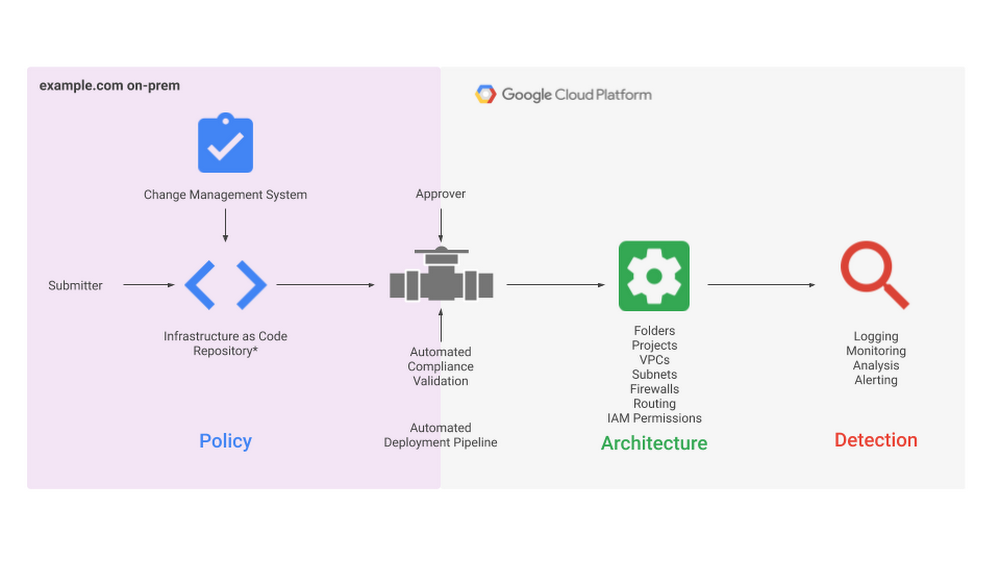
When it comes to infrastructure security, every stakeholder has the same goal: maintain the confidentiality and integrity of their company’s data and systems. Period.Developing and operating in the Cloud provides the opportunity to achieve these goals by being more secure and having greater visibility and governance over your resources and data. This is due to the relatively uniform environment of cloud infrastructure (as compared with on-prem) and inherent service-centric architecture. In addition, cloud providers take on some of the key responsibilities for security doing their part in a shared responsibility model. However, translating this shared goal into reality can be a complex endeavor for a few reasons. Firstly, administering security in public clouds is unlike what you may be used to as the infrastructure primitives (the building blocks available to you) and control abstractions (how you administer security policy) differ from on premise environments. Additionally, ensuring you make the right policy decisions in an area as high-stakes and ever-evolving as security means that you’ll likely spend hours researching and reading through documentation, perhaps even hiring experts. To partner with you and help address these challenges, Google Cloud built the security foundations blueprint to identify core security decisions and guide you with opinionated best practices for deploying a secured GCP environment. What is the security foundations blueprint?The security foundations blueprint is made up of two resources: the security foundations guide, and the Terraform automation repository. For each security decision, the security foundations guide provides opinionated best practices in order to help you build a secure starting point for your Google Cloud deployment, and can be read and used as a reference guide. The recommended policies and architecture outlined in the document can then be deployed through automation using the Terraform repository available on GitHub. Who is it for?The security foundations blueprint was designed with the enterprise in mind, including those with the strongest security requirements. However, the best practices are applicable to any size cloud customer, and can be adapted or adopted in pieces as needed for your organization. As far as who in an organization is going to find it most useful, it is beneficial for many roles:CISOs and compliance officers will use the security foundations guide as a reference to understand Google’s key principles for Cloud Security and how they can be applied and implemented to their deployments.Security practitioners andplatform teams will follow the guide’s detailed instructions and accompanying Terraform templates for applying best practices so that they can actively set-up, configure, deploy, and operate their own security-centric infrastructure. Application developers will deploy their workloads and applications on this foundational infrastructure through an automated application deployment pipeline provided in the blueprint. What topics does it cover?This security foundations blueprint continues to expand the topics it covers, with its most recent release in April 2021 including the following areas:Google Cloud organization structure and policyAuthentication and authorizationResource hierarchy and deploymentNetworking (segmentation and security)Key and secret managementLoggingDetective controlsBilling setupApplication securityEach of the security decisions addressed in these topics come with background and discussion to support your own understanding of the concepts, which in turn enables you to customize the deployment to your own specific use case (if needed).The topics are useful separately, which makes it possible to pick-and-choose areas where you need recommendations, but they also work together. For example, by following the best practices for project and resource naming conventions, you will be set up for advanced monitoring capabilities, such as real-time notifications for compliance to custom policies.How can I use it?While the security foundations guide is incredibly valuable on its own, the real magic for a security practitioner or application developer comes from the ability to adopt, adapt, and deploy the best practices using templates in Terraform, a tool for managing Infrastructure as Code (IaC). For anyone new to IaC, simply put, it allows you to automate your infrastructure through writing code that configures and provisions your infrastructure. By using IaC to minimize the amount of manual configuration, you also benefit through limiting the possibility of human error in enforcing these components of your security policy.The Security Foundations Blueprint as an automated deployment pipelineThe Terraform automation repo includes configuration that defines the environment outlined in the guide. You can apply the repo end-to-end to deploy the full security foundations blueprint, or use the included modules individually and modify them so that you can adopt just portions of the blueprint. It’s important to note that there are a few differences between the policies for the sample organization outlined in the guide and what is deployed using the Terraform templates. Luckily, those few differences are outlined in the errata pages that are part of the Terraform automation repo.So what should I do next? We hope you’ll continue following the journey of this blog series where we’ll dive deeper into the best practices provided throughout the topical sections of the guide, discuss the different ways in which the blueprints have helped enterprises secure their own Cloud deployment, and take a look inside the Terraform templates to see how they can be adopted, adapted, and deployed. In the meantime, take a look at this recent Cloud blog post which announces the launch of the blueprint’s latest version and discusses the key security principles that steer the best practices. If you’re ready to dive straight into the security foundations guide, you can start at the beginning, or head to a topic in which you’re particularly interested. Reviewing the guide in this way, you will be able to see for yourself the level of detail and discussion, and most importantly, the direct path it provides to move beyond recommendations and into implementation. We don’t expect you to try and apply the blueprint to your security posture right away, but a great first step would be to fork the repo and deploy it in a new folder or organization. Go forth, deploy and stay safe out there.Related ArticleBuild security into Google Cloud deployments with our updated security foundations blueprintGet step by step guidance for creating a secured environment with Google Cloud with the security foundations guide and Terraform blueprin…Read Article
Quelle: Google Cloud Platform
Announcing new features for Cloud Monitoring's Grafana plugin

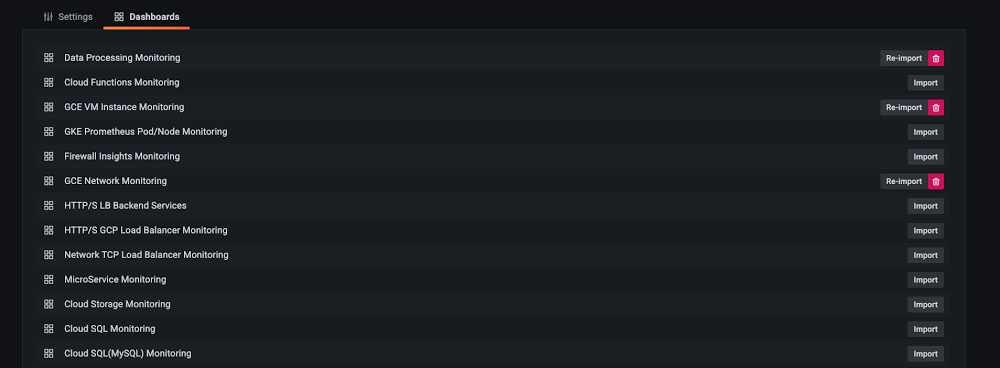
The observability of metrics is a key factor for a successful operations team, allowing for increasingly effective visualizations, analysis, and troubleshooting. Google Cloud works with third-party partners, such as Grafana Labs, to make it easy for customers to create their desired observability stack leveraging a combination of different tools. More than two years ago, we collaborated with Grafana Labs to introduce the Cloud Monitoring plugin for Grafana. Since then, we’ve continued collaborating with Grafana to make lots of improvements to the experience.As part of this collaborative effort, we’re excited to announce new features such as popular dashboard samples, more effective troubleshooting with deep links, better visualizations through precalculated metrics, and more powerful analysis capabilities. Let’s take a closer look at each of the new features:1. Sample dashboards for Google Cloud servicesIt’s always easier to modify than creating from scratch! We introduced the 15 most popular sample dashboards from Google Cloud Monitoring dashboard samples library on github and converted these dashboards into a Grafana-compatible format. They are ready to install from Grafana in just one click. With this sample library, you can easily import a sample, apply it to a test project, edit it and save it as needed.2. Deep link to Google Cloud Monitoring metrics explorerSometimes you need to switch between your Grafana interface and the Google Cloud Console for troubleshooting. When that happens, it’s easy to lose context, and it can be hard to locate your time-series data. We introduced deep linking to Cloud Monitoring metrics explorer on Grafana’s chart to help. You can easily log into the Cloud Console through deep linking and land right on the time series that you want to investigate.3. Improved query interface that aligns with new dashboard creation flowLast year, Cloud Monitoring got an improved dashboard creation flow, including a new way to preprocess delta and cumulative metrics kinds. You now have options to  preprocess delta metrics by their rate, and you can also select to view cumulative metrics either as rate or as delta.With these options you can choose to visualize your data by its original format or in a format that is easily transformed into a rate or a change in value.4. New Monitoring Query Language (MQL) interfaceCloud Monitoring’s MQL became generally available last year, making it easier to perform advanced calculations. We also enabled the MQL editor on the Grafana plugin so you can run your existing MQL query from the Grafana interface directly.Get Started TodayIf you use both Grafana and Google Cloud, you can get started adding Google Cloud Monitoring as a data source for your Grafana dashboards. We look forward to hearing from you about what other features you would like to see so please join us in our discussion forum to ask questions or provide feedback.Related ArticleIntroducing Stackdriver as a data source for GrafanaIt is not uncommon to have multiple monitoring solutions for IT infrastructure these days as distributed architectures take hold for many…Read Article
Quelle: Google Cloud Platform

How HBO Max uses reCAPTCHA Enterprise to make its customer experience frictionless

Editor’s note: Randy Gingeleski, Senior Staff Security Engineer for HBO Max and Brian Lozada, CISO for HBO Max, co-authored this blog to share their experiences with reCAPTCHA Enterprise and help other enterprises achieve the same level of security for their customer experiences.  The COVID-19 pandemic gave audiences more time than ever to explore all the content hosted on HBO Max, and dramatically increased the demand for quick and reliable streaming. To support this demand, we made huge investments in our customer experience tools and digital experiences to continue bringing our customers the latest content while curating a best-in-class experience. But as the demand for our services increased, so did our attack surface. We were part of the 65% of enterprisesthat noticed an increase in online attacks last year. Attackers tried to throw anything and everything our way, ranging from using leaked credentials to log in to accounts, to entering fake promotion codes, to using stolen credit card information on the payments page. As we evaluated our approach to protect against web-based attacks, we set out to build a security strategy that would keep the customer’s experience at the core of everything that we did. At HBO Max, we believe that security should be usable for our security team and invisible to our end users. One of the tactics we use to achieve that goal isreCAPTCHA Enterprise, a frictionless bot management solution that stops fraudsters while allowing customers to use our services. Today, we’re going to share how we use reCAPTCHA Enterprise to create a frictionless experience for our customers, empower our security team, and further grow our business.Like most businesses with a website and mobile application, we have multiple web pages that get targeted by human and automated actors. The web pages that come under the largest and most frequent attacks are the web pages involved in helping a customer purchase an HBO Max membership. We noticed attackers trying to use stolen credit card information or repeatedly reentering the same credit card information on our payments page. We also noticed attackers trying to use current and expired coupon codes over and over again on the payment page. We chose reCAPTCHA Enterprise because we wanted a proven product that can protect against credential stuffing, coupon fraud, and other fraudulent attacks while providing a frictionless customer experience. Google has over a decade of experience defending the internet and data for its network of more than 5 million sites, and this experience is what reCAPTCHA Enterprise is built on, which gave us faith it could work for us. A significant portion of our user base does not have to sign up for HBO Max because they are already customers of Hulu, AT&T, or another partner company. For brand new customers, they need to sign up, create an account, and login at HBO Max directly. When securing the signup system for these customers, we had to balance the needs of several of our internal stakeholders. Our customer experience team needed a security product that would not apply friction to the customer journeys they build and optimize to make it as easy as possible to sign up for HBO Max. Our marketing team needed a security product that would not stop them from engaging and connecting directly with potential customers. And our product team wanted customers to be able to safely browse and stream content. Our signup flow had to meet the needs of all our stakeholders while providing advanced security to our website. The legacy approach of checking boxes, clicking images, or making our customers engage in some kind of challenge felt like an outdated and cheap approach. With reCAPTCHA Enterprise, we eliminated the burden on the audience, as it secures the signup flow without requiring humans to engage in any kind of challenge. It’s a win for everyone. Internal stakeholders can create customer-centric experiences, and customers can easily use our services. And it’s even resulted in customer preference for our services over our competitors’ that use security products that require more effort. reCAPTCHA Enterprise comes with many features, including mobile application SDK support and an Annotation API for model tuning, that help our security team determine if an interaction with our website is from a human or bot.We use risk scores in reCAPTCHA Enterprise to determine if an interaction is going to impact legitimate customers and our business. reCAPTCHA Enterprise gives us 11 scores between 0 and 1, with scores closer to 0 like 0.1 and 0.3 being high risk or highly fraudulent and scores like 0.7 and 0.9 being low risk and likely a human. We review our risk scores with an analysis of our web and network traffic and customer’s usernames and account IDs. Together, all this information helps us set a risk threshold for our website, where we do not let interactions with a low score engage with the site. We also use reCAPTCHA Enterprise’s Annotation API to tune the web risk analysis to our website’s preferences, such as not letting an interaction with a low score proceed on our webpages. So far, we’ve had no issues with our threshold, and legitimate customers have been able to engage with our website.In addition to using reCAPTCHA Enterprise’s risk scores, we also use its reason codes to help us interpret interactions with our website. Reason codes are how reCAPTCHA Enterprise assigns a risk score to an interaction. They tell us things like if an interaction was automated or is not following normal patterns. The reason codes give us confidence, accuracy, and a starting point to determine what went wrong in an interaction. From there, we also look at logs and how quickly a user moved through different actions.reCAPTCHA Enterprise has not only made a difference to our customers and our security team, but also to our business. By protecting some of our most vulnerable pages, such as the account creation, login, promotion code page, or payment page, we’ve seen a dramatic decrease in brute force and credential stuffing attacks. We also replaced our legacy software that was used to protect gift cards with reCAPTCHA Enterprise, and we noticed a considerable decrease in token-cracking fraud. Due to the number of locations HBO Max accounts can be created, including smart TVs, phones, and computers, our website receives billions of requests per day. reCAPTCHA Enterprise has made it easy for us to determine which of those requests are from our customers and which ones are fraudulent and therefore grow our customer base and revenue. Because of its frictionless experience for our customers and usability for our security team, we highly encourage other enterprises who are looking to secure their customer experience to start with reCAPTCHA Enterprise today. We strongly encourage any enterprise with a web application or mobile application to use reCAPTCHA Enterprise to protect against online fraud and abuse and preserve your customer experience.
Quelle: Google Cloud Platform

Latest Transfer Appliance enables fast, simple and secure data movement

Overseeing a cloud migration is a tough job, but moving your actual data there doesn’t have to be. Today, we are pleased to announce the availability of our latest Transfer Appliance for the US, EU and Singapore regions, providing a simple, secure, cost-effective and offline way to transfer petabytes of data from data centers and field locations into Google Cloud.With Transfer Appliance, you get secure, high-performance data transfer in a tamper-resistant, ruggedized design. All-SSD storage lets you write data fast, while support for CMEK (Customer Managed Encryption Keys) and AES 256 encryption protects data while it is in flight, and helps you comply with industry-specific regulations (ISO, SOC, PCI & HIPAA).Every day, customers are choosing to move their data to Google Cloud and take advantage of our fully-managed, globally available Cloud Storage. Cloud Storage is built by Google engineers and gives you the same reliability and performance as the storage used by Google’s most popular products like Youtube and Workspace. Getting your data into Cloud Storage is just the beginning. Once your data is stored in Cloud Storage, you can easily connect to powerful data analytics products like BigQuery, or derive intelligence from your data with products like the recently launched Vertex AI platform.Transfer Appliance use casesWhether you have slow or unreliable connectivity, or can’t afford to disrupt your network, moving large quantities of data can be a notoriously fraught process. For customers with limited network bandwidth or connectivity, transferring large amounts of data over your network can monopolize your connection for a long time, impacting production systems’ performance for days or weeks on end in the case of larger transfers. Because you copy your data onto Transfer Appliance and then ship it,  you can move your data to Google Cloud without disrupting regular business operations. Another great use case for the Transfer Appliance is customers with remote or mobile locations, like ships or other field environments. Collect data locally, and once at the dock or port, simply ship the data to Google Cloud for processing or archiving.Google Cloud customer ADT provides residential, small business and commercial security, fire protection, and monitoring services to their customers. As ADT grew, it became clear that valuable data was being duplicated across systems and teams. Optimizing accessibility to this data presented an opportunity to extract better insights and do it more efficiently. To make their data more accessible they decided to migrate their Oracle and Hadoop instances to Cloud Storage and use BigQuery for their data warehouse. But when it came time to move, they realized that transferring the data over their VPN posed some challenges. Daniel Marolt, Senior Manager of Information at ADT says, “it quickly became clear our VPN connection would not be the most effective method to transfer our data out of our data center. We needed some way to get hundreds of terabytes of data to cloud quickly and cost-effectively, without disrupting regular business operations. Google’s Transfer Appliance allowed us to get our data into Google Cloud securely, quickly and easily. We received the appliance, uploaded our data directly from our data center, shipped it back, and days later our data lake was available in Cloud Storage.”How Transfer Appliance works Using Transfer Appliance starts with submitting an order from the Google Cloud Console. Then, to prepare for the transfer, specify the destination Cloud Storage bucket and KMS key for encryption. Google Cloud validates the data-source location’s needs such as power and space, racks or shelves to place appliances. Then the appropriate appliance and cables are shipped to meet your requirements. Once the appliance is on site and ready to connect to your network, you simply mount the NFS share exposed by the appliance and copy the data. Then, once all the data copy operations are completed, seal the appliance for shipping; this finalization step protects the appliance and your data from tampering in transit.Back at a Google Cloud processing facility, we attest to the integrity of the appliance, and move the data securely into the destination bucket. We inform you of the successful completion of the transfer session as soon as these operations are done. This typically takes 1 to 2 weeks to complete depending on which Transfer Appliance you selected.You can ship Transfer Appliances to multiple locations in parallel in capacities of 40TB and 300TB, depending on your needs. Your local network limits the number of appliances you can effectively use at a location, and the available transfer capacity of your source data systems. If you have recurring data transfer needs, you can also rent multiple appliances in stages, to ensure your data collection operations can move data at a steady pace. Get started todayGoogle Cloud’s suite oftransfer offerings are designed to make it easy to move your data from other clouds, on-premises or between Google Cloud regions. However, in some scenarios, you may not have the connectivity to get your data to where it needs to go—that’s where the transfer appliance can help. Read more about Transfer Appliance or order one from your Cloud Console today.Related ArticleHow to transfer your data to Google CloudYou’ve decided to migrate your data to the Google Cloud but where should you begin? What are the Google Cloud data transfer services avai…Read Article
Quelle: Google Cloud Platform





