Google demonstrates leading performance in latest MLPerf Benchmarks

The latest round of MLPerf benchmark results have been released, and Google’s TPU v4 supercomputers demonstrated record-breaking performance at scale. This is a timely milestone since large-scale machine learning training has enabled many of the recent breakthroughs in AI, with the latest models encompassing billions or even trillions of parameters (T5,Meena,GShard,Switch Transformer, andGPT-3). Google’s TPU v4 Pod was designed, in part, to meet these expansive training needs, and TPU v4 Pods set performance records in four of the six MLPerf benchmarks Google entered using TensorFlow and JAX. These scores are a significant improvement over our winning submission from last year and demonstrate that Google once again has the world’s fastest machine learning supercomputers. These TPU v4 Pods are already widely deployed throughout Google data centers for our internal machine learning workloads and will be available via Google Cloud later this year.Figure 1: Speedup of Google’s best MLPerf Training v1.0 TPU v4 submission over the fastest non-Google submission in any availability category – in this case, all baseline submissions came from NVIDIA. Comparisons are normalized by overall training time regardless of system size. Taller bars are better.1Let’s take a closer look at some of the innovations that delivered these ground-breaking results and what this means for large model training at Google and beyond. Google’s continued performance leadershipGoogle’s submissions for the most recent MLPerf demonstrated leading top-line performance (fastest time to reach target quality), setting new performance records in four benchmarks. We achieved this by scaling up to 3,456 of our next-gen TPU v4 ASICs with hundreds of CPU hosts for the multiple benchmarks. We achieved an average of 1.7x improvement in our top-line submissions compared to last year’s results. This means we can now train some of the most common machine learning models in a matter of seconds.Figure 2: Speedup of Google’s MLPerf Training v1.0 TPU v4 submission over Google’s MLPerf Training v0.7 TPU v3 submission (exception: DLRM results in MLPerf v0.7 were obtained using TPU v4). Comparisons are normalized by overall training time regardless of system size. Taller bars are better. Unet3D not shown since it is a new benchmark for MLPerf v1.0.2We achieved these performance improvements through continued investment in both our hardware and software stacks. Part of the speedup comes from using Google’s fourth-generation TPU ASIC, which offers a significant boost in raw processing power over the previous generation, TPU v3. 4,096 of these TPU v4 chips are networked together to create a TPU v4 Pod, with each pod delivering 1.1 exaflop/s of peak performance.Figure 3: A visual representation of 1 exaflop/s of computing power. If 10 million laptops were running simultaneously, then all that computing power would almost match the computing power of 1 exaflop/s.In parallel, we introduced a number of new features into the XLA compiler to improve the performance of any ML model running on TPU v4. One of these features provides the ability to operate two (or potentially more) TPU cores as a single logical device using a shared uniform memory access system. This memory space unification allows the cores to easily share input and output data – allowing for a more performant allocation of work across cores. A second feature improves performance through a fine-grained overlap of compute and communication. Finally, we introduced a technique to automatically transform convolution operations such that space dimensions are converted into additional batch dimensions. This technique improves performance at the low batch sizes that are common at very large scales.Enabling large model research using carbon-free energyThough the margin of difference in topline MLPerf benchmarks can be measured in mere seconds, this can translate to many days worth of training time on the state-of-the-art models that comprise billions or trillions of parameters. To give an example, today we can train a 4 trillion parameter dense Transformer with GSPMD on 2048 TPU cores. For context, this is over 20 times larger than the GPT-3 model published by OpenAI last year. We are already using TPU v4 Pods extensively within Google to develop research breakthroughs such as MUM and LaMDA, and improve our core products such as Search, Assistant and Translate. The faster training times from TPUs result in efficiency savings and improved research and development velocity. Many of these TPU v4 Pods will be operating at or near 90% carbon free energy. Furthermore, cloud datacenters can be ~1.4-2X more energy efficient than typical datacenters, and the ML-oriented accelerators – like TPUs – running inside them can be ~2-5X more effective than off-the-shelf systems. We are also excited to soon offer TPU v4 Pods on Google Cloud, making the world’s fastest machine learning training supercomputers available to customers around the world. Cloud TPUs support leading frameworks such as TensorFlow, PyTorch, and Jax, and we recently released an all-new Cloud TPU system architecture that provides direct access to TPU host machines, greatly improving the user experience. Want to learn more? Please contact your Google Cloud sales representative to request early access to Cloud TPU v4 Pods. We are excited to see how you will expand the machine learning frontier with access to exaflops of TPU computing power!1. All results retrieved from www.mlperf.org on June 30, 2021. MLPerf name and logo are trademarks. See www.mlperf.org for more information. Chart uses results 1.0-1067, 1.0-1070, 1.0-1071, 1.0-1072, 1.0-1073, 1.0-1074, 1.0-1075, 1.0-1076, 1.0-1077, 1.0-1088, 1.0-1089, 1.0-1090, 1.0-1091, 1.0-1092.2. All results retrieved from www.mlperf.org on June 30, 2021. MLPerf name and logo are trademarks. See www.mlperf.org for more information. Chart uses results 0.7-65, 0.7-66, 0.7-67, 1.0-1088, 1.0-1090, 1.0-1091, 1.0-1092.Related ArticleNew Cloud TPU VMs make training your ML models on TPUs easier than everNew Cloud TPU VMs let you run TensorFlow, PyTorch, and JAX workloads on TPU host machines, improving performance and usability, and reduc…Read Article
Quelle: Google Cloud Platform

Build a platform with KRM: Part 4 – Administering a multi-cluster environment

This is part 4 in a multi-part series about the Kubernetes Resource Model. See parts 1, 2, and 3 to learn more. Kubernetes clusters can scale. Open-source Kubernetes supports up to 5,000 Nodes, and GKE supports up to 15,000 Nodes. But scaling out a single cluster can only get you so far: if your cluster’s control plane goes down, your entire platform goes down; if the Cloud region running your cluster has a service interruption, so does your app. Many organizations choose, instead, to operate multiple Kubernetes clusters. Besides availability, there are lots of reasons to consider multi-cluster, such as allocating a cluster to each development team, splitting workloads between cloud and on-prem, or providing burst capability for traffic spikes. But operating a multi-cluster platform comes with its own challenges. How to consistently administer many clusters at once? How to keep the clusters secure? How to deploy and monitor applications running across multiple clusters? How to seamlessly fail over from one region to another?This post introduces a few tools that can help platform teams more easily administer a multi-cluster Kubernetes environment. The platform base layer, with Config Sync In the last post, we explored how thoughtful platform abstractions can help reduce toil for app developers- including for a multi-cluster environment, where automation such as CI/CD handles all interactions with the staging and production clusters. But equally important is the platform base layer, the Kubernetes resources and configuration that are shared across services. Your platform base layer might consist of Namespaces, role-based access control, and shared workloads like Prometheus. Platform abstractions depend on the existence of these base-layer resources. And so does the security and stability of your platform as a whole. It’s important that these resources not only get deployed, but also stay put. CI/CD is great for deploying resources, but what about making sure resources stay deployed? What if a Kubernetes Namespace gets deleted? Or a Prometheus StatefulSet is modified? Kubernetes’ job is to ensure that the cluster’s actual state matches the desired state. But sometimes, the “desired” state isn’t desired at all – it’s a developer who mistakenly modified a resource, or a bad actor that’s gained access into the system. For this reason, a platform base layer needs more than a one-and-done CI/CD pipeline. A tool called Config Sync can help with this. Config Sync is a Google Cloud product that can sync Kubernetes resources from a Git repository to one or more GKE or Anthos clusters. Unlike CI/CD tools like Cloud Build, Config Sync watches your clusters constantly, making sure that the intended resource state in the cluster always matches what’s in Git. Config Sync is designed primarily for base-layer resources like namespaces and RBAC. In this way, Config Sync is complementary to, not a replacement for, CI/CD. Source: Config Sync documentationConfig Sync runs in a Pod inside your Kubernetes cluster, watching your Git config repo for changes, and also watching the cluster itself for any divergence from your desired state in Git. If any configuration drift is detected from what’s stored in Git, Config Sync will update the API Server accordingly. You can point multiple Config Sync deployments at the same Git repo, allowing you to manage the base-layer platform resources for multiple clusters using the same source of truth. And by using Git as the landing zone for config, you can benefit from some of the GitOps principles we discussed in part 2, including the ability to audit and roll back configuration changes.Let’s walk through an example of how to manage base-layer resources with Config Sync. The Cymbal Bank platform consists of four GKE clusters: admin, dev, staging, and prod. We can install Config Sync on all four clusters using the gcloud tool or the Google Cloud Console, pointing all four clusters at a single Git repository, called cymbalbank-policy. Note that this repo is separate from the application source and config repos, and is managed by the platform team. From the Console, we can see that all four clusters are synced to the same commit of the cymbalbank-policy repo. Now, let’s say that the Cymbal Bank platform team wants to limit the amount of CPU and memory resources each application team can request for their service. Kubernetes ResourceQuotas help impose these limits, and prevent unexpected Pod evictions.The platform team can define a set of ResourceQuotas for each application namespace. They can also scope the resources to only be applied to a subset of clusters – for instance, to the production cluster only. (If no cluster name selector is specified, Config Sync will deploy the resource to all clusters by default.)From here, the platform team can commit the resources to the cymbalbank-policy repo, and Config Sync, always watching the policy repo, will deploy the resources to the production cluster:If a developer tries to delete one of the ResourceQuotas, Config Sync will block the request, helping to ensure that these base-layer resources stay put.  In this way, Config Sync can help platform teams ensure the stability of that platform base-layer, as well as ensure resource consistency across multiple clusters at once. This, in turn, can help organizations mitigate the complexity of adding new clusters to their environment.  Enforce policies on Kubernetes resourcesConfig Sync is a powerful tool on its own, and can work with any Kubernetes resource that your cluster recognizes. This includes Custom Resource Definitions (CRDs) installed with add-ons like Anthos Service Mesh. But Config Sync, by default, doesn’t have an idea of “good or bad” Kubernetes resources. It will deploy whatever resources land in Git, even resources that might pose a security risk to your organization. Security is an essential feature of any developer platform, and when it comes to Kubernetes, it’s important to think about security from the initial software design stages, and set up your clusters with security best-practices in mind.   But it’s just as important to think about security at deploy-time. Who and what can access your clusters? What kinds of Kubernetes resources – and fields within those resources- are allowed? These decisions will depend on lots of factors, including the kinds of data your application deals with, and any industry-specific regulations. One common security use case for KRM is the need to monitor incoming Kubernetes resources, whether they’re coming in through kubectl, CI/CD, or Config Sync. But if you have multiple clusters, your Kubernetes environment has multiple API Servers, and therefore multiple entry points.  A Google tool called Policy Controller can help automate resource monitoring across multiple clusters. Policy Controller is a Kubernetes admission controller that can accept or reject incoming resources based on custom policies you define. Policy Controller is based on the OpenPolicyAgent Gatekeeper project, and it allows you to define policies, or “Constraints,” as KRM. This means you can deploy them using Config Sync, via Git. Once deployed, Policy Controller uses your Constraints as a set of rules to evaluate all incoming KRM, rejecting resources that fall out of compliance.  Let’s walk through an example. Say that the Cymbal Bank security team wants to ensure that no code in development is accessible to the public. Kubernetes Services of type LoadBalancerexpose public IP addresses by default, so the platform team wants to define a PolicyController constraint that blocks Services of that type on the development GKE cluster. To do this, the platform team can define a Policy Controller Constraint as KRM. This Constraint uses a Constraint Template, provided through the pre-installed Constraint Template library. The ConstraintTemplate defines the logic of the policy itself, and the Constraint makes the template concrete, populating any variables needed to execute the policy logic. Here, we’re also adding a Config Sync cluster name annotation, to scope this resource to apply only to the development cluster.The platform team can then commit the resource to the cymbalbank-policy repo, and Config Sync will deploy the resource to the development cluster. From here, if an app developer tries to create an externally-accessible Kubernetes Service, Policy Controller will block the resource from being created.The platform team can define as many of these Constraints as they want, each defining a separate policy.Writing custom policies The Policy Controller Constraint Template library provides a lot of functionality, from blocking privileged containers, to requiring certain resource labels, to preventing app teams from deploying into certain namespaces. But if you want to enforce custom logic on your organization’s KRM, you can do so by writing a custom Constraint Template. Constraint Templates are written in a query language called Rego. Rego was designed for policy rule evaluation, and it can introspect Kubernetes resource fields to make a conclusion as to whether the resource is allowed or not. For instance, let’s say that the platform team wants to limit the number of containers allowed inside a single application Pod. Too many containers per Pod can cause outage risks— when one container crashes, the entire Pod crashes.To enforce this policy, the platform team can define a Constraint Template, using the Rego language, that looks inside a resource to ensure that the number of containers per Pod is within the allowed limit: Finally, the platform team can push these resources to the cymbalbank-policy repo, and Config Sync will deploy the policy to all four clusters. If a developer tries to define a Kubernetes Deployment containing more containers per pod than what’s allowed, the resource will be blocked at deploy time: Custom Constraint Templates can give platform teams lots of flexibility in the types of policies they define and enforce in a Kubernetes environment. Integrating policy checks into CI/CD As we explored earlier, Config Sync and CI/CD are complementary tools. Config Sync works great for base-layer platform resources and policies, whereas CI/CD works well for application tests and deployment. But one pitfall of having two separate KRM deployment mechanisms is that app developers may not know that their resources are out of policy until they try to deploy them into production. This is especially true if some policies are scoped only to production, as we saw with the ResourceQuota example. Ideally, the platform team has a way to empower developers and code reviewers to know ahead of time whether new or modified resources are still in compliance. We can enable this use case by integrating policy checks into the existing Cymbal Bank CI/CD.Policy Controller operates, by default, as a Kubernetes Admission Controller running inside the cluster. But Policy Controller also provides a “standalone” mode, running inside a container, that can be used outside of a cluster, such as from inside a Cloud Build pipeline. In the example below, Cloud Build executes Policy Controller checks by getting the cymbalbank-app-config manifests, cloning the cymbalbank-policy resources, and using the “policy-controller-validate” container image to evaluate the app manifests against the policies. From here, an app developer or operator can know if their resources violate org-wide policies, by looking at the Cloud Build output for their Pull Request:  By integrating policy checks into CI/CD, app development teams can understand whether their resources are in compliance, and platform teams add an additional layer of policy checks to the platform. Overall, Config Sync and Policy Controller can provide a powerful toolchain for standardizing base-layer config across a multi-cluster environment. Check out the Part 4 demo to try out each of these examples. And stay tuned for Part 5, where we’ll learn how to use KRM to manage cloud-hosted resources. 
Quelle: Google Cloud Platform

Use Vertex Pipelines to build an AutoML classification end-to-end workflow

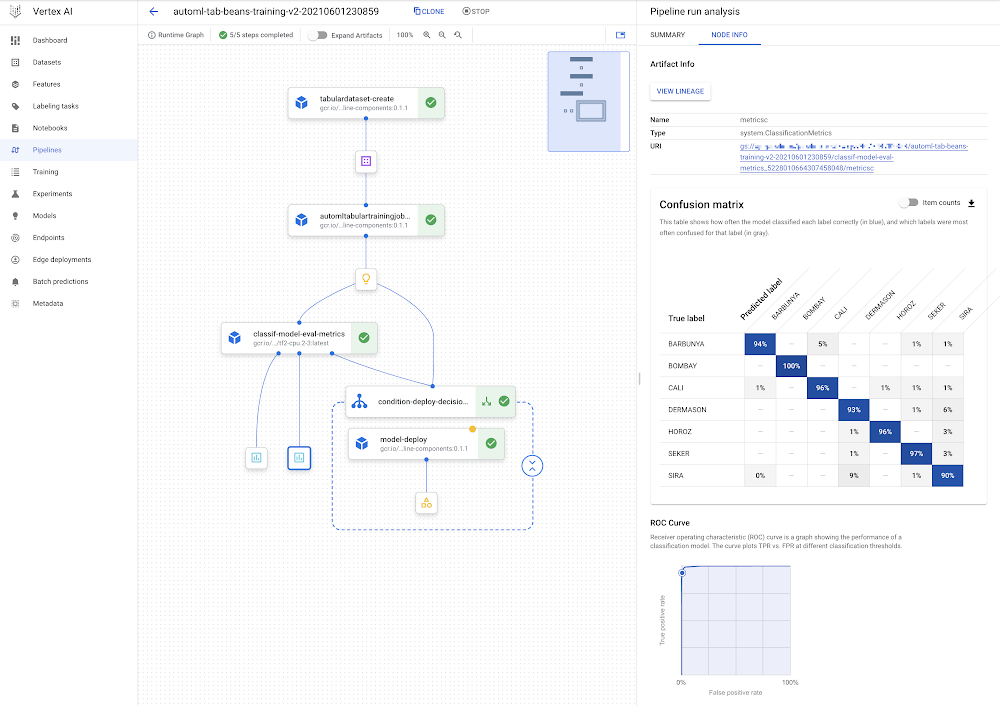
IntroductionThis post shows how you can use Vertex Pipelines to build an end-to-end ML workflow. The workflow trains a custom model using AutoML; evaluates the accuracy of the trained model; and if the model is sufficiently accurate, deploys it to Vertex AI for serving.Vertex AI and Vertex PipelinesThe recently-launched Vertex AI is a unified ML Ops platform to help data scientists and ML engineers increase their rate of experimentation, deploy models faster, and manage models more effectively. It brings AutoML and AI Platform together, with some new ML Ops-focused products, into a unified API, client library, and user interface.Vertex Pipelines is part of Vertex AI. It helps you to automate, monitor, and govern your ML systems by orchestrating your ML workflows. It is automated, scalable, serverless, and cost-effective: you pay only for what you use. Vertex Pipelines is the backbone of the Vertex AI ML Ops story, and makes it easy to build and run ML workflows using any ML framework. Because it is serverless, and has seamless integration with GCP and Vertex AI tools and services, you can focus on building and running your pipelines without worrying about infrastructure or cluster maintenance.Vertex Pipelines automatically logs metadata to track artifacts, lineage, metrics, and execution across your ML workflows, supports step execution caching, and provides support for enterprise security controls like Cloud IAM, VPC-SC, and CMEK.Vertex Pipelines supports two open source Python SDKs: TFX (TensorFlow Extended) and KFP (Kubeflow Pipelines). The example Vertex pipeline highlighted in this post uses the KFP SDK, and includes use of the Google Cloud Pipeline Components, which support easy access to Vertex AI services. Vertex Pipelines requires v2 of the KFP SDK. Soon, it will be possible to use the KFP v2 ‘compatibility mode’ to run KFP V2 examples like this on OSS KFP as well.An end-to-end AutoML workflow with Vertex PipelinesVertex AI’s AutoML Tabular service lets you bring your own structured data to train a model, without needing to build the model architecture yourself. For this example, I’ll use the UCI Machine Learning ‘Dry beans’ dataset. (From: KOKLU, M. and OZKAN, I.A., (2020) “Multiclass Classification of Dry Beans Using Computer Vision and Machine Learning Techniques.”In Computers and Electronics in Agriculture, 174, 105507. DOI.)The challenge is a classification task: predict the type of a bean given some information about its characteristics.Vertex Pipelines makes it very straightforward to construct a workflow to support building, evaluating, and deploying such models. We’ll build a pipeline that looks like this:The DAG for the AutoML classification workflow.You can see that the model deployment step is wrapped by a conditional: the model will only be deployed if the evaluation step indicates that it is sufficiently accurate.For this example, nearly all the components (steps) in the pipeline are prebuilt Google Cloud Pipeline Components. This means that we mostly just need to specify how the pipeline is put together using these building blocks.However, I’ll add one Python function-based custom component for model evaluation and metrics visualization.The pipeline definition looks as follows (with a bit of detail elided):We first create a Dataset from a BigQuery table that holds the training data. Then, we use AutoML to train a tabular classification model. The dataset arg to the training step gets its value from the output of the Dataset step (dataset=dataset_create_op.outputs[“dataset”]).After the model is trained, its evaluation metrics are checked against given ‘threshold’ information, to decide whether it’s accurate enough to deploy.The next section goes into more detail about how this custom ‘eval metrics’ component is defined. One of its inputs is an output of the training step (training_op.outputs[“model”])— which points to the trained model.Then, a KFP conditional uses an output of the eval step to decide whether to proceed with the deployment:If the model is sufficiently accurate, the prebuilt deployment component is called. This step creates an Endpoint and deploys the trained model to that endpoint for serving.Defining a custom componentMost of the steps in the pipeline above are drawn from pre-built components; building blocks that make it easy to construct an ML workflow. But I’ve defined one custom component to parse the trained model’s evaluation metrics, render some metrics visualizations, and determine— based on given ‘threshold’ information— whether the model is good enough to be deployed. This custom component is defined as a Python function with a @kfp.v2.dsl.component decorator. When this function is evaluated, it is compiled to a task ‘factory function’ that can be used in a pipeline specification. The KFP SDK makes it very straightforward to define new pipeline components in this way.Below is the custom component definition, with some detail elided. The @component decorator specifies three optional arguments: the base container image to use; any packages to install; and the yaml file to which to write the component specification.The component function, classif_model_eval_metrics, has some input parameters of note.  The model parameter is an input kfp.v2.dsl.Modelartifact. As you may remember from the pipeline specification above, here this input will be provided by an output of the training step.The last two function args, metrics and metricsc , are component Outputs, in this case of types Metrics and ClassificationMetrics. They’re not explicitly passed as inputs to the component step, but rather are automatically instantiated and can be used in the component. For example, in the function below, we’re calling metricsc.log_roc_curve() and metricsc.log_confusion_matrix() to render these visualizations in the Pipelines UI. These Output params become component outputs when the component is compiled, and can be consumed by other pipeline steps.The NamedTuple outputs are another type of component output. Here we’re returning a string that indicates whether or not to deploy the model. When this function is evaluated, we can use the generated factory function to define a pipeline step as part of a pipeline definition, as we saw in the previous section:The example notebook has the full component definition.Sharing component specificationsWhen the component is compiled, we can also request that a yaml component specification be generated. We did this via the optional output_component_file=”tables_eval_component.yaml” arg passed to the @component decorator.The yaml format allows the component specification to be put under version control and shared with others.Then, the component can be used in other pipelines by calling the kfp.components.load_component_from_url function (and other variants like load_component_from_file).Running a pipeline job on Vertex PipelinesOnce a pipeline is defined, the next step is to compile it — which generates a json job spec file— then submit and run it on Vertex Pipelines. When you submit a pipeline job, you can specify values for pipeline input parameters, overriding their defaults.The example notebook shows the details of how to do this.Once a pipeline is running, you can view its details in the Cloud Console, including the pipeline run and lineage graphs shown above, as well as pipeline step logs and pipeline Artifact details.You can also submit pipeline job specs via the Cloud Console UI, and the UI makes it easy to clone pipeline runs. The json pipeline specification file may also be put under version control and shared with others.Leveraging Pipeline step caching to develop and debugVertex Pipelines supports step caching, and this helps with iterating on pipeline development— when you rerun a pipeline, if a component’s inputs have not changed, its cached execution results can be reused. If you run this pipeline more than once, you might notice this feature in action.If you’re running the example, try making a small change to the example notebook cell that holds the custom component definition (the classif_model_eval_metrics function in the “Define a metrics eval custom component” section) by uncommenting this line: # metrics.metadata[“model_type”] = “AutoML Tabular classification”Then re-compile the component, recompile the pipeline without changing the DISPLAY_NAME value, and run it again. When you do so, you should see that Vertex Pipelines can leverage the cached executions for the upstream steps— as their inputs didn’t change— and only needs to re-execute from the changed component. The pipeline DAG for the new run should look as follows, with the ‘recycle’ icon on some of the steps indicating that their cached executions were used.Leveraging step caching with the AutoML classification workflow.Note: Step caching is on by default, but if you want to disable it, you can pass the enable_caching=False arg to the create_run_from_job_spec function when you submit a pipeline run.Lineage trackingIf you click on an Artifact in a pipeline graph, you’ll see a “VIEW LINEAGE” button. This tracks how the artifacts are connected by step executions. So it’s sort of the inverse of the pipeline DAG, and can include multiple executions that consumed the same artifact (this often happens with cache hits, for example). The tracking information shown is not necessarily just for a single pipeline run, but for any pipeline execution that has used the given artifact.Lineage tracking.What’s next?This post introduced Vertex Pipelines, and the prebuilt Google Cloud Pipeline Components, which allow easy access to Vertex AI services. The Pipelines example in this post uses the AutoML Tabular service, showing how straightforward it is to bring your own data to train a model. It showed a pipeline that creates a Dataset, trains a model using that dataset, obtains the model’s evaluation metrics, and decides whether or not to deploy the model to Vertex AI for serving.For next steps, check out other Vertex Pipelines example notebooks as well as a codelab based in part on the pipeline in this post.You can also find other Vertex AI notebook examples here and here.Related ArticleGoogle Cloud unveils Vertex AI, one platform, every ML tool you needGoogle Cloud launches Vertex AI, a managed platform for experimentation, versioning and deploying ML models into production.Read Article
Quelle: Google Cloud Platform
EFPL’s Swiss Plasma Center aims to simulate fusion on Google Cloud

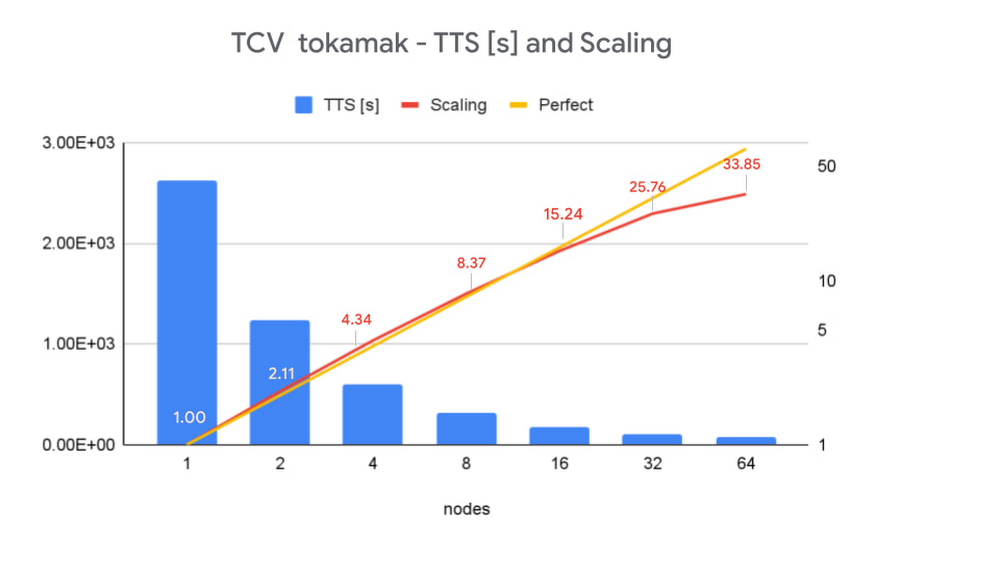
The development of a new clean energy source has the potential to revolutionize our world. The The Swiss Plasma Center at EPFL (École polytechnique fédérale de Lausanne) is trying to do just that: Using intense magnetic fields to confine hydrogen at temperatures up to 100 million degrees, scientists aim to create the conditions for fusion reactions to occur, such as in the stars, thus releasing a huge amount of clean energy—and solving the world’s energy problems in the process. As part of the EUROfusion program, the Swiss Plasma Center is involved in the development of the ITER, the world’s largest scientific experiment under construction, to prove the feasibility of large-scale fusion reactions and pave the way for DEMO, the demonstration fusion reactor. If it succeeds, fusion could solve the world’s energy problems without generating any greenhouse gas or any long-term radioactive waste. The physical simulations that run on these experiments are an essential part of this process.My job as director of operations for Scientific IT and Applications Support at EPFL is to provide High Performance Computing (HPC) resources to scientific projects like this one. Paolo Ricci, a professor at the Swiss Plasma Center, explains that “the field of fusion power entails not just building massive experiments such as ITER that are at the forefront of technology, but also performing cutting-edge theoretical research to better understand, interpret and predict physical phenomena. These predictions are based on large-scale simulations that require the world’s most powerful computers. Researchers need operational support to perform such calculations.” Starting on July 1, EPFL will host a EUROfusion’s Advanced Computing Hub, that will support Europe in the development of the software to carry out the simulation for fusion in Europe, and I will direct its operations.To run these massive simulations, Professor Ricci and his group developed software called GBS. The goal of GBS simulations is to describe and understand the physics of the narrow layer, just a few centimeters thick, that separates the 100-million-degrees plasma core from the machine walls that must be kept at a much lower temperature—just a few hundreds degrees. This temperature gradient, probably the strongest in the universe, is dominated by extremely complex nonlinear multiscale and multiphysics phenomena. An accurate description of this region is crucial to understanding the performance of tokamaks and is thus required for the optimal operation of ITER.Deploying large-scale energy simulations on Google CloudAccurately simulating medium to large tokamaks, the devices where fusion reactions occur,  is computationally very demanding and requires a Tier-0 (or currently petaflops-capable) supercomputer. However, resources and access to Tier-0 supercomputers are limited. It is therefore crucial to understand the performance of simulation codes like GBS on Google Cloud, to give  the broader scientific community access to the technology.Using Google Cloud’s HPC VM images, we are able to deploy a fully-localized compute cluster using TerraForm recipes from the slurm-gcp project maintained by SchedMD. Users access the cluster’s front end with their EPFL LDAP account and, using Spack, a widely-used package manager for supercomputers, we install the same computing environment as the one we provide on-premises. Overall, we can now deploy a flexible and powerful HPC infrastructure that is virtually identical to the one we maintain at EPFL in less than 15 minutes and dynamically offload on-prem workloads in times of high demand.We tested the performance of GBS with two tokamaks, TCV and JT60-SA, using Google Cloud’s HPC VM images and observed excellent scaling, even with the very demanding large-size tokamak. In terms of ‘time to solution,’ we compared one iteration of the solver running on a Tier-0 supercomputer vs. on Google Cloud. Using the Google Cloud HPC VM Images, we achieved comparable results up to 150 nodes, which is very impressive considering the added flexibility Google Cloud offers. Using Tokamak Configuration Variable (TCV) geometry, our results show excellent scalability: we managed to get a 33X speedup for the TCV tokamak simulation, with a near-perfect scale up to 32 nodes.To test the performance of the HPC VM images, we also performed the same turbulence simulation using a configuration based on JT60-SA, a large-scale advanced tokamak that will operate in Japan with a geometry similar to ITER. Because of its size, simulations on this tokamak become very demanding at around one billion unknowns, but we managed to get very good results up to 150 nodes. Solving the world’s energy problems is a complex problem, and to solve it, our work must be scalable, adaptable, and take advantage of the most advanced computing technologies. Google Cloud provides the needed performance and flexibility to complement the powerful Tier-0 supercomputers we use today.You can learn more about HPC on Google Cloud here.Related ArticleCloud against the storm: Clemson’s 2.1 million VCPU experimentClemson used 2.1 million VCPUs on Google Cloud for hurricane preparednessRead Article
Quelle: Google Cloud Platform
Nordeus brings its A-game with Google Cloud CDN

Nordeus’ flagship football team-management simulation, Top Eleven, reached the top of the mobile game charts nearly a decade ago, and it’s been there ever since.Nordeus clearly knows a thing or two about creating exceptional game experiences that keep players coming back. And with a recently completed cloud migration that includes Google Cloud CDN, the Nordeus infrastructure team created a simpler, smarter, and more cost-effective way to sustain its success.According to Strahinja Kustudić, head of infrastructure and data engineering at Nordeus, there are now more than 220 million registered players around the world that play Top Eleven on a very regular basis, and millions more are now playing two other game titles on the company’s active roster. Nordeus itself has emerged as one of Europe’s fastest-growing game developers, with new game titles currently in the works and more than 180 employees working at the company’s headquarters in Belgrade, Serbia.Leaving behind an unscalable, unsustainable on-prem systemUntil 2019, the company delivered all of its gaming content using self-managed, on-premises systems. Their infrastructure included a UK-based data center with more than 400 dedicated servers running a virtual machine-based private cloud production environment, along with a sizable production Hadoop cluster.Keeping everything on-prem gave the Nordeus infrastructure team control and visibility. But for their small and overstretched team, a status quo approach was no longer sustainable.”For a long time, the infrastructure team was just me and one other person,” Kustudić said. “We were doing some extreme over-provisioning, which is something you have to do when you’re running dedicated servers. But we were paying a lot for nothing, and it didn’t make any sense.” At the same time, he added, the team’s challenges with scaling its compute capacity separately from storage meant that a much-needed Hadoop upgrade was unlikely to occur.A legacy CDN with little room for growthThe company’s content delivery network (CDN) comprised another piece of its infrastructure puzzle. Previously, Nordeus relied on a single CDN provider that delivered acceptable performance, Kustudić said, but the process for adding new domains or other management tasks was complex and inefficient.”You had to contact [the CDN provider], talk with them, send them a certificate, and then they had to set it up,” Kustudić stated. “It’s not that easy.”The Nordeus on-prem storage cluster was another potential barrier to growth. While it performed as expected, the server’s high-maintenance, custom storage and file system requirements combined to create yet another source of complexity and inefficiency.According to Kustudić, Nordeus wasn’t eager to take on the potential complexities of a cloud migration project. But moving to the cloud made sense not just from a cost perspective, but from a scalability perspective, too; supporting current and future growth had become unsustainable with on-prem infrastructure.”It wasn’t just about the cost,” Kustudić explained. “We needed a platform that would be much easier to scale, administer, and monitor. We needed a platform that would be flexible and that would allow us to develop faster, move faster, and be a lot more agile.”Going all-in with a cloud migration strategyIn April 2019, Nordeus started its Google Cloud migration project. Over the next six months, and with support from Google Cloud engineers from the outset, Nordeus moved its entire on-prem technology stack into Google Cloud.After taking some initial steps to strengthen the performance of its network, the Nordeus team learned to take advantage of tools like Terraform, which was new to them, and Ansible, which they already had been using to manage their on-prem environment for years. Both contributed to greater efficiency and scalability in their game development, test and launch processes. By January 2020, Nordeus was ready to migrate its final piece of infrastructure: its CDN.Kustudić and his team were impressed by the simplicity of the Google Cloud CDN setup process. “We couldn’t imagine a CDN would be that easy to set up,” Kustudić said. “We don’t want to think about CDN — and that was a big problem with our on-prem system. Over the past year, since we did the migration, it’s not something we ever think about. . . . we know it works and can scale indefinitely.”A CDN strategy designed to scaleAccording to Kustudić, Nordeus achieved both scalability and simplicity while revamping its entire approach to using a CDN. Whenever Nordeus launches a new game, the infrastructure team and any necessary dev teams are able to use a simple Terraform script to launch a CDN environment on demand which includes a Google Cloud Platform project, Cloud Load Balancer, Google Cloud Storage bucket, and Cloud CDN instances. Using this code-based approach allows Nordeus to easily set up multiple test environments to efficiently test games during the development cycle, launch new games quickly, and scale game infrastructure efficiently based on user demands.Cloud Storage also played an important part in solving the company’s CDN challenges. Gone are the custom storage requirements and the inefficiency of storing vast numbers of small files within their filesystem. Instead, CDN origin storage became a non-issue with GCS. “The simplicity of CDN and Cloud Storage was mind-blowing,” Kustudić said. “We don’t have to worry about scaling at all — it just works.” Yet another advantage of using GCS instead of a home-grown on-prem storage cluster is that the infrastructure team doesn’t have to worry about user errors and backing up files anymore — GCS built-in versioning takes care of it.Freeing up the infrastructure team to focus on enabling growthIn terms of bottom-line impact, Kustudić pointed out that Google Cloud CDN delivered clear improvements in latency — especially in Europe, where latency has dropped by 15-20 percent. And while Kustudić pointed out that Nordeus didn’t go into its Google Cloud migration to lower costs, that’s exactly what happened. Its monthly CDN operating costs have declined by about 50%.For Nordeus, saving money with Google Cloud CDN is less important than simply being able to focus on more important things like enabling growth, empowering dev teams to support a faster cadence of releases, and keeping the company on its fast track to global gaming prominence. “It’s insane how good this is, and how easy it is to set up,” Kustudić said. “We got a faster and more flexible platform, with more features than we ever could have had with a private cloud.” Those are important capabilities for any business, but for a fast-growing company working to stay on top of a hotly competitive industry, they can make a critical difference.Learn More About Cloud CDNTo learn more about Cloud CDN, visit the Google Cloud CDN solution page which includes features, documentation, customer stories and more. To get started with Cloud CDN, take a look at our how-to guides and review our best practices here.Related ArticleHTTP/3 gets your content there QUIC, with Cloud CDN and Load BalancingCloud CDN and Load Balancing customers can now serve clients HTTP/3, for better performance for streaming video, image serving and API sc…Read Article
Quelle: Google Cloud Platform

ATB Financial boosts SAP data insights and business outcomes with BigQuery

When ATB Financial decided to migrate its vast SAP landscape to the cloud, the primary goal was to focus on things that matter to customers as opposed to IT infrastructure. Based in Alberta, Canada, ATB Financial serves over 800,000 customers through hundreds of branches as well as digital banking options. To keep pace with competition from large banks and FinTech startups and to meet the increasing 24/7 demands of customers, digital transformation was a must. To support this new mandate, in 2019, ATB migrated its extensive SAP backbone to Google Cloud. In addition to SAP S/4 HANA, ATB runs SAP financial services, core banking, payment engine, CRM and business warehouse on Google Cloud. In parallel, changes were needed to ATB’s legacy data platform. The platform had stability and reliability issues and also suffered from a lack of historical data governance. Analytics processes were ad hoc and manual. The legacy data environment was also not set up to tackle future business requirements that come with a high dependency on real-time data analysis and insights.After evaluating several potential solutions, ATB choseBigQuery as a serverless data warehouse and data lake for its next-generation, cloud-native architecture. “BigQuery is a core component of what we call our data exposure enablement platform, or DEEP,” explains Dan Semmens, Head of Data and AI at ATB Financial. According to Semmens, DEEP consists of four pillars, all of which depend on Google Cloud and BigQuery to be successful:Real-time data acquisition: ATB uses BigQuery throughout its data pipeline, starting with sourcing, processing, and preparation, moving along to storage and organization, then discovery and access, and finally consumption and servicing. So far, ATB has ingested and classified 80% of its core SAP banking data as well as data from a number of its third-party partners, such as its treasury and cash management platform provider, its credit card provider, and its call center software. Data enrichment: Before migrating to Google Cloud, ATB managed a number of disconnected technologies that made data consolidation difficult. The legacy environment could handle only structured data, whereas Google Cloud and BigQuery lets the bank incorporate unstructured data sets, including sensor data, social network activity, voice, text, and images. ATB’s data enrichment program has enabled more than 160 of the bank’s top-priority insights running on BigQuery, including credit health decision models, financial reporting, and forecasting, as well as operational reporting for departments across the organization. Jobs such as marketing campaigns and month-end processes that used to take five to eight hours now run in seconds, saving over CA$2.24 million in productivity. Self-service analytics: Data for self-service reporting, dashboarding, and visualization is now available for ATB’s 400+ business users and data analysts. Previously, bringing data and analytics to the business users who needed it while ensuring security was burdensome for IT, fraught with recurrent data preparation and other highly manual elements. Now, ATB automates much of its data protection and governance controls through the entire data lifecycle management process. Data access is not only open to more team members but it is faster and easier to acquire without compromising security. And it’s not just raw data that users can access. ATB uses BigQuery to define its enterprise data models and create what it calls its data service layer to make it easier for team members to visualize their data.AI-assisted analytics and automation: Through Google Cloud and BigQuery, ATB has been able to publish data and ML models that provide alerts and notifications via APIs to customer service agents. These real-time recommendations allow customer service agents to provide more tailored service with contextualized advice and suggested new services. So far, the company has deployed more than 40 ML models to generate over 20,000 AI-assisted conversations per month. Thanks to improved customer advocacy and less churn, the bank has realized more than CA$4 million in operating revenue. During the ongoing COVID crisis, the system was also able to predict when business and personal banking customers were experiencing financial distress so that a relationship manager could proactively reach out to offer support, such as payment deferral or loan restructuring. The AI tools provided by BigQuery are also helping ATB detect fraud that previously evaded rules-based fraud detection by using broader sets of timely and accurate data. Thanks to the speed and ease of moving data from SAP to BigQuery, ATB is using artificial intelligence (AI) and machine learning (ML) to do things it previously hadn’t thought possible, including sophisticated fraud prevention models, product recommendations, and enriched CRM data that improves the customer experience. Using the power of Google Cloud and BigQuery, ATB Financial has been able to draw more value from its SAP data while lowering cost and improving security and reliability. Speed to provide data sets and insights to internal team members has improved 30%. The bank also has seen a 15x reduction in performance incidents while improving data governance and security. Dan Semmens projects that the digital transformation strategy built on Google Cloud and BigQuery has both saved millions compared to its on-premises environment and has also realized millions in new business opportunities. Semmens is looking toward the future that includes initiatives like Open Banking and greater ability to provide real time personalized advice for customers to drive revenue growth. “We see our data platform as foundational to ATB’s 10-year strategy,” he says. “The work we’ve undertaken over the past 18 months has enabled critical functionality for that future.” Learn more about how ATB Financial is leveraging BigQuery to gain more from SAP data. Visit us here to explore how Google Cloud, BigQuery, and other tools can unlock the full value of your SAP enterprise data.Related ArticleRead Article
Quelle: Google Cloud Platform
Dataflow, the backbone of data analytics

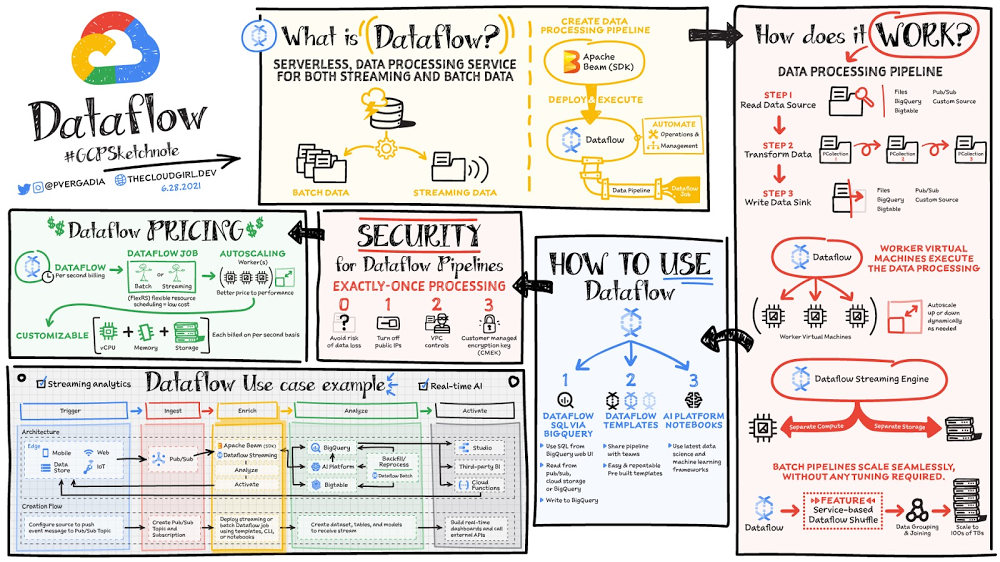
Data is generated in real-time from websites, mobile apps, IoT devices,and other workloads. Capturing, processing and analyzing this data is a priority for all businesses. But, data from these systems is not often in the format that is conducive for analysis or for effective use, by downstream systems. That’s where Dataflow comes in! Dataflow is used for processing & enriching batch or stream data for use cases such as analysis, machine learning or data warehousing. Dataflow is a serverless, fast and cost-effective service that supports both stream and batch processing. It provides portability with processing jobs written using the open source Apache Beam libraries and removes operational overhead from your data engineering teams by automating the infrastructure provisioning and cluster management. Click to enlargeHow does data processing work?In general a data processing pipeline involves three steps: You read the data from a source, transform it and write the data back into a sink.The data is read from the source into a PCollection. The ‘P’ stands for “parallel” because a PCollection is designed to be distributed across multiple machines.Then it performs one or more operations on the PCollection, which are called transforms. Each time it runs a transform, a new PCollection is created. That’s because PCollections are immutable. After all of the transforms are executed, the pipeline writes the final PCollection to an external sinkOnce you have created your pipeline using Apache beam SDK in the language of your choice – Java or Python. You can use Dataflow to deploy and execute that pipeline which is called a Dataflow job. Dataflow then assigns the worker virtual machines to execute the data processing, you can customize the shape and size of these machines. And, if your traffic pattern is spiky, Dataflow autoscaling automatically increases or decreases the number of worker instances required to run your job. Dataflow streaming engine separates compute from storage and moves parts of pipeline execution out of the worker VMs and into the Dataflow service backend. This improves autoscaling and data latency! How to use DataflowYou can create dataflow jobs using the cloud console UI, gcloud CLI or the API. There are multiple options to create a job. Dataflow templates offer a collection of pre-built templates with an option to create your own custom ones! You can then easily share them with others in your organization. Dataflow SQL lets you use your SQL skills to develop streaming pipelines right from the BigQuery web UI. You can join streaming data from Pub/Sub with files in Cloud Storage or tables in BigQuery, write results into BigQuery, and build real-time dashboards for visualization.Using Vertex AI notebooks from the Dataflow interface, you can build and deploy data pipelines using the latest data science and machine learning frameworks. Dataflow inline monitoring lets you directly access job metrics to help with troubleshooting pipelines at both the step and the worker level. Dataflow governanceWhen using Dataflow, all the data is encrypted at rest and in transit. To further secure data processing environment you can:Turn off public IPs to restrict access to internal systems.Leverage VPC Service Controls that help mitigate the risk of data exfiltrationUse your own custom encryption keys customer-managed encryption key (CMEK)ConclusionDataflow is a great choice for batch or stream data that needs processing and enrichment for the downstream systems such as analysis, machine learning or data warehousing. For example: Dataflow brings streaming events to Google Cloud’s Vertex AI and TensorFlow Extended (TFX) to enable predictive analytics, fraud detection, real-time personalization, and other advanced analytics use cases.  For a more in-depth look into Dataflow check out the documentation.  Want to explore further? Take Dataflow specialization on Coursera& Pluralsight.For more #GCPSketchnote, follow the GitHub repo. For similar cloud content follow me on Twitter @pvergadia and keep an eye out on thecloudgirl.dev.Related ArticleDataflow Under the Hood: Comparing Dataflow with other toolsSee how fully managed streaming service Dataflow helps make stream and batch processing and data analytics easier.Read Article
Quelle: Google Cloud Platform

Mrs. T’s Pierogies: Improved forecasting and DR with SAP on Google Cloud

Pierogies might just be the ultimate comfort food. But when Mrs. T’s Pierogies — the leading manufacturer of frozen pierogies in the US — learned it needed to transition its existing on-premises SAP ECC to S/4HANA, the company sought a little comfort for itself. Founded in 1952, Mrs. T’s Pierogies now produces more than 650 million pierogies a year. Moving that many pierogies requires a powerful ERP system — and an equally powerful IT infrastructure on which to run it. Mrs. T’s realized that the SAP-mandated transition of its ERP solution to SAP S/4HANA was an opportunity to move its SAP systems to Google Cloud and gain real-time analytics capabilities for faster sales forecasting, more effective trade promotions, and more sophisticated planning.From necessity to opportunityMrs. T’s successfully ran its SAP ECC solution on its own on-premises servers for years. But after SAP decided to sunset the product, Mrs. T’s realized that it faced multiple challenges, including: Migrating its SAP ECC 6.0 system from an on-premises leagcy OS to a cloud-based Linux environmentMoving data from its SAP DB2 database to HANATransitioning from ECC to SAP S/4HANAThat complex transition needed to take place with little or no downtime, since nearly all of the company’s invoices, warehouse movements, and transfer orders used the Electronic Data Interchange (EDI) protocol. Missing even a few hours of EDI transactions would put significant revenue at stake. Adding to the challenge: Some Mrs. T’s customers would not accept an invoice past five days, which left little room for error. Mrs. T’s chose Rackspace Technology, a longtime Google Cloud partner, to oversee the move. Mrs. T’s could have chosen to run S/4HANA on its legacy hardware but saw migration to Google Cloud as an opportunity to improve key aspects of its business, in particular data analytics. Historically, sales planning and forecasting involved time-consuming manual processes. But the speed, availability, and scalability of Google Cloud meant that Mrs. T’s could take advantage of S/4HANA’s embedded analytics capabilities. Migrating could also open the door to leveraging Google Cloud’s native integration of SAP data to power Google tools such as BigQuery, Google Cloud AI Building Blocks, and more. The move to Google Cloud also gave Mrs. T’s an opportunity to update its disaster recovery process. Previously, the company backed up to tape. So, if its SAP systems went down, a member of the IT department would have to drive the most recent tape backups an hour to its cold site, where the disaster recovery partner would load the SAP backup tape, boot the system up, switch network connections to that site, and cross their fingers. Not only would downtime be significant, but restored data would be limited to the periodic tape backup. “Everything just worked”Once Mrs. T’s decided to migrate to Google Cloud, the company worked with Rackspace Technology to implement the system. The first phase focused on moving the SAP production environment from on-premises infrastructure to Google Cloud and updating its database to HANA, which took place over 12 weeks. The switchover occurred over a weekend and was all but invisible to users. “We came in on Monday and everything just worked,” recalls Timothy Coyle, Director of Information Systems & Technology. In a second four-month phase, the company transitioned from EEC to S/4. The move to Google Cloud paid dividends immediately. Batch transactions occurred twice as fast and on-screen end-user transactions rendered instantly. The upgrade also gave the finance team access to embedded analytics and monitoring for the first time. With everything now in the cloud, disaster recovery could be dynamic and nearly instantaneous, with a worst-case scenario of just 5 to 10 minutes of downtime. “Mrs. T’s needed a skilled and experienced partner that could move its SAP environment to Google Cloud with no negative impacts to its business. We knew this migration was a key initiative in Mrs. T’s digital transformation journey,” says Chuck Britton, Google Partner Development Manager at Rackspace. “We also knew that running SAP on Google Cloud would give the business the fast and flexible analytical capabilities it needed for its SAP data.” From ideation to production, Mrs. T’s migrated from its legacy on-premises infrastructure to a modern SAP S/4HANA solution on Google Cloud in only seven months, with minimal downtime and zero disruptions. Now that the migration is complete, Mrs. T’s has a flexible, highly scalable environment to run the SAP applications and data that fuel the business. Says Coyle, “Our strategic intent for IT is to make processes simpler, people more productive, and infrastructure more secure. This project fits right square in the middle of that strategic philosophy.”Learn more about ways in which Google Cloud can transform your SAP experience and about Rackspace Google Cloud solutions for SAP customers.Related ArticlePega: Optimizing business operations with SAP on Google CloudPegasystems deployed its SAP environment to Google Cloud to make its systems more reliable and take advantage of powerful new data capabi…Read Article
Quelle: Google Cloud Platform

Top 25 Google Search terms, now in BigQuery

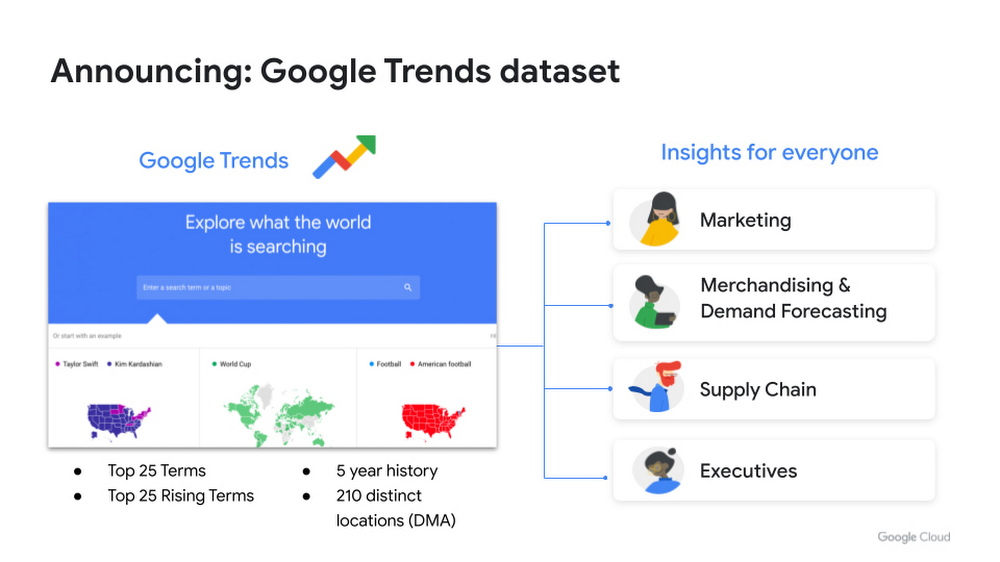
Today we’re announcing preview availability of a new public dataset for Google Trends. For the first time we’re bringing Google-owned Search data into Google Cloud Datasets for convenient analysis in BigQuery, or through your favorite business intelligence tools. For over a decade, Google Trends has provided a sample of Google Search data. Continuing to lead with a privacy-first mindset, the data is anonymized, indexed, normalized, and aggregated prior to publication. Access to Google Trends data has been limited to the Google Trends website and requires manual processing to export the underlying dashboard data to derive additional analytical insights. Now, we’re streamlining access to this dataset by surfacing and allowing direct interaction with BigQuery in a safe, secure and private manner. This BigQuery dataset, also available soon in Analytics Hub, allows users to measure interest in a particular topic or search term across Google Search, from around the United States, down to the city-level. Whether you’re a marketer, an executive, or an operations manager, you can now easily ask what people are searching for to inform your analyses. Say you’re a merchandiser in retailing, and want to ensure your end-cap displays are relevant to your local audience, you can take signals from what people are looking for in your market area to inform what items to place. Or, imagine you’re in charge of your product’s R&D initiatives and want to understand what new features could be incorporated into an existing product based on what people are searching for. What’s popular and relevant might even inspire a new product line for your team. Terms that appear in these datasets could be an indicator of what you should be paying attention to.“Google Search Trends data has always been an important tool for our WPP agency data teams. At WPP we believe that data variety is a superpower which is why we are excited to use the new Trends dataset availability within BigQuery, plus the launch of Analytics Hub. The best creativity in the world is informed by data insights, and influenced by what people search for, so the operational efficiencies we’ll gain via the Analytics Hub and the insights we can drive with Trends data are just phenomenal.”—Di Mayze Global Head of Data and AI, WPPHow the Google Trends dataset worksTo remain true to Google’s mission to “organize the world’s information and make it universally accessible and useful,” we are sharing some of this data in a safe, private, and secure manner. In this initial preview, we will provide popular trending terms through Google Cloud Datasets. The dataset surfaces the Top 25 stories and Top 25 Rising queries for the United States in a BigQuery dataset, available to access from the Google Cloud Marketplace.Google Trends dataset now available in the Google Cloud MarketplaceTop stories are indicative of the most searched topics for the day throughout the United States, whereas top rising provides a view of what search terms have surged in popularity over the past day. Each term will be segmented by Nielsen’s Designated Market Area® (DMA) and by the week, enriched with a historical backfill over a rolling five year period.As a new set of top terms and top rising queries is generated daily, data will be inserted into a new partition of their respective table. Each set of top stories and top rising queries will persist and remain static until its expiration date of 30 days is reached (e.g. each table partition has a time-to-live of 30 days). Learn more about the schema of each table in the dataset listing.   Getting started with the Google Trends datasetFor top and rising terms stored in the Google Trends dataset, users can obtain access without charges of up to 1TB/month in queries and up to 10GB/month in storage through BigQuery’s free tier. SQL queries above these thresholds are subject to regular BigQuery pricing. Users can also leverage the BigQuery sandbox to access BigQuery without the need to create a Google Cloud account or provide credit card information, subject to the sandbox’s limits and BigQuery’s free tier thresholds. To begin exploring these public dataset tables, simply query the top 25 and top 25 rising tables from the BigQuery SQL UI. To minimize the data scanned and processed, utilize the partition filter in your query:select * from `bigquery-public-data.google_trends.top_terms` where refresh_date = DATE_SUB(CURRENT_DATE(), INTERVAL 1 DAY)To compare and overlay the most popular search trends with the top rising, join the tables on dma_id:select * from `bigquery-public-data.google_trends.top_terms` top join `bigquery-public-data.google_trends.top_rising_terms` rising on top.dma_id = rising.dma_id where top.refresh_date = DATE_SUB(CURRENT_DATE(), INTERVAL 1 DAY) Outside of the BigQuery UI, you can also interact with this dataset from familiar BI tools like Looker, Data Studio or with solutions from our partner ecosystem.What’s next for Google Cloud Datasets?This is just the beginning of our journey in making Google’s first-party data more accessible to organizations to enhance their analytics initiatives. Stay tuned for a future blog post on reference patterns and use cases with Google Trends data, as well as for updates on product roadmap and other dataset solutions offered through Google Cloud Datasets. In the meantime, explore the new Google Trends dataset in your own project, or if you’re new to BigQuery spin up a project using the BigQuery sandbox.Related ArticleIntroducing Analytics Hub: secure and scalable sharing for data and analyticsAnalytics Hub makes data sharing across organizations secure and easyRead Article
Quelle: Google Cloud Platform

Google joins the O-RAN Alliance to advance telecommunication networks

At Google, we believe that co-innovation with customers, partners, and technology vendors as part of a broader ecosystem is critical to accelerating industry digital transformation. From our contribution to open standards, to our commitment to open source and our continued focus and expansion of Google’s vibrant partner network, we are committed to drive transformative change in telecommunications.Since announcing our comprehensive strategy for the telecommunications industry in 2020, we’ve been working closely with customers, partners, and industry bodies globally to help transform the industry together. Today, we’re excited to take another step forward and are proud to announce that we are joining the O-RAN Alliance, which is a world-wide community of mobile network operators, vendors, and research and academic institutions operating in the Radio Access Network (RAN) industry.Accelerating cloud-native network readinessWhen it comes to the evolution of mobile networks, Radio Access Network (RAN) is the most significant building block to reduce total cost of ownership, scale, and overall complexity. As a result, operators worldwide are now on the journey to apply principles of disaggregation, cloud, and software centricity to transform radio access. We believe that industry-wide open reference architectures and interfaces for RAN are key to driving innovation across communication service provider (CSP) mobile networks—with the O-RAN Alliance driving significant advances in the RAN layer and already gaining traction with a number of large CSPs who have become early adopters of the standard. O-RAN specifications will also create conditions for enhanced network security and enable a more competitive and vibrant RAN supplier ecosystem with faster innovation to improve user experience and unlock new CSP operating models. Partnering with industry leadersAs its newest member, we’re excited to work alongside fellow Alliance members, bringing the broad knowledge and expertise across Google to jointly drive and accelerate the realization of O-RAN initiatives:History of software innovationFrom programming languages like Go, to the Android mobile operating system that provides the foundation of billions of mobile devices across the world, to Kubernetes, which has become the default choice for container orchestration across the industry, Google has a long history of software innovation, and we’re eager to further solidify O-RAN’s journey to achieving truly open cloud software centricity.Hybrid and multicloud solutions to enable choiceAs 5G brings cloud, software, and network together, CSPs globally are embracing public cloud and multicloud for both IT and network transformation. Google Cloud’s solutions empower CSP developer ecosystems to seamlessly build and scale new applications across any environment, with Anthos providing a complete, open, hybrid, and modular solution that enables flexible deployment models across a wide range of RAN use cases.Network leadershipOver the past decade, we’ve seen the network evolve through the emergence of programmability, open APIs, declarative intents and data models, and early software definition of network functions. Over the coming years, we believe this journey will accelerate with the shift to cloud-native networking across the board, bringing in end-to-end multi-domain automation and rich analytics. We’re bringing Google’s experience in building our own scaled global network to drive greater innovation and accelerate O-RAN initiatives in this space.Network AI Over the next decade, companies will undergo massive transformation towards an autonomous and self-healing network. This digital transformation will require architecting, designing, and deploying intelligence across a distributed cloud network that is fundamentally powered by AI and closed loop automation. Our vision is to work with the O-RAN Alliance to enable cloud-native intelligent networks that are secure, self-driving, and self-healing—bringing Google’s wealth of software experience and global leadership in the areas of machine learning, massive data processing, and geospatial analytics to efficiently design, manage, and operate RAN intelligent controllers and network orchestrators, as well as create common data platforms for end-to-end network optimization powered by predictive machine learning solutions.  We’re excited by the journey that lies ahead and look forward to partnering with Alliance members to help drive the O-RAN ambitions from vision into reality.
Quelle: Google Cloud Platform



