5 Ways telehealth is democratizing access to healthcare

According to a National Academy of Medicine discussion paper, social determinants of health (SDoH) account for upwards of 80% of a population’s health outcomes. Breaking this down further, 50% come just from socioeconomic and physical environment factors such as education, employment, income, family and social support, community safety, air and water quality, and access to housing and transit. SDoH determine access to and quality of healthcare, and are contributors to a system of disparate access to care.Click to enlargeWe believe that to more efficiently provide comprehensive healthcare access to more people, providers will leverage technology to blend in-person and virtual modes of care delivery.In this article, Amwell and Google Cloud examine five ways telehealth – as part of a provider’s overall care model – can help democratize access to healthcare. (graphic url) Remove distance as a barrier to care8.6 million Americans live more than 30 minutes from their nearest hospital. Long drives can deter patients from seeking care or maintaining routine visits. On the flip side, 92% of Americans nationwide have access to wired broadband in the home or through mobile broadband. Therefore, having a virtual visit just a click away can help remove barriers to care, like distance.Eliminate the risk of unnecessary exposureVirtual care means that patients don’t have to worry about potential exposure in transit, while sitting in waiting rooms, or from direct interactions during in-person health visits. This is particularly relevant when it comes to those with chronic diseases or underlying conditions. Telehealth provides patients who may be more susceptible to diseases with access to continuous healthcare without putting them at higher risk for developing more severe symptoms. Virtual visits can occur in the comfort –and safety– of patients’ homes.Extend access to specialized care55% of preventable hospitalization or mortality in rural settings is due to lack of access to specialty care. With telehealth, physical proximity to specialized services–typically in urban areas–can be reduced as a limiting factor. Virtual solutions grant everyone access to top specialists, regardless of location.Save time and moneyBy augmenting in-person visits with telehealth applications, providers can benefit from greater efficiencies in scheduling, helping to improve their bottom line, and add more flexibility to their workday. Meanwhile, patients can spend less on travel and childcare, limit time taken off work, and save on other costs associated with in-person visits — for a savings of $35 to $690 per visit. In a survey by the COVID-19 Healthcare Coalition, 76% of the 2,000+ patients surveyed across the US responded that transportation was removed as a barrier, 65% reported they no longer had to take time off from work for an appointment, and 67 percent reporting lower costs than an in-person visit.Combat physician shortage and fatigueResearch shows there will be a shortage of more than 100,000 doctors by 2030. In the midst of a physician shortage, telehealth can help improve care delivery and make it more efficient, ensuring more people can still have their healthcare needs addressed. Additionally, by integrating intelligence such as case triaging along with telehealth into a virtual care model, providers can help reduce clinician burnout.Amwell and Google Cloud are partnering to deliver transformative telehealth solutions that will make it easier for more patients to receive care and improve patient and clinician experiences across the continuum of care. One example includes embedding real-time captioning and translation services powered by Google Cloud’s AI and NLP technologies within the Amwell platform to increase health access and understanding for more people.As physicians, we are excited that the future of healthcare will continue to blend cloud technologies like EHR-integrated telehealth platforms, AI, healthcare-trained virtual agents along with in-person care to create an integrated hybrid care model that will improve patient outcomes and unburden providers, all while expanding access to broader patient populations.To learn more, download the whitepaper “Healthcare’s Virtual Transformation,” written in conjunction with Becker’s Hospital Review.1: “Social Determinants of Health 101 for Health Care: Five Plus Five,” National Academy of Medicine, October 2017
Quelle: Google Cloud Platform

Batter up! Use machine learning to uncover what excites baseball fans

The game of baseball has no shortage of statistics — from batting average to exit velocity, strikeouts to wins above replacement. Among all sports, Major League Baseball (MLB) arguably contains the most analytical and data-driven participants and fan base. Subconsciously or viscerally, players and managers on the field and those following from anywhere are constantly assessing and making decisions based off of game play trends and expectations — whether a batter will come through with a hit in an important situation, when a pitcher should be pulled. Less analyzed, however, is what leads fans to become engaged with certain players or teams, and what factors drive their love of the game. This is the motivation behind the problem being posed by Major League Baseball in their Kaggle competition for Player Digital Engagement Forecasting. Can you use machine learning to deconstruct baseball fandom?This competition asks you to predict measures of digital engagement for each active player on a daily basis during the MLB season. So, how large was the surge in fan interest after Joe Musgrove threw the first no-hitter in Padres history? Is Shohei Ohtani’s engagement higher when he pitches well, when he hits a monster home run…or when he does both? You’re provided a wealth of game, team and player information – detailed stats, awards, rosters, and transaction information – as well as social and digital engagement data as your inputs. Data scientists will recognize this as an exciting forecasting problem with both traditional regression and time series components, where having this input data just prior to the prediction date is critical to determining which players will receive the most engagement. With so many variables in the game, there are an endless number of vectors which could possibly influence fan engagement. Eleven-time All-Star Miguel Cabrera delighted fans by hitting the first home run of the season – in the snow! Occasionally a lesser-known player like Musgrove or Carlos Rodón “wins the day” with an unlikely no-hitter. And sometimes just getting traded to an iconic franchise like the Yankees generates a ton of fan interest, like it did for Rougned Odor in early April.As these examples show, a player’s digital engagement can be pretty dynamic during the season, with many different potential contributors to who is “trending” on a given day. How can you use data to uncover which factors are the most influential of engagement with each player’s digital content?Ready to play ball? Check out the competition on Kaggle for all the details. $50,000 in prizes is up for grabs in two prize categories. The code competition puts your machine learning skills to the test, to see who can build the most accurate forecasting models to predict daily digital engagement for every active player. You’ll have until July 31st to build your models and then be evaluated on a future time frame, which will determine the winners. For data visualization and exploration experts out there, the explainability prizes give you an opportunity to analyze more broadly which factors, even those outside of what we’re providing directly, most influence digital engagement. You’ll be evaluated on how well you can use what the data is telling you to support your findings.And if you’re looking to get started, we’ve provided an introductory video and some notebook tutorials, including a starting point for harnessing the power of Vertex AI through tools including Cloud Notebooks, Explainable AI, and Vizier. With the second half of the season upon us, it’s an exciting time to be an MLB fan. With this Kaggle competition, it’s also a perfect opportunity to use data science to help understand baseball fandom and potentially earn some of your own accolades in the process. Step up to the plate!Major League Baseball trademarks and copyrights are used with permission of Major League Baseball. Visit MLB.com.Related ArticleHow BigQuery helps scale and automate insights for baseball fansAn in depth look at how BigQuery features and functionality can create insights from data for baseball fans.Read Article
Quelle: Google Cloud Platform

Fresh ingredients to fresh insights: An inside look at Papa John's data cloud strategy

Editor’s note: In this blog, we look at how Cloud SQL delivered speed, flexibility, and agility to global pizza company Papa John’s International. With more than 5,400 locations in 50 countries and territories, Papa John’s International is one of the largest pizza chains in the world. In 2017, the company took a cloud-first strategy and kicked off our journey with Google Cloud. We started with a proof-of-concept (POC) project—a very small-scale integration with SADA—for a test set of data. This early test of Google Cloud brought flexibility and agility to the entire software development life cycle of that project. Today, Papa John’s runs on Cloud SQL, BigQuery, and Cloud Storage, as well as Kubernetes Engine, leveraging the power of data to fuel innovation and differentiation across the business, and Google Maps Platform to easily map customer deliveries. Our loyalty programs, our website and our customer and partner experiences are all powered by data. In addition, we’re also looking to equip stores  with the power of real-time information to help them make  deliveries on time.For our team, we’re seeing huge benefits on the database administration side. The scalability has become easier, provisioning is faster and the level of productivity is high. We’ve also significantly reduced our licensing costs, which also improves the bottom line. Now that we’re fully managed by Google Cloud, our DBAs and other teams can focus on new initiatives that grow our business and meet our customers’ needs.Cloud SQL is at the heart of our data initiativesCloud SQL has played a huge role in our data initiatives because it is fully managed, reliable, and secure and allows our developers to focus on value-added tasks. We use Cloud SQL with both MySQL and PostgreSQL, depending on the project. We began our transformation journey with a number of re-architecture projects, including revamping our loyalty program and moving our mapping system onto Google Maps Platform, which includes hours and locations for individual stores. This data was managed by our teams on-premises in Oracle, and we successfully moved it to the managed Cloud SQL for PostgreSQL database on the cloud. For this re-architecture project, we use Google Maps Platform to locate whether a customer’s address is within a store’s delivery zone.Here’s a look at a Papa John’s location map, powered by our back-end Cloud SQL databaseAnother project where Cloud SQL has been instrumental is in our commerce platform, which is built on Google Cloud. We partner with a number of third-party aggregators for deliveries and we need to make sure they’re integrated  from both data and communications perspectives.We sometimes call the Customer Price Indexes (CPIs) of these aggregator partners to send them menu data, including product availability in stores, product configurations, and more. Our Java applications read that data and call the CPIs for our partner aggregators. Depending on the partner, integrations either push to the partner or  respond to the partner’s request right away. We’re also running a call center for ordering, so our staff need to be able to respond quickly to ensure customers are satisfied. All of this data is stored and served from Cloud SQL. We have about 15 engineering teams following an  agile process that uses our various databases. We have one central platform engineering team that uses Terraform and Google Kubernetes Engine (GKE) to provision databases. Over the years, a huge benefit we’ve seen is on the database administration side. That team doesn’t have to do as much hands-on management as they were doing with the on-premises solutions. We worry less about the number of connections to the databases and how many applications are using the data. And since we are building our new databases on the cloud instead of on Oracle, the potential licensing costs are dramatically lower. Life in the cloud has brought us immense benefitsGoogle Cloud has helped transform our business. We use Cloud SQL with analytical systems like BigQuery, Google Cloud’s modern data warehouse, and most of these system’s real-time ingestions are event-driven.In a couple of use cases, we have multiple subscribers for a queue, and those subscribers would process the data and then -depending on the use case, would pump it into BigQuery for analysis. We have found this is a better approach rather than simply replicating all the data going into Cloud SQL into BigQuery.Looking ahead, we’re planning on moving our entire data systems from on-premises onto Google Cloud, which will help us reduce the footprint of our cu​​rrent databases and use better and lighter technologies. Our experience so far with Cloud SQL, BigQuery and other services makes us confident we’ll reach these goals and continue innovating with our roadmap.Compared to life before migration, it’s amazing to run on the cloud. With Google Cloud, the provisioning is so easy, the level of productivity is so high, and we don’t have to wait for all of the related infrastructure to be built up. It’s faster than auto-provisioning through several environments, and the need for troubleshooting is greatly minimized.If all this talk of moving data is making you hungry, join us for a slice—find a Papa John’s location near you. Ready to learn more about Cloud SQL? Get started with a free trial.Related ArticleBuilding a self-service microservices architecture with Cloud SQLMigrating from a monolithic on-premises to a microservices architecture with Cloud SQL and GKE helped Entegral offer self-service and sav…Read Article
Quelle: Google Cloud Platform

UCLA: Building the future of higher education technology with APIs

Imagine you work at a university, and every time you need to use department funds to pay for something, you’re required to go through a protracted, multi-step process. Or suppose you’re a student trying to review your academic record, then browse and enroll in classes you need– but different parts of the process are scattered across different apps and websites, some with conflicting information. Today’s consumers expect engaging, low-friction digital experiences from businesses–and likewise, today’s students expect similarly straightforward and smooth experiences from institutions of higher learning.  Now imagine you’re part of the university IT staff that has to replace old processes with digital experiences. You wouldn’t want to do a custom integration for each project–for each new use case in which a faculty member needs to buy something, a student needs class information, and so on. Instead, you need data and functionality to be simply, repeatably, scalably available to developers for new uses. You wouldn’t want these systems to be merely available. Instead, you’d need them to be painless for different collaborators to find, resilient to spikes in traffic, simple to govern en masse, and easy to secure. This is the kind of challenge the IT team at the University of California, Los Angeles (UCLA) faced. The school has a long history of accolades for its great IT– but technology never stands still, and to move as quickly and agilely as students, staff, and partners expect, UCLA needed a modern, API-first approach to building apps and digital services. Curtis Fornadley, program manager for Enterprise Integration at UCLA, said that like many large organizations, the university has many legacy systems that need to be leveraged for modern applications. “Previously, UCLA’s team ran an enterprise service bus, with a homegrown gateway for SOAP services,” he explained. “But SOAP-based services are difficult to scale, and managing them often involves locking them down, which clashes with our need to make data and functionality easier for developers to use.”Today’s API-first architectures are designed to be scaled across decentralized teams, letting administrators apply governance and security while still letting developers work faster by easily harnessing the resources they need. Recognizing the need to adopt such an architecture at UCLA, Fornadley formed a comprehensive API program proposal that culminated in the university adopting Apigee, Google Cloud’s API management platform, to bring the vision to life. “We needed API management to help people across the university more efficiently create new solutions,” he said. Cornerstones of this vision include the development of the Ascend Financial System and the Student Information System. The former extends the university’s financial system APIs, making them accessible to developers from various departments via secure and scalable self-service capabilities. The Student Information System encompasses APIs that provide real-time access to the students’ academic, financial and personal records to various UCLA applications on campus. With these two projects alone, the number of APIs, and the number of applications using and depending on them, increased considerably, requiring comprehensive management to keep services online, monitor their usage, and authenticate access to them. Without a campus-wide API program, the success of such initiatives would be threatened by fragmented API experiences for both internal developers and partners. UCLA currently manages over 200 APIs and is building out a hub-and-spoke model in which developers use a self-service portal to find and access the services they need. With federated, campus-wide API governance in place, the program ensures a consistent experience for all parties, and establishes authoritative single “sources of truth” when developers are leveraging data for applications. Although UCLA’s API program is still growing, many results  already speak for themselves. On-campus Apigee usage has grown from 1 million calls in 2020 to over 11 million (so far) in 2021. The transition of all APIs from the home-grown gateway to Apigee is completing this month and the expected usage by the end of the year is expected to be at least 49 million calls.The program also provides a foundation for myriad innovations going forward. By monitoring API usage and generating analytics, for example, the university is learning which services are being leveraged in interesting or popular ways, which will guide future investments, and they’re gaining insights to secure APIs against evolving threats. Additionally, APIs are helping UCLA to activate their vast data stores, both by breaking down the silos between them and making them connectable to services in the cloud. Not least of all, APIs are making it easier for partners to work with UCLA, enabling faster, simpler collaboration and sharing of services. To try Apigee for free and learn how it can help your organization, click here.Related ArticleThe time for digital excellence is here—Introducing Apigee XApigee X, the new version of Google Cloud’s API management platform, helps enterprises accelerate from digital transformation to digital …Read Article
Quelle: Google Cloud Platform

DeNA Sports Business: Combating COVID-19 by analyzing device data with Google Cloud

Editor’s note: Today we’re hearing from Makoto Kimura, General Manager System Dept. Sports Business Div; and Yusuke Muto, Software Engineer System Dept. Sports Business Div at DeNA Sports. They share how Google Cloud has helped them to keep their events going while also keeping their visitors safe during the pandemic. The pandemic is forcing the cancelation or postponement of events in Japan and elsewhere – and requiring the organizers of events that do proceed to implement strict measures to protect attendees against infection. At DeNA Co. Ltd’s Sports Business Division, we aim to help visitors experience entertainment during the crisis while enjoying peace of mind. To support this objective, we have developed and released an operational status visualization system that checks whether Japan’s coronavirus contact tracing app COCOA is installed on smartphones used by event attendees. By visualizing the COCOA install rate, we can help event organizers educate those visitors who do not have the app to download and use it. To achieve the system’s required measurement capabilities, we turned to BigQuery, Google Cloud’s analytics data warehouse. We found BigQuery:Delivers fast write times even when processing large volumes of data Provides the flexibility to enable a range of query types; and Supports visualization through business intelligence tools such as Looker and Data Studio.BigQuery enabled us to expedite creation of an analytical environment so we could shift our focus quickly to developing sensor devices, while using a simple configuration to write data directly from each device using open source data collection software Fluentd. BigQuery’s pricing structure also meant we could scale cost-effectively.  In addition, BigQuery empowered us to quickly build systems to obtain insights from data derived from the positioning and beacon technology we had researched and developed in-house for a long time.Our visualization system consists of three data functions:Acquisition through sensor devicesAggregation with BigQuery, andVisualization through Data Studio.  The sensor device used to determine whether COCOA is installed on a smartphone is developed on a single-board computer capable of running the Linux SDK (Software Development Kit) and that can easily connect to WiFi. Each sensor device uses Fluentd to write data directly to BigQuery over the internet. Direct connection of each device to the internet means if one device fails, the remaining devices are unaffected. Data collected by each sensor device is aggregated into BigQuery – minus personally identifiable information – and visualized through Data Studio, with a dashboard made available to event organizers. Users can gain real-time insights into the number of COCOA-enabled devices, the number of COCOA devices in chronological order, and other important information. Real-time visualization of the number of COCOA-enabled devices is based on the aggregation and counting of COCOA installation information that has passed through two sensor devices – an approach that prevents one sensor device picking up distant radio waves and counting one piece of COCOA installation information as multiple items. Meanwhile, visualizing the number of COCOA devices in chronological order enables monitoring of the behavior of visitors from before an event starts to after it ends.Here is a diagram of the DeNA Sports Business operational status visualization system:Click tp enlargeBecause BigQuery is a fully managed service, we did not have to worry about provisioning resources in advance to manage the often unpredictable data volumes incurred during large-scale events. BigQuery also supported the rapid creation of dashboards in Data Studio and real-time visualization, which we believe could not be achieved with other services.We now plan to use various technologies to step up measures against the coronavirus, including IoT to aggregate various types of data into BigQuery and deliver visualizations through Data Studio. In the future, we would like to make the visualization system a tool for holding events in the post-coronavirus era and look forward to working with Google Cloud to make that happen.
Quelle: Google Cloud Platform

Announcing general availability of Google Cloud CA Service

We are happy to announce the general availability of Certificate Authority Service offered by Google Cloud (Google Cloud CAS). Google Cloud CAS provides a highly scalable and available private CA to address the unprecedented growth in certificates in the digital world. This exponential growth is due to a perfect storm of conditions over the past few years, achieving almost a flywheel effect – the rise of cloud computing, moving to containers, the emergence of pervasive high speed connectivity,  the proliferation of Internet-of-things (IoT) and smart devices (see our whitepaper on this topic). See how easy it is to set up a CA with Google Cloud CAS:Since ourpublic preview announcement in October, we have seen tremendous reception from the market and innovative use cases for the service  from our customers. Here are some notable examples straight from our CAS customers:”At Credit Karma, security is a top priority, and we always seek ways to improve our security posture. One area where we have been working with Google for more than a year now is the identity of our workloads and how we can leverage platform features to offload to cloud some of the time consuming tasks that our security and devops team need to run today. We are very happy with progress that GCP has made in addressing our feedback and we believe CA Service is a fundamental piece of building a strong identity story in cloud, by cloud.” – Jason Roberts, Security Engineer, Credit Karma“Commerzbank AG takes security of our data very seriously. While Google Cloud Platform comes with a high level of in-build security controls, we had to further enhance those by enabling the highest security standards for data transport. This requires to bring trust into GCP based on Commerzbank owned certificates. Google understood our needs and invested into capabilities with Certificate Authority Service, empowering us to rely on our trusted certificates and security standards while providing fully automated and scalable certificate handling. This enables us to use GCE, GKE, and other authorized services to deliver products and value”, Christian Gorke, Head of Cyber Center of Excellence, Commerzbank AG“Building a secure and compliant PKI system is known to be a complex and costly endeavor making it cost prohibitive for many regulated government transactions. With the help of GCP’s Certificate Authority Service (CAS), Vitu Authority Trust’s digital signature service became the first authorized government digital signature service provider to deliver a fully digital car buying experience in the United States. GCP’s Certificate Authority Service provided Vitu Authority Trust the highest level of compliance at an affordable rate, allowing Vitu Authority Trust to outsource the burden of digital certificate management to the cloud”, Arash Nikoo VP, Technical Operations, VituThe top three desirable features of CAS were as follows:The first and most desired feature in Google Cloud CAS by our customers is scale and availability. Scale in this case is measured as a) number of issued certificates per second and b) total number of certificates/CAs allowed per project. Availability is the SLA backed up time for certificate issuance, per region.When planning to build this product, we found that the most common problem from customers was around how to address machine and service identity within their cloud transformation. This was specifically problematic due to the more ephemeral nature of most cloud workloads relative to what customers do on premise with manual deployments (good examples are containers and microservices that are short lived).The scale required for certificate issuance creates huge demand and unpredictability to customers’ existing CAs which they often cannot support. Last thing they want is their identity infrastructure to be their scalability bottleneck as they dynamically scale out to support special events: in retail space, this could be Black Friday sales where thousands of nodes/VMs are spun to accommodate spike in sales and then rapidly torn down post the spikes, rendering all investments made to just support Black Friday useless.Another reason for renewed interest in scale was the move to a zero trust access model, which was expedited by COVID-19 and work from home requirements. The core need to open up device management across the internet created a new scale requirement for certificate enrollment to allow for securing the device over the internet. In addition to scale and availability, the second Google Cloud CAS key benefit for our customers was savings compared to the cost of building an alternative solution. Such an endeavour requires purchasing Hardware Security Modules (HSM), licensing the software, purchasing server devices, securing multiple redundant root key material locations, then hiring a specialized PKI/DevOps team to operate the system at scale (high CapEX and OpEX). Customers told us they only have so many projects they can take on, so they have to choose carefully. CAs and certificates are an enabler for their business and make a great candidate to free up resources that might have been used internally to solve the scale problem and reassign them to more business-critical tasks, while accelerating velocity of the projects that use the service. Google Cloud CAS is backed with hardware security (HSM) without any direct customer involvement with HSM purchasing, provisioning and management. We saw customers cancelling their HSM orders in response to cost savings provided by Google Cloud CAS.Security was the third commonly quoted reason for considering Google Cloud CAS. Cloud CA that seamlessly integrates with other cloud services provides the most secure solution for their cloud workload, while freeing customers from having to keep software, hardware and firmware up to date.Outside the usual suspects scenarios for CAS (i.e., DevOps), we saw a great reception of our strategy on relying on Certificate Lifecycle Management partners (Venafi and AppViewx as launch partners for public preview) to help modernize traditional IT and on-premise CA story. Customers really see the value of moving their CA to cloud to save on OpEX and CapEX, and see this as an opportunity to converge their CA story across both devops and traditional IT and achieve the perfect single pane controllability and manageability story. We heard many times that PKI teams were worried that they lost control of the modern DevOps team as they did not have visibility to their certificate operation. CAS can be the ideal way to fix that problem. Customers migrating to zero trust access models also found value in CAS.Since our public preview, customers have asked us to expand our partner ecosystem so that their desired partners can also work with CAS. We are happy to introduce three new members of our partner program: Key Factor,Jetstack and Smallstep (which brings in ACME support for CAS) who join our existing partners Venafi and AppViewx.We also had some interesting and rather surprising scenarios brought to us by customers which we initially did not think of as potential targets. Interestingly, most examples are from the IoT space. We saw small to midsize companies who are building IoT peripherals, like wireless chargers, USB devices, or cables reaching out with a need for certificates. They do not want to invest in PKI and CAs as it is not their core business and the economy of it does not make sense given their market size. CAS provides a perfect model to address those with a pay-as-you-go CAS is easy to implement, operate, administer and grow for their scenarios.These stories were really reassuring for us as we had made the right bets and features, though we acknowledged that there were areas of improvements. We are lucky enough to have a very vested and engaged set of customers providing us with great feedback and helping us identify product gaps. We truly appreciate it as their feedback made our product much better at GA resulting in a few nice feature additions. Before we enumerate all new features, it is worth to call out two new industry leading features of CAS in GA:CA rotation (when CA certificate is close to expiry) is hard and normally requires a disruptive flow to replace the close to expiry CA with the new one. Customers asked us to make the process completely seamless for them. In response to those, we are adding a new feature to GA called CA pool that allows for a group of CAs serving the same incoming requests queue. CA rotation can simply be achieved by adding a new CA to the pool and taking the old one out of it, without any changes to workloads or client code. Also, the serving CA in the pool is chosen in a uniform fashion allowing for increased throughput. More control over the certificate issuance policy was another commonly asked feature. With GA, we are enhancing our policies to allow per user group policies to be defined. Also, admins can define certificate templates that get applied to all issued certificates overriding (some or all) the parameters in the issued certificate. Below is a summary of the rest of the new features and integration that we make available as part of our GA:We heard about configuration as code and the importance of Terraform support for configuring and managing Google Cloud CAS. We listened and created aTerraform provider for Google Cloud CAS.We also heard of the huge demand for making sure cert-manager works with Google Cloud CAS. cert-manager with more than 1.6 M downloads per day is one of the most commonly used open source tools for automating certificate lifecycle management within Kubernetes environments. In response to this ask, we worked with Jetstack and created integration with cert-manager.io. We heard from customers that they love their Hashicorp Vault as a policy engine and would like to continue using it for this new service. As such, we built a Hashicorp Vault pluginthat allows it to be the source of policies and Google Cloud CAS being the certificate issuer. Customers also requested a guided way to set up the product, as such, we are announcing availability of CAS QwiklabIn addition to above features/integrations, we are also announcing the following updates as part of GA release:Pricing: Our pricing model offers a simple pay-as-you-go model. For large volume customers, we also provide subscription models to remove the ambiguity of billing when demand is non-predictable.SLA: Our SLA is now publicly available and offers 99.9% availability per region for certificate creation. More regions: We are happy to announce that CAS is available in many new regions, including São Paulo, Montréal, Frankfurt, London, Sydney, Mumbai, Tokyo, and many more.Compliance: CAS has been included as part of ISO 27001, 27017, 27018, SOC1, SOC2, SOC3, BSI C5, and PCI audits. We are also working to include CAS in our FedRAMP audits. Additionally CAS by default uses Google cloud HSM for private key protection which is FIPS 140-2 Level 3 validated.Google Cloud CAS offers a virtually unbounded quota  for the total number of issued certificates at a rate that can meet any of modern scales backed by an enterprise grade SLA, making customer managed deployments very hard to justify. Start planning your transition to a cloud-ready CA platform that CAS enables.Read more about CAS in our whitepapers (1) (2) and activate it here.Related ArticleIntroducing CAS: Securing applications with private CAs and certificatesCertificate Authority Service (CAS) is a highly scalable and available service that simplifies and automates the management and deploymen…Read Article
Quelle: Google Cloud Platform

Cloud SQL for MySQL launches IAM database authentication

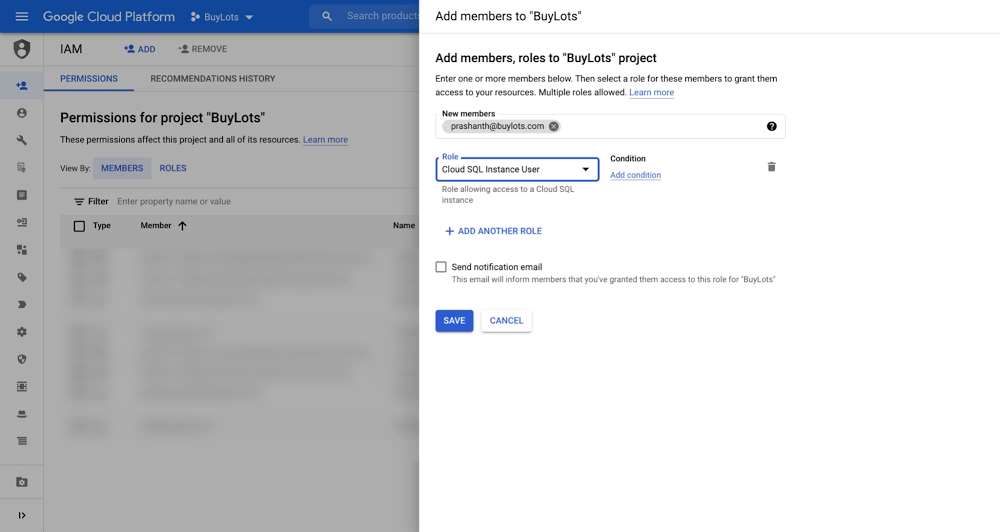
When enterprise IT administrators design their data systems, security is among the most important considerations they have to make. Security is key to defining where data is stored and how users access it. Traditionally, IT administrators have managed user access to systems like SQL databases through issuing users a separate, dedicated username and password. Although it’s simple to set up, distributed access control requires administrators to spend a lot of time securing each system, instituting password complexity and rotation policies. For some enterprises, such as those bound by SOX or PCI-DSS rules, these measures may be required in each system for regulatory compliance. To minimize management effort and the risk of an oversight, IT administrators often prefer centralized access control, in which they can use a single hub to grant or revoke access to any system, including SQL databases.To achieve that centralized access control, we’ve released IAM database authentication for Cloud SQL for MySQL  into general availability. With IAM database authentication, administrators can use Cloud Identity and Access Management (IAM), Google Cloud’s centralized access management system, to govern not only administrative access, but also connection access for their MySQL databases. With Cloud IAM, administrators can reduce the administrative effort associated with managing passwords for each Cloud SQL database. Furthermore, with Cloud Identity’s robust password security system, administrators can establish a strong, unified security posture and maintain compliance across all Google Cloud systems, including Cloud SQL. With IAM database authentication, end-users can log in to the Cloud SQL database with their Cloud Identity credentials. First, users log in to Google Cloud. When ready to access the database, the user uses gcloud or the Google Cloud API to request an access token and then presents their Google username along with the token to the database instance in order to log in. Before the user can log in to the database, Cloud IAM checks to make sure that the user has permission to connect. Compared with the database’s built-in authentication method, IAM database authentication means users have one less password to manage. Both individual end users and applications can use IAM database authentication to connect to the database. How to Set Up IAM Database AuthenticationTo illustrate with an example, let’s say the IT administrator team at a retailer named BuyLots wants to let Prashanth from the data analyst team authenticate to a new US Reporting MySQL database instance running in Cloud SQL. Prashanth already has a Cloud Identity account.First, the administrator goes to Cloud IAM and grants Prashanth’s Cloud Identity account the Cloud SQL Instance User role. This ensures that Cloud IAM will respond affirmatively when Cloud SQL checks to see if Prashanth should be allowed to access the database during login.Click to enlargeNext, the administrator heads to Cloud SQL and edits the configuration of the US Reporting database instance, enabling IAM database authentication by turning on the “cloudsql_iam_authentication” flag.Click to enlargeAfter that, the administrator creates a new MySQL user account for Prashanth on the US Reporting database instance, selecting Cloud IAM for the authentication method. The administrator submits Prashanth’s full Cloud Identity username (“prashanth@buylots.com”). The administrator notes that because of MySQL character limits, Prashanth’s MySQL username is his Cloud Identity username without the domain (“prashanth”).Click to enlargeFinally, the administrator needs to open up MySQL and explicitly grant the appropriate privileges to Prashanth so that he can access the correct tables with the right level of permissions. While Cloud IAM handles authentication, Cloud SQL still uses MySQL’s privilege system to determine what actions the user is authorized to perform. New IAM database authentication MySQL users have no privileges when they are created. The administrator grants Prashanth read access to all tables in the sales database in the US Reporting database instance.The administrator has now successfully set up Prashanth to connect to the Cloud SQL for MySQL instance using IAM database authentication.How to Log in with IAM Database AuthenticationIt’s time for Prashanth to log in to the US Reporting database instance to pull some data for his monthly report. Prashanth uses the Cloud SDK from his laptop to access Google Cloud. For his MySQL queries, Prashanth uses the MySQL Command-Line Client, and he connects to BuyLots databases through the Cloud SQL Auth proxy. Prashanth uses the Cloud SQL Auth proxy because it makes connecting simpler. The proxy directs connection requests so that US Reporting looks local to Prashanth’s MySQL Command-Line Client. Furthermore, the Cloud SQL Auth proxy takes care of SSL encryption for him, so Prashanth doesn’t have to worry about self-managed SSL certificates.First, Prashanth uses the Cloud SDK to log in to Google Cloud and enters his Cloud Identity credentials through the web browser.Next, Prashanth fires up the Cloud SQL Auth proxy. Prashanth passes in the instance connection name and the port number for the MySQL connection request to use. Since Prashanth already logged in earlier to Google Cloud, the Cloud SQL Auth proxy can use Prashanth’s Cloud SDK credentials to authorize his connections to the instance.Lastly, Prashanth uses a command to connect to MySQL from his operating system’s command line interface. For the MySQL username, Prashanth passes in his Cloud Identity username, leaving off the BuyLots domain name. In place of a traditional MySQL password, Prashanth passes in a command invoking the Cloud SDK to return his Cloud Identity access token. Prashanth also has to specify the cleartext option in the connection request. Since he’s using the Cloud SQL Auth proxy, he can indicate that the host is local.Prashanth has now connected to his Cloud SQL for MySQL database using IAM database authentication! Learn MoreWith IAM database authentication, enterprise IT administrators can now further secure access to Cloud SQL databases and centrally manage access through Cloud IAM. To learn more about IAM database authentication for Cloud SQL for MySQL, see our documentation.Related ArticleImproving security and governance in PostgreSQL with Cloud SQLManaged cloud databases need security and governance, and Cloud SQL just added pgAudit and Cloud IAM integrations to make security easier.Read Article
Quelle: Google Cloud Platform

How to build an open cloud datalake with Delta Lake, Presto & Dataproc Metastore

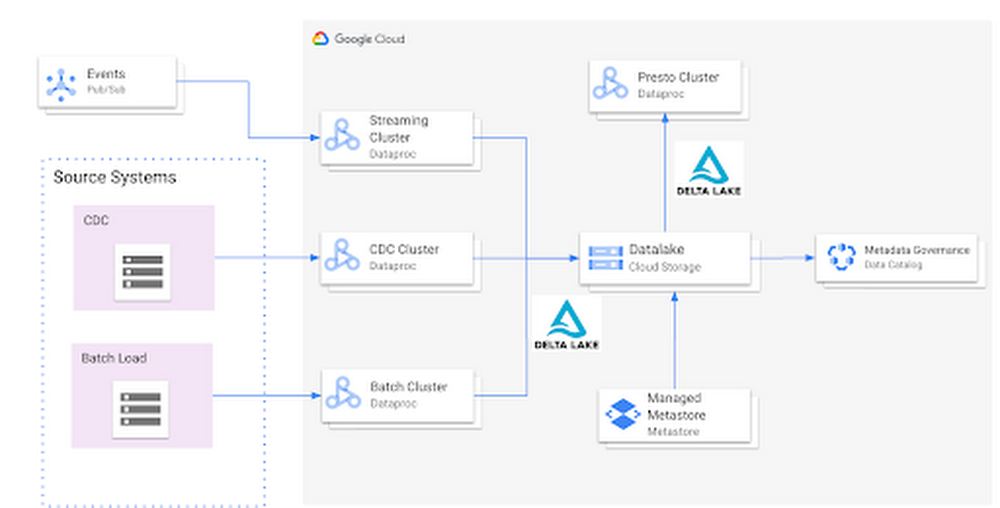
Organizations today build data lakes to process, manage and store large amounts of data that  originate from different sources both on-premise and on cloud. As part of their data lake strategy, organizations want to leverage some of the leading OSS frameworks such as Apache Spark for data processing, Presto as a query engine and Open Formats for storing data such as Delta Lake for the flexibility to run anywhere and avoiding lock-ins.Traditionally, some of the major challenges with building and deploying such an architecture were:Object Storage was not well suited for handling mutating data and engineering teams spent a lot of time in building workarounds for thisGoogle Cloud provided the benefit of running Spark, Presto and other varieties of clusters with the Dataproc service, but one of the challenges with such deployments was the lack of a central Hive Metastore service which allowed for sharing of metadata across multiple clusters.Lack of integration and interoperability across different Open Source projectsTo solve for these problems, Google Cloud and the Open Source community now offers:Native Delta Lake support in Dataproc, a managed OSS Big Data stack for building a data lake with Google Cloud Storage, an object storage that can handle mutationsA managed Hive Metastore service called Dataproc Metastore which is natively integrated with Dataproc for common metadata management and discovery across different types of Dataproc clustersSpark 3.0 and Delta 0.7.0 now allows for registering Delta tables with the Hive Metastore which allows for a common metastore repository that can be accessed by different clusters.ArchitectureHere’s what a standard Open Cloud Datalake deployment on GCP might consist of:Apache Spark running on Dataproc with native Delta Lake SupportGoogle Cloud Storage as the central data lake repository which stores data in Delta formatDataproc Metastore service acting as the central catalog that can be integrated with different Dataproc clustersPresto running on Dataproc for interactive queriesSuch an integration provides several benefits:Managed Hive Metastore serviceIntegration with Data Catalog for data governanceMultiple ephemeral clusters with shared metadataOut of the box integration with open file formats and standardsReference implementationBelow is a step by step guide for a reference implementation of setting up the infrastructure and running a sample applicationSetupThe first thing we would need to do is set up 4 things:Google Cloud Storage bucket for storing our dataDataproc Metastore ServiceDelta Cluster to run a Spark Application that stores data in Delta formatPresto Cluster which will be leveraged for interactive queriesCreate a Google Cloud Storage bucketCreate a Google Cloud Storage bucket with the following command using a unique name.Create a Dataproc Metastore serviceCreate a Dataproc Metastore service with the name “demo-service” and with version 3.1.2. Choose a region such as us-central1. Set this and your project id as environment variables.Create a Dataproc cluster with Delta LakeCreate a Dataproc cluster which is connected to the Dataproc Metastore service created in the previous step and is in the same region. This cluster will be used to populate the data lake. The jars needed to use Delta Lake are available by default on Dataproc image version 1.5+Create a  Dataproc cluster with Presto Create a Dataproc cluster in us-central1 region with the Presto Optional Component and connected to the Dataproc Metastore service.Spark ApplicationOnce the clusters are created we can log into the Spark Shell by SSHing into the master node of our Dataproc cluster “delta-cluster”.. Once logged into the master node the next step is to start the Spark Shell with the delta jar files which are already available in the Dataproc cluster. The below command needs to be executed to start the Spark Shell. Then, generate some data.# Write Initial Delta format to GCSWrite the data to GCS with the following command, replacing the project ID.# Ensure that data is read properly from SparkConfirm the data is written to GCS with the following command, replacing the project ID.Once the data has been written we need to generate the manifest files so that Presto can read the data once the table is created via the metastore service.# Generate manifest filesWith Spark 3.0 and Delta 0.7.0 we now have the ability to create a Delta table in Hive metastore. To create the table below command can be used. More details can be found here # Create Table in Hive metastoreOnce the table is created in Spark, log into the Presto cluster in a new window and verify the data. The steps to log into the Presto cluster and start the Presto shell can be found here.#Verify Data in PrestoOnce we verify that the data can be read via Presto the next step is to look at schema evolution. To test this feature out we create a new dataframe with an extra column called “z” as shown below:# Schema Evolution in SparkSwitch back to your Delta cluster’s Spark shell and enable the automatic schema evolution flagOnce this flag has been enabled  create a new dataframe that has a new set of rows to be inserted along with a new column Once the dataframe has been created we leverage the Delta Merge function to UPDATE existing data and INSERT new data # Use Delta Merge Statement to handle automatic schema evolution and add new rowsAs a next step we would need to do two things for the data to reflect in Presto:Generate updated schema manifest files so that Presto is aware of the updated dataModify the table schema so that Presto is aware of the new column.When the data in a Delta table is updated you must regenerate the manifests using either of the following approaches:Update explicitly: After all the data updates, you can run the generate operation to update the manifests.Update automatically: You can configure a Delta table so that all write operations on the table automatically update the manifests. To enable this automatic mode, you can set the corresponding table property using the following SQL command.However, in this particular case we will use the explicit method to generate the manifest files againOnce the manifest file has been re-created the next step is to update the schema in Hive metastore for Presto to be aware of the new column. This can be done in multiple ways, one of the ways to do this is shown below:# Promote Schema Changes via Delta to PrestoOnce these changes are done we can now verify the new data and new column in Presto as shown below:# Verify changes in PrestoIn summary, this article demonstrated:Set up the Hive metastore service using Dataproc Metastore, spin up Spark with Delta lake and Presto clusters using DataprocIntegrate the Hive metastore service with the different Dataproc clustersBuild an end to end application that can run on an OSS Datalake platform powered by different GCP servicesNext stepsIf you are interested in building an Open Data Platform on GCP please look at the Dataproc Metastore service for which the details are available here and for details around the Dataproc service please refer to the documentation available here. In addition, refer to this blog which explains in detail the different open storage formats such as Delta & Iceberg that are natively supported within the Dataproc service.Related ArticleMigrating Apache Hadoop to Dataproc: A decision treeAre you using the Apache Hadoop and Spark ecosystem? Are you looking to simplify the management of resources while continuing to use the …Read Article
Quelle: Google Cloud Platform

Build a platform with KRM: Part 5 – Manage hosted resources from Kubernetes

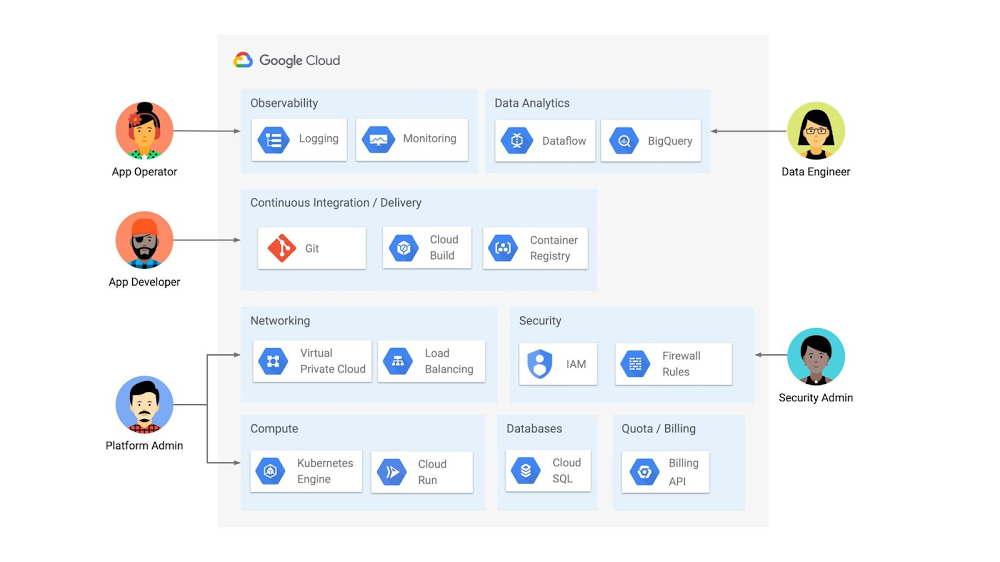
This is the fifth and final post in a multi-part series about the Kubernetes Resource Model. Check out parts 1, 2, 3, and 4 to learn more.  In part 2 of this series, we learned how the Kubernetes Resource Model works, and how the Kubernetes control plane takes action to ensure that your desired resource state matches the running state. Up until now, that “running resource state” has existed inside the world of Kubernetes- Pods, for example, run on Nodes inside a cluster. The exception to this is any core Kubernetes resource that depends on your cloud provider. For instance, GKE Services of type Load Balancer depend on Google Cloud network load balancers, and GKE has a Google Cloud-specific controller that will spin up those resources on your behalf. But if you’re operating a Kubernetes platform, it’s likely that you have resources that live entirely outside of Kubernetes. You might have CI/CD triggers, IAM policies, firewall rules, databases. The first post of this series introduced the platform diagram below, and asserted that “Kubernetes can be the powerful declarative control plane that manages large swaths” of that platform. Let’s close that loop by exploring how to use the Kubernetes Resource Model to configure and provision resources hosted in Google Cloud. Click to enlargeWhy use KRM for hosted resources?Before diving into the “what” and “how” of using KRM for cloud-hosted resources, let’s first ask “why.” There is already an active ecosystem of infrastructure-as-code tools, including Terraform, that can manage cloud-hosted resources. Why use KRM to manage resources outside of the cluster boundary? Three big reasons. The first is consistency. The last post explored ways to ensure consistency across multiple Kubernetes clusters- but what about consistency between Kubernetes resources and cloud resources? If you have org-wide policies you’d like to enforce on Kubernetes resources, chances are that you also have policies around hosted resources. So one reason to manage cloud resources with KRM is to standardize your infrastructure toolchain, unifying your Kubernetes and cloud resource configuration into one language (YAML), one Git config repo, one policy enforcement mechanism. The second reason is continuous reconciliation. One major advantage of Kubernetes is its control-loop architecture. So if you use KRM to deploy a hosted firewall rule, Kubernetes will work constantly to make sure that resource is always deployed to your cloud provider- even if it gets manually deleted. A third reason to consider using KRM for hosted resources is the ability to integrate tools like kustomize into your hosted resource specs, allowing you to customize resource specifications without templating languages. These benefits have resulted in a new ecosystem of KRM tools designed to manage cloud-hosted resources, including the Crossplane project, as well as first-party tools from AWS, Azure, and Google Cloud. Let’s explore how to use Google Cloud Config Connector to manage GCP-hosted resources with KRM. Introducing Config ConnectorConfig Connector is a tool designed specifically for managing Google Cloud resources with the Kubernetes Resource Model. It works by installing a set of GCP-specific resource controllers onto your GKE cluster, along with a set of Kubernetes Custom Resources for Google Cloud products, from Cloud DNS to Pub/Sub.How does it work? Let’s say that a security administrator at Cymbal Bank wants to start working more closely with the platform team to define and test Policy Controller constraints. But they don’t have access to a Linux machine, which is the operating system used by the platform team. The platform team can address this by manually setting up a Google Compute Engine (GCE) Linux instance for the security admin. But with Config Connector, the platform team can instead create a declarative KRM resource for a GCE instance, commit it to the config repo, and Config Connector will spin up the instance on their behalf.Click to enlargeWhat does this declarative resource look like? A Config Connector resource is just a regular Kubernetes-style YAML file- in this case, a custom resource called Compute Instance. In the resource spec, the platform team can define specific fields, like what GCE machine type to use. Once the platform team commits this resource to the Config Sync repo, Config Sync will deploy the resource to the cymbal-admin GKE cluster, and Config Connector, running on that same cluster, will spin up the GCE resource represented in the file.Click to enlargeThis KRM workflow for cloud resources opens the door for powerful automation, like custom UIs to automate resource requests within the Cymbal Bank org. Integrating Config Connector with Policy Controller By using Config Connector to manage Google Cloud-hosted resources as KRM, you can adopt Policy Controller to enforce guardrails across your cloud and Kubernetes resources.  Let’s say that the data analytics team at Cymbal Bank is beginning to adopt BigQuery. While the security team is approving production usage of that product, the platform team wants to make sure no real customer data is imported. Together, Config Connector and Policy Controller can set up guardrails for BigQuery usage within Cymbal Bank. Click to enlargeConfig Connector supports BigQuery resources, including Jobs, Datasets, and Tables. The platform team can work with the analytics team to define a test dataset, containing mocked data, as KRM, pushing those resources to the Config Sync repo as they did with the GCE instance resource. From there, the platform team can create a custom Constraint Template for Policy Controller, limiting the allowed Cymbal datasets to only the pre-vetted mock dataset: These guardrails, combined with IAM, can allow your organization to adopt new cloud products safely- not only defining who can set up certain resources, but within those resources, what field values are allowed. Manage existing GCP resources with Config Connector Another useful feature of Config Connector is that it supports importing existing Google Cloud resources into KRM format, allowing you to bring live-running resources into the management domain of Config Connector. You can use the config-connector command line tool to do this, exporting specific resource URIs into static files: Output:From here, we can push these KRM resources to the config repo, and allow Config Sync and Config Controller to start lifecycling the resources on our behalf. The screenshot below shows that the cymbal-dev Cloud SQL database now has the “managed-by-cnrm” label, indicating that it’s now being managed from Config Connector (CNRM = “cloud-native resource management”).Click to enlargeThis resource export tool is especially useful for teams looking to try out KRM for hosted resources, without having to invest in writing a new set of YAML files for their existing resources. And if you’re ready to adopt Config Connector for lots of existing resources, the tool has a bulk export option as well. Overall, while managing hosted resources with KRM is still a newer paradigm, it can provide lots of benefits for resource consistency and policy enforcement. Want to try out Config Connector yourself? Check out the part 5 demo.This post concludes the Build a Platform with KRM series. Hopefully these posts and demos provided some inspiration on how to build a platform around Kubernetes, with the right abstractions and base-layer tools in mind. Thanks for reading, and stay tuned for new KRM products and features from Google. 
Quelle: Google Cloud Platform

Learn to code for the cloud: Earn native app development skills badges for free

Earlier this year, we launched the Google Cloud skills challenge, which provides 30 days of free access to training to build your cloud knowledge and an opportunity to earn skill badges that showcase your Google Cloud competencies. Today, we’re adding a Native App Development track to the skills challenge, joining the Getting Started, Data Analytics, Kubernetes, Machine Learning (ML) and Artificial Intelligence (AI) tracks. The Native App Development track is designed for cloud developers who want to learn to build serverless web apps and Google Assistant applications on Google Cloud using Cloud Run and Firebase. Specifically, you’ll have an opportunity to earn three skill badges in the Native App Dev track: Serverless Firebase Development, Serverless Cloud Run Development, and Build Interactive Apps with Google Assistant. To earn a skill badge, you complete a series of hands-on labs and take a final assessment challenge lab to test your skills.Here’s an overview of each badge.Serverless Firebase DevelopmentTo earn this skill badge, you’ll learn how to build serverless web apps, import data into a serverless database, and build Google Assistant applications using Firebase, Google’s backend-as-service platform for creating mobile and web applications.Serverless Cloud Run DevelopmentFor this badge, you’ll discover how to use Cloud Run, a fully managed serverless platform, to connect and leverage data stored in Cloud Storage. You’ll learn how to use Cloud Run to build a resilient, asynchronous system with Pub/Sub, build a REST API gateway as well as build and expose services. Build Interactive Apps with Google AssistantTo earn the final skills badge, you’ll build Google Assistant applications by creating a project in the Actions console, integrating Dialogflow, testing your action in the Actions simulator, and adding Cloud Translation API to your assistant application. Ready to jump into the skills challenge? Sign uphere. You can also check out this quick video below to learn how to join the skills challenge.Related Article2021 resolutions: Kick off the new year with free Google Cloud trainingTackle your New Year’s resolutions with our new skills challenges which will provide you with no cost training to build cloud knowledge i…Read Article
Quelle: Google Cloud Platform