What you need to know about Confidential Computing

This blog includes content from Episode One “Confidentially Speaking” of our Cloud Security Podcast, hosted by Anton Chuvakin (Head of Solutions Strategy) and Timothy Peacock (Product Manager). You should listen to the whole conversation for more insights and deeper context.Related ArticleRead ArticleWe all deal with a lot of sensitive data and today, enterprises must entrust all of this sensitive data to their cloud providers. With on-premises systems, companies used to have a very clear idea about who could access data and who was responsible for protecting that data. Now, data lives in many different places—on-premises, at the edge, or in the cloud. You may already know that Google Cloud provides encryption for data when it is in transit or at rest by default, but did you also know we also allow you to encrypt data in use—while it’s being processed? In this podcast episode, Product Manager Nelly Porter gave us a peek under the hood of  confidential computing at Google Cloud. What is confidential computing? Google Cloud’s Confidential Computing started with a dream to find a way to protect data when it’s being used. We developed breakthrough technology to encrypt data when it is in use, leveraging Confidential VMs and GKE Nodes to keep code and other data encrypted when it’s being processed in memory. The idea is to ensure encrypted data stays private while being processed, reducing exposure.During the episode, Nelly Porter explained that Google Cloud’s approach is based on hardware and CPU capability. Confidential Computing is built on the newest generation of AMD CPU processors, which have a Secure Encrypted Virtualization extension that enables the hardware to generate encryption keys that are ephemeral and associated with a single VM.  Basically, they are never stored anywhere else and are not extractable—the software will never have access to those keys. “You can do whatever you need to do, but you will be in a cryptographically isolated space that no other strangers passing by can see.”Memory controllers use the keys to quickly decrypt cache lines when you need to execute an instruction and then immediately encrypts them again. In the CPU itself, data is decrypted but it remains encrypted in memory. Confidential computing aims to mitigate gaps in data securityNelly also shed some light on why confidential computing will continue to play a central role in the future of cloud computing. She pointed out that one of the biggest gaps companies are looking to cover is securing data when it is in use. Data that is encrypted on-premises or in cloud storage, but the biggest risk for companies is when they start working with that data. For instance, imagine you encrypted your data on-premises and only you hold the keys. You upload that data into Cloud Storage buckets—simple, safe, and secure. But now, you want to train machine learning models based on that data. When you upload it into your environment, it’s no longer protected. Specifically, data in reserved memory is not encrypted.We’re trying to ensure that your data is always protected in whatever state it exists, so fewer people have the opportunity to make mistakes or maliciously expose your data.Top takeaways about confidential computing Throughout the conversation, Nelly also shared interesting points about the development and direction of confidential computing at Google Cloud. Here were our favorite takeaways from the podcast: We worked hard to make Google Cloud’s approach simple.We’ve invested a lot of time and effort into investigating the possibilities (and limitations) of confidential computing to avoid introducing residual risks to our approach. For instance, the early introduction of hardware capable of confidential computing in the industry required IT teams to have the resources to rewrite or refactor their app, severely limiting their ability to adopt it within their organizations. With Confidential Computing, teams can encrypt data in use without making any code changes in their applications.  All Google Cloud workloads can run as Confidential VMs, enabled with a single checkbox, making the transition to confidential computing completely simple and seamless. “A lot of customers understand the values of confidential computing, but simply cannot support re-writing the entire application. It’s why Google Cloud, in particular, decided to take a different approach and use models that were incredibly easy to implement, ensuring that our customers would not have those barriers to cross.”Confidential computing is for more than just fintech. There is, of course, a compelling use case for confidential computing at highly-regulated companies in financial, government, life sciences, and public sectors. However, Nelly shared that her team didn’t anticipate that even verticals without significant regulation or compliance requirements would be so interested in this technology, mostly to pre-empt privacy concerns. Many companies see confidential computing as a way to create cryptographic isolation in the public cloud, allowing them to further ease any user or client concerns about what they are doing to protect sensitive data. For instance, during COVID-19, there was an increase in small research organizations that wanted to collaborate across large datasets of sensitive data. “Prior to confidential computing, it wasn’t possible to collaborate because you needed the ability to share very sensitive data sets among multiple parties while ensuring none of them will have access to this data, but the results will benefit all of them—and us.”An open community, working together will be key for the future. Nelly also shared that there are plans to extend memory protections beyond just CPUs to cover GPUs, TPUs, and FPGAs. Google Cloud is working with multiple industry vendors and companies to develop confidential computing solutions that will cover specific requirements and use cases.Confidential computing will not be achieved by a single organization – it will require many people to come together. We are a member of the Confidential Computing Consortium, which aims to solve security for data in use and includes other vendors like Red Hat, Intel, IBM, and Microsoft. “Google alone would not be able to accomplish confidential computing. We need to ensure that all vendors, GPU, CPU, and all of them follow suit. Part of that trust model is that it’s third parties’ keys and hardware that we’re exposing to a customer.”There are no magic bullets when it comes to security. Confidential computing is still an emerging, very new technology and unsurprisingly, there are a lot of questions about what it does and how it works. It’s important to remember that there is no such thing as the one-tool-fits-all-threats security solution. Instead, Nelly notes that confidential computing is yet another tool that can be added to your security arsenal. “No solution will ever be the magic bullet that will make everyone happy and secure, guaranteed. But confidential computing is an addition to our toolbox of defense against gaps we have to take super seriously and invest in solving.” Did you enjoy this blog post? To listen to the full conversation, head over to Episode One “Confidentially Speaking” of our Cloud Security Podcast, hosted by Anton Chuvakin (Head of Solutions Strategy) and Timothy Peacock (Product Manager). We also recommend checking outother episodes of the Cloud Security Podcast by Google for more interesting stories and insights about security in the cloud, from the cloud, and of course, what we’re doing at Google Cloud.
Quelle: Google Cloud Platform
Where should I run my stuff? Choosing a Google Cloud compute option

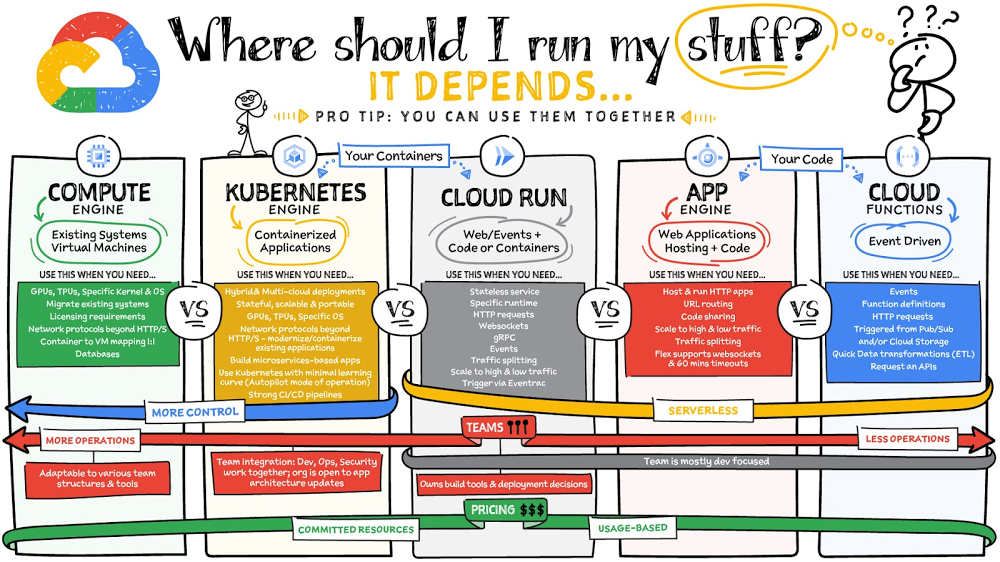
Where should you run your workload? It depends…Choosing the right infrastructure options to run your application is critical, both for the success of your application and for the team that is managing and developing it. This post breaks down some of the most important factors that you need to consider when deciding where you should run your stuff!Click to enlargeWhat are these services?Compute Engine – Virtual machines. You reserve a configuration of CPU, memory, disk, and GPUs, and decide what OS and additional software to run.Kubernetes Engine – Managed Kubernetes clusters. Kubernetes is an open-source system for automating deployment, scaling, and management of containerized applications. You create a cluster and configure which containers to run; Kubernetes keeps them running and manages scaling, updates and connectivity.Cloud Run – A fully managed serverless platform that runs individual containers. You give code or a container to Cloud Run, and it hosts and auto scales as needed to respond to web and other events.App Engine – A fully managed serverless platform for complete web applications. App Engine handles the networking, application scaling, and database scaling. You write a web application in one of the supported languages, deploy to App Engine, and it handles scaling, updating versions, and so on. Cloud Functions – Event-driven serverless functions. You write individual function code and Cloud Functions calls your function when events happen (for example, HTTP, Pub/Sub, and Cloud Storage changes, among others). What level of abstraction do you need?If you need more control over the underlying infrastructure (for example, the operating system, disk images, CPU, RAM, and disk) then it makes sense to use Compute Engine. This is a typical path for legacy application migrations and existing systems that require a specific OS. Containers provide a way to virtualize an OS so that multiple workloads can run on a single OS instance. They are fast and lightweight, and they provide portability. If your applications are containerized then you have two  main options. You can use Google Kubernetes Engine, or GKE, which gives you full control over the container down to the nodes with specific OS, CPU, GPU, disk, memory, and networking. GKE also offers Autopilot, when you need the flexibility and control but have limited ops and engineering support. If, on the other hand, you are just looking to run your application in containers without having to worry about scaling the infrastructure, then Cloud Run is the best option. You can just write your application code, package it into a container, and deploy it.  If you just want to code up your HTTP-based application and leave the scalability and deployment of the app to Google Cloud then App Engine — a serverless, fully-managed option that is designed for hosting and running web applications — is a good option for you. If your code is a function and just performs an action based on an event/trigger, then deploying it with Cloud Functions makes sense. What is your use case? Use Compute Engine if you are migrating a legacy application with specific licensing, OS, kernel, or networking requirements. Examples: Windows-based applications, genomics processing, SAP HANA.Use GKE if your application needs a specific OS or network protocols beyond HTTP/s. When you use GKE, you are using Kubernetes, which makes it easy to deploy and expand into hybrid and multi-cloud environments. Anthos is a platform specifically designed for hybrid and multi-cloud deployments. It provides single-pane-of-glass visibility across all clusters from infrastructure through to application performance and topology. Example: Microservices-based applications. Use Cloud Runif you just need to deploy a containerized application in a programming language of your choice with HTTP/s and websocket support. Examples: websites, APIs, data processing apps, webhooks.Use App Engine if you want to deploy and host a web based application (HTTP/s) in a serverless platform. Examples: web applications, mobile app backendsUse Cloud Functions if your code is a function and just performs an action based on an event/trigger from Pub/Sub or Cloud Storage. Example: Kick off a video transcoding function as soon as a video is saved in your Cloud Storage bucket.Need portability with open source? If your requirement is based on portability and open-source support take a look at GKE, Cloud Run, and Cloud Functions. They are all based on open-source frameworks that help you avoid vendor lock-in and give you the freedom to expand your infrastructure into hybrid and multi-cloud environments.  GKE clusters are powered by the Kubernetes open-source cluster management system, which provides the mechanisms through which you interact with your cluster. Cloud Run for Anthos is powered by Knative, an open-source project that supports serverless workloads on Kubernetes. Cloud Functions use an open-source FaaS (function as a service) framework to run functions across multiple environments. What are your team dynamics like?If you have a small team of developers and you want their attention focused on the code, then a serverless option such as Cloud Run or App Engine is  a good choice because you won’t have to have a team managing the infrastructure, scale, and operations. If you have bigger teams, along with your own tools and processes, then Compute Engine or GKE makes more sense because it enables you to define your own process for CI/CD, security, scale, and operations. What type of billing model do you prefer? Compute Engine and GKE billing models are based on resources, which means you pay for the instances you have provisioned, independent of usage. You can also take advantage of sustained and committed use discounts. Cloud Run, App Engine, and Cloud Functions are billed per request, which means you pay as you go. ConclusionIt’s important to consider all the relevant factors that play a role in picking appropriate compute options for your application. Remember that no decision is necessarily final; you can always move from one option to another.To explore these points in more detail, please take a look at the “Where Should I Run My Stuff?” video.For more #GCPSketchnote, follow the GitHub repo &  thecloudgirl.dev. For similar cloud content follow us on Twitter at @pvergadia and @briandorseyRelated ArticleCurious about Google Cloud Bare Metal Solution? Start here.Bare Metal solution helps you modernize your specialized Oracle workloads by providing an easier and a faster migration path while mainta…Read Article
Quelle: Google Cloud Platform

Cloud Armor: enhancing security at the edge with Adaptive Protection, expanded coverage scope, and new rules

Cloud Armor, Google Cloud’s DDoS defense service and web-application firewall (WAF) helps customers protect their websites and services from denial of service and web attacks every day using the same infrastructure, network, and technology that has protected Google’s own internet-facing properties from the largest DDoS attacks reported. To stay ahead of the evolving threat landscape, we’re continuing to enhance protections delivered at the edge of Google’s network through innovations in Cloud Armor.First, we’re releasing the preview of Cloud Armor Adaptive Protection, a machine learning-powered capability to protect your applications and services from Layer 7 DDoS attacks. We have been building and maturing this technology with internal and external design partners and testers over the last few years. All Cloud Armor customers can try it at no extra charge during the preview period.To further help customers keep their networks safe with Cloud Armor, we are announcing general availability of four new preconfigured WAF rules and a reference architecture to help Google Cloud customers protect themselves from the OWASP Top 10 web-app vulnerability risks. Finally, we are introducing preview releases of Cloud Armor protection for content served from Cloud CDN or Google Cloud Storage backend buckets, as well as per-client rate limiting.Adaptive Protection: Detect suspicious traffic early for rapid attack mitigation First, let’s take a deeper dive into what Adaptive Protection has to offer. Adaptive Protection monitors traffic out-of-band and learns what normal traffic patterns look like, developing and constantly updating a baseline on a per-application/service basis. Adaptive Protection quickly identifies and analyzes suspicious traffic patterns and provides customized, narrowly tailored rules that mitigate ongoing attacks in near-real time. Applications and workloads exposed to the internet are at constant risk of DDoS attacks. While L3/L4 volumetric- and protocol-based attacks are effectively mitigated at Google’s edge, targeted application layer (Layer 7) attacks are still a constant risk. In L7 attacks, well-formed, legitimate web requests are generated by automated processes from compromised devices (e.g., botnets) at volumes high enough to saturate the web site or service. This problem has grown increasingly acute as the size and frequency of DDoS attacks increases with the proliferation of widely-available DDoS attack tools and for-hire botnets. Since attacks can come from millions of individual IPs, manual triage and analysis to generate and enforce blocking rules becomes time and resource intensive, ultimately allowing high-volume attacks to impact applications.How Adaptive Protection works to detect potential attacksAdaptive Protection is the result of a multi-year research and development effort conducted by teams across Google, with feedback and testing from external technology partners and customers. Security operations teams receive three primary benefits from Adaptive Protection: 1) early alerts on anomalous requests on a per-backend-service basis, 2) dynamically generated signatures describing the potential attack, and 3) a suggested custom WAF rule to block the offending traffic. Alerts from Adaptive Protection are sent to the Cloud Armor dashboard, Security Command Center, and Cloud Logging with notification of an impending attack. The attack-specific signatures and WAF rule are the result of a second set of ML models, comprised of dozens of traffic features and attributes. Adaptive Protection’s models are built using TensorFlow in order to efficiently and accurately detect application level attacks and identify the best way to mitigate them. The WAF rule is presented to the user as part of the alert issued for the detection. Users are then able to choose to deploy the proposed WAF rule in near-real time to block the attack at the edge of Google’s network. This early detection helps the teams rapidly mitigate attacks far upstream from cloud infrastructure and services.How Project Shield uses Adaptive Protection: a case studyAdaptive Protection is used by Project Shield, a service from Google that helps protect news, human rights, and election monitoring sites from DDoS attacks. Adaptive Protection has allowed the team to greatly increase efficiency while offering insight, analysis, and more effective mitigations of attacks.For example, the Project Shield team recently received the alert in the image above. This attack, an HTTP Flood, peaked above 17,700 requests per second (RPS) which represented an anomalous increase from normal traffic volumes for this endpoint. Adaptive Protection detected and alerted on the attack a few seconds after it started. Critically, the alert arrived almost 2 minutes before the attack ramped up to its eventual peak, and it came with a proposed mitigation. The alert that arrived was enriched by our signature detection models with a thorough analysis on the nature and origins of the attacks, and suggested a Cloud Armor WAF rule to block the attack. An example of the signature of the attack provided is captured in the below two images.The team was able to immediately see the regions from which the attack traffic was originating, as well as a side-by-side comparison of the prevalence of the implicated source regions during the event to their prevalence in the established baseline. The six implicated regions collectively contributed ~50% of the attack traffic during the event, while normally they contribute less than 1% of all traffic, according to the baseline model.A similar analysis of client types surfaced nine distinct user-agents that contributed ~100% of the attack traffic, whereas in the baseline model those same nine appeared in less than 1% of requests. This is not surprising, as the implicated user-agent strings corresponded to older mobile and desktop browser versions that could be utilized by common attack tools while legitimate clients typically use up-to-date browser versions.Finally, the alert that was generated in the first few seconds of the attack included not only the full signature details described above but also a recommended Cloud Armor WAF rule narrowly tailored to block only the attack traffic and allow genuine requests through. With the alert, the analysis, and the proposed WAF rule, the defenders were enabled to respond to the attack in near real time without having to spend precious minutes or hours analyzing logs to synthesize a mitigation. Get started with Adaptive ProtectionGet started today by enabling Adaptive Protection in existing security policies by checking the “enable” check box when editing the policy from your Cloud Armor section in the Console. All Cloud Armor customers can try out Adaptive Protection while it is in preview at no extra charge. When it reaches general availability, Adaptive Protection’s attack detection and notification will continue to be included in Cloud Armor Standard, while attack signature identification and mitigating rules suggestions will only be available as part of our recently announced Cloud Armor Managed Protection Plus subscription.New rules, reference architecture, and protectionsEnterprises must satisfy requirements for external compliance frameworks, like PCI DSS, as well as internal security goals. Cloud Armor enhancements make this easier. Four additional preconfigured WAF rules are now generally available to help mitigate OWASP Top 10 web-app vulnerability risks. Together, they help protect your websites and services from attacks such as HTTP request smuggling and unwanted scanners and crawlers:Scanner DetectionPHP InjectionSession FixationProtocol EnforcementAdditionally, we have published a whitepaper and reference architectures to help you understand how to leverage and configure a variety of products and controls on Google Cloud to help protect yourself from the OWASP Top 10 and meet compliance requirements.We are also expanding the scope of protection on Google Cloud by introducing the preview of Cloud Armor protection for workloads serving content from Cloud CDN as well as Google Cloud Storage (GCS) backend buckets. Now you can enforce geography-based access policies and block unwanted users in order to comply with licensing or regulatory requirements by deploying Cloud Armor edge security policies in front of your CDN or GCS enabled services to filter requests before they are served from cache. Finally, we are announcing the preview release of per-client rate limiting in Cloud Armor by introducing two new rule actions: throttle and rate-based-ban. Now users can help ensure the availability of their applications, prevent abuse, and mitigate malicious activity like credential stuffing by configuring Cloud Armor to throttle clients to a specified request rate or block all traffic from abusive clients. Rate limiting rules will be available to all Cloud Armor customers (both Standard and Managed Protection Plus) in the upcoming weeks. With all of these advancements Cloud Armor continues to provide customers around the world with cloud-native protections that help keep their networks safe from evolving threats. To learn more, explore the following resources: Adaptive Protection OverviewManaged Protection Plus OverviewSecurity Policy Overview: Edge Security PoliciesIntegrating Cloud Armor with Cloud CDNRelated ArticleEnhance DDoS protection & get predictable pricing with new Cloud Armor serviceProtect yourself with the same technology that has protected Google from some of the largest cyber attacks ever reported.Read Article
Quelle: Google Cloud Platform

Reaffirming Google Cloud’s commitments to EU businesses in light of the EDPB’s Recommendations

From retail companies to auto manufacturers and financial services institutions, organizations across Europe rely on our cloud services to run their businesses. We are committed to helping our customers meet stringent data protection requirements by offering industry-leading technical controls, contractual commitments, and continued transparency to support their risk assessments and compliance needs. On June 21, 2021, the European Data Protection Board (EDPB) published its finalRecommendations on supplementary measures following the Court of Justice of the European Union’s ruling, which invalidated the EU-US Privacy Shield Framework and upheld the validity of the EU Standard Contractual Clauses (SCCs). The EDPB’s guidance is important to help organizations address international data transfers. Many of the Board’s recommendations align with our long-standing practices. In the light of the above, we want to reaffirm our commitment to GDPR compliance and to help Google Cloud customers meet their compliance objectives when using our services. In particular:A customer-controlled cloudOur customers own their data and we believe they should have the strongest levels of control over data stored in the cloud.  Our public cloud provides customers with world-class levels of visibility and control over their data through our services.   With the capabilities we offer, Google Cloud Platform customers can store data in the European region, ensure customer data is not moved outside of Europe, and prevent users and administrators outside of Europe from accessing their data. They can exercise control over who accesses their data by managing their own encryption keys, ensuring the keys are stored in a European region, and storing them outside Google Cloud’s infrastructure. Customers can also require detailed justification and approval each time a key is requested to decrypt data using External Key Manager, and deny Google the ability to decrypt their data for any reason using Key Access Justifications, which is now in General Availability. You can learn more by reading our blog on advancing control and visibility in the cloud. For insight into what this commitment means to customers from a technical perspective, please see our post on options for data residency, operational transparency and control. Google Cloud was the first and is currently the only cloud provider to offer the ability for customers to store and manage encryption keys for cloud-resident data outside the provider’s infrastructure with programmatic control over decryption based on specific justifications, including government access requests.Our Google Workspace (formerly G Suite) customers can opt to store their covered data in Europe. Additionally, we’re taking encryption a step further in Workspace by giving customers direct control of encryption keys and the identity service they choose to access those keys. With Client-side encryption, customer data is indecipherable to Google, while users can continue to take advantage of Google’s native web-based collaboration, access content on mobile devices, and share encrypted files externally. This capability is currently available in Public Beta for Google Drive, Docs, Sheets, and Slides with plans to extend it to other Workspace services. Customers can also benefit from third party solutions that offer end-to-end encryption for Gmail. With these solutions, customers can keep keys in their preferred geo-location and manage access to covered content.Google Cloud will continue to invest in capabilities that ensure that our customers control the location of and access to their data.New Standard Contractual Clauses The European Commission has published new Standard Contractual Clauses to help safeguard European personal data. Google Cloud plans to implement the new SCCs to help protect our customers’ data and meet the requirements of European privacy legislation. Like the previous SCCs, these clauses can be used to facilitate lawful transfers of data.Transparency to help your risk-based assessmentThe EDPB’s recommendations introduce a risk-based approach under which data exporters should assess the level of risk to fundamental rights that a certain transfer would entail in practice.Our Transparency Report discloses the number of requests made by law enforcement agencies and government bodies for Enterprise Cloud customer information. The historical numbers show that the number of Enterprise Cloud-related requests is extremely low compared to our Enterprise Cloud customer base. For example, our report shows that we didn’t produce any Google Cloud Platform Enterprise customer data in response to government requests for the last reporting period. The likelihood of Enterprise Cloud customer information data being affected by these types of requests is therefore low.We also work hard to help our customers conduct a meaningful assessment by giving a clear and detailed understanding of our process for responding to government requests for Cloud customer data in rare cases where they do happen.AccountabilityWe are always looking at ways to increase our accountability and compliance support for our customers. Recently we announced our adherence to the EU GDPR Code of Conduct.  Codes of conduct are effective collaboration instruments among industry players and data protection authorities where state-of-the-art industry practices can be tailored to meet stringent data protection requirements. We believe that this Code provides a robust basis to build an international data transfer tool for cloud services and will continue to support industry efforts in this regard.  We also continue to follow and be certified against internationally-recognized privacy and security standards such as ISO/IEC 27001, ISO/IEC 27017, ISO/IEC 27018, and ISO/IEC 27701. Certifications provide independent validation of our ongoing dedication to world-class security and privacy. Strong policy advocacyWe will continue to advocate for the principles we believe should guide access requests by government authorities for enterprise data anywhere in the world. Government engagement on a bilateral and multilateral level is critical for modernizing laws and establishing rules for the production of electronic evidence across borders in a manner that respects international norms and resolves any potential conflicts of law. Google has long supported these efforts, including work to find a successor to the US-E.U. Privacy Shield to restore legal certainty around trans-Atlantic personal data flows and develop common global principles on government access to data at the Organisation for Economic Co-operation and Development (OECD) level. We will continue to support these efforts while protecting the privacy and security of our customers. Millions of organisations with users in Europe rely on our cloud services to run their businesses every day, and we remain steadfastly committed to helping them meet their regulatory requirements by maintaining a diverse set of compliance tools in light of EDPB’s recommendations.Related ArticleGoogle Cloud’s contribution to an environment of trust and transparency in EuropeThe Belgian Data Protection Authority has approved a new Cloud Code of Conduct, and Google Cloud is among the first cloud providers to ad…Read Article
Quelle: Google Cloud Platform

Introducing Quilkin: open-source UDP proxies built for game server communication

Traditionally, dedicated game servers for real time multiplayer games have used bespoke UDP protocols for communication and synchronization of gameplay among the players within a game. This communication is most often bundled into monolithic game servers and clients, pairing the technical functionality of communication protocols, such as custom network physics synchronisation, security, access control, telemetry and metrics, with the extremely high computational requirements of physics simulations, AI computation and more.Developed in collaboration with Embark Studios, Quilkin is a UDP proxy, tailor-made for high performance real-time multiplayer games. Its aim is twofold:Pull common functionality, such as security, access control, telemetry and metrics out of monolithic dedicated game servers and clients.Provide this common functionality in a composable and configurable way, such that it can be reused across a wide set of multiplayer games.This reusable foundation then allows game developers to spend more of their time focusing on building the game-specific aspects of building their multiplayer communication protocols, rather than these common aspects.Challenges with multiplayer Game Server communicationIn fast-paced, multiplayer games, the full simulation of a session of gameplay generally occurs within the memory of a monolithic dedicated game server, whose responsibility covers everything from network physics and AI simulation to communications from client back to server and more.Since the entire state of the game is memory resident, each client connects directly to the dedicated game server the player is playing on, which presents several challenges:Each dedicated game server is a single point of failure. If it goes down, then the whole game session (or sometimes multiple sessions) fails. This makes it a target for malicious actors.The IP and port of connection to the game server is public, and exposed to the game client, making it easy to discover and target.Multiple aspects of game server simulation and network communication are tightly coupled in the same process, making reuse and modularity more difficult, and expanding risk of performance issues.If we look at both web and mobile technologies over the past several years, some of these challenges start to look very familiar. Thankfully, one of the solutions to help drive dedicated server workloads to more redundant and distributed orchestration is the utilisation of traffic proxies!By using a proxy for multiplayer UDP traffic, in front of our dedicated games servers within a low latency network such as what is available on Google Cloud, we can address these key challenges as follows:Greater reliability. Proxies provide redundant points of communication entry. UDP packets can be sent to any number of proxies and routed to the dedicated game server. While a dedicated game server will still generally be a single point of failure, proxies improve redundancy and potential failover at the communication layer.Greater security. The IP and port of the dedicated game server is no longer public. Game clients may only have visibility into a subset of the proxy pool, limiting a potential attack surface.Greater scalability. We start to break apart the single process, as we can move aspects of the communication protocol, metrics, communication security and access control into the proxy. This removes the non-game specific computation out of your game server’s processing loop.As a result, the entire system is now more resilient as proxies can be scaled independently, not only for performance reasons but also to distribute load in case of malicious actors.Introducing Quilkin: The UDP proxy for Game ServersEmbark Studios and Google Cloud came together and built Quilkin, to provide a standard, open source solution.  Based out of Stockholm, Embark Studios is a (relatively) new studio made up of seasoned industry veterans.  They were the perfect collaboration partner to create Quilkin with, given their team’s experience with large scale real time multiplayer games.  Quilkin is an open-source, non-transparent UDP proxy specifically designed for use with large scale multiplayer dedicated game server deployments, to ensure security, access control, telemetry data, metrics and more.Quilkin is designed to be used behind game clients as well as in front of dedicated game servers, and offers the following major benefits:Obfuscation. Non-transparent proxying of UDP data, making the internal state of your game architecture less visible to bad actors.Out of the box metrics. For UDP packet traffic and communication.Visibility. A composable set of processing filters that can be applied for routing, access control, rate limiting, and more.Flexibility. Ability to to be utilised as a standalone binary, with no client/server changes required or as a Rust library, depending on how deep an integration you wish for your system and/or custom processing Filters you wish to build.Compatibility. Can be integrated with existing C/C++ code bases via Rust FFI, if required.Onboarding. Multiple integration patterns, allowing you to choose the level of integration that makes sense for your architecture and existing platform.Until now, these sorts of capabilities are only available to large game studios with resources to build their own proprietary technology. We think leveling the playing field for everyone in the games industry is an important and worthy endeavor. That’s why we collaborated with Google Cloud and initiated this project together.At Embark, we believe open source is the future of the games industry and that open, cross-company collaboration is the way forward, so that all studios, regardless of size, are able to achieve the same level of technical capabilities. —Luna Duclos, Tech Lead, Embark StudiosGoogle Cloud is excited to announce Quilkin as the latest entry in our portfolio of open-source solutions for gaming.  Quilkin complements our existing OSS solutions including Agones for game servers, Open Match for matchmaking, and Open Saves for persistence.  These are designed to work together as an open and integrated ecosystem for gaming.  We’re proud to include Embark Studios as our latest open source collaborator for gaming along with Ubisoft, Unity, and 2K Games.  Google Cloud will continue to work closely with our partners in industry and the community to offer planet-scale solutions to power the world’s largest games. —Rob Martin, Chief Architect, Google Cloud for GamesGetting started with QuilkinWhile Quilkin can support more advanced deployment scenarios like above, the easiest way to get started with Quilkin is to deploy it as a sidecar to your existing dedicated game server. This may initially limit some of the benefits, but it’s an easy path to getting metrics and telemetry data about your UDP communication, with a very low barrier to entry and the ability to expand over time.While Quilkin is released as both binaries and container images, and is not tied to any specific hosting platform, we’ll use Agones and Google Cloud Game Servers as our game server hosting platform for this example.First we will create a ConfigMap to store the yaml for a static configuration for Quilkin that will accept connections on port 26001 and route then to the Xonotic (an open source, multiplayer FPS game) dedicated game server on port 26000:Second, we’ll take the example container that Agones provides for the Xonotic dedicated game server, and  run Quilkin alongside each dedicated game server as a sidecar, in an Agones Fleet of game servers like so:Once applied, when we query the cluster for the running GameServers, everything looks the same as it would without Quilkin! Nothing else in our system needs to be aware that the traffic is being intercepted, and we can freely take advantage of the functionality of Quilkin without adjusting either client or server code.If this has piqued your interest, make sure to have a look at the walkthrough, where we step through this same scenario and then extend it to compress UDP packets from the game client to server, without having to change either programs.This just scratches the surface, however: there’s even more to Quilkin, including an xDS compliant admin API, a variety of existing Filters to manipulate and route UDP packets and more.What’s next for QuilkinQuilkin is still in its early stages, with this 0.1.0 alpha release, but we’re very happy with the foundation that has been laid.There are a variety of features in the roadmap, from enhanced metrics and telemetry, new filters and filter types, and more.If you would like to try out this release, you can grab the binaries or container images from our releases page, step through our quickstarts and review different integration options with your dedicated game servers.To get involved with the project, please:Check out our Github repositoryJoin our Discord communityJoin the quilkin-discuss mailing listFollow us on TwitterEmbark Studios has also released their own announcement blog post, going deeper into the plans they have for their own production game backend infrastructure, and where Quilkin fits in.Thanks to everyone who has been involved with this project across Google Cloud and Embark Studios, and we look forward to the future for Quilkin!
Quelle: Google Cloud Platform

Create alerts from your logs, available now in Preview

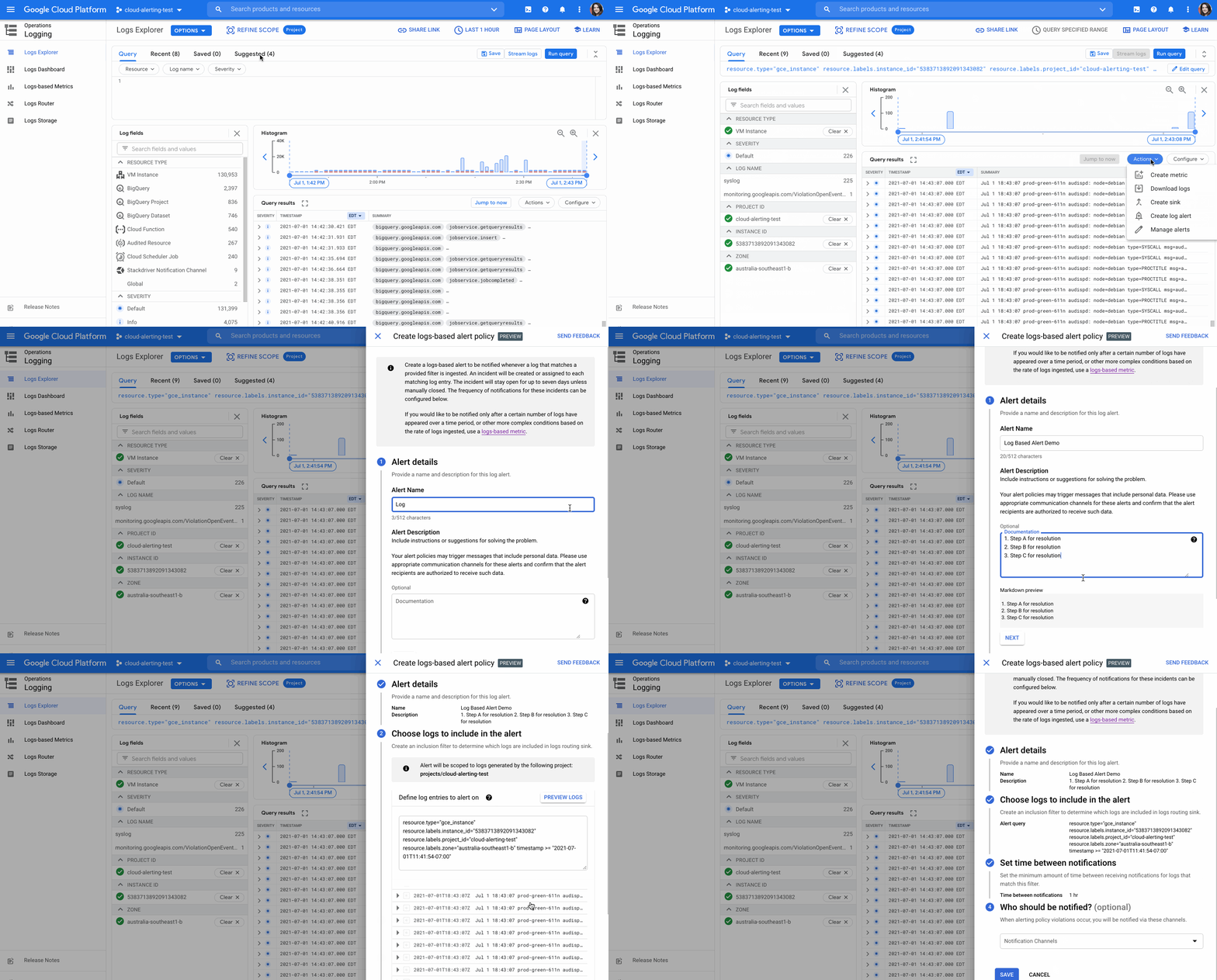
Being alerted to an issue with your application before your customers experience undue interruption is a goal of every development and operations team. While methods for identifying problems exist in many forms, including uptime checks and application tracing, alerts on logs is a prominent method for issue detection. Previously, Cloud Logging only supported alerts on error logs and log-based metrics, but that was not robust enough for most application teams.Today, we’re happy to announce the preview of log-based alerts, a new feature that opens alerts to all log types, adds new notification channels, and helps you make alerts more actionable within minutes. The alert updates include: the ability to set alerts on any log type and content,additional notification channels such as SMS, email groups, webhooks (and more!) anda metadata field for alerts so playbooks and documentation can be included.Alert on any logs dataWhile error logs and log-based metrics are sufficient for many indicators of application and system health, there are some events in security, such as suspicious IP address activity, or runtime system issues such as host errors, where you want to get alerted immediately. We’re happy to announce that you can now set alerts on single log entries via the UI or API.Creating an alert in the UI is easy:Go to Logs Explorer and run your query. Under Actions > Create Log Alert.Enter the following information: a) alert name & documentation, b) any edits to your log query if necessary (and preview the results to confirm it is correct), c) select the minimum interval between alerts for this policy, and d) select the notification channel(s).Click “Save” and you’re done!For more information on configuring a log-based alert, visit the documentation page.Creating a log-based alert in the Google Cloud ConsoleNew notification channelsCloud Logging is pre-integrated with Google Cloud services and can be configured to send alerts when something goes wrong. While email notifications from Cloud Logging were effective during business hours, operations teams and their development cohorts expressed a need for a greater number of communication channels for their global extended workforce partners and after-hours triage units. That’s why we’re excited to announce, as part of this preview, that logging alerts of any kind can be sent to an email group, SMS, mobile push notifications, webhooks, Pub/Sub, and Slack.Enhanced metadata for alertsAlerts are just the first step to actually solving an issue within your service or application. Development and operations teams usually have a playbook or documentation for incidents or occurrences where they want to create an alert. Including links to these materials can save valuable time, especially as workforces involve more geographic distribution and collaboration between a greater number of teams. With this preview announcement, you can now include documentation or links to playbooks that allow your team to investigate and solve alerts.Overview of the fields that are configured as part of logs-based alertsConfigure your logging alerts todayIf you have a critical log field that your team is watching, consider setting up an alert on it today. See the documentation that walks you through each step of configuring an alert.If you’d like to be alerted after a certain count of your log entries, consider a Log-based metric. This allows you to set a threshold for the number of log events that occur within a specific time period before you are notified.If you have suggestions or feedback, please join our Cloud Operations group on the Google Cloud Community site.Related ArticleRead Article
Quelle: Google Cloud Platform

Optimizing your Google Cloud spend with BigQuery and Looker

TL;DR: You can visualize your billing data with Looker to gain insights on your spending over time! Use the Google Cloud Cost Management block to quickly get analyzing.Along with the growth of the power and flexibility of the cloud, there’s also an increasing need for better visibility into your cloud spend. If you’re just getting started or aren’t running much in the cloud, the billing reports are a great place to start and can help you see what you’re paying for. However, as your usage of the cloud grows, you may need even more details on where that spend came from. As a best practice, we always recommend enabling the export of your billing data to BigQuery. This should be your first step when creating a new billing account because you can’t backfill any data before enabling the export and you’ll probably want all the data you can get!That’s a lot of data!The standard billing export includes both a cost table, where you can see cost and usage across services, and a pricing table, that can be used to analyze prices, discounts and services. Besides the standard billing export, you can also use the preview feature to export insights and recommendations data into BigQuery. Recommender is a service that provides per-product or per-service recommendations, and are generated based on heuristic methods, machine learning, and current resource usage. With these exports enabled, you can use BigQuery to analyze spend details down to the hour, but maybe you’re not the kind of person who enjoys writing queries or puzzling through data from  hundreds of thousands of rows (or maybe you are, no judgement). So where do you go from here? Enter visualization!Look, it’s Looker!Looker is a business intelligence/big data analytics platform that helps you explore and analyze your data, and we’ve just recently launched the Google Cloud Billing block to help you get started on your visualization journey. Using the Looker Marketplace, you can easily install any number of Looker Blocks and other content to help you get a running start. Installing the Google Cloud Billing block only takes a few steps and you’ll end up with a dashboard to help you see what your spend looks like.That’s also a lot of data, but much easier to understand!To get started using the GCP Billing block, you’ll need to first create a connection to your BigQuery project using the steps outlined here. Next, you can search through the marketplace to find and install the block on your instance.The pre-built Looker is a great starting place for analyzing your billing data. However, you can continue to develop new fields in LookML or even customize existing definitions. We’ve included some examples of how to customize this block in our Github ReadMe here.  Using the dashboardsNow that you have your shiny new dashboards up and running, there’s a few things you may want to look for to optimize your spend. First off, you may want to use the Cost Summary Dashboard to pinpoint areas of high spend to drill into. Using the Project Deep Dive dashboard we can focus our attention on a single project that has unusual spend behavior. With the information in this report, we can pinpoint a specific service that is ripe for optimization – for example, Compute Engine.Finally, we can head over to the Recommendations Insights dashboard to understand where there may be tactical things we can do to immediately reduce costs.  You can even create a custom field-action to mark a recommendation as accepted straight from the Looker dashboard.Further customizationsOne of the key advantages of centralizing your billing, pricing and recommendations data into BigQuery and analyzing it in Looker is the ability to include custom business logic and other data sources. For example, you may use labels to represent the designated cost center for each project. In this case, you can customize the LookML to create a new dimension that leverages the value from the cost_center, as shown here.  With each cost center represented in your model, you could even refine the aggregation metrics to divide up the support costs across each team. Finally, each one of these centers may have their own budget information, that’s managed in a Google Spreadsheet. By creating an external table in BigQuery, Looker users can now see how each team’s spend is tracking towards their budget.With so many organizations taking a mult-cloud approach to their technology stack, you may be wondering how you can see your Google Cloud billing data alongside other platforms. The good news is that the Google Cloud Cost Management block is just one element of the Looker Multi-Cloud Cost Management Solution – stay tuned for more on that soon! See what I mean?While you may want to do some additional customizations, the block is a great starting point to quickly see where your spend is coming from and if there are any surprises.  Another option to get started is using the Data Studio template that gives you a few starting views into your billing data.The starter Data Studio template with some sample billing dataIf you’re not using Looker yet, check out these getting started guides to help you learn more and request a demo.Related ArticleLooker lets you choose what works best for your dataEmbrace platform freedom with Looker. Learn about how we are expanding our features as a cloud platform to meet the unique needs of every…Read Article
Quelle: Google Cloud Platform

The new Google Cloud region in Delhi NCR is now open

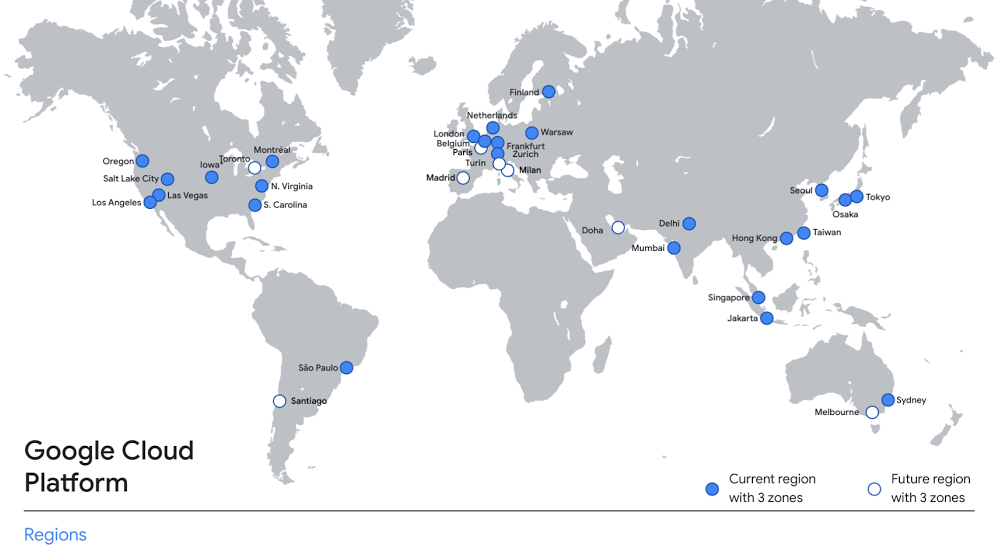
In the past year, Google has worked to surface timely and reliable health information, amplify public health campaigns, and help nonprofits get urgent support to Indians in need. Now, we are continuing to focus on helping India’s businesses accelerate their digital transformation, deepening our commitment to India’s digitization and economic recovery. To support customers and the public sector in India and across Asia Pacific, we’re excited to announce that our new Google Cloud region in Delhi National Capital Region (NCR) is now open. Designed to help both Indian and global companies alike build highly available applications for their customers, the Delhi NCR region is our second Google Cloud region in India and 10th to open in Asia Pacific. What customers and partners are sayingNavigating this past year has been a challenge for companies as they grapple with changing customers demands and economic uncertainty. Technology has played a critical role, and we’ve been fortunate to partner with and serve people, companies, and government institutions around the world to help them adapt. The Google Cloud region in Delhi NCR will help our customers adapt to new requirements, new opportunities and new ways of working, like we’ve helped so many companies do in the region: InMobi scaled a personalized AI platform to support 120+ million active users. “With the arrival of the Google Cloud Delhi NCR, InMobi Group sees the opportunity to continue closing the gap between our users and products,” says Mohit Saxena, Co-founder and Group CTO of Inmobi. “Glance, especially, has been serving AI-powered personalised content to over 120 million active users. We can’t wait to continue giving them truly meaningful experiences that are speedy, scale well, and are relevant to them, by expanding the use of our current tools working on Google Cloud with the opening of a new region.”Groww now supports a sizable user base. “Google Cloud provides great technology that enables us to build and scale infrastructure to millions of users, and the new Google Cloud region in Delhi NCR will continue to help more businesses and startups in India access powerful cloud-based infrastructure, products and services,” says Neeraj Singh, Co-founder and Chief Technology Officer, Groww.HDFC Bank is positioned for the future. “At HDFC Bank, we are harnessing technology platforms to both run and build the bank. As we progress to be future ready, the objective is to invest in future technologies that give us scale, efficiency and resiliency. Towards this the Google Cloud region in Delhi NCR will enable us to enhance our resiliency and help us in building an active-active design framework for our new generation applications on cloud,” says Ramesh Lakshminarayanan, CIO, HDFC Bank.  Dr. Reddy’s Lab built a modern data platform with Google Cloud. “At Dr Reddy’s, we pride ourselves in helping patients regain good health, acting quickly to provide innovative solutions to address patients’ unmet needs and in accelerating access to medicines to people worldwide. Our Google Cloud-powered data platform is helping us realize these objectives and we welcome Google’s investment in the new Delhi NCR region as helping us and other businesses in India make further contributions to our social and economic future,” says Mukesh Rathi, Senior Vice President & CIO, Dr. Reddy’s Laboratories.“To survive the disruption caused by the pandemic and to succeed in the long term, organizations need to become digital natives, so they can be more agile, explore new business models and build new capabilities that boost resilience. A cloud-first strategy plays a key role in enabling businesses to do this,” said Piyush N. Singh, Lead – India market unit & lead – Growth and Strategic Client Relationships, Asia Pacific and Latin America, Accenture. “Harnessing the potential of cloud requires the right data infrastructure and this expansion by Google Cloud will undoubtedly help Indian enterprises in their digital transformation journeys.”A global network of regionsDelhi NCR joins 25 existing Google Cloud regions connected via our high-performance network, helping customers better serve their users and customers throughout the globe. As the second region in India, customers benefit from improved business continuity planning with distributed, secure infrastructure needed to meet IT and business requirements for disaster recovery, while maintaining data sovereignty.Click to enlargeWith this new region, Google Cloud customers operating in India also benefit from low latency and high performance of their cloud-based workloads and data. Designed for high availability, the region opens with three availability zones to protect against service disruptions, and offers a portfolio of key products, including Compute Engine, App Engine, Google Kubernetes Engine, Cloud Bigtable, Cloud Spanner, and BigQuery. Supporting India’s recovery with training and educationGoogle and Google Cloud will also continue to support our customers with people and education programs. We’re investing in local talent and the local developer community to help enterprises digitally transform and support economic recovery. Through the India Digitization Fund, we expanded our efforts to support India’s recovery from COVID-19—in particular, through programs to support education and small businesses. In addition to expanding internet access, and investments to help start-ups accelerate India’s digital transformation, we’ve grown our Grow with Google efforts. Businesses can access digital tools to maintain business continuity, find resources like quick help videos, and learn digital skills—in both English and in Hindi.Helping customers build their transformation cloudsGoogle Cloud is here to support businesses, helping them get smarter with data, deploy faster, connect more easily with people and customers throughout the globe, and protect everything that matters to their businesses. The cloud region in Delhi NCR offers new technology and tools that can be a catalyst for this change. To learn more, visit the Google Cloud locations page, and be sure to watch the region launch event here.Related ArticleGCP arrives in India with launch of Mumbai regionThe first Google Cloud Platform region in India is now open for you to build applications and store your data.Read Article
Quelle: Google Cloud Platform

How to provide better search results with AI ranking

Every IT team wants to get the right information to employees and vendors as quickly as possible. Yet the task is always getting harder as more information becomes available and results invariably become stale. Disparate internal systems hold vital information. Search capabilities are not consistent across tools. No universal system exists. And even inside Google we can’t use our web search technology, because that assumes a fully public dataset, a lot of traffic, and more active content owners. It’s so hard to get internal search right because each person has individual goals, access levels and needs.All too often, this sisyphean task ends up requiring huge amounts of manual labor, or leads to inferior results and frustrated people. At Google we transitioned our internal search to rank results using machine learning models. We found this helps surface the most relevant resources to employees – even when needs change rapidly and new information becomes available.Sudden changeOur internal search site–Moma–is Googlers’ primary way to source information. It covers a large number of data sources, from internal sites to engineering documentation to the files our employees collaborate on. Over 130,000 weekly users issue queries each week – to get their job done and to learn the latest about what’s going on at Google.With COVID-19 and working-from-home changing so much so rapidly, lots of new content and guidance for Googlers was created quickly and needed to be easily accessible and discoverable by all employees. But how to make sure it gets shown?Manual tweakingBefore adopting ML for search ranking, we used to tweak ranking formulas with literally hundreds of individual weights and factors for different data sources and signals. Adding new corpora of information and teaching the search engine new terminology was always possible, but laborious in practice. Synonyms, for example, would rely on separate datasets that needed manual updating, for example to make sure that searches for “Covid19”, “Covid”, and “Coronavirus” all return the relevant pages. The involved human effort to carefully craft and apply changes, validate them and deploy them often meant that new content for new topics was slow to rank highly. Even then, search results could be hit-or-miss depending on how users formulated their queries, as writers often wouldn’t know exactly which keywords to use in their content – especially in situations where trends emerge quickly, and the terminology was evolving in real time.Automated scoringWe now use ML for scoring and ranking results based on many signals, and our model learns quickly because we continuously train on our own usage logs of the last four weeks. Our team integrated this ranking method in 2018, and it served us well with recent shifts in search patterns. When new content becomes available for new needs, the model can pick up new patterns and correlations that would have otherwise taken careful manual modelling. This is the fruit of our investments over the last years, including automatic model releases and validation, measurement and experimentation, which allowed us to get to daily ranking model rollouts.Create training dataCreating training sets is the prerequisite for any application of machine learning, and in this case it’s actually pretty straightforward: Generate the training data from search logs that capture which results were clicked for which queries. Choosing an initial simple set of model features helps to keep complexity low and make the model robust. Click through rate for pages by queries and a simple topicality score like TF-IDF can serve as starting points. Each click on a document gets a label of 1, everything else a label of 0. Each search impression that gets a click should become a training example to the ML model. Don’t do any aggregations on query or such; the model will learn these by itself. Feed the training data into an ML ranking model, like tensorflow_ranking.MeasurementOnce the basics are working, you’ll want to gauge the performance of the model, and improve it. We combine offline analysis – replaying queries from logs and measuring if the clicked results ranked higher on average – and live experimentation, where we divert a share of traffic to a different ranking model for direct comparison. Robust search quality analysis is key, and in practice it’s helpful to consider that higher-up results will always get more clicks (position bias), and that not all clicks are good. When users immediately come back to the search results page to click on something different, that indicates the page wasn’t what they were looking for.Expanding the modelWith more signals and page attributes available, you can train more sophisticated models that consider e.g. page popularity, freshness, content type, data source or even user attributes like their job role. When structured data is available, it can make for powerful features, too. Word embeddings can outperform manually defined synonyms while reducing reliance on human curation, especially on the “long tail” of search queries. Running machine learning in production with regular model training, validation and deployment isn’t trivial, and comes with quite a learning curve for teams new to the technology. TFX does a lot of the heavy lifting for you, helping to follow best practices and to focus on model performance rather than infrastructure. Positive impactThe ML-driven approach allows us to have a relatively small team that doesn’t have to tweak ranking formulas and perform manual optimizations. We can operate driven by usage data only, and don’t employ human raters for internal search.This ultimately enabled us to focus our energy on identifying user needs and emerging query patterns from search logs in real time, using statistical modelling and clustering techniques. Equipped with these insights, we consulted partner teams across the company on their content strategy and delivered tailor-made, personalized search features (called Instant Answers) to get the most helpful responses in front of Googlers where they needed them most. For example, we could spot skyrocketing demand for (and issues with!) virtual machines and work-from-home IT equipment early, influencing policy, spurring content creation and informing custom, rich promotions in search for topical queries.  As a result, 4 out of 5 Googlers said they find it easy to find the right information on Covid-19, working from home, and updated company services.Give it a try Interested in improving your own search results? Good! Let’s put the pieces together. To get started you’ll need:Detailed logging, ranking quality measurements and integrated A/B testing capabilities.  These are the foundations to train models and evaluate their performance. Frameworks like Apache Beam can be very helpful to process raw logs and generate useful signals from them. A ranking model built with Tensorflow Ranking, based on usage signals. In many open source search systems like Elastic Search or Apache Solr, you can modify, extend or override scoring functions, which can allow you to plug in your model into an existing system.Production pipelines for model training, validation and deployment using TFXWe want to acknowledge Anton Krohmer, Senior Software Engineer, who contributed technical insight and expertise to this post.Related ArticleGoogle supercharges machine learning tasks with TPU custom chipEditor’s Update June 27, 2017: We recently announced Cloud TPUs.Machine learning provides the underlying oomph to many of Google’s most-l…Read Article
Quelle: Google Cloud Platform

How Wunderkind scales up to 200K requests per second using Google Cloud

Editor’s note: We’re hearing here how martech provider Wunderkind easily met the scaling demands of their growing customer base on multiple use cases with Cloud Bigtable and other Google Cloud data solutions.Wunderkind is a performance marketing channel and we mostly have two kinds of customers: online retailers, and publishers like Gizmodo Media Group, Reader’s Digest, The New York Post and more. We help  retailers boost their e-commerce revenue through real-time messaging solutions designed for email, SMS, onsite, and advertising. Brands want to provide a one-to-one experience to more of their customers, and we use our extensive history with best practices in email marketing and technology to help brands reach more customers through targeted messaging and personalized shopping experiences. With  publishers, it’s a different value proposition, we use the same platform to provide a non disruptive and personalized ad experience for their website. For example, if you are on their site and then you left, we might show an ad tailored to you when you come back later – depending on the campaign. After running into limitations with our legacy database system, we turned to Cloud Bigtable and Google Cloud, which helped us be more flexible and easily scale for high traffic demand – which can be a stable 40,000 requests per second, and meet the needs of our growing number of data use cases. Three different databases power our core productIn our core offering, companies send us user events from their websites. We store these events and later decide (using our secret sauce) if and how to reach out to those users on behalf of our customers. Because many of our customers are retailers, Black Friday and Cyber Monday are big traffic days for us as. On such days, we can get 31 billion events, sometimes as many as  200K events per second. We show 1.6 billion impressions that have seen close to 1 billion pageviews. And at the end of all this, we securely send about 100 million emails. We noticed the same thing for election time; traffic reached the same high volume. We need scalable solutions to support this level of traffic as well as the elasticity to let us pay only for what we use, and that’s where Google Cloud comes in.So how does this work? Our externally facing APIs, which are running on Google Kubernetes Engine, receive those user events—up to hundreds of thousand per second. All the components in our architecture need to be able to handle this demand. So from our APIs, those events go to Pub/Sub, Dataflow and from there they are written to Bigtable and BigQuery, Google Cloud’s serverless, and highly scalable data warehouse. This business user activity data underpins almost all our products. Events can be things like product views or additions to shopping carts. When we store this data in Bigtable, we use a combination of email address and the customer ID as the Bigtable key and we record the event details in that record. What do we do with this information next? It’s important to mention that we also mark the last time we received an event about a user in Memorystore for Redis, Google Cloud’s fully managed Redis service. This is important because we have another service that is periodically checking Memorystore for users that have not been active for a campaign-specific period of time (it can be 30 minutes, for example), then deciding whether to reach out to them.How we decide when we reach out is an intelligent part of our product offering, based on the channel, message, product, etc. When we do reach out, we use Memorystore for Redis as a rate limiter or token bucket. In order not to overwhelm the email or texting providers we send API requests to, we throttle those requests using Memorystore. (We prefer to preemptively throttle the outgoing API requests as opposed to handling errors later.)When we do reach out, often we will need details for a specific product—let’s say if the website belongs to a retailer. We usually get that information from the retailer through various channels and we store product information in Cloud SQL for MySQL. We pull that information when we need to send an email with product information, and we use Memorystore for Redis to cache that information, since many of the products are repeatedly called. Our Cloud SQL instance has 16 vCPUs, 60GBs of memory and 0.5TB of disk space and when we perform those product information updates, we have about a thousand write transactions per second. We are also in the process of migrating some tables from a self managed MySQL instance, and we keep those tables synchronized with Cloud SQL using Datastream. Our user history database was originally stored in AWS DynamoDB, but we were running into problems with how they structured the data, and we’d often get hot shards but with no way to determine how or why. That led to our decision to migrate to Bigtable. We set up the migration first by writing the data to two locations from Pub/Sub, performed some backfill of data until that was up and running, and then started working on the reading. We performed this over a few short months, then switched everything to Bigtable. So, as mentioned, we are using Bigtable for multiple databases. The instance that stores our user events has about 30 TB with about 50 nodes.Profile managementA second use case for Bigtable is for user profile management, where we track, for example, user attributes based on subscription activity, whether they’ve opted in or out of various lists, and where we apply list-specific rules that determine which targeted emails we send out to users. Our very own URL shortenerOur third use case for Bigtable is our URL shortener. When our customers build out campaigns and choose a URL, we append tracking information to the query string of the URLs and they become long. Many times, we are sending them via SMS texts, so the URLs need to be short. We originally used an external solution, but made the determination that they couldn’t support our future demands. Our calls tend to be very bursty in nature, and we needed to plan for a future state of supporting higher throughput. We use a separate table in Bigtable for this shortened URL. We generate the short slug that is 62 bit-encoded and use it as the rowkey. We use the long slug as a Protobuf-encoded data structure in one of the row cells and we also have a cell for counting how many times it was used. We use Bigtable’s atomic increment to increase that counter to track how many times the short slug was used. When the user receives a text message on their phone, they click the short URL, which goes through to us, and we expand it to the long slug (from Bigtable) and redirect them to the appropriate site location. Obviously, for the URL shortener use case, we need to make the conversion very quickly. Bigtable’s low latency helps us meet that demand and we can scale it up to meet higher throughput demands.Meeting the future with Google CloudOur business has grown considerably, and as we keep signing up new clients, we need to scale up accordingly, and Bigtable has met our scaling demands easily. With Bigtable and other Google Cloud products powering our data architecture, we’ve met the demand of incredibly high traffic days in the last year, including Black Friday and Cyber Monday. Traffic for these events went much higher than expected, and Bigtable was there, helping us easily scale on demand. We are working on leveraging a more cloud native approach and using Google Cloud managed services like GKE, Dataflow, pub/sub, Cloud SQL , Memorystore, BigQuery and more. Google has those 1st party products and we don’t see the value in rolling out or self managing such solutions ourselves..Thanks to Google Cloud, we now have reliable and flexible data solutions that will help us meet the needs of our growing customer base, and delight their users with fast, responsive, personalized shopping messaging and experiences. Learn more about Wunderkind and Cloud Bigtable. Or check out our recent blog exploring the differences between Bigtable and BigQuery.Related ArticleBigtable vs. BigQuery: What’s the difference?Bigtable vs BigQuery? What’s the difference? In this blog, you’ll get a side-by-side view of Google BigQuery and Google Cloud Bigtable.Read Article
Quelle: Google Cloud Platform