
5 Tales from the Docker Crypt

(Cue the Halloween music)
Welcome to my crypt. This is the crypt keeper speaking and I’ll be your spirit guide on your journey through the dangerous and frightening world of IT applications. Today you will learn about 5 spooky application stories covering everything from cobweb covered legacy processes to shattered CI/CD pipelines. As these stories unfold, you will hear  how Docker helped banish cost, complexity and chaos.
Tale 1 &; “Demo Demons”
Splunk was on a mission to enable their employees and partners across the globe to deliver demos of their software regardless of where they’re located in the world, and have each demo function consistently. These business critical demos include everything from Splunk security, to web analytics and IT service intelligence. This vision proved to be quite complex to execute. At times their SEs would be in customer meetings, but their demos would sometimes fail. They needed to ensure that each of their 30 production demos within their Splunk Oxygen demo platform could live forever in eternal greatness.
To ensure their demos were working smoothly with their customers, Splunk uses Docker Datacenter, our on-premises solution that brings container management and deployment services to the enterprise via an integrated platform. Images are stored within the on-premises Docker Trusted Registry and are connected  to their Active Directory server so that users have the correct role-based access to the images. These images are publicly accessible to people who are authenticated but are outside of the corporate firewall. Their sales engineers can now pull the images from DTR and give the demo offline ensuring that anyone who goes out and represents the Splunk brand, can demo without demise.
Tale 2 &8211; “Monster Maintenance”
Cornell University&;s IT team was spending too many resources taking care of r their installation of Confluence. Their team spent 1,770 hours maintaining applications over a six month period and were in need of utilizing immutable infrastructure that could be easily torn down once processes were complete. Portability across their application lifecycle, which included everything from development, to production, was also a challenge.
With a Docker Datacenter (DDC) commercial subscription from Docker, they now host their Docker images in a central location, allowing multiple organizations to access them securely. Docker Trusted Registry provides high availability via DTR replicas, ensuring that their dockerized apps are continuously available, even if a node fails. With Docker, they experience a 10X reduction in maintenance time. Additionally, he portability of Docker containers helps their workloads move across multiple environments, streamlining their application development, and deployment processes. The team is now able to deploy applications 13X faster than in the past by leveraging reusable architecture patterns and simplified build and deployment processes.
Tale 3 &8211; “Managing Menacing Monoliths and Microservices!”
SA Home Loans, a mortgage firm located in South Africa was experiencing slow application deployment speeds. It took them 2 weeks just to get their newly developed applications over to their testing environment, slowing innovation. These issues extended to production as well. Their main home loan servicing software, a mixture of monolithic Windows services and IIS applications, was complex and difficult to update,placing a strain on the business. Even scarier was that when they deployed new features or fixes, they didn’t have an easy or reliable roll back plan if something went wrong (no blue/green deployment). In addition, their company decided to adopt a microservices architecture. They soon realized that upon completion of this project they’d have over 50 separate services across their Dockerized nodes in production! Orchestration now presented itself as a new challenge.
To solve their issues, SA Home Loans trusts in Docker Datacenter. SA Home Loans can now deploy apps 30 times more often! The solution also provides the production-ready container orchestration solution that they were looking for. Since DDC has embedded swarm within it, it shares the Docker engine APIs, and is one less complex thing to learn. The Docker Datacenter solution provides ease of use and familiar frontend for the ops team.
 
Tale 4 &8211; “Unearthly Labor”
USDA’s legacy website platform consisted of seven manually managed monolithic application servers that implemented technologies using traditional labor-intensive techniques that required expensive resources. Their systems administrators had to SSH into individual systems deploying updates and configuration one-by-one. USDA discovered that this approach lacked the flexibility and scalability to provide the services necessary for supporting their large number of diverse apps built with PHP, Ruby, and Java – namely Drupal, Jekyll, and Jira. A different approach would be required to fulfill the shared platform goals of USDA.
USDA now uses Docker and has expedited their project and modernized their entire development process. In just 5 weeks. they launched four government websites on their new dockerized  platform to production. Later, an additional four websites were launched including one for the first Lady, Michelle Obama, without any  additional hardware costs. By using Docker, the USDA saved  upwards of $150,000 in technology infrastructure costs alone. Because they could leverage a shared infrastructure model, they were also able to reduce  labor costs as well. Using Docker provided the USDA with the  agility needed  to develop, test, secure, and even deploy modern software in a high-security federal government datacenter environment.
Tale 5 &8211; “An Apparition of CI/CD”
Healthdirect dubbed their original applications development process &;anti CI/CD&; as it was broken, and difficult to create a secure end-to-end CI/CD pipeline. They had a CI/CD process for the infrastructure team, but were unable to repeat the process across multiple business units. The team wanted repeatability but lacked the ability to deploy their apps and provide 100% hands-off automation. .
Today Healthdirect is using Docker Datacenter. Now their developers are empowered in the release process and the code developed locally ships to production without changes. With Docker, Healthdirect was able to  innovate faster and deploy their applications to production, with ease.
So there they are. 5 spooky tales for you on this Halloween day.To learn more about Docker Datacenter check out this demo.
Now, be gone from my crypt. It’s time for me to retire back to my coffin.
Oh and one more thing….Happy Halloween!!
For more resources:

Hear from Docker customers
Learn more about Docker Datacenter
Sign up for your 30 day free evaluation of Docker Datacenter


5 spooky Tales from the Docker Crypt  To Tweet

The post 5 Tales from the Docker Crypt appeared first on Docker Blog.
Quelle: https://blog.docker.com/feed/
Considerations for Running Docker for Windows Server 2016 with Hyper-V VMs

We often get asked at , “Where should I run my application? On bare metal, virtual or cloud?” The beauty of Docker is that you can run a anywhere, so we usually answer this question with “It depends.” Not what you were looking for, right?
To answer this, you first need to consider which infrastructure makes the most sense for your application architecture and business goals. We get this question so often that our technical evangelist, Mike Coleman has written a few blogs to provide some guidance:

To Use Physical Or To Use Virtual: That Is The Container Deployment Question
So, When Do You Use A Container Or VM?

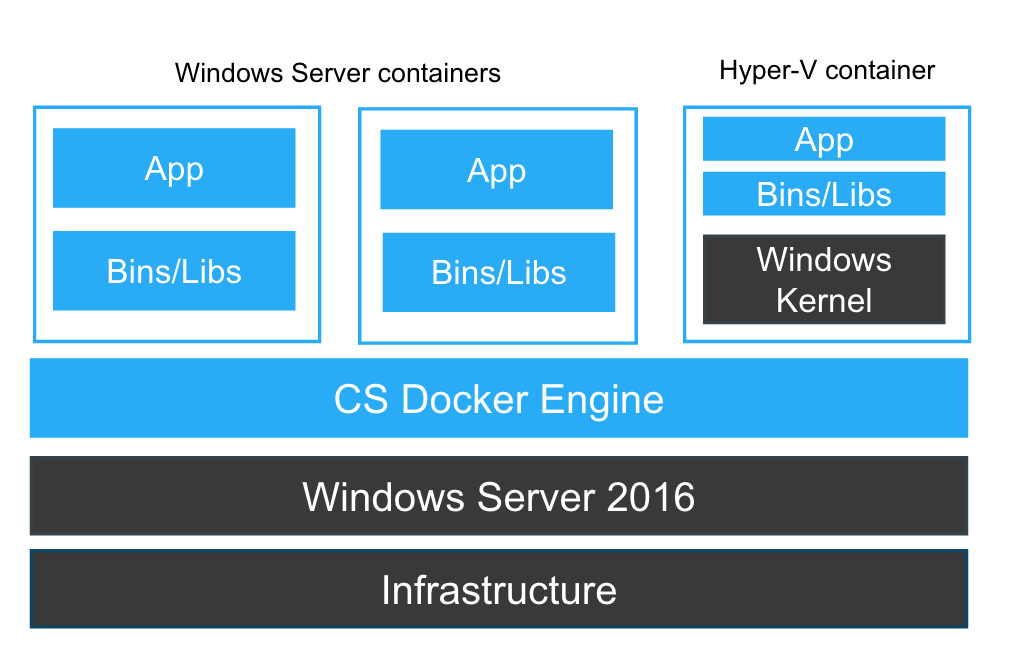
During our recent webinar, titled &;Docker for Windows Server 2016&;, this question came up a lot, specifically what to consider when deploying a Windows Server 2016 application in a -V VM with Docker and how it works. First, you’ll need to understand the differences between Windows Server containers, Hyper-V containers, and Hyper-V VMs before considering how they work together.
A Hyper-V container is a Windows Server container running inside a stripped down Hyper-V VM that is only instantiated for containers.

This provides additional kernel isolation and separation from the host OS that is used by the containerized application. Hyper-V containers automatically create a Hyper-V VM using the application’s base image and the Hyper-V VM includes the required application binaries, libraries inside that Windows container. For more information on Windows Containers read our blog. Whether your application runs as a Windows Server container or as a Hyper-V container is a runtime decision. Additional isolation is a good option for multi tenant environments. No changes are required to the Dockerfile or image, the same image can be run in either mode.
Here we the the top Hyper-V container questions with answers:
Q: I thought that containers do not need a hypervisor?
A: Correct, but since a Hyper-V container packages the same container image with its own dedicated kernel it ensures tighter isolation in multi-tenant environments which may be a business or application requirement for specific Windows Server 2016 applications.
Q: ­Do you need a hypervisor layer before the OS in both Hyper-V and Docker for Windows Server containers?
A: The hypervisor is optional. With Windows Server containers, isolation is achieved not with hypervisor, but with process isolation, filesystem and registry sandboxing.
Q: Can the Hyper-V containers be managed from the Hyper-V Manager, in the same way that the VM&;s are? (ie. turned on/off, check memory usage, etc?)
A: While Hyper-V is the runtime technology powering Hyper-V Isolation, Hyper-V containers are not VMs and neither appear as a Hyper-V resource nor be managed with classic Hyper-V tools, like Hyper-V Manager. Hyper-V containers are only executed at runtime by the Docker Engine.
Q: Can you run Windows Server container and Hyper-V Containers running Linux workloads on the same host?
A: Yes. You can run a Hyper-V VM with a Linux OS on a physical host running Windows Server.  Inside the VM, you can run containers built with Linux.

Next week we’ll bring you the next blog in our Windows Server 2016 Q&A Series &; Top questions about Docker for SQL Server Express. See you again next week.
For more resources:

Learn more: www.docker.com/microsoft
Read the blog: Webinar Recap: Docker For Windows Server 2016
Learn how to get started with Docker for Windows Server 2016
Read the blog to get started shifting a legacy Windows virtual machine to a Windows Container

Top considerations for running Docker @WindowsServer container in Hyper-VClick To Tweet

The post Considerations for Running Docker for Windows Server 2016 with Hyper-V VMs appeared first on Docker Blog.
Quelle: https://blog.docker.com/feed/

Docker Weekly Roundup | October 23, 2016


The last week of October 2016 is over and you know what that means; another news . Highlights include Windows workloads with Image2Docker, part four of the SwarmKit series, and a Docker InfraKit test-drive! As we begin a new week, let’s recap our five top stories:

Windows Workloads with Image2Docker &; a community supported and designed project to demonstrate the ease of creating Windows Containers from existing servers. Interested parties are encouraged to fork it, play with it and contribute pull requests back to the community.

SwarmKit &8211; Part 4 &8211;  a tutorial series on Docker SwarmKit led by Gabriel Schenker. Part four of the series explains how to create a swarm in the cloud and run a sample application on it.

Docker Volumes  &8211; user instructions on how to make sure posts and images stay permanent via Docker volumes, even with an upgrade to a container image, as showcased by Alex Ellis.

InfraKit Test-Drive &8211; a detailed illustration of a sample Docker image created to demonstrate InfraKit’s self-healing operation via Ajeet Raina.  

Testing Swarm on Raspberry Pi &8211; a screencast of Docker swarm and how it’s able to recover from failure of an ethernet interface. Author Mathia Renner reinforces swarms ability to recover flawlessly from a reboot and crash. 

Weekly Roundup: Top 5 Docker stories for the week 10/23/16Click To Tweet

The post Docker Weekly Roundup | October 23, 2016 appeared first on Docker Blog.
Quelle: https://blog.docker.com/feed/

Webinar Recap: Docker for Windows Server 2016

Last week, we held our first webinar on “ for Windows Server 2016” to a record number of attendees, showcasing the most exciting new Windows Server 2016 feature &; containers powered by Commercially Supported Docker Engine.
Docker CS Engine and containers are now available natively on Windows and supported by Microsoft with Docker’s Commercially Supported (CS) Engine included in Windows Server 2016.Now developers and IT pros can begin the same transformation for Windows-based apps and infrastructure to reap the benefits they’ve seen with Docker for Linux: enhanced security, agility, and improved portability and freedom to run applications on bare metal, virtual or cloud environments.
Watch the on-demand webinar to learn more about the technical innovations that went into making Docker containers run natively on Windows and how to get started.
Webinar: Docker for Windows Server 2016

Here are just a few of the most frequently asked questions from the session.  We’re still sorting through the rest and will post them in a follow up blog.
Q: How do I get started?
A: Docker and Microsoft have worked to make getting started simple, we have some great resources to get you started whether you&;re a developer or an IT pro:

Complete the Docker for Windows Containers Lab on GitHub
Read the blog: Build And Run Your First Docker Windows Server Container
View the images in Docker Hub that Microsoft has made available to the community to start building Windows containers: https://hub.docker.com/r/microsoft/
Get started converting existing Windows applications to Docker containers:

Read the blog: Image2Docker: A New Tool For Prototyping Windows VM Conversions
Register for the webinar on October 25th at 10AM PST &8211; Containerize Windows workloads with Image2Docker Tool

Q: How is Docker for Windows Server 2016 licensed?
A: Docker CS Engine comes included at no additional cost with Windows Server 2016 Datacenter, Standard, and Essentials editions with support provided by Microsoft and backed by Docker. Support is provided in accordance with the selected Windows Server 2016 support contract with available SLAs and hotfixes and full support for Docker APIs.
Q: Is there a specific Windows release that supports Docker for development?
A: You can get started using Windows 10 Anniversary Edition by installing Docker for Windows (direct link for  public beta channel) or by downloading and installing Windows Server 2016. You can also get started using Azure.
To learn more about how to get started, read our blog: Build And Run Your First Docker Windows Server Container or get started with the Docker for Windows Containers Lab on GitHub.
Q: Windows has a Server Core and Nano Sever base image available. What should I use?
A: Windows Server Core is designed for backwards compatibility. It is a larger base image but has the things you need so your existing applications are able to run in Docker. Nano Server is slimmer and is best suited for new applications that don’t have legacy dependencies.
For more resources:

Learn more: www.docker.com/microsoft
Read the blog: Top 5 Docker Questions From Microsoft Ignite
Learn more about the Docker and Microsoft partnership
Read the blog:  Introducing Docker For Windows Server 2016

Check out the Docker for Windows Server 2016 Webinar video and Q&A Recap w/ @friism Click To Tweet

The post Webinar Recap: Docker for Windows Server 2016 appeared first on Docker Blog.
Quelle: https://blog.docker.com/feed/

Docker Community Spotlight: Nimret Sandhu

Nimret Sandhu has shown himself to be a key player in the success of the Seattle Meetup group; and now with almost 2000 eager members,  organizing engaging events has become quite the responsibility! On top of his busy work schedule at Dev9, his extracurricular activities and a family life, Nimret took the time to tell us his Docker story, his favorite thing about the Docker Community and also departed with some words of wisdom for anyone just starting a meetup group.
 
Tell us about your first experience with Docker. What drew you to joining as an organizer for the Docker Seattle Meetup group?
My first experience with Docker was when our company, Dev9, looked into partnering with this up-and-coming startup named Docker a couple of years ago. Since I’m a long time *nix user who’s been exposed to solaris zones, bsd jails, etc. in the past, I looked into it, and immediately realized the potential. Once I downloaded and played around with it, I was so blown away by the technology that I started evangelizing it to our clients. I gave a talk on it and volunteered to help out with the Docker Seattle Meetup. I had already been running the Seattle Java User’s Group for a few years, and it was quite natural for me to volunteer to join the Docker Seattle Meetup group since I am quite passionate about technology.
Now that you use Docker, how do you use it and what do you use it for?
In my role as Director of Technology for Dev9, I am expected to delve into technical nuances when necessary while also managing multiple teams for clients in the Seattle area. Accelerated, rapid development is critical. Docker allows me to experiment with various enterprise-related technologies, primarily in the Java and JavaScript space. Projects are typically software development and/or Continuous Delivery leveraging tools such as the JVM, Jenkins, Spring Boot etc.
Docker is extremely easy to work with and provides a convenient way to package a solution together. I’ve found it to be incredibly helpful in accelerating my speed of development.
What are some aspects you love about organizing Docker Meetup events? 
I love the energy and diversity within the Docker community. People really have an interest in this tech and the domain. When people take the time to show up, it makes a big difference. We always have a great turnout and people are very engaged.
What I love about organizing the events is that we have such a wide variety of presentations. A mix from vendors, companies who use the technology, or people who are playing around with it for their own needs. It’s a great forum to exchange ideas, network and even find the next opportunity.
What advice would you give to a new organizer that just started their Docker Meetup group?

Start small, but start. The journey of a thousand miles begins with a single step.
Get the word out. Put info on community calendars (i.e. WTIA, Geekwire) and applicable places that people read. You can even mention this event at another meet-up. Look into mailing lists for start-ups or small organizations.
Coordinate with people who run other meetups to leverage synergies.
Ask for volunteers and companies to help.
Seek sponsorships &; many local businesses and companies are interested in hosting, providing food or being involved in other ways.
Attend other meetups to gain tips and thoughts from the organizers. Network with them on-going.

What do you do when you are not organizing meetup events?
As the Director of Technology for Dev9, I lead teams of software developers and am responsible for the projects we have in the Seattle area. Most of the projects are server-side, client-side and mobile. I help assemble teams, assist business development efforts, conduct up-front assessments for clients, hire and retain staff, and manage projects to ensure customer satisfaction and best practices in modern software development techniques. I am also the chair of the Seattle Java Users Group (SeaJUG), and have been for the last decade. I am on multiple Advisory Boards with the University of Washington Professional and Continuous Education program and help set direction and content in technology, ensuring that the programs stay up-to-date. Most importantly, I’m a father to my two lovely daughters and enjoy family time in general.
Take look at my Geek of the Week feature for more info!
Motto or personal mantra?
Work hard, play hard.

Huge shout out to Nirmet Sandhu and all docker meetup organizers for their contributions! Click To Tweet

The post Docker Community Spotlight: Nimret Sandhu appeared first on Docker Blog.
Quelle: https://blog.docker.com/feed/

Docker Weekly Roundup | October 9, 2016


It’s time for your weekly ! Get caught up on the top news including; expansion into China through a commercial partnership with Alibaba Cloud, announcement of DockerCon 2017, and information on the upcoming Global Mentor Week. As we begin a new week, let’s recap the top five most-read stories of the week of October 9, 2016:

Alibaba Cloud Partnership Docker expands into China market through new partnership with the Alibaba Group, the world&;s largest retail commerce group. The focus of the partnership is to provide a China-based Docker Hub, enable Alibaba to resell Docker’s commercial offerings, and create a “Docker For Alibaba Cloud”.

DockerCon 2017 a three day, conference organized by Docker. This year’s US edition will take place in Austin, TX and continue to build on the success of previous events as it grows and reflects Docker’s established ecosystem and ever-growing community.

Global Mentor Week  is a global event series aimed at providing Docker training to both newcomers and intermediate users. Participants will work through self-paced labs that will be available through an online Learning Management System (LMS). There will be different labs for different skill levels, Developers, Ops, Linux and Windows users.

Docker on Windows &; check out this blog on three tips for setting a solid foundation and improving the Docker on Windows experience from Elton Stoneman.

SQL Server 2016 was publicly available this week and SQL Server 2016 Express Edition in Windows Containers is now available on Docker Hub. In addition, the build scripts will be hosted on the SQL Server Samples GitHub repository and the image can be used in both Windows Server Containers as well as Hyper-V Containers.

Weekly Roundup: Top 5 Docker stories for the week 10/09/16Click To Tweet

The post Docker Weekly Roundup | October 9, 2016 appeared first on Docker Blog.
Quelle: https://blog.docker.com/feed/

Docker Announces Expansion To China Through Commercial Partnership with Alibaba Cloud

The containerization movement fueled by has extended across all geographic boundaries since the very beginning. Some of Docker’s earliest success stories were from Chinese based, web-scale companies running Docker in production before Docker had released its 1.0 version. Additionally, through the grass roots efforts of the development community, we have thriving Docker Meetups in 20 of ’s largest cities. This is a testament to the innovative spirit within the Chinese developer community because the ability to deliver great community content from Docker Hub has been highly constrained. That is why a partnership with China’s largest public cloud provider is so significant. Docker, in concert with Cloud, is going to deliver a China-based instance of Docker Hub to ensure optimal access and performance to the thousands of Dockerized images that will serve as the foundation of a new generation of distributed applications in China.  
In addition to formally providing Dockerized content on Docker Hub to China, Docker is commercially partnering with Alibaba to address the substantial demand for running enterprise applications in containers.  A June 2016 Alibaba Cloud survey indicates that more than 80% respondents are already using or plan to use containers. Together Alibaba Cloud and Docker will make it easier for organizations of all sizes to containerize legacy applications, accelerate their digital transformations and build new microservices. Through this commercial partnership with Alibaba Cloud, we look to serve the unique needs of global enterprises in China and to deepen our roots in the market.
Specifically, the commercial partnership entails:

Providing a China-based Docker Hub running on Alibaba Cloud for the distribution of thousands of Dockerized applications
Enabling Alibaba to resell Docker’s commercial offerings in China, including Docker Datacenter and Commercially Supported Docker Engine
Creating “Docker For Alibaba Cloud” &; a configuration of Docker for Alibaba that has been created  by Docker

Agility is key to innovation. By  partnering with Alibaba Cloud to deliver a locally-hosted Docker Hub,  developers will enjoy significantly faster image downloads and UI response rates. Now, development teams will begin leveraging Docker Hub to integrate source code management, build and QA tools. This enables users to reduce their commit-to-deploy cycle times from days to minutes, often enabling them to ship applications more frequently than before.
We are excited to advance the user experience for developers throughout China and to help unlock the innovation and creativity that will help transform the economy. In addition, we’ve added Alibaba Cloud to Docker’s growing list of supported cloud environments where Docker Datacenter can be easily and quickly installed. Our collaboration further enables application portability &8211;  without sacrificing the security, policy and control that comes with Docker Datacenter, an integrated platform where both developers and IT ops teams can meet to collaborate. This is another critical step towards enabling ‘write-once, run-anywhere’ apps that can be deployed on-premises or in the cloud. Overall, there is a vast opportunity in this collaboration between Docker and Alibaba Cloud as China’s cloud spending is expected to increase roughly 5X over the next three years.   

Docker Announces Expansion To China Through Commercial Partnership with Alibaba To Tweet

The post Docker Announces Expansion To China Through Commercial Partnership with Alibaba Cloud appeared first on Docker Blog.
Quelle: https://blog.docker.com/feed/

Docker Weekly Roundup | October 2, 2016


This week, our readers enjoyed some big news, including the release of InfraKit, a toolkit for declarative infrastructure, a Windows 10 container guide, and a new open source project Image2Docker. As we begin a new week, let’s recap our top 5 most-read stories for the week of October 2, 2016:

InfraKit is a new declarative management toolkit for orchestrating infrastructure. InfraKit’s simple, pluggable components for a declarative infrastructure state, actively monitor and automatically reconcile that state.

Windows Server Container guide is designed to get setup to run Docker Windows Containers on Windows 10 or using a Windows Server 2016 VM.

Docs Repo On GitHub is a consolidation of all Docker documentation into a single Pages-based repository on GitHub. All documentation for Docker projects will now be open sourced for an easier than ever way to contribute to and stage the public docs.

Image2Docker is a new tool for prototyping Windows VM conversions to show how to replicate a VM Image to a container. The Powershell module can point at a virtual hard disk image, scan for common Windows components and suggest a Dockerfile.

Docker Compose Story is a tool for defining and running your multi-container Docker applications. Applications can be defined in a YAML file where all options used in `docker run` are now defined, and allows users to manage applications as a single entity versus individual containers by Ajeet Raina.

Weekly : Top 5 Docker stories for the week 10/02/16Click To Tweet

The post Docker Weekly Roundup | October 2, 2016 appeared first on Docker Blog.
Quelle: https://blog.docker.com/feed/

Top 5 Docker Questions from Microsoft Ignite

Last week was busy for the team at Microsoft Ignite in Atlanta. With the exciting announcement about the next evolution of the Docker and Microsoft relationship, the availability of Docker for Windows Server 2016 workloads, the show floor, general session, keynotes, and breakout sessions were all abuzz about Docker for Windows. Whether you were attended or not we want to make sure you didn’t miss a thing, here are the key announcements at this year’s Microsoft Ignite:

Docker Doubles Container Market with Support for Windows Workloads
Availability of Docker For Windows Server 2016
Docker Commercially Supported Docker Engine available in Windows Server 2016

Cool @VisualStudio and @docker integration being demoed by @shanselman at auto creation of Dockerfiles & debug inside containers. pic.twitter.com/HVDHKmwRrL
— Marcus Robinson (@techdiction) September 26, 2016

Wow @Docker engine included with all Server 2016 deployments. MSIgnite
— Joe Kelly (@_JoeKelly_) September 26, 2016

 
Here our top 5 questions heard in the Docker booth:

What are containers?

While container technology had been around for more than a decade. However, as the leader in the containerization market, .Docker has made the technology usable and accessible to all developers and sysadmins. . Containers allow developers and IT Pros to package an application into a standardized unit for software development, making them highly portable and able to run across any operating system. Each container contains a complete filesystem with everything needed to run: code, runtime, system tools, system libraries –essentially,  anything that can be installed on a server. This guarantees that the software will always run the same, regardless of its environment, without having to make any changes to the underlying code. Docker containers were previously only available to the Linux community and with the announcement of Docker for Windows Server 2016, Docker containers are now available for Windows workloads addressing 98% of enterprise workloads.
 

How is this different than App-V Application Virtualization?

Those in the Windows OS world are familiar with Microsoft App-V or ThinApp and naturally there were questions about comparing them to Docker containers. Application virtualization is used to package a full application with the relevant OS libraries into a single executable. Docker is a set of tooling used to build server based applications.  A single application could be comprised of one or hundreds of containers connected together. App-V is used for desktop applications and are not designed for server based applications. The most common example is packaging browsers with extensions so they can access custom web apps.  Each App-V package can reside on a laptop with different extensions/plugins, etc. To learn more about Application Virtualization and Docker, read our blog: There’s Application Virtualization and There’s Docker
 

How do I get started with Docker for Windows Server?

Integrating Visual Studio Tools for Docker and Docker for Windows provides desktop development environments for building Dockerized Windows apps. Getting started is easy and we have the tools you need to get started in a few easy steps:

Pick your tool:

The latest Anniversary update for Windows 10 offers containerization support for the Windows 10 kernel.
To run Windows containers in production at scale, download a free evaluation version Windows Server 2016 and install it on bare metal or in a VM running on Hyper-V, VirtualBox or similar.

Install a Windows Docker Engine on your system with Docker for Windows public beta on your system.
Run your first Windows Container in just a few steps with the instructions listed on the “Getting Started with Docker for Windows” webpage.
Create your own Dockerfile with our Image2Docker tool, a Powershell module that points at a virtual hard disk image, scans for common Windows components and suggest a Dockerfile. Read the blog to learn more and get started.

For a complete list of instructions read our blog post &; Build And Run Your First Docker Windows Server Container & view Windows Server container base images and applications on Docker Hub from Microsoft.
 

How do I manage containers?

Docker Datacenter is the integrated container orchestration and management platform for IT Pros. Today Docker Datacenter is available on Azure to manage Linux application environments. With the availability of Windows Server 2016 and Docker Engine, we are planning for a beta in Q4 2016 of Docker Datacenter management for Windows Server based applications.  Sign up here to be notified of the beta.
 

Where can I learn more?

There are lots of great resources and sessions to help you learn more. Whether you attended the conference or watched online here’s a wrap up of the top five session from Microsoft Ignite:

General Session with Scott Guthrie, EVP Cloud and Enterprise at Microsoft and Daryll Fogal CTO at Tyco


Keynote: “Reinvent IT infrastructure for business agility” with Jason Zander, CVP Microsoft Azure and Ben Golub, CEO of Docker


Breakout sessions:

Walk the path to containerization – transforming workloads into containers
Accelerate application delivery with Docker Containers and Windows Server 2016
Dive into the new world of Windows Server and Hyper-V Containers

Top 5 Docker questions from MSIgnite &8211; Answers hereClick To Tweet

Resources

Learn more about Docker on Windows Server
Sign up to be notified of GA and the Docker Datacenter for Windows Beta
Register for a webinar: Docker for Windows Server
Learn more about the Docker and Microsoft partnership

The post Top 5 Docker Questions from Microsoft Ignite appeared first on Docker Blog.
Quelle: https://blog.docker.com/feed/

Docker Weekly Roundup | September 25, 2016


The last week of September 2016 is over and you know what that means; another news . Highlights include, a new commercial relationship between Docker and Microsoft, general availability of Docker containers on Windows Server 2016, and consolidation of Docker documentation on GitHub! As we begin a new week, let’s recap our five hottest stories:

Docker and Microsoft Partnership Docker announced a Commercial Partnership with Microsoft that doubles the container market by extending Docker Engine to Windows Server 2016.
Docker for Windows Server 2016 Microsoft announced general availability of Windows Server 2016, one of the most exciting new aspect of the announcement  is that containers on Windows are powered by Docker.
Containers for Windows a step-by-step guide on containerized workload, the various components, such as the Docker client tools, the Docker daemon, and the virtual machine host for running containers by Bruno Terkaly.
New Docs Repo on GitHub announcement of consolidation of all Docker documentation into a new single Pages-based repository on GitHub.
Image2Docker a new prototyping tool created by Docker Captain Trevor Sullivan for Windows VMs that shows how to replicate a VM Image to a Docker container.

Weekly roundup: Top 5 Docker stories for the week 09/25/16Click To Tweet

The post Docker Weekly Roundup | September 25, 2016 appeared first on Docker Blog.
Quelle: https://blog.docker.com/feed/