Sora 2 now available in Azure AI Foundry

Turning imagination into reality has never been more instantaneous—and powerful—as it is today, with the launch of OpenAI’s Sora 2: Now in public preview in Azure AI Foundry.

Azure AI Foundry is the developer destination built for creators, from startups to global businesses. The platform now offers a curated catalog of generative media models, including OpenAI’s Sora, GPT-image-1 and GPT-image-1-mini, Black Forest Lab’s Flux 1.1 and Kontext Pro, and more. These models empower software development companies and builders to serve creatives with new and unique capabilities—to accelerate storyboarding, drive engagement, and transform the creative process, all without sacrificing the safety, reliability, and integration businesses expect.

Start creating with Sora 2 in Azure AI Foundry

What can you create with Sora 2 in Azure AI Foundry?

Sora 2 in Azure AI Foundry isn’t just another video generation tool; it’s a creative powerhouse, seamlessly integrated into a platform built for innovation, trust, and scale. Unlike standalone solutions, Azure AI Foundry offers a unified platform where developers can access Sora 2 alongside other leading generative models in a secure, scalable, and structured environment to achieve more:

Marketers can rapidly produce stunning, branded campaign assets including animated assets for product launches and personalized content to capture attention and drive engagement.

Retailers can engage customers with interactive and localized campaigns to accelerate time-to-market and transform their customers’ online shopping experience.

Creative directors can transform imaginative ideas into dynamic movie trailers and cinematic experiences to test concepts, while Sora 2’s realistic world simulation, synchronized audio, and creative controls help bring visions to life.

Educators can create immersive lesson plans and interactive media that spark curiosity and deepen understanding.

With Sora 2 in Azure AI Foundry, developers across industries can innovate boldly and confidently. Azure AI Foundry’s unified environment, advanced capabilities, and enterprise-grade security provide the foundation for creativity to flourish and ideas to become reality.

What features and controls are available?

Sora 2 in Azure AI Foundry stands out by combining OpenAI’s most advanced video generation capabilities with the trusted infrastructure and security controls of Microsoft Azure, unlocking new possibilities for every developer with a set of core features:

Realistic video generation powered by advanced world simulation and physics.

Generation based on input text, images, and video.

Synchronized audio and dialogue for immersive storytelling.

Audio available in multiple languages.

Enhanced creative control, including detailed prompt understanding for studio shots, scene details, and camera angles.

Seamless integration into business workflows, backed by Microsoft’s enterprise-grade safety and security.

Microsoft is committed to delivering secure and safe AI solutions for organizations of all sizes. Through Azure AI Foundry and our responsible AI principles, we empower customers with embedded security, safety, and privacy controls.

This foundation extends to Sora 2, where our advanced safety systems and robust controls work together to help developers innovate more confidently in Azure AI Foundry:

Content filters for inputs: Screens text, image, and video inputs for prompts. 

Content filters for outputs: Analyzes video frames and audio; can block content to help comply with organizational policies.

Enterprise-grade security: Azure’s compliance and governance frameworks protect customer data and creative assets. 

Sora 2 Azure AI Foundry pricing and availability

Starting today, Sora 2 is available via API through Standard Global in Azure AI Foundry.

ModelSizePrice per second (in USD)
Sora 2
Portrait: 720×1280 Landscape: 1280×720
$0.10

Please refer to the Azure AI Foundry Models page for future updates in deployment types and availability.

Get started with AI as your creative partner

Sora 2 is designed to empower and inspire developers. By accelerating early production and enabling rapid prototyping, Sora 2 frees up time for more ideation and storytelling. The goal is to bring human creativity to the next level, making it easier for anyone to turn ideas into compelling visual stories.

Ready to create with Sora 2?
Explore the full catalog of generative media models in Azure AI Foundry.

Get started

The post Sora 2 now available in Azure AI Foundry appeared first on Microsoft Azure Blog.
Quelle: Azure

From queries to conversations: Unlock insights about your data using Azure Storage Discovery—now generally available

We are excited to announce the general availability of Azure Storage Discovery, a fully managed service that delivers enterprise-wide visibility into your data estate in Microsoft Azure Blob Storage and Azure Data Lake Storage. Azure Storage Discovery helps you optimize storage costs, comply with security best practices, and drive operational efficiency. With the included Microsoft Copilot in Azure integration, all decision makers and data users can access and uncover valuable data management insights using simple, everyday language—no specialized programming or query skills required. The intuitive experience provides advanced data visualizations and actional intelligence that are most important to you.

 What is Azure Storage Discovery?

Businesses are speeding up digital transformation by storing large amounts of data in Azure Storage for AI, analytics, cloud native apps, HPC, backup, and archive. This data spans multiple subscriptions, regions, and accounts to meet workload needs and compliance rules. The data sprawl makes it challenging to track data growth, spot unexpected data reduction, or optimize costs without clear visibility into data trends and access patterns. Organizations struggle to identify which datasets and business units drive growth and usage the most. Without a global view and streamlined insights across all storage accounts, it’s challenging to ensure data availability, residency, security, and redundancy are consistently aligned with best practices and regulatory compliance requirements.

Azure Storage Discovery makes it simple to gain and analyze insights to manage such large data estates.

Analyze your data estate with Azure Storage Discovery

Azure Storage Discovery lets you easily set up a workspace with storage accounts from any region or subscription you can access. The first insights are available in less than 24 hours, and you can get started by analyzing your data estate.

Unlock intelligent insights using natural language with Copilot in Azure

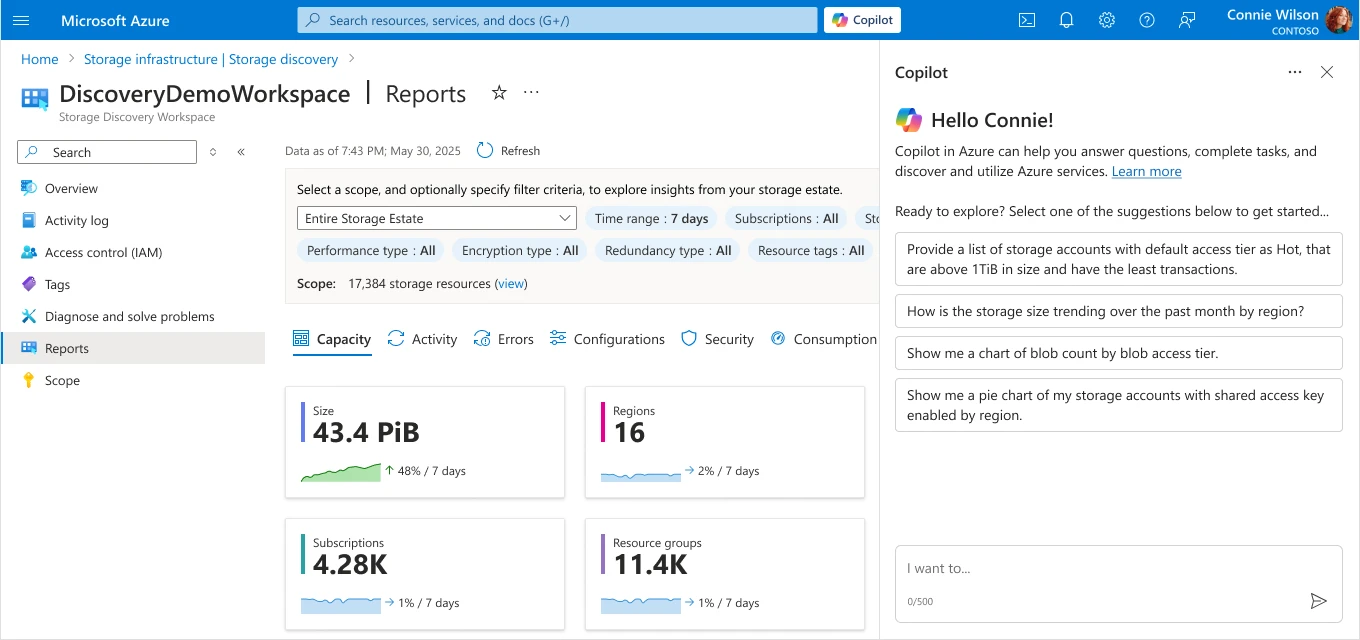
Use natural language to ask for the storage insights you need to accomplish your storage management goals. Copilot in Azure expresses them using rich data visualizations, like tables and charts.

Interactive reports built into the Azure portal

Azure Storage Discovery generates out-of-box dashboards you can access from the Azure portal, with insights that help you visualize and analyze your data estate. The reports include filters for your storage data estate by region, redundancy, and performance, allowing you to quickly drill down and uncover the insights important to you.

Advanced storage insights

The reports deliver insights, at a glance, across multiple dimensions, helping you manage your data effectively:

Capacity: Insights about resource, object sizes, and counts aggregated by subscriptions, resource groups, and storage accounts with growth trends.

Activity: Visualize transactions, ingress, and egress for insights on how your storage is accessed and utilized.

Security: Highlights critical security configurations of your storage resources with outliers including public network access, shared access key, anonymous access to blobs, and encryption settings.

Configurations: Surfaces configuration patterns across your storage accounts like redundancy, lifecycle management, inventory, and others.

Errors: Highlights failed operations and error codes to help identify patterns of issues that might be impacting workloads.

Kickstart your insights for free, including 15 days of historical data

Getting started is easy with access to 15 days of historical insights within hours of deploying your Azure Storage Discovery workspace. The standard pricing plan offers the most comprehensive set of insights, while the free pricing plan gets you going with the basics.

Analyze long term trends with 18 months of insights

The Azure Storage Discovery workspace with the standard pricing plan, will retain insights for up to 18 months so you can analyze long-term trends and any business or season specific workload patterns.

Azure Storage Discovery is available to you today! You can learn more about Azure Storage Discovery here and even get started in the Azure Portal here.

Use Copilot to solve the most important business problems

During the design of Azure Storage Discovery, we spoke with many customers across various business-critical roles, such as IT managers, data engineers, and CIOs. We realized AI could simplify onboarding by removing the need for infrastructure deployment or coding knowledge. As a result, we included Copilot in Azure Storage Discovery from the start. It offers insights beyond standard reports and dashboards using natural language queries to deliver actionable information through visualizations like trend charts and tables.

To get started, simply navigate to your Azure Storage Discovery workspace resource in the Azure portal, and activate Copilot.

Identify opportunity to optimize costs

Understanding storage size trends is crucial for cost optimization, and analyzing these trends by region and performance type can reveal important patterns about how the data is evolving over time. With Azure Storage Discovery’s 18 months of data retention, you can uncover long-term trends and unexpected changes across your data estate, while Copilot quickly visualizes storage size trends broken down by region.

“How is the storage size trending over the past month by region?”

Finding cost-saving opportunities across many storage accounts can be difficult, but Copilot simplifies this by highlighting accounts with the highest savings potential based on capacity and transactions as shown below.

“Provide a list of storage accounts with default access tier as Hot, that are above 1TiB in size and have the least transactions”

Before taking any action, you can dive even deeper into the insights by evaluating distributions. For example, a distribution of access tiers across blobs.

“Show me a chart of blob count by blob access tier”

Knowing that the majority of objects are still in the Hot tier provides immediate opportunities to reduce costs by enabling Azure Storage Actions to tier down or even delete data that is not accessed frequently. Azure Storage Actions is a fully managed, serverless platform that automates data management tasks—like tiering, retention, and metadata updates—across millions of blobs in Azure Blob Storage and Data Lake Storage.

Assess whether storage configurations align with security best practices

For better storage security, Microsoft recommends using Microsoft Entra ID with managed identities instead of Shared Key authentication. Azure Storage Discovery enables you to quickly see that there are still many storage accounts with shared access keys enabled and drill down into a list of Storage accounts that need optimization.

“Show me a pie chart of my storage accounts with shared access key enabled by region”

Manage your data redundancy requirements

Azure provides several redundancy options to meet data availability, disaster recovery, performance, and cost needs. These choices should be regularly reviewed against risks and benefits for an effective storage strategy. Azure Storage Discovery quickly shows the redundancy configuration for all storage accounts and allows you to analyze the most suitable option for each workload and critical business data.

“Show me a chart of my storage account count by redundancy”

Pricing and availability

A single Azure Storage Discovery workspace can analyze the subscriptions and storage accounts from all supported regions. Learn more about the regions supported by Azure Storage Discovery here. The service offers a free pricing plan with insights related to capacity and configurations retained for up to 15 days and a standard pricing plan that also includes advanced insights related to activity, errors, and security configurations. Insights are retained for up to 18 months, allowing you to analyze trends and business cycles.

Learn more about the pricing plans in the Azure Storage Discovery documentation and access the prices for your region here.

Get started with Azure Storage Discovery

Getting started with Azure Storage Discovery is easy. Simply follow these two steps:

Configure an Azure Storage Discovery workspace and select the set of subscriptions and resource groups containing your storage accounts.

Define the “Scopes” that represent your business groups or workloads.

That’s it! Give it a moment. Once a workspace is configured, Azure Storage Discovery starts aggregating the relevant insights and makes them available to you via intuitive charts. You’ll find them in the Azure portal, on different report pages of your workspace. We’ll even look back in time and provide 15 days of historic data. Your insights are typically available within a few hours.

To get started, visit Azure Storage Discovery in the Azure Marketplace.

You can also deploy via the brand new Storage Center in the Azure portal. Find Azure Storage Discovery in the “Data management” section.

Want to read more before deploying? The planning guide walks you through all the important considerations for a successful Azure Storage Discovery deployment.

We’d love to hear your feedback. What insights are most valuable to you? What would make Azure Storage Discovery more valuable for your business? Let us know at: StorageDiscoveryFeedback@service.microsoft.com.

Get started with Azure Storage Discovery
Azure Storage Discovery integrates with Copilot in Azure, enabling you to unlock insights and accelerate decision-making without utilizing any query language.

Find the overview here

The post From queries to conversations: Unlock insights about your data using Azure Storage Discovery—now generally available appeared first on Microsoft Azure Blog.
Quelle: Azure

Getting Started with Offload: Automating Everyday Workflows with Docker

Every developer eventually hits a wall with their local machine. Maybe it’s training an AI model that drains your CPU, compiling a massive codebase that makes your fan sound like a jet engine, or simply trying to run GPU workloads on a laptop that doesn’t have one. The result is the same: slow builds, limited resources, and wasted time.

Docker Offload was built to solve exactly that problem. Instead of forcing you to upgrade your hardware or spend days setting up cloud infrastructure, Offload extends your existing Docker workflow into the cloud. You keep using the same docker build and docker run commands you already know — but behind the scenes, the heavy lifting happens on powerful, cloud-hosted machines (including GPUs).

Think of it as a turbo button for Docker: the same developer experience, just supercharged.

Docker Offload is a fully managed service that lets you execute Docker builds and run containers in the cloud while maintaining your familiar local development experience.It provides on-demand cloud infrastructure for fast, consistent builds and compute-intensive workloads like running LLMs, machine learning pipelines, and GPU-accelerated applications.This is ideal if you want to leverage cloud resources or if your local machine doesn’t meet the hardware requirements to run the model locally.

Why use Docker Offload

Docker Offload is designed to support modern development teams working across local and cloud environments. It helps you:

Offload heavy builds and runs to fast, scalable infrastructure

Accelerate feedback loops in development and testing

Run containers that require more resources than your local setup can provide

Use Docker Compose to manage complex, multi-service apps that need cloud resources

Docker Offload is ideal for high-velocity development workflows that need the flexibility of the cloud without sacrificing the simplicity of local tools.

How to get started

Step 1: Sign up and subscribe to Docker Offload for access

To access Docker Offload, you must sign up and subscribe.

Step 2: Start Docker Offload

Start Docker Desktop and sign in with your account.

Open a terminal and run the following command to start Docker Offload:

$ docker offload start

When prompted, select your Docker account to use for Docker Offload. This account will consume credits for your Docker Offload usage.

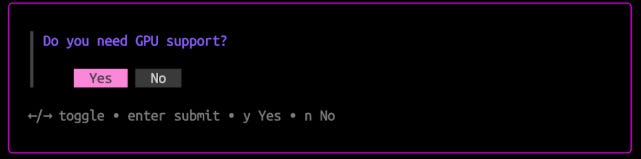
When prompted, select whether to enable GPU support. If you choose to enable GPU support, Docker Offload will run in an instance with an NVIDIA L4 GPU, which is useful for machine learning or compute-intensive workloads.

NoteEnabling GPU support consumes more budget. For more details, see Docker Offload usage.

Step 3: Run a container with Docker Offload

After starting Docker Offload, Docker Desktop connects to a secure cloud environment that mirrors your local experience. When you run builds or containers, they execute remotely, but behave just like local ones.

To verify that Docker Offload is working, run a container:

$ docker run –rm hello-world

If you enabled GPU support, you can also run a GPU-enabled container:

$ docker run –rm –gpus all hello-world

If Docker Offload is working, you’ll see Hello from Docker! in the terminal output.

Step 4: Stop Docker Offload

When you’re done using Docker Offload, you can stop it, which will stop a budget consumption, however after a few minutes the offload worker will be completely disposed. When stopped, you get back to  building images and running containers locally.

$ docker offload stop

To start Docker Offload again, run the docker offload start command.

Save money

Docker Offload runs your builds remotely, not on the machine where you invoke the build. This means that files must be transferred from your local system to the cloud over the network.

Transferring files over the network introduces higher latency and lower bandwidth compared to local transfers. To reduce these effects, Docker Offload includes several performance optimizations:

It uses attached storage volumes for build cache, which makes reading and writing cache fast.

When pulling build results back to your local machine, it only transfers files that changed since the previous build.

Even with these optimizations, large projects or slower network connections can lead to longer transfer times. Here are several ways to optimize your build setup for Docker Offload:

Use .dockerignore files

Choose slim base images

Use multi-stage builds

Fetch remote files during the build

Leverage multi-threaded tools

For general Dockerfile tips, see Building best practices.
Quelle: https://blog.docker.com/feed/

Amazon Redshift auto-copy is now available in 4 additional AWS regions

Amazon Redshift auto-copy is now available in the AWS Asia Pacific (Malaysia), Asia Pacific (Thailand), Mexico (Central), and Asia Pacific (Taipei) regions. With Auto-Copy, you can set up continuous file ingestion from your Amazon S3 prefix and automatically load new files to tables in your Amazon Redshift data warehouse without the need for additional tools or custom solutions. Previously, Amazon Redshift customers had to build their data pipelines using COPY commands to automate continuous loading of data from S3 to Amazon Redshift tables. With auto-copy, you can now setup an integration which will automatically detect and load new files in a specified S3 prefix to Redshift tables. The auto-copy jobs keep track of previously loaded files and exclude them from the ingestion process. You can monitor auto-copy jobs using system tables. To learn more, see the documentation or check out the AWS Blog.
Quelle: aws.amazon.com

Amazon DCV releases version 2025.0 with enhanced keyboard handling and WebAuthn support

AWS announces Amazon DCV 2025.0, the latest version of the high-performance remote display protocol that enables customers to securely access remote desktops and application sessions. This release focuses on enhancing user productivity and security while expanding platform compatibility for diverse use cases. Amazon DCV 2025.0 includes the following key features and improvements:

Enhanced WebAuthn redirection on Windows and standard browser-based WebAuthn support on Linux, enabling security key authentication (like Yubikeys, Windows Hello) in native Windows and SaaS applications within virtual desktop sessions
Linux client support for ARM architecture, further broadening compatibility and performance
Windows Server 2025 support, delivering latest security standards and enhanced performance on DCV hosts
Server side keyboard layout support and layout alignment for Windows clients, enhancing input reliability and consistency
Scroll wheel optimizations for smoother navigation

For more information about the new features and enhancements in Amazon DCV 2025.0, see the release notes or visit the Amazon DCV webpage to learn more and get started.
Quelle: aws.amazon.com

Amazon U7i instances now available in AWS US East (Ohio) Region

Starting today, Amazon EC2 High Memory U7i instances with 6TB of memory (u7i-6tb.112xlarge) are now available in the US East (Ohio) region. U7i-6tb instances are part of AWS 7th generation and are powered by custom fourth generation Intel Xeon Scalable Processors (Sapphire Rapids). U7i-6tb instances offer 6TB of DDR5 memory, enabling customers to scale transaction processing throughput in a fast-growing data environment. U7i-6tb instances offer 448 vCPUs, support up to 100Gbps Elastic Block Storage (EBS) for faster data loading and backups, deliver up to 100Gbps of network bandwidth, and support ENA Express. U7i instances are ideal for customers using mission-critical in-memory databases like SAP HANA, Oracle, and SQL Server. To learn more about U7i instances, visit the High Memory instances page.
Quelle: aws.amazon.com

Amazon CloudWatch introduces interactive incident reporting

Amazon CloudWatch now offers interactive incident report generation, enabling customers to create comprehensive post-incident analysis reports in minutes. The new capability, available within CloudWatch investigations, automatically gathers and correlates your telemetry data, as well as your input and any actions taken during an investigation, and produces a streamlined incident report. Using the new feature you can automatically capture critical operational telemetry, service configurations, and investigation findings to generate detailed reports. Reports include executive summaries, timeline of events, impact assessments, and actionable recommendations. These reports help you better identify patterns, implement preventive measures, and continuously improve your operational posture through structured post incident analysis. The incident report generation feature is available in US East (N. Virginia), US East (Ohio), US West (Oregon), Asia Pacific (Hong Kong), Asia Pacific (Mumbai), Asia Pacific (Singapore), Asia Pacific (Sydney), Asia Pacific (Tokyo), Europe (Frankfurt), Europe (Ireland), Europe (Spain), and Europe (Stockholm). You can create their first incident report by first creating a CloudWatch investigation and then clicking “Incident report”. To learn more about this new feature, visit the CloudWatch incident reports documentation.
Quelle: aws.amazon.com