Amazon SageMaker Unified Studio adds interactive interface for managing Feature Store in IAM Domains

Amazon SageMaker Unified Studio IAM domains now includes an interactive interface for creating and managing feature groups in SageMaker Feature Store, eliminating the need to write code for common feature management tasks. This launch makes feature management accessible to data scientists, ML engineers, and business analysts from a single collaborative environment.
Features are the inputs to ML models used during training and inference. For example, a music recommendation app might use features like song ratings, listening duration, and listener demographics to personalize which songs are suggested to each user. With this interactive interface for creating and managing features, you can now discover and search existing features, create and modify feature groups, view definitions and schemas, monitor data ingestion status – all without writing API calls. Features created elsewhere appear immediately in SageMaker Unified Studio when sharing the same IAM role, ensuring seamless workflows across your ML development lifecycle.
To learn more about using the interactive interface for creating and managing features in SageMaker Unified Studio, visit the Amazon SageMaker Unifed Studio User Guide.
Quelle: aws.amazon.com

Amazon VPC IPAM now supports tags on IPAM pool allocations

Amazon VPC IP Address Manager (IPAM) now supports tags on IPAM pool allocations, enabling customers to organize, govern, and control access to individual IP address allocations using the same tagging workflows they use across other AWS resources.
Amazon VPC IP Address Manager (IPAM) helps customers plan, track, and monitor IP addresses across their AWS environments. With this launch, customers can tag allocations at creation time or add tags to existing allocations. These tags can be referenced in AWS Identity and Access Management and Service Control Policies, enabling centralized governance over IP address usage at scale. For example, a network administrator can tag allocations by environment and enforce an IAM policy that allows only the production networking role to allocate from the pool, while development teams are restricted to development pools. Customers can also search and filter allocations by tag across all IPAM pools, making it faster to locate specific IP address ranges in large, multi-account environments.
This feature is available in all AWS Regions where IPAM is available at no additional cost. To learn more, see the IPAM User Guide. To get started with IPAM, visit the IPAM console.
Quelle: aws.amazon.com

Amazon RDS now supports ENA Express for Multi-AZ replication

Amazon RDS Multi-AZ instances now use ENA Express for replication traffic between Availability Zones. ENA Express uses AWS’s Scalable Reliable Datagram (SRD) protocol to optimize network performance by delivering up to 25 Gbps single-flow bandwidth for cross-AZ replication traffic leveraging advanced congestion control and multi-pathing capabilities, and reducing latency variability for Multi-AZ deployments. RDS Multi-AZ instances replicate data synchronously to a standby in a different Availability Zone to provide high availability and automatic failover. AWS SRD, used by ENA Express, improves replication by dynamically distributing traffic across multiple network paths and adapting to congestion in real time. Amazon RDS Multi-AZ with ENA Express delivers increased write throughput and lower write latencies for write-intensive database workloads. ENA Express for Amazon RDS is available at no additional charge for Amazon RDS for MariaDB, Amazon RDS for MySQL, Amazon RDS for PostgreSQL, Amazon RDS for Db2, and Amazon RDS for Oracle. It is supported in Africa (Cape Town), Asia Pacific (Hong Kong, Hyderabad, Jakarta, Malaysia, Melbourne, Mumbai, New Zealand, Osaka, Seoul, Singapore, Sydney, Taipei, Thailand, Tokyo), Canada (Central), Canada West (Calgary), Europe (Frankfurt, Ireland, London, Milan, Paris, Spain, Stockholm, Zurich), Israel (Tel Aviv), Mexico (Central), US East (N. Virginia, Ohio), US West (N. California, Oregon), and AWS GovCloud (US) Regions. To enable this on your existing Amazon RDS instances, perform a start-stop or scale compute action. For a list of supported instance types on ENA Express, refer the user guide. 
Quelle: aws.amazon.com

Azure Files Entra-Only identities: Advancing cloud-native identity and security

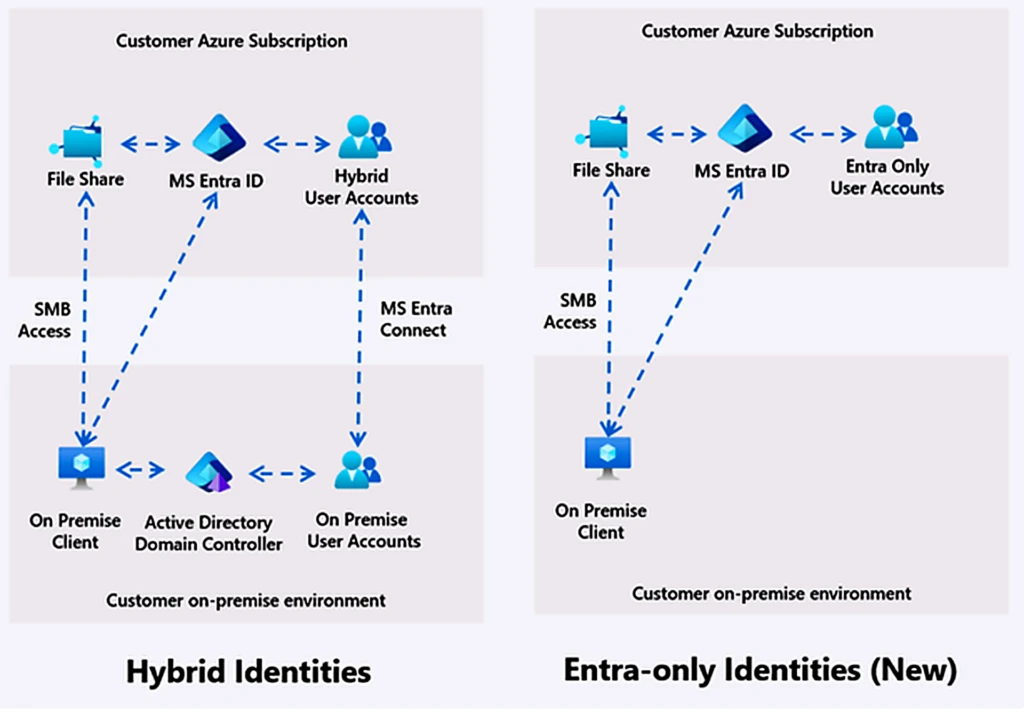
We are excited to announce the general availability (GA) of Entra-Only identities for Azure Files SMB. With native Microsoft Entra ID authentication, organizations can now grant secure, identity-based access to SMB file shares using cloud-only identities.

Enable Microsoft Entra Kerberos authentication

This means no Active Directory, hybrid sync, or managed domain controllers required, significantly simplifying architecture while reducing ongoing management and maintenance costs. Entra-Only identities elevate Azure Files with a highly integrated, modern identity experience—delivering a leading, best-in-class standard for secure, seamless and comprehensive cloud native access.

As customers look to migrate to Azure Files, reliance on on-premises Active Directory authentication has been seen as a key blocker to a complete cloud-native experience. Entra-Only identities support for Azure Files SMB removes that blocker, enabling organizations to authenticate users and devices directly through Microsoft Entra ID, helping modernize storage, compute and identity, while aligning with Zero-Trust principles.

Entra-Only identities enable seamless virtual desktop infrastructure (VDI) profile management on Azure Files while meeting modern security standards. In Azure Virtual Desktop (AVD), built-in B2B support extends this further, allowing external partners to use their existing identities with FSLogix profiles, without creating duplicate accounts.

For general-purpose scenarios, this unlocks migration of on-prem Windows-based workloads to a fully cloud-native platform, retaining native SMB compatibility while delivering a highly integrated identity, security, and management experience. Users can securely access files from anywhere without domain setup, VPNs, or complex networking requirements. Together, these capabilities help organizations reduce operational complexity while strengthening their security posture.

Why choose Entra-Only identities with Azure Files

Modern, cloud-native identity with simplified operations. Access to Azure Files is secured using native Entra ID authentication with client-side Intune integration, eliminating overhead of identity lifecycle maintenance and compliance, VPNs, and hybrid sync—simplifying deployment, reducing maintenance overhead, and streamlining management.

Co-existence with hybrid identities setup. Organizations with a mix of hybrid and cloud-native identities can use this feature concurrently while in the journey to retire active directory.

Secure access from anywhere. Users can access file shares via Entra-joined clients, enabling seamless remote work without duplicating identities.

Extended support to MacOS clients (limited preview). Secure file share access is extended to modern MacOS clients, Entra-joined via Platform SSO, enabling creative and cross-platform workloads to integrate with Azure Files using Entra-based identity.

What’s new with Entra-Only identities

Portal-based NTFS permissions management: Granular file and directory ACLs for Entra-Only (and hybrid) users and groups can be configured directly from the Azure portal, eliminating the need for domain-joined clients or legacy tools. This is now available for all users across all regions.

Expanded RBAC support for secure authorization: Adding share-level RBAC for specific users and groups is now available for Entra only users and groups in limited regions. For regional availability, please check here.

How Entra-Only identities work with Azure Files

This feature modernizes SMB authentication by making Microsoft Entra ID the primary Kerberos Key Distribution Center (KDC). Clients authenticate directly with Microsoft Entra ID to obtain Kerberos tickets for cloud identities, eliminating the need for Active Directory or Entra Connect sync. While the SMB protocol remains unchanged for compatibility, ticket issuance and identity validation are completely handled by Entra.

How it works:

When accessing the file share, the client requests a Kerberos ticket from Entra ID for Azure Files.

This ticket, containing cloud-based security identifiers (SIDs), is presented during the SMB session setup.

Azure Files validates the ticket and establishes the session—enabling secure, identity-based access. Authorization continues to use NTFS ACLs, now extended to Entra-Only users and groups. Permissions can be managed directly in the Azure portal, removing reliance on domain-joined clients or legacy tools.

Together, this preserves Kerberos security and scale while shifting identity control entirely to Entra, enabling a clean transition to cloud-native file access.

Hero workloads modernized with Entra-Only identities

Re-imagining VDI deployments with Azure Files and Entra-Only identities

Entra-Only identities simplify and modernize VDI deployments with Azure Files by enabling a fully cloud-native identity, compute and storage stack for user profile management. In Azure Virtual Desktop (AVD), FSLogix profile containers can be stored on Azure Files Premium and accessed using Microsoft Entra-based users via Kerberos, preserving secure, seamless SMB access.

Why this matters:

It removes dependencies on hybrid identity infrastructure.

It simplifies deployments.

It reduces operational overhead, especially for distributed or remote workforces.

With Entra ID as the authentication authority, users can sign in to their virtual desktops and access profiles using cloud-native identities, enabling end-to-end single sign-on without line-of-sight to on-premises systems.

By adopting Entra-Only identity access with Azure Files, WTW has been able to deliver insurance applications to customers on AVD using their existing Entra identities. FSLogix profile containers stored on Azure File Shares ensure users receive a consistent profile experience across any AVD host they connect to. This solution removes the dependency on legacy domain controllers and file share infrastructure, replacing it with a fully Entra-joined environment backed by AVD hosts and Azure File Shares—resulting in a more secure, streamlined, and less complex architecture.
—Gordon Griffin, Technical Director, Willis Tower Watson

B2B identities support further extends VDI scenarios by allowing external users to access desktops, loading their profiles securely using existing identities. Together, this enables organizations to deliver a consistent, scalable, and secure VDI experience while accelerating their transition to a fully cloud-native architecture.

Entra-Only identities with Azure Files mark a major step forward in simplifying and securing modern desktop and application environments. By enabling Kerberos-based Entra user access, we can deliver a truly cloud-native experience for our customers, with identity, compute and storage all in Azure, while maintaining seamless SMB compatibility. This significantly reduces deployment complexity and allows organizations to adopt secure, scalable VDI and file access solutions faster than ever before.
—Chuck Mikuzis, Product Manager, Nerdio

Watch: Azure Files Native Entra ID support with AVD FSLogix

Simplifying file sharing for the modern workforce

Entra-Only identities streamline general-purpose file sharing and information worker (IW) collaboration. Access to shared folders is governed directly through Entra ID, enabling consistent, identity-driven access across distributed teams without requiring domain-joined devices or network connectivity to on-premises infrastructure.

This simplifies onboarding and day-to-day operations—new users can be granted access through Entra groups, and permissions are enforced consistently across locations. Combined with NTFS ACL portal support, organizations can maintain familiar file-level security while modernizing their access model.

The result:

Faster onboarding.

Reduced helpdesk overhead.

Seamless collaboration across geographies.

Seamless cloud native access for remote and distributed energy workforces

Entra-Only identities enable oil and gas organizations to securely access critical datasets from remote and field locations without relying on complex multi-domain/multi-forest Active directory configuration or hybrid infrastructure. Engineers and geoscientists working across offshore rigs, exploration sites, and global offices can authenticate directly with Entra ID and access Azure Files, eliminating VPN dependencies and improving reliability in low-connectivity environments.

This approach simplifies deployment and operations while maintaining enterprise-grade security and compliance. Combined with support for thin clients and remote access, teams can collaborate in real-time on large datasets without managing distributed infrastructure.

Continued investments in Azure Files identity

Secure Entra-native application access with Managed Identities (GA)

Managed Identities support brings Entra-native application access to Azure Files, removing the need for shared keys or secrets. Applications, virtual machines, or Azure services use Managed Identities with Entra-issued OAuth tokens establishing secure SMB sessions, reducing credential sprawl and simplifying access. This helps simplify DevOps workflows and enables scalable integration across Azure Kubernetes Service (AKS) and enterprise applications.

Bringing secure, cloud-native access to MacOS workloads (limited preview)

Secure Azure Files support over MacOS clients allows creative design teams and educational institutions to work seamlessly across operating system (OS) platforms with un-interrupted access. Designers, media professionals, and higher education professionals can authenticate directly with Entra ID and access SMB file shares, aligning Mac workflows with the same enterprise-grade identity used organization-wide.

Sign up for limited preview

What’s next with Azure Files Entra-Only Identities

Native NTFS ACL editing experience

We are continuing to enhance the permissions management experience by bringing native support for editing NTFS ACLs directly through familiar client workflows. This closes a key gap between cloud and traditional file server environments, enabling administrators and users to manage fine-grained file and directory permissions using the same tools and experiences they rely on today.

Adding support in sovereign cloud environments

We are working to expand Entra-Only identities for Azure Files to sovereign cloud regions, enabling organizations in highly regulated environments to adopt cloud-native identity for SMB workloads. This unlocks the same benefits of SMB Kerberos-based authentication, and centralized identity management, while meeting compliance and enterprise grade regulatory requirements.

Get started with Entra-Only identities and other Azure Files investments

Entra-Only identities for Azure Files SMB is generally available today, supported across HDD and SSD shares and all billing models, at no additional cost. Explore our documentation for step-by-step guidance. Make your workload ready for the future!

For questions on enabling on MacOS platforms, please register here. For other questions, reach out to azurefiles@microsoft.com.

Explore the documentation
Enable Microsoft Entra Kerberos authentication for hybrid and cloud-only identities (preview) on Azure Files.

Read now

The post Azure Files Entra-Only identities: Advancing cloud-native identity and security appeared first on Microsoft Azure Blog.
Quelle: Azure

Azure IaaS: Deploy high-performance workloads with a system-level approach

In this article

Rethinking performance in the cloudAccelerating AI workloads with system-level performanceScaling cloud-native applications without sacrificing performanceSustaining performance for business-critical systemsPerformance as a coordinated systemPractical guidance: Optimizing for your workloadBuild on a foundation designed for performance

This blog post is the third part of a blog series called Azure IaaS which will share best practices and guidance to help you build a trusted infrastructure platform—from performance, resiliency, and security to scalability and cost efficiency.

Performance has become one of the most defining factors in how applications succeed or fail in the cloud. Whether you’re training AI models, scaling a Kubernetes platform, or running a business-critical database, performance is no longer a single decision about CPU, storage, or networking. It’s the outcome of how all three work together and requires a system-level approach.

Learn how Azure IaaS delivers system-level performance

Many organizations still approach performance by provisioning more resources—larger virtual machines (VMs), faster disks, or higher network bandwidth. But modern workloads don’t behave predictably enough for that strategy to hold. Bottlenecks shift dynamically. A database may be constrained by storage latency at one moment and network bandwidth shortly after that. An AI pipeline may stall not because of compute limitations, but because data cannot move fast enough between nodes.

This is why performance in the cloud has evolved from a resource-level concern to a system-level challenge. And it’s why Azure approaches performance differently, engineering it into the platform so customers can achieve consistent, scalable outcomes without manually tuning every layer.

Rethinking performance in the cloud

Performance today is not just about peak speed. It’s about consistency, scalability, and responsiveness under real-world conditions.

For customers, that means evaluating performance across multiple dimensions:

Latency—including tail latency (P99/P99.9), which directly impacts user experience.

Throughput—or how much work can be completed over time.

Scalability—the ability to maintain performance as demand increases.

Consistency—ensuring performance doesn’t degrade unpredictably under load.

Equally important is time-to-performance, how quickly infrastructure can be provisioned, scaled, or recovered. In many cases, how fast you can respond to change matters just as much as how fast your system runs.

Azure IaaS brings these dimensions together, aligning compute, storage, and networking capabilities to the needs of specific workloads. The result is performance that is delivered as a coordinated system, not assembled from isolated components.

Accelerating AI workloads with system-level performance

AI workloads are among the most demanding environments for performance. Training and inference pipelines require massive parallel compute, high-throughput data access, and low-latency communication between distributed components.

In these scenarios, performance is only as strong as the weakest layer. Azure addresses this by optimizing the full data path.

Compute efficiency through platform acceleration

Azure Boost helps improve VM performance by offloading storage and networking processing from the host CPU to dedicated hardware and software components. This helps reduce hypervisor overhead and helps free up compute cycles for model training and inference, improving both throughput and latency consistency.

High-throughput storage for sustained data access

AI workloads depend on continuous access to large datasets. Azure storage options are designed to help deliver sustained IO performance and help ensure that compute resources are not idle while waiting on data. Services like Azure Blob Storage and ADLS help deliver the high-throughput, low-latency, and massively scalable data foundation AI workloads need—enabling fast ingestion and retrieval of large datasets for training and inference. Their optimized parallel data access and seamless integration with AI tools help maximize compute utilization and help eliminate pipeline bottlenecks.

Low-latency, high-bandwidth networking

Distributed training requires rapid communication between nodes. Azure’s networking services, such as Azure ExpressRoute, help enable fast data movement across clusters, reducing synchronization delays and improving overall training efficiency. This can help prevent compute resources from sitting idle.

Together, these capabilities help ensure that performance improvements in compute are not constrained by storage or networking bottlenecks. This helps organizations to process more data and train models faster without unnecessary infrastructure overhead.

Scaling cloud-native applications without sacrificing performance

Cloud-native applications introduce a different kind of performance challenge. Instead of fixed workloads, they must handle unpredictable demand, scaling up and down dynamically while maintaining responsiveness.

Azure Kubernetes Service (AKS) helps provide the foundation for this elasticity, enabling workloads to scale horizontally across nodes. But compute scaling alone is not enough; stateful services must scale with the same level of performance.

This is where Azure’s integrated approach becomes critical.

Dynamic, high-performance storage for Kubernetes

Azure Container Storage enables AKS workloads to consume local NVMe disks through Kubernetes-native provisioning. This helps remove the need for manual disk configuration while delivering sub-millisecond latency and high IOPS for stateful services.

Production-ready data platforms on Kubernetes

With tools like CloudNativePG, organizations can run PostgreSQL and other databases directly on AKS with built-in high availability, failover, and backup capabilities without sacrificing performance. Adding flexible data access across both file and object storage further enhances this foundation, enabling applications to use the most appropriate storage interface for their needs while simplifying data movement and recovery across environments.

Low-latency service communication

Microservices architectures depend on frequent communication between components. Using eBPF host routing in Cilium, Advanced Container Networking Services improves datapath efficiency by reducing latency and increasing throughput, enabling high-performance communication across large-scale microservices environments. Azure’s networking helps ensure interactions remain fast and consistent, helping to prevent inter-service latency from becoming a bottleneck.

The result is a platform where both stateless and stateful workloads can scale dynamically while maintaining performance. And because resources can be provisioned and scaled on demand, organizations benefit from improved cost efficiency, paying only for what they use while maintaining application responsiveness.

Sustaining performance for business-critical systems

For business-critical workloads (enterprise databases, SAP environments, and transactional systems), performance is not just about speed. It’s about predictability and reliability.

These systems must deliver consistent performance under sustained load, often with strict latency and availability requirements. Variability, even at the margins, can have significant business impact.

Azure addresses this through precise control and platform-level optimization.

Consistent compute performance

Azure helps deliver consistent compute performance through purpose-built VM architectures, intelligent placement, and platform-level orchestration. Virtual Machine Scale Sets (VMSS) automatically distribute and scale workloads across fault and update domains, helping maintain predictable performance under changing demand. Azure further enhances consistency with Azure Boost, which offloads virtualization and I/O processing to dedicated hardware, reducing contention and improving efficiency.

Tunable storage performance

Azure Ultra Disk and Premium SSD v2 allow customers to independently configure capacity, IOPS, and throughput. This decoupling helps enable precise alignment of storage performance to workload requirements, avoiding both underperformance and unnecessary cost.

In addition to tunable block storage options like Ultra Disk and Premium SSD v2, Azure also offers highly durable object and file storage services—such as Azure Blob Storage and Azure Files—that provide geo-redundancy and long-term data protection for unstructured data and shared workloads, complementing performance tuning with enterprise-grade durability and scale.

Reliable, low-latency networking

Consistent communication between application tiers is essential for transactional systems. Azure’s networking infrastructure helps ensure that latency remains low and predictable across environments through features such as Accelerated Networking, which reduces network latency by bypassing the virtual switch path, and proximity placement groups, which keep latency-sensitive workloads physically close together within the datacenter. Combined with Azure Boost, which offloads networking processing to dedicated hardware, and support for high-bandwidth, multi-NIC configurations on optimized VM series, these capabilities help enable fast, deterministic data movement and help maintain consistent application performance at scale.

Faster recovery

Performance also includes how quickly systems can recover. Instant Access Snapshots help enable disks to be restored immediately—without waiting for data hydration—reducing downtime and accelerating recovery from failures.

This is complemented by Azure Backup fast restore capabilities, which further shorten restore times, while zone-redundant storage (ZRS) maintains data across availability zones to reduce the impact of localized disruptions.

For broader incidents, Azure Site Recovery orchestrates failover across regions to rapidly bring workloads back online. Together, these capabilities are enhanced by Azure Disk incremental snapshots, which capture only changed data to reduce recovery point objectives (RPO) with minimal overhead, enabling faster, more efficient recovery across scenarios.

This combination helps ensure that performance is maintained not only during normal operations, but also during peak demand and recovery scenarios—where it matters most.

Performance as a coordinated system

Across AI, cloud-native, and business-critical workloads, a clear pattern emerges: performance is not achieved by optimizing a single component in isolation.

Instead, it depends on how compute, storage, and networking are tailored in tandem for the workload at hand.

This alignment helps reduce bottlenecks and helps ensure that improvements in one area are reinforced by capabilities in others. It also simplifies operations, allowing teams to focus on workload design and business outcomes rather than infrastructure tuning.

Practical guidance: Optimizing for your workload

While Azure provides a strong foundation, achieving optimal performance still requires aligning infrastructure choices to workload needs:

For AI workloads, prioritize balanced throughput across compute, storage, and networking to avoid idle resources and maximize efficiency.

For cloud-native applications, design for horizontal scaling and leverage Kubernetes-native storage to maintain performance for stateful services.

For business-critical systems, focus on consistency and predictability, using tunable storage and optimized compute to meet strict performance requirements.

Across all scenarios, evaluate performance holistically and leverage platform capabilities to reduce overhead and simplify optimization.

Build on a foundation designed for performance

Performance directly impacts every aspect of your application—from user experience to operational efficiency and the ability to scale innovation.

By integrating compute, storage, and networking into a cohesive platform, Azure enables organizations to deliver high performance across their most demanding workloads—without the complexity of managing each layer independently.

Explore how Azure delivers performance across AI, cloud-native, and business-critical workloads.

To go deeper, explore the Azure IaaS Resource Center for tutorials, best practices, and guidance across compute, storage, and networking to help you design and operate resilient infrastructure with greater confidence.

Create a resilient infrastructure with Azure
Visit the Azure IaaS Resource Center to start building a stronger, more efficient infrastructure today.

Get started with Azure

Did you miss these posts in the Azure IaaS series?

Explore new resources for building a stronger, more efficient infrastructure

Keep critical applications running with built-in resiliency at scale

Defense in depth built on secure-by-design principles

The post Azure IaaS: Deploy high-performance workloads with a system-level approach appeared first on Microsoft Azure Blog.
Quelle: Azure