6 Development Tool Features that Backend Developers Need

Application development is seemingly getting more and more complex every day. While those complexities can lead to better end-user experiences, they can also hamper your overall productivity. Without a doubt, effective tooling helps you tackle these challenges much more easily. Good tools are user-friendly, work cross-platform, and have multi-language support.


Additionally, the best tools are actually enjoyable to use while keeping you seamlessly engaged. This is what makes integrated platforms so valuable to application development — but, how do you recognize a good solution when you see it?
Here’s what you should look for while evaluating tools and platforms.
1) Collaborative and User-Friendly Environments
Whether you’re working within one unified workspace or many, fostering strong collaboration is essential. Development projects have many stakeholders. They also — for individual features and especially entire products — rely on contributions from numerous team members.
This is where development environments come in handy. Environments help teams transition cohesively between tasks, projects, and milestones along their roadmaps. They also help developers manage application source code end-to-end. Your search for an ideal development environment should include those that bundle development, staging, and production servers. Additionally, look for all-encompassing environments that can reduce your overall tooling footprint. Prioritize the following environment features:

Task automation 
Writing
Testing
Debugging
Patching
Updating
Code compiling
Code merging
Viewing of in-progress code and peer review

 
Each snippet of application code is vital, which makes sharing so helpful. Additionally, environments that can support multiple repositories like GitHub, GitLab, or Bitbucket help teams code more effectively. You might also leverage different technologies with their own requirements. Wouldn’t it be great if numerous functions could be integrated within single solutions (like an IDE, for example)?
Overall, you’ll want an environment that helps you tackle your day-to-day tasks. It should welcome all technical stakeholders. It should also be something that you enjoy using on a daily basis. Great tools reduce friction — and the idea that environments can bring a smile to your face isn’t so far fetched. Remember to first create a “needs” checklist and evaluate your workflows before committing (no pun intended).
2) Kubernetes Compatibility
What makes Kubernetes (K8s) so important? Currently, there are over 3.9 million global K8s developers worldwide. This adoption is growing in lockstep with microservices and containerization. It’s not surprising that Kubernetes is the world’s leading container-orchestration platform.
In fact, 67% of respondents from last year’s Cloud Native Computing Foundation (CNCF) survey use K8s in production. Globally, 31% of backend developers also leverage K8s, so there’s a pretty good chance you do, too. If you need Kubernetes integration, you’ll want tools or platforms with it baked in.
3) Wide-Ranging OS and Hardware Support
It seems obvious, but any development tool must be compatible with your machine to be useful. You’ll need to choose the correct download package for your desktop OS — whether you’re running Windows, macOS, or a Linux distro.
From a collaborative standpoint, any application that supports all major operating systems is much more valuable. That flexibility means that developers with varied workstation setups can use it — and it even helps drive adoption. It’s much easier to lobby for your favorite developer tool when everyone can use it. Plus, working alongside other developers on one platform is much easier than building a “bridge” between two radically different, OS-specific tools.
OS aside, many apps have binaries tailored to specific hardware components — like Apple’s M-series Arm processors. Alternative packages may favor x86 architectures. These customized installs can deliver performance optimizations that you wouldn’t get from a universal install. They’re also integral to granting applications low-level permissions and system access needed to work effectively.
4) Multi-Language Support
Before containers, you had to install your desired language or framework locally on your development machine. This often entailed proprietary package managers unique to each language. Unfortunately, failed version upgrades could leave a particular language unusable and hard to remove. This can bloat any OS over time — and eventually require a fresh install.
Today, there are hundreds of programming languages of varied popularity. No tool can support all of them, but the right tool should support the heaviest hitters — like JavaScript, Python, Java, C, C++, C#, PHP, and others. Even five years ago, many developers reported using seven languages on average per project.
The most important language is the one you’re currently using. And that can change quickly! Consider that Swift and Rust are highly-desired languages, while Kotlin is also gaining steam. Your tools should let you grow and expand your development skill set, instead of being restrictive. Development is often an exploratory process, after all.
5) Easy Debugging
Writing functional code is challenging, but writing “clean” code can be even harder. Even the best developers make mistakes, and those little gremlins become increasingly harder to uncover as source code expands. Software bugs can take a massive amount of time to pinpoint (and fix) as development progresses — consuming up to 50% of a developer’s total bandwidth.
You also have to keep your users in mind, as coding issues can adversely affect your core services. Unfortunately, a missed bug can cause outages and impact people in very real ways. It’s therefore important to remember that bugs can have serious consequences, which makes debugging so critical for all users.
The right tooling should streamline this process. Shift-left testing and real-time linting are good approaches for catching pre-production issues. Devs are doing a better job here overall, but there’s still room for improvement. For example, a developer typically creates 70 bugs per 1,000 lines of code. Fifteen bugs reach end users in production, from there.
Since fixing a bug can take 30 times longer than writing a line of code, automation, collaboration, and targeted debugging features are crucial. You can pour every bit of debugging time you get back into other development tasks. Then, you can focus on shipping new features and improving user experiences.
6) Seamless Tech-Stack Integration
In this bring-your-own-stack (BYOS) world, it’s easy to encounter fragmentation while using platforms and applications in a piecemeal manner. These approaches often require workarounds or, at best, make you hop between windows to get work done.
In that sense, integration doesn’t just mean that one tool or technology meshes well with another. Complete integration describes a scenario where multi-platform functionality is possible through one single interface.
Bouncing between apps for even mundane tasks is frustrating. That’s why API-driven services platforms have become so popular — and why major vendors have opened up their ecosystems to partners or community developers. Your platform should boost your productivity and welcome external integrations with open arms. Similarly, they should fit into your internal and production environments.
This is important if you’re an indie developer or open-source contributor. However, it’s become essential for those working within larger companies — which deploy upwards of 187 applications on average. Consequently, you’ll want your tools to play nicely with numerous technologies.
Know Your Requirements
Building a needs-based tooling strategy is key. Whether you’re a lone developer or a member of a larger development team, take the time to sit down and assess your current situation. What’s working? Where could your tooling strategy improve? Gather feedback and apply those lessons while making decisions.
We’ve heard plenty of feedback ourselves, and have considered the needs of backend developers while developing Docker Desktop. Our goal is to make it easy for you and your team to build, share, and run your applications — and we’re always trying to make Desktop better for you. Make sure to check out our public roadmap and share your suggestions for features you’d love to see most.
Docker Desktop (for Windows, macOS, and now Linux) bundles together local K8s support, the Docker CLI, Docker Extensions (Beta), container management, Dev Environments (Preview), and more to keep you productive. Check out our documentation to learn how Docker Desktop makes development more enjoyable.
Quelle: https://blog.docker.com/feed/
New Extensions and Container Interface Enhancements in Docker Desktop 4.9

We’re excited to announce the launch of Docker Desktop 4.9, and we’re looking forward to you trying it! Here’s what’s coming in our latest launch. 
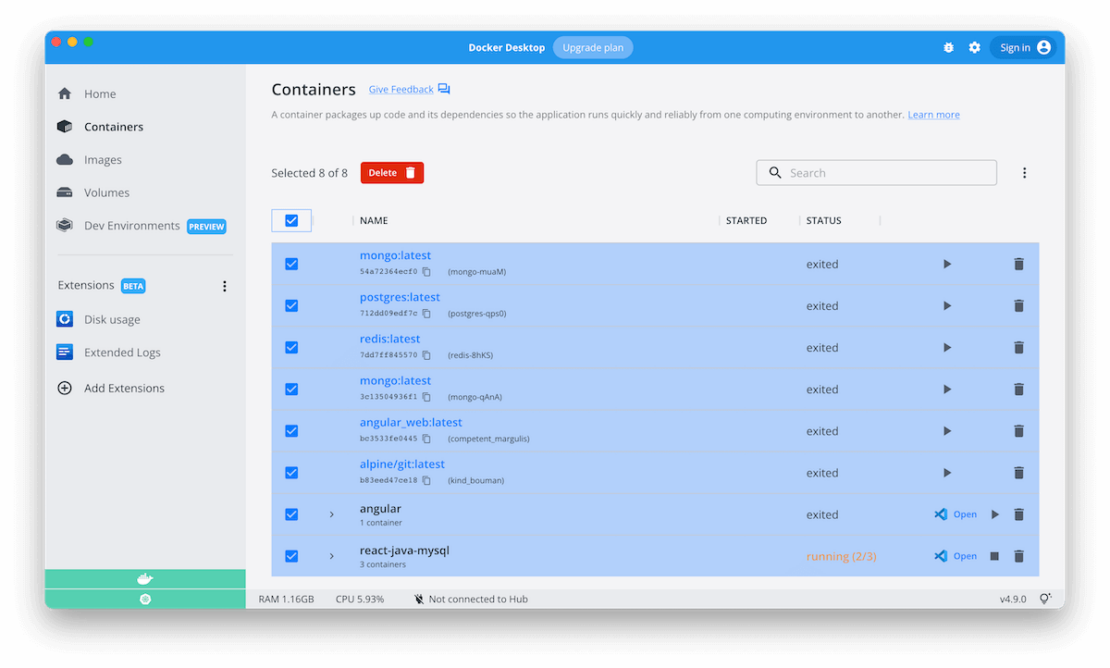
Manage your containers easily with table view and bulk remove
We’ve made a few user experience enhancements to the containers tab based on all of your awesome feedback. We’re excited to announce that on the Containers tab you can now:

Easily clean up multiple containers simultaneously with multi-select checkboxes

Resize columns to view your complete container and image names. Just drag the dividers in the table header.
Quickly copy your image id and easily paste it elsewhere, like in your terminal


Easily sort columns using header attributes. You can also hide columns to create more space and reduce clutter.

Navigate away from your tab and back to it, without disturbing either sorting and search results. These now remain in place thanks to state persistence!

 
Are you looking for more easy ways to tidy up your resources? Check out our Disk Usage extension in the Extensions Marketplace!
New extensions are joining the lineup
We’re happy to announce the addition of two new extensions to the Extensions Marketplace:

Lens Kubernetes – helps you access and take control of your Kubernetes clusters. Read more about it on the Mirantis website.
Slim.ai – gives you the power to create secure containers faster. Dive deeply into the construction of your images and discover what’s in your containers. Read more about this exciting extension here.

 
Information at a glance with the Docker Dashboard Footer
We’ve revamped the Docker Dashboard Footer to readily display key information about Docker Desktop’s current state, including:

Virtual Machine memory usage
Virtual Machine CPU usage
Docker Desktop version
A quick way to view the tip of the week

 
What else can we improve?
Please share your feedback and suggestions for what we should work on next! You can upvote, comment, or submit new ideas to our public roadmap. To learn more about the contents of Docker Desktop 4.9, check out our release notes.
Looking to get started as a new Docker Desktop user? View our Get Started page and read through our Docker Desktop Overview. 
 
Quelle: https://blog.docker.com/feed/

Automating Your Containers’ Security Scanning

Application development is complex. Teams must juggle numerous processes, gather all dependencies, and package everything together into a performant application. On top of this, each containerized application must satisfy strict security requirements, to protect your users and systems against intrusion.
When it comes to maintaining container security, software bugs are inevitable. They’re often harmless glitches, but some can pose serious security risks — letting bad actors access your systems. Whenever someone discovers a vulnerability within commercial or open-source software, they must register it within the Common Vulnerability and Exposure (CVE) database. There are currently more than 170,000 recorded CVEs, and engineers discovered over 2,083 new ones in March 2022 alone.
In this article, we’ll explore how vulnerabilities impact containers and how using images from trusted sources helps. We’ll then discuss how to use Docker’s native Snyk integration to secure your software supply chain.
The State of Software Security
Developers have increasingly turned to third-party code and applications while building their services. Unfortunately, using third-party software may also expose your code to risk. It’s absolutely essential that you leverage trusted images and secure your containers through ongoing vigilance.
This is why image scanning is so critical — not just early on in development, but throughout an application’s life. Thankfully, Docker customers have access to continuous security scanning that’s integrated into their workflows via Snyk — so you can find and fix vulnerabilities more easily. Whether you’re running conventional containers or Kubernetes applications, our native Snyk integration is valuable throughout the software development lifecycle.
How Vulnerabilities Affect Containers
A Docker container starts with a base image, typically from an online source. Teams then add layers to incorporate the functionality they need. These layers might just be simple commands that perform actions like creating a folder, yet they often pull in additional packages.
Here’s a basic Dockerfile example called good-nodejs:

FROM node:lts-alpine3.15
WORKDIR /workdir
RUN npm i express-openid-connect

 
This file has three layers:

FROM: This instruction initializes a new build stage and prepares the base image for upcoming instructions. Any valid Dockerfile starts with a FROM expression. Our example above uses an official Node.js image built atop Alpine Linux. This image contains everything needed to get up and running with Node. It has multiple layers, which you can see from the size of its Dockerfile. Each layer — from the Alpine Linux OS layer and those that make up Alpine — is a potential vulnerability source.
WORKDIR: This layer sets a working directory. Risks here are minimal or non-existent, since WORKDIR doesn’t introduce any new, external software packages.
RUN: This instructional layer installs another third-party package. It may introduce additional vulnerabilities via the package code, its dependencies, and any other requisite packages.

 
These above layers have a knack for concealing vulnerabilities deep inside an image, where they’re inconspicuous. You may need to perform extensive penetration testing to find them.
Using Trusted Sources
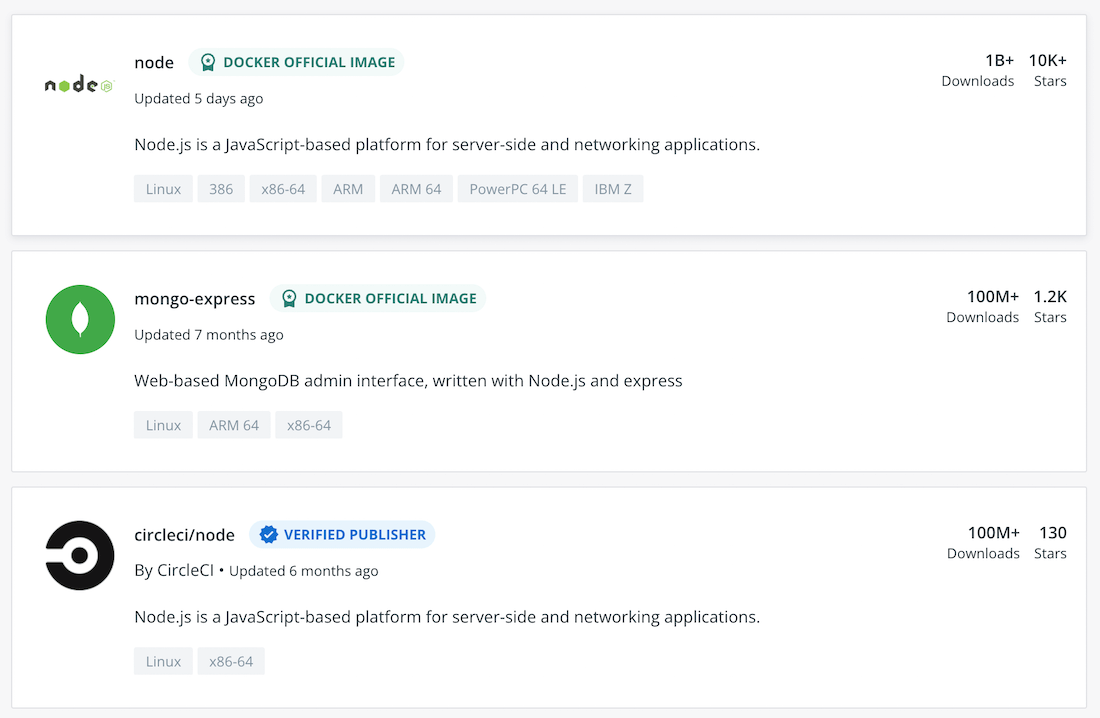
Trusted images that follow image best practices are your most powerful allies when securing your supply chain. Docker Hub provides access to Docker Official Images and Verified Publisher images — denoted by the color-coded badges displayed prominently beside their names.


Docker’s internal teams curate Docker Official Images. We frequently update, scan, and patch these images to galvanize security. Every essential operating system, programming language, middleware, and database is represented.
Docker’s external partners supply Docker Verified Publisher images. When you use these images, you know that they’re sourced authentically and actively maintained. Our program helps ensure that these components are trustworthy. You’ll also find resources from Snyk, similar to those above:


Developers don’t need to have an advanced security background or read CVE reports to fix container issues. This partnership gives Docker developers access to the industry’s most comprehensive, timely, and accurate database of open source and container-vulnerability intelligence.
Our security coverage goes far beyond CVE vulnerabilities and other public databases. Snyk’s in-house research team maintains its database and combines public sources, community contributions, proprietary research, and machine learning to continuously adapt to dynamic security threats.
Identifying Vulnerabilities
Trusted images are great starting points for development, yet they may not be fully functional. You may choose to leverage community-sourced images or those from outside developers instead. Luckily, you can use Docker Hub’s Snyk integration to detect any threats hidden within any images and code. More importantly, our Snyk integration also arms developers with base image fix recommendations and identifies any Dockerfile lines that introduce vulnerabilities.
Automated vulnerability scanning can detect CVEs that find their way into your container images. It’s an essential tool for securing your software supply chain — acting as a front-line defense mechanism as you integrate third-party code into their projects.
This scan works by examining all packages and dependencies defined in your Dockerfile, and checks them against a list of recorded vulnerabilities.
You can enable a repository’s vulnerability scanning in its respective Settings tab.


With scanning enabled, Snyk will automatically analyze any new tags pushed to the repository (like a specific image version or variant).
Consider our basic Dockerfile from earlier. To demonstrate how image scanning works, you can pull an older version of your base image (with known vulnerabilities), and do the same for your npm package:

FROM node:15.9.0-alpine3.13
WORKDIR /workdir
RUN npm i express-openid-connect@2.7.1

 
We can test Snyk’s functionality from here. If you build and push this code to your Docker Hub repository — with the test tag bad-nodejs (alongside good-nodejs from earlier) — you’ll see that Snyk has automatically scanned it. This scan has found 22 high-severity and eight medium-severity vulnerabilities:


You can then dive into the bad-nodejs results to get a breakdown of all vulnerabilities discovered, showing:

Severity
Priority score
CVE number
Package introducing the issue
Package versions with the bug and the fix


When you drill further into a vulnerability, Snyk presents information within a tree-like structure. You can see which package is responsible for introducing the vulnerability. In the example below, apk-tools is importing zlib, which contains an out-of-bounds write vulnerability:


Enabling Continuous Monitoring
Using older image versions to replicate legacy systems is a common practice; it ensures that your applications are backwards compatible. Your workflows might also prioritize stability over new features. Finally, licensing new software versions can be cost-prohibitive for your company, therefore keeping you on an older version.
Building an image with bleeding-edge technologies — and deploying it into production — does introduce some risk. If product development stagnates for an extended period, there’s a high chance that someone will find vulnerabilities in public releases. You wouldn’t know about these vulnerabilities before deployment, since you chose the newest versions.
Using Snyk’s technology, Docker Hub mitigates these risks by periodically re-scanning all repository images. Your Docker Hub subscription grants you Docker Desktop as a local UI. This lets you view recent scan results for images across your organization.
 

Fixing the Container Image via a Web UI
When you push your Dockerfiles to publicly-accessible source control — like GitHub, GitLab, and Bitbucket — you can integrate the code with a free Snyk account and get detailed remediation recommendations. The web UI prompts you to automatically fix vulnerabilities with a pull request into the source code.
 

Fixing the Container Image via the Command Line
Docker Desktop also provides powerful CLI scanning locally. This alternative method lets Snyk examine your Dockerfile and provide detailed recommendations based on its findings. It’s also an essential tool if you’ve embraced a shift-left testing philosophy.
When you scan that aforementioned bad-nodejs image via the command line, you’ll uncover the same vulnerabilities found within Docker Hub:

✗ Critical severity vulnerability found in apk-tools/apk-tools
Description: Out-of-bounds Read
Info: https://snyk.io/vuln/SNYK-ALPINE313-APKTOOLS-1533754
Introduced through: apk-tools/apk-tools@2.12.1-r0
From: apk-tools/apk-tools@2.12.1-r0
Image layer: Introduced by your base image (node:15.9-alpine3.13)
Fixed in: 2.12.6-r0

 
This output shows how the vulnerability was introduced and links to Snyk, where more information is available.
By linking your Dockerfile on the CLI scan, you’ll receive the same upgrade recommendations for your base image as you had earlier.


You’ll find another vulnerability if you scroll further down. Your added npm package introduced the vulnerability after intentionally grabbing an older version. Crucially, Snyk tells you how to fix this.


Next Steps
Security discussions can be both headache inducing and complex in a traditional development environment. Process fragmentation impacts security from one team to the next, and the onus is often on leaders to form a cohesive strategy. However, you should never have to wonder if your teams are building, running, and sharing secure applications.
Accordingly, automated vulnerability scanning helps your organization secure its software supply chain. Docker’s native Snyk integration provides broad oversight of your organization’s image security — detecting vulnerabilities inside dependency layers. Our Docker Extension for Snyk helps you better follow development best practices, while also meeting your compliance requirements. Learn more about getting started with Snyk scanning, and our Docker Extension for Snyk, here.
The integration reduces the time and effort needed to boost security. Your development teams can instead spend their time improving your services. To learn more about Docker’s vulnerability scanning integrations — and how to start securing your images —  browse our documentation.
Quelle: https://blog.docker.com/feed/

Moss simplifies climate change mitigation with Google Cloud

Editor’s note: World Environment Day reminds us that we all can contribute to creating a cleaner, healthier, and more sustainable future. Google Cloud is excited to celebrate innovative startup companies developing new technology and driving sustainable change. Today we’re highlighting Moss, a Brazilian startup, simplifying carbon offset transactions and increasing traceability, using blockchain and Google Cloud technology. Brazil is an important nation in the fight against climate change. With 212 million people, it’s the sixth most populous country in the world. And the Amazon rainforest is by far the world’s largest rainforest—larger, in fact, than the next two largest rainforests combined—and therefore the earth’s largest carbon sink. Yet as much as 17 percent of the rainforest is already lost to agricultural development and resource extraction.I’m passionate about enabling a more sustainable future for Brazilians and for people all over the world, as is my business partner, Luis Felipe Adaime, who used to work in financial services. That industry—at least in Brazil—is still in the early stages of embracing more sustainability initiatives. Luis Felipe was interested in climate change and environmental, social, and governance (ESG) strategies, but few people in Brazilian finance were even talking about these things. After his daughter was born, he decided to dedicate his life to combating climate change and foundedMoss.Moss, where I am a Partner and Managing Director, makes it easier by simplifying green carbon offset transactions. We started in Brazil, but we’re global now, and we’re growing fast, with 44 employees dedicated to reaching more customers worldwide. The focus on sustainability is increasing everywhere now. For instance in 2019, the UK became the first country in the world to pass a net zero carbon emissions law, requiring itself to reduce net emissions of greenhouse gasses by 100 percent compared to 1990 levels by the year 2050. Other countries worldwide are embracing similar goals. Net zero carbon emissions doesn’t mean that no carbon dioxide (or its equivalent) is released into the atmosphere. That is likely impossible given how economies and the people they serve operate today. Net zero means that for every ton of carbon dioxide emitted, another ton is removed, such as by the planting of trees to replace it with a carbon sink. Fernanda Castilho, Partner and Managing Director at MossExpanding access to carbon credits to fight climate changeOur mission is simple: combat climate change by digitizing the tools we need to expand the market for buying carbon offset credits. We started by transferring existing credits to blockchain and by creating a green token, MCO2, which we sell to companies and individuals who want to do their part. MCO2 is an ERC-20 utility token, a standard used for creating and issuing smart contracts on the Ethereum blockchain. If you purchase carbon offset credits from us, and retire them, we believe that you’re donating money to projects that prevent deforestation in the Amazon for timber harvesting and cattle grazing. Moss makes publicly available a real-time reconciliation on itswebsite, where holders can check the total supply of tokens on the Ethereum blockchain and compare it to the regular inventory of the carbon credit market.We partner with global companies such as Harrison Street, a real estate investment fund in the UK, and One River Asset Management, a crypto management fund in the US. But our largest clients are corporations here in Brazil that acquire our credits with the objective to offset their carbon footprints or offer it to their own clients.GOL, for instance, Brazil’s largest airline, now gives passengers the option to offset carbon emissions from their trips when they purchase a ticket. We also work with a number of Brazilian soccer teams, and there’s an app available in the Google Play store that individuals can use to purchase credits to offset their personal carbon footprints. Rapid time to market with advanced securityOur CTO, Renan Kruger, lobbied hard to use Google Cloud right at the beginning because he loved using Google Workspace at his previous job. Our IT team also heavily promoted the use of Google Cloud thanks to capabilities in Cloud SQL, Cloud Storage, Compute Engine, Google Kubernetes Engine (GKE), BigQuery, Dataflow, and Cloud Functions. We also value that Google Cloud takes environmental sustainability as seriously as we do.BigQuery is a terrific repository for capturing and analyzing massive amounts of data, so the flexibility to manage and analyze vast pools of data is integral to creating our carbon credit exchange. GKE can be one of the simplest ways to eliminate operational overhead by automatically deploying, scaling, and managing Kubernetes. Google Cloud Dataflow is perfect for fast, cost-effective, serverless data processing, and we love that Cloud Functions lets us pay as we go to run our code without any server management. All of this is crucial for us because we have immense flexibility to scale and don’t need or want to run hardware. Our product is an app for buying and selling credits rather than physical objects, so we can operate entirely in the cloud. We used Firebase, the Google mobile development platform, to quickly build and grow our app with basically no infrastructure in aNoOps scenario to achieve a rapid time to market. We can deploy edge functions and back-end functions using Node JS inside the Firebase stack itself. We can also deploy our solutions on blockchain to help secure our product keys. And Google Cloud data governance helps us deploy and maintain clusters, reducing the time, cost, and labor of maintaining traditional infrastructure.Equally critical is security. With Google Cloud, we don’t worry about patching or hardening the system or any of the other headaches IT teams deal with using on-premise infrastructure or less-secure cloud environments.Moving toward net zero emissionsRight now we’re trying to reduce carbon emissions, but removing carbon that’s already in the atmosphere and reversing rather than slowing climate change is a priority. Damage control, while important today, isn’t enough in the long run. A big challenge is that right now it’s very expensive to remove carbon from the atmosphere. Fortunately, technology is always improving, which could help lower carbon-elimination costs. The reality is that we all have to work together and contribute to combat climate change. Everyone everywhere is already witnessing impacts that are projected to only worsen in frequency and severity. The more people who are empowered to take action, the better it will be for everyone. At Moss, we offer another important avenue for people to get involved, with a vision that additional,  transparent and  high-quality carbon credits will aid in installing the destruction we see today and tomorrow. If you want to learn more about how Google Cloud can help your startup, visit our pagehere to get more information about our program, and sign up for our communications to get a look at our community activities, digital events, special offers, and more.Related ArticleHow Google Cloud is helping more startups build, grow, and scale their businessesLearn how Google is investing in startups at the 2022 Google Cloud Startup Summit.Read Article
Quelle: Google Cloud Platform

Google Cloud’s preparations to address the Digital Operational Resilience Act

European legislators came to an inter-institutional agreement on the Digital Operational Resilience Act (DORA) in May 2022. This is a major milestone in the adoption of new rules designed to  ensure financial entities can withstand, respond to and recover from all types of ICT-related disruptions and threats, including increasingly sophisticated cyberattacks.DORA will harmonize how financial entities must report cybersecurity incidents, test their digital operational resilience, and manage ICT third-party risk across the financial services sector and European Union (EU) member states. In addition to establishing clear expectations for the role of ICT providers, DORA will also allow financial regulators to directly oversee critical ICT providers.  Google Cloud welcomes the agreement on DORA. As part of our Cloud On Europe’s Terms initiative, we are committed to building trust with European governments and enterprises with a cloud that meets their regulatory, digital sovereignty, sustainability, and economic objectives. We recognize the continuous effort by the European Commission, European Council, and European Parliament to design a proportionate, effective, and future-proof regulation. We have been engaging with the policymakers on the DORA proposal since it was tabled in September 2020, and appreciate the constructive dialogue that the legislators have held with ICT organizations.Google Cloud’s perspective on DORAWe firmly believe that DORA will be crucial to the acceleration of digital innovation in the European financial services sector. It creates a solid framework to enhance understanding, transparency, and trust among ICT providers, financial entities, and financial regulators. Here are a few key benefits of DORA:Coordinated ICT incident reporting: DORA consolidates financial sector incident reporting requirements under a single streamlined framework. This means financial entities operating in multiple sectors or EU member states should no longer need to navigate parallel, overlapping reporting regimes during what is necessarily a time-sensitive situation. DORA also aims to address parallel incident reporting regimes like NIS2. Together these changes help get regulators the information they need while also allowing financial entities to focus on other critical aspects of incident response. New framework for digital operational resilience testing: Drawing on existing EU initiatives like TIBER-EU, DORA establishes a new EU-wide approach to testing digital operational resilience, including threat-led penetration testing. By clarifying testing methodology and introducing mutual recognition of testing results, DORA will help financial entities continue to build and scale their testing capabilities in a way that works throughout the EU. Importantly, DORA addresses the role of the ICT provider in testing and permits pooled testing to manage the impact of testing on multi-tenant services like public clouds.CoordinatedICT third party risk management: DORA builds on the strong foundation established by the European Supervisory Authorities’ respective outsourcing guidelines by further coordinating ICT third-party risk management requirements across sectors, including the requirements for contracts with ICT providers. By helping to ensure that similar risks are addressed consistently across sectors and EU member states, DORA will enable financial entities to consolidate and enhance their ICT third-party risk management programs. Direct oversight of critical ICT providers: DORA will allow financial regulators to directly oversee critical ICT providers. This mechanism will create a direct communication channel between regulators and designated ICT providers via annual engagements, including oversight plans, inspections, and recommendations. We’re confident that this structured dialogue will help to improve risk management and resilience across the sector.How Google Cloud is  preparing for DORAAlthough political agreement on the main elements of DORA have been reached, legislators are still finalizing the full details. We expect the final text to be published later this year and that there will be a two-year implementation period after publication. While DORA isn’t expected to take effect until 2024 at the earliest, here’s four important topics that DORA will impact and what Google Cloud does to support our customers in these areas today.Incident reporting: Google Cloud runs an industry-leading information security operation that combines stringent processes, a world-class team, and multi-layered information security and privacy infrastructure. Our data incident response whitepaper outlines Google Cloud’s approach to managing and responding to data incidents. We also provide sophisticated tools and solutions that customers can use to independently monitor the security of their data, such as the Security Command Center. We continuously review our approach to incident management based on evolving laws and industry best practices, and will be closely following the developments in this area under DORA.Digital operational resilience testing: We recognize that operational resilience is a key focus for the financial sector. Our research paper on strengthening operational resilience in financial services by migrating to Google Cloud discusses the role that a well-executed migration to Google Cloud can play in strengthening resilience. We also recognize that resilience must be tested. Google Cloud conducts our own rigorous testing, including penetration testing and disaster recovery testing. We also empower our customers to perform their ownpenetration testing and disaster recovery testing for their data and applications. Third-party risk: Google Cloud’s contracts for financial entities in the EU address the contractual requirements in the EBA outsourcing guidelines, the EIOPA cloud outsourcing guidelines, the ESMA cloud outsourcing guidelines, and other member state requirements. We are paying close attention to how these requirements will evolve under DORA.Oversight: Google Cloud is committed to enabling regulators to effectively supervise a financial entity’s use of our services. We grant information, audit and access rights to financial entities, their regulators and their appointees, and support our customers when they or their regulators choose to exercise those rights. We would approach a relationship with a lead overseer with the same commitment to ongoing transparency, collaboration, and assurance.We share the same objectives as legislators and regulators seeking to strengthen the digital operational resilience of the financial sector in Europe, and we intend to continue to build on our strong foundation in this area as we prepare for DORA. Our goal is to make Google Cloud the best possible service for sustainable, digital transformation for European organizations on their terms—and there is much more to come.Related ArticleHelping build the digital future. On Europe’s terms.Cloud computing is globally recognized as the single most effective, agile and scalable path to digitally transform and drive value creat…Read Article
Quelle: Google Cloud Platform

Apigee best practices for Contact Center AI

By now, you’ve probably interacted with a customer service chatbot at some point. However, many of those interactions may have left a lot to be desired. Modern consumers generally expect more than a simple bot that answers questions with predefined answers—they expect a virtual agent that can solve their problems.Google Cloud Contact Center AI (CCAI) can make it easier for organizations to efficiently support their end customers with natural interactions delivered through AI-powered conversation. In this guide, we’ll share seven Apigee best practices for building fast, effective chatbots with secure APIs using CCAIand Apigee API Management.This blog post assumes you have basic knowledge of CCAI and Apigee API Management.Good conversation is challengingOne of the many challenges organizations face is how to provide a bot experience to customers when information resides in more places than ever. Creating an optimal virtual agent generally involves integrating with both new and legacy systems that are spread out across a mix of on-premises and cloud environments, using REST APIs.Dialogflow CX is a natural language processing module of CCAI that translates text or audio from a conversation into structured data. A powerful feature of Dialogflow CX is webhook fulfillments to connect with backend systems. Once a virtual agent triggers a webhook, Dialogflow CX connects to backend APIs, consumes the responses, and stores required information in its context. This integration can allow virtual agents to have more informed and purposeful interactions with end users, such as verifying store hours, determining whether a particular item is in stock, and checking the status of an order.Developing APIs for CCAI fulfillment is not a straightforward task. There can be many challenges associated with it, including:Complexity: You may need to access APIs that are not exposed externally, which can require significant collaboration and rules to enable access to existing data and systems. This can easily lead to technical debt and more inefficiency without an API Gateway that can translate the complexities of data systems in real time and forward them to a customer.Increased customer frustration: Contact centers often act as one of the primary drivers of customer experience. Improving the speed of response can enhance experiences, but any friction or delays can be magnified. Caching and prefetching data are some commonly used flows to enable faster virtual agent responses. API Orchestration: APIs generally require more than just exposing an endpoint as they need to change often in response to customer needs. This flexibility can require API orchestration, where APIs are decoupled from rigid services and integrated into an interface tailored to the expected consumption patterns and security requirements of interacting with Dialogflow CX. Without an API platform, translating complexities of data systems in realtime and forwarding to the caller is not efficient.How Dialogflow and Apigee deliver better chatbot experiencesCCAI can be more effective when woven into the fabric of the business via APIs. The more functionality (and therefore more APIs) you add to the agent, the more critical it can become to streamline the API onboarding process. You need to consolidate repetitive work, validate security postures, and identify and implement optimizations to ensure a great end user experience.Apigee API Management can pave the way for faster and easier fulfillment. Apigee is an intuitive platform for bot designers and architects to incorporate key business processes and insights into their workflow. More specifically, it enables Dialogflow to speak with your backend systems. You can use Apigee’s built-in policies to inspect Dialogflow requests, set responses, validate defined parameters, and trigger events in real time. For example, if a call meets a defined business criteria, Apigee can augment a “360 degree view” in a data warehouse like BigQuery, add a customer to a campaign list, or send a SMS/text alert—all without any material impact on the routing time. By pairing CCAI with Apigee, you can leverage a greater portion of Google Cloud’s transformation toolset, reduce the amount of time needed for conversation architects to integrate APIs, and create a more cohesive development environment for solving call center challenges.Seven ways to get more out of Contact Center AI API development with ApigeeThe following are several best practices for Apigee API development for Dialogflow CX API fulfillments:1. Create a single common Apigee API proxy Let’s assume we have a Dialogflow CX virtual agent that needs three fulfillment APIs that will be fronted by Apigee:get list of moviesadd movie ticket to cartorder item in cartTechnically, you can create a separate Dialogflow CX webhook for each of these APIs, which can point to three separate API proxies. However, because Dialogflow has a proprietary request and response format, creating three separate API proxies for those fulfillment APIs results in three non-RESTful proxies that are difficult to consume for any clients other than Dialogflow CX virtual agents.Instead, we recommend creating a common Apigee API proxy that is responsible for handling all the fulfillment APIs required by the agent. Dialogflow CX will have just one webhook that is configured to send requests to the common Apigee API proxy. Each webhook call is sent with a webhook tag that uniquely identifies the correct fulfillment API.2. Leverage Dialogflow policies as much as possibleApigee provides two Dialogflow-specific policies: ParseDialogflowRequest and SetDialogflowResponse. It is highly recommended to use these policies whenever possible. Doing so not only adheres to the general best practice of choosing built-in policies first over custom code, but also ensures that parsing and setting of Dialogflow request and response is standardized, hardened, and performant.As a general rule:ParseDialogflowRequest is required only once in an API proxy and placed in the PreFlow after authentication has taken place.SetDialogflowResponse may be used for each distinct fulfillment response (i.e., for each unique webhook tag). If the SetDialogflowResponse does not meet all of the requirements, either supplement or replace it with AssignMessage or JavaScript policies.3. Use conditional flows for each webhook tagConditional flows should be used to separate the logic for different fulfillment APIs. The easiest way to implement this is by placing a ParseDialogflowRequest policy in the PreFlow. Once that policy has been added, the flow variable google.dialogflow.<optional-prefix>.fulfillment.tag will be populated with the value of the webhook tag. This variable can then be used to define the conditions in which a request enters a particular conditional flow.Here is an example of a conditional flow using the same three fulfillment APIs from above:4. Consider utilizing proxy chainingDialogflow CX webhooks have their own request and response format instead of following RESTful conventions such as GET for reads, POST for creates, PUT for updates, etc. This makes it difficult for conventional clients to easily consume an API Proxy created for DIalogflow CX.Hence we recommend using proxy chaining. With proxy chaining you can separate API proxies into two categories: Dialogflow proxies and resource proxies. Dialogflow proxies can be lightweight proxies limited to actions specific to the Dialogflow client. These might include:Authenticating requestsTranslating a Dialogflow CX request into a RESTful formatSending a RESTful request to the resource proxyTranslating the response back from the resource proxy into the Dialogflow formatAnd any tasks that involve connecting to the backend and exchanging data should fall to your resource proxies. You should create resource proxies just like any other Apigee API proxy, without considerations for Dialogflow in mind. The focus should be on providing an eloquent, RESTful interface for all types of clients to easily consume.Proxy chaining provides a way to reuse proxies. However, it can incur some additional overhead as the call moves from one proxy to another. Another approach you can use is to develop components that are expressly designed to be reused, using Reusable shared flows. Shared flows combine policies and resources together and can be abstracted into shared libraries, allowing you to capture functionality that can be consumed in multiple places. They also let security teams standardize on approach and rules for connectivity to trusted systems, assuring security compliance without compromising the rate of innovation. Proxies you want to connect in this way must be in the same organization and environment.5. Improve performance with cache prefetchingWhen creating a chatbot or any other natural language understanding-enhanced application, response latency is an important metric — the time it takes for a bot to respond back to the user. Minimizing this latency helps retain user attention and avoids scenarios where the user is left wondering whether the bot is broken.If a backend API that a Dialogflow virtual agent relies on has a long response time, it may be useful to prefetch the data and store it in Apigee’s cache to improve performance. You can include tokens and other meta-information, which can directly impact the time elapsed between customer input and a return prompt from Dialogflow. The Apigee cache is programmable, which can enable greater flexibility and thus a better conversation experience. You can implement prefetching and caching data using Response Cache (or Populate Cache) combined with Service Callout policy.6. Prefer responding with a single complex parameter instead of multiple scalar parametersWhen responding to a virtual agent with the SetDialogflowResponse policy, one can return multiple values at once via the <Parameters> element. This element accepts one or more children <Parameter> elements. If possible, it’s generally more effective to return a single parameter as a JSON object instead of breaking up the response as multiple parameters, each containing a single string or number. You can leverage this strategy via <JSONPath>.This approach is recommended because: Parameters will be logically grouped.Dialogflow CX can still easily access the composite parameters using dot notation.The agent can use a null value for a single parameter to erase previous response parameters and delete the entire JSON object instead of having to specify a null value for many different individual parameters7. Consider responding with 200s on certain errorsIf a webhook service encounters an error, Dialogflow CX recommends returning certain 4XX and 5XX status codes to notify the virtual agent that an error has occurred. Whenever Dialogflow CX receives these types of errors, it invokes the webhook.error event and continues execution without making the contents of the error response available to the agent.However, there are scenarios where it is reasonable for the fulfillment API to provide feedback on an error, such as notifying the user that a movie is no longer available or that a certain cinema ticket is invalid. In these cases, consider responding with a 200 HTTP status code to provide context around whether the error was expected (e.g. 404) vs. unexpected (e.g. 5XX).Get startedApigee’s built-in policies, nuanced approach to security, shared flows, and caching mechanism can provide a smoother way to implement effective virtual agents that deliver speedy responses to your end customers. By applying these best practices, your Dialogflow engineers can have more time to innovate and focus on building better conversation experiences rather than integrating backend systems.Try building a sample Contact Center AI workflow with Apigee or visit Integrating with Contact Center AI to find out more.Related ArticleContact Center AI reimagines the customer experience through full end-to-end platform expansionGoogle Cloud extends Contact Center AI with Contact Center AI Platform, adding CRM integration for end-to-end management of customer jour…Read Article
Quelle: Google Cloud Platform

QuintoAndar becomes largest housing platform in Latin America with help from Google Cloud

Stanford University classmates Gabriel Braga and André Penha knew the real estate market in Brazil was plagued by bureaucracy and steep fees, and they were sure they could build something better. They envisioned a digital marketplace that could connect potential tenants and homebuyers to landlords and sellers to streamline real estate transactions in Brazil. In 2012, they founded QuintoAndar, a housing marketplace that connects property owners, residents, brokers and agents in Brazil. The company, which began with a small team of developers, has now the largest valuation of a proptech in Latin America at $5.1B as of August 2021, after raising another $120M on top of the $300 million in Series E funding they raised in May 2021.Building a PWA at Google for Startups Accelerator: BrazilQuintoAndar started out with four projects in two stacks for their front end main products: Android and iOS mobile apps and desktop and mobile websites. The brand wasn’t well-known, so users were hesitant to install its apps. To meet their aggressive traffic and growth goals, QuintoAndar decided to participate in the Google for Startups Accelerator: Brazil program. Their Google mentors introduced them to the concept of Progressive Web Apps, which use modern web capabilities to deliver an app-like user experience, and described a long-term strategy for QuintoAndar using a PWA. QuintoAndar’s leadership could see that a PWA would allow them to evolve the product on multiple platforms by unifying the production and support of new features.To help focus developers on a main stack and offer users a great web experience, the QuintoAndar team decided to go all-in on a PWA written in React, using Chrome for the browser and Chrome DevTools to develop and debug the app. They used WorkBox to improve the offline experience and Google Material Design to unify the desktop-app cross-platform experience.The PWA served as QuintoAndar’s main web digital channel, and three apps met the needs of three user categories: home buyers and renters; sellers or landlords; and real estate agents. Home buyers and renters used QuintoAndar’s main PWA to search for homes, schedule virtual or on-site visits, negotiate, and complete all the steps of the rental or sales process. Homeowners used the homeowners’ app to list properties for sale or rent, monitor visits, negotiate with potential buyers or tenants, and close deals. Real estate agents used the agent’s app to manage their schedules, book visits, contact clients, and manage deals.QuintoAndar’s four years of focusing on its PWA helped the company shape its product and drive growth. Traffic increased to 30 times its initial rates. By 2021, with a larger engineering and product team and a well-known brand, QuintoAndar decided to invest in mobile app development, to offer a better user experience. After researching mobile development options, the company built a native app with Flutter, and QuintoAndar’s app score went up from 3.9 to 4.5. The company continues to invest in both web and native mobile app platforms.Leveraging Google Cloud to get results Now, QuintoAndar has dedicated platform teams to improve its tech stack and build developer tools for stream-aligned teams, like design system, web performance, and native teams. On the stack side, they use Next.js for web and Flutter for native apps. They also use YouTube, Google Maps Platform, Firebase, Cloud Firestore, Cloud Functions, and Analytics to real time sync in features such as favorite lists and negotiations (which are back-and-forth messages between the tenant/buyer and the homeowner/seller). When QuintoAndar launched, none of the players in the proptech market in Brazil showed exact locations of their listings, which had a negative impact on user experience. QuintoAndar uses Google Maps to show the exact location of properties, which forces the market to change accordingly.Looking forward to growthQuintoAndar has grown steadily, and today, the company employs over 4,000 people, with technical teams of more than 600. QuintoAndar is available in all five 5 regions of Brazil and more than 60 Brazilian cities, and is expanding internationally, starting with Mexico. Taking its lead from Google mentors, the company has adopted guiding principles of innovation, keeping customers at the center of decision-making, working collaboratively, and delivering results.  If you want to learn more about how Google Cloud can help your startup, visit our pagehere to get more information about our program, and sign up for our communications to get a look at our community activities, digital events, special offers, and more.Related ArticleHow Google Cloud is helping more startups build, grow, and scale their businessesLearn how Google is investing in startups at the 2022 Google Cloud Startup Summit.Read Article
Quelle: Google Cloud Platform

Amazon EMR Serverless ist ab sofort allgemein verfügbar

Wir freuen uns, die allgemeine Verfügbarkeit von Amazon EMR Serverless, anzukündigen, einer neuen serverlosen Bereitstellungsoption in Amazon EMR, die es Dateningenieuren und -analysten einfach und kostengünstig ermöglicht, Datenanalysen im Petabyte-Bereich in der Cloud durchzuführen. Amazon EMR ist eine Big-Data-Lösung, mit der Sie umfangreiche verteilte Datenverarbeitungsaufträge, interaktive SQL-Abfragen und Anwendungen für Machine Learning (ML) ausführen können, die auf Open-Source-Analyse-Frameworks wie Apache Spark , Apache Hive, und Presto basieren. Mit EMR Serverless können Sie Ihre Spark- und Hive-Anwendungen ausführen, ohne Clusters konfigurieren, optimieren, abstimmen oder verwalten zu müssen.
Quelle: aws.amazon.com






