Pendler-E-Bike: Tenways CGO800S für 1.900 Euro soll 100 km Reichweite bieten
Tenways hat das auf Komfort setzende E-Bike CGO800S vorgestellt, das für tägliche Pendelstrecken gedacht ist. (E-Bike, Elektromobilität)
Quelle: Golem

Tenways hat das auf Komfort setzende E-Bike CGO800S vorgestellt, das für tägliche Pendelstrecken gedacht ist. (E-Bike, Elektromobilität)
Quelle: Golem
Wondering how to get started with Vertex AI? Below, we’ve collected a list of resources to help you build and hone your skills across data science, machine learning, and artificial intelligence on Google Cloud.We’ve broken down the resources by what we think a Data Analyst, Data Scientist, ML Engineer, or a Software Engineer might be most interested in. But we also recognize there’s a lot of overlap between these roles, so even if you identify as a Data Scientist, for example, you might find some of the resources for ML Engineers or Developers just as useful!Data Analyst From data to insights, and perhaps some modeling, data analysts look for ways to help their stakeholders understand the value of their data.Data exploration and Feature Engineering[Guide] Exploratory Data Analysis for Feature Selection in Machine Learning[Documentation] Feature preprocessing in BigQuery Data visualization[Guide] Visualizing BigQuery data using Data Studio[Blog] Go from Database to Dashboard with BigQuery and LookerData ScientistAs a data scientist, you might be interested in generating insights from data, primarily through extensive exploratory data analysis, visualization, feature engineering, and modeling. If you’d like one place to start, check out Best practices for implementing machine learning on Google Cloud. Model registry[Video] AI/ML Notebooks how to with Apache Spark, BigQuery ML and Vertex AI Model RegistryModel training[Codelab] Train models with the Vertex AI Workbench notebook executor[Codelab] Use autopackaging to fine tune Bert with Hugging Face on Vertex AI Training[Blog] How To train and tune PyTorch models on Vertex AILarge scale model training[Codelab] Multi-Worker Training and Transfer Learning with TensorFlow[Blog] Optimize training performance with Reduction Server on Vertex AI[Video] Distributed training on Vertex AI Workbench Model tuning[Codelab] Hyperparameter tuning[Video] Faster model training and experimentation with Vertex AIModel serving[Blog] How to deploy PyTorch models on Vertex AI[Blog] 5 steps to go from a notebook to a deployed modelML EngineerBelow are resources for an ML Engineer, someone whose focus area is MLOps, or the operationalization of feature management, model serving and monitoring, and CI/CD with ML pipelines.Feature management[Blog] Kickstart your organization’s ML application development flywheel with the Vertex Feature Store[Video] Introduction to Vertex AI Feature StoreModel Monitoring[Blog] Monitoring feature attributions: How Google saved one of the largest ML services in troubleML Pipelines[Blog] Orchestrating PyTorch ML Workflows on Vertex AI Pipelines[Codelab] Intro to Vertex Pipelines[Codelab] Using Vertex ML Metadata with PipelinesMachine Learning Operations[Guide] MLOps: Continuous delivery and automation pipelines in machine learningSoftware Engineer with ML applicationsHere are some resources if you work more as a traditional software engineer who spends more time on using ML in applications and less time on data wrangling, model building, or MLOps.[Blog] Find anything blazingly fast with Google’s vector search technology[Blog] Using Vertex AI for rapid model prototyping and deployment[Video] Machine Learning for developers in a hurryLooking for resources?Are you looking for more information but you can’t seem to find them? Let us know! Reach out to us on Linkedin:Nikita NamjoshiPolong LinRelated ArticlePick your AI/ML Path on Google CloudYour ultimate AI/ML decision treeRead Article
Quelle: Google Cloud Platform
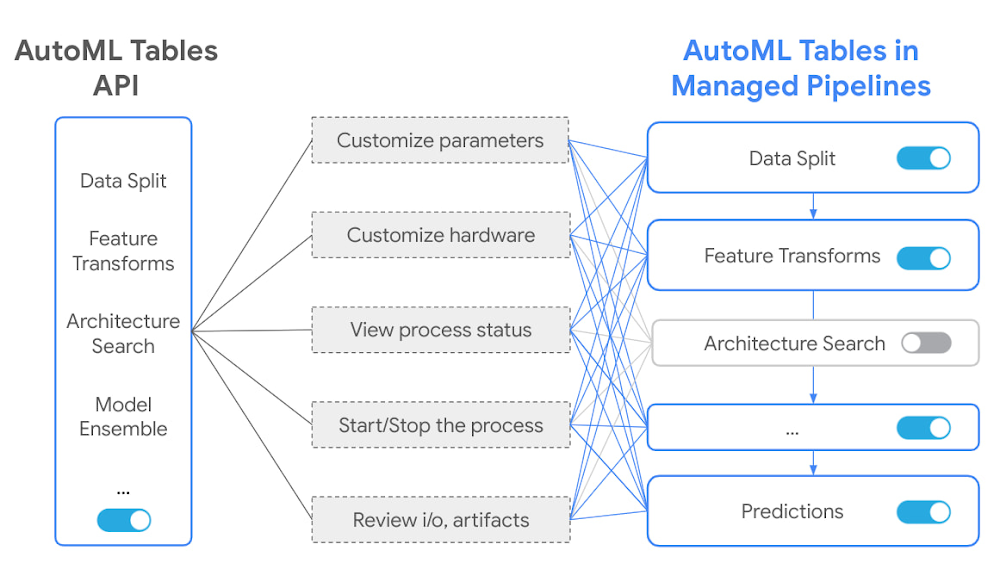
Earlier this year, we shared details about our collaboration with USAA, a leading provider of insurance and financial services to U.S. military members and veterans, who leveraged AutoML models to accelerate the claims process. Boasting a peak 28% improvement relative to baseline models, the automated solution USAA and Google Cloud produced can predict labor costs and car part repair/replace decisions based on photos of damaged vehicles, potentially redefining how claims are assessed and handled. This use case combines a variety of technologies that extend well beyond the insurance industry, among them a particularly sophisticated approach to tabular data, or data structured into tables with columns and rows (e.g., vehicle make/model and points of damage, in the case of USAA). Applying machine learning (ML) to tabular data can unlock tremendous value for businesses of all kinds, but few tools have been both user-friendly and appropriate for enterprise-scale jobs. Vertex AI Tabular Workflows, announced at Google Cloud Applied ML Summit, aims to change this. Applying Google AI research to solving customer problemsGoogle’s investment in rigorous artificial intelligence (AI) and ML research makes cutting-edge technologies not only more widely available, but also easier to use, faster to deploy, and efficient to manage. Our researchers publish over 800 papers per year, generating hundreds of academic citations. Google Cloud has successfully turned the results of this research into a number of award-winning, enterprise-grade products and solutions.For example, Neural Architecture Search (NAS) was first described in a November 2016 research paper and later became Vertex AI NAS, which lets data science teams train models with higher accuracy, lower latency, and low power requirements. Similarly, Matching Engine was first described in an August 2019 paper before translating into an open-sourced TensorFlow implementation called ScaNN in 2020, and then into Vertex AI Matching Engine in 2021, which helps data teams address the “nearest neighbor search” problem. Other recent research-based releases include the ability to run AlphaFold, DeepMind’s revolutionary protein-folding system, on Vertex AI. In tabular data, the research into evolutionary and “learning-to-learn” methods led to the creation of AutoML Tables andAutoML Forecast in Vertex AI. Data scientists and analysts have enjoyed using AutoML for its ability to abstract the inherent complexity of ML into simpler processes and interfaces without sacrificing scalability or accuracy. They can train models with fewer lines of code, harness advanced algorithms and tools, and deploy models with a single click. A number of high-profile customers have already successfully reaped the benefits of our AutoML products. For example, Amaresh Siva, senior vice president for Innovation, Data and Supply Chain Technology at Lowe’s said, “Using Vertex AI Forecast, Lowe’s has been able to create accurate hierarchical models that balance between SKU and store-level forecasts. These models take into account our store-level, SKU-level, and region-level inventory, promotions data and multiple other signals, and are yielding more accurate forecasts.” These and many other success stories helped Vertex AI AutoML become the leading Automated Machine Learning Framework in the market, according to the Kaggle “State of Data Science and Machine Learning 2021” report. Expanding AutoML with Vertex AI Tabular WorkflowsWhile we have been thrilled by adoption of our AI platforms, we are also well aware of requests for more control, flexibility and transparency in AutoML for tabular data. Historically, the only solution to these requests was to use Vertex AI Custom Training. While it provided the necessary flexibility, it also required engineering the entire ML pipeline from scratch using various open source tools, which would often need to be maintained by a dedicated team. It was clear that we needed to provide options “in the middle” between AutoML and Custom Training—something that is powerful and leverages Google’s research, yet is flexible enough to allow many customizations. This is why we are excited to announce Vertex AI Tabular Workflows- integrated, fully managed, scalable pipelines for end-to-end ML with tabular data. These include AutoML products and new algorithms from Google Research teams and open source projects. Tabular workflows are fully managed by the Vertex AI team, so users don’t need to worry about updates, dependencies and conflicts. They easily scale to large datasets, so teams don’t need to re-engineer infrastructure as workloads grow. Each workflow is paired with an optimal hardware configuration for best performance. Lastly, each workflow is deeply integrated with the rest of Vertex AI MLOps suite, like Vertex Pipelines and Experiments tracking, allowing teams to run many more experiments in less time.AutoML Tables workflow is now available on Vertex AI Pipelines, bringing many powerful improvements, such as support for 1TB datasets with 1,000 columns, and the ability to control model architectures evaluated by the search algorithm and change the hardware used in the pipeline to improve training time. Most importantly, each AutoML component can be inspected in a powerful pipelines graph interface that lets customers see the transformed data tables, evaluated model architectures and many more details. Every component now also gets extended flexibility and transparency, such as being able to customize parameters, hardware, view process status, logs and more. Customers are taken from a world with controls for the whole pipeline into a world with controls for every step in the pipeline.Google’s investment in tabular data ML research has also led to the creation of multiple novel architectures such as TabNet,Temporal Fusion Transformers and Wide & Deep. These models have been well received by the research community, resulting in hundreds of academic citations. We are excited to offer fully managed, optimized pipelines for TabNet and Wide & Deep in Tabular Workflows. Our customers can experience the unique features of these models, like built-in explainability tools, without worrying about implementation details or selecting the right hardware.New workflows are added to help improve and scale feature engineering work. For example, our Feature Selection workflow can quickly rank the most important features in datasets with over 10,000 columns. Customers can use it to explore their data or combine it with TabNet or AutoML pipelines to enable training on very large datasets. We hope to see many more interesting stories of customers using multiple Tabular Workflows together.Vertex AI Tabular Workflows makes all of this collaboration and research available to our customers, as an enterprise-grade solution, to help accelerate the deployment of ML in production. It packages the ease of AutoML along with the ability to interpret each step in the workflow and choose what is handled by AutoML versus by custom engineering. Managed AutoML pipeline is glassbox, letting data scientists and engineers see and interpret each step in the model building and deployment process, including the ability to flexibly tune model parameters and more easily refine and audit models. Elements of Vertex AI Tabular Workflows can also be integrated into existing Vertex AI pipelines. We’ve added new managed algorithms including advanced research models like TabNet, new algorithms for feature selection, model distillation and much more. Future noteworthy components will include implementation of Google advanced models such as Temporal Fusion Transformers, and popular open source models like XGBoost. Today’s research projects are tomorrow’s enterprise ML catalystsWe look forward to seeing Tabular Workflows improve ML operation across multiple industries and domains. Marketing budget allocations can be improved because feature ranking can identify well performing features from a large variety of internal datasets. These new features can boost the accuracy of user churn prediction models and campaign attributions. Risk and fraud operations can benefit from models like TabNet, where built-in explainability features allow for better model accuracy while satisfying regulatory requirements. In manufacturing, being able to train models on hundreds of gigabytes of full, unsampled sensor data can significantly improve the accuracy of equipment breakdown predictions. A better preventative maintenance schedule means more cost-effective care with fewer breakdowns. There is a tabular data use case in virtually every business and we are excited to see what our customers achieve. As our history of AI and ML product development and new product launches demonstrate, we’re dedicated to research collaborations that help us productize the best of Google and Alphabet AI technologies for enterprise-scale tasks and workflows. We look forward to continuing this journey and invite you to check out the keynote from our Applied ML Summit to learn more.Related ArticleWhat is Vertex AI? Developer advocates share moreDeveloper Advocates Priyanka Vergadia and Sara Robinson explain how Vertex AI supports your entire ML workflow—from data management all t…Read Article
Quelle: Google Cloud Platform
Artificial intelligence (AI) and machine learning (ML) are transforming industries around the world, from trailblazing new frontiers in conversational human-computer interactions and speech-based analysis, to improving product discovery in retail,to unlocking medical research with advancements like AlphaFold. But underpinning all ML advancements is a common challenge: fast-tracking the building and deployment of ML models into production, and abstracting the most technically complex processes into unified platforms that open ML to more users. Our mission is to remove every barrier in the way of deploying useful and predictable ML at scale. This is why, in May 2021, we announced the general availability of Vertex AI, a managed ML platform designed specifically to accelerate the deployment and maintenance of ML models. Leveraging Vertex AI, data scientists can speed up ML development and experimentation by 5x, with 80% fewer lines of code required.In the year since the launch, customers across diverse industries have successfully accelerated the deployment of machine learning models in production with Vertex AI. In fact, through Vertex AI and BigQuery, we have seen 2.5 times more machine learning predictions generated in 2021 compared to the previous year. Additionally, customers are seeing great value in Vertex AI’s unified data and AI story. This is best represented by the 25x growth in active customers we have seen for Vertex AI Workbench over the last six months.Let’s take a look at how some of these organizations are using Vertex AI today. Accelerating ML in retail: ML at Wayfair, Etsy, Lowe’s and Magalu Our research of over 100 global retail executives identified that AI and ML-powered applications have the potential to drive $230-515 billion in business value. Whether the use cases involve optimizing inventory or bettering customer experience, retail is among the industries where ML adoption has been strongest. For example, online furniture and home goods retailer Wayfair has been able to run large model training jobs 5-10x faster by leveraging Vertex AI. “We’re doing ML at a massive scale, and we want to make that easy. That means accelerating time-to-value for new models, increasing reliability and speed of very large regular re-training jobs, and reducing the friction to build and deploy models at scale,” said Matt Ferrari, Head of Ad Tech, Customer Intelligence, and Machine Learning at Wayfair, in a Forbes article. Vertex AI helps the company to “weave ML into the fabric of how we make decisions,” he added. Elsewhere, Etsy estimates it has reduced the time it takes to go from ideation to a live ML experiment by about 50%. “Our training and prototyping platform largely relies on Google Cloud services like Vertex AI and Dataflow, where customers can experiment freely with the ML framework of their choice,” the company notes in a blog post. “These services let customers easily leverage complex ML infrastructure (such as GPUs) through comfortable interfaces like Jupyter Notebooks. Massive extract transform load (ETL) jobs can be run through Dataflow while complex training jobs of any form can be submitted to Vertex AI for optimization.”Forecasting in particular is a major retail use case that can be significantly bettered with the power of ML. Vertex AI Forecast is already helping Lowe’s with a range of models at the company’s more than 1,700 stores, according to Amaresh Siva, senior vice president for Innovation, Data and Supply Chain Technology at Lowe’s.“Using Vertex AI Forecast, Lowe’s has been able to create accurate hierarchical models that balance between SKU and store-level forecasts. These models take into account our store-level, SKU-level, and region-level inventory, promotions data and multiple other signals, and are yielding more accurate forecasts,” said Siva.Brazilian retailer Magalu has similarly deployed Vertex AI to reduce inventory prediction errors. With Vertex AI, “four-week live forecasting showed significant improvements in error (WAPE) compared to our previous models,” said Fernando Nagano, director of Analytics and Strategic Planning at Magalu. “This high accuracy insight has helped us to plan our inventory allocation and replenishment more efficiently to ensure that the right items are in the right locations at the right time to meet customer demand and manage costs appropriately.”From memory to manufacturing to mobile payments: ML at Seagate, Coca Cola Bottlers Japan, and Cash App Retail is not the only industry leveraging the power of AI and ML. According to our research, 66% of manufacturers who use AI in their day-to-day operations report that their reliance on AI is increasing.Google joined forces with Seagate, our HDD original equipment manufacturer (OEM) partner for Google’s data centers, to leverage ML for improved prediction of frequent HDD problems, such as disk failure. The Vertex AI AutoML model generated for the effort achieved a precision of 98% with a recall of 35%, compared to precision for 70-80% and recall of 20-25% for the competing custom ML model. Coca Cola Bottlers Japan (CCBJ) is also ramping up its ML efforts, using Vertex AI and BigQuery to process billions of data records from 700,000 vending machines, helping the company to make strategic decisions about when and where to locate products. “We have created a prediction model of where to place vending machines, what products are lined up in the machines and at what price, how much they will sell, and implemented a mechanism that can be analyzed on a map,” said Minori Matsuda,Data Science Manager / Google Developer Expert at CCBJ, in a blog post. “We were able to realize it in a short period of time with a sense of speed, from platform examination to introduction, prediction model training, on-site proof of concept to rollout.”Turning to finance, Cash App, a platform from the U.S.-based financial services company Square, is leveraging products from Google Cloud and NVIDIA to achieve a roughly 66% improvement in completion time for core ML processing workflows. “Google Cloud gave us critical control over our processes,” said Kyle De Freitas, a senior software engineer at Dessa, which was acquired by Cash App in 2020. “We recognized that Compute Engine A2 VMs, powered by the NVIDIA A100 Tensor Core GPUs, could dramatically reduce processing times and allow us to experiment much faster. Running NVIDIA A100 GPUs on Google Cloud’s Vertex AI gives us the foundation we need to continue innovating and turning ideas into impactful realities for our customers.”Driving toward an ML-fueled future: ML at Cruise and SUBARUIn the automotive space, manufacturers throughout the world have invested billions to digitize operations and invest in AI to both optimize design and enable new features. For instance, self-driving car service Cruise has millions of miles of autonomous travel under its belt, with Vertex AI helping the company to quickly train and update ML models that power crucial functions like image recognition and scene understanding. “After we ingest and analyze that data, it’s fed back into our dynamic ML Brain, a continuous learning machine that actively mines from the collected data to automatically train new models that exceed the performance of the older models,” explained Mo Elshenawy, Executive Vice President of Engineering at Cruise, in a blog post. “This is done with the help of Vertex AI, where we are able to train hundreds of models simultaneously, using hundreds of GPU years every month!”Meanwhile, SUBARU is turning to ML to eliminate fatal accidents caused by its cars. SUBARU Lab uses Google Cloud to analyze images from the company’s EyeSight stereo cameras, for example. The team uses a combination of NVIDIA A100 GPUs and Compute Engine for processing muscle, with data scientists and data engineers using Vertex AI to build models. “I chose Google Cloud from many platforms because it had multiple managed services such as Verex AI, the managed notebooks option, and Vertex AI Training that were useful for AI development. It was also fascinating to have high-performance hardware that could handle large-scale machine learning operations,” said Thossimi Okubo, Senior Engineer of AI R&D at SUBARU. Working together to accelerate ML deploymentWe are very encouraged by the adoption of Vertex AI, and we are excited to continue working with key customers and partners to expand our thinking around the challenges data scientists face in accelerating deployment of ML models in production. Watch our Google Cloud Applied ML Summit session with Smi-tha Shyam, Director of Engineering for Uber AI, and Bryan Goodman, Director of AI and Cloud at Ford, to get a sense of how we’re working with partners and customers in this journey. To learn more, check out additional expert commentary at our Applied ML Summit, peruse our latest Vertex AI updates, or visit our Data Science on Google Cloud page to learn more about our unified data and AI story.Related ArticleWhat is Vertex AI? Developer advocates share moreDeveloper Advocates Priyanka Vergadia and Sara Robinson explain how Vertex AI supports your entire ML workflow—from data management all t…Read Article
Quelle: Google Cloud Platform
As part of today’s Google Cloud Applied ML Summit, we’re announcing a variety of product features and technology partnerships to help you more quickly and efficiently build, deploy, manage, and maintain machine learning (ML) models in production. Our performance tests found a 2.5x increase in the number of ML predictions generated through Vertex AI and BigQuery in 2021, and a 25x increase in active customers for Vertex AI Workbench in just the last six months. Customers have made clear that managed and integrated ML platforms are crucial to accelerating the deployment of ML in production. For example, Wayfair accelerated large model training jobs by 5-10x with Vertex AI, enabling increased experimentation, reduced coding, and more models making it to production. Likewise, Seagate used AutoML to build a ML model with 98% precision, compared to only 70-80% from their earlier custom models.Bryan Goodman, Director of AI and Cloud at Ford, said, “Vertex AI is an integral part of the Ford machine learning development platform, including accelerating our efforts to scale AI for non-software experts.“This momentum is tremendous, but we know there is more work to be done to help enterprises across the globe fast-track the digitization of operations with AI. According to Gartner*, “Only 10% of organizations have 50% or more of their software engineers trained on machine learning skills.” [Source: Gartner: Survey Analysis: AI Adoption Spans Software Engineering and Organizational Boundaries – Van Baker, Benoit Lheureux – November 25, 2021] Similarly, Gartner states that “on average, 53% of [ML] projects make it to production.” [Source: Gartner: 4 Machine Learning Best Practices to Achieve Project Success – Afraz Jaffri, Carlie Idoine, Erick Brethenoux – December 7, 2021].These findings speak to the primary challenge of not only gaining ML skills or abstracting technology dependencies so more people can participate in the process of ML deployment, but also to applying those skills to deploy models in production, continuously monitor, and drive business impact.Let’s take a look at how our announcements will help you remove the barriers to deploying useful and predictable ML at scale. Four pillars for accelerating ML deployment in productionThe features we’re announcing today fit into the following four-part framework that we’ve developed in discussions with customers, partners, and other industry thought leaders.Providing freedom of choiceData scientists work most effectively when they have the freedom to choose the ML frameworks, deployment instances, and compute processors they’ll work with. To this end, we partnered with NVIDIA earlier this year to launch One Click Deploy of NVIDIA AI software solutions to Vertex AI Workbench. NVIDIA’s NGC catalog lets data scientists start their model development on Google Cloud, speeding the path to building and deploying state-of-the-art AI. The feature simplifies the deployment of Jupyter Notebooks from over 12 complex steps to a single click, abstracting away routine tasks to help data science teams focus on accelerating ML deployment in production.We also believe this power to choose should not come at a cost. With this in mind, we are thrilled to announce the availability of Vertex AI Training Reduction Server, which supports both Tensorflow and PyTorch. Training Reduction Server is built to optimize bandwidth and latency of multi-node distributed training on NVIDIA GPUs. This significantly reduces the training time required for large language workloads, like BERT, and further enables cost parity across different approaches. In many mission-critical business scenarios, a shortened training cycle allows data scientists to train a model with higher predictive performance within the constraints of a deployment window. Meeting users where they are Whether ML tasks involve pre-trained APIs, AutoML, or custom models built from the ground up, skills proficiency should not be the gating criteria for participation in an enterprise-wide strategy. This is the only way to get your data engineers, data analysts, ML researchers, MLOps engineers, and data scientists to participate in the process of ML acceleration across the organization. To this end, we’re announcing the preview of Vertex AI Tabular Workflows, which includes a glassbox and managed AutoML pipeline that lets you see and interpret each step in the model building and deployment process. Now, you can comfortably train datasets of over a terabyte, without sacrificing accuracy, by picking and choosing which parts of the process you want AutoML to handle versus which parts you want to engineer yourself. Elements of Tabular Workflows can also be integrated into your existing Vertex AI pipelines. We’ve added new managed algorithms including advanced research models like TabNet, new algorithms for feature selection, model distillation and much more. Future noteworthy components will include implementation of Google proprietary models such as Temporal Fusion Transformers, and Open Source models like XGboost and Wide & Deep. Uniting data and AITo fast track the deployment of ML models into production, your organization needs a unified data and AI strategy. To further integrate data engineering capabilities directly into the data science environment, we’re announcing features to address all data types: structured data, graph data, and unstructured data. First up, for structured data, we are announcing the preview of Serverless Spark on Vertex AI Workbench. This allows data scientists to launch a serverless spark session within their notebooks and interactively develop code. In the space of graph data, we are excited to introduce a data partnership with Neo4j that unlocks the power of graph-based ML models, letting data scientists explore, analyze, and engineer features from connected data in Neo4j and then deploy models with Vertex AI, all within a single unified platform. With Neo4j Graph Data Science and Vertex AI, data scientists can extract more predictive power from models using graph-based inputs, and get to production faster across use cases such as fraud and anomaly detection, recommendation engines, customer 360 , logistics, and more.In the space of unstructured data, our partnership with Labelboxis all about helping data scientists leverage the power of unstructured data to build more effective ML models on Vertex AI. Labelbox’s native integration with Vertex AI reduces the time required to label unstructured image, text, audio, and video data, which helps accelerate model development for image classification, object detection, entity recognition, and various other tasks. With the integration only available on Google Cloud, Labelbox and Vertex AI create a flywheel for accelerated model development. Managing and maintaining ML modelsFinally, our customers demand tools to easily manage and maintain ML models. Data scientists shouldn’t need to be infrastructure engineers or operations engineers to keep models accurate, explainable, scaled, disaster resistant, and secure, all in an ever-changing environment. To address this need, we’re announcing the preview of Vertex AI Example-based Explanations. This novel Explainable AI technique helps data scientists identify mislabeled examples in their training data or discover what data to collect to improve model accuracy. Using example-based explanations to quickly diagnose and treat issues, data scientists can now maintain a high bar on model quality.Ford and Vertex AIAs mentioned, we’ve seen our customers achieve great results with our AI and ML solutions. Ford, for example, is leveraging Vertex AI across many use cases and user types.“We’re using Vertex AI pipelines to build generic and reusable modular machine learning workflows. These are useful as people build on the work of others and to accelerate their own work,” explained Goodman. “For low code and no code users, AutoML models are useful for transcribing speech and basic object detection, and we like that there is integrated deployment for trained models. It really helps people get things into use, which is important. For power users, we are extensively leveraging Vertex AI’s custom model deployment for our in-house models. It’s ideal for data scientists and data engineers not to have to master skills in infrastructure and software. This is critical for growing the community of AI builders at Ford, and we’re seeing really good success.”Customer stories and enthusiasm propel our efforts to continue creating better products that make AI and ML more accessible, sustainable, and powerful. We’re thrilled to have been on this journey with you so far, and we can’t wait to see what you do with our new announcements. To learn more, check out additional expert commentary at our Applied ML Summit, and visit our Data Science on Google Cloud page to learn more about how Google Cloud is helping you fast-track the deployment of ML in production. *GARTNER is a registered trademark and service of Gartner, Inc. and/or its affiliates in the U.S. and internationally and is used herein with permission. All rights reserved.Related ArticleAccelerating ML with Vertex AI: From retail and finance to manufacturing and automotiveHow businesses across industries are accelerating deployment of machine learning models into production with VertexAI.Read Article
Quelle: Google Cloud Platform

Editor’s note: In February 2021, Google Cloud and TELUS announced a 10-year strategic alliance to drive innovation of new services and solutions across data analytics, machine learning, and go-to-market strategies that support digital transformation within key industries, including communications technology, healthcare, agriculture, and connected home. By December 2021, TELUS had completed a pilot for a use case that leveraged Google Cloud AI and Machine Learning solutions and Telco Edge Anthos to increase safety in the workplace and save lives in manufacturing facilities. The use case leverages Multi-Access Edge Computing (MEC) to move the processing and management of traffic from a centralized cloud to the edge of TELUS’ 5G network, making it possible to deploy applications and process content closer to its customers, and thus yielding several benefits including better performance, security, and customization. Today, we invite Samer Geissah, Head of Technology Strategy and Architecture at TELUS, to share how the company is delivering on its promise to use this technology to drive meaningful change, starting with workers’ well-being. Whenever a new technology buzzword comes along I think: what problems does this solve, and for whom is this going to make a real difference? That’s because at TELUS, we see innovation as a means to act on our social purpose to drive meaningful change, from modernizing healthcare and making our food supply more sustainable, to reducing our environmental footprint and connecting Canadians in need. Multi-Access Edge Computing (MEC) is a buzzword that offers an opportunity to do just this. That’s why we want to leverage cloud capabilities and optimize our network’s edge computing potential, tapping into our award-winning high-speed 5G connectivity to help solve some of industry’s most complex challenges. The reason why this presents such a great opportunity is that companies across industries still rely on maintenance-heavy on-premises systems to manage core computing tasks. But, with cloud capabilities delivered at the edge of our 5G network, we open a new world of possibilities for them. For example, manufacturers who currently rely on IoT-enabled equipment in their facilities can deliver new experiences by running advanced AI-based visual inspections directly from 5G-enabled devices–all without the need for local processing power or extra on-site space. In fact, it’s this example that inspired our new use case, where our Connected Worker Safety solution can be applied across a range of business verticals to help improve safety, prevent injury, and save lives, demonstrating how the perfect combination of skilled people and digital technology can make the world a safer place.Empowering intelligent decision making at the edgeBe it a farm, manufacturing facility, hospital, or a factory floor, workers should be able to work in environments where their health and safety are held as the highest priority. But how can employers ensure that their remote, frontline, and in-office employees are safe and healthy at all times? We’ve found the answer by combining Google Cloud AI/ML capabilities and Anthos as a platform for delivering workloads, with our network’s infrastructure.Together with Google Cloud, we have been leveraging solutions with the power of MEC and 5G to develop a workers’ safety application in our Edmonton Data Center that enables on-premise video analytics cameras to screen manufacturing facilities and ensure compliance with safety requirements to operate heavy-duty machinery. The CCTV (closed-circuit television) cameras we used are cost-effective and easier to deploy than RTLS (real time location services) solutions that detect worker proximity and avoid collisions. This is a positive, proactive step to steadily improve workplace safety. For example, if a worker’s hand is close to a drill, that drill press will not bore holes in any surface until the video analytics camera detects that the worker’s hand has been removed from the safety zone area.A few milliseconds could make all the difference when you are operating heavy equipment without guards in place. So, to power the solution’s predetermined actions with immediate response times, we worked with Accenture and hosted the application on an Anthos bare metal Google Cloud environment running on our TELUS multi-edge access computing. Because all the conditions in our model are programmable, this solution can be replicated at scale across a variety of practical scenarios other than factory floors. The actions in response to the analysis are also programmable, which means companies can use this technology to look at workers’ conditions and decide the best course of action to educate, assist, and protect them. All this is done through a single pane of glass ecosystem, making it easy to customize this solution to meet various business needs. Meanwhile, leveraging our existing global networks to process data and compute cycles at the edge eliminates the need to transport data to a central location for real-time computation. This means that we can offer this solution to partners while optimizing latency and lowering costs. Powering blink-of-an-eye communication with AnthosTo put the importance of lowering speed into perspective, consider that the average latency of blinking your eye is about 300 milliseconds. From a safety point of view, preventative processes need to be much faster than that. For this use case, our machine learning models running on edge are currently processing data at a tenth of the time it takes for you to blink your eyes, and we’re aiming to lower that latency further to help build even safer systems.Our plan is to deploy Anthos clusters on bare metal to our customers across Canada to take advantage of our existing enterprise infrastructure, making it possible for us to run our solution closer to partners and eventually enable just one millisecond of latency. At that point, we’ll be able to power new use cases that require near real-time feedback, leaving absolutely no room for error. This could include remote surgery, platooning of fleets on autonomous vehicles, and many other cellular vehicle-to-everything (V2X) solutions that require high-speed communication for platform operators to manage remote edge fleets in far-away places. Improving workers’ safety while enabling new sources of revenueAlthough edge computing and 5G have been around for a while, we believe that use cases like this are only just starting to demonstrate the incredible speed of change and high potential that these models provide. The next step for us is to develop our workers’ safety solution and get it to market, making TELUS an early adopter of new 5G solutions at the edge that can help our business and industry partners make workplaces safer.It’s a great win to be able to combine efforts with Google Cloud and reduce latency in a context where timing can impact and save lives, and I’m confident that workers’ safety is just the beginning of a series of industry challenges that we’ll address together.Related ArticleTELUS accelerates modernization with data scienceTELUS, a Canadian communications and information technology company, has transformed their approach to data science with Google Cloud ser…Read Article
Quelle: Google Cloud Platform
A modernized cloud workload offers significant benefits—including cost savings, optimized security and management, and opportunities for ongoing innovation. But the process of migrating and modernizing workloads can be challenging. That’s why it’s essential to prepare and plan ahead—and to ensure that your organization finds continued value in the cloud.
Whether you’re just starting your move to the cloud or are looking for ways to optimize your current cloud workloads, my team and I are committed to helping you maximize your cloud investments, overcome technical barriers, adopt new business processes, develop your team’s skills, and achieve sustainable innovation in the cloud. That’s why we invite you to watch sessions from Realizing Success in the Cloud—now available on-demand.
At this digital event, attendees learned about the key components of a successful cloud adoption journey. They heard Microsoft leaders, industry experts, and Azure customers discuss ways to drive value with migration and modernization. They also discovered best practices for boosting adoption across organizations and enabling sustainable innovation in the long term.
Check out these session highlights, which cover three critical areas of the cloud journey:
1. Optimize your business value in the cloud
In the early phases of any new cloud project, it’s essential that you define strategy, understand motivations, and identify business outcomes. Maybe you’re looking to optimize your cost investment and reduce technical debt. Or maybe adoption might enable your team to build new technical capabilities and products. Whether you’re looking to migrate, modernize, or innovate in the cloud, you’ll want to build a business case that sets your organization up for success—and we’ll show you how to put one together.
With the help of Jeremy Winter, Azure VP of Program Management, you’ll explore the process using key technical and financial guidelines. In this session, you’ll discover templates, assessments, and tools for estimating your cloud costs, managing spending, and maximizing the overall value you get from Azure. You’ll also hear how the cloud experts at Insight, a Microsoft technology partner, use Azure enablement resources to help their clients realize savings.
2. Customize your Azure journey
Your organization’s business, security, and industry requirements are unique, which is why you’ll need to develop a tailored plan that will help you successfully execute your vision—and ensure that your deployment and operations needs are being met. That’s why it’s important to understand when to adhere to the best practices of your cloud vendor—and when to customize your journey—with guidance from the experts.
In the session led by Uli Homann, Microsoft VP of Cloud and AI, you’ll learn how to set up scalable, modular cloud environments using Azure landing zones. As you prepare for post-deployment, you’ll find out how to evaluate the cost efficiency, performance, reliability, and security of your workload performance using recommendations from the Azure Well-Architected Framework and Azure Advisor. Uli also speaks with NHS Digital, the technology partner for the UK’s public healthcare system, to discuss how they built a responsive system architecture that could scale and perform under unprecedented demand.
3. Accelerate success with Azure skills training
Whether you’re migrating to the cloud or building a cloud-native app, the skills of your team are key to enabling successful business outcomes. Azure skills training fosters a growth mindset and helps your team develop expertise that impacts your entire organization, from individual career advancement to sustainable, long-term innovation.
In a fireside chat between Sandeep Bhanot, Microsoft VP of Global Technical Learning, and Cushing Anderson, VP of IT Education and Certification at IDC, you’ll hear about key learnings from research that highlight the business value of skills training for accelerating success. You’ll also explore how to use these findings to build a compelling business case for developing skills training programs in your organization.
Watch this event on-demand to:
Get an overview of the cloud enablement tools, programs, and frameworks available to help you realize your goals on Azure.
See these resources in action. Hear success stories from customers like KPMG who have used Azure enablement resources to build, optimize, and achieve ongoing value in the cloud.
Hear insights from Microsoft product experts as they answer questions from the Azure community during the Q and A.
The live event may be over, but you still have the chance to learn and explore at your own pace, on your own time. Discover how to quickly access and use the right set of Azure enablement tools for your specific needs—and pave the way for ongoing success in the cloud.
Watch now.
Quelle: Azure

This post was co-authored by Suren Jamiyanaa, Program Manager 2, Azure Networking.
We continue to be amazed by the adoption, interest, positive feedback, and the breadth of use cases customers are finding for our service. Today, we are happy to share several key Azure Firewall capabilities as well as an update on recent important releases into general availability and preview.
Intrusion Detection and Prevention System (IDPS) signatures lookup now generally available.
TLS inspection (TLSi) Certification Auto-Generation now generally available.
Web categories lookup now generally available.
Structured Firewall Logs now in preview.
IDPS Private IP ranges now in preview.
Azure Firewall is a cloud-native firewall-as-a-service offering that enables customers to centrally govern and log all their traffic flows using a DevOps approach. The service supports both application and network-level filtering rules and is integrated with the Microsoft Threat Intelligence feed for filtering known malicious IP addresses and domains. Azure Firewall is highly available with built-in auto-scaling.
IDPS signatures lookup
Azure Firewall Premium IDPS signature lookup is a great way to better understand the applied IDPS signatures on your network as well as fine-tuning them according to your specific needs. IDPS signatures lookup allows you to:
Customize one or more signatures and change their mode to Disabled, Alert, or Alert and Deny. For example, if you receive a false positive where a legitimate request is blocked by Azure Firewall due to a faulty signature, you can use the signature ID from the network rules logs and set its IDPS mode to off. This causes the "faulty" signature to be ignored and resolves the false positive issue.
You can apply the same fine-tuning procedure for signatures that are creating too many low-priority alerts, and therefore interfering with visibility for high-priority alerts.
Get a holistic view of the entire 58,000 signatures.
Smart search.
Allows you to search through the entire signatures database by any type of attribute. For example, you can search for specific CVE-ID to discover what signatures are taking care of this CVE by typing the ID in the search bar.
TLSi Certification Auto-Generation
For non-production deployments, you can use the Azure Firewall Premium TLS inspection Certification Auto-Generation mechanism, which automatically creates the following three resources for you:
Managed Identity
Key Vault
Self-signed Root CA certificate
Just choose the new managed identity, and it ties the three resources together in your Premium policy and sets up TLS inspection.
Web categories lookup
Web Categories is a filtering feature that allows administrators to allow or deny web traffic based on categories, such as gambling, social media, and more. We added tools that help manage these web categories: Category Check and Mis-Categorization Request.
Using Category Check, an admin can determine which category a given FQDN or URL falls under. In the case that a FQDN or URL fits better under a different category, an administrator can also report an incorrect classification, in which the request will be evaluated and updated if approved.
Structured Firewall Logs
Today, the following diagnostic log categories are available for Azure Firewall:
Application rule log
Network rule log
DNS proxy log
These log categories are using Azure diagnostics mode. In this mode, all data from any diagnostic setting will be collected in the AzureDiagnostics table.
With this new feature, customers will be able to choose using Resource Specific Tables instead of the existing AzureDiagnostics table. In case both sets of logs are required, at least two diagnostic settings would need to be created per firewall.
In Resource Specific mode, individual tables in the selected workspace are created for each category selected in the diagnostic setting.
This method is recommended since it makes it much easier to work with the data in log queries, provides better discoverability of schemas and their structure, improves performance across both ingestion latency and query times, and the ability to grant Azure role-based access control (RBAC) rights on a specific table.
New Resource Specific tables are now available in diagnostic setting allowing users to utilize the following newly added categories:
Network rule log: contains all Network Rule log data. Each match between data plane and network rule creates a log entry with the data plane packet and the matched rule's attributes.
NAT rule log: contains all destination network address translation (DNAT) events log data. Each match between data plane and DNAT rule creates a log entry with the data plane packet and the matched rule's attributes.
Application rule log: contains all Application rule log data. Each match between data plane and Application rule creates a log entry with the data plane packet and the matched rule's attributes.
Threat Intelligence log: contains all Threat Intelligence events.
IDPS log: contains all data plane packets that were matched with one or more IDPS signatures.
DNS proxy log: contains all DNS Proxy events log data.
Internal FQDN resolve failure log: contains all internal Firewall FQDN resolution requests that resulted in failure.
Application rule aggregation log: contains aggregated Application rule log data for Policy Analytics.
Network rule aggregation log: contains aggregated Network rule log data for Policy Analytics.
NAT rule aggregation log: contains aggregated NAT rule log data for Policy Analytics.
Additional Kusto Query Language (KQL) log queries were added (as seen in the diagram below) to query structured firewall logs.
IDPS Private IP ranges
In Azure Firewall Premium IDPS, Private IP address ranges are used to identify if traffic is inbound or outbound. By default, only ranges defined by Internet Assigned Numbers Authority (IANA) RFC 1918 are considered private IP addresses. To modify your private IP addresses, you can now easily edit, remove or add ranges as needed.
Learn more
Azure Firewall Documentation.
Azure Firewall Preview Features.
Azure Firewall Premium.
Azure Firewall Web Categories.
Quelle: Azure

This blog post has been co-authored by Manju Ramanathpura, Principal Group PM, Azure DevEx & Partner Ecosystem.
As adoption of public cloud grows by leaps and bounds, organizations want to leverage software and services that they love and are familiar with as a part of their overall cloud solution. Microsoft Azure enables customers to host their apps on the globally trusted cloud platform and use the services of their choice by closely partnering with popular SaaS offerings. Dynatrace is one such partner that provides deep cloud observability, advanced AIOps, and continuous runtime application security capabilities on Azure.
“Deep and broad observability, runtime application security, and advanced AI and automation are key for any successful cloud transformation. Through the Dynatrace platform’s integration with Microsoft Azure, customers will now have immediate access to these capabilities. This integration will deliver answers and intelligent automation from the massive amount of data generated by modern hybrid-cloud environments, enabling flawless and secure digital interactions.”—Steve Tack, SVP Product Management, Dynatrace.
Modern cloud-native environments are complex and dynamic. When failures occur, development teams need deep visibility into the systems to get to the root cause of the issues and understand the impact of potential fixes. Good observability solutions such as Dynatrace for Azure not only enable you to understand what is broken, but also provide the ability to proactively identify and resolve issues before they impact your customers. Currently, if you want to leverage Dynatrace for observability, you go through a complex process of setting up credentials, Event Hubs, and writing custom code to send monitoring data from Azure to Dynatrace. This is often time-consuming and hard to troubleshoot when issues occur. To alleviate this customer pain, we worked with Dynatrace to create a seamlessly integrated solution on Azure that’s now available on the Azure Marketplace.
Dynatrace’s integration provides a unified experience with which you can:
Create a new Dynatrace environment in the cloud with just a few clicks. Dynatrace SaaS on Azure is a fully managed offering that takes away the need to set up and operate infrastructure.
Seamlessly ship logs and metrics to Dynatrace. Using just a few clicks, configure auto-discovery of resources to monitor and set up automatic log forwarding. Configuring Event Hubs and writing custom code to get monitoring data is now a thing of the past.
Easily install Dynatrace OneAgent on virtual machines (VMs) and App Services through a single click. OneAgent continuously monitors the health of host and processes and automatically instruments any new processes.
Use single sign-on to access the Dynatrace SaaS portal—no need to remember multiple credentials and log in separately.
Get consolidated billing for the Dynatrace service through Azure Marketplace.
“Microsoft is committed to providing a complete and seamless experience for our customers on Azure. Enabling developers to use their most loved tools and services makes them more productive and efficient. Azure native integration of Dynatrace makes it effortless for developers and IT administrators to monitor their cloud applications with the best of Azure and Dynatrace together.”—Balan Subramanian, Partner Director of Product Management, Azure Developer Experiences.
Get started with Dynatrace for Azure
Let’s now look at how you can easily set up and configure Dynatrace for Azure:
Acquire the Dynatrace for Azure offering: You can find and acquire the solution from the Azure Marketplace.
Create a Dynatrace resource in Azure portal: Once the Dynatrace solution is acquired, you can seamlessly create a Dynatrace resource using the Azure portal. Using the Dynatrace resource, you can configure and manage your Dynatrace environments within the Azure portal.
Configure log forwarding: Configure which Azure resources send logs to Dynatrace, using the familiar concept of resource tags.
Install Dynatrace OneAgent: With a single click, you can install Dynatrace OneAgent on multiple VMs and App Services.
Access Dynatrace native service for Azure with single sign-on: Use the single sign-on experience to effortlessly access dashboards, Smartscape® topology visualization, log content, and more on the Dynatrace portal.
Next steps
Subscribe to the preview of Dynatrace’s integration with Azure available in the Azure Marketplace.
Learn more about the Dynatrace integration.
Quelle: Azure
We previously tackled how to deploy your web applications quicker with the Caddy 2 Official Image. This time, we’re turning our attention to Rust applications.
The Rust Foundation introduced developers to the Rust programming language in 2010. Since then, developers have relied on it while building CLI programs, networking services, embedded applications, and WebAssembly apps.
Rust is also the most-loved programming language according to Stack Overflow’s 2021 Developer Survey, and Mac developers’ most-sought language per Git Tower’s 2022 survey. It has over 85,000 dedicated libraries, while our Rust Official Image has over 10 million downloads. Rust has a passionate user base. Its popularity has only grown following 2018’s productivity updates and 2021’s language-consistency enhancements.
That said, Rust application deployments aren’t always straightforward. Why’s this the case?
The Deployment Challenge
Developers have numerous avenues for deploying their Rust applications. While flexibility is good, the variety of options can be overwhelming. Accordingly, your deployment strategies will change depending on application types and their users.
Do you need a fully-managed IaaS solution, a PaaS solution, or something simpler? How important is scalability? Is this application as a personal project or as part of an enterprise deployment? The answers to these will impact your deployment approach — especially if you’ll be supporting that application for a long time.
Let’s consider something like Heroku. The platform provides official support for major languages like PHP, Python, Go, Node.js, Java, Ruby, and others. However, only these languages receive what Heroku calls “first-class” support.
In Rust’s case, Heroku’s team therefore doesn’t actively maintain any Rust frameworks, language features, or updated versioning. You’re responsible for tackling these tasks. You must comb through a variety of unofficial, community-made Buildpacks to extend Heroku effectively. Interestingly, some packs do include notes on testing with Docker, but why not just cut out the middle man?
There are also options like Render and Vercel, which feature different levels of production readiness.
That’s why the Rust Official Image is so useful. It accelerates deployment by simplifying the process. Are you tackling your next Rust project? We’ll discuss common use cases, streamline deployment via the Rust Official Image, and share some important tips.
Why Rust?
Rust’s maintainers and community have centered on system programming, networking, command-line applications, and WebAssembly (AKA “Wasm”). Many often present Rust as an alternative to C++ since they share multiple use cases. Accordingly, Rust also boasts memory safety, strong type safety, and modularity.
You can also harness Rust’s application binary interface (ABI) compatibility with C, which helps Rust apps access lower-level binary data within C libraries. Additionally, helpers like wasm-pack, wasm-bindgen, Neon, Helix, rust-cpython, and cbindgen let you extend codebases written in other languages with Rust components. This helps all portions of your application work seamlessly together.
Finally, you can easily cross compile to static x86 binaries (or non-x86 binaries like Arm), in 32-bit or 64-bit. Rust is platform-agnostic. Its built-in mechanisms even support long-running services with greater reliability.
That said, Rust isn’t normally considered an “entry-level” language. Experienced developers (especially those versed in C or C++) tend to pick up Rust a little easier. Luckily, alleviating common build complexities can boost its accessibility. This is where container images shine. We’ll now briefly cover the basics behind leveraging the Rust image.
To learn more about Rust’s advantages, read this informative breakdown.
Prerequisites and Technical Fundamentals
The Rust Official Image helps accelerate your deployment, and groups all dependencies into one package.
Here’s what you’ll need to get started:
Your Rust application code
The latest version of Docker Desktop
Your IDE of choice (VSCode is recommended, but not required)
In this guide, we’ll assume that you’re bringing your finalized application code along. Ensure that this resides in the proper location, so that it’s discoverable and usable within your upcoming build.
Your Rust build may also leverage pre-existing Rust crates (learn more about packages and crates here). Your package contains one or more crates (or groups of compiled executables and binary programs) that provide core functionality for your application. You can also leverage library crates for applications with shared dependencies.
Some crates contain important executables — typically in the form of standalone tools. Then we have configurations to consider. Like .yaml files, Cargo.toml files — also called the package manifests — form an app’s foundation. Each manifest contains sections. For example, here’s how [package] section looks:
[package]
name = "hello_world" # the name of the package
version = "0.1.0" # the current version, obeying semver
authors = ["Alice <a@example.com>", "Bob <b@example.com>"]
You can define many configurations within your manifests. Rust generates these sectioned files upon package creation, using this $ cargo new script:
$ cargo new my-project
Created binary (application) `my-project` package
$ ls my-project
Cargo.toml
src
$ ls my-project/src
main.rs
Rust automatically uses src/main.rs as the binary crate root directory, whereas src/lib.rs references a package with a library crate. The above example from Rust’s official documentation incorporates a simple binary crate within the build.
Before moving ahead, we recommend installing Docker Desktop, because it makes managing containers and images much easier. You can view, run, stop, and configure your containers via the Dashboard instead of the CLI. However, the CLI remains available within VSCode — and you can `SSH` directly into your containers via Docker Desktop’s Container interface.
Now, let’s inspect our image and discuss some best practices. To make things a little easier, launch Docker Desktop before proceeding.
Using the Rust Official Image
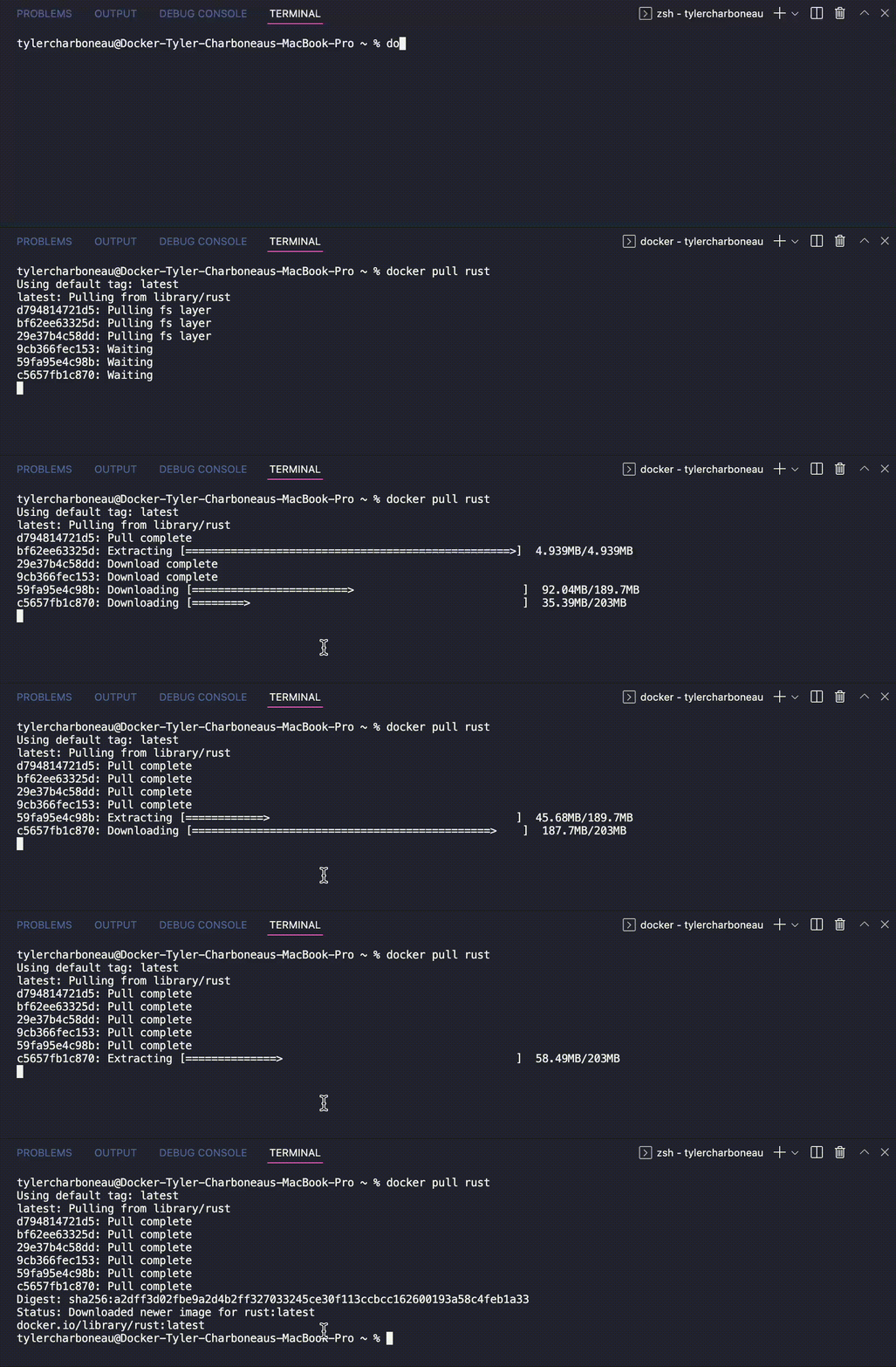
The simplest way to use the Rust image is by running it as a Rust container. First, enter the `docker pull rust` command to automatically grab the `latest` image version. This takes about 20 seconds within VSCode:
You can confirm that Docker Desktop pulled your image successfully by accessing the Images tab in the sidebar — then locating your rust image in the list:
To run this image as a container, hover over it and click the blue “Run” button that appears. Confirm by clicking “Run” again within the popup modal. You can expand the Optional Settings form to customize your container, though that’s not currently necessary.
Confirm that your rust container is running by visiting the Containers tab, and finding it within the list. Since we bypassed the Optional Settings, Docker Desktop will give your container a random name. Note the blue labels beside each container name. Docker Desktop displays the base image’s name:tag info for each container:
Note: Alternatively, you can pull a specific version of Rust with the tag :<version>. This may be preferable in production, where predictability and pre-deployment testing is critical. While :latest images can bring new fixes and features, they may also introduce unknown vulnerabilities into your application.
You can stop your container by hovering over it and clicking the square “Stop” button. This process takes 10 seconds to complete. Once stopped, Docker Desktop labels your container as exited. This step is important prior to making any configuration changes.
Similarly, you can (and should) remove your container before moving onward.
Customizing Your Dockerfiles
The above example showcased how images and containers live within Desktop. However, you might’ve noticed that we were working with “bare” containers, since we didn’t use any Rust application code.
Your project code brings your application to life, and you’ll need to add it into your image build. The Dockerfile accomplishes this. It helps you build layered images with sequential instructions.
Here’s how your basic Rust Dockerfile might look:
FROM rust:1.61.0
WORKDIR /usr/src/myapp
COPY . .
RUN cargo install –path .
CMD ["myapp"]
You’ll see that Docker can access your project code. Additionally, the cargo install RUN command grabs your packages.
To build and run your image with a complete set of Rust tooling packaged in, enter the following commands:
$ docker build -t my-rust-app .
$ docker run -it –rm –name my-running-app my-rust-app
This image is 1.8GB — which is pretty large. You may instead need the slimmest possible image builds. Let’s cover some tips and best practices.
Image Tips and Best Practices
Save Space by Compiling Without Tooling
While Rust tooling is useful, it’s not always essential for applications. There are scenarios where just the compiled application is needed. Here’s how your augmented Dockerfile could account for this:
FROM rust:1.61.0 as builder
WORKDIR /usr/src/myapp
COPY . .
RUN cargo install –path .
FROM debian:buster-slim
RUN apt-get update && apt-get install -y extra-runtime-dependencies && rm -rf /var/lib/apt/lists/*
COPY –from=builder /usr/local/cargo/bin/myapp /usr/local/bin/myapp
CMD ["myapp"]
Per the Rust Project’s developers, this image is merely 200MB. That’s tiny compared to our previous image. This saves disk space, reduces application bloat, and makes it easier to track layer-by-layer changes. That outcome appears paradoxical, since your build is multi-stage (adding layers) yet shrinks significantly.
Additionally, naming your stages and using those names in each COPY ensures that each COPY won’t break if you reorder your instructions.
This solution lets you copy key artifacts between stages and abandon unwanted artifacts. You’re not carrying unwanted components forward into your final image. As a bonus, you’re also building your Rust application from a single Dockerfile.
Note: See the && operator used above? This helps compress multiple RUN commands together, yet we don’t necessarily consider this a best practice. These unified commands can be tricky to maintain over time. It’s easy to forget to add your line continuation syntax () as those strings grow.
Finally, Rust is statically compiled. You can create your Dockerfile with the FROM scratch instruction and append only the binary to the image. Docker treats scratch as a no-op and doesn’t create an extra layer. Consequently, Scratch can help you create minuscule builds measuring just a few MB.
To better understand each Dockerfile instruction, check out our reference documentation.
Use Tags to Your Advantage
Need to save even more space? Using the Rust alpine image can save another 60MB. You’d instead specify an instruction like FROM rust:1.61.0-alpine as builder. This isn’t caveat-free, however. Alpine images leverage musl libc instead of glibc and friends, so your software may encounter issues if important dependencies are excluded. You can compare each library here to be safe.
There are some other ways to build smaller Rust images:
The rust:<version>-slim tag pulls an image that contains just the minimum packages needed to run Rust. This saves plenty of space, but fails in environments that require deployments beyond just your rust image
The rust:<version>-slim-bullseye tag pulls an image built upon Debian 11 branch, which is the current stable distro
The rust:<version>slim-buster tag also pulls an image built upon the Debian 10 branch, which is even slightly smaller than its bullseye successor
Docker Hub lists numerous image tags for the Rust Official Image. Each version’s size is listed according to each OS architecture.
Creating the slimmest possible application is an admirable goal. However, this process must have a goal or benefit in mind. For example, reducing your image size (by stripping dependencies) is okay when your application doesn’t need them. You should never sacrifice core functionality to save a few megabytes.
Lastly, you can lean on the `cargo-chef` subcommand to dramatically speed up your Rust Docker builds. This solution fully leverages Docker’s native caching, and offers promising performance gains. Learn more about it here.
Conclusion
Cross-platform Rust development doesn’t have to be complicated. You can follow some simple steps, and make some approachable optimizations, to improve your builds. This reduces complexity, application size, and build times by wide margins. Moreover, embracing best practices can make your life easier.
Want to jumpstart your next Rust project? Our awesome-compose library features a shortcut for getting started with a Rust backend. Follow our example to build a React application that leverages a Rust backend with a Postgres database. You’ll also learn how Docker Compose can help streamline the process.
Quelle: https://blog.docker.com/feed/






