
Azure at Microsoft Ignite 2025: All the intelligent cloud news explained

Before joining Microsoft, I spent years helping organizations build and transform. I’ve seen how technology decisions can shape a business’s future. Whether it’s integrating platforms or ensuring your technology strategy stands the test of time, these choices define how a business operates, innovates, and stays ahead of the competition.

Today, business leaders everywhere are asking:

How do we use AI and agents to drive real outcomes?

Is our data ready for this shift?

What risks or opportunities come with AI and agents?

Are we moving fast enough, or will we fall behind?

This week at Microsoft Ignite 2025, Azure introduces solutions that address those questions with innovations designed for this very inflection point.

It’s not just about adopting the right tools. It’s about having a platform that gives every organization the confidence to embrace an AI-first approach. Azure is built for this moment, with bold ambitions to enable businesses of every size. By unifying AI, data, apps, and infrastructure, we’re delivering intelligence at scale.

If you’re still wondering if AI can really deliver ROI, don’t take my word for it; see how Kraft Heinz, The Premier League, and Levi Strauss & Co. are finding success by pairing their unique data with an AI-first approach.

const currentTheme =
localStorage.getItem(‘msxcmCurrentTheme’) ||
(window.matchMedia(‘(prefers-color-scheme: dark)’).matches ? ‘dark’ : ‘light’);

// Modify player theme based on localStorage value.
let options = {“autoplay”:false,”hideControls”:null,”language”:”en-us”,”loop”:false,”partnerName”:”cloud-blogs”,”poster”:”https://azure.microsoft.com/en-us/blog/wp-content/uploads/2025/11/Screenshot-2025-11-19-125803.png”,”title”:””,”sources”:[{“src”:”https://cdn-dynmedia-1.microsoft.com/is/content/microsoftcorp/1093182-YourIntelligentCloud-0x1080-6439k”,”type”:”video/mp4″,”quality”:”HQ”},{“src”:”https://cdn-dynmedia-1.microsoft.com/is/content/microsoftcorp/1093182-YourIntelligentCloud-0x720-3266k”,”type”:”video/mp4″,”quality”:”HD”},{“src”:”https://cdn-dynmedia-1.microsoft.com/is/content/microsoftcorp/1093182-YourIntelligentCloud-0x540-2160k”,”type”:”video/mp4″,”quality”:”SD”},{“src”:”https://cdn-dynmedia-1.microsoft.com/is/content/microsoftcorp/1093182-YourIntelligentCloud-0x360-958k”,”type”:”video/mp4″,”quality”:”LO”}],”ccFiles”:[{“url”:”https://azure.microsoft.com/en-us/blog/wp-json/msxcm/v1/get-captions?url=https%3A%2F%2Fwww.microsoft.com%2Fcontent%2Fdam%2Fmicrosoft%2Fbade%2Fvideos%2Fproducts-and-services%2Fen-us%2Fazure%2F1093182-yourintelligentcloud%2F1093182-YourIntelligentCloud_cc_en-us.ttml”,”locale”:”en-us”,”ccType”:”TTML”}]};

if (currentTheme) {
options.playButtonTheme = currentTheme;
}

document.addEventListener(‘DOMContentLoaded’, () => {
ump(“ump-691f1e1c0fe99″, options);
});

With these updates, we’re making it easier to build, run, and scale AI agents that deliver real business outcomes.

TLDR—the Ignite announcement rundown

On the go and want to get right to what’s new and how to learn more? We have you covered. Otherwise, keep reading for a summary of top innovations from the week.

If you want to make AI agents smarter with enterprise context…Microsoft Fabric IQPreviewMicrosoft Foundry IQPreviewMicrosoft Foundry new tool catalogPreviewIf you want a simple, all-in-one agent experience…Microsoft Agent FactoryAvailable nowIf you want to modernize and extend your data for AI–wherever it lives…SAP BDC Connect for Microsoft FabricComing soonAzure HorizonDBPreviewAzure DocumentDBAvailable nowSQL Server 2025Available nowIf you want to operate smarter and securely with AI-powered control…Foundry Control PlanePreviewAzure Copilot with built-in agentsPreviewNative integration for Microsoft Defender for Cloud and GitHub Advanced SecurityPreviewIf you want to build on an AI-ready foundation…Azure BoostAvailable nowAzure Cobalt 200Coming soon

Your AI and agent factory, expanded: Microsoft Foundry adds Anthropic Claude and Cohere models for ultimate model choice and flexibility 

Earlier this year, we brought Anthropic models to Microsoft 365 Copilot, GitHub Copilot, and Copilot Studio. Today, we’re taking the next natural step: Claude Sonnet 4.5, Opus 4.1, and Haiku 4.5 are now part of Microsoft Foundry, advancing our mission to give customers choice across the industry’s leading frontier models—and making Azure the only cloud offering both OpenAI and Anthropic models. 

This expansion underscores our commitment to an open, interoperable Microsoft AI ecosystem—bringing Anthropic’s reasoning-first intelligence into the tools, platforms, and workflows organizations depend on every day.

Read more about this announcement

This week, Cohere’s leading models join Foundry’s first-party model lineup, enabling organizations to build high-performance retrieval, classification, and generation workflows at enterprise scale.

With these additions to Foundry’s 11,000+-model ecosystem—alongside innovations from OpenAI, xAI, Meta, Mistral AI, Black Forest Labs, and Microsoft Research—developers can build smarter agents that reason, adapt, and integrate seamlessly with their data and applications. 

Make AI agents smarter with enterprise context

In the agentic era, context is everything because the most useful agents don’t just reason, they’re capable of understanding your unique business. Microsoft Azure brings enterprise context to the forefront, so you can connect agents to the right data and systems—securely, consistently, and at scale. This set of announcements makes that real.

GPT‑5.1 in Foundry

Read more

Microsoft Fabric IQ turns your data into unified intelligence

Fabric IQ organizes enterprise data around business concepts—not tables—so decision-makers and AI agents can act in real time. Now in preview, Fabric IQ unifies analytics, time-series, and operational data under a semantic framework.

Because all data resides in OneLake, either natively or via shortcuts and mirroring, organizations can realize these benefits across on-premises, hybrid, and multicloud environments. This speeds up answering new questions and building processes, making Fabric the unified intelligence system for how enterprises see, decide, and operate.

Discover how Fabric IQ can support your business

Introducing Foundry IQ, which enables agents to understand more from your data

Now in preview, Foundry IQ makes it easier for businesses to connect AI agents to the right data, without the usual complexity. Powered by Azure AI Search, it streamlines how agents access and reason over both public and private sources, like SharePoint, Fabric IQ, and the web.

Instead of building custom RAG pipelines, developers get pre-configured knowledge bases and agentic retrieval in a single API that just works—all while also respecting user permissions. The outcome is agents that understand more, respond better, and help your apps perform with greater precision and context.

Build and control task forces of agents at cloud scale

Read Asha's blog

Back to the top

Agents, simplified: Microsoft Agent Factory, powered by Azure

This week, we’re introducing Microsoft Agent Factory—a program that brings Work IQ, Fabric IQ, and Foundry IQ together to help organizations build agents with confidence.

With a single metered plan, organizations can use Microsoft Foundry and Copilot Studio to build with IQ. This means you can deploy agents anywhere, including Microsoft 365 Copilot, without upfront licensing or provisioning.

Azure delivers large scale cluster

Read more

Eligible organizations can also tap into hands-on support from top AI Forward Deployed Engineers and access tailored, role-based training to boost AI fluency across teams.

Confidently build agents with Microsoft Agent Factory

Modernize and extend your data for AI—wherever it lives

Great AI starts with great data. To succeed, organizations need a foundation that’s fast, flexible, and intelligent. This week, we introduced new capabilities to help make that possible.

Introducing Azure HorizonDB, a new fully managed PostgreSQL database service for faster, smarter apps

Now in preview, HorizonDB is a cloud database service built for speed, scale, and resilience. It runs up to three times faster than open-source PostgreSQL and grows to handle demanding storage requirements with up to 15 replicas running on auto-scaling shared storage.

Whether building new AI apps or modernizing core systems, HorizonDB delivers enterprise-grade security and natively integrated AI models to help you scale confidently and create smarter experiences.

Azure DocumentDB offers AI-ready data, open standards, and multi-cloud deployments

Now generally available, Azure DocumentDB is a fully managed NoSQL service built on open-source tech and designed for hybrid and multicloud flexibility. It supports advanced search and vector embeddings for more accurate results and is compatible with popular open-source MongoDB drivers and tools.

sovereign cloud capabilities

Read more

SQL Server 2025 delivers AI innovation to one of the world’s most widely used databases

The decades-long foundation of innovation continues with the availability of SQL Server 2025. This release helps developers build modern, AI-powered apps using familiar T-SQL—securely and at scale.

With built-in tools for advanced search, near real-time insights via OneLake, and simplified data handling, businesses can finally unlock more value from the data they already have. SQL Server 2025 is a future-ready platform that combines performance, security, and AI to help teams move faster and work smarter.

Start exploring SQL Server 2025

Fabric goes further

SQL database and Cosmos DB in Fabric are also available this week. These databases are natively integrated into Fabric, so you can run transactional and NoSQL workloads side-by-side, all in one environment.

Get instant access to trusted data with bi-directional, zero copy sharing through SAP BDC Connect for Fabric

Fabric now enables zero-copy data sharing with SAP Business Data Cloud, enabling customers to combine trusted business data with Fabric’s advanced analytics and AI—without duplication or added complexity. This breakthrough gives you instant access to trusted, business-ready insights for advanced analytics and AI.

We offer these world-class database options so you can build once and deploy at the edge, as platform as a service (PaaS), or even as software as a service (SaaS).And because our entire portfolio is either Fabric-connected or Fabric-native, Fabric serves as a unified hub for your entire data estate.

Strengthen the databases at the heart of your data estate

Read Arun's blog

Back to the top

Operate smarter and more securely with AI-powered control

We believe trust is the foundation of transformation. In an AI-powered world, businesses need confidence, control, and clarity. Azure provides that with built-in security, governance, and observability, so you can innovate boldly without compromise.

With capabilities that protect your data, keep your operations transparent, and make environments resilient, we announced updates this week to strengthen trust at every layer.

Unified observability helps keep agents secure, compliant, and under your control

One highlight from today’s announcements is the new Foundry Control Plane. It gives teams real-time security, lifecycle management, and visibility across agent platforms. Foundry Control Plane integrates signals from the entire Microsoft Cloud, including Agent 365 and the Microsoft security suite, so builders can optimize performance, apply agent controls, and maintain compliance.

New hosted agents and multi-agent workflows let agents collaborate across frameworks or clouds without sacrificing enterprise-grade visibility, governance, and identity controls. With Entra Agent ID, Defender runtime protection, and Purview data governance, you can scale AI responsibly with guardrails in place.

Azure Copilot: Turning cloud operations into intelligent collaboration

Azure Copilot is a new agentic interface that orchestrates specialized agents across the cloud management lifecycle. It embeds agents directly where you work—chat, console, or command line—for a personalized experience that connects action, context, and governance.

We are introducing new agents that simplify how you run on the cloud—from migration and deployment to operations and optimization—so each action aligns with enterprise policy. 

Migration and modernization agents deliver smarter, automated workflows, using AI-powered discovery to handle most of the heavy lifting. This shift moves IT teams and developers beyond repetitive classification work so they can focus on building new apps and agents that drive innovation.

Similarly, the deployment agent streamlines infrastructure planning with guidance rooted in Azure Well-Architected Framework best practices, while the operations and optimization agents accelerate issue resolution, improve resiliency, and uncover cost savings opportunities.

Learn more about these agents in the Azure Copilot blog

Secure code to runtime with AI-infused DevSecOps

Microsoft and GitHub are transforming app security with native integration for Microsoft Defender for Cloud and GitHub Advanced Security. Now in preview, this integration helps protect cloud-native applications across the full app lifecycle, from code to cloud.

GitHub Universe 2025

Read more

This enables developers and security teams to collaborate seamlessly, allowing organizations to stay within the tools they use every day.

Streamline cloud operations and reimagine the datacenter

Read Jeremy's blog

Build on an AI-ready foundation

Azure infrastructure is transforming how we deliver intelligence at scale—both for our own services and for customers building the next generation of applications.

At the center of this evolution are new AI datacenters, designed as “AI superfactories,” and silicon innovations that enable Azure to provide unmatched flexibility and performance across every AI scenario.

THE first AI superfactory

Read more

Azure Boost delivers speed and security for your most demanding workloads

We’re announcing our latest generation of Azure Boost with remote storage throughput of up to 20 GBps, up to 1 million remote storage IOPS, and network bandwidth of up to 400 Gbps. These advancements significantly improve performance for future Azure VM series. Azure Boost is a purpose-built subsystem that offloads virtualization processes from the hypervisor and host operating system, accelerating storage and network-intensive workloads.

Azure Cobalt 200: Redefining performance for the agentic era

Azure Cobalt 200 is our next-generation ARM-based server, designed to deliver efficiency, performance, and security for modern workloads. It’s built to handle AI and data-intensive applications while maintaining strong confidentiality and reliability standards.

By optimizing compute and networking at scale, Cobalt 200 helps you run your most critical workloads more cost-effectively and with greater resilience. It’s infrastructure designed for today’s demands—and ready for what’s next.

See what Azure Cobalt 200 has to offer

Keeping you at the frontier with continuous innovation

We’re delivering continuous innovation in AI, apps, data, security, and cloud. When you choose Azure, you get an intelligent cloud built on decades of experience and partnerships that push boundaries. And as we’ve just shown this week, the pace of innovation isn’t slowing down anytime soon.

Back to the top

Agentic enterprise, unlocked: Start now on Microsoft Azure

I hope Ignite—and our broader wave of innovation—sparked new ideas for you. The era of the agentic cloud isn’t on the horizon; it’s here right now. Azure brings together AI, data, and cloud capabilities to help you move faster, adapt smarter, and innovate confidently.

I invite you to imagine what’s possible—and consider these questions:

What challenges could you solve with a more connected, intelligent cloud foundation?

What could you build if your data, AI, and cloud worked seamlessly together?

How could your teams work differently with more time to innovate and less to maintain?

How can you stay ahead in a world where change is the only constant?

Want to go deeper into the news? Check out these blogs:

Microsoft Foundry: Scale innovation on a modular, interoperable, secure agent stack by Asha Sharma.

Azure Databases + Microsoft Fabric: Your unified and AI-powered data estate by Arun Ulagaratchagan.

Announcing Azure Copilot agents and AI infrastructure innovations by Jeremy Winter.

Ready to take the next step?

Explore technology methodologies and tools from real-world customer experiences with Azure Essentials.

Check out the latest announcements for software companies.

Visit the Microsoft Marketplace, the trusted source for cloud solutions, AI apps, and agents.

The post Azure at Microsoft Ignite 2025: All the intelligent cloud news explained appeared first on Microsoft Azure Blog.
Quelle: Azure
Microsoft Databases and Microsoft Fabric: Your unified and AI-powered data estate

In this article

Another leap forward across Microsoft Databases and Microsoft FabricDeploy the next generation of Microsoft DatabasesGetting your data estate ready for AI with Microsoft FabricMark your calendar for FabCon and SQLConWatch these announcements in action at Microsoft Ignite

As AI reshapes every industry, one truth remains constant: data is no longer just an asset—it’s your competitive edge. The pace of AI demands easy data access, faster insights, and the ability to iterate without friction. Yet many organizations are held back by fragmented data estates and legacy systems. Microsoft Fabric was designed to meet this moment—to unify your data, simplify your architecture, and accelerate your path to becoming an AI-led organization.

That mission is gaining traction at remarkable speed. Since Fabric launched two years ago, it has grown faster than any other data and analytics platform in the industry. More than 28,000 customers—including 80% of the Fortune 500—now rely on Fabric, and its ecosystem continues to expand as partners build solutions to solve the most complex data challenges.

Explore Azure announcements at Microsoft Ignite 2025

Another leap forward across Microsoft Databases and Microsoft Fabric

As Fabric becomes the central connection point for data, we’re strengthening the database layer at the heart of your data estate—ensuring you have the scale and performance required for AI.  

Microsoft already offers one of the industry’s most comprehensive database portfolios, and we’re expanding it even further—while deeply integrating these capabilities into Fabric. I’m excited to announce the general availability of SQL Server 2025, Azure DocumentDB, and SQL database and Cosmos DB in Fabric, along with the preview of our newest addition, Azure HorizonDB. With these new offerings, you have a world-class database option to build once and deploy at the edge, as platform as a service (PaaS), or even as software as a service (SaaS). And because our entire portfolio is either Fabric-connected or Fabric native, Fabric serves as a unified hub for your entire data estate. Below I’ll cover how these new databases are purpose-built to support your AI projects.  

Deploy the next generation of Microsoft Databases

Modernize your SQL estate with SQL Server 2025, now generally available

Microsoft has been shaping the SQL landscape for more than 35 years. Now, with the release of SQL Server 2025 into general availability, we’re introducing the next evolution—one that brings developer‑first AI capabilities at the edge, within the familiar T‑SQL experience. Smarter search combines advanced semantic intelligence with full‑text filtering to uncover richer insights from complex data. AI model management using model definitions in T-SQL allows seamless integration with popular AI services such as Microsoft Foundry.

Enterprise reliability and security remain best-in-class. Enhanced query performance, optimized locking, and improved failover help ensure higher concurrency and uptime for mission‑critical workloads. With strengthened credential management through Microsoft Entra ID via Azure Arc, SQL Server 2025 is secure by design. Your data is also instantly accessible for your AI and analytics in Microsoft OneLake with mirroring for SQL Server 2025 in Fabric, now also generally available.

SQL Server 2025 is the most significant release for SQL developers in a decade. And the response to our preview has been overwhelming, with 10,000 organizations participating, 100,000 databases already deployed, and download rate two times higher than SQL Server 2022. If you want to join all those who’ve already adopted SQL Server 2025, download it today.

Azure DocumentDB: MongoDB-compatible, AI-ready, and built for hybrid and multi-cloud

We’re excited to announce Azure DocumentDB, a new service built on the open-source, MongoDB-compatible DocumentDB standard governed by the Linux Foundation. The first Azure managed service to support multi-cloud and hybrid NoSQL, Azure DocumentDB can run consistently across Azure, on-premises, and other clouds.

Azure DocumentDB gives you the freedom to embrace open source while achieving scale, security, and simplicity. It’s AI-ready, with capabilities like vector and hybrid search to deliver more relevant results. Instant autoscale meets demand, and independent compute and storage scaling keeps workloads efficient. Security and availability is standard, with Microsoft Entra ID integration, customer-managed encryption keys, 35-day backups included, and a 99.995% availability service-level agreement (SLA). And soon, enhanced full-text search will add features like fuzzy matching, proximity queries, and expanded language support, making it even easier to build intelligent, search-driven apps.

Azure DocumentDB is now generally available, so you can try it today. You can also learn more about Azure DocumentDB and all the Azure Database news by reading Shireesh Thota’s, Corporate Vice President of Azure Databases, announcement blog.

Azure HorizonDB: PostgreSQL designed for your mission-critical workloads

PostgreSQL has become the backbone of modern data solutions thanks to its rich ecosystem, extensibility, and open source foundation. Microsoft is proud to be the #1 PostgreSQL committer among hyperscalers, and we’re building on that leadership with Azure HorizonDB.

Now in early preview, Azure HorizonDB is a fully managed, PostgreSQL-compatible database service, built to handle the scale and performance required by the modern enterprise. It goes far beyond open source Postgres, with auto-scaling storage up to 128 TB, scale-out compute up to 3,072 vCores, <1 millisecond multi-zone commit latency, and enterprise security and compliance. Vector search is built-in, along with integrated AI model management and seamless connectivity to Microsoft Foundry so you can build modern AI apps. Combined with GitHub Copilot, Fabric, and Visual Studio Code integrations, it provides an intelligent and secure foundation for building and modernizing applications at any scale. To learn more about Azure HorizonDB, read our announcement blog.

Accelerate app development with Fabric SaaS Databases, now generally available

We are also releasing a new class of SaaS databases, both SQL database and Cosmos DB in Fabric, into general availability. Data developers now have access to world-class database engines within the same unified platform that powers analytics, AI, and business intelligence.

Fabric Databases are designed to streamline your application development. You can provision them in seconds, and they don’t require the usual granular configuration or deep database expertise. They provide enterprise-grade performance, are secure by default with features like cloud authentication, customer-managed keys, and database encryption, and come natively integrated into the Fabric platform, even using the same Fabric capacity units for billing.

With Fabric databases, developers now have the flexibility to build applications grounded in operational, transactional, and analytical data. Together, these offerings make Fabric a developer-first data platform that is streamlined, scalable, and ready for modern data applications.

Learn more by reading Shireesh Thota’s, Corporate Vice President of Azure Databases, announcement blog.

All your databases connected into Fabric

We’re making it easier than ever to work with your entire Microsoft database portfolio in Fabric, giving you a single, unified place to manage and use all your data. Building on our existing mirroring support for Azure SQL Database and Azure SQL MI, we’re now announcing the general availability of mirroring for Azure Database for PostgreSQL, Azure Cosmos DB, and SQL Server versions 2016–2022 and 2025. With these databases mirrored directly into Fabric, you can eliminate traditional extract, transform, and load (ETL) pipelines and make your data instantly ready for analytics and AI.

Getting your data estate ready for AI with Microsoft Fabric

Choosing the right database is essential, but it’s just the beginning. The major opportunity lies in driving frontier transformation, where data becomes the foundation for an AI-native enterprise. We recommend focusing on three core steps:

Unifying your data estate to eliminate silos and complexity.

Creating semantic meaning so your data is ready for AI.

Empowering agents to act on insights and transform operations.

In this section, I’ll dive into the latest enhancements to Microsoft Fabric that help you achieve every step of your data journey. This includes expanded interoperability in OneLake with SAP, Salesforce, Azure Databricks, and Snowflake, the introduction of Fabric IQ—a new workload that adds semantic understanding—and enhanced agentic capabilities across Fabric to help you build richer, AI-powered data experiences.

This is the future of data, and it’s already within reach. With Fabric and our database innovations, Microsoft is helping organizations move seamlessly from insight to action—unlocking the full potential of your data and the AI built on top of it.

Unify your data estate with Microsoft OneLake

Microsoft OneLake unifies all your data—across clouds, on-premises, and beyond Microsoft—into a single data lake with zero-ETL capabilities like shortcuts and mirroring. Alongside the additional mirroring sources for Microsoft Databases, we’re also introducing the preview of shortcuts to SharePoint and OneDrive. This allows you to bring unstructured productivity data into OneLake without copying files or building ETL pipelines, making it easier to train agents and enrich your structured data.

Once connected to OneLake, your data becomes easily discoverable in the apps your teams use every day like Power BI, Teams, Excel, Copilot Studio, and Microsoft Foundry. Today, we are taking that a step further with native integration with Foundry IQ—the next generation of retrieval-augmented generation (RAG). Agents rely on context—Foundry IQ’s knowledge bases deliver high-value context to agents by simplifying access to multiple data sources and making connections across information. You can use the OneLake knowledge source in Foundry IQ to connect agents to multi-cloud sources like AWS S3, on-premises sources, and structured and unstructured data.

See how shortcuts and mirroring unify your data in OneLake and fuel the next generation of intelligent agents in Microsoft Foundry:

Expanding OneLake interoperability with leading data platforms

We are also seeing great momentum with dozens of partners outside of Microsoft deeply integrating with OneLake, including ClickHouse, Dremio, Confluent, EON, and many more. And now, we are thrilled to add new, deeper interoperability with SAP, Salesforce, Azure Databricks, and Snowflake.

First, we’re deepening interoperability with the systems organizations rely on most, SAP and Salesforce. With the launch of SAP Business Data Cloud Connect for Microsoft Fabric, customers can allow bidirectional, zero-copy data sharing between SAP Business Data Cloud (BDC) and Fabric. At the same time, we are working with Salesforce to integrate their data into Fabric using the same zero-copy approach, unlocking advanced analytics and AI capabilities without the overhead of traditional ETL.

We’re also strengthening interoperability with Azure Databricks and Snowflake so you can use a single copy of data across platforms. By the end of 2025, Azure Databricks will release, in preview, the ability to natively read data from OneLake through Unity Catalog, enabling seamless access without duplication or complex data movement. Looking ahead, Databricks will also add support for writing to and storing data directly in OneLake, allowing full two-way interoperability. Read more about this interoperability.

Our collaboration with Snowflake on bidirectional data access continues as well. We are introducing a new item in OneLake called a Snowflake Database and a new UI in Snowflake—both designed to allow OneLake to be the native storage solution for your Snowflake data. We’re also bringing Snowflake mirroring to general availability, allowing you to virtualize your external Snowflake-managed Iceberg tables in OneLake with shortcuts created and handled automatically. Together, these innovations let you run any Fabric workload—whether analytics, AI, or visualization—directly on your Snowflake-managed Iceberg tables.

Learn more about our Snowflake collaboration by reading our latest joint blog or by watching the following demo:

Finally, in close collaboration with dbt Labs, we are also excited to announce built-in support for their industry leading data transformation capability. Now in preview, dbt jobs in Microsoft Fabric let you build, test, and orchestrate dbt workflows in your Fabric workspaces. Learn more in this blog.

Create semantic knowledge to fuel AI with Fabric IQ

As Frontier Firms train agents on their enterprise data, it’s become clear that quality and context matter more than data volume. Agents need business context across relationships, hierarchies, and meaning to turn raw data into actionable insight. That’s why we’re introducing Fabric IQ—a new workload designed to map your datasets to the real-world entities they represent, creating a shared semantic structure on top of your data.

The power of IQ lies in how it unifies disparate data types under a single, coherent framework. Built upon Power BI’s industry-leading, rich semantic model technology, IQ brings together analytical data, time-series telemetry, and geospatial information, all organized under a semantic framework of business entities and their relationships, properties, rules, and actions. You can then create operations agents, a new type of agent in Fabric, which can use this model to act as virtual team members, monitoring real-time data sources, identifying patterns, and taking proactive action. Instead of forcing your teams and even agents to think in terms of tables and schemas, IQ allows you to align data with how your organization operates.

In short, Fabric IQ is designed to model reality with data, so that every insight, prediction, and action is grounded in how your organization actually operates. You can learn more about IQ in Yitzhak Kesselman’s, Corporate Vice President of Messaging and Real-Time Intelligence, announcement blog.

Empower data-rich agents with Copilot, Fabric data agents, and operations agents

As organizations scale their AI initiatives, the ability to connect intelligent agents with enterprise-grade data is becoming a critical differentiator. Fabric is making this possible with a set of integrated AI experiences: Copilot in Power BI helps you ask questions of your data, Fabric data agents allow deeper analysis, and the new Fabric operations agents let you monitor your data estate and take action in real time. These experiences can be used across Fabric or as foundational knowledge sources in industry-leading AI tools like Microsoft Foundry, Copilot Studio or even Microsoft 365 Copilot to power smarter, more data-rich AI experiences.

Beyond introducing operations agents as part of Fabric IQ, we’re also expanding what data agents and Copilot can do. Along with existing integration with Microsoft Foundry and Copilot Studio, Fabric data agents can now be embedded directly in Microsoft 365 Copilot. This lets business users (with the right permissions) access trusted knowledge from OneLake and transforms Microsoft 365 from a productivity suite into an intelligent insights platform.

They can also act as hosted Model Context Protocol (MCP) servers, making it easy to integrate with other applications and agents across the AI ecosystem. Finally, data agents can now reason across both structured and unstructured data. Thanks to an integration with Azure AI Search, data teams can add their existing unstructured data search endpoints as a source in data agents. Learn more the Fabric data agent enhancements by reading the Fabric AI blog.

We’re also enhancing the standalone experience for Copilot in Power BI with a new search experience. Simply describe what you need, and Copilot will locate the relevant report, semantic model, or data agent and surface the right answers. This standalone experience is also coming to Power BI mobile so you can use it on the go.

Take a look at how you can apply all of these AI experiences together seamlessly:

In short, we’re redefining what it means to have an AI-powered data estate. With data agents, Copilot in Power BI, and operations agents in Fabric IQ, AI is now woven across Fabric. And with native integration to Microsoft Foundry and Copilot Studio, you can easily add Fabric agents as building blocks to create more intelligent, informed custom agents.

You also can see more innovation coming to the Fabric platform by reading Kim Manis’, Corporate Vice President of the Fabric Platform, Fabric blog or by checking out the more technical Fabric November 2025 Feature summary blog.

Mark your calendar for FabCon and SQLCon

We are excited to announce SQLCon 2026, which will happen at the same time and the same location as the Microsoft Fabric Community Conference (FabCon), happening March 16–20, 2026 in Atlanta, Georgia. By uniting the powerhouse SQL and Fabric communities, we’re giving data professionals everywhere a unique opportunity to master the latest innovations, share practical knowledge, and accelerate what’s possible with data and AI, all in one powerful week. Register for either conference and enjoy full access to both, with the flexibility to mix and match sessions, keynotes, and community events to fit your interests.

Register for FabCon and SQLCon now

Watch these announcements in action at Microsoft Ignite

If you’re interested in seeing these announcements live, I encourage you to join my Ignite session, “Innovation Session: Microsoft Fabric and Azure Databases – the data estate for AI” either in person or online at no cost. I’ll not only cover these major announcements but show you how they come together to help you create a unified, intelligent data foundation for AI.

You can also dive deeper into these announcements and so much more by watching the rest of the breakout sessions across Azure Data:

Tuesday, November 18

Modern data, modern apps: Innovation with Microsoft Databases

Microsoft Fabric: The data platform for the next AI frontier

Unifying your data journey: Migrating to Microsoft Fabric

Wednesday, November 19

Premier League’s data-driven fan engagement at scale

Create a semantic foundation for your AI agents in Microsoft Fabric

Move fast, save more with MongoDB-compatible workloads on DocumentDB

SQL database in Fabric: The unified database for AI apps and analytics

The blueprint for intelligent AI agents backed by PostgreSQL

Connect to and manage any data, anywhere in Microsoft OneLake

Unlock the power of Real-Time Intelligence in the era of AI

Empower Business Users with AI driven insights in Microsoft Fabric

Thursday, November 20

Real-time analytics and AI apps with Cosmos DB in Fabric

From interoperability to agents: Powering financial workflows with AI

How Fabric Data Agents Are Powering the Next Wave of AI

Explore Azure announcements at Microsoft Ignite 2025

The post Microsoft Databases and Microsoft Fabric: Your unified and AI-powered data estate appeared first on Microsoft Azure Blog.
Quelle: Azure
Announcing Azure Copilot agents and AI infrastructure innovations

In this article

Agentic cloud operations: Introducing Azure CopilotAzure’s AI infrastructure: The backbone of modernizationBuilding for trust: Resiliency, operational excellence, and securityWhat does modernizing workloads look like today?Looking ahead

The cloud is more than just a platform—it’s the engine of transformation for every organization. This year at Microsoft Ignite 2025, we’re showing how Microsoft Azure modernizes cloud infrastructure at global scale—built for reliability, security, and performance in the AI era.

Streamline cloud operations with Azure Copilot

From scalable compute to resilient networks and AI-powered operations, Azure provides the foundation that helps customers innovate faster and operate with confidence. Our strategy is anchored in three key areas, each designed to help customers thrive in a rapidly changing landscape:

We’re strengthening Azure’s global foundation. We’re expanding capacity and resilience across regions while optimizing datacenter design, power efficiency, and network topology for AI-scale workloads. Our services are zone-redundant by default, our edge footprint is growing to meet low-latency needs, and security and compliance controls are embedded at every layer. From confidential computing and sovereign cloud architectures to our security capabilities, Azure is engineered for trust by design.

We’re modernizing every workload. We’re advancing compute, network, storage, application, and data services with Microsoft Azure Cobalt and Azure Boost systems, Azure Kubernetes Service (AKS) Automatic, and Azure HorizonDB for PostgreSQL. We embrace and integrate with Linux, Kubernetes, and open-source ecosystems customers rely on.

We’re transforming how teams work. We’re embedding AI agents directly into the platform through Azure Copilot and GitHub Copilot, bringing agent-based capabilities for migration, app modernization, troubleshooting, and optimization. These features remove repetitive tasks so teams can focus on architecture instead of administration, making an integral part of how Azure runs end-to-end.

Agentic cloud operations: Introducing Azure Copilot

Azure is entering a new era where AI becomes the foundation for running your cloud. As environments grow more complex, traditional tools and manual workflows can’t keep up. This brings us to a frontier moment, where AI and cloud converge to redefine operations. We call this agentic cloud ops: a new model for the AI era.  

What is Azure Copilot?

Azure Copilot is a new agentic interface that orchestrates specialized agents across the cloud management lifecycle, automating migration, optimization, troubleshooting, and more, freeing up teams to focus on innovation.

Azure Copilot aligns actions—human or agent—with your policies and standards, offering a unified framework for compliance, auditing, and enforcement that respects role-based access control (RBAC) and Azure Policy. It provides strong governance and data residency controls, full visibility across agents and workloads, and lets you bring your own storage for complete control of chat and artifact data. To make the operating model truly agentic, we’re introducing six Azure Copilot agents—migration, deployment, optimization, observability, resiliency, and troubleshooting—in gated preview.

Learn more about Azure Copilot in our detailed blog, and learn how to sign up for the preview.

Sign up for the Azure Copilot preview

Azure’s AI infrastructure: The backbone of modernization

Azure is built for reliable, world-class performance, delivering at global scale and speed.

With more than 70 regions and hundreds of datacenters, Azure provides the largest cloud footprint in the industry. This unified infrastructure supports consistent performance, capacity, and compliance for customers everywhere.

AI infrastructure that delivers performance and scale

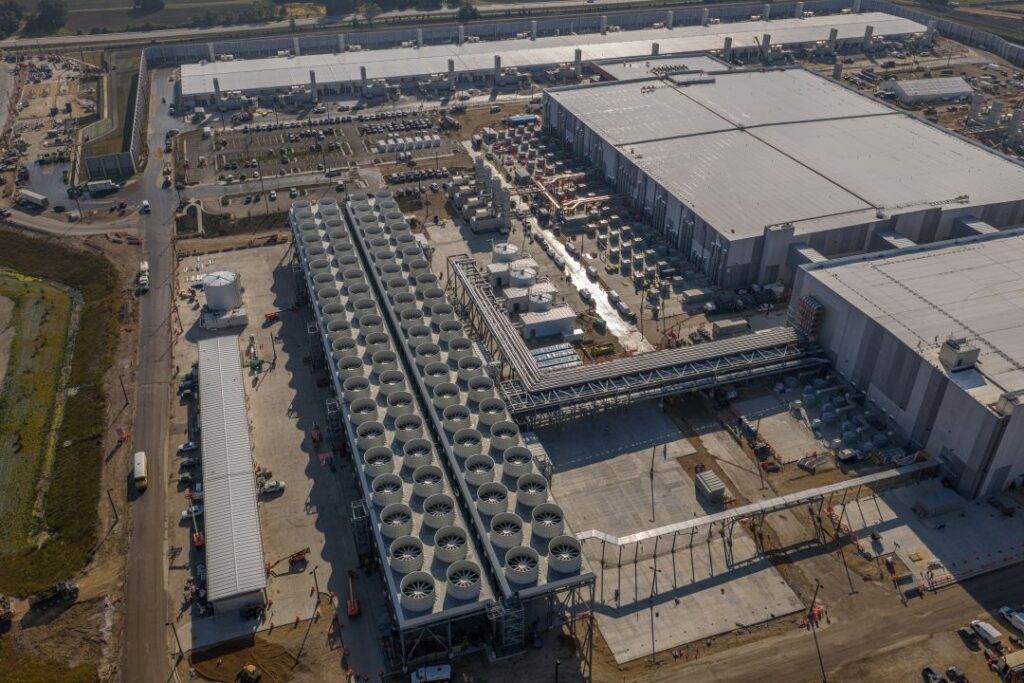
We’ve reimagined how our datacenters are built and operated to support the critical needs of the largest AI challenges. In September 2025, we launched Fairwater, our largest and most sophisticated AI datacenter to date, and our newest site in Atlanta now joins Wisconsin to form a planet-scale “AI superfactory.” By using high-density liquid cooling, a flat network architecture linking hundreds of thousands of GPUs, and a dedicated AI WAN backbone, we’re giving customers unmatched capacity, flexibility, and utilization across every AI workload.

Azure is the first cloud provider to deploy NVIDIA’s GB300 GPUs at scale, extending our leadership from GB200 and continuing to define the infrastructure foundation for the AI era. Each Fairwater site connects hundreds of thousands of these best-in-class GPUs, millions of CPU cores, and massive storage—enough to hold 80 billion 4K movies.

A key part of this evolution is our AI WAN—a high-speed network linking Fairwater and other Azure datacenters to move data quickly and coordinate massive AI jobs across sites. It’s engineered to keep GPUs busy, reduce bottlenecks, and scale workloads beyond the limits of a single location, so customers can tackle bigger projects and get results faster. Driving down costs through innovation, we’ve set a new benchmark for secure, high-performance AI: Azure processed more than 1.1 million tokens per second for language models—the equivalent of writing seven books per second from a single rack.

Azure’s AI infrastructure puts supercomputing-level power in every customer’s hands—enabling larger model training, faster deployment, and broader user reach within a trusted, compliant environment.

Extending AI infrastructure innovation to your workloads

An exciting part of our work on AI datacenters is that the same architectural breakthroughs that allow us to train frontier models also strengthen Azure’s core services, directly benefiting all workloads.

One of these examples is Azure Boost, which offloads virtualization processes traditionally performed by the hypervisor and host operating system onto purpose-built hardware and software. Combined with our new AMD “Turin” and Intel “Granite Rapids” virtual machines—plus the latest network-optimized and storage-optimized families—customers are seeing more than 20 GB per second of managed-disk throughput and more than a million input/output operations per second (IOPS). More than a quarter of our global fleet is now Boost-enabled, and network throughput has doubled to 400 gigabits per second for our general-purpose and AI SKUs. The infrastructure investments we’ve talked about are already being used by leading-edge companies to bring services to billions of users.

Cloud-native apps and data

Azure Kubernetes Service (AKS) delivers secure, managed Kubernetes with automated upgrades and scaling. Paired with cloud-native databases like PostgreSQL and Cosmos DB, teams build faster and recover instantly.

We’re doing the work to bridge the power of the AI infrastructure into AKS by enabling cutting-edge GPUs to function as AKS nodes out of the box or actively monitoring their health.

We haven’t stopped at the infrastructure layer. We’re also reinventing how easy it is to take advantage of Kubernetes itself. That’s why we introduced AKS Automatic. It embeds best practices, automates infrastructure provisioning, and operates critical Kubernetes components to reduce complexity and improve reliability. It handles the hard parts—patching, upgrades, observability, and security—so teams can focus on innovation instead of infrastructure.

With AKS Automatic-managed system node pools, we’re making AKS Automatic even lower-touch because now you don’t have to run critical Kubernetes components yourself. It’s entirely managed by the service. It moves key services like CoreDNS and metrics server to Microsoft-managed infrastructure, making it even easier to focus entirely on your apps.

You not only need easy-to-use application infrastructure; you also need easy-to-use data tools for your applications. We’re introducing Azure HorizonDB for PostgreSQL, which brings breakthrough scalability and AI integration for next-generation applications. Azure DocumentDB is now generally available—the first managed database built on the open-source engine we contributed to the Linux Foundation.

We are also excited to expand our longstanding partnership with SAP and announce the launch of SAP Business Data Cloud Connect for Microsoft Fabric, simplifying access to data sharing across both platforms. Read the announcement blog to learn more.

Azure Databases and Microsoft Fabric
Learn more about the next generation of Microsoft’s databases, announced at Microsoft Ignite 2025.

Read the blog

Building for trust: Resiliency, operational excellence, and security

The world runs on Azure’s cloud infrastructure. Every business, government, and developer depends on it to be reliable, secure, and always available. That responsibility drives everything we do in Azure. Our mission is to build the most efficient, reliable, and cost-effective infrastructure platform of the AI era, one that customers can depend on every day.

Resiliency is not just a feature. It is a design principle, a culture, and a shared commitment between Microsoft and our customers. Every region, service, and operation is built with that responsibility in mind.

At Microsoft Ignite, we are taking this commitment further with new capabilities that strengthen reliability, simplify operations, and help customers build with greater confidence.

Raising the bar on operational excellence: Operational excellence means reliability is designed from the start. Every Azure region is built with availability zones, redundant networking, and automated fault detection. We are extending that foundation with services like NAT Gateway, now zone-redundant by default for improved network reliability without any configuration required.

Empowering customers: With Azure Resiliency (public preview), we are co-engineering resiliency with customers. This new experience helps teams set recovery objectives, test failover drills, and validate application health, strengthening readiness together before issues arise.

Evolving security for modern threats

We continue to expand Azure’s security foundation with new capabilities that make protection simpler, smarter, and more integrated across the platform. These updates strengthen boundaries, automate defense, and bring AI-powered insight directly into how customers protect and operate their environments.

Simplifying protection: Azure Bastion Secure by Default is built into the platform. It automatically hardens remote access to virtual machines through RDP and SSH, reducing setup time and risk

Strengthening boundaries: Network Security Perimeter, now generally available, provides secure and centralized firewall to control access to PaaS resources.

Better defense: And we’re making advancements in the Web Application Firewall with Captcha for human verification.

All of this builds on Azure’s broader stack of confidential virtual machines, containers, hardware-based attestation, and encryption, supporting protection from hardware through to application.

What does modernizing workloads look like today?

Organizations are on a journey to modernize. Most run a mix of systems that span decades—from mission-critical databases to new cloud-native services. Azure meets customers where they are, helping modernize applications and data with flexibility, openness, and built-in intelligence.

Rather than a one-off effort, modernization is really about re-architecting agility, scaling efficiently, and using AI and open technologies without sacrificing reliability or control.

To help simplify and accelerate the modernization journey, we’re investing to help you find and get to the best destination for your workloads, whether it’s infrastructure as a service (IaaS), platform as a service (PaaS), or software as a service (SaaS).

Azure’s agentic migration and modernization tools make it easier than ever to modernize your apps, data, and infrastructure with speed and precision. For example, you can move existing .NET applications directly into a fully managed environment—no refactoring or containers required—into the new App Service Managed Instance (now in preview).

On the data side, the next-generation Azure SQL Managed Instance (now generally available) delivers up to five-times faster performance and double the storage capacity. And Azure Copilot and GitHub Copilot simplify SQL Server, Oracle, and PostgreSQL modernization.

Plus, across infrastructure—from VMware to Linux and IT operations—AI agents streamline migrations, reduce licensing overhead, and automate patching, governance, and compliance, so modernization becomes a repeatable, intelligent motion.

Customers migrating and modernizing to Azure using our agentic tools have shared the impressive results they have experienced. Here are just a few examples:

.NET: More than 500,000 lines of code upgraded and migrated in weeks.

Java: Four times faster modernized applications than before using the agents.

Read more about GitHub Copilot app modernization.

Looking ahead

The promise of the cloud was always about scale, flexibility, and innovation. With our innovations across our infrastructure, datacenters, Azure Copilot, services, and open-source contributions, that promise expands to drive your business forward every day.

The next era of the cloud is inevitable. It’s agentic, intelligent, and human-centered—and Microsoft is helping lead the way.

Join us at Microsoft Ignite where you can tune in to our sessions to learn more:

Innovation Session

Innovation Session: Scale Smarter: Infrastructure for the Agentic Era

Breakouts

End-to-End migration of applications with AI Agents to IaaS and PaaS

Unlock agentic intelligence in the cloud with Copilot in Azure

What’s new and what’s next in Azure IaaS

SQL Server 2025: The AI-ready enterprise database

Scaling Kubernetes securely and reliably with AKS

Inside Azure Innovations with Mark Russinovich

The post Announcing Azure Copilot agents and AI infrastructure innovations appeared first on Microsoft Azure Blog.
Quelle: Azure

Beyond the Hype: How to Use AI to Actually Increase Your Productivity as a Dev

When I started incorporating AI tools into my workflow, I was first frustrated. I didn’t get the 5x or 10x gains others raved about on social. In fact, it slowed me down.

But I persisted. Partly because I see it as my professional duty as a software engineer to be as productive as possible, partly because I’d volunteered to be a guinea pig in my organization.

After wrestling with it for some time, I finally got my breakthrough discovery—the way to use AI tools well involves the same disciplines we’ve applied in software development for decades:

Break work down into reasonable chunks

Understand the problem before trying to solve it    

Identify what worked well and what didn’t

Tweak variables for the next iteration

In this article, I share the patterns of AI use that have led me to higher productivity. 

These aren’t definitive best practices. AI tools and capabilities are changing too quickly, and codebases differ too much. And then we’re not even taking the probabilistic nature of AI into account.

But I do know that incorporating these patterns into your workflow can help you become one of the developers who benefit from AI instead of being frustrated or left behind.

A Cycle for Effective AI Coding

Too many people treat AI like a magic wand that will write their code _and_ do their thinking. It won’t. These tools are just that: tools. Like every developer tool before them, their impact depends on how well you use them.

To get the most from AI tools, you need to constantly tweak and refine your approach. 

The exact process you follow will also differ depending on the capabilities of the tools you use. 

For this article, I’ll assume you’re using an agentic AI tool like Claude Code, or something similar: a well-rounded coding agent with levers you can tweak and a dedicated planning mode, something that more tools are adopting. I’ve found this type of tool to be the most impactful.

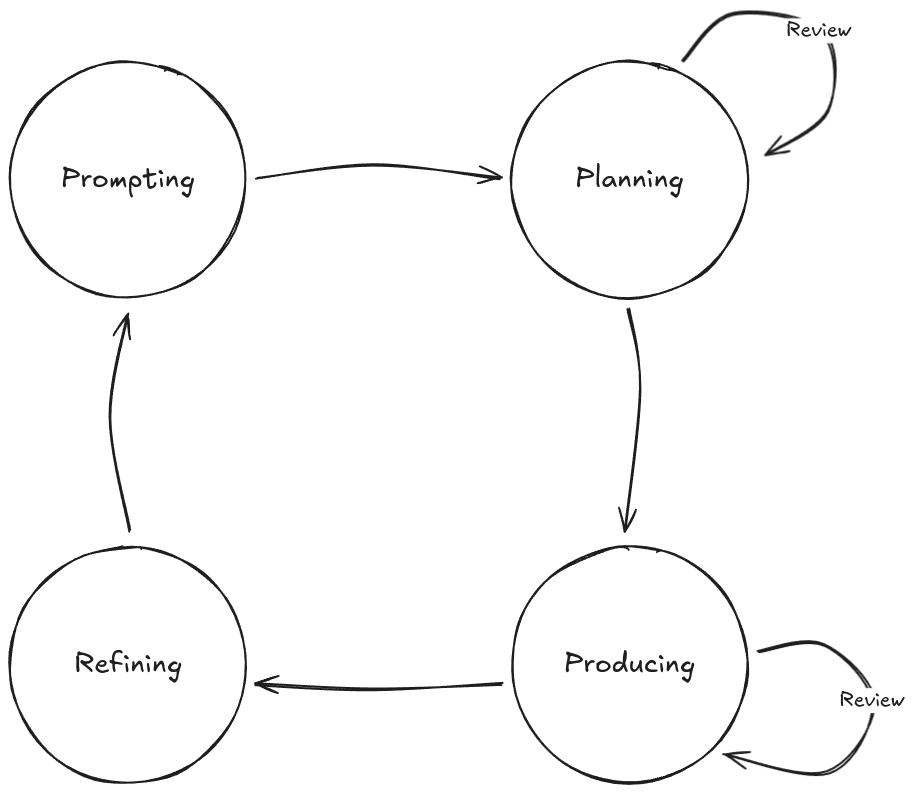
With such a tool, an effective AI coding cycle should look something like this:

The cycle consists of four phases:

Prompting: Giving instructions to the AI

Planning: Working with the AI to construct a change plan

Producing: Guiding the AI as it makes changes to the code

Refining: Using learnings from this iteration to update your approach for the next cycle

You might think this is overly complicated. Surely you could simply go between prompting and producing repeatedly? Yes, you could do that, and it might work well enough for small changes. 

But you’ll soon find that it doesn’t help you write sustainable code quickly. 

Without each step in this loop, you risk that the AI tool will lose its place or context, and the quality of its output will plummet. One of the major limitations of these tools is that they will not stop and warn you when this happens; they’ll just keep on trying their best. As the operator of the tool and ultimately the owner of the code, it’s your responsibility to set the AI up for success. 

Let’s look at what this workflow looks like in practice.

1. Prompting

AI tools are not truly autonomous: the quality of the output reflects the input you provide. That’s why prompting is arguably the most important phase in the loop: how well you do it will determine the quality of output you get, and by extension, how productive your use of AI will be.

This phase has two main considerations: context management and prompt crafting.

Context Management

A common characteristic of current-gen AI tools is that the quality of their output tends to decrease as the amount of context they hold increases. This happens for several reasons:

Poisoning: errors or hallucinations linger in context

Distractions: the model reuses mediocre context instead of searching for better info    

Confusion: irrelevant details lower output quality

Clashes: outdated or conflicting info leads to errors

As long as AI tools have this limitation, you get better results by strictly managing the context.

In practice, this means rather than having one long-running conversation with your agent, you should “wipe” its context in between tasks. Start from a fresh slate each time, and re-prompt it with the information it needs for the next task so that you don’t implicitly rely on accumulated context. With Claude Code, you do this with the /clear slash command. 

If you don’t clear context, tools like Claude will “auto-compact” it, a lossy process that can carry forward errors and reduce quality over time.

If you need any knowledge to persist between sessions, you can have the AI dump it into a markdown file. You can then either reference these markdown files in your tool’s agent file (CLAUDE.md for Claude Code) or mention the relevant files when working on specific tasks and have the agent load them in.

Structure varies, but it might look something like this…

.

├── CLAUDE.MD

└── docs

└── agents

     └── backend

         ├── api.md

         ├── architecture.md

         └── testing.md

“`

Prompt Crafting

After ensuring you’re working with a clean context window, the next most important thing is the input you provide. Here are the different approaches you can take depending on the task you are dealing with.

Decomposition

Generally, you want to break work down into discrete, actionable chunks. Avoid ambiguous high-level instructions like “implement an authentication system”, as this has too much variability. Instead, think about how you would actually do the work if you were going to do it manually, and try to guide the AI along the same path.

Here’s an example from a document management system task I gave Claude. You can view the whole interaction summary in this GitHub repo.

Prompt: “Look at DocumentProcessor and tell me which document types reference customers, projects, or contracts.”

Output: AI identified all references

Prompt: “Update the mapping functions at {location} to use those relationships and create tests.”

Output: Implemented mappings + tests

Prompt: “Update documentIncludes to ensure each type has the right relations. Check backend transformers to see what exists.”

Output: Filled in missing relationships

Notice how the task is tackled in steps. A single mega-prompt would have likely failed at some point due to multiple touchpoints and compounding complexity. Instead, small prompts with iterative context led to a high success rate. 

Once the task is done, wipe the context again before moving on to avoid confusing the AI.

Chaining

Sometimes you do need a more detailed prompt, such as when tasking the AI with a larger investigation task. In this case, you can improve your chances of success greatly by chaining prompts together. 

The most common way of doing this is by providing your initial prompt to a separate LLM, such as ChatGPT or Claude chat, and asking it to draft a prompt for you for a specific purpose. Once you’re satisfied with the parameters of the detailed prompt, feed it into your coding agent. 

Here’s an example:

Prompt (ChatGPT): “Draft me a prompt for a coding agent to investigate frontend testing patterns in this codebase, and produce comprehensive documentation that I can provide to an AI to write new tests that follow codebase conventions.”

This prompt produces a fairly detailed second-stage prompt that you can review, refine, and feed to your agent:

You can see the full output here. 

This approach obviously works best when you ensure the output aligns with the reality of your code. For example, this prompt talks about `jest.config.js`, but if you don’t use jest, you should change this to whatever you do use. 

Reuse

Sometimes, you’ll find a pattern that works really well for your codebase or way of working. Often, this will happen after Step 4: Refining, but it can happen at any time. 

When you find something that works well, you should set it aside for reuse. Claude Code has a few ways you can do this, with the most idiomatic one being custom slash commands. The idea here is that if you have a really solid prompt, you can encode it as a custom command for reuse.

For example, one great time saver I found was using an agent to examine a Laravel API and produce a Postman collection. This was something I used to do manually when creating new modules, which can be quite time-consuming.

Using the chaining approach, I produced a prompt that would:

Generate a new Postman collection for a given backend module

Use the Controller/API test suite to inform the request body values

Use the Controller and route definitions to determine the available endpoints

Running the prompt through an agent consistently produced a working Postman collection almost instantly. You can see the prompt here. 

When you find a valuable pattern or prompt like this, you should consider sharing it with your team, too. Increasing productivity across your team is where the real compounding benefits can happen.

2. Planning

Tools like Claude Code have a planning mode that allows you to run prompts to build context without making any changes. While you don’t always need this functionality, it’s invaluable if you’re dealing with a change with any appreciable amount of complexity.

Typically, the tool will perform an investigation to find all the information it needs to determine what it would do if it weren’t in planning mode. It will then present you with a summary of the intended changes. The key inflection point here is that it allows you to review what the AI is planning to do.

In the screenshot below, I used planning mode to ask Claude what’s needed to add “Login with Google” to an existing app that already supports “Login with Discord”:

I could see everything the AI planned to change to decide whether it makes sense for my use case.

Important: read the plan carefully! Make sure you understand what the AI is saying, and make sure it makes sense. If you don’t understand or if it seems inaccurate, ask it to clarify or investigate more. 

You should not move on from the planning phase until the plan looks exactly like what you would expect.

If the AI proposes rewriting a huge amount of code, treat it as a red flag. Most development should be evolutionary and iterative. If you break work into small chunks, the AI should propose and make small changes, which in turn will be easier to review. If the plan includes far more changes than you expected, review your input to see if the AI is missing important context.

Once you’ve iterated on the plan, you can give the AI the go-ahead to execute the plan.

3. Producing

During the third phase, the AI will begin to make changes to your codebase. Although the AI will produce most of the output here, you’re not off the hook. You still own any code it produces at your behest, for better or worse. It’s therefore better to see the producing phase as a collaboration between you and the AI: the AI produces code and you’re guiding it in real-time.

To get the most out of your AI tool and spend the least amount of time doing rework, you need to guide it. Remember, your goal is maximum productivity—real productivity, not just lines of code. That requires that you need to actively engage with the tool and work with it as it builds things, rather than just leaving it to its own devices.

If you take sufficient care with creating your prompt and doing planning, there shouldn’t be too many surprises during the actual coding phase. However, AI can still make mistakes, and it will certainly overlook things, especially in larger systems. (This is one of the major reasons why fully “vibe coded” projects break down quickly as they increase in scope. Even when the entire system has been built by AI, it will not remember or know everything that exists in the codebase.)

A day must still pass where I’ve not caught AI making a mistake. They might be small mistakes, like using string literals in place of pre-existing constants, or inconsistent naming conventions. These things might not even stop the code from working. 

However, if you let these changes through unchecked, it will be the start of a slippery slope that is hard to recover from. Be diligent, and treat any AI-generated code as you would code from another team member. Better still, understand that this code has your name attached to it, and don’t accept anything that you aren’t willing to “own” in perpetuity.

So if you notice a mistake has been made, point it out and suggest how it can be fixed. If the tool deviates from the plan or forgets something, try to catch it early and course-correct. Because your prompts are now small and focused, the features the AI builds should also be smaller. This makes reviewing them easier.

4. Refining

Luckily, rather than constantly fighting the machine and going back and forth on minor issues, the final phase of the loop—refining—offers a more sustainable way to calibrate your AI tool over time.

You might not make a change to your setup after every loop, but every loop will yield insight into what is working well and what needs to change. 

The most common way to tweak the behavior of AI tools is to use their specific steering documents. For instance, Claude has CLAUDE.md, and Cursor has Rules. 

These steering documents are typically a markdown file that gets loaded into the agent’s context automatically. In it, you can define project-specific rules, style guides, architectures, and more. If you find, for example, that the AI constantly struggles with how to set up mocks in your tests, you can add a section to your doc that explains what it needs to know, with examples it can use for reference, or links to known-good files in the codebase it can look at. 

This file shouldn’t get too big, as it does take up space in the LLM’s context. Treat it like an index, where you include information that is always needed directly in the file, and link out to more specialized information that AI can pull in when needed. 

Here’s an excerpt from one of my CLAUDE.md files that work well:

“`md

## Frontend

### Development Guidelines

For detailed frontend development patterns, architecture, and conventions, see:
**[Frontend Module Specification](./docs/agents/frontend/frontend-architecture.md)**

This specification covers:

– Complete module structure and file organization
– Component patterns and best practices
– Type system conventions
– Testing approaches
– Validation patterns
– State management
– Performance considerations

“`

The AI understands the hierarchy of markdown files, so it will see that there’s a section about frontend development guidelines, and it will see a link to a module specification. The tool will then decide internally whether it needs this information. For instance, if it’s working on a backend feature, it will skip it, but if it’s working on a frontend module, it will pull in this extra file. 

This feature allows you to conditionally expand and refine the agent’s behavior, tweaking it each time it has trouble in a specific area, until it can work in your codebase effectively more often than not.

Exceptions to the Cycle

There are some cases where it makes sense to deviate from this flow.

For quick fixes or trivial changes, you might only need Prompting → Producing. For anything beyond that, skipping planning and refinement usually backfires, so I don’t recommend it.

Refinement will likely need to be done quite often when first starting or when moving to a new codebase. As your prompts, workflows, and setup mature, the need to refine drops. Once things are dialed in, you likely won’t need to tweak much at all.

Finally, while AI can be a real accelerator for feature work and bug fixes, there are situations where it will slow you down. This varies by team and codebase, but as a rule of thumb: if you’re deep in performance tuning, refactoring critical logic, or working in a highly regulated domain, AI is more likely to be a hindrance than a help.

Other Considerations

Beyond optimizing your workflow with AI tools, a few other factors strongly affect output quality and are worth keeping in mind.

Well-Known Libraries and Frameworks

One thing you’ll notice quickly is that AI tools perform much better with well-known libraries. These are usually well-documented and likely included in the model’s training data. In contrast, newer libraries, poorly documented ones, or internal company libraries tend to cause problems. Internal libraries are often the hardest, since many have little to no documentation. This makes them difficult not only for AI tools but also for human developers. It’s one of the biggest reasons AI productivity can lag on existing codebases.

In these situations, your refinement phase often means creating guiding documentation for the AI so it can work with your libraries effectively. Consider investing time up front to have the AI generate comprehensive tests and documentation for them. Without it, the AI will have to reanalyze the library from scratch every time it works on your code. By producing documentation and tests once, you pay that cost up front and make future use much smoother.

Project Discoverability

The way your project is organized has a huge impact on how effectively AI can work with it. A clean, consistent directory structure makes it easier for both humans and AI to navigate, understand, and extend your code. Conversely, a messy or inconsistent structure increases confusion and lowers the quality of output you get.

For instance, a clean, consistent structure might look like this:

“`
.
├── src
│ ├── components
│ ├── services
│ └── utils
├── tests
│ ├── unit
│ └── integration
└── README.md

“`

Compare that with this confusing structure:

“`
.
├── components
│ └── Button.js
├── src
│ └── utils
├── shared
│ └── Modal.jsx
├── pages
│ ├── HomePage.js
│ └── components
│ └── Card.jsx
├── old
│ └── helpers
│ └── api.js
└── misc
└── Toast.jsx
“`

In the clear structure, everything lives in predictable places. In the confusing one, components are scattered across multiple folders (`components`, `pages/components`, `shared`, `misc`), utilities are duplicated, and old code lingers in `old/`. 

An AI, like any developer, will struggle to build a clear mental model of the project, which increases the chance of duplication and errors. 

If your codebase has a confusing structure and restructuring it is not an option, map out common patterns—even if there are multiple patterns for similar things—and add these to your steering document to reduce the amount of discovery and exploration the AI tool needs to do.

Wrapping Up

Adding AI tools to your workflow won’t make you a 10x developer overnight. You might even find that they slow you down a bit initially, as all new tools do. But if you invest the time to learn them and adapt your workflow, the payoff can come surprisingly quickly.

The AI tooling space is evolving fast, and the tools you use today will likely feel primitive a year from now. However, the habits you build and the workflow you develop—the way you prompt, plan, act, and refine—will carry forward in one form or another. Get those fundamentals right, and you’ll not only keep up with the curve, you’ll stay ahead of it.

Quelle: https://blog.docker.com/feed/

How Docker Hardened Images Patches Vulnerabilities in 24 hours

On November 19, 2025, the Golang project published two Common Vulnerabilities and Exposures (CVEs) affecting the widely-used golang.org/x/crypto/ssh package. While neither vulnerability received a critical CVSS score, both presented real risks to applications using SSH functionality in Go-based containers.

CVE-2025-58181 affects SSH servers parsing GSSAPI authentication requests. The vulnerability allows attackers to trigger unbounded memory consumption by exploiting the server’s failure to validate the number of mechanisms specified in authentication requests. CVE-2025-47914 impacts SSH Agent servers that fail to validate message sizes when processing identity requests, potentially causing system panics when malformed messages arrive. (These two vulnerabilities came just days after CVE-2025-47913, a high-severity vulnerability affecting the same Golang component that Docker also quickly patched)

For teams running Go applications with SSH functionality in their containers, leaving these vulnerabilities unpatched creates exposure to denial-of-service attacks and potential system instability.

How Docker achieves lightning fast vulnerability response

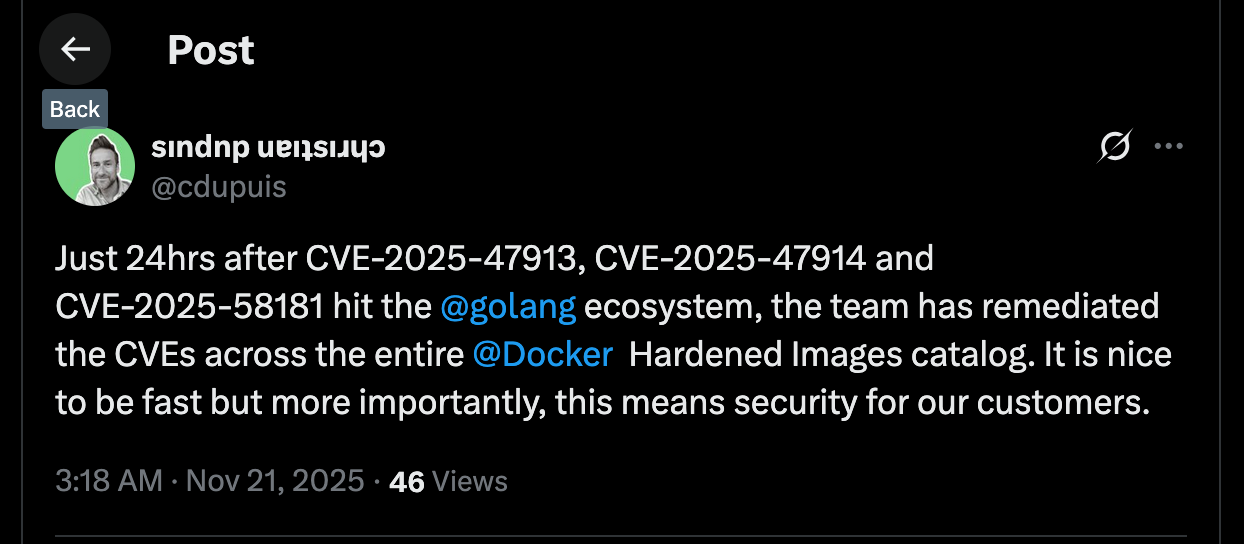
When these CVEs hit the Golang project’s security feed, Docker Hardened Images customers had patched versions available in less than 24 hours. This rapid response stems from Docker Scout’s continuous monitoring architecture and DHI’s automated remediation pipeline.

Here’s how it works:

Continuous CVE ingestion: Unlike vulnerability scanning that runs on batch schedules, Docker Scout continuously ingests CVE information from upstream sources including GitHub security advisories, the National Vulnerability Database, and project-specific feeds. The moment CVE data becomes available, Scout begins analysis.

Instant impact assessment: Within seconds of CVE ingestion, Scout identifies which Docker Hardened Images are affected based in Scout’s comprehensive SBOM database. This immediate notification allows the remediation process to start without delay.

Automated patching workflow: Depending on the vulnerability and package, Docker either patches automatically or triggers a manual review process for complex changes. For these Golang SSH vulnerabilities, the team initiated builds immediately after upstream patches became available.

Cascading builds: Once the patched Golang package builds successfully, the system automatically triggers rebuilds of all dependent packages and images. Every Docker Hardened Image containing the affected golang.org/x/crypto/ssh package gets rebuilt with the security fix.

The entire process, from CVE disclosure to patched images available to customers, was completed in under 24 hours. Customers using Docker Scout received immediate notifications about the vulnerabilities and the availability of patched versions.

Why Docker’s Security Response Is Different

One of Docker’s key differentiators is its continuous, real-time monitoring, rather than periodic batch scanning. Traditional vulnerability management relies on daily or weekly scans, leaving containers exposed to known vulnerabilities for hours or even days.

With Docker Scout’s real-time CVE ingestion, detection starts the moment a vulnerability is published, enabling remediation within seconds and minimizing exposure.

This foundation powers Docker Hardened Images (DHI), where packages and dependencies are continuously tracked and automatically updated when issues arise. For example, when vulnerabilities were found in the golang.org/x/crypto library, all affected images were rebuilt and released within a day. Customers simply pull the latest tags to stay secure, no manual patching, emergency maintenance, or impact triage required.

But continuous monitoring is just the foundation. What truly sets Docker apart is how that real-time intelligence flows into an automated, transparent, and trusted remediation pipeline, built on over a decade of experience securing and maintaining the Docker Official Images program.These are the same images trusted and used by millions of developers and organizations worldwide, forming the foundation of countless production environments. That long-standing operational experience in continuously maintaining, rebuilding, and distributing secure images at global scale gives Docker a proven track record in delivering reliability, consistency, and trust few others can match.

Beyond automation, Docker’s AI guardrails add yet another layer of protection. Purpose-built for the Hardened Images pipeline, these AI systems continuously analyze upstream code changes, flag risky patterns, and prevent flawed dependencies from entering the supply chain. Unlike standard coding assistants, Docker’s AI guardrails are informed by manual, project-specific reviews, blending human expertise with adaptive intelligence. When the system detects a high-confidence issue such as an inverted error check, ignored failure, or resource mismanagement, it halts the release until a Docker engineer verifies and applies the fix. This human-in-the-loop model ensures vulnerabilities are caught long before they can reach customers, turning AI into a force multiplier for safety, not a replacement for human judgment.

Another critical differentiator is complete transparency. Consider what happens when a security scanner still flags a vulnerability even after you’ve pulled a patched image. With DHI, every image includes a comprehensive and accurate Software Bill of Materials (SBOM) that provides definitive visibility into what’s actually inside your container. When a scanner reports a supposedly remediated image as vulnerable, teams can verify the exact package versions and patch status directly from the SBOM instead of relying on scanner heuristics.

This transparency also extends to how Docker Scout handles CVE data. Docker relies entirely on independent, third-party sources for vulnerability decisions and prioritization, including the National Vulnerability Database (NVD), GitHub Security Advisories, and upstream project maintainers. This approach is essential because traditional scanners often depend on pattern matching and heuristics that can produce false positives. They may miss vendor-specific patches, overlook backported fixes, or flag vulnerabilities that have already been remediated due to database lag. In some cases, even vendor-recommended scanners fail to detect unpatched vulnerabilities, creating a false sense of security.

Without an accurate SBOM and objective CVE data, teams waste valuable time chasing phantom vulnerabilities or debating false positives with compliance auditors. Docker’s approach eliminates that uncertainty. Because the SBOM is generated directly from the build process, not inferred after the fact, it provides definitive evidence of what’s inside each image and why certain CVEs do or don’t apply. This transforms vulnerability management from guesswork and debate into objective, verifiable security assurance, backed by transparent, third-party data.

CVEs don’t have to disrupt your week

Managing vulnerabilities consumes significant engineering time. When critical CVEs drop, teams rush to assess impact, test patches, and coordinate deployments. Docker Hardened Images eliminate this overhead by continuously updating base images with complete transparency into their contents with rapid turnarounds to reduce your exposure window.

If you’re tired of vulnerability whack-a-mole disrupting your team’s roadmap, Docker Hardened Images offers a better path forward. Learn more about how Docker Scout and Hardened Images can reduce your vulnerability management burden, or contact our team to discuss your specific security requirements.

Quelle: https://blog.docker.com/feed/

AWS announces Flexible Cost Allocation on AWS Transit Gateway

AWS announces general availability of Flexible Cost Allocation on AWS Transit Gateway, enhancing how you can distribute Transit Gateway costs across your organization.
Previously, Transit Gateway only used a sender-pay model, where the source attachment account owner was responsible for all data usage related costs. The new Flexible Cost Allocation (FCA) feature provides more versatile cost allocation options through a central metering policy. Using FCA metering policy, you can choose to allocate all of your Transit Gateway data processing and data transfer usage to the source attachment account, the destination attachment account, or the central Transit Gateway account. FCA metering policies can be configured at an attachment-level or individual flow-level granularity. FCA also supports middle-box deployment models enabling you to allocate data processing usage on middle-box appliances such as AWS Network Firewall to the original source or destination attachment owners. This flexibility allows you to implement multiple cost allocation models on a single Transit Gateway, accommodating various chargeback scenarios within your AWS network infrastructure. Flexible Cost Allocation is available in all commercial AWS Regions where Transit Gateway is available. You can enable these features using the AWS Management Console, AWS Command Line Interface (CLI) and the AWS Software Development Kit (SDK). There is no additional charge for using FCA on Transit Gateway. For more information, see the Transit Gateway documentation pages.
Quelle: aws.amazon.com

Amazon Connect launches monitoring of contacts queued for callback

Amazon Connect now provides you with the ability to monitor which contacts are queued for callback. This feature enables you to search for contacts queued for callback and view additional details such as the customer’s phone number and duration of being queued within the Connect UI and APIs. You can now pro-actively route contacts to agents that are at risk of exceeding the callback timelines communicated to customers. Businesses can also identify customers that have already successfully connected with agents, and clear them from the callback queue to remove duplicative work. This feature is available in all regions where Amazon Connect is offered. To learn more, please visit our documentation and our webpage. 
Quelle: aws.amazon.com

Second-generation AWS Outposts racks now supported in the AWS Asia Pacific (Tokyo) Region

Second-generation AWS Outposts racks are now supported in the AWS Asia Pacific (Tokyo) Region. Outposts racks extend AWS infrastructure, AWS services, APIs, and tools to virtually any on-premises data center or colocation space for a truly consistent hybrid experience. Organizations from startups to enterprises and the public sector in and outside of Japan can now order their Outposts racks connected to this new supported region, optimizing for their latency and data residency needs. Outposts allows customers to run workloads that need low latency access to on-premises systems locally while connecting back to their home Region for application management. Customers can also use Outposts and AWS services to manage and process data that needs to remain on-premises to meet data residency requirements. This regional expansion provides additional flexibility in the AWS Regions that customers’ Outposts can connect to. To learn more about second-generation Outposts racks, read this blog post and user guide. For the most updated list of countries and territories and the AWS Regions where second-generation Outposts racks are supported, check out the Outposts rack FAQs page.
Quelle: aws.amazon.com

AWS IoT Core enhances IoT rules-SQL with variable setting and error handling capabilities

AWS IoT Core now supports a SET clause in IoT rules-SQL, which lets you set and reuse variables across SQL statements. This new feature provides a simpler SQL experience and ensures consistent content when variables are used multiple times. Additionally, a new get_or_default() function provides improved failure handling by returning default values while encountering data encoding or external dependency issues, ensuring IoT rules continue execution successfully. AWS IoT Core is a fully managed service that securely connects millions of IoT devices to the AWS cloud. Rules for AWS IoT is a component of AWS IoT Core which enables you to filter, process, and decode IoT device data using SQL-like statements, and route the data to 20+ AWS and third-party services. As you define an IoT rule, these new capabilities help you eliminate complicated SQL statements and make it easy for you to manage IoT rules-SQL failures.
These new features are available in all AWS Regions where AWS IoT Core is available, including AWS GovCloud (US) and Amazon China Regions. For more information and getting started experience, visit the developer guides on SET clause and get_or_default() function.
Quelle: aws.amazon.com

Automated Reasoning checks now include natural language test Q&A generation

AWS announces the launch of natural language test Q&A generation for Automated Reasoning checks in Amazon Bedrock Guardrails. Automated Reasoning checks uses formal verification techniques to validate the accuracy and policy compliance of outputs from generative AI models. Automated Reasoning checks deliver up to 99% accuracy at detecting correct responses from LLMs, giving you provable assurance in detecting AI hallucinations while also assisting with ambiguity detection in model responses. To get started with Automated Reasoning checks, customers create and test Automated Reasoning policies using natural language documents and sample Q&As. Automated Reasoning checks generates up to N test Q&As for each policy using content from the input document, reducing the work required to go from initial policy generation to production-ready, refined policy. Test generation for Automated Reasoning checks is now available in the US (N. Virginia), US (Ohio), US (Oregon), Europe (Frankfurt), Europe (Ireland), and Europe (Paris) Regions. Customers can access the service through the Amazon Bedrock console, as well as the Amazon Bedrock Python SDK. To learn more about Automated Reasoning checks and how you can integrate it into your generative AI workflows, please read the Amazon Bedrock documentation, review the tutorials on the AWS AI blog, and visit the Bedrock Guardrails webpage.
Quelle: aws.amazon.com





