Microsoft shares what's next in machine learning at NVIDIA GTC

Finding scalable solutions for today’s global challenges requires forward-thinking, transformative tools. As environmental, economic, and public health concerns mount, Microsoft Azure is addressing these challenges head on with high-performance computing (HPC), AI, and machine learning. The behind-the-scenes power for everything from MRI scans to energy management and financial services, these technologies are equipping customers and developers with innovative solutions that break through the boundaries of what’s possible in data and compute, paving the way for growth opportunities that span industries and applications around the world.

Microsoft Azure is committed to unlocking these new opportunities for our customers, providing the broadest range of NVIDIA GPUs at the edge, on-premises, in the cloud, and for hybrid environments.

At NVIDIA GTC we will demonstrate this commitment by showing how Azure’s advanced HPC capabilities, and AI/machine learning in the cloud are driving transformation and making an impact together with NVIDIA’s latest technology.

Microsoft Azure’s collaboration with NVIDIA was developed with our customers in mind and focused on opening new doors to innovation with graphics processing unit (GPU) acceleration in the cloud.

Learn more by registering today for NVIDIA GTC, a free, online event running September 19 to 22, 2022.

Get a chance to win an NVIDIA Jetson Nano or swag box

In both of our sessions you have a chance to win a SWAG box complete with a HPC t-shirt and mug or a Jetson Nano. Attend these sessions and don’t forget to look for the special link to enter!

Microsoft Sessions at NVIDIA GTC

The new SDK and CLI in Azure Machine Learning.
Bala Venkataraman, Principal Program Manager, Microsoft.

Video on demand

Azure Machine Learning is committed to simplifying the adoption of its platform for training and production. In 2022, we announced the general availability of Azure Machine Learning CLI v2 and the preview of Azure Machine Learning Python SDK v2. Both launches demonstrate our continued focus on making workflows easier and managing their entire lifecycle starting from training single jobs to pipelines and model deployments. In this session, learn about the key improvements in usability and productivity, and the new features that come with the command-line interpreter (CLI) and software development kit (SDK) v2 of Azure Machine Learning.

Register for this session now.

Operationalize large model training on Azure Machine Learning using multi-node NVIDIA A100 GPUs.
Sharmeelee Bijlani, Program Manager Azure Machine Learning, Microsoft; Razvan Tanase, Principal Engineering Manager Azure Machine Learning, Microsoft.

Wednesday, September 21, 10:00 to 10:50 AM PDT (1:00 to 1:50 PM EDT, 7:00 to 7:50 AM CEST)

In recent years, deep learning models have grown exponentially in size, demonstrating an acute need for customers to train and fine-tune them using large-scale data infrastructure, advanced GPUs, and an immense amount of memory. Fortunately, developers can now use simple training pipelines on Azure Machine Learning to train large models running on the latest multi-node NVIDIA GPUs. This session will describe these software innovations to customers through Azure Machine Learning (including a fully optimized PyTorch environment) that offers great performance and an easy-to-use interface for large-scale training. We’ll also highlight the power of Azure Machine Learning through experiments using 1,024 A100 Tensor Core GPUs to scale the training of a two-trillion parameter model with a streamlined user experience at 1,000 plus GPU scale.

Register for this session now.

Watch Party #1: Operationalize large-model training on Azure Machine Learning using multi-node NVIDIA A100 GPUs.
Mary Howell, NVIDIA.

Wednesday, Sep 21st, 3:00 – 3:30 PM PDT
In this GTC Watch Party, we will be replaying our Operationalize Large-Model Training on Azure Machine Learning using Multi-Node NVIDIA A100 GPUs session. Participants will be joined by experts from across Microsoft and NVIDIA who bring fresh insights and experiences to the table, taking the session to a whole new level of understanding. Interaction is core to our GTC Watch Parties, and we encourage you to join the discussion with any comments or questions. 

Register for this session.

Watch Party #2: Operationalize large-model training on Azure Machine Learning using multi-node NVIDIA A100 GPUs.
Gabrielle Davelaar, AI Technical Specialist, Microsoft; Maxim Salnikov, Senior Azure GTM Manager, Microsoft; Henk Boelman, Senior Cloud Advocate–AI and Machine Learning, Microsoft; Alexander Young, Technical Marketing Engineer, NVIDIA; Ulrich Knechtel, Microsoft Partner Manager (EMEA), NVIDIA.

Thursday, September 22, 2:00 to 3:30 PM CEST (5:00 to 6:30 AM PDT, 8:00 to 9:30 AM EDT)

In this GTC Watch Party, we will be replaying our Operationalize Large-Model Training on Azure Machine Learning using Multi-Node NVIDIA A100 GPUs session. Participants will be joined by experts from across Microsoft and NVIDIA who bring fresh insights and experiences to the table, taking the session to a whole new level of understanding. Interaction is core to our GTC Watch Parties, and we encourage you to join the discussion with any comments or questions.

Register for this session now.

Microsoft is helping customers across industries step up, transforming AI and machine learning at the Edge

Nuance’s Dragon Ambient eXperience helps doctors document care faster with AI on Azure

Nuance developed an AI-based clinical solution that automatically turns doctor-patient conversations into accurate medical notes. Built with Azure and PyTorch, this solution saves doctors transcription time, reducing administrative burdens and helping them conduct more focused, higher-quality interactions with their patients.

Energy utility Elva builds a highly secure DevOps platform with Azure infrastructure and network security services

Elva looked to build a secure, cloud-first DevOps platform that could meet Norway’s data residency and compliance requirements, delivering automated services that would help develop network grid technology. Using Azure DDoS Protection, Azure Web Application Firewall, and Azure Kubernetes Service, Elva realized its goal, enhancing its in-house development and data integration capabilities. 

The Royal Bank of Canada creates personalized offers while protecting data privacy with Azure confidential computing

The Royal Bank of Canada (RBC) partnered with Microsoft to create a privacy-preserving multi-party data sharing platform built on Azure confidential computing. Called VCR, this solution enables RBC to personalize offerings and protect privacy at the same time, creating exceptional digital experiences that clients can trust.  

Recapping 2022 moments with Azure and NVIDIA technologies

Azure NC A100 v4-series

At Microsoft, our NC series virtual machines allow customers access to almost limitless AI hardware infrastructure so they can be productive quickly. Last summer, we leveled up, announcing the general availability of Azure NC A100 v4 series virtual machines. Powered by NVIDIA A100 80GB PCle Tensor Core GPUs and 3rd Gen AMD EPYC™ processors, these virtual machines help our customers gain insights faster, innovate with speed, do more with less, and are the most performant and cost-competitive NC series offering for a diverse set of workloads.

DeepSpeed on Azure

Azure Machine Learning uses large fleets of the latest NVIDIA GPUs powered by NVIDIA Quantum InfiniBand interconnects to tackle large-scale AI training and tuning. Last July, we announced a breakthrough in our software stack, using DeepSpeed and 1,024 NVIDIA A100 GPUs to scale the training of a two trillion parameter model with a streamlined user experience at 1,000 plus GPU scale. We are bringing these software innovations to you through Azure Machine Learning (including a fully optimized PyTorch environment) that offers great performance and an easy-to-use interface for large-scale training.

NVads A10 v5 virtual machines

Traditionally, graphics-heavy visualization workloads that run in the cloud require virtual machines with full GPUs that are both costly and inflexible. To combat this, we introduced the first GPU-partitioned (GPU-P) virtual machine offering in the cloud, and just last July, we announced the general availability of NVads A10 v5 GPU accelerated virtual machines. Azure is the first public cloud to offer GPU partitioning on NVIDIA GPUs, and our new NVads A10 v5 virtual machines are designed to offer the right choice for any workload and provide optimum configurations for both single-user and multi-session environments. Dig into our latest virtual machine innovation.

NVIDIA Jetson AGX Orin-powered edge AI devices now available

Microsoft is pleased to announce that the NVIDIA Jetson AGX Orin SoM is now powering Azure Certified edge devices from industry-leading device builders including AAEON, Advantech, and AVerMedia, along with the NVIDIA Jetson AGX Orin developer kit.

Developers and solution builders can now leverage powerful NVIDIA Jetson AGX Orin devkits and production modules with Microsoft Azure to create, deploy, and operate powerful AI solutions at the edge, accelerating product development and deployment at scale. The NVIDIA Orin Nano modules have set a new baseline for entry-level edge AI and robotics, building on the momentum behind the Jetson Orin platform worldwide. Stay tuned for new Jetson Orin NX and Orin Nano partner products launching to meet customer needs in AI solution development.

NVIDIA DLI training powered by Azure

We’re proud to host NVIDIA deep learning institute (DLI) training at NVIDIA GTC again this year, with instructor-led workshops around accelerated computing, accelerated data science, and deep learning. Hosted on Microsoft Azure, these sessions enable and empower you to leverage NVIDIA GPUs on the Microsoft Azure platform to solve the world’s most interesting and relevant problems. Register for a DLI workshop today.

Join us at NVIDIA GTC

In collaboration with NVIDIA, Microsoft delivers purpose-built AI, machine learning, and HPC solutions in the cloud to meet even the most demanding real-world applications at scale. Join us at NVIDIA GTC September 19 to 22, to see how every enterprise can leverage the power of GPUs at the edge, on-premises, in the cloud, and for hybrid solutions.

Learn more

Register for NVIDIA GTC DLI workshops and training sponsored by Microsoft Azure.
Learn more about our edge to cloud story with NVIDIA.
Read how Microsoft and NVIDIA are accelerating AI and HPC in the cloud.
See the quick start guide to benchmarking AI models in Azure: MLPerf Inference v2.1.
Learn more about Azure’s and NVIDIA’s roles in accelerating AI research and development for Meta.
Read NVIDIA’s step-by-step tutorial for boosting AI inference performance on Azure Machine Learning.
See this recap of Microsoft sessions at last year’s NVIDIA GTC.

Quelle: Azure
What is the Best Container Security Workflow for Your Organization?

Since containers are a primary means for developing and deploying today’s microservices, keeping them secure is highly important. But where should you start? A solid container security workflow often begins with assessing your images. These images can contain a wide spectrum of vulnerabilities. Per Sysdig’s latest report, 75% of images have vulnerabilities considered either highly or critically severe. 

There’s good news though — you can patch these vulnerabilities! And with better coordination and transparency, it’s possible to catch these issues in development before they impact your users. This protects everyday users and enterprise customers who require strong security. 

Snyk’s Fani Bahar and Hadar Mutai dove into this container security discussion during their DockerCon session. By taking a shift-left approach and rallying teams around key security goals, stronger image security becomes much more attainable. 

Let’s hop into Fani and Hadar’s talk and digest their key takeaways for developers and organizations. You’ll learn how attitudes, structures, and tools massively impact container security.

Security requires the right mindset across organizations

Mindset is one of the most difficult hurdles to overcome when implementing stronger container security. While teams widely consider security to be important, many often find it annoying in practice. That’s because security has traditionally taken monumental effort to get right. Even today, container security has become “the topic that most developers tend to avoid,” according to Hadar. 

And while teams scramble to meet deadlines or launch dates, the discovery of higher-level vulnerabilities can cause delays. Security soon becomes an enemy rather than a friend. So how do we flip the script? Ideally, a sound container-security workflow should do the following:

Support the agile development principles we’ve come to appreciate with microservices developmentPromote improved application security in productionUnify teams around shared security goals instead of creating conflicting priorities

Two main personas are invested in improving application security: developers and DevSecOps. These separate personas have very similar goals. Developers want to ship secure applications that run properly. Meanwhile, DevSecOps teams want everything that’s deployed to be secured. 

The trick to unifying these goals is creating an effective container-security workflow that benefits everyone. Plus, this workflow must overcome the top challenges impacting container security — today and in the future. Let’s analyze those challenges that Hadar highlighted. 

Organizations face common container security challenges

Unraveling the mystery behind security seems daunting, but understanding common challenges can help you form a strategy. Organizations grapple with the following: 

Vulnerability overload (container images can introduce upwards of 900)Prioritizing security fixes over othersUnderstanding how container security fundamentally works (this impacts whether a team can fix issues)Lengthier development pipelines stemming from security issues (and testing)Integrating useful security tools, that developers support, into existing workflows and systems

From this, we can see that teams have to work together to align on security. This includes identifying security outcomes and defining roles and responsibilities, while causing minimal disruption. Container security should be as seamless as possible. 

DevSecOps maturity and organizational structures matter

DevSecOps stands for Development, Security, and Operations, but what does that mean? Security under a DevSecOps system becomes a shared responsibility and a priority quite early in the software development lifecycle. While some companies have this concept down pat, many others are new to it. Others lie somewhere in the middle. 

As Fani mentioned, a company’s development processes and security maturity determine how they’re categorized. We have two extremes. On one hand, a company might’ve fully “realized” DevSecOps, meaning they’ve successfully scaled their processes and bolstered security. Conversely, a company might be in the exploratory phase. They’ve heard about DevSecOps and know they want it (or need it). But, their development processes aren’t well-entrenched, and their security posture isn’t very strong. 

Those in the exploratory phase might find themselves asking the following questions:

Can we improve our security?Which organizations can we learn from?Which best practices should we follow?

Meanwhile, other companies are either DevOps mature (but security immature) or DevSecOps ready. Knowing where your company sits can help you take the correct next steps to either scale processes or security. 

The impact of autonomy vs. centralization on security

You’ll typically see two methodologies used to organize teams. One focuses on autonomy, while the other prioritizes centralization.

Autonomous approaches

Autonomous organizations might house multiple teams that are more or less siloed. Each works on its own application and oversees that application’s security. This involves building, testing, and validation. Security ownership falls on those developers and anyone else integrated within the team. 

But that’s not to say DevSecOps fades completely into the background! Instead, it fills a support and enablement role. This DevSecOps team could work directly with developers on a case-by-case basis or even build useful, internal tools to make life easier. 

Centralized approaches

Otherwise, your individual developers could rally around a centralized DevOps and AppSec (app security) team. This group is responsible for testing and setting standards across different development teams. For example, DevAppSec would define approved base images and lay out a framework for container design that meets stringent security protocols. This plan must harmonize with each application team throughout the organization. 

Why might you even use approved parent images? These images have undergone rigorous testing to ensure no show-stopping vulnerabilities exist. They also contain basic sets of functionality aimed at different projects. DevSecOps has to find an ideal compromise between functionality and security to support ongoing engineering efforts. 

Whichever camp you fall into will essentially determine how “piecemeal” your plan is. How your developers work best will also influence your security plan. For instance, your teams might be happiest using their own specialized toolsets. In this case, moving to centralization might cause friction or kick off a transition period. 

On the flip side, will autonomous teams have the knowledge to employ strong security after relying on centralized policies? 

It’s worth mentioning that plenty of companies will keep their existing structures. However, any structural changes like those above can affect container security in the short and long term. 

Diverse tools define the container security workflow

Next, Fani showed us just how robust the container security tooling market is. For each step in the development pipeline, and therefore workflow, there are multiple tools for the job. You have your pick between IDEs. You have repositories and version control. You also have integration tools, storage, and orchestration. 

These serve a purpose for the following facets of development: 

Local developmentGitOpsCI/CDRegistryProduction container management

Thankfully, there’s no overarching best or “worst” tool for a given job. But, your organization should choose a tool that delivers exceptional container security with minimal disruption. You should even consider how platforms like Docker Desktop can contribute directly or indirectly to your security workflows, through tools like image management and our Software Bill of Materials (SBOM) feature.

You don’t want to redesign your processes to accommodate a tool. For example, it’s possible that Visual Studio Code suits your teams better than IntelliJ IDEA. The same goes for Jenkins vs. CircleCI, or GitHub vs. Bitbucket. Your chosen tool should fit within existing security processes and even enhance them. Not only that, but these tools should mesh well together to avoid productivity hurdles. 

Container security workflow examples

The theories behind security are important but so are concrete examples. Fani kicked off these examples by hopping into an autonomous team workflow. More and more organizations are embracing autonomy since it empowers individual teams. 

Examining an autonomous workflow

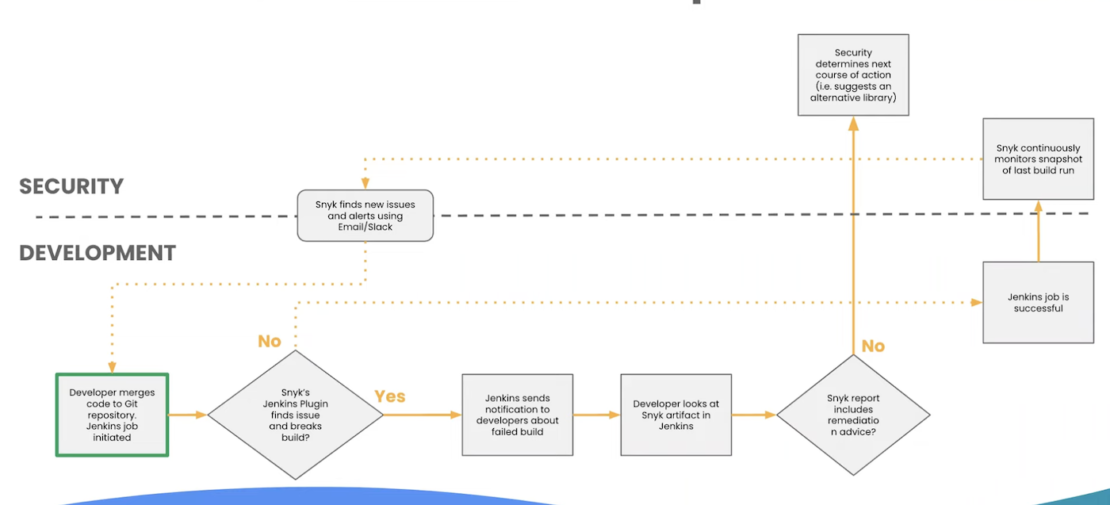
As with any modern workflow, development and security will lean on varying degrees of automation. This is the case with Fani’s example, which begins with a code push to a Git repository. That action initiates a Jenkins job, which is a set of sequential, user-defined tasks. Next, something like the Snyk plugin scans for build-breaking issues. 

If Snyk detects no issues, then the Jenkins job is deemed successful. Snyk monitors continuously from then on and alerts teams to any new issues: 

[Click to Enlarge]

When issues are found, your container security tool might flag those build issues, notify developers, provide artifact access, and offer any appropriate remediation steps. From there, the cycle repeats itself. Or, it might be safer to replace vulnerable components or dependencies with alternatives. 

Examining a common base workflow

With DevSecOps at the security helm, processes can look a little different. Hadar walked us through these unique container security stages to highlight DevOps’ key role. This is adjacent to — but somewhat separate from — the developer’s workflows. However, they’re centrally linked by a common registry: 

[Click to Enlarge]

DevOps begins by choosing an appropriate base image, customizing it, optimizing it, and putting it through its paces to ensure strong security. Approved images travel to the common development registry. Conversely, DevOps will fix any vulnerabilities before making that image available internally. 

Each developer then starts with a safe, vetted image that passes scanning without sacrificing important, custom software packages. Issues require fixing and bounce you back to square one, while success means pushing your container artifacts to a downstream registry. 

Creating safer containers for the future 

Overall, container security isn’t as complex as many think. By aligning on security and developing core processes alongside tooling, it’s possible to make rapid progress. Automation plays a huge role. And while there are many ways to tackle container security workflows, no single approach definitively takes the cake. 

Safer public base images and custom images are important ingredients while building secure applications. You can watch Fani and Hadar’s complete talk to learn more. You can also read more about the Synk Extension for Docker Desktop on Docker Hub.
Quelle: https://blog.docker.com/feed/

Back Up and Share Docker Volumes with This Extension

When you need to back up, restore, or migrate data from one Docker host to another, volumes are generally the best choice. You can stop containers using the volume, then back up the volume’s directory (such as /var/lib/docker/volumes/<volume-name>). Other alternatives, such as bind mounts, rely on the host machine’s filesystem having a specific directory structure available, for example /tmp/source on UNIX systems like Linux and macOS and C:/Users/John on Windows.

Normally, if you want to back up a data volume, you run a new container using the volume you want to back up, then execute the tar command to produce an archive of the volume content:

docker run –rm
-v “$VOLUME_NAME”:/backup-volume
-v “$(pwd)”:/backup
busybox
tar -zcvf /backup/my-backup.tar.gz /backup-volume

To restore a volume with an existing backup, you can run a new container that mounts the target volume and executes the tar command to decompress the archive into the target volume. 

A quick Google search returns a number of bash scripts that can help you back up volumes, like this one from Docker Captain Bret Fisher. With this script, you can get the job done with the simpler ./vackup export my-volume backup.tar.gz. While scripts like this are totally valid approaches, the Extensions team was wondering: what if we could integrate this tool into Docker Desktop to deliver a better developer experience? Interestingly enough, it all started as a simple demo just the day before going live on Bret’s streaming show!

Now you can back up volumes from Docker Desktop

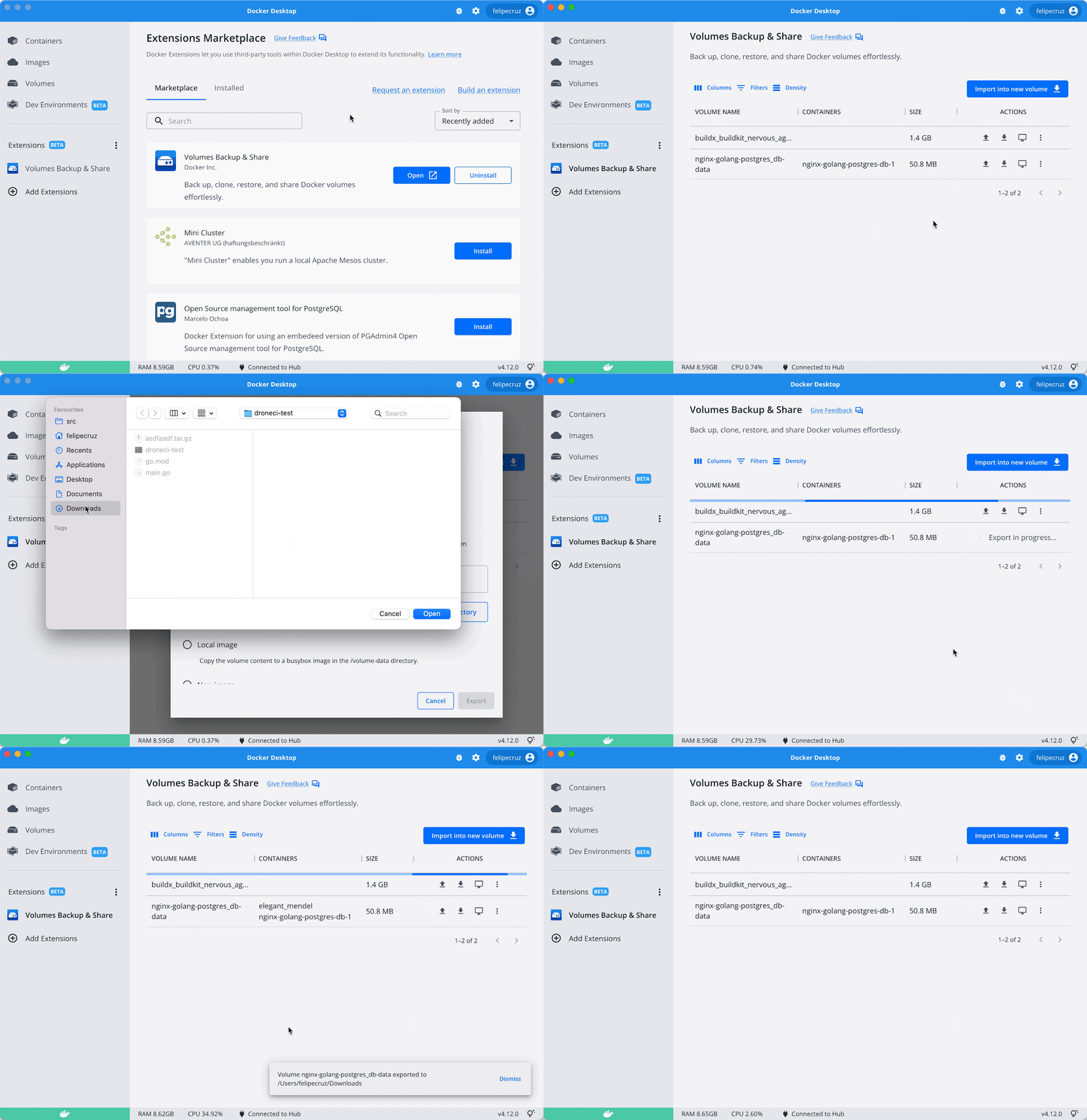
You can now back up volumes with just a few clicks using the new Volumes Backup & Share extension. This extension is available in the Marketplace and works on macOS, Windows, and Linux. And you can check out the OSS code on GitHub to see how the extension was developed.

How to back up a volume to a local file in your host

What can I do with the extension?

The extension allows you to:

Back up data that is persisted in a volume (for example, database data from Postgres or MySQL) into a compressed file.Upload your backup to Docker Hub and share it with anyone.Create a new volume from an existing backup or restore the state of an existing volume.Transfer your local volumes to a different Docker host (through SSH).Other basic volume operations like clone, empty, and delete a volume.

In the scenario below, John, Alex, and Emma are using Docker Desktop with the Volume Backup & Share extension. John is using the extension to share his volume (my-app-volume) with the rest of their teammates via Docker Hub. The volume is uploaded to Docker Hub as an image (john/my-app-volume:0.0.1) by using the “Export to Registry” option. His colleagues, Alex and Emma, will use the same extension to import the volume from Docker Hub into their own volumes by using the “Import from Registry” option.

Create different types of volume backups

When backing up a volume from the extension, you can select the type of backup:

A local file: creates a compressed file (gzip’ed tarball) in a desired directory of the host filesystem with the content of the volume.A local image: saves the volume data into the /volume-data directory of an existing image filesystem. If you were to inspect the filesystem of this image, you will find the backup stored in /volume-data.A new image: saves the volume data into the /volume-data directory of a newly created image.A registry: pushes a local volume to any image registry, whether local (such as localhost:5000) or hosted like Docker Hub or GitHub Container Registry. This allows you to share a volume with your team with a couple clicks.>  As of today, the maximum volume size supported to push to Docker Hub by the extension is 10GB. This limit may be changed in future versions of the extension depending on feedback received from users.

Restore or import from a volume

Similarly to the different types of volume backups described above, you can import or restore a backup into a new or an existing volume.

You can also select whether you want to restore a volume from a local file, a local image, a new image, or from a registry.

Transfer a volume to another Docker host

You might also want to copy the content of a volume to another host where Docker is running (either Docker Engine or Docker Desktop), like an Ubuntu server or a Raspberry Pi.

From the extension, you can specify both the destination host the local volume copied to (for example, user@192.168.1.50) and the destination volume.

> SSH must be enabled and configured between the source and destination Docker hosts. Check to make sure you have the remote host SSH public key in your known_hosts file.

Below is an example of transferring a local volume from Docker Desktop to a Raspberry Pi.

Perform other operations

The extension provides other volume operations such as view, clone, empty, or delete.

How does it work behind the scenes?

In a nutshell, when a back up or restore operation is about to be carried out, the extension will stop all the containers attached to the specified volume to avoid data corruption, and then it will restart them once the operation is completed.

These operations happen in the background, which means you can carry out more of them in parallel, or leave the extension screen and navigate to other parts of Docker Desktop to continue with your work while the operations are running.

For instance, if you have a Postgres container that uses a volume to persist the database data (i.e. -v my-volume:/var/lib/postgresql/data), the extension will stop the Postgres container attached to the volume, generate a .tar.gz file with all the files that are inside the volume, then start the containers and put the file on the local directory that you have specified.

Note that for open files like databases, it’s usually better to use their preferred backup tool to create a backup file, but if you stored that file on a Docker volume, this could still be a way you get the Docker volume into an image or tarball for moving to remote storage for safekeeping.

What’s next?

We invite you to try out the extension and give us feedback here.

And if you haven’t tried Docker Extensions, we encourage you to explore the Extensions Marketplace and install some of them! You can also start developing your own Docker Extensions on all platforms: Windows, WSL2, macOS (both Intel and Apple Silicon), and Linux.

To learn more about the Extensions SDK, have a look at the official documentation. You’ll find tutorials, design guidelines, and everything else you need to build an extension.Once your extension’s ready, you can submit it to the Extensions Marketplace here.

Related posts

Vackup project by Bret FisherBuilding Vackup – Live Stream on YouTube

Quelle: https://blog.docker.com/feed/

Amazon Connect führt eine API zur Suche nach Routing-Profilen nach Name, Beschreibung und Tags ein.

Amazon Connect bietet nun eine neue API zum Suchen nach Routing-Profilen in Ihrer Amazon Connect-Instance. Diese neue API stellt eine programmgesteuerte und flexible Möglichkeit für die Suche nach Routing-Profilen anhand von Name, Beschreibung oder Tags bereit. Zum Beispiel können Sie diese API nun verwenden, um nach allen Routing-Profilen zu suchen, deren Beschreibung „Vertrieb“ enthält. Weitere Informationen zu dieser neuen API findest du in der API-Dokumentation.
Quelle: aws.amazon.com

Amazon Connect bietet jetzt eine API, um Warteschlangen nach Name, Beschreibung und Tags zu suchen

Amazon Connect bietet nun eine neue API zum Suchen nach Warteschlangen in Ihrer Amazon Connect-Instance. Diese neue API stellt eine programmgesteuerte und flexible Möglichkeit für die Suche nach Warteschlangen anhand von Name, Beschreibung oder Tags bereit. Zum Beispiel können Sie diese API nun verwenden, um nach allen Warteschlangen zu suchen, deren Beschreibung „Priorität“ enthält. Weitere Informationen zu dieser neuen API findest du in der API-Dokumentation.
Quelle: aws.amazon.com