Apple Macbook Neo: Schneller als Intel-Desktops – und nach 4 Stunden leer
Das Macbook Neo übertrifft AMD, Intel und Qualcomm in Single-Core-Benchmarks. Der Akku hält weniger als einen Arbeitstag. (Macbook Neo, Apple)
Quelle: Golem

Das Macbook Neo übertrifft AMD, Intel und Qualcomm in Single-Core-Benchmarks. Der Akku hält weniger als einen Arbeitstag. (Macbook Neo, Apple)
Quelle: Golem

Lockheed Martin entwickelt Mini-Reaktoren für den Mond. Sie sollen während der 14 Erdtage andauernden Mondnächte
als Energiequelle für eine zukünftige Artemis-Basis werden. (Lockheed Martin, Raumfahrt)
Quelle: Golem

Forscher haben überraschend klare Empfehlungen: Für Wohlbefinden beim Gaming zählt nicht die Spielzeit – sondern wann, wie und was man spielt. (GDC 2026, Studien)
Quelle: Golem

Microsoft baut DirectX für das KI-Zeitalter um: Neue APIs bringen Machine Learning direkt in die Grafikpipeline. (DirectX, Microsoft)
Quelle: Golem
Starting today, Amazon EC2 M8azn instances are now available in US East (Ohio) Region. These general purpose high-frequency high-network instances are powered by fifth generation AMD EPYC (formerly code named Turin) processors and offer the highest maximum CPU frequency, 5GHz in the cloud. M8azn instances offer up to 2x compute performance compared to previous generation M5zn instances, and up to 24% higher performance than M8a instances. M8azn instances deliver up to 4.3x higher memory bandwidth and 10x larger L3 cache compared to M5zn instances allowing latency-sensitive and compute-intensive workloads to achieve results faster. These instances also offer up to 2x networking throughput and up to 3x EBS throughput versus M5zn instances. Built on the AWS Nitro System using sixth generation Nitro Cards, these instances are ideal for applications such as real-time financial analytics, high-performance computing, high-frequency trading (HFT), CI/CD, intensive gaming, and simulation modeling for the automotive, aerospace, energy, and telecommunication industries. M8azn instances are available in 9 sizes ranging from 2 to 96 vCPUs with up to 384 GiB of memory, including two bare metal variants. To get started, sign in to the AWS Management Console. For more information visit the Amazon EC2 M8azn instance page.
Quelle: aws.amazon.com
Starting today, Amazon EC2 R8a instances are now available in Asia Pacific (Tokyo) Region. These instances, feature 5th Gen AMD EPYC processors (formerly code named Turin) with a maximum frequency of 4.5 GHz, deliver up to 30% higher performance, and up to 19% better price-performance compared to R7a instances. R8a instances deliver 45% more memory bandwidth compared to R7a instances, making these instances ideal for latency sensitive workloads. Compared to Amazon EC2 R7a instances, R8a instances provide up to 60% faster performance for GroovyJVM, allowing higher request throughput and better response times for business-critical applications. Built on the AWS Nitro System using sixth generation Nitro Cards, R8a instances are ideal for high performance, memory-intensive workloads, such as SQL and NoSQL databases, distributed web scale in-memory caches, in-memory databases, real-time big data analytics, and Electronic Design Automation (EDA) applications. R8a instances offer 12 sizes including 2 bare metal sizes. Amazon EC2 R8a instances are SAP-certified, and providing 38% more SAPS compared to R7a instances. To get started, sign in to the AWS Management Console. For more information about the new instances, visit the Amazon EC2 R8a instance page.
Quelle: aws.amazon.com
Amazon CloudWatch Application Signals now offers three new console based capabilities for Service Level Objectives (SLOs): SLO Recommendations, Service-Level SLOs, and SLO Performance Report. CloudWatch Application Signals helps customers monitor and improve application performance on AWS. It automatically collects data from applications running on services like Amazon EC2, Amazon ECS, and Lambda. Previously, customers had to manually set SLO thresholds without data-driven guidance, often leading to misconfigured targets and alert fatigue. They also lacked visibility into overall service health across operations and had no way to track reliability trends over time or generate calendar periods performance reports. These new capabilities address each of those gaps, making it easier to set data-driven reliability targets, monitor overall service health, and identify reliability trends before they become incidents. SLO Recommendations analyzes 30 days of service metrics (P99 latency and error rates) to suggest appropriate reliability targets. Customers can validate proposed targets before implementation to help reduce the cognitive and operational effort needed for new SLO deployments. Service-Level SLOs provide a holistic view of service reliability across all operations, simplifying alignment between technical monitoring and business objectives. SLO Performance Report provides historical analysis aligned with calendar periods, supporting daily, weekly, and monthly intervals. These capabilities support key use cases including proactive reliability management, SLO threshold optimization, and business reporting aligned with calendar periods. These features are available in all AWS Regions where Amazon CloudWatch Application Signals is available. Pricing is based on the number of inbound and outbound requests to and from applications, plus Service Level Objectives charges, with each SLO generating 2 application signals per service level indicator metric period.
Quelle: aws.amazon.com

Es gibt zwei offizielle Fassungen von Alien 3, die beide nicht den Segen des Regisseurs haben. Nun gesellt sich eine inoffizielle dazu, die schon eher nach David Finchers Geschmack sein sollte. Von Peter Osteried (Aliens, Digitalkino)
Quelle: Golem
Agents have enormous potential to power secure, personal AI assistants that automate complex tasks and workflows. Realizing that potential, however, requires strong isolation, a codebase that teams can easily inspect and understand, and clear control boundaries they can trust.
Today, NanoClaw, a lightweight agent framework, is integrating with Docker Sandboxes to deliver secure-by-design agent execution. With this integration, every NanoClaw agent runs inside a disposable, MicroVM-based Docker Sandbox that enforces strong operating system level isolation. Combined with NanoClaw’s minimal attack surface and fully auditable open-source codebase, the stack is purpose-built to meet enterprise security standards from day one.
From Powerful Agents to Trusted Agents
The timing reflects a broader shift in the agent landscape. Agents are no longer confined to answering prompts. They are becoming operational systems.
Modern agents connect to live data sources, execute code, trigger workflows, and operate directly within collaboration platforms such as Slack, Discord, WhatsApp, and Telegram. They are evolving from conversational interfaces into active participants in real work.
That shift from prototype to production introduces two critical requirements: transparency and isolation.
First, transparency.
Organizations need agents built on code they can inspect and understand, with clear visibility into dependencies, source files, and core behavior. NanoClaw delivers exactly that. Its agent behavior is powered by just 15 core source files, with lines of code up to 100 times smaller than many alternatives. That simplicity makes it dramatically easier to evaluate risk, understand system behavior, and build with confidence.
Second, isolation.
Agents must run within restricted environments, with tightly controlled filesystems and limited host access. Through the Docker Sandbox integration, each NanoClaw agent runs inside a dedicated MicroVM that mirrors your development environment, with only your project workspace mounted in. Agents can install packages, modify configurations, and even run Docker itself, while your host machine remains untouched.
In traditional environments, enabling more permissive agent modes can introduce significant risk. Inside a Docker Sandbox, that risk is contained within an isolated MicroVM that can be discarded instantly. This makes advanced modes such as –dangerously-skip-permissions practical in production because their impact is fully confined.
The result is greater autonomy without greater exposure.
Agents no longer require constant approval prompts to move forward. They can install tools, adapt their environment, and iterate independently. Because their actions are contained within secure, disposable boundaries, they can safely explore broader solution spaces while preserving enterprise-grade safeguards.
Powerful agents are easy to prototype. Trusted agents are built with isolation by design.
Together, NanoClaw and Docker make secure-by-default the standard for agent deployment.
“Infrastructure needs to catch up to the intelligence of agents. Powerful agents require isolation,” said Mark Cavage, President and Chief Operating Officer at Docker, Inc. “Running NanoClaw inside Docker Sandboxes gives the agent a secure, disposable boundary, so it can run freely, safely.”
“Teams trust agents to take on increasingly complex and valuable work, but securing agents cannot be based on trust,” said Gavriel Cohen, CEO and co-founder of NanoCo and creator of NanoClaw. “It needs to be based on a provably secure hard boundary, scoped access to data and tools, and control over the actions agents are allowed to take. The security model should not limit what agents can accomplish. It should make it safe to let them loose. NanoClaw was built on that principle, and Docker Sandboxes provides the enterprise-grade infrastructure to enforce it.”
Get Started
Ready to try it out? Deploy NanoClaw in Docker Sandboxes today:
GitHub: github.com/qwibitai/nanoclaw
Docker Sandboxes: Learn more
Quelle: https://blog.docker.com/feed/
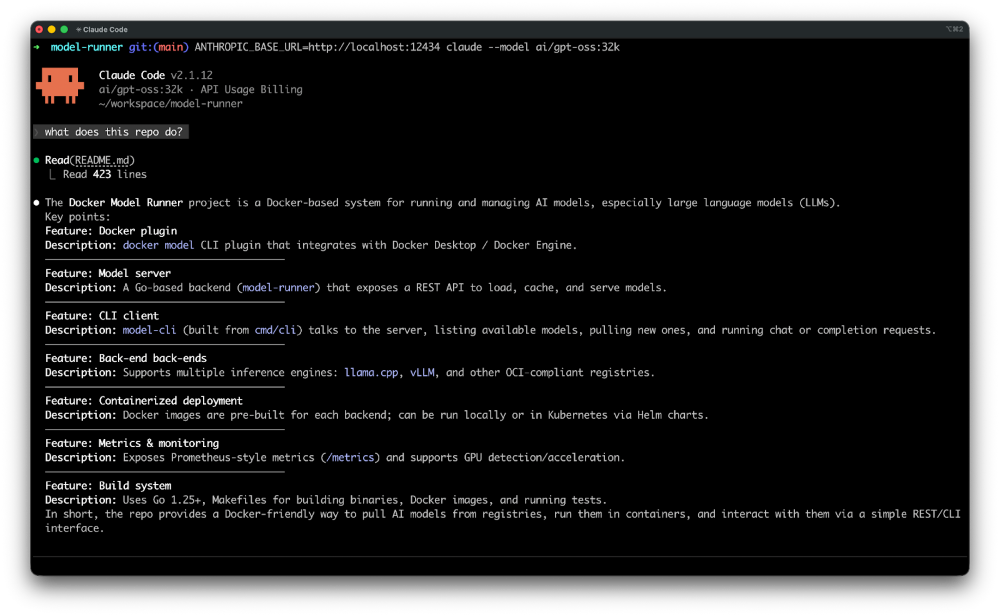
Claude Code is quickly becoming a go-to AI coding assistant for developers and increasingly for non-developers who want to build with code. But to truly unlock its potential, it needs the right local infrastructure, tool access, and security boundaries.
In this blog, we’ll show you how to run Claude Code with Docker to gain full control over your models, securely connect it to real-world tools using MCP servers, and safely give it autonomy inside isolated sandboxes. Read on for practical resources to help you build a secure, private, and cost-efficient AI-powered development workflow.
Run Claude Code Locally with Docker Model Runner
This post walks through how to configure Claude Code to use Docker Model Runner, giving you full control over your data, infrastructure, and spend. Claude Code supports custom API endpoints through the ANTHROPIC_BASE_URL environment variable. Since Docker Model Runner exposes an Anthropic-compatible API, integrating the two is simple. This allows you to run models locally while maintaining the Claude Code experience.
With your model running under your control, it’s time to connect Claude Code to tools to expand its capabilities.
How to Add MCP Servers to Claude Code with Docker MCP Toolkit
MCP is becoming the de facto standard to connect coding agents like Claude Code to your real tools, databases, repositories, browsers, and APIs. With more than 300 pre-built,containerized MCP servers, one-click deployment in Docker Desktop, and automatic credential handling, developers can connect Claude Code to trusted environments in minutes — not hours. No dependency issues, no manual configuration, just a consistent, secure workflow across Mac, Windows, and Linux.
In this guide, you’ll learn how to:
Set up Claude Code and connect it to Docker MCP Toolkit.
Configure the Atlassian MCP server for Jira integration.
Configure the GitHub MCP server to access repository history and run git commands.
Configure the Filesystem MCP server to scan and read your local codebase.
Automate tech debt tracking by converting 15 TODO comments into tracked Jira tickets.
See how Claude Code can query git history, categorize issues, and create tickets — all without leaving your development environment.
Prefer a video walkthrough? Check out our tutorial on how to add MCP servers to Claude Code with Docker MCP Toolkit.
Connecting tools unlocks powerful automation but with greater capability comes greater responsibility. If you’re going to let agents take action, you need to run them safely.
Docker Sandboxes: Run Claude Code and Other Coding Agents Unsupervised (but Safely)
As Claude Code moves from suggestions to real-world actions like installing packages and modifying files, isolation becomes critical.
Sandboxes provide disposable, isolated environments purpose-built for coding agents. Each agent runs in an isolated version of your development environment, so when it installs packages, modifies configurations, deletes files, or runs Docker containers, your host machine remains untouched.
This isolation lets you run agents like Claude Code with autonomy. Since they can’t harm your computer, let them run free. Check out our announcement on more secure, easier to use, and more powerful Docker Sandboxes.
Summary
Claude Code is powerful on its own but when used with Docker, it becomes a secure, extensible, and fully controlled AI development environment.
In this post, you learned how to:
Run Claude Code locally using Docker Model Runner with an Anthropic-compatible API endpoint, giving you full control over your data, infrastructure, and cost.
Connect Claude Code to tools using the Docker MCP Toolkit, with 300+ containerized MCP servers for services like Jira, GitHub, and local filesystems — all deployable in one click.
Run Claude Code safely in Docker Sandboxes, isolated environments that allow coding agents to operate autonomously without risking your host machine.
By combining local model execution, secure tool connectivity, and isolated runtime environments, Docker enables you to run AI coding agents like Claude Code with both autonomy and control, making them practical for real-world development workflows.
Quelle: https://blog.docker.com/feed/






