Amazon EBS now supports Volume Clones for instant volume copies

Today, Amazon Web Services (AWS) announces the general availability of Volume Clones for Amazon Elastic Block Store (Amazon EBS), our high-performance block storage service. This new capability allows you to instantly create and access point-in-time copies of EBS volumes within the same Availability Zone (AZ), accelerating software development workflows and enhancing operational agility. Customers use Amazon EBS volumes as durable block storage attached to Amazon EC2 instances. With Amazon EBS Volume Clones, you can instantly create copies of volumes and access the copied volumes with single-digit millisecond latency. Amazon EBS Volume Clones enables rapid creation of test and development environments from production volumes, eliminating manual copy workflows. Additionally, Volume Clones integrates with the Amazon EBS Container Storage Interface (CSI) driver, simplifying storage management for containerized applications. Amazon EBS Volume Clones is available in all AWS Commercial Regions and AWS GovCloud (US) Regions. You can access Volume Clones through the AWS Console, AWS Command Line Interface (CLI), AWS SDKs, and AWS CloudFormation. This capability supports all EBS volume types and works for volume copies within the same account and AZ. For detailed pricing information, please visit the EBS pricing page. To explore how Volume Clones can accelerate your software development processes and improve operational efficiency, visit the AWS documentation.
Quelle: aws.amazon.com

Amazon AppStream 2.0 announces availability of license included Microsoft applications

Amazon AppStream 2.0 now offers Microsoft applications with licenses included, providing customers with the flexibility to run these applications on AppStream 2.0 fleets. As part of this launch, AppStream 2.0 provides Microsoft Office, Visio, and Project 2021/2024 in both Standard and Professional editions. Each is available in both 32-bit and 64-bit versions for On-Demand and Always-On fleets. Administrators can dynamically control applications availability by adding or removing applications from AppStream 2.0 images and fleets. End users benefit from a seamless experience, accessing Microsoft applications that are fully integrated with their business applications within their AppStream 2.0 sessions. This helps in ensuring that users can work efficiently with both Microsoft and business applications in a unified environment, eliminating the need for switching between different platforms or services. To get started, create an AppStream custom image by launching an image builder with a Windows Server operating system image. Select the desired set of applications to be installed. Then connect to the image builder and complete image creation by following the Amazon AppStream 2.0 Administration Guide. You must use an AppStream 2.0 Image Builder that uses an AppStream 2.0 agent released on or after October 2, 2025 Or, your image must use managed AppStream 2.0 image updates released on or after October 3, 2025. This functionality is generally available in all regions where AppStream 2.0 is offered. Customers are billed per hour for the AppStream streaming resources, and per-user per-month (non-prorated) for Microsoft applications. Please see Amazon AppStream 2.0 Pricing for more information.
Quelle: aws.amazon.com

Join Us in Rebooting the Docker Model Runner Community!

We’re thrilled to announce that we’re breathing new life into the Docker Model Runner community, and we want you to be a part of it! Our goal is to make it easier than ever for you to contribute, collaborate, and help shape the future of running AI models with Docker.

From a Limited Beta to a Universe of Possibilities

When we first announced Docker Model Runner, it was in its beta phase, exclusively available on Docker Desktop and limited to Apple and Nvidia hardware. We received a ton of valuable feedback, and we’ve been hard at work making it more accessible and powerful.

Today, we’re proud to say that Docker Model Runner is now Generally Available (GA) and can be used in all versions of Docker! But that’s not all. We’ve added Vulkan support, which means you can now run your models on virtually any GPU. This is a huge leap forward, and it’s all thanks to the incredible potential we see in this project and the community that surrounds it.

Making Contributions a Breeze

We’ve listened to your feedback about the contribution process, and we’ve made some significant changes to make it as smooth as possible.

To start, we’ve consolidated all the repositories into a single, unified home. This makes it much easier to find everything you need in one place.

We have also invested a lot of effort in updating our documentation for contributors. Whether you’re a seasoned open-source veteran or a first-time contributor, you’ll find the information you need to get started.

Your Mission, Should You Choose to Accept It

The success of Docker Model Runner depends on you, our amazing community. We’re calling on you to help us make this project the best it can be. Here’s how you can get involved:

Star our repository: Show your support and help us gain visibility by starring the Docker Model Runner repo.

Fork and Contribute: Have an idea for a new feature or a bug fix? Fork the repository, make your changes, and submit a pull request. We’re excited to see what you come up with!

Spread the word: Tell your friends, colleagues, and anyone else who might be interested in running AI models with Docker.

We’re incredibly excited about this new chapter for Docker Model Runner, and we can’t wait to see what we can build together. Let’s get to work!

Learn more

Check out the Docker Model Runner General Availability announcement

Visit our Model Runner GitHub repo! Docker Model Runner is open-source, and we welcome collaboration and contributions from the community!

Get started with Docker Model Runner with a simple hello GenAI application

Quelle: https://blog.docker.com/feed/

Build a Multi-Agent System in 5 Minutes with cagent

Models are advancing quickly. GPT-5, Claude Sonnet, Gemini. Each release gives us more capabilities. But most real work isn’t solved by a single model.

Developers are realizing they need a system of agents: different types of agents working together to accomplish more complex tasks. For example, a researcher to find information, a writer to summarize, a planner to coordinate, and a reviewer to check accuracy.

The challenge is that today, building a multi-agent system is harder than it should be. Context doesn’t flow cleanly between agents. Tools require custom integration. Sharing with a teammate means sending instructions and hoping they can re-create your setup.

That’s the problem cagent solves.

In this blog, we’ll walk you through the basics, how to create a multi-agent AI system in minutes, and how cagent makes this possible. 

What’s a multi-agent system?

A multi-agent system is a coordinated group of AI agents that collaborate to complete complex tasks. Using cagent, you can build and run these systems declaratively, no complex wiring or reconfiguration needed.

Meet cagent: The best (and open source) way to build multi-agent systems

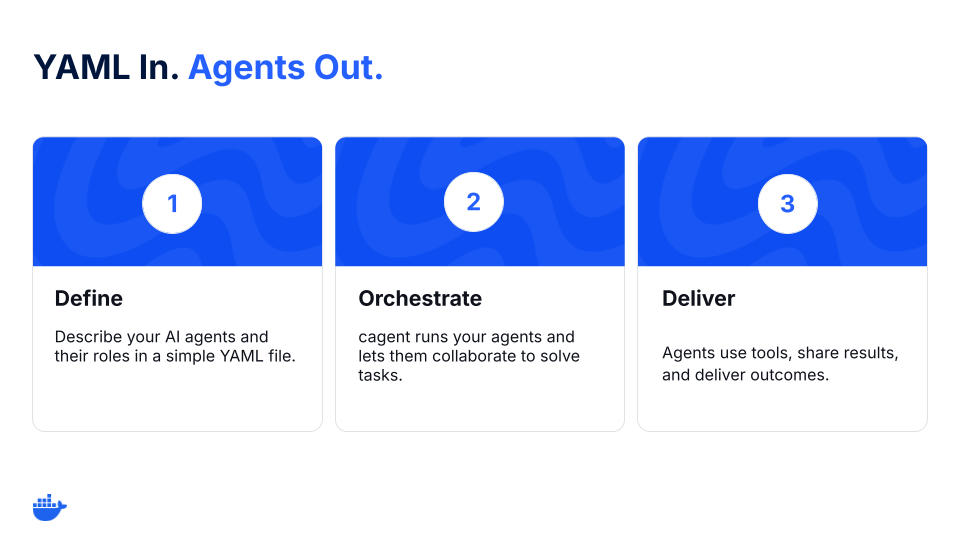
Figure 1: cagent workflow for multi-agent orchestration. 

cagent is an open-source tool for building agents and a part of Docker’s growing ecosystem of AI tools. 

Instead of writing glue code to wire up models, tools, and workflows, describe an agent (or a team of agents) in a single YAML file:

Which model the agent uses (OpenAI, Anthropic, Gemini, or a local one)

What its role or instructions are

Which tools it can use (like GitHub, search, or the filesystem)

And, if needed, which sub-agents it delegates to

This turns agents into portable, reproducible artifacts you can run anywhere and share with anyone. 

Multi-agent challenges that cagent is solving

Create, run, and share multi-agent AI systems more easily with cagent.

Orchestrate agents (and sub-agents) more easily – Define roles and delegation (sub-agents). cagent manages calls and context.

Let agents use tools with guardrails – Grant capabilities with MCP: search, GitHub, files, databases. Each agent gets only the tools you list and is auditable.

Use (and swap) models – OpenAI, Anthropic, Gemini, or local models through Docker Model Runner. Swap providers without rewriting your system.

Treat agents like artifacts – Package, version, and share agents like containers.

How to build a multi-agent system with Docker cagent

Here’s what that looks like in practice.

Step 1: Define your multi-agent system

version: "2"

agents:
root:
model: anthropic/claude-sonnet-4-0
instruction: |
Break down a user request.
Ask the researcher to gather facts, then pass them to the writer.
sub_agents: ["researcher", "writer"]

researcher:
model: openai/gpt-5-mini
description: Agent to research and gather information.
instruction: Collect sources and return bullet points with links.
toolsets:
– type: mcp
ref: docker:duckduckgo

writer:
model: dmr/ai/qwen3
description: Agent to summarize notes.

instruction: Write a concise, clear summary from the researcher’s notes.

Step 2: Run the YAML file

cagent run team.yaml

The coordinator delegates, the researcher gathers, and the writer drafts. You now have a functioning team of agents.

Step 3: Share it on Docker Hub

cagent push ./team.yaml org/research-writer

Now, anyone on your team can run the exact same setup with:

cagent run docker.io/org/research-writer

That’s a full multi-agent workflow, built and shared in under 5 minutes.

First principles: Why cagent works

These principles keep cagent an easy-to-use and customizable multi-agent runtime to orchestrate AI agents.

Declarative > imperative. Multi-agent systems are mostly wiring: roles, tools, and topology. YAML keeps that wiring declarative, making it easy to define, read, and review.

Agents as artifacts. Agents become portable artifacts you can pull, pin, and trust.

Small surface area. A thin runtime that does one job well: coordinate agents.

What developers are building with cagent

Developers are already exploring different multi-agent use cases with cagent. Here are some examples:

1. PR and issue triaging

Collector reads PRs/issues, labels, failing checks

Writer drafts comments or changelogs

Coordinator enforces rules, routes edge cases

2. Research summarizing

Researcher finds and cites sources

Writer produces a clean summary

Reviewer checks for hallucinations and tone

3. Knowledge routing

Router classifies requests

KB agent queries internal docs

Redactor strips PII before escalation

Each one starts the same way: a YAML file and an idea. And they can be pushed to a registry and run by anyone.

Get started

cagent gives you the fastest path forward to build multi-agent systems. It’s open-source, easy to use, and built for the way developers already work. Define your agents, run them locally, and share them, all in a few lines of YAML.

YAML in, agents out.

Run the following to get started:

brew install cagent
cagent new
cagent run agent.yaml

Learn more

Get the technical details from our cagent documentation. 

We’d love to hear what you think. Join us in the Docker Community Slack. 

Dive into more topics about AI and Docker. 

Subscribe to the Docker Navigator Newsletter.

Quelle: https://blog.docker.com/feed/

Amazon EC2 M8g instances now available in additional regions

Starting today, Amazon Elastic Compute Cloud (Amazon EC2) M8g instances are available in AWS Europe (Paris), Asia Pacific (Osaka), AWS Canada (Central), and AWS Middle East (Bahrain) regions. These instances are powered by AWS Graviton4 processors and deliver up to 30% better performance compared to AWS Graviton3-based instances. Amazon EC2 M8g instances are built for general-purpose workloads, such as application servers, microservices, gaming servers, midsize data stores, and caching fleets. These instances are built on the AWS Nitro System, which offloads CPU virtualization, storage, and networking functions to dedicated hardware and software to enhance the performance and security of your workloads. AWS Graviton4-based Amazon EC2 instances deliver the best performance and energy efficiency for a broad range of workloads running on Amazon EC2. These instances offer larger instance sizes with up to 3x more vCPUs and memory compared to Graviton3-based Amazon M7g instances. AWS Graviton4 processors are up to 40% faster for databases, 30% faster for web applications, and 45% faster for large Java applications than AWS Graviton3 processors. M8g instances are available in 12 different instance sizes, including two bare metal sizes. They offer up to 50 Gbps enhanced networking bandwidth and up to 40 Gbps of bandwidth to the Amazon Elastic Block Store (Amazon EBS). To learn more, see Amazon EC2 M8g Instances. To explore how to migrate your workloads to Graviton-based instances, see AWS Graviton Fast Start program and Porting Advisor for Graviton. To get started, see the AWS Management Console. 
Quelle: aws.amazon.com