GitOps — Evolution of DevOps

medium.com – In easy words, GitOps is a smart and intelligent way for Continuous Deployment of Cloudnative application. As it continuously monitor and matches the production environment with the development code …
Quelle: news.kubernauts.io

Hosting Live (Virtual!) Events: Lessons from Planning the WordPress.com Growth Summit

Back in January, my team at WordPress.com was busy planning another year of exciting in-person events — community meetups, conference keynotes, booths, and in-person demos — at large exhibit halls and hotels around the world.

Then the world changed overnight, and because of a global pandemic, our Events team — just like many of you running your own businesses — had to rethink everything about how we connect with people. 

So we went back to work. We’ve learned so much in just five months, and it culminates in the upcoming WordPress.com Growth Summit — our first-ever multi-day virtual conference. It’s going to be a jam-packed program full of expert advice from business leaders and entrepreneurs. We’ll also have breakout sessions with our own WordPress experts, the Automattic Happiness Engineers, taking you through everything you need to know about building a powerful, fast website that works great for SEO, eCommerce, and growing your business. 

In the lead-up to the Summit, we wanted to share everything we’ve learned so far about running virtual events, from YouTube to webinars to Facebook Live and ticket sales. There are dozens of great solutions for staying connected to and supporting your audience — here’s what’s been working for us: 

Live webinars 

In April, we launched a series of daily webinars, 30-minute live demos and Q&As direct from our Happiness Engineers, five days a week. These webinars walk people through the basics of getting started with WordPress.com. We also launched a few topical webinars — deeper dives into specific topics: eCommerce 101, growing an audience, using the WordPress app, and podcasting, to name a few.

We chose Zoom to host these because it’s a popular platform that allows for key webinar elements like pre-registration/signups, screen sharing, and Q&A. We pulled these together quickly, so going with a familiar solution was key for us and our audience. 

To expand our reach, we also streamed to our Facebook, Instagram, and YouTube channels. This was a simple integration that Zoom offers already, and we saw our viewership grow exponentially. 

Pre-recorded vs. live instruction 

At virtual events, one question always comes up: pre-recorded or live? We prefer a combination! Live is great when possible; it gives attendees an opportunity to interact with speakers, speakers can personalize the content based on questions being asked, and attendees can interact with one another, forming connections with like-minded content creators and entrepreneurs. 

Live content also has challenges: internet connections can cut out, computers can shut down unexpectedly, and there are more opportunities for interruption (does anyone else’s dog bark the minute you get on a live video?). It also requires all participants to be online at the same time, which can be logistically challenging.

Our advice: Test, test, test! If a speaker isn’t comfortable presenting live, there is the option to do a combination — a pre-recorded session with a live Q&A in the chat. We’ve found it to work really well, and it gives attendees the same access to the presenter.

The Growth Summit 

We helped folks to get online quickly with our daily webinars and dove into deeper topics each month, and now we want to help you grow your site. Enter The Official WordPress.com Growth Summit, happening next week, August 11-13.

We gathered frequently asked questions over the past few months, listened to your requests for live sessions across more time zones, and found inspiration from users that we felt needed to be shared widely.  

The Growth Summit takes a deeper dive into topics and offers hands-on WordPress training for anyone looking to get online. You’ll have the opportunity to ask questions live, connect with speakers, visit our virtual Happiness Bar for 1:1 support, and connect with other attendees during the networking breaks. 

Some key highlights from the agenda: 

Using the block editorCustomizing your siteGrowing your audienceImproving your content ranking (SEO)Creating a marketing plan Expanding from blogging to podcasting Making money with your siteAnd so much more… 

We wanted a platform for this event that would act as an immersive event experience. There are many great platforms for this, including Accelevents and Hopin. We’ll be experimenting with many of them in the coming months (Remember: test!). A few key features we looked for: 

Ease of self-productionAbility for simultaneous sessionsOverall user experienceFlow of the event — central location for agenda, speaker bios, networking, and moreNetworking featuresAudience engagement — polling, live chat, and moreAnalyticsRegistration within the platformAccessibilityCustomizationSpeaker (virtual) green rooms

The best part? This event is being offered twice a day so that we cover all time zones. And if you can’t join us live, attendees will have access to all content from all time zones, after the event.

Register for the WordPress.com Growth Summit Today!

Quelle: RedHat Stack
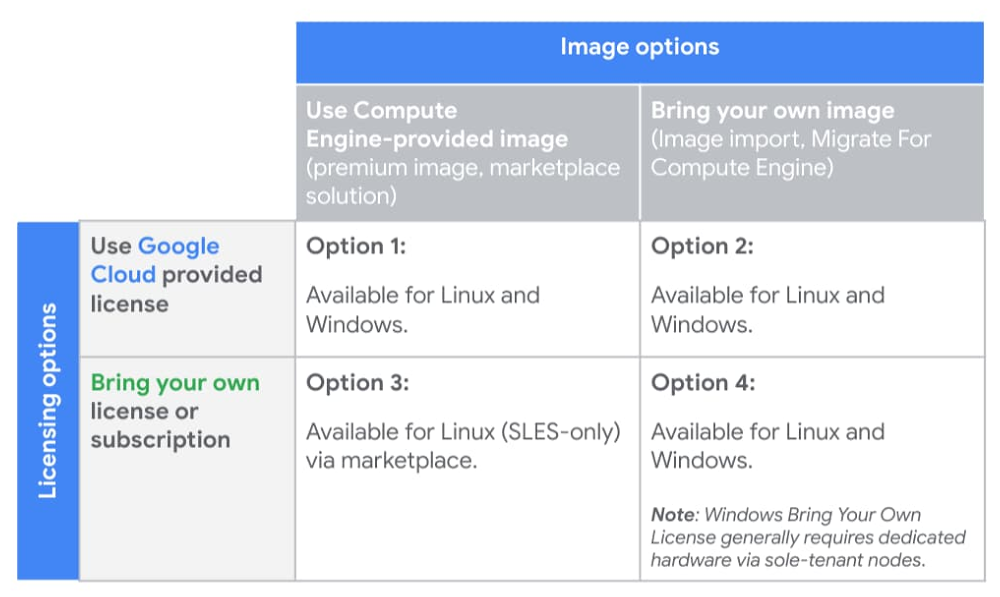
Compute Engine explained: Picking the right licensing model for your VMs

We recently posted a guide to choosing the right Compute Engine machine family and type for your workloads. Once you’ve decided on the right technical specs, you need to decide how to license it appropriately, what kind of image to use—and evaluate tradeoffs between your options. This is an important process as licensing decisions can add a layer of complexity to future operational or architectural decisions. To support your cloud journey, Compute Engine provides licensing flexibility and compliance support through various licensing options, as illustrated in the table below:Let’s take a closer look at the four available licensing options, and their respective benefits and considerations. For specific questions around your licenses or software rights, please work with your legal team, license reseller, or license provider.Option 1: Google Cloud-provided image and licenseArguably, the most straightforward option is to purchase new licenses from Google Cloud. For your convenience, Compute Engine provides prebuilt images that have pay-as-you-go licenses attached. This approach can help minimize licensing agreements and obligations, and enable you to take advantage of pay-as-you-go billing for elastic workloads. In addition, using Google Cloud’s premium Compute Engine images and licensing relieves you of a lot of operational burden, as Google Cloud:Provides ongoing updates and patches to base imagesManages license reporting and complianceSimplifies your support model by leveraging Google for your software support needsPremium images and licenses for Compute Engine are available for both Linux and Windows workloads. To ensure proper license reporting and compliance, you are automatically billed based on usage for all VMs created with these images.For customers that don’t already have a Microsoft Enterprise Agreement or Red Hat Cloud Access licenses, this model allows you to take advantage of Google Cloud’s relationships with third-party software vendors for pay-as-you-go licenses that scale with your workload, and offer premium support. This allows you to pay for exactly what you need when your workloads spike, rather than paying a predetermined amount through fixed third-party contracts.For pay-as-you-go licenses, Compute Engine offers the following premium images with built-in licensing:Red Hat Enterprise Linux (RHEL and RHEL for SAP)SUSE Linux Enterprise Server (SLES and SLES for SAP)Microsoft Windows ServerMicrosoft SQL ServerWith the exception of Microsoft SQL Server, all licenses associated with these images are charged in one-second increments, with a one-minute minimum. SQL Server images are also charged in one-second increments, but have a 10-minute minimum. To see additional pricing details, visit the premium images pricing documentation.Option 2: Bring your own image with Google Cloud-provided licensesIf you want to import your own images, but still wish to use pay-as-you-go licenses provided by Google Cloud, Compute Engine lets you import your virtual disks or import your virtual appliances and specify a license provided by Compute Engine to attach to the image. This model lets you bring a custom image to Compute Engine, ensure the proper Compute Engine drivers are installed, and use a Compute Engine pay-as-you-go license. Similar to Compute Engine premium images, all images created through this import process will have the appropriate license(s) attached. VMs created using these images are billed automatically to help ensure correct license reporting and compliance.Some of the benefits of using your own image with Google Cloud licensing include:You can use your own custom imageGoogle Cloud manages license reporting and complianceSimplified support by leveraging Google for your vendor software support needsThis option, available for both Linux (RHEL) and Windows workloads, helps reduce licensing agreements and complexity, and lets you take advantage of pay-as-you-go billing for elastic workloads.Option 3: Google Cloud-provided image with bring your own license or subscriptionIf you want to use an image from Google Cloud but want to bring your own licenses or subscriptions, that’s an option too. You can choose SUSE Linux Enterprise Server with your own subscription (BYOS) support from the Google Cloud Marketplace, allowing you to spin up your own images while taking advantage of any licensing agreements or subscriptions you may have with your Linux operating system vendor. To use BYOS, sign up for a license on the vendor’s website when you deploy the solution. Under this model, the vendor bills you directly for licensing, and Google Cloud bills you separately for infrastructure costs.This option is not available for Windows Server or SQL Server, as both require you to bring your own image when you bring your own licenses. Additional details on bringing your own Windows licenses is covered below.In short, with a Google Cloud-provided image plus your own license or subscription, you can:Use a Google Cloud Marketplace solution with pre-installed software packagesReuse existing licensing agreementsPay Google Cloud only for infrastructure costsOption 4: Bring your own image and your own licenseLastly, you can bring eligible licenses to Google Cloud to use with your own imported images. With this option, you can import your virtual disks or virtual appliances, specifying a ‘Bring Your Own License’ (BYOL) option. Like other BYOL or BYOS options, images created using this option are only billed for infrastructure. This option supports customers with eligible Red Hat Enterprise Linux or Windows Server and other Microsoft application (e.g., SQL Server) licenses. For Red Hat Enterprise Linux, you can import your RHEL images using the image import tool and specify your own licenses. You can run these workloads on either multi-tenant VMs or single-tenant VMs on Compute Engine sole-tenant nodes.For Windows licenses, you can import your own image using the same image import tooling. For customers running Microsoft application servers with Software Assurance (which includes SQL Server, but not the underlying OS), you can bring your licenses using License Mobility. However, for Windows OS licenses, regardless of whether or not you have Software Assurance, you are restricted to running your BYOL Windows Server or BYOL Desktop OS on dedicated hardware, available on Compute Engine sole-tenant nodes or Google Cloud VMware Engine.Sole-tenant nodes allow you to launch your instances onto physical Compute Engine servers that are dedicated exclusively to your workloads while providing visibility into the underlying hardware to support your license usage and reporting needs. When running on sole-tenant nodes, there are different host maintenance configurations to help support your physical server affinity licensing restrictions, while still ensuring you receive the latest host updates. Additional details on these options can be found in the sole-tenant node documentation.There are several benefits to using your own image with your own license or subscription:Save on licensing costs by reusing existing investments in licensesTake advantage of unlimited virtualization rights for your per-physical-core licenses by using CPU overcommit on sole-tenant nodesLeverage Compute Engine tooling for licensing reporting and complianceHowever, before going down this path, consider the following:Although Compute Engine provides support and tooling on sole-tenant infrastructures, you’re responsible for license activation, reporting and compliance.Windows Server BYOL requires the use of dedicated hardware, in the form of Compute Engine sole-tenant nodes.Sole-tenant nodes provide maintenance policy configurations for you to adjust the maintenance behavior to best comply with your licensing requirements.The licensing low-downChoosing the right image and licensing options for a given workload depends on a variety of factors, including the operating system or application that you’re running, and whether or not you have existing licenses, images or vendor relationships that you want to take advantage of. We hope this blog post helps you make sense of all your options. For more on licensing pricing, check out these resources:See the estimated costs of your instances and Compute Engine resources when you create them in the Google Cloud Console.Estimate your total project costs with the Google Cloud Pricing Calculator.View and download prices from the Pricing Table in the Cloud Console.Use the Cloud Billing Catalog API for programmatic access to SKU information.Gauge your costs with Premium Image PricingFor detailed information on licensing Microsoft workloads on Google Cloud, please reference this guide authored by SoftwareOne.
Quelle: Google Cloud Platform

The best of Google Cloud Next ’20: OnAir's Security Week for technical practitioners

Hello security aficionados! This is your week for Google Cloud Next ’20: OnAir. There is a ton of content related to security coming out this week across a wide range of topics and audiences. With that in mind, here are some sessions that I think are particularly useful for security professionals and technical practitioners:Take Control of Security with Cloud Security Command Center: Guillaume Blaquiere from Veolia, along with Kyle Olive and Andy Chang from Google Cloud demonstrate how to prevent, detect, and respond to threats in virtual machines, containers, and more using Cloud Security Command Center.Authentication for Anthos Clusters: Google’s Richard Liu and Pradeep Sawlani show you how to authenticate to Anthos clusters, including how to integrate with your identity providers using protocols such as OIDC and LDAP.Minimizing Permissions Using IAM Recommender: Find out how Uber developed automation to minimize permissions org-wide from Uber’s Senior Cloud Security Engineer Sonal Desai, along with Cloud IAM Product Manager Abhi Yadav.Check out our full Security Session Guide for a look at everything going on this week. In addition to sessions, our weekly Talks by DevRel series is a great companion to the conference. Join our host Kaslin Fields for our security technical practitioner-focused recap, Q&A, and deep dive sessions by Sandro Badame and Stephanie Wong on Friday August 7th at 9 AM PST. For folks in Asia-Pacific, I will be hosting the APAC edition with our APAC team on Friday at 11 AM SGT.If you want hands-on technical experience, we also have security-focused Study Jams available this week:HTTP Load Balancer with Cloud ArmorHands-on Lab: User Authentication: Identity-Aware ProxySecurity Week has something for everyone, so be sure to take a look at the full security session catalog for sessions that cover more, including security, compliance, and handling sensitive data.Beyond this week, we also have a lot of exciting security learning opportunities coming over the rest of the summer. Application Modernization Week (starting on August 24th), in particular, has some interesting security-related sessions:Secrets in Serverless – 2.0: Discover all the secrets about how to store secrets for Serverless workloads from my DevRel colleague and Cloud Secrets Product Manager Seth Vargo.Evolve to Zero Trust Security Model‎ with Anthos Security: Find out how you can protect your software supply chain with Binary Authorization and Anthos.Anthos Security: Modernize Your Security Posture for Cloud-Native Applications: Learn all the Cloud Native security tools that GKE and Anthos make available from GKE Security Engineer Greg Castle and Senior Product Manager Samrat Ray.Security touches many different areas and practitioners need to be constantly learning, so check back on the blog every Monday from now until the first week of September for session guides, and be on the lookout for sessions, demos, and Study Jams in other weeks as well!
Quelle: Google Cloud Platform

Google Cloud named a Leader in the 2020 Forrester Wave for API Management Solutions

APIs are a critical component of any enterprise’s digital transformation strategy. They can drive customer engagement, accelerate time to market of new services, power innovation and unlock new business opportunities. Therefore, choosing the right API management platform is critical to running a successful API program, and research from industry analyst firms like Forrester Research can help enterprises evaluate and choose the right solution.Today, we’re proud to share that Google Cloud has been recognized by Forrester as a leader in The Forrester Wave™: API Management Solutions, Q3 2020. We believe this recognition is a testament to our continued strategic investments in product innovation and laser-sharp focus on the success of our customers. Today, six of the top 10 healthcare companies, seven of the top 10 retailers, five of the top 10 financial services companies and six of the top 10 telecom providers trust Apigee to drive their digital transformation efforts. Moreover, many global organizations that were impacted by the COVID-19 pandemic continued to invest in Apigee as they doubled-down on their digital strategy. In this report, Forrester assessed 15 API management solutions against a set of pre-defined criteria. In addition to being named a leader, Google Cloud received the highest possible score in the market presence category, and the strategy category criteria of product vision, and planned enhancements, and current offering criteria such as API user engagement, REST API documentation, formal lifecycle management, data validation and attack protection, API product management, and analytics and reporting.“As a long-standing player in the market, Google Cloud has rich resources for educating customers and prospects on API business potential, including using them to create new ecosystem models. This shows in the product’s rich set of API product and pricing definition features,” according to the Forrester report. Forrester also noted that Google Cloud has deepened its integration of Apigee with other Google Cloud capabilities such as reCAPTCHA, machine learning and Istio-based service mesh. Forrester also noted that Google Cloud’s reference customers expressed high satisfaction with Apigee API management. We believe this reflects why large global brands like Nationwide Insurance, Philips, Pizza Hut, ABN Amro, Ticketmaster and Change Healthcare etc. partner with Google Cloud to drive their digital transformation programs. “What I’ve really appreciated about Apigee isn’t just the functionality in the developer portal, but the guidance they provided on how we should roll out our API strategy and how we can think strategically about digital transformation using APIs,” said Rick Schnierer, AVP, One IT Applications Business Solutions, Nationwide Insurance.You can download the full The Forrester Wave™: API Management Solutions, Q3 2020 report here (requires an email address).To learn more about Apigee, visit the website here.
Quelle: Google Cloud Platform

New Azure SQL Learning Tools help reduce the global technology skills gap

Microsoft’s learning solutions pave the way toward data-centric jobs of the future

"It’s been forecasted 800 million people need to learn new skills for their jobs by 2030. In this time of change, people are hungry to learn, gain new skills, and grow their economic opportunity.”—Satya Nadella, CEO, Microsoft

Across Microsoft, we are helping a new generation of technology workers develop the right level of skills. Recently, Microsoft announced the availability of new virtual learning programs. These programs, focused on technical topics, are already helping people enhance their digital expertise and, for some, are providing a foundation for success in a new career path.

Building upon this goal, we're excited to announce the Azure Data team’s latest additions to these educational programs.

Our all-new content will help beginners being introduced to Azure as well as SQL experts learn how to understand the benefits of Azure SQL. Since SQL Server and Azure SQL share the same engine, these new set of tools builds upon familiar content. This means SQL Server professionals can become Azure SQL professionals with just a little bit of help, such as:

Microsoft Learn learning path: This six-course Azure SQL fundamentals learning path provides a built-in lab environment for you to learn at your own pace without a subscription.

YouTube/Channel9 series: We offer more than 60 videos to help beginners learn more about Azure SQL. Viewers can experience on-demand training through Microsoft Developer and Azure SQL playlists on YouTube and Channel9.

GitHub content: Learners and educators can dig into open-source code in a scenario-driven GitHub workshop, where forking and redelivering is encouraged. You can access this content by visiting the SQL Server workshops page and selecting “Workshop: Azure SQL”.

Learn Live in the Azure SQL Bootcamp: In this four-day series of live sessions, Microsoft SQL experts Anna Hoffman and Bob Ward will help you get ramped up and support you as you learn. You can sign up for Azure SQL Bootcamp here to join us.

Azure SQL’s rapid adoption creates new opportunities

Azure SQL adoption is accelerating at a dramatic growth rate and will continue on this trajectory for the foreseeable future. Azure SQL unlocks new opportunities for our customers to optimize costs, build resiliency, and promote agility with AI-based features, rapid scaling capability, and much more.

A few weeks ago, a Morgan Stanley report noted, “The key insight of [the] 2nd edition of our New Stack monthly is that the relational database, commonly viewed as outdated for the digital era, is not only not dead but is seeing a resurgence reflecting strong growth in cloud. MSFT is a key beneficiary with the top share in cloud and overall".

It’s a terrific time to join the Azure SQL community and fine-tune your technical skills. If you have questions about the benefits, opportunities, or process of making a move from SQL on-premises to SQL in the Cloud, we can lend a hand to guide you. Our new learning materials answer these questions and go into greater technical depth. On Twitter, you can follow us @AzureSQL and get more involved in the community with the #AzureSQL.

Kudos due to our SQL community 

I’d like to take a moment to acknowledge a few members of our team who gathered feedback from customers, took that information to heart and developed our new curriculum. First, a heartfelt thank you to Anna Hoffman, Data Scientist, for your dedicated efforts to providing customers the latest content and for enabling more scalable platforms to deliver it. I’d also like to thank Bob Ward, one of our SQL visionaries, who has invested over 26 years driving SQL development. Last but not least, I’m grateful to Buck Woody, who has written hundreds of articles about databases to help educate future data experts.

Jumpstart your journey

In these uniquely challenging times, it is more important than ever for Microsoft to equip our SQL community with new tools and resources to help you succeed. Whether you are a SQL expert, or someone just starting, I encourage you to visit our latest resources and find out how you can jumpstart your journey to learn about Azure SQL.
Quelle: Azure

Announcing preview of Java Message Service 2.0 over AMQP on Azure Service Bus

Azure Service Bus simplifies enterprise messaging scenarios by leveraging familiar queue and topic subscription semantics over the industry-driven AMQP protocol. It offers customers a fully managed platform as a service (PaaS) offering with deep integrations with Azure services to provide a messaging broker with high throughput, reliable latency while ensuring high availability, secure design, and scalability as a first-class experience. We aim to offer Azure Service Bus for customer workloads on most application stacks and ecosystems.

In keeping with that vision, we’re excited to announce preview support for Java Message Service (JMS) 2.0 over AMQP in Azure Service Bus Premium tier. With this, we empower customers to seamlessly lift and shift their Java and Spring workloads to Azure while also helping them modernize their application stack with best in class enterprise messaging in the cloud.

As enterprise customers look to lift and shift their workloads to Azure, they may take the opportunity to modernize their application stack by leveraging cloud-native Azure offerings. This is more appropriate for components on the data plane, storing or moving data, which benefit from moving away from an infrastructure as a service (IaaS) hosted setup to a more cloud-native PaaS setup.

With databases and data stores, the establishment of standardized APIs and protocols has paved the way for seamless migration, wherein the application is agnostic of the actual provider or implementation of this standardized API and with negligible or configuration only code changes, the applications can move from their current on-premises provider to Azure’s fully managed PaaS offering with expected behavior.

The enterprise messaging ecosystem has been largely fragmented compared to the data ecosystem until the recent AMQP 1.0 protocol standardization in 2011 that drove consistent behavior across all enterprise message brokers guaranteed by the protocol implementation. However, this still did not lead to a standardized API contract, perpetuating the fragmentation in the enterprise messaging space.

The Java Enterprise community (and by extension, Spring) has made some forward strides with the Java Message Service (JMS 1.1 and 2.0) specification to standardize the API utilized by producer and consumer applications when interacting with an enterprise messaging broker. The Apache QPID community furthered this by its implementation of the JMS API specification over AMQP. QPID-JMS, whether standalone or as part of the Spring JMS package, is the de-facto JMS implementation for most enterprise customers working with a variety of message brokers.

Connect existing applications with Azure Service Bus over AMQP

With the feature list supported with this preview (with full parity planned by general availability), Azure Service Bus supports all Java Message Service API contracts, enabling customers to bring their existing applications to Azure without rewriting the application. Here is a list of JMS features that are supported today:

Queues.
Topics.
Temporary queues.
Temporary topics.
Subscriptions.

Shared durable subscriptions.
Shared non-durable subscriptions.
Unshared durable subscriptions.
Unshared non-durable subscriptions.

QueueBrowser.
TopicBrowser.
Auto-creation of all the above entities (if they don’t already exist).
Message selectors.
Sending messages with delivery delay (scheduled messages).

Seamless migration from on-premises or IaaS hosted JMS provider to Azure Service Bus

To connect an existing JMS based application with Azure Service Bus, simply add the Azure Service Bus JMS Maven package or the Azure Service Bus starter for Spring boot to the application’s pom.xml and add the Azure Service Bus connection string to the configuration parameters.

With configuration only code changes, as shown above, customers can keep their business logic agnostic of the message broker and avoid any vendor lock-in.
  

Simple pricing, painless deployments, and scalable resourcing

By leveraging Azure Service Bus JMS support, customers can now avoid the overhead of procuring licenses, managing an enterprise messaging broker on their own IaaS Compute, simplify cost management with a fixed price per messaging unit, and by leveraging automatic scale up and down provisioning to address variability in workloads.

Integrate with other Azure offerings to further modernize your application stack

You can also leverage Azure Service Bus’s integration with other Azure offerings to modernize and simplify the application stack. Here are some ways on how you can do that.

Azure Logic Apps: Utilize Azure Logic Apps connectors for Azure Service Bus to replace various critical business workflows with a simple low-code pay-as-you-go Serverless offering.
Azure Functions: Utilize Azure Functions triggers for Azure Service Bus to replace custom applications with a simple pay-as-you-go serverless PaaS offering.
Azure Monitor and Alerts: Utilize Azure monitor and alerts to keep an eye on the Azure Service Bus Namespace, Queue, Topics, and Subscriptions level metrics.
Azure KeyVault: Utilize integration with Azure KeyVault to encrypt the data on the namespace with a customer-managed key.
Virtual Networks and Private endpoints: Secure access to Azure Service Bus using Virtual network service endpoints. Connect with a cloud-hosted service via an address hosted on your private network using Private endpoints.

Get started today

Get started today by provisioning a Service Bus namespace with JMS features and migrating your existing Java and Spring applications from Active MQ to Service Bus.
Quelle: Azure






