MLB's fan data team hits it out of the park with data warehouse modernization

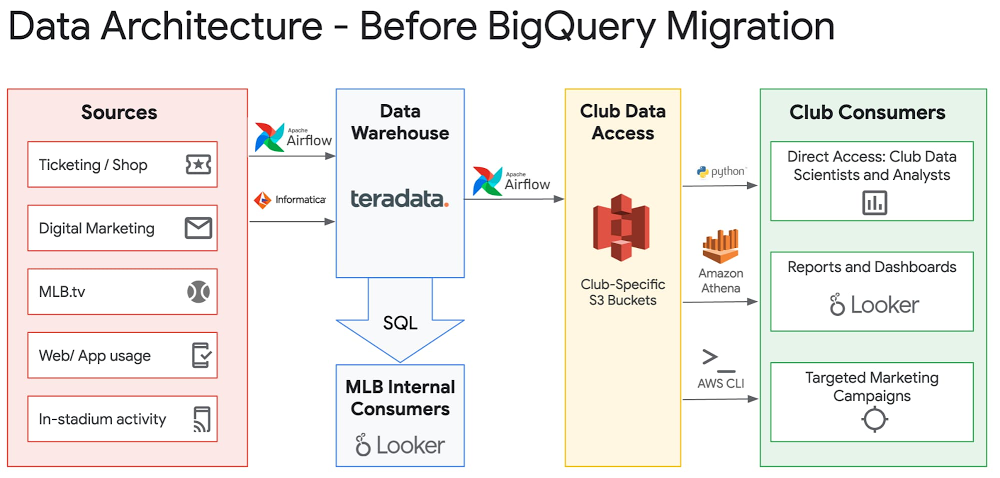
Editor’s note: In this blog post, VP of Data Engineering at MLB Robert Goretsky provides a deeper dive on MLB’s data warehouse modernization journey. Check out the full Next OnAir session: MLB’s Data Warehouse Modernization.At Major League Baseball (MLB), the data generated by our fans’ digital and in-stadium transactions and interactions allows us to quickly iterate on product features, personalize content and offers, and ensure that fans are connected with our sport. The fan data engineering team at MLB is responsible for managing 350+ data pipelines to ingest data from third-party and internal sources and centralize it in an enterprise data warehouse (EDW). Our EDW is central to driving data-related initiatives across the internal product, marketing, finance, ticketing, shop, analytics, and data science departments, and from all 30 MLB Clubs. Examples of these initiatives include:Personalizing the news articles shown to fans on MLB.com based on their favorite teams.Communicating pertinent information to fans prior to games they’ll be attending.  Generating revenue projections and churn rate analyses for our MLB.tv subscribers. Building ML models to predict future fan purchase behavior.Sharing fan transaction and engagement data from central MLB to the 30 MLB Clubs to allow the Clubs to make informed local decisions.  After a technical evaluation in 2018, we decided to migrate our EDW from Teradata to Google Cloud’s BigQuery. We successfully completed a proof of concept in early 2019, and ran a project to fully migrate from Teradata to BigQuery from May 2019 through November 2019. (Yes, we completed the migration in seven months!) With the migration complete, MLB has realized numerous benefits in migrating to a modern, cloud-first data warehouse platform. Here’s how we did it.How MLB migrated to BigQueryWe ran several workstreams in parallel to migrate from Teradata to BigQuery:Replication: For each of the ~1,000 regularly updated tables in Teradata, we deployed a data replication job using Apache Airflow to copy data from Teradata to BigQuery. Each job was configured to trigger replication only after the data was populated from the corresponding upstream source into Teradata. This meant that data was always as fresh in BigQuery as it was in Teradata. Having fresh data in BigQuery allowed all downstream consumers of the data (including members of the business intelligence, analytics, data science, and marketing teams) to start building all new processes/analyses/reports on BigQuery early on in the project, before most ETL conversion was completed. ETL conversion: We had over 350 ETL jobs running in Airflow and Informatica, each populating data to Teradata or extracting data from Teradata, each of which needed to be converted to interact with BigQuery. To determine the order in which to convert and migrate these jobs, we built a dependency map to determine which tables and ETL jobs were upstream and downstream from others. Jobs that were less entangled, with fewer downstream dependencies, could be migrated first. A SQL Transpiler tool from CompilerWorks was helpful, as it dealt with the rote translation of SQL from one dialect to another. Data engineers needed to individually examine output from this tool, validate results, and, if necessary, adjust query logic accordingly. To assist with validation, we built a table comparison tool that ran on BigQuery and compared output data from ETL jobs. Report conversion: We use two tools to produce reporting for end users—Business Objects and Looker. For each of the Business Objects reports and Looker Dashboards, our business intelligence team converted SQL logic and reviewed report output to ensure accuracy. This workstream was able to run independently of the ETL translation workstream, since the BI team could rely on the data replicated directly from Teradata into BigQuery.End-user training: Users within the marketing, data science, and analytics teams were onboarded to BigQuery early in the project, leveraging the data being replicated from Teradata. This allowed ample time for teams to learn BigQuery syntax and connect their tools to BigQuery.  Security configuration: Leveraging MLB’s existing SSO setup via Okta and G Suite, users were provisioned with access to BigQuery using the same credentials they used for access to their desktop/email. There was no need to set up separate sets of credentials, and users who left the organization were immediately disconnected from data access. The benefits that migration brought MLB Pricing: With BigQuery’s on-demand pricing model, we were able to run side-by-side performance tests with minimal cost and no commitment. These tests involved taking copies of some of our largest and most diverse datasets and running real-world SQL queries to compare execution time. As MLB underwent the migration effort, BigQuery cost increased linearly with the number of workloads migrated. By switching from on-demand to flat-rate pricing using BigQuery Reservations, we are able to fix our costs and avoid surprise overages (there’s always that one user who accidentally runs a ‘SELECT * FROM’ the largest table), and share unused capacity with other departments in our organization, including our data science and analytics teams.Data democratization: Providing direct user access to Teradata was often cumbersome, if not impossible, due to network connectivity restrictions and client software setup issues. By contrast, BigQuery made it trivial to securely share datasets with any G Suite user or group with the click of a button. Users can access BigQuery’s web console to immediately review and run SQL queries on data that is shared with them. They can also use Connected Sheets to analyze large data sets with pivot tables in a familiar interface. In addition, they can import data from files and other databases, and join those private datasets with data shared centrally by the data engineering team.MLB’s central office handles the ingestion and processing of data from a variety of data sources and shares club-specific data with each Club in the initiative known internally as “Wheelhouse.” The previous Wheelhouse data-share infrastructure involved daily data dumps from Teradata to S3, one per Club per dataset, which introduced latency and synchronization issues. The new Wheelhouse infrastructure leverages BigQuery’s authorized views to provide Clubs with real-time access to the specific rows of data relevant to them. For example, MLB receives StubHub sales data for all 30 Clubs, and has set up an authorized view per Club so that each Club can view only the sales for their own team. Due to BigQuery’s serverless infrastructure, there is no concern about one user inadvertently affecting performance for all other users. This simplification in architecture can be seen in the diagrams below:Seeing the IT results from migrating to BigQueryImproved performance: Queries generally complete 50% faster on BigQuery compared with Teradata. In many cases, queries that would simply time out or fail on Teradata (and impact the entire system in the process), or that were not feasible to even consider loading into Teradata, run without issue on BigQuery. This was especially true for our largest data set, which is 150TB+ in size per year and consists of hit-level clickstream data from our websites and apps. This data set previously needed to be stored outside our data warehouse and processed with separate tools from the Hadoop ecosystem, which led to friction for analysts who often wanted to join this data with other transactional data sets.Richer insights via integrations: The BigQuery Data Transfer Service makes it easy to set up integrations with several services MLB currently uses, including Google Ads, Google Campaign Manager, and Firebase. Previously, setting up these kinds of integrations involved hand-coded, time-consuming ETL processes. Looker, our BI tool, seamlessly integrates with BigQuery and provides a clean and highly performing interface for business users to access and drill into data. Third-party vendor support for BigQuery is strong as well. As an example, our marketing analytics team is able to use the data ingested from Google Ads to inform advertising spend and placement decisions. Reduced operational overhead: With Teradata, MLB needed a full-time DBA team on staff to handle 24×7 operational support for database issues, including bad queries, backup issues, space allocation, and user permissioning. With BigQuery, MLB has found no need for this role. Google Cloud’s support covers any major service issues, and former administrative tasks such as restoring a table backup can now be done easily by end users, letting our IT teams focus on more strategic work.Increased developer happiness: Our data engineering, data science, and analytics staff were often frustrated by the lack of documentation and subtle gotchas present within Teradata. Given that Teradata was mainly used within larger enterprise deployments, online documentation on sites such as Stack Overflow was limited. In contrast, BigQuery is well-documented, and given the lack of barriers to entry (any Google Cloud user can try it for free), there already seem to be more resources available online to troubleshoot issues, get answers to questions, and learn about product features.Accelerated time to value: No downtime or upgrade planning is needed to immediately take advantage of new useful features that are added on a regular basis by the BigQuery engineering team.Seeing the business impact from BigQueryWith our migration to BigQuery complete, we’re now able to take a more comprehensive and frictionless approach to leveraging our fan data to serve our fans and the league. A few projects that have already been facilitated by our move to BigQuery are:OneView: This is a new initiative launched by our data platform product team to compile over 30 pertinent data sources into a single table, with one row per fan, to facilitate downstream personalization and segmentation initiatives. Previously, we would have spent a long time developing and troubleshooting an incremental load process to populate this table. Instead, with the power of BigQuery, we’re able to run full rebuilds of this table on a regular basis that complete quickly and do not adversely affect performance of other data workloads. We’re also able to leverage BigQuery’s Array and Struct data types to nest repeated data elements within single columns in this table to allow users to drill into more specific data without needing any lookups or joins. This OneView table is already being used to power news article personalization.Real-time form submission reporting: By using the Google-provided Dataflow template to stream data from Pub/Sub in real time to BigQuery, we are able to create Looker dashboards with real-time reporting on form submissions for initiatives such as our “Opening Day Pick ‘Em” contest. This allows our editorial team to create up-to-the-minute analyses of results.With our modern data warehouse up and running, we’re able to serve data stakeholders better than ever before. We’re excited about the data-driven capabilities we’ve unlocked to continue creating a better online and in-person experience for our fans.
Quelle: Google Cloud Platform

From recovery to reinvention: A Q&A with Equifax CTO Bryson Koehler

With hundreds of millions of people and organizations relying on financial services organizations each day to keep their information safe and secure, trust is at the heart of everything these organizations do.Consumer credit reporting agency Equifax knows this all too well. In 2017, it experienced a historic data breach. As CTO, Bryson Koehler, recognized that rebuilding trust would mean fundamentally rethinking how Equifax managed technology and data security—and their business—as a whole.  Today, Equifax is in a very different place. The company is transforming the majority of their IT operations on the strong foundation of Google Cloud, and in doing so, transforming many aspects of their entire business. The company recently issued a paper outlining their transformation efforts to leverage the cloud while also building world-class data security measures. We sat down with Bryson to get a deeper understanding of what they learned from their successful three year digital transformation journey.Glen Tillman: Where does Equifax see its mission today?Bryson Koehler: It’s about finding opportunities where we can leverage technology and data to help people make smarter, more informed decisions, and improve the process and experience for them. For example, we have mobile devices in our pockets and on our wrists that help us with health coaching, but do we have financial coaching? We get lots of feedback about how to make good health and entertainment decisions, but many of us don’t get the information to make good financial decisions. And I think Equifax is uniquely positioned to help people live their financial best.Glen: After the security incident in 2017, Equifax went through a level of transformation that is unprecedented, especially in your business. Can you tell us what drove that decision?Bryson: When you have a data breach, that’s a kind of existential crisis moment for any company. You try to understand the impact, how to protect people impacted by it, and how you can make sure it doesn’t happen again. We realized we needed to think radically differently about how we could create a sustainable security posture and who we are from a technological culture perspective.The cloud makes world-class security possible by providing consistency in the way we build and deploy technology. On-premises or private cloud installations often create a mixed-generation infrastructure that breaks automation, requiring manual fixes that lead to human error. By removing opportunities for mistakes, the cloud keeps us focused on good hygiene and discipline. It also offers the flexibility that lets you make changes, building reliability into the infrastructure and code without creating vulnerabilities or reducing productivity.Glen: How did you establish what you needed from the cloud and why did that lead you to Google Cloud?Bryson: When I looked at what we needed at Equifax, I realized that Google’s tighter focus around data, security, AI, and machine learning were a better fit. Security is something that has to be built in and not bolted on, and I think the engineering culture at Google—broadly speaking, not just the cloud—has good reason to take pride in their achievements in this regard. This ends up creating a culture that I feel more comfortable placing a bet for five years in the future than I would with any others.I felt that Google Cloud offers a differentiated approach to data that was completely unique and did not seem to be available at other companies. And Google has really been there for us with a commitment of lining us up with the right people to help us achieve success not just in usage but also the outcome.Glen: Many companies are still cautious about going to the cloud—especially in financial services—so what you did was a huge leap.Bryson: It is a big leap but it’s one that’s worth taking. Our job is about ensuring that our data and systems are secure and protected, not just from hackers, but also from misuse. Making sure that data is being used in the right ways, places, and times with the right use cases and intent is just as important—and in time, more important.Things are going to evolve, and you’re going to need to be able to adapt as those rules change. People stick to what they know because they don’t have a deep enough understanding how this all works. To achieve the change we’ve seen requires a technological shift, but more importantly, it demands a cultural shift that functionally changes who you are as a company because when you get back to business, you can’t go back to business as usual.Glen: One thing that moving to the cloud helps with is removing data silos. Has that had a major impact on the culture?Bryson: That will be the next part of our cultural shift. If you went back years ago, Equifax would have needed to get data from multiple sources within our own company to get a full picture. By bringing these data sources into a cloud based environment, we can organize our data into a single, seamless structure—while still keeping all critical governing and separation measures in place—creating differentiated products to help our customers make smarter decisions and to help consumers live their financial best.  Glen: How do you see the cloud evolving the financial services industry moving forward?Bryson: If you think about this strategically, financial services companies are working hard to make better, more confident decisions and matchmake the right customers to the right products and services. When you think about the fraud intelligence exchange we’re doing at Equifax, for example, we all have that incentive to help reduce fraud, so sharing and partnering in the industry helps all boats rise. Fraud adds costs, slows down processes, and encumbers good customer experiences in many cases, so the more we can do as an industry to realize that this is not a competitive asset and work together to reduce it, the better we all will be. There are great dialogues around that, and many companies are recognizing that the cloud is a great place to do this. From a data and analytics perspective, having the infinite horizontal scalability of cloud infrastructure provides much better capabilities to achieve that without increasing the risk footprint through replication and consistency, increasing security. And because so much of our industry moves so fast that transactions are measured in milliseconds, being able to share data in real time with the cloud improves the ability to help people in the future right when they need it.Learn more about Google Cloud solutions for financial services.
Quelle: Google Cloud Platform

Deploying WordPress to the Cloud

I was curious the other day how hard it would be to actually set up my own blog or rather I was more interested in how easy it is now to do this with containers. There are plenty of platforms that host blogs for you but is it really now as easy to just run one yourself?

In order to get started, you can sign up for a Docker ID, or use your existing Docker ID to download the latest version of Docker Desktop Edge which includes the new Compose on ECS experience. 

Start with the local experience

To start I setup a local WordPress instance on my machine, grabbing a Compose file example from the awesome-compose repo.

Initially I had a go at running this locally on with Docker Compose:

$ docker-compose up -d

Then I can get the list of running containers:

$ docker-compose ps
Name Command State Ports
————————————————————————————–
deploywptocloud_db_1 docker-entrypoint.sh –def … Up 3306/tcp, 33060/tcp
deploywptocloud_wordpress_1 docker-entrypoint.sh apach … Up 0.0.0.0:80->80/tcp

And then lastly I had a look to see that this was running correctly:

Deploy to the Cloud

Great! Now I needed to look at the contents of the Compose file to understand what I would want to change when moving over to the cloud.

I am going to be running this in Elastic Container Service on AWS using the new Docker ECS integration in the Docker CLI. This means I will be using some of the new docker ecs compose commands to run things rather than the traditional docker-compose commands. (In the future we will be moving to just docker compose everywhere!)

version: ‘3.7’
services:
db:
image: mysql:8.0.19
command: ‘–default-authentication-plugin=mysql_native_password’
restart: always
volumes:
– db_data:/var/lib/mysql
environment:
– MYSQL_ROOT_PASSWORD=somewordpress
– MYSQL_DATABASE=wordpress
– MYSQL_USER=wordpress
– MYSQL_PASSWORD=wordpress
wordpress:
image: wordpress:latest
ports:
– 80:80
restart: always
environment:
– WORDPRESS_DB_HOST=db
– WORDPRESS_DB_USER=wordpress
– WORDPRESS_DB_PASSWORD=wordpress
– WORDPRESS_DB_NAME=wordpress
volumes:
db_data:

Normally here I would move my DB passwords into a secret, but secret support is still to come in the ECS integration so for now we will keep our secret in our Compose file.

The next step is to now consider how we are going to run this in AWS, to continue you will need to have an AWS account setup. 

Choosing a Database service

Currently the Compose support for ECS in Docker doesn’t support volumes (please vote on our roadmap here), so we probably want to choose a database service to use instead. In this instance, let’s pick RDS. 

To start let’s open up our AWS console and get our RDS instance provisioned.

Here I have gone into the RDS section and I will choose the MySQL instance type to match what I was using locally and also choose the lowest tier of DB as that is all I think I need. 

I now enter the details of my DB making sure to note the password to include in my Compose file:

Great, now we need to update our Compose file to no longer use our local MYSQL and instead use the RDS instance. For this I am going to make a ‘prod’ Compose file to use, I will also need to grab my DB host name from RDS. 

Adapting our Compose File

I can now update my compose file by removing the DB running in a container and adding my environment information. 

version: ‘3.7’
services:
wordpress:
image: wordpress:latest
ports:
– 80:80
restart: always
environment:
WORDPRESS_DB_HOST: wordpressdbecs.c1unvilqlnyq.eu-west-3.rds.amazonaws.com:3306
WORDPRESS_DB_USER: wordpress
WORDPRESS_DB_PASSWORD: wordpress123
WORDPRESS_DB_NAME: wordpressdbecs

What we can see is that the Compose file is much smaller now as I am taking a dependency on the manually created RDS instance. We only have a single service (“wordpress”) and there is no more “db” service needed. 

Creating an ecs context and Deploying

Now we have all the parts ready to deploy, we will start by setting up our ECS context by following these steps 

Create a new ECS context by running: docker ecs setup

We will be asked to name our context, I am just going to hit enter to name my context ecsWe will then be asked to select an AWS profile, I don’t already have the AWS extension installed so I will select new profile and name it ‘myecsprofile’I will then need to select a region, I am based in Europe so will enter eu-west-3 (make sure you do this in the same region you deployed your DB earlier!)Now either you will need to enter an AWS access key here or if you are already using something like AWS okta or an AWS CLI you will be able to say N here to use your existing credentialsWith all of this done you may still get the error message that you need to ‘migrate to the new ARN format’ (Amazon Resource name). You can read more about this on the Amazon blog post here.To complete the change you will need to go to the console settings for your AWS account and move over your opt in to an ‘enabled’ state then save the setting:Let’s now check that our ECS context has been successfully created by listing the available contexts using docker context lsWith this all in place we can now use our new ECS context to deploy! We will need to set our ECS context as our current focus : docker context use ecs

Then we will be able to have our first go at deploying our Compose Application to ECS using the compose up command : docker ecs compose up 

With this complete we can check the logs to our WordPress to see that everything is working correctly : docker ecs compose logs 

It looks like our WordPress instance cannot access our DB, if we jump back into the Amazon web console and have a look at our DB settings using the ‘modify’ button on the overview page, we can see in our security groups that our WordPress deployment is not included as only the default group is:

You should be able to see your container project name (I have a couple here from prepping this blog post a couple of times!). You will want to add this group in with the same project name and then save you changes to apply immediately. 

Creating an ecs context and deploying

Now I run: docker ecs compose ps

From the command output  I can grab the full URL including my port and navigate to my site newly deployed to the Cloud using my web browser: 

Great! Now we have 2 compose files, one that lets us work on this locally and one that lets us run this in the cloud with our RDS instance. 

Cleaning resources

Remember when you are done if you don’t want to keep your website running (and continuing to pay for it) to use a docker compose down and you may want to remove your RDS instance as well.

Conclusion

There you have it, we have now got a wordpress instance we can deploy either locally with persistent state or in the cloud!

To get started remember you will need the latest Edge version of Docker Desktop, if you want to do this from scratch you can get started with the WordPress Official Image or you could try this with one of the other Official images on Hub. And remember if you want to run anything you have created locally in your ECS instance you will need to have saved it to Docker Hub first.  To start sharing your content on Hub check out our get started guide for Hub.
The post Deploying WordPress to the Cloud appeared first on Docker Blog.
Quelle: https://blog.docker.com/feed/






