Turn any Dataflow pipeline into a reusable template

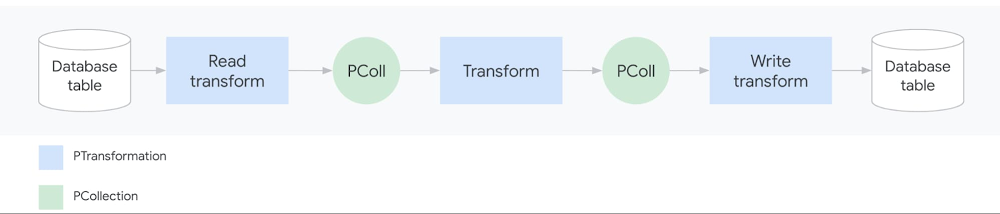
As data analysis grows within an organization, business teams need the ability to run batch and streaming jobs and leverage the code written by engineers. But re-running existing code often requires setting up a development environment and making slight code changes, which is challenging for people without a programming background.With this challenge in mind, we recently introduced Dataflow Flex Templates, which make it even easier to turn any Dataflow pipeline into a reusable template that anyone can run. Existing classic templates let developers share batch and streaming Dataflow pipelines via templates so everyone can run a pipeline without a development environment or writing code. However, classic templates were rigid for a couple of reasons:First, since the Dataflow pipeline execution graph is permanently fixed when the developer converts the pipeline into a shareable template, classic templates could then only be run to accomplish the exact task the developer originally had in mind. For example, choosing a source to read from, such as Cloud Storage or BigQuery, had to be determined at the template creation stage and could not be dynamic based on a user’s choice during template execution. So developers sometimes had to create several templates with minor variations (such as whether the source was Cloud Storage or BigQuery). Second, the developer had to select the pipeline source and sink from a limited list of options because of classic templates’ dependency on the ValueProvider interface. Implementing ValueProvider allows a developer to defer the reading of a variable to whenever the template is actually run. For example, a developer may know that the pipeline will read from Pub/Sub but wants to defer the name of the subscription for the user to pick at runtime. In practice, this means that developers of external storage and messaging connectors needed to implement Apache Beam’s ValueProvider interface to be used with Dataflow’s classic templates.The new architecture of Flex Templates effectively removes both limitations, so we recommend using Flex Templates moving forward.Flex Templates bring more flexibility over classic templates by allowing minor variations of Dataflow jobs to be launched from a single template and allowing the use of any source or sink I/O. Since the execution graph is now built dynamically when the template is executed (instead of during the template creation process), minor variations can be made to accomplish different tasks with the same underlying template, such as changing the source or sink file formats. Flex Templates also remove the ValueProvider dependency, so any input and output source can be used.Next, we’ll offer a developer’s guide to why and how to create custom Flex Templates.Why sharing Dataflow pipelines has been challengingAn Apache Beam pipeline commonly reads input data (from the source), transforms it (using transforms like ParDo) and writes the output (to the sink):A simple Dataflow pipelinePipelines can be significantly more sophisticated, with multiple input sources, series of chained transforms (DAG of steps), and multiple output sinks. Once an Apache Beam pipeline is constructed, it can be deployed and executed in various runners such as Dataflow, Spark, Flink or Direct Runner (for local runs). Templates are a Dataflow-specific feature that makes it easier to re-run pipelines on the Dataflow runner.But what exactly does “running a pipeline” mean? When you run a Dataflow pipeline, the Apache Beam SDK executes the code locally and builds an execution graph converting the sources, sinks and transforms into nodes. The execution graph object is then translated (serialized) into JSON format and submitted to the Dataflow service. Finally, the Dataflow service performs several validations (API, quota and IAM checks), optimizes the graph, and creates a Dataflow job to execute the pipeline.Sharing a Java-based Dataflow pipeline before TemplatesPrior to Dataflow templates, it was challenging for developers to share pipelines with coworkers. In the past, a developer would start by creating a development environment (with the JDK, Apache Beam SDK, and Maven or Gradle typically installed for Java or Python, and pip typically installed for Python), write the code, build a binary artifact (fat JAR with dependencies or Python equivalent) and share the artifact either through an artifactory or Cloud Storage. Users would then set up local runtime environments and fetch the binary into their individual environments for execution. If the pipeline was written in Java, the runtime environment would need Java JRE installed; if the pipeline was Python-based, all Python packages the developer used would need to be installed. Finally, when the user ran the pipeline, an execution graph would get generated and sent to the Dataflow service to run the pipeline on cloud. There were several points where something could break in these steps, and creating a runtime environment was a non-trivial task for users without a technical background. Even scheduling pipelines on a VM (using cron) or third-party schedulers needed a similar runtime environment to exist, complicating the automation process.Sharing Dataflow pipelines with classic templatesSharing a Dataflow pipeline with classic templatesClassic templates significantly improve the user experience for rerunning Dataflow pipelines. When the developer runs the pipeline code in the development environment, the pipeline now gets converted into a Dataflow template stored on Cloud Storage. The staged template consists of the translated JSON execution graph along with dependencies (pipeline artifacts and third-party libraries). The execution graph is permanently fixed and the user cannot change the shape of the DAG. Once the Cloud Storage bucket permissions have been adjusted to share with users, they can invoke the pipeline while passing in any required parameters directly via a gcloud command, a REST API, or the Dataflow UI in Google Cloud Console. Users no longer need to build and configure a runtime environment. Cloud Scheduler can also be used to easily trigger the pipeline to be run on a regular schedule without the need of a runtime environment.Sharing Dataflow pipelines with Flex TemplatesSharing a Dataflow pipeline with Flex TemplatesSimilar to classic templates, with Flex Templates staging and execution are still separate steps. However, the runnable pipeline artifact that gets staged is different; instead of staging a template file in Cloud Storage, developers now stage a Docker image in Google Container Registry.Additionally, a developer does not need to run the pipeline to create a Flex Template. Instead, the developer packages the pipeline code/binaries, including dependencies, into a Docker image and stores it in Container Registry, then creates a template spec file stored in Cloud Storage.Four steps in the developer workflowThe staged image is built using a Google-provided base image and contains the pipeline artifacts with dependencies and environmental variables:Components inside the Flex Template Docker imageThe Docker image does not contain the JSON serialized execution graph. For Java-based pipelines, the image contains the JAR file; for Python pipelines, the image contains the Python code itself. Only when a user actually runs the Flex Template does the graph construction phase start within a new container and the execution graph is constructed based on the parameters the user provides at runtime. This allows for execution graphs to be dynamically constructed based on final input parameters from the user.The file in Cloud Storage is not the Flex Template, but rather the template spec file. This spec file contains all of the necessary information to run the job, such as the Container Registry image location, SDK language, metadata such as the name and description of the template and any required or optional parameters the template needs. Similar to classic templates, regex can be used to validate the input parameters provided by the user.Users can execute the Flex Template using a gcloud command, calling the REST API, or using the Dataflow UI in Google Cloud Console referring to a template spec file stored in Cloud Storage and providing required parameters. Automating and scheduling a recurring job can also be done via Cloud Scheduler or Terraform (support for Airflow is under development).Comparing classic vs. Flex TemplatesThe following table summarizes the similarities and differences between classic and Flex templates:Create your first Dataflow Flex TemplateIf you are new to Dataflow templates, we recommend starting with our Google Cloud-provided templates for moving data between systems with minimal processing. These are production-quality templates that can be easily run from the Dataflow UI in Google Cloud Console.If you want to automate a task that is not in the provided templates, follow our Using Flex Templates guide. The tutorial walks you through a streaming pipeline example that reads JSON-encoded messages from Pub/Sub, transforms message data with Beam SQL, and writes the results to a BigQuery table.You can also review the source code for the Google-provided templates and review our examples for generating random data, decompressing data in Cloud Storage, analyzing tweets, or doing data enrichment tasks like obfuscating data before writing it to BigQuery.Finally, when you’re ready to share the Flex Template with users, the Google Cloud Console UI provides an option to select a Custom Template and then asks for a Cloud Storage path of its location:Creating a custom template from Google Cloud ConsoleLearn more about Dataflow on our site, and check out our presentation on Flex Templates at Beam Summit.Thanks to contributors to the design and development of the new release of Dataflow Flex Templates, in no particular order: Mehran Nazir, Sameer Abhyankar, Yunqing Zhou, Arvind Ram Anantharam, Runpeng Chen, and the rest of the Dataflow team.
Quelle: Google Cloud Platform

Why build apps on a cloud-native database like MongoDB Atlas?

IT departments today are being challenged to adopt new and far more strategic roles within the organizations they serve. As more businesses turn to technology as a competitive differentiator, IT is being challenged to step away from its traditional focus on running infrastructure and to step up as a strategic business function—delivering software and services that support innovation and create compelling customer experiences.Modern, cloud-native applications are critical to this transformation. The cloud allows IT organizations to retire legacy applications and infrastructure, and to deliver software that is far more resilient and scalable—without sacrificing usability and performance.The legacy database: a weak link in the cloud-native chainAs businesses migrate to managed infrastructure and cloud-native apps, on-prem legacy database systems have emerged as a serious barrier to scalability and performance. As a result, more businesses are turning to new database options such as MongoDB Atlas that are designed to meet the demands of modern, cloud-native environments.Here’s the problem in a nutshell: Legacy databases were designed for environments where data came in small, tidy packages and where scalability wasn’t a major requirement. That makes these systems a poor fit for cloud-native applications that are built to scale and that drive massive amounts of data.JSON-based document databases like MongoDB, on the other hand, are very well-suited for modern application development methods: teams can store data in a format not unlike the objects in their code, allowing them to work quickly and efficiently. And as a managed database-as-a-service solution, MongoDB Atlas gives IT organizations an alternative to the cost and complexity of an on-premises, legacy system.AutoTrader UK builds a future on MongoDB AtlasAutoTrader UK is a great example of an IT organization that’s using MongoDB Atlas on Google Cloud to modernize its legacy databases in favor of a fully managed, database-as-a-service platform. AutoTrader UK relied heavily on Oracle and SQL Server but began using MongoDB in its own data centers so that its development teams could move faster. After migrating to MongoDB Atlas, the company retained all of the advantages of its self-managed MongoDB environment, but shed the operational and infrastructure complexity. This was a critical move for a company built almost entirely on the value of its business data, and where scalability and resource management posed especially pressing challenges.To release new features faster, AutoTrader UK launched multiple initiatives to improve team efficiency and agility, including migrating entirely to the cloud and moving off legacy databases. Their team already had experience with and enjoyed using various Google Cloud services like Dataflow and BigQuery, which helped fuel their decision to migrate entirely to Google Cloud – replacing their Oracle database with Cloud SQL – and MongoDB Atlas. As Russell Warman, Head of Infrastructure at AutoTrader put it: “From a business perspective, migrating to Google Cloud Platform means we can get ideas up and running quickly, enabling us to build brilliant new products, helping us to continue to lead in this space.”The company’s developers now roll out new products far more quickly and with greater confidence, and the company has since made big strides in decommissioning its on-premises data center. This brought IT’s legacy management burden under control, along with infrastructure and related costs.Just as important, the move to MongoDB Atlas and Cloud SQL set the stage for AutoTrader UK to compete and win with software. The company’s development team pushed over 36,000 releases live in a year including more than 450 releases in a single day. With nearly 270 apps deployed in the public cloud today, AutoTrader UK maintains a 99.79% release success rate and 99.99% availability for its core search functionality.The benefits of MongoDB Atlas MongoDB Atlas brings together capabilities that are critical to a modern, cloud-native, microservice-aligned database architecture, including:Developer productivity: MongoDB Atlas is a non-relational database that employs a JSON-based document data model. MongoDB documents map naturally to an object-oriented programming model, which makes it intuitive and easy to work with using any object-oriented language. This flattens the learning curve when a dev team builds applications with MongoDB Atlas. Many developers find MongoDB especially flexible as fields can vary from document to document and data structure can be easily changed over time.Scalability: MongoDB Atlas allows IT to deploy right-sized applications as a matter of course; it scales up or down instantly and on demand, without risking application downtime. By relying on sharding, MongoDB Atlas avoids issues with hardware bottlenecks while also minimizing the complexity that often crops up at scale. MongoDB Atlas users can also select from a number of sharding strategies based on the workloads and query patterns they need to serve.Availability and uptime: Running an application in the public cloud usually offers better availability from the get-go compared to an on-premises environment. This is because of the massive investments providers such as Google Cloud make to replicate their infrastructure across multiple geographical regions, and to gain other capabilities that very few businesses have the resources to duplicate.Building on these capabilities, MongoDB Atlas deploys every database cluster as a self-healing replica set that fails over automatically when necessary. MongoDB Atlas will automatically provision replica set members across multiple availability zones within a region—a critical safeguard against the most common, localized failures that create the greatest risk for most businesses. And when a MongoDB Atlas instance fails, the system recovers instantly and automatically in most cases.Automation: “Keeping the lights on” is a massive source of waste and frustration when teams deal with legacy database systems. MongoDB Atlas automates key tasks during provisioning and configuration, maintenance, and disaster recovery processes so teams don’t waste time on mundane maintenance and upkeep. It also employs automated monitoring and alerting to help teams detect and troubleshoot performance issues before they affect your applications or user experience.A modern database designed to adaptBy integrating within a modern, cloud-native app environment, MongoDB Atlas gives developers the freedom to architect and re-architect applications as an organization’s business needs change—without the risk of outgrowing a legacy database solution or of enduring a forced product upgrade to accommodate growth. Leaving behind a legacy database and moving to MongoDB Atlas can be a big step towards achieving this goal.Learn more about MongoDB Atlas on Google Cloud.Watch Vadim Supitskiy, Forbes’ CTO chat with Lena Smart, MongoDB CISO about how Forbes set digital innovation standards with MongoDB and Google Cloud.Related ArticleHow our customers are using MongoDB Atlas on Google Cloud PlatformOpen-source cloud databases can run workloads quickly. MongoDB Atlas on GCP brings you combined billing, management and ease of use.Read Article
Quelle: Google Cloud Platform

Azure introduces new capabilities for live video analytics

In June 2020, we announced the preview of the Live Video Analytics platform—a groundbreaking new set of capabilities in Azure Media Services that allows you to build workflows that capture and process video with real-time analytics from the intelligent edge to intelligent cloud. We continue to see customers across industries enthusiastically using Live Video Analytics on IoT Edge in preview, to drive positive outcomes for their organizations. Last week at Microsoft Ignite, we announced new features, partner integrations, and reference apps that unlock additional scenarios that include social distancing, factory floor safety, security perimeter monitoring, and more. The new product capabilities that enable these scenarios include:

Spatial Analysis in Azure Computer Vision for Cognitive Services: Enhanced video analytics that factor in the spatial relationships between people and movement in the physical domain.
Intel OpenVINO Model Server integration: Build complex, highly performant live video analytics solutions powered by OpenVINO toolkit, with optimized pre-trained models running on Intel CPUs (Atom, Core, Xeon), FPGAs, and VPUs.
NVIDIA DeepStream integration: Support for hardware accelerated hybrid video analytics apps that combine the power of NVIDIA GPUs with Azure services.
Arm64 support: Develop and deploy live video analytics solutions on low power, low footprint Linux Arm64 devices.
Azure IoT Central Custom Vision Template: Build rich custom vision applications in as little as a few minutes to a few hours with no coding required.
High frame rate inferencing with Cognitive Services Custom Vision integration: Demonstrated in a manufacturing industry reference app that supports six useful out of the box scenarios for factory environments.

Making video AI easier to use

Given the wide array of available CPU architectures (x86-64, Arm, and more) and hardware acceleration options (Intel Movidius VPU, iGPU, FPGA, NVIDIA GPU), plus the dearth of data science professionals to build customized AI, putting together a traditional video analytics solution entails significant time, effort and complexity.

The announcements we’re making today further our mission of making video analytics more accessible and useful for everyone—with support for widely used chip architectures, including Intel, NVIDIA and Arm, integration with hardware optimized AI frameworks like NVIDIA DeepStream and Intel OpenVINO, closer integration with complementary technologies across Microsoft’s AI ecosystem—Computer Vision for Spatial Analysis and Cognitive Services Custom Vision, as well as an improved development experience via the Azure IoT Central Custom Vision template and a manufacturing floor reference application.

Live video analytics with Computer Vision for Spatial Analysis

The Spatial Analysis capability of Computer vision, a part of Azure Cognitive Service, can be used in conjunction with Live Video Analytics on IoT Edge to better understand the spatial relationships between people and movement in physical environments. We’ve added new operations that enable you to count people in a designated zone within the camera’s field of view, to track when a person crosses a designated line or area, or when people violate a distance rule.

The Live Video Analytics module will capture live video from real-time streaming protocol (RTSP) cameras and invoke the spatial analysis module for AI processing. These modules can be configured to enable video analysis and the recording of clips locally or to Azure Blob storage.

Deploying the Live Video Analytics and the Spatial Analysis modules on edge devices is made easier by Azure IoT Hub. Our recommended edge device is Azure Stack Edge with the NVIDIA T4 Tensor Core GPU. You can learn more about how to analyze live video with Computer Vision for Spatial Analysis in our documentation.

Live Video Analytics with Intel’s OpenVINO Model Server

You can pair the Live Video Analytics on IoT Edge module with the OpenVINO Model Server(OVMS) – AI Extension from Intel to build complex, highly performant live video analytics solutions. Open vehicle monitoring system (OVMS) is an inference server powered by the OpenVINO toolkit that’s highly optimized for computer vision workloads running on Intel. As an extension, HTTP support and samples have been added to OVMS to facilitate the easy exchange of video frames and inference results between the inference server and the Live Video Analytics module, empowering you to run any object detection, classification or segmentation models supported by OpenVINO toolkit.

You can customize the inference server module to use any optimized pre-trained models in the Open Model Zoo repository, and select from a wide variety of acceleration mechanisms supported by Intel hardware without having to change your application, including CPUs (Atom, Core, Xeon), field programmable gate arrays (FPGAs), and vision processing units (VPUs) that best suit your use case. In addition, you can select from a wide variety of use case-specific Intel-based solutions such as Developer Kits or Market Ready Solutions and incorporate easily pluggable Live Video Analytics platform for scale.

“We are delighted to unleash the power of AI at the edge by extending OpenVINO Model Server for Azure Live Video Analytics. This extension will simplify the process of developing complex video solutions through a modular analytics platform. Developers are empowered to quickly build their edge to cloud applications once and deploy to Intel’s broad range of compute and AI accelerator platforms through our rich ecosystems.”—Adam Burns, VP, Edge AI Developer Tools, Internet of Things Group, Intel


Live Video Analytics with NVIDIA’s DeepStream SDK

Live Video Analytics and NVIDIA DeepStream SDK can be used to build hardware-accelerated AI video analytics apps that combine the power of NVIDIA graphic processing units (GPUs) with Azure cloud services, such as Azure Media Services, Azure Storage, Azure IoT, and more. You can build sophisticated real-time apps that can scale across thousands of locations and can manage the video workflows on the edge devices at those locations via the cloud. You can explore some related samples on GitHub.

You can use Live Video Analytics to build video workflows that span the edge and cloud, and then combine DeepStream SDK to build pipelines to extract insights from video using the AI of your choice.

The diagram above illustrates how you can record video clips that are triggered by AI events to Azure Media Services in the cloud. The samples are a testament to robust design and openness of both platforms.

“The powerful combination of NVIDIA DeepStream SDK and Live Video Analytics powered by the NVIDIA computing stack helps accelerate the development and deployment of world-class video analytics. Our partnership with Microsoft will advance adoption of AI-enabled video analytics from edge to cloud across all industries and use cases.”—Deepu Talla, Vice President and General Manager of Edge Computing, NVIDIA


Live Video Analytics now runs on Arm

You can now run Live Video Analytics on IoT Edge on Linux Arm64v8 devices, enabling you to use low power-consumption, low-footprint devices such as the NVIDIA® Jetson™ series.

Develop Solutions Rapidly Using the IoT Central Video Analytics Template

The new IoT Central video analytics template simplifies the setup of an Azure IoT Edge device to act as a gateway between cameras and Azure cloud services. It integrates the Azure Live Video analytics video inferencing pipeline and OpenVINO Model Server—an AI Inference server by Intel, enabling customers to build a fully working end-to-end solution in a couple of hours with no code. It’s fully integrated with the Azure Media Services pipeline to capture, record, and play analyzed videos from the cloud.

The template installs IoT Edge modules such as an IoT Central Gateway, Live Video Analytics on IoT Edge, Intel OpenVINO Model server, and an ONVIF module on your edge devices. These modules help the IoT Central application configure and manage the devices, ingest live video streams from the cameras, and easily apply AI models such as vehicle or person detection. Simultaneously in the cloud, Azure Media Services and Azure Storage record and stream relevant portions of the live video feed. Refer to our IoT Show episode and related blog post for a full overview and guidance on how to get started.

Integration of Cognitive Services Custom Vision models in Live Video Analytics

Many organizations already have a large number of cameras deployed to capture video data but are not conducting any meaningful analysis on the streams. With the advent of Live Video Analytics, applying even basic image classification and object detection algorithms to live video feeds can help unlock truly useful insights and make businesses safer, more secure, more efficient, and ultimately more profitable. Potential scenarios include:

Detecting if employees in an industrial/manufacturing plant are wearing hard hats to ensure their safety and compliance with local regulations.
Counting products or detecting defective products on a conveyer belt.
Detecting the presence of unwanted objects (people, vehicles, and more) on-premises and notifying security.
Detecting low and out of stock products on retail store shelves or on factory parts shelves.

Developing AI models from scratch to perform tasks like these and deploying them at scale to work on live video streams on the edge entails a non-trivial amount of work. Doing it in a scalable and reliable way is even harder and more expensive. The integration of Live Video Analytics on IoT Edge with Cognitive Services Custom Vision makes it possible to implement working solutions for all of these scenarios in a matter of minutes to a few hours.

You begin by first building and training a computer vision model by uploading pre-labeled images to the Custom Vision service. This doesn’t require you to have any prior knowledge of data science, machine learning, or AI. Then, you can use Live Video Analytics to deploy the trained custom model as a container on the edge and analyze multiple camera streams in a cost-effective manner.

Live Video Analytics powered manufacturing floor reference app

We have partnered with the Azure Stack team to evolve the Factory.AI solution, a turn-key application that makes it easy to train and deploy vision models without the need for data science knowledge. The solution includes capabilities for object counting, employee safety, defect detection, machine misalignment, tool detection, and part confirmation. All these scenarios are powered by the integration of Live Video Analytics running on Azure Stack Edge devices.

In addition, the Factory.AI solution also allows customers to train and deploy their own custom ONNX models using Custom Vision SDK. Once a custom model is deployed on the edge, the reference app leverages gRPC from Live Video Analytics for high frame rate accurate inferencing. You can learn more about the manufacturing reference app at Microsoft Ignite or by visiting the Azure intelligent edge patterns page.

Get started today

In closing, we’d like to thank everyone who is already participating in the Live Video Analytics on IoT Edge preview. We appreciate your ongoing feedback to our engineering team as we work together to fuel your success with video analytics both in the cloud and on the edge. For those of you who are new to our technology, we’d encourage you to get started today with these helpful resources:

Watch the Live Video Analytics introduction video.
Find more information on the product details page.
Watch the Live Video Analytics demo.
Try the new Live Video Analytics features today with an Azure free trial account.
Register on the Media Services Tech Community and hear directly from the Engineering team on upcoming new features, to provide feedback and discuss roadmap requests.
Download Live Video Analytics on IoT Edge from the Azure Marketplace.
Get started quickly with our C# and Python code samples.
Review our product documentation.
Search the GitHub repo for Live Video Analytics open source projects.
Contact amshelp@microsoft.com for questions.

Intel, the Intel logo, Atom, Core, Xeon, and OpenVINO are registered trademarks of Intel Corporation or its subsidiaries.

NVIDIA and the NVIDIA logo are registered trademarks or trademarks of NVIDIA Corporation in the U.S. and/or other countries. Other company and product names may be trademarks of the respective companies with which they are associated.
Quelle: Azure

Docker Names Donnie Berkholz to Vice President of Products

To deepen Docker’s investment in products that make developers successful, we’re pleased to announce that Donnie Berkholz will join the Docker team as VP of Products. Donnie has an extensive background as a practitioner, leader, and advisor on developer platforms and communities. He spent more than a decade as an open-source developer and leader at Gentoo Linux, and he recently served as a product and technology VP at CWT overseeing areas including DevOps and developer services. Donnie’s also spent time at RedMonk, 451 Research, and Scale Venture Partners researching and advising on product and market strategy for DevOps and developer products.

To get to know Donnie, we asked him a few questions about his background and where he plans to focus in his new role:

What got you the most excited about joining Docker? 

I’ve been a big fan of Docker’s technology since the day it was announced. At the time, I was an industry analyst with RedMonk, and I could instantly sense the incredible impact that it would have in transforming the modern developer experience. Recent years have borne that out with the astonishing growth in popularity of containers and cloud-native development. With Docker’s renewed focus on developers, I’m really excited to help shape products that have a natural fit with Docker’s user base.

What are your main goals now that you’re part of the Docker team?

Everything tends to fall into place when you’ve got a great team who’s aligned and empowered. As VP of Products, I’ll be making sure our team has everything they need to succeed, continuing to evolve our product strategy and vision, and driving execution with an experimental mindset. What I mean by that is ensuring we have a culture and way of working that allows us to continuously innovate and learn fast — in partnership with the broader Docker team, as well as our partners, customers and the millions of developers who use Docker.

We have an amazing community of Docker users, and I’m really excited about making their lives better by solving some of their biggest and most frustrating problems as they develop software.

What will you focus on most in the next few months as you work to shape great products for developers?

My initial priorities when starting any new role are to build relationships and to learn. First, collaboration is such a critical aspect of success in any organization that it’s vital to form high-trust relationships, so you can partner closely and cross-functionally. Second, learning how and why things are done the way they are is crucial, so you don’t come in with a plan from a playbook that seems grand but doesn’t fit the needs of the organization. Once those are in place, my focus will shift toward getting us from where we are today to where we’ll need to be, so we can reach and exceed our ambitious goals.

When you’re not focused on making Docker better, what hobbies or interests do you have?

I love to read sci-fi and fantasy books, especially these little niches called wuxia or xianxia. If you imagine “Crouching Tiger, Hidden Dragon” or “Kung Fu Hustle,” you’ll get the idea. Besides that, I’m a big fan of craft beer. So let me know if any of you visit Minneapolis or (in a future world!) we attend the same event, because I’d love to share a beverage of any sort with our community.
The post Docker Names Donnie Berkholz to Vice President of Products appeared first on Docker Blog.
Quelle: https://blog.docker.com/feed/





