The best of Google Cloud Next ’20: OnAir's Data Analytics Week for technical practitioners

Calling all data practitioners: It’s week 5 of Google Cloud Next ‘20: OnAir, and this week we’re covering all things data analytics. This covers the full spectrum of data workflows in Google Cloud, from data ingestion using Dataflow and Pub/Sub to BigQuery’s machine learning and geospatial capabilities and data visualization with Looker. And, of course, this week includes a session about BigQuery Omni, which lets you use BigQuery’s capabilities across Google Cloud, Amazon Web Services, and Azure (soon). After checking out the sessions below, if you have questions, join me this Friday, August 14 at 9 AM PST for a developer- and operator-focused live recap and Q&A session. Our APAC team is also hosting a recap Friday, August 14 at 11 AM SGT. Several colleagues will join me to discuss their sessions, data analytics news, and future events to look forward to. Join us live to ask our experts questions or watch it on-demand at any time after it airs. Hope to see you then.We have a lot of great content to share this week, so let’s dig in to a few highlights:Analytics in a multi-cloud world with BigQuery Omni—BigQuery Product Manager Emily Rapp brings BigQuery Omni to life with a demonstration of how it can help multi-cloud users better understand their analytics insights with their data stored across multiple clouds.MLB’s data warehouse modernization—Google Cloud data engineer Ryan McDowell and Robert Goretsky, Major League Baseball’s VP of data engineering, detail the challenges Major League Baseball experienced in their traditional data warehouse, their migration to BigQuery, and the benefits they saw.Building a streaming anomaly detection solution at TELUS using Pub/Sub, Dataflow, and BigQuery ML—Google Cloud solutions architect Masud Hasan and TELUS Lead Architect for Cybersecurity Analytics and Enterprise Data Lake Abdul Rahman Sattar break down the Google Cloud-native architecture TELUS uses to stream and analyze real-time events to detect anomalies that might be a security threat to their customers. Also, this week’s Cloud Study Jam features opportunities for hands-on cloud experience with workshops on BigQuery. These workshops are led by Google Cloud’s experts, and feature opportunities to learn more about BigQuery, as well as an opportunity to chat with some of our training teams. Be sure to check out the entire session catalog for this week for a wide variety of content that drills down into Looker, developing data lakes in Google Cloud, building data pipelines, real-time AI, and more. Google Cloud Next ‘20: OnAir is running through the week of September 8, so be sure to check  out the full session catalog and register now.
Quelle: Google Cloud Platform

How Revionics brings advanced analytics to retailers with help from Google Cloud

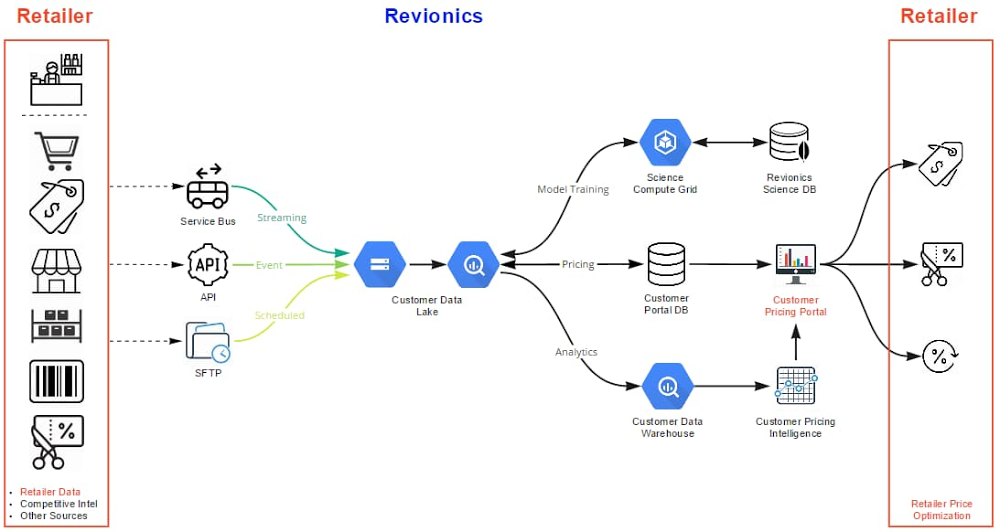
Editor’s note: Today we’re hearing from Revionics, a lifecycle pricing platform that gives retailers the confidence to ask the “what ifs” and “why nots” that result in profitable pricing strategies. In this blog, the Revionics team shares their cloud data warehouse migration journey and the lessons learned along the way. At Revionics, we’ve been in the data analytics business for nearly two decades, serving retail customers who wanted to leverage their data to drive their pricing strategies. At the company’s founding in 2002, our advanced AI models were probably the most complex in commercial use. Out of necessity, Revionics built the advanced technology infrastructure to handle the data volume and processing for our AI models. Fast forward to today, and cloud infrastructure has finally caught up. The state of current cloud computing infrastructure has opened up new avenues of data exploration for our teams and customers.Researching cloud optionsFrom the beginning, we didn’t just want to solve known problems. We wanted to improve our overall infrastructure to become more nimble to support our customers’ needs, today and in the future. Just like our AI models help retailers focus on what is possible, we need infrastructure that enables our data scientists to create that vision.We had been using on-premises Teradata appliances, and the parallelism and performance had worked well for us. But appliances have hardware and software restrictions that made it hard for us to share data and seamlessly scale. They’re not elastic, and couldn’t offer us the space we needed. We had maxed out the physical storage capacity of the appliances themselves, and we were rapidly approaching the time where we would need to renew the hardware to upgrade and expand performance and capacity. The space required for processing resulted in access constraints to the latest analytical results, impacting decision making based on current information. Replacing appliances with newer ones couldn’t alone solve our elasticity and data access problems, so we started exploring cloud options. In addition, many of our tech-savvy customers have in-house data analytics experts, and we wanted to offer them plug-and-play capabilities on our data warehouse infrastructure. That way, they could dig into their data and respond to market shifts accordingly. Once we learned more about current cloud options, we could visualize many ways to drive our business forward. For example, the elasticity and amount of storage available could let us really accelerate our product development and overall customer success.Cloud migration decisionsPartnering with Google Cloud, we adopted BigQuery. For each client, we built a data lake and a complete structured data warehouse, so every client’s data is isolated and securely accessible to meet client queries. The scale that BigQuery brought became essential when the COVID-19 pandemic wrought huge, overnight changes for our retail clients, who needed to meet unexpected demand while keeping their employees and customers safe. We were able to rapidly update our AI pricing models with our customers’ most current data and give them clarity to make the right pricing decisions. We migrated Teradata SQL to BigQuery SQL, which facilitated a fast migration. Converting Teradata DDL to BigQuery DDL was straightforward—we encountered a few challenges in our view queries due to differences in SQL, but this also gave us an opportunity to learn about how BigQuery works. We’re a lean company, so we needed to move data efficiently without a lot of manual work required. Our DevOps team helped us build tools so we could create script templates for different projects and customer datasets. For us, it was faster to redeploy our own tools than learn new tools. We had a lot of practical conversations discussing our options, and ultimately we did what was least disruptive to our customers and provided the greatest continuity for operational management, while leveraging select services available in Google Cloud.Revionics puts customers first in all that we do. Ensuring they were not impacted during the migration was a top priority, and we worked with our customers closely throughout the process. We migrated following retail’s busiest season, and we carefully performed our due diligence to internally sync and enable our customer go-live in January 2020. Google Cloud helped support our no-downtime migration and ensure business continuity.Google Cloud helped support our no-downtime migration and ensure business continuity.Migration learnings and lessonsMigrating our reports to run on BigQuery required some planning. We primarily did a lift-and-shift migration to minimize the total changes involved; all we had to do was point our existing metadata model to BigQuery. We made adjustments to some data types where necessary, but most of the reports did not need to be updated. However, some queries generate differently in BigQuery, so we took the opportunity to improve the design and performance of selected reports. As an example, our reports sit on views in a separate dataset, and we were able to simply move logic upstream, leveraging a few of the unique capabilities of BigQuery to improve runtime performance.Click to enlargeFor a successful migration, it helps to establish standards and adopt production tools early. We migrated chunks of the data model at a time, allowing us to test and improve through the project. We also took immediate advantage of several BigQuery database capabilities, such as implementing partitioning and clustering. For us, it was the right move and enabled a fast transition. Now, our next step is how to improve our data model. There are changes we can make under the covers that are impactful, such as views and the interface between BigQuery and our reporting platform. Composer and Airflow both came in handy for our data load process. We built extract pipelines to move data from our SQL Servers to Cloud Storage to load into BigQuery, all executed through Composer. We also take full advantage of built-in monitoring and logging tools (formerly known as Stackdriver). On the other side of migrationToday, the infrastructure we’ve created with Google Cloud has helped address the immediate needs we had, and provides the foundation for Revionics to solve new and interesting problems. We’re opening new doors, and Google Cloud has helped improve how we operate our infrastructure, forecast growth, and manage costs. Data access: For example, moving data to construct new analytics had at times been a slow, unwieldy process that could require days of copying and processing. Now, all of a client’s data is securely co-located in BigQuery, enabling immediate access to data for customer-specific analysis without impacting production operations in any way. Data processing happens in seconds and minutes rather than hours and days, whereas to analyze any one customer’s data before our cloud migration, end users often encountered roadblocks to move data off the SQL Server instance. Now, they don’t have to move data at all.Security: We’d been used to focusing on security, at times sacrificing usability out of necessity. With Google Cloud, we use Google’s built-in encryption at rest and in transit without any impact to usability, and with zero configuration requirements or management needed. We’ve improved our security footprint, lowered our management overhead, and improved performance significantly. Additionally, BigQuery makes it simple to triage issues, and we’ve gained significant efficiency in the way we find and solve any issues. The time spent triaging customer questions has been reduced dramatically. Seeing the business impactWhen we first started almost twenty years ago, retailers would set prices for all their products once a year. As retailers adopted our AI-based pricing models, Revionics introduced the ability to automatically model prices every week, and optimize on demand. We have now set the foundation to enable even more advanced modeling and optimization techniques, and are able to model at a deeper and more granular level than ever before, for orders of magnitude greater data volumes, all while improving our processing times. With this new functionality, we will enable retailers to update prices at the speed of their business, providing the ability to test “what ifs” and run pricing scenarios in minutes. Our data scientists can access so much more data than they could before, at speed, and perform data modeling at the transactional level. We’re able to create models now that we’ve been wanting to create for years that are broad and go deeper into the details. This capability is a pillar for Revionics and has helped speed up our product development and unleashed our data scientists. For our customers, this means that we can continually stay ahead of the complexity of modern retail environments, and this new scalability means we can respond to them immediately and help them adapt quickly.   Earlier tools didn’t allow many of our teams to self-serve their analytics needs, but with access to BigQuery, they’re able to do analytics work on their own. From a support angle, that’s been beneficial. Custom reporting requests that used to take hours now are available immediately and securely for the end user through BigQuery.   Combined, this has opened up exciting new roadmap possibilities. We’re looking at improving how we give our customers access to their data, exploring new and intriguing visualizations, all while leveraging the built-in global access and security, giving us a lot of capabilities and potential products. When it comes to the cloud, there’s a lot to learn. If you’re just getting started, we recommend that you master what you can and don’t try to learn everything all at once. To help, allow your teams to explore, then identify the most critical functional and non-functional requirements and stay focused on those to prevent scope creep and help drive success in your own cloud adoption journey.Learn more about Revionics. Thanks for additional contributions from Clinton Pilgrim and Kausik Kannan.
Quelle: Google Cloud Platform

21 new ways we're improving observability with Cloud Ops

We’ve heard from customers about how important it is to be able to reliably operate your applications and infrastructure running on Google Cloud. In particular, observability is critical to reliable operations. To help you quickly gain insight into your Google Cloud environment, we’ve added 21 new features to Cloud Operations, the observability suite we launched earlier this year, which gives you access to all our operations capabilities directly from the Google Cloud Console. The new features we’re discussing today make it easier for you to get the observability you need from your environment, whether it’s in Google Cloud, other clouds, on-premises or a mix.Perhaps more importantly, Cloud Operations is built on top of infrastructure with breathtaking scale—and we pass the resulting performance on to you. Two of Cloud Operations’ central services, Cloud Monitoring and Cloud Logging, are built on core observability platforms used by all of Google that handle over 16 million metrics queries per second, 2.5 exabytes of logs per month, and over 14 quadrillion metric points on disk. That’s a lot of data! To get to this scale, we developed the culture and practices that go into building, launching and running production applications with high velocity and reliability. The practice of Site Reliability Engineering (SRE) is core to this, and an integral part of product planning. In addition to offering the power of this massive platform to Google Cloud customers, we’ve been picking relevant capabilities from the SRE approach that we believe will simplify customer experiences, and building them into Cloud Ops products, broken down according to the five steps of the process for adding observability in your environment—plan, collect, store, configure and troubleshoot. Let’s take a closer look.PlanBefore you start building your operational workflow, it’s a best practice to outline your services and how you want each to perform, defining Service Level Objectives, (SLOs). That leads us to our first new feature:1. The general availability of SLO Monitoring Now, focusing on your SLOs is easier than ever. SLO Monitoring gives you the ability to focus on signals and improve the signal-to-noise ratio. This, along with out-of-the-box alerts, reduces the levels of expertise required to monitor production environments, and makes it easier to identify and remediate issues before they impact critical business metrics.In just two weeks since making it generally available, we’ve had hundreds of new users for SLO Monitoring, and gotten some great feedback about how it can simplify your monitoring practices.“SLOs measure how the user feels about your product—that is what truly matters,”said Vipul Makar, SRE Lead & Enterprise Architect, Equifax.”With SLO Monitoring we make data-driven decisions and build more reliable products. Once we learned how to use SLOs we never looked back!”To learn more about SLOs and using custom metrics to create SLOs, join us at these Google Cloud Next ’20: OnAir sessions: OPS200 – Kubernetes Engine Infrastructure and Service Monitoring with Equifax and OPS102 – Best Practices for Custom Metric Telemetry on Google Cloud.CollectCollecting logs and metrics is easy when you leverage out-of-the-box observability for Google Cloud system logs and metrics. You can add application and third-party logs and metrics from wherever they are generated: OpenTelemetry / OpenCensus, captured by Google Cloud monitoring and logging agents, or submitted directly through Cloud Operations APIs. Today, we’re expanding the types of logs that you can use in Logging in two important ways:2. G Suite audit logs  – The integration betweenG Suite audit logs and Cloud Logging is now generally available, adding to the dozens of Google Cloud services already providing audit logs out of the box.3. Multi-cloud and on premise – We’ve partnered with Blue Medora to provide agents for collecting logs and metrics from anywhere — now generally available at no additional cost.We’ve also made it even easier to capture metrics and logs from your Compute Engine VMs:4. You can now install, run, and manage the Cloud Logging and Monitoring agents across groups of Compute Engine instances or your entire fleet with a single command.To learn more about collecting logs and metrics, join us at OPS102 – Best Practices for Custom Metric Telemetry on Google Cloud and OPS203 – OpenTelemetry and Observability at Shopify, Splunk, and Google.StoreBeing able to store and protect your data in Cloud Logging and Monitoring is critical to your observability strategy. That’s why we’ve been working hard to launch new features to help you meet your security and privacy requirements.Cloud Logging makes it easy to search and analyze logs as well as provides a central, secure, compliant, and scalable log storage solution. Today we’re announcing a number of improvements to log storage and management building on several recent improvements for exploring and analyzing logs. Here’s a selection of what’s new:5.Logs buckets (Beta) – Centralize or subdivide your logs based on your needs for ownership, retention, and region. 6. Logs views (Preview) – Gain better control over who has access to your logs data.7. Regionalized log storage (Preview) – Configure your log buckets in five separate cloud regions, with more to come.8. Improved log routing (Preview) – Route logs from one project to another or even using an aggregated log sink at the folder or organization level to centralize logs into a logs bucket.9. Customizable retention (Generally Available) – In addition to announcing that custom retention is generally available, allowing you to retain your logs data for anywhere from one day to 10 years, you can now use custom retention through the end of March 2021 for no additional cost. This means you can try out our log management capabilities for your long-term compliance and analytics needs for logs without a cost commitment. Regionalized logs buckets and logs views are now in private preview but coming to beta in September 2020. Some examples of our new functionality that preview users have enjoyed include centralizing all audit logs from across your organization, splitting out logs from a multitenant GKE cluster into multiple projects, or setting up regionalized log storage. Sign up for access or to be notified of future releases of the preview of logs views and regionalized storage.Then, there’s your ability to write and retain custom and Prometheus metrics, which can be critical to the observability of your applications and services. To help ensure that you have these metrics when you need them:10. Extended Retention for Custom and Prometheus metrics – they are now retained for 24 months rather than 6 weeks, at no additional cost.11. 10 second resolution for Agent, Custom, and Prometheus metrics –  you can write metrics at 10 second granularity for agent, custom and Prometheus metrics. You can use these higher resolution metrics to track rapidly changing environments, applications, services, and infrastructure.To learn more about our new log management capabilities, join us at OPS100 – Designing for Observability on Google Cloud.ConfigureOur Cloud Operations suite offers several ways for you to customize your environment to meet your business and reliability goals: dashboards, alerting policies, logs-based metrics, uptime checks and SLOs.  We’ve got a range of new improvements to help you both automate your configuration and get started quickly with new out of the box dashboards.12. Monitoring Dashboards API – Building out your dashboards at scale is easier than ever with our new Dashboards API, which allows you to manage your monitoring as code. 13. Out of the box dashboards – The only thing better than easy-to-build dashboards are dashboards that are already built for you. We’ve added a range of new out-of-the-box dashboards including a Cloud Logging dashboard and a newly refreshed dashboard for Compute Engine that shows cross-fleet metrics.14. Pub/Sub alerting notifications  – In addition to visualizing your system, you’ll want to use alerting for reliability and automation to reduce toil with the new Pub/Sub integration for alerting in Cloud Monitoring.15. Monitoring Query Language (generally available) – The new Monitoring Query Language allows you to manipulate time series to create useful charts, for example plot ratios between different metrics or current vs. past metrics, define arithmetic expressions over time-series values, or create new aggregations.  To learn more about alerting and dashboarding with Cloud Operations, join us at OPS208 – Alerting Best Practices for Google Cloud Monitoring and OPS302 – Monitoring as Code.TroubleshootNow that you’ve got everything set up, you’re ready to troubleshoot issues in production. We’ve added six new features to the Cloud Logging to help you find issues fast.16. Our new logs viewer is now generally available (GA) and boasts a variety of new features for analyzing logs data, and now supports viewing your logs at the folder or org level in your GCP organization.17. We’ve added histograms to the new logs viewer to help you spot patterns in your logs over time.18. We’ve added the logs field explorer to the new logs viewer which helps you rapidly refine queries and spot interesting distributions across your data.19. Saved and recent searches in the new logs viewer to help you get to your most valuable logs more quickly. 20. Integration with traces now provides in-context insight about latency and makes it easy to find all logs that include a specific trace. 21. Our logging query language also got a major upgrade with support for regular expressions. To learn more about troubleshooting with Cloud Operations, join us at OPS201 – Creating a Better Developer Experience with Google Cloud’s Operations Suite of Products and OPS301 – Analyzing Distributed Traces to Find Performance Bottlenecks.For an overview of the new functionality and how it can be used with GKE, check out this short video:Get started with Cloud OperationsWith a Google-scale foundation, and an aggressive roadmap of new features and functionality, you can rely on the observability tools in Cloud Operations to help you manage, monitor and troubleshoot your most mission-critical applications. To learn more about Cloud Operations, register for and join us at these NEXT’20 OnAir sessions:OPS100 – Designing for Observability on Google CloudOPS200 – Kubernetes Engine Infrastructure and Service Monitoring with EquifaxOPS213 – Cloud Operations Spotlight
Quelle: Google Cloud Platform

How to optimize your Azure workload costs

The economic challenges posed by the global health pandemic continue to affect every organization around the world. During this difficult time, cost optimization has become an especially critical topic. Recently, we provided an overview of how to approach cost optimization on Microsoft Azure, which laid out three focus areas to help you get the most value out of your Azure investment: understanding and forecasting your costs, optimizing your workload costs, and controlling your costs.

Today, we’ll dive more deeply into the second focus area—how you can optimize your Azure workloads costs—and show you how guidance in the Microsoft Azure Well-Architected Framework, tools like Azure Advisor, and offers like the Azure Hybrid Benefit and Azure Reservations can help you operate more efficiently on Azure and save.

Design workloads for cost optimization using best practices from the Azure Well-Architected Framework

The Azure Well-Architected Framework is designed to help you build and deploy cloud workloads with confidence, using actionable and simple to use deep technical content, assessments, and reference architectures based on proven industry best practices. You can assess workloads against the five pillars of the Azure Well-Architected Framework cloud design—cost optimization, reliability, security, performance efficiency, and operational excellence—to help you focus on the right activities and to ensure you optimize workloads and proactively meet business needs.

The cost optimization section of the Azure Well-Architected Framework is all about managing costs to get the most value out of your Azure workloads and covers:

Cost management principles, a series of important considerations that can help you achieve both business objectives and cost justification.
Cost best practices for design, provisioning, monitoring, and optimization.
Trade-offs between cost and other pillars like reliability and performance.

A great way to get started with the Azure Well-Architected Framework is by taking the Azure Well-Architected Review. This review examines your workload against the best practices defined by the pillars of reliability, cost optimization, operational excellence, security, and performance efficiency. You can choose to take the review for any or all of the pillars, so you can start by focusing on cost optimization, if you prefer.

Optimize your Azure resources with best practice recommendations from Azure Advisor

Your workloads are composed of resources, so configuring your resources according to the latest Azure best practices is critical to ensuring your workloads are cost optimized. Azure Advisor is a free service that helps you optimize your already-deployed Azure resources for cost, security, performance, reliability, and operational excellence. Advisor is aligned with the Azure Well-Architected Framework, but is targeted at the resource level instead of the workload level. Advisor’s recommendations are personalized to your Azure environment based on your resource telemetry and configurations.

Examples of Advisor cost recommendations include rightsizing underutilized or shutting down unused resources, buying reserved instances to save over pay-as-you-go costs, and using storage lifecycle management. Our full list of Advisor cost recommendations is available.

Advisor offers several features to make it faster and easier to optimize your resources. Quick Fix enables one-click bulk remediation of recommendations, so you can multi-select resources you’d like to remediate. Click Quick Fix, and Advisor takes care of the rest. You can configure Advisor to display only the recommendations that mean the most to you, such as those for your production subscriptions and resource groups. Advisor alerts notify you when you have new recommendations, and Advisor recommendation digests remind you about available recommendations you haven’t remediated yet.

Visit the Advisor documentation to learn more and get started remediating your cost recommendations.

Save big on Azure by leveraging your existing on-premises licensing investment with the Azure Hybrid Benefit

The Azure Hybrid Benefit is a licensing benefit that lets you bring your Windows Server and SQL Server on-premises licenses with Software Assurance or subscriptions to Azure and save up to 85 percent compared to standard pay as-you-go rates,1 so you only pay for the compute costs on Azure. You can apply these savings across Azure SQL and Azure Dedicated Host.

License mobility benefits offered by Azure include the ability to bring your Windows Server and SQL Server licenses to the cloud, leverage SQL Server licensing in Infrastructure as a Service (IaaS) and Platform as a Service (PaaS) environments, and gain additional licensing benefits, including 180-day dual use rights of your licenses, both on-premises and in Azure. For your heavily-virtualized workloads, you get four vCPUs of Azure SQL Database or Azure SQL Managed Instance for each core of SQL Server Enterprise.

These unique advantages plus additional benefits such as, free fail-over servers licensing for SQL Server disaster recovery and free extended security updates, make Azure the best-in-class cloud for Windows Server and SQL Server.

Check out the Azure Hybrid Benefit Documentation for more technical tutorials and resources.

Reserve upfront and pay less with Azure Reservations

Receive a discount on your Azure services by purchasing Azure Reservations, which is a one-year or three-year commitment to specific Azure services. Giving us visibility into your one-year or three-year resource needs in advance allows us to be more efficient. In return, we pass these savings onto you as discounts of up to 72 percent.2 When you buy a reservation, you immediately receive a discount and are no longer charged at pay-as-you-go rates. This offer is ideal for Azure services that use significant capacity or run for long periods of time in a consistent way.

Reservation discounts apply to the following eligible subscriptions and offer types:

Enterprise agreements (offer numbers: MS-AZR-0017P or MS-AZR-0148P).
Microsoft Customer Agreement subscriptions.
Individual plans with pay-as-you-go rates (offer numbers: MS-AZR-0003P or MS-AZR-0023P).
Cloud Solution Provider (CSP) subscriptions.

Learn more

Learn more about how to lower your upfront cash outflow with various monthly payment options at no additional cost in the reservations documentation.

You could achieve the lowest cost of ownership when you combine the Azure Hybrid Benefit, reservation pricing, and extended security updates. Cost optimize your Azure workloads today with these Azure cost saving options.

Check back soon for more cloud cost optimization guidance or visit our Azure cost optimization page to learn more.

1The 85 percent savings is based on 8-Core D13 v2 VM in East US 2 region. Savings are calculated from full price (license included) for SQL Server Enterprise edition VM against reduced rate (applying Azure Hybrid Benefit for SQL Server and Windows Server), which excludes Software Assurance costs for SQL Server and Windows Server, which may vary based on EA agreement or any applicable volume licensing agreement. Actual savings may vary based on region, instance size and compute family. Prices as of June 5, 2018 are subject to change.

2The 72 percent saving is based on one M32ts Azure VM for Windows OS in US Gov Virginia region running for 36 months at a pay-as-you-go rate of ~$3,660.81/month; reduced rate for a 3-year Reserved Instance of ~$663.45/month. Azure pricing as of October 30, 2018 (prices subject to change). Actual savings may vary based on location, instance type, or usage.
Quelle: Azure
Getting hands-on: Start building on Google Cloud for free

We’re pleased to share updates to our Google Cloud free programs so developers can get started even faster in solving real-world business challenges. With more and more developers building with the Google Cloud Platform every day, we’ve invested in a broad range of new hands-on resources, videos, tutorials, and comprehensive documentation to help you get started and grow and maintain momentum with Google Cloud. These include:The Free Trial program. Last year more than 750,000 new developers trained on GCP, and many started with our hands-on free trial experience that provides a great on-ramp to use our 200+ cloud products and services. We’ve found that one of the highest predictors of developer success is developers completing a proof of concept during the first three months of our free trial program. As a result, we’ve updated the program so that, starting August 17th, users now have 90 days to use their $300 USD in Google Cloud credits. In addition to the free trial, users can also leverage our free products, resources, and training. This lets us focus on helping developers and organizations maximize the impact of their free trial in those critical first months. There will be no changes for customers already in a free trial. For more information, check out all of the details on our trial program here.The Always Free Tier program. More than 20 of our most popular products and services are available for freeabove and beyond your $300 USD free trial credits, even after your free trial is complete. You can try everything from App Engine and Compute Engine, to industry-leading AI, data analytics, storage and security tools.Better training—and more resources to help you get started. All Google Cloud free trial and free tier users can access: 30 days of unlimited Qwiklabs training as well as more than 60 on-demand webinars, hundreds of how-to videos, playlists, and training courses and in-depth learning paths on platforms including Pluralsight and Coursera.User and expert resources in Google Cloud communities, on our Slack channel and Reddit. You can also check out GitHub or Stack Exchange boards to ask technical questions, discuss projects, and find targeted support.Regularly updated documentation, from detailed cloud basics to enterprise guides, which gives you foundational concepts, quickstarts, top use cases, and advanced hands-on guides. Support resources available right in your Google Cloud console.Like all Google Cloud services, we continue to improve our free trial programs based on your feedback. Please leave a note in any of the above channels letting us know what you think.
Quelle: Google Cloud Platform






