Deploying Helm Charts w. Terraform

medium.com – One interesting Terraform provider is the Helm provider that can install Helm Charts. This can be useful for situations like: This article demonstrates how to use create a module that deploy Helm Cha…
Quelle: news.kubernauts.io

Under the hood: The security analytics that drive IAM recommendations on Google Cloud

IAM Recommender helps security professionals enforce the principle of least privilege by identifying and removing unwanted access to Google Cloud Platform (GCP) resources. In our previous blog, we described some best practices for achieving least privilege with less effort using IAM Recommender—which uses machine learning to help determine what users actually need by analyzing their permission use over a 90-day period. In this post we’ll peek under the hood to see how IAM Recommender works, with the help of a step-by-step example.A DIY approachFor a little more background, IAM Recommender generates daily policy recommendations and serves them to users automatically. Google collects the logs, correlates data, and recommends a modified IAM policy to minimize risk. We then surface these results in various places to ensure visibility: in-context in the IAM Permissions page in Cloud Console, through a Recommendations Hub in Cloud Console, and through BigQuery.Let’s think through what building an analytics system that does all of this from the ground up would require: You first need to build an entitlements warehouse that periodically collects normalized role bindings for all your resources, so you’ll need to pay attention to hierarchies and inherited role bindings. Then, to ensure your recommendations don’t break any existing workloads, you’ll need to collect and build telemetry to determine which permissions have been used recently. You can do this by storing Cloud Audit Logs data access logs for the resources you want to analyze. This, however, is a very high volume of log data that comes at a cost, and the analysis is non-trivial; it requires series log processing, parsing, and normalization, and aggregation.You will sometimes find gaps in your access logs data, which could arise from sporadic individual behaviors such as users taking vacations or changing projects. You’ll need to use machine learning to plug these gaps, which is also not trivial because of high-dimensions and sparse features of the training data.To ensure you build for business continuity, you’ll need to build in monitoring and controls, and add provisions for break-glass.Once this work is done, you can use the analytics pipeline to analyze utilization against policy data to determine which permissions are safe to remove. You might want to enhance this with machine learning to predict future permission needs to ensure users don’t have to come back for additional access.Lastly, once you’ve determined the right sets of permissions, roles, conditions, and resources, you’ll need to come up with a model that ranks the best IAM policy to meet your users’ needs.We wanted to empower you with actionable intelligence while saving all of this effort. The end result is Active Assist which does this analysis for you at Google scale. But, even if you were able to do all of this, you could only analyze your own data. We’re able to gain additional insight from cross-customer analysis, further identifying gaps and potential misconfigurations in your policies before they can become a problem. Google Cloud proactively protects the privacy of our users during this analysis with techniques that are described in detail in our blog here.Let’s look a little deeper into our implementation.Safe to applyWhen we launched this product, a key consideration was to ensure recommendations were safe to apply—that they wouldn’t break workloads. Making safe recommendations depends on having high-quality input data. IAM Recommender analyzes authorization telemetry data to compute policy utilization and make subsequent recommendations. At Google Cloud, our production systems take care of processing and ensure data quality and freshness directly from the source of the logs. Importantly, IAM Recommender does this for all customers at scale, which is more efficient than each customer doing it on their own. We collect and store petabytes of logs data to enable this functionality, at no additional charge.But authorization logs only tell a part of the story. In Google Cloud, resources can be organized hierarchically, where a child resource inherits the IAM policy attached to a parent. To make accurate recommendations, we also apply attributed inheritance data in our analytics. To ensure the quality of our recommendations, we built comprehensive monitoring and alerting systems with detection and validation scripts. We then automated these checks with ML to measure new recommendations against baselines. These checks against baselines ensure the analytics pipeline from the upstream input data to downstream dependencies are safe to apply. If we detect deviation from baselines, preventative measures kick in to halt the pipeline to ensure we are serving reliable recommendations.ML security analytics at petabyte scaleTo provide recommendations, we developed a multi-stage pipeline using Google Cloud’s Dataflow processing engine. To get a sense of scale, Cloud IAM is a planet-scale authorization engine that processes hundreds of millions of authorization requests every second. IAM Recommender ingests these authorization logs and generates and re-validates hundreds of millions of recommendations daily to serve the best results to our customers. Google Cloud’s scalable infrastructure allows us to provide this service cost-effectively.Our system performs detailed policy utilization analysis that replays authorization logs with the latest policy config snapshot and resource metadata on a daily basis. This data is fed into our ML training models, and the output is piped into policy utilization insights that support recommendations. We then use privacy-preserving ML techniques that plug gaps in observation data, which could be due to a recommendation variant, system outage, or other issue. (Check out this blog to explore these ML techniques in more depth.)Balancing the tradeoff between risk and complexityIAM Recommender uses a cost function to determine the set of roles that cover the needed permission set, ranks the roles by their security risk, and picks the least risky one. Determining the minimum set of roles is equivalent to the NP-complete set cover problem. To cut down on overhead, the approach optimizes for recurring patterns across multiple projects in a given organization, reducing permissions while maximizing role membership. In some cases we determine the best role is one that hasn’t been created yet—though our systems do find opportunities for reuse across your organization—and in these cases we recommend creating a custom role.Learn moreTo learn more about IAM Recommender, check out the documentation and our blog about Exploring the machine learning models behind Cloud IAM Recommender. To learn more about Active Assist, visit our website. To see how our customers solved for least privilege, check out one of our Google Cloud Next ‘20: OnAir sessions:Minimizing Permissions Using IAM RecommenderUsing Policy Intelligence to Achieve Least Privilege AccessCloud is Complex. Managing It Shouldn’t Be
Quelle: Google Cloud Platform

Looker news and highlights from Google Cloud Next '20: OnAir, Week 5

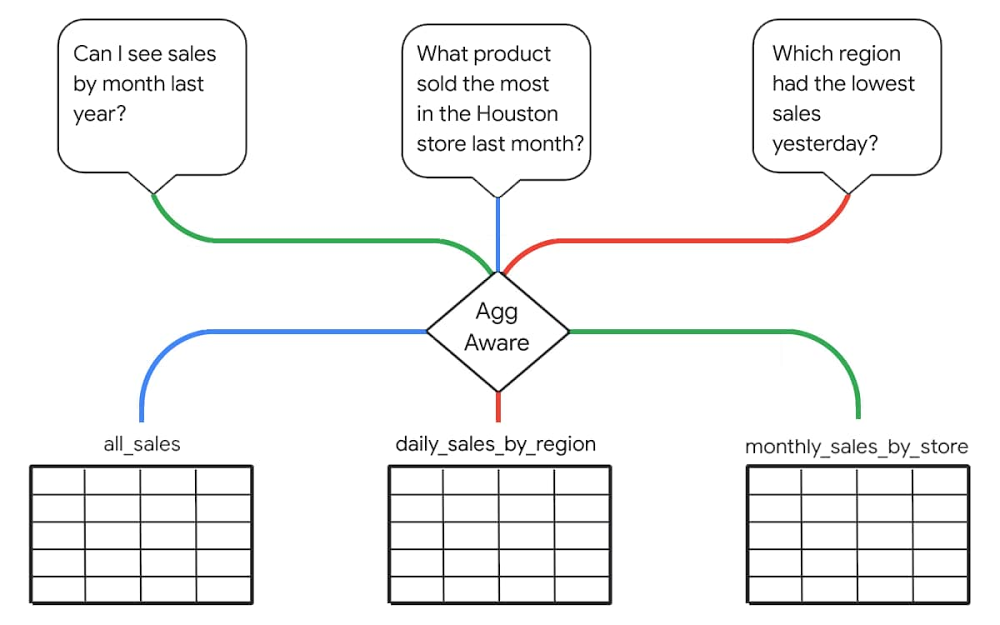
August has been a busy month for us here at Looker. We started off Data Analytics week at Google Cloud Next ’20: OnAir with a major release of top-requested enhancements—building on our vision of empowering companies to build powerful data experiences and drive positive, data-driven business outcomes. Then, throughout this week, we’ve presented our vision for data leaders, shared some of our newest capabilities, led virtual hands-on-labs, and highlighted inspiring customer stories and demos across the entire Next OnAir experience. In the smart analytics keynote, we show you how Looker is a critical component for delivering Google Cloud’s vision of an open, intelligent, and flexible platform. See how Sunrun leveraged Looker and BigQuery to accelerate their digital transformation initiatives, or how Looker fits into Verizon Media’s 100+ PB analytics platform. Hear how the Looker team supported data-driven responses to COVID-19, take a technical deep dive, see a demo of Looker with BigQuery BI Engine, or learn about Looker’s (not so) secret sauce: Intro to LookML. Finally, in our Looker Roadmap session, hear about many of the newest advancements and get a peek at what’s next. We’re particularly proud of the progress we’ve made on the data experiences roadmap we first announced last December. For the last year, we’ve focused on features that help our wide community of system administrators, application builders, model developers, data analysts, and business decision makers by providing the scale and performance, cost optimization, simplified management, and ease of development of data experiences they require. Companies, departments, and individuals all have unique, different ways they use data to guide their work.  This understanding guides Looker’s approach to analytics and the new enhancements we announced this week. Let’s take a further look at a few key aspects of the announcements. Increased performance and efficiency with aggregate awarenessTo drive greater performance and efficiency at scale, Looker now includes aggregate awareness. With aggregate awareness, Looker can materialize query results and dynamically route user queries to different tables based on level of granularity.  This helps minimize the total number of queried records, reducing query cost and improving response time. Aggregate awareness is fully managed in LookML, Looker’s semantic layer, reducing implementation time and cost while maintaining simplicity for users. Unlike other solutions, aggregate awareness doesn’t limit a query to a specific table. Instead, it can automatically UNION-in related data when query scope exceeds that of a given aggregate table.Managing Looker at scale just got easierSince last year, Looker administrators have been able to leverage Looker system activity analytics to track their usage of the Looker platform. Dashboards and data exploration experiences are pre-built in Looker to help measure user activity, query performance, scheduling, content (reports and dashboard) use, and any errors that might occur. With elite system activity, now available, administrators can retain system analytics data longer and perform more complex, faster analysis of this data. Coupled with new user and permissions management tools, including the ability to better leverage existing LDAP systems, system activity analytics helps Looker admins drive platform adoption and ensure the smooth operation of vital reports, dashboards, explores, and other, more advanced, data experiences.Simplifying and speeding access to insightsLooker has also redesigned the dashboard and reporting experience to include more intuitive interactions. It’s now easier than ever to provide users with tools that let them start at high-level dashboards and drill down into the data to find answers to questions. Delivering self-service access to data that’s accessible and intuitive, Looker offers easy cross-filtering in dashboards.  A newly enhanced integration with Slack and improved alerting functionality put data right where users need it, on-demand, streamlining the time from question to insight and then to business-impacting action. These new ways of accessing data, minimizing friction in existing workflows, allow non-technical employees to take a proactive approach to their area of the business.Quickly, easily deliver new data experiencesWith a new extension framework for data product development, Looker also reduces friction developers experience when modeling, visualizing, or operationalizing their data. The extension framework allows front-end developers to build and deploy within Looker without relying on DevOps or standalone servers. Extensions also have full access to Looker APIs and can take advantage of existing authentication and permissions, simplifying the development process and speeding time to value for data products. Working-backwards from their desired end goal and dream application, our most innovative developers go beyond static reports and realize their vision with Looker developer tools and partners.Turnkey models for data-driven marketersWe’ve also introduced new Looker Blocks for marketers—built in partnership with experts at Google Cloud and with integrated BigQuery ML models—that make it easier than ever for data-driven marketers to get up and running quickly with out-of-the-box advanced analytics for Google Analytics 360, Google Marketing Platform, and Google Ads data. With these new blocks, marketing teams can dig deeper into web behavior, optimize campaign investment, define granular KPIs, expand insights by joining external datasets, and shorten the time from insight to action. Looker Blocks continue to be a powerful tool that accelerates analytics value—providing deep expertise and insights, faster, in a way that’s easy to implement and understand.From BI to data experiencesWith the announcements this week, Looker continues to enhance the tools you’re already using by infusing new, relevant data into your workday. To learn more about all the latest Looker enhancements for your business, click here. You can also register here and speak live with our team about these and other features and updates.
Quelle: Google Cloud Platform