I do declare! Infrastructure automation with Configuration as Data

Over the years there’s been an explosion in infrastructure platforms and application frameworks that form the foundation of “cloud native.” Modern infrastructure platforms range from container orchestrators such as Kubernetes to serverless platforms aimed at rapid application development. In parallel, shell scripts that administrators used to deploy, configure, and manage these platforms evolved into what is now called Infrastructure as Code (IaC), which formalizes the use of higher level programming languages such as Python or Ruby or purpose-built languages such as HashiCorp’s HCL (through Terraform). Though IaC has been broadly adopted, it suffers from a major flaw: code does not provide a contract between the developer’s intent and runtime operation. Contracts are the foundation of a consistent, secure and high-velocity IT environment. But every time you modify or refactor code, you need to run validation tools to determine its intent.Which begs the question, why are admins using programming languages in the first place? Why is all of this so complicated? In many ways it’s an attempt to automate the unknown, the unpredictable. But by nature, most infrastructure is loosely defined and requires baling wire and duct tape to stick things together in ways that mimic what a system administrator would do when logged into a server.Furthermore, while provisioning infrastructure is important, IT practitioners also need to deploy and manage both infrastructure and applications from day two onwards in order to maintain proper operations. Ideally, you could use the same configuration management tools to deploy and manage both your infrastructure and applications holistically. The Kubernetes wayThings are different with Kubernetes…Instead of taking an imperative or procedural approach, Kubernetes relies on the notion of Configuration as Data, taking a declarative approach to deploying and managing cloud infrastructure as well as applications. You declare your desired state without specifying the precise actions or steps for how to achieve it. Every Kubernetes resource instance is defined by Configuration as Data expressed in YAML and JSON files. Creating a Deployment? Defining a Service? Setting a policy? It’s all Configuration as Data, and Kubernetes users have been in on the secret for the past six years. Want to see what we mean? Here’s a simple Kubernetes example…In just 10 lines of YAML, you can define a Service with a unique version of your application, set up the network to create a route, ingress, Service, and load balancer, and automatically scale up and down based on traffic. How does Configuration as Data work? Within the Kubernetes API Server are a set of controllers that are responsible for ensuring the live infrastructure state matches the declarative state that you express. For example, the Kubernetes service controller might ensure that a load balancer and Service proxy are created, that the corresponding Pods are connected to the proxy, and all necessary configuration is set up and maintained to achieve your declared intent. The controller maintains that configured state forever, until you explicitly update or delete that desired state.What’s less well known is that the Kubernetes Resource Model (KRM) that powers containerized applications can manage non-Kubernetes resources including other infrastructure, platform, and application services. For example, you can use the Kubernetes Resource Model to deploy and manage cloud databases, storage buckets, networks, and much more. Some Google Cloud customers also manage their applications and services using Kubernetes controllers that they developed in-house with open-source tools.How do you start leveraging the KRM for managing Google Cloud resources? Last year, Google Cloud released Config Connector, which provides built-in controllers for Google Cloud resources. Config Connector lets you manage your Google Cloud infrastructure the same way you manage your Kubernetes applications—by defining your infrastructure configurations as data—reducing the complexity and cognitive load for your entire team.Following our service example above, let’s say we want to deploy a Google Cloud Redis instance as a backing memory store for our service. We can use KRM by creating a simple YAML representation that is consistent with the rest of our application:We can create the Redis instance via KRM and Config Connector:Where CaD meets IaCDoes that mean you no longer need traditional IaC tools like Terraform? Not necessarily. There will always be a need to orchestrate configuration between systems, for example, collecting service IPs and updating external DNS sources. That’s where those tools come in. The benefit when managing Google Cloud resources with Config Connector is that the contract will be much stronger. This model also offers a better integration story and cleanly separates the responsibility for configuring a resource and managing it. Here’s an example with Terraform:Terraform is used to provision a Google Cloud network named “demo_network” via the Terraform provider for Google and to create a Google Cloud Redis instance connected to it via the Terraform Kubernetes provider and KRM. On the surface, the contract between Terraform and the two providers looks the same, but beneath the surface lies a different story.The Terraform provider for Google calls the Google Cloud APIs directly to create the networking resources. If you wanted to use another configuration tool you would need to create a new set of Google Cloud API integrations. Furthermore, you will jump back and forth between Kubernetes and Terraform to view resources created separately in each interface.On the other hand, the Kubernetes provider is backed by a controller running in Kubernetes that presents a KRM interface for configuring Redis instances. Once Terraform submits configuration in the form of data to a Kubernetes API server, the resource is created and is actively managed by Kubernetes. Configuration as Data establishes a strong contract between tools and interfaces for consistent results. You’re able to remain in the Kubernetes interface to manage resources and applications together. The Kubernetes API server continuously reconciles the live Google Cloud state with the desired state you established in Terraform with KRM. Configuration as Data complements Terraform with consistency between Terraform executions that may be hours, days, or weeks apart.To make a long story short, Configuration as Data is an exciting approach to infrastructure and app management that enables fluid interaction between native resources and configuration tools like IaC and command lines.  It’s also an area that’s moving quickly. Stay tuned for more about Configuration as Data coming soon. In the meantime, try Config Connector with your Google Cloud projects and share your feedback about what you did, what worked, and what new features you’d like to see.Related ArticleUnify Kubernetes and GCP resources for simpler and faster deploymentsThe new Config Connector lets you manage GCP resources as if they were in Kubernetes.Read Article
Quelle: Google Cloud Platform

Docker Compose for Amazon ECS Now Available

Docker is pleased to announce that as of today the integration with Docker Compose and Amazon ECS has reached V1 and is now GA!

We started this work way back at the beginning of the year with our first step – moving the Compose specification into a community run project. Then in July we announced how we were working together with AWS to make it easier to deploy Compose Applications to ECS using the Docker command line. As of today all Docker Desktop users will now have the stable ECS experience available to them, allowing developers to use docker compose commands with an ECS context to run their containers against ECS.

As part of this we want to thank the AWS team who have helped us make this happen: Carmen Puccio, David Killmon, Sravan Rengarajan, Uttara Sridhar, Massimo Re Ferre, Jonah Jones and David Duffey.

Getting started with Docker Compose & ECS

As an existing ECS user or a new starter all you will need to do is update to the latest Docker Desktop Community version (2.5.0.1 or greater) store your image on Docker Hub so you can deploy it (you can get started with Hub here), then you will need to get yourself setup on AWS and then lastly you will need to create an ECS context using that account. You are then read to use your Compose file to start running your applications in ECS.

We have done a couple of blog posts and videos along with AWS to give you an idea of how to get started or use the ECS experience. 

Amazon’s GA announcement of the experienceDocker Announcement / AWS announcement Open sourcing the integration Deploying WordPress to ECS Amazon unboxing of ECS experience Docker Docs 

If you have other questions about the experience or would like to give us feedback then drop us a message in the Compose CLI repo or in the #docker-ecs channel in our community Slack.

New in the Docker Compose ECS integration 

We have been adding new features to the ECS integration over the last few months and we wanted to run you through some of the ones that we are more excited about:

GPU support 

As part of the more recent versions of ECS we have provided the ability to deploy to EC2 (rather than the default fargate) to allow developers to make use of unique instance types/features like GPU within EC2. 

To do this all you need to do is specify that you need a GPU instance type as part of your Compose file and the Compose CLI will take care of the rest! 

services:
learn:
image: itamarost/object-detection-app:latest-gpu
command: python app.py
ports:
– target: 8000
protocol: tcp
x-aws-protocol: http
deploy:
resources:
# devices:
# – capabilities: [”gpu”]
reservations:
memory: 30Gb
generic_resources:
– discrete_resource_spec:
kind: gpus
value: 1

EFS support

We heard early feedback from developers that when you are trying to move to the cloud you may not be ready to move to managed service to persist your data and may still want to use volumes with your application. To solve  this we have added Elastic File System (EFS) volume support to the Compose CLI allowing users to create volumes and use them as part of their Compose applications. This is created with a Retain policy so data won’t be deleted on application shut-down. If the same application (same project name) is deployed again, the file system will be re-attached to offer the same user experience developers are used to locally with docker-compose.

To do this I can either specify an existing file system that I have already created:

volumes:
my-data:
external: true
name: fs-123abcd

Or I can create a new one from scratch by providing information about how I want it configured:

volumes:
my-data:
driver_opts:
# Filesystem configuration
backup_policy: ENABLED
lifecycle_policy: AFTER_14_DAYS
performance_mode: maxIO
throughput_mode: provisioned
provisioned_throughput: 1024

I can also manage these through the docker volume command which lets me list and manage my resources allowing me to remove them when I no longer need them.

Context creation improvements 

We have also been looking at how we improve the context creation flow to make this simpler and more interactive – while also allowing power users to specify things more up front if they know how they want to configure your context. 

When you get started we now have 3 options for creating a new context: 

? Create a Docker context using: [Use arrows to move, type to filter]
> An existing AWS profile
A new AWS profile
AWS environment variables

If you select an existing profile, we will list your available profiles to choose from and allow you to simply select the profile you want to have associated with this context. 

$ docker context create ecs test2
? Create a Docker context using: An existing AWS profile
? Select AWS Profile nondefault
Successfully created ecs context “test2″

$ docker context inspect test2
[
{
“Name”: “test2″,
“Metadata”: {
“Description”: “(eu-west-3)”,
“Type”: “ecs”
},
“Endpoints”: {
“ecs”: {
“Profile”: “nondefault”,
}

}
]

If you want to create a new profile, we will ask you for the credentials needed to do this as part of the creation flow and will save this profile for you:

? Create a Docker context using: A new AWS profile
? AWS Access Key ID fiasdsdkngjgwka
? Enter AWS Secret Access Key *******************
? Region eu-west-3
Saving to profile “test3″
Successfully created ecs context “test3″

$ docker context inspect test3
[
{
“Name”: “test3″,
“Metadata”: {
“Description”: “(eu-west-3)”,
“Type”: “ecs”
},
“Endpoints”: {
“ecs”: {
“Profile”: “test3″,
}
},

}
]

If you want to do this using your existing AWS environment variables, then you can choose this option we will create the context with a reference to these env vars so we continue to respect them as you work with them:

$ docker context create ecs test1
? Create a Docker context using: AWS environment variables
Successfully created ecs context “test1″
$ docker context inspect test1
[
{
“Name”: “test1″,
“Metadata”: {
“Description”: “credentials read from environment”,
“Type”: “ecs”
},
“Endpoints”: {
“ecs”: {
“CredentialsFromEnv”: true
}
},

}
]

We hope this new simplified way of getting started and the flags we have added in here to allow you to override parts of this will help you get started with ECS even faster than before. 

We are really excited about the new experience we have built with ECS, if you have any feedback on the experience or have ideas for other backends for the Compose CLI please let us know via our Public Roadmap.

Join our workshop “I Didn’t Know I Could Do That with Docker – AWS ECS Integration” with Docker’s Peter McKee and AWS’ Jonah Jones Tuesday, November 24, 2020 – 10:00am PT / 1:00pm ET. Register here. 

The post Docker Compose for Amazon ECS Now Available appeared first on Docker Blog.
Quelle: https://blog.docker.com/feed/

Mirantis is at KubeCon. Join our live experts!

The post Mirantis is at KubeCon. Join our live experts! appeared first on Mirantis | Pure Play Open Cloud.
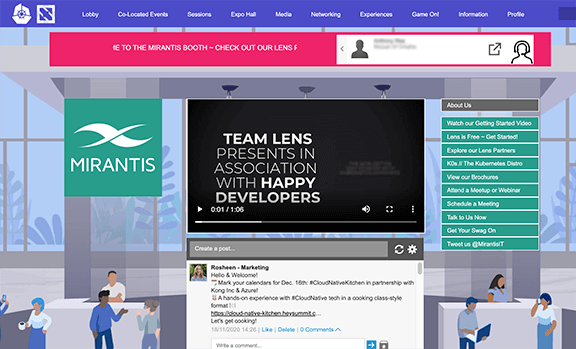
The CNCF’s KubeCon + CloudNativeCon North America 2020 is officially underway, and it’s an exciting time for developers and technologists to gather to discuss the latest in the Kubernetes and Cloud Native communities. Mirantis, a proud gold-level sponsor for this year’s event, would like to invite you to check out our virtual booth (located in Gold-Hall B), which showcases our latest innovations to help our customers ship code faster. 
To help you navigate everything we have to offer, our Kubernetes and Cloud Native experts will be standing by to chat with you about optimizing your company’s cloud infrastructure, or about one of the many other Kubernetes-related projects Mirantis is involved in including the latest Lens Kubernetes IDE update and the launch of a new, pure upstream Kubernetes distribution: k0s.

Come visit the virtual Mirantis booth at KubeCon in Gold-Hall B!
Mirantis Cloud Native Platform
At front and center is Mirantis Cloud Native Platform, which encompasses all our technological offerings that allow our customers to ship their code faster, on private and public clouds, or on bare metal, all at that highest level of security and certification that you have come to expect from a Mirantis offering. 
The individual components highlighted in more detail at our virtual booth include:

Mirantis Kubernetes Engine (formerly Docker Enterprise/UCP): Enterprise-ready K8s and Swarm orchestration, deployed and managed anywhere
Mirantis Secure Registry (formerly Docker Trusted Registry): Store, share, and manage container images in your own private registry, all with maximum security
Mirantis Container Runtime (formerly Docker Engine – Enterprise): The industry-leading enterprise container engine, based off the industry standard 
Mirantis Container Cloud (formerly Docker Enterprise Container Cloud): Centralized multi-cluster and multi-cloud deployment and management with increased visibility and enhanced control, all continuously updated with zero downtime

Lens 4.0
For all the do-it-yourself developers in attendance this year, the biggest release of Lens, the world’s most popular Kubernetes IDE, is coming soon! Lens 4.0, currently available as a Beta, runs on any OS, and can be downloaded directly to your desktop. Lens 4.0 features drastic improvements made in two specific areas: 

Extension API: Now you can add any K8s integrated component, toolkit, or service to optimize Lens through custom visualization and analysis.
Logs UI improvements: Efficiently debug problems and monitor activity in real time with the Logs UI, now featuring an improved user interface, faster rendering performance, access to logs from past containers, and so much more. 

Introducing k0s
Mirantis is excited to announce the launch of an all new Kubernetes distribution called k0s. Created by the same team that brought you Lens, this open source project runs anywhere, with no operating system dependencies other than the Linux Kernel, and 1 line installation. Suitable for use cases ranging from local development to large scale production deployments, k0s offers flexibility and compatibility for all users, as well as a host of other features, including:

Zero friction: Drastically reduces complexity when installing/running a conformant K8s distribution, essentially reducing developer friction to zero
Zero dependencies: Distributed as a single binary with no host OS requirements besides the kernel, all vulnerabilities and performance issues are fixed directly in the distribution
Zero overhead: Designed to be super lightweight and flexible, requiring minimal resources 
Zero cost: Open source software that is 100% free, and always will be
Zero downtime: Comes with automated lifecycle management so you can upgrade your clusters while your applications keep running

K0s was designed to be the only open source Kubernetes distribution that you will ever need, applicable to a variety of use cases ranging from typical cloud deployments to more specialized edge computing/IoT-type instances. We feel pretty confident that you’ll love k0s and how easy it makes Kubernetes. Get started now, or talk some more with one of our Kubernetes experts at our virtual booth. 
Connect with us at KubeCon
We would love to hear from you at our virtual booth, open now through the end of the conference (11/20). Here, you can schedule and attend a demo for one of the many Mirantis offerings, or simply talk with some of our experts to learn more about Lens, k0s, and any other Mirantis Cloud Native Platform offering that can help optimize your business. We also have an awesome video showcasing some of the updates coming to Lens with the release of version 4.0, as well as a demo on how to get started with Mirantis Container Cloud.
If any of these cutting-edge products or offerings caught your eye, please stop by our virtual booth. And if you are unable to attend KubeCon + CloudNativeCon, you can still visit our website and schedule a meeting with one of our experts. We look forward to hearing from you, and if you are in attendance this week, we will be in Gold-Hall B. 
The post Mirantis is at KubeCon. Join our live experts! appeared first on Mirantis | Pure Play Open Cloud.
Quelle: Mirantis

Ankündigung von Amazon Lightsail Containers, einer einfachen Möglichkeit, containerisierte Anwendungen in der Cloud auszuführen

Amazon Lightsail bietet Ihnen jetzt die Möglichkeit, containerisierte Workloads in der Cloud auszuführen, ohne oder mit nur geringen Vorkenntnissen in der Cloud. Mit diesem nativen Service, genannt Lightsail Container, können Sie jetzt containerisierte Anwendungen in der Cloud bereitstellen, indem Sie die Docker-Images direkt von Ihrem Desktop oder aus öffentlichen Registern wie DockerHub verwenden – mit nur wenigen Klicks und über eine einfach zu bedienende Oberfläche. Lightsail kümmert sich um die gesamte Komplexität des Infrastrukturmanagements und ermöglicht es Ihnen, sich auf Ihren Anwendungscode zu konzentrieren. Lightsail Containers bietet die gleichen vorhersehbaren Preise wie seine anderen Angebote mit Preisen ab 7 USD/Monat für einen Container Service.
Quelle: aws.amazon.com

Amazon QuickSight unterstützt jetzt Sicherheit auf Spaltenebene, Spaltenbeschreibungen und einen neuen Oracle Connector

Amazon QuickSight hat eine leistungsstarke neue Data Governance-Funktion hinzugefügt: Sicherheit auf Spaltenebene (CLS). Diese Funktion ergänzt die bestehende Row Level Security(RLS)-Funktion und gibt Autoren in Kombination die Kontrolle darüber, wer auf welche Daten in ihren Visualisierungen zugreifen kann. CLS ermöglicht es Datensatzbesitzern, Einschränkungen auf Spaltenbasis anzuwenden. Dadurch wird sichergestellt, dass Benutzer nur Spalten sehen, die sie sehen dürfen. Beispielsweise könnte ein Datensatzbesitzer seinen Datensatz so einrichten, dass nur Mitglieder einer Personalabteilung Gehaltsinformationen einsehen können, während jeder weniger sensible Informationen wie Vor- und Nachname einsehen kann. CLS kann über die QuickSight-Schnittstelle und über APIs für einen Datensatz konfiguriert werden. Weitere Informationen finden Sie hier.  
Quelle: aws.amazon.com