Introducing .NET on Google Cloud Functions

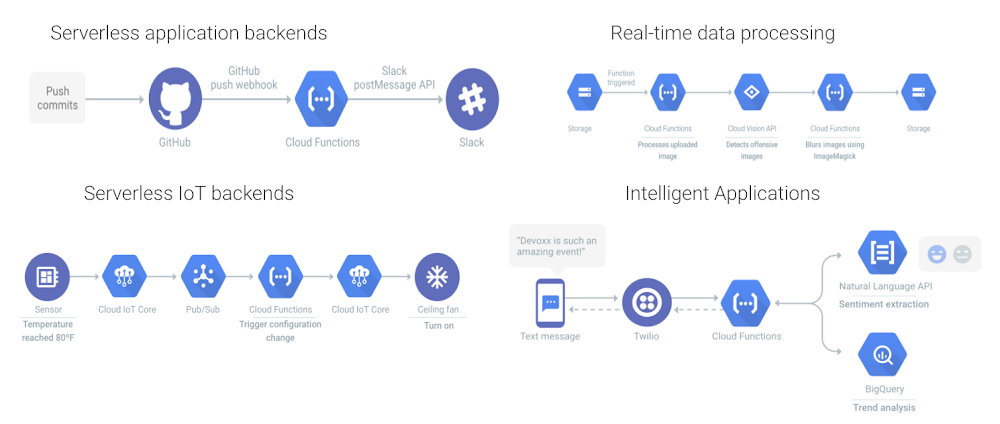
Cloud Functions is Google Cloud’s Function-as-a-Service platform that allows users to create single-purpose, stand-alone functions that respond to events, without having to manage a server or runtime environment. Cloud functions are a great fit for serverless applications, mobile or IoT backends, real-time data processing systems, video, image and sentiment analysis and even things like chatbots, or virtual assistants.Today we’re bringing .NET Core 3.1, a free, cross-platform and open-source platform for Windows, Mac and Linux, to Cloud Functions. With this integration you can write cloud functions using your favorite .NET Core 3.1 runtime with our Functions Framework for .NET, for an idiomatic developer experience!With Cloud Functions for .NET, now in Preview, you can use .NET Core 3.1 to build business-critical applications and integration layers, and deploy the function in a fully managed environment, complete with access to resources in a private VPC network. .NET functions scale automatically based on your load. You can write HTTP functions to respond to HTTP events, and CloudEvent functions to process events sourced from various cloud and Google Cloud services including Pub/Sub, Cloud Storage and Firestore.You can develop functions using the Functions Framework for .NET, an open source functions-as-a-service framework for writing portable .NET functions. With Functions Framework you develop and run your functions locally, then deploy them to Cloud Functions, or to another .NET environment.The Functions Framework for .NET supports HTTP functions and CloudEvent functions. A HTTP cloud function is very easy to write. Below, you’ll find a simple HTTP function for Webhook/HTTP use cases.CloudEvent functions on the .NET runtime respond to industry standard CNCF CloudEvents. These events can be from various Google Cloud services, such as Pub/Sub, Cloud Storage and Firestore.Here is a simple CloudEvent function working with Pub/Sub.VB and F# SupportThe Cloud Functions .NET runtime also supports VB and F#. The programming model is exactly the same, and there are examples in the GitHub repository. The .NET Functions Framework comes with a template package for use from the command line or Visual Studio, and these templates support VB and F# as well.Try Cloud Functions for .NET todayCloud Functions for .NET is ready for you to try today. Read the Quickstart guide, learn how to write your first functions, and try it out with a Google Cloud Platform free trial. If you want to dive a little bit deeper into the technical aspects, you can also read Jon Skeet’s blog on a tour of the .NET Functions Framework. If you’re interested in the open-source Functions Framework for .NET, please don’t hesitate to have a look at the project and potentially even contribute to it. In addition, we also have a codelab that you could try out to help you get familiarized with the runtime. We’re looking forward to seeing all the .NET functions you write!Related ArticleNew in Cloud Functions: languages, availability, portability, and moreCloud Functions includes a wealth of new capabilities that make it a robust platform on which to build your applicationsRead Article
Quelle: Google Cloud Platform

.NET 5.0 on Google Cloud

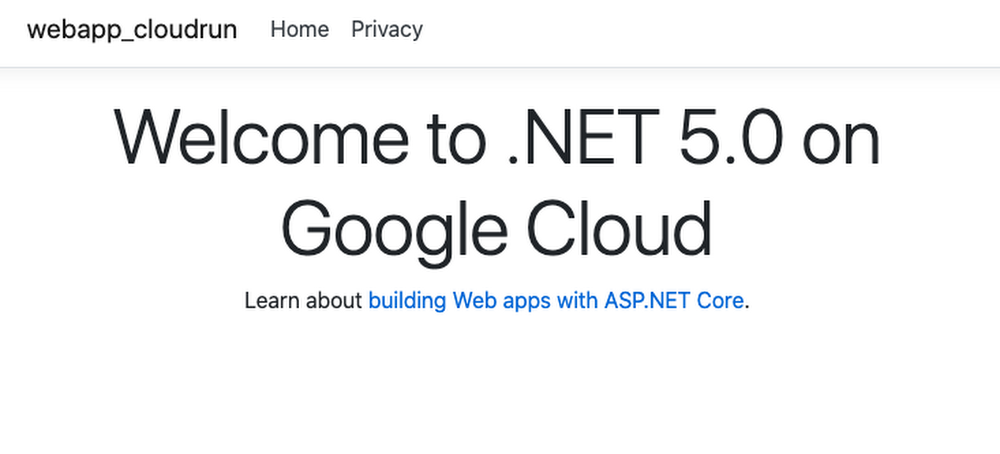
A unified .NET.NET 5.0 was released just a few days ago with many new features, improvements, C# 9 support, F# 5 support, and more. .NET 5.0 is the first release of the unified .NET vision that was announced last year. Going forward, there will be just one .NET targeting Windows, Linux, macOS, and more. Google Cloud already has support for different versions of .NET. You can run traditional Windows based .NET apps on Windows Servers in Compute Engine or on Windows Containers in Google Kubernetes Engine (GKE). For modern Linux based containerized .NET apps, there’s more choice with App Engine (Flex), GKE and my favorite Cloud Run. Not to mention, the .NET Core 3.1 support in Cloud Functions is currently in preview for serverless .NET functions. In the rest of the blog post, I want to show you how to deploy .NET 5.0 to Cloud Run. Cloud Run makes it really easy to deploy and scale containerized apps on a fully managed platform..NET 5.0First, make sure you have the latest .NET 5.0 installed:> dotnet –version5.0.100Let’s follow the ASP.NET tutorial to create a web app with ASP.NET framework. Create a simple web app with plain HTTP support:> dotnet new webapp -o webapp-cloudrun –no-httpsCloud Run expects for the app to listen on a PORT environment variable. Change CreateHostBuilder function of Program.cs file to do that:Also, let’s change the default welcome message in Index.cshtml file to display a welcome message like this:<h1 class=”display-4″>Welcome to .NET 5.0 on Google Cloud</h1>After the changes, you can build and run the app locally. It should start a server listening on port 8080:> dotnet runinfo: Microsoft.Hosting.Lifetime[0]      Now listening on: http://0.0.0.0:8080Containerize .NET 5.0 To containerize the app, we will create a Dockerfile. One thing to keep in mind is that with the release of .NET 5.0, all Docker tags for .NET Core 2.1/3.1 and .NET 5.0 is published to one set of unified Docker repositories (see 2375). The names of these repositories have been changed from the originals to no longer include “core” in the name. Here’s the Dockerfile for our app using the new dotnet/sdk and dotnet/aspnet base images with 5.0 versions:FROM mcr.microsoft.com/dotnet/sdk:5.0-alpine AS buildWORKDIR /appCOPY *.csproj ./RUN dotnet restoreCOPY . ./WORKDIR /appRUN dotnet publish -c Release -o outFROM mcr.microsoft.com/dotnet/aspnet:5.0-alpine AS runtimeWORKDIR /appCOPY –from=build /app/out ./ENTRYPOINT [“dotnet”, “webapp-cloudrun.dll”]Build and save the Docker image to Google Container Registry with Cloud Build:> gcloud builds submit –tag gcr.io/${GOOGLE_CLOUD_PROJECT}/hello-dotnet5Deploy to Cloud RunFinally, deploy to Cloud Run:> gcloud run deploy –image gcr.io/${GOOGLE_CLOUD_PROJECT}/hello-dotnet5         –platform managed         –allow-unauthenticatedIn a few seconds, you should see the service deployed:✓ Deploying… Done.✓ Creating Revision…✓ Routing traffic…✓ Setting IAM Policy…Done.Service [hello-dotnet5] revision [hello-dotnet5-00002-tux] has been deployed and is serving 100 percent of traffic.Service URL: https://hello-dotnet5-dhmnie7yqa-ew.a.run.appAnd visiting the service URL will display our page:Of course .NET support is not limited to Cloud Run. Check out how we support .NET on Google Cloud.  Related ArticleStreamlining Cloud Run development with Cloud CodeCloud Run is now integrated with Cloud Code, making it easier to create new Cloud Run services from your favorite IDE.Read Article
Quelle: Google Cloud Platform

Neues Beratungsangebot von AWS-Lösungen: Atlassian Managed Hosting

Atlassian Managed Hosting ist ein Beratungsangebot von AWS-Lösungen, das über ein Beratungsengagement von kreuzwerker, einem Kompetenzpartner von AWS DevOps, bereitgestellt wird. Atlassian Managed Hosting ermöglicht es Kunden, alle von Atlassian serverseitig bereitgestellten Anwendungen auf AWS auszuführen. Kunden, die dieses Beratungsangebot anfordern, nehmen an einem Engagement teil, das eine Bewertung vorhandener Daten, Onboarding und Tests zur Vorbereitung der Migration, Produktmigration und Unterstützung nach der Migration umfasst.
Quelle: aws.amazon.com

Amazon Textract unterstützt die Handschrift und fünf neue Sprachen

Amazon Textract, ein Machine-Learning-Service, extrahiert Text und andere Daten aus Dokumenten sowie aus Tabellen und Formularen. Wir freuen uns, heute zwei neue Funktionen ankündigen zu können:

Amazon Textract unterstützt jetzt die Erkennung von handgeschriebenem Text aus Dokumenten wie Formularen aus dem Gesundheitswesen, Rezepten, Reklamationsbriefen, Steuerunterlagen, Einkommensdokumenten, Schecks, Anträgen, akademischen Arbeiten und vielem mehr. Sie können die APIs Dokumenttext erkennen oder Dokument analysieren verwenden, um Bilder oder PDFs gescannter Dokumente zu verarbeiten und sowohl gedruckten Text als auch Handschrift zu extrahieren, wodurch es Ihnen leicht fallen wird, fast jede Verarbeitung gescannter Dokumente zu automatisieren. Sie können zudem Amazon Augmented AI (Amazon A2I) verwenden, einen weiteren AWS-Service, der es Ihnen erleichtert, die Workflows für die von Menschen durchgeführte Überprüfung der Machine-Learning-Vorhersagen zu erstellen. Sie können sich in der Amazon Textract-Konsole anmelden, um die Handschrift-Funktion zu testen, oder sich die neue Demo des Amazon Machine Learning-Helden Mike Chambers ansehen. 
Amazon Textract unterstützt jetzt die Verarbeitung von Dokumenten mit gedrucktem Text in Spanisch, Deutsch, Italienisch und Portugiesisch. Sie können damit beginnen, Dokumente in diesen Sprachen zur Textextraktion zu versenden, und Amazon Textract wird die Informationen automatisch erkennen und für Sie extrahieren.

Quelle: aws.amazon.com