How to bring zero-trust security to microservices
infoworld.com – Why we must use a zero-trust security model in microservices and how to implement it using the Kuma universal service mesh.
Quelle: news.kubernauts.io
infoworld.com – Why we must use a zero-trust security model in microservices and how to implement it using the Kuma universal service mesh.
Quelle: news.kubernauts.io
Offering predictions can be a challenge, because specific predictions depend on specific timeframes. But looking at the trends that we’re seeing in cloud adoption, there are a few things I’ve seen in 2020 that imply changes we will be seeing in 2021. As someone who was a network engineer when the internet revolution happened, I can see the signs of another revolution—this time built around the cloud and data—and acting on the signs of change will likely tell the difference between the disruptors and the disrupted. Here’s what I see coming down the road, and what’s important to keep in mind as we head into a new year.1. The next phase of cloud computing is about the benefits of transformation (not just cost). In 2021, cloud models will start to include a governed data architecture, with accelerated adoption of analytics and AI throughout an organization. In the past, we’ve seen notable developments that have driven massive cloud adoption movements. The first wave of cloud migration was driven by applications as a service, which gave businesses the tools to develop more quickly and securely for specific applications, e.g. CRM. Then, the second generation saw a lot of companies modernizing infrastructure to move on from physical data center maintenance. That’s all been useful for businesses, but with all that’s happened in 2020, the third phase—digital transformation—will arrive in earnest. As this happens, we’ll start to see the benefits that come from truly transforming your business. Positive outcomes include the infusion of data analytics and AI/ML into everyday business processes, leading to profound impacts across every industry and society at large.2. Compliance can’t just be an add-on item.The modern cloud model has to be one that can withstand the scrutiny around data sovereignty and accessibility questions. It’ll change how companies do business and how much of society is run. Even large, traditional enterprises are moving to the cloud to handle urgent needs, like increased regulations. The stakes are too high now for enterprises to ignore the critical components of security and privacy. One of the big reasons the cloud—and Google Cloud specifically—is so vital to better data analytics revolves around these questions of compliance and governance. Around the world, for businesses of every size, there’s an increased focus on security, privacy, and data sovereignty. So much of the digital transformation that we’ll see in 2021 will happen out of necessity, but today’s cloud is what makes it possible. Google Cloud is a platform built ground-up based on these foundational requirements, so enterprises can make the transition to the cloud with the assurance that data is protected. 3. Open infrastructure will reign supreme. By 2021, we’ll see 80% or more of enterprises adopt a multicloud or hybrid IT strategy. Cloud customers want options for their workloads. Open infrastructure and open APIs are the way forward, and the open philosophy is one you should embrace. No business can afford to have its valuable data locked into a particular provider or service. This emerging open standard means you’ll start to see multi-cloud and on-premises data sources coming together rapidly. With the right tools, organizations can use multiple cloud services together, letting them gain the specific benefits they need from each cloud as if it was all one infrastructure. The massive shift we’re seeing toward both openness and cloud also brings a shift toward stronger data assets and better data analytics. If you’ve been surprised over the past year about how many data sources exist for your company, or how much of it is gathered, you’re not alone. An open infrastructure will let you choose the cloud path that works best for your business. Data solutions like Looker and BigQuery Omni are specifically designed to work in an open API environment on our open platform to stay ahead of continually changing data sources.4. Harnessing the power of AI/ML will no longer require a degree in data science. Data science, with all of the expertise and specialized tools that have typically been involved, can no longer be the purview of just the privileged few. Teams throughout an organization need to have access to the power of data science, with capabilities like ML modeling and AI, without having to learn an entirely new discipline. For many of these team members, it’ll bring new life into their jobs and the decisions they need to make. If they haven’t been consuming data, they’ll start. With this capacity to give the whole team the power of analytics, businesses will be able to gather, analyze, and act on data far quicker than those who are still using the traditional detached data science model. This improves productivity and informed decision making by giving employees the tools to gather, sort, and share data on demand. It also frees up teams with data science experience that would normally be assembling, analyzing, and creating presentations to concentrate on tasks that are more suited to their abilities and training. With Google Cloud’s infrastructure and our data and AI/ML solutions, it’s easy to move data to the cloud easily and start analyzing it. Tools like Connected Sheets, Data QnA, and Looker make data analytics something that all employees can do, regardless of whether they are certified data analysts or scientists. 5. More and more of the world’s enterprise data will need to be processed in real time. We’re quickly getting to the point where data residing in the cloud outpaces data residing in data centers. That’s happening as worldwide data is expected to grow 61% by 2025, to 175 zettabytes. That’s a lot of data, which offers a trove of opportunity for businesses to explore. The challenge is capturing data usefulness in the moment. Following past stored data can be informative, but more and more use cases require immediate information, especially when it comes to reacting to unexpected events. For example, identifying and stopping a network security breach in the moment, with real-time data and a real-time reaction, has enormous consequences for a business. That one moment can save untold hours and costs spent on mitigation.This is the same method that we use to help our customers overcome DDOS attacks, and if 2020 has taught us anything, it’s that businesses will need this ability to instantly respond to unexpected problems more than ever moving forward.While real-time data revolutionizes how quickly we gather data, perhaps the most unexpected yet incredibly useful source of data we’ve seen is predictive analytics. Traditionally, data is gathered only from the physical world, meaning the only way to plan for what will happen was to look at what could physically be tested. But with predictive models and AI/ML tools like BigQuery ML, organizations can run simulations based on real-life scenarios and information, giving them data on circumstances that would be difficult, costly, or even impossible to test for in physical environments.Related ArticleRead Article6. More than 50% of data lakes will span multiple clouds and on-premises. We know that aligning the right services to the right use cases can be complicated. And while the cloud opens up a ton of opportunities for better data options, the fact that so many businesses are moving to these cloud solutions means that organizations will need a strong digital strategy to stay competitive, and this extends down to their data storage. Lots of businesses are choosing multicloud for flexibility, especially with so many options available. In the cloud, data storage has taken the shape of either a data warehouse—which stores primarily structured data so that everything is easily searchable—or data lakes—which bring together all of a business’ data together, regardless of structure. We’ll see more of the trend we’ve already seen, starting with the line between lake and warehouse getting blurrier. Google Cloud has a variety of data lake modernization solutions that give organizations the ability to integrate unstructured data as well as use AI/ML solutions to make data lakes easier to navigate, driving insights and collaboration.What’s next for your business?Change is happening fast, and while it can be overwhelming, all these technology changes are really exciting. At the end of it, you’ll be able to respond in real-time to problems, help your business users get their data without delay, and know for sure the entire lifecycle of any of your data. Let’s get started.Check out our guide to building a modern data warehouse or see how data-to-value leaders succeed in driving results from their enterprise data strategy in the report by Harvard Business Review Analytic Services: Turning data into unmatched business value.
Quelle: Google Cloud Platform

2020 was a tough year. As the global pandemic spread and impacted every country, industry, and individual, we turned to data and analytics to help guide us through the unknown. We used data and the cloud to help us understand the spread of COVID-19 while simultaneously digitally transforming industries to offer a safer way for the public to get what they need when they need it. Data and analytics became a critical tool for our essential workers and businesses as they navigated this trying time. Our data analytics team was hard at work to help organizations rethink their business strategy in order to deliver services to their customers.Everything we heard from customers this year and what we worked on here at Google Cloud reflects this new sense of urgency around using and sharing data across the digital world. Here’s a look back at the four major themes we focused on in 2020 and why they will be more relevant than ever in 2021.Beyond BI—do more with intelligent services The amount of data generated today is overwhelming, but an abundance of data doesn’t necessarily equate to useful information. Companies are already employing business intelligence (BI) to get insights from their data and achieve better business outcomes. Now, they can augment their current solutions with AI and machine learning (ML) to analyze massive datasets, recognize patterns, and gain insights that help define the past, the present—and the future.For example, Looker enables teams to go beyond traditional reports and dashboards to deliver modern BI, integrated insights, data-driven workflows, and custom applications using Looker Blocks. Users also benefit from real-time analytics and aggregate awareness capabilities to stream the most relevant data for high performance and efficient queries. You can use BigQuery ML to build custom ML models without moving data from the warehouse, including real-time AI solutions like anomaly detection. Additionally, the natural language interface Data QnA, announced at Next OnAir, empowers business users to analyze datasets conversationally without adding more work for BI teams.Related ArticleRead ArticleOpen platforms for choice, flexibility, and portabilityWith the proliferation of SaaS applications and a workload-at-a-time migration mentality, a majority of enterprise cloud architectures are being built with two or more public clouds. This allows enterprises to take advantage of the lowest storage and compute costs, use the most innovative AI and ML services, and provides freedom of portability if needed. That’s why we are committed to being open at Google Cloud.By 2021, over 75% of midsize and large organizations will have adopted a multicloud and/or hybrid IT strategy. Gartner PredictsWe’re breaking down silos across different environments to enable our customers to manage, process, analyze, and activate data—no matter where it is. This year, we introduced BigQuery Omni, our flexible, multi-cloud analytics solution that lets you analyze data in Google Cloud, AWS, and Azure (coming soon) without the need for cross-cloud data movement. In addition, Looker’s in-database architecture allows you to query data where it’s located to give you a consistent way to analyze data, even across multiple databases and clouds. We believe our vision of a multi-cloud, open data analytics future was reflected in this year’s brand-new Gartner Magic Quadrant for Cloud Database Management Systems (DBMS). Google was named a Leader among the furthest three positioned vendors on the completeness-of-vision axis. In 2020, we also helped organizations like Wayfair migrate their on-prem data analytics open source software to our open cloud. This type of portability allows them to take advantage of cloud scale and costs with Dataproc, while lowering the adoption barrier for their data analytics professionals familiar with Apache Spark, Presto, and Apache Hive.To strengthen our backup and DR capabilities across all of Google Cloud, Google recently acquired Actifio. Enterprises running critical workloads on Google Cloud, including hybrid scenarios, can prevent data loss and downtime due to external threats, network failures, human errors, and other disruptions. Scale intelligently without losing controlData analytics are now mission-critical for many businesses, but how do you respond efficiently to rapid demand and put data into the right hands without driving up costs? Can you achieve flexibility and predictability? Over the past year, we heard from customers as they navigated the unprecedented jump to online shopping as brick-and-mortar retailers shut their doors. At the same time, they still had to plan for regular calendar events like Black Friday/Cyber Monday and product launches. We announced BigQuery Flex Slots to help them scale their cloud data warehouses up and down quickly while only paying for what they consumed. We also made it easier to optimize data processing and migration to the cloud with a new Dataflow change data capture (CDC) solution that focuses on ingesting and processing changed records, rather than all available data. In addition, we recognize that organizations are dealing with an increasing number of rich assets to meet the demands of a data-driven workforce. Data is now used by everyone in an organization—not just data analysts. To us, that means giving people smart tools to derive more value regardless of their roles, such as a data catalog for self-service data discovery or product recommendation reference patterns that make it easier to use data to improve customer experience.Making data analytics work for youDespite its challenges, 2020 was also a year of unimaginable growth, innovation, and inspiration. At Google Cloud, we learned a lot about what’s important to you and how you’re using data analytics to reach new milestones. We heard stories from KeyBank and Trendyol Group as they migrated to BigQuery cloud data warehouse, learned how Procter & Gamble uses cloud analytics to personalize their consumer experience, and helped ThetaLabs partner with NASA to deliver more engaging streaming video. Major League Baseball (MLB) used Google Cloud to derive better insights from baseball data that helps broadcasters and content generators tell better stories and drive fan engagement. Conrad Electric selected Looker to gain visibility into product performance and unlock insights to optimize them accordingly. And Blue Apron embedded smart analytics across the entire customer journey, from recipe recommendations and improving the quality of their supply chain to streamlining packaging workflows. But perhaps the most inspiring leaps have been the ways smart analytics can be leveraged to help in the face of crisis. For instance, Commonwealth Care Alliance (CCA) used data analytics from Google Cloud to help clinicians and care managers prioritize care for high-risk patients. Reliable data and an easy way to get answers has made it possible for them to keep pace with changing factors and ensure they could provide the best care for their members.Get ready for 2021 Google Cloud data analytics training for all skill levels gives you the confidence to build a data cloud and take advantage of our open, flexible, and intelligent platform. Learn more about our smart analytics solutions at Google Cloud. On behalf of Google, we’d like to thank you for being on this journey with us. We wish you the warmest of holiday seasons and can’t wait to see what we’ll build together in 2021. Gartner, Magic Quadrant for Cloud Database Management Systems, November 23, 2020, Donald Feinberg, Adam Ronthal, Merv Adrian, Henry Cook, Rick GreenwaldGartner does not endorse any vendor, product or service depicted in its research publications and does not advise technology users to select only those vendors with the highest ratings or other designation. Gartner research publications consist of the opinions of Gartner’s research organization and should not be construed as statements of fact. Gartner disclaims all warranties, expressed or implied, with respect to this research, including any warranties of merchantability or fitness for a particular purpose.Related ArticleMost popular public datasets to enrich your BigQuery analysesCheck out free public datasets from Google Cloud, available to help you get started easily with big data analytics in BigQuery and Cloud …Read Article
Quelle: Google Cloud Platform
In 2020, everything changed. Who would have expected that how we live, work, communicate, and learn would be different by the end of the year? At Google Cloud, we saw how COVID-19 forced changes not only in how our customers worked in offices, but also how software developers and IT practitioners innovated. To support these changes, we introduced new products, features, and resources to address the needs we hear most from our customers: how to better connect people, how to get smarter with your data, how to build faster, and how to do this all with the confidence that your data is safe. Meeting your customers’ needs is essential, and so is empowering your employees with the tools and information they need in real time.Here, we take a look back at the year’s most popular posts from the Google Cloud blog:1. Google Workspace brought productivity to a new levelThe arrival of Google Workspaceallowed our customers to better connect their workforce with the tools they needed to get anything done, in one place. It included everything our customers loved about G Suite, including all of the familiar productivity apps—Gmail, Calendar, Drive, Docs, Sheets, Slides, Meet—and added a new, deeply integrated user experience. For example, we introduced new ways that core Workspace tools like video, chat, email, files, and tasks became more deeply integrated, powerful, and efficient.2. New features and security measures made Google Meet the place to be2020 was all about connecting virtually. As more employees, educators, and students worked remotely in response to the spread of COVID-19, we wanted to help them stay connected and productive. We rolled out free access to our advanced Google Meet video-conferencing capabilities to all G Suite and G Suite for Education customers globally through September. We added features such as support for larger meetings for up to 250 participants per call; live streaming for up to 100,000 viewers; and the ability to record meetings and save them to Google Drive. We also rolled out other top-requested features, including tiled layouts, low-light mode, noise cancellation, and others. And as the year progressed, we never stopped innovating, introducing Meet on the Nest Hub Max, customizable backgrounds, and moderation controls like meeting attendance, Q&A, and polling. We also shared the array of counter-abuse protections we built to give you confidence that your meetings are safe, including anti-hijacking measures for both web meetings and dial-ins and browser-based security features, 2-step Verification, and our Advanced Protection Program. For schools, we introduced several features to improve the remote learning experiences for teachers and students. 3. Google Cloud learning resources connected cloud students with new topicsTo help you transition to remote work and learning, we shared details about our Google Cloud learning resources, which you can use at home. These include our extensive catalog of over 100 on-demand training courses on Pluralsight and Coursera designed to get you started on the path to certification in cloud architecture, data engineering, and machine learning; hands-on labs on Qwiklabs; and interactive webinars at no cost for 30 days, so you can gain cloud experience—and get smarter about cloud—no matter where you are. 4. The COVID-19 public dataset program opened up a world of research possibilitiesTo aid researchers, data scientists, and analysts in the fight against COVID-19, we made a hosted repository of public datasets, like our COVID-19 Open Data dataset, free to access and query through our COVID-19 Public Dataset Program. Researchers can also use BigQuery MLto train advanced machine learning models with this data right inside BigQuery at no additional cost. 5. Google Cloud’s coronavirus response combined business continuity, monitoring, free resources, and moreWith all of the challenges impacting our customers, we wanted to give them confidence that our people were here when you needed them. We outlined all of the measures we take to make our services available to customers everywhere during the pandemic and beyond. These include regular disaster recovery testing (DiRT) of our infrastructure and processes; multiple SRE coverage areas; compute and storage hardware capacity monitoring and reserves; remote access and backup contingencies for our support teams; enhanced support structure for customers on the front lines; and free access to the premium version of Hangouts Meet to existing customers. 6. AppSheet empowered citizen app developers with no-codeWe were proud to share that Google acquired AppSheet, a leading no-code application development platform used by enterprises across a variety of industries. This acquisition helps enterprises empower millions of citizen developers to more easily and quickly create and extend applications without the need for professional coding skills. Employees will be able to develop richer applications at scale that use Google Sheets and Forms, and top Google technologies like Android, Maps, and Google Analytics. In addition, AppSheet customers can continue to integrate with a number of cloud-hosted data sources, including Salesforce, Dropbox, AWS DynamoDB, and MySQL. 7. API experts brought order to complex design decisionsAs many software developers know, there are two primary models for API design: RPC and REST. Most modern APIs are implemented by mapping them to the same HTTP protocol. It’s also common for RPC API designs to adopt one or two ideas from HTTP while staying within the RPC model, which has increased the range of choices that an API designer faces. We looked at the choices and offered guidance on how to choose between them, focusing on gRPC, OpenAPI, and REST—three significant and distinct approaches for building APIs that use HTTP.8. Google Cloud detective work solved a tricky networking problemIf you’ve ever wondered how Google Cloud Technical Solutions Engineers (TSE) approach your support cases, we offered a Google Cloud mystery story—the case of the missing DNS packets. Follow along to see how they worked closely with our customer to gather information in the course of their troubleshooting, and how they reasoned their way through to a resolution. This true story offers insight into what to expect the next time you submit a ticket to Google Cloud support.9. Google Cloud Next ‘20: OnAir lit up the digital stageFinally, to keep you up to date with all of the important announcements made at Google Cloud Next ‘20: On Air, we offered a week-by-week breakdown focused on product areas like application development, artificial intelligence and machine learning, databases, data analytics and much more. Check out the blog for the full list.That’s a wrap for 2020! Keep coming back to the Google Cloud blog for announcements, helpful advice, customer stories, and more in 2021.Related ArticleRead Article
Quelle: Google Cloud Platform
2020 was a year unlike any other, and all its unexpectedness brought foundational enterprise technology into the spotlight. Businesses needed their databases to be reliable, scalable, and consistently well-performing. As a result, migration plans accelerated, rigid licensing fell further out of favor, and transformative application development sped up. This was clear even in 2019, when cloud database management system (DBMS) revenues were $17 billion, up 54% from 2018, according to Gartner Predicts. We’ll be eager to see what Gartner reports from 2020, but from our perspective, growth accelerated significantly this year. We believe that our data vision of openness and flexibility was reflected in the first-ever DBMS Magic Quadrant this year. Gartner named Google Cloud a Leader in DBMS for 2020. We heard from customers across industries that this was the year they started or stepped up their database modernization. To help them meet their mission-critical goals, Google Cloud continued to launch new products and features. Here’s what was new and notable this year.New options, new flexibility entered the cloud database sceneDatabase migration service now available for Cloud SQLDatabase migrations can be a challenge for enterprises. We give our customers a uniquely easy, secure, and reliable experience with the recent launch of our serverless Database Migration Service (DMS), which provides high-fidelity, minimal downtime migrations for MySQL and PostgreSQL workloads and is designed to be truly cloud-native. Our blog announcing the launch has more info, and steps to get you started. SQL Server, managed in the cloudEnterprise companies often tell us how important the ability to migrate to Cloud SQL for SQL Server is to their larger goals of infrastructure modernization and a multi-cloud strategy. Cloud SQL for SQL Server is now generally available globally to help you keep your SQL Server workloads running. Our blog on the subject lists the five steps to get started migrating, a link to the full migration guide, and a helpful video for more details. Bare Metal Solution for Oracle databases comes to five new Google Cloud regionsBare Metal Solution lets businesses run specialized workloads such as Oracle databases in Google Cloud Regional Extensions, while lowering overall costs and reducing risks associated with migration. Last year we announced the availability of Bare Metal Solution in five more regions: Ashburn, Virginia; Frankfurt; London; Los Angeles, California; and Sydney. We also launched four more sites this year: Amsterdam, São Paulo, Singapore, and Tokyo. Customers did amazing things with cloud databases in 2020We’ve seen some clear trends emerge in cloud migration. We’ve seen customers follow what we’re referring to as a three-phase journey: migration, when they transition large commercial and open source databases; modernization, which involves moving from legacy to open source databases; and transformation, building next-gen applications and opening up new possibilities. Wherever you are in this journey, Google Cloud is focused on supporting you with the services, best practices, and tooling ecosystem to enable your success.At pharmaceutical and pharmacy technology giant McKesson, teams chose Cloud SQL to modernize their legacy environment. 3D printing and design company Makerbot shared how they architected Google Cloud’s tightly integrated tools—including Google Kubernetes Engine (GKE), Pub/Sub, and Cloud SQL—for an innovative autoscaling solution.We heard from Bluecore, developer of a marketing platform for large retailers that delivers campaigns through predictive data models, about how they turned to Cloud SQL for a fully managed solution that offered campaign creation functionality without slowing down the retail brand’s website. Customers like Handshake, provider of a platform to connect universities, also chose a Cloud SQL migration. Financial solutions provider Freedom Financial Network switched from Rackspace to Cloud SQL to meet growing demand. And at Google Cloud Next ‘20: OnAir, we heard from ShareChat and The New York Times about the successes they’ve found using our cloud-native databases. We also heard from Khan Academy, which uses Cloud Firestore to help meet the rising demand for online learning. Enterprise readiness arrived for open source databasesIn the event of a regional outage in Google Cloud, you want your application and database to quickly start serving your customers in another available region. This year, we launched Cloud SQL cross-region replication, available for MySQL and PostgreSQL database engines. We’ve worked closely with Cloud SQL customers facing business continuity challenges to simplify the experience, and our blog explains how to get started and offers a look at how Major League Baseball puts cross-region replication to use.In addition, Cloud SQL added committed use discounts as well as more maintenance controls, serverless exports, and point-in-time-recovery for Postgres.This past fall, we announced that Cloud SQL now supports MySQL 8. You now have access to a variety of powerful new features for better productivity—such as instant DDL statements (e.g. ADD COLUMN), atomic DDL, privilege collection using roles, window functions, and extended JSON syntax. Check out the full list of new features. Cloud SQL database service adds PostgreSQL 13We also launched support in Cloud SQL for PostgreSQL 13, giving you access to the latest features of PostgreSQL while letting Cloud SQL handle the heavy operational lifting. Recent PostgreSQL 13 performance improvements across the board include enhanced partitioning capabilities, increased index and vacuum efficiency, and better extended monitoring. Our recent blog has more details, more features, and instructions for getting started. Tools for measuring performance of Memorystore for RedisA popular open source in-memory data store, Redis is used as a database, cache, and message broker. Memorystore for Redis is Google Cloud’s fully managed Redis service. Memorystore recently added support for Redis 5.0, as well as VPC service controls, Redis Auth and TLS encryption. You’ll see how you can measure the performance of Memorystore for Redis, as well as performance tuning best practices for memory management, query optimizations, and more. Cloud-native databases: trusted for enterprise workloads, better for developers Google Cloud Spanner is the only managed relational database with unlimited scale, strong consistency, and 99.999% availability. (Check out more details on what’s new in Spanner.) In 2020, we announced new enterprise capabilities for Spanner, including the general availability of managed backup-restore and ninenew multi-regions of Spanner that offer 99.999% availability. Spanner also introduced support for new SQL capabilities, including query optimizer versioning, foreign keys, check constraints, and generated columns. Plus, Spanner introduced the C++ client library for C++ application developers and local Emulator that lets you develop and test your applications using a local emulator, helping reduce application development costs. Bigtable, our fully managed NoSQL database service, now offers managed backups for high business continuity and lets users add data protection to workloads with minimal management overhead. Bigtable expanded its support for smaller workloads, letting you create production instances with one or two nodes per cluster, down from the previous minimum of three nodes per cluster.Firestore, which lets mobile and web developers build apps easily, added new features such as the Rules Playground, letting you test your updated Firebase Security rules quickly. The Firestore Unity SDK, added this year, makes it easy for game developers to adopt Firestore. In addition, Firestore introduced a C++ client library and offers a richer query language with a range of new operators, including not-in, array-contains, not-equal, less than, greater than, and others. That’s a wrap for the year in databases. Stay tuned to the Google Cloud Blog for up-to-the-minute announcements, launches, and best practices for 2021. Gartner, Magic Quadrant for Cloud Database Management Systems, November 23, 2020, Donald Feinberg, Adam Ronthal, Merv Adrian, Henry Cook, Rick GreenwaldGartner does not endorse any vendor, product or service depicted in its research publications and does not advise technology users to select only those vendors with the highest ratings or other designation. Gartner research publications consist of the opinions of Gartner’s research organization and should not be construed as statements of fact. Gartner disclaims all warranties, expressed or implied, with respect to this research, including any warranties of merchantability or fitness for a particular purpose
Quelle: Google Cloud Platform
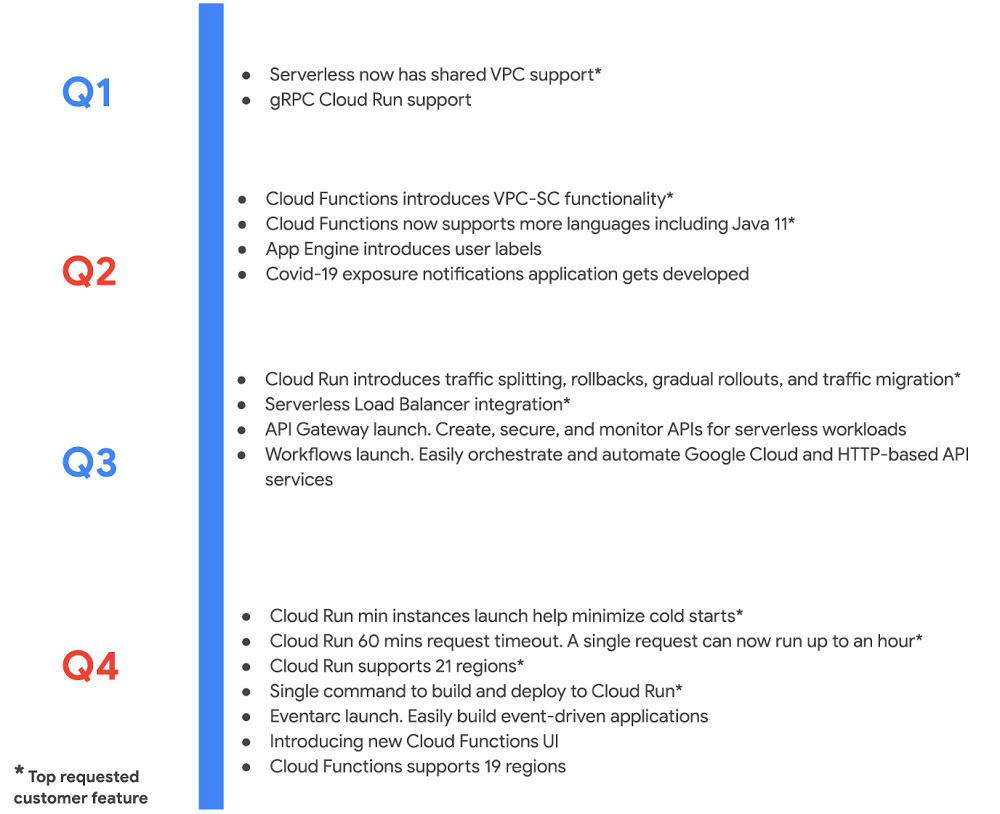
What a year it has been. 2020 challenged even the most adaptive enterprises, upending their best laid plans. Yet, so many Google Cloud customers turned uncertainty into opportunity. They leaned into our serverless solutions to innovate rapidly, in many cases introducing brand new products, and delivering new features to respond to market demands. We were right there with them, introducing over a 100 new capabilities—faster than ever before! I’m grateful for the inspiration our customers provided, and the tremendous energy around our serverless solutions and cloud-native application delivery. Cloud Run proved indispensable amidst uncertainty As digital adoption accelerated, developers turned to Cloud Run—it’s the easiest, fastest way to get your code to production securely and reliably. With serverless containers under the hood, Cloud Run is optimized for web apps, mobile backends, and data processing, but can also run most any kind of application you can put in a container. Novice users in our studies built and deployed an app on Cloud Run on their first try in less than five minutes. It’s so fast and easy that anyone can deploy multiple times a day. It was a big year for Cloud Run. This year we added an end-to-end developer experience that goes from source and IDE to deploy, expanded Cloud Run to a total of 21 regions, and added support for streaming, longer timeouts, larger instances, gradual rollouts, rollbacks and much much more. These additions were immediately useful to customers. Take MediaMarktSaturn, a large European electronics retailer, which chose Cloud Run to handle a 145% traffic increase across its digital channels. Likewise, using Cloud Run and other managed services, IKEA was able to spin solutions for challenges brought by the pandemic in a matter of days, while saving 10x the operational costs. And unsurprisingly, Cloud Run has emerged as a service of choice for Google developers internally, who used it to spin up a variety of new projects throughout the year. With Cloud Run, Google Cloud is redefining serverless to mean so much more than functions, reflecting our belief that self-managing infrastructure and an excellent developer experience shouldn’t be limited to a single type of workload. That said, sometimes a function is just the thing you need, and this year we worked hard to add new capabilities to Cloud Functions, our managed function as a service offering. Here is a sampling: Expanded features and regions: Cloud Functions added 17 new capabilities and is available in several new regions, for a total 19 regions. A complete serverless solution: We also launched API Gateway, Workflows and Eventarc. With this suite, developers can now create, secure, and monitor APIs for their serverless workloads, orchestrate and automate Google Cloud and HTTP-based API services, and easily build event-driven applications.Private access: With the integration between VPC Service Controls and Cloud Functions, enterprises can secure serverless services to mitigate threats, including data exfiltration. Enterprise can also take advantage of VPC Connector for Cloud Functions to enable private communication between cloud resources and on-premises hybrid deployments. Enterprise scale: Enterprises working with huge data sets can now leverage gRPC to connect a Cloud Run servicewith other services. And finally, the External HTTP(S) Load Balancing integration with Cloud Run and Cloud Functions lets enterprises run and scale services worldwide behind a single external IP address. While both Cloud Run and Cloud Functions have seen strong user adoption in 2020, we also continue to see strong growth in App Engine, our oldest serverless product, thanks largely to its integrated developer experience and automatic scaling benefits. In 2020, we added support for new regions, runtimes, and Load Balancing, to App Engine to further build upon developer productivity and scalability benefits.Click to enlargeBuilt-in security powered continuous innovation Companies have had to reconfigure and rethink their business to adapt to the new normal during the pandemic. Cloud Build, our serverless continuous integration/continuous delivery (CI/CD) platform, helps by speeding up the build, test, and release cycle. Developers perform deep security scans within the CI/CD pipeline and ensure only trusted container images are deployed to production.Consider the case of Khan Academy, which raced to meet unexpected demand as students moved to at-home learning. Khan Academy used Cloud Build to experiment rapidly with new features such as tailored schedules, while scaling seamlessly on App Engine. Then there was New York State, whose unemployment systems saw a 1,600% jump in new unemployment claims during the pandemic. The state rolled out a new website built on fully managed serverless services including Cloud Build, Pub/Sub, Datastore, and Cloud Logging to handle this increase. We added a host of new capabilities to Cloud Build in 2020 across the following areas to make these customer successes possible: Enterprise readiness: Artifact Registry brings together many of the features requested by our enterprise customers, including support for granular IAM, regional repositories, CMEK , VPC-SC, along with the ability to manage Maven, npm packages and containers. Ease of use: With just a few clicks, you can create CI/CD pipelines that implement out-of-the-box best practices for Cloud Run and GKE. We also added support for buildpacks to Cloud Build to help you easily create and deploy secure, production-ready container images to Cloud Run or GKE. Make informed decisions: With the new Four Keys project, you can capture key DevOps Research & Assessment (DORA) metrics to get a comprehensive view of your software development and delivery process. Additionally, the new Cloud Build dashboard provides deep insights into how to optimize your CI/CD process.Interoperability across CI/CD vendors: Tekton, founded by Google in 2018 and donated to the Continuous Delivery Foundation (CDF) in 2019, is becoming the de facto standard for CI/CD across vendors, languages, and deployment environments, with contributions from over 90 companies. In 2020, we added support for new features like triggers to Tekton. GitHub integration: We brought advanced serverless CI/CD capabilities to GitHub, where millions of you collaborate on a day-to-day basis. With the new Cloud Build GitHub app, you can configure and trigger builds based on specific pull request, branch, and tag events.Click to enlargeContinuous innovation succeeds when your toolchain provides security by default, i.e., when security is built into your process. For New York State, Khan Academy and numerous others, a secure software supply chain is an essential part of delivering software securely to customers. And the availability of innovative, powerful, best-in-class native security controls is precisely why we believe Google Cloud was named a leader in the latest Forrester Wave™ IaaS Platform Native Security, Q4 2020 report, and rated highest among all providers evaluated in the current offering category.Onboarding developers seamlessly to cloud We know cloud development can be daunting, with all its services, heaps of documentation and a continuous flow of new technologies. To help, we invested in making it easier to onboard to cloud and maximizing developer productivity:Cloud Shell Editor with in-context tutorials: My personal favorite go-to tool for learning and using Google Cloud is our Cloud Shell Editor. Available on ide.cloud.google.com, Cloud Shell Editor is a fully functional development tool that requires no local setup, and is available directly from the browser. We recently enhanced Cloud Shell Editor with in-context tutorials, built-in auth support for Google Cloud APIs, and extensive developer tooling. Do give it a try, we hope you like it as much as we do!In-context tutorials available within Cloud Shell EditorSpeed up cloud-native development: To improve the process of building serverless applications, we integrated Cloud Run and Cloud Code. And to speed up Kuberentes development via Cloud Code, we added support for buildpacks. We also added built-in support for 400 popular Kubernetes CRDs out of the box, along with new features such as inline documentation, completions, and schema validation to make it easy for developers to write YAML. Leverage the best of Google Cloud: Cloud Code now lets you easily integrate numerous APIs, including AI/ML, compute, databases, identity and access management as you build out your app. Additionally, with new Secret Manager integration, you can manage sensitive data like API keys, passwords, and certificates, right from your IDE.Modernize legacy applications: With Spring Cloud GCP we made it easy for you to modernize legacy Java applications with little-to-no code changes. Additionally, we announced free accessto the Anthos Developer Sandbox, which allows anyone with a Google account to develop applications on Anthos at no cost.Click to enlargeOnwards to 2021In short, it’s been a busy year, and like everyone else, we’re looking out to 2021, when everyone can benefit from the accelerated digital transformation that companies undertook this year. We hope to be a part of your journey in 2021, helping developers build applications quickly and securely that allow your business to adapt to market changes and improve your customers’ experience. Stay safe, have a happy holiday, and we look forward to working with you to build the next generation of amazing applications!Related ArticleWhat’s new with Google CloudFind our newest updates, announcements, resources, events, learning opportunities, and more in one handy location.Read Article
Quelle: Google Cloud Platform
This is a guest post from Viktor Petersson, CEO of Screenly.io. Screenly is the most popular digital signage product for the Raspberry Pi. Find Viktor on Twitter @vpetersson.
For those not familiar with Qt, it is a cross-platform development framework that is used in a wide range of products, including cars (Tesla), digital signs (Screenly), and airplanes (Lufthansa). Needless to say, Qt is very powerful. One thing you cannot say about the Qt framework, however, is that it is easy to compile — at least for embedded devices. The countless blog posts, forum threads, and Stack Overflow posts on the topic reveal that compiling Qt is a common headache.
As long-term Qt users, we have had our fair share of battles with it at Screenly. We migrated to Qt for our commercial digital signage software a number of years ago, and since then, we have been very happy with both its performance and flexibility. Recently, we decided to migrate our open source digital signage software (Screenly OSE) to Qt as well. Since these projects share no code base, this was a greenfield opportunity that allowed us to start afresh and explore exciting new technologies for the build process.
Because compiling Qt (and QtWebEngine) is a very heavy operation, we would need to pre-compile and distribute Qt so that the Dockerfile could simply download and include it in the build process (rather than compiling as part of the installation process).
We sat down and created the following requirements for our build process:
The process must be fully automated from start to finish.We need to be able to build Qt/QtWebEngine for all supported Raspberry Pi boards (with the appropriate Qt device profile).We should use cross compilation on x86 to speed up the process where it makes sense.We need to be able to run the full process on CI, and thus cannot rely on a Raspberry Pi.We should confine everything to run inside Docker containers so we do not clutter the host with build packages.
With the above goals in mind, we had a great opportunity to try out the new multi-platform support in Docker. Used in conjunction with multi-stage builds, we were able to get the best of both worlds:
Use emulation where we cannot cross-compileSwitch to cross-compilation for the heavy lifting
How does multi-platform in Docker work?
The easiest way to use multi-platform functionality in Docker is to invoke it from the command line. Using the docker buildx, we can tap into new beta functionalities. By running docker buildx build –platform linux/arm/v7 -t arm-build . This command builds the docker image as per the `Dockerfile` in the current directory using ARMv7 emulation. Behind the scenes, Docker runs the whole Docker build process in a QEMU virtualized environment (qemu-user-static to be precise). By doing this, the complexity of setting up a custom VM is removed. Once built, we can even use docker run to launch containers in ARMv7 mode automagically.
Multi-platform, multi-stage and Qt
While multi-platform functionality is a great stand-alone feature, it gets even more powerful when combined with multi-stage builds. Within a single Dockerfile, we’re able to mix and match platforms and copy between the steps. This functionality is exactly what we ended up doing with the Qt build process for Screenly OSE.
Stage 1: ARM
Thanks to the fine folks over at Balena, we are able to use a Raspbian base image in the first stage. We can invoke this step using:
FROM –platform=linux/arm/v7 balenalib/rpi-raspbian:buster as builder
After the above step, we can use Docker as we normally do and execute various RUN commands, such as installing packages etc.. Do note that this container is running emulated using QEMU if the build is not run on ARMv7 hardware. In our case, we use the command to install the Qt build dependencies. The above step also allows us to fully eliminate the need for copying files from either a disk image (which is what the Qt Wiki suggests) or rsync files from a physical Raspberry Pi.
Stage 2: x86
Once we have installed our dependencies in our ARM step, we can switch over to the builder’s native x86 architecture to avoid emulation and do the cross compile with the following line:
FROM –platform=linux/amd64 debian:buster
Now, we are onto the interesting part. After we have switched over to x86, we can copy files from the previous step. We do this in order to create a sysroot that we can use for Qt. We complete this step by running the following commands:
<!– wp:paragraph –>
<p>RUN mkdir -p /sysroot/usr /sysroot/opt /sysroot/lib</p>
<!– /wp:paragraph –>
<!– wp:paragraph –>
<p>COPY –from=builder /lib/ /sysroot/lib/</p>
<!– /wp:paragraph –>
<!– wp:paragraph –>
<p>COPY –from=builder /usr/include/ /sysroot/usr/include/</p>
<!– /wp:paragraph –>
<!– wp:paragraph –>
<p>COPY –from=builder /usr/lib/ /sysroot/usr/lib/</p>
<!– /wp:paragraph –>
<!– wp:paragraph –>
<p>COPY –from=builder /opt/vc/ sysroot/opt/vc/</p>
<!– /wp:paragraph –>
We now have the best of both worlds. By taking advantage of both multi-step and multi-platform functionality, we generate a sysroot that we can use to build Qt. Since we used a fully functional Raspbian image in our previous step, we are even able to get Qt to pick up all existing libraries.
./configure
-sysroot /sysroot
As we mentioned in the introduction, compiling Qt is far from straightforward. There are a lot of steps required to compile it successfully. To learn more about the exact steps, you can see the full Dockerfile and script build_qt5.sh.
To emulate or not to emulate…
Being able to emulate a platform like ARM is amazing and provides a lot of flexibility. However, it does come at a cost. There is a big performance penalty. This issue is the reason why we do not actually compile Qt using emulation. Instead, we use cross-compilation. If you have the ability to cross-compile rather than emulate, know that cross-compilation will give you much better performance.
About Screenly
Screenly is the most popular digital signage product for the Raspberry Pi. If you want to turn a physical screen into a secure, remotely-controllable device (over UI or digital signage API) that can display dashboards, images, videos, and webpages, Screenly makes setup a breeze. Screenly is available in two flavors: an open source version and a commercial version.
The post Compiling Qt with Docker multi-stage and multi-platform appeared first on Docker Blog.
Quelle: https://blog.docker.com/feed/
Amazon SageMaker Studio ist die erste integrierte Entwicklungsumgebung (Integrated Development Environment, IDE) für Machine Learning (ML). Es bietet eine einzige, webbasierte visuelle Schnittstelle, auf der Sie alle ML-Entwicklungsschritte durchführen können, die für Vorbereitung, Build, Schulung und Abstimmung, Bereitstellung und Überwachung von Modellen erforderlich sind. Ab heute können Sie die Verbindung von Ihrem Amazon Virtual Private Cloud (VPC) an SageMaker Studio mit AWS PrivateLink sichern. Bei Verwendung von PrivateLink, fließt der Verkehr vollständig innerhalb des AWS-Netzwerks ohne das öffentliche Internet zu durchqueren, daher wird eine zusätzliche Sicherheitsebene hinzugefügt.
Quelle: aws.amazon.com
Heute kündigte AWS Key Management Service (KMS) die Verfügbarkeit für attributbasierte Zugriffskontrolle (ABAC) an, um die Verwendung von Tags und Alias-Namen in Richtlinienbedingungen zu erlauben. Bei der attributbasierten Zugriffskontrolle handelt es sich um eine Autorisierungsstrategie, die Berechtigungen basierend auf Tags definiert, die an Benutzer und AWS-Ressourcen angefügt werden können. KMS unterstützt zusätzlich die Verwendung von wichtigen Alias-Namen in Richtlinienbedingungen.
Quelle: aws.amazon.com
Heute kündigt AWS den Fleet Manager an, eine neue Funktion im AWS Systems Manager, der Ihnen hilft Ihren Fernserverwaltungsprozess zu optimieren und zu skalieren. Fleet Manager stellt Ihnen visuelle Tools bereit, um Ihre Windows-, Liniux- und macOS-Server zu verwalten, damit Sie leicht allgemeine Administratoraufgaben für Ihre Flotte durchführen können, die auf AWS und On-Premises ausgeführt wird, ohne dass Sie diese Server mittels Remote-Zugriff verbinden müssen.
Quelle: aws.amazon.com






