Taking the plunge into open source

When you find an open source project to which you want to contribute, you might feel ready to jump right in and start making an impact as fast as you can. That’s laudable, but there is some guidance we want to share from the Red Hat Open Source Program Office to help make your plunge into a new project a smooth one.
Quelle: CloudForms

Rethinking ‘rehost, replatform, rearchitect’: Cloud migration for the real world

When helping customers plan large-scale migrations of applications to the cloud, we here on the Professional Services team sometimes observe them pouring countless hours into the top-down evaluation of their application estate and categorizing them into discrete migration strategies like “rehost”, “replatform”, “refactor” and so on. It’s a well1 established2 industry3 practice4 in which the only open point for debate, it seems, is whether there are 5, 6, 7 or 8 distinct “R’s”. In practice, the popular “R” migration strategies aren’t really strategies at all—they’re placeholders for all the things you don’t yet know about your applications. We find that an IT organization’s policies and capabilities do more to determine the migration path than anything else and ultimately override any architect’s prior top-down planning.What’s more, almost no application falls squarely into any one of the migration strategies across all of its layers. The database might get replatformed from self-hosted PostgreSQL to managed Cloud SQL while the application layer might get rehosted as the same VM on Compute Engine, while the load balancer might get replaced with Google’s Global Load Balancer.What most organizations usually need is a more holistic approach to migration. That’s why when our Professional Services teams engage with customers, we pay little attention to these semantics. In this early planning stage we’re more interested in people and processes before we focus on the technology. First, we may recommend you consider the Google Cloud Adoption Framework, and determine whether your cloud migration needs to be tactical, strategic or transformational. Then, armed with that insight, it’s time to consider three fundamental migration approaches:Migration factoryThe migration factory approach, in which we laterally copy or deploy virtual machines or containers in bulk, works well if the applications are simple and similar enough and if the team handling the migration can execute it autonomously without needing to coordinate much with individual application teams. This scaled approach is well suited for initiatives that are infrastructure-led rather than application-led, in particular wholesale data center exits, and can be expedited with solutions like Google Cloud VMware Engine or specialized tools like Migrate for Compute Engine or our Database Migration Service. By the same token, the migration factory approach doesn’t lend itself well to a change management process (through internal policy or external regulation) in which each application must individually undergo a manual review. The effort of reviewing and controlling for the inevitable changes outweighs the time saved from the automated migration of the code and data itself. The same is true if you need to make material changes to your CI/CD tool chain before you can deploy to your cloud environment. And once you factor in the change process, the commercial case for an as-is migration to the cloud becomes less compelling.In summary, there are some specific scenarios in which the migration factory approach is the best option, but there are many other scenarios that don’t meet the criteria.Greenfield software developmentAt the other extreme of a migration factory approach, there’s the option not to migrate an existing application at all, but rather to develop a new “greenfield” or “cloud-native” application instead. This approach essentially follows textbook agile software development practices. While there is nothing specific to the cloud about this approach, the cloud’s managed and serverless services lend themselves particularly well to accelerating the development of such a software solution.A newly developed application must be treated as a product and not as a project, meaning the team does not abandon its work after the last milestone has been reached. Rather, it remains dedicated to the application and continuously refines and expands its functionality in perpetuity (or until the application is deprecated). In this regard, the approach is fundamentally different from any kind of migration. There are no predetermined schedules and the architect does not unilaterally dictate requirements—there are only sprints of incrementally feature rich, usable software. The team tasked with developing the application must be small, cross-functional and long-lived. It also takes considerably more time to develop a new application than to migrate an existing one.Modernization factoryThe majority of migrations that we see our customers engage in involve some degree of modernization on an application by application basis.Software modernization falls on a wide spectrum, involving a multitude of independent tactics and best practices to improve the scalability, availability, security and durability of the application itself while also reducing the amount of toil in deploying and operating the application.It’s through these incremental modernizations that customers usually realize their true TCO savings—and it’s also the reason why improving their DevOps capabilities naturally goes hand in hand with cloud adoption. In the cloud, because everything is an API, everything can be automated.For example, provisioning consistent project environments with the help of infrastructure as code can constitute a noteworthy modernization. Decoupling state from stateless logic can have great scaling benefits. Removing shell access from all servers and allowing only for changes to be pushed through a CI/CD pipeline can be a game changer for your security posture. There are a hundred more examples of incremental software modernizations and none of them squarely fit into a migration strategy “R”.A simplified illustration of a gradual modernization evolutionWhen we work with our customers to land their applications with some degree of modernization on Google Cloud we take stock of the common application layers (or “archetypes”) found in their current estate and mutually agree on a limited set of target cloud services, a set of modernization tactics and a degree of process automation through CI/CD and infrastructure as code. Any additional modernization effort above this baseline should be postponed until after the application has landed in production in the cloud.A modernization factory requires a hybrid team construct, composed of a small cross-functional app team that is familiar with the individual application plus a “factory” team that is familiar with the portfolio of target services and modernization tactics to be employed across all applications. While the app team enters and leaves the factory together with its application, the factory team stays in place and processes one application (and one app team) at a time.Crucially, the factory team must include representation from—and hold accountable—all decision makers who have the authority to block the successful completion of the migration. Think of the factory team as a matrixed microcosm of the business that transcends organizational hierarchies and binds everyone to a single shared objective: to successfully land an application in the cloud.Last but not least, the modernization factory provides a central forum in which to train people on the new cloud operating model. This helps mitigate against prematurely training swathes of IT employees on technologies for which they don’t have an immediate need, while also ensuring that the app teams have the skills and ways of working to be successful on their own after the migration concludes.Once the first migration factory has a proven track record of success, additional modernization factories can be spun up to migrate more applications in parallel.RecommendationSo, which approach should you take for your applications? To develop a real migration strategy, first answer why your organization is adopting the cloud. How you approach it follows from that.For example, harkening back to the Google Cloud Adoption Framework, if your objective is to reduce cost with minimal change to your applications (i.e., tactical) then we recommend taking the migration factory approach. If your objective is to maximize the benefits you get from your software (i.e., strategic) then we recommend taking the modernization factory or the greenfield software development approach. If your objective is to innovate with net new applications that solve new business problems (i.e., transformational) then we recommend taking the greenfield software development approach.After you’ve established why your organization wants to adopt cloud and have agreed on how you would like to approach it, everything else will begin to fall into place – including things that don’t begin with the letter “R”.To learn more about migrating to Google Cloud, check out our data center migration center or sign up for a free cloud migration cost assessment.1. Gartner’s 5 R’s2. AWS’s 6 R’s3. Citrix’s 7 R’s4. Infosys’ 8 R’sRelated ArticleApplication modernization isn’t easy. But we can make it easier.Migrating and modernizing applications and moving to the cloud can be a fun and interesting challenge, but it’s seldom “easy”. Here are f…Read Article
Quelle: Google Cloud Platform

Red Hat statement about Richard Stallman’s return to the Free Software Foundation board

Red Hat is a long-time donor and contributor to projects stewarded by the Free Software Foundation (FSF), with hundreds of contributors and millions of lines of code contributed. Considering the circumstances of Richard Stallman’s original resignation in 2019, Red Hat was appalled to learn that he had rejoined the FSF board of directors. As a result, we are immediately suspending all Red Hat funding of the FSF and any FSF-hosted events.
Quelle: CloudForms

Friday Five — March 26, 2021

The Friday Five is a weekly Red Hat® blog post with 5 of the week’s top news items and ideas from or about Red Hat and the technology industry. Consider it your weekly digest of things that caught our eye.

Quelle: CloudForms

Check, please! Billing in Cloud Storage

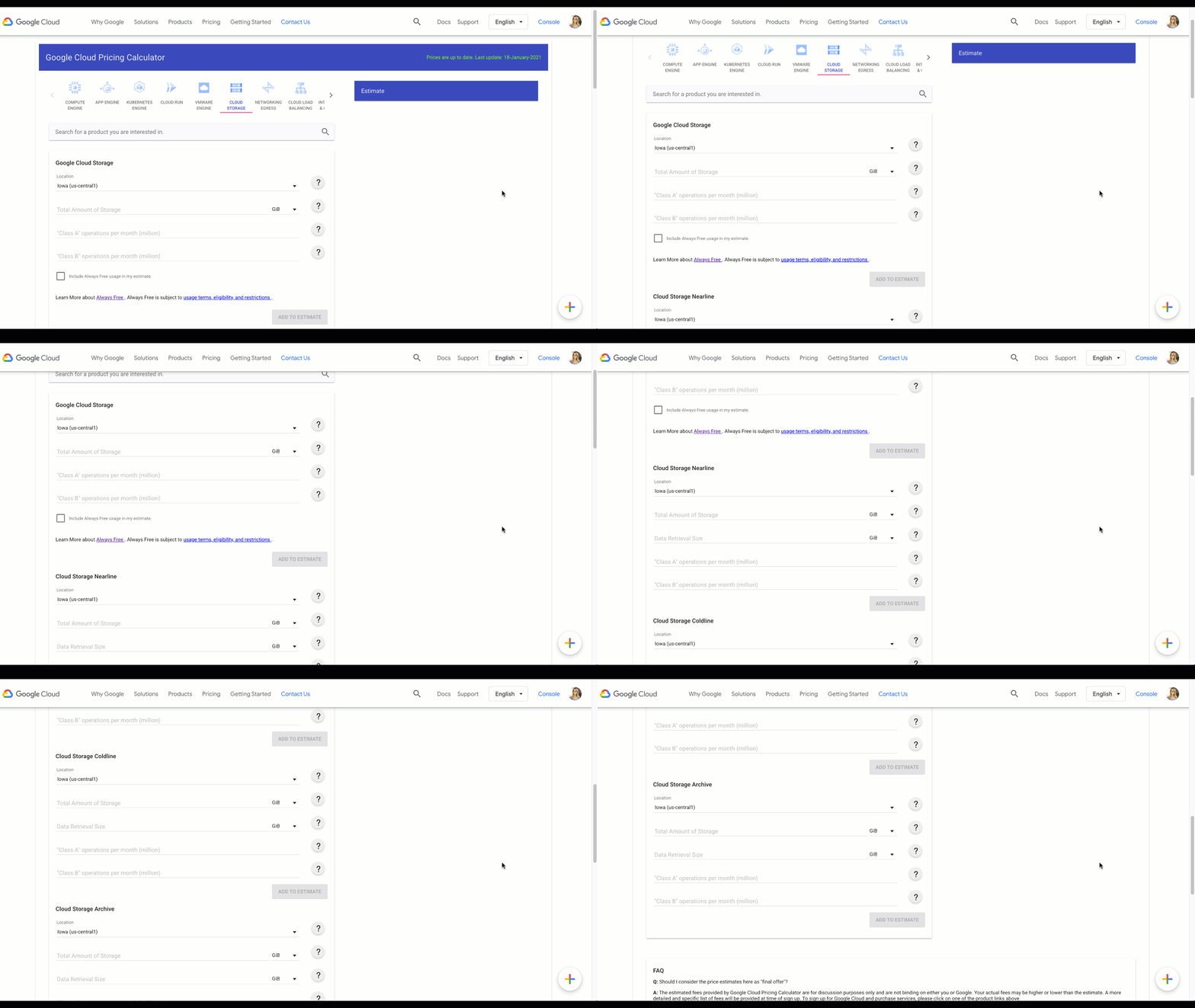
If you’d rather listen to this as a podcast, check out Google Cloud Reader. So far, we’ve talked a lot about how to use Cloud Storage—from managing data to optimizing performance, uploading, downloading, and buckets. But there’s one important topic that we haven’t talked about: the price tag.Analogy time! I’ve found that having a grocery list keeps me from overspending at the store (even if I’m shopping on an empty stomach) and this kind of budget planning comes in handy for Cloud Storage, too. Instead of snack specifics, you’ll need other information, but the same principles apply: As a general rule, it’s a good idea to predict and track your data usage so you can anticipate your monthly costs. Details in the documentation, and below.Let’s get to it.Pricing overviewTo start, it’s good to understand how pricing is broken down. For Cloud Storage, pricing is a compilation of four components:Data Storage refers to the amount of data stored in your buckets, and the rates vary depending on the storage class of your data, and location of your buckets.Network Usage is the amount of data read from or moved between your buckets.Operations Usage are the actions you take in Cloud Storage, like listing the objects in your buckets, for example.Retrieval and Early Deletion fees are only applicable for data stored in the less-frequently accessed storage Classes: Nearline, Coldline, and Archive.Each of these components has its own pricing tables that show cost based on factors such as region and operation type, which means that each company’s total cost is going to be based upon its specific requirements. So as much as I’d like to tell you exactly what your bottom line will be in this blog post, I can’t. But let’s focus on what we *can* accomplish in this post, and that’s a high level overview of the various costs and tools you can use to manage them!Pricing calculatorAllow me to be the first to introduce you to your budgeting best friend, the Google Cloud pricing calculator! I’ll walk you through the different sections so you’re ready to go when the time comes to enter your own information.Data storageData storage costs apply to the at-rest storing of your data in Cloud Storage. For a quick refresher, “at rest” means that the data is physically on the disk itself, and not somewhere in transit throughout the network, or only temporarily housed there. For another quick refresher, we’ve got 4 types of storage class: Standard, Nearline, Coldline, and Archive.Standard Storage is appropriate for storing data that is frequently accessed, such as serving website content, interactive workloads, or data supporting mobile and gaming applications. For standard storage, the monthly cost is the only cost you need to plan for.However, for the other three storage types, you’ll want to consider the minimum storage duration of that data, as well as any retrieval costs.For example, Coldline Storage has a minimum storage duration of 90 days, and a retrieval cost of, say, two pennies. So the cheaper monthly cost is completely worth it if you only want to access this data twice a year. If you find yourself accessing or updating the data every week, you’ll end up spending more money than if you had selected Standard Storage to begin with. So that’s something to consider when setting things up.Network costsWhen discussing network costs, we need to distinguish between egress and ingress:Egress represents data sent from Cloud Storage, like when reading data.Ingress represents data sent to Cloud Storage, like when writing data.Important note: Network ingress is always free.For network egress, there are three categories to consider:First, when that network egress is moving or copying data to other Cloud Storage buckets, or when other Google Cloud services access that data. This is considered “network egress within Google Cloud” and is free within regions, such as reading data in a US-EAST1 bucket into a US BigQuery dataset. Pricing then applies for egress between regions or across continents.Second, there’s “specialty network services,” which is when you use certain Google Cloud network products—such as Cloud CDN or Cloud Interconnect—egress pricing is based on their pricing tables. All other egress is considered to be “general network usage” and is billed based upon which continent the data is traveling to.Operations usageAn operation is an action that makes changes to, or retrieves information about buckets and objects in Cloud Storage. Operations are divided into three categories: Class A, Class B, and free. For a full list of the operations that fall into each class, check the documentation. As a brief overview:Class A includes creating storage buckets and objects. Class B includes retrieving storage objects. Free operations are primarily deletions.Early retrieval and deletion feesBecause Nearline Storage, Coldline Storage, and Archive Storage are intended for storing infrequently accessed data, there are additional costs associated with retrieval, and minimum storage durations. But more about that in the documentation.Closing out!Stay tuned for more posts on making the most of Cloud Storage.Learn more about your storage options in Cloud Storage Bytes. If you want to know more about pricing, check out the documentation for the most up to date information for your particular use case, more examples, and tutorials.Related ArticleServing up data from Cloud StorageWhen it comes to the cloud, there’s more than one way to serve a file. We’ll walk you through all the ways to serve data from Cloud Stora…Read Article
Quelle: Google Cloud Platform