Compute Engine explained: Scheduling the OS patch management service

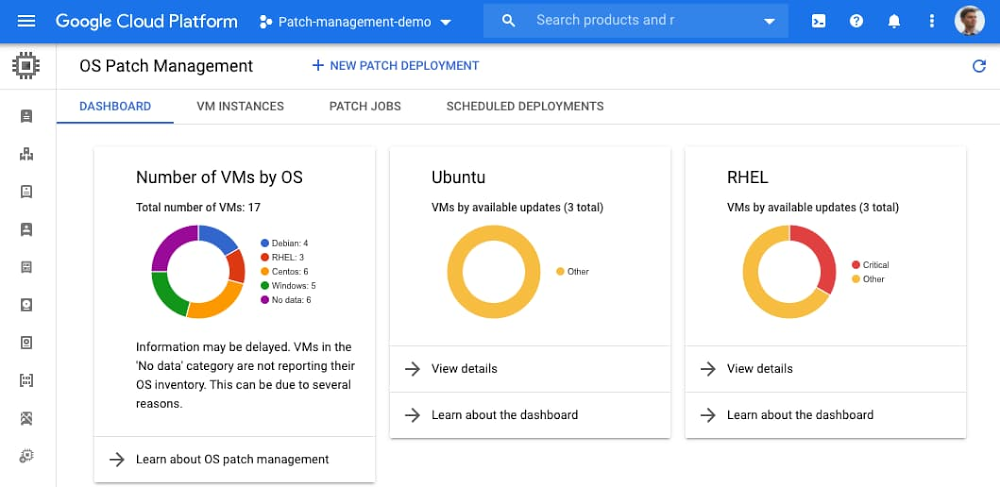
Last year, we introduced the OS patch management service to protect your running Compute Engine VMs against defects and vulnerabilities. The service makes patching Linux and Windows VMs with the latest OS upgrades simple, scalable and effective. In this blog, we share a step-by-step guide on how to set up a project with a schedule to automatically patch filtered VM instances, resolve issues if an agent is not detected, and view an overview of patch compliance across your VM fleet.Getting startedImagine an example project with several VM instances hosting a mythical web service. You want to automatically keep the instances updated with the latest critical fixes and security updates against malicious software. You have a production fleet and a development fleet of machines for which you want to apply updates using different schedules. First, enable the service by navigating to GCE > OS Patch Management in the Google Cloud Console. Alternatively, you can also enable Cloud OS Config API and Container Analysis API through the Google Cloud Marketplace, or gcloud:Note that the OS Config agent is most likely already installed on the VM instances and just needs to be enabled via project metadata keys:After the agent collects data across the VM fleet, this data is then displayed on the patch compliance dashboard, which shows the state across all your VMs and operating systems, and displays a bird eye’s view of your patch compliance:You can now see some VM instances that you might like to patch more frequently, for example the CentOS and Red Hat Enterprise Linux (RHEL) fleet. Creating a patch deploymentYou can then click the New Patch Deployment at the top of the screen and walk through the steps to create a patch deployment for the target VMs, each with specific patch configurations and scheduling options.In the Target VMs section, you can use VM Instance name prefixes and labels to target only the VM instances with labels that start with a certain prefix. More instance filtering options are available, including zonal and combinations of label groups.In the Patch config option, you can select to patch RHEL, CentOS and Windows with critical and security patches, or specify exact Microsoft Knowledge Base (KB) numbers and packages to install. You can also exclude specific packages from being installed in the ‘Exclude’ fields.Finally, you can schedule the patch job. For example, here’s how to run the job every second Tuesday of the month for a maximum duration (three-hour maintenance window), from 11 AM to 2PM:After the patch job runs, you can see the result of the installed patches. This information is reported on the compliance dashboard and the VM instances tab:Patch your Compute Engine VMs todayTo learn more about the OS patch management service on Compute Engine including automating patch deployment, visit our documentation page.Related ArticleProtect your running VMs with new OS patch management serviceNew OS patch management service protects your Compute Engine VMsRead Article
Quelle: Google Cloud Platform

Migrating data, technology and people to Google Cloud

Editor’s note: Bukalapak, an ecommerce company based in Jakarta, is one of Indonesia’s largest businesses. As their platform grew to serve over 100 million customers and 12 million merchants, they needed a solution that would reliably and securely scale to handle millions of transactions a day. Here, they discuss their migration to Google Cloud and the value added from its managed services.Similar to many other enterprises, Bukalapak’s ecommerce platform did not originate in the cloud. It was initially built leveraging on-premises technologies that worked quite well at the beginning. However, as our business grew—processing over 2 million transactions per day and supporting 100 million customers—it became challenging to keep up with the necessary scale and availability needs. It wasn’t uncommon to see traffic spikes following promotional events, which were frequent. Our infrastructure and overall architecture, however, just wasn’t designed to handle this scale of demand. It was clear we needed a new way to support the success of the business, a way that would allow us to scale to meet fast-growing demand, while providing the best experience to our customers, all without overburdening our team. This led us to implement significant architectural changes, and consider a migration to the cloud.Choosing Google CloudGiven that this migration would be a large and complex endeavor, we wanted a partner in this journey, not just a vendor. We started by evaluating the product and services portfolio of potential providers, along with their ability to innovate and solve cutting-edge problems. With our very limited experience in the cloud, it was critical to have an experienced professional services team that could effectively guide and support us throughout the migration journey. We also evaluated the overall cost and the availability of data centers in Indonesia that would allow us to comply with government requirements for financial products. Finally, we needed to plan for how we would attract and retain talent, so we looked at the degree of adoption across the providers across Southeast Asia, and specifically Indonesia. After careful consideration across these areas, Google Cloud was the right choice for us.Embarking on the cloud migrationOur on-premises deployment included over 160 relational and NoSQL databases, We also maintained a Kubernetes cluster of over 1,000 nodes and over 30,000 cores, running 550 production microservices and one large monolith application. To address the large amount of technical debt our platform had, we decided against a lift-and-shift approach. Instead, we spent a good deal of time refactoring our services, particularly our monolith application (a.k.a., the mothership), and partitioning our databases. Enhancing our monitoring and alerting, deployment tooling, and testing frameworks were critical to improve the quality of our software, development and release processes, and performance and incident management. We also invested heavily in automation, moving away from manual testing to integration testing, API testing and front-end testing. Adopting the toolings and best practices of DevOps, MLOps and ChatOps increased our engineering velocity and improved the quality of our products and services. For a team that had very limited cloud experience, it was clear early on that this was not just a technology migration. It involved a cultural migration as well, and we wanted to ensure our team could perform the migration while gaining the skill set and experience needed to maintain and develop cloud-based applications. We started by training a smaller team, which took on the task of migrating our first services. Incrementally, we worked on expanding the training, and looping in more and more engineers in the migration efforts. As more engineering teams got involved, we paired them with one of the engineers who joined the migration early on and acted as a coach. This approach allowed us to transfer knowledge and roll out best practices, incrementally but surely, across the entire organization. We took a multi-step approach for the migration. We started by focusing on the cloud foundation work, introducing automation and new technologies like Ansible and Terraform. We also invested heavily in establishing a strong security foundation, onboarding WAF and Anti-DDoS, domain threat detection, network scanning, and image hardening tools, to name a few. From there, we started to migrate the smaller, simpler services and worked our way up to the more complex. That helped the team gain experience over time while managing risk appropriately. In the end, we successfully completed the migration in just 18 months, with very minimal downtime.  Managed services for greater peace of mindOur team selected Cloud SQL early on as the fully managed service for most of our MySQL and PostgreSQL databases. We appreciated how easy Cloud SQL made it to manage and maintain our databases. With just a few simple API calls, we could quickly set up a new instance or read replica. Auto-failovers and auto-increasing disk size ensured we could run reliably without a heavy operational burden. In addition to Cloud SQL, we’ve now been able to integrate across the other Google Cloud data services, including BigQuery, Data Studio, Pub/Sub, and Dataflow. These services have been instrumental in helping us process, store, and gain insights from a massive amount of data. That in turn allowed us to better understand our customers and consistently find new opportunities to make improvements on their behalf.Google Cloud’s managed services give a greater peace of mind. Our team spends less time on maintenance and operations. Instead, we have more time and resources to focus on building products and solving problems related to our core business. Our engineering velocity has increased, and our team has access to Google’s cutting-edge technology, enabling us to solve problems more efficiently. In addition, our platform now has higher uptime, and can scale with ease to keep up with unpredictable and growing demand. We also were able to improve the overall security of our platform and now have a standardized security model that can easily be implemented for new applications. The larger impact has been on what our lean infrastructure team is now able to accomplish. Migrating to Google Cloud gave us the strategic and competitive advantages we were looking for. Both throughout the migration and now that we’re running in production, Google Cloud has been a great partner to us. The Google Cloud team put a lot of effort into understanding what we needed to be successful, and advocating for our needs, often connecting us to product teams or experts from others in the organization. Their desire to go the extra mile on behalf of their customers made our experience positive and ultimately made our cloud migration successful.Learn more about Bukalapak and how you can migrate to Google Cloud managed databases.Related ArticleTo run or not to run a database on Kubernetes: What to considerIt can be a challenge to run a database in a distributed container environment like Kubernetes. Try these tips and best practices.Read Article
Quelle: Google Cloud Platform
4 best practices for ensuring privacy and security of your data in Cloud Storage

Cloud storage enables organizations to reduce costs and operational burden, scale faster, and unlock other cloud computing benefits. At the same time, they must also ensure they meet privacy and security requirements to restrict access and protect sensitive information. Security is a common concern we hear from companies as they move their data to the cloud, and it’s a top priority for all our products. Cloud Storage offers simple, reliable, and cost-effective storage and retrieval of any amount of data at any time, with built-in security capabilities such as encryption in transit and at rest and a range of encryption key management options, including Google-managed, customer-supplied, customer-managed and hardware security modules. Google has one of the largest private networks in the world, minimizing exposure of your data to the public internet when you use Cloud Storage. Best practices for securing your data with Cloud StorageSecuring enterprise storage data requires planning ahead to protect your data from future threats and new challenges. Beyond the fundamentals, Cloud Storage offers several security features, such as uniform bucket-level access, service account HMAC keys, IAM conditions, Delegation tokens, and V4 signatures. We wanted to share some security best practices for using these features to help secure and protect your data at scale: #1: Use org policies to centralize control and define compliance boundariesCloud Storage, just like Google Cloud, follows a resource hierarchy. Buckets hold objects, which are associated with projects, which are then tied to organizations. You can also use folders to further separate project resources. Org policies are settings that you can configure at the org, folder, or project level to enforce service-specific behaviors. Here are two org policies we recommend enabling: Domain-restricted sharing—This policy prevents content from being shared with people outside your organization. For example, if you tried to make the contents of a bucket available to the public internet, this policy would block that operation. Uniform bucket-level access—This policy simplifies permissions and helps manage access control at scale. With this policy, all newly created buckets have uniform access control configured at the bucket level governing access for all the underlying objects. #2: Consider using Cloud IAM to simplify access control  Cloud Storage offers two systems for granting permissions to your buckets and objects: Cloud IAM and Access Control Lists (ACLs). For someone to access a resource, only one of these systems needs to grant permissions. ACLs are object-level and grant access to individual objects. As the number of objects in a bucket increases, so does the overhead required to manage individual ACLs. It becomes difficult to assess how secure all the objects are within a single bucket. Imagine having to iterate across millions of objects to see if a single user has the correct access. We recommend using Cloud IAM to control access to your resources. Cloud IAM enables a Google Cloud wide, platform centric, uniform mechanism to manage access control for your Cloud Storage data. When you enable uniform bucket-level access control, object ACLs are disallowed, and Cloud IAM policies  at the bucket level are used to manage access—so permissions granted at a bucket-level automatically apply to all the objects in a bucket.#3: If you can’t use IAM Policies, consider other alternatives to ACLs We recognize that sometimes our customers continue to use ACLs for different reasons, such as multi-cloud architectures or sharing an object with an individual user. However, we don’t recommend putting end users on object ACLs. Consider these alternatives instead: Signed URLs—Signed URLs allow you to delegate time-limited access to your Cloud Storage resources. When you generate a signed URL, its query string contains authentication information tied to an account with access (e.g. a service account). For example, you could send a URL to someone allowing them to access a document, read it,  with access revoked after one week. Separate buckets—Audit your buckets and look for access patterns. If you notice that a group of objects all share the same object ACL set, consider moving them into a separate bucket so you can control access at the bucket-level. IAM conditions—If your app uses shared prefixes in object naming, you could also use IAM Conditions to shard access based on those prefixes.Delegation Tokens—You can use STS Tokens to grant time-limited access to Cloud Storage buckets and shared prefixes. #4 Use HMAC keys for service accounts, not user accounts A hash-based message authentication key (HMAC key) is a type of credential used to create signatures included in requests to Cloud Storage. In general, we suggest using HMAC keys for service accounts rather than user accounts. This helps eliminate the security and privacy implications of relying on accounts held by individual users. It also reduces the risk of service access outages as user accounts could be disabled when a user leaves a project or company.  To further improve security, we also recommend: Regularly changing your keys as part of a key rotation policy.Granting service accounts the minimum access to accomplish a task (i.e. the principle of least privilege). Setting reasonable expiration times if you’re still using V2 signatures (or migrating to V4 signatures, which automatically enforces a maximum one-week time limit). To learn more about Cloud Storage and more ways to keep your data safe and compliant, check out our access control documentation, and watch our breakout session from Cloud Next ‘20: OnAir.
Quelle: Google Cloud Platform






