Google Cloud and AVEVA’s OSIsoft serve the industrial sector a new flavor of PI

Across the industrial sector, many digital enablers and disruptive technologies are transforming businesses to be more efficient, profitable, nimble, and secure: smart factories with connected machines, the rise of the industrial internet of things (IIoT), proliferation of sensors and data, and new cloud strategies, to name a few.Our work with the PI System is designed to help industrial companies modernize their data and take it beyond the operational space to Google Cloud, deriving more insights and business value. Thanks to our partnership with AMD and OSIsoft, now part of AVEVA, customers can effectively, safely, and easily deploy a fully functioning PI System to Google Cloud. Together, we assist customers along that transformational journey through the launch of GCP deployment scripts for PI Core.The PI System is the market-leading data management platform for industrial operations in essential industries such as energy, mining, oil and gas, utilities, pharmaceutical, facilities, manufacturing, and more. The PI System automatically captures sensor data from every relevant source, refines and contextualizes the data, and delivers it to a broad ecosystem of people, tools, and applications for analysis and strategic planning. It also serves as a single source of truth for consistent decision making.With the PI System, industrial companies can generate insights from their data, including:Analyzing seasonal trends  Determining if utilities are meeting the demands of production  Comparing the performance of different lots of raw material  Determining when maintenance is required on equipment  Optimizing the utilization or performance of a production line  The new deployment scripts are a natural addition to PI Integrator for Business Analytics, which integrates Google Cloud with PI Core, the on-premises portion of the PI System. PI Integrator for Business Analytics can deliver critical operational data directly to Google Cloud destinations like Cloud Storage, BigQuery, and Pub/Sub. It can also be deployed either on-prem or on Google Cloud.The solution allows customers to take time-series data from one or many of their PI Core deployments and move it onto BigQuery, Google Cloud’s enterprise data warehouse for analytics. Customers can take advantage of exabyte-scale storage and petabyte-scale SQL queries in this high-speed, in-memory BI engine, enabling cloud-based artificial intelligence (AI) and machine learning (ML) tools that provide deep insights like anomaly detection and predictive maintenance from that data.Through our partnership, PI Core-based solutions for industrial customers are further protected by Google Cloud’s robust security features, like encrypting cloud data at rest by default, that keep data safe and more secure. What’s more, PI Core is aligned with real-time mission-critical industrial applications, avoiding delays in time-sensitive process automation or discrete manufacturing processes. Serving a new slice of PI (System) on Google CloudGCP deployment scripts for PI Core are the latest achievement in our partnership. We developed these deployment scripts for PI Core on Google Cloud using Infrastructure as Code (IaC) with PowerShell and Terraform technologies. With PI Core on Google Cloud, customers can generate business insights through the power of Google Cloud’s Smart Data Platform with AI/ML combined with other contextualized data. The scripts accelerate an industrial customer’s digital transformation and support quick and iterative testing and prototyping. They’re also designed for customers who are considering moving their on-prem system to Google Cloud, or customers who would like to deploy PI Core as an aggregation system to bring diverse on-prem data from multiple PI Systems into one place.Click to enlargeThese deployment scripts automate the provision of the PI Core components running on Google Cloud N2D VM instances powered by hardware such as 2nd Gen AMD EPYC™ processors. GCP deployment scripts for PI Core include recommended practices for both platforms by delivering automation to deploy test and development environments.  The scripts are offered in non-high availability (non-HA) configuration, with an HA version providing failover capabilities for PI Core coming soon. These scripts are open-sourced, and the non-HA version is now available on Google’s GitHub.By running PI Core on Google Cloud, the industrial sector has an easy and efficient path to business insights, generating more value from their collected data in a safe and managed environment. Enabling PI Core deployment on Google Cloud through scripts is just one of the solutions that we’re building together. Stay tuned for more updates.Learn more about PI Core and the overall PI System for the industrial sector. Learn more about Google Cloud instances powered by AMD. Ready to get started with our deployment scripts? Visit the GCP deployment scripts for PI Core on our Github.Related ArticleCOVID-19 reshapes manufacturing landscape, new Google Cloud findings showAccording to our new research released today, manufacturers around the world have started to revamp their operating models and supply cha…Read Article
Quelle: Google Cloud Platform

Get Involved with Docker

Every day, hundreds of passionate Docker users around the world contribute to Docker. Whether you are just getting started or are an expert in your field, there are many ways to get involved and start contributing to Docker. If you’re into technical writing, you can easily publish and/or edit articles in docs.docker.com. If you’re more into code contribution, there are dozens of open source Docker projects you can dive into. Or if you’re just interested in sharing knowledge and spreading Docker goodness, you can organize a local meetup or a virtual workshop on our community events page. 

There are literally countless ways one can contribute to Docker. This makes it sometimes a bit difficult to find the right project or activity that maps to your interests and level of Docker expertise. That’s why we’ve been working to make it easier for anyone to learn more about ways to contribute and find the right project or activity. To this end, we created a community-driven website that aims to make it easier than ever to navigate the many different contribution opportunities that exist at Docker, and ultimately, to find the right contribution pathway to get started. 

The website is entirely built on top of GitHub, is editable by the community and is organized into six distinct sections, from technical to non-technical contributions. 

We also put emphasis on “community events” which are central in our efforts to engage more contributors. You’ll find lots of tools and resources that will be continuously updated, including event handbooks. These handbooks are specifically designed with step-by-step guidance on how to run a workshop with a full list of topics to cover, e.g. “Docker for Node.JS developers” workshop.  Again, the website is entirely editable by anyone with a GitHub account so if you have content to share, a bug to flag or a recommendation to make, just make a pull request.

This is an experimental website: we’re still building out sections and figuring out the right format and structure. We look forward to seeing it evolve and improve over time with the contributions from the community to become a very useful resource for the Docker community.

A *huge* hat tip to Docker Captain Ajeet Raina for driving this initiative forward!

References and links:

Get Involved with Docker website How to contribute to the Get Involved siteCommunity Leaders Handbooks
The post Get Involved with Docker appeared first on Docker Blog.
Quelle: https://blog.docker.com/feed/

New flexibility: Run your Dataprep jobs with BigQuery or Dataflow

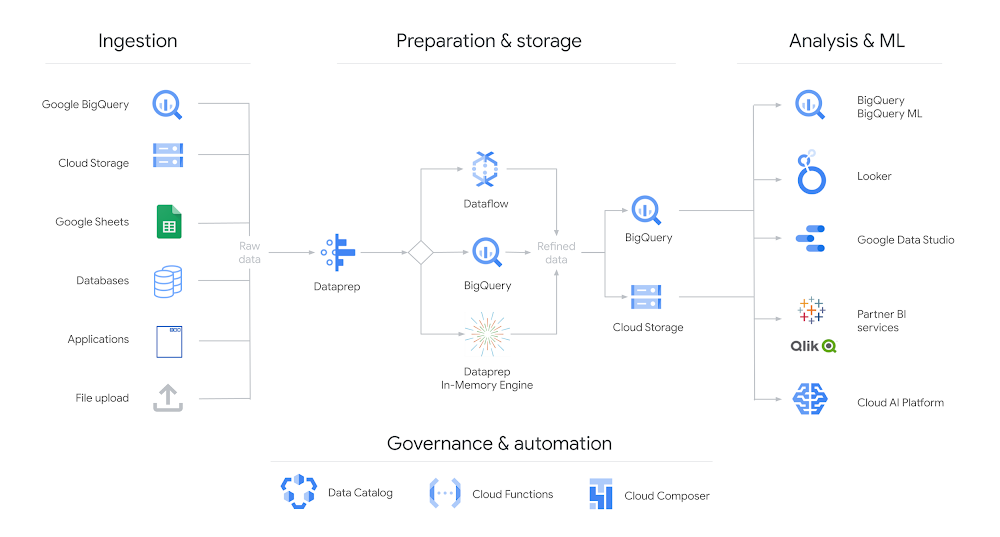
Cloud Dataprep by Trifacta is Google Cloud’s intelligent data service for visually exploring, cleaning, and preparing structured and unstructured data for analytics and machine learning. Due to its serverless architecture, Dataprep does not need any infrastructure to deploy or manage, and is fully scalable.Designed and built through a partnership between Google and Trifacta – the data engineering  platform, Dataprep allows users of all skill levels to prepare data.  Dataprep has a graphical user interface so there is no need to write code to create a pipeline. Additionally, each UI input automatically predicts and suggests the next step for data transformation, making it easy and flexible for the end user. After making all desired transformations, Dataprep users can build repeatable data pipelines that can be executed at scale using the processing power of Google Cloud.Introducing Dataprep BigQuery pushdownSpeaking of processing power, today we’re excited to announce a new addition to Dataprep – BigQuery pushdown.  BigQuery pushdown gives you the flexibility to run jobs using either BigQuery or Dataflow.  If you select BigQuery  then Dataprep can automatically determine if data pipelines can be partially or fully translated in a BigQuery SQL statement.  Any portions of the pipeline that cannot be run in BigQuery are executed in Dataflow.  Utilizing the power of BigQuery results in highly efficient data transformations, especially for manipulations such as filters, joins, unions, and aggregations. Dataprep BigQuery pushdown leads to better performance, optimized costs, and increased security with IAM and OAuth support.Dataprep leverages BigQuery or Dataflow to wrangle data (click to enlarge)In today’s data focused world, the modern equivalent to ETL (Extract, Transform, Load) is ELT (Extract, Load, Transform). The ELT framework enables data savvy business users to transform data rather than relying on IT teams to both transform and load data. With ELT, technical teams can handle the logistics of moving and managing data in BigQuery, while business users can leverage the power of SQL for intermediate transformations. This reduces cycles between the technical and business teams for finalizing data transformation requirements, and reduces the burden on the technical teams. Dataprep BigQuery pushdown complements the ELT framework helping data savvy business users and the technically focused IT teams with data transformation and data preparation tasks.In summary, the new BigQuery pushdown on Dataprep enables faster data transformations, optimized costs, and increased flexibility. You can learn more about Dataprep BigQuery pushdown and get started today by trying Dataprep on the Google Cloud Marketplace.
Quelle: Google Cloud Platform

Creating a serverless pipeline for real-time market data

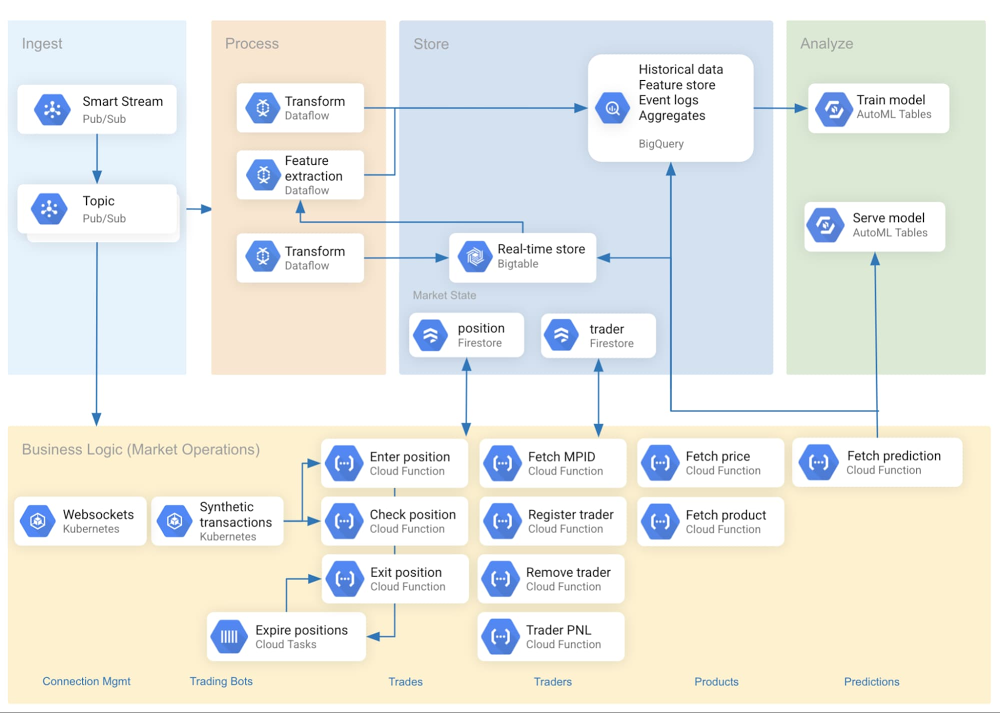
Editor’s note: This is the second part in our special series on working with market data in Google Cloud. This post highlights how we leveraged serverless components to build a flexible data ingestion pipeline. Check out the first post on visualizing real-time market data in the cloud.Capital markets firms must rapidly extract insights from unbounded real-time datasets. A firm’s market data pipelines should weigh the end user’s data access requirements as a central design consideration, but oftentimes the rigidity of delivery mechanisms and analytical tools block this goal. Serverless data offerings can solve this problem by removing operational friction when introducing a new, well-suited tool. This makes it simple for one data pipeline to serve separate user goals—say, one for training a real-time machine learning model and another for analyzing historical data. With a serverless data pipeline, capital markets firms can focus on insights, not infrastructure, and stay ahead in a fast-moving industry. In this post, you’ll see best practices for real-time data ingestion using CME Group’s Smart Stream top-of-book (ToB) JSON feed. The reference architecture considers data usage patterns and schema when selecting storage and transport options. It also encapsulates business logic in Cloud Functions to increase the speed of development and to offload operational complexities. These patterns and designs can be applied to a wide variety of use cases.Figure 1 depicts the ingestion pipeline’s reference architecture.Figure 1: Reference architectureHow we set up real-time data ingestionThe source of the real-time data we used is Smart Stream, a service available on Google Cloud from CME Group. The data originates with the CME Globex trading platform as a multicast stream running over UDP. The instrument price data is forwarded over an interconnect to different Pub/Sub topics, each corresponding to a single product, like silver or orange juice concentrate futures.Pub/Sub is serverless and tightly integrated with other Google Cloud services. It’s also fully managed by Google, alleviating users from many scaling, planning, and reliability concerns. Google provides open-source Dataflow templates to ingest data from Pub/Sub to various sinks such as BigQuery and Cloud Storage. Bigtable was leveraged as a real-time data store, serving most recent data and features to a prediction endpoint. (The endpoint passes this data to machine learning models hosted on Google Cloud’s AI Platform). In parallel, we use BigQuery as a scalable analytics warehouse. Pub/Sub data was streamed to both sinks with separate Dataflow jobs.Figure 2 is a shell snippet launches a Dataflow job with a Google-provided template for PubSub-to-BigQuery pipelines:Figure 2: Launching a Dataflow template to ingest messages from Pub/Sub to BigQueryFigure 3 depicts a Dataflow pipeline with three input Pub/Sub topics (one per trading instrument) and Bigtable as a sink:Figure 3: Dataflow job graphThe class in Figure 4 defines an Apache Beam pipeline to ingest data from a single topic (i.e., product code) and write to Bigtable:Figure 4: Apache Beam ingestion pipeline to BigtableAt first glance, the app’s predictive models and web front-end charts are similar in their demand for data freshness. On further inspection, however, a difference emerges—the charts can use the Smart Stream price data directly without an intervening data store. So for front-end delivery, we settled on Pub/Sub via websockets.Using Pub/Sub with serverless ingestion components offered architectural flexibility and removed operational complexity as a constraint. Data coming from one Pub/Sub topic can be stored in Bigtable for machine learning or in BigQuery for analytics, in addition to being sent directly over websockets to power rapidly changing visualizations.Storage and schema considerationsIdeally, the time spent managing data is minimal compared to the time spent using data. If schema design and storage architecture is executed properly, users will feel that the data is working for them, rather than them working for the data.Row key design is critical to any Bigtable pipeline. Our key concatenates a product symbol with a reverse timestamp, which is optimized for our access pattern (“fetch N most recent records”) while avoiding hotspotting. In order to reverse the timestamp, we subtract it from the programming language’s maximum value for long integers (such as Java’s java.lang.Long.MAX_VALUE). This forms the key: <SYMBOL>#<INVERTED_TIMESTAMP>. A product code’s most recent events appear at the start of the table, speeding up the query response time. This approach accommodates our primary access pattern (which queries multiple recent product symbols)—but may yield poor performance for others. A post on Bigtable schema design for time series data has additional concepts, patterns and examples.Figure 5 shows a sample data point ingested into Bigtable:Figure 5: Representation of a market data record within BigtableWhile Bigtable is well-suited to deliver low-latency data to machine learning models, we also needed a more analytically tuned query engine for longer-lookback insights. BigQuery was a natural fit because of its serverless and scalable nature, as well as its integration with tools such as AutoML. When designing, we considered three options for preparing the BigQuery data for visualization as classic OHLC “candlesticks.” First, we could store the nested Pub/Sub JSON into BigQuery and write a complex SQL query to unnest and aggregate. Second, we could write a view that unnests, and then write a simpler SQL query that aggregates (without unnesting). Third, we could develop and run a Dataflow job to unnest Pub/Sub records into a “flat” format for storage in BigQuery, and could then aggregate with a simple SQL query. Though the third option may represent a superior design longer term, time constraints steered us towards the second option. The BigQuery view was simple to set up, and the team got productive quickly when querying against the flattened schema. Thanks to a DATE partition filter, the SQL view definition scans only the most recent day from the underlying table storing the quotes. This dramatically improves performance of the queries against the view.   A sample of the data transformation and views for this specific chart using the second methodology are shown in Figures 6 and 7.Figure 6: SQL view definition to flatten original source recordsFigure 7: SQL view definition that generates OHLC bars (“candlesticks”)Because both Bigtable and BigQuery are serverless, the maintenance of each storage solution is minimal, and more time can be spent deriving and delivering value from the data, rather than capacity planning around procurement of storage arrays and operational complexities.Market data microservicesCloud Functions offer developers two primary benefits. First, they provide the ability to bypass non-differentiating low-level implementation details in favor of business-specific code. Second, they support flexible use of data by encapsulating business logic outside of the database. In our pipeline, we accordingly used Cloud Functions for isolated, task-specific code chunks. One example is our pipeline’s Fetch Predictionfunction, which retrieves trade records from Bigtable and extracts first-order features (mean, sum, max, etc) for input to the machine learning model. This enables rapid predictions that are used by the bots to make algorithmic trading decisions in near real-time. This is demonstrated in Figure 8.Figure 8: Python routine to fetch predictions at runtimeFetch Candles is a Cloud Function that fetches a recent price summary from BigQuery detailing the opening, closing, highest and lowest price observed for each minute. To improve the request-response performance, we enabled HTTP(s) load balancing with a serverless network endpoint group for our app, and then optimized delivery with Cloud CDN. Configured this way, Fetch Candles will query BigQuery only for the first request for a given minute and product code. Subsequent requests will be delivered from the Cloud CDN cache, until the maximum cache TTL of one minute is reached. This can significantly reduce the overall volume of query executions as web client traffic scales up. Since the data is in a lookback window, there’s no functional necessity for BigQuery to calculate the aggregates more than once per individual duration.Figure 9: OHLC “candlestick” chart visualizationBy enabling a microservices architecture, Cloud Functions allowed each developer to develop in their preferred language, and to develop, test, and debug individual functions in isolation.Figure 10 shows an inventory of the principal functions used in our market data pipelines.Figure 10: Sample inventory of Cloud FunctionsMany of these functions provide input to a machine learning model, while others fetch data from  BigQuery for visualizations of trader performance in a real-time Profit/Loss ledger.ConclusionA data pipeline built from serverless components allows capital markets firms to focus on developing valuable insights and offerings, and not on managing infrastructure. In a serverless environment, the end users’ data access patterns can strongly influence the data pipeline architecture and schema design. This, in conjunction with a microservices architecture, minimizes code complexity and reduced coupling. As organizations continue to add data sources and information tools to their operations, using serverless computing models enable them to focus on value-added tasks of using data to make better decisions.Learn more about Google Cloud for financial services.Related ArticleNew white paper: Strengthening operational resilience in financial services by migrating to Google CloudLearn how migrating to Google Cloud can play a critical role in strengthening operational resilience in the financial services sector.Read Article
Quelle: Google Cloud Platform