Compliance with confidence: Introducing Assured Workloads Support

As organizations in regulated industries modernize and adopt cloud technologies, ensuring the security, privacy, and regulatory compliance of their sensitive workloads is an essential part of choosing a cloud provider. Regulated customers have specific compliance needs around data locality and personnel access to customer data. In the US specifically, these are mandated by requirements under the Department of Defense (i.e., IL4), the FBI’s Criminal Justice Information Services Division (CJIS), and the Federal Risk and Authorization Management Program (FedRAMP).Last year, we introduced Assured Workloads (now generally available with additional features in preview) which lets Google Cloud customers easily and quickly create controlled environments in which US data location and US person support controls are enforced. Regulated customers, and the organizations which interact with them, can use this product to support their compliance efforts by:Choosing to store their sensitive workloads in the US only;Ensuring only Google personnel who meet criteria on geographical access location (currently, US only), background checks, and “US Person” status, can support their workload.We understand that these compliance regulations have a significant impact to your organization and safeguarding your business is important to us. Therefore, today, we’re introducing Assured Workloads Supportfor Google Cloud, which is now generally available (GA) to Premium Support customers. Assured Workloads Support is a Value Add Service to Premium Support customers, who will receive Premium Support from a US Person, in a US Location, 24/7. Customers also receive all the key benefits from Premium Support—15-min response time  for P1 cases, issues resolved by customer aware Google Technical Solution Engineers with access to your business systems information, and direct engagement with a named Technical Account Manager (TAM), a trusted technical advisor focused on operational rigor, platform health and architectural stability. We look forward to expanding Assured Workloads Support in other regions beyond the US later this year. Assured Workloads Support for Google Cloud is available for purchase effective January 19th, 2021. Assured Workloads Support is available to customers who purchase the Assured Workloads Premium Subscription and Premium Support. Please connect with your Google Cloud Sales representative to learn more.Related ArticleCompliance without compromise: Introducing Assured Workloads for GovernmentAssured Workloads for Government, currently in Private Beta, can help you serve your government workloads without the compromises of trad…Read Article
Quelle: Google Cloud Platform

Introducing real-time data integration for BigQuery with Cloud Data Fusion

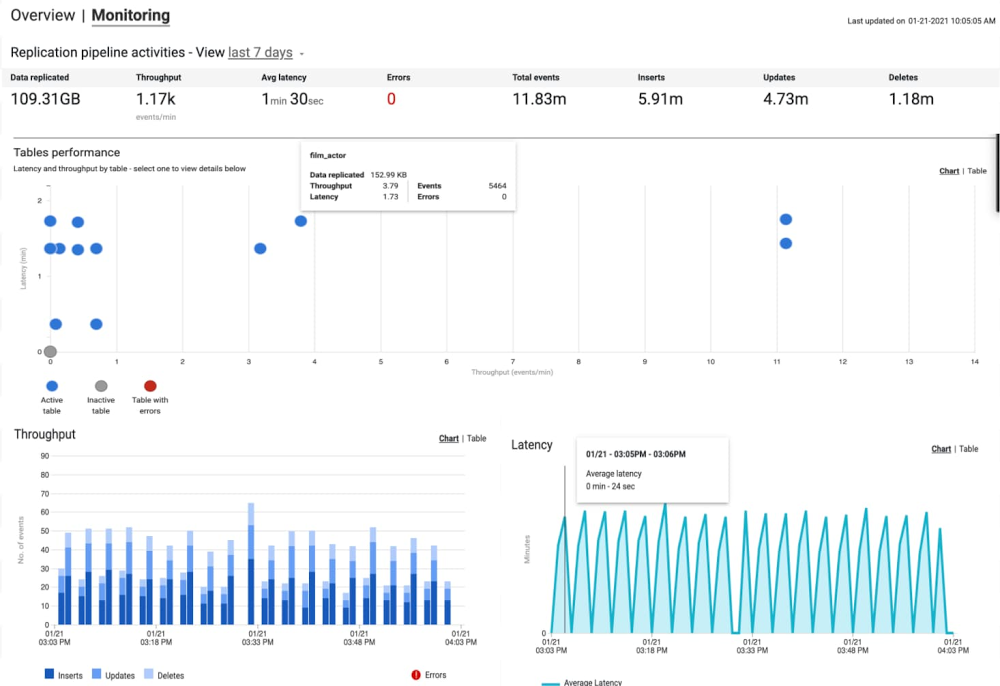
Businesses today have a growing demand for real-time data integration, analysis, and action. More often than not, the valuable data driving these actions—transactional and operational data—is stored either on-prem or in public clouds in traditional relational databases that aren’t suitable for continuous analytics. While old-school migrations or batch ETL loads can achieve the objective of loading data to a data warehouse, these high-latency approaches don’t cut it when it comes to making the accurate decisions based upon the most up-to-date insights. Cloud Data Fusion is a fully managed, cloud-native data integration and ingestion service that helps developers, data engineers, and business analysts alike to efficiently build and manage ETL/ELT jobs. Today we’re announcing the public preview launch of the replication application in Data Fusion that enables low-latency, real-time data replication from transactional and operational databases such as SQL Server and MySQL directly into BigQuery. Let’s take a closer look at the benefits of replication in Data Fusion:Remove technical bottlenecks so even citizen developers can set up replication easilyCloud Data Fusion features a simple, wizard-driven interface that enables even citizen developers such as ETL developers and data analysts to easily set up data replication. This standard, easy-to-use interface eliminates the need for development of complicated, bespoke tools for each type of operational database, thereby enabling self-service, continuous replication of data to BigQuery.Feasibility assessment and actionable recommendationsIt also includes an assessment tool to help identify schema incompatibilities, connectivity issues, and missing features prior to starting replication, then provides corrective actions. This helps users get ahead of potential issues during replication, thereby leading to faster development and iteration. Easily access the latest operational data in real time for analysis within BigQueryChange data capture, or CDC, provides a representation of data that has changed in a stream, allowing computations and processing to focus specifically on only the most recently changed records, thereby minimizing egress toll on sensitive production systems. With this release, Data Fusion now offers log-based replication directly into BigQuery. It integrates with Debezium as the change provider for making CDC logs from various databases available in a common format. It currently includes support for Microsoft SQL Server (which relies upon SQL Server CDC) and MySQL (which relies upon MySQL Binary Log). With support for CDC streams, Google Cloud users have access to the latest data in BigQuery for analysis and action.Enterprise scalability to support high-volume transactional databasesInitial loads of data to BigQuery are supported with zero-downtime snapshot replication to make the data warehouse ready for consuming changes continuously. Once the initial snapshot is done, high-throughput, continuous replication of changes then starts in real-time. End-to-end operational visibilityData Fusion also provides operational dashboards to monitor throughput, latency, and errors in replication jobs. These dashboards provide real-time insights into replication performance. This lets users proactively identify potential bottlenecks, and monitor data delivery SLAs.Take advantage of key Google Cloud features and integrationsReplication is available in all Google Cloud regions supported today for Data Fusion. This launch includes support for Customer-Managed Encryption Keys (CMEK) and VPC-SC. Cloud Data Fusion’s integration within the Google Cloud platform ensures that the highest levels of enterprise security and privacy are observed while making the latest data available in your data warehouse for analytics.Ready to try out replication? Create a new instance of Data Fusion and add the replication app. Don’t forget to bring the getting started guide along for the ride.
Quelle: Google Cloud Platform

How to develop with PyTorch at lightning speed

Over the years, I’ve used a lot of frameworks to build machine learning models. However, it was only until recently that I tried out PyTorch. After going through the intro tutorial, Deep Learning with PyTorch: A 60 Minute Blitz, I started to get the hang of it. With PyTorch support built into Google Cloud, including notebooks and pre-configured VM images, I was able to get started easily.There was one thing that held me back. All of the wonderful flexibility also meant that there were so many ways to do things. How should I load my training and test data? How should I train my model, calculating the loss and logging along the way? I got everything working properly, but I kept wondering if my approach could be improved. I was hoping for a higher level of abstraction that would take care of how to do things, allowing me to focus on solving the problem.I was delighted to discover PyTorch Lightning! Lightning is a lightweight PyTorch wrapper that helps you organize your code and provides utilities for common functions. With Lightning, you can produce standard PyTorch models easily on CPUs, GPUs, and TPUs! Let’s take a closer look at how it works, and how to get started.To introduce PyTorch Lightning, let’s look at some sample code in this blog post from my notebook, Training and Prediction with PyTorch Lightning. The dataset used, from the UCI Machine Learning Repository, consists of measurements returned from underwater sonar signals to metal cylinders and rocks. The model aims to classify which item was found based on the returned signal. Acoustic data has a wide variety of applications, including medical imaging and seismic surveys, and machine learning can help detect patterns in this data.Organizing your notebook code with PyTorch LightningAfter installing Lightning, I started by creating a SonarDataset, inheriting from the standard PyTorch Dataset. This class encapsulates logic for loading, iterating, and transforming data. For example, it maps the raw data, with “R” for rocks and “M” for mines, into 0 and 1. That enables the data to answer the question, “is this a mine?”, a binary classification problem. Here’s a code snippet from that class:Next, I created a SonarDataModule, inheriting from Lightning’s LightningDataModule. This class provides a standard way to split data across training, testing, and validation sets, and then to load each set into a PyTorch DataLoader. Here’s a code snippet of from the setup() method in the SonarDataModule:Finally, I created a SonarModel, inheriting from LightningModule. This class contains the model, as well as methods for each step of the process, such as forward() for prediction, training_step() for computing training loss, and test_step() for calculating accuracy.Training and predicting with your modelLightning’s Trainer class makes training straightforward. It manages details for you such as interfacing with PyTorch DataLoaders; enabling and disabling gradients as needed; invoking callback functions; and dispatching data and computations to appropriate devices.Let’s look at a couple of the methods in the tutorial notebook. First, you instantiate a new trainer, specifying options such as the number of GPUs to use and how long to train. You train your model with fit(), and can run a final evaluation on your test data with test(). A tune() method is also provided to tune hyperparameters.After the training process, you can use standard PyTorch functions to save or predict with your model, for instance:Getting started with LightningGoogle Cloud’s support for PyTorch makes it easy to build models with Lightning. Let’s walk through the steps. First, you’ll want to create a notebook instance using Cloud AI Platform Notebooks. You can select a PyTorch instance that is preloaded with a PyTorch DLVM image, including GPU support if you’d like. Once your notebook instance is provisioned, simply select OPEN JUPYTERLAB to begin.Since PyTorch dependencies are already configured, all you need to do is include one line in your notebook to start using Lightning: !pip install pytorch-lightning.If you’d like to access the sample for this tutorial, you can open a new terminal (File > New > Terminal), and then run git clone https://github.com/GoogleCloudPlatform/ai-platform-samples. You’ll find the sample in ai-platform samples > notebooks > samples > pytorch > lightning.With Lightning, using PyTorch is more accessible than ever before. With best practices and helpful utilities embedded in the framework, you can focus on solving ML problems. Since Lightning produces standard PyTorch code, you’ll be able to leverage Google Cloud’s PyTorch support for developing, training, and serving your models.
Quelle: Google Cloud Platform

Beyond Corp Enterprise: True zero trust architecture for the multicloud

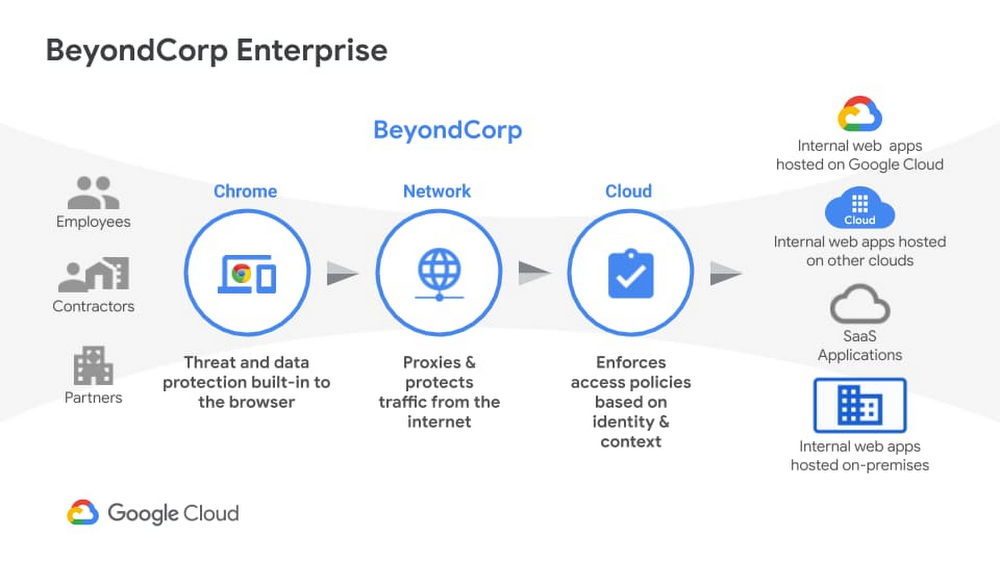
We recently announced the general availability of BeyondCorp Enterprise, Google’s comprehensive zero trust product offering. As we work to democratize zero trust, building a solution to support customers across different environments was top of mind for our team. Google has over a decade of experience managing and securing cloud applications at a global scale and this new offering was developed based on learnings from our experience managing our own enterprise, feedback from customers and partners, as well as informed by leading engineering and security research. We recognize the complexities that come with a zero trust journey and understand that most customers host resources across different cloud providers. With this in mind, BeyondCorp Enterprise was purpose-built as a multicloud solution, enabling customers to securely access resources hosted not only on Google Cloud or on-premises, but also across other clouds such as Azure and Amazon Web Services (AWS). Beyond Corp Enterprise provides context-aware access controls for internal and SaaS applications and cloud resources, and offers integrated threat and data protection without the for a Virtual Private Network (VPN). This solution is hosted on Google’s global network infrastructure and enables elastic-scaling based on use, helping customers manage secure access for different user groups, including employees, contractors or temporary workers, and partners. The diagram below shows the high-level architecture of BeyondCorp Enterprise. As you can see, BeyondCorp Enterprise supports applications and resources hosted on Google Cloud, on other clouds, or on-premises.Click to enlargeSo what does this mean for you and how can BeyondCorp Enterprise help? Google continues to emphasize its commitment for multi-cloud environments with BeyondCorp Enterprise. Customers “live” in a diverse world of different clouds and different vendors and we know it’s unrealistic that customers would have 100 percent of their resources hosted in one provider. That’s why we have been mindful to not only support access to apps on other clouds, but also build integrations with other leading technology vendors so customers can leverage their existing investments. The potential for the zero trust architecture is limitless as our ecosystem is built such that it is easily extensible by security partners, and the rulesets can be enriched to include additional signals like threat and data loss. Using a combination of user and device attributes, BeyondCorp Enterprise uses criteria such as the user’s location when trying to access a resource, the time of day the user is trying to access the resource, or the type of device a user is using to access a resource. BeyondCorp Enterprise also leverages Endpoint Verification in the Chrome Browser to identify the posture of the device accessing an application. These various parameters are used to configure “grant” or “deny” rules and policies, which are then enforced by the cloud Identity Aware Proxy and a combination of other controls.Click to enlargeEnterprise customers who adopt a “best of breed” approach to security will find Google’s approach to zero trust and the BeyondCorp Enterprise architecture complementary to their strategy. As an example, if you use one of our BeyondCorp Alliance partners  as your endpoint detection and response solution or Unified Endpoint Management (UEM) solution, you can also integrate signals from these solutions to incorporate into your policies and protect your resources across your on-premises, Google Cloud, or other clouds. This architecture ensures that you have the autonomy to choose your preferred security vendors.Once secure access is granted, BeyondCorp Enterprise provides threat and data protection capabilities, including the ability to protect SaaS applications and other websites from data loss, data exfiltration, credential theft, malware, and phishing attacks. Because these capabilities are delivered through the Chrome Browser, we can support users on Windows, Mac, Linux, and ChromeOS, again making it easy to meet customers where they are and enable simple deployment and adoption.Many people think zero trust requires a complete overhaul of their environment and would entail installing multiple agents on a computer; but instead, all you need is a web browser. We are excited to bring disruptive innovation to our customers in a way that does not disrupt security operations. rotectionGoogle is a true engineering-driven company. Innovating and solving global-scale problems is at the core of the company’s DNA. Ideas and projects that led to the creation of products that have redefined how people across the world work, such as Gmail, Google Maps, and of course, the Chrome Browser, which also birthed BeyondCorp Enterprise. If you would like to learn more about BeyondCorp Enterprise, visit the product page, register for our upcoming webinar on Feb 23, or contact your Google account team.Related ArticleBeyondCorp Enterprise: Introducing a safer era of computingThe GA of Google’s comprehensive zero trust product offering, BeyondCorp Enterprise, brings this modern, proven technology to organizatio…Read Article
Quelle: Google Cloud Platform