Debugging your Proxyless gRPC service mesh

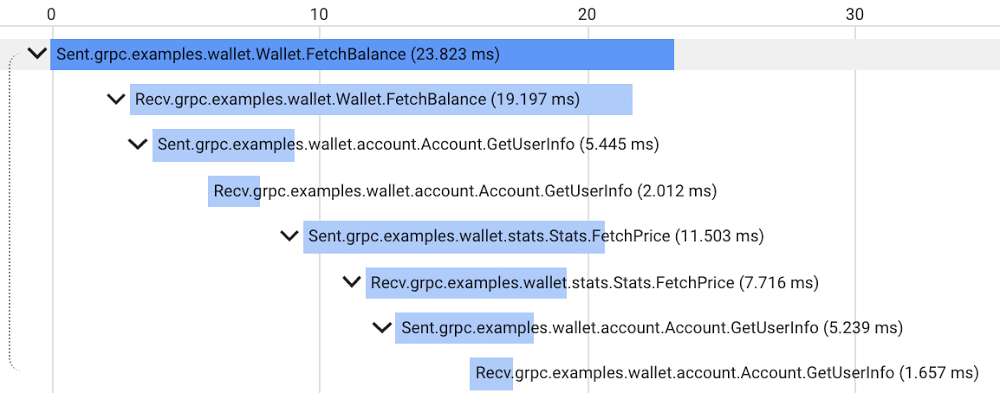
Proxyless gRPC applications in a service mesh now support many of the same features as deployments with a sidecar Envoy proxy, but in the past it has been difficult to get application-level insight into problems with specific nodes in the mesh. Today, we are happy to announce new tools, examples, and documentation to make it easier to debug your Proxyless gRPC applications. Proxyless gRPC now includes an admin API to allow live debugging of nodes in your mesh, and support for the xDS CSDS protocol to dive deeper into per-node control plane configurations to identify and resolve any issues. Further, we provide documentation and sample code illustrating how to add OpenCesus instrumentation to your gRPC clients and servers to send metric and tracing data to Cloud Monitoring and Cloud Trace.As a network library, gRPC provides some predefined admin services to make debugging easier. For example, there is a channel tracing service named Channelz (see gRPC blog). With Channelz, you can access the metrics about the requests going through each channel, like how many RPCs have been sent, how many succeeded or failed, and much more. Each existing admin service is packaged as a separate library, and the documentation of the predefined admin services is usually scattered. It can be time consuming to get the dependency management, module initialization, and library import right for each one of them. Recently, gRPC introduced admin interface APIs, which provide a convenient way to create a gRPC server to expose admin services. With this, any new admin services that you may add in the future are automatically available via the admin interface just by upgrading your gRPC version.Debugging a large service mesh can be a complex task. Unexpected routing behaviors could be due to a misconfiguration, unhealthy backends or issues in the control or data plane. As part of the admin interface API, gRPC can now expose the xDS configuration, the service mesh configuration that Traffic Director, our fully-managed service mesh, sends to gRPC applications. This configuration is exposed via the CSDS service, which you can easily start by using the admin interface APIs. Our grpcdebug CLI tool prints human-readable output based on the information it fetches from a target gRPC application.You can now also instrument gRPC C++, Go, and Java clients and servers with the OpenCensus library to send metrics and tracing to Cloud Monitoring and Cloud Trace. While gRPC’s OpenCensus integration has been available for a long time, our user guide and example code demonstrate clearly how to configure OpenCensus instrumentation in the context of a service mesh and ensure that traces are compatible across both Proxyless gRPC and Envoy-sidecar applications. After instrumenting your Proxyless gRPC application, you’ll be able to view traces such as the following example of our gRPC Wallet mesh:For more information about using gRPC with Traffic Director and these new features, see the following links:Traffic Director with proxyless gRPC services overviewRelated ArticleTraffic Director and gRPC—proxyless services for your service meshWith the addition of xDS API support, you can now use Traffic Director with proxyless gRPC services.Read Article
Quelle: Google Cloud Platform

Community Rooms at DockerCon LIVE 2021

The Docker community spans the four corners of the world. To celebrate the global nature of our community at DockerCon this year, we’ve created something new: Community Rooms.

Building on the learnings of our “regional rooms experiment” during our last Community All-Hands, Community Rooms are virtual spaces that DockerCon attendees will be able to join to discuss, share and learn about Docker in their own language and/or around a specific topic area. 

100% LIVE

The main focus of these Community Rooms is to bring people together and encourage interaction so we have set them up to be 100% live. Yep, that’s right, all the content you’ll find in these rooms, whether they’re talks, demos, workshops, panel discussions etc. will be in real-time, all broadcast over a live Zoom link. 

Hosted by the Community for the Community

Each Community Room will be overseen by Docker Captains and Community Leaders. They will be responsible for every aspect of the room, from the curation of content, to the management of the schedule, to the recruitment of the speakers, to the moderation of their room’s live chat. 

There will be seven community rooms to choose from, each with one or several hosts: 

Japan Room (language: Japanese / hosted by Akihiro Suda) Brazil Room (language: Portuguese / hosted by Lucas Santos and Rafael Gomes)Spanish Room (language: Spanish / Manuel Morejon, Javier Ramirez and Marcos Lilljedahl)French Room (language: French / hosted by Rachid Zarouali, Luc Juggery and Kevin Alvarez)German Room (language: German / hosted by Nicholas Dille and Nana Janashia)WSL2 Room (language: English / hosted by Nuno do Carmo)Docker for Super Beginners Room (language / hosted by Julie Lerman and Rachid Zarouali) 

Managing time-zones

We’re mindful that for a good portion of the world, the sun will have already set by the time DockerCon begins at 9am Pacific Time. To accommodate for this Community Rooms will be accessible for 24 hours from the event kick-off, ensuring all time zones are covered. For example, to factor in the 14 hour time difference with Japan, sessions in the Japan Room will take place *after* DockerCon is effectively over.  

Interested in speaking in a Community Room?

If you’re interested in participating in one of these rooms, whether it’s giving a talk about a cool project you’re working, or running a workshop or doing a mind-blowing demo, don’t hesitate to fill out this submission form. If you have any questions or if you want to know more about a specific Community Room, please feel free to contact one of the hosts mentioned above. 

Stay tuned!

In about two weeks we’ll publish the final schedule for each room. We’re really excited about DockerCon LIVE 2021 and we hope these community rooms will bring together as many people from the community from as many parts of the world as possible.

And May the 4th be with you. 

Join Us for DockerCon LIVE 2021  

Join us for DockerCon LIVE 2021 on Thursday, May 27. DockerCon LIVE is a free, one day virtual event that is a unique experience for developers and development teams who are building the next generation of modern applications. If you want to learn about how to go from code to cloud fast and how to solve your development challenges, DockerCon LIVE 2021 offers engaging live content to help you build, share and run your applications. Register today at https://dockr.ly/2PSJ7vn
The post Community Rooms at DockerCon LIVE 2021 appeared first on Docker Blog.
Quelle: https://blog.docker.com/feed/

Amazon Kinesis Data Analytics für Apache Flink führt benutzerdefinierte Wartungsfenster in der Vorschau ein

Amazon Kinesis Data Analytics für Apache Flink unterstützt jetzt UpdateApplicationMaintenanceConfiguration in einer Vorversion. Amazon Kinesis Data Analytics patcht regelmäßig die zugrunde liegende Infrastruktur von Anwendungen mit Sicherheits-Updates für Betriebssysteme und Container-Images, um die AWS-Compliance- und Sicherheitsziele während der Standard-Wartungsfenster in jeder Region zu erfüllen. Sie können UpdateApplicationMaintenanceConfiguration über die CLI oder die API verwenden, um die bevorzugten Startzeiten für das Wartungsfenster einer Anwendung auszuwählen.
Quelle: aws.amazon.com

Neue AWS-Lösungsimplementierung: AWS Blueprints

Wir freuen uns, die Aufnahme von AWS Blueprints in das Portfolio von AWS-Lösungsimplementierungen bekannt zu geben. AWS-Lösungsimplementierungen helfen Ihnen dabei, häufige Probleme zu lösen und mit der AWS-Plattform schneller Lösungen zu entwickeln.
Quelle: aws.amazon.com

Neue Entwickler-Desktop-Funktion in der integrierten Entwicklungsumgebung (IDE) von AWS RoboMaker

AWS RoboMaker hat eine neue Funktion veröffentlicht, mit der Entwickler eine Desktopsitzung für die IDE öffnen und grafische Tools ausführen können, um mit Simulationen zu interagieren. AWS RoboMaker IDE bietet einen Cloud-Robotik-Workspace, der mit den wichtigsten Tools vorkonfiguriert ist, um mit dem Erstellen und Testen von Roboteranwendungen zu beginnen, ohne dass zusätzliche Hardware bereitgestellt werden muss. Diese Funktion bietet Entwicklern einen einzigen Bereich, in dem sie mit dem Erstellen und Simulieren von Robotikanwendungen beginnen können.
Quelle: aws.amazon.com

Der Amazon Monitron Service ist jetzt in der Region Europa (Irland) verfügbar

Amazon Monitron ist ein End-to-End-System, das Machine Learning (ML) nutzt, um abnormale Bedingungen in industrieller Ausrüstung zu erkennen, sodass Sie eine vorausschauende Wartung einführen und ungeplante Ausfallzeiten reduzieren können. Es umfasst Sensoren zum Erfassen von Vibrations- und Temperaturdaten von Geräten, ein Gateway-Gerät zum sicheren Übertragen von Daten an AWS, den Amazon Monitron Service, der die Daten mithilfe von Machine Learning auf abnormale Gerätebedingungen analysiert, und eine dazugehörige mobile App zum Einrichten der Geräte und Empfangen der Berichte zum Betriebsverhalten und zur Warnung vor möglichen Fehlern in Ihren Geräten. Heute geben wir bekannt, dass der Amazon Monitron Service jetzt auch in Europa (Irland) verfügbar ist. Dies gilt zusätzlich zur Region USA Ost (Nord-Virginia), wo der Amazon Monitron Service bereits verfügbar ist.
Quelle: aws.amazon.com






