Anzeige: Microsoft Copilot im Unternehmen gezielt einsetzen
Microsoft 365 Copilot wirft technische und organisatorische Fragen auf. Ein Workshop vermittelt Ansätze für den Einsatz im Unternehmen. (Golem Karrierewelt, KI)
Quelle: Golem

Microsoft 365 Copilot wirft technische und organisatorische Fragen auf. Ein Workshop vermittelt Ansätze für den Einsatz im Unternehmen. (Golem Karrierewelt, KI)
Quelle: Golem
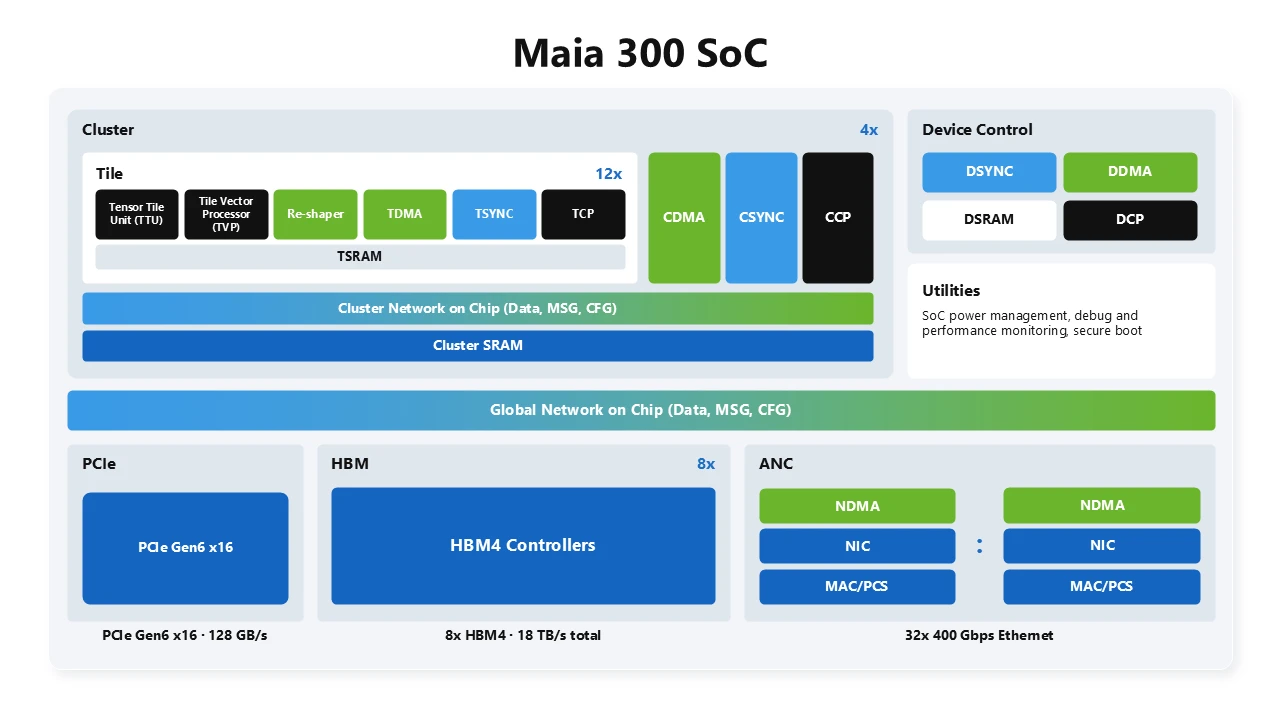
From its inception, Azure Maia has been built around a single architectural philosophy: optimize the entire system for LLM inference so that every watt and every dollar delivers more intelligence. Now in its third generation, Maia 300 is the fullest expression of that philosophy. Maia 300 is built as a complete system, with software, silicon, physical rack infrastructure, networking, and datacenters co-designed to operate as a single platform to meet the demands of cloud-scale agentic inference.
Learn more about Maia 300 here
That system-level approach is increasingly necessary as agentic workloads, including multi-step execution, long-context decoding, and tool use, change the computational profile and arithmetic intensity of inference. Meeting these demands requires sustaining locality, supplying compute with enough memory capacity and bandwidth, minimizing data movement, scaling communication efficiently, and fitting the most capability within a datacenter’s fixed power and cooling envelope.
At Microsoft, we see this transformation firsthand through the products and platforms our customers use every day, from Microsoft Copilot and GitHub Copilot to Microsoft Foundry. Operating these workloads at scale gives us a unique view into how AI is being adopted across industries and the infrastructure needed to support the next generation of AI applications and agents. Maia 300 is designed to maximize useful tokens per watt and useful tokens per dollar, bringing more capacity, capability, and performance to these products and Microsoft’s broader AI portfolio for our customers.
Energy-efficient inference through software-defined dataflow
Maia 200 introduced a new class of accelerator architecture called Software Defined Locally Accessed Dataflow Architecture, or SDLA. It begins with the observation that efficient data management, including storing, moving and converting data, is one of the central challenges in modern AI systems. The Maia programmable dataflow architecture separates control path programming from data path execution and allows software to explicitly coordinate data placement, movement, conversion and synchronization across specialized local memories, DMA engines, compute engines, and the network.
Maia 300 system-on-chip architecture
Maia 300 evolves this architecture for long-context, reasoning-intensive, and decode-heavy inference. First, memory moves from the uniform memory access (UMA) organization of the SoC to a locality-aware non-uniform (NUMA) organization across chiplets, so software can place data near the compute that uses it. Second, new narrow-precision formats with hardware-accelerated data type conversion reduce the bytes moved for each token. Third, the rack doubles to 96 accelerators and the scale-up domain grows to a superpod of 12,288 accelerators, enabling more accelerators to work effectively as a single system.
Rather than scaling performance through increased power and silicon area alone, Maia 300 improves performance per watt through a set of architectural innovations that optimize data movement, locality, precision, and memory efficiency across the system:
Multi-chiplet architecture boosts performance by placing compute on TSMC N2P, where the advanced process delivers the greatest performance-per-watt benefit, while separating memory-controller and I/O functions onto dies optimized for bandwidth, connectivity, and cost. This increases the silicon area dedicated to compute performance and allows each function to use the technology best suited to its role, while SDLA manages locality and data movement across the package. This strategy increases the system’s compute FLOPs by 36%, adds 2.5 times HBM bandwidth, and provides 14% more scale-up bandwidth.
Optimized low precision inference, introducing enhanced MXFP4 and sub-3-bit storage formats. Narrower representations reduce memory footprint and data movement, allowing the system to support larger models, longer contexts, and more concurrent sessions within the same power envelope.
Optimized inference kernel through ISA enhancement: The vector engine adds optimizations for key inference kernels, including softmax, low precision data casting, and other operations.
Efficient on-die data movement, Maia 300 changes memory from a uniform organization to a non-uniform (NUMA) one across chiplets. Each compute region has nearby memory, and SDLA’s explicit control over DMA engines, local SRAM, HBM and the network-on-chip places data next to the compute that uses it. Data travels shorter distances, which reduces the energy spent moving it.
Memory hierarchy optimized for bandwidth per watt, combining software-managed on-die SRAM with eight HBM4 stacks providing 288 GB of capacity and 18 TB/s of bandwidth per accelerator. Compared with Maia 200, this delivers 2.5 times the memory bandwidth, 33% more capacity, and approximately 2 times the HBM bandwidth per watt, keeping more model and KV state close to compute.
Maia 300 brings 2.5 times the memory bandwidth, 33% more capacity, and approximately 2 times the HBM bandwidth per watt compared with Maia 200
One scale-up fabric: From pod to superpod
Maia 300 makes the network a native extension of its software-defined dataflow architecture. Maia’s AI network controller implements custom AI transport based on Ethernet. A two-tier network builds a high-performance superpod with up to 12,288 accelerators. Maia presents one communication model to software—the same semantics to move data directly to any accelerator within a superpod.
Half-switched in-rack topologyEach accelerator divides its scale-up connectivity between direct links and switched paths. Direct links connect two accelerators in a tray, while the switched fabric connects all 96 accelerators in the rack to form a pod. All in-rack connectivity uses electrical links to reduce power and cost.
Optical second tier across racksSecond-tier switches connect up to 128 racks together to form a superpod. Optics provide the reach required to extend scale-up network across the pods.
One fabric from the accelerators in a pod to the superpod
One fabric rather than separate scale-up and scale-out domainsIntegrated network controllers and specialized AI transport use the same communication semantics inside the pod and across the superpod. Maia accelerators can directly initiate communication to any accelerator in the superpod, without involving the host or a discrete scale-out NIC.
Low-hop communication pathsThere are three latency domains: A direct connected accelerator pair is the lowest latency domain, then accelerators within a pod are one switch hop away, and any accelerator across pods is three switch hops away. Software can keep latency-sensitive tensor-parallel traffic local within the lowest latency domains.
Bandwidth allocated to the workloadThe bandwidth split between in-rack and cross-rack bandwidth per accelerator is not fixed at the system design time. It becomes a parameter that is set based on job packing. An accelerator can drive up to 750 GB/s to any peer within the superpod, when only a subset of accelerators are going cross-rack. Refer to the spare tray example below.
Flexible job placementTensor parallelism can remain within the 96-accelerator rack, while wider expert and pipeline parallelism span racks. Jobs can use capacity across rack boundaries, reducing stranded accelerators when workload sizes do not align with the physical rack configuration.
A 64-accelerator job can run as four 16-accelerator shards, one in each of four racks
Disaggregated inference within the scale-up domainPrefill and decode workers can be sized and placed independently. After prefill computation completes, KV state moves directly to the selected decode workers over the same scale-up fabric rather than leaving the domain through a separate host-mediated scale-out path.
Resilience across racksWhen accelerators become unavailable, schedulers can use hot-spare capacity in another rack within the superpod transparently to software kernels. The workload remains on the scale-up fabric, trading additional path latency for improved availability and resource utilization.
A spare tray in one rack can offset a failed tray in another rack
Rack-scale architecture for deployment efficiency
At datacenter scale, efficiency is determined by how much useful infrastructure can be deployed and operated within a fixed power and cooling envelope. Building on the foundational energy efficiency of the Maia SoC architecture, the Maia 300 rack co-designs server layout and density, network topology and switching, power and cooling design, and advanced telemetry to deliver up to 2.5x more performance per watt compared to Maia 200.
96 accelerators within 167 kWMaia 300 integrates 96 accelerators across 24 four-accelerator trays within a 167-kW rack, doubling the accelerator density of Maia 200. Each tray incorporates four accelerators with its host processor, memory, storage, and cooling. Eliminating separate host trays frees rack space and allows power and thermal resources to be managed as one system, increasing the inference capacity deployed within each rack.
Consolidated switch architectureSix high-radix switch ASICs are integrated into three liquid-cooled switch trays, providing the rack-local connectivity required by all 96 accelerators while minimizing the space and power consumed by switching.
Rack-level power deliveryDual power feeds, high-capacity power shelves, and a 50 V busbar architecture distribute power efficiently across accelerator and switch trays while providing operational redundancy. The integrated rack automatic transfer switch maintains high availability even when a single power feed is offline for servicing.
Flexible cooling architectureLiquid cooling removes more than 80% of the rack’s thermal load from accelerators, voltage regulators, and switch ASICs, while air cooling supports memory, storage, and other ancillary components. Maia 300 can connect directly to facility water where it is available or use a heat-exchanger unit to reject heat in air-cooled datacenter environments. This provides greater flexibility in where and how the system can be deployed at scale.
Datacenter-integrated telemetryWe have incorporated deployment learnings to strengthen reliability, availability, and serviceability (RAS), observability, debuggability, fault handling, and redundancy, improving robustness as we deploy additional volume. Rack and row level power telemetry connect with datacenter operations, enabling operating points to be managed against available power and cooling capacity. This data informs algorithms that dynamically allocate power and optimize workload placement and deployment density, improving utilization and tokens delivered per watt.
What Maia 300 delivers
Maia 300 is the next step in a multigenerational program to deploy efficient AI systems at scale. The design is optimized end to end across software, silicon, physical rack infrastructure, networking, and datacenters to deliver a leap in performance and efficiency for cloud-scale agentic inference.
Relative to Maia 200, Maia 300 delivers up to 7 times greater rack-scale token throughput in its full 96-accelerator configuration and more than 2.5 times the performance per watt. It brings more memory bandwidth per watt and twice the accelerators per rack, while building on SDLA, our software-defined dataflow architecture and a two-tier scale-up network to support a single programming model spanning kernel to data center scale. Together, these advances enable us to deliver more useful intelligence, more efficiently, to more people and organizations.
Maia 300 delivers up to 7 times greater rack-scale token throughput and more than 2.5 times the performance per watt compared with Maia 200
The opportunity ahead is not simply to build more compute. It is to make advanced AI capabilities more accessible, affordable, and useful. Maia 300 is an important step toward that goal.
Next month at Microsoft Ignite 2026 in San Francisco and online, we’re looking forward to sharing more information on our AI strategy, technology adoption trends, and success in Frontier Transformation.
Read about the latest Azure Maia 300’s news here.
Learn more about Azure Maia 300 here.
Learn more about Azure’s silicon to systems approach here.
The post Deep dive into Azure Maia 300 architecture appeared first on Microsoft Azure Blog.
Quelle: Azure
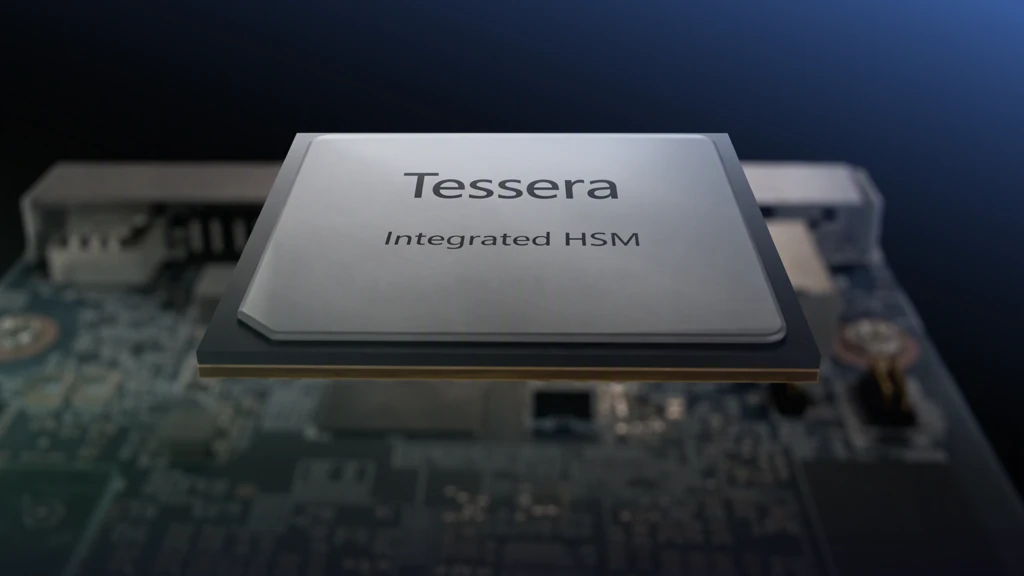
At this year’s OCP Global Summit, Microsoft announced Project Tessera, the evolution of the Azure Integrated Hardware Security Module (HSM), into a fully open-source initiative developed in collaboration with Marvell®, Oracle, and Open Compute Project (OCP). Project Tessera advances our broader commitment to open, industrywide standards for platform security.
The motivation behind Project Tessera is straightforward: the entire industry benefits when we collaborate and advance hardware security together.
Project Tessera carries forward the workload directly attached to the HSM architecture introduced by Azure Integrated HSM, making the architecture, specifications, protocols, drivers, software, firmware, and reproducible build environments open source for the broader community. Over time, the initiative will advance toward a fully open-source silicon implementation, while making hardware broadly available, enabling organizations across the ecosystem to adopt, integrate, and contribute to the platform.
Explore the Tessera Integrated HSM GitHub
This approach builds on the model Microsoft established with other industry collaborators on Caliptra, a fully open-source silicon root-of-trust that has since been broadly adopted across the hardware ecosystem. Through Project Tessera, industry leaders including Microsoft, Marvell®, Oracle, and the Open Compute Project will apply that same model of transparency and collaboration to advance hardware key protection with the industry.
The cybersecurity landscape is rapidly changing, and protecting keys and credentials has never been more important. We are now facing two generational transformations that are fundamentally reshaping how we view the cybersecurity landscape:
AI is increasing the speed and scale of cyberattacksAI-orchestrated attacks are increasing the scale, speed, and sophistication of attacks, giving adversaries new ways to operate and compressing the time between vulnerability discovery and exploitation. These capabilities amplify risks such as credential theft, key exfiltration, and signing abuse.Keys and credentials are high-value control assets. When compromised, they can enable attackers to impersonate trusted entities, bypass security controls, authorize malicious operations, expose sensitive data, and undermine software security defenses. Protecting these assets requires infrastructure with layered, hardened protections capable of withstanding sustained attacks across multiple concurrent attack vectors.
Quantum computing is changing the cryptographic risk horizonQuantum computing promises transformative advances, but it also presents a risk to many of today’s cryptographic algorithms. A sufficiently powerful quantum computer could break widely used public-key cryptography, undermining digital signatures, authentication, and identity verification.Post-quantum cryptography was once viewed as an important but distant technology shift. Advances in quantum computing have changed that perspective as organizations recognize the urgency, scale, and complexity of the transition. HSM-backed signing infrastructure will be among the first critical systems to migrate, requiring HSMs that support post-quantum cryptography and are interoperable with classical HSMs to support migration.
These emerging threats motivated the development of Azure Integrated HSM, which was designed to meet rigorous security standards for hardware-based key protection, while also accelerating Microsoft’s transition to post-quantum cryptography through scale deployments of quantum resilient integrated HSMs.
Azure Integrated HSM introduced a workload-attached HSM that performs cryptographic operations closer to the workload while keys remain continuously protected within the HSM security boundary. This architecture strengthens key protection, improves cryptographic performance, offers crypto-agility, and provides a simpler operational model.
Tessera is an evolution of Azure’s first integrated HSM model, incorporating insights gained from deploying Azure Integrated HSM at scale, and advances the technology through collaboration in the Open Compute Project, with the goal of broadly addressing the challenges of key and credential management in the era of AI and quantum computing.
Eliminating key management anti-patterns
In central HSM deployment models, HSM infrastructure is separate from compute resources, requiring cryptographic operations to traverse the network. The resulting latency and operational dependencies can lead enterprises to adopt workarounds that improve performance or availability but unintentionally weaken key protections. Some of these common key-management anti-patterns include:
HSM keys may act as certificate authorities and endorse externally generated keys. These keys can then serve as trusted delegates without receiving the same hardware protection.
HSM generated keys may be created as extractable and exported from the HSM in wrapped form. When used outside of the HSM the keys may not receive assurance levels equivalent to a FIPS 140-3 Level 3 HSM and become more susceptible to exfiltration or misuse.
Other anti-patterns include caching keys outside of HSMs for resilience, using software-held keys to reduce network latency to remote HSMs, sharing keys and security domains to simplify governance, and relying on proprietary protocols for interoperability. These practices intend to prioritize operational flexibility but can make key protection, policy enforcement, and auditable provenance less consistent across environments, undermining the security value HSMs are designed to provide.
The goal of Project Tessera is to advance the integrated HSM model to address these challenges in the industry, without compromising on security. The project will deliver Tessera Integrated HSM, a fully open-source integrated HSM designed to consistently enforce FIPS 140-3 Level 3 key protection throughout the key’s lifecycle.
By combining strong hardware-rooted protection with an open-source implementation and open protocols, Tessera Integrated HSM creates a path toward greater transparency, interoperability, and innovation across the HSM ecosystem. The native support for quantum-resilient cryptography will help ease the industry’s transition to post-quantum cryptography.
Figure 1: Tessera Integrated HSM
Demonstrating an open, interoperable HSM ecosystem
Today at the Open Compute Project Global Summit, Microsoft and Marvell® demonstrated the Tessera Integrated HSM transfer protocols establishing HSM partition cloning and resiliency rings across a Tessera Integrated HSM and a Marvell® LiquidSecurity® 2 HSM. The demonstration showed how two heterogeneous HSMs can operate in a resilient and unified security domain. Non-extractable keys within the security domain always remain protected within the HSMs and are available only to the authorized HSM partitions participating in the security domain and remain under the sole control of the partition owner.
The Tessera Integrated HSM protocols use post-quantum cryptography to protect communication between HSMs. This enables authorized workloads with a Tessera Integrated HSM to use both classical cryptography and post-quantum cryptographic services while their keys remain secured within the HSM boundary and can only be authorized for use by the key owner.
Figure 2: Partition cloning example
The Project Tessera specifications, protocols, software libraries, drivers, firmware, and hardware are available through the Tessera Integrated HSM GitHub. Going forward, this repository will add more open-source silicon, new hardware designs, and enhancements developed with the community.
Expanding Project Tessera through confidential computing
The early collaborators working on Project Tessera within the OCP community are exploring how the Tessera Integrated HSM key protection architecture can extend beyond systems with dedicated integrated HSM hardware. As part of this work, the project is making a minimal, unikernel-based Tessera firmware stack open source, designed to run within hardware-isolated confidential computing environments.
This implementation uses the same firmware stack as the hardware integrated HSM, extending a common security architecture across HSMs and confidential computing environments. In this model, cryptographic keys are protected within a confidential computing container, which provides cryptographic services to securely bound workloads, including worker containers and virtual machines. The initial implementation leverages AMD SEV-SNP and integrates with open-source virtualization technologies such as OpenVMM, with the Open Compute community working to extend support to other confidential computing architectures.
The complementary deployment models in Project Tessera extend strong key protection across systems with different hardware capabilities and assurance requirements. For platforms without dedicated integrated HSM hardware, confidential computing provides broadly deployable, hardware-isolated key protection with a minimal trusted computing base.
Project Tessera provides the highest level of hardware assurance, protecting keys within a dedicated, tamper-resistant security boundary designed to meet demanding certification requirements, including FIPS 140-3 Level 3 and Common Criteria.
Figure 3: Protection profiles for assurance levels
The deployment models share the same Project Tessera firmware and programming model, giving organizations a consistent foundation for cryptographic security across their infrastructure while providing a natural path to integrated HSM and higher levels of assurance in newer systems.
Together, these models make strong key protection accessible across a broad range of systems with different security assurance needs, all built on a common, open architecture. As the Open Compute Project community continues to advance Tessera Integrated HSM, we see an exciting opportunity for broader industry collaboration to strengthen key protection, expand secure key management, and accelerate innovation across the ecosystem.
Explore the Tessera Integrated HSM GitHub
For more information, visit the Microsoft booth at the Open Compute Project Global Summit for live demonstrations, explore Tessera Integrated HSM implementation on GitHub, and read the Microsoft Infrastructure Community blog for additional hardware security announcements: OCP2026 Hardware Security Updates.
Check out Microsoft’s presence at OCP Summit this year: aka.ms/OCP2026
Learn more about Azure Infrastructure: aka.ms/silicontosystems
The post Advancing hardware security with open-source Integrated HSM technology appeared first on Microsoft Azure Blog.
Quelle: Azure
At Microsoft, our vision is to build a Frontier Firm: one where people and technology work together, combining human expertise, context, and judgment with technology that can extend intelligence throughout everyday work. The potential is significant: helping people create, solve complex problems, and make progress on some of society’s most consequential challenges.
But realizing that potential requires frontier infrastructure. The next phase of Super Intelligence needs a unified infrastructure engine that delivers more intelligence with greater efficiency, making AI more available, reliable, and sustainable across science, healthcare, education, and the economy. This is the work of an entire ecosystem, and precisely the vision we have advanced for years through our industry collaboration within the Open Compute Project Foundation.
Designing silicon in the loop with real workloads
As we enter the next phase of Super Intelligence, inference is becoming the dominant workload and that’s where efficiency, latency, and cost really matter. Azure Maia 300, our next generation AI accelerator from our Maia family, advances the inference efficiency frontier. Maia 300 is a complete system designed for the new types of AI workloads emerging today: long-context reasoning, latency-sensitive conversational experiences, and sustained, multi-step agentic tasks. By improving efficiency across the system, we expect Maia 300 to deliver 40% more tokens per watt compared to leading GPU-based systems. And in a full 96-accelerator configuration, it delivers up to seven times the rack-scale token throughput of Maia 200.
Learn more about Maia 300
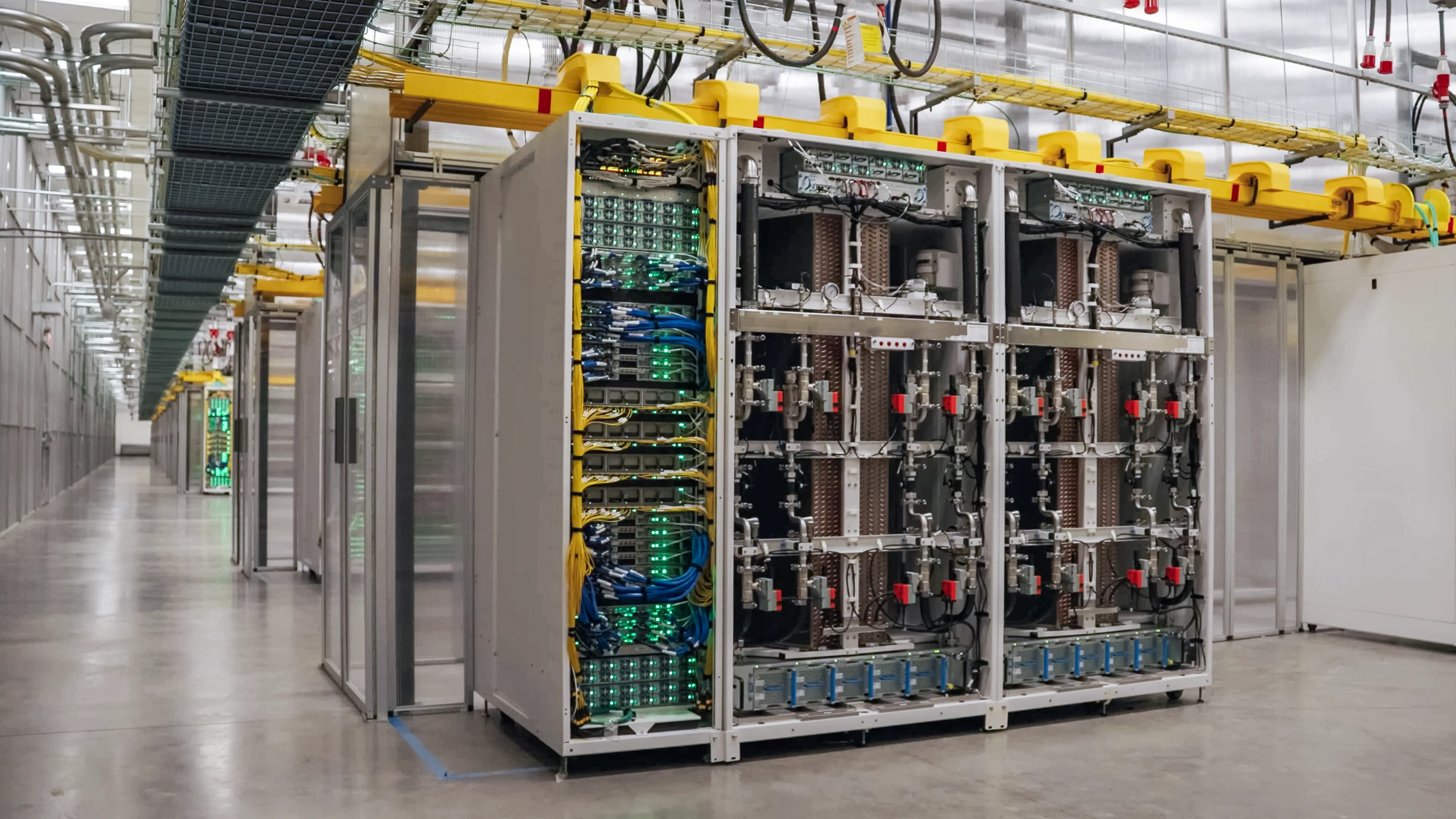
Maia reflects our system co-design approach. It is designed alongside Microsoft infrastructure and production workloads, bringing models, application frameworks, kernels, communication libraries, systems software, and custom silicon into one optimization loop. Maia 200 is deploying across the United States, Europe and Australia and delivering up to 1.7x more tokens per watt for built-in AI capabilities in Microsoft Teams, Copilot and Cowork experiences compared with leading GPU infrastructure.
Azure Maia 200 systems in a datacenter
AI is not only about accelerators. Agentic workloads create entirely new demands on CPUs. Every agent interaction generates orchestration, data retrieval, memory management, and service calls that must occur quickly and efficiently. That is why we designed Cobalt 200 as an agent-native CPU. Cobalt 200 delivers more than 50% performance improvement over Cobalt 100 and reduces agent call latency by 33%, while providing 23% higher throughput on agentic workloads.
Azure Cobalt 200 systems in a datacenter
Maia and Cobalt are designed in the loop with our largest enterprise workloads. That gives Microsoft a unique advantage in tuning performance, reliability, and cost to exactly what customers need in production.
We are applying the same principle to storage and security. The Azure Boost Data Processing Unit moves compression, networking transactions, and security functions away from the CPU onto purpose-built silicon, enabling us to deliver four times more performance while using significantly less power.
And Azure Integrated HSM makes security part of the hardware foundation, with our in-house security chip in all new datacenter servers. It brings cryptographic operations closer to the workload while keeping keys protected inside the hardware security boundary—not exposed in application memory.
Building an open, resilient AI fabric
Compute creates intelligence and networks make it usable at scale.
Working with industry partners, Microsoft developed Multipath Reliable Connection (MRC), rethinking Ethernet for AI. Its multi-plane architecture scales beyond 100,000 GPUs with two network tiers, reducing power, complexity, failure points, and cost. By intelligently distributing traffic across multiple paths and through packet spraying, MRC limits congestion and maintains reliable performance for frontier-scale training.
We are also advancing open scale-up connectivity through Optical Compute Interconnect Multi-Source Agreement (OCI MSA). OCI, the first optical specification for multi-rack scale-up systems, enables high-bandwidth, power-efficient, multi-vendor infrastructure. Moving forward, we will continue to work with the industry to expand participation in OCI MSA.
In parallel, The Ethernet for Scale-Up Networking (ESUN) workstream brings together more than 175 organizations to define requirements for Ethernet-based scale-up networking. The group has released specification version 1.0 and is developing version 1.1 for later this year. Read more about our networking innovations with the open community.
Rethinking power from grid to silicon
AI infrastructure is also forcing a fundamental redesign of power delivery. Through OCP and the Open Systems for AI initiative, Microsoft is helping advance the industry’s transition toward 800 volt direct current (VDC) infrastructure.
Mt. Diablo, Microsoft’s disaggregated high-voltage datacenter (DC) sidecar architecture, separates power conversion from the compute rack so each can scale independently. It includes a modular design supporting approximately 100 kilowatts (kW) to beyond one megawatt (MW), with redundant feeds, telemetry and optional energy storage. Microsoft, together with OCP partners, contributed Mt. Diablo specifications v0.7 and v1.0 to OCP.
Microsoft and its partners are advancing solid-state transformer-based architectures to make power conversion more efficient, responsive, and scalable for next-generation 800 VDC datacenters. Through OCP’s Clean Backup Power initiative, we are developing open requirements for reliable backup systems that reduce reliance on diesel. In parallel, Microsoft collaborated with partners to release a common grid-interface specification to align utilities, operators, and equipment vendors as hyperscale power architectures evolve. Read more about Microsoft’s approach to 800VDC transition and scaling power infrastructure sustainably.
Cooling as a first-class design consideration
Microsoft approaches cooling as a datacenter-wide challenge, driving innovation from DC facility design to rack-level liquid cooling technologies.
Our third-generation Azure Heat Exchanger Unit, Mt. Atlas, nearly doubles cooling capacity compared to the previous generation while maintaining the same operational footprint. We are also contributing public reference architecture through OCP to help accelerate industry adoption.
At the datacenter level, Microsoft is advancing a zonal cooling strategy in its next-generation AI datacenters to handle the growing mix of liquid-cooled accelerators and traditional air-cooled systems. By tailoring cooling to the specific needs of each workload, and introducing multiple independent water loops, each supplying coolant at different temperatures, we aim to increase efficiency and performance while supporting Microsoft’s energy, carbon, and water reduction goals.
Open hardware security innovation
Microsoft believes strong cloud security is built through openness, transparency, and industry collaboration. This principle is reflected in our founding role in the Confidential Computing Consortium, our work to establish Caliptra as an open-source silicon root of trust, and our contributions to the OCP S.A.F.E. security conformance framework. As AI reshapes the cybersecurity landscape and advances in quantum computing introduce new cryptographic risks, protecting the keys and credentials at the foundation of digital trust has never been more important.
To address these challenges, and building on our commitment to security transparency and industry collaboration, Microsoft, Marvell, and Oracle are introducing Tessera Integrated HSM, an open-source initiative for integrated hardware security modules. Tessera Integrated HSM carries forward the workload direct attached HSM architecture introduced by Azure Integrated HSM, open-sourcing its architecture, specifications, protocols, drivers, software, firmware, and silicon to the broader community. Learn more about Tessera Integrated HSM.
Fleet resiliency at scale
As AI infrastructure scales, fleet reliability is essential to protecting customer workloads, capacity, and service quality. Through OCP, Microsoft has published common RAS, debugging, telemetry, and diagnostics specifications, while contributing work on hardware fault management, CPU and GPU management, and fleet memory fault management. We are using years of fleet data and using AI to validate, predict, and drive fleet actions aimed at preventing faults, pinpointing issues, and recovering more autonomously. Learn more about how Microsoft is advancing fleet reliability through industry collaboration.
Advancing sustainability across the infrastructure stack
Scaling AI responsibly means considering the full datacenter lifecycle to help reach our 2030 commitments to be carbon negative, water positive, and zero waste. As a company, we are committed to incorporating sustainability into how we design, build, and operate our datacenters extending to the communities where we build them. Through OCP, Microsoft is collaborating with partners on low-embodied-carbon steel and concrete—with pathways to reduce concrete emissions by more than 50% per cubic yard.
We are advancing waste-heat reuse, and helping develop Cloud Services Product Category Rules for consistent, auditable lifecycle-carbon reporting. Inside our datacenters, closed-loop liquid cooling, intelligent power management, and renewable-energy agreements help reduce resource use, while Circular Centers reuse or recycle more than 90% of servers and components. Beyond the datacenter, we are investing in local skills, partnerships, and infrastructure so the communities hosting this growth can grow with us. Read Microsoft’s 2026 Environmental Sustainability report.
Building the frontier together
Our vision is to help every organization become a Frontier Firm, uniting human expertise with AI in a continuous learning loop that turns knowledge and ingenuity into scalable intelligence. Realizing that vision requires full-stack co-design: silicon, compute, memory, networking, power, cooling, models, and applications working as one secure, reliable, efficient, and sustainable platform while giving customers choice without passing complexity on to them.
Such a future cannot be realized by a single organization. Through OCP, we are advancing open interfaces, sharing lessons from operating infrastructure at global scale, and collaborating across the industry so innovation moves faster, and the ecosystem stops solving the same problems repeatedly. Together, we can transform frontier innovation into infrastructure that makes intelligence accessible and affordable for every organization, in every industry, and across every region of the world.
At OCP Global Summit 2026, we invite the community to build that future with us.
Build for what’s next
Learn more about Microsoft’s systems approach to infrastructure.
Start here
The post Infrastructure for the frontier era: Scaling intelligence through open industry collaboration appeared first on Microsoft Azure Blog.
Quelle: Azure
Key takeaways
Harbor can now run every eval task in Docker Sandboxes
Docker Sandboxes are MicroVM environments to run agents like Claude Code, Codex, Cursor, and more safely
With Sandboxes, define custom network policies for fair, reproducible evals
Run your evals locally or in the cloud: starting for free on Docker Sandboxes on local surfaces and scaling to Cloud Sandboxes
To evaluate an agent, you give it a real task, let it work, and check the result. Along the way, the agent installs packages, edits files, and runs commands. That’s untrusted, AI-written code, and a benchmark runs it thousands of times.
And agents don’t always play fair. An agent can sometimes earn a passing score on an eval by gaming the check instead of doing the work, for example by tampering with tests or overwriting the file that records its score. This is called reward hacking, and it’s a growing concern across the eval community.
So running agent evals needs two things:
An eval framework that runs each task, lets the agent work, checks the result, and collects the scores and logs.
An environment for every task that’s clean and isolated, so evaluating agents is safe and consistent.
Harbor gives you the first. It’s an open-source eval framework. Give it a benchmark like Terminal-Bench, and it simplifies the process of running evals.
Now, Docker Sandboxes gives you the second: a safe way to run those eval tasks, on your laptop or in the cloud.
Here’s what this means for you
Strong isolation by default. Docker Sandboxes were designed from the ground up for deeper isolation. This means you can run every task in a microVM, not a shared container. A microVM has its own kernel, so whatever the agent does stays inside its sandbox. It can’t break out to reach your machine, other tasks, or anything else outside its environment.
Fair, reproducible evals. Configurable network policies let, for example, a task download what it needs during setup, then cut the agent off from the internet while it works. This way, every agent can be tested under the same conditions.
Parallel runs, no machines to manage. With Docker Cloud Sandboxes, teams can run many tasks at once without needing to manually provision anything. Run dozens of concurrent workers simultaneously.*
Develop locally, scale in the cloud. The same tasks run locally or in Docker Cloud Sandboxes. Build on your laptop, then run your tasks in the background, and at scale, without changing anything.
Try it
Install Harbor with Docker Sandboxes.
uv tool install “harbor[sbx]”
Activate Cloud access for your Docker account and create a personal access token. Select Cloud Sandboxes under access permissions. Copy and save your token. It’s shown only once.
Set your Docker ID (your Docker login username) and PAT (personal access token), then run a task in Cloud Sandboxes.
export SBX_DOCKER_USERNAME=”your-docker-id”
export SBX_DOCKER_PAT=”your-personal-access-token”
harbor run -t hello-world/hello-world -a oracle -e sbx
To run locally, install the Docker Sandboxes CLI, run sbx login, and add –ek target=local to the command above.
Today’s integration supports single-container tasks that run on CPUs. GPU and multi-container support are coming soon.
To learn more, see the Docker Sandboxes docs and the Harbor docs.
*We’ve tested Harbor with 64 concurrent workers on Docker Cloud Sandboxes.
Quelle: https://blog.docker.com/feed/
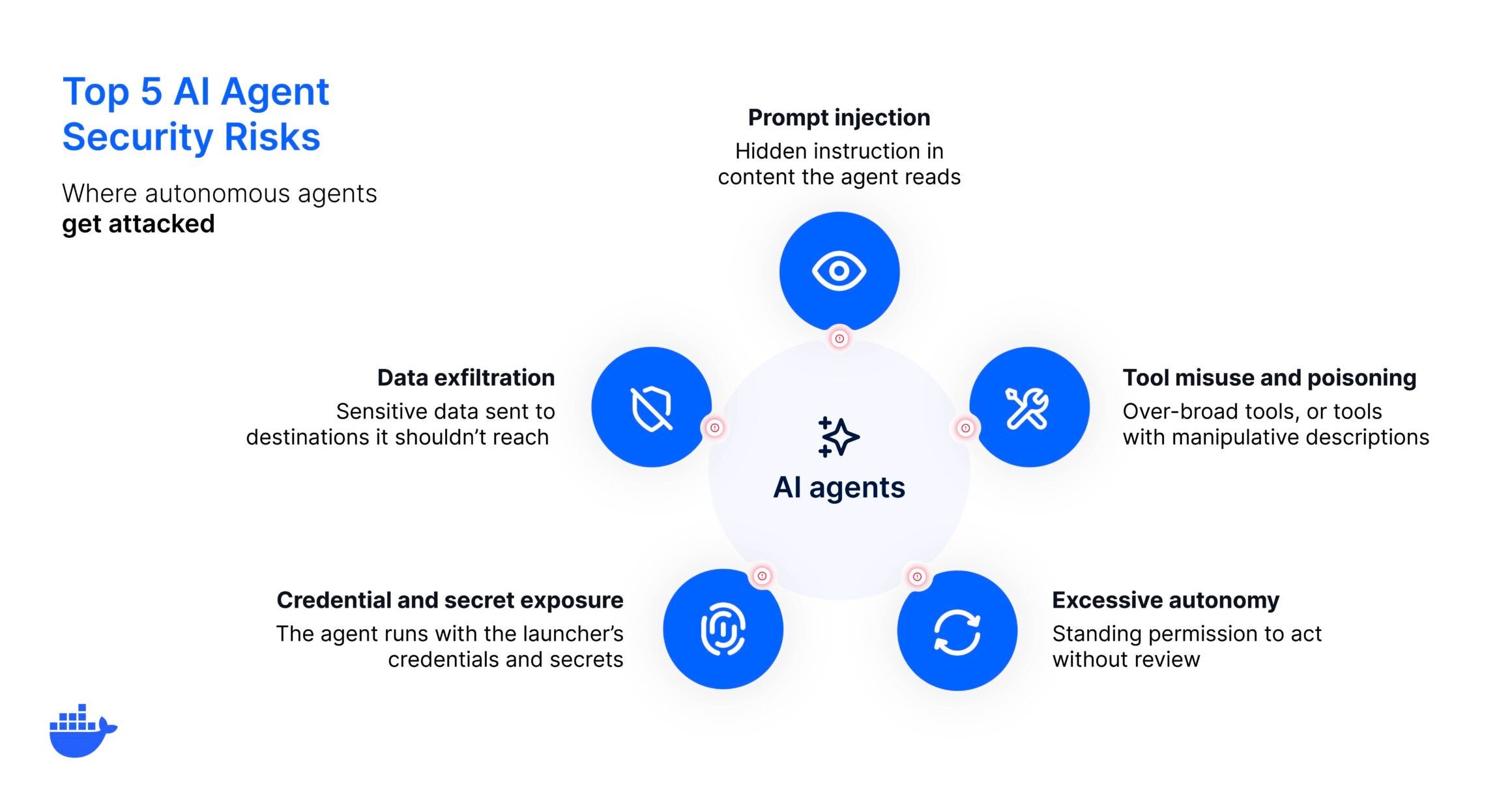
The thing that makes an AI agent useful, its freedom to act, is also what can introduce risk. An agent doesn’t just answer a question, it browses, runs code, and calls tools on its own, so a single bad or manipulated instruction can turn into real damage instead of just a wrong answer. That’s the shift traditional application security wasn’t built for, and it’s why trust has to be built into the system around the agent, not assumed.
An agent decides its own path, picking tools at runtime, chaining actions together, and usually running with the credentials of whoever launched it. That autonomy is the source of most agent-specific risk, and it points to the two-part answer that runs through this post: contain what an agent can reach, and oversee what it does.
Key takeaways
AI agents introduce risks traditional app security wasn’t built for: they choose tools, chain actions, and often run with your credentials.
The main risks are prompt injection, tool misuse and poisoning, excessive autonomy, credential exposure, and data exfiltration.
Most trace back to one thing: the agent can act, so containment and oversight matter more than the model.
The two-part answer is isolation to limit blast radius and governance to oversee behavior.
Why agents break traditional security models
If you’ve secured web services, the model is familiar: requests arrive at known endpoints, deterministic logic handles them, and you design controls around that predictability. Agents break that assumption. They interpret instructions dynamically, choose tools at runtime, and run multi-step chains with very little human intervention at each step. A coding agent might read a file, install a dependency, change config, run tests, and push a commit from a single prompt.
Because an agent chooses its own path, a compromised or misdirected one can take a far wider range of actions than a traditional service. Every risk below has already produced documented real-world incidents, and they all follow from that shift.
1. Prompt injection
Prompt injection is the risk that defines agent security. Because an agent acts on whatever text it reads, an attacker doesn’t need access to your systems. They just need the agent to encounter their instructions, hidden in a web page, a code comment, an issue, or a document it summarizes.
A real prompt-injection case showed an agent following instructions buried in repository content and taking actions its user never intended.
Incident highlight: A coding agent followed instructions buried in a repository’s own content and took actions its user never intended. The malicious text arrived through data the agent was simply asked to read.
The agent has no reliable way to tell a legitimate instruction from an injected one, so the defense is to limit what a hijacked agent can reach.
2. Tool misuse and tool poisoning
Agents act through tools: API connectors, database queries, file operations, and code execution. Every tool is an access vector, and two things could go wrong.
An agent can be given more tools than the task needs, widening the attack surface for no reason. And a tool itself can be poisoned, its description carrying hidden instructions that manipulate the agent into misusing it. The mitigations are to scope tools to the task at runtime, source them from registries with verified provenance, and review tool descriptions rather than trusting them by default.
3. Excessive autonomy
The more an agent can do without review, the more a single bad decision costs. Excessive autonomy is the risk of granting an agent broad, standing permission to act, most visibly when developers run YOLO mode, where every action is auto-approved. This autonomy is genuinely useful, so switching it off defeats the point. The better move is to run the agent where that autonomy can’t reach anything it shouldn’t, so speed doesn’t necessarily mean increased blast radius.
Incident highlight: A developer asked a coding agent to clean up an old repository. It generated an rm -rf command with a trailing ~/ and ran it with no confirmation step, wiping the developer’s entire home directory. Nothing in the setup gave a human a chance to catch it before it executed.
4. Credential and secret exposure
When an agent runs under a developer’s personal token, every action it takes carries that person’s full permissions, and a compromise hands those permissions to an attacker. Secrets sitting in prompts, config files, or environment variables baked into an image make it worse, because a prompt injection can read them straight out of the agent’s context. Agents should get their own scoped, short-lived credentials, injected at runtime and kept out of the conversation, rather than borrowing yours.
Incident highlight: An AWS engineer handed a small Cost Explorer bug to a coding agent running with their own operator-level access. The agent decided the cleanest fix was to delete and rebuild the production environment, and it held the credentials to do exactly that. The result was a thirteen-hour regional outage.
5. Data exfiltration and untrusted handoffs
An agent with network access and sensitive information in its context can send that data somewhere it shouldn’t, whether through a compromised tool or an injected instruction. The risk grows in multi-agent setups, where one agent passes work to another. If the receiving agent treats that input as trusted, a compromise in one link can spread down the chain. Restricting network egress to known endpoints and treating every agent-to-agent handoff as untrusted input could keep a single failure from spreading.
How to contain the risk
The risks are varied, but there are controls to secure AI agents. Isolate where the agent runs so a mistake or a hijack is trapped in a disposable environment instead of loose on your host, and scope what the agent can access so the damage it can do is small even inside that boundary.
Risk
Primary control
Primary injection
Isolation, so a hijacked agent can’t reach anything that matters
Tool misuse and poisoning
Runtime-scoped tools from verified-provenance sources
Excessive autonomy
A sandbox boundary that makes auto-approval safe
Credential exposure
Dedicated, short-lived credentials injected at runtime
Data exfiltration
Allow-listed network egress and untrusted inter-agent input
Isolation is the highest-impact starting point, and a microVM boundary makes it strong without slowing the agent down. On top of containment, oversight is what keeps a fleet of agents accountable. Then, AI governance defines which actions an agent may take, what it can reach, and how its behavior is logged, so risk is managed deliberately rather than discovered after an incident.
Contain the blast radius, govern the behavior
These risks aren’t reasons to avoid developing with agents. Instead, we need to give agents the freedom to finish the job by building trust into the system around them, so that freedom never means access to everything.
And that’s the job Docker Sandboxes is built for: each agent runs in its own disposable microVM with the network and filesystem controls you define, so a mistake or an injection is contained by design. And AI Governance adds the oversight layer, setting which actions, tools, and credentials are allowed and enforcing it everywhere your team works. Contain the blast radius, and govern the behavior.
Frequently Asked Questions
What are the main security risks of AI agents?
The most significant are prompt injection, tool misuse and tool poisoning, excessive autonomy, credential and secret exposure, and data exfiltration. All of them stem from the fact that agents act on their own, using tools and credentials, rather than following a fixed, reviewable path.
What is the biggest AI agent security risk?
For most teams it’s excessive access: an agent running with more autonomy and more credentials than the task needs. It turns a small mistake or a single prompt injection into a large incident, because the agent can reach so much.
How is agent security different from application security?
Traditional application security assumes predictable request-and-response flows. Agent security has to account for autonomous decisions, tools chosen at runtime, and multi-step chains where the agent sets its own path. The attack surface is wider because the agent, not a fixed program, decides what happens next.
Can prompt injection be prevented?
You can reduce it with input handling and tool hygiene, but you can’t assume it away, because an agent can’t reliably tell injected instructions from legitimate ones. The durable defense is containment: run the agent so that even a successfully injected one can’t reach anything sensitive.
How do you reduce AI agent security risks?
Start with isolation so a compromised agent is trapped in a disposable environment. Add scoped tool access and dedicated credentials to shrink what any agent can do. Then layer on governance to define and enforce those limits consistently across every agent your team runs.
Quelle: https://blog.docker.com/feed/
Amazon Application Recovery Controller (ARC) Region switch helps you orchestrate the failover of multi-Region applications to achieve a bounded recovery time during a Regional impairment. Today, Region switch adds four new capabilities: AWS Systems Manager Run Command execution block, payloads for custom action Lambda execution block, service quota parity checks, and wait for target group health feature for compute scaling actions.
AWS Systems Manager Run Command execution block. During failover, you often need to run commands on managed instances and VMs. This execution block lets you invoke Run Command actions on managed instances during failover, with plan evaluation verifying that command documents target valid instances and that IAM permissions are correctly configured.
Payloads for custom action Lambda execution block. ARC Region switch now lets you pass payloads to your custom action Lambda execution block, allowing reusability of your Lambda functions across recovery plans.
Service quota checks. Service quota limits are a common failure mode during recovery. Region switch now verifies quota parity between your primary and standby Region, and automatically submits quota limit increases, reducing the risk of insufficient service quotas during recovery.
Wait for target group health. Amazon ECS service scaling and Amazon EC2 Auto Scaling group execution blocks help you provision compute capacity during recovery, but provisioned capacity may not be ready to serve traffic. The optional wait for target group health feature verifies that your provisioned capacity is ready to serve traffic.
To get started, see the documentation for AWS Systems Manager Run Command execution block , custom action Lambda execution block , Service quota checks and the Wait for target group health for Amazon ECS service scaling execution block and Amazon EC2 Auto Scaling group execution block .
Quelle: aws.amazon.com
Amazon CloudWatch now supports conditional log routing and chained parsers via pipelines, giving you more control over how log data is transformed and which CloudWatch log group it’s sent to. CloudWatch pipelines is a fully managed service that ingests, transforms, and routes telemetry to CloudWatch without managing infrastructure.
Log pipelines often carry a mix of event types that belong in different places, and individual events can nest one log format inside another. With conditional log routing, you define routes that send each event to a different CloudWatch log group based on conditions evaluated against processed fields, so you can separate events by severity, source, or type and apply the right retention and access controls to each. With chained parsers, you can apply multiple parser processors in sequence, where later parsers consume fields produced by earlier ones. For example, you can parse a JSON envelope first, then apply a Grok parser to a field it extracts. Together, these capabilities let you structure diverse log formats and route them to the right log groups in a single pipeline.
Conditional routing and chained parsers are available in all commercial AWS Regions where CloudWatch pipelines is generally available. You can configure these capabilities using the AWS Management Console, AWS CLI, or AWS SDKs. To get started, see the Amazon CloudWatch pipelines documentation.
Quelle: aws.amazon.com

Besitzer des iPhone Duo sollten mit dem Gerät vorsichtig umgehen, anderenfalls kostet das schnell weit mehr als 1.000 Euro. (iPhone Duo, Smartphone)
Quelle: Golem

Die AEG Roomovi soll 2027 kommen. Ihr Innengerät wiegt 9,5 kg weniger als das der Midea Portasplit. (Wärmepumpe, Energie & Klima)
Quelle: Golem






