Forrester names Google Cloud a leader in Document Analytics Platforms

At Google, our mission is to organize the world’s information and make it universally accessible and useful. For our Document AI solutions suite, as well as the Vertex AI platform atop which Document AI is built, achieving this goal involves building capabilities to extract structured data from unstructured sources. Since launching Document AI in late 2020, we’ve tailored this technology to many of the most common and complex workflow challenges that enterprises face when dealing with unstructured data. Watching customers adopt these solutions has been gratifying, and today, we’re thrilled to share that leading global research and advisory firm Forrester Research has named Google Cloud as a Leader in two recently published reports: The Forrester Wave™: Document-Oriented Text Analytics Platforms, Q2 2022 and The Forrester Wave™: People-Oriented Text Analytics Platforms, Q2 2022 authored by Boris Evelson. The Forrester Wave™ serves as an important guide for buyers considering technology options and is based on Forrester’s objective analysis and opinion.Our Document AI suite of offerings is helping enterprises large and small automate data capture at scale to improve the speed of doing business and reduce document processing costs. In addition to our general processors for Document OCR (Optical Character Recognition), which allow you to identify and extract text from documents in over 200 languages for printed text and 50 languages for handwritten text, we’ve also invested in specialized parsers for procurement, contracts, lending and, most recently, identity—all based on the challenges we’ve seen our customers face in industries like financial services, retail, and public sector. Forrester recognizes the power of our investments and innovations in its analysis in The Forrester Wave™: Document-Oriented Text Analytics Platforms, Q2 2022 report, saying: “Google Cloud’s strengths include document capture, image analytics, full ModelOps cycle capabilities, unstructured data security, and integration with Google Cloud’s augmented BI platform Looker.”Google Cloud has a close relationship with the Google Research organization that allows us to move very quickly to integrate bleeding edge technologies into our solutions. Large Language Models like LaMDA (our breakthrough conversation technology), and MUM (Multitask Unified Model, which can process complex queries and information across text and images) are examples of research technologies that we are currently using to develop our Document AI offerings. The power of connecting Google’s research to applications was acknowledged by both of Forrestor’s Wave reports for text analytics. In The Forrester Wave™: Document-Oriented Text Analytics Platforms, Q2 2022 report, Forrester says, “Google’s text analytics strategy is impressive, particularly its development and use of language models – such as its own LaMDA to improve cognitive search via conversational UX, open-source BERT, and partnering with PEGASUS project for document summarization.”Our customers such ase Mr Cooper, Workday,Unified Post, State of Hawaii  and many others are seeing great success in improving efficiency of document processing and customer service speed and satisfaction. If you’re dealing with a document based workflow and are not satisfied with the efficiency, accuracy, or cost of your current processes talk to your Google Cloud sales executive about how Document AI may help your business. You can read the findings from The Forrester Wave™: Document-Oriented Text Analytics Platforms, Q2 2022 by downloading your complimentary copy here.Related ArticleGoogle Cloud simplifies customer verification and benefits processing with Document AI for Identity cardsGoogle Cloud simplifies customer verification and benefits processing with Document AI for Identity.Read Article
Quelle: Google Cloud Platform

Google Cloud launches new sustainability offerings to help public sector agencies improve climate resilience

Governments play a vital role in understanding and responding to climate change; however, they often lack the actionable insights they need to respond quickly. To help solve this problem, Google Cloud is introducing new offerings that help organizations utilize Earth observation data to better understand climate risks and provide insights to inform policies for adaptation strategies. With these data-driven insights, public sector agencies and researchers can improve their response time to climate disasters, make more accurate predictions, and implement disaster-response plans with greater confidence. These offerings — Climate Insights for natural resources and Climate Insights for infrastructure — are already having an impact in the public sector and can be used to inform a multitude of use cases, including land and infrastructure management, and city and regional planning.Introducing Climate InsightsClimate Insights leverages the scale and power of Google Earth Engine (GEE) running on Google Cloud and combines artificial intelligence (AI) and machine learning (ML) capabilities with geospatial analysis using Google BigQuery and Vertex AI. Through GEE, climate researchers can access a multi-petabyte catalog of satellite imagery and geospatial datasets with planetary-scale analysis capabilities. Climate Insights can help Earth observation and remote-sensing scientists standardize and aggregate data from different sources, analyze them quickly, and easily visualize their outputs. Climate Insights for natural resources By unlocking geospatial data, Climate Insights for natural resources can help leaders manage the risks of extreme heat, wildfires, floods, droughts, which have dramatically impacted communities, and economies around the globe. It draws on GEE’s data catalog of more than 900 open datasets spanning 40 years, and leverages the expertise of Climate Engine to provide departments and agencies with an efficient way to ingest, process, and deliver pre-built Earth observation insights via API into decision-making contexts. For example, Natural Resources Canada (NRCan) has been using GEE to process satellite data to track environmental changes at scale. NRCan researcher Dr. Richard Fernandes has been using GEE to power his LEAF Toolbox, which creates customizable maps of foliage density in real time. Agriculture Canada is currently exploring using the LEAF toolbox to assess how crops are progressing, which impacts local economies and the global food supply. Furthermore, NRCan is currently piloting Climate Insights to provide scientists tools to accelerate their research.“Through a strategic partnership with Google Cloud, our scientists are leveraging cutting-edge cloud technologies to enhance the value of Earth observation science and data,” says Dr. Fernandes. “These types of next-generation geo-solutions allow massive volumes of Earth observation data to be converted into actionable insights supporting evidence-based decision-making that improve Canada’s economic and environmental performance.” Climate Insights for infrastructureUnderstanding and anticipating climate risk to the built environment is a challenge for any organization managing infrastructure. Not only is it necessary to have up-to-date insights regarding climate risks, but also current climate data needs to be combined with infrastructure data to assess risk and prioritize investments. Public sector organizations store large amounts of data in Geographic Information System (GIS) systems. Climate Insights for infrastructure helps make that data easy to access, analyze, and share through a unified solution. Building on top of GEE, Google Cloud, and CARTO, these insights enable planners, policy analysts, operations staff, and executives to access data for their decision making through an intuitive and easy to use location intelligence platform. The State of Hawaii Department of Transportation (HDOT) manages 2,500 miles of highway, with 20% of roads facing risks due to erosion and sea-level rise. With Climate Insights for infrastructure, HDOT can assess risk and prioritize investment decisions based on multiple climate factors, asset conditions, and community impact. “Our goal is to have a common data-driven platform to collect and share information across agencies, counties, and cities,” says Ed Sniffen, deputy director of highways for HDOT. “This helps us collaborate within our department and engage with our communities so we can better serve the public.”All running on the cleanest cloud in the industryWe support our cloud customers by operating the cleanest cloud in the industry, helping them act today to decarbonize their digital applications and infrastructure, and achieve their most ambitious sustainability targets. And by 2030, Google aims to operate on 24/7 carbon-free energy at all of our campuses, cloud regions and offices around the world.To learn more about Climate Insights and Google’s solutions for the public sector, register for the Google Cloud Sustainability Summit or contact our team. Click here to learn more about Google Cloud sustainability.Related ArticleAdopting real-world sustainability solutions with Google Cloud’s ecosystemGoogle Cloud and its ecosystem of sustainability-focused partners provide data, insights, and intelligence to support customer sustainabi…Read Article
Quelle: Google Cloud Platform

Monitoring Cloud SQL with SQL Server database auditing

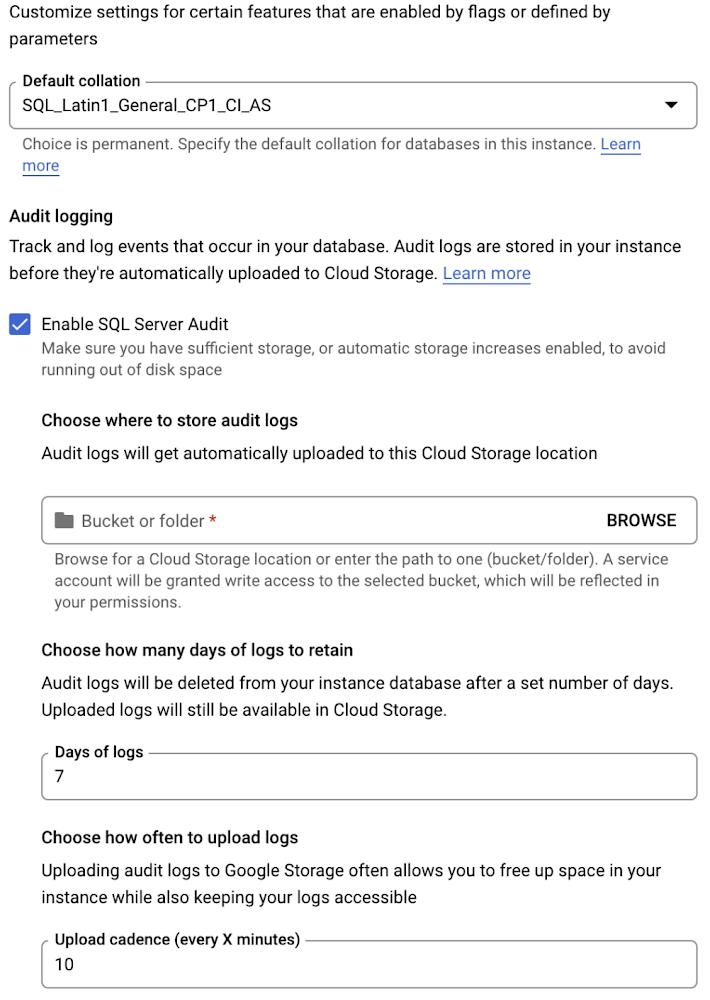
Cloud SQL for SQL Server is a fully-managed database service that allows you to run SQL Server in the cloud and let Google take care of the toil. In the past year, we’ve launched features that help you get the most out of SQL Server, like support for Active Directory authentication, SQL Server 2019, and Cross Region Replicas. We’re happy to add another SQL Server security feature: database auditing. Database auditing allows you to monitor changes to your SQL Server databases, like database creations, data inserts, or table deletions. Cloud SQL writes audit logs generated by SQL Server to the local disk and to Google Cloud Storage. You can specify how long logs should be stored on the instance – for up to seven days – and use a SQL Server function to inspect logs. Cloud SQL will also automatically write all audit files to a Google Cloud Storage bucket that you manage, so you can decide how long to retain these records if you need them for longer than seven days, or consolidate them with audit files from other SQL Server instances. To enable database auditing, go to the Google Cloud console, select your Cloud SQL for SQL Server instance, and select Edit from the Overview page. You can also enable SQL Server Audit when you create a new Cloud SQL instance:Once you’ve enabled auditing for your Cloud SQL for SQL Server instance, you can create SQL Server audits and audit specifications, which determine what information will be tracked on your databases. You can capture granular information about operations performed on your databases, including, for example, every time a login succeeds or fails. If you want to capture different information for each of your databases, you can create different audit specifications for each database on your instance, or you can create server-level audit specifications to track changes across all databases. SQL Server auditing is now available for all Cloud SQL for SQL Server instances. Learn more about how to get started with this feature today!Related ArticleCloud SQL for SQL Server: Database administration best practicesCloud SQL for SQL Server is a fully-managed relational database service that makes it easy to set up, maintain, manage, and administer SQ…Read Article
Quelle: Google Cloud Platform

Impact.com: Forging a new era of business growth through partnerships

Business partnerships come in all shapes and forms: from affiliate and influencer marketing, to SaaS providers and strategic B2B alliances. For all parties to be successful and drive business growth through a partnership, they must have a way to manage, track, and measure the incremental value their partners provide throughout their relationship. That’s why impact.com has developed technology that makes it easy for businesses to create, manage, and scale an ecosystem of partnerships with the brands and communities that customers trust so that businesses can focus on building great relationships.The partnership management platform is currently helping thousands of brands, including Walmart and Shopify, to manage and optimize their partnerships’ ROI through its purpose-built platform. And impact.com has brought this vision to life with its software built on Google Cloud Platform. “We believe in the power of technology and partnerships to create transformational growth for our customers, our company, and ourselves,” says Lisa Riolo, VP Strategic Partnerships and Co-founder at impact.com. “This mindset has been integral to the success of impact.com, which grew from a five person startup to a company valued at $1.5 billion as of September 2021.”Fuelling business growth with the right partnerships and technologyimpact.com’s original vision was to significantly improve the technology available to performance marketers while empowering traditional media channels with the data and measurement systems available to digital marketers. But it’s always been clear that for the company to remain relevant it needs to constantly evolve to meet the needs of the next generation of marketers.“We designed our toolset to be future-proof, flexible, and to adapt to the changing global landscape. Our customers rely on impact.com to manage their strategic partnerships on a global level,” says Riolo. “This combined ability to be reliable and continually innovate is the sweet spot we look for when selecting the components of our technology setup, and that’s what we found in Google Cloud.”As a company that focuses on helping businesses grow through their partnerships, scalability has always been one key criteria behind impact.com’s technology. As it acquires multiple product-led technology companies throughout its growth, the importance of being scalable becomes more evident. New companies joining impact.com suddenly gain access to a multitude of businesses they could be working with, while their customer base tends to multiply due to the exposure they gain through these new partnerships. “From a strategic perspective, when you need something new you can build it, buy it, or partner with someone who has it. We do all three,” says Riolo. “Each time we welcome a new company, we bring them on board Google Cloud so they can lean on the same reliability and scalability as we do. Having the ability to accommodate our growth is a must, and scaling on a Google Cloud environment is seamless and efficient. Additionally, we are taking advantage of the global footprint of the platform to run our applications closer to customers with low latency.”Helping more businesses to grow in the cloudAs buyers increasingly turn to cloud marketplaces to fulfill their procurement needs, impact.com is launching its partnership management software on Google Cloud Marketplace. This means that companies of all sizes can find and quickly deploy impact.com’s software on Google Cloud without having to manually configure the software itself, its virtual machine instances, or its network settings. And by taking this step onto the cloud, they gain access to infrastructure that can keep up with their success.“Our commitment to our partners centers on how we best support and enable their growth. I believe, as customers grow, their need to be in the cloud is critical to their ability to scale up, no matter what type of business they are,” explains Riolo. “So being on Google Cloud Marketplace is important for impact.com to get more exposure, and also important for Google Cloud,  because the growth-focused businesses we attract need more cloud capabilities. That’s how we grow together, and we’re very excited about what this means for the future of our relationships.”Related Article5 ways retailers can evolve beyond traditional segmentation methodsFive ways retailers can evolve beyond traditional customer segmentation methods to drive more personalized experiences in real time.Read Article
Quelle: Google Cloud Platform

Improving developer agility and efficiency with Google Workspace

The software development process requires complex, cross-functional collaboration while continuously improving products and services. Our customers who build software say that they value Google Workspace for its ability to drive innovation and collaboration throughout the entire software development life cycle. Developers can hold standups and scrums in Google Chat, Meet, and Spaces, create and collaborate on requirements documentation in Google Docs and Sheets, build team presentations in Google Slides, and manage their focus time and availability with Google Calendar. Development teams also use many other tools to get work done, like tracking issues and tasks in Atlassian’s Jira, managing workloads with Asana, and incident management in PagerDuty. One of the benefits of Google Workspace is that it’s an open platform tailored to improve the performance of your tools by seamlessly integrating them together. We’re constantly expanding our ecosystem and improving Google Workspace, giving you the power to push your software development even further.Make software development more agileGoogle Workspace gives you real-time visibility into project progress and decisions to help you ship quality code fast and stay connected with your stakeholders, all without switching tools and tabs. By leveraging applications from our partners, you can pull valuable information out of silos, making collaborating on requirements, code reviews, bug triage, deployment updates, and monitoring operations easy for the whole team. This allows your teams to stay focused on their priorities while keeping everyone aligned, ensuring collaborators are always in the loop.Plan and execute togetherWhen combined with integrations, Google Workspace makes the software development planning process more collaborative and efficient. For example, many organizations use Asana—a leading work management platform—to coordinate and manage everything from daily tasks to cross-functional strategic initiatives. To make the experience more seamless, Asana built integrations so users can always have access to their tasks and projects with Google Drive, Gmail, and Chat. With these integrations for Google Workspace, you can turn your conversations into action and create new tasks in Asana—all without leaving Google Workspace. “We’ve seen exceptional, heavy adoption of tasks being created from within the Gmail add-on. Our customers and community have also shown very strong interest in future development work, which is something we’ll continue to prioritize.” Strand Sylvester, Product Manager, Asana To date, users have installed the Asana for Gmail add-on over 2.5 million times, as well as over 3.8 million installs of the Asana for Google Workspace add-on for Google Drive.Turn your conversations into action with the Asana for Google Chat app.Start coding quicklyGoogle Workspace makes it easy for product managers, UX designers, and engineers to agree on what they’re building and why. By bringing all stakeholders, decisions, and requirements into one place—whether it’s a Gmail or Google Chat conversation, or a document in Google Docs, Sheets, or Slides—Google Workspace removes friction, helping your teams finalize product specifications and get started right away.Integrations like GitHub for Google Chat make the entire development process fit easily into a developer’s workflow. With this integration, teams can quickly push new commits, make pull requests, do code reviews, and provide real-time feedback that improves the quality of their code—all from Google Chat.Get updates on GitHub without leaving the conversation.Speed up testingIntegrations like Jira for Google Chat accelerate the entire QA process in the development workflow. The app acts as a team member in the conversation, sending new issues and contextual updates as they are reported to improve the quality of your code and keep everyone informed on your Jira projects.Quickly create a new Jira issue without ever leaving Google Chat.Ship code fasterDevelopers use Jenkins—a popular open-source continuous integration and continuous delivery tool—to build and test products continuously. Along with other cloud-native tools, Jenkins supports strong DevOps practices by letting you continuously integrate changes into the software build. With Jenkins for Google Chat, development and operations teams can connect into their Jenkins pipeline and stay up to date by receiving software build notifications directly in Google Chat.Jenkins for Google Chat helps DevOps teams stay up to date with build notifications.Proactively monitor your servicesImproving the customer experience requires capturing and monitoring data sources to improve application and infrastructure observability. Google Workspace supports DevOps teams and organizations by helping stakeholders collaborate and troubleshoot more effectively. When you integrate Datadog with Google Chat, monitoring data becomes part of your team’s discussion, and you can efficiently collaborate to resolve issues as soon as they arise. The integration makes it easy to start a discussion with all the relevant teams by sharing a snapshot of a graph in any of your Chat spaces. When an alert notification is triggered, it allows you to notify each Chat space independently, precisely targeting your communication to the right teams.Collaborate, share, and track performance with Datadog for Google Chat.Improve service reliabilityOrchestrating business-wide responses to interruptions is a cross-functional effort. When revenue and brand reputation depends on customer satisfaction, it’s important to proactively manage service-impacting events. Google Workspace supports response teams by ensuring that urgent alerts reach the right people by providing teams with a central space to discover incidents, find the root cause, and resolve them quickly.  PagerDuty for Google Chat empowers developers, DevOps, IT operations, and business leaders to prevent and resolve business-impacting incidents for an exceptional customer experience—all from Google Chat. See and share details with link previews, and perform actions by creating or updating incidents. By keeping all conversations in a central space, new responders can get up to speed and solve issues faster without interrupting others.PagerDuty for Google Chat keeps the business up to date on service-impacting incidents.Accelerate developer productivityIntegrating your DevOps tools with Google Workspace allows your development teams to centralize their work, stay focused on what’s important—like managing their work—build code quickly, ship quality products, and communicate better during service impacting incidents. For more apps and solutions that help centralize your work so you and your teams can connect, create, and get things done, check out Google Workspace Marketplace, where you’ll find more than 5,300 public applications that integrate directly into Google Workspace.Related ArticleCan email still delight us? An interview with Gmail’s Product LeadInterview with Gmail’s Product Lead on how the team innovates and continues to deliver great user experiences.Read Article
Quelle: Google Cloud Platform