Build a modern, distributed Data Mesh with Google Cloud

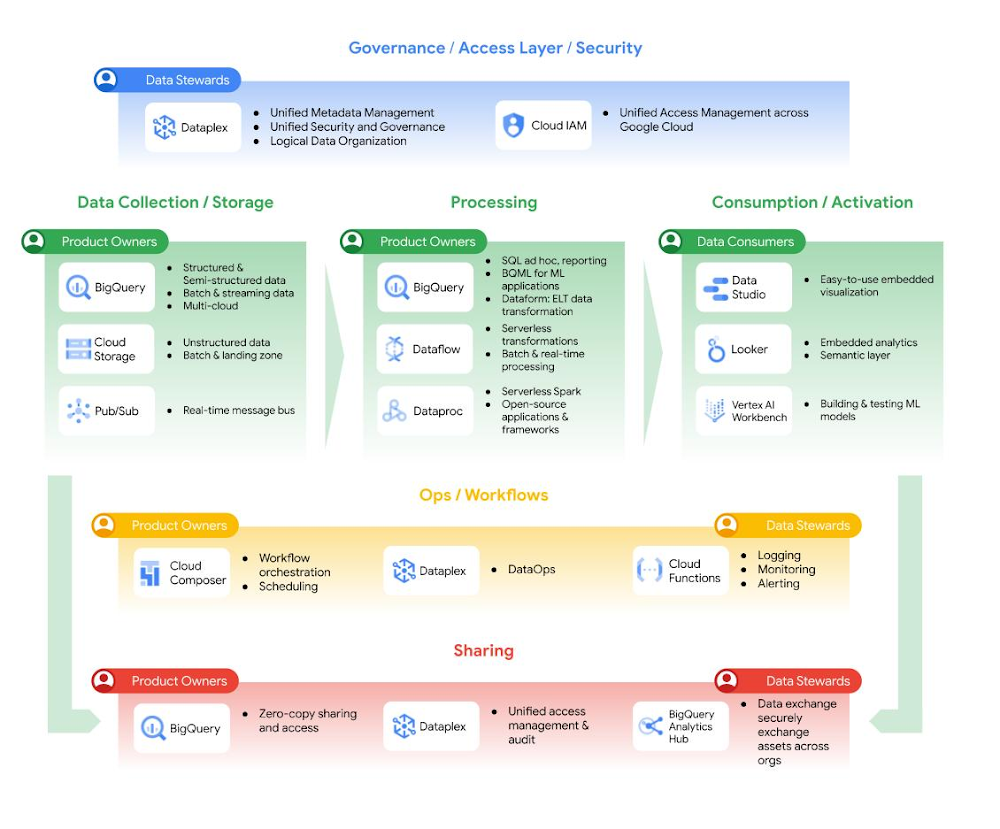
Data drives innovation, but business needs are changing more rapidly than processes can accommodate, resulting in a widening gap between data and value. Your organization has many data sources that  you use to make decisions, but how easy is it to access these new data sources? Do you trust the reports generated from these data sources? Who are the owners and producers of these data sources? Is there a centralized team who should be responsible for producing and serving every single data source in your organization? Or is it time to decentralize some data ownership and speed up data production? In other words, is it time to let the teams with the  most context around data own it?From a technology perspective, data platforms support these ambitions already. In the past, you were concerned about whether you had enough capacity or the amount of engineering time needed to incorporate new data sources into your analytics stack. The data processing, network, and storage barriers are now coming down, and you can ingest, store, process, and access much more data residing in different source systems without costing a fortune. But here’s the thing. Even though data platforms have evolved, the organizational model for  generating analytics data and processes users follow to access and use it haven’t. Many organizations rely on a central team to create a repository of all the data assets in the organization, and then make them useful and accessible to the users of that data. This slows  companies down from getting the value they want from their data. When we talk to our customers we see one of two problems:  The first problem is a data bottleneck. There’s only one team, sometimes just one person or system that can access the data, so every request for data  must go through them. The central team is also asked to interpret the use cases for that data, and make judgments on the data assets required without having much domain knowledge about the data. This situation causes a lot of frustration for data analysts, data scientists and ultimately any business user who requires data for decision making. Over time, people give up on waiting and make decisions without data.Data chaos is the other thing that happens, because people get fed up with the bottleneck. People copy the most relevant data they can find, not knowing if it is the best option available to them. This data duplication (and subsequent uses)  can happen enough times that users lose track of the source of truth of the data, its freshness, and what the data means. Aside from being a data governance nightmare, this creates unnecessary work and a waste of system resources, leading to increased complexity and cost. It slows everyone down and erodes trust in data. To address the above challenges, organizations may wish to give business domains autonomy in generating, analyzing, and exposing data as data products, as long as these data products have a justifiable use case. The same business domains would own their data products throughout their entire lifecycle.In this model, the need for a central data team remains, although without ownership of the data itself. The goal of the central team is to support users in generating value from data by enabling them to autonomously build, share, and use data products. The central team does this via a set of standards and best practices for domains to build, deploy, and maintain data products that are secure and interoperable, governance policies to build trust in these products (and the tooling to assist domains to adhere to them), and a common platform to enable self-serve discovery and use of data products  by domains. Their job is made easier by an already self-service and serverless data platform. In 2019, Zhamak Dehghani introduced to the world the notion of Data Mesh, applying a DevOps mentality that was developed through infrastructure modernization to data. Coincidentally, this is how Google has been operating internally over the last decade. A decentralized data platform is achieved by using BigQuery behind the scenes. As a result, instead of moving data from domains into a centrally owned data lake or platform, domains can host and serve their domain datasets in an easily consumable way. The business area generating data becomes responsible for owning and serving their datasets for access by teams with a business need for that data. We have been working with numerous customers over the last two years who are eager to try Data Mesh out for themselves. We have written about how to build a data mesh on Google Cloud in detail: you can read the full whitepaper here, and a follow up guide to implementation here. In a nutshell, Data Mesh is an architectural paradigm that decentralizes data ownership into the teams that have the greatest business context about that data. These teams take on the responsibility of keeping data fresh, trustworthy, and discoverable by data consumers elsewhere in the company. Data effectively becomes a product, owned and managed within a domain by the teams who know it best. For this approach to work, governance also needs to be federated across the domains, so that management of data and access can be customized, within boundaries, by the data owners as well.The idea of a Data Mesh is alluring; it combines business needs with technology in a way we don’t typically see. It promises a solution to help break down organizational barriers in extracting value from data. To do this, companies must adopt four principles of Discoverability, Accessibility, Ownership, and (Federated) Governance, which require a coordinated effort across technical and business unit leadership. In practice, each group that owns a data domain across a decentralized organization may need to employ a hybrid group of data workers  to take on the increased data curation, data management, data engineering, and data governance tasks required to own and maintain data products for that domain. From day-to-day operations of the team to employee management and performance evaluations, this significantly impacts an organization, so it is not a small change to make and needs buy-in from cross-functional stakeholders and leadership across the company. It is essential that the offices of the Chief Information Security Officer (CISO), Chief Data Officer (CDO), and Chief Information Officer (CIO) are engaged as the key stakeholders as early as possible to enable business units to manage data products in addition to their business-as-usual activities. There must also be business unit leaders willing to have their teams assume this new responsibility. If key stakeholders are less involved in your organizational planning, this may result in inadequate resources being allocated and the overall project failing. Fundamentally, Data Mesh is not just a technical architecture but rather an operating model shift towards distributed ownership of data and autonomous use of technology to enable business units to optimize locally for agility. Thinh Ha’s article on organizational features that are anti-candidates for Data Mesh is a must-read if you are considering this approach at your company. At Google Cloud, we have built managed services to help companies like Delivery Hero modernize their analytics stack and implement Data Mesh practices. Data Mesh promises domain-oriented, decentralized data ownership and architecture where each domain is responsible for creating and consuming data – which in turn allows faster scaling of the number of data sources and use cases. You can achieve this by having federated computation and access layers while keeping your data in BigQuery and BigLake. Then you can join data from different domains, even raw data if needed, with no duplication or data movement. Analytics Hub is then used for discovery together with Dataplex. In addition, Dataplex provides the ability to handle centralized administration and governance. This is further complemented by having Looker, which fits in perfectly as it allows scientists, analysts, and even business users to access their data with a single semantic model. This universal semantic layer abstracts data consumption for business users and harmonizes data access permissions.Figure 1: Data Mesh in Google’s Data CloudIn addition, BigQuery StorageApi allows data access from 20+ APIs at high performance without impacting other workloads, due to its true separation of storage and computation. In this way, BigQuery acts as a lakehouse, bringing together data warehouse and data lake functionality, and allowing different types and higher volumes of data. You can read more about lake houses in our recent open data lakehouse article. Through powerful federated queries, BigQuery can also process external data sources in object storage (Cloud Storage) for Parquet and ORC open source file formats, transactional databases (Bigtable, Cloud SQL), or spreadsheets in Drive. All this can be done without moving the data. These components come together in the example architecture as outlined in Figure 2.Figure 2: Data Mesh example architectureIf you think a Data Mesh may be the right approach for your business, we encourage you to read our whitepaper on how to build a Data Mesh on Google Cloud. But before you consider building a Data Mesh, think through your company’s data philosophy and whether you’re organizationally ready for such a change. We recommend you read “What type of data processing organization are you?” to get started on this journey. The answer to this question is critical as Data Mesh may not be suitable for your organization as a whole if you have existing processes that cannot be federated immediately. If you are looking to modernize your analytics stack as a whole, check out our white paper on building a unified analytics platform. For more interesting insights on Data Mesh, you can read the full whitepaper here. We also have a guide to implementing a data mesh on Google Cloud here, that details the architecture possible on Google Cloud, the key functions and roles required to deliver  on that architecture, and the considerations that should be taken into account in each major task in the data mesh.AcknowledgementsIt was an honor and privilege to work on this with Diptiman Raichaudhuri, Sergei Lilichenko, Shirley Cohen, Thinh Ha,  Yu-lm Loh, Johan Pcikard, Yu-lm Loh and  Maxime Lanciaux for support, work they have done and discussions.
Quelle: Google Cloud Platform

Azure Virtual WAN simplifies networking needs

Today we are excited to make announcements in multiple areas of Azure Virtual WAN (vWAN), networking as a service that brings networking, security, and routing functionalities together to provide a single operational interface. As enterprises increasingly adopt the cloud while reducing their costs, IT teams looking to consolidate, accelerate, or even revamp their wide area network should consider Azure Virtual WAN. You don't need to have all these use cases to start using Virtual WAN—you can get started with just one. With ease of use and simplicity built in, vWAN is a one-stop shop to connect, protect, route traffic, and monitor your wide area network.

“Microsoft Azure Virtual WAN is driving outcomes for Accenture. Migrating 250+ corporate networks to Virtual WAN with code-based deployments creates flexible, cheaper, and consistent networks for our customers. We can now easily connect new work sites in hours.”—Conrad Johnson, Cloud Networks Service Director, Accenture.

The following areas have key announcements:

Remote user connectivity (also known as point-to-site VPN).
Routing.
Branch connectivity (also known as site-to-site VPN).
Private connectivity (also known as ExpressRoute).
Third-Party Network Virtual Appliance Integrations.

Remote-user connectivity (also known as point-to-site VPN)

Multipool user group support preview

Multipool user group support for remote-user (point-to-site) VPN allows you to assign different IP address pools to connecting users based on their credentials. With this feature, you can segment your remote users into distinct groups, assign each group unique IP addresses and use the assigned IPs to control and restrict access to business-critical applications hosted both in Azure and on-premises.

User groups within a Virtual WAN can be defined based on Azure Active Directory membership, Certificate Common Name domain or custom RADIUS attributes.

In this example, Contoso corporation has three departments, human resources, finance, and engineering. Contoso also has an on-premises datacenter hosting several business applications connected to Virtual WAN via an ExpressRoute circuit. Contoso leverages Azure Active Directory groups and Virtual WAN remote user/point-to-site VPN groups to segment and assigns different IPs to HR, finance, and engineering users.

Contoso then configures Azure Firewall and on-premises Firewall rules to allow each functional department to only access relevant applications. For example, Azure Firewall is configured to restrict access to applications in the HR VNet to HR Users. Likewise, on-premises firewalls are also configured to allow users access to applications based on need.

To learn more, read about the underlying concepts behind remote-user connectivity and watch a step-by-step tutorial.

Routing

Secure hub routing intent preview

Routing intent and routing policies allow you to simplify securing your Azure Virtual WAN deployments. With a single click, you can send all traffic (including inter-region and branch-to-branch) to be inspected by Azure Firewall or select Next-Generation Firewall (NGFW) Network Virtual Appliances deployed in the virtual WAN hub. Virtual WAN’s router manages this all for you dynamically by using BGP so that you can avoid error-prone configurations.1

Configuring a routing policy on a hub makes that hub a regional security boundary—all traffic entering or leaving that hub will be sent to Azure Firewall or NVA of choice for inspection before being forwarded to its destination. Routing policies allow you to deploy Azure Firewall/NVA as a bump-in-the-wire solution to inspect East-West (VNet-to-VNet, branch-to-branch (ExpressRoute, P2S VPN, S2S VPN), North-South (branch-to-VNet) traffic between resources connected to the same hub and different hubs. Azure Firewall or a Network virtual appliance Firewall can also serve as the egress point for internet traffic for Virtual Networks and on-premises.

For more information on how to use routing intent and policies, please see how to configure Virtual WAN Hub routing policies.
For a list of available Next-Generation Firewall (NGFW) NVA’s deployed in the hub and appropriate instructions for deploying and accessing previews, please see our Network Virtual Appliances documentation.

Hub routing preference (HRP) is generally available

When a virtual hub router learns multiple routes across S2S VPN, ER, and SD-WAN NVA connections for a destination route prefix on-premises, the virtual hub router makes routing decisions using a built-in route selection algorithm. Being able to select virtual hub routing preference provides the ability to influence routing decisions in a virtual hub router for traffic flowing towards on-premises.

Hub routing preference gives you more control over your infrastructure by allowing you to select how your traffic is routed when a virtual hub router learns multiple routes across S2S VPN, ER and SD-WAN NVA connections. Hub routing preference provides the ability to select between ExpressRoute, AS Path, and VPN to create your desired traffic flow.

Routes are selected in the following order:

Select routes with Longest Prefix Match (LPM).
Prefer static routes over BGP routes.
Hub routing preference lets you select between ExpressRoute, AS Path, and VPN.

For more information on hub routing preference, please see Virtual WAN virtual hub routing preference – Preview – Azure Virtual WAN | Microsoft Learn.

Bypass next hop IP for workloads within a spoke VNet connected to the virtual WAN hub generally available

One of Virtual WANs most popular routing use cases is deploying an NVA in a spoke VNet attached to a virtual WAN hub, then routing traffic through the NVA. Bypassing next hop IP for workloads within a spoke VNet connected to the virtual WAN hub lets you deploy and access other resources in the VNet with your NVA without any additional configuration.

Bypassing next hop IP for workloads within a spoke VNet connected to the virtual WAN hub allows you to have greater flexibility in how you deploy NVAs. This feature allows you to deploy NVAs and other workloads into the same VNet without forcing all the traffic through the NVA.

Learn how to configure virtual hub routing and more about Bypass next hop IP for workloads within a spoke VNet connected to the virtual WAN hub.

Border Gateway Protocol (BGP) Peering with a virtual hub is generally available

BGP Peering with a virtual hub exposes the ability to peer with the virtual hub router directly using the Border Gateway Protocol (BGP) routing protocol. This feature now eliminates the need to configure static routes between a Network Virtual Appliance (NVA) and the virtual hub router.

BGP Peering with a virtual hub enables you to deploy an NVA in a spoke VNet and dynamically exchange routes with your branch and on-premises sites. You can then peer that same NVA with the virtual hub dynamically using BGP. Now you can exchange routes between your branch and the virtual hub without using static routes!

Read more about BGP peering with a virtual hub on Microsoft Learn.
Learn how to configure BGP peering to an NVA virtual hub.

Branch connectivity (also known as site-to-site VPN)

BGP dashboard is now generally available

The BGP dashboard provides the ability to monitor BGP peers, advertised routes, and learned routes for your site-to-site VPNs configured to use BGP in one place.

The BGP dashboard provides greater visibility into your branch offices connected to Virtual WAN. You now have the ability to see what routes your branch office is sending to the virtual WAN router, while also seeing what routes the Virtual WAN router is sending to your branch offices.

See more information on how to monitor S2S VPN BGP routes on the BGP dashboard.

For customers that want to use a non-vWAN VPN gateway, also known as a Virtual Network gateway, which can be used to set up a site-to-site connection within Azure to a Virtual WAN system, the following Virtual WAN–enabled capabilities are worth checking out.

Virtual Network Gateway VPN over ExpressRoute private peering (AZ and non-AZ regions) is generally available

Customers can now use VPN over ExpressRoute private peering connectivity in non-AZ regions. Earlier, this feature was only available for regions having availability zones. The following gateway SKUs can be used for setting up VPN connectivity:

VpnGw1/2/3/4/5 SKUs with standard public IP for regions with no availability zones
VpnGw1AZ/2AZ3AZ/4AZ/5AZ SKUs with standard public IP for regions having one or more availability zones

Point-to-site users connecting to a virtual network gateway can use ExpressRoute (via the site-to-site tunnel) to access on-premises resources.

Customers can deploy site-to-site VPN connections over ExpressRoute private peering at the same time as site-to-site VPN connection via the Internet on the same VPN gateway.

Read more information on this new feature.

Custom traffic selectors (portal)–generally available

Customers may want to set traffic selectors to narrow down address prefixes from both ends of a VPN tunnel. Custom traffic selectors are particularly useful for customers who have large VNet address spaces but want to use one of their subnets for IPsec/IKE negotiation. Customers can add custom traffic selectors when creating a new connection or update an existing connection.

Earlier, we enabled custom traffic selectors using PowerShell. Customers can now also use the portal to set custom traffic selectors on their Virtual Network Gateway VPN connections.

The TrafficSelectorPolicy parameter consists of an array of traffic selectors, with each traffic selector holding a collection of local and remote address ranges in CIDR format.

See more information on setting up traffic selectors.

High availability for Azure VPN client using secondary profile is generally available

Customers can now use Azure VPN client in Windows to add a secondary gateway preference in their primary gateway configuration. This feature improves connection availability for point-to-site customers by having a pre-configured additional profile. If for some reason, the primary gateway encounters an outage, VPN client will automatically failover to connect with the secondary gateway.

See more information on Azure VPN client using secondary profile.

Private connectivity (also known as ExpressRoute)

ExpressRoute circuit with visibility of Virtual WAN connection

Previously in Azure Portal, when navigating to an ExpressRoute circuit connected to a Virtual WAN hub, the ExpressRoute circuit’s Connections page did not display the connections to the virtual hub’s ExpressRoute gateway. With this feature, these connections to the virtual hub’s ExpressRoute gateways are now visible.

By displaying these connections to the ExpressRoute gateways in the virtual hub, this feature provides you with more visibility into your Azure architecture. Not only does this enable you to gain a deeper understanding of your topology, but this will allow you to better monitor and troubleshoot your ExpressRoute connectivity.

Watch a tutorial on how to create an ExpressRoute association to Azure Virtual WAN.

Third-party integrations

Fortinet SDWAN is generally available

We are pleased to announce the general availability of Fortinet SD-WAN in Virtual WAN. Fortinet’s security-driven approach consolidates next-generation Azure Firewall and SD-WAN into a single set of hassle-free solutions to deploy and bootstrap highly available virtual appliances and provide full security inspection at the point of cloud connectivity.

Fortinet SD-WAN dynamically exchanges routes with the Virtual Hub Router using BGP to effortlessly simplify routing between Fortinet SD-WAN branch devices, your applications hosted in Azure Virtual Networks, and services hosted on ExpressRoute-connected on-premises.2

Find more information about Network Virtual Appliances in Virtual WAN on Microsoft Learn.
Read more about Fortinet SD-WAN in Virtual WAN.

Aruba EdgeConnect Enterprise SDWAN preview

We are pleased to announce the preview of Aruba EdgeConnect Enterprise SD-WAN solution in Azure Virtual WAN. The Aruba EdgeConnect Enterprise SD-WAN solution delivers optimized, secured, and automated branch connectivity to, and through, Azure.

The Aruba EdgeConnect Enterprise solution provides a fully-automated, scalable, and software-defined experience connecting branch offices and data centers to Azure Virtual WAN with application-aware traffic steering.

See more on how to deploy the Aruba EdgeConnect Enterprise SD-WAN in Virtual WAN.
Read about Integrated Network Virtual Appliances in Virtual WAN on Microsoft Learn.

Checkpoint NG Firewall preview

We are pleased to announce the preview of Check Point’s Next-Generation Firewall in Virtual WAN. This deep integration allows you to deploy a Check Point Cloud Guard Network Security (CGNS) NVA in the Virtual WAN hub, which lets you enjoy Check Point capabilities without having to worry about provisioning high availability, bootstrapping, or managing upgrades. A major benefit of this NVA integration is simplified routing, as the NVA peers use BGP with the Virtual WAN hub router, which intelligently handles routing decisions within and across Virtual WAN hubs.

Check Point CGNS provides many next-generation firewall capabilities, such as advanced threat detection to prevent malware attacks. In addition, you can configure Check Point security policies via a single pane of glass with Check Point Security Management.2

Watch a demo on this integration.
Read more about the Check Point Azure Virtual WAN security solution announcement.
Find more information about Integrated Network Virtual Appliances on Microsoft Learn.

We want your feedback

We look forward to continuing to build out Azure Virtual WAN and adding more capabilities in the future. We encourage you to try out Azure Virtual WAN and its new features and look forward to hearing more about your experiences and so we can incorporate your feedback into the product.

Learn more

For additional information, please explore these resources:

What's new in Azure Virtual WAN?.
Virtual WAN documentation.


1. Support for inter-region traffic inspection is currently rolling out and is available today for a limited set of regions. To learn more, please reach out to previewinterhub@microsoft.com.

2. NGFW use cases for Routing Intent are currently in preview. Please see Routing Intent section above for more details.
Quelle: Azure

Leverage SFTP support for Azure Blob Storage to build a unified data lake

Today, we are announcing that SSH File Transfer Protocol (SFTP) support for Azure Blob Storage is generally available. SFTP support for Azure Blob Storage is a fully managed, highly scalable SFTP service that enables simple, secure, and easy-to-manage file transfers. This empowers you to modernize your data transfer workflows and eliminate data silos.

The addition of SFTP to Azure Blob Storage, our object storage platform, expands on our vision of multi-protocol access and enables you to run your SFTP workloads with minimal management effort and low infrastructure costs. SFTP support, combined with protocol support for NFS 3.0, Blob REST, and Azure Data Lake Storage, helps customers migrate their applications without any changes. Building on top of the Blob Storage foundation also allows SFTP-enabled accounts to inherit the security, durability, scalability, and cost efficiency of Azure Blob Storage.

This new feature is a one-click enablement solution to transfer files to and from object storage using SFTP without having to monitor or maintain the underlying infrastructure. Customers no longer need to spend resources and time to deploy, manage, scale, and maintain virtual machine (VM)–based SFTP servers.

During our public preview, thousands of customers from various industries such as consulting, retail, healthcare, telecom, financial services, and governments have embraced this feature and are eager to deploy their workloads in production. These customers have been using SFTP for a variety of data transfer scenarios such as exchanging data with customers and partners, modernizing legacy data workflows, syncing data across on-premises and cloud, and collecting data from nodes in a network to unlock insights via a unified data lake.

Manage hybrid workloads using SFTP support for Azure Blob Storage

AT&T, the world’s largest telecommunications company, has a goal to move the majority of its applications to the cloud using private networks. As an organization, it wants to modernize legacy apps and adopt a hybrid architecture where some critical applications are running on-premises and some on Azure.

"As a part of its hybrid architecture, AT&T transfers data between on-premises to Azure and one of the primary methods used is SFTP. Now, instead of creating, maintaining, and patching VMs to keep an SFTP service running, AT&T leverages Blob SFTP to eliminate these repetitive tasks. By providing one-click enablement to create an SFTP endpoint for our Blob Storage accounts, Azure abstracts the infrastructure complexity and provides a highly available SFTP service. The cherry on top of the cake is Local Users, a lightweight identity that complements SFTP, which is very easy to set up, manage, and allows granular permission setting at container level."—Chirag Choksi, Principal Software Engineer, AT&T.

Unlock insights via a unified data lake

Kraft Heinz is an American multinational food company with many beloved brands across the globe. The company has a deep partnership with Microsoft and Azure is its preferred cloud platform for various IT modernization, digital transformation, data science, and analytics workloads that drive its business forward. Kraft Heinz’s data analytics processes involve collaborating with multiple partners and vendors who share data that needs to be ingested into their Enterprise Data Warehouse.

“Managing data sharing pipelines with a wide range of data providers, partners, and retailers is extremely complicated and becomes messy if many different tools are used. SFTP is the common denominator that helps us exchange data in a scalable and secure manner with all collaborators, but we have been incurring tech debt by managing our own SFTP VM servers that require constant maintenance. With SFTP support for Azure Blob Storage, we can easily enable an SFTP endpoint for our data lake for both inbound and outbound file transfers without compromising security or creating additional tech debt. This frees up valuable resources which were previously used to maintain our own SFTP servers. Most importantly, it allows us to create a unified data lake that can be used to generate business insights.”—Ashish Agrawal, Director of Cloud Engineering, Kraft Heinz Company.

Migrate business-critical applications to the cloud

SNCF Réseau is the leading French railway network management company that orchestrates traffic on more than 28,000 kilometers of railway lines. It is responsible for 5 million passengers and 250K tons of freight every day and strives to provide cost-effective and environmentally friendly mobility solutions. To modernize its billing application, SNCF utilizes SFTP support for Azure Blob Storage.

“SFTP servers enable SNCF to communicate data between Azure cloud and their on-premises data centers. In SFTP support for Azure Blob Storage, SNCF found the perfect fully managed, highly available, massively scalable SFTP PaaS that vastly simplified our data transfer workflows. Blob Storage’s native SFTP solution decreases maintenance overhead, freeing up resources that enable SNCF to focus on their goal to innovate and enrich the lives of millions of travelers.”—Taij Triki, Solution Architect, SNCF.

Get Started

Accelerate your migration to the cloud for SFTP workloads with SFTP support for Azure Blob Storage today! Get started by checking out the introductory video and reviewing how to connect to Azure Blob Storage using SFTP.

Learn more

Optimize performance with the guidance in performance Considerations for SFTP in Azure Blob Storage.

Assess limitations of known issues with SFTP support for Azure Blob Storage.

Verify host keys by referring to host keys for SFTP support for Azure Blob Storage.


SFTP support for Azure Blob Storage is not currently available with GA support in West Europe. This will be resolved in the coming weeks.
Quelle: Azure

Control Dev Environments Better with Hardened Desktop (and More!)

Are you looking for even simpler and faster ways to do what you need in Docker Desktop? Whether you’re an admin looking for new ways to secure the supply chain or a developer who wants to discover new Docker Extensions or streamline your use of Dev Environments, Docker Desktop 4.13 has the updates you’re looking for. Read on to see what’s part of this release! 

Enhanced security and management for Docker Business customers

With this release, we’re introducing a new Docker Desktop security model: Hardened Docker Desktop This model includes two new features for Docker Business customers — Settings Management and Enhanced Container Isolation.

Settings Management

With Settings Management, admins can configure Docker Desktop’s settings on client machines throughout their org. In the new admin-settings.json file, admins are able to configure important security settings like proxies and network ranges, and ensure that these values can’t be modified by users.

Enhanced Container Isolation

For an extra layer of security, admins can also enable Enhanced Container Isolation, which ensures that any configurations set with Settings Management cannot be modified by user containers. Enhanced Container Isolation ensures that all containers run unprivileged in the Docker Desktop Linux VM using the Linux user-namespace, as well as introducing a host of other security enhancements. These features are the first within Docker’s new Hardened Desktop security model for Docker Business customers, which provides more granular control over Docker Desktop’s Linux VM.

Docker Extensions Categories

The Docker Extension Marketplace continues to grow, with over 25 extensions added since we launched at DockerCon! With all of these new options, it might be hard to know which extension will benefit you the most in your day to day workflows. 

That’s why in Docker Desktop 4.13, you can now search the Extensions Marketplace by title, description, or author. But there’s more — we also now provide a list of categories for filtering as per our roadmap issue.

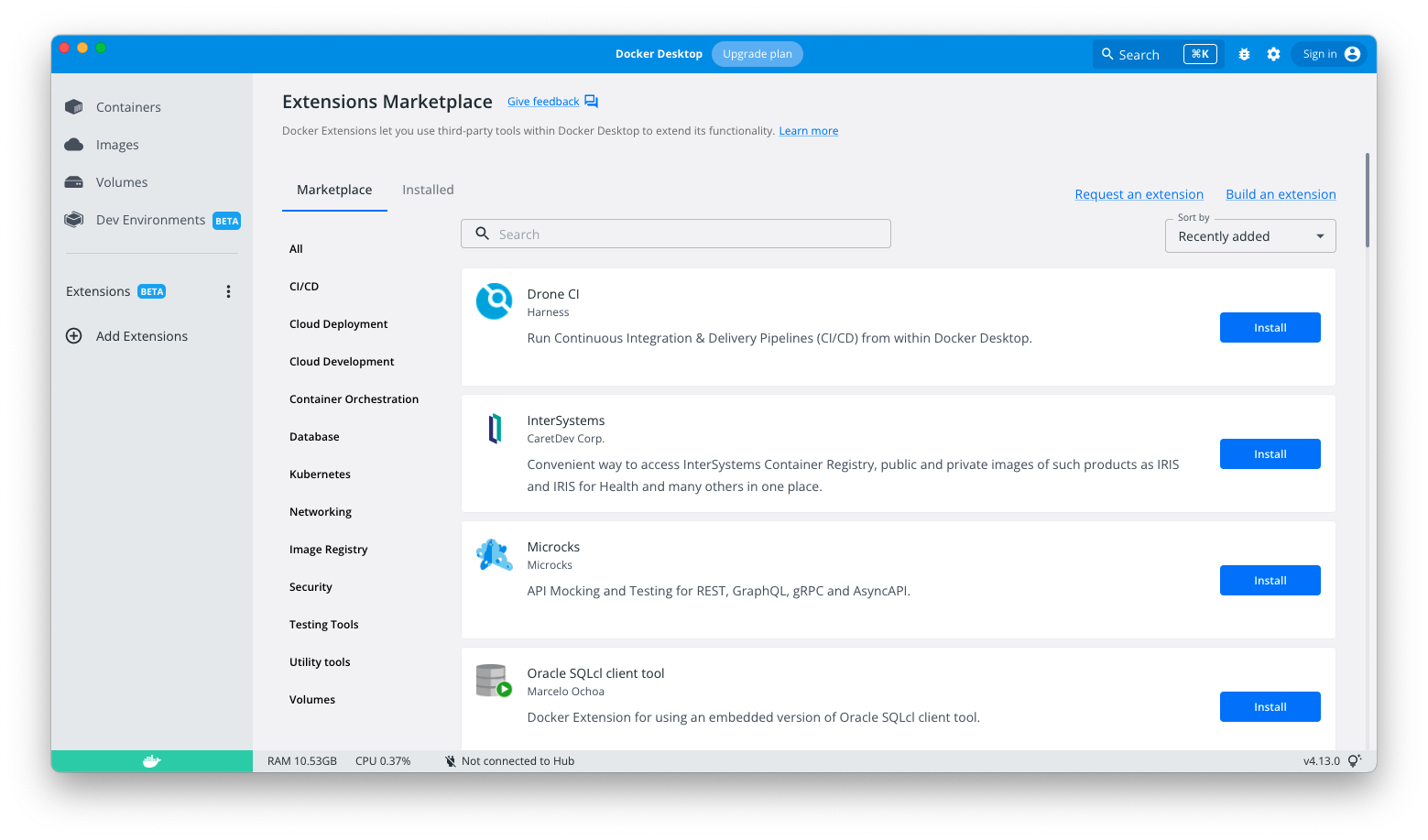
The below screenshot shows the new categories that allow you to find useful extensions more easily. There’s categories for Kubernetes, security, testing tools, and more!Are there any extensions you’d like to see in the Marketplace? Let us know here!

How can I categorize my extension?

If you plan to publish your extension to the Marketplace, you can specify to which categories your extension belongs to. Add the label com.docker.extension.categories to the extension’s Dockerfile, followed by a list of comma separated values with the category keys defined in the docs.

For instance:

LABEL com.docker.extension.categories=”kubernetes,security”

Note that extensions published to the Marketplace before the 22nd of September 2022 have been auto-categorized by Docker, so if you’re the author of any of these, you don’t have to do anything.

Streamlined Dev Environments Experience

We’ve also made a number of improvements to Dev Environments with Docker Desktop 4.13:

CLI Plugin

Use the new docker dev CLI plugin to get the full Dev Environments experience from the terminal in addition to the Dashboard.

Launch from a Git repo

Now you can quickly launch a new environment from a Git repo:

docker dev create https://github.com/dockersamples/compose-dev-env

Simplified project configuration

Now all you need to get started is a compose-dev.yaml file. If you have an existing project with a .docker/ folder — don’t worry! It’ll be migrated automatically the next time you launch.

Dev Environments is still in beta, and your feedback is more important than ever. You can submit feedback directly from the Dev Environments tab in Docker Desktop.

What other features would make your life easier?

Now that you’ve learned what’s new, let us know what you think! Is there a feature or extension that will make using Docker an even better experience for you? Check out our public roadmap to leave feedback and to see what else is coming.
Quelle: https://blog.docker.com/feed/