Ankündigung einer neuen Funktion der Cost-Explorer-Konsole

Ab heute finden Kunden von Cost Explorer eine neue Benutzeroberfläche in der Konsole, die ihre Kosten und Nutzung visualisiert. Das neue Zusammenfassungs-Widget bietet eine Übersicht, die auf einen Blick die gesamten und durchschnittlichen Kosten anzeigt. Kunden können auch bestimmte Ausgaben- und Nutzungsinformationen nachsehen, indem sie die neue Suchfunktion der Tabellenansicht verwenden. Cost Explorer verfügt über eine benutzerfreundliche Oberfläche, mit der du deine AWS-Kosten und -Nutzung im Zeitablauf visualisieren, verstehen und verwalten kannst. Du kannst deine Daten auf hoher Ebene analysieren (zum Beispiel Gesamtkosten und Nutzung über alle Konten hinweg) oder dir deine Kosten- und Nutzungsdaten genauer ansehen, um Trends zu identifizieren, Kostentreiber zu ermitteln und Anomalien zu erkennen.
Quelle: aws.amazon.com

Building scalable real time applications with Firestore

Firestore is a serverless, fully managed NoSQL document database. In addition to being a great choice for traditional server-side applications, Firestore in Native Mode also offers a backend-as-a-service (BaaS) model ideal for rapid, flexible web, and mobile application development. Build applications that don’t require managing any backend infrastructure.A key part of this model is real time queries where data is synchronized from the cloud directly to a user’s device, allowing you to easily create responsive multi-user applications. Firestore BaaS has always been able to scale to millions of concurrent users consuming data with real time queries, but up until now, there has been a limit of 10,000 write operations per second per database. While this is plenty for most applications, we know that there are some extreme use cases that require even higher throughput.We are happy to announce that we are now removing this limit and moving to a model where the system scales up automatically as your write traffic increases. This will be fully backwards compatible and will require no changes to existing applications.Keep reading for a deep dive into the system architecture and what is changing to allow for higher scale.Life of a real time queryReal time queries let you subscribe to some particular data in your Firestore database, and get an instant update when the data changes, synchronizing the local cache on the user’s device. The following example code uses the Firestore Web SDK to issue a real time query against the document with the key “SF”, within the collection “cities”, and will log a message in the console any time the contents of this document are updated.code_block[StructValue([(u’code’, u’const unsub = onSnapshot(doc(db, “cities”, “SF”), (doc) => {rn console.log(“Current data: “, doc.data());rn});’), (u’language’, u”), (u’caption’, <wagtail.wagtailcore.rich_text.RichText object at 0x3e1754f84dd0>)])]A good way to think about a real time query is that internally in Firestore it works as the reverse of a request-response query in a traditional database system. So rather than scanning through indexes to find the rows that match a query, the system keeps track of the active queries and, given any piece of data change, matches the changes to the registry to active queries and forwards the change to the caller of that query.The system consists of a number of components:The Firestore SDKs establish a connection from the user’s device to Firestore Front End servers. An onSnapshot API call registers a new real time query with a Subscription Handler.Whenever any data changes in Firestore, it is both persisted in replicated storage and transactionally sent to a server responsible for managing a commit-time-ordered Changelog of updates. This is the starting point for the real time query processing.Each change is then fanned out from the ChangeLog to a pool of Subscription Handlers.These handlers check which active real time queries match a specific data change, and in the case of a match (in the example above, whenever there is a change to the “cities/SF” document) forward the data to the Frontend and in turn to the SDK and the user’s application.A key part of Firestore’s scalability is the fan-out from the Changelog to the SubscriptionHandler to the Frontends. This allows a single data change to be propagated efficiently to serve millions of real time queries and connected users. High availability is achieved by running many replicas of all these components across multiple zones (or multiple regions in the case of a multi-region deployment).Previously, the changelogs were managed by a single backend server for each Firestore database. This meant that the maximum write throughput for Firestore Native was limited to what could be processed by one server.The big change coming with this update to Firestore is that the changelog servers now automatically scale horizontally depending on write traffic. As the write rate for a database increases beyond what a single server can handle, the changelog will be split across multiple servers, and the query processing will consume data from multiple sources instead of one. This is all done transparently by the backend systems when it is needed and there is no need for any application changes to take advantage of this improvement.Best practices when using Firestore at high scaleWhile this improvement to Firestore makes it easy to create very scalable applications, consider these best practices when designing your application to ensure that it will run optimally. Control traffic to avoid hotspotsBoth Firestore’s storage layer and changelogs have automatic load splitting functionality. This means that when the traffic increases, it will automatically be distributed across more servers. However, the system may take some time to react and typical split operations can take a few minutes to take effect.A common problem in systems with automatic load splitting is hotspots — traffic that is increasing so fast that the load splitter can’t keep up. The typical effect of a hotspot is increased latency for write operations, but in the case of real time queries they can also mean slower notifications for the queries listening to data that is being hotspotted.The best way to avoid hotspots is to control the way you ramp up traffic. For a good rule of thumb, we recommend following the “555 rule”. If you’re starting cold, start your traffic at 500 operations per second, then increase by at most 50% every 5 minutes. If you have a steady rate of traffic already, you can increase the rate more aggressively.Firestore Key Visualizer is a great tool for detecting and understanding hotspots. Learn more about it in the tool documentation here, and in this blog post.Keep documents, result sets, and batches smallTo ensure low latency response time from real time queries, it is best to keep the data lean. Documents with small payloads (e.g. field count, field value size, etc) can be quickly processed by the query system, and this keeps your application responsive. Big batches of updates, large documents, and queries that read large sets of data, on the other hand, may slow things down, and you may see longer delays between when data is committed and when notifications are sent out. This may be counterintuitive when compared to a traditional database where batching is often a way to get higher throughput.Control the fanout of queriesFirestore’s sharding algorithm tries to co-locate data in the same collection or collection group onto the same server. The intent is to maximize the possible write throughput while keeping the number of splits a query needs to talk to as small as possible. But certain patterns can still lead to suboptimal query processing — for example, if your application stores most of its data in one giant collection, a query against that collection may have to talk to many splits to read all the data, even if you apply a filter to the query. This in turn may increase the risk of higher variance in tail latency.To avoid this you can design your schema and application in a way where queries can be served efficiently without going to many splits. Breaking your data into smaller collections — each one with a smaller write rate — may work better. We recommend load testing to best understand the behavior and need of your application and use case.What’s nextRead more about building scalable applications with FirestoreFind out how to get real-time updates on FirestoreLearn more about Key Visualizer for Firestore
Quelle: Google Cloud Platform

When speed is revenue: New Cloud CDN features to improve users’ digital experiences

When it comes to digital experiences, speed is revenue. Users are highly sensitive to slow experiences, and the probability of them bouncing increases by 32% when page load times go from 1 second to 3 seconds. Frustrating experiences let revenue walk out of the door.Cloud CDN can help accelerate your web services by using Google’s edge network to bring your content closer to your users. This can help you save on cloud operations costs, minimize the load on your origin servers, and scale your web experiences to a global audience. Our latest improvements to Cloud CDN expand on the tools you need to fine tune your web service performance.Speed up page load times and save on costs by compressing dynamic contentWith dynamic compression, Cloud CDN automatically reduces the size of responses that are transferred from the edge to a client, even if they were not compressed by the origin server. In a sample of popular CSS and Javascript files, we saw that dynamic compression reduced response sizes between 60 to 80%. This is a win-win for both your web service and its end users. With dynamic compression, you get:Faster page load: By reducing the size of content like CSS and Javascript resources, you can reduce time to first contentful paint and page loads overall. Cost management: Web services that serve a large amount of compressible content can significantly reduce their cache egress costs by enabling dynamic compression.Cloud CDN supports gzip and Brotli compression for web resources like HTML, CSS, Javascript, JSON, HLS playlists, and DASH manifests. Get started with dynamic compression in preview today.Customize cache keys to improve CDN performanceWhen a request comes to Cloud CDN’s edge, it gets mapped to a cache key and compared against entries in the cache. By default, Cloud CDN uses the protocol, host, path, and query string from the URI to define these cache keys. Using Cloud CDN’s new custom cache keys, you can better control caching behavior in order to improve cache hit rates and origin offload. We now support using named headers and cookies. If your web service implements A/B testing or canarying, using named cookies to define cache keys may be especially useful. Using Cloud CDN’s new allowlist for URI parameters for Cloud Storage, you can also implement cache busting. This is a strategy that enables your end users to find the latest version of a cached resource even if an older version is active in the cache. By adding a query parameter that specifies versioning and adding it to the allowlist, you can avoid needing to explicitly invalidate the older cached version. Allowlists are now available for backend buckets, in addition to existing support for backend services.Get started with custom cache keys today.Accelerate your business with Google Cloud networkingTo learn more about how customers like AppLovin use Cloud CDN and Google Cloud networking to accelerate their business, check out our Cloud NEXT session on simplifying and securing your network.
Quelle: Google Cloud Platform

Run Google Cloud Speech AI locally, no internet connection required

We’ve all been there— asking a voice assistant to play a song, launch an app, or answer a question, but the assistant doesn’t comply. Maybe it’s a network outage, or maybe you’re in the middle of nowhere, far away from coverage—either way the result is the same: the voice assistant can’t connect to the server and thus cannot help. With our Speech-to-Text (STT) API now processing over 1 billion minutes of speech each month, it’s clear that voice assistants — and Automatic Voice Recognition (ASR) in general — are essential to how millions of people make decisions and navigate their lives. Typically, however, to successfully provide high-quality speech results to consumers, the AI systems responsible for ASR have needed a stable cloud connection to specialized hardware.With Speech On-Device, which went into GA at Google Cloud Next ‘22, we’re excited to  embed the powerful speech recognition available in the cloud for a  variety of new use cases in environments with inconsistent, little, or no internet connectivity.  These on-device Speech-to-Text and Text-to-Speech technologies have already been used in Google Assistant, but with Speech On-Device, a new generation of apps and services can harness this technology. Build speech experiences with–or without–network connectivity From cars that drive through tunnels, to apps running on integrated devices like kiosks, to IoT devices, Speech On-Device delivers server-quality voice capabilities with a fraction of the processing power—all while helping to maintain privacy by keeping data on the local device. Running locally is made possible by new modeling techniques, on both the Speech-to-Text (STT) and Text-to-Speech (TTS) fronts.For Speech-to-Text (or ASR), years of work on our end-to-end Speech models, such as our latest conformer models, has decreased the size and compute necessary to run fully-featured speech models. These advancements have resulted in quality comparable to that of a server, while still allowing for models that are lightweight enough to run on local devices CPUs. For Text-to-Speech, we leverage new technology developed at Google to bring high-quality voice into vehicles. Speech On-Device TTS not only provides acoustic quality comparable to our WaveNet technology, DeepMind’s breakthrough model for generating more natural-sounding speech, but it also is significantly less computationally demanding and can easily run on embedded CPUs without the need for accelerators.Speech On-Device is easy for developers to get started with. Each system (STT and TTS) provides customers with a binary, built for their specific hardware, operating system, and software environment. This binary exposes a local gRPC interface that other services on the device can talk to, making it easy for multiple services to access speech recognition or speech synthesis as they need to, without additional libraries or integration.  Each model is only a couple hundred megabytes in size. The entire system can run on the single core of a modern ARM-based System on Chip (SoC) while still achieving latencies usable for real-time interactions. This means it can be added to existing systems without worrying about acceleration or optimization. And, as with all Cloud Speech-to-Text API models, Speech On-Device is built to work directly out-of-the-box, with no training or customization necessary. Join the Google Cloud customers already using Speech On-DeviceWe’re excited to see the new speech-driven experiences that organizations will build with this service—especially after seeing Speech On-Device’s early adopters in action. For example, Toyota is leveraging Speech On-Device as Ryan Wheeler — Vice President, Machine Learning at Toyota Connected North America — discussed in a Google Cloud Next ‘22 session. If you are interested in Speech On-Device, there is a review process to help assess whether your use case is aligned with our best practices. To get started, contact your seller today.Related ArticleGoogle Cloud Text-to-Speech API now supports custom voicesGoogle Cloud’s Text-to-Speech API now supports custom voices to help businesses differentiate their brands and deliver better customer ex…Read Article
Quelle: Google Cloud Platform

Unlocking the value of unstructured data at scale using BigQuery ML and object tables

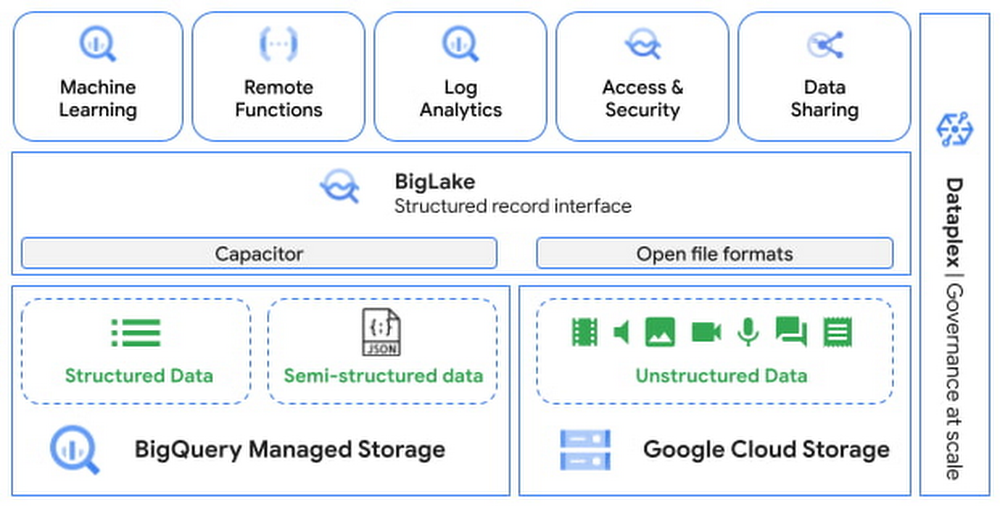
Most commonly, data teams have worked with structured data. Unstructured data, which includes images, documents, and videos, will account for up to 80 percent of data by 2025. However, organizations currently use only a small percentage of this data to derive useful insights. One of main ways to extract value from unstructured data is by applying ML to the data. This could be in the form of extracting objects from images, translating text from one language to another, character recognition from images, sentiment analysis and much more. Performing such tasks is currently achievable by using services that host ML models for these operations. However, business across industries are faced by three major challenges:  Data management: data scientists/analysts have to move stored data to where they build ML pipelines, a notebook or other AI platformsInfrastructure management: there is no security and governance guarantees desired by large enterprisesLimited data science resources: require developing custom solutions in Python, or use frameworks such as Spark or Beam/DataflowBigQuery is an industry leading, fully managed, cloud data warehouse that helps users manage and analyze all of their structured and semi-structured data. Taking advantage of its storage and compute scale, BigQuery also enables users to do in-database machine learning. Now, BigQuery is expanding these capabilities  to unstructured data by providing an integrated solution that eliminates data silos, democratizes compute without sacrificing enterprise-grade security and governance guarantees provided by the underlying Data Warehouse. Data practitioners  can now use familiar SQL constructs to analyze images, text, etc. at scale, and enrich the insights by combining structured and unstructured data in one system. In this article, you will learn:About object tables which enable access to unstructured dataHow to run SQL to get insights from imagesHow to expand unstructured data analytics leveraging Cloud AI servicesIntroducing Object Tables to enable access to unstructured dataAt Next ‘22, we announced the preview of object tables , a new table type in BigQuery that provides metadata for objects stored in Google Cloud Storage. Object tables are powered by BigLake, and serve as the fundamental infrastructure to bring structured and unstructured data under a single management framework. You can now build machine learning models to drive business insights from data in all shapes of forms, without the need to move your data.Run SQL to get insights from images  With easy access to the unstructured data, you can now write SQL on images, and predict results from machine learning models using BigQuery ML. You can import either state of the art TensorFlow Vision models (e.g. ImageNet and ResNet 50) or your own models to detect objects, annotate photos, extract text from images, and much more. You can unify the results of image analysis with structured data (website traffic, sales order, etc.) to train machine learning models to generate insights for better business outcomes. Let’s look at how Adswerve and Twiddy were able to incorporate rental listing images in their analytics to generate search results that resonated the most with their users. User Story from Adswerve & Twiddy Adswerve is a leading Google Marketing, Analytics and Cloud partner on a mission to humanize data. Twiddy & Co. is Adswerve’s client – a vacation rental company in North Carolina, dedicated to creating exceptional customer experiences by helping them to find dream vacation homes. “As a local family vacation rental business specializing in delivering southern hospitality for nearly 45 years, we’ve always strived for our vacation home images to convey the unique local experience that our homes offer. BigQuery ML made it really easy for our business analysts to figure out just the right image creatively by analyzing thousands of potential options and combining them with existing click-through data. This, otherwise, would have taken a lot longer or simply we wouldn’t have done it at all.” — Shelley Tolbert, Director of Marketing, Twiddy & CompanyTo further improve their customer search experience on the website, they are faced by three main challenges: Relying on structured data (e.g. location, size) only to predict what customers might likeThe editorial team uses a manual photo selection processRequire data science resources to build machine learning pipelines and processing data to resize images is labor intensive They wanted to build machine learning models using both website search data and rental listing images to predict the click-through rate of the rental properties. Here is how they accomplished this using BigQuery ML with the new capabilities of Object Table.Step 1: Access to image data by creating an object tableStep 2: Create image embeddings by importing a TensorFlow image modelStep 3: Train a wide and deep BigQuery ML supported model using both image and website data, and predict the click-through rate of rental properties  The results inferred that users are more likely to click on images that had water or other scenic properties. With these insights, Twiddy’s editorial team now makes a more data-driven approach for image selection and editing. This can all be done using SQL, which aligns with their existing analyst skills without having to recruit more specialized data scientists. Watch this demo from Adswerve to learn more.Expanding unstructured data analytics leveraging Cloud AI services Beyond using your own or public machine learning models to analyze unstructured data, we are bringing the Cloud AI services including Translation AI, Vision AI, Natural Language AI, and many others right inside BigQuery. You can translate text, detect objects from photos, perform sentiment analysis on user feedback, and much more all in SQL. You can then incorporate the results into your machine learning models for further analysis. The YouVersion Bible App has been installed on more than half a billion unique devices. It offers Bible text in more than 1,800 languages and supports search in 103 languages. At the start of the geo-political issues in Ukraine, the search volume in Ukrainian nearly doubled. The team wanted to understand what people were searching for and make sure the search results were providing content that would bring people hope and peace. However, without an auto-translate feature, the team had to manually copy and paste each search term into Google translate dozens of times per day for weeks, which was very time-consuming.  With translation capabilities using BigQuery ML, YouVersion will be able to easily learn what users are searching for in the app moving forward. The team will be able to quickly fine-tune search results and generate content that is relevant to their users. This aligns with YouVersion’s desire to serve its global community well by helping the team remove language barriers between them and the people they serve. Watch this demo from YouVersion to learn more. What’s next We will continue to expand these capabilities for different unstructured data types including documents, audios, videos, etc. in the near future. Submit this form to try these new capabilities that unlock the power of your unstructured data in BigQuery using BigQuery ML. You can find other BigQuery ML capabilities announced at Google Cloud Next.
Quelle: Google Cloud Platform