Automattic Awarded Coveted Spot on Forbes Cloud 100 List

Automattic — a leader in publishing and e-commerce software and the parent company behind the industry-leading brands WordPress.com, WooCommerce, WordPress VIP, Jetpack, Tumblr, and more — was awarded a coveted spot on the prestigious Forbes Cloud 100 list, the annual ranking of the world’s top private cloud companies. In partnership with Bessemer Venture Partners and Salesforce Ventures, the Forbes Cloud 100 recognizes standouts in tech’s hottest categories from disruptive startups to internet giants.

A pioneer in democratizing publishing and e-commerce, WordPress powers 38 percent of all websites globally, has 10x the content management market share of its nearest competitor, and is the platform of choice for tens of millions of websites around the world. 

WooCommerce, Automattic’s e-commerce solution, powers 30 percent of the top one million global e-commerce websites — allowing anyone to sell anything from anywhere. With WooCommerce, people can build exactly the business they want, with everything they need to run their store on a single platform. 

Automattic’s technology also powers the largest brands on the web. The WordPress VIP Platform is used by more than 250 enterprises, including Salesforce.com, Facebook, Microsoft, New York Times, Spotify, and CNN, to publish content to hundreds of millions of readers and users.  VIP’s purpose-built infrastructure delivers flexibility, security, and control with unrivaled performance and effortless scaling.

Automattic’s innovation is also attracting a growing and diverse array of platform interactions  —  e.g. 1.7 million new users registering each month across the Automattic ecosystem, 1.2 billion monthly unique visitors on WordPress.com, and 9 billion monthly page views on Tumblr. 

“We are incredibly proud to be included in the Forbes Cloud 100 list — for the fifth year in a row — among so many other noteworthy companies,” said Matt Mullenweg, CEO, Automattic. “Our passion is making the web a better place, and I credit the extraordinary results over the years to the talented and wonderful people — both inside and outside our organization — who bring the Automattic vision to life every day.”
Quelle: RedHat Stack

A New Way to Publish Your Blog Posts Simultaneously as Twitter Threads

Publishing WordPress content on Twitter just got a whole lot easier. You can already bring single Tweets or threads, also known as Tweetstorms, over from Twitter to WordPress, and now we’re bringing the process full circle. With just two extra clicks, you can transform your entire blog post into a Twitter thread. By publishing your quality content on Twitter, you can open new lines of engagement and conversation.

WordPress.com blog with corresponding Twitter thread at right

When you share a WordPress post as a Twitter thread, nothing is left behind: Text, images, video, and embeds will be inserted into the thread right where they’re supposed to be.

Text, video, and image galleries like this are included in the Twitter thread

We know that Twitter threads work best without breaks and other quirks. That’s why, in building this feature, we paid special attention to formatting. If a paragraph is too long for a single Tweet, for instance, it will automatically be split into multiple Tweets. And rather than squishing as many words as possible into the first Tweet and letting the rest spill to the second one, the break will come at the end of a sentence. Also, if you have a list block in your post, it will be formatted as a list on Twitter.

To give you extra control, while you’re writing a post, we’ll show you where Tweet splits will happen. That way, you can shape how your post will appear on Twitter as you write.

How to publish a blog post as a Twitter thread

At any time while you’re working on a post, you can click on the Jetpack icon that’s located on the far right of the header menu at the top of the page.

If you don’t already have your Twitter account connected to your website, click “Connect an account” to allow WordPress to publish content on your Twitter feed. You can add multiple Twitter handles if you’ll be Tweeting from more than one account. You only need to connect each account once.

Make sure the right Twitter handle is selected, write a custom message, and then choose whether you want to share a single link to your blog post or all of the post’s content as a thread.

Hit publish! Your blog post and the Tweet or thread will be shared simultaneously. Be sure you’ve selected your Twitter account when you publish, as this is the only time you’ll be able to share your blog post as a Twitter thread.

Sharing your full blog posts on Twitter is a great way to amplify your content, increase engagement, and build an audience for your work. You most likely have a number of followers on your WordPress blog who aren’t following you on Twitter, and vice versa. This feature allows you to tap into both groups.

Connect your Twitter account to your WordPress site today, and start publishing to both platforms at the same time. Get creative, and have fun. We’re excited to see how you use this first-of-its-kind tool.
Quelle: RedHat Stack

The New Jetpack Search Add-On

As your website grows, it becomes challenging for visitors to find exactly what they need. Being prolific and publishing lots of posts and pages is a net positive for engaging and growing your audience, but it also means visitors may be more likely to find content that isn’t relevant to their interests.

This is where Jetpack Search comes into the picture: It turns your website into a place where visitors can search, refine their results, and find the specific content and products that interest them. 

Built by the same team that created WordPress.com, Jetpack Search is a powerful search solution backed by Elasticsearch (an open source search platform), Jetpack Stats, and our globally distributed data centers — the very same ones that keep your WordPress.com website up, running, and secure day in and day out. Jetpack Search uses multiple technologies to build a modern search experience that improves website engagement. You can now add Jetpack Search to your WordPress.com site with just a few clicks.

What makes Jetpack Search better than regular search?

A modern search experience combines great result rankings with a fast and intuitive user interface. Most WordPress themes can’t do this yet, because the default WordPress search function offers only basic options to show the most relevant content to viewers.

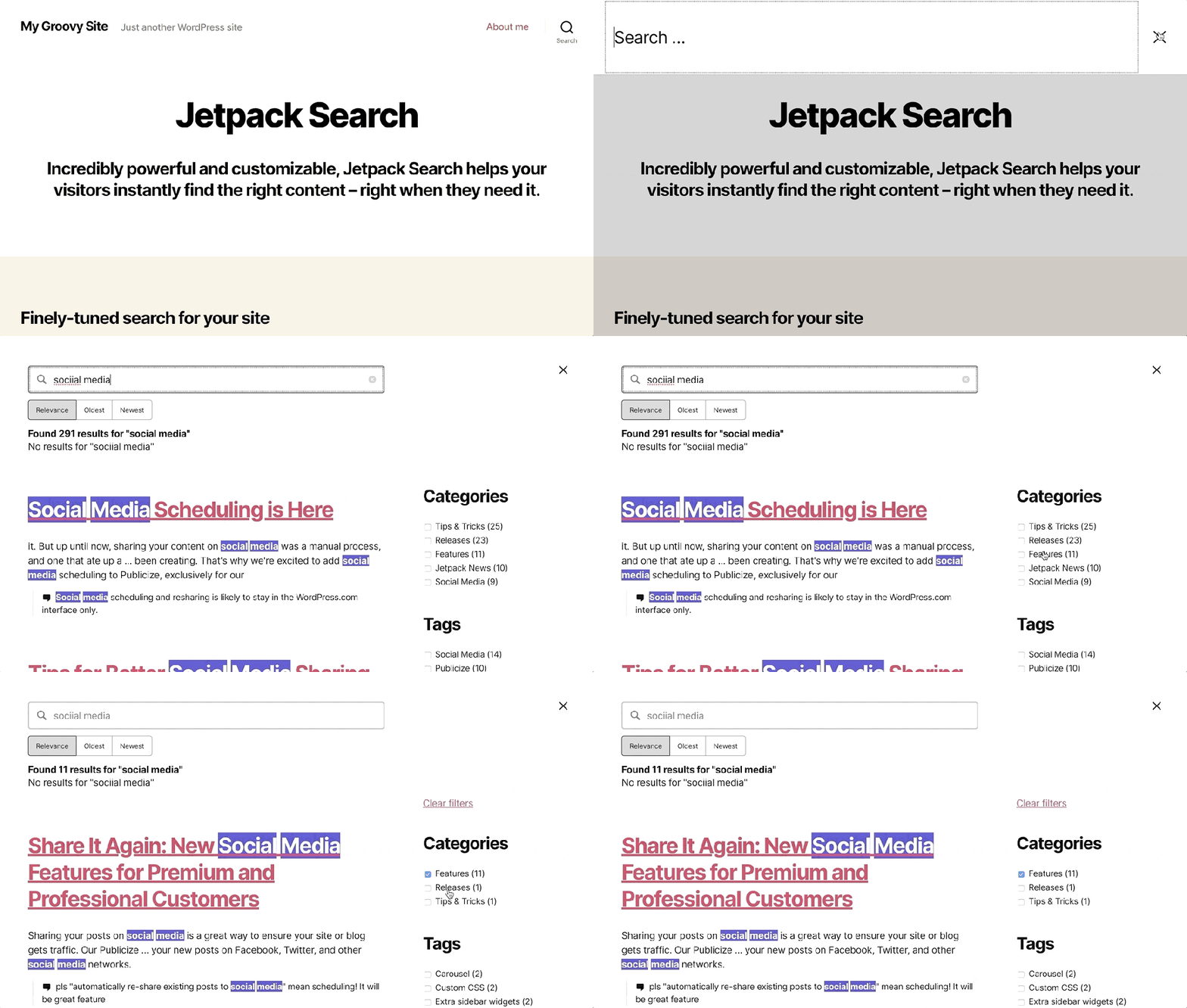
Jetpack Search combines modern ranking algorithms with your traffic stats so that the best results will float to the top and engage your visitors. Our search algorithms work well with numerous languages and provide custom handling for 29 of the most widely used languages in the world. A large percentage of searches contain typos or spelling errors, but Jetpack Search instantly corrects the search query when there are no matches — so if a potential customer is looking for, say, collectables, they will still see the most popular collectibles you offer on your online store. Any changes you make to your site will be reflected in your search results within a few minutes.

Great algorithms are not enough, though. Jetpack Search displays results instantly, as your readers type into the search box. It does its magic equally well on both mobile devices and desktop computers, and in any theme — even those without widget areas. As the user refines their search terms or filters the results, Jetpack Search continues to update the results instantly. The user’s search terms will be highlighted in the results, which they will be able to narrow down further with displayed filters. 

Instant search, spelling correction, and filtering on TwentyTwenty theme.

All of these benefits come together to provide a compelling and beautiful user experience that will encourage people to stay on your site longer.

Get Started with Jetpack Search

We wanted to make Jetpack Search accessible for website owners of all stripes, from those who publish a personal blog to owners of thriving online stores. So we’re offering this new add-on at a price that takes into account how many searchable items — posts, pages, products, and custom post types — your site contains.

Record LimitPrice Per Month100$51,000$1010,000$25100,000$601,000,000$200Over one million$200 per million

All purchases are fully refundable for 30 days. Even better, when you add Jetpack Search to your site with an annual subscription, you get two months free — so you only pay for 10 months every year. When your purchase renews after a year, the price will automatically adjust based on the number of items in your search index.

We think you’ll love Jetpack Search — but more importantly, your site visitors will love it too.

Follow the link below to purchase your Jetpack Search subscription. Once you buy it, Jetpack Search will automatically be enabled for your site. You can then customize the colors, filtering, and other details if you’d like — though the out-of-the-box settings work great, too.

Get Jetpack Search

Read about how we made Jetpack Search
Quelle: RedHat Stack

Deepen Engagement on Your Website with Loom Video Embeds

Video has quickly become one of the most engaging mediums on the internet. Whether you have a personal blog, virtual classroom, business vlog, collaboration website for your team, or something in between, there’s no doubt that you’ve come across video as a way to build and engage your following. By 2022, online videos will make up more than 82% of all consumer internet traffic – 15 times higher than in 2017! (Cisco)

Videos come in all shapes and sizes, and we know that the ability to easily add and embed them is important for engaging your audience. We’ve been hard at work making sure that you can add the video content you want to your WordPress.com website.

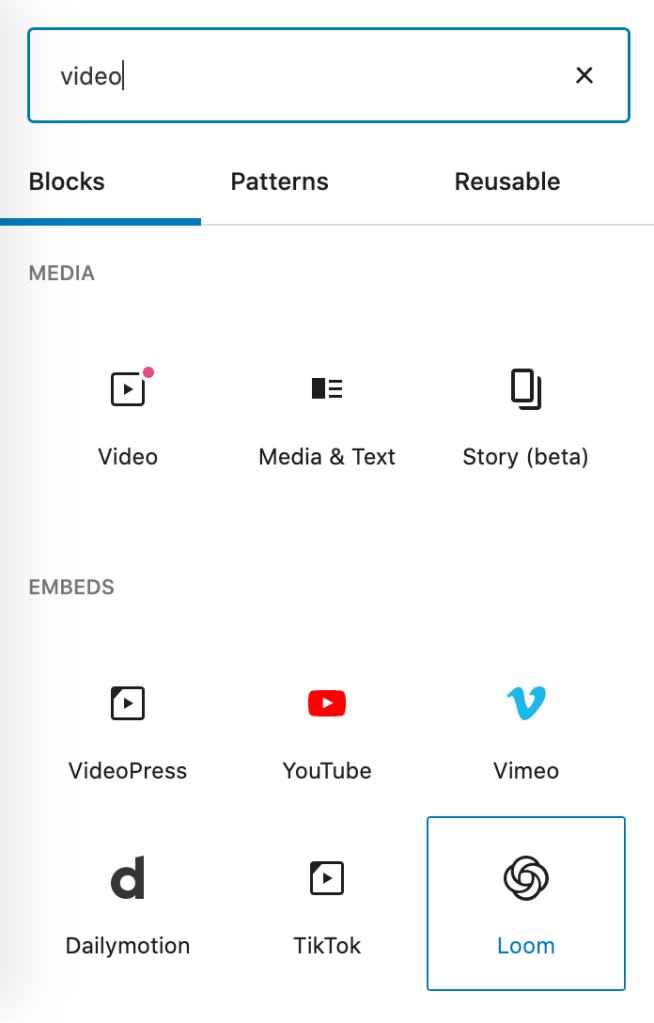
We’re pleased to share today a new Loom block that supports Loom video embeds on any page or post. Loom is a video messaging tool for work, and now all you need to do is copy and paste a Loom URL directly into a new block to embed it.

Embed videos with blocks

The new Loom block joins a number of other video embed features available to WordPress.com users—for instance, you can copy and paste a video URL from YouTube, TikTok, DailyMotion, or Vimeo, or you can use a Video block to upload your own video files.

3 Simple Steps to Embed a Loom Video on Your Website

Grab your Loom video URL – copy it.Paste that URL directly into the WordPress editor in a new block.Alternatively, you can search for “Loom” in the block selector or enter /loom and hit enter in a new line to add it quickly. Then paste the URL into the block interface from here.Publish!

Adding video content to your website is as easy as 1-2-3. Trying adding some to a page or post today to kick off deeper engagement with your site’s visitors.
Quelle: RedHat Stack

A Look at How We Updated Fonts on WordPress.com

We recently updated WordPress.com’s fonts and wanted to give you a behind-the-scenes look at how we chose the list. Here’s an example of a few of them in use.

We looked at several criteria when curating our selections to give your site’s visitors the best experience.

First, we looked at the overall popularity and quality of each font, paying close attention to the letterforms of the most common and most quirky characters.  We made sure that these worked well in specific layouts, at different scales, and as part of the entire collection.

To make the cut, fonts had to contain a breadth of styles and weights, including true italics.

It was important to select fonts with broad character and language support beyond basic Latin. We also looked to showcase a diversity of type designers and open source fonts.

Careful consideration of all the criteria mentioned above allowed us to end up with a list that facilitates attractive font pairings for headings and body text.

Here’s a closer look at a few patterns you can create with a keen typographic eye.

For an even closer, hands-on look, you can check them out in Global Styles and the Customizer today. We’re looking forward to seeing how you use custom fonts on WordPress.com! Your feedback will help us continue to grow, refine, and improve the font choices we offer.
Quelle: RedHat Stack

Mirantis Partners with ExitCertified (Tech Data) to Launch its On Demand Cloud Native Training Courses

The post Mirantis Partners with ExitCertified (Tech Data) to Launch its On Demand Cloud Native Training Courses appeared first on Mirantis | Pure Play Open Cloud.
Signature Docker Container and Kubernetes courses now offered in online format 
CAMPBELL, Calif., October 06, 2020 – Mirantis announced today it has partnered with ExitCertified (Tech Data) to launch a series of Mirantis On Demand cloud native training courses.
ExitCertified prepares businesses to use today’s leading IT technologies such as AWS, VMware and IBM. On Demand Training from ExitCertified makes it easy to upgrade skills at the students’ own pace. Available instantly, On Demand offers the same course content and hands-on labs found in classrooms, and the fully searchable lessons can be stopped, started, rewound or repeated any time. 
“We are excited to have been chosen by Mirantis as the platform for their On Demand training solution,” said Mark McCreath, vice president of Education Services for North America at Tech Data. “Produced exclusively on ExitCertified’s On Demand platform, we’re enabling our customers with authorized training content that they can access anywhere, anytime, 24/7.”
“Mirantis has provided training and certification on leading cloud technologies for years, offering career growth opportunities and giving businesses peace of mind,” said Justin Nevill, director of Global Learning Services at Mirantis. “These courses give Kubernetes and Docker users a chance to gain essential skills in a hands-on learning environment that’s been informed by Mirantis’ extensive experience developing and deploying these technologies at scale in production environments. Now with ExitCertified’s On Demand platform our students can gain these real-world skills online, whenever and wherever they want.”
Mirantis online On Demand training courses provide the same content as instructor-led training. Delivered in an easy-to-consume eLearning experience, the On Demand courses enable customers to learn Kubernetes and Docker Containers where, when, and how they want. Content includes one year of access to official Mirantis certified video content recorded by professional instructors, as well as up to 240 hours of hands-on cloud-based labs. Content setup enables easy search through materials, with the ability to start, stop, and rewind video lessons. Students also have access to technical and instructor support if they have any questions. Mirantis awards certificates upon successful completion of course work.
Currently three courses are available for registration, CN100: Docker Containerization Essentials, CN110: Docker Swarm Application Essentials, and CN210: Docker Enterprise Operations, as well as the CN250: Docker Enterprise Bootcamp bundle that combines all three courses. Additional cloud native courses from the Mirantis training catalog will be added in November 2020.
Visit the On Demand Course Catalog for more details.
Mirantis Training is an established leader in technical training for open cloud technologies. They are a leading vendor in that space, with a Docker, Kubernetes, and OpenStack training portfolio. Since 2012 they have trained and certified more than 40,000 cloud professionals, who choose Mirantis for its expert instructors, proven hands-on curriculum, real-world focus, and preparation for industry recognized cloud certification exams.
About ExitCertified and Tech Data Global Lifecycle Management
Global Lifecycle Management (GLM) is a provider of specialized solutions within Tech Data. GLM gives technology companies the freedom to focus on the road ahead by providing end-to-end customer and product lifecycle management services. Leveraging our team of experts, global logistics network and over 45 years’ experience, we design solutions to release precious capital from our customers’ businesses so they can focus on investing in their transformation journey. Vendor-certified training from GLM’s award-winning training platform — delivered by ExitCertified — provides 24/7 access to over 9,500 authorized courses that cover more than two dozen leading technology brands. Start the journey at www.servicesbytechdata.com. 
The post Mirantis Partners with ExitCertified (Tech Data) to Launch its On Demand Cloud Native Training Courses appeared first on Mirantis | Pure Play Open Cloud.
Quelle: Mirantis

Free OpenStack Essentials Course, and an Update From the Mirantis OpenStack Training Team

The post Free OpenStack Essentials Course, and an Update From the Mirantis OpenStack Training Team appeared first on Mirantis | Pure Play Open Cloud.
A year ago, I wrote a blog discussing the new Certified OpenStack Administrator (COA) exam, Tips for taking the new OpenStack COA (Certified OpenStack Administrator) exam. The Mirantis OpenStack Training team has been busy since then, strengthening our partnership with the OpenStack Foundation and updating our course content.
Mirantis Partnership with the OpenStack Foundation
Since releasing the new COA exam a year ago, Mirantis has continued to work closely with the OpenStack Foundation.
At the upcoming virtual Open Infrastructure Summit, Mirantis Training is sponsoring the following:

OpenStack COA Info Session: This presentation provides an overview of the Certified OpenStack Administrator (COA) exam; sponsored by the OpenStack Foundation, in collaboration with Mirantis. This session is scheduled for Wednesday, October 21, at 11:45 am.
OS100 OpenStack Essentials: The Mirantis Training team is providing an OS100 class, free of charge to summit attendees, for the Upstream Institute on Thursday, October 22.

Use the following URL to view the exam schedule and enroll:

coa.arlo.co/w/events/1-coa-certified-openstack-administrator

Soon, you will also see updates to the COA exam – stay tuned for further details!
You can read more about the COA exam from the following:

Certified OpenStack Administrator (COA)
Tips for taking the new OpenStack COA (Certified OpenStack Administrator) exam

OpenStack Course Updates
Over the last few months, based on feedback from our students, the Mirantis Training team has also been working hard to update our OpenStack curriculum. As a result, we recently launched an updated OpenStack Cloud Technology (OS) track. 
These updates represent our continued commitment to providing vendor-neutral training for OpenStack. 
OpenStack Course Roadmap
To highlight the changes, let’s start with the new role-based roadmap:

Notice that there is now a learning path based on your OpenStack skills/role.
Each OpenStack course is designed for a specific audience. For example,

If you are new to OpenStack, then OS100 is for you. As you continue to grow your skills, you can enroll in an OS220 class.  
If you are interested in taking the COA exam, OS220 or OS250 will help you prepare. 

Let’s continue by looking at each course, its content, and the target audience. 
OS100: OpenStack Essentials (1 day)
Users who are new to OpenStack (or not even familiar with OpenStack) will appreciate this course. 
The primary goal of this course is to provide familiarity with OpenStack and its cloud ecosystem. The most commonly used OpenStack components (Keystone, Glance, Nova, Neutron, Cinder, Horizon, Heat, Octavia, and Telemetry) are discussed in detail. 
As Cloud workloads expand to supporting container and bare metal technologies, students also need to understand the associated OpenStack components, at an introductory level, such as:

Magnum for deploying Container Orchestration Engines (COEs) on virtual machines or bare metal servers   
Zun for deploying containers and pods from OpenStack – a consistent UI to deploy VMs, containers, and pods!
Ironic for bare metal server deployments
Cloud Kitty for Cloud costing and billing
And more!

This course is intended for Project Managers, Sales Engineers, Development Managers, Business Stakeholders, and beginning Cloud operations personnel.
Hands-on labs use the Dashboard UI, known as the Horizon component.
OS220: OpenStack Administration and Operations (3 days)
This course is designed to provide you with a complete experience with administering and operating the most commonly used OpenStack components (Keystone, Glance, Nova, Neutron, Cinder, Horizon, Heat, Octavia, and Telemetry) to implement Infrastructure as a Service (IaaS) in a private cloud; from image management to instance creation to network plugins and more.
This course is intended for intermediate level system/network administrators, Technical IT professionals, deployment engineers, cloud administrators, and cloud operations personnel who already understand OpenStack and need more details.
Hands-on labs use both the Dashboard UI and the OpenStack CLI client.
At the end of this course, you will have acquired the skills necessary to pass the COA Exam.
OS250: OpenStack Administration Bootcamp (4 days)
This course is a bundle of OS100 and OS220.
OS320: Advanced OpenStack Deployment (1 day)
Imagine if you could take a class where you learn how to build a private cloud, based on OpenStack, in ONE DAY!  This is the class for you!  (Of course, you might need some Tylenol, too.)
This course begins with an Ubuntu environment with the stable Rocky code branch. You execute the necessary tasks to install the OpenStack components. Typically, this involves installing one or more Linux code packages, editing one or more configuration files, restarting the services, and verifying your work.
This course involves extensive hands-on lab experience.
At the end of the lab exercises, you have your own private cloud using all of the default drivers, known as the reference implementations, such as, KVM for the hypervisor, Open vSwitch (OVS) for layer 2 networking, NAT tables and namespaces for layer 3 routing, Logical Volume Manager (LVM) for block storage/volume services, and more.
This course is intended for experienced system/network administrators, technical IT professionals, deployment engineers, cloud administrators, and cloud support personnel.
Due to the nature of this content, most hands-on labs use the OpenStack CLI client until the Dashboard UI is installed.
Summary
It has been a busy year!  Mirantis continues to work closely with the OpenStack Foundation for the COA exam. 
Our OpenStack courses were restructured to allow for a role-based learning path. You also have more course content and labs.  Who can argue they want less?  More means you are getting more information to help you do your job.
All OpenStack courses are currently based on the Rocky release level.  Stay tuned for further updates in the future. 
All Mirantis OpenStack courses are available for private delivery, delivered by Mirantis personnel, or the global network of Mirantis’ Authorized Training Partners for public class delivery; available in various locations and time zones. 
For details on all of Mirantis’ training, visit training.mirantis.com.
Questions?  Feel free to contact us at training@mirantis.com.
The post Free OpenStack Essentials Course, and an Update From the Mirantis OpenStack Training Team appeared first on Mirantis | Pure Play Open Cloud.
Quelle: Mirantis

A Better Way to Discover Blogs and Get Inspired

WordPress is home to millions of sites across countless topics. It’s a big and beautiful world, and we want to make it easier for you to discover new voices. Over the past few months, the mobile team has been working hard to improve the experience of your WordPress Reader on the mobile app. In particular, we’ve been exploring different ways for you to discover new blogs and find inspiration.

The new Discover tab on your Reader will recommend blogs and posts based on topics you follow. These changes give you more control over what you see, making it easier for you to find interesting voices, while also giving you and your site the opportunity to find a bigger audience. 

How it works

Add appropriate tags and categories when drafting your blog posts — this helps us recommend your posts to the right audience. 

The topics you now see in your improved Reader are a combination of tags and categories. If you want to find interesting blogs, follow topics you care about. The Discover tab will then show you recommended blogs and posts based on those topics.

Each post on the Discover tab has a list of topics on top. If you want to go deeper into a topic, tap on it to see a feed of blog posts from that specific topic.

If you’d like to see more posts from a particular topic on your Discover feed, tap the Follow button from that topic feed.

Soon we’ll be rolling out improvements to posts on the Reader as well. To give blog posts more room to shine, the featured image will be more prominent. 

If you’d like to try the new Discover tab, make sure you update your WordPress app to the latest version. If you don’t have the app yet, you can download it for free, on both Android and iOS. We’d love to hear your thoughts on the new experience. For specific feedback on the updates, reach out to us from within the app by going to My Site, tapping your photo on the top right, tapping Help & Support → and then selecting Contact Support.
Quelle: RedHat Stack

Toward zero: Reducing and offsetting our data center power emissions

Following the massive Australian bushfires earlier this year, I was motivated to act within my role as a data scientist at Automattic to help fight anthropogenic climate change. Together with colleagues from across the company, we formed an employee resource group focused on sustainability. We are pleased to announce that as a result of our efforts, Automattic now offsets data center power emissions produced from non-renewable sources. This means that the servers running WordPress.com, WordPress VIP, Tumblr, and other Automattic services contribute net zero carbon emissions to our shared atmosphere.

Measuring and offsetting emissions is not a trivial task. In the interest of transparency, this post provides more details on the decisions we made and answers questions that readers may have on the topic. We hope that this will benefit other organizations that are in a similar position to Automattic. We welcome feedback and are happy to answer any other questions you may have.

The decision: For 2020, we decided to purchase offsets from Simoshi via the United Nations’ offset platform. These offsets are produced by improving the efficiency of cooking stoves in Ugandan schools. Emission reductions are achieved by using less wood to cook the same amount of food. This project also has third-party certification from the Gold Standard, and it contributes to nine of the United Nations’ Sustainable Development Goals, including No Poverty, Quality Education, and Gender Equality. See the project page and the following video for more details:

Why did we choose this project? Anyone who’s tried to purchase offsets knows that it can be complicated. We don’t have in-house sustainability experts, so we relied on publicly-available information to better understand the topic. Resources we found useful include: Carbon Offset Guide, atmosfair, and Greenhouse Gas Protocol. As the price of offsets varies widely, we chose to follow Microsoft’s approach and set our own internal price of $15 per metric tonne of CO2e. Simoshi’s project stood out because it matches our budget, has a clear emission reduction mechanism, is certified by the United Nations and the Gold Standard, and has many benefits beyond emission reductions, which align with our company’s values.

What emissions do our offsets cover? Automattic has servers in many data centers around the world, operated by different providers. As we don’t control the data center providers’ choice of energy utilities, we treat the emissions from data center power use as being in Scope 3, i.e., as indirect emissions from our value chain. For each data center, we used publicly-available information from our providers to determine whether they’re powered by renewable resources. This led us to conclude that approximately half of our data center energy use is covered by renewables paid for by the data center providers. For the other data centers, we used our servers’ power consumption logs to get the estimated power used over a period of one year. We then multiplied these figures by 1.5 to obtain a conservative estimate that accounts for power usage effectiveness. Using a variety of resources on grid carbon intensity, such as those published by the American Environmental Protection Agency and the European Environment Agency, we converted these power use estimates to emission estimates. This gave us an overall figure of 1,850 tonnes of CO2e for 2020.

Why offset rather than reduce emissions? We are aware that offsetting is an imperfect solution. Ideally, we would source all our energy from renewables. In a perfect world, it wouldn’t even be possible to buy energy generated by burning fossil fuels. However, given the current reality, setting our own price on carbon and offsetting non-renewable data center emissions is a good temporary solution. This also gives us a financial incentive to work with providers and shift toward greener data centers. In fact, this sort of shift happened last year when we changed our main European data center to a provider that operates on 100% renewables. We hope to continue making such changes in coming years, i.e., reducing emissions where feasible and offsetting the rest.

Why aren’t we doing more? From watching the climate action space, it seems like every announcement is greeted with demands to do more. This is a positive thing — society should hold companies accountable for their actions. As a company, we believe that we can always do better: The opening sentence of our creed is “I will never stop learning”, and we know that we are “in a marathon, not a sprint.” It is our hope that as we learn more about the space and our impact, we will be able to take stronger climate action.

What are we planning to do next? Automattic is a fully-distributed company. This means that our employees aren’t required to commute to central offices, which leads to significant savings in carbon emissions. However, we historically relied on flying to in-person meetups a few times a year to foster collaboration and bonding. Since March 2020, all business travel has been suspended, and it is still unclear what travel will look like in the post-pandemic world. In any case, as an employee resource group, we are planning on quantifying our travel emissions, and advocating for reducing avoidable trips and offsetting emissions from trips that are deemed essential. One change that is already taking place is aligning more teams around fewer time zones. In addition to helping with synchronous collaboration and decreasing isolation, this will reduce the distance traveled per person once meetups resume. We will share more on other actions we take in the future — watch this space! We also welcome feedback from our customers, so please comment on this post or contact us to share your thoughts.
Quelle: RedHat Stack