Inside the world’s most powerful AI datacenter

This week we have introduced a wave of purpose-built datacenters and infrastructure investments we are making around the world to support the global adoption of cutting-edge AI workloads and cloud services.

Today in Wisconsin we introduced Fairwater, our newest US AI datacenter, the largest and most sophisticated AI factory we’ve built yet. In addition to our Fairwater datacenter in Wisconsin, we also have multiple identical Fairwater datacenters under construction in other locations across the US.

In Narvik, Norway, Microsoft announced plans with nScale and Aker JV to develop a new hyperscale AI datacenter.

In Loughton, UK, we announced a partnership with nScale to build the UK’s largest supercomputer to support services in the UK.

These AI datacenters are significant capital projects, representing tens of billions of dollars of investments and hundreds of thousands of cutting-edge AI chips, and will seamlessly connect with our global Microsoft Cloud of over 400 datacenters in 70 regions around the world. Through innovation that can enable us to link these AI datacenters in a distributed network, we multiply the efficiency and compute in an exponential way to further democratize access to AI services globally.

So what is an AI datacenter?

The AI datacenter: the new factory of the AI era

Aerial view of Microsoft’s new AI datacenter campus in Mt Pleasant, Wisconsin.

An AI datacenter is a unique, purpose-built facility designed specifically for AI training as well as running large-scale artificial intelligence models and applications. Microsoft’s AI datacenters power OpenAI, Microsoft AI, our Copilot capabilities and many more leading AI workloads.

The new Fairwater AI datacenter in Wisconsin stands as a remarkable feat of engineering, covering 315 acres and housing three massive buildings with a combined 1.2 million square feet under roofs. Constructing this facility required 46.6 miles of deep foundation piles, 26.5 million pounds of structural steel, 120 miles of medium-voltage underground cable and 72.6 miles of mechanical piping.

Unlike typical cloud datacenters, which are optimized to run many smaller, independent workloads such as hosting websites, email or business applications, this datacenter is built to work as one massive AI supercomputer using a single flat networking interconnecting hundreds of thousands of the latest NVIDIA GPUs. In fact, it will deliver 10X the performance of the world’s fastest supercomputer today, enabling AI training and inference workloads at a level never before seen.

The role of our AI datacenters – powering frontier AI

Effective AI models rely on thousands of computers working together, powered by GPUs, or specialized AI accelerators, to process massive concurrent mathematical computations. They’re interconnected with extremely fast networks so they can share results instantly, and all of this is supported by enormous storage systems that hold the data (like text, images or video) broken down into tokens, the small units of information the AI learns from. The goal is to keep these chips busy all the time, because if the data or the network can’t keep up, everything slows down.

The AI training itself is a cycle: the AI processes tokens in sequence, makes predictions about the next one, checks them against the right answers and adjusts itself. This repeats trillions of times until the system gets better at whatever it’s being trained to do. Think of it like a professional football team’s practice. Each GPU is a player running a drill, the tokens are the plays being executed step by step, and the network is the coaching staff, shouting instructions and keeping everyone in sync. The team repeats plays over and over, correcting mistakes until they can execute them perfectly. By the end, the AI model, like the team, has mastered its strategy and is ready to perform under real game conditions.

AI infrastructure at frontier scale

Purpose-built infrastructure is critical to being able to power AI efficiently. To compute the token math at this trillion-parameter scale of leading AI models, the core of the AI datacenter is made up of dedicated AI accelerators (such as GPUs) mounted on server boards alongside CPUs, memory and storage. A single server hosts multiple GPU accelerators, connected for high-bandwidth communication. These servers are then installed into a rack, with top-of-rack (ToR) switches providing low-latency networking between them. Every rack in the datacenter is interconnected, creating a tightly coupled cluster. From the outside, this architecture looks like many independent servers, but at scale it functions as a single supercomputer where hundreds of thousands of accelerators can train a single model in parallel.

This datacenter runs a single, massive cluster of interconnected NVIDIA GB200 servers and millions of compute cores and exabytes of storage, all engineered for the most demanding AI workloads. Azure was the first cloud provider to bring online the NVIDIA GB200 server, rack and full datacenter clusters. Each rack packs 72 NVIDIA Blackwell GPUs, tied together in a single NVLink domain that delivers 1.8 terabytes of GPU-to-GPU bandwidth and gives every GPU access to 14 terabytes of pooled memory. Rather than behaving like dozens of separate chips, the rack operates as a single, giant accelerator, capable of processing an astonishing 865,000 tokens per second, the highest throughput of any cloud platform available today. The Norway and UK AI datacenters will use similar clusters, and take advantage of NVIDIAs next AI chip design (GB300) which offers even more pooled memory per rack.

The challenge in establishing supercomputing scale, particularly as AI training requirements continue to require breakthrough scales of computing, is getting the networking topology just right. To ensure low latency communication across multiple layers in a cloud environment, Microsoft needed to extend performance beyond a single rack. For the latest NVIDIA GB200 and GB300 deployments globally, at the rack level these GPUs communicate over NVLink and NVSwitch at terabytes per second, collapsing memory and bandwidth barriers. Then to connect across multiple racks into a pod, Azure uses both InfiniBand and Ethernet fabrics that deliver 800 Gbps, in a full fat tree non-blocking architecture to ensure that every GPU can talk to every other GPU at full line rate without congestion. And across the datacenter, multiple pods of racks are interconnected to reduce hop counts and enable tens of thousands of GPUs to function as one global-scale supercomputer.

When laid out in a traditional datacenter hallway, physical distance between racks introduces latency into the system. To address this, the racks in the Wisconsin AI datacenter are laid out in a two-story datacenter configuration, so in addition to racks networked to adjacent racks, they are networked to additional racks above or below them.

This layered approach sets Azure apart. Microsoft Azure was not just the first cloud to bring GB200 online at rack and datacenter scale; we’re doing it at massive scale with customers today. By co-engineering the full stack with the best from our industry partners coupled with our own purpose-built systems, Microsoft has built the most powerful, tightly coupled AI supercomputer in the world, purpose-built for frontier models.

High density cluster of AI infrastructure servers in a Microsoft datacenter.

Addressing the environmental impact: closed loop liquid cooling at facility scale

Traditional air cooling can’t handle the density of modern AI hardware. Our datacenters use advanced liquid cooling systems — integrated pipes circulate cold liquid directly into servers, extracting heat efficiently. The closed-loop recirculation ensures zero water waste, with water only needed to fill up once and then it is continually reused.

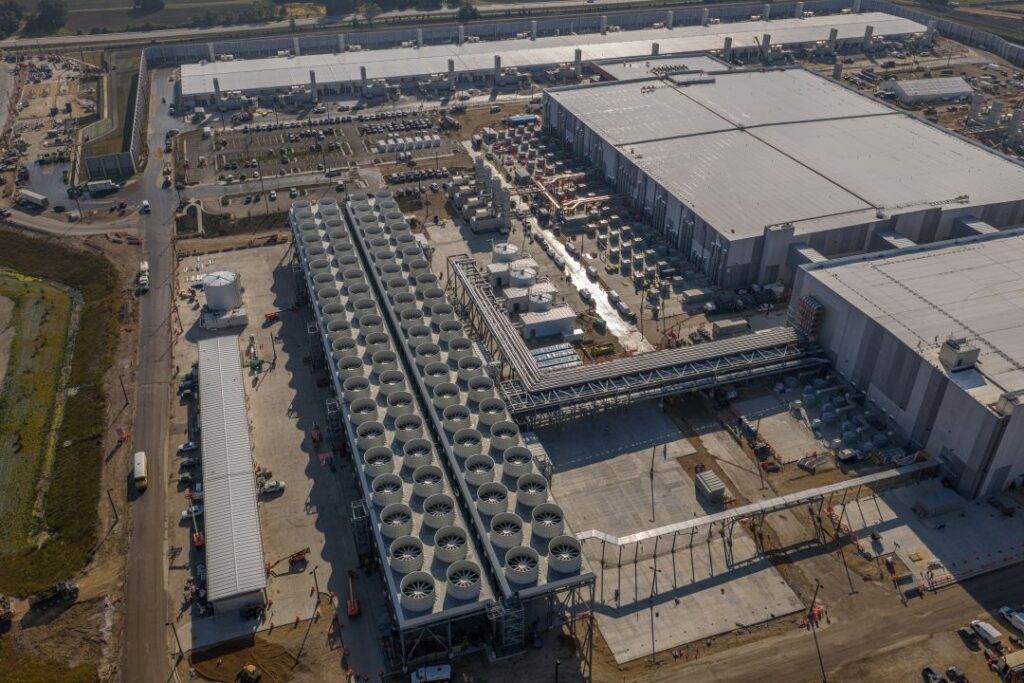
By designing purpose-built AI datacenters, we were able to build liquid cooling infrastructure into the facility directly to get us more rack-density in the datacenter. Fairwater is supported by the second largest water-cooled chiller plant on the planet and will continuously circulate water in its closed loop cooling system. The hot water is then piped out to the cooling “fins” on each side of the datacenter, where 172 20-foot fans chill and recirculate the water back to the datacenter. This system keeps the AI datacenter running efficiently, even at peak loads.

Aerial view of part of the closed loop liquid cooling system.

Over 90% of our datacenter capacity uses this system, requiring water only once during construction and continually reusing it with no evaporation losses. The remaining 10% of traditional servers use outdoor air for cooling, switching to water only during the hottest days, a design that dramatically reduces water usage compared to traditional datacenters.

We’re also using liquid cooling to support AI workloads in many of our existing datacenters; this liquid cooling is accomplished with Heat Exchanger Units (HXUs) that also operate with zero-operational water use.

Storage and compute: Built for AI velocity

Modern datacenters can contain exabytes of storage and millions of CPU compute scores. To support the AI infrastructure cluster, an entirely separate datacenter infrastructure is needed to store and process the data used and generated by the AI cluster. To give you an example of the scale — the Wisconsin AI datacenter’s storage systems are five football fields in length!

Aerial view of a dedicated storage and compute datacenter used to store and process data for the AI datacenter.

We reengineered Azure storage for the most demanding AI workloads, across these massive datacenter deployments for true supercomputing scale. Each Azure Blob Storage account can sustain over 2 million read/write transactions per second, and with millions of accounts available, we can elastically scale to meet virtually any data requirement.

Behind this capability is a fundamentally rearchitected storage foundation that aggregates capacity and bandwidth across thousands of storage nodes and hundreds of thousands of drives. This enables scale to exabyte scale storage, eliminating the need for manual sharding and simplifying operations for even the largest AI and analytics workloads.

Key innovations such as BlobFuse2 deliver high-throughput, low-latency access for GPU node-local training, ensuring that compute resources are never idle and that massive AI training datasets are always available when needed. Multiprotocol support allows seamless integration with diverse data pipelines, while deep integration with analytics engines and AI tools accelerates data preparation and deployment.

Automatic scaling dynamically allocates resources as demand grows, combined with advanced security, resiliency and cost-effective tiered storage, Azure’s storage platform sets the pace for next-generation workloads, delivering the performance, scalability and reliability required.

AI WAN: Connecting multiple datacenters for an even larger AI supercomputer

These new AI datacenters are part of a global network of Azure AI datacenters, interconnected via our Wide Area Network (WAN). This isn’t just about one building, it’s about a distributed, resilient and scalable system that operates as a single, powerful AI machine. Our AI WAN is built with growth capabilities in AI-native bandwidth scales to enable large-scale distributed training across multiple, geographically diverse Azure regions, thus allowing customers to harness the power of a giant AI supercomputer.

This is a fundamental shift in how we think about AI supercomputers. Instead of being limited by the walls of a single facility, we’re building a distributed system where compute, storage and networking resources are seamlessly pooled and orchestrated across datacenter regions. This means greater resiliency, scalability and flexibility for customers.

Bringing it all together

To meet the critical needs of the largest AI challenges, we needed to redesign every layer of our cloud infrastructure stack. This isn’t just about isolated breakthroughs, but composing multiple new approaches across silicon, servers, networks and datacenters, leading to advancements where software and hardware are optimized as one purpose-built system.

Microsoft’s Wisconsin datacenter will play a critical role in the future of AI, built on real technology, real investment and real community impact. As we connect this facility with other regional datacenters, and as every layer of our infrastructure is harmonized as a complete system, we’re unleashing a new era of cloud-powered intelligence, secure, adaptive and ready for what’s next.

To learn more about Microsoft’s datacenter innovations, check out the virtual datacenter tour at datacenters.microsoft.com.

Scott Guthrie is responsible for hyperscale cloud computing solutions and services including Azure, Microsoft’s cloud computing platform, generative AI solutions, data platforms and information and cybersecurity. These platforms and services help organizations worldwide solve urgent challenges and drive long-term transformation.
The post Inside the world’s most powerful AI datacenter appeared first on Microsoft Azure Blog.
Quelle: Azure
FabCon Vienna: Build data-rich agents on an enterprise-ready foundation

FabCon Vienna: Build data-rich agents on an enterprise-ready foundation

Welcome everyone to the second annual European Microsoft Fabric Community Conference this week in the vibrant city of Vienna, Austria! With more than 130 sessions and 10 full-day workshops, this year’s sold-out European event is bigger than ever and there’s no shortage of incredible learning experiences. More than 4,200 attendees will get to test their driving skills on a high-octane racing simulator powered by Fabric Real Time Intelligence, ask their questions directly at expert-staffed booths, compete for a chance to be crowned the DataViz World Champion, and celebrate Microsoft Power BI’s tenth anniversary.

This event is an opportunity to get much deeper into Microsoft Fabric, which has now become the fastest growing data platform in Microsoft’s history.1 In less than two years, we’ve been able to expand Microsoft Fabric into a complete data and analytics platform with more than 25,000 customers, including about 80% of the Fortune 500, spanning everything from analytics to databases to real-time insights.

Microsoft has massive investments in Fabric, and I’m thrilled to share a new slate of announcements that will further advance Fabric’s vision as the most comprehensive, enterprise-grade data platform on the planet. These announcements include new OneLake shortcut and mirroring sources, a brand-new Graph database enabling you to connect entities across OneLake, new geospatial capabilities with Maps in Fabric, improved developer experiences, and new security controls—giving you what you need to run your mission-critical scenarios on Fabric.Get started with Microsoft Fabric

Unify your data with OneLake, the AI-ready data foundation

Any successful AI or data project starts with the right data foundation. Organizations like Lumen, IFS, NTT Data, and the Chalhoub Group have all adopted Microsoft OneLake as the unified access point for their data. Lumen—a leader in enterprise connectivity—cut 10,000 hours of manual effort with OneLake. “We used to spend up to six hours a day copying data into SQL servers,” says Chad Hollingsworth, Cloud Architect at Lumen. “Now it’s all streamlined. OneLake allowed us to ingest once and use anywhere.”

With mirroring and OneLake shortcuts, we’ve simplified how you connect to and transform your data with a zero-copy, zero-ETL approach that allows you to instantly connect to any data—no matter the cloud, database, vendor, engine, or format. In addition to the recent announcement of mirroring for Azure Databricks, we are thrilled to announce the preview of mirroring for Oracle and Google BigQuery, allowing you to access your Oracle and Google data in OneLake in near real-time. We are also extending Fabric data agents to support all mirrored databases, so you can ask questions about your external database data. Additionally, we are announcing the general availability of OneLake shortcuts to Azure Blob Storage and the preview of new OneLake shortcut transformations to automatically convert JSON and Parquet files to Delta tables, for instant analysis. Finally, we are releasing the OneLake integration with Azure AI Search into general availability, enabling you to easily ground your custom agents with OneLake data.

https://www.youtube-nocookie.com/embed/vgi5yb7KlxY?rel=0&v=vgi5yb7KlxY

With your data in OneLake, the OneLake catalog then provides the tools to discover, govern, and secure your data from a single place. With more than 30 million monthly active Power BI and Fabric users, it’s already the default source of data and insights. We are also launching OneLake security into full preview and creating a new tab in the OneLake catalog called Secure, where you can manage the security and permissions for all your data items. Along with this new tab, we are releasing OneLake catalog Govern tab into general availability.

https://www.youtube-nocookie.com/embed/UiFm5AjKXHQ?rel=0&v=UiFm5AjKXHQ

We are also excited to enrich our extensibility story with the preview of a new OneLake Table API, which lets apps use GET and LIST calls to discover and inspect OneLake tables stored in either Iceberg or Delta format using Fabric’s security model. Finally, for workspace owners, we are releasing preview of OneLake diagnostics that allows you to capture all the data activity and storage operations for a specific workspace into any lakehouse in the same capacity.

Train smarter agents with connected intelligence from graph and maps in Fabric

The first step in starting any agentic project is data. You need to bring the data together and ensure your data estate can handle the volume of data used in training. But sophisticated AI agents require more than simply huge quantities of data. To provide you with accurate answers grounded on your business, they need to first understand the relationships between data. They need to understand your business operations. They need context.

We believe this is the next major shift now required for a modern AI-ready data estate. You can learn more about this shift and our vision in Jessica Hawk’s blog, “Microsoft leads shift beyond data unification to organization, delivering next gen AI readiness.” To help you provide this context to your agents or any other data project, we are excited to announce the preview of two transformative new features in Fabric: Graph and Maps.

Model, analyze, and visualize complex data relationships

Graph in Fabric is designed to enable organizations to visualize and query relationships that drive business outcomes. Built upon the proven architecture principles of LinkedIn’s graph technology, graph in Fabric can help you reveal connections across customers, partners, and supply chains. But like your data, graph is easier to explain visually:

https://www.youtube-nocookie.com/embed/TFrAAdRdyVc?rel=0&v=TFrAAdRdyVc

“Graph in Microsoft Fabric is a game changer. The highly scalable graph engine coupled with Fabric’s ease of use is a uniquely powerful combination.”

—Luke Hiester, Senior Data Scientist, Eastman Chemical Company

Graph will roll out in various Fabric regions starting on October 1, 2025.

Visualize, analyze, and act on location-based data instantly

Maps in Fabric can help you bring geospatial context to your agents and operations by transforming enormous volumes of location-based data into interactive, real-time visualizations that drive location-aware decisions and enhance business awareness. Check out a full demo of the new experience:

https://www.youtube-nocookie.com/embed/zdZOrYR049E?rel=0&v=zdZOrYR049E

By combining streaming analytics, geospatial mapping, and contextual modeling, maps can help you extract location-based insights for your existing business processes to drive better awareness and outcomes.

You can learn more about graph and maps in Yitzhak Kesselman’s “The Foundation for Powering AI-Driven Operations: Fabric Real-Time Intelligence” blog.

Delighting developers with new tools in Fabric

Power BI is a leader in business intelligence for developers with more than 7 million actively building data visuals. Now, Microsoft Fabric is quickly becoming the home for all data developers. To help developers feel even more at home, we’re adding a huge range of new tooling across Fabric.

First, we’ve released the Fabric Extensibility Toolkit into preview—an evolution of the Microsoft Fabric Workload Development Kit but newly designed to help any developer bring their data apps to Fabric for their own organizations along with a simplified architecture and additional automation to drastically streamline development. Developers can now simply build their own Fabric items, and everything else like distribution, user interface, and security is taken care of for you—try it today.

We’re also introducing the preview of Fabric MCP, a developer-focused Model Context Protocol that enables AI-assisted code generation and item authoring in Microsoft Fabric. Designed for agent-powered development and automation, it streamlines how you build using Fabric’s public APIs with built-in templates and best-practice instructions. It also integrates with tools like Microsoft Visual Studio Code and GitHub Codespaces and is fully open and extensible.

With the general availability of Git integration and deployment pipelines with lakehouses, data warehouses, copy jobs, activator, Power BI reports, and many more, we are excited to announce that you can employ continuous integration and continuous delivery (CI/CD) capabilities across the Fabric platform. We are even extending CI/CD support to Fabric data agents. We are also releasing User Data Functions and the Fabric VS Code extension into general availability. And we are releasing an open-source version of the command line interface in Fabric.

Finally, we are also releasing horizontal tabs for open items, support for multiple active workspaces, and a new object explorer—all designed to make multitasking in Fabric smoother, faster, and more intuitive.

Build your mission-critical scenarios on Microsoft Fabric

Fabric has comprehensive, built-in tools for network security, data security, and governance, enabling any organization to effectively manage and govern their data. A detailed overview of all of the existing capabilities are available in the Fabric Security Whitepaper.

Now, we are thrilled to announce significant additions to our security, capacity management, performance, and migration—all of which further cement Fabric as the ideal data platform for every AI and mission-critical scenario. Frontier firms implementing AI need more than just next-generation AI tools. You need a comprehensive, cost-effective data platform to support your projects with end-to-end data protection, integration with developer tools, and performance that can scale to any need. Microsoft Fabric has both the leading generative AI capabilities and the enterprise-ready foundation to truly foster an AI-powered data culture.

Connect securely to even the most sensitive data

First, we are providing additional safeguards to help you manage secure data connections and precisely manage the level of isolation you need in each workspace. We are excited to announce the general availability of Azure Private Link in Fabric and outbound access protection for Spark, and the soon to be released preview of workspace IP filtering—all at the workspace-level. Additionally, we are expanding mirroring to support on-premises data sources and data sources behind firewalls. Finally, we are excited to announce the general availability of customer managed keys for Fabric workspaces.

More granular capacity management

Gaining control over the jobs running on your Fabric capacities is critical to any mission critical scenario. To give you this control, we are announcing the general availability of surge protection for background jobs and the preview of surge protection for workspaces. With surge protection, you can set limits on background activity consumption and now, specific workspace activity—helping you protect capacities from unexpected surges. Learn more.

Enhanced Fabric Data Warehouse performance

Fabric is engineered to handle massive data volumes with exceptional performance across its analytics engines, and we’re continuously enhancing their efficiency. Since August 2024, we’ve released 40 performance improvements to Fabric Data Warehouse driven by your feedback, resulting in a 36% performance improvement in industry standard benchmarks—try it today.

Seamlessly migrate your Synapse data to Fabric

We are also excited to release the general availability of an end-to-end migration experience natively built into Fabric, enabling Azure Synapse Analytics (data warehouse) customers to transition seamlessly to Microsoft Fabric. The migration experience allows you to migrate both metadata and data from Synapse Analytics and comes with an intelligent assessment, guided support, and AI-powered assistance to minimize the migration effort.

Extend Fabric with partner-created workloads and seamless integration with Snowflake

We are excited to announce the general availability of new partner solutions native to Microsoft Fabric from ESRI, Lumel, and Neo4j. ESRI’s advanced geospatial analytics, Lumel’s vibrant business intelligence insights, and Neo4j’s graph analytics are all just a click away in the Fabric workload hub. In addition, several new partners are announcing capabilities built on Microsoft Fabric, learn more by reading the FabCon Vienna partner blog.

In May of 2024, we announced an expanded partnership with Snowflake—committing both our platforms to provide seamless bi-directional integration and enable customers with the flexibility to do what makes sense for their business. Since then, we’ve expanded interoperability between Snowflake and Microsoft OneLake including the ability to write Snowflake tables to OneLake, the ability to use OneLake shortcuts to access Snowflake tables, the ability to read OneLake tables directly from Snowflake, and full support for Apache Iceberg format in OneLake. Now, we are releasing new Iceberg REST Catalog APIs that allow Snowflake to read Iceberg tables from OneLake, keeping OneLake tables automatically in sync. You can learn more about this new announcement and our partnership by reading the Microsoft OneLake and Snowflake interoperability blog.

See more Microsoft Fabric innovation

In addition to the announcements above, we are excited to share a huge slate of other innovations coming to Fabric, including enhancements to SQL databases in Fabric, the preview of Runtime 2.0, the preview of AI functions in Data Wrangler, the general availability of editing semantic models in the Power BI service, and so much more.

You can learn more about these announcements and everything else by reading the Fabric September 2025 Feature summary blog, the Power BI September feature summary blog, or by exploring the latest blogs on the Fabric Updates channel.

Join us at FabCon Atlanta and Microsoft Ignite

Already excited about the next FabCon? Join us in Atlanta, Georgia, from March 16 to 20, 2026, for even more in-depth sessions, cutting-edge demos and announcements, community networking, and everything else you love about FabCon. Register today and use code MSCATL for a $200 discount on top of current Early Access pricing!

In the meantime, you can join us at Microsoft Ignite this year from November 18 to 21, 2025, either in person in San Francisco or online to see even more innovation coming to Fabric and the rest of Microsoft. You’ll see firsthand the latest solutions and capabilities across all of Microsoft and connect with experts who can help you bolster your knowledge, build connections, and explore emerging technologies.

Explore additional resources for Microsoft Fabric

Sign up for the Fabric free trial.

View the updated Fabric Roadmap.

Try the Microsoft Fabric SKU Estimator.

Visit the Fabric website.

Join the Fabric community.

Read other in-depth, technical blogs on the Microsoft Fabric Updates Blog.

Sign up now for our upcoming ask the Fabric expert sessions

Join us on September 24, 2025, for the “Ask the Experts—Microsoft OneLake” webinar where experts from our OneLake team will join to answer all your questions live.

Get certified in Microsoft Fabric

Join the thousands of other Fabric users who’ve achieved more than 50,000 certifications collectively for the Fabric Analytics Engineers and Fabric Data Engineers roles. To celebrate FabCon Vienna, we are offering the entire Fabric community a 50% discount on exams DP-600, DP-700, DP-900, and PL-300. Request your voucher.

Join the FabCon Global Hackathon

Build real-world data and AI solutions that push the boundaries of what’s possible with Microsoft Fabric. Join the hackathon to compete for prizes up to $10,000.

Read additional blogs by industry-leading partners

How AI-native data platforms are redefining business by PricewaterhouseCoopers LLP.

Your Operational Data Just Became Your Smartest Business Agent by iLink Digital.

From OLTP to AI: Choosing Your Microsoft Fabric Database Engine by Lumel Technologies.

Building scalable e-commerce product recommendations with Microsoft Fabric SQL by MAQ Software.

Things You Should Know About MCP in Microsoft Fabric by Nimble Learn.

How to Estimate Microsoft Fabric Costs: Capacity Planning Strategies for AI Workloads by JourneyTeam.

How Microsoft Fabric Modernized & Transformed ERP Data Analytics by Bizmetric.

Unlocking the full value of Data as a Product with Microsoft Fabric and Purview by Thoughtworks.

The post FabCon Vienna: Build data-rich agents on an enterprise-ready foundation appeared first on Microsoft Azure Blog.
Quelle: Azure

Azure Kubernetes Service Automatic: Fast and frictionless Kubernetes for all

Today, I’m excited to announce the general availability of Azure Kubernetes Service (AKS) Automatic, delivering Kubernetes that’s already configured, optimized, and ready to run—right out of the box. AKS Automatic accelerates app delivery with automation, simplifies Kubernetes operations through intelligent defaults, and enables secure, compliant workloads optimized for AI and cloud-native use cases. AKS Automatic will set the standard for a simplified Kubernetes experience. 

Get an introduction to AKS Automatic

Instead of wrestling with setup and operations, teams go from commit to cloud without friction, accelerating delivery and unleashing innovation. AKS Automatic is the perfect balance between simplification and flexibility. By removing the complexity of Kubernetes infrastructure, it empowers teams to focus on building and running applications, while still preserving the extensibility and openness you expect from Kubernetes.

AKS powers mission-critical workloads for some of the world’s most forward-thinking organizations, including OpenAI, BMW, Hexagon, McDonald’s, and the NBA. Across industries, enterprises are leveraging AKS to scale securely and accelerate innovation. AKS Automatic builds on this trusted foundation to make Kubernetes faster, simpler, and more secure for every team.

Removing the “Kubernetes tax”

Even for the most advanced Kubernetes users, the power of the platform can often come with operational overhead. AKS Automatic was built to remove those barriers by:

Lowering the learning curve for new Kubernetes users. “Easy mode” clusters with best-practice defaults and guardrails simplify configuration and operations, while ensuring every app deployed on AKS has the performance, reliability, and security it requires. Even first-time Kubernetes users can have a reliable cluster up and running, fast.

Freeing up resources and reducing operational overhead. Running Kubernetes traditionally can mean maintaining the control plane, tuning node pools, patching systems, handling upgrades, and scaling–all tasks that can consume considerable time and resources. AKS Automatic offloads these day-two operations to Azure, managing your cluster’s infrastructure (node provisioning, scaling, maintenance, and repairs) automatically–freeing your team up to focus on other things.

Mitigating security and reliability risks from misconfiguration. Kubernetes flexibility can be a double-edged sword–a small mistake in setup can expose security vulnerabilities or undermine reliability. AKS Automatic clusters come secure and production-ready right out –of –the box. They enforce a hardened default configuration and Azure continuously patches and monitors cluster components to keep them up to date. This means a stronger security posture and resilient operations without extra effort.

From container image to deployed application in minutes, AKS Automatic streamlines the entire Kubernetes experience. With intelligent defaults, simplified cluster operations, and proactive security built in, teams are freed up to focus on building and running applications, instead of managing infrastructure.

The AKS Automatic PoC has helped our Enterprise Tooling Platform significantly reduce operational overhead. By streamlining deployment and management, it allowed us to focus more on apps and tools workloads rather than infrastructure. We’re now planning to adopt AKS Automatic as our ETP microservices and hosting platform for production.
—Swamy Asha, Solution Engineer at Royal Mail Group

What AKS Automatic delivers

AKS Automatic simplifies Kubernetes by offering a fully managed, opinionated experience that abstracts away from infrastructure complexity, while keeping the full power of Kubernetes at your fingertips. In practical terms, when you create an AKS Automatic cluster, you get:

One-click, production-ready clusters. Spin up a production-grade cluster in minutes. Azure handles node setup, networking, and integrations using best practices—no upfront decisions required. Defaults like Azure Container Networking Interface (CNI) and Azure Linux nodes are preselected, so you’re ready to deploy immediately.

Intelligent autoscaling without manual tuning. AKS Automatic enables dynamic scaling for both pods and nodes using Horizontal Pod Autoscaler (HPA), Vertical Pod Autoscaler (VPA), and KEDA for event-driven scaling–all enabled out –of –the box. It also introduces automated node provisioning via Karpenter, an open-source Kubernetes autoscaler that dynamically scales your cluster up or down based on real-time demand—no manual configuration needed.

Built-in best practices for security and reliability. Every AKS Automatic cluster is production-ready by default. This means security and reliability features are baked in from the start. You get Microsoft Entra ID integration for authentication, role-based access control, and network policies without extra setup. Node images are patched automatically, and Azure Monitor is preconfigured for logs and metrics. Deployment safeguards help prevent misconfigurations that could impact uptime, while automatic node repairs and built-in scaling ensure your workloads run reliably. This means you get a stable, secure cluster on day one.

Azure’s application platform delivers flexibility in how customers want to scale AI Apps and agents in production, from AKS to Azure Container Apps and Azure App Service. AKS Automatic strengthens Azure’s position by making Kubernetes simpler for all teams, accelerating deployment of AI applications and agents and seamlessly integrating with Azure’s ecosystem of services and developer tools.

Kubernetes continues to draw massive interest from customers building new AI applications and agents, as well as those modernizing existing applications and deploying at scale. Even more, we’ve embedded Microsoft’s expertise running Kubernetes at scale – underpinning Microsoft Teams, M365, Xbox Live and more – directly in AKS Automatic configurations to enhance security, scalability, and performance. 

Developer-friendly and fully extensible Kubernetes. While AKS Automatic handles infrastructure, it keeps the experience familiar for developers and platform engineers. You still get the full Kubernetes API, kubectl, and your existing tools all work as expected. AKS Automatic integrates with CI/CD pipelines (e.g., GitHub Actions), enabling fast, repeatable deployments. If you need to customize something or use a specific Kubernetes feature, you still have the full power of Kubernetes at your fingertips.

A platform optimized for AI and cloud-native workloads. AKS Automatic is purpose-built to support the demands of modern applications, including AI, ML, and cloud-native services. It offers GPU support, intelligent workload placement, and dynamic resource allocation to handle compute-intensive tasks like model training and inference.

Open-source alignment. Importantly, none of this comes at the expense of control or openness. AKS Automatic is built on upstream open-source Kubernetes, and it remains 100% conformant with CNCF standards (just like AKS Standard). It leverages open-source projects like KEDA and Karpenter, staying true to the Kubernetes community while delivering a managed experience.

Benefits for startups and enterprises alike

One of the unique aspects of AKS Automatic is that it’s designed to be valuable to a wide range of customers.

For lean teams and startups, it makes Kubernetes feasible even without dedicated DevOps or platform engineers. You get a “it just works” Kubernetes cluster where a lot of the tricky parts (like scaling, security, upgrades) are handled for you. This means a small team can leverage the power of Kubernetes–flexibility, portability, scaling–without getting bogged down in operations. As your needs grow, you still have all the capabilities of Kubernetes available.

For enterprise IT and platform teams, AKS Automatic offers consistency and efficiency at scale. Enterprise platform teams can provide AKS Automatic clusters as a self-service option to internal groups, and have confidence that those clusters will be secure and well-managed out of the box. It frees up experienced Kubernetes operators to focus on higher-value architecture decisions rather than routine cluster maintenance. And because it’s still AKS, it integrates with enterprise tools like Azure Arc, Azure Monitor, and company-wide policies just as well as standard AKS does.

In both cases, the outcome is the same: teams can spend more time on their applications and business logic, and less time on Kubernetes itself. AKS Automatic removes much of the undifferentiated heavy lifting that came with Kubernetes, which means more developer productivity and operational peace of mind.

Get started with AKS Automatic

Getting started is as easy as selecting the “Automatic” option when you create a new AKS cluster. In the Azure Portal, you’ll find a toggle or SKU selection for AKS Automatic during provisioning. With Azure CLI, you can enable it by specifying tier Automatic when creating a cluster. There’s no separate product or new API–it’s the AKS you know, with a new managed mode.

Explore AKS Automatic today

If you’re interested in learning more or trying it out:

Ready to start focusing on innovation instead of infrastructure? Join us live today for the global virtual launch event of AKS Automatic (or catch the recap)!

Check out the documentation and quickstarts. We have updated guides on Microsoft Learn, such as “Introduction to AKS Automatic” which covers how it works, and a quickstart for deploying an app to an AKS Automatic cluster from a GitHub repository (using our automated CI/CD integration). These resources walk you through the experience step by step.

Try converting a test workload. A great way to evaluate AKS Automatic is to take a non-critical workload or a dev/test environment you have on a standard AKS cluster and deploy it to a new AKS Automatic cluster. You’ll quickly notice the differences in what you don’t have to do (no manual node management, etc.), and you can observe the autoscaling in action by putting some load on it. Since the Kubernetes API is the same, migrating an app is usually straightforward – often it’s as simple as pointing your kubectl context to the new cluster and re-applying your manifests or Helm charts.

Join the community conversation. We’re eager to hear from you–what works well, what could be better, and what features you’d like to see next. Kubernetes at scale is a journey, and GA is a milestone, not the end. As we move forward, we’ll continue to enhance AKS Automatic, guided heavily by user input. Connect with our team on our Monthly Community Calls or on our GitHub.

Our team is thrilled to make AKS Automatic generally available and can’t wait to see how you use it. Whether you’re a startup founder looking to scale your app without hiring an ops team, or an enterprise architect aiming to standardize and simplify your company’s Kubernetes footprint, we believe AKS Automatic will help you achieve more with less hassle. It’s Kubernetes, minus the complexity. We invite you to try it out and let us know what you think–and we look forward to a new wave of cloud-native innovation that AKS Automatic will help unlock.
The post Azure Kubernetes Service Automatic: Fast and frictionless Kubernetes for all appeared first on Microsoft Azure Blog.
Quelle: Azure
Accelerating AI and databases with Azure Container Storage, now 7 times faster and open source

More companies than ever before are choosing to run stateful workloads—such as relational databases, AI inferencing, and messaging queues—on Kubernetes. For developers building on Kubernetes, storage performance has never been more important.

Today, we’re announcing the next major release of Azure Container Storage – v2.0.0. Compared to prior versions, it delivers up to 7 times higher IOPS, 4 times less latency, and improved resource efficiency. With built-in support for local NVMe drives, Azure Container Storage now delivers our fastest, most powerful Kubernetes storage platform on Azure. It’s now also completely free to use, and available as an open-source version for installation on non-AKS clusters. Whether you’re running stateful applications in production, scaling AI workloads, or streamlining dev/test environments, this major release’s performance will give your workloads a considerable boost.

Get started with Azure Container Storage documentation

What’s Azure Container Storage?

Before we dive into the latest enhancements, let’s take a moment to revisit what Azure Container Storage is and how developers run stateful workloads on Kubernetes with speed, simplicity, and reliability.

Azure Container Storage is a cloud-native volume management and orchestration service specifically designed for Kubernetes. It integrates seamlessly with AKS (Azure Kubernetes Service) to enable provisioning of persistent volumes for production-scale, stateful workloads.

Azure Container Storage’s vision is to serve as the unified block storage orchestrator for Kubernetes workloads on Azure, providing a consistent experience across multiple storage backends for simplified volume orchestration via Kubernetes APIs. This v2.0.0 release focuses specifically on breakthrough performance with local NVMe storage, bringing enterprise-grade performance with cloud-native simplicity. Later this year, we’ll be debuting support for Azure Container Storage to integrate with Elastic SAN.

Azure Container Storage delivers optimized performance and efficiency with low-latency storage for high throughput stateful applications, along with built-in orchestration and automation that allows Kubernetes to manage storage pools, persistent volume lifecycles, snapshots, and scaling—all without switching contexts or managing individual CSI (container storage interface) drivers.

What’s new?

There’s quite a bit to unpack here, so let’s take a deeper dive into some of the key benefits that Azure Container Storage v2.0.0 delivers:

Pricing changes

As before, you’ll continue to pay for the underlying storage backend you use. But Azure Container Storage versions 2.0.0 and beyond will no longer charge a per-GB monthly fee for storage pools larger than 5 TiB for both our first party managed and open-source version, making the service now completely free to use. Provision as much storage as you need without worrying about additional management fees. This means you get enterprise-grade storage orchestration and breakthrough performance without any additional service costs—just pure value for your Kubernetes workloads.

Enhanced performance with reduced resource consumption

This release of Azure Container Storage is optimized specifically for local NVMe drives provided with a variety of VM families. This focus unlocks the fastest possible I/O performance for your most demanding workloads while reducing infrastructure costs.

Perhaps most exciting, this latest version of Azure Container Storage on local NVMe is now faster than ever before. We’ve rebuilt our architecture from the ground up—from the kernel level to the control plane—to push the limits of our storage orchestrator. This dramatic speed improvement comes with an equally impressive reduction in cluster resource consumption. Previously, Azure Container Storage on local NVMe had three performance modes that could consume 12.5%, 25%, or 50% of your node pool’s CPU cores. Azure Container Storage v2.0.0 no longer has performance tiers. Instead, it delivers superior performance while using fewer resources than even our previous lowest-impact setting. This translates directly to cost savings—you get better performance while freeing up CPU capacity for your applications to perform even faster.

Let’s look at the benchmarks. On fio (Flexible I/O Tester), the open-source industry standard for storage testing, Azure Container Storage on NVMe delivers approximately 7 times higher IOPS and 4 times less latency compared to the previous version.

But how does this translate to real workloads? We tested our own PostgreSQL for AKS deployment guide and found that PostgreSQL’s transactions per second improved by 60% while cutting latency by over 30%. For database-driven applications, this means faster query responses, higher throughput, and better user experiences.

All in all, Azure Container Storage delivers a significant performance boost for I/O-demanding workloads out of the box without additional configuration needed, offering developers a simple yet powerful tool in their cloud-native arsenal.

Accelerated AI model loading and KAITO Integration

For AI and machine learning workloads, model loading time can be a significant bottleneck. Azure VMs equipped with GPUs have local NVMe drives available. With the latest NVMe enhancements in the new v2.0.0 version, Azure Container Storage takes advantage of this hardware by dramatically accelerating model file loading for AI inferencing workloads. With our recent integration with KAITO, the first Kubernetes-native controller for automating AI model deployment, you can now deploy and scale AI models faster than ever, reducing time-to-inference and improving overall AI application responsiveness.

Above: Azure Container Storage providing fast NVMe-backed storage for model files

We loaded Llama-3.1-8B-Instruct LLM and found a 5 times improvement in model file loading speed with Azure Container Storage v2.0.0, compared to using an ephemeral OS disk.

More flexible scaling options

Azure Container Storage previously required a minimum of three nodes when using ephemeral drives. It now works with clusters of any size, including single-node deployments. This flexibility is particularly valuable for applications with robust built-in replication or backup capabilities, development environments, and edge deployments where you need high-performance storage without the overhead of larger clusters. The elimination of minimum node requirements also reduces costs for smaller deployments while maintaining the same high-performance capabilities.

Open source and community support

We recognize how important the open-source community is to the health and spirit of the Kubernetes ecosystem. Azure Container Storage version 2.0.0 is now built on our newly created open-source repositories, making it accessible to the broader Kubernetes community.

Whether you need the Azure-managed version for seamless AKS integration or prefer the community open-source version for self-hosted Kubernetes clusters, you get the same great product and features. The open-source approach also means easier installation, greater transparency, and the ability to contribute to the project’s evolution.

Explore our open-source repository (local-csi-driver), and learn more about our related block storage products:

Azure Container Storage enabled by Azure Arc

Use Container Storage Interface (CSI) driver for Azure Disk on Azure Kubernetes Service (AKS)

In summary

This major update to Azure Container Storage delivers a faster and leaner high-performance Kubernetes storage platform. Here’s what you get:

Included out of the box: This release focuses on ephemeral drives (local NVMe and temporary SSD) provided with select VM families, including storage-optimized L-series, GPU-enabled ND-series, and general-purpose Da-series.

Enhanced workload support: Optimized for demanding applications like PostgreSQL databases and KAITO-managed AI model serving.

Superior performance: 7 times improvement in read/write IOPS and 4 times reduction in latency, with 60% better PostgreSQL transaction throughput.

Open source: Built on open-source foundations with community repositories for easier installation on any Kubernetes cluster.

Flexible scaling: Deploy on clusters with as few as one node—no minimum cluster size requirements.

Zero service fees: Completely free to use for all storage pool sizes—you only pay for underlying storage.

Getting started

Ready to experience the performance boost? Here are your next steps:

New to Azure Container Storage? Start with our comprehensive documentation.

Deploying specific workloads? Check out our updated deployment guide for PostgreSQL.

Want the open-source version? Visit our GitHub repository for installation instructions.

Have questions or feedback? Reach out to our team at AskContainerStorage@microsoft.com.

Regardless of your workload, Azure Container Storage provides the performance and ease you expect from modern cloud-native storage. We’re excited to see what you build—and we’d love to hear your feedback. Happy hacking!
The post Accelerating AI and databases with Azure Container Storage, now 7 times faster and open source appeared first on Microsoft Azure Blog.
Quelle: Azure
Ask Ralph: Where style meets AI—a new era of conversational commerce

Over the past few years, AI has seamlessly woven itself into the fabric of our daily routines, transforming the ways we access information and organize our lives. From intelligent search engines to virtual assistants that help us plan trips, AI is behind the effortless convenience we now expect.

It’s also transforming the way we shop. Increasingly, we’re embracing AI shopping tools that more easily help us find products. But that’s just the start of what conversational commerce can do. Just like consumers want in store, online they’re seeking recommendations that reflect their sense of personal style.

Enter Ask Ralph, a new AI-powered styling companion that not only helps with product discovery but also inspires consumers with Ralph Lauren’s unique and iconic take on style.

Azure AI: Design, customize, and manage AI apps and agents at scaleAsk Ralph: A style companion powered by AIAsk Ralph is a conversational AI shopping experience built on Azure OpenAI and available in the Ralph Lauren app in the US. You can interact with Ask Ralph just like you would a stylist in a Ralph Lauren store by asking simple, conversational questions or using prompts to find the perfect look for any occasion.

Whether you’re refreshing your wardrobe for fall or wondering what to wear to a concert in the park, Ask Ralph responds with curated, fully stylized, visually displayed, and shoppable outfits from across the Polo Ralph Lauren brand, tailored to your unique prompts.

The delight of conversational commerceAsk Ralph is part of a broader movement—one where AI doesn’t just assist, it inspires.

Using natural language, Ask Ralph interprets open-ended prompts, asks clarifying questions, and delivers beautifully visualized outfit recommendations that are tailored to your query—all based on Ralph Lauren’s real-time available inventory.

Built for the future, grounded in legacyFor nearly 60 years, Ralph Lauren has been a pioneer in creating transportive and cinematic retail experiences. Twenty-five years ago, Microsoft and Ralph Lauren teamed up to launch one of fashion’s first e-commerce platforms, setting an industry standard—and now, together, we are again redefining the shopping experience with Ask Ralph.

As Naveen Seshadri, Ralph Lauren’s Chief Digital Officer, shared in a recent interview, “At Ralph Lauren, our focus is always on the consumer. We harness innovative technologies to create an elevated, personalized experience that draws customers into Ralph’s iconic world at every interaction. The launch of Ask Ralph is a continuation of that commitment.”

To hear more from Naveen on the vision behind Ask Ralph, watch the Ralph Lauren customer video.

Agentic AI: The new frontierAsk Ralph is powered by Azure’s agentic AI capabilities—intelligent systems that plan, reason, and act. These agents are transforming retail by enabling immersive, personalized experiences at scale.

“At Ralph Lauren, our focus is always on the consumer. We harness innovative technologies to create an elevated, personalized experience that draws customers into Ralph’s iconic world at every interaction. The launch of Ask Ralph is a continuation of that commitment.”

—Naveen Seshadri, Chief Digital Officer at Ralph Lauren

Confidence, creativity, connectionAt its heart, Ask Ralph is about inspiration. It’s about helping people find new ways to express their personal style.

This is just the beginning for Ask Ralph, which will continue to evolve with new features and offerings to offer an even more personalized experience, as well as expand across markets, platforms, and additional Ralph Lauren brands.

A woman holding a tabletAzure AI solutionsCreate the future with Azure AI Foundry

Get startedReady to transform the shopping experience with AI?With Azure AI, retailers have the power to build immersive, intelligent shopping experiences that scale, adapt, and inspire. Whether you’re looking to personalize customer journeys, optimize inventory, or empower your workforce, Microsoft’s AI platform is ready to help you innovate with confidence.

Join us for an AI.deation workshop to explore how agentic AI can elevate your business—from concept to production. Let’s co-create the future of retail, one conversation at a time.

Learn moreRead the press release on Microsoft News.Learn more about Ask Ralph and download the app on the Ralph Lauren site.Read the full Ralph Lauren customer story.
The post Ask Ralph: Where style meets AI—a new era of conversational commerce appeared first on Microsoft Azure Blog.
Quelle: Azure

Agent Factory: Connecting agents, apps, and data with new open standards like MCP and A2A

This blog post is the fifth out of a six-part blog series called Agent Factory which will share best practices, design patterns, and tools to help guide you through adopting and building agentic AI.

An agent that can’t talk to other agents, tools, and apps is just a silo. The real power of agents comes from their ability to connect to each other, to enterprise data, and to the systems where work gets done. Integration is what transforms an agent from a clever prototype into a force multiplier across a business.

With Azure AI Foundry customers and partners, we see the shift everywhere: customer service agents collaborating with retrieval agents to resolve complex cases, research agents chaining together across datasets to accelerate discovery, and business agents acting in concert to automate workflows that once took teams of humans. The story of agent development has moved from “can we build one?” to “how do we make them work together, safely and at scale?” 

Connect agents with Azure AI Foundry

Industry trends show integration as the unlock

At Microsoft over the years, I’ve seen how open protocols shape ecosystems. From OData, which standardized access to data APIs, to OpenTelemetry, which gave developers common ground for observability, open standards have consistently unlocked innovation and scale across industries. Today, customers in Azure AI Foundry are looking for flexibility without vendor lock-in. The same pattern is now unfolding with AI agents. Proprietary, closed ecosystems create risk if agents, tools, or data can’t interoperate, causing innovation to stall and an increase in switching costs.

Standard protocols taking root: Open standards like the Model Context Protocol (MCP) and Agent2Agent (A2A) are creating a lingua franca for how agents share tools, context, and results across vendors. This interoperability is critical for enterprises who want the freedom to choose best-of-breed solutions and ensure their agents, tools, and data can work together, regardless of vendor or framework.

A2A collaboration on MCP: Specialist agents increasingly collaborate as teams, with one handling scheduling, another querying databases, and another summarizing. This mirrors human work patterns, where specialists contribute to shared goals. Learn more about how this connects to MCP and A2A in our Agent2Agent and MCP blog. 

Connected ecosystems: From Microsoft 365 to Salesforce to ServiceNow, enterprises expect agents to act across all their apps, not just one platform. Integration libraries and connectors are becoming as important as models themselves. Open standards ensure that as new platforms and tools emerge, they can be integrated seamlessly, eliminating the risk of isolated point solutions.

Interop across frameworks: Developers want the freedom to build with LangGraph, AutoGen, Semantic Kernel, or CrewAI—and still have their agents talk to each other. Framework diversity is here to stay.

What integration at scale requires

From our work with enterprises and open-source communities, a picture emerges of what’s needed to connect agents, apps, and data:

Cross-agent collaboration by design: Multi-agent workflows require open protocols that allow different runtimes and frameworks to coordinate. Protocols like A2A and MCP are rapidly evolving to support richer agent collaboration and integration. A2A expands agent-to-agent collaboration, while MCP is growing into a foundational layer for context sharing, tool interoperability, and cross-framework coordination.

Shared context through open standards: Agents need a safe, consistent way to pass context, tools, and results. MCP enables this by making tools reusable across agents, frameworks, and vendors.

Seamless enterprise system access: Business value only happens when agents can act: update a CRM record, post in Teams, or trigger an ERP workflow. Integration fabrics with prebuilt connectors remove the heavy lift. Enterprises can connect new and legacy systems without costly rewrites or proprietary barriers.

Unified observability: As workflows span agents and apps, tracing and debugging across boundaries becomes essential. Teams must see the chain of reasoning across multiple agents to ensure safety, compliance, and trust. Open telemetry and evaluation standards give enterprises the transparency and control they need to operate at scale.

How Azure AI Foundry enables integration at scale

Azure AI Foundry was designed for this connected future. It makes agents interoperable, enterprise ready, and integrated into the systems where businesses run.

Model Context Protocol (MCP): Foundry agents can call MCP-compatible tools directly, enabling developers to reuse existing connectors and unlock a growing marketplace of interoperable tools. Semantic Kernel also supports MCP for pro-code developers. 

A2A support: Through Semantic Kernel, Foundry implements A2A so agents can collaborate across different runtimes and ecosystems. Multi-agent workflows—like a research agent coordinating with a compliance agent before drafting a report—just work.

Enterprise integration fabric: Foundry comes with thousands of connectors into SaaS and enterprise systems. From Dynamics 365 to ServiceNow to custom APIs, agents can act where business happens without developers rebuilding integrations from scratch. And with Logic Apps now supporting MCP, existing workflows and connectors can be leveraged directly inside Foundry agents.

Unified observability and governance: Tracing, evaluation, and compliance checks extend across multi-agent and multi-system workflows. Developers can debug cross-agent reasoning and enterprises can enforce identity, policy, and compliance end-to-end.

Why this matters now

Enterprises don’t want isolated point solutions—they want connected systems that scale. The next competitive advantage in AI isn’t just building smarter agents, it’s building connected agent ecosystems that work across apps, frameworks, and vendors. Interoperability and open standards are the foundation for this future, giving customers the flexibility, choice, and confidence to invest in AI without fear of vendor lock-in.

Azure AI Foundry makes that possible:

Flexible protocols (MCP and A2A) for agentic collaboration and interoperability.

Enterprise connectors for system integration.

Guardrails and governance for trust at scale.

With these foundations, organizations can move from siloed prototypes to truly connected AI ecosystems that span the enterprise.

What’s next

In part six of the Agent Factory series, we’ll focus on one of the most critical dimensions of agent development: trust. Building powerful agents is only half the challenge. Enterprises need to ensure these agents operate with the highest standards of security, identity, and governance.

Did you miss these posts in the series?

Agent Factory: The new era of agentic AI—common use cases and design patterns.

Agent Factory: Building your first AI agent with the tools to deliver real-world outcomes.

Agent Factory: Top 5 agent observability best practices for reliable AI.

Agent Factory: From prototype to production—developer tools and rapid agent development.

Azure AI Foundry
Build adaptable AI agents that connect with each other to automate tasks and enhance user experiences.

Learn more

The post Agent Factory: Connecting agents, apps, and data with new open standards like MCP and A2A appeared first on Microsoft Azure Blog.
Quelle: Azure

Agent Factory: From prototype to production—developer tools and rapid agent development

This blog post is the fourth out of a six-part blog series called Agent Factory which will share best practices, design patterns, and tools to help guide you through adopting and building agentic AI.

Developer experiences as the key to scale

AI agents are moving quickly from experimentation to real production systems. Across industries, we see developers testing prototypes in their Integrated Development Environment (IDE) one week and deploying production agents to serve thousands of users the next. The key differentiator is no longer whether you can build an agent—it’s how fast and seamlessly you can go from idea to enterprise-ready deployment.

Deploy AI agents quickly with Azure AI Foundry

Industry trends reinforce this shift:

In-repo AI development: Models, prompts, and evaluations are now first-class citizens in GitHub repos—giving developers a unified space to build, test, and iterate on AI features. 

More capable coding agents: GitHub Copilot’s new coding agent can open pull requests after completing tasks like writing tests or fixing bugs, acting as an asynchronous teammate.

Open frameworks maturing: Communities around LangGraph, LlamaIndex, CrewAI, AutoGen, and Semantic Kernel are rapidly expanding, with “agent templates” on GitHub repos becoming common.

Open protocols emerging: Standards like the Model Context Protocol (MCP) and Agent-to-Agent (A2A) are creating interoperability across platforms.

Developers increasingly expect to stay in their existing workflow—GitHub, VS Code, and familiar frameworks—while tapping into enterprise-grade runtimes and integrations. The platforms that win will be those that meet developers where they are—with openness, speed, and trust.

What a modern agent platform should deliver

From our work with customers and the open-source community, we’ve seen a clear picture emerge of what developers really need. A modern agent platform must go beyond offering models or orchestration—it has to empower teams across the entire lifecycle:

Local-first prototyping: Developers want to stay in their flow. That means designing, tracing, and evaluating AI agents directly in their IDE with the same ease as writing and debugging code. If building an agent requires jumping into a separate UI or unfamiliar environment, iteration slows and adoption drops.

Frictionless transition to production: A common frustration we hear is that an agent that runs fine locally becomes brittle or requires heavy rewrites in production. The right platform provides a single, consistent API surface from experimentation to deployment, so what works in development works in production—with scale, security, and governance layered in automatically.

Open by design: No two organizations use the exact same stack. Developers may start with LangGraph for orchestration, LlamaIndex for data retrieval, or CrewAI for coordination. Others prefer Microsoft’s first-party frameworks like Semantic Kernel or AutoGen. A modern platform must support this diversity without forcing lock-in, while still offering enterprise-grade pathways for those who want them.

Interop by design: Agents are rarely self-contained. They must talk to tools, databases, and even other agents across different ecosystems. Proprietary protocols create silos and fragmentation. Open standards like the Model Context Protocol (MCP) and Agent-to-Agent (A2A) unlock collaboration across platforms, enabling a marketplace of interoperable tools and reusable agent skills.

One-stop integration fabric: An agent’s real value comes when it can take meaningful action: updating a record in Dynamics 365, triggering a workflow in ServiceNow, querying a SQL database, or posting to Teams. Developers shouldn’t have to rebuild connectors for every integration. A robust agent platform provides a broad library of prebuilt connectors and simple ways to plug into enterprise systems.

Built-in guardrails: Enterprises cannot afford agents that are opaque, unreliable, or non-compliant. Observability, evaluations, and governance must be woven into the development loop—not added as an afterthought. The ability to trace agent reasoning, run continuous evaluations, and enforce identity, security, and compliance policies is as critical as the models themselves.

How Azure AI Foundry delivers this experience 

Azure AI Foundry is designed to meet developers where they are, while giving enterprises the trust, security, and scale they need. It connects the dots across IDEs, frameworks, protocols, and business channels—making the path from prototype to production seamless.

Build where developers live: VS Code, GitHub, and Foundry

Developers expect to design, debug, and iterate AI agents in their daily tools—not switch into unfamiliar environments. Foundry integrates deeply with both VS Code and GitHub to support this flow.

VS Code extension for Foundry: Developers can create, run, and debug agents locally with direct connection to Foundry resources. The extension scaffolds projects, provides integrated tracing and evaluation, and enables one-click deployment to Foundry Agent Service—all inside the IDE they already use.

Model Inference API: With a single, unified inference endpoint, developers can evaluate performance across models and swap them without rewriting code. This flexibility accelerates experimentation while future-proofing applications against a fast-moving model ecosystem.

GitHub Copilot and the coding agent: Copilot has grown beyond autocomplete into an autonomous coding agent that can take on issues, spin up a secure runner, and generate a pull request, signaling how agentic AI development is becoming a normal part of the developer loop. When used alongside Azure AI Foundry, developers can accelerate agent development by having Copilot generate agent code while pulling in the models, agent runtime, and observability tools from Foundry needed to build, deploy, and monitor production-ready agents.

Use your frameworks

Agents are not one-size-fits-all, and developers often start with the frameworks they know best. Foundry embraces this diversity:

First-party frameworks: Foundry supports both Semantic Kernel and AutoGen, with a convergence into a modern unified framework coming soon. This future-ready framework is designed for modularity, enterprise-grade reliability, and seamless deployment to Foundry Agent Service.

Third-party frameworks: Foundry Agent Service integrates directly with CrewAI, LangGraph, and LlamaIndex, enabling developers to orchestrate multi-turn, multi-agent conversations across platforms. This ensures you can work with your preferred OSS ecosystem while still benefiting from Foundry’s enterprise runtime.

Interoperability with open protocols

Agents don’t live in isolation—they need to interoperate with tools, systems, and even other agents. Foundry supports open protocols by default:

MCP: Foundry Agent Service allows agents to call any MCP-compatible tools directly, giving developers a simple way to connect external systems and reuse tools across platforms.

A2A: Semantic Kernel supports A2A, implementing the protocol to enable agents to collaborate across different runtimes and ecosystems. With A2A, multi-agent workflows can span vendors and frameworks, unlocking scenarios like specialist agents coordinating to solve complex problems.

Ship where the business runs

Building an agent is just the first step—impact comes when users can access it where they work. Foundry makes it easy to publish agents to both Microsoft and custom channels:

Microsoft 365 and Copilot: Using the Microsoft 365 Agents SDK, developers can publish Foundry agents directly to Teams, Microsoft 365 Copilot, BizChat, and other productivity surfaces.

Custom apps and APIs: Agents can be exposed as REST APIs, embedded into web apps, or integrated into workflows using Logic Apps and Azure Functions—with thousands of prebuilt connectors to SaaS and enterprise systems.

Observe and harden

Reliability and safety can’t be bolted on later—they must be integrated into the development loop. As we explored in the previous blog, observability is essential for delivering AI that is not only effective, but also trustworthy. Foundry builds these capabilities directly into the developer workflow:

Tracing and evaluation tools to debug, compare, and validate agent behavior before and after deployment.

CI/CD integration with GitHub Actions and Azure DevOps, enabling continuous evaluation and governance checks on every commit.

Enterprise guardrails—from networking and identity to compliance and governance—so that prototypes can scale confidently into production.

Why this matters now

Developer experience is the new productivity moat. Enterprises need to enable their teams to build and deploy AI agents quickly, confidently, and at scale. Azure AI Foundry delivers an open, modular, and enterprise-ready path—meeting developers in GitHub and VS Code, supporting both open-source and first-party frameworks, and ensuring agents can be deployed where users and data already live.

With Foundry, the path from prototype to production is smoother, faster, and more secure—helping organizations innovate at the speed of AI.

What’s next

In Part 5 of the Agent Factory series, we’ll explore how agents connect and collaborate at scale. We’ll demystify the integration landscape—from agent-to-agent collaboration with A2A, to tool interoperability with MCP, to the role of open standards in ensuring agents can work across apps, frameworks, and ecosystems. Expect practical guidance and reference patterns for building truly connected agent systems.

Did you miss these posts in the series?

Agent Factory: The new era of agentic AI—common use cases and design patterns.

Agent Factory: Building your first AI agent with the tools to deliver real-world outcomes.

Agent Factory: Top 5 agent observability best practices for reliable AI.

Azure AI Foundry
Build AI agents that automate tasks, enhance user experiences, and deliver results.

Learn more

The post Agent Factory: From prototype to production—developer tools and rapid agent development appeared first on Microsoft Azure Blog.
Quelle: Azure

Microsoft Cost Management updates—July & August 2025

Whether you’re a new student, a thriving startup, or the largest enterprise, you have financial constraints. You need to know what you’re spending, where your money is being spent, and how to plan for the future. Nobody wants a surprise bill—and that’s where Microsoft Cost Management comes in. We’re always looking for ways to learn more about your challenges and help you do more with less.

See the newest features on Microsoft Cost Management

Here are a few of the latest improvements and updates (July 2025):

Service Principal support for Partner Admin Reader role (EA indirect partners)

Azure Pricing Calculator: Tip of the Month

New ways to save money with Microsoft Cloud

New videos and learning opportunities

Documentation updates

Let’s dig into the details.

Service Principal support for Partner Admin Reader role (EA indirect partners)

We’re excited to announce that Azure now supports assigning the Partner Admin Reader role to Service Principals. This enhancement empowers Enterprise Agreement indirect partners (CSPs who manage customer Azure costs) to programmatically access cost data across their customers’ enrollments under their Partner Customer Number (PCN) via Azure Active Directory applications—without relying on interactive user accounts.

Why this matters:

Managing cloud costs across multiple customers is complex and might be error-prone when relying on manual exports or shared credentials. Partners need secure, scalable, and automated access to cost data to integrate insights into their tools and optimize spend in real time.

With these enhancements, partners can now:

Automate cost data retrieval securely using Azure Active Directory service principals (no shared user credentials).

Integrate Cost Management data into partner billing tools, dashboards, or workflows using APIs.

Maintain strong governance and control access to billing scopes with Azure Role-Based Access Control.

Enable near real-time monitoring, invoice reconciliation, and proactive cost optimization across multiple customers.

To get started, learn more about how to assign Enterprise Agreement roles to service principals.

Azure Pricing Calculator: Tip of the Month 

When working with estimates in the Azure Pricing Calculator—that include multiple services—scrolling through all the details can become overwhelming. To simplify your view, click the collapse button on your estimate. This instantly minimizes the detailed configuration for all services in your estimate, leaving just the summary line visible.

Why this helps:

Reduces unnecessary scrolling when managing large estimates.

Makes it easier to focus on the services you want to review or adjust.

Keeps your workspace clean and organized, especially when sharing estimates with others.

Try collapsing services the next time you build a complex estimate. It’s a small trick that makes a big difference in navigating your pricing scenarios!

New ways to save money with Microsoft Cloud

Here are new and updated offers you might be interested in for cost savings and optimization from July and August 2025:

Generally available: Azure Firewall ingestion-time transformation for cost-efficient logging. Now you can filter or transform Azure Firewall logs before they’re ingested into Log Analytics, reducing the amount of data stored and lowering your logging costs without losing critical security insights. 

Public preview: Azure Storage Mover–free Amazon Web Services S3-to-Azure Blob migration. Now you can move data from Amazon Web Services S3 to Azure Blob Storage securely and at no additional cost using Azure Storage Mover. This fully managed service simplifies multi-cloud or full migration scenarios without third-party tools, reducing complexity and expenses.

New videos and learning opportunities

We added several new videos for your viewing and learning. Whether you are new to Cost Management or require a refresher, these videos will prove to be highly beneficial:

Managing Access to Cost Management Data

How to use the Azure Copilot to understand your costs

Configuring Cost Allocation Rules and Tags

Documentation updates

The Cost Management and Billing documentation continues to evolve. Here are some our new and updated documents from July and August:

Pay your Microsoft Customer Agreement or Microsoft Online Subscription Program bill: Updated on July 2 to add partial payment options and India-specific payment methods.

Manage Azure Reservations: Updated on July 8 to clarify reservation scope changes, splitting reservations, and limitations on billing subscription changes.

Charge back Azure saving plan costs: Published on July 9 to explain chargeback/showback for savings plans using amortized cost and API queries.

Calculate Enterprise Agreement (EA) savings plan cost savings: Published on July 9 to guide EA customers in calculating savings plan benefits using amortized usage data.

Manage Azure costs with automation: Updated on July 10 to add best practices for Cost Details API, automation workflows, and handling large datasets.

Understand and work with Cost Management scopes: Updated on July 25 to clarify Role-Based Access Control vs. billing scopes and role requirements for cost visibility.

Manage a Microsoft Azure Consumption Commitment resource: Published on August 14 to describe MACC resources, movement between subscriptions, and deletion rules.

Set up your billing account for a Microsoft Customer Agreement: Updated on August 14 to detail EA-to-MCA transition steps, prerequisites, and common migration issues.

Manage a Microsoft Azure credit resource under a subscription: Published on August 19 to introduce Azure Credit resources for MCA accounts and explain moving or deleting them.

Permissions to view and manage Azure reservations: Updated on August 21 to expand guidance on Role-Based Access Control roles, billing roles, and delegation for reservation access.

Want to keep an eye on all documentation updates? Check out the change history of the Cost Management and Billing documentation in the Azure Docs repository on GitHub. If you see something missing, select Edit at the top of the document and submit a quick pull request. You can also submit a GitHub issue. We welcome and appreciate all contributions!

What’s next for Cost Management

These are just a few of the updates from the last two months. Don’t forget to check out previous Microsoft Cost Management updates for more tips and features. We’re always listening and making continuous improvements based on your feedback—please keep it coming!

Follow the team, share your ideas, and get involved:

Submit ideas and vote on requests in the Cost Management feedback forum.

Watch and subscribe to the Microsoft Cost Management YouTube channel.

Stay tuned for more in next month’s update.

Microsoft Cost Management
Manage your cloud costs with confidence.

Get started >

The post Microsoft Cost Management updates—July & August 2025 appeared first on Microsoft Azure Blog.
Quelle: Azure

Azure mandatory multifactor authentication: Phase 2 starting in October 2025

As cyberattacks become increasingly frequent, sophisticated, and damaging, safeguarding your digital assets has never been more critical, and at Microsoft, your security is our top priority. Microsoft research shows that multifactor authentication (MFA) can block more than 99.2% of account compromise attacks, making it one of the most effective security measures available.

As announced in August 2024, Azure started to implement mandatory MFA for Azure Public Cloud sign-ins. By enforcing MFA for Azure sign-ins, we aim to provide you with the best protection against cyber threats as part of Microsoft’s commitment to enhance security for all customers, taking one step closer to a more secure future.

As previously announced, Azure MFA enforcement was rolled out gradually in phases to provide customers with enough time to plan and execute their implementations:

Phase 1: MFA enforcement on Azure Portal, Microsoft Entra admin center, and Intune admin center sign-ins.

Phase 2: Gradual enforcement for MFA requirement for users performing Azure resource management operations through any client (including but not limited to: Azure Command-Line Interface (CLI), Azure PowerShell, Azure Mobile App, REST APIs, Azure Software Development Kit (SDK) client libraries, and Infrastructure as Code (IaC) tools).

We are proud to announce that multifactor enforcement for Azure Portal sign-ins was rolled out for 100% of Azure tenants in March 2025. Now, Azure is announcing the start of Phase 2 MFA enforcement at the Azure Resource Manager layer, starting October 1, 2025. Phase 2 enforcement will be gradually applied across Azure tenants through Azure Policy, following Microsoft safe deployment practices.

Starting this week, Microsoft sent notices to all Microsoft Entra Global Administrators by email and through Azure Service Health notifications to notify the start date of enforcement and how to prepare for upcoming MFA enforcement.

Prepare for mandatory MFA enforcement

Customer impact

Users will be required to authenticate with MFA before performing resource management operations. Workload identities, such as managed identities and service principals, aren’t impacted by either phase of this MFA enforcement.

Learn more about the scope of enforcement.

How to prepare

1. Enable MFA for your users

To ensure your users can perform resource management actions, enable MFA for your users by October 1, 2025. To identify which users in your environment are set up for mandatory MFA, follow these steps. 

2. Understand potential impact

To understand potential impact ahead of Phase 2 enforcement, assign built-in Azure Policy definitions to block resource management operations if the user has not authenticated with MFA.

Customers can gradually apply this enforcement across different resource hierarchy scopes, resource types, or regions.

3. Update your Azure CLI and PowerShell clients

For the best compatibility experience, users in your tenant should use Azure CLI version 2.76 and Azure PowerShell version 14.3 or later.

Next steps for multifactor authentication for Azure sign-in

To ensure your users can perform resource management actions, enable MFA for your users by October 1, 2025. 

To understand the potential impact, apply a built-in Azure Policy definition in audit or enforcement mode.

For the best compatibility experience, users in your tenant should use Azure CLI version 2.76 and Azure PowerShell version 14.3 or later.

If you can’t enable MFA for your tenant by October 1, 2025, the Global Administrator for your tenant can postpone the enforcement date through Azure Portal.

Keep an eye out for further communications through the previously communicated notification channels.

MFA for Azure sign-in
Prepare for Phase 2 of multifactor authentication enforcement.

Learn more

The post Azure mandatory multifactor authentication: Phase 2 starting in October 2025 appeared first on Microsoft Azure Blog.
Quelle: Azure

Agent Factory: Top 5 agent observability best practices for reliable AI

This blog post is the third out of a six-part blog series called Agent Factory which will share best practices, design patterns, and tools to help guide you through adopting and building agentic AI.

Seeing is knowing—the power of agent observability

As agentic AI becomes more central to enterprise workflows, ensuring reliability, safety, and performance is critical. That’s where agent observability comes in. Agent observability empowers teams to:

Detect and resolve issues early in development.

Verify that agents uphold standards of quality, safety, and compliance.

Optimize performance and user experience in production.

Maintain trust and accountability in AI systems.

With the rise of complex, multi-agent and multi-modal systems, observability is essential for delivering AI that is not only effective, but also transparent, safe, and aligned with organizational values. Observability empowers teams to build with confidence and scale responsibly by providing visibility into how agents behave, make decisions, and respond to real-world scenarios across their lifecycle.

Learn more about building agentic AI in Azure AI Foundry

What is agent observability?

Agent observability is the practice of achieving deep, actionable visibility into the internal workings, decisions, and outcomes of AI agents throughout their lifecycle—from development and testing to deployment and ongoing operation. Key aspects of agent observability include:

Continuous monitoring: Tracking agent actions, decisions, and interactions in real time to surface anomalies, unexpected behaviors, or performance drift.

Tracing: Capturing detailed execution flows, including how agents reason through tasks, select tools, and collaborate with other agents or services. This helps answer not just “what happened,” but “why and how did it happen?”

Logging: Records agent decisions, tool calls, and internal state changes to support debugging and behavior analysis in agentic AI workflows.

Evaluation: Systematically assessing agent outputs for quality, safety, compliance, and alignment with user intent—using both automated and human-in-the-loop methods.

Governance: Enforcing policies and standards to ensure agents operate ethically, safely, and in accordance with organizational and regulatory requirements.

Traditional observability vs agent observability

Traditional observability relies on three foundational pillars: metrics, logs, and traces. These provide visibility into system performance, help diagnose failures, and support root-cause analysis. They are well-suited for conventional software systems where the focus is on infrastructure health, latency, and throughput.

However, AI agents are non-deterministic and introduce new dimensions—autonomy, reasoning, and dynamic decision making—that require a more advanced observability framework. Agent observability builds on traditional methods and adds two critical components: evaluations and governance. Evaluations help teams assess how well agents resolve user intent, adhere to tasks, and use tools effectively. Agent governance can ensure agents operate safely, ethically, and in compliance with organizational standards.

This expanded approach enables deeper visibility into agent behavior—not just what agents do, but why and how they do it. It supports continuous monitoring across the agent lifecycle, from development to production, and is essential for building trustworthy, high-performing AI systems at scale.

Azure AI Foundry Observability provides end-to-end agent observability

Azure AI Foundry Observability is a unified solution for evaluating, monitoring, tracing, and governing the quality, performance, and safety of your AI systems end to end in Azure AI Foundry—all built into your AI development loop. From model selection to real-time debugging, Foundry Observability capabilities empower teams to ship production-grade AI with confidence and speed. It’s observability, reimagined for the enterprise AI era.

With built-in capabilities like the Agents Playground evaluations, Azure AI Red Teaming Agent, and Azure Monitor integration, Foundry Observability brings evaluation and safety into every step of the agent lifecycle. Teams can trace each agent flow with full execution context, simulate adversarial scenarios, and monitor live traffic with customizable dashboards. Seamless CI/CD integration enables continuous evaluation on every commit and governance support with Microsoft Purview, Credo AI, and Saidot integration helps enable alignment with regulatory frameworks like the EU AI Act—making it easier to build responsible, production-grade AI at scale.

Five best practices for agent observability

1. Pick the right model using benchmark driven leaderboards

Every agent needs a model and choosing the right model is foundational for agent success. While planning your AI agent, you need to decide which model would be the best for your use case in terms of safety, quality, and cost.

You can pick the best model by either evaluating the model on your own data or use Azure AI Foundry’s model leaderboards to compare foundation models out-of-the-box by quality, cost, and performance—backed by industry benchmarks. With Foundry model leaderboards, you can find model leaders in various selection criteria and scenarios, visualize trade-offs among the criteria (e.g., quality vs cost or safety), and dive into detailed metrics to make confident, data-driven decisions.

Azure AI Foundry’s model leaderboards gave us the confidence to scale client solutions from experimentation to deployment. Comparing models side by side helped customers select the best fit—balancing performance, safety, and cost with confidence.
—Mark Luquire, EY Global Microsoft Alliance Co-Innovation Leader, Managing Director, Ernst & Young, LLP*

2. Evaluate agents continuously in development and production

Agents are powerful productivity assistants. They can plan, make decisions, and execute actions. Agents typically first reason through user intents in conversations, select the correct tools to call and satisfy the user requests, and complete various tasks according to their instructions. Before deploying agents, it’s critical to evaluate their behavior and performance.

Azure AI Foundry makes agent evaluation easier with several agent evaluators supported out-of-the-box, including Intent Resolution (how accurately the agent identifies and addresses user intentions), Task Adherence (how well the agent follows through on identified tasks), Tool Call Accuracy (how effectively the agent selects and uses tools), and Response Completeness (whether the agent’s response includes all necessary information). Beyond agent evaluators, Azure AI Foundry also provides a comprehensive suite of evaluators for broader assessments of AI quality, risk, and safety. These include quality dimensions such as relevance, coherence, and fluency, along with comprehensive risk and safety checks that assess for code vulnerabilities, violence, self-harm, sexual content, hate, unfairness, indirect attacks, and the use of protected materials. The Azure AI Foundry Agents Playground brings these evaluation and tracing tools together in one place, letting you test, debug, and improve agentic AI efficiently.

The robust evaluation tools in Azure AI Foundry help our developers continuously assess the performance and accuracy of our AI models, including meeting standards for coherence, fluency, and groundedness.
—Amarender Singh, Director, AI, Hughes Network Systems

3. Integrate evaluations into your CI/CD pipelines

Automated evaluations should be part of your CI/CD pipeline so every code change is tested for quality and safety before release. This approach helps teams catch regressions early and can help ensure agents remain reliable as they evolve.

Azure AI Foundry integrates with your CI/CD workflows using GitHub Actions and Azure DevOps extensions, enabling you to auto-evaluate agents on every commit, compare versions using built-in quality, performance, and safety metrics, and leverage confidence intervals and significance tests to support decisions—helping to ensure that each iteration of your agent is production ready.

We’ve integrated Azure AI Foundry evaluations directly into our GitHub Actions workflow, so every code change to our AI agents is automatically tested before deployment. This setup helps us quickly catch regressions and maintain high quality as we iterate on our models and features.
—Justin Layne Hofer, Senior Software Engineer, Veeam

4. Scan for vulnerabilities with AI red teaming before production

Security and safety are non-negotiable. Before deployment, proactively test agents for security and safety risks by simulating adversarial attacks. Red teaming helps uncover vulnerabilities that could be exploited in real-world scenarios, strengthening agent robustness.

Azure AI Foundry’s AI Red Teaming Agent automates adversarial testing, measuring risk and generating readiness reports. It enables teams to simulate attacks and validate both individual agent responses and complex workflows for production readiness.

Accenture is already testing the Microsoft AI Red Teaming Agent, which simulates adversarial prompts and detects model and application risk posture proactively. This tool will help validate not only individual agent responses, but also full multi-agent workflows in which cascading logic might produce unintended behavior from a single adversarial user. Red teaming lets us simulate worst-case scenarios before they ever hit production. That changes the game.
—Nayanjyoti Paul, Associate Director and Chief Azure Architect for Gen AI, Accenture

5. Monitor agents in production with tracing, evaluations, and alerts

Continuous monitoring after deployment is essential to catch issues, performance drift, or regressions in real time. Using evaluations, tracing, and alerts helps maintain agent reliability and compliance throughout its lifecycle.

Azure AI Foundry observability enables continuous agentic AI monitoring through a unified dashboard powered by Azure Monitor Application Insights and Azure Workbooks. This dashboard provides real-time visibility into performance, quality, safety, and resource usage, allowing you to run continuous evaluations on live traffic, set alerts to detect drift or regressions, and trace every evaluation result for full-stack observability. With seamless navigation to Azure Monitor, you can customize dashboards, set up advanced diagnostics, and respond swiftly to incidents—helping to ensure you stay ahead of issues with precision and speed.

Security is paramount for our large enterprise customers, and our collaboration with Microsoft allays any concerns. With Azure AI Foundry, we have the desired observability and control over our infrastructure and can deliver a highly secure environment to our customers.
—Ahmad Fattahi, Sr. Director, Data Science, Spotfire

Get started with Azure AI Foundry for end-to-end agent observability

To summarize, traditional observability includes metrics, logs, and traces. Agent Observability needs metrics, traces, logs, evaluations, and governance for full visibility. Azure AI Foundry Observability is a unified solution for agent governance, evaluation, tracing, and monitoring—all built into your AI development lifecycle. With tools like the Agents Playground, smooth CI/CD, and governance integrations, Azure AI Foundry Observability empowers teams to ensure their AI agents are reliable, safe, and production ready. Learn more about Azure AI Foundry Observability and get full visibility into your agents today!

What’s next

In part four of the Agent Factory series, we’ll focus on how you can go from prototype to production faster with developer tools and rapid agent development.

Did you miss these posts in the series?

Agent Factory: The new era of agentic AI—common use cases and design patterns.

Agent Factory: Building your first AI agent with the tools to deliver real-world outcomes.

Azure AI Foundry
Build adaptable AI agents that automate tasks and enhance user experiences.

Learn more

*The views reflected in this publication are the views of the speaker and do not necessarily reflect the views of the global EY organization or its member firms.
The post Agent Factory: Top 5 agent observability best practices for reliable AI appeared first on Microsoft Azure Blog.
Quelle: Azure

