Unlocking Local AI on Any GPU: Docker Model Runner Now with Vulkan Support

Running large language models (LLMs) on your local machine is one of the most exciting frontiers in AI development. At Docker, our goal is to make this process as simple and accessible as possible. That’s why we built Docker Model Runner, a tool to help you download and run LLMs with a single command.

Until now, GPU-accelerated inferencing with Model Runner was limited to CPU, NVIDIA GPUs (via CUDA), and Apple Silicon (via Metal). Today, we’re thrilled to announce a major step forward in democratizing local AI: Docker Model Runner now supports Vulkan!

This means you can now leverage hardware acceleration for LLM inferencing on a much wider range of GPUs, including integrated GPUs and those from AMD, Intel, and other vendors that support the Vulkan API.

Why Vulkan Matters: AI for Everyone’s GPU

So, what’s the big deal about Vulkan?

Vulkan is a modern, cross-platform graphics and compute API. Unlike CUDA, which is specific to NVIDIA GPUs, or Metal, which is for Apple hardware, Vulkan is an open standard that works across a huge range of graphics cards. This means if you have a modern GPU from AMD, Intel, or even an integrated GPU on your laptop, you can now get a massive performance boost for your local AI workloads.

By integrating Vulkan (thanks to our underlying llama.cpp engine), we’re unlocking GPU-accelerated inferencing for a much broader community of developers and enthusiasts. More hardware, more speed, more fun!

Getting Started: It Just Works

The best part? You don’t need to do anything special to enable it. We believe in convention over configuration. Docker Model Runner automatically detects compatible Vulkan hardware and uses it for inferencing. If a Vulkan-compatible GPU isn’t found, it seamlessly falls back to CPU.

Ready to give it a try? Just run the following command in your terminal:

docker model run ai/gemma3

This command will:Pull the Gemma 3 model.Detect if you have a Vulkan-compatible GPU with the necessary drivers installed.Run the model, using your GPU to accelerate the process.It’s that simple. You can now chat with a powerful LLM running directly on your own machine, faster than ever.

Join Us and Help Shape the Future of Local AI!

Docker Model Runner is an open-source project, and we’re building it in the open with our community. Your contributions are vital as we expand hardware support and add new features.Head over to our GitHub repository to get involved:https://github.com/docker/model-runnerPlease star the repo to show your support, fork it to experiment, and consider contributing back with your own improvements.

Learn more

Check out the Docker Model Runner General Availability announcement

Visit our Model Runner GitHub repo! Docker Model Runner is open-source, and we welcome collaboration and contributions from the community!

Get started with Model Runner with a simple hello GenAI application

Quelle: https://blog.docker.com/feed/

From the Captain’s Chair: Pradumna Saraf

Docker Captains are leaders from the developer community that are both experts in their field and are passionate about sharing their Docker knowledge with others. “From the Captain’s Chair” is a blog series where we get a closer look at one Captain to learn more about them and their experiences. 

Today, we are interviewing Pradumna Saraf. He is an Open Source Developer with a passion for DevOps. He is also a Golang developer and loves educating people through social media and blogs about various DevOps tools like Docker, GitHub Actions, Kubernetes, etc. He has been a Docker Captain since 2024.

Can you share how you first got involved with Docker?

If I remember correctly, I was learning about databases, more specifically, MongoDB. Until that time, I had no idea there was something called Docker. I was trying to find a way to get the database up and running locally, and then I came to know from a YouTube video about how Docker is the most common and efficient way for running these kinds of applications locally, and then I skipped learning about databases and dived deep into learning Docker.

What inspired you to become a Docker Captain?

The community. Docker has always been working towards making the developer life easier and listening to the community and users, whether it’s an open source offering or an enterprise, and I wanted to be part of this community. Before even joining the Captains program, I was advocating for Docker by sharing my learning via social media, blogs, etc, and educating people because I was passionate and really loved the potential of Docker. Becoming a Captain felt natural, as I was already doing the stuff, so it was great to get the recognition.

What are some of your personal goals for the next year?

Writing more technical content, of course! Also, giving more in-person talks at international conferences. I also want to get back to contributing and helping open source projects grow.

If you weren’t working in tech, what would you be doing instead?

That’s an interesting question. I love tech. It’s hard to imagine my life without tech because getting into it was not a decision; it was a passion that was inside of me before I could spell technology. But still, if I were not in tech, I might be a Badminton or a Golf player.

Can you share a memorable story from collaborating with the Docker community?

Yes, there was a meetup in Docker Bangalore, India, where Ajeet (DevRel at Docker), a good friend of mine, and I collaborated, and he invited me to deliver a talk on Docker extensions. It was really nice meeting the community, having conversations over pizza about how various people and companies are using Docker in their workflow and bottlenecks.

What’s your favorite Docker product or feature right now, and why?

I am really biased towards Docker Compose. My favourite feature right now is being able to define models in a Docker Compose YAML file and start/stop an AI model with the same Docker Compose commands. Apart from that, I really like the standalone Docker Model Runner (DMR).

Can you walk us through a tricky technical challenge you solved recently?

I was working on an authorization project, where I was verifying users with the right set of permissions and letting them access the resource, and interestingly, Docker had a key role in that project. The role of Docker was a Policy Decision Point (PDP), which was running inside a container and listening to external requests, and was responsible for validating if the entity/user/request is authorized to access the particular resource with the right permissions. This was a particularly unique application of Docker, where I used it as a decision point. Docker made it easy to run, keeping it separate from the main app and making it scalable with almost zero downtime. It showed Docker can also be used for important services like authorization.

What’s one Docker tip you wish every developer knew?

Using multi-stage builds. It helps keep your images small, clean, secure, and production-ready. It’s such a simple thing, but it can make a huge difference. I have seen an image go from 1.7 GB to under 100 MB. Bonus: It will also make your pull and push faster, saving CI cost and making your overall deployment faster.

If you could containerize any non-technical object in real life, what would it be and why?

My age. I’d containerize age so I could choose how old I want to be. If I want to feel young, I will run Docker with an image with the age version of 20, and if I want to think more mature, I will run Docker with an image with the age version of 40.

Where can people find you online? (talks, blog posts, or open source projects, etc.)

People can find social media platforms like Twitter (X), LinkedIn, BlueSky, Threads, etc. For my open source work, people can find me on GitHub. I have many Docker-related projects. Apart from that, if people are more into blogs and conferences, they can find me on my blog and sessionize profile. Or just Google “Pradumna Saraf”.

Rapid Fire Questions

Cats or Dogs?

Cats

Morning person or night owl?

Night Owl

Favorite comfort food?

Dosa

One word friends would use to describe you?

Helpful

A hobby you picked up recently?

Learning more about aircraft and the aviation industry.
Quelle: https://blog.docker.com/feed/

Powered by Docker: How Open Source Genius Cut Entropy Debt with Docker MCP Toolkit and Claude Desktop

This is part of the Powered by Docker series, where we feature use cases and success stories from Docker partners and practitioners. This story was contributed by Ryan Wanner. Ryan has more than fifteen years of experience as an entrepreneur and 3 years in AI space developing software and is the founder of Open Source Genius.

Open Source Genius is a start-up that helps organizations navigate an AI-powered future by building practical, human-centered AI systems. In early 2025, OSG had a good problem: demand. With multiple ventures ramping up, they were shipping more AI solutions and generating more documentation, processes, and assets to manage. But as decks, PDFs, and SOPs piled up, so did the time-sucking chaos: files were misnamed, folders got messy, and teams were constantly hunting for the “real” version of a doc in Slack threads.

OSG called it entropy debt. Instead of hiring ops or layering on another SaaS tool, they built something smarter: an AI-powered file automation agent using Docker’s MCP Toolkit and Claude Desktop. It saves the team two hours per person every week! 

Here’s how they did it and what they gained.

The Challenge

OSG’s mission is ambitious – to create over $100M in small business value by 2027 through modular solutions deployed across multiple ventures. 

With active projects at Hideout Golf Club, Music City Energy Spa, MHCP USA, and more, the team was generating critical documents constantly: mission/vision frameworks, brand guardrails, operational SOPs (like their comprehensive 4-T Resource Manager tracking Talent, Tech, Tangible Assets, and Tides), business one-pagers, pitch decks, and reference materials. Each venture needed its own organized knowledge base, but the manual overhead was becoming a bottleneck.

This created what the team called entropy debt—time lost to: 

Renaming files to match ever‑shifting conventions 

Drag‑and‑dropping assets into ad‑hoc folders 

Ping‑ponging links in Slack to find “the latest” version

OSG’s team was drowning in files. With 15-30 documents landing in downloads folders daily across multiple business ventures and departments, the chaos was constant. Updated pitch decks, revised SOPs, new brand guidelines—each one needed attention, but nobody had time to properly organize them.

The team faced three equally frustrating options:

Take time to manually rename and organize—pulling people away from higher-value work

Delegate the task to someone else—adding to someone’s already-full plate

Use the search function and hope it works—often ending in Slack messages like “Can someone send me the latest Brand Guardrails?”

OSG tried various organizational systems, but they all required discipline and consistency across a distributed team. The team realized that if they needed to build a system robust enough for effective delegation, they could instead build a process to solve it with automation.

With this increase in lost time and productivity, the founders were looking to create a repeatable, low‑overhead fix, but also one that came with no extra SaaS fees or dedicated ops hire.

The Solution — The Entropy Agent Inside OSG

Enter the solution – OSG built the Entropy Agent in Claude Desktop and hosted supporting MCP servers on Docker Desktop. 

Why did OSG choose Docker MCP Catalog and Toolkit? 

As an existing Docker practitioner, the OSG Team was already familiar with the platform and had it running locally. When Docker announced MCP support, it was a natural fit—no new approvals needed, no cloud dependencies, and all processing stays on their local machines. For a team that values “In God we trust; all others bring data,” the ability to maintain complete control over sensitive operational documents—tracking everything from employee scorecards to $4.2M in real estate holdings to proprietary business methodologies—was non-negotiable.

OSG team chose the Docker MCP Catalog and Toolkit for its simple, secure approach to discovering, running, and managing MCP servers. True to their value of “Think Big, Act Small,” the setup process took under 1 hour from discovery to first successful file routing. With one-click integration into Claude Desktop, there’s no need for manual configuration files or complex networking—each MCP server is ready to go out of the box.

The architecture mirrors the diagram shared by the founders:

Claude Desktop AI – Classifies incoming files, validates they belong in the BOS, routes commands, and syncs updates.

Docker MCP Toolkit – Runs an MCP Gateway Server that exposes callable services. The first service available is the GitHub MCP Server. In the next phase, additional MCP Servers for Notion, Slack, and Google Drive will be introduced.

GitHub BOS – Nine‑domain folder framework (Foundation through Governance) where every validated file lands with a custom.md explainer.

Current Operational Flow

With the Entropy Agent in place, the workflow is simple: the operator drops a file into the local Entropy Inbox, and the agent takes care of the rest, classifying, renaming, and updating the correct BOS folder automatically.

Step

Action

Receive

Operator drops a file (e.g., updated Brand Guardrails) into an “Entropy Inbox” folder on their local machine.

Classify & Validate

Claude identifies the file type, confirms it matches one of the four foundational categories, and renames it using OSG’s convention.

Route

Claude sends a command through the MCP Gateway to the GitHub MCP Server.

Sync

GitHub MCP places the file into the correct BOS folder, commits, and pushes to the private repo.

Context

Claude appends or updates the custom.md in that folder so humans know why the file matters.

Results

OSG implemented the Entropy agent using Docker and Claude in less than an hour. Since then, the team has been saving an estimated two hours per person every week. 

Now files are automatically renamed, sorted, and organized into their BOS framework with zero manual effort. When the marketing consultant needs brand guardrails for a campaign, when the founder needs the latest 4-T Resource Manager for a board meeting, or when a virtual assistant needs to onboard a new contractor—the files are always in the same place, named the same way, every time. No searching. No guessing. No wasted time.

The clarity this creates goes beyond just finding files. It means anyone on the team—from engineers to consultants—can confidently access the exact information they need to do their best work, regardless of which venture or project they’re supporting.

OSG set up this first internal agent using the Docker MCP stack in under an hour. It wasn’t perfect, but it worked, and that kind of speed to value is huge. Further, the founder also appreciated the psychological difference. The downloads folder used to be a mess; now everything lives in a predictable structure. That clarity extends beyond just file management. As they build out more systems and internal agents, having everything organized has made their stack easier to navigate and far more AI-friendly.

OSG estimates they’re saving at least two hours a week per person just by cutting down on file-related tasks that weren’t really part of anyone’s job. But more importantly, the way this stack supports context-aware workflows is helping them build toward something bigger: a truly AI-centric organization.

Before OSG started using the Docker MCP stack, a lot of their internal communication was just about locating things. “Where’s that file?” “Who has the latest version?” Those kinds of questions were constant. Now, they’re mostly gone. If something isn’t where they expect it to be, they know it’s either not created yet—or someone needs to build it. That small shift alone has made a noticeable impact on how the OSG team works together.

Pain Point

Pre-Agent

Post-Agent

Manual renaming & filing

100% human

0 % — fully automated

Duplicate file versions

Common

Rare — single canonical copy in BOS

“Where’s that doc?” pings

Daily

< 1 per week

Lessons Learned

OSG’s experience shows that small, targeted automations can deliver big results, especially when built on a flexible, familiar platform like Docker. Other learnings include:

Choose a platform that’s flexible, secure, and familiar like Docker. Docker’s MCP Toolkit gave OSG the freedom to test, iterate, and refine their agent without wrestling with dependency conflicts or complex runtime setup. Because MCP servers run in isolated containers, OSG sidestepped the common pitfalls of environment inconsistencies and version conflicts that plague traditional Node.js or Python installations—just run the container, and it works. 

Security was non-negotiable for OSG. With sensitive operational documents—from employee scorecards to $4.2M in real estate holdings—the team needed more than basic access controls. Docker’s container-based approach provides built-in isolation, OAuth support, and secure credential storage, eliminating the risks of plaintext environment variables and full host access that plague many MCP tools. Docker also addresses emerging threats unique to MCP servers, like Tool Poisoning and Tool Rug Pulls, by leveraging its trusted position as both a provider of secure content and secure runtimes. For teams looking to build AI agents, picking a platform like Docker that combines security, simplicity, and extensibility is critical—it removes friction from the development process and lets you focus on solving real problems, not wrestling with infrastructure.

Single Canonical Home Beats Infinite Folders. A GitHub‑based BOS eliminates debate about “real” vs “working” files. When there’s only one authoritative location for each document, version confusion disappears and team confidence goes up. This architectural decision—paired with automated file routing—transformed how the entire team accesses information.

Modular MCP Servers Future‑Proof the Stack. Starting with the GitHub MCP server kept the system light and focused. As Docker expands the MCP ecosystem, OSG can easily add new integrations—Slack digests, Notion knowledge bases, Google Drive syncs—without refactoring their core workflow. Because each MCP server runs as an independent container, adding functionality is as simple as enabling a new service. This modular architecture means the agent can grow with the business.

Small Automation, Big Return. A few hundred lines of Claude prompts and MCP calls replaced repetitive, low-value tasks across every project. The lesson: you don’t need massive infrastructure to see meaningful impact. Start with one painful workflow, automate it completely, and build from there. The psychological shift alone—from “where’s that file?” to “if it’s not there, we haven’t built it yet”—has transformed how the team works together.

Conclusion

OSG’s Entropy Agent shows that you don’t need a heavyweight platform to kill entropy debt. A targeted Claude workflow plus one MCP server delivered immediate, measurable relief—and laid groundwork for richer automation down the road. Docker’s MCP solution makes it easy to extend your agents with MCP capabilities, no complex setup, just scalable, secure, and solid performance out of the box!

Learn more

Visit the Open Source Genius website and sister site to learn more about their services or reach out directly to Ryan. 

Explore the MCP Catalog: Discover containerized, security-hardened MCP servers

Download Docker Desktop to get started with the MCP Toolkit: Run MCP servers easily and securely

Quelle: https://blog.docker.com/feed/

Unlimited access to Docker Hardened Images: Because security should be affordable, always

Every organization we speak with shares the same goal: to deliver software that is secure and free of CVEs. Near-zero CVEs is the ideal state. But achieving that ideal is harder than it sounds, because paradoxes exist at every step. Developers patch quickly, yet new CVEs appear faster than fixes can ship. Organizations standardize on open source, but every dependency introduces fresh exposure. Teams are asked to move at startup speed, while still delivering the assurances expected in enterprise environments.

The industry has tried to close this gap and chase the seemingly impossible goal of near-zero CVEs. Scanners only add to the challenge, flooding teams with alerts more noise than signal. Dashboards spotlight problems but rarely deliver solutions. Hardened images hold real promise, giving teams a secure starting point with container images free of known vulnerabilities. But too often, they’re locked behind a premium price point. Even when organizations can pay, the costs don’t scale, leaving uneven protection and persistent risk.

That changes today. We’re introducing unlimited access to the Docker Hardened Images catalog, making near-zero CVEs a practical reality for every team at an affordable price. With a single Hardened Images subscription, every team can access the full catalog: unlimited, secured, and always up to date. Logged in users will be able to access a one-click free trial, so teams can see the impact right away.

This launch builds on something we’ve done before. With Docker Hub, we made containers accessible to every developer, everywhere. What was once complex, niche, and difficult to adopt became simple and universal. Now, Docker can play that same role in securing the ecosystem.Every developer’s journey, whether they realize it or not, often begins with Docker Hub, and the first step in that journey should be secure by default, with hardened, trusted images accessible to everyone, without a premium price tag.

What makes Docker Hardened Images different

Unlimited access to the Docker Hardened Images catalog isn’t just another secure image library, it’s a comprehensive foundation for modern development. The catalog covers the full spectrum of today’s needs: ML and AI images like Kubeflow, languages and runtimes such as Python, databases like PostgreSQL, application frameworks like NGINX, and core infrastructure services including Kafka.It even includes FedRAMP-ready variants, engineered to align out of the box with U.S. federal security requirements. 

What truly sets Docker Hardened Images apart is our hardening approach. Every image is built directly from source, patched continuously from upstream, and hardened by stripping away unnecessary components. This minimal approach not only reduces the attack surface but also delivers some of the smallest images available, up to 95% smaller than alternatives. Each image also includes VEX (Vulnerability Exploitability eXchange) support, helping teams cut through noise and focus only on vulnerabilities that truly matter.

Docker Hardened Images is compatible with widely adopted distros like Alpine and Debian. Developers already know and trust these, so the experience feels familiar and trusted from day one. Developers especially appreciate how flexible the solution is: migrating is as simple as changing a single line in a Dockerfile. And with customization, teams can extend hardened images even further, adding out-of-the-box system packages, certifications, scripts, and tools without losing the hardened baseline.

And this isn’t just our claim. The quality and rigor of Docker Hardened Images were independently validated by SRLabs, an independent cybersecurity consultancy, who confirmed that the images are signed, rootless by default, and ship with SBOM + VEX. Their assessment found no root escapes or high-severity breakouts, validated Docker’s 95% reduction in attack surface, and highlighted the 7-day patch SLA and build-to-sign pipeline as clear strengths over typical community images.

Making security universal

By making hardened, trusted images accessible to everyone, we ensure every developer’s journey begins secure by default, and every organization, from startups to enterprises, can pursue near-zero CVEs without compromise.

Talk to us to learn more

Explore how Docker Hardened Images is a good fit for every team 

Start a on-click free 30 day trial (requires Hub login) to see the difference for yourself

Quelle: https://blog.docker.com/feed/

IBM Granite 4.0 Models Now Available on Docker Hub

Developers can now discover and run IBM’s latest open-source Granite 4.0 language models from the Docker Hub model catalog, and start building in minutes with Docker Model Runner. Granite 4.0 pairs strong, enterprise-ready performance with a lightweight footprint, so you can prototype locally and scale confidently.

The Granite 4.0 family is designed for speed, flexibility, and cost-effectiveness, making it easier than ever to build and deploy generative AI applications.

About Docker Hub

Docker Hub is the world’s largest registry for containers, trusted by millions of developers to find and share high-quality container images at scale. Building on this legacy, it is now also becoming a go-to place for developers to discover, manage, and run local AI models. Docker Hub hosts our curated local AI model collection, packaged as OCI Artifacts and ready to run. You can easily download, share, and upload models on Docker Hub, making it a central hub for both containerized applications and the next wave of generative AI.

Why Granite 4.0 on Docker Hub matters

Granite 4.0 isn’t just another set of language models. It introduces a next-generation hybrid architecture that delivers incredible performance and efficiency, even when compared to larger models.

Hybrid architecture. Granite 4.0 cleverly combines the linear-scaling efficiency Mamba-2 with the precision of transformers. Select models also leverage a Mixture of Experts (MoE) strategy – instead of using the entire model for every task, it only activates the necessary “experts”, or subssets of parameters. This results in faster processing and memory usage reductions of more than 70% compared to similarly sized traditional models.

“Theoretically Unconstrained” Context. By removing positional encoding, Granite 4.0 can process incredibly long documents, with context lengths tested up to 128,000 tokens. Context length is limited only by your hardware, opening up powerful use cases for document analysis and Retrieval-Augmented Generation (RAG).

Fit-for-Purpose Sizes. The family includes several sizes, from the 3B parameter Micro models to the 32B parameter Small model, allowing you to pick the perfect balance of performance and resource usage for your specific need

What’s in the Granite 4.0 family

Sizes and targets (8-bit, batch=1, 128K context):

H-Small (32B total, ~9B active): Workhorse for RAG and agents; runs on L4-class GPUs.

H-Tiny (7B total, ~1B active): Latency-friendly for edge/local; consumer-grade GPUs like RTX 3060.

H-Micro (3B, dense): Ultra-light for on-device and concurrent agents; extremely low RAM footprint.

Micro (3B, dense): Traditional dense option when Mamba-2 support isn’t available.

In practice, these footprints mean you can run capable models on accessible hardware – a big win for local development and iterative agent design.

Run in seconds with Docker Model Runner

Docker Model Runner gives you a portable, reproducible way to run local models with an OpenAI-compatible API from laptop dev to CI and cloud.

# Example: start a chat with Granite 4.0 Micro
docker model run ai/granite-4.0-micro

Prefer a different size? Pick your Granite 4.0 variant in the Model Catalog and run it with the same command style. See the Model Runner guide for enabling the runner, chat mode, and API usage.

What you can build (fast)

Granite’s lightweight and versatile nature makes it perfect for a wide range of applications. Combined with Docker Model Runner, you can easily build and scale projects like:

Document Summarization and Analysis: Process and summarize long legal contracts, technical manuals, or research papers with ease.

Smarter RAG Systems: Build powerful chatbots and assistants that pull information from external knowledge bases, CRMs, or document repositories.

Complex Agentic Workflows: Leverage the compact models to run multiple AI agents concurrently for sophisticated, multi-step reasoning tasks.

Edge AI Applications: Deploy Granite 4.0 Tiny in resource-constrained environments for on-device chatbots or smart assistants that don’t rely on the cloud.

Join the Open-Source AI Community

This partnership is all about empowering developers to build the next generation of AI applications. The Granite 4.0 models are available under a permissive Apache 2.0 license, giving you the freedom to customize and use them commercially.

We invite you to explore the models on Docker Hub and start building today. To help us improve the developer experience for running local models, head over to our Docker Model Runner repository.

Head over to our GitHub repository to get involved:

Star the repo to show your support

Fork it to experiment

Consider contributing back with your own improvements

Granite 4.0 is here. Run it, build with it, and see what’s possible with Granite 4.0 and Docker Model Runner.
Quelle: https://blog.docker.com/feed/

Llama.cpp Gets an Upgrade: Resumable Model Downloads

We’ve all been there: you’re 90% of the way through downloading a massive, multi-gigabyte GGUF model file for llama.cpp when your internet connection hiccups. The download fails, and the progress bar resets to zero. It’s a frustrating experience that wastes time, bandwidth, and momentum.

Well, the llama.cpp community has just shipped a fantastic quality-of-life improvement that puts an end to that frustration: resumable downloads!

This is a significant step forward for making large models more accessible and reliable to work with. Let’s take a quick look at what this new feature does and then explore how to achieve a truly seamless, production-grade model management workflow with Docker.

What’s New in Llama.cpp pulling?

Based on a recent pull request, the file downloading logic within llama.cpp has been overhauled to be more robust and efficient.

Previously, if a download was interrupted, you had to start over from the beginning. Even worse, if a new version of a model was released at the same URL, the old file would be deleted entirely to make way for the new one, forcing a complete re-download.

The new implementation is much smarter. Here are the key improvements:

Resumable Downloads: The downloader now checks if the remote server supports byte-range requests via the Accept-Ranges HTTP header. If it does, any interrupted download can be resumed exactly where it left off. No more starting from scratch!

Smarter Updates: It still checks for remote file changes using ETag and Last-Modified headers, but it no longer immediately deletes the old file if the server doesn’t support resumable downloads.

Atomic File Writes: The code now writes downloads and metadata files to a temporary location before atomically renaming them. This prevents file corruption if the program is terminated mid-write, ensuring the integrity of your model cache.

This is an enhancement that makes the ad-hoc experience of fetching models from a URL much smoother. However, as you move from experimentation to building real applications, managing models via URLs can introduce challenges around versioning, reproducibility, and security. That’s where a fully integrated Docker workflow comes in.

From Better Downloads to Best-in-Class Model Management

While the new llama.cpp feature fixes the delivery of a model from a URL, it doesn’t solve the higher-level challenges of managing the models themselves. You’re still left asking:

Is this URL pointing to the exact version of the model I tested with?

How do I distribute this model to my team or my production environment reliably?

How can I treat my AI models with the same rigor as my application code and container images?

For a complete, Docker-native experience, the answer is Docker Model Runner.

The Docker-Native Way: Docker Model Runner

The Docker Model Runner is a tool that lets you manage, run, and distribute AI models using Docker Desktop (via GUI or CLI) or Docker CE and ecosystem you already know and love. It bridges the gap between AI development and production operations by treating models as first-class citizens alongside your containers.

Instead of depending on an application’s internal downloader and pointing it at a URL, you can manage models with familiar commands and enjoy powerful benefits:

OCI Push and Pull Support: Docker Model Runner treats models as Open Container Initiative (OCI) artifacts. This means you can store them in any OCI-compliant registry, like Docker Hub. You can docker model push and docker model pull your models just like container images.

Versioning and Reproducibility: Tag your models with versions (e.g., my-company/my-llama-model:v1.2-Q4_K_M). This guarantees that you, your team, and your CI/CD pipeline are always using the exact same file, ensuring reproducible results. The URL to a file can change, but a tagged artifact in a registry is immutable.

Simplified and Integrated Workflow: Pulling and running a model becomes a single, declarative command. Model Runner handles fetching the model from the registry and mounting it into the container for llama.cpp to use.

Here’s how simple it is to run a model from Docker Hub using the llama.cpp image with Model Runner:

# Run a Gemma 3 model, asking it a question
# Docker Model Runner will automatically pull the model
docker model run ai/gemma3 "What is the Docker Model Runner?"

The resumable download feature in llama.cpp is a community contribution that makes getting started easier. When you’re ready to level up your MLOps workflow, embrace the power of Docker Model Runner for a truly integrated, reproducible, and scalable way to manage your AI models. Resumable downloads is a feature we are working on in Docker Model Runner to enhance the pulling experience in a Docker-Native way.

We’re Building This Together!

Docker Model Runner is a community-friendly project at its core, and its future is shaped by contributors like you. If you find this tool useful, please head over to our GitHub repository. Show your support by giving us a star, fork the project to experiment with your own ideas, and contribute. Whether it’s improving documentation, fixing a bug, or a new feature, every contribution helps. Let’s build the future of model deployment together!

Learn more:

Check out Docker Model Runner General Availability announcement

Visit our Model Runner GitHub repo! Docker Model Runner is open-source, and we welcome collaboration and contributions from the community!

Read more about our blog on llama.cpp’s support for pulling GGUF models directly from Docker Hub

Quelle: https://blog.docker.com/feed/

Docker at AI Engineer Paris: Build and Secure AI Agents with Docker

Last week, Docker was thrilled to be part of the inaugural AI Engineer Paris, a spectacular European debut that brought together an extraordinary lineup of speakers and companies. The conference, organized by the Koyeb team, made one thing clear: the days of simply sprinkling ‘AI dust’ on applications are over. Meaningful results demand rigorous engineering, complex data pipelines, focus on distributed systems, understanding compliance and supply chain security of AI.

But the industry’s appetite for automation and effectively working with natural language and unstructured data isn’t going anywhere. It’s clear that AI Agents represent the next, inevitable wave of application development. 

At Docker, we’re dedicated to ensuring that building, sharing, and securing these new AI-powered applications is as simple and portable as containerizing microservices. That was the core message we shared at the event, showcasing how our tools simplify the entire agent lifecycle from local development to secure deployment at scale.

Keynote on democratizing AI Agents

Tushar Jain, Docker’s EVP Engineering & Product, joined a powerful line-up of Europe’s top AI engineering thought leaders including speakers from Mistral, Google DeepMind, Hugging Face, and Neo4j.

Tushar’s session, “Democratizing AI Agents: Building, Sharing, and Securing Made Simple,” focused on a critical challenge: AI agent development can’t stay locked away with a few specialists. To drive real innovation and productivity across an organization, building agents must be democratized. We believe agents need standardized packaging and developers need a simple, secure way to discover and run MCP servers.

Tushar spoke about how over the last decade, Docker made containers and microservices accessible to every developer. Now we see agents following the same trajectory. Just as containers standardized microservices, we need new tooling and trusted ecosystems to standardize agents. By developing standardized agent packaging and building the MCP Toolkit & Catalog for secure, discoverable tools, Docker is laying the groundwork for the next era of agent-based development.

Hands-On: Building Collaborative Multi-Agent Teams

To guide attendees to understanding this in practice, we followed this vision with a hands-on workshop, Building Intelligent Multi-Agent Systems with Docker cagent: From Solo AI to Collaborative Teams. And it was a massive hit! Attendees had a perfect way to connect with the cagent team and to learn how to package and distribute agents as easily as building and pushing Docker images. 

The workshop focused on recently open-sourced cagent and how to use it for common tasks in agent development: 

Orchestrate specialized AI agent teams that collaborate and delegate tasks intelligently.

using cagent to easily package, share, and run existing multi-agent systems created by community 

and of course how to integrate external tools through the Model Context Protocol (MCP), ensuring agents have access to the data and can affect changes in the real world. 

If you want to try it yourself, the self-paced version of the workshop is available online: https://cagent-workshop.rumpl.dev/README.html

At the end of the day during a breakout session, we followed that up with another reality-inspired message in my talk Building AI workflows: from local experiments to serving users. Whatever technologies you pick for your AI agent implementation: AI applications are distributed systems. They are a combination of the model, external tools, and your prompts. This means that if you ever aim to move from prototypes to production, you shouldn’t develop agents as simple prompts in AI assistants UI. Instead, treat them as you would any other complex architecture: containerize the individual components, factor in security and compliance, and architect for deployment complexity from the start.

Next Steps: Build and Secure Your Agents Today!

All in all, we had plenty of fantastic conversations with the AI Engineer community, which reinforced that developers are looking for tools that offer simplicity, portability, and security for this new wave of applications.

Docker is committed to simplifying agent development and securing MCP deployments at scale.

Learn More

Watch the AI Engineer Paris Keynote

Explore the MCP Catalog: Discover containerized, security-hardened MCP servers

Download Docker Desktop to get started with the MCP Toolkit: Run MCP servers easily and securely

Check out our MCP Horror Stories series to see common MCP security pitfalls and how you can avoid them

Visit the cagent repo and build your agents in a few easy steps

Quelle: https://blog.docker.com/feed/

Fine-Tuning Local Models with Docker Offload and Unsloth

I’ve been experimenting with local models for a while now, and the progress in making them accessible has been exciting. Initial experiences are often fantastic, many models, like Gemma 3 270M, are lightweight enough to run on common hardware. This potential for broad deployment is a major draw.

However, as I’ve tried to build meaningful, specialized applications with these smaller models, I’ve consistently encountered challenges in achieving the necessary performance for complex tasks. For instance, in a recent experiment testing the tool-calling efficiency of various models, we observed that many local models (and even several remote ones) struggled to meet the required performance benchmarks. This realization prompted a shift in my strategy.

I’ve come to appreciate that simply relying on small, general-purpose models is often insufficient for achieving truly effective results on specific, demanding tasks. Even larger models can require significant effort to reach acceptable levels of performance and efficiency.

And yet, the potential of local models is too compelling to set aside. The advantages are significant:

Privacy

Offline capabilities

No token usage costs

No more “overloaded” error messages

So I started looking for alternatives, and that’s when I came across Unsloth, a project designed to make fine-tuning models much faster and more accessible. Its growing popularity (star history) made me curious enough to give it a try.

In this post, I’ll walk you through fine-tuning a sub-1GB model to redact sensitive info without breaking your Python setup. With Docker Offload and Unsloth, you can go from a baseline model to a portable, shareable GGUF artifact on Docker Hub in less than 30 minutes. In part 2 of this post, I will share the detailed steps of fine-tuning the model. 

Challenges of fine-tuning models

Setting up the right environment to fine-tune models can be… painful. It’s fragile, error-prone, and honestly a little scary at times. I always seem to break my Python environment one way or another, and I lose hours just wrestling with dependencies and runtime versions before I can even start training.

Fortunately, the folks at Unsloth solved this with a ready-to-use Docker image. Instead of wasting time (and patience) setting everything up, I can just run a container and get started immediately.

Of course, there’s still the hardware requirement. I work on a MacBook Pro, and Unsloth doesn’t support MacBooks natively, so normally, that would be a deal-breaker.

But here’s where Docker Offload comes in. With Offload, I can spin up GPU-backed resources in the cloud and tap into NVIDIA acceleration, all while keeping my local workflow. That means I now have everything I need to fine-tune models, without fighting my laptop.

Let’s go for it.

How to fine-tune models locally with Unsloth and Docker

Can a model smaller than 1GB reliably mask personally identifiable information (PII)?

Here’s the test input:

This is an example of text that contains some data. The author of this text is Ignacio López Luna, but everybody calls him Ignasi. His ID number is 123456789. He has a son named Arnau López, who was born on 21-07-2021.

Desired output:

This is an example of text that contains some data. The author of this text is [MASKED] [MASKED], but everybody calls him [MASKED]. His ID number is [MASKED]. He has a son named [MASKED], who was born on [MASKED].

When tested with Gemma 3 270M using Docker Model Runner, the output was:

[PERSON]

Clearly, not usable. Time to fine-tune.

Step 1: Clone the example project

​​git clone https://github.com/ilopezluna/fine-tuning-examples.git
cd fine-tuning-examples/pii-masking

The project contains a ready to use python script to fine tune Gemma 3 using the pii-masking-400k dataset from ai4privacy.

Step 2: Start Docker Offload (with GPU)

docker offload start

Select your account.

Answer Yes when asked about GPU support (you’ll get an NVIDIA L4-backed instance).

Check status:

docker offload status

See the Docker Offload Quickstart guide.

Step 3: Run the Unsloth container

The official Unsloth image includes Jupyter and some example notebooks. You can start it like this:

docker run -d -e JUPYTER_PORT=8000
-e JUPYTER_PASSWORD="mypassword"
-e USER_PASSWORD="unsloth2024"
-p 8000:8000
-v $(pwd):/workspace/work
–gpus all
unsloth/unsloth

Now, let’s attach a shell to the container: 

docker exec -it $(docker ps -q) bash

Useful paths inside the container:

/workspace/unsloth-notebooks/ → example fine-tuning notebooks

/workspace/work/ → your mounted working directory

Thanks to Docker Offload (with Mutagen under the hood), the folder /workspace/work/ stays in sync between cloud GPU and local dev machine.

Step 4: Fine-tune

The script finetune.py is a small training loop built around Unsloth. Its purpose is to take a base language model and adapt it to a new task using supervised fine-tuning with LoRA. In this example, the model is trained on a dataset that teaches it how to mask personally identifiable information (PII) in text.

LoRA makes the process lightweight: instead of updating all of the model’s parameters, it adds small adapter layers and only trains those. That means the fine-tune runs quickly, fits on a single GPU, and produces a compact set of weights you can later merge back into the base model.

When you run:

unsloth@46b6d7d46c1a:/workspace$ cd work
unsloth@46b6d7d46c1a:/workspace/work$ python finetune.py
Unsloth: Will patch your computer to enable 2x faster free finetuning.
[…]

The script loads the base model, prepares the dataset, runs a short supervised fine-tuning pass, and saves the resulting LoRA weights into your mounted /workspace/work/ folder. Thanks to Docker Offload, those results are also synced back to your local machine automatically.

The whole training run is designed to complete in under 20 minutes on a modern GPU, leaving you with a model that has “learned” the new masking behavior and is ready for conversion in the next step.

For a deeper walkthrough of how the dataset is built, why it’s important and how LoRA is configured, stay tuned for part 2 of this blog!  

Step 5: Convert to GGUF

At this point you’ll have the fine-tuned model artifacts sitting under /workspace/work/.

To package the model for Docker Hub and Docker Model Runner usage, it must be in GGUF format. (Unsloth will support this directly soon, but for now we convert manually.)

unsloth@1b9b5b5cfd49:/workspace/work$ cd ..
unsloth@1b9b5b5cfd49:/workspace$ git clone https://github.com/ggml-org/llama.cpp
Cloning into 'llama.cpp'…
[…]
Resolving deltas: 100% (45613/45613), done.
unsloth@1b9b5b5cfd49:/workspace$ python ./llama.cpp/convert_hf_to_gguf.py work/result/ –outfile work/result.gguf
[…]
INFO:hf-to-gguf:Model successfully exported to work/result.gguf

Next, check that the file already exists locally (this indicates the automatic Mutagen-powered file sync process did finish):

unsloth@46b6d7d46c1a:/workspace$ exit
exit
((.env3.12) ) ilopezluna@localhost pii-masking % ls -alh result.gguf
-rw-r–r–@ 1 ilopezluna staff 518M Sep 23 15:58 result.gguf

At this point, you can stop Docker Offload:

docker offload stop

Step 6: Package and share on Docker Hub

Now let’s package the fine-tuned model and push it to Docker Hub:

((.env3.12) ) ilopezluna@localhost pii-masking % docker model package –gguf /Users/ilopezluna/Projects/fine-tuning-examples/pii-masking/result.gguf ignaciolopezluna020/my-awesome-model:version1 –push
Adding GGUF file from "/Users/ilopezluna/Projects/fine-tuning-examples/pii-masking/result.gguf"
Pushing model to registry…
Uploaded: 517.69 MB
Model pushed successfully

You can find more details on distributing models in the Docker blog on packaging models.

Step 7: Try the results!

Finally, run the fine-tuned model using Docker Model Runner:

docker model run ignaciolopezluna020/my-awesome-model:version1 "Mask all PII in the following text. Replace each entity with the exact UPPERCASE label in square brackets (e.g., [PERSON], [EMAIL], [PHONE], [USERNAME], [ADDRESS], [CREDIT_CARD], [TIME], etc.). Preserve all non-PII text, whitespace, ' ' and punctuation exactly. Return ONLY the redacted text. Text: This is an example of text that contains some data. The author of this text is Ignacio López Luna, but everybody calls him Ignasi. His ID number is 123456789. He has a son named Arnau López, who was born on 21-07-2021"
This is an example of text that contains some data. The author of this text is [GIVENNAME_1] [SURNAME_1], but everybody calls him [GIVENNAME_1]. His ID number is [IDCARDNUM_1]. He has a son named [GIVENNAME_1] [SURNAME_1], who was born on [DATEOFBIRTH_1]

Just compare with the original Gemma 3 270M output:

((.env3.12) ) ilopezluna@F2D5QD4D6C pii-masking % docker model run ai/gemma3:270M-F16 "Mask all PII in the following text. Replace each entity with the exact UPPERCASE label in square brackets (e.g., [PERSON], [EMAIL], [PHONE], [USERNAME], [ADDRESS], [CREDIT_CARD], [TIME], etc.). Preserve all non-PII text, whitespace, ' ' and punctuation exactly. Return ONLY the redacted text. Text: This is an example of text that contains some data. The author of this text is Ignacio López Luna, but everybody calls him Ignasi. His ID number is 123456789. He has a son named Arnau López, who was born on 21-07-2021"
[PERSON]

The fine tuned model is far more useful, and now it’s already published on Docker Hub for anyone to try.

Why fine-tuning models with Docker matters

This experiment shows that small local models don’t have to stay as “toys” or curiosities. With the right tooling, they can become practical, specialized assistants for real-world problems.

Speed: Fine-tuning a sub-1GB model took under 20 minutes with Unsloth and Docker Offload. That’s fast enough for iteration and experimentation.

Accessibility: Even on a machine without a GPU, Docker Offload unlocked GPU-backed training without extra hardware.

Portability: Once packaged, the model is easy to share, and runs anywhere thanks to Docker.

Utility: Instead of producing vague or useless answers, the fine-tuned model reliably performs one job, masking PII, something that could be immediately valuable in many workflows.

This is the power of fine-tuning models: turning small, general-purpose models into focused, reliable tools. And with Docker’s ecosystem, you don’t need to be an ML researcher with a huge workstation to make it happen. You can train, test, package, and share, all with familiar Docker workflows.

So next time you think “small models aren’t useful”, remember, with a bit of fine-tuning, they absolutely can be.

This takes small local models from “interesting demo” to practical, usable tools.

We’re building this together!

Docker Model Runner is a community-friendly project at its core, and its future is shaped by contributors like you. If you find this tool useful, please head over to our GitHub repository. Show your support by giving us a star, fork the project to experiment with your own ideas, and contribute. Whether it’s improving documentation, fixing a bug, or a new feature, every contribution helps. Let’s build the future of model deployment together!

Start with Docker Offload for GPU on demand →

Learn more

Check out Model Runner General Availability announcement

Visit our Model Runner GitHub repo!

Learn how Compose makes building AI apps and agents easier

Check out Unsloth documentation for more details on the Unsloth Docker image.

Quelle: https://blog.docker.com/feed/

From Shell Scripts to Science Agents: How AI Agents Are Transforming Research Workflows

It’s 2 AM in a lab somewhere. A researcher has three terminals open, a half-written Jupyter notebook on one screen, an Excel sheet filled with sample IDs on another, and a half-eaten snack next to shell commands. They’re juggling scripts to run a protein folding model, parsing CSVs from the last experiment, searching for literature, and Googling whether that one Python package broke in the latest update, again.

This isn’t the exception; it’s the norm. Scientific research today is a patchwork of tools, scripts, and formats, glued together by determination and late-night caffeine. Reproducibility is a wishlist item. Infrastructure is an afterthought. And while automation exists, it’s usually hand-rolled and stuck on someone’s laptop.

But what if science workflows could be orchestrated, end-to-end, by an intelligent agent?

What if instead of writing shell scripts and hoping the dependencies don’t break, a scientist could describe the goal, “read this CSV of compounds and proteins, search for literature, admet, and more”, and an AI agent could plan the steps, spin up the right tools in containers, execute the tasks, and even summarize the results?

That’s the promise of science agents. AI-powered systems that don’t just answer questions like ChatGPT, but autonomously carry out entire research workflows. And thanks to the convergence of LLMs, GPUs, Dockerized environments, and open scientific tools, this shift isn’t theoretical anymore.

It’s happening now.

What is a Science Agent?

A Science Agent is more than just a chatbot or a smart prompt generator; it’s an autonomous system designed to plan, execute, and iterate on entire scientific workflows with minimal human input.

Instead of relying on one-off questions like “What is ADMET?” or “Summarize this paper,” a science agent operates like a digital research assistant. It understands goals, breaks them into steps, selects the right tools, runs computations, and even reflects on results.

CrewAI: AI agents framework -> https://www.crewai.com/ADMET: how a drug is absorbed, distributed, metabolized, and excreted, and its toxicity

Let’s make it concrete:

Take this multi-agent system you might build with CrewAI:

Curator: Data-focused agent whose primary role is to ensure data quality and standardization.

Researcher: Literature specialist. Its main goal is to find relevant academic papers on PubMed for the normalized entities provided by the Curator.

Web Scraper: Specialized agent for extracting information from websites.

Analyst: Predicts ADMET properties and toxicity using models or APIs.

Reporter: Compiles all results into a clean Markdown report.

Each of these agents acts independently but works as part of a coordinated system. Together, they automate what would take a human team hours or even days, now in minutes and reproducibly.

Why This Is Different from ChatGPT

You’ve probably used ChatGPT to summarize papers, write Python code, or explain complex topics. And while it might seem like a simple question-answer engine, there’s often more happening behind the scenes, prompt chains, context windows, and latent loops of reasoning. But even with those advances, these interactions are still mostly human-in-the-loop: you ask, it answers.

Science agents are a different species entirely.

Instead of waiting for your next prompt, they plan and execute entire workflows autonomously. They decide which tools to use based on context, how to validate results, and when to pivot. Where ChatGPT responds, agents act. They’re less like assistants and more like collaborators.

Let’s break down the key differences:

Feature

LLMs (ChatGPT & similar)

Science Agents (CrewAI, LangGraph, etc.)

Interaction

Multi-turn, often guided by user prompts or system instructions

Long-running, autonomous workflows across multiple tools

Role

Assistant with agentic capabilities abstracted away

Explicit research collaborator executing role-specific tasks

Autonomy

Semi-autonomous; requires external prompting or embedded system orchestration

Fully autonomous planning, tool selection, and iteration

Tool Use

Some tools are used via plugins/functions (e.g., browser, code interpreter)

Explicit tool integration (APIs, simulations, databases, Dockerized tools)

Memory

Short- to medium-term context (limited per session or chat, non-explicit workspace)

Persistent long-term memory (vector DBs, file logs, databases, explicit and programmable)

Reproducibility

Very limited, without the ability to define agents’ roles/tasks and their tools

Fully containerized, versioned workflows, reproducible workflows with defined agent roles/tasks

Try it yourself

If you’re curious, here’s a two-container demo you can run in minutes.

git repo: https://github.com/estebanx64/docker_blog_ai_agents_research

We just have two containers/services for this example:

Prerequisites

Docker and Docker Compose

OpenAI API key (for GPT-4o model access)

Sample CSV file with biological entities

Follow the instructions from README.md in our repo to set up your OpenAI API KEY

Running the next workflow with the example included in our repo is going to charge ~1-2 USD for the OpenAI API.

Run the workflow.

docker compose up

The logs above demonstrate how our agents autonomously plan and execute a complete workflow.

Ingest CSV File

 The agents load and parse the input CSV dataset.

Query PubMed

 They automatically search PubMed for relevant scientific articles.

Generate Literature Summaries

 The retrieved articles are summarized into concise, structured insights.

Calculate ADMET Properties

 The agents call an external API to compute ADMET (Absorption, Distribution, Metabolism, Excretion, Toxicity) predictions.

Compile Results into Markdown Report

 All findings are aggregated and formatted into a structured report.md.

Output Files

report.md – Comprehensive research report.

JSON files – Contain normalized entities, literature references, and ADMET predictions.

This showcases the agents’ ability to make decisions, use tools, and coordinate tasks without manual intervention.

If you want to explore and dive in more, please check the README.md included in the github repository

Imagine if your lab could run 100 experiments overnight, what would you discover first?

But to make this vision real, the hard part isn’t just the agents, it’s the infrastructure they need to run.

Infrastructure: The Bottleneck

AI science agents are powerful, but without the right infrastructure, they break quickly or can’t scale. Real research workflows involve GPUs, complex dependencies, and large datasets. Here’s where things get challenging, and where Docker becomes essential.

The Pain Points

Heavy workloads: Running tools like AlphaFold or Boltz requires high-performance GPUs and smart scheduling (e.g., EKS, Slurm).

Reproducibility chaos: Different systems = broken environments. Scientists spend hours debugging libraries instead of doing science.

Toolchain complexity: Agents rely on multiple scientific tools (RDKit, PyMOL, Rosetta, etc.), each with their own dependencies.

Versioning hell: Keeping track of dataset/model versions across runs is non-trivial, especially when collaborating.

Why Containers Matter

Standardized environments: Package your tools once, run them anywhere, from a laptop to the cloud.

Reproducible workflows: Every step of your agent’s process is containerized, making it easy to rerun or share experiments.

Composable agents: Treat each step (e.g., literature search, folding, ADMET prediction) as a containerized service.

Smooth orchestration: You can use the CrewAI or other frameworks’ capabilities to spin up containers and isolate tasks that need to run or validated output code without compromising the host.

Open Challenges & Opportunities

Science agents are powerful, but still early. There’s a growing list of challenges where developers, researchers, and hackers can make a huge impact.

Unsolved Pain Points

Long-term memory: Forgetful agents aren’t useful. We need better semantic memory systems (e.g., vector stores, file logs) for scientific reasoning over time.

Orchestration frameworks: Complex workflows require robust pipelines. Temporal, Kestra, Prefect, and friends could be game changers for bio.

Safety & bounded autonomy: How do we keep agents focused and avoid “hallucinated science”? Guardrails are still missing.

Benchmarking agents: There’s no standard to compare science agents. We need tasks, datasets, and metrics to measure real-world utility.

Ways to Contribute

Containerize more tools (models, pipelines, APIs) to plug into agent systems.

Create tests and benchmarks for evaluating agent performance in scientific domains.

Conclusion

We’re standing at the edge of a new scientific paradigm, one where research isn’t just accelerated by AI, but partnered with it. Science agents are transforming what used to be days of fragmented work into orchestrated workflows that run autonomously, reproducibly, and at scale.

This shift from messy shell scripts and notebooks to containerized, intelligent agents isn’t just about convenience. It’s about opening up research to more people, compressing discovery cycles, and building infrastructure that’s as powerful as the models it runs.

Science is no longer confined to the lab. It’s being automated in containers, scheduled on GPUs, and shipped by developers like you.

Check out the repo and try building your own science agent. What workflow would you automate first?
Quelle: https://blog.docker.com/feed/

Docker MCP Toolkit: MCP Servers That Just Work

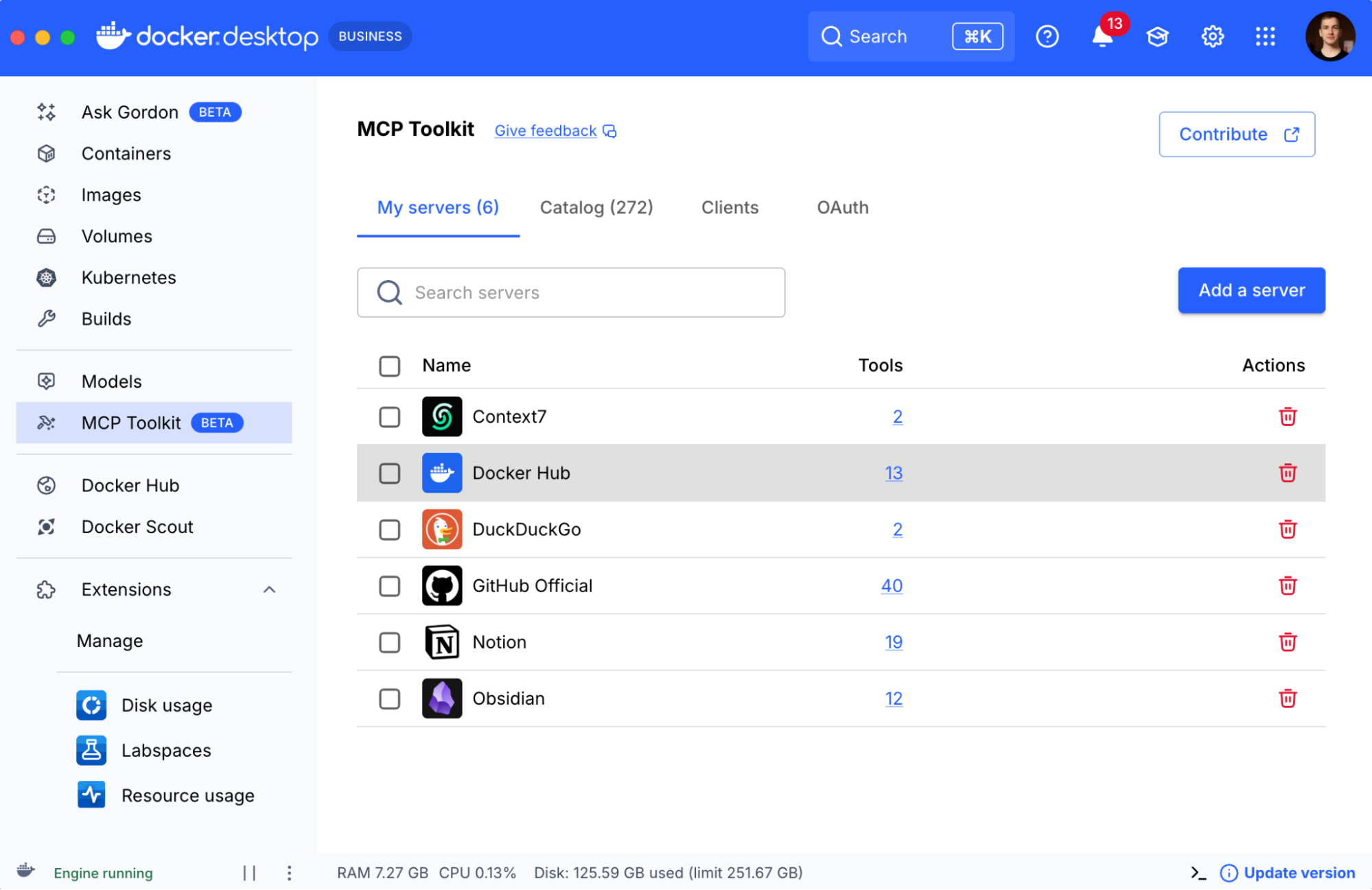
Today, we want to highlight Docker MCP Toolkit, a free feature in Docker Desktop that gives you access to more than 200 MCP servers. It’s the easiest and most secure way to run MCP servers locally for your AI agents and workflows. The MCP toolkit allows you to isolate MCP servers in containers, securely configure individual servers, environment variables, API keys, and other secrets, and provides security checks both for tool calls and the resulting outputs. Let’s look at a few examples to see it in action.

Get started in seconds: Explore 200+ curated MCP servers and launch them with a single click

Docker MCP Catalog includes hundreds of curated MCP servers for development, automation, deployment, productivity, and data analysis.

You can enable MCP servers and configure them with just a few clicks right in Docker Desktop. And on top of that automatically configure your AI assistants like Goose, LM Studio, or Claude Desktop and more to use MCP Toolkit too. 

Here are two examples where we configure Obsidian, GitHub, and Docker Hub MCP servers from Docker MCP Toolkit to work in LM Studio and Claude Desktop. 

Build advanced MCP workflows: Connect customer feedback in Notion directly to GitHub Issues

And you can of course enable setups for more complex workflows involving data analysis. In the video below, we use Docker Compose to declaratively configure MCP servers through the MCP Gateway, connected to the MCP Toolkit in Docker Desktop. The demo shows integrations with Notion, GitHub MCP servers, and our sample coding assistant, Crush by Charmbracelet.

We instruct it to inspect Notion for Customer Feedback information and summarize feature requests as issues on GitHub. Which is a nice little example of AI helping with your essential developer workflows.

Learn more about setting up your own custom MCP servers

And of course, you can add your custom MCP servers to the MCP Toolkit or mcp-gateway based setups. Check out this more involved video. 

Or read this insightful article about building custom Node.js sandbox MCP server (article) and plugging it into a coding agent powered by one of the world’s fastest inference engine by Cerebras.

Conclusion

The Docker MCP Catalog and Toolkit bring MCP servers to your local dev setup, making it easy and secure to supercharge AI agents and coding assistants. With access to 200+ servers in the MCP Catalog, you can securely connect tools like Claude, LM Studio, Goose, and more, just a few clicks away in MCP Toolkit. Check out the video above for inspiration to start building your own MCP workflows! Download or open Docker Desktop today, then click MCP Toolkit to get started!

Learn more

Explore the MCP Catalog: Discover containerized, security-hardened MCP servers

Download Docker Desktop to get started with the MCP Toolkit: Run MCP servers easily and securely

Check out our MCP Horror Stories series to see common MCP security pitfalls and how you can avoid them

Quelle: https://blog.docker.com/feed/