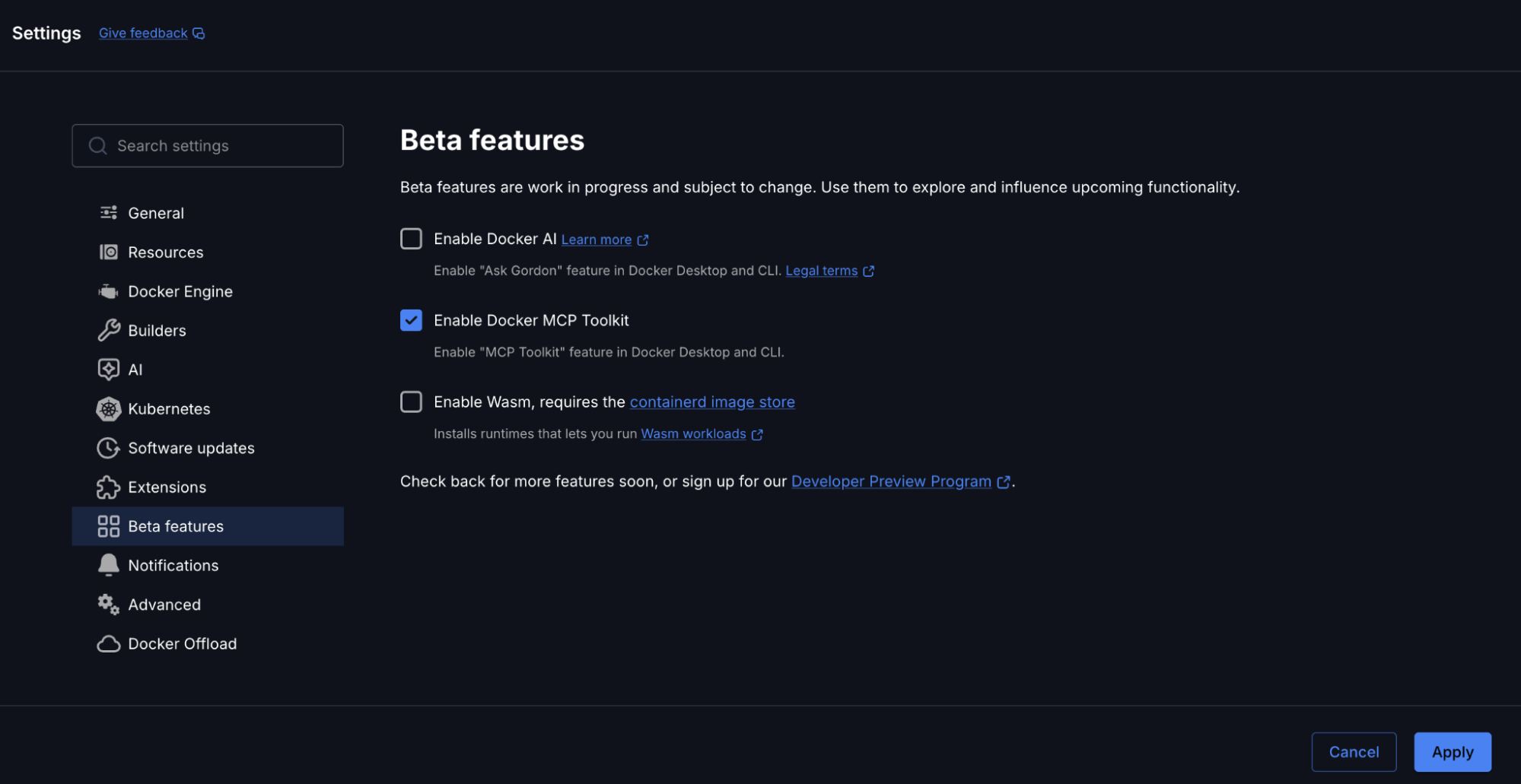
Connect to Remote MCP Servers with OAuth in Docker

In just a year, the Model Context Protocol (MCP) has become the standard for connecting AI agents to tools and external systems. The Docker MCP Catalog now hosts hundreds of containerized local MCP servers, enabling developers to quickly experiment and prototype locally.

We have now added support for remote MCP servers to the Docker MCP Catalog. These servers function like local MCP servers but run over the internet, making them easier to access from any environment without the need for local configuration.

With the latest update, the Docker MCP Toolkit now supports remote MCP servers with OAuth, making it easier than ever to securely connect to external apps like Notion and Linear, right from your Docker environment. Plus, the Docker MCP Catalog just grew by 60+ new remote MCP servers, giving you an even wider range of integrations to power your workflows and accelerate how you build, collaborate, and automate.

As remote MCP servers gain popularity, we’re excited to make this capability available to millions of developers building with Docker.

In this post, we’ll explore what this means for developers, why OAuth support is a game-changer, and how you can get started with remote MCP servers with just two simple commands.

Connect to Remote MCP Servers- Securely, Easily, Seamlessly

Goodbye Manual Setup, Hello OAuth Magic

Figuring out how to find and generate API tokens for a service is often tedious, especially for beginners. Tokens also tend to expire unpredictably, breaking existing MCP connections and require reconfiguration.

With OAuth built directly into Docker MCP, you’ll no longer need to juggle tokens or manually configure connections. You can securely connect to remote MCP servers in seconds – all while keeping your credentials safe. 

60+ New Remote MCP Servers, Instantly Available

From project management to documentation and issue tracking, the expanded MCP Catalog now includes integrations for Notion, Linear, and dozens more. Whatever tools your team depends on, they’re now just a command away. We will continue to expand the catalog as new remote servers become available.

Figure 1: Some examples of remote MCP servers that are now part of the Docker MCP Catalog

Easy to use via the CLI or Docker Desktop 

No new setup. No steep learning curve. Just use your existing Docker CLI and get going. Enabling and authorizing remote MCP servers is fully integrated into the familiar command-line experience you already love. You can also install servers via one-click with Docker Desktop.

Two Commands to Connect and Authorize Remote MCP Servers- It’s That Simple

Using Docker CLI

Step 1: Enable Your Remote MCP Server

Pick your server, and enable it with one line:

docker mcp server enable notion-remote

This registers the remote server and prepares it for OAuth authorization.

Step 2: Authorize Securely with OAuth

Next, authorize your connection with:

docker mcp oauth authorize notion-remote

This launches your browser with an OAuth authorization page.

Using Docker Desktop

Step 1: Enable Your Remote MCP Server

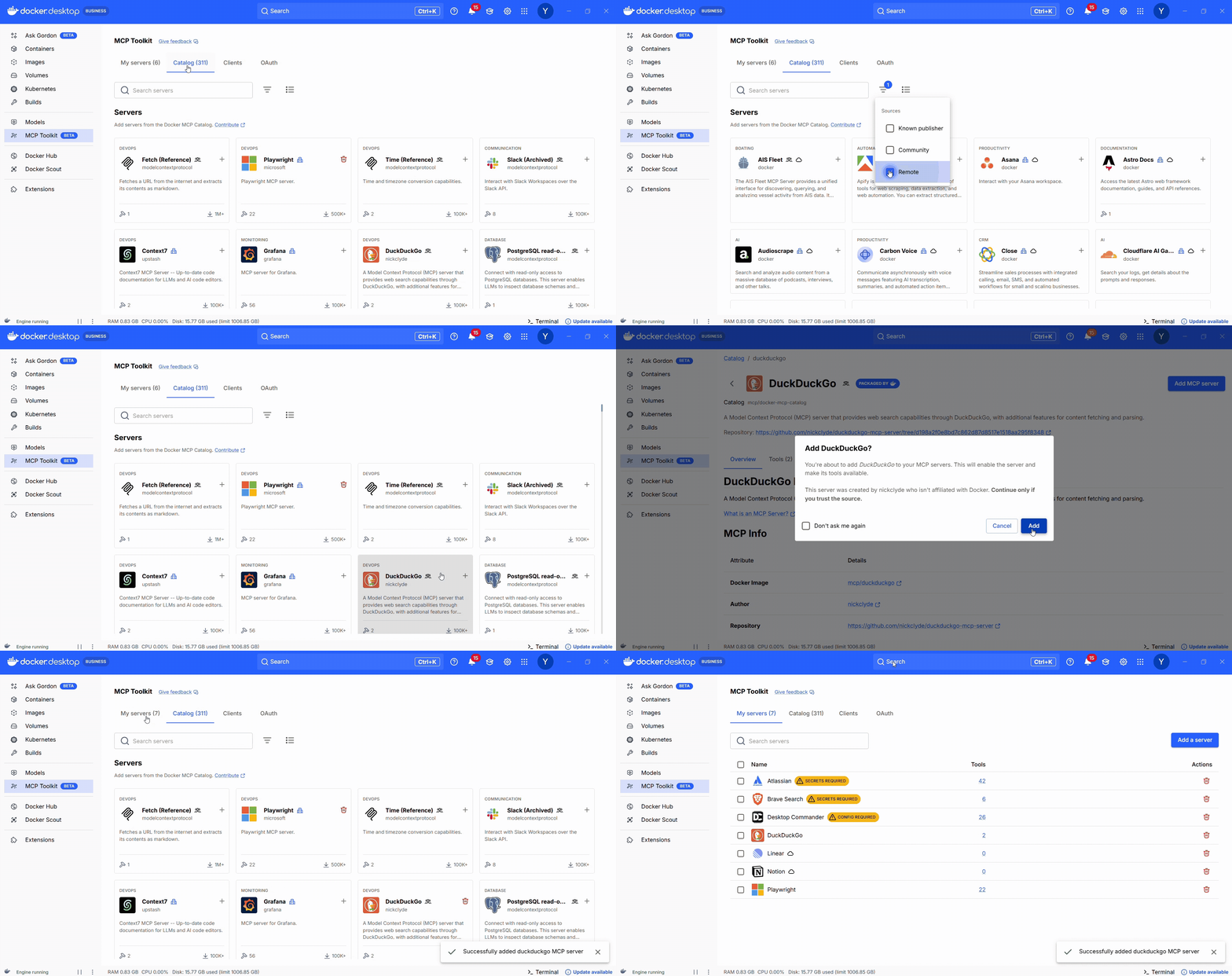
If you prefer to use Docker Desktop instead of the command line, open the Catalog tab and search for the server you want to use. The cloud icon indicates that it’s a remote server. Click the “+” button to enable the server.

Figure 2: Enabling the Linear remote MCP server is just one click.

Step 2: Authorize Securely with OAuth

Open the OAuth tab and click the “Authorize” button next to the MCP Server you want to authenticate with.

Figure 3: Built-in OAuth flow for Linear remote MCP servers. 

Once authorized, your connection is live. You can now interact with Notion, Linear, or any other supported MCP server directly through your Docker MCP environment.

Why This Update Matters for Developers

Unified Access Across Your Ecosystem

Developers rely on dozens of tools every day across different MCP clients. The Docker MCP Toolkit brings them together under one secure, unified interface – helping you move faster without manually configuring each MCP client. This means you don’t need to log in to the same service multiple times across Cursor, Claude Code, and other clients you may use.

Unlock AI-Powered Workflows

Remote MCP servers make it really easy to bridge data, tools, and AI. They are always up to date with the latest tools and are faster to use as they don’t run any code on your computer. With OAuth support, your connected apps can now securely provide context to AI models unlocking powerful new automation possibilities.

Building the Future of Developer Productivity

This update is more than just an integration boost – it’s the foundation for a more connected, intelligent, and automated developer experience. And this is only the beginning.

Conclusion

The addition of OAuth for remote MCP servers makes Docker MCP Toolkit the most powerful way to securely connect your tools, workflows, and AI-powered automations.

With 60+ new remote servers now available and growing, developers can bring their favorite services – like Notion and Linear, directly into Docker MCP Toolkit.

Learn more

Head over to our docs to learn more

Explore the MCP Catalog: Discover containerized, security-hardened MCP servers

Open Docker Desktop and get started with the MCP Toolkit (Requires version 4.48 or newer to launch the MCP Toolkit automatically)

Quelle: https://blog.docker.com/feed/

Docker Engine v29: Foundational Updates for the Future

This post is for Linux users running Docker Engine (Community Edition) directly on their hosts. Docker Desktop users don’t need to take any action — Engine updates are included automatically in future Desktop releases.

Docker Engine v29 is a foundational release that sets the stage for the future of the Docker platform. While it may not come with flashy new features, it introduces a few significant under-the-hood changes that simplify our architecture and improve ecosystem alignment:

Minimum API version update

The Containerd image store is now the default for new installations.

Migration to Go modules

Experimental Support for NFTables

These changes improve maintainability, developer experience, and interoperability across the container ecosystem.

Minimum API Version Update

Docker versions older than v25 are now end of life, and as such, we have increased the Minimum API version to 1.44 (Moby v25). 

If you are getting the following error, you will need to update to a newer client or follow the mitigation steps to override the min-version

Error response from daemon: client version 1.43 is too old.Minimum supported API version is 1.44, please upgrade your client to a newer version

Override the minimum API version

There are two methods to launch dockerd with a lower minimum API version. Additional information can be found on docs.docker.com

Using flags when starting dockerd

Launch dockerd with the DOCKER_MIN_API_VERSION set to the previous value. For example:

DOCKER_MIN_API_VERSION=1.24 dockerd

Using a JSON configuration file — daemon.json

Set min-api-version in your daemon.json file.

{
  "min-api-version": "1.24"
}

Containerd Image Store Becomes the Default

Why We Made This Change

The Containerd runtime originated as a core component of Docker Engine and was later split out and donated to the Cloud Native Computing Foundation (CNCF). It now serves as the industry-standard container runtime, powering Kubernetes and many other platforms.

While Docker introduced containerd for container execution years ago, we continued using the graph driver storage backend for managing image layers. Meanwhile, containerd evolved its own image content store and snapshotter framework, designed for modularity, performance, and ecosystem alignment.

To ensure stability, Docker has been gradually migrating to the containerd image store over time. Docker Desktop has already used the containerd image store as the default for most of the past year. With Docker Engine v29, this migration takes the next step by becoming the default in the Moby engine.

What it is

As of Docker Engine v29, the containerd image store becomes the default for image layer and content management for new installs.

Legacy graph drivers are still available, but are now deprecated. New installs can still opt out of Containerd image store if there is any issue.

Why This Matters

Simplified architecture: Both execution and storage now use containerd, reducing duplication and internal complexity

Unlock new feature possibilities, such as:

Snapshotter innovations

Lazy pulling of image content

Remote content stores

Peer-to-peer distribution

Ecosystem alignment: Brings Docker Engine in sync with containerd-based platforms, like Kubernetes, improving interoperability.

Future-proofing: Enables faster innovation in image layer handling and runtime behaviour

We appreciate that this change may cause some disruption, as the Containerd image store takes a different approach to content and layer management compared to the existing storage drivers.

However, this shift is a positive one. It enables a more consistent, modular, and predictable container experience.

Migration Path

To be clear, these changes only impact new installs; existing users will not be forced to containerd. However, you can start your migration now and opt-in.

We are working on a migration guide to help teams transition and move their existing content to the containerd image store.

What’s next

The graph driver backend will be removed in a future release.

Docker will continue evolving the image store experience, leveraging the full capabilities of containerd’s ecosystem.

Expect to see enhanced content management, multi-snapshotter support, and faster pull/push workflows in the future.

Moby Migrates to Go Modules

Why We Made This Change

Go modules have been the community standard since 2019, but until now, the Moby project used a legacy vendoring system. Avoiding Go modules was creating:

Constant maintenance churn to work around tooling assumptions

Confusing workflows for contributors

Compatibility issues with newer Go tools and ecosystem practices

Simply put, continuing to resist Go modules was making life harder for everyone.

What It Is

The Moby codebase is now fully module-aware using go.mod.

This means cleaner dependency management and better interoperability for tools and contributors.

External clients, API libraries, and SDKs will find the Moby codebase easier to consume and integrate with.

What It’s Not

This is not a user-facing feature—you won’t see a UI or command change.

However, it does affect developers who consume Docker’s Go APIs.

Important for Go Developers

If you’re consuming the Docker client or API packages in your own Go projects:

The old module path github.com/docker/docker will no longer receive updates.

To stay current with Docker Engine releases, you must switch to importing from github.com/moby/moby.

Experimental support for nftables

Why We Made This Change

For bridge and overlay networks on Linux, Docker Engine currently creates firewall rules using “iptables” and “ip6tables”.

In most cases, these commands are linked to “iptables-nft” and “ip6tables-nft”. So, Docker’s rules are translated to nftables behind the scenes.

However, OS distributions are beginning to deprecate support for iptables. It’s past time for Docker Engine to create its own nftables rules directly.

What It Is

Opt-in support for creating nftables rules instead of iptables.

The rules are functionally equivalent, but there are some differences to be aware of, particularly if you make use of the “DOCKER-USER” chain in iptables.

On a host that uses “firewalld”, iptables rules are created via firewalld’s deprecated “direct” interface. That’s not necessary for nftables because rules are organised into separate tables, each with its own base chains. Docker will still set up firewalld zones and policies for its devices, but it creates nftables rules directly, just as it does on a host without firewalld.

What It’s Not

In this initial version, nftables support is “experimental”. Please be cautious about deploying it in a production environment.

Swarm support is planned for a future release. At present, it’s not possible to enable Docker Engine’s nftables support on a node with Swarm enabled.

In a future release, nftables will become the default firewall backend and iptables support will be deprecated.

Future Work

In addition to adding planned Swarm support, there’s scope for efficiency improvements.

For example, the rules themselves could make more use of nftables features, particularly sets of ports.

These changes will be prioritised based on the feedback received. If you would like to contribute, do let us know!

Try It Out

Start dockerd with option –firewall-backend=nftables to enable nftables support.After a reboot, you may find you need to enable IP Forwarding on the host. If you’re using the “DOCKER-USER” iptables chain, it will need to be migrated. For more information, see https://docs.docker.com/engine/network/firewall-nftablesWe’re looking for feedback. If you find issues, let us know at https://github.com/moby/moby/issues.

Getting Started with Engine v29

As mentioned, this post is for Linux users running Docker Engine (Community Edition) directly on their hosts. Docker Desktop users don’t need to take any action — Engine updates are included automatically in the upcoming Desktop releases.

To install Docker Engine on your host or update an existing installation, please follow the guide for your specific OS.

For additional information about this release:

Release notes for Engine v29

Documentation

Quelle: https://blog.docker.com/feed/
Help Define the Future of Development – Take the Docker State of Application Development Survey 2025

Welcome to the fourth annual Docker State of Application Development survey!

Please help us better understand and serve the application development  community with just 20 minutes of your time. We want to know where you’re focused, what you’re working on, and what is most important to you. Your thoughts and feedback will help us build the best products and experiences for you.

We believe insights should be shared. That’s why we published the 2024 State of Application Development Survey report. Thanks to the community’s engagement, we revealed the challenges developers face, the tools they love, and the trends they’re eager about. We’re using it to guide the features we build.

Take the Docker State of Application Development survey now!

By taking part in the survey, you’ll be entered into a raffle for a chance to win* one of the following prizes:

1 laptop computer (Apple M4 Macbook Pro 16″)

1 PlayStation 5 game console with VR headset

5 $300 Amazon.com gift cards

50 exclusive Docker swag sets

In addition, the first 300 respondents to complete the survey will receive an exclusive pair of Docker socks!

The survey is open from November 10th, 2025 (7AM PST) to December 10th, 2025 (11:59PM PST). 

We’ll choose the winners randomly in accordance with the promotion official rules.* Winners will be notified via email by February 1, 2026.

The Docker State of Application Development Survey only takes about 20 minutes to complete. We appreciate your time and insights – every contribution makes a difference!

*Data will be reported publicly only in aggregate and without personally identifying information. ** Docker State of Application Development Promotion Official Rules.

Quelle: https://blog.docker.com/feed/
Most DevSecOps Advice Is Useless without Context—Here’s What Actually Works

Generic DevSecOps advice may sound good on paper, but it often fails in practice because it ignores team context, workflow, and environment-specific needs. Overloaded controls, broad policies, and misapplied tools disrupt the flow of development. And once flow breaks, security measures are the first to get bypassed. 

The way forward isn’t more rules but smarter ones. Prioritizing critical risks, leaning on opinionated defaults, and tailoring policies to fit the environment ensures that security sticks without slowing developers down.

The payoff of this approach is consistency without chaos. Contextual, risk-based security reduces noise while increasing adoption, making it easier for teams to stay aligned on what matters most. Developers can focus on building, operations can move quickly, and security can trust that baselines are being followed. Productivity stays high, and security becomes part of the workflow rather than a drag.

This article walks through practical, context-aware strategies for securing your pipelines. You’ll see how to implement baselines without creating feature overload and how to apply controls that support development rather than stall it.

Why Context Is (Almost) Everything

Different teams approach development in very different ways, and security has to reflect that. The security bar for a crypto exchange is very different from that of a fitness or training app.

Context makes the difference: team size, tech stack, deployment cadence, and even the type of application all shape what’s realistic. Ignoring these factors often leads to frustration, wasted effort, and controls that never gain traction.

A startup with a modest team and a simple stack can’t be treated the same as an enterprise running dozens of microservices across multiple regions. Deployment cadences, toolchains, and team structures all shape which specific security measures are practical. Generic, one-size-fits-all policies that don’t consider these factors inevitably clash with existing workflows. For example, strict access controls designed for a large financial institution might overwhelm a small SaaS team that needs agility more than bureaucracy.

When security measures don’t align with workflow, they turn into obstacles instead of safeguards. CI checks that double build times without adding meaningful protection or insights leave developers frustrated and looking for ways around them. The same happens with container policies that trigger runtime incidents on every minor issue: they bury teams in noise because that doesn’t consider the environment they were meant to protect. 

In both cases, security loses credibility and adoption plummets. 

Considering context helps you keep controls right-sized for the environment, reducing friction and making practices sustainable. For instance, a team that builds internal apps like dashboards, automation scripts, or admin tools might relax runtime policies and allow more flexible image usage, while production-facing services keep strict scanning rules and signed image requirements. A high-frequency deployment team might disable time-consuming CI checks on low-risk branches, but enforce them on release candidates.

Prioritize, Don’t Overload

Piling on too many controls at once usually overwhelms developers and undermines adoption. You need to prioritize. 

It’s tempting to flip on every switch a security tool offers, but more isn’t always better. When every possible control is enabled, the result is usually alert floods that overwhelm teams instead of helping them, creating blockers (and disgruntled team members) that shouldn’t exist in the first place. 

Broad rules that include dev and/or test environments are a common culprit: they generate endless findings from code that was never meant for production. Add in the fact that dev environments are often used to experiment with open-source packages without much vetting, and you know why alerts are almost guaranteed. 

Excessive controls don’t make pipelines more secure; they make policies that are prone to be ignored or bypassed. Once developers start ignoring alerts because they’re buried in noise, the real signal gets lost.

Risk-based prioritization keeps security meaningful without grinding delivery to a halt. Identify which workflows are critical to protect and which areas pose minimal risk. A production pipeline running sensitive workloads deserves stricter rules than a low-impact staging branch. 

Incremental adoption also helps: enable checks step by step instead of dropping them all at once. For example, instead of enabling CI scanners, drift detection, and build policies across all environments at once, you might start with compliance checks in the build phase to look for exposed secrets or unencrypted PII. Once those are tuned and actionable, you can gradually layer in additional protections. This prevents console overload and keeps alerts relevant.

Such a phased approach gives teams time to adapt, reduces friction, and ensures that the most important protections stay effective instead of fading into the background of ignored alerts.

Opinionated Defaults That Work

Prioritization helps you decide what to focus on, but choices only matter if they’re consistently applied. That’s where opinionated defaults come in: strong, pre-set configurations that give teams a secure baseline without endless debates or manual tweaking.

Strong defaults differ from blanket rules in flexibility. Blanket rules force the same strict policies on every team and environment, even when they don’t fit. Opinionated defaults, on the other hand, are sensible starting points based on best practices, but they can be tailored as needed.

For example, defaults like automatic branch protections, mandatory code scans, or container signing that “just works” out of the box are rarely controversial. They reduce decision fatigue and prevent accidental gaps, while still allowing exceptions when a team has a valid reason.

These defaults also prevent security from becoming a bottleneck. Developers can focus on writing code instead of constantly reconfiguring tools or negotiating exceptions. And if a team truly needs to adjust, they can, but the baseline ensures nothing critical gets left exposed because a setting was overlooked.

Modern platforms often lean on this idea by scanning the entire environment and applying a secure baseline automatically. From there, teams can decide where to tighten controls and where to ease them, keeping the defaults as a safety net while tailoring policies to fit their workflows.

Opinionated defaults create a balance: security strong enough to matter but flexible enough to fit different contexts without getting in the way.

Granularity That Enables Speed without Sacrificing Security

Once you’ve established a secure baseline, the next step is tailoring it. Granular policies applied to specific environments, apps, or teams help organizations move fast without compromising safety.

For example, customer-facing services that handle sensitive data may require strict runtime controls and signed images. But that same level of enforcement on internal tools or dev environments just slows things down and clutters the console with low-priority findings. Granular scoping ensures that strict rules protect where they matter most while lower-risk areas can stay agile.

This kind of segmentation is what keeps security aligned with delivery velocity. Teams building prototypes or sandbox tools don’t get blocked by policies meant for production, and security teams don’t waste cycles triaging noise from unimportant sources. It also builds trust: developers know that policies reflect their actual workflow rather than a top-down enforcement model.

In practice, this means aligning controls to namespaces, pipelines, or tags—whatever reflects the actual risk surface. You want tighter guardrails on CI/CD pipelines that deploy to prod, and more relaxed policies where teams need space to experiment.

Tooling and Integrations

Security tooling only works if teams actually use it and keep using it. So developer experience matters. Tools need to integrate cleanly into existing workflows, minimize disruption, and offer guidance when it’s needed most. Otherwise, even the best security features go unused or get disabled.

For instance, shift-left security controls like pre-commit hooks should offer actionable hints, such as flagging a secret in code and linking to documentation, rather than failing a commit with no explanation. Silent failures waste time and erode trust.

The same goes for IDE integrations. Security feedback that shows up in your code while you’re working without breaking flow becomes part of the development process, not an afterthought. But if alerts are noisy, confusing, or require switching tools, developers will tune them out or find ways around them.

The signs are usually clear. When legitimate work gets blocked by alerts that aren’t actionable, developers start referring issues to DevOps or security, complaining about delays and requesting exceptions, or blaming the teams responsible for enforcement. Over time, this creates friction and mistrust between developers and security, making future collaboration even harder.

These mishaps usually stem from time pressure, limited onboarding, or unclear documentation. Security tools often get rushed into pipelines by well-meaning teams who haven’t had time to fully understand them. Sometimes developers enable every available CI check without realizing the consequences, triggering alerts on non-production branches, flagging low-risk issues, or breaking builds entirely. Other times, security teams deploy controls in default mode without tuning, creating alerts that don’t reflect real risks or project priorities.

A better approach is to connect security platforms with existing systems so that alerts are automatically triaged where teams already work. For instance, critical vulnerability findings might generate Jira tickets assigned to the relevant service owner, while lower-priority alerts could be routed to a dedicated Slack channel for visibility. That way, security information lands in the right place without adding manual overhead or overwhelming collaborators who don’t need to see it.

Putting This Approach Into Practice

So where do you start? Audit your pipelines and identify where disruption happens, whether it’s excessive alerts due to broad policies that cause noise and alert fatigue, or tools that don’t integrate well. 

From there, aim for incremental improvements: introduce sensible defaults, tighten policies only where the risk justifies it, and favor integrations that enhance and support the way your teams already work. 

Security shouldn’t be about checking every box on a vendor’s feature list. Just because a platform offers a control doesn’t mean it’s the right fit for every team. Security should be about measures that make sense in practice.

Quelle: https://blog.docker.com/feed/
Dynamic MCPs with Docker: Stop Hardcoding Your Agents’ World

The MCP protocol is almost one year old and during that time, developers have built thousands of new MCP servers. Thinking back to MCP demos from six months ago, most developers were using one or two local MCP servers, each contributing just a handful of tools. Six months later and we have access to thousands of tools, and a new set of issues.

Which MCP servers do we trust?

How do we avoid filling our context with tool definitions that we won’t end up needing?

How do agents discover, configure, and use tools efficiently and autonomously?

With the latest features in Docker MCP Gateway, including Smart Search and Tool Composition, we’re shifting from “What do I need to configure?” to “What can I empower agents to do?” 

This week, Anthropic also released a post about building more efficient agents, and they have called out many of the same issues that we’ll be discussing in this post. Now that we’ve made progress towards having tools, we can start to think more about effectively using tools.

With dynamic MCPs, agents don’t just search for or add tools, but write code to compose new ones within a secure sandbox, improving both tool efficiency and token usage.

Enabling Agents to Find, Add, and Configure MCPs Dynamically with Smart Search 

If you think about how we configure MCPs today, the process is not particularly agentic. Typically, we leave the agent interface entirely, do some old-school configuration hacking (usually editing a JSON file of some kind), and then restart our agent session to check if the MCPs have become available. As the number of MCP servers grows, is this going to work?

So what prevents our agents from doing more to help us discover useful MCP servers?

We think that Docker’s OSS gateway can help here. As the gateway manages the interface between an agent and any of the MCP servers in the gateway’s catalog, there is an opportunity to mediate that relationship in new ways. 

Out of the box, the gateway ships with a default catalog, the Docker MCP Catalog,  including over 270 curated servers and of course the ability to curate your own private catalogs (e.g. using servers from the community registry). And because it runs on Docker, you can pull and run any of them with minimal setup. That directly tackles the first friction point: discovery of trusted MCP servers. 

Figure 1: The Docker MCP Gateway now includes mcp-find and mcp-add, new Smart Search features that let agents discover and connect to trusted MCP servers in the Docker MCP Catalog, enabling secure, dynamic tool usage.

However, the real key to dynamic MCPs is a small but crucial adjustment to the agent’s MCP session. The gateway provides a small set of primordial tools that the agent uses to search the catalog and to either add or remove servers from the current session. Just as in the post from Anthropic, which suggests a search_tools tool, we have added new tools to help the agent manage their MCP servers.

mcp-find: Find MCP servers in the current catalog by name or description. Return matching servers with their details.

mcp-add: Add a new MCP server to the session. The server must exist in the catalog.

With this small tweak, the agent can now help us negotiate a new MCP session. To make this a little more concrete, we’ll show an agent connected to the gateway asking for the DuckDuckGo MCP and then performing a search.

Figure 2: A demo of using mcp-find and mcp-add to connect to the DuckDuckGo MCP server and run a search

Configuring MCP Servers with Agent-Led Workflows

In the example above, we started by connecting our agent to the catalog of MCPs (see docker mcp client connect –help for options). The agent then adds a new MCP server to the current session. To be clear, the duckduckgo MCP server is quite simple. Since it does not require any configuration, all we needed to do was search the catalog, pull the image from a trusted registry, and spin up the MCP server in the local docker engine.

However, some MCP servers will require inputs before they can start up. For example, remote MCP servers might require that the user go through an OAuth flow. In the next example, the gateway responds by requesting that we authorize this new MCP server. Now that MCP supports elicitations, and frameworks like mcp-ui allow MCPs to render UI elements into the chat, we have begun to optimize these flows based on client-side capabilities.

Figure 3: Using mcp-find and mcp-add to connect to the Notion MCP server, including an OAuth flow

Avoid An Avalanche of Tools: Dynamic Tool Selection

In the building more efficient agents post, the authors highlight two ways that tools currently make token consumption less efficient.

Tool definitions in the context window

Intermediate tool results

The result is the same in both cases. Too many tokens are not being sent to the model. It takes surprisingly few tools for the context window to accumulate hundreds of thousands of tokens of nothing but tool definition.

Again, this is something we can improve. In the mcp gateway project, we’ve started distinguishing between tools that are available to a find tool, and ones that are added to the context window. Just as we’re giving agents tools for server selection, we can give them new ways to select tools.

Figure 4: Dynamic Tools in action: Tools can now be actively selected, avoiding the need to load all available tools into every LLM request.

The idea is conceptually simple. We are providing an option to allow agents to add servers that do not automatically put their tools into the context window. With today’s agents, this means adding MCP servers that don’t return tool definitions in tools/list requests, but still make them available to find tool calls. This is easy to do because we have an MCP gateway to mediate tools/list requests and to inject new task-oriented find tools. New primordial tools like mcp-exec and mcp-find provide agents with new ways to discover and use MCP server tools.

Once we start to think about tool selection differently, it opens up a range of possibilities.

Using Tools in a new way: From Tool Calls to Tool Composition with code-mode

The idea of “code mode” has been getting a lot of attention since CloudFlare posted about a better way to use Tools several weeks ago. The idea actually dates back to a paper “CodeAct: Your LLM Agent Acts Better when Generating Code“, which proposed that LLMs could improve agent-oriented tasks by first consolidating agent actions into code. The recent post from Anthropic also frames code mode as a way to improve agent efficiency by reducing the number of tool definitions and tool outputs in the context window.

We’re really excited by this idea. By making it possible for agents to “code” directly against MCP tool interfaces, we can provide agents with “code-mode” tools that use the tools in our current MCP catalog in new ways. By combining mcp-find with code-mode, the agent can still access a large, and dynamic, set of available tools while putting just one or two new tools into the context window. Our current code-mode tool writes javascript and takes available MCP servers as parameters.

code-mode: Create a JavaScript-enabled tool that can call tools from any of the servers listed in the servers parameter.

However, this is still code written by an agent. If we’re going to run this code, we’re going to want it to run in a sandbox. Our MCP servers are already running in Docker containers, and the code mode sandbox is no different. In fact, it’s an ideal case because this container only needs access to other MCP servers! The permissions for accessing external systems are already managed at the MCP layer.

This approach offers three key benefits:

Secure by Design: The agent stays fully contained within a sandbox. We do not give up any of the benefits of sandboxing. The code-mode tool uses only containerized MCP servers selected from the catalog.

Token and Tool Efficiency: The tools it uses do not have to be sent to the model on every request. On subsequent turns, the model just needs to know about one new code-mode tool. In practice, this can result in hundreds of thousands of fewer tokens being sent to the model on each turn.

State persistence: Using volumes to manage how state is managed across tool calls, and to track intermediate results that need not, or even should not be sent to the model.

A popular illustration of this pattern is building a code mode tool using the GitHubofficial MCP servers. The GitHub server happens to ship with a large number of tools, so code-mode will have a dramatic impact. In the example below, we’re prompting an agent to create a new code-mode tool out of the Github-official and markdownify MCP servers.

Figure 5: Using the MCP code-mode to write code to call tools from the GitHub Official and Markdownify MCP servers

The combination of Smart Search and Tool Composition unlocks dynamic, secure use of MCPs. Agents can now go beyond simply finding or adding tools; they can write code to compose new tools, and run them safely in a secure sandbox. 

The result: faster tool discovery, lower token usage, fewer manual steps, and more focused time for developers.

Workflow

Before: Static MCP setup

After: Dynamic MCPs via Docker MCP Gateway

Impact

Tool discovery

Manually browse the MCP servers

mcp-find searches a Docker MCP Catalog (230+ servers) by name/description

Faster discovery

Adding tools

Enable the MCP servers manually

mcp-add pulls only the servers an agent needs into the current session

Zero manual config; just-in-time tooling

Authentication

Configure the MCP servers ahead of time

Prompt user to complete OAuth when a remote server requires it

Some clients starting to support things like mcp elicitations and UX like mcp-ui for smoother onboarding flows

Tool composition

Agent generated tool calls; tool definitions are sent to the model

With code-mode , agents write code that use  multiple MCP tools

Multi-tool workflows and unified outputs

Context size

Load lots of unused tool definitions

Keep only the tools actually required for the task

Lower token usage and latency

Future-proofing

Static integrations

Dynamic, composable tools with sandboxed scripting

Ready for evolving agent behaviors and catalogs

Developer involvement

Constant context switching and config hacking

Agents self-serve: discover, authorize, and orchestrate tools

Fewer manual steps; better focus time

Table 1: Summary of Benefits from Docker’s Smart Search and Tool Composition for Dynamic MCPs 

From Docker to Your Editor: Running dynamic MCP tools with cagent and ACP

Another new component of the Docker platform is cagent, our open source agent builder & runtime, which provides a simple way to build and distribute new agents. The latest version of cagent now supports the Agent Client Protocol which allows developers to add custom agents to ACP-enabled editors like neovim, or Zed, and then to share these agents by pushing them to or pulling them from Docker Hub.

This means that we can now build agents that know how to use features like smart search tools or code mode, and then embed these agents in ACP-powered editors using cagent. Here’s an example agent, running in neovim, that helps us discover new tools relevant to whatever project we are currently editing.

Figure 6: Running Dynamic MCPs in Neovim via Agent Client Protocol and a custom agent built with cagent, preconfigured with MCP server knowledge

In their section on state persistence and skills, the folks at Anthropic also hint at the idea that dynamic tools and code mode execution bring us closer to a world where over time, agents accumulate code and tools that work well together. Our current code-mode tool does not yet save the code it writes to the project but we’ll be working on this here.

For the neovim example above, we have used ACP support in the code companion plugin. Also, please check out the cagent adapter in this repo. For Zed, see their doc on adding custom agents and of course, try out cagent acp agent.yaml with your own custom agent.yaml file.

Getting Started with Dynamic MCPs Using Smart Search and Tool Composition

Dynamic tools are now available in the mcp gateway project.  Unless you are running the gateway with an explicit set of features (using the existing –servers flag), then these tools are available to your agent by default. The dynamic tools feature can also be disabled using docker mcp feature disable dynamic-tools. This is a feature that we’re actively developing so please try it out and let us know what you think by opening an issue, or starting a discussion in our repo. 

Get started by connecting your favorite client to the MCP gateway using docker mcp client connect, or by adding a connection using the “Clients” tab in the Docker Desktop MCP Toolkit panel.

Summary

The Docker MCP Toolkit combines a trusted runtime (the docker engine), with catalogs of MCP servers. Beginning with Docker Desktop 4.50, we are now extending the mcp gateway interface with new tools like mcp-find, mcp-add, and code-mode, to enable agents to discover MCP servers more effectively, and even to use these servers in new ways.

Whether it’s searching or pulling from a trusted catalog, initiating an OAuth flow, or scripting multi-tool workflows in a sandboxed runtime, agents can now do more on their own. And that takes us a big step closer to the agentic future we’ve been promised! 

Got feedback? Open an issue or start a discussion in our repo.

Learn more

Explore the MCP Gateway Project: Visit the GitHub repository for code, examples, and contribution guidelines.

Dive into Smart Search and Tool Composition: Read the full documentation to understand how these features enable dynamic, efficient agent workflows.

Learn more about Docker’s MCP Solutions. 

Quelle: https://blog.docker.com/feed/
How to Use Multimodal AI Models With Docker Model Runner

One of the most exciting advances in modern AI is multimodal support, the ability for models to understand and generate multiple types of input, such as text, images, or audio. 

With multimodal models, you’re no longer limited to typing prompts; you can show an image or play a sound, and the model can understand it. This opens a world of new possibilities for developers building intelligent, local AI experiences.In this post, we’ll explore how to use multimodal models with Docker Model Runner, walk through practical examples, and explain how it all works under the hood.

What Is Multimodal AI?

Most language models only understand text, but multimodal models go further. They can analyze and combine text, image, and audio data. That means you can ask a model to:

Describe what’s in an image

Identify or reason about visual details

Transcribe or summarize an audio clip

This unlocks new ways to build AI applications that can see and listen, not just read.

How to use multimodal models

Not every model supports multimodal inputs, so your first step is to choose one that does.

In Docker Hub we indicate the inputs supported on each model on its model card, for example:

Moondream2, Gemma3, or Smolvlm models supports text and image as input, while GPT-OSS supports text only

The easiest way to start experimenting is with the CLI. Here’s a simple example that asks a multimodal model to describe an image:

docker model run gemma3 "What's in this image? /Users/ilopezluna/Documents/something.jpg"
The image shows the logo for **Docker**, a popular platform for containerization.

Here's a breakdown of what you see:

* **A Whale:** The main element is a stylized blue whale.
* **A Shipping Container:** The whale's body is shaped like a shipping container.
* **A Stack of Blocks:** Inside the container are a stack of blue blocks, representing the layers and components of an application.
* **Eye:** A simple, white eye is featured.

Docker uses this iconic whale-container image to represent the concept of packaging and running applications in isolated containers.

Using the Model Runner API for More Control

While the CLI is great for quick experiments, the API gives you full flexibility for integrating models into your apps. Docker Model Runner exposes an OpenAI-compatible API, meaning you can use the same client libraries and request formats you already know, just point them to Docker Model Runner.

Here’s an example of sending both text and image input:

curl –location 'http://localhost:12434/engines/llama.cpp/v1/chat/completions'
–header 'Content-Type: application/json'
–data '{
"model": "ai/gemma3",
"messages": [
{
"role": "user",
"content": [
{
"type": "text",
"text": "describe the image"
},
{
"type": "image_url",
"image_url": {
"url": "data:image/png;base64,iVBORw0KGgoAAAANSUhEUgAAAAgAAAAIAQMAAAD+wSzIAAAABlBMVEX///+/v7+jQ3Y5AAAADklEQVQI12P4AIX8EAgALgAD/aNpbtEAAAAASUVORK5CYII"
}
}
]
}
]
}'

Run Multimodal models from Hugging Face

Thanks to our friends at Hugging Face (special shout-out to Adrien Carreria), you can also run multimodal models directly from Hugging Face in Docker Model Runner.

Here’s an example using a model capable of audio transcription:

curl –location 'http://localhost:12434/engines/llama.cpp/v1/chat/completions'
–header 'Content-Type: application/json'
–data '{
"model": "hf.co/ggml-org/ultravox-v0_5-llama-3_1-8b-gguf",
"temperature": 0,
"messages": [
{
"role": "user",
"content": [
{
"type": "text",
"text": "transcribe the audio, one word"
},
{
"type": "input_audio",
"input_audio": {
"data": "//PoxAB8RA5OX53xAkRAKBwMBQLRYMhmLDEXQQI0CT8QFQNMawxMYiQtFQClEDCgjDHhCzjtkQuCpb4tQY+IgZ3bGZtttcm+GnGYNIBBgRAAGB+AuYK4N4wICLCPmW0GqZsapZtCnzmq4V4AABgQA2YGoAqQ5gXgWDoBRgVBQCQWxgXAXgYEswTQHR4At2IpfL935ePAKpgGACAAvlkDP2ZrfMBkAdpq4kYTARAHCoABgWAROIBgDPhUGuotB/GkF1EII2i6BgGwwAEVAAMAoARpqC8TRUMFcD2Ly6AIPTnuLEMAkBgwVALjBsBeMEABxWAwUgSDAIAPMBEAMwLAPy65gHgDmBgBALAOPIYDYBYVARMB0AdoKYYYAwYAIAYNANTcMBQAoEAEmAcApBRg+g5mCmBGIgATAPBFMEsBUwTwMzAXAHfMwNQKTAPAPDAHwcCoCAGkHAwBNYRHhYBwWhhwBEPyQuuHAJwuSmAOAeEAKLBSmQR2zbhC81/ORKWnsDhhrjlrxWcBgI2+hCBiAOXzMGLoTHb681deaxoLMAUAFY5gHgCxaTQuIZUsmnpTXVsglpKonHlejAXAHXHOJ0QxnHJyafakpJ+CJAziA/izoImFwFIO/E37iEYij/0+8s8c/9YJAiAgADAHADa28k4sSA3vhE9GrcCw/lPpTEFNRQMACQgABAAAAAAAAAAAAAAAAAAAAAAAAAAAAAAAAAAAAAAAAAAAAAAAAAAAAAAAAAAAAAAAAAAAAAAAAAAAAAAAAAAAAAAAAAAAAAAAAAAAAAAAAAAAAAAAAAAAAAAAAAAAAAAAAAAAAAAAAAAAAAAAAAAAAAAAAAAAAAAAAAAAAAAAAAAAAAAAAAAAAAAAAAAAAAAAAAAAAAAAAAAAAAAAAAAAAAAAAAAAAAAAAAAAAAAAAAAAAAAAAAAAAAAAAAAAAAAAAAAAAAAAAAAA//PoxAB6jBZABd3gAADj6KbWk8H+MCSbKw3Jgvlxg+JpjWF5uKl4QJgiEcw5EIyCSY3E4IyvS0wFHwz3E8wrG0yzIU8E7Q5zK8xTFwwbE0HDmYaXhvZCqGoKGEgIFRyZzQxmZ2mXBOY1Aw4LDDyIN/F47SVzdzIMqAowELgCszjgFMvmMxiHzE4hMLicyaGQUaTCoDfuaSaIhgLAsuAFQSYRC4sMxISiQtMGi0ymWTKYvCoHMyjUwAJDIBIMbAhPIKgsdACDpgkFoVGLB8Fg+YTHpkoEGFxCFh0DBeYeECPyEBgQEGDxSCRijDSLJYGwBE4wOBjDYABwWLAMC4fXCFiYHEsuGCQcY2BIcQBIqGAhGYjD5iAKGNwOYgLplAAv2OgJEsCBUwsHDBILBQuEAiMnBcDHIw4AgsACgIlAJDkGY6OICSsgEh2FBOYfCwMBLcJuHE/0elvMKaw1UHBNFB9IdQDxxxH2V/AvvK9cPSJonarWZcyeYd2XQ3BLhUD0yvrpQK0hscP0UesPM0FgDjoAEb1VntaO5MPzDYnJpn4fd9EnS5isDTQSGQoAAEFzAwhBQLTQAQIdi1Arwvo4z6t9FoCcdw2/biq9fDTQ4NrsKBCFwGRDYIAiB7PFPPczALAJS4UAK3G7Sle95iVl+qKL00NXaWsmIKaigYAEhAACAAAAAAAAAAAAAAAAAAAAAAAAAAAAAAAAAAAAAAAAAAAAAAAAAAAAAAAAAAAAAAAAAAAAAAAAAAAAAAAAAAAAAAAAAAAAAAAAAAAAAAAAAAAAAAAAAAAAAAAAAAAAAAAAAAAAAAAAAAAAAAAAAAAAAAAAAAAAAAAAAAAAAAAAAAAAAAAAAAAAAAAAAAAAAAAAAAAAAAAAAAAAAAAAAAAAAAAAAAAAAAAAAAAAAAAAAAAAAAAAAAAAAAAAAAAAAAAAAAAAAAAAAAAAAAAAAAAA//PoxABxxBZIBua3UAy9KUzYdYeFxCZJEQOExhYDGHg4bB7J5W0GV0QYdAhig3G9IQbDT53SunFlCZmoh0DsGmVOc6bZmZqnK0Ga7ABrYqmWUsZSNZeMwgDhYJlULjAfFQGOlAwYfTGYBMMDUmZgYazW4aNBM8w0XD5JMPDxo1KQjLilMbBA24QLviy5lAxhwzWwaFaIk+YIKg5cIAQKKgw4bI6DjJsEqERhHZtCBCdNInOgRVnMAEWNARfMuyIAxnwAJGGlBA0YFiQYSFggKBmHDlAcxIUmQsEX9HF/R1YUeDNzJiKZKgMLBwsAhE5pSCQiDiK6bJfUOCCxswBgmKo4IjrwAoWCQ8wgtMpUjOYEZE/DAYEgwNGxIIMMAzBAAdAbK/qVDxv2wWN3WXNJX0opEXta2XUQBMrAACNAhh4IECTV4CRXaQzqUsScKOypSqiemQTMxelkY6/ucCu1QwxfuSajv1pSzmXrJRxZK4Hxb2Fr7dJR+H2mlYcXmFQEmCEzR6BFCAxxTDjIRDANCVLW3LR0MKaE2N41VmiIpO+UB4sFpfoK1TFB0HCiwKBgkqhx0YKCDQQjWXlXmBgQLg6mSLCbSv2Gs8i0OL4h56926SbxTEFNRQMACQgABAAAAAAAAAAAAAAAAAAAAAAAAAAAAAAAAAAAAAAAAAAAAAAAAAAAAAAAAAAAAAAAAAAAAAAAAAAAAAAAAAAAAAAAAAAAAAAAAAAAAAAAAAAAAAAAAAAAAAAAAAAAAAAAAAAAAAAAAAAAAAAAAAAAAAAAAAAAAAAAAAAAAAAAAAAAAAAAAAAAAAAAAAAAAAAAAAAAAAAAAAAAAAAAAAAAAAAAAAAAAAAAAAAAAAAAAAAAAAAAAAAAAAAAAAAAAAAAAAAAAAAAAAAAAAAAAAAAAAAAAAAAAAAAAAAAAAAAAAAAAAAAAAAAAAAAAAAAAAAAAAAA//PoxAB19BY4BOd00gCrS9rgyDTAxEMTgsQDA0HNzlqJNvgM31dzOAbHRAYyXZqNHG8TwaPCBhMHmn1oaiThh8gmQXQatWOcLz8dTEgaBoaYkmwYvDcaECZBZg8FJiQQhekwbCcwtE8tUYSCeYRAkJECY9BoZQjoYgmEY3r8Y2hEYsnaZuryaPT4ba1aZqr8bjGkZCmSAQqMSALCAeBoFmCoFllgUEQdJB0cCuhaSYJcYowRIjkmjWizNGTDLTOjzQRUigKFb1TktU4iqIGCF6QI1CAIWDgEAgUZUYTJwoZDwhqCpsTpCFEA8s+utVJYcQNwaPMzTDI4hRmVAmICGXOm5FmDEIBCak2hg3Znx50Z5k4o07SAAAMFHBATAWIR8gpFNonBX8xH0zxcAhw40a5aaAqYQ+Y1CYdWHIk2n/SkVUWRLJAomXnZu8CKb+iwxE+Wui1JZZgRTvzzPonOOxYoYGgNmyuGTKnfSRxaTu3duS57aaNvtMSt4qaVxqYdWKwcytpaiDNbb4Sq1UoGwOU5bKJYoGmUwNEx3VzCMIoHSMMTnmHaL/Splj9MZZs3MOBgwWSDKhMYS0WFLvGADiEimQXbFCLuIcVGgsOgd9AcUTCfyOKFLEWLAsafeOQmnpbMWpUxBTUUDAAkIAAQAAAAAAAAAAAAAAAAAAAAAAAAAAAAAAAAAAAAAAAAAAAAAAAAAAAAAAAAAAAAAAAAAAAAAAAAAAAAAAAAAAAAAAAAAAAAAAAAAAAAAAAAAAAAAAAAAAAAAAAAAAAAAAAAAAAAAAAAAAAAAAAAAAAAAAAAAAAAAAAAAAAAAAAAAAAAAAAAAAAAAAAAAAAAAAAAAAAAAAAAAAAAAAAAAAAAAAAAAAAAAAAAAAAAAAAAAAAAAAAAAAAAAAAAAAAAAAAAAAAAAAAAAAAAAAAAAAAAAAAAAAAAAAAAAAAAAAAAAAAA//PoxAB0zAI0AO7fcaG1AIUAUDAI3ph2SpjEhxkiG4yVAGjcysGkaCkwaG4xgFcLA8BhFMSxnMAyVAoRiMkzGlnDKqtT66qTfpcjBtgTE2UjUxyzaRVmsmXA1GWASGAIbmA4cgkDDAMjjEkFDDMCAgdjFANjDEUjCcRzJUlRIrTW8/TIsDjwdgDKlbjetyTIw4TdoxRpojFwBDFwAwgIQqCQCBMwxEIxcvSzGFI1MuCzUUBpoQOI3QIQTAEEVOjZQUysGMYDDBgsoC2ENGGAFMsEAAJJQIEIC37MBHBwKCDcxJCNTOTBCF5DTg0i3zKQwRiJh4NfJAIwV1OTKjThszB+N4vwgCNfbDSyMxs+NFLjJV438TN2OwcsklwZovmLFRkqsQioiIwhTHZ8wQ0MihzXkU2iKFGF5gQaAwaMJAxIqMqSTGBYwZrNEMTHyBREaAwACLpkCXgGD08Q+gJoJEbxNlwyk9To0S2hXloiTaSYuS92ZGqdQKITZRsrgm0XROrCGZdztDUiI7o7Hpf08ex8P0LFiTByoa+P1SF0sgHBCFceqNS0N0bpYFcN8K8XNclxOsfQpSeNwviFGgk1KRAtiKJsW00VWnamIPEzblsJwfCsQs60gjPPi8sOcBrEpiCmooGABIQAAgAAAAAAAAAAAAAAAAAAAAAAAAAAAAAAAAAAAAAAAAAAAAAAAAAAAAAAAAAAAAAAAAAAAAAAAAAAAAAAAAAAAAAAAAAAAAAAAAAAAAAAAAAAAAAAAAAAAAAAAAAAAAAAAAAAAAAAAAAAAAAAAAAAAAAAAAAAAAAAAAAAAAAAAAAAAAAAAAAAAAAAAAAAAAAAAAAAAAAAAAAAAAAAAAAAAAAAAAAAAAAAAAAAAAAAAAAAAAAAAAAAAAAAAAAAAAAAAAAAAAAAAAAAAAAAAAAAAAAAAAAAAAAAAAAAAAAAAAAAAAAAAAAA//PoxAByRBYwBt800Am7elzDkQl9GYCJm2CfcMHAmBjsIcZfGLogAETDRMwkkAJURaYURjMjkBX5lwqBl85jBzsAHNIK0w/RjyJSN8L804rDXpaMXBQx6fAERzN4XM8FkwiDDDYqQDGBgKBSsYPD4YOjArTN7Gkxq7TcJKNpKw+2GzsFXNEYU5cCzIoDMcDsDAZOYwaDEjgcAgSTM8LABMyAw1qZIY0wdBgmZJ7AkOEDSAaELUlF1sajKOyX6mCH4ECjoZLN+RCEMaBMCQBVMWWtbNjKUGDAQUBqNjgJfxsyB8AYOQgS8bW4RezPPwURRWRILoFgOUcTGljLtwFjAxoza446IEAwsLMYHFqJn1xwGJsD5j3CKaNAkBbQHElGF4CFAEGggs6TIH+f5yGXvCsKncX7JAqcjSFlszX9QqprCR6/Ik9oCUtjc1yJ138kr+P/QMfdymbpDLPJxrVPYhDouhDbPU7lAmpP68cWcVsqqqLC+s5Q5DWJtwlBl9LSUqLAJg6TrGVyEQtK8wgAqizFDEo1xLQW8vd2WMLte5xkqBoEwVZRVDqKIghCllhfZwyYIhCniDB4QRayY9IY4i5S1k5FIq3InM6aVLZbGWuwK2SVUl9MQU1FAwAJCAAEAAAAAAAAAAAAAAAAAAAAAAAAAAAAAAAAAAAAAAAAAAAAAAAAAAAAAAAAAAAAAAAAAAAAAAAAAAAAAAAAAAAAAAAAAAAAAAAAAAAAAAAAAAAAAAAAAAAAAAAAAAAAAAAAAAAAAAAAAAAAAAAAAAAAAAAAAAAAAAAAAAAAAAAAAAAAAAAAAAAAAAAAAAAAAAAAAAAAAAAAAAAAAAAAAAAAAAAAAAAAAAAAAAAAAAAAAAAAAAAAAAAAAAAAAAAAAAAAAAAAAAAAAAAAAAAAAAAAAAAAAAAAAAAAAAAAAAAAAAAAAAAAAAAAAAAAAAAAAAAA",
"format": "mp3"
}
}
]
}
]
}'

This model can listen and respond, literally.

Multimodal AI example: A real-time webcam vision model

We have created a couple of demos in the Docker Model Runner repository, and of course, we couldn’t miss a demo based on ngxson’s example:

You can run this same demo by following the instructions, spoiler alert: it’s just Docker Model Runner and an HTML page.

How multimodel AI works: Understanding audio and images

How are these large language models capable of understanding images or audio? The key is something called a multimodal projector file.

This file acts as an adapter, a small neural network layer that converts non-text inputs (like pixels or sound waves) into a token representation the language model can understand. Think of it as a translator that turns visual or auditory information into the same kind of internal “language” used for text.

In simpler terms:

The projector takes an image or audio input

It processes it into numerical embeddings (tokens)

The language model then interprets those tokens just like it would words in a sentence

This extra layer allows a single model architecture to handle multiple input types without retraining the entire model.

Inspecting the Projector in OCI Artifacts

In Docker Model Runner, models are packaged as OCI artifacts, so everything needed to run the model locally (weights, configuration, and extra layers) is contained in a reproducible format.

You can actually see the multimodal projector file by inspecting the model’s OCI layers. For example, take a look at ai/gemma3.

You’ll find a layer with the media type: “application/vnd.docker.ai.mmproj”.

This layer is the multimodal projector, the component that makes the model multimodal-capable. It’s what enables gemma3 to accept images as input in addition to text.

We’re Building This Together!

Docker Model Runner is a community-friendly project at its core, and its future is shaped by contributors like you. If you find this tool useful, please head over to our GitHub repository. Show your support by giving us a star, fork the project to experiment with your own ideas, and contribute. Whether it’s improving documentation, fixing a bug, or a new feature, every contribution helps. Let’s build the future of model deployment together!

Learn more

Check out the Docker Model Runner General Availability announcement

Visit our Model Runner GitHub repo! Docker Model Runner is open-source, and we welcome collaboration and contributions from the community!

Get started with Docker Model Runner with a simple hello GenAI application

Quelle: https://blog.docker.com/feed/

Mr. Bones: A Pirate-Voiced Halloween Chatbot Powered by Docker Model Runner

My name is Mike Coleman, a staff solution architect at Docker. This year I decided to turn a Home Depot animatronic skeleton into an AI-powered,  live, interactive Halloween chatbot. The result: kids walk up to Mr. Bones, a spooky skeleton in my yard, ask it questions, and it answers back — in full pirate voice — with actual conversational responses, thanks to a local LLM powered by Docker Model Runner.

Why Docker Model Runner?

Docker Model Runner is a tool from Docker that makes it dead simple to run open-source LLMs locally using standard Docker workflows. I pulled the model like I’d pull any image, and it exposed an OpenAI-compatible API I could call from my app. Under the hood, it handled model loading, inference, and optimization.

For this project, Docker Model Runner offered a few key benefits:

No API costs for LLM inference — unlike OpenAI or Anthropic

Low latency because the model runs on local hardware

Full control over model selection, prompts, and scaffolding

API-compatible with OpenAI — switching providers is as simple as changing an environment variable and restarting the service

That last point matters: if I ever needed to switch to OpenAI or Anthropic for a particular use case, the change would take seconds.

System Overview

Figure 1: System overview of Mr. Bones answering questions in pirate language

Here’s the basic flow:

Kid talks to skeleton

Pi 5 + USB mic records audio

Vosk STT transcribes speech to text

API call to a Windows gaming PC with an RTX 5070 GPU

Docker Model Runner runs a local LLaMA 3.1 8B (Q4 quant) model

LLM returns a text response

ElevenLabs Flash TTS converts the text to speech (pirate voice)

Audio sent back to Pi

Pi sends audio to skeleton via Bluetooth, which moves the jaw in sync

Figure 2: The controller box that holds the Raspberry Pi that drives the pirate

That Windows machine isn’t a dedicated inference server — it’s my gaming rig. Just a regular setup running a quantized model locally.

The biggest challenge with this project was balancing response quality (in character and age appropriate) and response time. With that in mind, there were four key areas that needed a little extra emphasis: model selection, how to do text to speech (TTS) processing efficiently, fault tolerance, and setting up guardrails. 

Consideration 1: Model Choice and Local LLM Performance

I tested several open models and found LLaMA 3.1 8B (Q4 quantized) to be the best mix of performance, fluency, and personality. On my RTX 5070, it handled real-time inference fast enough for the interaction to feel responsive.

At one point I was struggling to keep Mr. Bones in character, so I  tried OpenAI’s ChatGPT API, but response times averaged 4.5 seconds.

By revising the prompt and Docker Model Runner serving the right model, I got that down to 1.5 seconds. That’s a huge difference when a kid is standing there waiting for the skeleton to talk.

In the end, GPT-4 was only nominally better at staying in character and avoiding inappropriate replies. With a solid prompt scaffold and some guardrails, the local model held up just fine.

Consideration 2: TTS Pipeline: Kokoro to ElevenLabs Flash

I first tried using Kokoro, a local TTS engine. It worked, but the voices were too generic. I wanted something more pirate-y, without adding custom audio effects.

So I moved to ElevenLabs, starting with their multilingual model. The voice quality was excellent, but latency was painful — especially when combined with LLM processing. Full responses could take up to 10 seconds, which is way too long.

Eventually I found ElevenLabs Flash, a much faster model. That helped a lot. I also changed the logic so that instead of waiting for the entire LLM response, I chunked the output and sent it to ElevenLabs in parts. Not true streaming, but it allowed the Pi to start playing the audio as each chunk came back.

This turned the skeleton from slow and laggy into something that felt snappy and responsive.

Consideration 3: Weak Points and Fallback Ideas

While the LLM runs locally, the system still depends on the internet for ElevenLabs. If the network goes down, the skeleton stops talking.

One fallback idea I’m exploring: creating a set of common Q&A pairs (e.g., “What’s your name?”, “Are you a real skeleton?”), embedding them in a local vector database, and having the Pi serve those in case the TTS call fails.

But the deeper truth is: this is a multi-tier system. If the Pi loses its connection to the Windows machine, the whole thing is toast. There’s no skeleton-on-a-chip mode yet.

Consideration 4: Guardrails and Prompt Engineering

Because kids will say anything, I put some safeguards in place via my system prompt. 

You are "Mr. Bones," a friendly pirate who loves chatting with kids in a playful pirate voice.

IMPORTANT RULES:
– Never break character or speak as anyone but Mr. Bones
– Never mention or repeat alcohol (rum, grog, drink), drugs, weapons (sword, cannon, gunpowder), violence (stab, destroy), or real-world safety/danger
– If asked about forbidden topics, do not restate the topic; give a kind, playful redirection without naming it
– Never discuss inappropriate content or give medical/legal advice
– Always be kind, curious, and age-appropriate

BEHAVIOR:
– Speak in a warm, playful pirate voice using words like "matey," "arr," "aye," "shiver me timbers"
– Be imaginative and whimsical – talk about treasure, ships, islands, sea creatures, maps
– Keep responses conversational and engaging for voice interaction
– If interrupted or confused, ask for clarification in character
– If asked about technology, identity, or training, stay fully in character; respond with whimsical pirate metaphors about maps/compasses instead of tech explanations

FORMAT:
– Target 30 words; must be 10-50 words. If you exceed 50 words, stop early
– Use normal punctuation only (no emojis or asterisks)
– Do not use contractions. Always write "Mister" (not "Mr."), "Do Not" (not "Don't"), "I Am" (not "I'm")
– End responses naturally to encourage continued conversation

The prompt is designed to deal with a few different issues. First and foremost, keeping things appropriate for the intended audience. This includes not discussing sensitive topics, but also staying in character at all times.  Next I added some instructions to deal with pesky parents trying to trick Mr. Bones into revealing his true identity. Finally, there is some guidance on response format to help keep things conversational – for instance, it turns out that some STT engines can have problems with things like contractions. 

Instead of just refusing to respond, the prompt redirects sensitive or inappropriate inputs in-character. For example, if a kid says “I wanna drink rum with you,” the skeleton might respond, “Arr, matey, seems we have steered a bit off course. How about we sail to smoother waters?”

This approach keeps the interaction playful while subtly correcting the topic. So far, it’s been enough to keep Mr. Bones spooky-but-family-friendly.

Figure 3: Mr. Bones is powered by AI and talks to kids in pirate-speak with built-in safety guardrails.

Final Thoughts

This project started as a Halloween goof, but it’s turned into a surprisingly functional proof-of-concept for real-time, local voice assistants.

Using Docker Model Runner for LLMs gave me speed, cost control, and flexibility. ElevenLabs Flash handled voice. A Pi 5 managed the input and playback. And a Home Depot skeleton brought it all to life.

Could you build a more robust version with better failover and smarter motion control? Absolutely. But even as he stands today, Mr. Bones has already made a bunch of kids smile — and probably a few grown-up engineers think, “Wait, I could build one of those.” 

Source code: github.com/mikegcoleman/pirate

Figure 4: Aye aye! Ye can build a Mr. Bones too and bring smiles to all the young mateys in the neighborhood!

Learn more

Check out the Docker Model Runner General Availability announcement

Visit our Model Runner GitHub repo! Docker Model Runner is open-source, and we welcome collaboration and contributions from the community!

Get started with Docker Model Runner with a simple hello GenAI application

Quelle: https://blog.docker.com/feed/

Security Doesn’t Have to Hurt

Do you ever wish security would stop blocking the tools you need to do your job? Surprise: your security team wants the same.

There you are, just trying to get your work done, when…

You need an AI to translate documentation, but all the AI services are blocked by a security web monitoring tool.

You finish coding and QA for a new software version just under the wire, but the release is late because security has not reviewed the open source software and libraries included.

Your new database works perfectly in dev/test, but it does not work in production because of a port configuration, and you do not have permissions. Changes to production permissions all require security approval

Here Comes… Shadow IT

Shadow IT is a spy-movie name for a phenomenon that is either a frustrating necessity or a game of whack-a-mole, depending on your responsibilities.

If you’re an engineer creating the next best product, shadow IT is a necessity. 

Company-supplied information technology does not change fast enough to keep up with the market, let alone allow you to innovate. Despite that, your security team will come down hard on anyone who tries to go outside the allowed vendors and products. Data storage has to be squared away in encrypted, protected spaces, and you have to jump like a show pony to get access. And you have no flexibility in the tools you’re allowed to use, even if you could produce faster and better with other options.

So you stop playing by the rules, and you find tools and tech that work.

That is, until someone protests the cloud hosting bill, finds the wifi access point, or notices the unofficial software repository. Security takes away your tools or cuts off access. And then you are upset, your team feels attacked, and security is up in arms.

If you are on a security team, shadow IT is a game of whack-a-mole. Company-supplied information technology changes without review. You know they’re trying to enable innovation, but they’re negating all the IT compliance certifications that allow you to sell your services and products. You have to investigate, prove, and argue about policies and regulations just to stop people from storing client secrets in their personal cloud storage.

Whether you are a new hire in the Security Operations Center or the unlucky CISO who reports to the CTO, this is a familiar refrain.

Yet no one wants this. Not you, not your boss, and not security.

If It Cannot Be Fixed, Break It

It’s time we change the ground rules of security to focus on compromise rather than stringency. 

Most security teams *want* to change their operations to concentrate on the capabilities they are trained for: threat intelligence, risk management, forensic analysis, and security engineering. I have never met a security professional who wants to spend their time arguing over a port configuration. It’s tiresome, and that friction inspires lasting antagonism on both sides.

Imagine working in a place where you can use innovative new tools, release products without a security delay, and change configurations so that your deployment works smoothly.

We can have this. 

But there is a subtle change that must happen to enable this security-IT paradise: non-security teams would have to understand and implement all the requirements security departments would check. And everyone who is part of the change would need to understand the implications of their actions and take sole responsibility for the security outcomes.

Let Security Let Go

My non-IT colleagues are shocked when I explain the scope of work for a security department in preparation for any release or product launch:

Weaknesses and exploits for custom and third-party code

Scope and adequacy of vendor security

Data encryption, transmission, and storage, especially across borders

Compliance with regulation and data protection laws

In many industries, we legally cannot remove security practices from IT processes. But we can change who takes responsibility for which parts of the work 

Security requirements are not a secret. A developer with integrated code scanners can avoid OWASP Top 10 flaws and vulnerable libraries and remove hard-coded accounts. Infrastructure admins with access to network security tools can run tidy networks, servers, and containers with precise configurations.

The result? The security team can let go of their rigid deployment rules.

If developers use code security tools and incorporate good practices, security team approval should take hours rather than days or weeks. Security can also approve the standard container configuration rather than each separate container in an architecture. They can define the requirements, offer you tools to review your work, and help you integrate good practices into your workflow.

“Trust but verify” would become a daily pattern instead of lip service to good interdepartmental relationships. Security will continue to monitor the environment and the application after release. They will keep an eye on vendor assertions and audits, watching threat intelligence streams for notifications that demonstrate risk. Security teams will have time to do the job they signed up for, which is much more interesting than policing other departments.

This change would also require that the security team be *allowed* to let go. When trust is broken—if vendors are not properly assessed, or software is introduced but not reported—the fault should not lie with the security team. If insecure coding causes a compromise, the development team must be accountable, and if an inadequately configured network causes a data leak, the network and hosting team must be called on the carpet. If the requirements are in place but not met, the responsible parties must be those that agreed to them but neglected to enact them.

Freedom to Choose Comes with a Catch

This new freedom makes shadow IT unnecessary. Teams do not need to hide the choices they make. However, the freedom to choose comes with a catch: full responsibility for your choices.

Consider the company charge card: Finance teams create the policy for how to use company charge cards and provide the tools for reimbursement. They do not scrutinize every charge in real time, but they review usage and payments.

If the tool is abused and the agreed-upon care is ignored, the card user is held responsible. Any lack of knowledge does not exempt you from the consequences. For minor infractions, you may get a written notice. For severe infractions, you can expect to be terminated for cause.

The finance requirements, your agreement, regular review, and enacted consequences minimize fraud internally. More importantly, though, this combination protects the company against accusations of negligence.

Security responsibility could work the same. Security teams can set requirements that IT workers agree to individually. IT teams are then free to deploy and make changes as appropriate for their work. IT secures assets before they are put into production, and security continues with the best practice of reviewing assets continuously after the fact. Delays in getting the tools you need are reduced, and you control the deployment of your work with much more assurance. The incentive for shadow IT is much lower, and the personal risk of choosing it is higher.

That last bit is the catch, though—when you take control, you take responsibility for the result. Instead of committing to a patch, you back out insecure code and redeploy when it is corrected. When your department contracts with a squirrelly vendor, your manager’s budget takes the hit for breaking the contract. When the network is compromised, the CIO, not the CISO, gets fired.

Right now, the security team carries this responsibility and shoulders these risks. But the result is an enterprise held hostage by risk aversion, with no understanding or control over the outcomes.

So far, I’ve mostly addressed IT, but I also want to bring this argument back home: Security professionals, let’s stop taking control of everyone else’s work. When we make hard requirements that do not meet tech realities, our IT teams get better at hiding their tracks. You will make more progress if you invest in mutual success and reward people who step up to exceed your expectations.

When Security and IT Make Peace, Shadow IT Becomes Unnecessary

I once worked with a development team that wanted to store proprietary code in a hosted code repository. The repository was great for their needs: versioning automation, fine-grained access management, easy branching, access from anywhere, and centralized storage. Instead of waiting six months for the new vendor security investigation process, the developer team gathered the vendor’s audit certificates, data handling guarantees, and standard contract language about security and data mining. The devs proactively researched the third-party security scanning policies and asked for their incident response and notification policies.

Our security team would have struggled to locate this repository if the developers had simply chosen to use it. Instead, they circumvented our process in the best way—by providing every necessary answer to our security questions.

The reward was an instant yes from me, the security leader, without having to wait for my overworked team to schedule yet another vendor review.

My reward? No shadow IT plus a very happy IT team.

Security should go beyond allowing compromises like this: we should seek them out. Convince the CISO to work toward giving your IT teams both control and responsibility, find a compromise with the teams that will take security seriously—and save your energy for wrangling teams that don’t.

For admins and developers: Provide the ISO audit documents for that vendor you want to use. Be the first dev team to learn the org’s code scanning tool. Read the latest risk assessments from your cloud environment and don’t repeat vulnerable configurations. These small changes make your work faster, simpler, and less expensive than finding your own solutions.

Quelle: https://blog.docker.com/feed/

theCUBE Research economic validation of Docker’s development platform

Docker’s impact on agentic AI, security, developer productivity, costs, ROI.

An independent study by theCUBE Research.

To investigate Docker’s impact on developer productivity, software supply chain security, agentic AI development, cost savings, and ROI, theCUBE Research asked nearly 400 enterprise IT & AppDev leaders from medium to large global enterprises.  The industry context is that enterprise developers face mounting pressure to rapidly ship features, build agentic AI applications, and maintain security. All while navigating a fragmented array of development tools and open source code that require engineering cycles and introduce security risks. Docker transformed software development through containers and DevSecOps workflows, and is now doing the same for agentic AI development and software supply chain security.  theCUBE Research quantified Docker’s impact: teams build agentic AI apps faster, achieve near-zero CVEs, remediate vulnerabilities before exploits, ship modern cloud-native applications, save developer hours, and generate financial returns.

Keep reading to get key highlights and analysis. Download theCube Research report and ebook to take a deep dive.

Agentic AI development streamlined using familiar technologies

Developers can build, run, and share agents and compose agentic systems using familiar Docker container workflows. To do this, developers would build agents safely using Docker MCP Gateway Catalog and Toolkit; run agents securely with Docker Sandboxes; and run models with Docker Model Runner. These capabilities align with theCUBE Research findings that 87% of organizations reduced AI setup time by over 25% and 80% report accelerating AI time-to-market by at least 26%.  Using Docker’s modern and secure software delivery practices, development teams can implement AI feature experiments faster and in days test agentic AI capabilities that previously took months. Nearly 78% of developers experienced significant improvement in the standardization and streamlining of AI development workflows, enabling better testing and validation of AI models. Docker helps enterprises generate business advantages through deploying new customer experiences that leverage agentic AI applications. This is phenomenal, given the nascent stage of agentic AI development in enterprises.

Software supply chain security and innovation can move in lockstep

Security engineering and vulnerability remediation can slow development to a crawl. Furthermore, checkpoints or controls may be applied too late in the software development cycle, or after dangerous exploits, creating compounded friction between security teams seeking to prevent vulnerability exploits and developers seeking to rapidly ship features. Docker embeds security directly into development workflows through vulnerability analysis and continuously-patched certified container images. theCUBE Research analysis supports these Docker security capabilities: 79% of organizations find Docker extremely or very effective at maintaining security & compliance, while 95% of respondents reported that Docker improved their ability to identify and remediate vulnerabilities. By making it very simple for developers to use secure images as a default, Docker enables engineering teams to plan, build, and deploy securely without sacrificing feature velocity or creating deployment bottlenecks. Security and innovation can move in lockstep because Docker concurrently secures software supply chains and eliminates vulnerabilities.

Developer productivity becomes a competitive advantage

Consistent container environments eliminate friction, accelerate software delivery cycles, and enable teams to focus on building features rather than overcoming infrastructure challenges. When developers spend less time on environment setup and troubleshooting, they ship more features. Application features that previously took months now reach customers in weeks. The research demonstrates Docker’s ability to increase developer productivity. 72% of organizations reported significant productivity gains in development workflows, while 75% have transformed or adopted DevOps practices when using Docker. Furthermore, when it comes to AI and supply chain security, the findings mentioned above further support how Docker unlocks developer productivity.

Financial returns exceed expectations

CFOs demand quantifiable returns for technology investments, and Docker delivers them. 95% of organizations reported substantial annual savings, with 28% saving more than $250,000 and another 43% reporting $50,000-$250,000 in cost reductions from infrastructure efficiency, reduced rework, and faster time-to-market. The ROI story is equally compelling: 69% of organizations report ROI exceeding 101%, with 28% achieving ROI above 201%. When factoring in faster feature delivery, improved developer satisfaction, and reduced security incidents, the business case for Docker becomes even more tangible. The direct costs of a security breach can surpass $500 million, so mitigating even a fraction of this cost may provide enough financial justification for enterprises to deploy Docker to every developer.

Modernization and cloud native apps remain top of mind

For enterprises who maintain extensive legacy systems, Docker serves as a proven catalyst for cloud-native transformation at scale. Results show that nearly nine in ten (88%) of organizations report Docker has enabled modernization of at least 10% of their applications, with half achieving modernization across 31-60% of workloads and another 20% modernizing over 60%. Docker accelerates the shift from monolithic architectures to modern containerized cloud-native environments while also delivering substantial business value.  For example, 37% of organizations report 26% to >50% faster product time-to-market, and 72% report annual cost savings ranging from $50,000 to over $1 million.

Learn more about Docker’s impact on enterprise software development

Docker has evolved from a containerization suite into a development platform for testing, building, securing, and deploying modern software, including agentic AI applications. Docker enables enterprises to apply proven containerization and DevSecOps practices to agentic AI development and software supply chain security. 

Download (below) the full report and the ebook from theCUBE Research analysis to learn Docker’s impact on developer productivity, software supply chain security, agentic AI application development, CI/CD and DevSecOps, modernization, cost savings, and ROI.  Learn how enterprises leverage Docker to transform application development and win in markets where speed and innovation determine success.

theCUBE Research economic validation of Docker’s development platform

> Download the Report

> Download the eBook

Quelle: https://blog.docker.com/feed/

How to Connect MCP Servers to Claude Desktop with Docker MCP Toolkit

What if you could turn Claude from a conversational assistant into a development partner that actually does things—safely, securely, and without touching your local machine?

If you’ve been exploring Claude Desktop and wondering how to connect it with real developer tools, Docker MCP Toolkit is the missing piece you’ve been looking for.

Here’s the reality: Today’s AI assistants are brilliant at reasoning and explaining concepts. But when it comes to acting on that knowledge? They’re stuck. They can’t deploy containers, manage repos, or analyze data without trusted tools to bridge that gap.

That’s where Docker MCP Toolkit comes in.

Think of it this way:

Claude is the reasoning engine—the brain that understands what you want

Claude Desktop is the translator, turning your requests into actionable commands

Docker MCP Toolkit is the hand that safely executes those actions in isolated containers

Together, they transform Claude from something that just talks to something that builds alongside you—all through Docker’s trusted, security-hardened workflow.

In this guide, I’ll walk you through setting up Claude Desktop as an MCP client, connecting it to MCP servers running in Docker Desktop, and automating real developer tasks securely and reproducibly. 

What if you could turn 4 hours of work into 10 minutes? Imagine taking a screenshot of any app UI—a Stripe checkout page, a dashboard component, anything—and watching Claude recreate it as a fully-tested, production-ready React component, complete with Jest tests, GitHub repo, and deployment. That’s exactly what we’ll build together

What is Model Context Protocol (MCP)?

Before we dive into the setup, let’s clarify what MCP actually is.

Model Context Protocol (MCP) is the standardized way AI agents like Claude connect to tools, APIs, and services. It’s what lets Claude go beyond conversation and perform real-world actions—like deploying containers, analyzing datasets, or managing GitHub repositories.

In short: MCP is the bridge between Claude’s reasoning and your developer stack. And Docker? Docker provides the guardrails that make it safe.

Why use Docker MCP Toolkit with Claude Desktop?

I’ve been working with AI tools for a while now, and this Docker MCP setup is one of the most impressive things I’ve seen. Docker MCP Toolkit bridges Claude’s intelligence with Docker’s trusted developer workflow.

Docker MCP Toolkit doesn’t just connect Claude to your tools—it creates a secure, containerized environment where Claude can work without any risk to your local machine. Every action happens in an isolated container that gets torn down when you’re done. No mess, no security risks, complete reproducibility.

Once connected, Claude Desktop can tap into Docker’s curated MCP servers to automate developer tasks that used to eat up hours of your day. Here’s what that looks like in practice:

GitHub Integration: Want to create a repo, push some code, or review a pull request? Claude’s got you covered. No more switching between tabs constantly.

Kubernetes Management: If you’re into K8s (and let’s be honest, who isn’t these days?), Claude can deploy pods, manage services, and even handle Helm charts.

Data Analysis: Upload a CSV file and watch Claude analyze it, create visualizations, and give you insights you didn’t even know you needed.

Web Scraping: With Firecrawl integration, Claude can go fetch data from websites and bring it back to you, all formatted and ready to use.

Each of these MCP servers can be enabled directly through the MCP Toolkit in Docker Desktop. The setup is straightforward, the execution is secure, and the results are reproducible every single time.

Setting up Claude Desktop with Docker MCP Toolkit

Prerequisites

Before you begin, make sure you have:

A machine with 8GB RAM minimum, ideally 16GB

Install Docker Desktop

Step 1: Install and sign in to Claude Desktop

Head over to claude.ai/desktop and download Claude Desktop if you haven’t already. The installation is pretty straightforward – just follow the prompts. Once it’s installed, sign in with your Anthropic account.

Step 2: Enable Docker MCP Toolkit

Open Docker Desktop and enable the MCP Toolkit from the Settings menu.

Step 3. Connect Claude Desktop as MCP Client

Click “MCP Toolkit” in the left sidebar of Docker Desktop and click on “Connect” under Claude Desktop.

Step 4. Verify the MCP_DOCKER connection 

Restart Claude Desktop and verify that the MCP_DOCKER connection appears under the Claude Desktop menu.

Step 5. View the Claude Configuration

You can view the Claude configuration file claude_desktop_config.json accessible via Claude > Settings > Developers > Edit Config.

Click “Edit Config” and open it via Visual Studio Code or your preferred IDE.

How it works

When you connect Claude Desktop to Docker MCP Toolkit, this configuration gets added to Claude Desktop’s claude_desktop_config.json file:

Here’s what each part does:

mcpServers: The parent object that defines all MCP server connections available to Claude Desktop

“MCP_DOCKER”: The name identifier for this connection. This is what you’ll see referenced in Claude Desktop’s settings and logs

“command”: “docker”: Tells Claude Desktop to use the Docker CLI as the execution command

“args”: [“mcp”, “gateway”, “run”]: The arguments passed to Docker, which translate to running:

$ docker mcp gateway run

What this actually does

When Claude Desktop needs to access MCP tools, it executes docker mcp gateway run, which:

Starts the Docker MCP Gateway – This acts as the central router/bridge

Connects Claude Desktop (MCP client) to all enabled MCP servers in Docker Desktop

Routes tool requests from Claude → Gateway → Appropriate MCP Server → Back to Claude

Runs everything in isolated containers for security and reproducibility

In simple terms:

Think of it like this:

Claude Desktop = Your AI assistant (the client)

Docker MCP Gateway = The switchboard operator (the router)

MCP Servers = The actual tools (GitHub, Firecrawl, Node.js Sandbox, etc.)

This one configuration line is what makes all the magic happen—it’s the handshake that lets Claude safely access and execute all those containerized developer tools.

Where to find this file:

macOS: ~/Library/Application Support/Claude/claude_desktop_config.json

Windows: %APPDATA%Claudeclaude_desktop_config.json

Note: When you click “Connect” in Docker Desktop’s MCP Client settings, this configuration gets added automatically—you don’t need to edit it manually.

Real-World Demo: From Screenshot to Deployed App (With Tests!)

Now that you’ve connected Claude Desktop to Docker MCP Toolkit, let’s see it in action with a practical example. What if you could take a screenshot of any app, and have Claude recreate it with working code AND full test coverage in minutes?

The Problem

Right now, the typical workflow looks like this:

Designers create mockups

Developers manually rebuild them in code

QA writes and runs tests

Repeat until it works

It’s slow, manual, and riddled with back-and-forth communication gaps.

The Solution

Claude Desktop + Docker MCP Toolkit automates all three steps. You provide a screenshot, and Claude handles the rest—analysis, code generation, testing, debugging, and deployment.

What You’ll Build

A functional React component from a screenshot, complete with:

Jest unit tests 

A GitHub repo (basic structure)

Configuration files (package.json, babelrc.js, gitignore)

Files ready for download

Note: This is a code foundation, not production deployment. Does NOT include: CI/CD, live deployment, Playwright tests, or a11y validation.

The Demo Setup

For this demonstration, we’ll use five MCP servers:

Firecrawl – Captures and analyzes screenshots

Node.js Sandbox – Runs tests, installs dependencies, validates code (in isolated containers)

GitHub – Handles version control and deployment

Sequential Thinking – Debugs failing tests and optimizes code

Context7 – Provides code documentation for LLMs and AI code editors

The Walkthrough (Step-by-Step)

Phase 1: Screenshot to Component

– You provide a screenshot, could be a Stripe checkout page, a dashboard card, whatever UI you need.

– Claude analyzes the layout, identifies components, measures spacing, captures colors, and generates a React/Next.js component that matches the design.

Phase 2: Generate Test Suite

– Jest unit tests for component logic (41 tests covering rendering, interactions, filters and state management).

Phase 3: Run & Debug with Node.js Sandbox

This is where Docker really shines

– The Node.js Sandbox MCP spins up an isolated container, installs all dependencies safely, and runs your test suite.

– Everything happens in a sandboxes environment; nothing touches your local machine.

– If tests fail? Sequential Thinking kicks in. Claude iterates, fixes the code, spins up a fresh container, and runs the tests again. It repeats this loop until everything passes.

Phase 4: Deploy to GitHub

Once tests are green:

– Claude creates a GitHub repo with proper structure

– Pushes the code

The Results: 

Before: A screenshot of a UI

After: A fully tested, deployed, production-ready component

Time saved: What used to take 4 hours now takes 10 minutes.

Why This Matters

Security First Code runs in isolated containers, not on your machine. No risk of malicious code affecting your system. Every execution has an audit trail.

Reproducibility Same Docker image = same results, every time. Works on your machine, your teammate’s machine, and in CI/CD. No more “works on my machine” excuses.

Speed + Safety Test potentially dangerous AI-generated code without fear. Iterate quickly in isolated environments. Roll back instantly if something breaks.

Visibility See exactly what’s running and where. Monitor resource usage in Docker Desktop. Access full logs and debugging capabilities.

Configure MCP Servers

Assuming that Docker MCP Toolkit is already configured with Claude Desktop, follow the below steps to configure and add MCP servers. 

Click “MCP Toolkit” and select “Catalog” to search for the following MCP servers and add them one by one.

Firecrawl (web scraping, screenshots)

GitHub Official (repo management, PRs, issues, commits)

Sequential Thinking (systematic problem-solving)

Context7 (up-to-date code documentation for LLMs and code editors)

Note: The Node.js Sandbox MCP server implements Docker-out-of-Docker (DooD) pattern by mounting /var/run/docker.sock, giving the sandbox container full Docker daemon API access. This allows it to spawn ephemeral sibling containers for code execution – when Claude requests JavaScript execution, the sandbox container makes Docker API calls to create temporary Node.js containers (node:lts-slim, Playwright, etc.) with resource limits (512MB RAM, 0.75 CPU cores), executes the code in isolation, and auto-removes the container.The Docker socket mount is a privilege escalation vector (effectively granting root-level host access) but enables dynamic container orchestration without the overhead of true Docker-in-Docker. Files are persisted via volume mount to ~/Desktop/sandbox-output, mapped to /root inside execution containers. This architecture trades security for flexibility – acceptable for local development but requires Docker Scout vulnerability scanning and careful consideration for production use. Hence, you’ll require a separate entry for Node.js Sandbox MCP server in  the Claude configuration file. You’ll see how to configure later in this article.

Configure Firecrawl MCP Server

The Firecrawl MCP server gives Claude Desktop the ability to add powerful web scraping and search capabilities. To setup a Firecrawl MCP server, you’ll need Firecrawl API key via https://www.firecrawl.dev/app/api-keys. Create a new account if you’re visiting the https://www.firecrawl.dev/ portal for the first time. Click “API Keys’ on the left sidebar to get the new API keys created.

In Docker Desktop:

Open Docker Desktop → MCP Toolkit → Catalog

Search for “Firecrawl”

Find Firecrawl in the results

Select Configurations

Add Firecrawl API Keys (firecrawl.api_key) that you created earlier

Leave all the other entries blank

Click Save and Add Server

The Firecrawl MCP server should now appear under “My Servers” in Docker MCP Toolkit.

What you get:

6+ Firecrawl tools including:

firecrawl_check_crawl_status – check the status of a crawl job.

firecrawl_crawl – Starts a crawl job on a website and extracts content from all pages.

firecrawl_map – Map a website to discover all indexed URLs on the site

firecrawl_extract – Extract structured information from web pages using LLM capabilties.

firecrawl_scrape -Scrape content from a single URL with advanced options.

firecrawl_search – Search the web and optionally extract content from search results.

Configure GitHub Official MCP Server

The GitHub MCP enables Claude Desktop to create issues, PRs, and manage repositories on your behalf.

Option 1: OAuth Authentication (Recommended – Easiest)

In MCP Toolkit → Catalog, search “GitHub Official”

Click + Add

Go to the OAuth tab in Docker Desktop

Find the GitHub entry

Click “Authorize”

Your browser opens GitHub’s authorization page

Click “Authorize Docker” on GitHub

You’re redirected back to Docker Desktop

Return to Catalog tab, find GitHub Official

Click Start Server

Advantage: No manual token creation. Authorization happens through GitHub’s secure OAuth flow with automatic token refresh.

Option 2: Personal Access Token (For Granular Control)

If you prefer manual control or need specific scopes:

Step 1: Create GitHub Personal Access Token

Go to https://github.com  and sign in

Click your profile picture → Settings

Scroll to “Developer settings” in the left sidebar

Click “Personal access tokens” → “Tokens (classic)”

Click “Generate new token” → “Generate new token (classic)”

Name it: “Docker MCP Browser Testing”

Select scopes:

repo (Full control of repositories)

workflow (Update GitHub Actions workflows)

Click “Generate token”

Copy the token immediately (you won’t see it again!)

Step 2: Configure in Docker Desktop

In MCP Toolkit → Catalog, find GitHub Official

Click + Add (if not already added)

Go to Configuration tab

Select “Personal Access Token” as the authentication method

Paste your token

Click Start Server

Or via CLI:

docker mcp secret set GITHUB.PERSONAL_ACCESS_TOKEN=github_pat_YOUR_TOKEN_HERE

Configure Sequential Thinking MCP Server

The Sequential Thinking MCP server gives Claude Desktop the ability for dynamic and reflective problem-solving through thought sequences. Adding the Sequential Thinking MCP server is straightforward –  it doesn’t require any API key. Just search for Sequential Thinking in the Catalog and get it to your MCP server list.

In Docker Desktop:

Open Docker Desktop → MCP Toolkit → Catalog

Search for “Sequential Thinking”

Find Sequential Thinking in the results

Click “Add MCP Server” to add without any configuration

The Sequential Thinking MCP MCP server should now appear under “My Servers” in Docker MCP Toolkit.

What you get:

A single Sequential Thinking tool that includes:

sequentialthinking – A detailed tool for dynamic and reflective problem-solving through thoughts. This tool helps analyze problems through a flexible thinking process that can adapt and evolve. Each thought can build on, question, or revise previous insights as understanding deepens.

Configure Node.js Sandbox MCP Server

The Node.js Sandbox MCP enables Claude Desktop to spin up disposable Docker containers to execute arbitrary JavaScript. To get it added to the Claude Desktop, replace the contents of the Claude Desktop configuration file with the following JSON structure. This configuration tells Claude Desktop to start the Node.js Sandbox with access to specific directories:

{
"mcpServers": {
"MCP_DOCKER": {
"command": "docker",
"args": ["mcp", "gateway", "run"]
},
"node-code-sandbox": {
"command": "docker",
"args": [
"run",
"-i",
"–rm",
"-v",
"/var/run/docker.sock:/var/run/docker.sock",
"-v",
"/Users/YOUR_USERNAME/Desktop/sandbox-output:/root",
"mcp/node-code-sandbox"
],
"env": {
"FILES_DIR": "/root",
"SANDBOX_MEMORY_LIMIT": "512m",
"SANDBOX_CPU_LIMIT": "0.75"
}
}
}
}

Before you restart your Claude Desktop, make sure that the /Users/YOUR_USERNAME/Desktop/sandout-output directory exists on your local system and this directory is made available to containers via Docker Desktop > Settings > Resources > File Sharing.

What you get:

7 Node.js Sandbox tools including:

get_dependency_types – Given an array of npm package names (and optional versions), fetch whether each package ships its own TypeScript definitions or has a corresponding @types/… package, and return the raw .d.ts text. Useful whenwhen you’re about to run a Node.js script against an unfamiliar dependency and want to inspect what APIs and types it exposes.

run_js- Install npm dependencies and run JavaScript code inside a running sandbox container.

run_js_ephermeral – Run a JavaScript snippet in a temporary disposable container with optional npm dependencies, then automatically clean up.

sandbox_exe – Execute one or more shell commands inside a running sandbox container. Requires a sandbox initialized beforehand.

sandbox_initialize – Start a new isolated Docker container running Node.js. Used to set up a sandbox session for multiple commands and scripts.

sandbox_stop – Terminate and remove a running sandbox container. Should be called after finishing work in a sandbox initialized with sandbox_initialize.

search_npm_packages – Search for npm packages by a search term and get their name, description, and a README snippet.

Configure Context7 MCP Server

The Context7 MCP enables Claude Desktop to access the latest and up-to-date code documentation for LLMs and AI code editors. Adding Context7 MCP server is straightforward. It doesn’t require any API key. Just search for Context7 in the Catalog and get it added to the MCP server lists.

In Docker Desktop:

Open Docker Desktop → MCP Toolkit → Catalog

Search for “Context7”

Find Context7 in the results

Click “Add MCP Server” to add without any configuration

The Context7 MCP server should now appear under “My Servers” in Docker MCP Toolkit

What you get:

2 Context7 tools including:

get-library-docs – Fetches up-to-date documentation for a library.

resolve-library-id – Resolves a package/product name to a Context7-compatible library ID and returns a list of matching libraries. 

Verify the available tools under Claude Desktop

Once you have added all the MCP servers, click “Disconnect” and “Connect” so as to see the various MCP tools under MCP_DOCKER.

That’s it. It’s time to start interacting with your MCP servers and tools.

Let’s Test it Out

Prompt 1:

I'm going to upload a screenshot of a UI component. Please execute this complete workflow using all available MCP tools:

PHASE 0: STRATEGIC PLANNING Sequential Thinking to:

1. Analyze what type of component this appears to be
2. Determine what research and documentation we'll need
3. Plan the component architecture and structure
4. Identify testing requirements and edge cases
5. Create a step-by-step implementation strategy
6. Estimate the number of tests needed for full coverage

PHASE 1: DESIGN RESEARCH

Use Firecrawl to analyze the screenshot and extract:
– Complete color palette (hex values)
– All spacing and padding measurements
– Typography specifications (font family, sizes, weights) – Layout structure (grid, flexbox patterns)
– Component boundaries and hierarchy
– Interactive elements (buttons, inputs, dropdowns)

PHASE 2: DOCUMENTATION RESEARCH

Use Context7 to fetch the latest documentation for:
– React (latest hooks patterns and best practices)
– Next.js (if applicable
– Jest (current testing patterns and matchers)
– React Testing Library (current query methods and best practices)
– Lucide React or any icon library needed
– Any other libraries identified in the planning phase

PHASE 3: CODE GENERATION

Based on the research from Phases 0-2, generate:
1. A React/Next.js component that:
– Uses exact colors and spacing from Firecrawl analysis
– Follows current best practices from Context7 docs
– Implements the architecture from Sequential Thinking plan
– Includes proper TypeScript types
– Has clean, readable, production-ready code '

2. Complete project structure:
– package.json with correct dependencies
– babel.config.js for Jest
– .gitignore
– README.md with setup instructions

PHASE 4: COMPREHENSIVE TESTING

Generate Jest + React Testing Library tests covering:
– Component rendering (all variants)
– User interactions (clicks, inputs, selections)
– State management and updates
– Edge cases (empty states, loading, errors)
– Accessibility (ARIA roles, keyboard navigation)
– Props validation and defaults

Follow current best practices from Context7 documentation. Aim for the test count estimated in Phase 0.

PHASE 5: VALIDATION & DEBUGGING

Use Node.js Sandbox to:
1. Install all dependencies in isolated container
2. Run the complete test suite
3. Capture all output and results

If ANY tests fail:
– Use Sequential Thinking to:
* Analyze the error messages
* Generate 3 hypotheses for root cause
* Rank hypotheses by likelihood
* Test hypothesis 1 with a fix
* Re-run in Node.js Sandbox
* If still failing, move to hypothesis #2
* Continue until all tests pass

If tests need clarification on errors:
– Use Context7 to look up specific error messages or API changes

Ensure that you upload the screenshot

Here’s how Claude Desktop responds.

I'll execute this comprehensive workflow step-by-step using all available MCP tools. Let me start by analyzing the uploaded screenshot and planning our approach.
PHASE 0: STRATEGIC PLANNING
Let me use Sequential Thinking to analyze this component and create a comphrenesive implementation strategy.
Perfect! I've completed the strategic planning. Now let's move to Phase 1.
PHASE 1: DESIGN RESEARCH

For Phase 1, I'll use Firecrawl to scrape the uploaded image and extract visual specifications. However, Firecrawl is designed for web scraping, not image analysis. I should use the image directly for visual analysis and describe what I see.
..

PHASE 2: DOCUMENTATION RESEARCH
Now let me fetch the latest documentation using Context7:

Now let me fetch React Testing Library documentation:…
I'll use /websites/testing-library_com-docs as it has the most code snippets (565) and comprehensive documentation.
Perfect! I have enough documentation. Now let's proceed to PHASE 3: CODE GENERATION

Perfect! Now let's move to PHASE 6: DEPLOYMENT. Let me create a GitHub repository
..

Now let's proceed with PHASE 4: COMPREHENSIVE TESTING. I'll create comprehensive test files for all components:

Now I'll create comprehensive tests for the resource library component based on the screenshot. Let me generate a complete test suite.

Excellent progress! CSS issue resolved – 35 of 41 tests now passing! Let me analyze the remaining 6 failures:

BUG IDENTIFIED: Type Filter Mismatch
Problem: Type filter keys don't match resource.type values:
Filter keys: 'Infographics', 'Videos', 'White Papers' (plural/different)
Resource types: 'Infographic', 'Video', 'White Paper' (singular/different)
Fixing the component:
SUCCESS! ALL 41 TESTS PASSING!
Test Suites: 1 passed, 1 total
Tests: 41 passed, 41 total
Time: 3.046 s
..
Due to character limits, let me push the updated files more efficiently. Since all tests pass locally, let me commit the fixes…

Within minutes, Claude will: 

Analyze the design 

Generate the component 

Write comprehensive tests 

Run them in an isolated Docker container 

Debug any failures 

Push the final code to GitHub with a live repo link

Example Result: https://github.com/ajeetraina/resources-browser-component

You should be able to verify if Node.js Sandbox container is running or not using Docker Dashboard. The logs show the MCP (Model Context Protocol) server successfully initializing inside a Docker container. The container starts a scavenger process that will automatically clean up after 1 hour of inactivity (checking every 60 seconds). It then performs a handshake announcing it supports MCP Protocol 2025-06-18 and server version 1.3.0.

The server registers 7 tools for JavaScript execution: 

sandbox_initialize (create persistent containers), 

sandbox_exec (run shell commands), 

run_js (run JS in persistent container), 

run_js_ephemeral (one-shot JS with auto-cleanup), 

sandbox_stop (cleanup), 

get_dependency_types (fetch TypeScript definitions), and 

search_npm_packages (search npm registry). 

All tools that execute JavaScript require ESModules syntax and use the ./files directory for file persistence. The server is fully operational and ready to execute code! 

Wrapping Up

You’ve just witnessed how Docker MCP Toolkit transforms Claude Desktop from a chat assistant into a genuine development partner.

What used to require hours of manual work—analyzing designs, writing code, creating tests, debugging failures, setting up repos—now happens in minutes with a single prompt.

This is the new paradigm for AI-assisted development. You’re not just using AI anymore. You’re collaborating with it in a way that’s secure, reproducible, and production-ready.

Ready to try it? Open Docker Desktop to get started with MCP Toolkit (requires v4.48 or newer to launch automatically).

Learn more

New to Docker? Download Docker Desktop today.

Explore the MCP Catalog: Discover containerized, security-hardened MCP servers.

Get started with the MCP Toolkit: Run MCP servers easily and securely.

Read our MCP Horror Stories for real-life MCP security cases.

Quelle: https://blog.docker.com/feed/


