Introducing Docker MCP Catalog and Toolkit: The Simple and Secure Way to Power AI Agents with MCP

Model Context Protocols (MCPs) are quickly becoming the standard for connecting AI agents to external tools, but the developer experience hasn’t caught up. Discovery is fragmented, setup is clunky, and security is too often bolted on last. Fixing this experience isn’t a solo mission—it will take an industry-wide effort. A secure, scalable, and trusted MCP ecosystem demands collaboration across platforms and vendors.

That’s why we’re excited to announce Docker MCP Catalog and Toolkit are now available in Beta. The Docker MCP Catalog, now a part of Docker Hub, is your starting point for discovery, surfacing a curated set of popular, containerized MCP servers to jumpstart agentic AI development. But discovery alone isn’t enough. That’s where the MCP Toolkit comes in. It simplifies installation, manages credentials, enforces access control, and secures the runtime environment. Together, Docker MCP Catalog and MCP Toolkit give developers and teams a complete foundation for working with MCP tools, making them easier to find, safer to use, and ready to scale across projects and teams.

We’re partnering with some of the most trusted names in cloud, developer tooling, and AI, including Stripe, Elastic, Heroku, Pulumi, Grafana Labs, Kong Inc., Neo4j, New Relic, Continue.dev, and many more, to shape a secure ecosystem for MCP tools. With a one-click connection right from Docker Desktop to leading MCP clients like Gordon (Docker AI Agent), Claude, Cursor, VSCode, Windsurf, continue.dev, and Goose, building powerful, intelligent AI agents has never been easier.

This aligns perfectly with our mission. Docker pioneered the container revolution, transforming how developers build and deploy software. Today, over 20 million registered developers rely on Docker to build, share, and run modern applications. Now, we’re bringing that same trusted experience to the next frontier: Agentic AI with MCP tools.

Model Context Protocol is gaining momentum — what improvements are still needed?

As MCPs become the backbone of agentic AI systems, the developer experience still faces key challenges. Here are some of the major hurdles:

Discovering the right, official, and/or trustworthy tools is hard

Finding MCP servers is fragmented. Developers search across registries, community-curated lists, and blog posts—yet it’s still hard to know which ones are official and trustworthy.

Complex installations and distribution

Getting started with MCP tools remains complex. Developers often have to clone repositories, wrangle conflicting dependencies in environments like Node.js or Python, and self-host local services—many of which aren’t containerized, making setup and portability even harder. On top of that, connecting MCP clients adds more friction, with each one requiring custom configuration that slows down onboarding and adoption.

Auth and permissions fall short

Many MCP tools run with full access to the host, launched via npx or uvx, with no isolation or sandboxing. Credentials are commonly passed as plaintext environment variables, exposing sensitive data and increasing the risk of leaks. Moreover, these tools often aren’t designed for scale and security. They’re missing enterprise-ready features like policy enforcement, audit logs, and standardized security. 

How Docker can help solve these challenges

The Docker MCP Catalog and Toolkit are designed to address the above pain points by securely streamlining the discovery, installation, and authentication of MCP servers — making it easy to connect with your favorite MCP clients. 

Discover and run MCP servers easily in secure, isolated containers

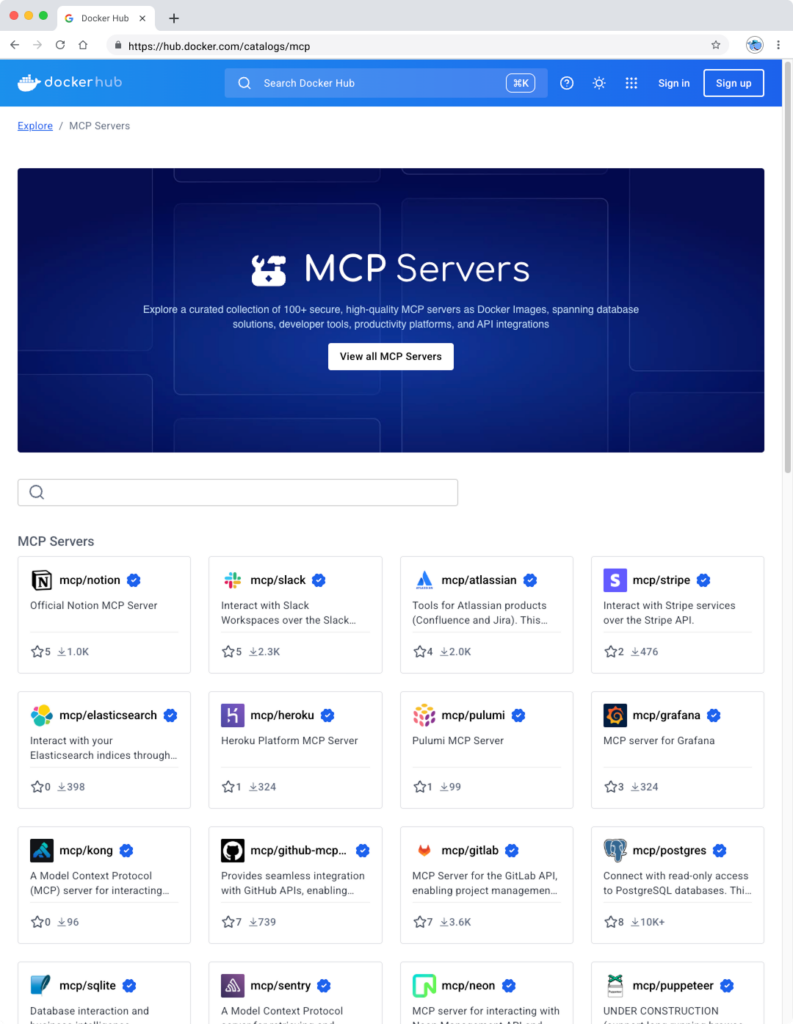
The MCP Catalog makes it easy to discover and access 100+ MCP servers — including Stripe, Elastic, Neo4j, and many more — all available on Docker Hub. With the MCP Toolkit Docker Desktop extension, you can quickly and securely run and interact with these servers. By packaging MCP servers as containers, developers can sidestep common challenges such as runtime setup, dependency conflicts, and environment inconsistencies — just run the container, and it works. 

Figure 1: Discover curated and popular MCP servers in Docker MCP Catalog, part of the Docker Hub

We’re not just simplifying discovery and installation — we’re placing security at the heart of the MCP experience. Because MCPs run inside Docker container images, they inherit the same built-in security features developers already trust and a rich ecosystem of tools for securing software throughout the supply chain. And we’re going further. The Docker MCP Toolkit addresses emerging threats unique to MCP servers like Tool Poisoning and Tool Rug Pulls, by leveraging Docker’s strong position as both a provider of secure content and secure runtimes.

Figure 2: The MCP Toolkit Docker Desktop Extension allows you to easily and securely run MCP servers in containers.

Go to the extensions menu of Docker Desktop to get started with Docker MCP Catalog and Toolkit, or use this for installation. Check out our doc for more information.

One-Click MCP Client Integration with Built-In Secure Authentication

While a curated list of MCPs and simplified security is a great starting point, it’s just the beginning. You can connect popular MCP servers from the Docker MCP Catalog to any MCP client. For clients like Gordon (Docker AI Agent), Claude, Cursor, VSCode, Windsurf, continue.dev, and Goose, one-click setup will make integration seamless. 

The Docker MCP Toolkit includes built-in OAuth support and secure credential storage, enabling clients to authenticate with MCP servers and third-party services without hardcoding secrets into environment variables. This ensures your MCP tools run securely and reliably right from the start.

Figure 3: Easily connect to your favorite MCP clients like Gordon, Claude, Cursor, and continue.dev with one click.

Enterprise-Ready MCP Tooling: Build, manage, and share in Docker Hub

Soon, you’ll be able to build and share your own MCPs on Docker Hub—home to over 14 million images, millions of active users, and a robust ecosystem of trusted content. Teams count on Docker Hub for verified images, deep image analysis, lifecycle management, and enterprise-grade tooling. Those same trusted capabilities will soon extend to MCPs, giving teams access to the latest tools and a secure, reliable way to distribute their own. And just like container images, MCPs will integrate with enterprise features like Registry Access Management and Image Access Management, ensuring secure, streamlined developer workflows from end to end. 

Wrapping up

Docker MCP Catalog and Toolkit bring much-needed structure, security, and simplicity to the fast-growing world of MCP tools. By standardizing how MCP servers are discovered, installed, and secured, we’re removing friction for developers building smarter, more capable AI-powered applications and agents.

Whether you’re connecting to external tools, customizing workflows, or scaling automation inside your IDE, Docker makes the entire process easy and secure. And this is just the beginning. With ongoing investments in expanding the MCP ecosystem and streamlining how tools are managed, we’re committed to making powerful AI tooling accessible to every team.

With Docker Catalog and Toolkit, your AI agent isn’t limited by what’s built in — it’s empowered by everything you can plug in. 

Go to the extensions menu of Docker Desktop to get started with Docker MCP Catalog and Toolkit, or use this for installation. See it in action during our upcoming webinar. Interested in hosting your MCP servers on Docker? Let’s connect.

Learn more

Get started with Docker MCP Catalog and Toolkit

Join the webinar for a live technical walkthrough.

Visit our MCP webpage 

Authenticate and update today to receive your subscription level’s newest Docker Desktop features.

Subscribe to the Docker Navigator Newsletter.

New to Docker? Create an account. 

Have questions? The Docker community is here to help.

Quelle: https://blog.docker.com/feed/
Update on the Docker DX extension for VS Code

It’s now been a couple of weeks since we released the new Docker DX extension for Visual Studio Code. This launch reflects a deeper collaboration between Docker and Microsoft to better support developers building containerized applications.

Over the past few weeks, you may have noticed some changes to your Docker extension in VS Code. We want to take a moment to explain what’s happening—and where we’re headed next.

What’s Changing?

The original Docker extension in VS Code is being migrated to the new Container Tools extension, maintained by Microsoft. It’s designed to make it easier to build, manage, and deploy containers—streamlining the container development experience directly inside VS Code.

As part of this partnership, it was decided to bundle the new Docker DX extension with the existing Docker extension, so that it would install automatically to make the process seamless.

While the automatic installation was intended to simplify the experience, we realize it may have caught some users off guard. To provide more clarity and choice, the next release will make Docker DX Extension an opt-in installation, giving you full control over when and how you want to use it. 

What’s New from Docker?

Docker is introducing the new Docker DX extension, focused on delivering a best-in-class authoring experience for Dockerfiles, Compose files, and Bake files

Key features include:

Dockerfile linting: Get build warnings and best-practice suggestions directly from BuildKit and Buildx—so you can catch issues early, right inside your editor.

Image vulnerability remediation (experimental): Automatically flag references to container images with known vulnerabilities, directly in your Dockerfiles.

Bake file support: Enjoy code completion, variable navigation, and inline suggestions when authoring Bake files—including the ability to generate targets based on your Dockerfile stages.

Compose file outline: Easily navigate and understand complex Compose files with a new outline view in the editor.

Better Together

These two extensions are designed to work side-by-side, giving you the best of both worlds:

Powerful tooling to build, manage, and deploy your containers

Smart, contextual authoring support for Dockerfiles, Compose files, and Bake files

And the best part? Both extensions are free and fully open source.

Thank You for Your Patience

We know changes like this can be disruptive. While our goal was to make the transition as seamless as possible, we recognize that the approach caused some confusion, and we sincerely apologize for the lack of early communication.

The teams at Docker and Microsoft are committed to delivering the best container development experience possible—and this is just the beginning.

Where Docker DX is Going Next

At Docker, we’re proud of the contributions we’ve made to the container ecosystem, including Dockerfiles, Compose, and Bake.

We’re committed to ensuring the best possible experience when editing these files in your IDE, with instant feedback while you work.

Here’s a glimpse of what’s coming:

Expanded Dockerfile checks: More best-practice validations, actionable tips, and guidance—surfaced right when you need them.

Stronger security insights: Deeper visibility into vulnerabilities across your Dockerfiles, Compose files, and Bake configurations.

Improved debugging and troubleshooting: Soon, you’ll be able to live debug Docker builds—step through your Dockerfile line-by-line, inspect the filesystem at each stage, see what’s cached, and troubleshoot issues faster.

We Want Your Feedback!

Your feedback is critical in helping us improve the Docker DX extension and your overall container development experience.

If you encounter any issues or have ideas for enhancements you’d like to see, please let us know:

Open an issue on the Docker DX VS Code extension GitHub repo

Or submit feedback through the Docker feedback page

We’re listening and excited to keep making things better for you! 
Quelle: https://blog.docker.com/feed/

Docker Desktop 4.41: Docker Model Runner supports Windows, Compose, and Testcontainers integrations, Docker Desktop on the Microsoft Store

Big things are happening in Docker Desktop 4.41! Whether you’re building the next AI breakthrough or managing development environments at scale, this release is packed with tools to help you move faster and collaborate smarter. From bringing Docker Model Runner to Windows (with NVIDIA GPU acceleration!), Compose and Testcontainers, to new ways to manage models in Docker Desktop, we’re making AI development more accessible than ever. Plus, we’ve got fresh updates for your favorite workflows — like a new Docker DX Extension for Visual Studio Code, a speed boost for Mac users, and even a new location for Docker Desktop on the Microsoft Store. Also, we’re enabling ACH transfer as a payment option for self-serve customers. Let’s dive into what’s new!

Docker Model Runner now supports Windows, Compose & Testcontainers

This release brings Docker Model Runner to Windows users with NVIDIA GPU support. We’ve also introduced improvements that make it easier to manage, push, and share models on Docker Hub and integrate with familiar tools like Docker Compose and Testcontainers. Docker Model Runner works with Docker Compose projects for orchestrating model pulls and injecting model runner services, and Testcontainers via its libraries. These updates continue our focus on helping developers build AI applications faster using existing tools and workflows. 

In addition to CLI support for managing models, Docker Desktop now includes a dedicated “Models” section in the GUI. This gives developers more flexibility to browse, run, and manage models visually, right alongside their containers, volumes, and images.

Figure 1: Easily browse, run, and manage models from Docker Desktop

Further extending the developer experience, you can now push models directly to Docker Hub, just like you would with container images. This creates a consistent, unified workflow for storing, sharing, and collaborating on models across teams. With models treated as first-class artifacts, developers can version, distribute, and deploy them using the same trusted Docker tooling they already use for containers — no extra infrastructure or custom registries required.

docker model push <model>

The Docker Compose integration makes it easy to define, configure, and run AI applications alongside traditional microservices within a single Compose file. This removes the need for separate tools or custom configurations, so teams can treat models like any other service in their dev environment.

Figure 2: Using Docker Compose to declare services, including running AI models

Similarly, the Testcontainers integration extends testing to AI models, with initial support for Java and Go and more languages on the way. This allows developers to run applications and create automated tests using AI services powered by Docker Model Runner. By enabling full end-to-end testing with Large Language Models, teams can confidently validate application logic, their integration code, and drive high-quality releases.

String modelName = "ai/gemma3";
DockerModelRunnerContainer modelRunnerContainer = new DockerModelRunnerContainer()
.withModel(modelName);
modelRunnerContainer.start();

OpenAiChatModel model = OpenAiChatModel.builder()
.baseUrl(modelRunnerContainer.getOpenAIEndpoint())
.modelName(modelName)
.logRequests(true)
.logResponses(true)
.build();

String answer = model.chat("Give me a fact about Whales.");
System.out.println(answer);

Docker DX Extension in Visual Studio: Catch issues early, code with confidence 

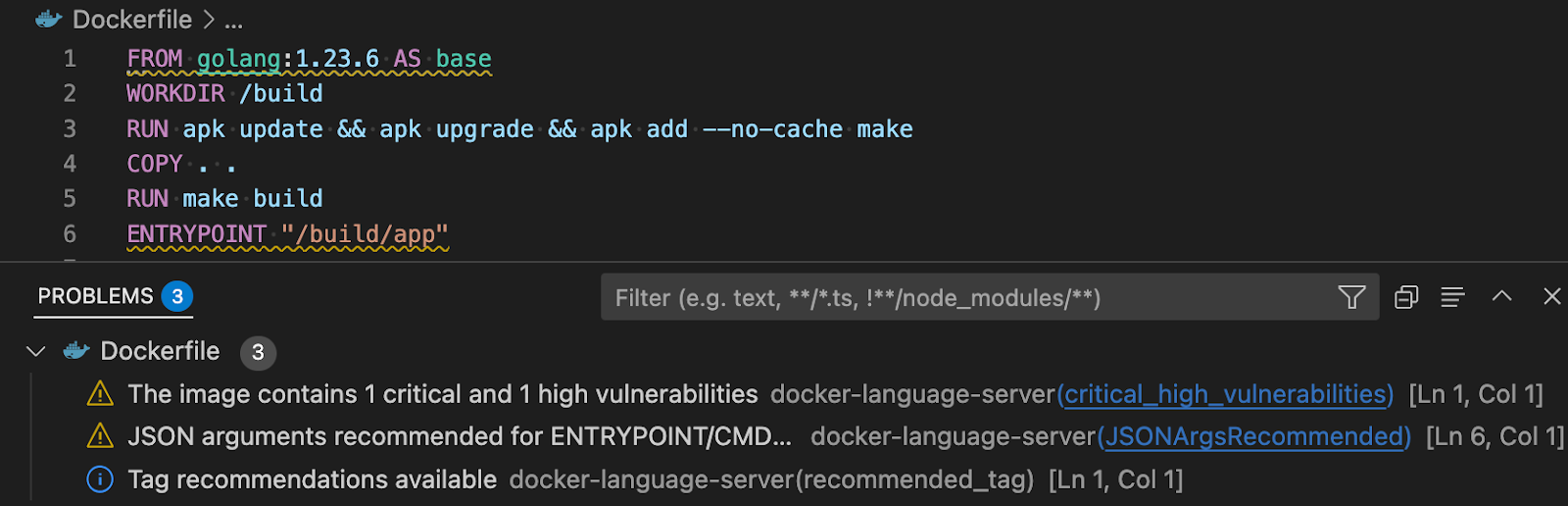
The Docker DX Extension is now live on the Visual Studio Marketplace. This extension streamlines your container development workflow with rich editing, linting features, and built-in vulnerability scanning. You’ll get inline warnings and best-practice recommendations for your Dockerfiles, powered by Build Check — a feature we introduced last year. 

It also flags known vulnerabilities in container image references, helping you catch issues early in the dev cycle. For Bake files, it offers completion, variable navigation, and inline suggestions based on your Dockerfile stages. And for those managing complex Docker Compose setups, an outline view makes it easier to navigate and understand services at a glance.

Figure 3: Docker DX Extension in Visual Studio provides actionable recommendations for fixing vulnerabilities and optimizing Dockerfiles

Read more about this in our announcement blog and GitHub repo. Get started today by installing Docker DX – Visual Studio Marketplace 

MacOS QEMU virtualization option deprecation

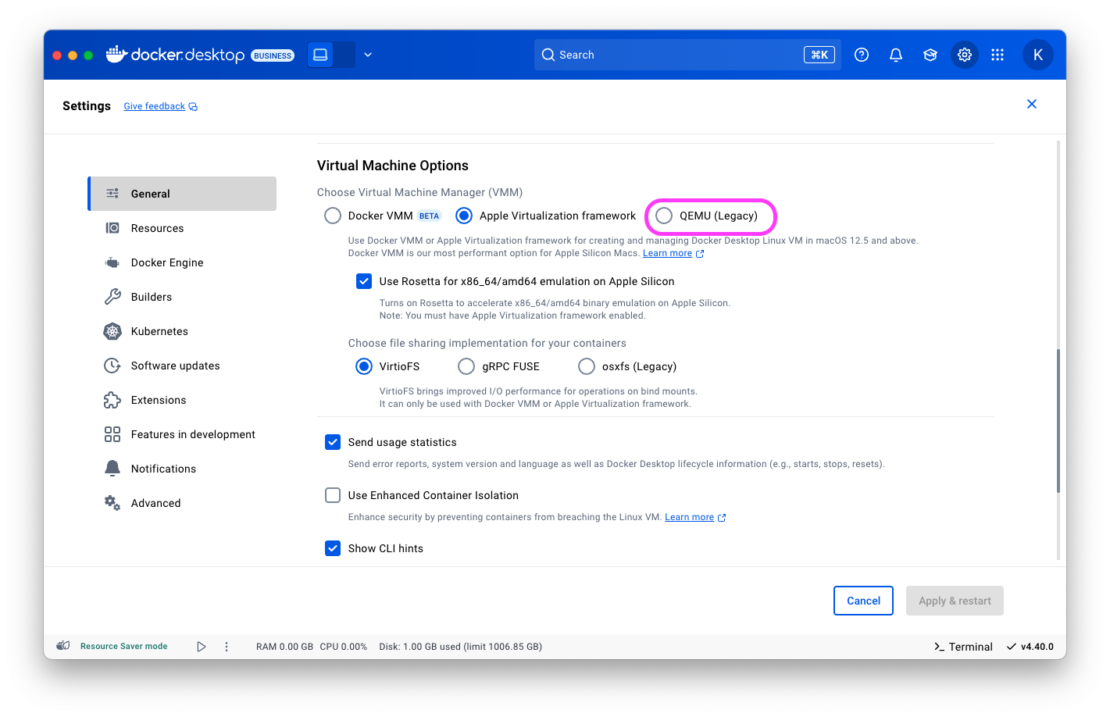
The QEMU virtualization option in Docker Desktop for Mac will be deprecated on July 14, 2025. 

With the new Apple Virtualization Framework, you’ll experience improved performance, stability, and compatibility with macOS updates as well as tighter integration with Apple Silicon architecture. 

What this means for you:

If you’re using QEMU as your virtualization backend on macOS, you’ll need to switch to either Apple Virtualization Framework (default) or Docker VMM (beta) options.

This does NOT affect QEMU’s role in emulating non-native architectures for multi-platform builds.

Your multi-architecture builds will continue to work as before.

For complete details, please see our official announcement. 

Introducing Docker Desktop in the Microsoft Store

Docker Desktop is now available for download from the Microsoft Store! We’re rolling out an EXE-based installer for Docker Desktop on Windows. This new distribution channel provides an enhanced installation and update experience for Windows users while simplifying deployment management for IT administrators across enterprise environments.

Key benefits

For developers:

Automatic Updates: The Microsoft Store handles all update processes automatically, ensuring you’re always running the latest version without manual intervention.

Streamlined Installation: Experience a more reliable setup process with fewer startup errors.

Simplified Management: Manage Docker Desktop alongside your other applications in one familiar interface.

For IT admins: 

Native Intune MDM Integration: Deploy Docker Desktop across your organization with Microsoft’s native management tools.

Centralized Deployment Control: Roll out Docker Desktop more easily through the Microsoft Store’s enterprise distribution channels.

Automatic Updates Regardless of Security Settings: Updates are handled automatically by the Microsoft Store infrastructure, even in organizations where users don’t have direct store access.

Familiar Process: The update mechanism maps to the widget command, providing consistency with other enterprise software management tools.

This new distribution option represents our commitment to improving the Docker experience for Windows users while providing enterprise IT teams with the management capabilities they need.

Unlock greater flexibility: Enable ACH transfer as a payment option for self-serve customers

We’re focused on making it easier for teams to scale, grow, and innovate. All on their own terms. That’s why we’re excited to announce an upgrade to the self-serve purchasing experience: customers can pay via ACH transfer starting on 4/30/25.

Historically, self-serve purchases were limited to credit card payments, forcing many customers who could not use credit cards into manual sales processes, even for small seat expansions. With the introduction of an ACH transfer payment option, customers can choose the payment method that works best for their business. Fewer delays and less unnecessary friction.

This payment option upgrade empowers customers to:

Purchase more independently without engaging sales

Choose between credit card or ACH transfer with a verified bank account

By empowering enterprises and developers, we’re freeing up your time, and ours, to focus on what matters most: building, scaling, and succeeding with Docker.

Visit our documentation to explore the new payment options, or log in to your Docker account to get started today!

Wrapping up 

With Docker Desktop 4.41, we’re continuing to meet developers where they are — making it easier to build, test, and ship innovative apps, no matter your stack or setup. Whether you’re pushing AI models to Docker Hub, catching issues early with the Docker DX Extension, or enjoying faster virtualization on macOS, these updates are all about helping you do your best work with the tools you already know and love. We can’t wait to see what you build next!

Learn more

Authenticate and update today to receive your subscription level’s newest Docker Desktop features.

Subscribe to the Docker Navigator Newsletter.

Learn about our sign-in enforcement options.

New to Docker? Create an account. 

Have questions? The Docker community is here to help.

Quelle: https://blog.docker.com/feed/
How to build and deliver an MCP server for production

In December of 2024, we published a blog with Anthropic about their totally new spec (back then) to run tools with AI agents: the Model Context Protocol, or MCP. Since then, we’ve seen an explosion in developer appetite to build, share, and run their tools with Agentic AI – all using MCP. We’ve seen new MCP clients pop up, and big players like Google and OpenAI committing to this standard. However, nearly immediately, early growing pains have led to friction when it comes down to actually building and using MCP tools. At the moment, we’ve hit a major bump in the road.

MCP Pain Points

Runtime:

Getting up and running with MCP servers is a headache for devs. The standard runtimes for MCP servers rely on a specific version of Python or NodeJS, and combining tools means managing those versions, on top of extra dependencies an MCP server may require.

Security:

Giving an LLM direct access to run software on the host system is unacceptable to devs outside of hobbyist environments. In the event of hallucinations or incorrect output, significant damage could be done.

Users are asked to configure sensitive data in plaintext json files. An MCP config file contains all of the necessary data for your agent to act on your behalf, but likewise it centralizes everything a bad actor needs to exploit your accounts.

Discoverability

The tools are out there, but there isn’t a single good place to find the best MCP servers. Marketplaces are beginning to crop up, but the developers are still required to hunt out good sources of tools for themselves.

Later on in the MCP user experience, it’s very easy to end up with enough servers and tools to overwhelm your LLM – leading to incorrect tools being used, and worse outcomes. When an LLM has the right tools for the job, it can execute more efficiently. When an LLM gets the wrong tools – or too many tools to decide, hallucinations spike while evals plummet.

Trust:

When the tools are run by LLMs on behalf of the developer, it’s critical to trust the publisher of MCP servers. The current MCP publisher landscape looks like a gold rush, and is therefore vulnerable to supply-chain attacks from untrusted authors.

Docker as an MCP Runtime

Docker is a tried and true runtime to stabilize the environment in which tools run. Instead of managing multiple Node or Python installations, using Dockerized MCP servers allows anyone with the Docker Engine to run MCP servers.

Docker provides sandboxed isolation for tools so that undesirable LLM behavior can’t damage the host configuration. The LLM has no access to the host filesystem for example, unless that MCP container is explicitly bound. 

The MCP Gateway

In order for LLM’s to work autonomously, they need to be able to discover and run tools for themselves. This is nearly impossible using all of these MCP servers. Every time a new tool is added, a config file needs to be updated and the MCP client needs to be updated. The current workaround is to develop MCP servers which configure new MCP servers, but even this requires reloading. A much better approach is to simply use one MCP server: Docker. This MCP server acts as a gateway into a dynamic set of containerized tools. But how can tools be dynamic?

The MCP Catalog 

A dynamic set of tools in one MCP server means that users can go somewhere to add or remove MCP tools without modifying any config. This is achieved through a simple UI in Docker Desktop to maintain a list of tools which the MCP gateway can serve out. Users gain the ability to configure their MCP clients use hundreds of Dockerized servers all by “connecting” to the gateway MCP server. 

Much like Docker Hub, Docker MCP Catalog delivers a trusted, centralized hub to discover tools for developers. And for tool authors, that same hub becomes a critical distribution channel: a way to reach new users and ensure compatibility with platforms like Claude, Cursor, OpenAI, and VS Code. 

Docker Secrets

Finally, in order to securely pass access tokens and other secrets around containers, we’ve developed a feature as part of Docker Desktop to manage secrets. When configured, secrets are only exposed to the MCP’s container process. That means the secret won’t appear even when inspecting the running container. Allowing secrets to be kept scoped tightly to the tools that need them means you no longer risk big data breaches leaving MCP config files around.
Quelle: https://blog.docker.com/feed/
Dockerizing MCP – Bringing Discovery, Simplicity, and Trust to the Ecosystem

AI agents are moving fast—from labs to real-world apps. And as they go from generating text to taking real action, the Model Context Protocol (MCP) has emerged as the de facto standard for connecting agents to tools.

MCP is exciting. It’s simple, modular, and built on web-native principles. We believe it has the potential to do for agentic AI interaction what containers did for app deployment – standardize and simplify a complex, fragmented landscape.

But, that leaves us at a classic inflection point. MCP Clients and Servers hold enormous potential, but the experience isn’t production-ready – yet. Discovery is fragmented, trust is manual, and core capabilities like security and authentication are still patched together with workarounds. 

To move from prototypes to production, a few things need to become non-negotiable. First, developers need a trusted, centralized hub to discover tools – no more digging through Discord threads or Twitter replies. And for tool authors, that same hub becomes a critical distribution channel: a way to reach new users and ensure compatibility with platforms like Claude, Cursor, OpenAI, and VS Code. Today, that channel simply doesn’t exist. Second, containerization should be the default; cloning repos and wrangling dependencies just to get started is unnecessary friction. Third, credential management must be seamless and secure – centralized, encrypted, and built to fit modern pipelines. And finally, security has to be foundational. Sandbox it. Permission it. Audit it. Trust can’t be an afterthought—it needs to be built in from day one. And it needs to be simple to use: accessible to all developers.

This moment for MCP reminds us a lot of the early days of the cloud and containers – high potential, a few sharp edges, and massive opportunity ahead. These aren’t abstract problems – they’re the same challenges developers face every time a new technology hits its inflection point. We’ve seen it before. And we know how to help. Back in the early days of the cloud, Docker brought structure to chaos by making immutability and isolation the standard, building in authentication, and launching Docker Hub as a central discovery layer. It didn’t just streamline deployment – it redefined how software gets built, shared, and trusted. Today, Docker serves over 20 million developers and powers billions of image pulls every month. If we bring that same clarity, trust, and scalability to MCP, we unlock a whole new generation of intelligent agents and real-world automation. That’s exactly what we’re doing – with Docker MCP Catalog and Docker MCP Toolkit.

And we’re not doing it alone. We’re partnering with leaders like Stripe, Elastic, Heroku, Pulumi, Grafana Labs, Kong Inc., Neo4j, New Relic, Continue.dev, and more – each contributing their expertise to help shape a robust, open, and secure MCP ecosystem. This isn’t just another product launch – it’s the foundation of a platform shift. And we’re building it together.

The world we’ve envisioned is one we’re building together with our partners — and it all begins this May. Starting then, the Docker MCP Catalog will serve as the trusted home for discovering MCP tools – seamlessly integrated into Docker Hub. At launch, it will include over 100 verified tools from leading partners like Stripe, Elastic, Neo4j, and more. Each tool will feature publisher verification, versioned releases, and curated collections to help developers find exactly what they need, faster. And just like container images, MCP tools will be distributed via Docker’s proven pull-based infrastructure – the same trusted backbone behind billions of downloads every month.

Alongside it, the Docker MCP Toolkit brings these tools to life – making them secure, seamless, and instantly usable on your local machine or anywhere Docker runs. With one-click launch from Docker Desktop, you can spin up MCP servers in seconds and connect them to clients like Docker AI Agent, Claude, Cursor, VS Code, Windsurf, continue.dev, and Goose – no complex setup required. It also includes built-in credentials and OAuth management, integrated with your Docker Hub account, ensuring smooth authentication and making it easy to revoke credentials when necessary. A Gateway MCP Server dynamically exposes enabled tools to compatible clients, while the new docker mcp CLI lets you build, run, and manage them with ease. And with built-in memory, network and disk isolation, every tool runs securely by default-ready for production from day one.

So what does the future look like with Docker MCP Catalog and Toolkit? Picture this: browsing hundreds of ready-to-run MCP servers directly on Docker Hub and spinning them up as easily as Redis or Postgres. Instantly connecting them to agents with a few clicks. No more hardcoded secrets, no more launching tools with full host access via npx or uvx, and no more compromising on isolation or security. Best of all? Run a Docker container, and the MCP tools just work. With familiar commands and tooling, the learning curve is nearly zero—and the possibilities are massive.

Whether you’re building tools, creating agents, or just exploring what’s possible with MCP—we’d love to hear from you. Eager to try the Docker MCP Toolkit and MCP Catalog? Click here to join our alert list. Want a sneak peek? Schedule a session with our DevRel team here. Interested in hosting your own tools on the MCP Catalog? Get in touch with us here. Let’s build this ecosystem – together.
Quelle: https://blog.docker.com/feed/
Docker Desktop for Mac: QEMU Virtualization Option to be Deprecated in 90 Days

We are announcing the upcoming deprecation of QEMU as a virtualization option for Docker Desktop on Apple Silicon Macs. After serving as our legacy virtualization solution during the early transition to Apple Silicon, QEMU will be fully deprecated 90 days from today, on July 14, 2025. This deprecation does not affect QEMU’s role in emulating non-native architectures for multi-platform builds. By moving to Apple Virtualization Framework or Docker VMM, you will ensure optimal performance.

Why We’re Making This Change

Our telemetry shows that a very small percentage of users are still using the QEMU option. We’ve maintained QEMU support for backward compatibility, but both Docker VMM and Apple Virtualization Framework now offer:

Significantly better performance

Improved stability

Enhanced compatibility with macOS updates

Better integration with Apple Silicon architecture

What This Means For You

If you’re currently using QEMU as your Virtual Machine Manager (VMM) on Docker Desktop for Mac:

Your current installation will continue to work normally during the 90-day transition period

After July 1, 2025, Docker Desktop releases will automatically migrate your environment to Apple Virtualization Framework

You’ll experience improved performance and stability with the newer virtualization options

Migration Plan

The migration process will be smooth and straightforward:

Users on the latest Docker Desktop release will be automatically migrated to Apple Virtualization Framework after the 90-day period

During the transition period, you can manually switch to either Docker VMM (our fastest option for Apple Silicon Macs) or Apple Virtualization Framework through Settings > General > Virtual Machine Options

For 30 days after the deprecation date, the QEMU option will remain available in settings for users who encounter migration issues

After this extended period, the QEMU option will be fully removed

Note: This deprecation does not affect QEMU’s role in emulating non-native architectures for multi-platform builds.

What You Should Do Now

We recommend proactively switching to one of our newer VMM options before the automatic migration:

Update to the latest version of Docker Desktop for Mac

Open Docker Desktop Settings > General

Under “Choose Virtual Machine Manager (VMM)” select either:

Docker VMM (BETA) – Our fastest option for Apple Silicon Macs

Apple Virtualization Framework – A mature, high-performance alternative

Questions or Concerns?

If you have questions or encounter any issues during migration, please:

Visit our documentation

Reach out to us via GitHub issues

Join the conversation on the Docker Community Forums

We’re committed to making this transition as seamless as possible while delivering the best development experience on macOS.
Quelle: https://blog.docker.com/feed/

New Docker Extension for Visual Studio Code

Today, we are excited to announce the release of a new, open-source Docker Language Server and Docker DX VS Code extension. In a joint collaboration between Docker and the Microsoft Container Tools team, this new integration enhances the existing Docker extension with improved Dockerfile linting, inline image vulnerability checks, Docker Bake file support, and outlines for Docker Compose files. By working directly with Microsoft, we’re ensuring a native, high-performance experience that complements the existing developer workflow. It’s the next evolution of Docker tooling in VS Code — built to help you move faster, catch issues earlier, and focus on what matters most: building great software.

What’s the Docker DX extension?

The Docker DX extension is focused on providing developers with faster feedback as they edit. Whether you’re authoring a complex Compose file or fine-tuning a Dockerfile, the extension surfaces relevant suggestions, validations, and warnings in real time. 

Key features include:

Dockerfile linting: Get build warnings and best-practice suggestions directly from BuildKit and Buildx.

Image vulnerability remediation (experimental): Flags references to container images with known vulnerabilities directly in Dockerfiles.

Bake file support: Includes code completion, variable navigation, and inline suggestions for generating targets based on your Dockerfile stages.

Compose file outline: Easily navigate complex Compose files with an outline view in the editor.

If you’re already using the Docker VS Code extension, the new features are included — just update the extension and start using them!

Dockerfile linting and vulnerability remediation

The inline Dockerfile linting provides warnings and best-practice guidance for writing Dockerfiles from the experts at Docker, powered by Build Checks. Potential vulnerabilities are highlighted directly in the editor with context about their severity and impact, powered by Docker Scout.

Figure 1: Providing actionable recommendations for fixing vulnerabilities and optimizing Dockerfiles

Early feedback directly in Dockerfiles keeps you focused and saves you and your team time debugging and remediating later.

Docker Bake files

The Docker DX extension makes authoring and editing Docker Bake files quick and easy. It provides code completion, code navigation, and error reporting to make editing Bake files a breeze. The extension will also look at your Dockerfile and suggest Bake targets based on the build stages you have defined in your Dockerfile.

Figure 2: Editing Bake files is simple and intuitive with the rich language features that the Docker DX extension provides.

Figure 3: Creating new Bake files is straightforward as your Dockerfile’s build stages are analyzed and suggested as Bake targets.

Compose outlines

Quickly navigate complex Compose files with the extension’s support for outlines available directly through VS Code’s command palette.

Figure 4: Navigate complex Compose files with the outline panel.

Don’t use VS Code? Try the Language Server!

The features offered by the Docker DX extension are powered by the brand-new Docker Language Server, built on the Language Server Protocol (LSP). This means the same smart editing experience — like real-time feedback, validation, and suggestions for Dockerfiles, Compose, and Bake files — is available in your favorite editor.

Wrapping up

Install the extension from Docker DX – Visual Studio Marketplace today! The functionality is also automatically installed with the existing Docker VS Code extension from Microsoft.

Share your feedback on how it’s working for you, and share what features you’d like to see next. If you’d like to learn more or contribute to the project, check out our GitHub repo.

Learn more

Install the Docker DX VS Code extension

Give us feedback or ask for features

Contribute to the extension project

Try the Docker Language Server or contribute to it

Subscribe to the Docker Navigator Newsletter.

New to Docker? Create an account.

Quelle: https://blog.docker.com/feed/

Introducing Docker Model Runner: A Better Way to Build and Run GenAI Models Locally

Generative AI is transforming software development, but building and running AI models locally is still harder than it should be. Today’s developers face fragmented tooling, hardware compatibility headaches, and disconnected application development workflows, all of which hinder iteration and slow down progress.  

That’s why we’re launching Docker Model Runner — a faster, simpler way to run and test AI models locally, right from your existing workflow. Whether you’re experimenting with the latest LLMs or deploying to production, Model Runner brings the performance and control you need, without the friction.

We’re also teaming up with some of the most influential names in AI and software development, including Google, Continue, Dagger, Qualcomm, HuggingFace, Spring AI, and VMware Tanzu AI Solutions, to give developers direct access to the latest models, frameworks, and tools. These partnerships aren’t just integrations, they’re a shared commitment to making AI innovation more accessible, powerful, and developer-friendly. With Docker Model Runner, you can tap into the best of the AI ecosystem from right inside your Docker workflow.

LLM development is evolving: We’re making it local-first 

Local development for applications powered by LLMs is gaining momentum, and for good reason. It offers several advantages on key dimensions such as performance, cost, and data privacy. But today, local setup is complex.  

Developers are often forced to manually integrate multiple tools, configure environments, and manage models separately from container workflows. Running a model varies by platform and depends on available hardware. Model storage is fragmented because there is no standard way to store, share, or serve models. 

The result? Rising cloud inference costs and a disjoined developer experience. With our first release, we’re focused on reducing that friction, making local model execution simpler, faster, and easier to fit into the way developers already build.

Docker Model Runner: The simple, secure way to run AI models locally

Docker Model Runner is designed to make AI model execution as simple as running a container. With this Beta release, we’re giving developers a fast, low-friction way to run models, test them, and iterate on application code that uses models locally, without all the usual setup headaches. Here’s how:

Running models locally 

With Docker Model Runner, running AI models locally is now as simple as running any other service in your inner loop. Docker Model Runner delivers this by including an inference engine as part of Docker Desktop, built on top of llama.cpp and accessible through the familiar OpenAI API. No extra tools, no extra setup, and no disconnected workflows. Everything stays in one place, so you can test and iterate quickly, right on your machine.

Enabling GPU acceleration (Apple silicon)

GPU acceleration on Apple silicon helps developers get fast inference and the most out of their local hardware. By using host-based execution, we avoid the performance limitations of running models inside virtual machines. This translates to faster inference, smoother testing, and better feedback loops.

Standardizing model packaging with OCI Artifacts

Model distribution today is messy. Models are often shared as loose files or behind proprietary download tools with custom authentication. With Docker Model Runner, we package models as OCI Artifacts, an open standard that allows you to distribute and version them through the same registries and workflows you already use for containers. Today, you can easily pull ready-to-use models from Docker Hub. Soon, you’ll also be able to push your own models, integrate with any container registry, connect them to your CI/CD pipelines, and use familiar tools for access control and automation.

Building momentum with a thriving GenAI ecosystem

To make local development seamless, it needs an ecosystem. That starts with meeting developers where they are, whether they’re testing model performance on their local machines or building applications that run these models. 

That’s why we’re launching Docker Model Runner with a powerful ecosystem of partners on both sides of the AI application development process. On the model side, we’re collaborating with industry leaders like Google and community platforms like HuggingFace to bring you high-quality, optimized models ready for local use. These models are published as OCI artifacts, so you can pull and run them using standard Docker commands, just like any container image.

But we aren’t stopping at models. We’re also working with application, language, and tooling partners like Dagger, Continue, and Spring AI and VMware Tanzu to ensure applications built with Model Runner integrate seamlessly into real-world developer workflows. Additionally, we’re working with hardware partners like Qualcomm to ensure high performance inference on all platforms.

As Docker Model Runner evolves, we’ll work to expand its ecosystem of partners, allowing for ample distribution and added functionality.

Where We’re Going

This is just the beginning. With Docker Model Runner, we’re making it easier for developers to bring AI model execution into everyday workflows, securely, locally, and with a low barrier of entry. Soon, you’ll be able to run models on more platforms, including Windows with GPU acceleration, customize and publish your own models, and integrate AI into your dev loop with even greater flexibility (including Compose and Testcontainers). With each Docker Desktop release, we’ll continue to unlock new capabilities that make GenAI development easier, faster, and way more fun to build with.

Try it out now! 

Docker Model Runner is now available as a Beta feature in Docker Desktop 4.40. To get started:

On a Mac with Apple silicon

Update to Docker Desktop 4.40

Pull models developed by our partners at Docker’s GenAI Hub and start experimenting

For more information, check out our documentation here.

Try it out and let us know what you think!

How can I learn more about Docker Model Runner?

Check out our available assets today! 

Turn your Mac into an AI playground YouTube tutorialA Quickstart Guide to Docker Model Runner Docker Model Runner on Docker Docs 

Come meet us at Google Cloud Next! 

Swing by booth 1530 in the Mandalay Convention Center for hands-on demos and exclusive content.
Quelle: https://blog.docker.com/feed/

Run Gemma 3 with Docker Model Runner: Fully Local GenAI Developer Experience

The landscape of generative AI development is evolving rapidly but comes with significant challenges. API usage costs can quickly add up, especially during development. Privacy concerns arise when sensitive data must be sent to external services. And relying on external APIs can introduce connectivity issues and latency.

Enter Gemma 3 and Docker Model Runner, a powerful combination that brings state-of-the-art language models to your local environment, addressing these challenges head-on.

In this blog post, we’ll explore how to run Gemma 3 locally using Docker Model Runner. We’ll also walk through a practical case study: a Comment Processing System that analyzes user feedback about a fictional AI assistant named Jarvis.

The power of local GenAI development

Before diving into the implementation, let’s look at why local GenAI development is becoming increasingly important:

Cost efficiency: With no per-token or per-request charges, you can experiment freely without worrying about usage fees.

Data privacy: Sensitive data stays within your environment, with no third-party exposure.

Reduced network latency: Eliminates reliance on external APIs and enables offline use.

Full control: Run the model on your terms, with no intermediaries and full transparency.

Setting up Docker Model Runner with Gemma 3

Docker Model Runner provides an OpenAI-compatible API interface to run models locally.It is included in Docker Desktop for macOS, starting with version 4.40.0.Here’s how to set it up with Gemma 3:

docker desktop enable model-runner –tcp 12434
docker model pull ai/gemma3

Once setup is complete, the OpenAI-compatible API provided by the Model Runner is available at: http://localhost:12434/engines/v1

Case study: Comment processing system

To demonstrate the power of local GenAI development, we’ve built a Comment Processing System that leverages Gemma 3 for multiple NLP tasks. This system:

Generates synthetic user comments about a fictional AI assistant

Categorizes comments as positive, negative, or neutral

Clusters similar comments together using embeddings

Identifies potential product features from the comments

Generates contextually appropriate responses

All tasks are performed locally with no external API calls.

Implementation details

Configuring the OpenAI SDK to use local models

To make this work, we configure the OpenAI SDK to point to the Docker Model Runner:

// config.js

export default {
// Model configuration
openai: {
baseURL: "http://localhost:12434/engines/v1", // Base URL for Docker Model Runner
apiKey: 'ignored',
model: "ai/gemma3",
commentGeneration: { // Each task has its own configuration, for example temperature is set to a high value when generating comments for creativity
temperature: 0.3,
max_tokens: 250,
n: 1,
},
embedding: {
model: "ai/mxbai-embed-large", // Model for generating embeddings
},
},
// … other configuration options
};

import OpenAI from 'openai';
import config from './config.js';

// Initialize OpenAI client with local endpoint
const client = new OpenAI({
baseURL: config.openai.baseURL,
apiKey: config.openai.apiKey,
});

Task-specific configuration

One key benefit of running models locally is the ability to experiment freely with different configurations for each task without worrying about API costs or rate limits.

In our case:

Synthetic comment generation uses a higher temperature for creativity.

Categorization uses a lower temperature and a 10-token limit for consistency.

Clustering allows up to 20 tokens to improve semantic richness in embeddings.

This flexibility lets us iterate quickly, tune for performance, and tailor the model’s behavior to each use case.

Generating synthetic comments

To simulate user feedback, we use Gemma 3’s ability to follow detailed, context-aware prompts.

/**
* Create a prompt for comment generation
* @param {string} type – Type of comment (positive, negative, neutral)
* @param {string} topic – Topic of the comment
* @returns {string} – Prompt for OpenAI
*/
function createPromptForCommentGeneration(type, topic) {
let sentiment = '';

switch (type) {
case 'positive':
sentiment = 'positive and appreciative';
break;
case 'negative':
sentiment = 'negative and critical';
break;
case 'neutral':
sentiment = 'neutral and balanced';
break;
default:
sentiment = 'general';
}

return `Generate a realistic ${sentiment} user comment about an AI assistant called Jarvis, focusing on its ${topic}.

The comment should sound natural, as if written by a real user who has been using Jarvis.
Keep the comment concise (1-3 sentences) and focused on the specific topic.
Do not include ratings (like "5/5 stars") or formatting.
Just return the comment text without any additional context or explanation.`;
}

Examples:

"Honestly, Jarvis is just a lot of empty promises. It keeps suggesting irrelevant articles and failing to actually understand my requests for help with my work – it’s not helpful at all."

"Jarvis is seriously impressive – the speed at which it responds is incredible! I’ve never used an AI assistant that’s so quick and efficient, it’s a game changer.

The ability to produce realistic feedback on demand is incredibly useful for simulating user data with zero API cost.

Generating contextual responses

We also use Gemma 3 to simulate polite, on-brand support responses to user comments. Here’s the prompt logic:

const response = await client.chat.completions.create({
model: config.openai.model,
messages: [
{
role: "system",
content: `You are a customer support representative for an AI assistant called Jarvis. Your task is to generate polite, helpful responses to user comments.

Guidelines for responses:
1. Be empathetic and acknowledge the user's feedback
2. Thank the user for their input
3. If the comment is positive, express appreciation
4. If the comment is negative, apologize for the inconvenience and assure them you're working on improvements
5. If the comment is neutral, acknowledge their observation
6. If relevant, mention that their feedback will be considered for future updates
7. Keep responses concise (2-4 sentences) and professional
8. Do not make specific promises about feature implementation or timelines
9. Sign the response as "The Jarvis Team"`
},
{
role: "user",
content: `User comment: "${comment.text}"
Comment category: ${comment.category || 'unknown'}

${featuresContext}

Generate a polite, helpful response to this user comment.`
}
],
temperature: 0.7,
max_tokens: 200
});

Examples:

For a positive comment:

Thank you so much for your positive feedback regarding Jarvis’s interface! We’re thrilled to hear you find it clean and intuitive – that’s exactly what we’re aiming for. We appreciate you pointing out your desire for more visual customization options, and your feedback will definitely be considered as we continue to develop Jarvis.

The Jarvis Team

For a negative comment:

Thank you for your feedback – we appreciate you taking the time to share your observations about Jarvis. We sincerely apologize for the glitches and freezes you’ve experienced; we understand how frustrating that can be. Your input is valuable, and we’re actively working on improvements to enhance Jarvis’s reliability and accuracy.

The Jarvis Team

This approach ensures a consistent, human-like support experience generated entirely locally.

Extracting product features from user feedback

Beyond generating and responding to comments, we also use Gemma 3 to analyze user feedback and identify actionable insights. This helps simulate the role of a product analyst, surfacing recurring themes, user pain points, and opportunities for improvement.

Here, we provide a prompt instructing the model to identify up to three potential features or improvements based on a set of user comments. 

/**
* Extract features from comments
* @param {string} commentsText – Text of comments
* @returns {Promise<Array>} – Array of identified features
*/
async function extractFeaturesFromComments(commentsText) {
const response = await client.chat.completions.create({
model: config.openai.model,
messages: [
{
role: "system",
content: `You are a product analyst for an AI assistant called Jarvis. Your task is to identify potential product features or improvements based on user comments.

For each set of comments, identify up to 3 potential features or improvements that could address the user feedback.

For each feature, provide:
1. A short name (2-5 words)
2. A brief description (1-2 sentences)
3. The type of feature (New Feature, Improvement, Bug Fix)
4. Priority (High, Medium, Low)

Format your response as a JSON array of features, with each feature having the fields: name, description, type, and priority.`
},
{
role: "user",
content: `Here are some user comments about Jarvis. Identify potential features or improvements based on these comments:

${commentsText}`
}
],
response_format: { type: "json_object" },
temperature: 0.5
});

try {
const result = JSON.parse(response.choices[0].message.content);
return result.features || [];
} catch (error) {
console.error('Error parsing feature identification response:', error);
return [];
}
}

Here’s an example of what the model might return:

"features": [
{
"name": "Enhanced Visual Customization",
"description": "Allows users to personalize the Jarvis interface with more themes, icon styles, and display options to improve visual appeal and user preference.",
"type": "Improvement",
"priority": "Medium",
"clusters": [
"1"
]
},

And just like everything else in this project, it’s generated locally with no external services.

Conclusion

By combining Gemma 3 with Docker Model Runner, we’ve unlocked a local GenAI workflow that’s fast, private, cost-effective, and fully under our control. In building our Comment Processing System, we experienced firsthand the benefits of this approach:

Rapid iteration without worrying about API costs or rate limits

Flexibility to test different configurations for each task

Offline development with no dependency on external services

Significant cost savings during development

And this is just one example of what’s possible. Whether you’re prototyping a new AI product, building internal tools, or exploring advanced NLP use cases, running models locally puts you in the driver’s seat.

As open-source models and local tooling continue to evolve, the barrier to entry for building powerful AI systems keeps getting lower.

Don’t just consume AI; develop, shape, and own the process.

Try it yourself: clone the repository and start experimenting today.
Quelle: https://blog.docker.com/feed/

Run LLMs Locally with Docker: A Quickstart Guide to Model Runner

AI is quickly becoming a core part of modern applications, but running large language models (LLMs) locally can still be a pain. Between picking the right model, navigating hardware quirks, and optimizing for performance, it’s easy to get stuck before you even start building. At the same time, more and more developers want the flexibility to run LLMs locally for development, testing, or even offline use cases. That’s where Docker Model Runner comes in.

Now available in Beta with Docker Desktop 4.40 for macOS on Apple silicon, Model Runner makes it easy to pull, run, and experiment with LLMs on your local machine. No infrastructure headaches, no complicated setup. Here’s what Model Runner offers in our initial beta release.

Local LLM inference powered by an integrated engine built on top of llama.cpp, exposed through an OpenAI-compatible API.

GPU acceleration on Apple silicon by executing the inference engine directly as a host process.

A growing collection of popular, usage-ready models packaged as standard OCI artifacts, making them easy to distribute and reuse across existing Container Registry infrastructure.

Keep reading to learn how to run LLMs locally on your own computer using Docker Model Runner!

Enabling Docker Model Runner for LLMs

Docker Model Runner is enabled by default and shipped as part of Docker Desktop 4.40 for macOS on Apple silicon hardware. However, in case you’ve disabled it, you can easily enable it through the CLI with a single command:

docker desktop enable model-runner

In its default configuration, the Model Runner will only be accessible through the Docker socket on the host, or to containers via the special model-runner.docker.internal endpoint. If you want to interact with it via TCP from a host process (maybe because you want to point some OpenAI SDK within your codebase straight to it), you can also enable it via CLI by specifying the intended port:

docker desktop enable model-runner –tcp 12434

A first look at the command line interfaceCLI

The Docker Model Runner CLI will feel very similar to working with containers, but there are also some caveats regarding the execution model, so let’s check it out. For this guide, I’m going to use a very small model to ensure it runs on hardware with limited resources and provides a fast and responsive user experience. To be more specific, we’ll use the SmolLM model, published by HuggingFace in 2024.

We’ll want to start by pulling a model. As with Docker Images, you can omit the specific tag, and it’ll default to latest. But for this example, let’s be specific:

docker model pull ai/smollm2:360M-Q4_K_M

Here I am pulling the SmolLM2 model with 360M parameters and 4-bit quantization. Tags for models distributed by Docker follow this scheme with regard to model metadata:

{model}:{parameters}-{quantization}

After having the model pulled, let’s give it a spin by asking it a question:

docker model run ai/smollm2:360M-Q4_K_M "Give me a fact about whales."

Whales are magnificent marine animals that have fascinated humans for centuries. They belong to the order Cetacea and have a unique body structure that allows them to swim and move around the ocean. Some species of whales, like the blue whale, can grow up to 100 feet (30 meters) long and weigh over 150 tons (140 metric tons) each. They are known for their powerful tails that propel them through the water, allowing them to dive deep to find food or escape predators.

Is this whale fact actually true? Honestly, I have no clue; I’m not a marine biologist. But it’s a fun example to illustrate a broader point: LLMs can sometimes generate inaccurate or unpredictable information. As with anything, especially smaller local models with a limited number of parameters or small quantization values, it’s important to verify what you’re getting back.

So what actually happened when we ran the docker model run command? It makes sense to have a closer look at the technical underpinnings, since it differs from what you might expect after using docker container run commands for years. In the case of the Model Runner, this command won’t spin up any kind of container. Instead, it’ll call an Inference Server API endpoint, hosted by the Model Runner through Docker Desktop, and provide an OpenAI compatible API. The Inference Server will use llama.cpp as the Inference Engine, running as a native host process, load the requested model on demand, and then perform the inference on the received request. Then, the model will stay in memory until another model is requested, or until a pre-defined inactivity timeout (currently 5 minutes) is reached. 

That also means that there isn’t a need to perform a docker model run before interacting with a specific model from a host process or from within a container. Model Runner will transparently load the requested model on-demand, assuming it has been pulled beforehand and is locally available. 

Speaking of interacting with models from other processes, let’s have a look at how to integrate with Model Runner from within your application code.

Having fun with GenAI development

Model Runner exposes an OpenAI endpoint under http://model-runner.docker.internal/engines/v1 for containers, and under http://localhost:12434/engines/v1 for host processes (assuming you have enabled TCP host access on default port 12434). You can use this endpoint to hook up any OpenAI-compatible clients or frameworks. 

In this example, I’m using Java and LangChain4j. Since I develop and run my Java application directly on the host, all I have to do is configure the Model Runner OpenAI endpoint as the baseUrl and specify the model to use, following the Docker Model addressing scheme we’ve already seen in the CLI usage examples. 

And that’s all there is to it, pretty straightforward, right?

Please note that the model has to be already locally present for this code to work.

OpenAiChatModel model = OpenAiChatModel.builder()
.baseUrl("http://localhost:12434/engines/v1")
.modelName("ai/smollm2:360M-Q4_K_M")
.build();

String answer = model.chat("Give me a fact about whales.");
System.out.println(answer);

Finding more models

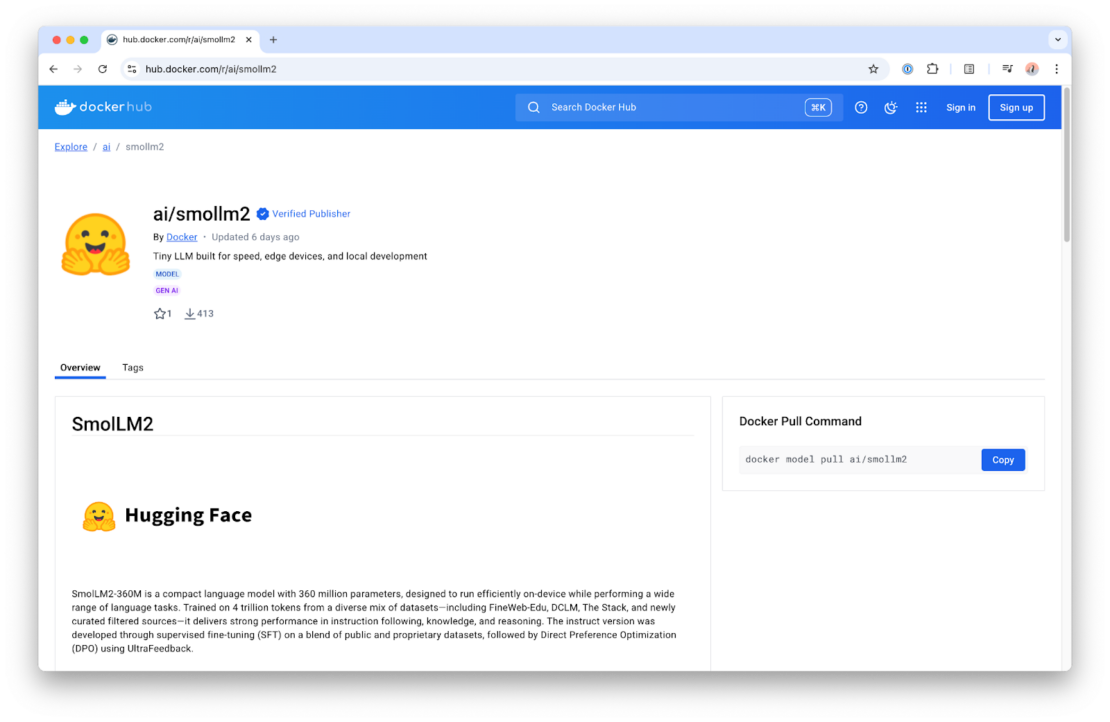
Now, you probably don’t just want to use SmolLM models, so you might wonder what other models are currently available to use with Model Runner.? The easiest way to get started is by checking out the ai/ namespace on Docker Hub.

On Docker Hub, you can find a curated list of the most popular models that are well-suited for local use cases. They’re offered in different flavors to suit different hardware and performance needs. You can also find more details about each in the model card, available on the overview page of the model repository.

What’s next?

Of course, this was just a first look at what Docker Model Runner can do. We have many more features in the works and can’t wait to see what you build with it. For hands-on guidance, check out our latest YouTube tutorial on running LLMs locally with Model Runner. And be sure to keep an eye on the blog, we’ll be sharing more updates, tips, and deep dives as we continue to expand Model Runner’s capabilities

Resources

Learn more on Docker Docs 

Subscribe to the Docker Navigator Newsletter.

New to Docker? Create an account. 

Have questions? The Docker community is here to help.

Quelle: https://blog.docker.com/feed/


