Docker Weekly Roundup | September 4, 2016

Each week, rounds up the most popular, informative, and thought-provoking articles from the tech community. This week, we delve into current options for securing Docker in production environments, unveil Microsoft’s container monitoring solution and answer the top Docker questions from VMWorld. As we begin a new week, let’s recap our top five most-read stories for the week of September 4, 2016:
 

Security in Production overview of the options available for securing Docker in production environments by Delve Labs.

OMS Container Monitoring Microsoft unveils Docker container monitoring solution, signaling the company’s interest in delving deeper into the open-source container space by Christopher Tozzi at Container Journal.

Windows Containers and Docker the five things you need to know in preparation of Docker running natively as a Windows service, with the release of Windows Server 2016 by Elton Stoneman.

VMWorld Questions the top four questions about Docker asked at VMWorld 2016 by Chris Hines.

Docker Cache on Travis learn a workaround using Travis cache with the upgrade of Travis to Docker 1.12 (from 1.9) by Giorgos Logiotatidis.

Weekly : Top 5 Docker stories for the week 09/04/16 via @DockerClick To Tweet

The post Docker Weekly Roundup | September 4, 2016 appeared first on Docker Blog.
Quelle: https://blog.docker.com/feed/

The 4 Biggest Questions About Docker from VMworld 2016

Simply incredible. We spent last week at speaking with thousands of enterprise security, infrastructure and virtualization pros. It was humbling to witness all of the curiosity and excitement around at the show, and how Docker clearly made a strong impression on the attendees.

This curiosity around Docker and its use within enterprise environments is the reason why i’m writing this blog. We noticed that there were many of the same questions that arose, and we figured we should share them with you, as you start your journey towards adopting Docker containers and VMs.
Here are the most commonly asked questions from the conference.

What is Docker? Or even a container? Is it a lightweight VM? Can I use it with vSphere? What value do they provide?


Containers are really about applications, not servers. That&;s why they aren&8217;t VMs. @docker VMWorld
— Karen Lopez (@datachick) August 29, 2016
 
A Docker container is a standard unit in which application code, binaries and libraries can be packaged and isolated. The Docker Engine is the runtime installed on your infrastructure of choice and is what executes commands to build and deploy containers. Many containers can be connected together to form a single application or one container can include the entire codebase. Docker provides an abstraction layer between the application itself and the underlying compute infrastructure making the application completely portable to any other endpoint running Docker.
Docker containers are not VMs nor even lightweight VMs as their architecture is different.The image below displays the key differences between Docker containers and VMs .  Docker containers share the OS kernel on the host where each VM has a full copy of an OS inside the VM.

This does not mean these two models are mutually exclusive. Docker containers run anywhere a Docker Engine is installed&;and Docker Engine runs on bare metal, in VMs (vSphere, Hyper-V) and clouds (AWS, Google, Azure, and more). This also means that Docker containers are portable from any one of the above environments to the other without having to recode the application. Additionally many users add containers into an existing virtual infrastructure to increase the density of workloads possible per VM.

There are several reasons why Docker containers are being adopted within the enterprise:

Security &; Docker containers are completely isolated from one another, even when running on the same host and sharing the same OS. This makes them ideal for enterprise teams leveraging (for example) bare metal servers and are looking to comply with industry security regulations. And with the Docker Datacenter platform enterprise teams receive on-premises tools chock full of security features.
Portability across infrastructure and app environments &8211; Docker containers can run anywhere the Docker Engine is installed. This gives teams the ability to move their applications across different environment without having to tweak the code. For example, teams can easily move from vSphere to other environments like Azure and AWS .
Optimize Resources &8211; Docker containers can be deployed within VMs, and in fact vSphere is a great place to run them. This allows teams to run multiple containers within VMs. This reduces the overall VM footprint and decreases maintenance costs associated with maintaining legacy apps. Given that there are now less VMs, companies can spend less on vSphere including reduced hypervisor licensing costs as well.


Are you currently using @docker containers & VMs together? VMWorld
— Docker (@docker) August 21, 2016

Speed &8211; Docker containers help streamline the application lifecycle, helping developers build applications more quickly and IT ops teams react faster to changing business needs. Containers spin up on average in ⅜ of a second, compared to VMs which take several seconds or minutes. This sub second spin up time of Docker containers allow teams to onboard developers more quickly and deploy out to production more frequently.

Does Docker support Windows Server?

Will @Docker like containers ever catch on in Windows? http://t.co/jMHaVVVMFo VMworld
— Keith Townsend (@CTOAdvisor) August 26, 2014

Today Docker Engine runs on all major Linux distros like: Ubuntu, CentOS, RHEL, OpenSUSE and more.  Support for Windows Server is the most popular question as most companies have a mix of Windows and Linux based applications.  I’m pleased to say that very soon, Docker Engine will run on Windows Server 2016.  This means that the same Docker container technology and workflow can be applied to Linux and Windows Server workloads. For example, going forward, admins can have applications that have a back-end windows piece e.g. Microsoft SQL server and leverage a linux-based web front end, and have be part of the same app… running in vSphere VMs, baremetal or cloud (boom)!
Windows Server 2016 and Docker is available as a tech preview to try here.

Docker sells commercial solutions built specifically with enterprise teams in mind


And here are the @Docker Commercial Management tools: Cloud VMworld pic.twitter.com/CxYKBVX8pL
— Arjan Timmerman (@Arjantim) August 29, 2016

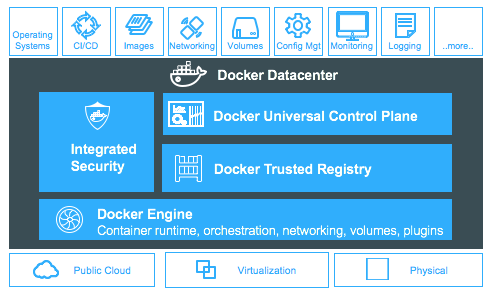
Our commercial management platform, Docker Datacenter, is what enterprise teams are leveraging across the entire application lifecycle. Developers use our solution to quickly create apps, update apps and deploy them and IT Ops uses the platform to secure their application environment, comply with industry regulations, and deploy applications out to production more frequently.  In addition they are able to reduce the overall application-related costs to the business.
As mentioned, Docker Datacenter is our enterprise solution. Sold as a monthly or annual subscription, Docker Datacenter (DDC) delivers an on-premises Containers as a Service environment that IT ops teams use to manage and secure the environment and devs use to create applications in a self-service manner. The tool provides an image registry, orchestration/management plane and commercial support from the Docker Customer Success team. This support also includes validated configurations of operating systems and support for previous versions of the Docker engine.
Oh, and Docker Datacenter has got the GUIs
 
lots of options with @Docker &8211; CLI, API, and GUI for deploying VMworld tfdx
— Tim Smith (@tsmith_co) August 29, 2016

Many VMware customers are accustomed to managing VMs in their vCenter GUI. So, they were happy to know that yes, there are Docker tools to help manage images and containers, and they come complete with a GUI. Well, there’s a couple actually. And just like how VMware users use tools built by VMware, for VMware, we recommend Docker users use tools built by Docker, for Docker.
With Docker Datacenter, IT Operations teams have the ability to manage, orchestrate and scale their Dockerized apps across their environment. The tool is chock full of enterprise features including:

Ability to deploy containers onto nodes directly from within the UCP GUI
Manage nodes, images and applications
Scale instances horizontally for times of peak application usage
Role-based access controls to control who can access what
Integration with LDAP/AD to quickly create teams and organizations

Here is a quick look at the Docker Datacenter management  dashboard.

Docker Datacenter also provides the capability to store, manage, and secure your images.Key features include:

Ability to sign images and ensure images are not tampered with
Ability to manage images, repositories, tags
Quickly update/patch apps and push new images to DTR
Integration with Universal Control Plane for quick deployment

How Docker Datacenter is priced, and what we mean when we say Docker “node”

The Docker Datacenter subscription is licensed by the number of Docker engines you require. A node is anything (VM, bare metal server or Cloud instance) with the Docker Engine installed on it. A good way to understand how many engines you require is to think about the number of existing VMs, or bare metal servers or cloud instances you want to begin Dockerizing. Datacenter is available on a monthly or annual subscription basis with the option of business day or business critical support to align to your application service levels.  Check out our pricing page to learn more.
For any virtualization gurus looking to learn more about Docker and how Docker containers and VMs can be used together I highly recommend you give this ebook on “Docker for the Virtualization Admin” a read.
Additional Resources

Read the eBook: Docker for The Virtualization Admin
Learn more about Docker Datacenter
See a demo of Docker Datacenter
Hear from Docker Datacenter Customers


Top 4 Docker questions from VMworld answered hereClick To Tweet

The post The 4 Biggest Questions About Docker from VMworld 2016 appeared first on Docker Blog.
Quelle: https://blog.docker.com/feed/

Your Guide to ContainerCamp UK

 UK kicks off tomorrow in the heart of London&;s Piccadilly and we can hardly contain our excitement. There are loads of talks that you won’t want to miss!
 
Thursday, September 8th   
 
Ben Hall, co-organizer of the Docker London Meetup Group will be speaking at Container Camp Day 0, a joint event put on by the Docker London and Kubernetes London Meetup Groups. Tickets are free but space is already sold out. You can sign up on the waitlist.
Be on the lookout for Docker Captains Elton Stoneman, Benjamin Wooton, Alex Ellis, and Nicolas de Loof who will be in attendance and make sure to say hello.
 
Friday, September 9th
 
9:55 am: Ben Firshman, Director of Product Management at Docker &; Building serverless apps with Docker
Everyone&8217;s talking about serverless right now. For good reason – it&8217;s makes distributed apps much simpler to build, scale, and maintain. In this session, Ben will demonstrate how you can use Docker to mix in serverless techniques &8211; right now &8211; and how serverless is going to change how you build distributed apps in the future.

 
11:15 am: Nishant Totla, Docker Software Engineer &8211; Orchestrating Linux containers while tolerating failures
Management of containers in production requires special care in order to keep the application up and running. In this session, learn the mechanisms and architecture of the Docker Engine orchestration platform (using a framework called swarmkit) to tolerate failures of services and machines, from cluster state replication and leader-election to container re-scheduling logic when a host goes down.

 
12:35 pm Lightening Talk: Nicholas Deloof &8211; Continuous delivery in a container world
 
5:00 pm: DockerCaptain Alex Ellis &8211; Docker and IoT: securing the server-room with realtime ARM microservices
Docker and Raspberry Pi are the perfect combination for protecting the data center against thermal overload and tampering. Learn how Docker Captain Alex Ellis used off-the-shelf hardware to create a scalable solution with help from Pimoroni and Docker Swarm.


Your docker agenda 4 containercamp w/ @bfirsh @nishanttotla @ndeloof @alexellisuk Click To Tweet

The post Your Guide to ContainerCamp UK appeared first on Docker Blog.
Quelle: https://blog.docker.com/feed/

Deploying to Multiple Kubernetes Clusters with kit

Editor’s note: today’s guest post is by Chesley Brown, Full-Stack Engineer, at InVision, talking about how they build and open sourced kit to help them to continuously deploy updates to multiple clusters.Our Docker journey at InVision may sound familiar. We started with Docker in our development environments, trying to get consistency there first. We wrangled our legacy monolith application into Docker images and streamlined our Dockerfiles to minimize size and amp the efficiency. Things were looking good. Did we learn a lot along the way? For sure. But at the end of it all, we had our entire engineering team working with Docker locally for their development environments. Mission accomplished! Well, not quite. Development was one thing, but moving to production was a whole other ballgame.Along Came KubernetesKubernetes came into our lives during our evaluation of orchestrators and schedulers last December. AWS ECS was still fresh and Docker had just released 1.9 (networking overlay release). We spent the month evaluating our choices, narrowing it down to native Docker tooling (Machine, Swarm, Compose), ECS and Kubernetes. Well, needless to say, Kubernetes was our clear winner and we started the new year moving headlong to leverage Kubernetes to get us to production. But it wasn’t long when we ran into a tiny complication…Automated Deployments With A CatchHere at InVision, we have a unique challenge. We just don’t have a single production environment running Kubernetes, but several, all needing automated updates via our CI/CD process. And although the code running on these environments was similar, the configurations were not. Things needed to work smoothly, automatically, as we couldn’t afford to add friction to the deploy process or encumber our engineering teams.Having several near duplicate clusters could easily turn into a Kubernetes manifest nightmare. Anti-patterns galore, as we copy and paste 95% of the manifests to get a new cluster. Scalable? No. Headache? Yes. Keeping those manifests up-to-date and accurate would be a herculean (and error-prone) task. We needed something easier, something that allows reuse, keeping the maintenance low, and that we could incorporate into our CI/CD system.So after looking for a project or tooling that could fit our needs, we came up empty. At InVision, we love to create tools to help us solve problems, and figuring we may not be the only team in this situation we decided to roll up our sleeves and created something of our own. The result is our open-source tool, kit! (short for Kubernetes + git)Hello kit!kit is a suite of components that, when plugged into your CI/CD system and source control, allows you to continuously deploy updates (or entirely new services!) to as many clusters as needed, all leveraging webhooks and without having to host an external service.Using kit’s templating format, you can define your service files once and have them reused across multiple clusters. It works by building on top of your usual Kubernetes manifest files allowing them to be defined once and then reused across clusters by only defining the unique configuration needed for that specific cluster. This allows you to easily build the orchestration for your application and deploy it to as many clusters as needed. It also allows the ability to group variations of your application so you could have clusters that run the “development” version of your application while others run the “production” version and so on.Developers simply commit code to their branches as normal and kit deploys to all clusters running that service. Kit then manages updating the image and tag that is used for a given service directly to the repository containing all your kit manifest templates. This means any and all changes to your clusters, from environment variables, or configurations to image updates are all tracked under source control history providing you with an audit trail for every cluster you have.We made all of this Open Source so you can check out the kit repo!Is kit Right For Us?If you are running Kubernetes across several clusters (or namespaces) all needing to continuously deploy, you bet! Because using kit doesn’t require hosting any external server, your team can leverage the webhooks you probably already have with github and your CI/CD system to get started. From there you create a repo to host your Kubernetes manifest files which tells what services are deployed to which clusters. Complexity of these files is greatly simplified thanks to kit’s templating engine.The kit-image-deployer component is incorporated into the CI/CD process and whenever a developer commits code to master and the build passes, it’s automatically deployed to all configured clusters.So What Are The Components?kit is comprised of several components each building on the next. The general flow is a developer commits code to their repository, an image is built and then kit-image-deployer commits the new image and tag to your manifests repository. From there the kit-deploymentizer runs, parsing all your manifest templates to generate the raw Kubernetes manifest files. Finally the kit-deployer runs and takes all the built manifest files and deploys them to all the appropriate clusters. Here is a summary of the components and the flow:kit-image-deployerA service that can be used to update given yaml files within a git repository with a new Docker image path. This can be used in collaboration with kit-deploymentizer and kit-deployer to automatically update the images used for a service across multiple clusters.kit-deploymentizerThis service intelligently builds deployment files as to allow reusability of environment variables and other forms of configuration. It also supports aggregating these deployments for multiple clusters. In the end, it generates a list of clusters and a list of deployment files for each of these clusters. Best used in collaboration with kit-deployer and kit-image-deployer to achieve a continuous deployment workflow.kit-deployerUse this service to deploy files to multiple Kubernetes clusters. Just organize your manifest files into directories that match the names of your clusters (the name defined in your kubeconfig files). Then you provide a directory of kubeconfig files and the kit-deployer will asynchronously send all manifests up to their corresponding clusters.So What’s Next?In the near future, we want to make deployments even smarter so as to handle updating things like mongo replicasets. We also want to add in smart monitoring to further improve on the self-healing nature of Kubernetes. We’re also working on adding additional integrations (such as Slack) and notification methods. And most importantly we’re working towards shifting more control to the individual developers of each service by allowing the kit manifest templates to exist in each individual service repository instead of a single master manifest repository. This will allow them to manage their service completely from development straight to production across all clusters.We hope you take a closer look at kit and tell us what you think! Check out our InVision Engineering blog for more posts about the cool things we are up to at InVision. If you want to work on kit or other interesting things like this, click through to our jobs page. We’d love to hear from you!–Chesley Brown, Full-Stack Engineer, at InVision.Download KubernetesGet involved with the Kubernetes project on GitHub Post questions (or answer questions) on Stack Overflow Connect with the community on SlackFollow us on Twitter @Kubernetesio for latest updates
Quelle: kubernetes
Your Docker Agenda for September

From webinars to workshops, meetups to conference talks, September is packed with lots of events. Check out the list of upcoming events sorted by continent below:

Official Docker Training Courses
Introduction to Docker: This is a two-day, on-site or classroom-based training course which introduces you to the Docker platform and takes you through installing, integrating, and running it in your working environment.
Sep 5-6: Introduction to Docker with Luis Herrera &; Docker Captain &8211; Madrid, Spain
Sep 12-13: Introduction to Docker with Contino &8211; London, United Kingdom
Sep 15-16: Introduction to Docker with AKRA &8211; Hamburg, Germany
Sep 19-20: Introduction to Docker with Alterway &8211; St. Cloud, France
 
Docker Administration and Operations: The Docker Administration and Operations course consists of both the Introduction to Docker course, followed by the Advanced Docker Topics course, held over four consecutive days.
Sep 12-15: Docker Administration and Operations with Luis Herrera &8211; Docker Captain &8211; Madrid, Spain
Sep 15-18: Docker Administration and Operations with AKRA &8211; Hamburg, Germany
Sep 19-23: Docker Administration and Operations with Amazic &8211; Nieuw-Vennep, The Netherlands
Sep 20-23: Docker Administration and Operations with Vizuri &8211; Austin, TX
Sep 26-29: Docker Administration and Operations with Luis Herrera &8211; Docker Captain &8211; Madrid, Spain
 
Advanced Docker Operations: This two day course is designed to help new and experienced systems administrators learn to use Docker to control the Docker daemon, security, Docker Machine, Swarm, and Compose.
Sep 21-22 Advanced Docker Operations with Alterway &8211; St. Cloud, France
Sep 22-23: Advanced Docker Operations with AKRA &8211; Hamburg, Germany
 
Asia
Sep 3rd: DOCKER MEETUP AT IBM INDIA PVT LTD. &8211; Mumbai, India
Docker: Build, test and deploy SaaS applications. Speaker: William Greenly. Session: Cognitive processing using Docker and IBM Watson. Speaker: Augustine Correa.
Sep 6th: DOCKER MEETUP AT PAYPAL &8211; Singapore, Singapore
Talks by Vincent Serpoul, Kai Hendry and Docker on Azure by Microsoft.
Sep 9-10th: CNUTCON 2016 WORLD CONTAINER CONFERENCE &8211; Beijing, China
Docker Engineer Dongluo Chen will speak about Using Docker SwarmKit Clustering Management and Service Orchestration
Sep 21st: CONTAINER SUMMIT TAIWAN&8211; Taipai, Taiwain
Docker Engineer Dongluo Chen will be speaking about Docker Swarm, Swarm Kit and the new Swarm mode built in Docker 1.12.
Sep 27th: DOCKER MEETUP AT RAWAQ TRAINING CENTER &8211; Riyadh, Saudi Arabia
Join us for a deep dive into Docker Technology and How VMware work with Docker Technology together. Learn how integrate Docker with VMware vSphere and create Docker Container on Photon OS and Manage it by Photon Controller.
 
Europe
Sep 1st: DOCKER MEETUP AT REAL IMPACT ANALYTICS &8211; Brussels, Belgium
Dependent startup/resiliency of micro services, by Ugo Bechameil (Real Impact Analytics). In a micro-services architecture, some services may be dependent on the availability of others either at startup or runtime. We will talk about some strategies to address this problematic and also some related use cases for the new native health check integrated into Docker 1.12.
Sep 1st: DOCKER MEETUP AT SKYSCANNER GLASGOW &8211; Glasgow, United Kingdom
DockerGlasgow : Workshop. Bring a laptop and learn some Docker!
Sep 1st: DOCKER MEETUP AT UNIVERSITY OF BAMBERG &8211; Bamberg, Germany
Let&;s grow our Docker knowledge together by presenting & discussing Docker use cases, sharing our best tips and tricks, discussing the latest developments in the Docker ecosystem & community, introducing newbies to Docker awesomeness and making new friends!
Sep 1st: DOCKER ORCHESTRATION AND ORACLE PUBLIC CLOUD &8211; Linz, Austria
Sep 5th: FULLSTACKFEST &8211; BARCELONA &8211; Barcelona, Spain
Amir Chaudhry will give a talk on Unikernels.
Sep 5th: DOCKER MEETUP AT ECI TELECOM &8211; Tel Aviv-Yafo, Israel
Running Docker on AWS by David Melamed. EFS Performance and Docker use cases by Gil Bahat.
Sep 6th: DOCKER MEETUP AT BUSINESS POLE &8211; ESPACE NIDA &8211; Nice, France
Sep 7th: DOCKER MEETUP AT INVISION AG &8211; Düsseldorf, Germany
Sep 8th: DOCKER MEETUP AT CENTRAL FOUNDATION BOYS SCHOOL &8211; London, United Kingdom
We&8217;ll be hosting the biggest container meetup London has ever seen! Open to everyone; the evening will be a series of lightning talks to showcase amazing projects and ideas in the Container Community.
Sept 9th: Container Camp UK &8211; London, United Kingdom
Docker engineers Ben Firshman and Nishant Totla and Docker Captains Alex Ellis and Nicolas De Loof will be speaking.
Sep 12th: VIEW SOURCE &8211; BERLIN &8211; Berlin, Germany
Docker Captain Philipp Garbe will be speaking.
Sep 12th: MUNICH AWS USER GROUP MEETUP &8211; Munich, Germany
Docker Captain Laura Frank will be speaking.
Sep 13th: DOCKER MEETUP AT HOCHSCHULE LUZERN – WIRTSCHAFT &8211; Luzern, Switzerland
The meetup will be held for the very first time in the beautiful city of Luzern. Tutorial on Docker Swarm by Brian Christner, Docker Captain and working at Swisscom.
Sep 14th: DOCKER FOR JAVA DEVELOPERS REFRESH IN LONDON &8211; London, UK
A lot of new features have been introduced in Docker 1.12 such as Swarm Mode, service discovery, load balancing, Docker for AWS, and many others. This session will walk you through some of the new features in a code-intensive session. Docker Captain Arun Gupta will give a talk.
Sep 14th: DOCKER MEETUP AT KIWI.COM &8211; Brno, Czech Republic
This demo and workshop introduction to Docker and container technologies is for beginners. See the power of containers and how they work and leave ready to move forward with container projects of your own.
Sep 15th: DOCKER MEETUP AT BLACK CAT TECHNOLOGY SOLUTIONS &8211; Birmingham, United Kingdom
In this session we&8217;ll be looking at Docker Swarm setup, configuration, case studies and get our hands dirty by setting up a live swarm cluster on our machines.
Sep 19th: OPERABILITY.IO &8211; London, England
How new technologies and approaches are changing IT Operations. Two days on all things (Dev)Ops! Docker engineer Richard Mortier will be speaking.
Sep 21st: AGILE MEETUP &8211; PETERBOROUGH &8211; Peterborough, United Kingdom
Docker Captain Alex Ellis will be speaking.
Sep 21st: SOFTWARE CIRCUS MEETUP IN ZURICH &8211; Zurich, Switzerland
Join Docker Captain Brian Christner to learn Docker Swarm. In this meetup, we&8217;ll first marvel at the attractions that the Software Circus Conference (Aug 31 &8211; Sep 2) in Amsterdam brought, in a wild mashup.
Sep 22nd: DOCKER MEETUP AT ZALANDO SE &8211; Dortmund, Germany
Join us at the Dortmund Docker Meetup to hear Peter Roßbach give an overview of the orchestration of container-based microservice environments.
Sep 22nd: WEB-DEV-BBQ MEETUP &8211; Stuttgart, Germany
Docker Captain Dieter Reuter will deliver Docker: Swarm on a physical cluster using ARM hardware.
Sep 27th: DOCKER MEETUP AT WORKDAY &8211; Dublin, Ireland
Marco Bonezzi from MongoDB will be giving a talk and demo on &;Orchestrating MongoDB on Docker, using Docker Swarm and cgroups.&;
Sep 28th: VOXXEDDAYS BELGRADE 2016 &8211; Belgrade, Serbia
Docker Captains Viktor Faric and Antonis Kalipetis will be speaking.
Sep 28th: CONTAINER CAMP UK &8211; London, UK
 
Africa
Sep 28th: PHP SOUTH AFRICA &8211; Johannesburg, South Africa
 
North America 
Sep 1st: DOCKER-IZE YOUR PERL PROGRAM &8211; Phoenix, AZ
This will be a short introduction to Docker and how you can use it to create a Docker container for it.
Sep 6th: DOCKER MEETUP AT CLOUDERA &8211; Palo Alto, CA
Portworx CTO and co-founder, Gou Rao will discuss: The challenges and pain points of delivering storage for stateful containers on-premise and in the cloud.
Sep 6th: DOCKER MEETUP AT CRITICAL MASS &8211; Calgary, Canada
Please join us for a brief introduction to Docker and a re-cap of DockerCon.
Sep 6th: DOCKER MEETUP AT IDEXX &8211; Portland, ME
Ken Cochrane, Engineer at Docker, will present on DockerCon highlights, especially Docker 1.12 and show a demo of Docker for AWS. Both talks will have Q&A sessions afterwards.
Sep 6th: DOCKER MEETUP AT RACKSPACE &8211; Austin, TX
Sep 8th: DOCKER MEETUP AT FULL SAIL UNIVERSITY &8211; Orlando, FL
Sep 12th: DOCKER MEETUP AT ISSUETRAK &8211; Virginia Beach, VA
Learn Docker real-world container and multi-server management. Our own Docker Captain Bret Fisher will be teaching Docker&8217;s official Orchestration Workshop, normally a paid half-day workshop. Awesome things you will get: Hand-on building your own Docker Swarm on AWS.
Sep 13th &8211; 15th: JENKINS WORLD IN SANTA CLARA &8211; Santa Clara, CA
Docker Captain, Viktor Farcic will be speaking about Docker
Sep 13th: CLOUD SECURITY ALLIANCE CONGRESS US &8211; San Jose, CA
Innovative since Day 1, P.S.R. brings together two related, but different, fields—privacy and security—helping you see beyond your role in order to excel in your role. Because perspective is everything.
Sep 14th: DOCKER MEETUP AT RACKSPACE RALLY ROOM &8211; Blacksburg, VA
Come out to the first Docker Meetup in Blacksburg! Since many folks are brand new to Docker, we will be starting off with the basics.
Sep 14th : Online Java User Group  &8211; Online, Wordwide
Docker Captain Arun Gupta will lead a Docker for Java Developers Refresh
Sep 15th: Strangeloop &8211; Saint Louis, Missouri
Docker Captain Bret Fisher will be teaching Docker&8217;s official Orchestration Workshop.
Sep 15th: DOCKER MEETUP AT OVH &8211; Québec, Canada
Sep 15th: PRIVACY. SECURITY. RISK. 2016 &8211; San Jose, USA
Docker&8217;s Director of Security Nathan Mccauley will be speaking.
Sep 20th: DOCKER MEETUP AT THE INNEVATION CENTER &8211; Las Vegas, NV
Michael McFall, CTO of Las Vegas based CloudMode, will show how to build a micro-service architecture using Docker and Kafka and it’s companion Zookeeper.
Sep 21st: DOCKER MEETUP AT DOCKER HQ &8211; San Francisco, CA
Docker for Java Developers by Arun Gupta (Docker Captain) and How to develop and debug a Spring Boot app with Docker by Patrick Chanezon.
Sep 26th: DOCKER MEETUP AT MICROSOFT ALPHARETTA &8211; Atlanta, GA
Building Websites Using ASP.NET Core, Docker & Azure.
Sep 26th: DOCKER AT MICROSOFT IGNITE &8211; Atlanta, GA
Docker will be in Atlanta this week for Microsoft Ignite! The team will be stationed at booth with a special surprise &8211; be sure to stop by!
Sep 27th: DOCKER MEETUP AT WILDBIT &8211; Philadelphia, PA
Sep 27th: DOCKER MEETUP AT PUPPET &8211; Portland, OR
We will have talks by Diogo Mónica from Docker and Jeff Nickoloff from All in Geek Consulting!
Sep 27th: AUTOMACON 2.0 PORTLAND &8211; Portland, OR
Docker Security Lead Diogo Monica will be speaking.

Latin America
Sep 15th: DOCKER MEETUP AT THE TECH PUB &8211; Córdoba, Argentina
Sep 17th: DOCKER MEETUP AT UCSAL &8211; Salvador, Brazil
 
Oceania
Sep 5th: DOCKER MEETUP AT CLEARPOINT &8211; Auckland, New Zealand
Sep 20th: DOCKER MEETUP AT OPTIVER ASIA PACIFIC &8211; Sydney, Australia
Our Journey with Docker Data Center by Andrew Khoury & Pablo Venegas (Odecee). Pablo and Drew share insights into their Docker journey. They’ll show the reasons why they chose DDC, how their projects have benefited, and what they needed to do to be ‘Production Ready’.
Sep 29th:  DOCKER MEETUP AT IBM BRISBANE &8211; Brisbane, Australia
We&8217;re going to set up a mixed swarm with some local notebooks, a raspberry pi, and some cloud VM&8217;s and then run some services in the mix.

Check out the list of upcoming docker events in september  Click To Tweet

The post Your Docker Agenda for September appeared first on Docker Blog.
Quelle: https://blog.docker.com/feed/

Docker Weekly Roundup | August 28, 2016

The last week of August 2016 is over and you know what that means; another news roundup. Highlights include, Docker comes to Raspberry Pi, a cheat sheet for Windows 10 and a presentation by Mike Coleman at Tech Field Day at VMWorld 2016.

Docker for Windows: cheat sheet of commands to manage containers and Docker Swarm services on Windows 10 dev machine. These scripts are compatible with Docker 1.12 and Docker for Windows by Stefan Prodan.
Tech Field Day: What is Docker? Mike Coleman, Technical Evangelist, introduces Docker and discusses container technology and how it works to help applications.
Docker + Raspberry Pi: the latest release for Raspberry Pi officially includes Raspbian Jessie installation support. You can now install the Docker client on your Raspberry Pi with just one terminal command by Matt Richardson.
Docker with ARM Devices: use Docker to build a Computing cluster with ARM devices by Vivek Juneja.
Docker Training Course: the Docker Administration and Operations training course consists of both the Introduction to Docker course, followed by the Advanced Docker Topics course, held over four consecutive days.

Weekly Roundup: Top 5 Docker stories of the week via @DockerClick To Tweet

The post Docker Weekly Roundup | August 28, 2016 appeared first on Docker Blog.
Quelle: https://blog.docker.com/feed/

Cloud Native Application Interfaces

Standard Interfaces (or, the Thirteenth Factor)–by Brian Grant and Craig Mcluckie, GoogleWhen you say we need ‘software standards’ in erudite company, you get some interesting looks. Most concede that software standards have been central to the success of the boldest and most successful projects out there (like the Internet). Most are also skeptical about how they apply to the innovative world we live in today. Our projects are executed in week increments, not years. Getting bogged down behind mega-software-corporation-driven standards practices would be the death knell in this fluid, highly competitive world.This isn’t about ‘those’ standards. The ones that emerge after years of deep consideration and negotiation that are eventually published by a body with a four-letter acronym for a name. This is about a different approach: finding what is working in the real world, and acting as a community to embrace it.Let’s go back to first principles. To describe Cloud Native in one word, we’d choose “automatable”.Most existing applications are not. Applications have many interfaces with their environment, whether with management infrastructure, shared services, or other applications. For us to remove the operator from patching, scaling, migrating an app from one environment to another, changing out dependencies, and handling of failure conditions, a set of well structured common interfaces is essential. It goes without saying that these interfaces must be designed for machines, not just humans. Machine-friendly interfaces allow automation systems to understand the systems under management, and create the loose coupling needed for applications to live in automated environments. As containerized infrastructure gets built there are a set of critical interfaces available to applications that go far beyond what is available to a single node today. The adoption of ‘serverless patterns’ (meaning ephemeral, event driven function execution) will further compound the need to make sense of running code in an environment that is completely decoupled from the node. The services needed will start with application configuration and extend to monitoring, logging, autoscaling and beyond. The set of capabilities will only grow as applications continue to adapt to be fuller citizens in a “cloud native” world.Exploring one example a little further, a number of service-discovery solutions have been developed but are often tied to a particular storage implementation, a particular programming language, a non-standard protocol, and/or are opinionated in some other way (e.g., dictating application naming structure). This makes them unsuitable for general-purpose use. While DNS has limitations (that will eventually need to be addressed), it’s at least a standard protocol with room for innovation in its implementation. This is demonstrated by CoreDNS and other cloud-native DNS implementations. When we look inside the systems at Google, we have been able to achieve very high levels of automation without formal interface definitions thanks to a largely homogeneous software and hardware environment. Adjacent systems can safely make assumptions about interfaces, and by providing a set of universally used libraries we can skirt the issue. A good example of this is our log format doesn’t need to be formally specified because the libraries that generate logs are maintained by the teams that maintain the logs processing systems. This means that we have been able to get by to date without something like fluentd (which is solving the problem in the community of interfacing with logging systems).Even though Google has managed to get by this way, it hurts us. One way is when we acquire a company. Porting their technology to run in our automation systems requires a spectacular amount of work. Doing that work while continuing to innovate is particularly tough. Even more significant though, there’s a lot of innovation happening in the open source world that isn’t easy for us to tap into. When new technology emerges, we would like to be able to experiment with it, adopt it piecemeal, and perhaps contribute back to it. When you run a vertically integrated, bespoke stack, that is a hard thing to do.The lack of standard interfaces leaves customers with three choices: Live with high operations cost (the status quo), and accept that your developers in many cases will spend the majority of their time dealing with the care and feeding of applications.Sign-up to be like Google (build your own everything, down to the concrete in the floor). Rely on a single, or a small collection of vendors to provide a complete solution and accept some degree of lock-in. Few in companies of any size (from enterprise to startup) find this appealing.It is our belief that an open community is more powerful and that customers benefit when there is competition at every layer of the stack. It should be possible to pull together a stack with best-of-breed capabilities at every level — logging, monitoring, orchestration, container runtime environment, block and file-system storage, SDN technology, etc. Standardizing interfaces (at least by convention) between the management system and applications is critical. One might consider the use of common conventions for interfaces as a thirteenth factor (expanding on the 12-factor methodology) in creating modern systems that work well in the cloud and at scale.Kubernetes and Cloud Native Computing Foundation (CNCF) represent a great opportunity to support the emergence of standard interfaces, and to support the emergence of a fully automated software world. We’d love to see this community embrace the ideal of promoting standard interfaces from working technology. The obvious first step is to identify the immediate set of critical interfaces, and establish working groups in CNCF to start assess what exists in this area as candidates, and to sponsor work to start developing standard interfaces that work across container formats, orchestrators, developer tools and the myriad other systems that are needed to deliver on the Cloud Native vision.–Brian Grant and Craig Mcluckie, Google
Quelle: kubernetes

Docker Online Meetup #42: Docker Captains Share Tips & Tricks for Using Docker 1.12

For this week’s Online Meetup, Docker Captains Ajeet Singh Raina, Viktor Farcic and Bret Fisher shared their tips and tricks for built In Docker orchestration.
Ajeet talked about the best ways to use Docker 1.12 Service Discovery and shared key takeaways. Viktor talked about best practices for setting a Swarm cluster and integrating it with HAProxy. Bret concluded the meetup with a presentation on Docker 1.12 command options and aliases including cli aliases for quick container management; the shortest path to secure production-ready swarm; how to use cli filters for easier management of larger swarms; and docker remote cli security setup.


Best ways to use Docker 1.12 Service Discovery by Docker Captain Ajeet Raina

Scaling and clustering with Docker Swarm by Docker Captain Viktor Farcic
Docker cli Tips and Tricks by Docker Captain Bret Fisher

Want to learn more about Docker 1.12 and orchestration? Check out these resources:

Docker 1.12.1 on Raspberry Pi 3 in 5 minutes by Docker Captain Ajeet Singh Raina
Docker Docs: Understand Docker container network
Docker 1.12 Release Notes
Docker Blog: Docker 1.12: Now With Built-In Orchestration!
Scale a real microservice with Docker 1.12 Swarm Mode by Docker Captain Alex Ellis
Docker 1.12 orchestration built-in by Docker Captain Gianluca Arbezzano

@BretFisher @ajeetsraina @vfarcic share Tips & Tricks for Using Docker 1.12Click To Tweet

The post Docker Online Meetup : Docker Captains Share Tips &; Tricks for Using Docker 1.12 appeared first on Docker Blog.
Quelle: https://blog.docker.com/feed/

Security Best Practices for Kubernetes Deployment

Editor’s note: today’s post is by Amir Jerbi and Michael Cherny of Aqua Security, describing security best practices for Kubernetes deployments, based on data they’ve collected from various real-life use-cases, in both on-premises and cloud deployments. Kubernetes provides many controls that can greatly improve your application security. Configuring them requires intimate knowledge with Kubernetes and the deployment’s security requirements. The best practices we highlight here are aligned to the container lifecycle: build, ship and run, and are specifically tailored to Kubernetes deployments. We adopted these best practices in our own SaaS deployment that runs Kubernetes on Google Cloud Platform.The following are our recommendations for deploying a secured Kubernetes application:Ensure That Images Are Free of Vulnerabilities Having running containers with vulnerabilities opens your environment to the risk of being easily compromised. Many of the attacks can be mitigated simply by making sure that there are no software components that have known vulnerabilities.Implement Continuous Security Vulnerability Scanning — Containers might include outdated packages with known vulnerabilities (CVEs). This cannot be a ‘one off’ process, as new vulnerabilities are published every day. An ongoing process, where images are continuously assessed, is crucial to insure a required security posture. Regularly Apply Security Updates to Your Environment — Once vulnerabilities are found in running containers, you should always update the source image and redeploy the containers. Try to avoid direct updates (e.g. ‘apt-update’) to the running containers, as this can break the image-container relationship. Upgrading containers is extremely easy with the Kubernetes rolling updates feature – this allows gradually updating a running application by upgrading its images to the latest version.Ensure That Only Authorized Images are Used in Your EnvironmentWithout a process that ensures that only images adhering to the organization’s policy are allowed to run, the organization is open to risk of running vulnerable or even malicious containers. Downloading and running images from unknown sources is dangerous. It is equivalent to running software from an unknown vendor on a production server. Don’t do that.Use private registries to store your approved images – make sure you only push approved images to these registries. This alone already narrows the playing field, reducing the number of potential images that enter your pipeline to a fraction of the hundreds of thousands of publicly available images. Build a CI pipeline that integrates security assessment (like vulnerability scanning), making it part of the build process.  The CI pipeline should ensure that only vetted code (approved for production) is used for building the images. Once an image is built, it should be scanned for security vulnerabilities, and only if no issues are found then the image would be pushed to a private registry, from which deployment to production is done. A failure in the security assessment should create a failure in the pipeline, preventing images with bad security quality from being pushed to the image registry.There is work in progress being done in Kubernetes for image authorization plugins (expected in Kubernetes 1.4), which will allow preventing the shipping of unauthorized images. For more info see this pull request.Limit Direct Access to Kubernetes NodesYou should limit SSH access to Kubernetes nodes, reducing the risk for unauthorized access to host resource. Instead you should ask users to use “kubectl exec”, which will provide direct access to the container environment without the ability to access the host.You can use Kubernetes Authorization Plugins to further control user access to resources. This allows defining fine-grained-access control rules for specific namespace, containers and operations.Create Administrative Boundaries between ResourcesLimiting the scope of user permissions can reduce the impact of mistakes or malicious activities. A Kubernetes namespace allows you to partition created resources into logically named groups. Resources created in one namespace can be hidden from other namespaces. By default, each resource created by a user in Kubernetes cluster runs in a default namespace, called default. You can create additional namespaces and attach resources and users to them. You can use Kubernetes Authorization plugins to create policies that segregate access to namespace resources between different users.For example: the following policy will allow ‘alice’ to read pods from namespace ‘fronto’.{  “apiVersion”: “abac.authorization.kubernetes.io/v1beta1″,  “kind”: “Policy”,  “spec”: {    “user”: “alice”,    “namespace”: “fronto”,    “resource”: “pods”,    “readonly”: true  }}Define Resource QuotaAn option of running resource-unbound containers puts your system in risk of DoS or “noisy neighbor” scenarios. To prevent and minimize those risks you should define resource quotas. By default, all resources in Kubernetes cluster are created with unbounded CPU and memory requests/limits. You can create resource quota policies, attached to Kubernetes namespace, in order to limit the CPU and memory a pod is allowed to consume.The following is an example for namespace resource quota definition that will limit number of pods in the namespace to 4, limiting their CPU requests between 1 and 2 and memory requests between 1GB to 2GB.compute-resources.yaml:apiVersion: v1kind: ResourceQuotametadata:  name: compute-resourcesspec:  hard:    pods: “4”    requests.cpu: “1”    requests.memory: 1Gi    limits.cpu: “2”    limits.memory: 2GiAssign a resource quota to namespace:kubectl create -f ./compute-resources.yaml –namespace=myspaceImplement Network SegmentationRunning different applications on the same Kubernetes cluster creates a risk of one compromised application attacking a neighboring application. Network segmentation is important to ensure that containers can communicate only with those they are supposed to. One of the challenges in Kubernetes deployments is creating network segmentation between pods, services and containers. This is a challenge due to the “dynamic” nature of container network identities (IPs), along with the fact that containers can communicate both inside the same node or between nodes.Users of Google Cloud Platform can benefit from automatic firewall rules, preventing cross-cluster communication. A similar implementation can be deployed on-premises using network firewalls or SDN solutions. There is work being done in this area by the Kubernetes Network SIG, which will greatly improve the pod-to-pod communication policies. A new network policy API should address the need to create firewall rules around pods, limiting the network access that a containerized can have.The following is an example of a network policy that controls the network for “backend” pods, only allowing inbound network access from “frontend” pods:POST /apis/net.alpha.kubernetes.io/v1alpha1/namespaces/tenant-a/networkpolicys{  “kind”: “NetworkPolicy”,  “metadata”: {    “name”: “pol1″  },  “spec”: {    “allowIncoming”: {      “from”: [{        “pods”: { “segment”: “frontend” }      }],      “toPorts”: [{        “port”: 80,        “protocol”: “TCP”      }]    },    “podSelector”: {      “segment”: “backend”    }  }}Read more about Network policies here.Apply Security Context to Your Pods and ContainersWhen designing your containers and pods, make sure that you configure the security context for your pods, containers and volumes. A security context is a property defined in the deployment yaml. It controls the security parameters that will be assigned to the pod/container/volume. Some of the important parameters are:Security Context SettingDescriptionSecurityContext->runAsNonRootIndicates that containers should run as non-root userSecurityContext->CapabilitiesControls the Linux capabilities assigned to the container.SecurityContext->readOnlyRootFilesystemControls whether a container will be able to write into the root filesystem.PodSecurityContext->runAsNonRootPrevents running a container with ‘root’ user as part of the podThe following is an example for pod definition with security context parameters:apiVersion: v1kind: Podmetadata:  name: hello-worldspec:  containers:  # specification of the pod’s containers  # …  securityContext:    readOnlyRootFilesystem: true    runAsNonRoot: trueReference here. In case you are running containers with elevated privileges (–privileged) you should consider using the “DenyEscalatingExec” admission control. This control denies exec and attach commands to pods that run with escalated privileges that allow host access. This includes pods that run as privileged, have access to the host IPC namespace, and have access to the host PID namespace. For more details on admission controls, see the Kubernetes documentation. Log EverythingKubernetes supplies cluster-based logging, allowing to log container activity into a central log hub. When a cluster is created, the standard output and standard error output of each container can be ingested using a Fluentd agent running on each node into either Google Stackdriver Logging or into Elasticsearch and viewed with Kibana.SummaryKubernetes supplies many options to create a secured deployment. There is no one-size-fit-all solution that can be used everywhere, so a certain degree of familiarity with these options is required, as well as an understanding of how they can enhance your application’s security.We recommend implementing the best practices that were highlighted in this blog, and use Kubernetes flexible configuration capabilities to incorporate security processes into the continuous integration pipeline, automating the entire process with security seamlessly “baked in”.–Michael Cherny, Head of Security Research, and Amir Jerbi, CTO and co-founder Aqua SecurityDownload KubernetesGet involved with the Kubernetes project on GitHub Post questions (or answer questions) on Stack Overflow Connect with the community on SlackFollow us on Twitter @Kubernetesio for latest updates
Quelle: kubernetes

New Dockercast episode with Avi Cavale from Shippable

In case you missed it, we launched , the official Docker Podcast earlier this month including all the DockerCon 2016 sessions available as podcast episodes.

In this podcast episode, we catch up with Avi Cavale the Co-founder & CEO at Shippable. We start off with a conversation where I ask him why he thinks there has been such an explosion of Docker adoption.  This leads us into the the ideas behind immutable infrastructure and immutable delivery models. Avi discusses how Shippable has focused on making the delivery pipeline easier for developers.
We also discuss some anti-patterns he calls Frankenstein Continuous Integration (CI) where, although Jenkins is awesome, the glue to put a robust CI system together can be reasonably complex. What Shippable tried to do is abstract away some of those complexities for developers.  We end up talking about different Docker patterns Shippable is seeing in the industry.
You can find the latest Dockercast episodes on the Itunes Store or via the SoundCloud RSS feed.


New dockercast episode w/ host @botchagalupe & @avinci from @beshippable as a guest!Click To Tweet

The post New Dockercast episode with Avi Cavale from Shippable appeared first on Docker Blog.
Quelle: https://blog.docker.com/feed/