Modernizing your serverless applications

Continuing innovation in serverlessGoogle Cloud recently released a suite of resources designed to help customers modernize their serverless compute platform experience and upgrade to the latest features as well as newer products which may be a better fit for their workloads. The initial content is focused on users of the very first Cloud product, Google App Engine.App Engine launched in 2008 as the first serverless product long before the buzzword was coined. Since then, App Engine has been adopted by many customers worldwide. The Cloud team didn’t stop there and continued to roll out additional features and product launches, including: App Engine’s Flexible environment to support additional runtimes (2016), Cloud Functions, for microservice or FaaS/function-hosting (2017), a more open second generation App Engine platform supporting newer language releases (2018), and Cloud Run, giving users the ability to serve containerized applications in a serverless environment (2019). With a more complete product suite and a more open platform, developers have more choices than ever before.As App Engine became more popular, many of its original services matured to become their own standalone Cloud products. For example, App Engine’s original Task Queues service is now Cloud Tasks, and its original Datastore service is now Cloud Datastore. Furthermore, some users have expressed the desire to also run their App Engine apps on-premise but discovered the App Engine services only work on the platform. These factors led to the launch of App Engine’s second generation platform without those bundled proprietary services. As a result, users have more options, and their apps are more portable. Support for more modern language runtimes such as Python 3, PHP 7, and the introduction of Node.js was also featured as part of this release.Helping users modernize their serverless appsWith the sunset of Python 2, Java 8, PHP 5, and Go 1.11, by their respective communities, Google Cloud has assured users by expressing continued long-term support of these legacy runtimes, including maintaining the Python 2 runtime. So while there is no requirement for users to migrate, developers themselves are expressing interest in updating their applications to the latest language releases.Google Cloud provides a set of migration guides for users modernizing from Python 2 to 3, Java 8 to 11, PHP 5 to 7, and Go 1.11 to 1.12+ as well as a summary of what is available in both first and second generation runtimes. However, moving to unbundled services (standalone Cloud equivalents or third-party alternatives) may not be intuitive to everyone. And while new products and users are great, helping existing users modernize their apps to take advantage of newer features is just as good. To that end, earlier this year, we launched the “Serverless Migration Station” video series and corresponding code samples and codelab tutorials, initially focused on Python and App Engine.Migration modulesEach “migration module” teaches a single modernization technique, usually as it relates to one of our serverless platforms. These scenarios include migrating from a legacy App Engine service, upgrading a serverless data storage solution from Cloud Datastore to Cloud Firestore, or even changing products altogether, like containerizing App Engine apps for Cloud Run.A video plus a codelab (free, self-paced tutorial) provide with hands-on experience implementing specific migrations, giving users the “muscle memory” needed for when they’re ready to make the same upgrades to their own applications. All modules feature a nearly-identical sample app. The starting point is always a working app to which the migration is applied, resulting in another working app, usually functionally-identical unless otherwise specified. Here are some modules available today (with more coming soon):Migrating web frameworks from webapp2 to FlaskMigrating from App Engine ndb to Cloud NDBMigrating from the Cloud NDB to Cloud DatastoreContainerizing and migrating from App Engine to Cloud Run (Docker)Containerizing and migrating from App Engine to Cloud Run (Cloud Buildpacks)Migrating from Cloud Datastore to Cloud FirestoreMigrating from App Engine taskqueue to Cloud TasksAll migration modules, their videos (when available), codelabs, and sample source code, can be found in the migration module repo. In addition to these modules, separate repos for migration samples from the documentation as well as community-sourced migration samples are also available. We hope these resources help you accelerate modernizing your serverless apps and demonstrates Google Cloud’s commitment to both existing customers as well as new ones!Related ArticleNew features to better secure your Google App Engine appsAnnouncing new features to further extend the security already provided by App Engine: Egress Controls and User-managed service accounts.Read Article
Quelle: Google Cloud Platform
ManTech and Google Cloud open joint facility to expedite government adoption of cloud technologies

Transitioning from legacy infrastructure to the cloud, mitigating security risk, and enabling secure collaboration for a hybrid workforce are challenges many agencies face today. While we are already seeing many federal, state and local governments adopting cloud technologies like artificial intelligence, advanced data analytics, cybersecurity solutions like Zero Trust, and Google Workspace, recent world events like COVID and cybersecurity breaches have accelerated the need for this adoption. To meet the need for faster industry-wide cloud adoption, Google Cloud is partnering with ManTech, a company that deeply understands the unique needs of the U.S. government mission. This partnership combines the public sector domain expertise and federal solution delivery capability of ManTech, with our world-class technology and security capabilities.  Joint demo center to bring strategy and vision to executionBuilding on the recently announced partnership, we are now launching a joint demo center in Northern Virginia to enable customers to engage in practical problem solving and showcase our combined technology capabilities. Together, ManTech and Google Cloud’s full range of capabilities and technology know-how can meet government needs across multi and hybrid cloud environments, infrastructure modernization, application development, data management, artificial intelligence, analytics, and cybersecurity. This will enable the two companies to jointly assist agencies with core areas of modernization including multicloud and hybrid cloud adoption, hyperscale analytics, security, 5G, and edge-computing. Supporting government agencies today—and into the futureGoogle Cloud’s partnership with ManTech is a critical step toward meeting the federal customer mission by expediting cloud adoption, and helping to solve the government’s unique challenges with new solutions and capabilities. As the need for cloud adoption has accelerated, and cybersecurity threats continue to destabilize our critical infrastructure, strategic private sector partnerships that support U.S. government interests have a key role to play in facilitating remote collaboration, and securing the welfare of Americans.
Quelle: Google Cloud Platform

More than just relational data at scale with Spanner’s new JSON data type

JSON, or JavaScript Object Notation, is the format that developers rely on for hierarchical or semi-structured data. As a subset of JavaScript, JSON’s popularity has been driven by explosive growth of rich, interactive experiences in the browser and scripting environments like Node.js. Cloud Spanner’s new JSON data type allows you to extend your relational data with sparse, nested, or less structured JSON data. This provides flexibility and agility without having to compromise on the availability and consistency at scale that your applications rely on with Spanner.Relational Is No Longer EnoughThere are very few technologies that can match the ubiquity and staying power of the relational data model. E. F. Codd’s original paper likely predates many readers of this blog. Tables of rows and columns, related by keys are a natural way to capture structured data for operational applications: A “Customer” has “Sales Orders” which are made up of “Order Lines”, each with a well defined set of attributes. However, not all today’s data lends itself well to strict modeling in tables. For example, what if Customer data is sourced from three different systems, each with its own set of attributes, or the definition of an Order Line changes frequently or is defined on the fly by users? Take, for example, a large electronics manufacturer with hundreds of different products. Each of these products has its own unique set of attributes. Modeling this relationally would require schema changes for each new attribute, even if their users or applications don’t need to query on them. With a growing business and new products coming online all the time, the analysis, modeling, deployment, and testing cycle for schema changes can be a drag on innovation. What they really need is the ability to query over a consistent set of key attributes, common to most products, and then to easily manage the long tail of other attributes without having to completely abandon the transactions and rich queries that Spanner provides. JSON is great for representing key-value pairs (objects), ordered lists (arrays), strings, numbers, and Booleans, without having to predefine anything about the structure or the allowable values. Our electronics manufacturer might model products with the following (grossly simplified) Products table.This is standard relational modeling that normalizes attributes into columns. In Spanner—or any relational database—you can use SQL to filter or aggregate by a specific column or join to other tables, for example where an Order Line has a foreign key relationship to Product. Again, Relational 101.However, in cases where the attributes for individual products vary widely, modeling using columns becomes unwieldy. The SocketSize attribute might only apply to one product out of millions. With Spanner, you now have the option to store this long tail of other attributes as JSON. Unlike a strongly typed column, JSON values don’t need to pre-define anything about their structure or values. Thus it’s easy to add new attributes without changing the relational schema.Because the JSON is stored as part of the table row, it gets all the consistency and guarantees that Spanner provides for queries and updates.As with any table, you can use SQL to query a table with JSON data. The dot operator (.) gives quick access to the properties of JSON values, in this case to project out the socketSize property of the other attributes.Spanner also provides a rich set of SQL functions that allow you to use JSONPath to traverse JSON values.The above query uses the relational model to do the heavy lifting of filtering, while still providing the flexibility to project out of the JSON column for the filtered set. This is important because Spanner doesn’t (yet) index data in JSON columns. The built-in query optimizer and indexes rely on explicit column definitions. However, using a generated column, you can automatically extract a value out of a JSON column for indexing or query. Generated columns are automatically updated in the same transaction as the values they depend on, so columns and indexes will always be up-to-date.For example, let’s say our electronics manufacturer wants to further refine their product type taxonomy by sub-types. Some products have already added a subtype property to a bag of ExtendedAttributes. A product specific to airplanes might have a sub-type of “aviation”. The extended attributes could be represented in JSON as:Using SQL, you can insert a new row with a JSON column or update an existing one:The value of the JSON could be any valid JSON. While the SQL allows you to specify JSON as a string, internally Spanner uses an efficient normalized representation to minimize the storage size and speed up access.In this case, you can “promote” a value from within a JSON column into its own column. Then, as with any column, you can create an index to speed up queries.For example, to filter by subtype:This query will use the  ProductSubtypeIdx index to avoid scanning each row.Spanner’s new JSON data type gives developers and data architects new flexibility to manage data that doesn’t fit nicely into relational tables. This is useful for handling sparse or changing data. You can query JSON columns with SQL using a rich set of built-in functions. Generated columns allow you to automatically extract values from JSON data into their own columns when you need to filter, join, or aggregate at scale.Related ArticleWhat is Cloud Spanner?Want a relational database that scales globally? Learn all about Cloud Spanner.Read Article
Quelle: Google Cloud Platform
Financial Services firms must rethink payments model to bank on APAC digital growth

Banks and other financial service institutions (FSIs), such as payment processors, need to overhaul their fragmented legacy payment infrastructures, which can no longer support growing online demand in Asia-Pacific, where consumers want real-time response and personalized service.This will be increasingly pressing as market competition likely drives transaction fees closer to zero, and FSIs are compelled to seek out new revenue streams to plug the hole.They can find these opportunities in the Asia-Pacific region, where online adoption is climbing and consumers are increasingly choosing digital payments over cash. This trend will continue as the global pandemic stretches on. The desire to minimize contact during the COVID-19 outbreak has pushed 91% of consumers in Asia-Pacific to pay with cards or mobile apps, instead of cash, according to aVisa study. And 75% plan to retain their digital payment habits even after the pandemic is over. These habits are surfacing in India, for example, where 39% prefer digital payment methods, compared to 26% who choose debit and credit cards, and 26% who prefer cash, according to astudy by YouGov and ACI Worldwide. Some 57% in the country use digital payments, including e-wallets, more than twice weekly to pay for their purchases during festive seasons, up from 43% in 2019. In addition, 29% now use digital payments at least once daily, compared to 15% last year. India has 190 million unbanked adults, indicating there is ample opportunity for even further growth. Failed transactions, however, have become a concern for 44% of Indian consumers, compared to 36% in 2019, the ACI study finds. Another 42% are anxious about fake apps or websites used in scams, while 40% express concerns about fraudulent Know Your Customer (KYC) updates and fake online payment links.Consumer anxiety over payments presents opportunities for FSI players to differentiate their market play by offering services that are not only more secure, but also more transparent. They can also stand out from the competition by delivering services tailored to the customer’s preferences and buying habits.To do that, banks will need an infrastructure that applies artificial intelligence (AI) and data analytics, and one that is able to establish a consolidated view of a customer’s financial interactions. They will not be able to do all of that with their legacy payment systems.Remove silos to deliver consistent payment experienceTraditional banks and payment processors are built around product ownership, which creates silos that separate the solution components that deliver standalone customer experiences.Walk into a bank today and you will find credit card and transaction account systems each running their own set of processes, around fraud and crime detection. Because these are developed on an individual product level, each built in a silo, the bank ends up with multiple structures for fraud detection. Many financial crimes occur because enterprise policy is not consistently embedded across systems and channels, and by reducing silos, a bank can increase confidence that policies are correctly enabled. On the other hand, consumers want a frictionless purchasing experience. They don’t care what processes are used as long as they are able to safely and easily complete their transaction.  Further, this purchasing experience should not disrupt a frictionless buying experience, it should be processed in real-time, and it should be carried out free of charge or at a low cost.A payments experience should cater to how customers want to pay, and should be as seamless as possible to the customer, while a complex transaction process takes place in the background.To do this, payment infrastructure should be scalable and agile so it can accommodate spikes in demand driven by seasonal volumes and real-time fluctuations in compute resources. Such infrastructure can only be achieved via a cloud-native architecture that can facilitate microservices and application programming interfaces (APIs). This level of interoperability and granularity means that new services can be developed both internally or with external partners. APIs enable banks to build applications that leverage different legacy systems and microservices, and also allow banks to share this data and functionality with partners, eliminating the laborious system integration challenges that often plague the banking industry’s various siloed systems.  FSIs will need to rebuild their systems and deliver customer-focused digital payment experiences, lest they risk losing out to neobanks or other fintech competitors. For example, it has been true for several years that younger customers engage with their financial services providers differently than older generations. If FSIs want to stay relevant, and to grow with this consumer base over time, they will need to rethink their payment strategies—and that starts with an agile, cloud-based, API-first approach rather than ongoing reliance on legacy processes.How banks are leveraging Google Cloud to remain competitive Singapore-based fintech playerFOMO Pay saw a gap in the market when it launched a digital payment processing platform that enables merchants to accept a full suite of mobile payment options, including Visa QR, WeChat Pay, and Alipay. Running on Google Cloud, FOMO Pay processes more than 3 million transactions every month and handles up to five transactions per second with no service disruption. The company taps Google Cloud’s data analytics, machine learning, and AI features to generate analysis and insights from various data sources, helping it better meet customer expectations. FOMO Pay also chose the cloud platform due to Google’s ability to meet security and regulatory requirements governing the storage and processing of sensitive payment and customer data.Australian electronic bill payments platformBPAY Group also turned to APIs to resolve challenges that were impacting its customers. Having operated for more than 22 years, the company realized it had legacy practices that needed reengineering. For instance, it traditionally used batch-processing systems to handle requests between billing companies and banks, but this would result in service disruptions in which an error in one request would cause an entire batch to be rejected. Batch processes also took longer to complete, which drove neobanks’ preference to work with real-time transactions.BPAY turned to Google’s Apigee API management platform to drive the development of its APIs, releasing four foundational APIs. These now let businesses not only validate payment information before submitting a batch file, which significantly reduces the margin for error, but also automatically generate batch files in the right format for different banks. It is also through these APIs thatBPAY’s partner Zip allows customers to tap its Buy Now Pay Later (BNPL) services to pay any bill that bears the BPAY logo.Such innovative digital payment services can only be possible when banks and FSIs have the right infrastructure in place, defined by qualities that include:cloud-native and agile built for streaming and able to handle burst capacityintegrated with robust security featuresable to provide data insights through AIAPI-enabledThe cloud will better arm FSIs to monetize payment flows and facilitate collaboration with partners, including new fintech players, to drive the development of innovative payment solutions.  Google Cloud, through its comprehensive portfolio that includes Apigee and machine learning capabilities, is able to provide FSIs the infrastructure they need to succeed in a highly competitive payments market that’s constantly evolving.Learn more about Google Cloud for financial services.Related ArticleRegistration is open for Google Cloud Next: October 12–14Register now for Google Cloud Next on October 12–14, 2021Read Article
Quelle: Google Cloud Platform

Traffic Director explained!

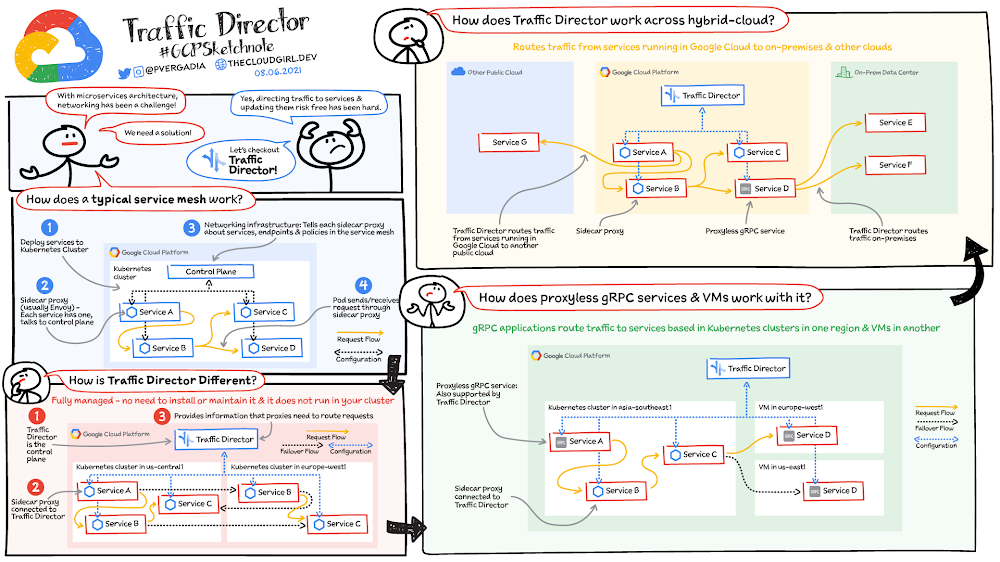
If your application is deployed in a microservices architecture then you are likely familiar with the networking challenges that come with it. Traffic Director helps you run microservices in a global service mesh. The mesh handles networking for your microservices so that you can focus on your business logic and application code, and that doesn’t need to know about underlying networking complexities. This separation of application logic from networking logic helps you improve your development velocity, increase service availability, and introduce modern DevOps practices in your organization.Click to enlargeHow does a typical service mesh work in Kubernetes?In a typical service mesh you deploy your services to a Kubernetes cluster.Each of the services’ Pods has a dedicated proxy (usually Envoy) running as a sidecar container alongside the application container(s).Each sidecar proxy talks to the networking infrastructure (a control plane) that is installed in your cluster. The control plane tells the sidecar proxies about services, endpoints, and policies in your service mesh.When a Pod sends or receives a request, the request is intercepted by the Pod’s sidecar proxy. The sidecar proxy handles the request, for example, by sending it to its intended destination.The control plane is connected to each proxy and provides information that the proxies need to handle requests. To understand the flow, if application code in Service A sends a request, the proxy handles the request and forwards it to Service B. This model enables you to move networking logic out of your application code. You can focus on delivering business value while letting the service mesh infrastructure take care of application networking.How is Traffic Director different?Traffic Director works similarly to the typical service mesh model, but it’s different in a few very crucial ways.  Traffic Director provides: A fully managed and highly available control plane. You don’t install it, it doesn’t run in your cluster, and you don’t need to maintain it. Google Cloud manages all this for you with production level SLOs. Global load balancing with capacity and health awareness, and failovers.Integrated security features to enable a zero-trust security posture. Rich control plane and data plane observability features.Support for multi-environment service meshes spanning across multi-cluster Kubernetes, hybrid cloud, VMs, gRPC services, and more.In the example pictured here, Traffic Director is the control plane and the four services in the Kubernetes cluster, each with sidecar proxies, are connected to Traffic Director.Traffic Director provides the information that the proxies need to route requests. For example, application code on a Pod that belongs to Service A sends a request. The sidecar proxy running alongside this Pod handles the request and routes it to a Pod that belongs to Service B.Multi-cluster Kubernetes: Traffic Director supports application networking across Kubernetes clusters. In this example, it provides a managed and global control plane for Kubernetes clusters in the US and Europe. Services in one cluster can talk to services in another cluster. You can even have services that consist of Pods in multiple clusters. With Traffic Director’s proximity-based global load balancing, requests destined for Service B go to the geographically nearest Pod that can serve the request. You also get seamless failover; if a Pod is down, the request automatically fails over to another Pod that can serve the request, even if this Pod is in a different Kubernetes cluster.How does Traffic Director work across hybrid and multi-cloud environments?Whether you have services in Google Cloud, on-premises, in other clouds, or all of these, your fundamental application networking challenges remain the same. How do you get traffic to these services? How do these services communicate with each other?Traffic Director can route traffic from services running in Google Cloud to services running in another public cloud and to services running in an on-premises data center. Services can use Envoy as a sidecar proxy or a proxyless gRPC service. When you use Traffic Director, you can send requests to destinations outside of Google Cloud. This enables you to use Cloud Interconnect or Cloud VPN to privately route traffic from services inside Google Cloud to services or gateways in other environments. You can also route requests to external services reachable over the public internet.How does Traffic Director support proxyless gRPC and VMs?Virtual machines: Traffic Director solves application networking for VM-based workloads alongside Kubernetes-based workloads. You simply add a flag to your Compute Engine VM instance template, and Google seamlessly handles the infrastructure set up, which includes installing and configuring the proxies that deliver application networking capabilities.As an example, traffic enters your deployment through External HTTP(S) Load Balancing to a service in the Kubernetes cluster in one region and can then be routed to another service on a VM in a totally different region.gRPC: With Traffic Director, you can easily bring application networking capabilities such as service discovery, load balancing, and traffic management directly to your gRPC applications. This functionality happens natively in gRPC, so service proxies are not required—that’s why they’re called proxyless gRPC applications. For more information, see Traffic Director and gRPC—proxyless services for your service mesh.For a more in-depth look into Traffic Director check out this post and documentation.  For more #GCPSketchnote, follow the GitHub repo. For similar cloud content follow me on Twitter @pvergadia and keep an eye out on thecloudgirl.dev.Related ArticleImprove gRPC service availability and efficiency with Traffic DirectorMake your proxyless gRPC services with Traffic Director more reliable and efficient with the new capabilities: Retry and Session Affinity.Read Article
Quelle: Google Cloud Platform

Announcing the Government & Education Summit, Nov 3-4, 2021

Mark your calendars – registration is open for Google Cloud’s Government and Education Summit, November 3–4, 2021.Government and education leaders have seen their vision become reality faster than they ever thought possible. Public sector leaders embraced a spirit of openness and created avenues to digital transformation, accepting bold ideas and uncovering new methods to provide public services, deliver education and achieve groundbreaking research. At Google Cloud, we partnered with public sector leaders to deliver an agile and open architecture, smart analytics to make data more accessible, and productivity tools to support remote work and the hybrid workforce. The pandemic has served as a catalyst for new ideas and creative solutions to long-standing global issues, including climate change, public health, and resource assistance. We’ve seen all levels of government and education leverage cloud technology to meet these challenges with a fervor and determination not seen since the industrial revolution. We can’t wait to bring those stories to you at the 2021 Google Cloud Government and Education Summit.The event will open doors to digital transformation with live Q&As, problem-solving workshops and leadership sessions, designed to bring forward the strongest talent, the most inclusive teams, and the boldest ideas. Interactive, digital experiences and sessions that align with your schedule and interests will be available, including dedicated sessions and programming for our global audiences.Register today for the 2021 Google Cloud Government and Education Summit. Moving into the next period of modernization, we feel equipped with not just the technology, but also the confidence to innovate and the experience to deliver the next wave of critical digital transformation solutions.Stay tuned to our Google Cloud Government and Education Summit page for upcoming announcements and updates.
Quelle: Google Cloud Platform

BigQuery Admin reference guide: Recap

Over the past few weeks, we have been publishing videos and blogs that walk through the fundamentals of architecting and administering your BigQuery data warehouse. Throughout this series, we have focused on teaching foundational concepts and applying best practices observed directly from customers. Below, you can find links to each week’s content:Resource Hierarchy [blog]: Understand how BigQuery fits into the Google Cloud resource hierarchy, and strategies for effectively designing your organization’s BigQuery resource model.Tables & Routines[blog]:What are the different types of tables in BigQuery? When should you use a federated connection to access external data, vs bringing data directly into native storage? How do routines help provide easy-to-use and consistent analytics? Find out here!Jobs & Reservation Model[blog]: Learn how BigQuery manages jobs, or execution resources, and how processing jobs plays into the purchase of dedicated slots and the reservation model.Storage & Optimizations[blog]: Curious to understand how BigQuery stores data in ways that optimize query performance? Here, we go under-the-hood to learn about data storage and how you can further optimize how BigQuery stores your data.Query Processing [blog]:Ever wonder what happens when you click “run” on a new BigQuery query? This week, we talked about how BigQuery divides and conquers query execution to power super fast analytics on huge datasets.Data Governance [blog]:Understand how to ensure that data is secure, private, accessible, and usable  inside of BigQuery. Also explore integrations with other GCP tools to build end-to-end data governance pipelines. BigQuery API Landscape [blog]:Take a tour of the BigQuery APIs and learn how they can be used to automate meaningful data-fueled workflows.Monitoring [blog]:Walk through the different monitoring data sources and platforms that can be used to continuously ensure your deployment is cost effective, performant and secure.We hope that these links can act as resources to help onboard new team members onto BigQuery or a reference for rethinking new patterns or optimizations – so make sure to bookmark this page! If you have any feedback or ideas for future videos, blogs or data focused series, don’t hesitate to reach out to me on LinkedIn or Twitter.Related ArticleBigQuery Admin reference guide: MonitoringThis blog aims to simplify monitoring and best practices related to BigQuery, with a focus on slots and automation.Read Article
Quelle: Google Cloud Platform

Deploying a Cloud Spanner-based Node.js application

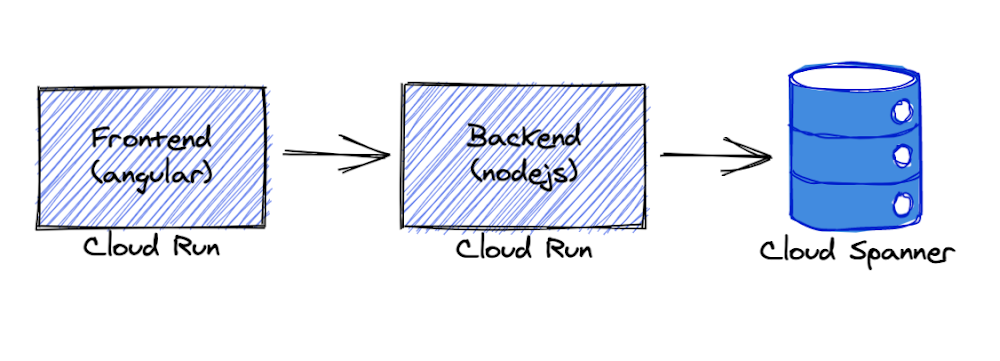
Cloud Spanner is Google’s fully managed, horizontally scalable relational database service. Customers in financial services, gaming, retail and many other industries trust it to run their most demanding workloads, where consistency and availability at scale are critical. In this blog post, we illustrate how to build and deploy a Node.js application on Cloud Spanner using a sample stock chart visualization tool called OmegaTrade. This application stores the stock prices in Cloud Spanner and renders visualizations using Google Charts. You will learn how to set up a Cloud Spanner instance and how to deploy a Node.js application to Cloud Run, along with a few important Cloud Spanner concepts.We begin by describing the steps to deploy the application on Cloud Run, and end with a discussion of best practices around tuning sessions, connection pooling & timeouts for applications using Cloud Spanner in general, which were adopted in OmegaTrade as well.Deployment stepsWe’re going to deploy the application completely serverless – with the frontend and backend services deployed on Cloud Run and Cloud Spanner as the data store. We chose Cloud Run because it abstracts away infrastructure management and scales up or down automatically almost instantaneously depending on traffic.The backend service uses the Node.js Express framework and connects to Cloud Spanner with default connection pooling, session, and timeout capabilities. As prerequisites, please ensure that you have:Access to a new or existing GCP project with one of the sets of permissions below:OwnerEditor + Cloud Run Admin + Storage Admin Cloud Run Admin + Service Usage Admin + Cloud Spanner Admin + Storage AdminEnabled billing on the above GCP projectInstalled and initialized the Google Cloud SDKInstalled and configured Docker on your machine Git installed and set up on your machineNote – Please ensure that your permissions are not restricted by any organizational policies, or you may run into an issue at the Deployment stage later on.Let’s begin!First, let’s set up our gcloud configuration as default and set a GCP project to this configuration. gcloud is the command-line interface for GCP services.Output:Choose your Google account with access to the required GCP project and enter the Project ID when prompted. Next,  we need to ensure the default gcloud configuration is set correctly. Below we are enabling authentication, unsetting any API endpoint URL set previously, and setting the GCP project we intend to use in the default gcloud configuration.Now let’s enable Google Cloud APIs for Cloud Spanner, Container Registry, and Cloud Run.Provision Cloud Spanner: Instance, database & tablesLet’s create a Spanner instance and a database using gcloud commands.We will also create 4 tables that are required by the OmegaTrade application:UsersCompaniesCompanyStocks (tracks the stock values)Simulations (tracks the state of each simulation)Verify if these tables were successfully created by querying INFORMATION_SCHEMA in the Cloud Spanner instance. The INFORMATION_SCHEMA, as defined in the SQL spec, is the standard way to query metdata about database objects.Now that the Cloud Spanner instance, database, and tables are created from the above step, let’s build and deploy OmegaTrade.Deploy app backend to Cloud RunWe will now walk through the steps to deploy the omegatrade/frontend and omegatrade/backend services to Cloud Run. We will first deploy the backend and then use the backend service URL to deploy the frontend. First, we’ll clone the repository:Let’s edit some env variables we need for the app to work. Add your project ID in the placeholder [Your-Project-ID].Now, let’s build the image from the dockerfile and push it to GCR. As above, we will need to change the command to reflect our GCP project ID.Note – In case you face issues with authentication, follow the steps mentioned in the Google Cloud documentation suggested at runtime, and retry the below commands.Next, let’s deploy the backend to Cloud Run. We will create a Cloud Run service and deploy the image we have built with some environment variables for Cloud Spanner configuration. This may take a few minutes.Now we have OmegaTrade backend up and running. The Service URL for the backend is printed to the console. Note down this URL as we will use it to build the frontend. Import sample stock data to the databaseTo import sample company and stock data, run the below command in the backend folder.The above command will migrate sample data into the connected database.Once this is successful, you will get a `Data Loaded successfully` message.Note: You may run this migration only on an empty database, to avoid duplication.Now, let’s deploy the frontend.Deploy the app frontend to Cloud RunBefore we build the front-end service, we need to update the following file from the repo with the back-end URL from the back-end deployment step, i.e. the Service URL. Note – If you’d like to enable Sign In With Google for the application, now would be a good time to set up OAuth. To do so, please follow the steps in part 6 of the readme.Change the base URL to the Service URL (append the /api/v1/ as it is). If you enabled OAuth, make sure the clientId matches the value that you got from the OAuth console flow. If you skipped creating any OAuth credentials, set clientId to an empty string. All other fields remain the same.Go back to the frontend folder. Build frontend service and push the image to GCR. This process may take a few minutes.Now, Let’s deploy the frontend to Cloud RunNow, we have the front end deployed. You can go to this Service URL in your browser to access the application.Optionally, we can add the frontend URL in the OAuth web application, to enable sign-in using a Google account.Under OAuth 2.0 Client IDs, open the application you have created (OmegaTrade-Test). Add the frontend URL under Authorised JavaScript origins and save.Note – Please ensure that cookies are enabled in your browser to avoid being blocked from running the app.A few screenshotsCongratulations! If you’ve been following along, the app should now be up and running in Cloud Run. You should be able to go to the frontend URL and play around with the application! Try adding your favorite company tickers and generating simulations. All data writes and reads are being taken care of by Cloud Spanner.Here are a few screenshots from the app:1. Login and Registration View: The user can register and authenticate using a Google account (via OAuth, if you enabled it) or using an email address. On successful login, the user is redirected to the Dashboard.2. Dashboard View: The app is pre-configured with simulated stock values for a few fictitious sample companies. The dashboard view renders the simulated stock prices in a graph. 3. Manage Company View: Users can also add a new company and its ticker symbol using this view.4. Simulate Data View:This view allows the user to simulate data for any existing or newly added company. The backend service simulates data based on a couple of parameters: the interval chosen and the number of rows. The user can also pause, resume and delete the running simulations.Now that we’ve got the application deployed, let’s cover a few important Spanner concepts that you’re likely to come across, both as you explore the application’s code, and in your own applications.SessionsA Session represents a communication channel with the Cloud Spanner database service. It is used to perform transactions that read, write, or modify data in a Cloud Spanner database. A session is associated with a single database.Best Practice – It is very unlikely you will need to interact with sessions directly. Sessions are created and maintained by client libraries internally and they are optimized by these libraries for best performance.Connection (session) poolingIn Cloud Spanner, a long-lived “connection”/”communication channel” with the database is modeled by a “session” and not a DatabaseClient object. The DatabaseClient object implements connection (session) pooling internally in a SessionPool object which can be configured via SessionPoolOptions.The default Session Pool options areBest Practice –  It is recommended to use the default session pool options as it is already configured for maximum performance.NOTE – You can set min = max if you want the pool to be its maximum size by default. This helps to avoid the case where your application has already used up min sessions and then it blocks waiting for the next block of sessions to be created.Timeouts and retriesBest Practice –  It is recommended to use the default timeout and retry configurations [1] [2] [3] because setting more aggressive timeouts and retries could cause the backend to start throttling your requests.In the following example, a custom timeout of 60 seconds is set explicitly (see the totalTimeoutMillis setting) for the given operation. If the operation takes longer than this timeout, a DEADLINE_EXCEEDED error is returned.ConclusionCongratulations! If you’ve been following along, you should now have a functional OAuth-enabled Node.js application based on Spanner deployed to Cloud Run. In addition, you should have a better understanding of the various parameters related to sessions, connection pooling, timeouts, and retries that Cloud Spanner exposes. Feel free to play with the application and explore the codebase at your leisure. To learn more about the building blocks for implementing Node.js applications on Cloud Spanner, visit Cloud Spanner Node.js Client API ReferenceCloud Spanner DocumentationCloud Spanner Node.js Client LibraryRelated ArticleMeasuring Cloud Spanner performance for your workloadIn this post, we will explore a middle ground to performance testing using JMeter. Performance test Cloud Spanner for a custom workload b…Read Article
Quelle: Google Cloud Platform

Begin your headless commerce journey with Google Cloud and commercetools

Headless EcommerceIn the last couple of years there has been a shift in the way retailers approach ecommerce: where in the past development efforts were prioritized around building a solid foundation for backend transactions and operations now it is clear that companies in this space are focusing on differentiating themselves by creating unique shopping experiences that increase engagement and reduce friction. But how can development teams spend the necessary time designing and writing code for this kind of interactions while also having to seamlessly maintain ecommerce vital components like online catalogs, shopping carts and checkout payment processes? Enter headless commerce.  Headless commerce (HC) helps companies of all sizes to innovate, develop and launch in less time and using fewer resources by decoupling backend and frontend. Headless solution providers empower online retailers by offering a balance between flexibility and optimization through pre-built api-accessible modules and components that can be easily plugged into their frontend architecture. This translates into rapid development while keeping desired levels of security, compliance, integration and responsiveness. This composable approach enables dev teams not only to create new features but also connect other ecommerce components with less effort which is critical when responding to business trends. But above all, the main benefit retailers receive from HC, is owning and controlling the frontend for an engaging customer journey as well as quickly launching new experiences.  Google Cloud + commercetoolscommercetools, a leader in the headless commerce space, has partnered with Google Cloud to make their cloud-native SaaS platform available in the Google Cloud Marketplace. With a flexible API system (REST API and GraphQL), commercetools’ architecture has been designed to meet the needs of demanding omnichannel ecommerce projects while offering real flexibility to modify or extend its features. It supports a variety of storefront providers like Vue Storefront, offers a large set of integrations and supports microservice-based architectures. All this while providing access to multiple programming languages (PHP, JS, Java) via its SDK tools. commercetools and Google Cloud provide development teams with all the tools to build high-quality digital commerce systems. Google Cloud’s scalability, AI/ML components, API management capabilities and CI/CD tools are a perfect fit to build frontend shopping experiences that easily integrate with the commercetools stack. Developers can take advantage of this compatibility by:Integrating systems with Google’s Retail Search, Recommendations AI and Vision Product SearchInjecting serverless functions into commercetools using Google Cloud FunctionsExtending and integrating commercetools via Events handled by Pub/SubManaging 3rd party, legacy, microservices and commercetools APIs with ApigeeSelecting the Google Cloud region commercetools uses for zero latency for custom appsExpanding their microservice ecosystem with components like Cloud Storage, Cloud SQL, Firestore and BigQueryAdditionally, commercetools allows ecommerce solutions to tap into the wider Google Ecosystem by providing authoritative data via Merchant Center, advertising via product listing ads and selling via Google Shopping. Architecture OverviewAs mentioned previously, headless commerce is increasingly preferred by retailers who want to own and control the ‘front-end’ for providing and enabling an engaging and differentiated user and shopping experiences. The approach involves a loosely coupled architecture that separates ‘front end’ from the ‘back end’ of a digital commerce application. The front end is typically built and managed by the retailer. They want to leverage an independent software vendor (ISV) offered, ready-to-use ‘back-end’ commerce building blocks for capabilities, such as product catalog, pricing, promotions, cart, shipping, account and others.Most retailers want to invest their time and resources in building a front end that requires an agile development model to introduce new and tweaking existing user experiences to acquire and retain customers. A few retailers that do not have an in-house web development team may choose an ISV that offers ready to use front end. The front end is a web app and designed as a progressive web application (PWA) on Google Cloud. The backend is a headless commerce offered by an ISV, such as commercetools. The backend commerce capabilities are built as a set of microservices, exposed as APIs, run cloud-native and implemented as headless. It is commonly referred to as the  “MACH” solution. The API-first approach of the architecture allows easily integrating ‘best of breed’ capabilities built internally and/or offered by 3rd party ISVs.Leveraging Google Cloud ComponentsThe architecture of the front end will be implemented on Google Cloud and will integrate with the ISV’s headless commerce back end that runs natively in Google Cloud. The front end will be designed using cloud-native services for PWA web app development (Google Kubernetes Engine, CI/CD services), Google Product Discovery solution that includes Retail Search and Vision API Product Search for serving product search (text and image) and Recommendations AI for serving recommendations.Storage (Cloud Storage), Database (Cloud SQL, Cloud Firestore), and edge caching for content delivery (Cloud CDN) Networking (Cloud DNS,  Global Load Balancing), and Security (Cloud Armor for DDoS, API Defense for API protection) Additionally, API management (Apigee on Google Cloud) can be used to orchestrate interactions of the front end with the APIs of the backend commerce services. The API management’s capability will be used for accessing the services of on-premises systems, such as ERP, order management system (OMS), warehouse management system (WMS) as needed to support the functioning of digital commerce application.  Alternatively, depending on the frontend capabilities, developers can use middleware to build custom services and route requests. What’s next?A considerable number of retailers have adopted headless commerce and are now focusing on adopting best practices and leveraging the agility that comes with this approach. Just like commercetools offers robust components that meet the retailer’s backend operational needs (Product Catalog, Order Management, Carts, Payments, etc), Google Cloud’s Compute, Networking, Severless and AI/ML services  provide the agility and flexibility required by development teams to quickly and easily extend their frontend capabilities. commercetools and Google Cloud work seamlessly together because they both prioritize ease of integration, scalability, security and iterability while providing ready-to-use building blocks. It also helps that commercetools backend runs on Google Cloud. Once an initial foundation of Google Cloud and commercetools has been established, adding new commerce modules and extending functionally of the current ones becomes a straightforward process that allows to route efforts to innovation initiatives. In the end, the main beneficiaries of this technical synergy are the shoppers that enjoy experiences which increase engagement and minimize friction. Alternatively, retailers can also save time and resources by relying on frontend integrations. commercetools offers a variety of third-party solutions that can effortlessly be added to a headless commerce architecture. These integrations as well as other important headless commerce extensions will be explored in future blog entries.  In the meantime, all the necessary tools to leverage headless commerce can be found in just one place: Get started with commercetools on the Google Cloud Marketplace today!Related ArticleRead Article
Quelle: Google Cloud Platform

What is Network Intelligence Center?

You need visibility into your cloud platform in order to monitor and troubleshoot it. Network Intelligence Center provides a single console for Google Cloud network observability, monitoring, and troubleshooting. Currently Network Intelligence Center has four modules: Network Topology: Helps you visualize the network topology including VPC connectivity to on-premises, internet, and their associated metrics. Connectivity Tests: Provides both static and dynamic network connectivity tests for configuration and data-plane reachability, to verify that packets are actually getting through.Performance Dashboard: Shows packet loss and latency between zones and regions that you are using. Firewall Insights: Shows usage for your VPC firewall rules and enables you to optimize their configurationClick to enlargeNetwork TopologyNetwork Topology collects real-time telemetry and configuration data from Google infrastructure and uses it to help you visualize your resources. It captures elements such as configuration information, metrics, and logs to infer relationships between resources in a project or across multiple projects. After collecting each element, Network Topology combines them to generate a graph that represents your deployment. This enables you to quickly view the topology and analyze the performance of your deployment without configuring any agents, sorting through multiple logs, or using third-party tools. Connectivity TestsThe Connectivity Tests diagnostics tool lets you check connectivity between endpoints in your network. It analyzes your configuration and in some cases performs run-time verification.To analyze network configurations, Connectivity Tests simulates the expected inbound and outbound forwarding path of a packet to and from your Virtual Private Cloud (VPC) network, Cloud VPN tunnels, or VLAN attachments. For some connectivity scenarios, Connectivity Tests also performs run-time verification where it sends packets over the data plane to validate connectivity and provides baseline diagnostics of latency and packet loss. Performance DashboardPerformance Dashboard gives you visibility into the network performance of the entire Google Cloud network, as well as the performance of your project’s resources. It collects and shows packet loss and latency metrics. With these performance-monitoring capabilities, you can distinguish between a problem in your application and a problem in the underlying Google Cloud network. You can also debug historical network performance problems.Firewall InsightsFirewall Insights enables you to better understand and safely optimize your firewall configurations. It provides reports that contain information about firewall usage and the impact of various firewall rules on your VPC network. For a more in-depth look into Network Intelligence Center check out the documentation.For more #GCPSketchnote, follow the GitHub repo. For similar cloud content follow me on Twitter @pvergadia and keep an eye out on thecloudgirl.dev 
Quelle: Google Cloud Platform



