Introducing Firehose: An open source tool from Gojek for seamless data ingestion to BigQuery and Cloud Storage

Indonesia’s largest hyperlocal company, Gojek has evolved from a motorcycle ride-hailing service into an on-demand mobile platform, providing a range of services that include transportation, logistics, food delivery, and payments. A total of 2 million driver-partners collectively cover an average distance of 16.5 million kilometers each day, making Gojek Indonesia’s de-facto transportation partner.To continue supporting this growth, Gojek runs hundreds of microservices that communicate across multiple data centers. Applications are based on an event-driven architecture and produce billions of events every day. To empower data-driven decision-making, Gojek uses these events across products and services for analytics, machine learning, and more.Data warehouse ingestion challenges To make sense of large amounts of data — and to better understand customers for the purpose of app development, customer support, growth, and marketing purposes — data must first be ingested into a data warehouse. Gojek uses BigQuery as its primary data warehouse. But ingesting events at Gojek’s scale, with rapid changes, poses the following challenges:With multiple products and microservices offered, Gojek releases new Kafka topics almost every day and they need to be ingested for analytical purposes. This can quickly result in significant operational overhead for the data engineering team that is deploying new jobs to load data into BigQuery and Cloud Storage. Frequent schema changes in Kafka topics require consumers of those topics to load the new schema to avoid data loss and capture more recent changes. Data volumes can vary and grow exponentially as people start building new products and logging new activities on top of a new topic. Each topic can also have a different load during peak business hours. Customers need to handle the rising volume of data to quickly scale per their business needs.Firehose and Google Cloud to the rescue To solve these challenges, Gojek uses Firehose, a cloud-native service to deliver real-time streaming data to destinations like service endpoints, managed databases, data lakes, and data warehouses like Cloud Storage and BigQuery. Firehose is part of the Open Data Ops Foundation (ODPF), and is fully open source. Gojek is one of the major contributors to ODPF.Here are Firehose’s key features:Sinks – Firehose supports sinking stream data to the log console, HTTP, GRPC, PostgresDB (JDBC), InfluxDB, Elastic Search, Redis, Prometheus, MongoDB, GCS, and BigQuery.Extensibility – Firehose allows users to add a custom sink with a clearly defined interface, or choose from existing sinks.Scale – Firehose scales in an instant, both vertically and horizontally, for a high-performance streaming sink with zero data drops.Runtime – Firehose can run inside containers or VMs in a fully-managed runtime environment like Kubernetes.Metrics – Firehose always lets you know what’s going on with your deployment, with built-in monitoring of throughput, response times, errors, and more.Key advantagesUsing Firehose for ingesting data in BigQuery and Cloud Storage has multiple advantages. Reliability Firehose is battle-tested for large-scale data ingestion. At Gojek, Firehose streams 600 Kafka topics in BigQuery and 700 Kafka topics in Cloud Storage. On average, 6 billion events are ingested daily in BigQuery, resulting in more than 10 terabytes of daily data ingestion.  Streaming ingestionA single Kafka topic can produce up to billions of records in a day. Depending on the nature of the business, scalability and data freshness are key to ensuring the usability of that data, regardless of the load. Firehose uses BigQuery streaming ingestion to load data in near-real-time. This allows analysts to query data within five minutes of it being produced.Schema evolutionWith multiple products and microservices offered, new Kafka topics are released almost every day, and the schema of Kafka topics constantly evolves as new data is produced. A common challenge is ensuring that as these topics evolve, their schema changes are adjusted in BigQuery tables and Cloud Storage. Firehose tracks schema changes by integrating with Stencil, a cloud-native schema registry, and automatically updates the schema of BigQuery tables without human intervention. This reduces data errors and saves developers hundreds of hours. Elastic infrastructureFirehose can be deployed on Kubernetes and runs as a stateless service. This allows Firehose to scale horizontally as data volumes vary.Organizing data in cloud storage Firehose GCS Sink provides capabilities to store data based on specific timestamp information, allowing users to customize how their data is partitioned in Cloud Storage.Supporting a wide range of open source softwareBuilt for flexibility and reliability, Google Cloud products like BigQuery and Cloud Storage are made to support a multi-cloud architecture. Open source software like Firehose is just one of many examples that can help developers and engineers optimize productivity. Taken together, these tools can deliver a seamless data ingestion process, with less maintenance and better automation.How you can contributeDevelopment of Firehose happens in the open on GitHub, and we are grateful to the community for contributing bug fixes and improvements. We would love to hear your feedback via GitHub discussions or Slack.Related ArticleTransform satellite imagery from Earth Engine into tabular data in BigQueryWith Geobeam on Dataflow, you can transform Geospatial data from raster format in Earth Engine to vector format in BigQuery.Read Article
Quelle: Google Cloud Platform

Pride Month: Q&A with bunny.money founders about saving for good

June is Pride Month—a time for us to come together to bring visibility and belonging, and celebrate the diverse set of experiences, perspectives, and identities of the LGBTQ+ community. This month, Lindsey Scrase, Managing Director, Global SMB and Startups at Google Cloud, is showcasing conversations with startups led by LGBTQ+ founders and how they use Google Cloud to grow their businesses. This feature highlights bunny.money and its founders, Fabien Lamaison, CEO, Thomas Ramé, Technology Lead, and Cyril Goust, Engineering Lead. Lindsey: Thanks Fabien, Thomas, and Cyril. It’s great to connect with you and talk about bunny.money. I love how you’re bringing a creative twist to fintech and giving back to communities. What inspired you to found the company?Fabien: One of my favorite childhood toys was an old-fashioned piggy bank. I remember staring at it and trying to figure out how much of my allowance should be saved, spent, or given to charity. As you can imagine, there were lots of ideas racing through my mind but saving and giving back were always important to me. Years later, I realized I could combine my passions for banking, technology, and helping others by creating a fintech service that makes it easy for people to save while donating to their favorite causes.Fabien Lamaison, CEO of bunny.moneyLindsey: My brothers and I did something similar where we allocated a portion of any money we made as kids to giving. And I too had a piggy bank – a beautiful one that could only be opened by breaking it. Needless to say it was a good saving mechanism! It’s inspiring to see you carrying your personal value forward into bunny.money to help others do the same. Tell us more about bunny.money?Fabien: bunny.money plays with the concept of reimagining saving—and offers a way to positively disrupt conventional banking. For us bunnybankers, financial and social responsibility go hand in hand. We empower people to build more sustainable, inclusive financial futures. Looking ahead, we not only want to help people set up recurring schedules for saving and donating, but also offer more options for socially responsible investing and help companies better match employee donations to charitable causes and build out retirement plans.Lindsey: It sounds like you’re not only disrupting traditional banking services but also how people manage their finances. How does bunny.money serve its customers?Fabien: bunny.money is a fintech company founded on the principles of providing easy, free, and ethical banking services. Our comprehensive banking platform enables customers to quickly open savings wallet and schedule recurring deposits.Thomas: bunny.money is also a fintech bridge that connects people and businesses to the communities and causes they care about. With bunny.money, customers can make one-time or recurring donations to the nonprofits of their choice. bunny.money doesn’t charge recipients fees to process donations. We give customers the option of offering us a tip, but it’s not required.Lindsey: So with bunny.money, what are some of the nonprofits people can donate to?Fabien: Over 30 organizations have already joined bunny.money’s nonprofit marketplace, includingStartOut,TurnOut,Trans Lifeline, and Techqueria. Some are seeing donations increase by up to 20 percent as they leverage bunny.money to gamify fundraising, promote social sharing, and encourage micro-donations from their members and supporters.Cyril: bunny.money also helps people discover local causes and nonprofits such as food banks requesting volunteers, parks that need to be cleaned, and mentoring opportunities. I’m particularly excited to see bunny.money help people build a fairer, greener society by donating to environmental nonprofits, including, Carbon Lighthouse,Sustainable Conservation, Public Land Water Association, back2earth andFARMS. We also decided to “lead by the example” and pledge to give 1% of our revenues to 1% for the Planet.Lindsey: Given your business and the services you offer, I imagine you’ve encountered immense complexity along the way. What were some of the biggest challenges that you had to overcome?Fabien: One of our biggest challenges was helping people understand saving for good, and purpose-led banking, which is a relatively new idea in fintech. Although there are plenty of mobile banking apps, most don’t offer an easy way for people to improve their personal finances and donate to their favorite causes in one convenient place.Cyril: On the technical side, we needed to comply with strict industry regulations, including all applicable requirements under the Bank Secrecy Act and the USA PATRIOT Act. These regulations protect sensitive financial data and help fight against fraudulent activities such as money laundering.Lindsey: Can you talk about how Google Cloud is helping you address these challenges?  Thomas: Protecting client data is a top priority for us, so we built bunny.money on thehighly secure-by-design infrastructure of Google Cloud. Google Cloud automatically encrypts data in transit and at rest, and the solutions comply with all major international security standards and regulations right out of the box. Although we serve customers in the U.S. today, Google Cloud distributed data centers will allow us to meet regional security requirements and eventually reach customers worldwide with quality financial services.Thomas Ramé, Technology Lead at bunny.moneyFabien: We wanted to build a reliable, feature-rich fintech platform and design a responsive mobile app with an intuitive user interface (UI). We knew from experience that Google Cloud is easy to use and offers integrated tools, APIs, and solutions. We also wanted to tap into the deep technical knowledge of theGoogle for Startups team to help us scale bunny.money and affordably trial different solutions with Google for Startups Cloud Program credits.Cyril: As aCertified Benefit Corporation™ (B Corp™), it is also important for us to work with companies that align with the values we champion such as diversity and environmental sustainability. Google Cloud iscarbon neutral and enables us to accuratelymeasure, report, and reduce our cloud carbon emissions. Lindsey: This is exactly how we strive to support startups at all stages – with the right technology, offerings, and support to help you scale quickly and securely, all while being the cleanest cloud in the industry. Can you go into more detail about the Google Cloud solutions you use—and how they all come together to support your business and customers? Fabien: Our save for good® mobile app enables customers to securely create accounts, verify identities, and connect to external banks in just under four minutes. Thomas: With Google Cloud, bunny.money consistently delivers a reliable, secure, and seamless banking experience. Since recently launching our fintech app, we’ve already seen an incredible amount of interest in our services that enable people to grow financially while contributing to causes they are passionate about. Right now, we’re seeing customers typically allocate about 10 percent of each deposit to their favorite charities.Cyril: The extensive Google Cloud technology stack helps us make it happen. We can useBigQuery to unlock data insights,Cloud SQL to seamlessly manage relational database services, andGoogle Kubernetes Engine (GKE) to automatically deploy and scale Kubernetes. These solutions enable us to cost-effectively scale bunny.money and build out a profitable fintech platform.Cyril Goust, Engineering Lead at bunny.moneyThomas: In addition to the solutions Cyril mentioned, we useCloud Scheduler to manage cron job services,Dataflow to unify stream and batch data processing, andContainer Registry to securely store Docker container images. We’re always innovating, and Google Cloud helps our small team accelerate the development and deployment of new services.Lindsey: It’s exciting to hear your story and the many different ways that Google Cloud technology has been able to support you along the way. You’re creating something that affects change on many levels—from how people save and give to how businesses and nonprofits can engage.Since it is also Pride month, I want to change focus for a minute and talk about how being part of the LGBTQ+ community impacted your approach to starting bunny.money?Fabien: I believe we all belong to several communities (family, friends “tribes,” sports, group of interests) that are different layers of our own identity and way of life. I’m part of the LGBTQ+ community, and I’m also an immigrant for example. I’m now a French-American, as is my husband, and we live in San Francisco. But even as a couple, we still had to live apart for several years—he in Paris and I in San Francisco—as we worked through issues with his U.S. work visa (same sex weddings were not possible at that time at the federal level, we couldn’t be under the same visa application).Fortunately, the LGBTQ+ community can be like an extended family, both professionally and personally. Personally, I’ve had the support of friends as my husband and I dealt with immigration and work challenges. And professionally, I’ve experienced incredible support in the startup world with nonprofits such asStartOut, which provides key resources to help LGBTQ+ entrepreneurs grow their businesses.Lindsey: I can only imagine the emotional toll that being apart created for you and your husband and I’m so glad that it eventually worked out. My wife is Austrian and while we are fortunate to be here together, this intersectionality has created an additional layer of complexity for us over the years as we have started a family. Do you have any advice for others in the LGBTQ+ community looking to start and grow their own companies? You mentioned StartOut, and I know there are additional organizations LGBTQ+ entrepreneurs can turn to for help, includingLesbians who Tech,Out in Tech,High Tech Gays (HTG) – Queer Silicon Valley, andQueerTech NYC (Meetup).Fabien: I would suggest really exploring what you’re passionate about. I’ve enjoyed focusing on saving and finances since I was young and have always been passionate about giving back. Being part of the LGBTQ+ community—or really any community that’s viewed as an “outsider”—gives you the opportunity to think differently. When you bring your passion and life experiences together, you can start to imagine new ways of doing things. By engaging in your communities, it can be easier to find others who share your experiences, interests, and even values. You bring the best from each world.Since LGBTQ+ founders and entrepreneurs might belong to several groups, it’s good to explore all available avenues and resources, including the organizations you mentioned earlier. We can always learn and accomplish more when we work together. I’ve experienced that both in the LGTBQ+, immigrant and Fintech communities.Lindsey: The importance of community underlies so many aspects of your identity as a founder, as someone who has moved to the US from France, and as a member of the LGBTQ+ community. I’m so glad that you’ve sought out – and received – support along the way. I agree it’s so important  for others to seek out this community and support.  And to close, would you be able to share any next steps for bunny.money?Fabien: We’re looking forward to helping customers build more sustainable and inclusive financial futures on our platform. We’ll continue contributing to positive change in the world by rolling out new AI-powered services to enable ethical investing and personalized giving and impact programs. As we build this first banking app for personal and workplace giving, our goal is to benefit all communities by bridging the gap between businesses and people—which is why we’re excited to continue working with partners like Google for Startups andGV (GV offers us valuable mentor sessions during our accelerator program at StartOut).If you want to learn more about how Google Cloud can help your startup, visit our pagehere to get more information about our program, and sign up for our communications to get a look at our community activities, digital events, special offers, and more.Related ArticlePride Month: Q&A with Beepboop founders about more creative, effective approaches to learning a new languageRead how Beepboop democratizes language instruction by helping students learn to speak Spanish and English in dynamic, fun environments l…Read Article
Quelle: Google Cloud Platform

Commerzbank has Reimagined the Customer Experience with Google Contact Center AI

Digital channels and on-demand banking have led customers to expect instant and helpful access to managing their finances, with minimal friction. Google Cloud built Contact Center AI (CCAI) and DialogFlow CX to help banks and other enterprises deliver these services, replacing phone trees or sometimes confusing digital menus with intelligent chatbots that let customers interact conversationally, just as they would with human agents. Leaders at Germany-based Commerzbank, which operates in over 50 countries, saw potential for these technologies to enhance customer experiences, providing more curated and helpful interactions that would build trust in and satisfaction with their brand. Commerzbank’s implementation speaks to how conversational artificial intelligence (AI) services can help businesses better serve customers, and in this article, we’ll explore their story and what their example means for your business. Commerzbank: Disrupting Customer Interactions with Google’s Contact Center AI and Dialog Flow CXTokyo, 7:00 AM. Vanessa is on a business trip in Japan, closing a new deal for her company, one of Commerzbank´s more than 30,000 corporate customers throughout Germany. She has been preparing for weeks, and is going through her points a final time in a downtown coffee shop. Glancing at her watch, she realizes she must leave immediately to get to the meeting.Intending to pay, she realizes the chip in her credit card is not functioning. Due to the time difference with Germany, Vanessa is now concerned she will not be able to contact someone from customer support. She opens the Commerzbank mobile app and contacts the customer center through chat. The access point she needs is available, but how can it help her most efficiently? Building excellent conversational experiencesCustomers like Vanessa need an answer right away. With that in mind, Commerzbank aims to provide customers with integrated support via the use of chatbots in the quest to deliver efficiency, high quality, and information consistency. This goal is where the Google Cloud virtual agent platform Dialogflow CX comes into play, providing us with an enormous number of features to build conversation dialogue through accurate intent recognition, a robust visual flow creator, and automated testing—all while significantly improving our time to market. In just nine weeks, the Commerzbank team set-up an agile proof-of-value project by developing a chatbot solution designed to deliver a reliable conversation experience. Commerz Direktservices Chatbot Agent is now able to identify the touchpoint the customer is using (App or Web) and detect more than 100 suitable FAQs and answer them properly. The Chatbot Agent also identifies leads and sales prospects, enabling it to provide support on open questions in relation to products and services, thus performing a graceful handover to the human agent with the enrichment of value parameters. Commerz Direktservices has also broadened the ability  of the Chatbot to handle different customer types (keyword-based vs. context-based customers) by constructing an intelligent dialog architecture that lets the Chatbot Agent flow elegantly through prompts and intent questioning.Commerzbank has integrated Google Dialogflow CX with Genesys Platform, helping to make use of the full capabilities of the existing contact center infrastructure and more efficiently orchestrate the incoming interactions. A very versatile architecture bridges the potential of Google Cloud with a variety of on-premise applications and components, while also providing system resiliency and supporting data security compliance. The support of the entire Google team has been invaluable to accelerate the bank’s journey to the cloud. Commerzbank is seeing a number of benefits as it expands its AI platform, including:Enhanced ability to deliver innovationImproved operational efficienciesBetter customer experience through reduced wait times and self-serve capabilities, leading to reduced churnGreater productivity for CommerzBank employees who are able to support customer queries with enriched Google CCAI data The creation of an integrated cross-channel strategyGoing beyond support into an active conversational experienceNow, Commerzbank wants to move beyond great customer support to continue to increase the value-add to the customer. Customers like Vanessa are looking for their bank to go the extra mile by optimizing their finances,  providing personalized financial products and solutions, and  offering more control over their investment portfolio, among other needs. With this in mind, Commerzbank aims to continue moving away from a scenario where chatbots are only passive entities waiting to be triggered, into a new and more innovative one whereby they become an active key enabler of enhanced customer interactions across the customer value chain. Commerzbank is already mapping active dialog paths to: Make tailored product suggestions to prospects, giving them the possibility to acquire a product that suits their particular needsIdentify customer requirements for financing or investment, inviting them to get advice and benefit from the existing opportunitiesGenerate prospects based on the business potential, thus providing the human agents with a framework to prioritize their interactions Commerzbank leaders anticipate the impact of this solution will be significant. It will let the company fulfill the first advisory touchpoint for financial needs and perform a fast conversation hand-over to specialists as soon as the customer requires it. As a result, leaders expect to exponentially increase conversion rates via more fruitful customer journeys.Helping Vanessa with a delightful customer experienceGoing back to Vanessa’s example: how can Commerzbank help Vanessa efficiently? When she contacts support through chat, the chatbot welcomes her and offers help with any question she may have. Vanessa explains the situation and the digital agent explains that delivering a replacement card would take many days, and that the most practical solution would be to activate a virtual debit card, e. g., with Google Pay on her phone. Vanessa gladly accepts this solution, prompting the Chatbot to deliver a short explanation on how to carry out the process, as well as two additional links: one for downloading the Google Pay App from the Google Play Store and another for digital self-service in the Commerzbank App, which she can intuitively use to synchronize the Commerzbank App and Google Pay. After just 5 minutes, Vanessa is able to pay comfortably using her phone and get to her meeting in time. This engagement is how Commerzbank wants to deliver digital customer experiences that fascinate their customers, allowing their customers to perform their daily banking activities faster, better, and easier. To learn more about how Google Cloud AI solutions can help your company, visit the product page or check out this report that explores the total economic impact of Google Cloud CCAI.Related ArticleHSBC deploys Dialogflow, easing call burden on policy expertsHSBC uses AI and machine learning to reduce the time employees spend on manually intensive queries and improve the consistency of policy …Read Article
Quelle: Google Cloud Platform

Introducing new commitments on the processing of service data for our cloud customers

At Google, we engage regularly with customers, regulators, policymakers, and other stakeholders to provide transparency into our operations, policies, and practices and to further strengthen our commitment to privacy compliance. One such engagement is our ongoing work with the Dutch government regarding its Data Protection Impact Assessment (DPIA) of Google Workspace and Workspace for Education.As a result of that engagement, today Google is announcing our intention to offer new  contractual privacy commitments for service data1 that align with the commitments we offer for customer data.2 Once those new commitments become generally available, we will process service data as a processor under customers’ instructions, with the exception of limited processing3 that we will continue to undertake as a controller. We will provide further details as we implement these updates – planned for Google Workspace, Google Workspace for Education and Google Cloud4 services – beginning in 2023 and in successive phases through 2024.In parallel, Google is working to develop a version of Chrome OS (including Chrome browser running on managed Chrome OS devices) for which Google will offer similar processor commitments. In line with our goal of giving customers greater transparency and control over their data, we’re aiming to provide this updated version of Chrome OS, once it’s complete, to our enterprise and education customers around the world. We recognise that privacy compliance plays a crucial role in earning and maintaining your trust, and we will continue to work diligently to help make compliance easier for your business as you use our cloud services. To learn more about our approach to privacy compliance, please visit our Privacy Resource Center.1. Service Data is defined in the Google Cloud Privacy Notice as the personal information Google collects or generates during the provision and administration of the Cloud Services, excluding any Customer Data and Partner Data.2. Customer Data means data submitted, stored, sent or received via the services by customer or end users, as further described in the applicable data processing terms.3. For example, billing and account management, capacity planning and forecast modeling, detecting, preventing and responding to security risks and technical issues.4. Formerly known as Google Cloud Platform.Related ArticleAn update on Google Cloud’s commitments to E.U. businesses in light of the new E.U.-U.S. data transfer frameworkGoogle Cloud welcomes the new data transfer framework deal agreed by the E.U./U.S. and explains how we support customers to further prote…Read Article
Quelle: Google Cloud Platform

Google Workspace, GKE help startup CAST AI grow faster and optimize cloud costs

In many ways, serial entrepreneur Gil Laurent and his technology startups have grown alongside Google Workspace and Google Cloud. When he was CEO and co-founder of Ukraine-based Viewdle — a machine learning and computer vision startup that was acquired by Google in 2012 — the organization relied on Google Workspace for many of its collaboration needs, trading the complexity of email attachments and file versions for the cloud-synced availability of documents in Google Drive. A similar story played out a few years later when he co-founded Zenedge — a cybersecurity company focused on the edge of the network — which was acquired by Oracle in 2018. Zenedge still used a handful of other services to round out meetings and collaboration, but Google Workspace was the foundation. In 2019, when co-founding his latest venture — cloud cost management startup CAST AI — Laurent saw that he didn’t have to pay for additional services, as Google Workspace’s product suite included everything needed to connect his teams and workstreams. From onboarding new employees and getting them connected to their corporate email, to real-time collaboration and video conferencing, Google Workspace offered everything. “As a young startup, there was only one place to start—Google Workspace,”  recalled Laurent, who now serves as the company’s chief product officer. “We did not even consider anything else.”Google Workspace is only one part of CAST AI’s Google product adoption, however. “Our whole business runs on GKE on Google Cloud,” Laurent said. The company was up and running on GKE (Google Kubernetes Engine) almost immediately after rolling out Google Workspace, and Laurent recalls a smooth transition. “It was very natural for everyone.” CAST AI is an end-to-end Kubernetes Automation and Management platform that helps businesses optimize their cloud costs by 63% on average. With an approach built on container orchestration, a product like GKE was necessary to efficiently run the company’s workloads and services.Laurent explained that at Zenedge, the company struggled to understand how to control its cloud costs as it experienced growth: “We started out spending thousands per month with 10 engineers, which seemed right. But three years later, after continued growth, we were spending millions. We didn’t understand why. The bill could be 100 pages long.” When founding CAST AI, Laurent addressed this frustration head on, using containers to ensure their customers’ cloud resources weren’t going unused at such high rates. “Containers can be moved around, so you can optimize deployment to make them busy most of the time while eliminating waste,” Laurent said. “We knew we had to include automation. You can tell someone that they’re using 1,000 VMs and that 50 could be used better or more efficiently if moved to a different instance type — but in DevOps, who does this? The opportunities for optimization change daily and people are afraid of breaking things. We knew we had to find a way to offer not just observability but automated management.”Choosing GKE was “easy because Google invented Kubernetes, and GKE is the state of the art, with its implementation of the full Kubernetes API, autoscaling, multi-cluster support, and other features that set the trend.” Laurent added that the company also took advantage of the Google for Startups Cloud Program to scale up its business by tapping into extended benefits like tailored mentorship and coverage for their Google Cloud usage for two years. Many startups adopt Google Workspace to connect and engage in real-time with their teams, but quickly learn that leveraging other Google offerings — such as cloud solutions and the Google for Startups Cloud Program — can be very helpful to further their startup’s growth. For CAST AI, the combination of GKE on Google Cloud and Google Workspace proved especially valuable because the company was founded in late 2019, just months before the global pandemic began. The CAST AI team needed sophisticated cloud services to build their product, in addition to collaboration and productivity tools that could accommodate remote workers in different countries. “The idea that you can work in any place at any time without tradeoffs, whether you’re in Madrid or Miami — that helps a lot,” Laurent said. “Without GKE and Google Workspace, I am not sure we could have achieved all that we have so far.”To learn more about how Google Workspace and Google Cloud help startups like CAST AIaccelerate their journey — from connecting and collaborating to building and innovating — visit our startups solutions pages for Google Workspace and Google Cloud.Related ArticleWhy managed container services help startups and tech companies build smarterWhy managed container services such as GKE are crucial for startups and tech companies.Read Article
Quelle: Google Cloud Platform

Mercari leverages Google's vector search technology to create a new marketplace

Mercari is one of the most successful marketplace services in recent years, with 5.3 million active users in the US and 20 million active users in Japan. In Oct 2021, the company launched a new service Mercari Shops in Japan that allows small business owners and individuals to open their e-commerce portal in 3 minutes. At the core of the new service, Mercari introduced Google’s vector search technology to realize the crucial part: creating a new marketplace for small shops using “similarity”.Mercari has 5.3M active users in the USThe Challenge: collection of shops doesn’t make a marketplaceAt the time of the launch, Mercari Shops was just a collection of small e-commerce sites where shoppers could only see the items sold by each shop one by one. For the shoppers, it was a somewhat painful experience to go back to the top page and choose a shop each time. This loses the most important value of the service; an enjoyable shopping experience for the shoppers.The challenge of Mercari Shops: shoppers were only able to browse the items from the selected shopShoppers would love something like “a real marketplace on smartphones” where they can easily browse hundreds of items from a wide variety of shops with a single finger gesture. But how do you manage the relationships across all the items to realize the experience? You would need to carefully define millions of item categories and SKUs shared across the thousands of sellers, and keep maintaining it all by manual operation of support staff. It also requires the sellers to search and choose the exact category for each item to sell. This is the way traditional marketplace services are built, involving much operational cost, and also losing another key value of Mercari Shops that anyone can build an e-commerce site within 3 minutes.How about using a recommendation system? The popular recommendation algorithm such as collaborative filtering usually requires large purchase or click histories to recommend other items, and doesn’t work well for recommending new items or long-tail items that don’t have any relationship with existing items. Also, collaborative filtering only memorizes the relationships between the items, such as “many customers purchase/view these other items also”. Meaning, it doesn’t actually make any recommendations with insights by looking at the item descriptions, names, images or many other side features.So Mercari decided to introduce a new way: using “similarity” to create a marketplace. A new marketplace created by similarityWhat does it mean by similarity? For example, you can define a vector (a list of numbers) with three elements (0.1, 0.02, 0.03) to represent an item that has 10% affinity to the concept of “fresh”, 2% to “vegetable”, and 30% to “tomato”. This vector represents the meaning or semantics of “a fresh tomato” as an item. If you search near vectors around it, those items would also have similar meaning or semantics – you will find other fresh tomatoes (note: this is a simplified explanation of the concept and the actual vectors have much complex vector space). Vector search finds items with similar meaningThis similarity between vectors exemplifies the marketplace in Mericari Shops that allows the shopper to browse all the similar items collected on a page. You don’t need to define and update item categories and SKUs manually to connect between the millions of items from thousands of sellers. Instead, machine learning (ML) algorithms extract the vectors from each item automatically, every time a seller adds a new item or updates an item. This is exactly the same way Google uses for finding relevant contents on Search, YouTube, Play and other services; called Vector Search.Enabled by the technology, now the shoppers of Mercari Shops can easily browse relevant items sold by different shops on the same page.The marketplace created with the similarity: shoppers can easily browse the relevant itemsVector search made easy with Matching EngineLet’s take a look at how Mercari built the marketplace using the vector search technology. With analytics results and experiments, they found that the item description written by the sellers represents the value of each item well, compared to other features such as the item images. So they decided to use item description texts to extract the feature vector of each item. Thus, the marketplace of Mercari Shops is organized by “how items are similar to each other in the text description”.Extracting feature vectors from the item description textsFor extracting the text feature vector, they used a word2vec model combined with TF-IDF. Mercari also tried other models such as BERT, but they decided to use word2vec as it’s simple and lightweighted, suitable for production use with less GPU cost for prediction.There was another challenge. Building a production vector search infrastructure is not an easy task. In the past, Mercari built their own vector search from scratch for an image search service. It took for them to assign a dedicated DevOps engineer, let them build Kubernetes servers, design and maintain the service. Also, they had to build and operate a data pipeline for continuous index update. To keep the search results fresh, you need to update the vector search index every hour with newly added items using the data pipeline. This pipeline had some incidents in the past and consumed DevOps engineers’ resources. Considering these factors, it was almost impossible for Mercari Shops to add a new vector search under a limited resource. Instead of building it from scratch, they introduced Vertex AI Matching Engine. It’s a fully managed service that shares the same vector search backend with the major Google services such as Google Search, YouTube and Play. So there is no need to implement the infrastructure from scratch, maintain it, and design and run the index update pipeline by yourself. Yet, you can quickly take advantage of the responsiveness, accuracy, scalability and availability of Google’s latest vector search technology.The feature extraction pipelineMercari Shops’ search service has two components: 1) feature extraction pipeline and 2) vector search service. Let’s see how each component works.The feature extraction pipelineThe feature extraction pipeline is defined with Vertex AI Pipelines, and is invoked by Cloud Scheduler and Cloud Functions periodically to initiate the following process:Get item data: The pipeline makes a query BigQuery to fetch the updated item dataExtract feature vector: The pipeline runs predictions on the data with the word2vec model to extract feature vectorsUpdate index: The pipeline calls Matching Engine APIs for adding the feature vectors to the vector index. The vectors are also saved to Cloud BigtableThe following is the actual definition of the feature extraction pipeline on Vertex AI Pipelines:The feature extraction pipeline definition on Vertex AI PipelinesVector search serviceThe second component is the vector search service that works in the following manner:The vector search serviceClient makes a query: a client makes a query to the Cloud Run frontend specifying an item idGet the feature vector: get a feature vector of the item from BigtableFind similar items: using Matching Engine API, find similar items with the feature vectorReturns the similar items: returns item ids of the similar itemsBy introducing Matching Engine, Mercari Shops was able to build the production vector search service within a couple of months. As of one month after launching the service, they haven’t seen any incidents. From development to production, only a single ML engineer (the author) implements and operates the whole service.Looking aheadWith the successful introduction, Mercari Shops is now working on adding more functionalities and extending the service to future shop projects. For example, Matching Engine has a filter vector match function that applies simple filters to the search results.  With this function, they may only show “on sale” items, or exclude items from specific shops. Also, Matching Engine will support a streaming index update soon that would allow the users to find items as soon as they are added by the sellers. Vertex AI Feature Store looks attractive too as a replacement for the Cloud Bigtable as the repository of feature vectors with its additional functionality including feature monitoring for better observability on the service quality. With those Google Cloud technologies and products, Mercari can turn their new ideas into reality with less time and resources, adding significant value to their business. 
Quelle: Google Cloud Platform

Announcing general availability of Confidential GKE Nodes

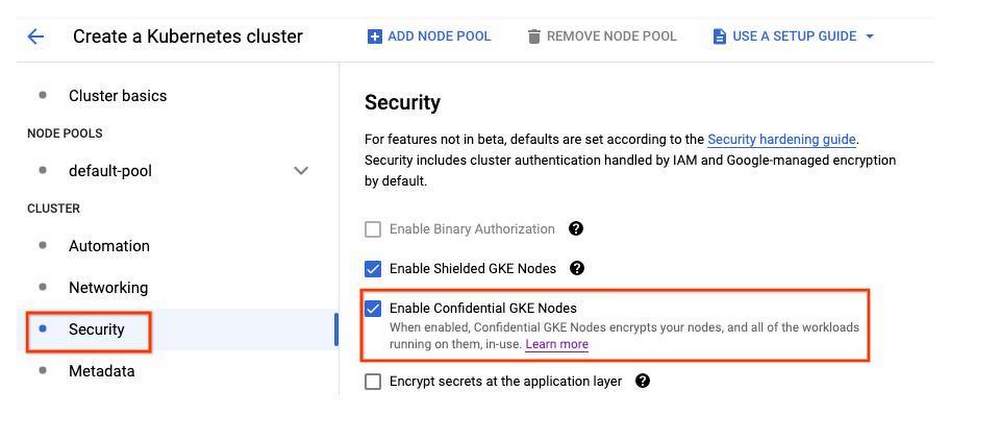
Today, we’re excited to announce the general availability of Confidential GKE Nodes. Many organizations have made Google Kubernetes Engine (GKE) the foundation of their modern application architectures. While the benefits of containers and Kubernetes can outweigh that of traditional architectures, moving to and running those apps in the cloud often entails careful planning to minimize risk and potential data exposure. To help increase security of your GKE clusters, Confidential GKE Nodes can be used.Part of the growing Confidential Computing product portfolio, Confidential GKE Nodes leverage hardware to make sure your data is encrypted in memory. The GKE workloads you run today can run confidentially without any code changes on your end. Bringing confidential computing to your container workloadsWith Confidential GKE Nodes, you can achieve encryption in-use for data processed inside your GKE cluster, without significant performance degradation. Confidential GKE Nodes are built on the same technology foundation as Confidential VM and utilize AMD Secure Encrypted Virtualization (SEV). This feature allows you to keep data encrypted in memory with node-specific, dedicated keys that are generated and managed by the processor. The keys are generated in hardware during node creation and reside solely within the processor, making them unavailable to Google or other nodes running on the host. Confidential GKE Nodes also leverage Shielded GKE nodes to offer additional protection against rootkit and bootkits, helping to ensure the integrity of the operating system you run on your Confidential GKE Nodes.Mixed node pools and stateful workloads Two new features have been added for the general availability release of Confidential GKE Nodes: mixed node pool support and PersistentVolumes. Mixing confidential node pools with non-confidential node poolsConfidential GKE Nodes can be enabled as a cluster-level security setting or a node pool-level security setting. When enabled at the cluster level, Confidential GKE Nodes enforce the use of Confidential VMs on all worker nodes. Worker nodes in a cluster can only use confidential nodes, and confidential computing can not be disabled on individual node pools. All worker nodes, including the workloads running on them, are encrypted in-use. When enabled at the node level, Confidential GKE Nodes enforce the use of Confidential VMs on specific node pools, so only worker nodes in specified node pools are running confidentially. This new capability can allow a single GKE cluster to run both confidential and non-confidential workloads. Creating regular node pools and confidential node pools in a single cluster can help minimize cluster management. To learn more, see our guide to enabling Confidential GKE Nodes on node pools.Supporting PersistentVolumes for stateful container workloadsConfidential GKE Nodes are great for protecting data in stateless and stateful workloads. Confidential GKE Nodes recently added support for PersistentVolume resources. In GKE, a PersistentVolume is a cluster resource that Pods can use for durable storage and is typically backed by a persistent disk. The pairing of PersistentVolumes with Confidential GKE Nodes is ideal for containerized applications that require block storage.PricingThere is no additional cost to deploy Confidential GKE Nodes, other than the cost of Compute Engine Confidential VM.Get started with this game-changing technologyCreating a GKE cluster that uses Confidential GKE Nodes on all nodes is easy. Simply go to the Cloud Console, click Kubernetes Engine and then click Clusters. Select “Create” and then “Configure” on GKE Standard. Under Cluster, there is a security section where you click the checkbox that says “Enable Confidential GKE Nodes.”GKE clusters can be enabled to run as Confidential under the Security Setting for Kubernetes Engine.Confidential computing transforms the way organizations process data in the cloud while preserving confidentiality and privacy. To learn more, read about our Confidential VMs and get started using your own confidential GKE Nodes today.Related ArticleA deeper dive into Confidential GKE Nodes—now available in previewConfidential GKE Nodes, now in preview, encrypt the memory of your nodes and the workloads that run on top of them.Read Article
Quelle: Google Cloud Platform

Wayfair: Accelerating MLOps to power great experiences at scale

Machine Learning (ML) is part of everything we do at Wayfair to support each of the 30 million active customers on our website. It enables us to make context-aware, real-time and intelligent decisions across every aspect of our business. We use ML models to forecast product demand across the globe, to ensure our customers can quickly access what they’re looking for. Natural language processing (NLP) models are used to analyze chat messages on our website so customers can be redirected to the appropriate customer support team as quickly as possible, without having to wait for a human assistant to become available.. ML is an integral part of our strategy for remaining competitive as a business and supports a wide range of eCommerce engineering processes at Wayfair. As an online furniture and home goods retailer, the steps we take to make the experience of our customers as smooth, convenient, and pleasant as possible determine how successful we are. This vision inspires our approach to technology and we’re proud of our heritage as a tech company, with more than 3,000 in-house engineers and data scientists working on the development and maintenance of our platform. We’ve been building ML models for years, as well as other homegrown tools and technologies, to help solve the challenges we’ve faced along the way. We began on-prem but decided to migrateto Google Cloud in 2019, utilizing a lift-and-shift strategy to minimize the number of changes we had to make to move multiple workloads into the cloud. Among other things, that meant deploying Apache Airflow clusters on the Google Cloud infrastructure and retrofitting our homegrown technologies to ensure compatibility. While some of the challenges we faced with our legacy infrastructure were resolved immediately, such as lack of scalability, others remained for our data scientists. For example, we lacked a central feature store and relied on a shared cluster with a shared environment for workflow orchestration, which caused noisy neighbor problems. As a Google Cloud customer, however, we can easily access new solutions as they become available. So in 2021, when Google Cloud launched Vertex AI, we didn’t hesitate to try it out as an end-to-end ML platform to support the work of our data scientists.One AI platform with all the ML tools neededAs big fans of open source, platform-agnostic software, we were impressed by Vertex AI Pipelines and how they work on top of open-source frameworks like Kubeflow. This enables us to build software that runs on any infrastructure. We enjoyed how the tool looks, feels, and operates. Within six months, we moved from configuring our infrastructure manually to conducting a POC, to a first production release.Next on our priority list was to use Vertex AI Feature Store to serve and use AI technologies as ML features in real-time, or in batch with a single line of code. Vertex AI Feature Store fully manages and scales its underlying infrastructure, such as storage and compute resources. That means our data scientists can now focus on feature computation logic, instead of worrying about the challenges of storing features for offline and online usage.While our data scientists are proficient in building and training models, they are less comfortable setting up the infrastructure and bringing the models to production. So, when we embarked on an MLOps transformation, it was important for us to enable data scientists to leverage a  platform as seamlessly as possible without having to know all about its underlying infrastructure. To that end, our goal was to build an abstraction on Vertex AI. Our simple python-based library interacts with the Vertex AI Pipeline and Vertex AI Features Store. And a typical data scientist can leverage this setup without having to know how Vertex AI works in the backend. That’s the vision we’re marching towards–and we’ve already started to notice its benefits.Reducing hyperparameter tuning from two weeks to under one hourWhile we enjoy using open source tools such as Apache Airflow, the way we were using it  was creating issues for our data scientists. And we frequently ran into infrastructure challenges, carried over from our legacy technologies, such as support issues and failed jobs. So we built a CI/CD pipeline using Vertex AI Pipelines, based on Kubeflow, to remove the complexity of model maintenance.Now everything is well arranged, documented, scalable, easy to test, and well organized in terms of best practices. This incentivizes people to adopt a new standardized way of working, which in turn brings its own benefits. One example that illustrates this is hyperparameter tuning, an essential part of controlling the behavior of a machine learning model. In machine learning, hyperparameter tuning or optimization is the problem of choosing a set of optimal hyperparameters for a learning algorithm. A hyperparameter is a parameter whose value is used to control the learning process. Every machine learning model will have a different hyperparameter, whose value is set before the learning process begins. And a good choice of hyperparameters can make an algorithm perform optimally. But while hyperparameter tuning is a very common process in data science, there are no standards in terms of how this should be done. Doing it in Python using a legacy infrastructure would take a data scientist on average two weeks. We have over 100 data scientists at Wayfair, so standardizing this practice and making it more efficient was a priority for us. With a standardized way of working on Vertex AI, all our data scientists can now leverage our code to access CI/CD, monitoring, and analytics out-of-the-box to conduct hyperparameter tuning in just one day. Powering great customer experiences with more ML-based functionalitiesNext, we’re working on a docker container template that will enable data scientists to deploy a running ‘hello world’ Vertex AI pipeline. It can take a data science team more than two months to get a ML model fully operational on average. With Vertex AI, we expect to cut down that time to two weeks. Like most of the things we do, this will have a direct impact on our customer experience. It’s important to remember that some ML models are more complex than others. Those that have an output that the customer immediately sees while navigating the website, such as when an item will be delivered to their door, are more complicated. This prediction is made by ML models and automated by Vertex AI. It must be accurate, and it must appear on-screen extremely quickly while customers browse the website. That means these models have the highest requirements and are the most difficult to publish to production. We’re actively working on building and implementing tools to streamline and enable continuous monitoring of our data and models in production, which we want to integrate with Vertex AI. We believe in the power of AutoML to build models faster, so our goal is to evaluate all these services in GCP and then find a way to leverage them internally. And it’s already clear that the new ways of working enabled by Vertex AI not only make the lives of our data scientists easier, but also have a ripple effect that directly impacts the experience of millions of shoppers who visit our website daily. They’re all experiencing better technology and more functionalities, faster. For a more detailed dive on how our data scientists are using Vertex AI, look for part two of this blog coming soon.Related ArticleHow Wayfair says yes with BigQuery—without breaking the bankBigQuery’s performance and cost optimization have transformed Wayfair’s internal analytics to create an environment of “yes”.Read Article
Quelle: Google Cloud Platform

Anthos on-prem and on bare metal now power Google Distributed Cloud Virtual

Last year, we announced Google Distributed Cloud (GDC), a portfolio of hardware, software, and services that will bring our infrastructure to the edge and into your data centers. In March, Google Distributed Cloud Edge became generally availableto deliver an integrated hardware and software solution for new telco and enterprise edge workloads. And today, we are pleased to share our next update for Google Distributed Cloud Virtual — a software-and services-only solution that brings our existing Anthos on-prem (for VMware vSphere and Anthos bare metal services) into the GDC portfolio under this unified new product family. Customers of Anthos on-premises (now known as GDC Virtual) will continue to enjoy the consistent management and developer experience they have come to know and expect, with no changes to current capabilities, pricing structure, or look and feel across user interfaces and will continue to see consistent roadmap additions. For customers just getting to know GDC Virtual, its capabilities will round out our GDC Edge and Hosted offerings which are designed to accelerate your cloud transformation.  Taken together, the Google Distributed Cloud portfolio for Edge, Hosted, and Virtual provides a uniform set of experiences for development, security, and management across any IT environment you choose, backed by a common Anthos API. This includes the ability to select across system form factor types, choosing between software only or integrated hardware and software solutions, and whether you prefer to be self or fully managed, by Google or another trusted partner. Based on your unique business and workload needs, you choose the scenario that works best for your organization.Cloud-managed and deployed onto your infrastructure, GDC Virtual provides a software only extension of Google Cloud allowing you to: Automate provisioning and management of GKE clusters on VMs and existing bare metal infrastructure with the requirements and form factors you choose and use the Google Cloud Console to provision Anthos clusters on vSphereEnable developers to build and deploy container-based workloads to Kubernetes directly or an application runtimeApply federated security, access control, and identity management across cloud and on-premises clustersTo further illustrate these capabilities, here are some examples of where customers might choose to deploy GDC Virtual. A customer has  a significant investment in their own VM environment. Selecting GDC  Virtual enables them to leverage their existing infrastructure to run new and modernized applications.A customer wants to bring advanced AI/ML workloads into each store. Given the need to deploy in their establishments, they have specific requirements for footprint and hardware.  With GDC Virtual, the new workloads can be deployed on hardware and in a footprint that meets their specific needs.A large auto manufacturer is on a journey to migrate their applications to the cloud.  As part of this journey, they are leveraging their existing on-premises investments. By choosing GDC Virtual, they would be able to  modernize applications in-place  before migrating to the cloud.GDC Virtual Adoption is Growing Rapidly We built Anthos three years ago to deliver a consistent cloud operational model and developer experience, and adoption has continued to grow exponentially. In fact, between 2021 and 2022, the number of customers for Anthos products grew by over five times. This includes Anthos bare metal customers (now Google GDC Virtual) growing by over four times over that same period. Now customers have more ways to consume Anthos – GDC Edge, Virtual, and Hosted – which are all powered by Anthos. Some notable customers include:TELUS – For TELUS, a leading provider of communications and technology, Anthos on-premises capabilities help enable their new Multi-Access Edge Computing (MEC) use cases. This new Telco edge solution, moves the processing and management of traffic from a centralized cloud to the edge of TELUS’ 5G network, making it possible to deploy applications and process content closer to its customers, and thus yielding several benefits including better performance, security, and customization. This includes enabling a new Connected Worker Safety solution that can be applied across a range of business verticals to help improve safety, prevent injury, and save lives. More details on this solution can be found here.  Major League Baseball (MLB) – MLB supports 30 teams spread across the US and Canada, running workloads in the cloud and at the edge with on-premises data centers at each of their ballparks. By using Anthos, they can containerize those workloads and run them in the location that makes the most sense for the application. In particular, this enables scenarios where local computing needs to occur in the park for latency reasons, such as delivering stats in the stadium, to fans, or to broadcast, or to the scoreboard. This has enabled data democratization and distribution to its 30 teams and can support improved time to insight and fan engagement.Google Corporate Engineering – With Anthos, Google Corporate Engineering is working to make operations consistent and to reduce costs across Google Cloud and on-prem distributed cloud environments by using common tooling. In 2021, Google began running its first production workloads in edge environments at corporate offices with Anthos Bare Metal and in 2022 added the first production workloads in hosted data centers. By the end of the year Google plans to have a sizable portion of our virtualized platform migrated to GDC Virtual; this final migration will include a number of enterprise workloads that are critical for the operation of our company, including security, financials, and IT. Freedom of choice with Google Distributed CloudTo us, supporting our customers’ transformation requirements means providing a Google Distributed Cloud portfolio that embraces openness and choice. GDC Virtual offers a new consumption model for customers built upon a proven Anthos stack as a software only deployment option on your infrastructure. This enables modernization efforts to progress in place at a pace that makes sense for your business. With this update for GDC Virtual, the Google Distributed Cloud portfolio can now enable consistent operations from on-premises, to edge, to cloud. To learn more about GDC Virtual check out the Google Distributed Cloud website. Current Google Cloud customers can also learn about Google Distributed Cloud by adding Anthos Service Mesh and Config Management to their GKE clusters today!Related ArticleIntroducing Google Distributed Cloud—in your data center, at the edge, and in the cloudGoogle Distributed Cloud runs Anthos on dedicated hardware at the edge or hosted in your data center, enabling a new class of low-latency…Read Article
Quelle: Google Cloud Platform

How one Googler uses talking tulips to connect with customers

Editor’s Note: Matt Feigal has spent years deep inside many of our customers’ toughest technical problems, and now helps our partners solve innumerable issues for even more customers. That success at engineering problem-solving didn’t come about as you’d expect, though. He’s got an inspiring range of skills in empathy, entertaining…and engineering.  What was your path to Google?I studied History at the University of Minnesota. I liked seeing all the angles: not just what a king did, but what happened in agriculture, in the economy, with the climate, and all the various situations and consequences. I started doing tech work to pay for my unpaid internships in  museum work and found I really enjoyed computers too.Early on I found a mentor who gave me a lot of trust, and pointed me to where I needed to skill up  (a lot). My first employer was a pacemaker company that sent me to Europe to improve research trials between the US and Europe. I really enjoyed understanding both sides of the ocean, and playing the ambassador on both cultural and technical details. Later I joined a Big Swedish Furniture Company as a lead developer, and continued this practice of bridging cultural and technical issues. Eventually I volunteered organizing tech communities and app development workshops as a way to keep myself learning and mentor others. I met a lot of Google developers this way, and that’s how I got a chance to work here.History to Engineering is an interesting path. How does it affect the way you work?I think it helps me have empathy on a couple of levels. Working both in Sales Engineering and Cloud Platforms Solutions roles, I’ve been tasked with asking customers about problems and discovering ways to solve them. I’ve learned it comes down to figuring out the one thing customers need and how that is going to fix the problem they need to solve first, so they build momentum and move faster on the next problems.  It’s a combination of engineering solutions, customer experiences, and hidden internal constraints such as culture and economics – it looks a lot like a social science problem.If there is one thing the customer needs, what is your one thing?I have to help lots of different people get motivated in the same direction. We at Google are seeing customer patterns across many companies and can best help by showing them how to apply repeatable, scalable systems. Yet every customer has complex and unique problems, and before they trust us we must prove we understand. I find combining this empathy with our experience is the best way to get them motivated and moving.  What has been unique about Google?At Google, we’re motivated by a vision, and I see that it’s what makes me and my peers successful:  we constantly build on our strengths, and challenge each other to make the most of those strengths, rather than spending too much effort filling our personal gaps. It’s a big change from my past work, and it makes for very special teams.What’s the most effective way you motivate people to use Cloud?By finding a way to uncover their passion and put it into action. I run meetups here for our partners to talk about our technology because techies love to connect and learn from each other. But it has to then go the next step: challenging them to go back to their shops and apply the new learning.Humor works too. I’ve been part of a few successful April Fool projects centered around life in Holland, like the self-driving bicycle (we ride a lot of bikes); the “Google Tulip,” for communicating with our national plant; and Google Wind for harnessing Holland’s windmills to blow away clouds. They’re funny, but more importantly we use them to build out storytelling and technical demos which show off the data pipelines, NLP, Kubernetes, etc., that real techies would use to build such a project. Since I’m not talking about a real project with these stories, it’s easier for people to quickly imagine their own problems that match the pattern. If someone in retail looks at a financial industry solution, they quickly turn off. But if we show how to talk to flowers, they imagine how that interactive voice application might work in their business.Related Article“Take that leap of faith” Meet the Googler helping customers create financial inclusionCloud Googler shares how she has brought her purpose to her work, creating equity in the financial services space.Read Article
Quelle: Google Cloud Platform