Trash talk: How moving Apigee Sense to GCP reduced our “data litter” and decreased our costs

By Sridhar Rajagopalan, Software Engineer

In the year-plus since Apigee joined the Google Cloud family, we’ve had the opportunity to deploy several of our services to Google Cloud Platform (GCP). Most recently, we completely moved Apigee Sense to GCP to use its advanced machine learning capabilities. Along the way, we also experienced some important performance improvements as judged by a drop in what we call “data litter.” In this post, we explain what data litter is, and our perspective on how various GCP services keep it at bay. Through this account, you may come to recognize your own application, and come to see data litter as an important metric to consider.

What is data litter?

First, let’s take a look at Apigee Sense and its application characteristics. At its core, Apigee Sense protects APIs running on Apigee Edge from attacks and unwanted exploitation. Those attacks are usually performed by automated processes, or “bots,” which run without the permission of the API owner. Sense is built around a four-element “CAVA” cycle: collect, analyze, visualize and act. It enhances human vigilance with statistical machine learning algorithms.

We collect a lot of traffic data as a by-product of billions of API calls that pass through Apigee Edge daily. The output end of each of the four elements in the CAVA cycle is stored in a database system. Therefore, the costs, performance and scalability of data management and data analysis toolchains are of great interest to us.

When optimizing an analytics application, there are several things that demand particular attention: latency, quality, throughput and cost.

Latency is the delay between when something happens and when we become aware of it. In the case of security, we define it as the delay between when a bot attacks and when we notice that the attack.
The quality of our algorithmic smarts is measured by true and false positives and negatives.
Throughput measures the average rate at which data arrives into the analytics application.
Cost, of course, measures the average rate at which dollars (or other currency) leave your wallet.

To this mix I like to consider a fifth metric: “data litter,” which in many ways measures the interplay between the four traditional metrics. Fundamentally, all analytics systems are GIGO (garbage in / garbage out). That is, if the data entering the system is garbage, it doesn’t matter how quickly it is processed, how smart our algorithms are, or how much data we can process every second. The money we spend does matter, but only because of questions about the wisdom of continuing to spend it.

Sources of data litter

Generally speaking, there are three main sources of data litter in an analytical application like Apigee Sense.

Timeliness of analysis: It’s the nature of a data-driven analysis engine like Sense to attempt to make a decision with all the data available to it when the decision needs to be made. A delayed decision is of little value in foiling an ongoing bot attack. Therefore, when there’s little data available to make decisions, the engine makes a less-informed decision and moves on. Any data that arrives subsequently is discarded because it is no longer useful, as the decision has already been made. The result? Data litter. 
Elasticity of data processing: If data arrives too quickly for the analysis engine to consume, it piles up and causes “data back pressure.” There are two remedies. First, to increase the size (and cost) of the analysis engine, or, alternately, to drop some data to relieve the pressure. Because you can’t scale up an analysis engine instantly, or because it is cost-prohibitive, we build a pressure release valve into the pipeline, causing data litter.
Scalability of the consumption chain: If the target database is down, or unable to consume the results at the rate at which they’re produced, you might as well stop the pipeline and discard the incoming data. It’s pointless to analyze data when there’s no way to use or store the results of the analysis. This too causes data litter.

Therefore, data litter is a holistic measure of the quality of the analysis system. It will be low only when the pipeline, analysis engine and target database are all well-tuned and constantly performing to expectations.

The easiest way to deal with the first kind of data litter is to slow down the pipeline by increasing latency. The easiest way to address the second kind is to throw money at the problem and run the analysis engine on a larger cluster. And the final problem is best addressed by adding more or bigger hardware to the database. Whichever path we take, we either increase latency and lose relevance, or lose money.

Moving to GCP

At Apigee, we track data litter with the data coverage metric, which is, roughly speaking, the inverse measure of how much of data gets dropped or otherwise doesn’t contribute to the analysis. When we moved the Sense analytics chain to GCP, the data coverage metric went from below 80% to roughly 99.8% for one of our toughest customer use cases. Put another way, our data litter decreased from over 20%, or one in five, to approximately one in five hundred. That’s a decrease of a factor of approximately 100, or two orders of magnitude!

The chart below shows the fraction of data available and used for decision making before and after our move to GCP. The chart shows the numbers for four different APIs, representing a subset of Sense customers.

These improvements were measured even while the cost of the deployed system, as well its the pipeline latency, were simultaneously tightened. Meanwhile, our throughput and algorithms stayed the same, and latencies and cost both dropped. Since the release a couple of months ago, these savings, along with the availability and performance benefits of the system, have persisted, while our customer base and the processed traffic has grown. So we’re getting more reliable answers more quickly than we did before and paying less than we did for almost the exact same use case. Wow!

Where did the data litter go?

There were two problems that accounted for the bulk of the data litter in the Sense pipeline. These were the elasticity of data processing and the scalability of the transactional store.

To alert customers of an attack as quickly as possible, we designed our system with adequate latency to avoid systematic data litter. In our environment, two features of the GCP platform contributed most significantly to the reduction of unplanned data litter.:

System elasticity. The data rate coming into the system is never uniform, and is especially high when there is an ongoing attack. The system is most under pressure when it is of highest value and needs to have enough elasticity to be able to deal with spikes without being provisioned significantly above the median data rates. Without this, the pressure release valve needs to be constantly engaged. 
Transactional processing power. The transactional load on the database at the end of the chain peaks during an attack. It also determines the performance characteristics of the user experience and of protective enforcement, both of which add to the workload when an API is under attack. Therefore, transactional loads need to be able to comfortably scale to meet the demands of the system near its limits. 

As part of this transition, we moved our analysis chain to Cloud Dataproc, which provided significantly more nimble and cost controlled elasticity. Because the cost of the analytics pipeline represented our most significant constraint, we were able to size our processing capacity limits more aggressively. This gave us the additional elastic capacity needed to meet peak demands without increasing our cost.

We also moved our target database to BigQuery. BigQuery distributes and scales cost-effectively and without hiccups well beyond our needs, and indeed, beyond most reasonable IT budgets. This completely eliminated the back pressure issue from the end of the chain.

Because two of the three sources of data litter are now gone, our team is able to focus on improving the timeliness of our analysis—ensuring that we move data from where it’s gathered through the analysis engine and make more intelligent and more relevant decisions with lower latency. This is what Sense was intended to do.

By moving Apigee Sense to GCP, we feel that we’ve taken back the control of our destiny. I’m sure that our customers will notice the benefits not just in terms of a more reliable service, but also in the velocity with which we are able to ship new capabilities to them.

Quelle: Google Cloud Platform

Whitepaper: Lift and shift to Google Cloud Platform

By Bryan Nairn, Product Marketing Manager 

Today we’re announcing the availability of a new white paper entitled “How to Lift-and-Shift a Line of Business Application onto Google Cloud Platform.” This is the first in a series of four white papers focused on application migration and modernization. Stay tuned to the GCP blog as we release the next installments in the coming weeks.

The “Lift-and-Shift” white paper walks you through migrating a Microsoft Windows-based, two-tier, expense reporting, web-application that currently resides on-premises, in your data center. The white paper provides background information, and a three-phased project methodology, as well as pointers to application code on github. You’ll be able to replicate the scenario on-premises, and walk through migrating your application to Google Cloud Platform (GCP).

The phased project includes implementation of initial GCP resources, including GCP networking, a site-to-site VPN and virtual machines (VMs), as well as setting up Microsoft SQL Server availability groups, and configuring Microsoft Active Directory (AD) replication in your new hybrid environment.

Want to learn more about how to lift and shift your own application by reading through (or following the same steps) in the white paper? If you’re ready to get started, you can download your copy of the white paper and start your migration today.

Quelle: Google Cloud Platform

Greetings from North Pole Operations! All systems go!

By Merry, Chief Information Elf, North Pole

Hi there! I’m Merry, Santa’s CIE (Chief Information Elf), responsible for making sure computers help us deliver joy to the world each Christmas. My elf colleagues are really busy getting ready for the big day (or should I say night?), but this year, my team has things under control, thanks to our fully cloud-native architecture running on Google Cloud Platform (GCP)! What’s that? You didn’t know that the North Pole was running in the cloud? How else did you think that we could scale to meet the demands of bringing all those gifts to all those children around the world?

You see, North Pole Operations have evolved quite a lot since my parents were young elves. The world population increased from around 1.6 billion in the early 20th century to 7.5 billion today. The elf population couldn’t keep up with that growth and the increased production of all these new toys using our old methods, so we needed to improve efficiency.

Of course, our toy list has changed a lot too. It used to be relatively simple — rocking horses, stuffed animals, dolls and toy trucks, mostly. The most complicated things we made when I was a young elf were Teddy Ruxpins (remember those?). Now toy cars and even trading card games come with their own apps and use machine learning.

This is where I come in. We build lots of computer programs to help us. My team is responsible for running hundreds of microservices. I explain microservices to Santa as a computer program that performs a single service. We have a microservice for processing incoming letters from kids, another microservice for calculating kids’ niceness scores, even a microservice for tracking reindeer games rankings.

Here’s an example of the Letter Processing Microservice, which takes handwritten letter in all languages (often including spelling and grammatical errors) and turns each one into text.

Each microservice runs on one or more computers (also called virtual machines or VMs). We tried to run it all from some computers we built here at the North Pole but we had trouble getting enough electricity for all these VMs (solar isn’t really an option here in December). So we decided to go with GCP. Santa had some reservations about “the Cloud” since he thought it meant our data would be damaged every time it rained (Santa really hates rain). But we managed to get him a tour of a data center (not even Santa can get in a Google data center without proper clearances), and he realized that cloud computing is really just a bunch of computers that Google manages for us.

Google lets us use projects, folders and orgs to group different VMs together. Multiple microservices can make up an application and everything together makes up our system. Our most important and most complicated application is our Christmas Planner application. Let’s talk about a few services in this application and how we make sure we have a successful Christmas Eve.

Our Christmas Planner application includes microservices for a variety of tasks: microservices generate lists of kids that are naughty or nice, as well as a final list of which child receives which gift based on preferences and inventory. Microservices plan the route, taking into consideration inclement weather and finally, generate a plan for how to pack the sleigh.

Small elves, big data

Our work starts months in advance, tracking naughty and nice kids by relying on parent reports, teacher reports, police reports and our mobile elves. Keeping track of almost 2 billion kids each year is no easy feat. Things really heat up around the beginning of December, when our army of Elves-on-the-Shelves are mobilized, reporting in nightly.

We send all this data to a system called BigQuery where we can easily analyze the billions of reports to determine who’s naughty and who’s nice in just seconds.

Deck the halls with SLO dashboards

Our most important service level indicator or SLI is “child delight”. We target “5 nines” or 99.999% delightment level meaning 99,999/100,000 nice children are delighted. This limit is our service level objective or SLO and one of the few things everyone here in the North Pole takes very seriously. Each individual service has SLOs we track as well.

We use Stackdriver for dashboards, which we show in our control center. We set up alerting policies to easily track when a service level indicator is below expected and notify us. Santa was a little grumpy since he wanted red and green to be represented equally and we explained that the red warning meant that there were alerts and incidents on a service, but we put candy canes on all our monitors and he was much happier.

Merry monitoring for all

We have a team of elite SREs (Site Reliability Elves, though they might be called Site Reliability Engineers by all you folks south of the North Pole) to make sure each and every microservice is working correctly, particularly around this most wonderful time of the year. One of the most important things to get right is the monitoring.

For example, we built our own “internet of things” or IoT where each toy production station has sensors and computers so we know the number of toys made, what their quota was and how many of them passed inspection. Last Tuesday, there was an alert that the number of failed toys had shot up. Our SREs sprang into action. They quickly pulled up the dashboards for the inspection stations and saw that the spike in failures was caused almost entirely by our baby doll line. They checked the logs and found that on Monday, a creative elf had come up with the idea of taping on arms and legs rather than sewing them to save time. They rolled back this change immediately. Crisis averted. Without the proper monitoring and logging, it would be very difficult to find and fix the issue, which is why our SREs consider it the base of their gift reliability pyramid.

All I want for Christmas is machine learning

Running things in Google Cloud has another benefit: we can use technology they’ve developed at Google. One of our most important services is our gift matching service, which takes 50 factors as input including the child’s wish list, niceness score, local regulations, existing toys, etc., and comes up with the final list of which gifts should be delivered to this child. Last year, we added machine learning or ML, where we gave the Cloud ML engine the last 10 years of inputs, gifts and child and parent delight levels. It automatically learned a new model to use in gift matching based on this data.

Using this new ML model, we reduced live animal gifts by 90%, ball pits by 50% and saw a 5% increase in child delight and a 250% increase in parent delight.

Tis the season for sharing

Know someone who loves technology that might enjoy this article or someone who reminds you of Santa — someone with many amazing skills but whose eyes get that “reindeer-in-the-headlights look” when you talk about cloud computing? Share this article with him or her and hopefully you’ll soon be chatting about all the cool things you can do with cloud computing over Christmas cookies and eggnog… And be sure to tell them to sign up for a free trial — Google Cloud’s gift to them!
Quelle: Google Cloud Platform

What a year! Google Cloud Platform in 2017

By Alex Barrett and Barrett Williams, Google Cloud blog editors

The end of the year is a time for reflection . . . and making lists. As 2017 comes to a close, we thought we’d review some of the most memorable Google Cloud Platform (GCP) product announcements, white papers and how-tos, as judged by popularity with our readership.

As we pulled the data for this post, some definite themes emerged about your interests when it comes to GCP:

You love to hear about advanced infrastructure: CPUs, GPUs, TPUs, better network plumbing and more regions. 
 How we harden our infrastructure is endlessly interesting to you, as are tips about how to use our security services. 
 Open source is always a crowd-pleaser, particularly if it presents a cloud-native solution to an age-old problem. 
 You’re inspired by Google innovation — unique technologies that we developed to address internal, Google-scale problems.

So, without further ado, we present to you the most-read stories of 2017.

Cutting-edge infrastructure
If you subscribe to the “bigger is always better” theory of cloud infrastructure, then you were a happy camper this year. Early in 2017, we announced that GCP would be the first cloud provider to offer Intel Skylake architecture, GPUs for Compute Engine and Cloud Machine Learning became generally available and Shazam talked about why cloud GPUs made sense for them. In the spring, you devoured a piece on the performance of TPUs, and another about the then-largest cloud-based compute cluster. We announced yet more new GPU models and topping it all off, Compute Engine began offering machine types with a whopping 96 vCPUs and 624GB of memory.

It wasn’t just our chip offerings that grabbed your attention — you were pretty jazzed about Google Cloud network infrastructure too. You read deep dives about Espresso, our peering-edge architecture, TCP BBR congestion control and improved Compute Engine latency with Andromeda 2.1. You also dug stories about new networking features: Dedicated Interconnect, Network Service Tiers and GCP’s unique take on sneakernet: Transfer Appliance.

What’s the use of great infrastructure without somewhere to put it? 2017 was also a year of major geographic expansion. We started out the year with six regions, and ended it with 13, adding Northern Virginia, Singapore, Sydney, London, Germany, Sao Paolo and Mumbai. This was also the year that we shed our Earthly shackles, and expanded to Mars ;)

Security above all

Google has historically gone to great lengths to secure our infrastructure, and this was the year we discussed some of those advanced techniques in our popular Security in plaintext series. Among them: 7 ways we harden our KVM hypervisor, Fuzzing PCI Express and Titan in depth.

You also grooved on new GCP security services: Cloud Key Management and managed SSL certificates for App Engine applications. Finally, you took heart in a white paper on how to implement BeyondCorp as a more secure alternative to VPN, and support for the European GDPR data protection laws across GCP.

Open, hybrid development

When you think about GCP and open source, Kubernetes springs to mind. We open-sourced the container management platform back in 2014, but this year we showed that GCP is an optimal place to run it. It’s consistently among the first cloud services to run the latest version (most recently, Kubernetes 1.8) and comes with advanced management features out of the box. And as of this fall, it’s certified as a conformant Kubernetes distribution, complete with a new name: Google Kubernetes Engine.

Part of Kubernetes’ draw is as a platform-agnostic stepping stone to the cloud. Accordingly, many of you flocked to stories about Kubernetes and containers in hybrid scenarios. Think Pivotal Container Service and Kubernetes’ role in our new partnership with Cisco. The developers among you were smitten with Cloud Container Builder, a stand-alone tool for building container images, regardless of where you deploy them.

But our open source efforts aren’t limited to Kubernetes — we also made significant contributions to Spinnaker 1.0, and helped launch the Istio and Grafeas projects. You ate up our “Partnering on open source” series, featuring the likes of HashiCorp, Chef, Ansible and Puppet. Availability-minded developers loved our Customer Reliability Engineering (CRE) team’s missive on release canaries, and with API design: Choosing between names and identifiers in URLs, our Apigee team showed them a nifty way to have their proverbial cake and eat it too.

Google innovation

In distributed database circles, Google’s Spanner is legendary, so many of you were delighted when we announced Cloud Spanner and a discussion of how it defies the CAP Theorem. Having a scalable database that offers strong consistency and great performance seemed to really change your conception of what’s possible — as did Cloud IoT Core, our platform for connecting and managing “things” at scale. CREs, meanwhile, showed you the Google way to handle an incident.

2017 was also the year machine learning became accessible. For those of you with large datasets, we showed you how to use Cloud Dataprep, Dataflow, and BigQuery to clean up and organize unstructured data. It turns out you don’t need a PhD to learn to use TensorFlow, and for visual learners, we explained how to visualize a variety of neural net architectures with TensorFlow Playground. One Google Developer Advocate even taught his middle-school son TensorFlow and basic linear algebra, as applied to a game of rock-paper-scissors.

Natural language processing also became a mainstay of machine learning-based applications; here, we highlighted with a lighthearted and relatable example. We launched the Video Intelligence API and showed how Cloud Machine Learning Engine simplifies the process of training a custom object detector. And the makers among you really went for a post that shows you how to add machine learning to your IoT projects with Google AIY Voice Kit. Talk about accessible!

Lastly, we want to thank all our customers, partners and readers for your continued loyalty and support this year, and wish you a peaceful, joyful, holiday season. And be sure to rest up and visit us again Next year. Because if you thought we had a lot to say in 2017, well, hold onto your hats.

Quelle: Google Cloud Platform

Consequences of SLO violations — CRE life lessons

By Alex Bramley, Customer Reliability Engineer

Previous episodes of CRE life lessons have talked in detail about the importance of quantifying a service’s availability and using SLOs to manage the competing priorities of features-focused development teams (“devs”) versus a reliability-focused SRE team. Good SLOs can help reduce organizational friction and maintain development velocity without sacrificing reliability. But what should happen when SLOs are violated?

In this blogpost, we discuss why you should create a policy on how SREs and devs respond to SLO violations, and provide some ideas for the structure and components of that policy. Future posts will go over an example taken from an SRE team here at Google, and work through some scenarios that put that policy into action.

Features or reliability?

In the ideal world (assuming spherical SREs in a vacuum), an SLO represents the dividing line between two binary states: developing new features when there’s error budget to spare, and improving service reliability when there isn’t. Most real engineering organizations will instead vary their effort on a spectrum between these two extremes as business priorities dictate. Even when a service is operating well within its SLOs, choosing to do some proactive reliability work may reduce the risk of future outages, improve efficiency and provide cost savings; conversely it’s rare to find an organization that completely drops all in-flight feature development as soon as an SLO is violated.

Describing key inflection points from that spectrum in a policy document is an important part of the relationship between an SRE team and the dev teams with whom they partner. This ensures that all parts of the organization have roughly the same understanding around what is expected of them when responding to (soon to be) violated SLOs, and – most importantly – that the consequences of not responding are clearly communicated to all parties. The exact choice of inflection points and consequences will be specific to the organization and its business priorities.

Inflection points

Having a strong culture of blameless postmortems and fixing root causes should eventually mean that most SLO violations are unique – informally, “we are in the business of novel outages.” It follows that the response to each violation will also be unique; making judgement calls around these is a part of an SREs job when responding to the violation. But a large variance in the range of possible responses results in inconsistency of outcomes, people trying to game the system and uncertainty for the engineering organization.

For the purposes of an escalation policy, we recommend that SLO violations be grouped into a few buckets of increasing severity based on the cumulative impact of the violation over time (i.e., how much error budget has been burned over what time horizon), with clearly defined boundaries for moving from one bucket to another. It’s useful to have some business justification for why violations are grouped as they are, but this should be in an appendix to the main policy to keep the policy itself clear.

It’s a good idea to tie at least some of the bucket boundaries to any SLO-based alerting you have. For example, you may choose to page SREs to investigate when 10% of the weekly error budget has been burned in the past hour; this is an example of an inflection point tied to a consequence. It forms the boundary between buckets we might informally title “not enough error budget burned to notify anyone immediately” and “someone needs to investigate this right now before the service is out of its long-term SLO.” We’ll examine more concrete examples in our next post, where we look at a policy from an SRE team within Google.

Consequences

The consequences of a violation are the meat of the policy. They describe actions that will be taken to bring the service back into SLO, whether this is by root causing and fixing the relevant class of issue, automating any stop-gap mitigation tasks or by reducing the near-term risk of further deterioration. Again, the choice of consequence for a given threshold is going to be specific to the organization defining the policy, but there are several broad areas into which these fall. This list is not exhaustive!

Notify someone of potential or actual SLO violation

The most common consequence of any potential or actual SLO violation is that your monitoring systems tells a human that they need to investigate and take remedial action. For a mature, SRE-supported service, this will normally be in the form of a page to the oncall when a large quantity of error budget has been burned over a short window, or a ticket when there’s an elevated burn rate over a longer time horizon. It’s not a bad idea for that page to also create a ticket in which you can record debugging details, use as a centralized communication point and reference when escalating a serious violation.

The relevant dev team should also be notified. It’s OK for this to be a manual process; the SRE team can add value by filtering and aggregating violations and providing meaningful context. But ideally a small group of senior people in the dev team should be made aware of actual violations in an automated fashion (e.g., by CCing them on any tickets), so that they’re not surprised by escalations and can chime in if they have pertinent information.

Escalate the violation to the relevant dev team

The key difference between notification and escalation is the expectation of action on the part of the dev team. Many serious SLO violations require close cooperation between SREs and developers to find the root cause and prevent recurrence. Escalation is not an admission of defeat. SREs should escalate as soon as they’re reasonably sure that input from the dev team will meaningfully reduce the time to resolution. The policy should set an upper bound on the length of time an SLO violation (or near miss) can persist without escalation.

Escalation does not signify the end of SRE’s involvement with an SLO violation. The policy should describe the responsibilities of each team and a lower bound on the amount of engineering time they should divert towards investigating the violation and fixing the root cause. It will probably be useful to describe multiple levels of escalation, up to and including getting executive-level support to commandeer the engineering time of the entire dev team until the service is reliable.

Mitigate risk of service changes causing further impact to SLOs

Since a service in violation of its SLO is by definition making users unhappy, day-to-day operations that may increase the rate at which error budget is burned should be slowed or stopped completely. Usually, this means restricting the rate of binary releases and experiments, or stopping them completely until the service is again within SLO. This is where the policy needs to ensure all parties (SRE, development, QA/testing, product and execs) are on the same page. For some engineering organizations, the idea that SLO violations will impact their development and release velocity may be difficult to accept. Reaching a documented agreement on how and when releases will be blocked – and what fraction of engineers will be dedicated to reliability work when this occurs – is a key goal.

Revoke support for the service

If a service is shown to be incapable of meeting its agreed-upon SLOs over an extended time period, and the dev team responsible for that service is unwilling to commit to engineering improvements to its reliability, then SRE teams at Google have the option of handing back the responsibility for running that service in production. This is unlikely to be the consequence of a single SLO violation, rather the combination of multiple serious outages over an extended period of time, where postmortem AIs have been assigned to the dev team but not prioritized or completed.

This has worked well at Google, because it changes the incentives behind any conversation around engineering for reliability. Any dev team that neglects the reliability of a service knows that they will bear the consequences of that neglect. By definition, revoking SRE support for a service is a last resort, but stating the conditions that must be met for it to happen makes it a matter of policy, not an idle threat. Why should SRE care about service reliability if the dev team doesn’t?

Summary

Hopefully this post has helped you think about the trade-off between engineering for reliability and features, and how responding to SLO violations moves the needle towards reliability. In our next post, we’ll present an escalation policy from one of Google’s SRE teams, to show the choices they made to help the dev teams they partner with maintain a high development velocity.

Quelle: Google Cloud Platform

Introducing Preemptible GPUs: 50% Off

By Chris Kleban and Michael Basilyan, GCE Product Managers

In May 2015, Google Cloud introduced Preemptible VM instances to dramatically change how you think about (and pay for) computational resources for high-throughput batch computing, machine learning, scientific and technical workloads. Then last year, we introduced lower pricing for Local SSDs attached to Preemptible VMs, expanding preemptible cloud resources to high performance storage. Now we’re taking it even further by announcing the beta release of GPUs attached to Preemptible VMs.

You can now attach NVIDIA K80 and NVIDIA P100 GPUs to Preemptible VMs for $0.22 and $0.73 per GPU hour, respectively. This is 50% cheaper than GPUs attached to on-demand instances, which we also recently lowered. Preemptible GPUs will be a particularly good fit for large-scale machine learning and other computational batch workloads as customers can harness the power of GPUs to run distributed batch workloads at predictably affordable prices.

As a bonus, we’re also glad to announce that our GPUs are now available in our us-central1 region. See our GPU documentation for a full list of available locations.

Resources attached to Preemptible VMs are the same as equivalent on-demand resources with two key differences: Compute Engine may shut them down after providing you a 30-second warning, and you can use them for a maximum of 24 hours. This makes them a great choice for distributed, fault-tolerant workloads that don’t continuously require any single instance, and allows us to offer them at a substantial discount. But just like its on-demand equivalents, preemptible pricing is fixed. You’ll always get low cost, financial predictability and we bill on a per-second basis.
Any GPUs attached to a Preemptible VM instance will be considered Preemptible and will be billed at the lower rate. To get started, simply append –preemptible to your instance create command in gcloud, specify scheduling.preemptible to true in the REST API or set Preemptibility to “On” in the Google Cloud Platform Console and then attach a GPU as usual. You can use your regular GPU quota to launch Preemptible GPUs or, alternatively, you can request a special Preemptible GPUs quota that only applies to GPUs attached to Preemptible VMs.

For users looking to create dynamic pools of affordable GPU power, Compute Engine’s managed instance groups can be used to automatically re-create your preemptible instances when they’re preempted (if capacity is available). Preemptible VMs are also integrated into cloud products built on top of Compute Engine, such as Kubernetes Engine (GKE’s GPU support is currently in preview. The sign-up form can be found here).

Over the years we’ve seen customers do some very exciting things with preemptible resources: everything from solving problems in satellite image analysis, financial services, questions in quantum physics, computational mathematics and drug screening.

“Preemptible GPU instances from GCP give us the best combination of affordable pricing, easy access and sufficient scalability. In our drug discovery programs, cheaper computing means we can look at more molecules, thereby increasing our chances of finding promising drug candidates. Preemptible GPU instances have advantages over the other discounted cloud offerings we have explored, such as consistent pricing and transparent terms. This greatly improves our ability to plan large simulations, control costs and ensure we get the throughput needed to make decisions that impact our projects in a timely fashion.” 

— Woody Sherman, CSO, Silicon Therapeutics 

We’re excited to see what you build with GPUs attached to Preemptible VMs. If you want to share stories and demos of the cool things you’ve built with Preemptible VMs, reach out on Twitter, Facebook or G+.

For more details on Preemptible GPU resources, please check out the preemptible documentation, GPU documentation and best practices. For more pricing information, take a look at our Compute Engine pricing page or try out our pricing calculator. If you have questions or feedback, please visit our Getting Help page.

To get started using Preemptible GPUs today; sign up for Google Cloud Platform and get $300 in credits to try out Preemptible GPUs.

Quelle: Google Cloud Platform

Simplify Cloud VPC firewall management with service accounts

By Daniel Merino, Technical Program Manager and Srinath Padmanabhan, Product Marketing Manager 

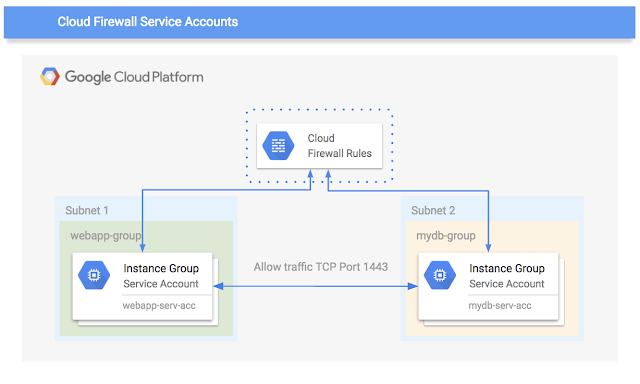
Firewalls provide the first line of network defense for any infrastructure. On Google Cloud Platform (GCP), Google Cloud VPC firewalls do just that—controlling network access to and between all the instances in your VPC. Firewall rules determine who’s allowed to talk to whom and more importantly who isn’t. Today, configuring and maintaining IP-based firewall rules is a complex and manual process that can lead to unauthorized access if done incorrectly. That’s why we’re excited to announce a powerful new management feature for Cloud VPC firewall management: support for service accounts.

If you run a complex application on GCP, you’re probably already familiar with service accounts in Cloud Identity and Access Management (IAM) that provide an identity to applications running on virtual machine instances. Service accounts simplify the application management lifecycle by providing mechanisms to manage authentication and authorization of applications. They provide a flexible yet secure mechanism to group virtual machine instances with similar applications and functions with a common identity. Security and access control can subsequently be enforced at the service account level.

Using service accounts, when a cloud-based application scales up or down, new VMs are automatically created from an instance template and assigned the correct service account identity. This way, when the VM boots up, it gets the right set of permissions and within the relevant subnet, so firewall rules are automatically configured and applied.

Further, the ability to use Cloud IAM ACLs with service accounts allows application managers to express their firewall rules in the form of intent, for example, allow my “application x” servers to access my “database y.” This remediates the need to manually manage Server IP Address lists while simultaneously reducing the likelihood of human error.

This process is leaps-and-bounds simpler and more manageable than maintaining IP address-based firewall rules, which can neither be automated nor templated for transient VMs with any semblance of ease.

Here at Google Cloud, we want you to deploy applications with the right access controls and permissions, right out of the gate. Click here to learn how to enable service accounts. And to learn more about Cloud IAM and service accounts, visit our documentation for using service accounts with firewalls.
Quelle: Google Cloud Platform

Announcing Go 1.8 on App Engine Standard Environment

By Vivek Sekhar, Product Manager

We’re happy to announce that Go 1.8 for the Google App Engine standard environment is now generally available and is covered by the App Engine Service Level Agreement (SLA). As of today, Go 1.8 will also be the default for newly-deployed apps that specify “api_version:go1″ in their “app.yaml” files. Existing deployments will not be modified.

Go 1.8 brings a number of library, runtime, performance and security improvements (see the the Go 1.7 Release Notes and the Go 1.8 Release Notes for details). We encourage you to test and re-deploy your apps to make use of them.

Note that the old x/net/context package was moved to the standard library as the “context” package starting in Go 1.7. You can automatically update your imports via “go tool fix -r context” if you have Go 1.8 installed.

If you need to continue deploying apps using the old Go 1.6 runtime, you can update your “app.yaml” file to specify “api_version:go1.6″.

Quelle: Google Cloud Platform

GCP Podcast hits 100 episodes — here are the 10 most popular episodes

By Mark Mandel and Francesc Campoy Flores, Developer Advocates

It was 2015, and we were having coffee in a Google cafeteria when we, Francesc and Mark, came up with the idea for the Google Cloud Platform Podcast. Shortly thereafter, the first episode “We Got a Podcast” was released on the internet. And now, after years of interviewing Google Cloud Platform (GCP) customers, product managers, engineers, developer experts, salespeople, support staff and more, we’ve released our 100th episode!

To celebrate this milestone, we invited as our guest the venerable Vint Cerf, who’s one of the “Fathers of the Internet,” having co-designed the TCP/IP protocols and the architecture of the internet, and who is currently vice president and Chief Internet Evangelist at Google. We talked to him about the history of the internet, net neutrality, the next billion users, interplanetary networks and more. His interview is totally amazing and you should definitely listen to it.

It also got us thinking about all the other amazing interviews we’ve done over the years. If you aren’t familiar with the Google Cloud Platform Podcast — or if you just want to relive the glory — here are the top 10 most downloaded episodes since it was introduced:

10. #93 What’s AI with Melanie Warrick 
Fellow Developer Advocate, Melanie talks to us all about the differences between ML and AI, as well as discussing applications and where she sees this technology going in the future.

9. #82 Prometheus with Julius Volz 
Julius, co-founder of open source monitoring platform Prometheus talks to us all about the history of the platform as well as its capabilities as a monitoring and alerting system.

8. #90 Office of the CTO with Greg DeMichillie 
Greg DeMichillie talks about how GCP interacts with enterprise customers through the Office of the CTO, and lessons that he learned from them.

7. #56 A Year in Review
A review of Mark and Francesc’s favorite moments of 2016 — a great historical snapshot of the technology of GCP in 2016.
6. #76 Kubernetes 1.6 with Daniel Smith
We’re joined by one of the engineers on Kubernetes, Daniel Smith, and we talk in depth about the new features of Kubernetes 1.6, and how developers can take advantage of them. (Mark really nerds out on this one).

5. #62 Cloud Spanner with Deepti Srivastava
Cloud Spanner has been a hugely popular product for GCP, and we talk to Product Manager Deepti Srivastava about why it’s so technologically amazing as well as a game changer for customers looking for a distributed, horizontally scalable database.

4. #71 Cloud Machine Learning Engine with Yufeng Guo 
Another Developer Advocate, Yufeng, comes onto the podcast to introduce us to machine learning, and discuss how Cloud Machine Learning Engine can be used to train, as well as host, TensorFlow models.

3. #75 Container Engine with Chen Goldberg 
We’re delighted to have Chen, Google Engineering Director for Container Engine and Kubernetes, to talk with us about the history of Kubernetes and why it’s open source, as well the integrations between Container Engine and GCP that make it so special.

2. #91 The Future of Media with Machine Learning with Amit Pande 
This is a fantastic episode with Amit, Product Management Leader for Google Cloud, to provide practical examples of how machine learning could be applied to the media and entertainment industry. Many things were learned!

1. #88 Kubernetes 1.7 with Tim Hockin 
One of the engineers that started the Kubernetes project, Tim comes onto the podcast to tell us all about the new feature of Kubernetes 1.7. Also, Tim is a super nice guy.

Lastly, the Google Cloud Platform Podcast would like to say thank you to all you listeners that have downloaded the podcast, the interviewees that gave us their time and all the people behind the scenes that helped edit, promote, procure equipment and more. Without all of you, the 100th episode would never have been possible.

To listen to more GCP podcasts, visit gcppodcast.com, or search for it in your favorite podcast app. See you all next week!
Quelle: Google Cloud Platform

Building good SLOs – CRE life lessons

By Robert van Gent and Stephen Thorne, Customer Reliability Engineers and Cody Smith, Site Reliability Engineer

In a previous episode of CRE Life Lessons, we discussed how choosing good service level indicators (SLIs) and service level objectives (SLOs) is critical for defining and measuring the reliability of your service. There’s also a whole chapter in the SRE book about this topic. In this episode, we’re going to get meta and go into more detail about some best practices we use at Google to formulate good SLOs for our SLIs.

SLO musings

SLOs are objectives that your business aspires to meet and intends to take action to defend; just remember, your SLOs are not your SLAs (service level agreements)! You should pick SLOs that represent the most critical aspects of the user experience. If you meet an SLO, your users and your business should be happy. Conversely, if the system does not meet the SLO, that implies there are users who are being made unhappy!

Your business needs to be able to defend an endangered SLO by reducing the frequency of outages, or reducing the impact of outages when they occur. Some ways to do this might include: slowing down the rate at which you release new versions, or by implementing reliability improvements instead of features. All parts of your business need to acknowledge that these SLOs are valuable and should be defended through trade-offs.

Here are some important things to keep in mind when designing your SLOs:

An SLO can be a useful tool for resolving meaningful uncertainty about what a team should be doing. The objective is a line in the sand between “we definitely need to work on this issue” and “we might not need to work on this issue.” Therefore, don’t pick SLO targets that are higher than what you actually need, even if you happen to be meeting them now, as that reduces your flexibility to change things in the future, including trade offs against reliability, like development velocity.

Group queries into SLOs by user experience, rather than by specific product elements or internal implementation details. For example, direct responses to user action should be grouped into a different SLO than background or ancillary responses (e.g., thumbnails). Similarly, “read” operations (e.g., view product) should be grouped into a different SLO than lower volume but more important “write” ones (e.g., check out). Each SLO will likely have different availability and latency targets.

Be explicit about the scope of your SLOs and what they cover (which queries, which data objects) and under what conditions they are offered. Be sure to consider questions like whether or not to count invalid user requests as errors, or happens when a single client spams you with lots of requests.

Finally, though somewhat in tension with the above, keep your SLOs simple and specific. It’s better not to cover non-critical operations with an SLO than to dilute what you really care about. Gain experience with a small set of SLOs; launch and iterate!

Example SLOs

Availability

Here we’re trying to answer the question “Was the service available to our user?” Our approach is to count the failures and known missed requests, and report the measurement as a percentage. Record errors from the first point that is in your control (e.g., data from your Load Balancer, not from the browser’s HTTP requests). For requests between microservices, record data from the client side, not the server side.

That leaves us with an SLO of the form:

Availability: <service> will <respond successfully> for <a customer scope> for at least <percentage> of requests in the <SLO period>

For example . . .

Availability: Node.js will respond with a non-503 within 30 seconds for browser pageviews for at least 99.95% of requests in the month.

. . . and . . .

Availability: Node.js will respond with a non-503 within 60 seconds for mobile API calls for at least 99.9% of requests in the month.

For requests that took longer than 30 seconds (60 second for mobile), the service might as well have been down, so they count against our availability SLO.

Latency

Latency is a measure of how well a service performed for our users. We count the number of queries that are slower than a threshold, and report them as a percentage of total queries. The best measurements are done as close to the client as possible, so measure latency at the Load Balancer for incoming web requests, and from the client not the server for requests between microservices.

Latency: <service> will respond within <time limit> for at least <percentage> of requests in the <SLO period>.

For example . . .

Latency: Node.js will respond within 250ms for at least 50% of requests in the month, and within 3000ms for at least 99% of requests in the month.

Percentages are your friend . . .
Note that we expressed our latency SLI as a percentage: “percentage of requests with latency < 3000ms” with target of 99%, not “99th percentile latency in ms” with target “< 3000ms”. This keeps SLOs consistent and easy to understand, because they all have the same unit and the same range. Also, accurately computing percentiles across large data sets is hard, while counting the number of requests below a threshold is easy. You’ll likely want to monitor multiple thresholds (e.g., percentage of requests < 50ms, < 250ms, . . .), but having SLO targets of 99% for one threshold, and possibly 50% for another, is generally sufficient.

Avoid targeting average (mean) latency — it’s almost never what you want. Averages can hide outliers, and sufficiently small values are indistinguishable from zero; users will not notice a difference between 50 ms and 250 ms for a full page response time, and thus they should be comparably good. There’s a big difference between an average of 250ms because all requests are taking 250ms, and an average of 250ms because 95% of requests are taking 1ms and 5% of requests are taking 5s.

. . . except 100%
A target of 100% is impossible over any meaningful length of time. It’s also likely not necessary. SREs use SLOs to embrace risk; the inverse of your SLO target is your error budget, and if your SLO target is 100% that means you have no error budget! In addition, SLOs are a tool for establishing team priorities — dividing top-priority work from work that’s prioritized on a case-by-case basis. SLOs tend to lose their credibility if every individual failure is treated as a top priority.

Regardless of the SLO target that you eventually choose, the discussion is likely to be very interesting; be sure to capture the rationale for your chosen target for posterity.

Reporting
Report on your SLOs quarterly, and use quarterly aggregates to guide policies, particularly pager thresholds. Using shorter periods tends to shift focus to smaller, day-to-day issues, and away from the larger, infrequent issues that are more damaging. Any live reporting should use the same sliding window as the quarterly report, to avoid confusion; the published quarterly report is merely a snapshot of the live report.

Example quarterly SLO summary

This is how you might present the historical performance of your service against SLO, e.g., for a semi-annual service report, where the SLO period is one quarter:

SLO

Target

Q2

Q3

Web Availability

99.95%

99.92%

99.96%

Mobile Availability

99.9%

99.91%

99.97%

Latency ≤ 250ms

50%

74%

70%

Latency ≤ 3000ms

99%

99.4%

98.9%

For SLO-dependent policies such as paging alerts or freezing of releases when you’ve spent the error budget, use a sliding window shorter than a quarter. For example, you might trigger a page if you spent ≥1% of the quarterly error budget over the last four hours, or you might freeze releases if you spent ≥ ⅓ of the quarterly budget in the last 30 days.

Breakdowns of SLI performance (by region, by zone, by customer, by specific RPC, etc.) are useful for debugging and possibly for alerting, but aren’t usually necessary in the SLO definition or quarterly summary.

Finally, be mindful about with whom you share your SLOs, especially early on. They can be a very useful tool for communicating expectations about your service, but the more broadly they are exposed the harder it is to change them.

Conclusion

SLOs are a deep topic, but we’re often asked about handy rules of thumb people can use to start reasoning about them. The SRE book has more on the topic, but if you start with these basic guidelines, you’ll be well on your way to avoiding the most common mistakes people make when starting with SLOs. Thanks for reading, we hope this post has been helpful. And as we say here at Google, may the queries flow, your SLOs be met and the pager stay silent!
Quelle: Google Cloud Platform