A little light reading: What to read to stay updated on cloud technology

It sometimes feels like keeping up with technology news could be a full-time job, whatever your particular area of interest. We collected this list of useful, interesting and otherwise cool stories for you to catch up on what was new in the bigger Google world in November. Here’s what caught our attention.Newspaper puts cloud infrastructure, AI into actionThe New York Times built a processing pipeline using GCP products to digitize and organize its more than five million physical photos. They are using Cloud Storage to hold the photo scans, Cloud Pub/Sub to provide the data pipeline, services on Google Kubernetes Engine (GKE) to resize images, and a Cloud SQL database to store metadata. Here’s the full story.Pixel photos get better with machine learningWe also recently got a look at how the Pixel 3 phone incorporates machine learning so the Portrait Mode of the camera can better predict depth when taking photos. Using machine learning allowed Pixel developers to consider multiple “depth cues,” which would be extremely difficult to do with a manually created algorithm. They instead trained a neural network written in TensorFlow to achieve the improved depth. Get all the technical details here.Want your phone to find the best signal? There’s a network for thatEver wish your phone could find another, better option when your signal is bad? There’s actually a virtual mobile network service from Google that automatically switches your phone service between Wi-Fi hotspots and cellular networks based on signal strength and speed wherever you are. The news in November was that Google Fi is now available for the majority of Android devices and iPhones.Get to know the service mesh conceptIf you’ve started playing around with Istio—or want to try it—this Medium piece is a great explainer on how to create an Istio-enabled “Hello, world” app. It focuses on routing, in particular, since Istio manages the traffic of your app, and assumes you have some knowledge of containers and Kubernetes.Need some techie fun in your spare time?It’s now easier to find and enter one of Google’s three coding competitions: Hash Code, Code Jam, and Kick Start. All the competitions are now global, and the site has a simplified interface. Will you accept the challenge? Sign up to get notifications for the early 2019 start dates.Anything you would add to this list? Tell us about your recommended reading.
Quelle: Google Cloud Platform

Kubernetes and GKE for developers: a year of Cloud Console

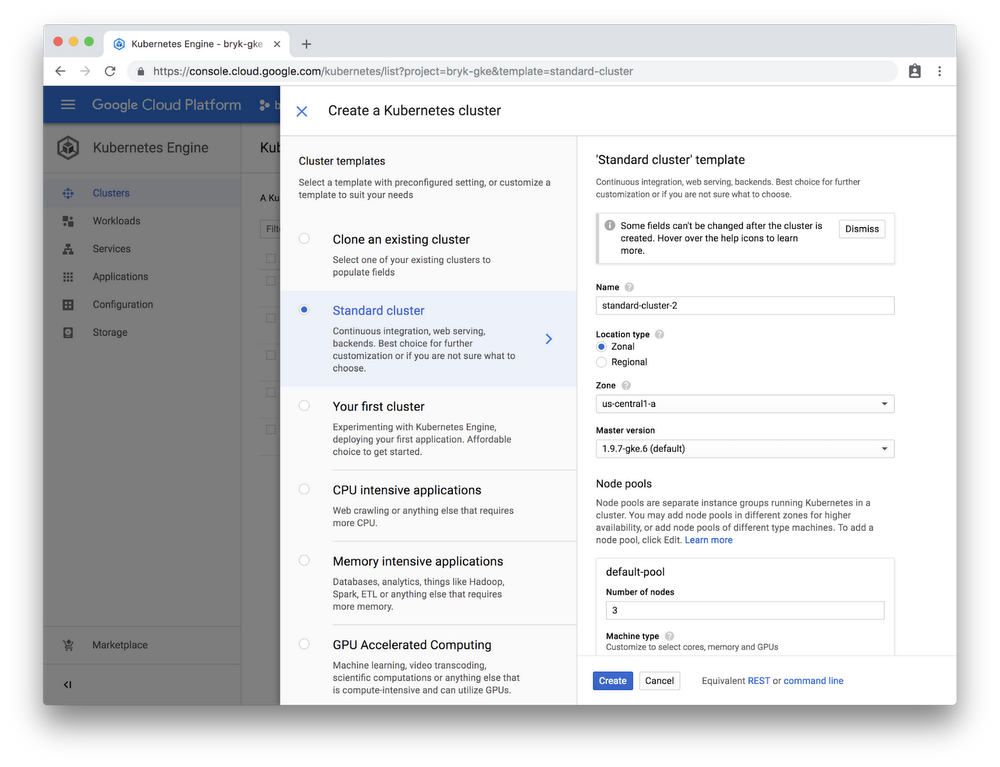
As a Google Kubernetes Engine (GKE) administrator, you routinely need to create and manage new clusters, deploy applications to them, and monitor and troubleshoot how those applications are performing. Today, there are two main ways to manage do that: the kubectl command line interface and Cloud Console, a web-based dashboard. Cloud Console for GKE has been generally available for a year now, and we’ve been adding some exciting new features to give you an easy, intuitive interface for managing your GKE environment.Off to an easy startTo present these new features to you, meet Taylor, an infrastructure and DevOps admin who wants to kick the tires before deciding whether to start using GKE in her company. She logs into Cloud Console and selects an option to create a new cluster, and is prompted to choose what kind of cluster she wants.Cloud Console makes choosing the right cluster easy. On the left Taylor can see a list of preconfigured templates that match common use-cases. On the right, she sees an option to let her customize a cluster exactly how she wants it. Out of curiosity, she expands the advanced view and plays around with different templates to see what setting would Google recommend. In the end she decides to go with ‘Your First Cluster’ configuration—looks perfect for the occasion!After her new cluster is provisioned Taylor wants to put it to work. She clicks on the ‘Deploy’ button and gets to a form that guides her through setting up her first-ever GKE application. Each step explains what the different options mean and what the next actions should be—from picking an image to exposing it to the internet.Taylor doesn’t have a specific application in mind, but GKE provisions nginx by default, so she decides to just go with that—she doesn’t even have to fill in or change any of the fields!A few minutes later Taylor has a working instance of nginx that is accessible from the internet via a Kubernetes service.Easier troubleshooting and monitoringAfter playing around with GKE for a bit, Taylor decides to try it out with some of her production workloads. She creates a larger cluster with several microservices. With each microservice she deploys, Cloud Console provides helpful CPU, memory and disk utilization charts, and highlights new features from Stackdriver, like limits.Unfortunately, it looks like some of her workloads are not working properly. To start troubleshooting Taylor clicks on the error and sees the likely reason for the failure, as well as a link to documentation that contains more tips on how to debug this particular issue. You can read more about troubleshooting applications using Cloud Console in our previous blog post.Find commercial Kubernetes applications in GCP MarketplaceAfter some time Taylor decides she’d like a commercial database to use with her applications. She finds a prepackaged version of Couchbase in Cloud Marketplace (formerly Cloud Launcher) and uses click-to-deploy to get it running fast.Apart from making GKE installs easy, Cloud Console also offers a rich UI to monitor and manage applications installed from the marketplace.Meet the GKE team at KubeconThese are just some of the things you can do in Cloud Console to manage your GKE environment. The Google Cloud team will be presenting on this and other GKE topics at KubeCon North America ‘18 in Seattle next week—be sure to check out the agenda. And if nothing else, stop by the Google Cloud booth D5 to try Cloud Console for yourself!
Quelle: Google Cloud Platform

How to connect Cloudera’s CDH to Cloud Storage

If you are running CDH, Cloudera’s distribution of Hadoop, we aim to provide you with first-class integration on Google Cloud so you can run a CDH cluster with Cloud Storage integration.In this post, we’ll help you get started deploying the Cloud Storage connector for your CDH clusters. The methods and steps we discuss here will apply to both on-premise clusters and cloud-based clusters. Keep in mind that the Cloud Storage connector uses Java, so you’ll want to make sure that the appropriate Java 8 packages are installed on your CDH cluster. Java 8 should come pre-configured as your default Java Development Kit.[Check out this post if you’re deciding how and when to use Cloud Storage over the Hadoop Distributed File System (HDFS).]Here’s how to get started:Distribute using the Cloudera parcelIf you’re running a large Hadoop cluster or more than one cluster, it can be hard to deploy libraries and configure Hadoop services to use those libraries without making mistakes. Fortunately, Cloudera Manager provides a way to install packages with parcels. A parcel is a binary distribution format that consists of a gzipped (compressed) tar archive file with metadata.We recommend using the CDH parcel to install the Cloud Storage connector. There are some big advantages of using a parcel instead of manual deployment and configuration to deploy the Cloud Storage connector on your Hadoop cluster:Self-contained distribution: All related libraries, scripts and metadata are packaged into a single parcel file. You can host it at an internal location that is accessible to the cluster or even upload it directly to the Cloudera Manager node.No need for sudo access or root: The parcel is not deployed under /usr or any of the system directories. Cloudera Manager will deploy it through agents, which eliminates the need to use sudo access users or root user to deploy.Create your own Cloud Storage connector parcelTo create the parcel for your clusters, download and use this script. You can do this on any machine with access to the internet.This script will execute the following actions:Download Cloud Storage connector to a local drivePackage the connector Java Archive (JAR) file into a parcelPlace the parcel under the Cloudera Manager’s parcel repo directoryIf you’re connecting an on-premise CDH cluster or cluster on a cloud provider other than Google Cloud Platform (GCP), follow the instructions from this page to create a service account and download its JSON key file.Create the Cloud Storage parcelNext, you’ll want to run the script to create the parcel file and checksum file and let Cloudera Manager find it with the following steps:1. Place the service account JSON key file and the create_parcel.sh script under the same directory. Make sure that there are no other files under this directory.2. Run the script, which will look something like this: $ ./create_parcel.sh -f <parcel_name> -v <version> -o <os_distro_suffix>parcel_name is the name of the parcel in a single string format without any spaces or special characters. (i.e.,, gcsconnector)version is the version of the parcel in the format x.x.x (ex: 1.0.0)os_distro_suffix: Like the naming conventions of RPM or deb, parcels need to be named in a similar way. A full list of possible distribution suffixes can be found here.d is a flag you can use to deploy the parcel to the Cloudera Manager parcel repo folder. It’s optional; if not provided, the parcel file will be created in the same directory where the script ran.3. Logs of the script can be found in /var/log/build_script.logDistribute and activate the parcelOnce you’ve created the Cloud Storage parcel, Cloudera Manager has to recognize the parcel and install it on the cluster.The script you ran generated a .parcel file and a .parcel.sha checksum file. Put these two files on the Cloudera Manager node under directory /opt/cloudera/parcel-repo. If you already host Cloudera parcels somewhere, you can just place these files there and add an entry in the manifest.json file.On the Cloudera Manager interface, go to Hosts -> Parcels and click Check for New Parcels to refresh the list to load any new parcels. The Cloud Storage connector parcel should show up like this:3. On the Actions column of the new parcel, click Distribute. Cloudera Manager will start distributing the Cloud Storage connector.4. JAR file to every node in the cluster.When distribution is finished, click Activate to enable the parcel.Configure CDH clusters to use the Cloud Storage connectorAfter the Cloud Storage connector is distributed on the cluster, you’ll need to do a few additional configuration steps to let the cluster use the connector. These steps will be different depending on whether you’re using HDFS or Spark for your Hadoop jobs.Configuration for the HDFS service1. From the Cloudera Manager UI, click HDFS service > Configurations. In the search bar,  type core-site.xml. In the box titled “Cluster-wide Advanced Configuration Snippet (Safety Valve) for core-site.xml,” add the following properties:2. Click Save configurations > Restart required services.3. Export Hadoop classpath to point to the Cloud Storage connector JAR file, as shown here:4. Run the “hdfs dfs – ls” command pointing to the bucket the service account has access to:Configuration for the Spark serviceIn order to let Spark recognize the Cloud Storage path, you have to let Spark load the connector JAR. Here is how to configure it:1. From the Cloudera Manager home page, go to Spark > Configuration > Spark Service Advanced Configuration Snippet (Safety Valve) for spark-conf/spark-env.sh. Add the configuration according to the Cloud Storage connector JAR path.2. Next, use Cloudera Manager to deploy the configuration and restart the service if necessary.3. Open Spark shell to validate that you can access Cloud Storage using Spark.Configuration for the Hive serviceIf you also need to store Hive table data in Cloud Storage, configure Hive to load the connector JAR file with the following steps:1. From Cloudera Manager home page, go to Hive Service > Configuration, search “Hive Auxiliary JARs Directory” and enter the path to the Cloud Storage connector JAR, as shown here:2. Validate if the JAR is being accepted by accessing the Hive CLI. Note that the IP address and the result may be different here from your screen:That’s it! You’ve now connected Cloudera’s CDH to Google Cloud Storage, so you can store and access your data on Cloud Storage with high performance and scalability. Learn more here about running these workloads on Google Cloud.
Quelle: Google Cloud Platform

Cloud Security Command Center is now in beta and ready to use

If you’re building applications or deploying infrastructure in the cloud, you need a central place to help understand your security posture, put it in a business context, and act on changes. In March, we announced Cloud Security Command Center in alpha, becoming the first major cloud provider to offer organization-level visibility into assets, vulnerabilities, and threats. Starting today, this security service is available to Google Cloud Platform (GCP) customers in beta.This beta release comes with a number of new features, including:Expanded coverage across GCP services including Cloud Datastore, Cloud DNS, Cloud Load Balancing, Cloud Spanner, Container Registry, Kubernetes Engine, and Virtual Private Cloud13 IAM roles added for fine grained access control across Cloud SCCNew examples of how to generate notifications when changes occur, or to trigger Cloud Functions from a Cloud SCC queryAbility to view and search for new, deleted, and total assets over a specified time periodExpanded client libraries including Java, Node, and GoExpanded capabilities to manage asset discoverySelf-serve onboarding via GCP MarketplaceSelf-serve partner security sources, such as Cavirin, Chef, and Redlock, via GCP MarketplaceCloud Security Command Center (Cloud SCC) provides security teams with insight into infrastructure, configuration, application and data risk so that you can quickly address vulnerabilities, mitigate threats to your cloud resources and evaluate your overall security posture. With Cloud SCC, you can view and monitor an inventory of your cloud assets, be alerted to security anomalies, scan cloud storage to discover where you are storing sensitive data, detect common web vulnerabilities, and review access rights to your critical resources, all from a single, centralized data platform and dashboard.Cloud Security Command Center gives us unprecedented visibility into the security posture of our VM instances and containerized workloads running within GCP. With this security service, we can quickly review and assess risks across all our GCP assets. Alexander Schuchman, Director Information Security, Colgate-PalmoliveCloud SCC is the best way to get started assessing and remediating security risks in your GCP environment. Here are three ways to use the service today:1. Assess security risks and vulnerabilitiesThe Cloud SCC dashboard presents findings that help you quickly uncover security risks and potential vulnerabilities and threats. For example, you can view which Cloud Storage buckets are publicly accessible, identify VMs with public addresses, discover overly permissive firewall rules, and be alerted to instances that may have been compromised to perform coin mining. You can also easily see if users outside of your designated domain, or GCP organization, have access to your resources.Use Cloud SCC to quickly discover non-org owners with access to GCP resourcesWith Cloud SCC, you can uncover VMs that are exposed to the internet2. View and act on changes to your GCP assetsCloud SCC gives you a comprehensive inventory of your cloud assets across numerous GCP services including App Engine, Cloud Datastore, Cloud DNS, Cloud Load Balancing, Cloud Spanner, Cloud Storage, Compute Engine, Container Registry, Kubernetes Engine, and Virtual Private Cloud. You can also view the inventory of your service accounts.Using asset inventory, you can view resources for the entire GCP organization or just for particular projects. Cloud SCC performs ongoing discovery scans, allowing you to see asset history to understand exactly what’s changed in your environment and act on unauthorized modifications. With the assets display, you can see new, deleted, and total assets for a specified time period.You can also generate notifications when changes occur and trigger Cloud Functions from a Cloud SCC query. For example, you can configure an action to automatically detect policy changes on a network firewall and then restore it back to a secure state, or detect when a Cloud Storage bucket becomes publicly accessible and then revert back to private access.3. Integrate security findings from Google and other cloud security leadersCloud SCC is a flexible platform that integrates with Google Cloud security services such as Data Loss Prevention (DLP) API, Forseti, Cloud Security Scanner, and anomaly detection from Google as well as with third-party cloud security solutions from vendors such as Cavirin, Chef,  and Redlock. By integrating partner solutions with Cloud Security Command Center, you can get a comprehensive view of risks and threats all in one place without having to go to separate consoles. You can also jump from the Cloud SCC dashboard directly into these third-party tools to help speed remediation efforts.Cloud SCC integrates with leading third-party cloud security vendorsCloud SCC can help you get a better handle on the security of your GCP environment today. Visit the Cloud SCC webpage for a product overview and documentation. You can start using Cloud SCC today, straight from GCP Marketplace.Learn more about the Cavirin and Chef integrations.
Quelle: Google Cloud Platform

Introducing Cloud IoT Core commands: increased flexibility to control your fleet of embedded devices

Today’s businesses need a fast and responsive way to communicate with and control the fleets of IoT devices out in the field. Today, we’re announcing a new device commands feature for our Cloud IoT Core managed service, providing high-frequency, low-latency, ephemeral messaging between the cloud and IoT devices.Device commands provide a real-time alternative to Cloud IoT Core device configs, enabling many new IoT use cases. Starting today, device commands are generally available in IoT Core for all Google Cloud Platform users.A building control system can easily control a single light or entire building’s worth at once by leveraging Device Commands.Understanding device commandsIoT deployments require bidirectional communication between devices and the cloud. Sending data from a device to the cloud is usually trivial, but sending data back down to devices—particularly with high throughput and low latency—can be quite a challenge. Many users choose to leverage MQTT for their communication, mainly because its publish-subscribe pattern simplifies the process of sending useful data to devices. If you want to sell a lightbulb that turns on as soon as the user says “OK, Google, turn on the light,” fast response times are essential to a good user experience.Cloud IoT Core provides channels for secure, persistent bidirectional communication via the existing state and config topics. These topics can be used to update the respective state and configuration settings for a device in the cloud. The config topic provides message persistence and guaranteed delivery to the device whenever it comes online. Config is great for setting persistent configuration information such as firmware version, an asset tag, or the device’s physical installation location. However, it’s not intended for sending high-frequency or ephemeral messages, like turning on or dimming a light.Cloud IoT’s new device commands feature can play an essential role in certain IoT scenarios, because it provides high-frequency, low-latency, ephemeral messaging between the cloud and each device. Commands lets users send up to 100 messages per second, per device, from the cloud to the device, and each message payload can be up to 256 kb in length. This limit is much greater than the current limit of 1 update per second for config messages. Devices subscribed to the IoT Core MQTT Bridge will receive these messages instantly, creating a low latency channel that users can trust for real-time control. Device commands is exposed as a new API in the IoT Core device manager, which lets you easily integrate with existing applications and Google Cloud IAM for access management. Commands supports the MQTT QoS 1 specification, which lets the user know right away if their message was delivered to the device or if it needs to be sent again (a “retry”) later.Configs vs. commandsNow that IoT Core provides two channels for communication down to devices from the cloud—config and commands—you need to know the best option for your communication needs. You’ll likely want to use config topic for low-frequency updates and modifying the actual configuration of a device—these could be a “mode” or “frequency” setting, for example. You should use device commands for real-time control or to send update messages such as “turn on” or “set RPM speed.” Commands can also be useful in cases where many applications communicate with a single device, and you’d prefer to not need to version of the config message.  What our customers are saying“Device commands enable Smart Parking to continue to achieve its mission of ‘Re-inventing the Parking Experience’ by securely and reliably displaying signs with live information anywhere and everywhere,” explains John Heard, CTO of Smart Parking. “Using device commands, the SmartCloud Platform is able to be an open message management solution.”“The new device commands feature from Cloud IoT Core provides SOTEC’s industrial gateway customers with real time cloud-to-device control,” says Matthias Feurer, Head of Smart & Connected Systems, SOTEC. “This empowers industrial automation equipment to be cloud-connected and -controlled. This will help us and our customers further realize our vision for smart factories and manufacturing.”Device commands are now generally available, so take a look at the documentation and try it out.
Quelle: Google Cloud Platform

ClearDATA: Running Forseti the serverless way

[Editor’s note: ClearDATA is a cloud services provider in the heavily regulated healthcare and life sciences industry, and recently began using the open-source Forseti Security to automate security and compliance testing in its environment. Along the way, ClearDATA developed a novel way to deploy Forseti using containers and Cloud Pub/Sub, for a lightweight, serverless alternative to the usual way of deploying Forseti in a dedicated VM. In the following post, ClearDATA’s Ross Vandegrift tells us more.]ClearDATA provides cloud services and DevOps expertise to help healthcare and life science companies realize the benefits of the cloud. Our mission is to make healthcare better by helping conservative, heavily regulated healthcare entities innovate safely in the cloud. To be successful, we enable healthcare and life science organizations to adopt modern cloud software technologies, like Forseti, that drive agility, while ensuring that sensitive data is protected and compliance obligations are met through automated tooling.Automated security and compliance tools require a few familiar components: an inventory of resources, a rules engine to evaluate the compliance of resources, and a violation tracking/reporting mechanism. Building such a tool could be a cool project, but on its own, wouldn’t help ClearDATA move the needle on healthcare. So when one of the engineers on our team came across the Forseti Security project, we were thrilled.Forseti is a Google-led project that helps GCP customers ensure the continuous security and compliance of their workloads. It periodically builds an inventory of cloud resources and provides a framework for scanning those resources for compliance. It records violations in a database and can optionally send them out via email. Finally, for some resource types, Forseti can act on those violations to bring them back into compliance.Even better, the tool is free software, released under the Apache license, with a friendly community with whom we could learn from and share. This means that we’d be able to extend an existing tool instead of building our own from scratch.Forseti’s architecture does have one downside for ClearDATA. It’s built as a traditional server application that runs in a dedicated VM. Most of our services are built on serverless design patterns. Our tools are often driven by events in customer projects, that in turn use Cloud Pub/Sub to trigger actions on a Kubernetes cluster. We’re also excited by our preliminary work with Knative for scalable serverless web endpoints. So Forseti’s monolithic VM-based design raised two types of concerns.The first is operational complexity: managing and scaling traditional server-based applications can be difficult. Lots has been written about the operational advantages of serverless architectures, so we won’t go into any detail on this issue.The second is controlling the scope of access: on GCP, a server-based application typically runs as a single service account. In order to inventory all of our customers’ projects, Forseti’s service account would require access to all of those projects. This was an unacceptable access requirement. Our policy is for no single credential to have simultaneous access to multiple customer projects. This is really a breach prevention strategy—no bug, no matter how minor, should ever have the necessary access to be able to copy data between customer projects. The easiest way to ensure this is to accept an absolute prohibition on any shared credential.When it comes to working with such a constraint, serverless architectures provide a unique advantage over persistent VMs. A persistent VM-based application has a long-lived identity, and lends itself to thinking in terms of granting access to that application. This encourages reusing that single identity, violating our goal of strict separation between credentials that can access customer projects. In fact, our original Forseti proof of concept ran into this exact issue.Serverless models require a conceptual shift, from thinking about the lifecycle of a server to the lifecycle of a single execution context, whether that is one event, request, or job. Here at ClearDATA, we’ve found that this shift forces developers to get comfortable with restricted credentials that only work in one execution context. Moreover, since typical execution contexts are shorter than VM lifetimes, this also helps enable the use of aggressively rotated keys—at ClearDATA, we generate service account keys that don’t last longer than one hour.The rest of this post will provide an overview of how we converted Forseti to run in a serverless fashion.How we did itOur deployment runs Forseti in a producer-consumer pattern. In other words, a cron job periodically pulls a list of projects that need to be inventoried and scanned from one of our internal management services. Each project results in a job that’s published to a Cloud Pub/Sub topic. Meanwhile, we have a Kubernetes cluster with some worker pods waiting for messages on a subscription to this Pub/Sub topic. When a job arrives from a subscribed topic, the information on the target project is extracted and used to run Forseti.The main steps required to implement this are:Create your Pub/Sub topic and subscription.Set up Forseti. We recommend putting Forseti in its own dedicated project, though it’s not strictly necessary.Here’s how to do this from gcloud. You can also do this using Cloud Deployment Manager or Terraform. Note that you’ll need to substitute your own organization’s info in these commands.Next, you’ll need to prepare Forseti’s cloud resources. If you’ve already set up Forseti following the usual instructions you’re good to go. Either delete, disable, or ignore the cron jobs running on the compute instances. If you haven’t already set up Forseti, these setup instructions are still your best bet, as they help you deploy the database. In particular, you’ll get a Cloud SQL database and a service account for Forseti. Once you’re more familiar with Forseti, you can redeploy these differently as you require.Now, you’re ready to prepare a Forseti job producer. We use a Docker image that’s run as a Kubernetes cron job, though we’d probably use Cloud Scheduler if we started today. The container just produces the jobs, so it doesn’t need to have Forseti installed. You can find our producer here—it pulls a list of projects from an internal service, issues a credential for each job, and publishes that data to the Cloud Pub/Sub topic for each project that needs to be inventoried.Next, you’ll need to prepare a container image with Forseti and the small shim to consume jobs from Pub/Sub.This container does require Forseti to be installed. The Forseti source code has a nice setup for building basic container images here. We build these images and use them as the base image for our worker image that can be found here.In that repository, the app subdirectory has three files:server.yaml, which contains our Forseti server config. Currently, we use a single configuration for every project. In the future, we’ll replace this with a dynamically loaded config to support per-customer and per-project Forseti configurations.__init.py__, which just as a simple namespace config.worker.py, which is where the actual work happens.worker.py users the Pub/Sub client from Google Cloud Client Library for Python. It works asynchronously—so the code sets up a subscription and provides a callback. The library invokes the callback for each message that it pulls from the subscription. The callback function unpacks the job info, sets up the application default credentials, and calls into the Forseti code to trigger the inventory collection. When it’s done it acknowledges the message so Pub/Sub knows that it’s been handled.Now, you need to create the Kubernetes objects required to deploy the producer and worker.Example Kubernetes manifests can be found here and here. You’ll need to configure some service accounts; see README.md in the repo for notes on what needs to be filled in.And there you have it—a fully operational Forseti deployment, operating serverlessly from within a container! With a bit of planning and a simple framework to run Forseti, we were able to trigger a containerized version of the app running on Kubernetes, provide a short-lived key to a restricted service account, and successfully perform inventory operations. Compared to the typical persistent VM-based Forseti deployment, this should provide better security and improved operational characteristics.Note that you can use this pattern to convert any traditional application’s periodic processes into a serverless workflow. That said, Forseti does have a few properties that make it a good fit for serverless:Forseti starts up quickly compared to its run interval. This ensures that startup overhead isn’t a significant portion of the running time. If your app needs several minutes before it’s ready to handle a request, this strategy may not be feasible.Forseti’s inventory collections are independent of one another. This means that there are no coordination concerns between parallel jobs, and no ordering problems to worry about. If your app cannot be so easily parallelized, this strategy may not be feasible.Forseti is free software, which means we have access to the source code and can modify or extend it. If your app is proprietary, there may be no way to learn how to make calls directly into the application.This blog post has presented a pretty simple consumer framework that only supports a fixed number of inventory workers. There’s lots of room for improvement: the ability to request other Forseti actions and autoscaling the number of consumer Pods immediately jump to mind. Nevertheless, engineering teams at ClearDATA and Google have begun discussions about how (and if!) Forseti should evolve towards a serverless design. In the meantime, if running Forseti (or another application, for that matter) serverlessly makes sense for your organization, I hope this blog provides signposts about how to go about it.
Quelle: Google Cloud Platform

Running dedicated game servers in Kubernetes Engine: tutorial

By Joseph Holley, Cloud Solutions Architect

Packaging server applications as container images is quickly gaining traction across tech organizations, game companies among them. They want to use containers to improve VM utilization, as well as take advantage of the isolated run-time paradigm. Despite their interest, many game companies don’t know where to start.

Using the orchestration framework Kubernetes to deploy production-scale fleets of dedicated game servers in containers is an excellent choice. We recommend Google Kubernetes Engine as the easiest way to start a Kubernetes cluster for game servers on Google Cloud Platform (GCP) without manual setup steps. Kubernetes will help simplify your configuration management and select a VM with adequate resources to spin up a match for your players for you automatically.

We recently put together a tutorial that shows you how to integrate dedicated game servers with Kubernetes Engine, and how to automatically scale the number of VMs up and down according to player demand. It also offers some key storage strategies, including how to manage your game server assets without having to manually distribute them with each container image. Check it out, and let us know what other Google Cloud tools you’d like to learn how to use in your game operations. You can reach me on Twitter at @gcpjoe.

Quelle: Google Cloud Platform

Get latest Kubernetes version 1.9 on Google’s managed offering

By Palak Dalal, Product Manager

We’re excited to announce that Kubernetes version 1.9 will be available on Google Kubernetes Engine next week in our early access program. This release includes greater support for stateful and stateless applications, hardware accelerator support for machine learning workloads and storage enhancements. Overall, this release achieves a big milestone in making it easy to run a wide variety of production-ready applications on Kubernetes without having to worry about the underlying infrastructure.
Google is the leading contributor to open-source Kubernetes releases and now you can access the latest Kubernetes release on our fully-managed Kubernetes Engine, and let us take care of managing, scaling, upgrading, backing up and helping to secure your clusters. Further, we recently simplified our pricing by removing the fee for cluster management, resulting in real dollar savings for your environment.

We’re committed to providing the latest technological innovation to Kubernetes users with one new release every quarter. Let’s a take a closer look at the key enhancements in Kubernetes 1.9.

Workloads APIs move to GA

The core Workloads APIs (DaemonSet, Deployment, ReplicaSet and StatefulSet), which let you run stateful and stateless workloads in Kubernetes 1.9, move to general availability (GA) in this release, delivering production-grade quality, support and long-term backwards compatibility.

Hardware accelerator enhancements

Google Cloud Platform (GCP) provides a great environment for running machine learning and data analytics workloads in containers. With this release, we’ve improved support for hardware accelerators such as NVIDIA Tesla P100 and K80 GPUs. Compute-intensive workloads will benefit greatly from cost-effective and high performance GPUs for many use cases ranging from genomics and computational finance to recommendation systems and simulations.

Local storage enhancements for stateful applications

Improvements to the Kubernetes scheduler in this release make it easier to use local storage in Kubernetes. The local persistent storage feature (alpha) enables easy access to local SSD on GCP through Kubernetes’ standard PVC (Persistent Volume Claim) interface in a simple and portable way. This allows you to take an existing Helm Chart, or StatefulSet spec using remote PVCs, and easily switch to local storage by just changing the StorageClass name. Local SSD offers superior performance including high input/output operations per second (IOPS), low latency, and is ideal for high performance workloads, distributed databases, distributed file systems and other stateful workloads.

Storage interoperability through CSI

This Kubernetes release introduces an alpha implementation of Container Storage Interface (CSI). We’ve been working with the Kubernetes community to provide a single and consistent interface for different storage providers. CSI makes it easy to add different storage volume plugins in Kubernetes without requiring changes to the core codebase. CSI underscores our commitment to being open, flexible and collaborative while providing maximum value—and options—to our users.

Try it now!

In a few days, you can access the latest Kubernetes Engine release in your alpha clusters by joining our early access program.

Quelle: Google Cloud Platform

Three ways to configure robust firewall rules

By Neha Pattan, Staff Software Engineer

If you administer firewall rules for Google Cloud VPCs, you want to ensure that firewall rules you create can only be associated with correct VM instances by developers in your organization. Without that assurance, it can be difficult to manage access to sensitive content hosted on VMs in your VPCs or allow these instances access to the internet, and you must carefully audit and monitor the instances to ensure that such unintentional access is not given through the use of tags. With Google VPC, there are now multiple ways to help achieve the required level of control, which we’ll describe here in detail.

As an example, imagine you want to create a firewall rule to restrict access to sensitive user billing information in a data store running on a set of VMs in your VPC. Further, you’d like to ensure that developers who can create VMs for applications other than the billing frontend cannot enable these VMs to be governed by firewall rules created to allow access to billing data.

Example topology of a VPC setup requiring secure firewall access.

The traditional approach here is to attach tags to VMs and create a firewall rule that allows access to specific tags, e.g., in the above example you could create a firewall rule that allows all VMs with the billing-frontend tag access to all VMs with the tag billing-data. The drawback of this approach is that any developer with Compute InstanceAdmin role for the project can now attach billing-frontend as a tag to their VM, and thus unintentionally gain access to sensitive data.

Configuring Firewall rules with Service Accounts

With the general availability of firewall rules using service accounts, instead of using tags, you can block developers from enabling a firewall rule on their instances unless they have access to the appropriate centrally managed service accounts. Service accounts are special Google accounts that belong to your application or service running on a VM and can be used to authenticate the application or service for resources it needs to access. In the above example, you can create a firewall rule to allow access to the billing-data@ service account only if the originating source service account of the traffic is billing-frontend@.

Firewall setup using source and target service accounts. (Service accounts names are abbreviated for simplicity.)

You can create this firewall rule using the following gcloud command:
gcloud compute firewall-rules create secure-billing-data
–network web-network
–allow TCP:443
–source-service-accounts billing-frontend@web.iam.gserviceaccount.com
–target-service-accounts billing-data@web.iam.gserviceaccount.com
If, in the above example, the billing frontend and billing data applications are autoscaled, you can specify the service accounts for the corresponding applications in the InstanceTemplate configured for creating the VMs.

The advantage of using this approach is that once you set it up, the firewall rules may remain unchanged despite changes in underlying IAM permissions. However, you can currently only associate one service account with a VM and to change this service account, the instance must be in a stopped state.

Creating custom IAM role for InstanceAdmin

If you want the flexibility of tags and the limitations of service accounts is a concern, you can create a custom role with more restricted permissions that disable the ability to set tags on VMs; do this by removing the compute.instances.setTag permission. This custom role can have other permissions present in the InstanceAdmin role and can then be assigned to developers in the organization. With this custom role, you can create your firewall rules using tags:
gcloud compute firewall-rules create secure-billing-data
–network web-network
–allow TCP:443
–source-tags billing-frontend
–target-tags billing-data
Note, however, that permissions assigned to a custom role are static in nature and must be updated with any new permissions that might be added to the InstanceAdmin role, as and when required.

Using subnetworks to partition workloads

You can also create firewall rules using source and destination IP CIDR ranges if the workloads can be partitioned into subnetworks of distinct ranges as shown in the example diagram below.

Firewall setup using source and destination ranges.

In order to restrict developers’ ability to create VMs in these subnetworks, you can grant Compute Network User role selectively to developers on specific subnetworks or use Shared VPC.

Here’s how to configure a firewall rule with source and destination ranges using gcloud:
gcloud compute firewall-rules create secure-billing-data
–network web-network
–allow TCP:443
–source-ranges 10.20.0.0/16
–destination-ranges 10.30.0.0/16
This method allows for better scalability with large VPCs and allows for changes in the underlying VMs as long as the network topology remains unchanged. Note, however, that if a VM instance has can_ip_forward enabled, it may send traffic using the above source range and thus gain access to sensitive workloads.

As you can see, there’s a lot to consider when configuring firewall rules for your VPCs. We hope these tips help you configure firewall rules in a more secure and efficient manner. To learn more about configuring firewall rules, check out the documentation.

Quelle: Google Cloud Platform

Why you should pick strong consistency, whenever possible

By Mike Curtiss, Software Engineer, Cloud Spanner

Do you like complex application logic? We don’t either. One of the things we’ve learned here at Google is that application code is simpler and development schedules are shorter when developers can rely on underlying data stores to handle complex transaction processing and keeping data ordered. To quote the original Spanner paper, “we believe it is better to have application programmers deal with performance problems due to overuse of transactions as bottlenecks arise, rather than always coding around the lack of transactions.”1

Put another way, data stores that provide transactions and consistency across the entire dataset by default lead to fewer bugs, fewer headaches and easier-to-maintain application code.

Defining database consistency

But to have an interesting discussion about consistency, it’s important to first define our terms. A quick look at different databases on the market shows that not all consistency models are created equal, and that some of the related terms can intimidate even the bravest database developer. Below is a short primer on consistency:

Term

Definition

What Cloud Spanner Supports

Consistency

Consistency in database systems refers to the requirement that any given database transaction must change affected data only in allowed ways. Any data written to the database must be valid according to all defined rules.2

Cloud Spanner provides external consistency, which is strong consistency + additional properties (including serializability and linearizability). All transactions across a Cloud Spanner database satisfy this consistency property, not just those within a replica or region.

Serializability

Serializability is an isolation property of transactions, where every transaction may read and write multiple objects. It guarantees that transactions behave the same as if they had executed in some serial order. It’s okay for that serial order to be different from the order in which transactions were actually run.3

Cloud Spanner provides external consistency, which is a stronger property than serializability, which means that all transactions appear as if they executed in a serial order, even if some of the reads, writes and other operations of distinct transactions actually occurred in parallel.

Linearizability

Linearizability is a recency guarantee on reads and writes of a register (an individual object). It doesn’t group operations together into transactions, so it does not prevent problems such as write skew, unless you take additional measures such as materializing conflicts.4

Cloud Spanner provides external consistency, which is a stronger property than linearizability, because linearizability does not say anything about the behavior of transactions.

Strong Consistency

All accesses are seen by all parallel processes (or nodes, processors, etc.) in the same order (sequentially)5

In some definitions, A replication protocol exhibits “strong consistency” if the replicated objects are linearizable.

The default mode for reads in Cloud Spanner is “strong,” which guarantees that they observe the effects of all transactions that committed before the start of the operation, independent of which replica receives the read.

Eventual Consistency

Eventual consistency means that if you stop writing to the database and wait for some unspecified length of time, then

eventually all read requests will return the same value.6

Cloud Spanner supports bounded stale reads, which offer similar performance benefits as eventual consistency but with much stronger consistency guarantees.

Cloud Spanner, in particular, provides external consistency, which provides all the benefits of strong consistency plus serializability. All transactions (across rows, regions and continents) in a Cloud Spanner database satisfy the external consistency property, not just those within a replica. External consistency states that Cloud Spanner executes transactions in a manner that’s indistinguishable from a system in which the transactions are executed serially, and furthermore, that the serial order is consistent with the order in which transactions can be observed to commit. External consistency is a stronger property than both linearizability and serializability.

Consistency in the wild

There are lots of use cases that call for external consistency. For example, a financial application might need to show users’ account balances. When users make a deposit, they want to see the result of this deposit reflected immediately when they view their balance (otherwise they may fear their money has been lost!). There should never appear to be more or less money in aggregate in the bank than there really is. Another example might be a mail or messaging app: You click “send” on your message, then immediately view “sent messages” because you want to double check what you wrote. Without external consistency, the app’s request to retrieve your sent messages may go to a different replica that’s behind on getting all state changes, and have no record of your message, resulting in a confusing and reduced user experience.

But what does it really mean from a technical standpoint to have external consistency? When performing read operations, external consistency means that you’re reading the latest copy of your data in global order. It provides the ability to read the latest change to your data across rows, regions and continents. From a developer’s perspective, it means you can read a consistent view of the state of the entire database (not just a row or object) at any point in time. Anything less introduces tradeoffs and complexity in the application design. That in turn can lead to brittle, hard-to-maintain software and can cause innumerable maintenance headaches for developers and operators. Multi-master architectures and multiple levels of consistency are workarounds for not being able to provide the external consistency that Cloud Spanner does.

What’s the problem with using something less than external consistency? When you choose a relaxed/eventual consistency mode, you have to understand which consistency mode you need to use for each use case and have to hard code rigid transactional logic into your apps to guarantee the correctness and ordering of operations. To take advantage of “transactions” in database systems that have limited or no strong consistency across documents/objects/rows, you have to design your application schema such that you never need to make a change that involves multiple “things” at the same time. That’s a huge restriction and workarounds at the application layer are painful, complex, and often buggy.

Further, these workarounds have to be carried everywhere in the system. For example, take the case of adding a button to set your color scheme in an admin preferences panel. Even a simple feature like this is expected to be carried over immediately across the app and other devices and sessions. It needs a synchronous, strongly consistent update—or a makeshift way to obtain the same result. Using a workaround to achieve strong consistency at the application level adds a velocity-tax to every subsequent new feature—no matter how small. It also makes it really hard to scale the application dev team, because everyone needs to be an expert in these edge cases. With this example, a unit test that passes on a developer workstation does not imply it will work in production at scale, especially in high concurrency applications. Adding workarounds to an eventually consistent data store often introduces bugs that go unnoticed until they bite a real customer and corrupt data. In fact, you may not even recognize the workaround is needed in the first place.

Lots of application developers are under the impression that the performance hit of external or strong consistency is too high. And in some systems, that might be true. Additionally, we’re firm believers that having choice is a good thing—as long as the database does not introduce unnecessary complexity or introduce potential bugs in the application. Inside Google, we aim to give application developers the performance they need while avoiding unnecessary complexity in their application code. To that end, we’ve been researching advanced distributed database systems for many years and have built a wide variety of data stores to get strong consistency just right. Some examples are Cloud Bigtable, which is strongly consistent within a row; Cloud Datastore, which is strongly consistent within a document or object; and Cloud Spanner, which offers strong consistency across rows, regions and continents with serializability. [Note: In fact, Cloud Spanner offers a stronger guarantee of external consistency (strong consistency + serializability), but we tend to talk about Cloud Spanner having strong consistency because it’s a more broadly accepted term.]

Strongly consistent reads and Cloud Spanner

Cloud Spanner was designed from the ground up to serve strong reads (i.e., strongly consistent reads) by default with low latency and high throughput. Thanks to the unique power of TrueTime, Spanner provides strong reads for arbitrary queries without complex multi-phase consensus protocols and without locks of any kind. Cloud Spanner’s use of TrueTime also provides the added benefit of being able do global bounded-staleness reads.

Better yet, Cloud Spanner offers strong consistency for multi-region and regional configurations. Other globally distributed databases present a dilemma to developers: If they want to read the data from geographically distributed regions, they forfeit the ability to do strongly consistent reads. In these other systems, if a customer opts to have strongly consistent reads, then they forfeit the ability to do reads from remote regions.

To take maximum advantage of the external consistency guarantees that Cloud Spanner provides and to maximize your application’s performance, we offer the following two recommendations:

Always use strong reads, whenever possible. Strong reads, which provide strong consistency, ensure that you are reading the latest copy of your data. Strong consistency makes application code simpler and applications more trustworthy.
If latency makes strong reads infeasible in some situations, then use reads with bounded-staleness to improve performance, in places where strong reads with the latest data are not necessary. Bounded-staleness semantics ensures you read a guaranteed prefix of the data (for example, within a specified period of time) that is consistent, as opposed to eventual consistency where you have no guarantees and your app can read almost anything forwards or back in time from when you queried it.

Foregoing strong consistency has some real risks. Strong reads across a database ensure that you’re reading the latest copy of your data and that it maintains the referential integrity of the entire dataset, making it easier to reason about concurrent requests. Using weaker consistency models introduces the risk of software bugs and can be a waste of developer hours—and potentially—customer trust.

What about writes?

Strong consistency is even more important for write operations—especially read-modify-write transactions. Systems that don’t provide strong consistency in such situations create a burden for application developers, as there’s always a risk of putting your data into an inconsistent state.

Perhaps the most insidious type of problem is write skew. In write skew, two transactions read a set of objects and make changes to some of those objects. However, the modifications that each transaction makes affect what the other transaction should have read. For example, consider a database for an airline based in San Francisco. It’s the airline’s policy to always have a free plane in San Francisco, in the event that this spare plane is needed to replace another plane with maintenance problems or for some other need. Imagine two transactions that are both reserving planes for upcoming flights out of San Francisco:

Begin Transaction
SELECT * FROM Airplanes WHERE location = “San Francisco” AND Availability = “Free”;
If number of airplanes is > 1: # to enforce “one free plane” rule
Pick 1 airplane
Set its Availability to “InUse”
Commit
Else: Rollback

Without strong consistency (and, in particular, serializable isolation for these transactions), both transactions could successfully commit, thus potentially breaking our one free plane rule. There are many more situations where write skew can cause problems.

Because Cloud Spanner was built from the ground up to be a relational database with strong, transactional consistency—even for complex multi-row and multi-table transactions—it can be used in many situations where a NoSQL database would cause headaches for application developers. Cloud Spanner protects applications from problems like write skew, which makes it appropriate for mission-critical applications in many domains including finance, logistics, gaming and merchandising.

How does Cloud Spanner differ from multi-master replication?

One topic that’s often combined with scalability and consistency discussions is multi-master replication. At its core, multi-master replication is a strategy used to reduce mean time to recovery for vertically scalable database systems. In other words, it’s a disaster recovery solution, and not a solution for global, strong consistency. With a multi-master system, each machine contains the entire dataset, and changes are replicated to other machines for read-scaling and disaster recovery.

In contrast, Cloud Spanner is a truly distributed system, where data is distributed across multiple machines within a replica, and also replicated across multiple machines and multiple data centers. The primary distinction between Cloud Spanner and multi-master replication is that Cloud Spanner uses paxos to synchronously replicate writes out of region, while still making progress in the face of single server/cluster/region failures. Synchronous out-of-region replication means that consistency can be maintained, and strongly consistent data can be served without downtime, even when a region is unavailable—no acknowledged writes are delayed/lost due to the unavailable region. Cloud Spanner’s paxos implementation elects a leader so that it’s not necessary to do time-intensive quorum reads to obtain strong consistency. Additionally, Cloud Spanner shards data horizontally across servers, so individual machine failures impact less data. While a node is recovering, replicated nodes on other clusters that contain that dataset can assume mastership easily, and serve strong reads without any visible downtime to the user.

A strongly consistent solution for your mission-critical data

For storing critical, transactional data in the cloud, Cloud Spanner offers a unique combination of external, strong consistency, relational semantics, high availability and horizontal scale. Stringent consistency guarantees are critical to delivering trustworthy services. Cloud Spanner was built from the ground up to provide those guarantees in a high-performance, intuitive way. We invite you to try it out and learn more.

See more on Cloud Spanner and external consistency.

1 https://static.googleusercontent.com/media/research.google.com/en//archive/spanner-osdi2012.pdf
2 https://en.wikipedia.org/wiki/Consistency_(database_systems)

3 Kleppmann, Martin. Designing Data-Intensive Applications. O’Reilly, 2017, p. 329.
4 Kleppmann, Martin. Designing Data-Intensive Applications. O’Reilly, 2017, p. 329.
5 https://en.wikipedia.org/wiki/Strong_consistency

6 Kleppmann, Martin. Designing Data-Intensive Applications. O’Reilly, 2017, p. 322.

Quelle: Google Cloud Platform