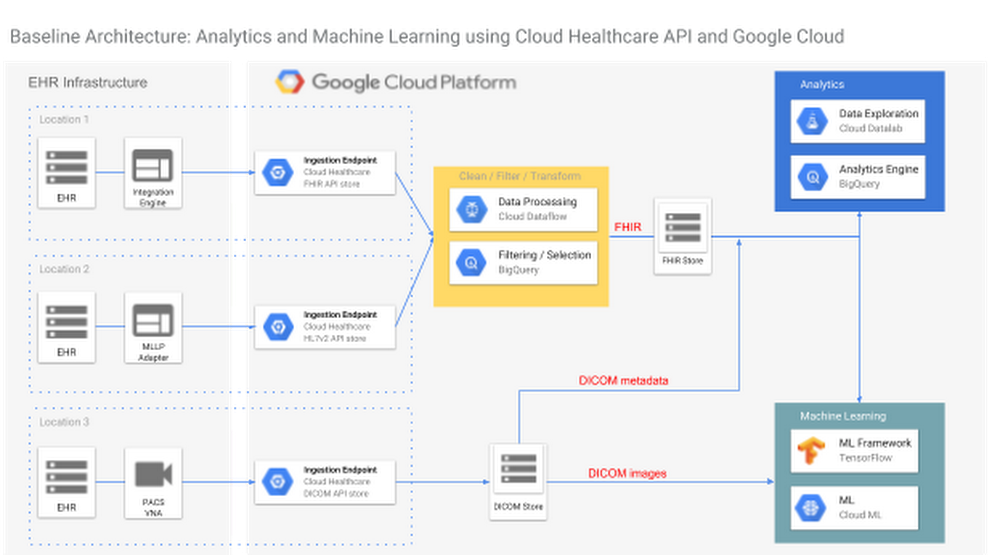
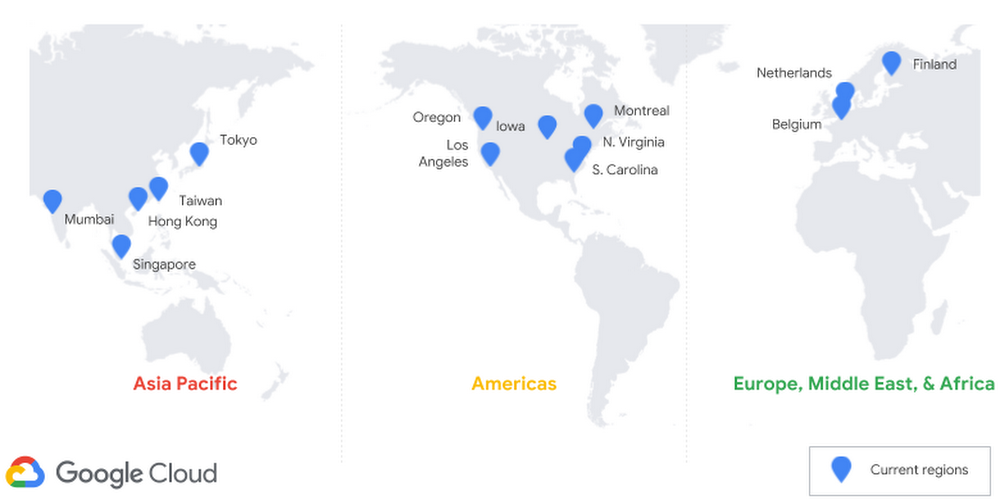
Every GCP blog post from 2018

Looking for a little light reading over the holidays? Below, we’ve compiled a list of all 557 (!) blog posts we published on GCP in 2018.Pro tip: Although we’ve listed these posts by month, you can also find them grouped by themes by clicking our topic tags, for example: AI & machine learning, data analytics, Kubernetes, databases, DevOps & SRE, networking, security, serverless, storage—and many, many more.JanuaryWhat Google Cloud, G Suite and Chrome customers need to know about the industry-wide CPU vulnerabilityCRE life lessons: Consequences of SLO violationsSimplify Cloud VPC firewall management with service accountsIntroducing Preemptible GPUs: 50% OffAnswering your questions about “Meltdown” and “Spectre”[Whitepaper] Lift and shift to Google Cloud PlatformProblem-solving with ML: automatic document classificationTrash talk: How moving Apigee Sense to GCP reduced our “data litter” and decreased our costsProtecting our Google Cloud customers from new vulnerabilities without impacting performanceStateful and ML workloads now run better on Google Kubernetes Engine with the latest version 1.9Why you should pick strong consistency, whenever possibleThree ways to configure robust firewall rulesExpanding our global infrastructure with new regions and subsea cables[Tutorial] Running dedicated game servers in Kubernetes EngineCloud AutoML: Making AI accessible to every businessAnalyzing your BigQuery usage with Ocado Technology’s GCP Census[Whitepaper] Embark on a journey from monoliths to microservicesCRE life lessons: An example escalation policyA guide to machine learning for the chronically curious: ML ExplorerHow we built a serverless digital archive with machine learning APIs, Cloud Pub/Sub and Cloud FunctionsCloud Shell Tutorials: Learning experiences integrated into the Cloud ConsoleOrbitera and MobileIron team up to make it easier to buy and sell apps in the cloudGoogle Cloud Platform opens region in the NetherlandsFiner-grained security using custom roles for Cloud IAMFebruaryUse Forseti to make sure your Google Kubernetes Engine clusters are updated for “Meltdown” and “Spectre”[Whitepaper] Modernizing your .NET Application for Google CloudGCP arrives in Canada with launch of Montréal regionHow to process weather satellite data in real-time in BigQueryToward effective cloud governance: designing policies for GCP customers large and small12 best practices for user account, authorization and password managementHow to use Weaveworks free tier for continuous delivery, monitoring and alerts for Kubernetes EngineAnnouncing Spring Cloud GCP—integrating your favorite Java framework with Google CloudWhy we used Elastifile Cloud File System on GCP to power drug discoveryGCP is building its second Japanese region in OsakaBitcoin in BigQuery: blockchain analytics on public dataCRE life lessons: Applying the Escalation PolicyEasy distributed training with TensorFlow using tf.estimator.train_and_evaluate on Cloud ML EngineIn our genes: How Google Cloud helps the Broad Institute slash the cost of researchCloud TPU machine learning accelerators now available in betaGPUs in Kubernetes Engine now available in betaPractice makes perfect: the Professional Data Engineer Practice Exam is now liveGet the most out of Google Kubernetes Engine with Priority and Preemption96 vCPU Compute Engine instances are now generally availableGoogle announces intent to acquire XivelyThe thing is . . . Cloud IoT Core is now generally availableManaging your Compute Engine instances just got easierCreating a single pane of glass for your multi-cloud Kubernetes workloads with CloudflareHow Google Cloud Storage offers strongly consistent object listing thanks to SpannerHow to handle mutating JSON schemas in a streaming pipeline, with Square EnixAnnouncing Google Cloud Spanner as a Vault storage backendGoogle Cloud and NCAA team up for a unique March Madness competition hosted on KaggleNew research: How to evolve your security for the cloudGoogle Cloud’s Response to Australian Privacy Principles (APP) and Australian Prudential Regulation Authority (APRA) RequirementsIntroducing Cloud Billing Catalog API: GCP pricing in real timeCloud poetry: training and hyperparameter tuning custom text models on Cloud ML EngineAnnouncing SSL policies for HTTPS and SSL proxy load balancersFully managed export and import with Cloud Datastore now generally availableMarchComparing regression and classification on US elections data with TensorFlow EstimatorsQueue-based scaling made easy with new Stackdriver per-group metricsHow Color uses the new Variant Transforms tool for breakthrough clinical data science with BigQueryGoogle Cloud for Healthcare: new APIs, customers, partners and security updatesExpanding the reach of Google Cloud Platform’s HIPAA-compliant offerings for healthcareFrom open source to sustainable success: the Kubernetes graduation storyLearn to run Apache Spark natively on Google Kubernetes Engine with this tutorialOptimizing your Cloud Storage performance: Google Cloud Performance AtlasGetting to know Cloud IAMIntroducing GCP’s new interactive CLIPredicting community engagement on Reddit using TensorFlow, GDELT, and Cloud Dataflow: Part 1Announcing new Stackdriver pricing—visibility for lessIntroducing Agones: Open-source, multiplayer, dedicated game-server hosting built on KubernetesHyperparameter tuning on Google Cloud Platform is now faster and smarterAutomatic serverless deployments with Cloud Source Repositories and Container BuilderBest practices for working with Google Cloud Audit LoggingIntroducing Skaffold: Easy and repeatable Kubernetes developmentGCP grows in the Netherlands region8 DevOps tools that smoothed our migration from AWS to GCP: TamrSecurity in the cloudGoogle Cloud Next ’18—Registration now open!Introducing new ways to protect and control your GCP services and dataJoining and shuffling very large datasets using Cloud DataflowNetwork policies for Kubernetes are generally availableUnderstand your spending at a glance with Google Cloud Billing reports betaPublic datasets: how nonprofits can drive social impact with planetary-scale dataNew ways to secure businesses in the cloudExpanding our Google Cloud security partnershipsIntroducing new ways to protect and control your GCP services and dataPre-built Cloud Dataflow templates: KISS for data movementCloud Identity: Manage users, devices and apps in one locationBuilding trust through Access TransparencyExtending GCP security to U.S. government customers through FedRAMP authorizationTake charge of your sensitive data with the Cloud Data Loss Prevention (DLP) APIExpanding MongoDB Atlas availability on GCPEasy HPC clusters on GCP with SlurmAutoML Vision in action: from ramen to branded goodsGetting to know Cloud Armor—defense at scale for internet-facing servicesKubernetes Engine Private Clusters now available in betaKubernetes 1.10: an insider take on what’s newHow Tokopedia modernized its data warehouse and analytics processes with BigQuery and Cloud DataflowIntroducing Cloud Text-to-Speech powered by DeepMind WaveNet technologyMonitor your GCP environment with Cloud Security Command CenterHow we used Cloud Spanner to build our email personalization system—from “Soup” to nutsTesting future Apache Spark releases and changes on Google Kubernetes Engine and Cloud DataprocIntroducing Stackdriver APM and Stackdriver ProfilerNow, you can automatically document your API with Cloud EndpointsSimplifying machine learning on open hybrid clouds with KubeflowExploring container security: An overviewAPI design: Which version of versioning is right for you?Tip off: how we’re using predictive analytics during the Final FourPredicting community engagement on Reddit using TensorFlow, GDELT, and Cloud Dataflow: Part 3Announcing Google Cloud Security Talks during RSA Conference 2018How to export logs from Stackdriver Logging: new solution documentationAprilUsing BigDL for deep learning with Apache Spark and Google Cloud DataprocGoogle Cloud using P4Runtime to build smart networksHow to run Windows Containers on Compute EngineStretching Elastic’s capabilities with historical analysis, backups, and cross-cloud monitoring on Google Cloud PlatformExpanding our cloud network for a faster, more reliable experience between Australia and Southeast AsiaNew ways to manage and automate your Stackdriver alerting policiesOro: How GCP smoothed our path to PCI DSS complianceServing real-time scikit-learn and XGBoost predictionsIntroducing VPC Flow Logs—network transparency in near real-timeNow, you can deploy to Kubernetes Engine from GitLab with a few clicksExploring container security: Node and container operating systemsViewing Stackdriver Trace spans and request logs in multi-project deploymentsToward better phone call and video transcription with new Cloud Speech-to-TextGoogle named a Leader in the Forrester Public Cloud Development Platform Wave, Q2 2018Introducing Kayenta: An open automated canary analysis tool from Google and NetflixHow to dynamically generate GCP IAM credentials with a new HashiCorp Vault secrets engineBigQuery lazy data loading: SQL data languages (DDL and DML), partitions, and half a trillion Wikipedia pageviewsHow to automatically scan Cloud Storage buckets for sensitive data: Taking charge of your securityBest practices for securing your Google Cloud databasesExploring container security: Digging into Grafeas container image metadataCloud-native architecture with serverless microservices—the Smart Parking storyReflecting on our ten year App Engine journey[Whitepaper] Running your modern .NET Application on KubernetesIntroducing kaniko: Build container images in Kubernetes and Google Container Builder without privilegesImproving the Google Cloud Storage backend for HashiCorp VaultBigQuery arrives in the Tokyo regionDialogflow Enterprise Edition is now generally availableCloud SQL for PostgreSQL now generally available and ready for your production workloadsExploring container security: Protecting and defending your Kubernetes Engine networkKubernetes best practices: How and why to build small container imagesEngineered for renewal: Google Cloud, Etsy and sustainabilityTwo higher ed collaborations expand access to Google Cloud PlatformIntroducing Partner Interconnect, a fast, economical onramp to GCPNow live in Tokyo: using TensorFlow to predict taxi demandAccelerating innovation for cloud-native managed databasesGoogle Cloud Platform announces new credits program for researchersExploring container security: Running a tight ship with Kubernetes Engine 1.10Introducing Kubernetes Service Catalog and Google Cloud Platform Service Broker: find and connect services to your cloud-native appsAccessing external (federated) data sources with BigQuery’s data access layerKubernetes best practices: Organizing with NamespacesRegistration for the Associate Cloud Engineer beta exam is now openAnnouncing variable substitution in Stackdriver alerting notificationsNew collaboration with Fitbit to drive positive health outcomesExpanding our GPU portfolio with NVIDIA Tesla V100MayCloud Composer is now in beta: build and run practical workflows with minimal effortIntroducing the Kubernetes Podcast from GoogleRegional replication for Cloud Bigtable now in betaScale big while staying small with serverless on GCP—the Guesswork.co storyApigee named a Leader in the Gartner Magic Quadrant for Full Life Cycle API Management for the third consecutive timeAnnouncing SAP CodeJams for Google Cloud Platform: learn to integrate SAP HANA with GCPAnnouncing Stackdriver Kubernetes Monitoring: Comprehensive Kubernetes observability from the startOpen-sourcing gVisor, a sandboxed container runtimeQueue your questions: common queries from Google Cloud customersIntroducing Asylo: an open-source framework for confidential computingExploring container security: Using Cloud Security Command Center (and five partner tools) to detect and manage an attackBuilding an image search application using Cloud Vision APIKubernetes best practices: Setting up health checks with readiness and liveness probesMusic in motion: a Firebase and IoT storyBigQuery at speed: new features help you tune your query execution for performanceCRE life lessons: Defining SLOs for services with dependenciesGCP is building a region in ZürichGoogle Cloud and NetApp collaborate on cloud-native, high performance storageSRE vs. DevOps: competing standards or close friends?Building a serverless mobile development pipeline on GCP: new solution documentationGoogle announces intent to acquire VelostrataIntroducing Cloud Memorystore: A fully managed in-memory data store service for RedisUsing Jenkins on Google Compute Engine for distributed buildsTransform publicly available BigQuery data and Stackdriver logs into graph databases with Neo4jGoogle Cloud: Ready for the GDPRKubernetes best practices: Resource requests and limitsExploring container security: Isolation at different layers of the Kubernetes stackGoogle Cloud for Life Sciences: new products and new partnersThree steps to prepare your users for cloud data migrationOpening a third zone in SingaporeIntroducing ultramem Google Compute Engine machine typesIncrease performance while reducing costs with the new App Engine schedulerUnderstanding native container routing with Alias IPsGoogle Maps Platform now integrated with the GCP ConsoleGetting more value from your Stackdriver logs with structured dataSharding of timestamp-ordered data in Cloud SpannerKubernetes best practices: terminating with graceCloud ML Engine adds Cloud TPU support for trainingGoogle Kubernetes Engine 1.10 is generally available and ready for the enterpriseGoogle Cloud Platform and Confluent partner to deliver a managed Apache Kafka serviceDialogflow adds versioning and other new features to help enterprises build vibrant conversational experiencesIntroducing Shared VPC for Google Kubernetes EngineNew machine learning specialization on Coursera teaches you to build production-ready models on GCPGet higher availability with Regional Persistent Disks on Google Kubernetes EngineGoogle Cloud named a leader in latest Forrester Research Public Cloud Platform Native Security WaveBetter cost control with Google Cloud Billing programmatic notificationsBeyond CPU: horizontal pod autoscaling with custom metrics in Google Kubernetes EngineStackdriver brings powerful alerting capabilities to the condition editor UIKubernetes best practices: mapping external servicesGoogle is named a leader in the 2018 Gartner Infrastructure as a Service Magic QuadrantIntroducing VPC-native clusters for Google Kubernetes EngineGain visibility and take control of Stackdriver costs with new metrics and toolsPartnering with KPMG to help more enterprises transform their businessesCloud Source Repositories: more than just a private Git repositorySecuring cloud-connected devices with Cloud IoT and MicrochipTroubleshooting tips: How to talk so your cloud provider will listen (and understand)JuneKubernetes best practices: upgrading your clusters with zero downtimeLast month today: GCP in MayRegional clusters in Google Kubernetes Engine are now generally available7 tips to maintain security controls in your GCP DR environmentHow to deploy geographically distributed services on Kubernetes Engine with kubemciBuilding on our SAP partnership: Working together to help businesses thriveA closer look at the HANA ecosystem on Google Cloud PlatformOCTO: Google Cloud’s two-way innovation streetIntroducing sole-tenant nodes for Google Compute Engine—when sharing isn’t an optionWhat DBAs need to know about Cloud Spanner, part 1: Keys and indexesTime to “Hello, World”: VMs vs. containers vs. PaaS vs. FaaSThe latest on our work with Cisco to help businesses on their journey to the cloudDoing DevOps in the cloud? Help us serve you better by taking this surveyIntroducing improved pricing for Preemptible GPUsNow, you can deploy your Node.js app to App Engine standard environmentIntroducing QUIC support for HTTPS load balancingLabelling and grouping your Google Cloud Platform resourcesIntroducing Cloud Dataflow’s new Streaming EngineBehind the scenes with the Dragon Ball Legends GCP backendPartner Interconnect now generally availableTry full-stack monitoring with Stackdriver on usPutting a Groovy twist on Cloud VisionGCP arrives in the Nordics with a new region in FinlandPowering up connected game development through our alliance with UnityCloud TPU now offers preemptible pricing and global availabilityBuilding scalable web applications with Cloud Datastore—new solutionGPUs as a service with Kubernetes Engine are now generally availableML Explorer: talking and listening with Google Cloud using Cloud Speech and Text-to-SpeechHow to run SAP Fiori Front-End Server (OpenUI5) on GCP in 20 minsAnnouncing a new certification from Google Cloud Certified: the Associate Cloud EngineerHow to connect Stackdriver to external monitoringHow RealtimeCRM built a business card reader using machine learningSix essential security sessions at Google Cloud Next 18Protect your Compute Engine resources with keys managed in Cloud Key Management ServiceGoogle Cloud for Electronic Design Automation: new partnersRunning format transformations with Cloud Dataflow and Apache BeamLights, camera, cloud: new tools for our media and entertainment customersNew Cloud Filestore service brings GCP users high-performance file storageBust a move with Transfer Appliance, now generally available in U.S.6 must-see sessions on AI and machine learning at Next ‘18Announcing MongoDB Atlas free tier on GCPWhy we believe in an open cloudCRE life lessons: Understanding error budget overspend (part one)BigQuery in June: a new data type, new data import formats, and finer cost controlsDataflow Stream Processing now supports PythonNew GitHub repo: Using Firebase to add cloud-based features to games built on UnityPreparing for a BeyondCorp world at your companyJulyKubernetes 1.11: a look from inside GoogleLast month today: GCP in JuneIntroducing Endpoint Verification: visibility into the desktops accessing your enterprise applicationsFive can’t-miss application development sessions at Google Cloud Next ‘18Connecting the dots: how the cloud operating model meets enterprise CIO needsIntroducing Jib—build Java Docker images betterPredict your future costs with Google Cloud Billing cost forecastGoogle Cloud hosts weekend-long event with DataKind to solve real-world challenges with dataHow to train a ResNet image classifier from scratch on TPUs on Cloud ML EngineMeasuring patent claim breadth using Google Patents Public Datasets7 best practices for building containers6 must-see sessions on the Internet of Things (IoT) at Next ‘187 must-see sessions on data analytics at Next ‘18Verifying PostgreSQL backups made easier with new open-source toolIntroducing new Apigee capabilities to deliver business impact with APIsGoogle Home meets .NET containers using DialogflowUsing Apache Spark DStreams with Cloud Dataproc and Cloud Pub/SubOur Los Angeles cloud region is open for businessDelivering increased connectivity with our first private trans-Atlantic subsea cableCloud Spanner adds import/export functionality to ease data movementGoogle Cloud AI Huddle: an open, collaborative, and developer-first AI forum driven by Google AI expertiseNow shipping: ultramem machine types with up to 4TB of RAMTop storage and database sessions to check out at Next 2018Introducing commercial Kubernetes applications in GCP MarketplaceDeveloping a JanusGraph-backed Service on Google Cloud PlatformMaking healthcare better for everyone—including providersKubernetes wins OSCON Most Impact AwardSRE fundamentals: SLIs, SLAs and SLOsVMware and Google Cloud: building the hybrid cloud together with vRealize OrchestratorBringing GPU-accelerated analytics to GCP Marketplace with MapD5 must-see network sessions at Google Cloud NEXT 2018Learning from our customers at Google Cloud Next ‘18Building a better cloud with our partners at Next ‘18Banking on the cloud: how financial services organizations are embracing cloud technologyPartnering with Intel and SAP on Intel Optane DC Persistent Memory for SAP HANATransforming the contact center with AIWorking with Accenture to help enterprises move to the cloudSky’s the limit: How businesses across every industry are taking advantage of Google CloudBuilding a global biomedical data ecosystem with the National Institutes of HealthBringing the best of serverless to youCloud Services Platform: bringing the best of the cloud to youUnlocking data analytics and machine learning for more businessesEmpowering businesses and developers to do more with AIBridging the gap between data and insightsBuilding on our cloud security leadership to help keep businesses protectedBringing intelligence to the edge with Cloud IoTData Solutions for Change: empowering nonprofits through large-scale analyticsAnnouncing resource-based pricing for Google Compute EngineOn GCP, your database your wayGoogle Cloud and GitHub collaborate to make CI fast and easyAccelerating software teams with Cloud BuildWhat a week! 105 announcements from Google Cloud Next ’18Transparent SLIs: See Google Cloud the way your application experiences itPreparing and curating your data for machine learningPreparing for a BeyondCorp world: Understanding your device inventoryDrilling down into Stackdriver Service MonitoringPerforming large-scale mutations in BigQueryIstio reaches 1.0: ready for prodAccess Google Cloud services, right from IntelliJ IDEAAugustA review of input streaming connectors for Apache Beam and Apache SparkRepairing network hardware at scale with SRE principlesGoogle is named a leader in the 2018 Gartner Magic Quadrant for Public Cloud Storage ServicesLast month today: July on GCPHortonworks and Google Cloud collaborate to expand data analytics offeringsWe’ve moved! Come see our new home!Introducing NVIDIA Tesla P4 GPUs for accelerating virtual workstations and ML inference on Compute EngineVirtual Trusted Platform Module for Shielded VMs: security in plaintextSecurity in plaintext: use Shielded VMs to harden your GCP workloadsSimple backup and replay of streaming events using Cloud Pub/Sub, Cloud Storage, and Cloud DataflowIntroducing App Engine Second Generation runtimes and Python 3.7Calling Java developers: Spring Cloud GCP 1.0 is now generally availableExpanding the Cloud Firestore beta to more usersGoogle Cloud’s continuing commitment to advance healthcare data interoperabilityA closer look at our newest Google Cloud AI capabilities for developers7 best practices for operating containersCloud Functions serverless platform is generally availableRobot dance party: How we created an entire animated short at Next ‘18Protecting against the new “L1TF” speculative vulnerabilitiesKubernetes Podcast rewind: What you missedPerforming VM mass migrations to Google Cloud with VelostrataWhat’s happening in BigQuery: integrated machine learning, maps, and moreIntroducing headless Chrome support in Cloud Functions and App EngineCloud AI Solutions: helping more industries solve common challenges with AIManaging Java dependencies for Apache Spark applications on Cloud DataprocHelping SaaS companies run reliably on Google CloudBuilding a hybrid render farm on GCP—new guide availableHyperparameter tuning using TPUs in Cloud ML EngineIntroducing Cloud HSM beta for hardware crypto key securityDeploy only what you trust: introducing Binary Authorization for Google Kubernetes EngineWho is this street artist? Building a graffiti artist classifier using AutoMLIntroducing PHP 7.2 runtime on the App Engine standard environmentDistributed optimization with Cloud DataflowUsing your existing identity management system with Google Cloud PlatformUsing BigQuery ML and BigQuery GIS together to predict NYC taxi trip costAutomatic documentation for your Cloud Endpoints API, now in GATesla V100 GPUs are now generally availableAnnouncing updates to Cloud Speech-to-Text and the general availability of Cloud Text-to-SpeechEthereum in BigQuery: a Public Dataset for smart contract analyticsNew research: what sets top-performing DevOps teams apartGoogle Cloud grants $9M in credits for the operation of the Kubernetes projectWhat makes TPUs fine-tuned for deep learning?Expanding our Public Datasets for geospatial and ML-based analyticsCloud Bigtable regional replication now generally availableTitan Security Keys: Now available on the Google StorePre-processing for TensorFlow pipelines with tf.Transform on Google CloudSeptemberLast month today: August on GCPOpen Match: Flexible and extensible matchmaking for gamesCisco Hybrid Cloud Platform for Google Cloud: Now generally availableA flexible way to deploy Apache Hive on Cloud DataprocHow Distributed Shuffle improves scalability and performance in Cloud Dataflow pipelinesAccess Transparency logs now generally available for six GCP servicesHow to deploy a TeamCity Continuous Integration solution to Google CloudIntroducing the Google Cloud blog: Our new home for cloud news, guides and storiesTrust through transparency: incident response in Google CloudUsing Stackdriver Workspaces to help manage your hybrid and multicloud environmentDeleting your data in Google Cloud PlatformEthereum in BigQuery: how we built this datasetCloud covered: What’s new with Cloud in AugustCloud TPUs in Kubernetes Engine powering Minigo are now available in betaIntroducing Cloud Inference API: uncover insights from large scale, typed time-series dataMaking connected games a reality for all developersNew Qwiklabs Quest available: Data Science on Google Cloud PlatformGoogle Cloud completes BSI C5 auditThe 5 most popular breakout sessions from Google Cloud Next ‘18 (according to YouTube)AI in motion: designing a simple system to see, understand, and react in the real world (Part I)Ibis and BigQuery: scalable analytics with the comfort of PythonIntroducing the Google Cloud Advanced Solutions Lab in Tokyo: Helping businesses do more with AIWorking with NEC to better serve Japanese enterprisesAnnouncing general availability of Cloud Memorystore for RedisGuard against security vulnerabilities in your software supply chain with Container Registry vulnerability scanningIntroducing new Cloud Source RepositoriesUnlock insights with ease: Data Studio and Cloud Dataprep are now generally availableNow on Coursera: Advanced Machine Learning with TensorFlow on Google Cloud PlatformSimplifying ML predictions with Google Cloud FunctionsSecuring your business and securing your fleet the BeyondCorp wayVisualize 2030: Google Cloud hosts data storytelling contest with the United Nations Foundation, the World Bank, and the Global Partnership for Sustainable Development DataA quick and easy way to set up an end-to-end IoT solution on Google Cloud PlatformA Kubernetes FAQ for the C-suiteScale Computing: Using hyperconverged infrastructure and cloud together for flexible DRProgress and updates on our partnership with SalesforceLaunching new GCP Support models: Role-Based and EnterpriseDigging into Kubernetes 1.12Register for a free 1:1 AI advisory consultation at Gartner SymposiumIntroducing private networking connection for Cloud SQLAnnouncing Cloud Tasks, a task queue service for App Engine flex and second generation runtimesAdding custom intelligence to Gmail with serverless on GCPOctoberBigQuery and surrogate keys: a practical approachDesigning and implementing your disaster recovery plan using GCPIntroducing PyTorch across Google CloudBuild it like you MEAN it with MongoDB Atlas on GCP[Whitepaper] The guide to financial governance in the cloudHow to transfer BigQuery tables between locations with Cloud ComposerGoogle Cloud Platform: Your cloud destination for mission critical SAP workloadsNetwork controls in GCP vs. on-premises: Not so different after allSecuring Kubernetes with GKE and Sysdig FalcoLast month today: September on GCPIs that a device driver, golf driver, or taxi driver? Building custom translation models with AutoML TranslateA strategy for implementing industrial predictive maintenance: Part IGCP infrastructure and operations: watch and learnA developer onramp to Kubernetes with GKEHow Traveloka built a Data Provisioning API on a BigQuery-based microservice architectureGain insights about your GCP resources with asset inventoryHow ZSL is working to protect at-risk animals and foster healthy ecosystems with the help of Google CloudBigQuery arrives in the London region, with more regions to comeHelping organizations increase visibility and control of cloud resourcesHow METRO AG is migrating its SAP finance systems to Google CloudBetter together: Working with EMEA businesses to help them do more in the cloudAI in motion: designing a simple system to see, understand, and react in the real world (Part II)Simplifying cloud networking for enterprises: announcing Cloud NAT and moreAccelerate with APIs: Apigee API monitoring, extensions and hosted targets now generally availableDevelop and deploy apps more easily with Cloud Spanner and Cloud Bigtable updatesStore it, analyze it, back it up: Cloud Storage updates bring new replication optionsSimplifying identity and access management for more businessesBuilding a more reliable infrastructure with new Stackdriver tools and partnersWhat’s happening in BigQuery: a new ingest format, data type updates, ML, and query schedulingIntroducing container-native load balancing on Google Kubernetes EngineWatch and learn: Kubernetes and GKE for developersServerless in action: building a simple backend with Cloud Firestore and Cloud FunctionsThe Halite competition returns, to teach ML enthusiasts how to design for intelligent machinesGet more control over your Compute Engine resources with new Cloud IAM featuresREST vs. RPC: what problems are you trying to solve with your APIs?On cats, TPUs, and pushing the boundaries of our imaginationMender and Cloud IoT facilitate robust device update managementCloud NAT: deep dive into our new network address translation serviceGo 1.11 is now available on App EngineIs there life on other planets? Google Cloud is working with NASA’s Frontier Development Lab to find outEnhancing Spinnaker’s Kubernetes support to ease app deployments5 cloud migration tasks you might be worried about (but don’t need to be)Introducing Stackdriver as a data source for GrafanaA process for implementing industrial predictive maintenance: Part IIUnderstanding native container routing with Alias IPsFirewall rules logging: a closer look at our new network compliance and security toolServerless from the ground up: Building a simple microservice with Cloud Functions (Part 1)Best practices for building Kubernetes Operators and stateful appsAI in Motion: designing a simple system to see, understand, and react in the real world (Part III)Protecting Cloud Storage with WORM, key management and more updatesIntroducing Private DNS Zones: resolve to keep internal networks concealedIntroducing the Cloud KMS plugin for HashiCorp VaultServerless from the ground up: Adding a user interface with Google Sheets (Part 2)Scripting with gcloud: a beginner’s guide to automating GCP tasksHow 20th Century Fox uses ML to predict a movie audienceGoogle named a leader in the latest Forrester Research API Management Solutions WaveCan cloud instances perform better than bare metal? Latest STAC-M3 benchmarks say yesModern data warehousing with BigQuery: a Q&A with Engineering Director Jordan TiganiAvailable first on Google Cloud: Intel Optane DC Persistent MemoryNode.js 10 available for App Engine, in lockstep with Long Term SupportIntegrating Google Cloud Build with JFrog ArtifactoryHow the public sector is working with Google Cloud to improve the health, safety, and wellbeing of citizensRun Apache Spark and Apache Hadoop workloads with the flexibility and predictability of Cloud DataprocGetting to know the Google Cloud Healthcare API: Part 1How Streak built a graph database on Cloud Spanner to wrangle billions of emailsNovemberBringing enterprise network security controls to your Kubernetes clusters on GKEExploring container security: running and connecting to HashiCorp Vault on KubernetesServerless from the ground up: Connecting Cloud Functions with a database (Part 3)Cutting costs with Google Kubernetes Engine: using the cluster autoscaler and Preemptible VMsSteering the right course for AIHDFS vs. Cloud Storage: Pros, cons and migration tipsCustomer Managed Encryption Keys (CMEK) for Dataproc is now generally availableContainerd available for beta testing in Google Kubernetes EngineAnnouncing Cloud Scheduler: a modern, managed cron service for automated batch jobsLast Month Today: GCP in OctoberDiscover Card: How we designed an experiment to evaluate conversational experience platformsDeep dive into managed TLS certs for HTTP(S) Load BalancersIntroducing AI Hub and Kubeflow Pipelines: Making AI simpler, faster, and more useful for businessesChoosing your cloud app migration orderPicture what the cloud can do: How the New York Times is using Google Cloud to find untold stories in millions of archived photosGoogle Cloud first to offer NVIDIA Tesla T4 GPUsHelp for slow Hadoop/Spark jobs on Google Cloud: 10 questions to ask about your Hadoop and Spark cluster performanceIntroducing Transfer Appliance in the EU for cloud data migrationLet’s talk AI: Customers meet in San Francisco to show how AI is helping their businessesGetting started with Kubeflow PipelinesSubatomic particles and big data: Google joins CERN openlabNew report examines the economic value of Cloud Dataproc’s managed Spark and Hadoop solutionTaking charge of your data: Using Cloud DLP to find and protect PIIGoogle Cloud Certification: Take the plungeCloud Functions pro tips: Using retries to build reliable serverless systemsExtending the SQL capabilities of your Cloud Dataproc cluster with the Presto optional componentUsing upstream Apache Airflow Hooks and Operators in Cloud ComposerAssociate Cloud Engineer certification now available in GermanNo tricks, just treats: Globally scaling the Halloween multiplayer Doodle with Open Match on Google CloudGoogle Cloud IoT and Microchip bring simple and secure cloud connectivity to 8-bit MCU with the AVR-IoT WG kitData for development: Supporting communities through data analyticsFinding data insights faster with BigQuery and GCP Marketplace solutionsKhan Bank: Using APIs to make banking faster and easier in MongoliaUnlocking what’s possible with medical imaging data in the cloudHTTP vs. MQTT: A tale of two IoT protocolsKubernetes users, get ready for the next chapter in microservices managementCloud Identity now provides access to traditional apps with secure LDAPHow modern is your data warehouse? Take our new maturity assessment to find outGrowing our presence in Asia Pacific: New GCP regions in Hong Kong and JakartaA solution for implementing industrial predictive maintenance: Part III8 common reasons why enterprises migrate to the cloudWelcoming more than 100 new partners to our SaaS programPega workflow automation: Simplifying Google’s network, and ready for your GCP workloadsGetting to know the Google Cloud Healthcare API: part 2Cloud Functions pro tips: Building idempotent functionsDecemberLast month today: GCP in NovemberStackdriver tips and tricks: Understanding metrics and building chartsThe Google Cloud Adoption Framework: Helping you move to the cloud with confidenceHow to connect Cloudera’s CDH to Cloud StorageHire by Google helps you match prior candidates with new jobsIntroducing Cloud IoT Core commands: increased flexibility to control your fleet of embedded devicesCloud Security Command Center is now in beta and ready to useKubernetes and GKE for developers: a year of Cloud ConsoleClearDATA: Running Forseti the serverless wayCloud covered: What was new in Google Cloud for NovemberA little light reading: What to read to stay updated on cloud technologyDeep reinforcement learning on GCP: using hyperparameter tuning and Cloud ML Engine to best OpenAI Gym gamesExploring container security: This year, it’s all about security. Again.Exploring container security: How containers enable passive patching and a better model for supply chain securityKnative: bringing serverless to Kubernetes everywhereExpanding our partnership with Palo Alto Networks to simplify cloud security and accelerate cloud adoptionReaders’ choice: Top Google Cloud Platform stories of 2018Accelerate your app delivery with Kubernetes and Istio on GKENurture what you create: How Google Cloud supports Kubernetes and the cloud-native ecosystemAnnouncing Cloud DNS forwarding: Unifying hybrid cloud namingNow you can train TensorFlow machine learning models faster and at lower cost on Cloud TPU PodsMLPerf benchmark establishes that Google Cloud offers the most accessible scale for machine learning trainingMark your calendar: Google Cloud Next ’19Google Cloud Platform now IRAP-certified by Australian Cyber Security CenterTaking a practical approach to BigQuery cost monitoringEnterprise IT can move up or out (or both)Introducing Access Approval and new Access Transparency services: Gain more meaningful oversight of your cloud providerCloud Identity for Customers and Partners (CICP) is now in beta and ready to useNew for Persistent Disk and Compute Engine: Control the storage location of your disk snapshotsPython 3.7 for App Engine is now generally availableCloud Spanner adds enhanced query introspection, new regions, and new multi-region configurationsAnnouncing the beta release of SparkR job types in Cloud DataprocExploring container security: Let Google do the patching with new managed base imagesHow the energy industry is using the cloudAI in depth: profiling the model training process for TensorFlow on Cloud ML EngineCloud Storage requests create data art and usage insightsCloud SQL now supports private connections and App Engine second generation runtimesGetting to know the Google Cloud Healthcare API: part 3Where poetry meets tech: Building a visual storytelling experience with the Google Cloud Speech-to-Text APINew Qwiklabs Quest available: IoT on Google CloudCloud Functions pro tips: Using retries to build reliable serverless systems (Part 3)Using data and ML to better track wildfire and assess its threat levelsWe’ll be back with more great content in 2019. But until then, happy holidays, and we’ll see you in the new year.
Quelle: Google Cloud Platform
Cloud Functions pro tips: Retries and idempotency in action

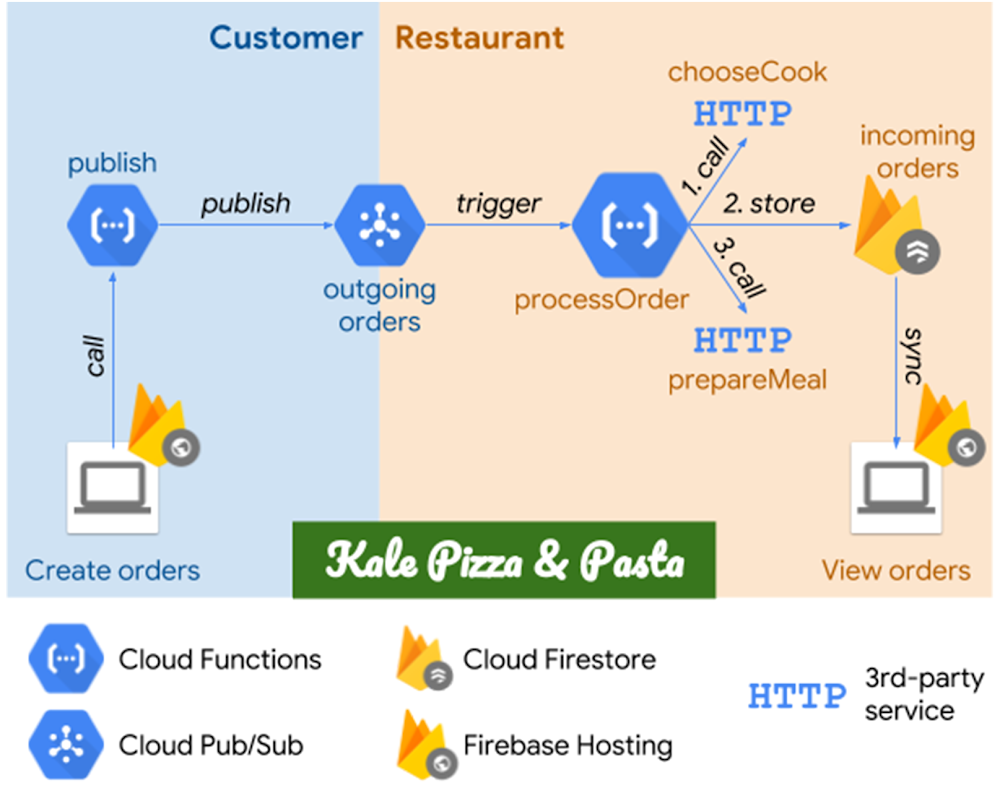
If you’ve been following our Cloud Functions pro tips series, you’ll recall previous blog posts where we showed you how to improve reliability of a serverless solution by retrying function executions and making functions idempotent. Now, it’s time to apply retries and idempotency to a real-world use case: food!Today, let’s look at an order processing system for fictional restaurant, Kale Pizza & Pasta. Built on Google Cloud Platform (GCP), the system lets customers place and cooks receive orders from a web browser, using a mix of Cloud Functions, Cloud Pub/Sub, Cloud Firestore and Firebase Hosting. You can see the architecture in the following diagram:Architecture of the sample restaurant order-processing systemStarting from the left, the customer places their orders through a website, which calls the publish service built with Cloud Functions to publish the orders to a Cloud Pub/Sub topic. Messages from this topic then trigger the processOrder function, which does three things sequentially: calls the third-party chooseCook service to choose the cook who will handle the order; stores the order in Cloud Firestore; and calls prepareMeal, another third-party service, which notifies the cook about the new order. Finally, restaurant workers can view the orders on a website which simply syncs the data from Cloud Firestore. Both websites have been deployed to Firebase Hosting, which provides a fast and easy way to host web apps.Plan for failureIf you’ve ever eaten at a restaurant, you know what you order isn’t always what you receive. So to test our application’s resiliency, we decided to simulate real-life third-party systems by introducing random failures to the chooseCook and prepareMeal services. In our example implementation, these third-party services are emulated with functions that fail randomly 10% of the time. Here is the source code:To test the system against heavy load, the customer-side website JavaScript code calls the publish service once per second, which creates orders that are processed by the system as described above. The restaurant-side website on the other end of the order processing pipeline shows orders that have been added to the database.Left: customer-side website with generated orders. Right: restaurant-side website with the received orders and their assigned cooksBoth websites present the orders chronologically. Each order includes its ID and ordered menu items. Additionally, the restaurant-side website shows the cook assigned to the order. The orders IDs are color-coded, to make it easier to spot corresponding orders on both websites.We generate customer orders for a while, and then look at both websites side by side. Here is the list of orders as seen by the customer system and by the restaurant:Lost orders: the customer created more orders than the restaurant receivedLooking at the number of orders, we immediately spot a problem: Kale Pizza & Pasta customers generated 18 orders, while the restaurant received only 16. Reviewing orders on the restaurant side, we can see that some customer orders are missing. (For example, the order for Vegeteriana, Coleslaw, Orange Juice is listed on the customer side but hasn’t made it over to the restaurant.) Lost orders mean unhappy customers—not good for business!Our order processing system runs on GCP and Firebase Hosting, so we can use Stackdriver to analyze its behavior. For example, let’s open Stackdriver Error Reporting in the Cloud Console to see where the errors are coming from:Error visible in Stackdriver Error ReportingHere, we see that the processOrder function is failing because of a transient error coming from the chooseCook function. After clicking on the error, we get more information about it, like error counts and a sample stack trace. To drill down to a specific instance of the error, we open logs for one of the listed error samples, and use Stackdriver Logging to filter the function logs by one of the execution IDs:Function execution logs in Stackdriver LoggingHere we see that the function failed to perform its first action—choosing a cook—and thus terminated its execution early, with an error. This explains why the order that triggered the function was not persisted in the database: the piece of the function code which stores an order did not have a chance to execute.The source code for the processOrder function, available from the Cloud Function page in Cloud Console, shows that the function result is formed by three chained Promises. This confirms that the function terminates early if any of the three performed actions fails:If you fail, try, try againAs we already know, chooseCook function has been written in a way to generate occasional failures. Thus, let’s make its caller, the processOrder function, more robust to handle such transient failures well.As described in a previous blog post, there is a simple strategy for handling transient errors like these: applying retries. Because we have a background cloud function, we can simply enable retries by redeploying the processOrder function, with the source code unchanged, but this time with ‘Retry on failure’ enabled.With this fix applied, we rerun our test and generate new orders through the updated function:Duplicate orders: the restaurant received more orders than the customer createdUnfortunately, the order counts still don’t match. But this time the restaurant website has more orders (11) than the customer site (9). By reviewing the restaurant’s order list, we see the reason for this situation: duplicate orders. For example, an order for Hawaii, Broccoli Salad, Water was created by the customer only once but appears twice on the restaurant site, assigned to two different cooks! Customers may be fine with that but just like missing customer orders, delivering extra pizzas is not good for Kale Pizza & Pasta’s business.Why are we getting duplicate orders? By looking into the reported errors, we see that not only does the chooseCook function return transient errors but the prepareMeal function does as well. Now, looking into the processOrder function source code again, we see that a new order document is added to Cloud Firestore every time a function executes. This results in duplicates in the following scenario: when an order is added to Cloud Firestore and then the call to prepareMeal function fails, the function is retried, resulting in the same order (potentially with a different cook assigned) being written to Cloud Firestore as a separate document.Applying idempotencyWe discussed situations like this in our blog post about idempotency, showing how you must make a function idempotent if you want to apply retries without duplicate results or side effects.In this case, to make the processOrder function idempotent, we can use a Cloud Firestore transaction in place of the add() call. The transaction first checks if the given order has already been stored (using the event ID to uniquely identify an order), and then creates a document in the database if the order does not exist yet:After deploying the function with this change applied, and ‘Retry on failure’ still enabled, we start to generate orders again:The customer and restaurant orders matchSuccess! The restaurant receives all the orders, and not a single duplicate! Even if we wait a bit and generate more events, the number of orders created on the customer side and received by the restaurant still match.In this example we showed you how to apply retries and idempotency to a real-life scenario. We made the process reliable by handling failures gracefully, without having to change the dependent services. They may still fail occasionally, but this won’t affect the workflow. It is also worth noting that we used GCP’s built-in observability features to help us analyze the problem. To learn more about how to build simple, scalable and reliable systems on GCP, check out cloud.google.com/functions/. You can also find the source code for the functions we used in this blog post on GitHub.
Quelle: Google Cloud Platform

Using data and ML to better track wildfire and assess its threat levels

As California’s recent wildfires have shown, it’s often hard to predict where fire will travel. While firefighters rely heavily on third-party weather data sources like NOAA, they often benefit from complementing weather data with other sources of information. (In fact, there’s a good chance there’s no nearby weather station to actively monitor weather properties in and around a wildfire.) How, then, is it possible to leverage modern technology to help firefighters plan for and contain blazes?Last June we chatted with Aditya Shah and Sanjana Shah, two students at Monta Vista High School in Cupertino, California, who’ve been using machine learning in an effort to better predict the future path of a wildfire. These high school seniors had set about building a fire estimator, based on a model trained inTensorFlow, that measures the amount of dead fuel on the forest floor—a major wildfire risk. This month we checked back in with them to learn more on how they did it.Why pick this challenge?Aditya spends a fair bit of time outdoors in the Rancho San Antonio Open Space Preserve near where he lives, and wanted to protect it and other areas of natural beauty so close to home. Meanwhile, after being evacuated from Lawrence Berkeley National Lab in the summer of 2017 due a nearby wildfire, Sanjana wanted to find a technical solution that reduced the risk of fire even before it occurs. Wildfires not only destroy natural habitat but also displace people, impact jobs, and cause extensive damage to homes and other property. Just as prevention is better than a cure, preventing a potential wildfire from occurring is more effective than fighting it.With a common goal, the two joined forces to explore available technologies that might prove useful. They began by taking photos of the underbrush around the Rancho San Antonio Open Space Preserve, cataloging a broad spectrum of brush samples—from dry and easily ignited, to green or wet brush, which would not ignite as easily. In all, they captured 200 photos across three categories of underbrush: “gr1” (humid), “gr2” (dry shrubs and leaves), and “gr3” (no fuel, plain dirt/soil, or burnt fuel).Aditya then trained a successful model with 150 sample (training) images (roughly 50 in each of the three classes) plus a 50 image test (evaluation) set. For training, Aditya turned to Keras, his preferred Python-based, easy-to-use deep learning library. Training the model in Keras has two benefits—it permits you to export to a TensorFlow estimator, which you can run on a variety of platforms and devices, and it allows for easy and fast prototyping since it runs seamlessly on either CPU or GPU.Preparing the dataBefore training the model, Aditya ran a preprocessing step on the data: resizing and flattening the images. He used the image_to_function_vector, which accepts raw pixel intensities from an input bitmap image and resizes that image to a fixed size, to ensure each image in the input dataset has the same ‘feature vector’ size. As many of the images are of different sizes, Aditya resized all his captured images to 32×32 pixels. Since Keras models take as their input a 1-dimensional feature vector, he needed to flatten the 32x32x3 image into a 3072-dimensional feature vector. Further, he defined the ImagePaths to initiate the list of data and label, then looped over the ImagePaths individually to load them to the folder storage using cv2.imread function. Next, Aditya extracted the class labels (as gr1, gr2, and gr3) from each image’s name. He then converted the images to feature vectors using image_to_feature_vector function and updated the data and label lists to match.Aditya next discovered that the simplest way to build the model was to linearly stacks layers, to form a sequential model, which simplified organization of the hidden layers. Aditya was able to use the img2vec function, built into TensorFlow, as well as a support-vector-machine (SVM) layer.Next, Aditya trained the model using a stochastic gradient descent (SGD) optimizer with learning rate = 0.05. SGD is an iterative method for finding an optimal solution by using stochastic gradient descent. There are a number of gradient descent methods typically used, including rmsprop, adagrad, adadelta, and adam. Aditya tried rmsprop, which yielded very low accuracy (~47%). Some methods like adadelta and adagrad yielded slightly higher accuracy but took more time to run. So Aditya decided to use SGD as it offers better optimization with good accuracy and fast running time. In terms of hyperparameters, Aditya tried different numbers of training epochs (50, 100, 200) and batch_size values (10, 35, 50), and he achieved the highest accuracy (94%) with epoch = 200 and batch_size = 35.In the testing phase, Aditya was able to achieve the 94.11% accuracy utilizing only the raw pixel intensities of the fuel images.The biggest challenge in this whole process was the data pre-processing step, as it involved accurately labeling the images. This very tedious task took Aditya more than four weeks while he created his training dataset.Modeling fire based on sensor dataAlthough Aditya and Sanjana now had a way to classify whether different types of underbrush were ripe for fire, they wondered how they might assess the current status of an entire area of land like the Rancho San Antonio Open Space Preserve.To do it, the pair settled on a high-definition image sensor, which connects over long-range, low-power LTE, to capture and relay images to Aditya’s computer, where they can run the model and classify the new inbound images. The device also collects a number of other metrics, including wind speed, wind direction, humidity, and temperature, and can classify an area of roughly 100 square meters (during daylight hours) to determine whether the ground cover will likely ignite or not. Aditya and Sanjana are currently collecting sensor data and testing the accuracy of their model at five different sites.Sensor and ML classifier architecture diagramBy combining real-time humidity and temperature data with NOAA-based wind speed and direction estimates, Aditya and Sanjana hope to determine in which direction a fire might travel. For the moment, the image-classification and the sensor-based prediction systems operate independently, but they plan to combine them in the future.What’s nextAlthough currently the pair are simply running TensorFlow models on Aditya’s gaming notebook PC (a tool of choice for data scientists on the go), Aditya plans to try out Cloud ML Engine in the future, to enable more flexible scaling than was possible on a single laptop. Image gathering from remote forest areas is another challenge they want to tackle, and they’re experimenting with all-terrain ground and aerial drones to collect data for this purpose.Aditya and Sanjana also plan to continue their efforts working with Cal Fire to deploy their device. Currently Cal Fire determines moisture levels by weighing known fuels, such as wood sticks, a process that requires human labor. Aditya and Sanjana’s device offers the potential to reduce the need for that labor.Although fire is an often devastating force of nature, it is inspiring that a team of high schoolers hope to provide an effective new tool to assist agencies in predicting and tracking both wildfires and the weather factors that enable them to spread.
Quelle: Google Cloud Platform

New Qwiklabs Quest available: IoT on Google Cloud

Connected devices provide a pathway to the age of smarter computing. As part of this evolution, the Internet of Things (IoT) plays a significant role in building a more sophisticated data-driven world. In a recent analysis, Gartner predicts double-digit growth rates in 2019 for IoT endpoints and spending on advanced analytics. Using data aggregation, consumed in real time directly from devices, presents an unprecedented opportunity to design and develop sophisticated data-centric solutions.Google Cloud Training Self Paced Labs now include a series of labs designed to help you take advantage of the latest IoT technology. The “IoT in the Google Cloud” quest presents a comprehensive introduction, with real-world examples that show you how to build your solution. Of course, not everyone has an IoT device lying around, so the labs show you how to accomplish this with data streaming from simulated hardware devices, completely self-contained in the cloud, via your web browser.  This blog post aims to introduce the most common elements when establishing a connected workflow between a device and Google Cloud Platform (GCP).As you can see from the above diagram, at its most basic level, IoT requires a connected device, ingestion of information (i.e. telemetry data), and some level of information processing based on the data received. In the more advanced labs, additional considerations to productionize your environment might be security, device management and monitoring.The concepts might seem quite abstract until you try them for yourself. Labs provide a hands-on introduction to both the subject matter and the services Google Cloud offers. Working through the labs highlights many of the challenges faced when working with IoT (e.g. securing devices through authenticated access and real world  monitoring), and some useful patterns that can be applied to real world business problems. In eight hours, you’ll learn how to use Google IoT Core in conjunction with services such as BigQuery, Cloud Dataflow and Stackdriver.IoT presents a real opportunity to establish a more data driven and analytical point of view, for example:Healthcare applications such as patient sensor monitoringIn-home devices like smart thermostatsPublic sector applications, including monitoring pollution levels or parkingTo assist you on this journey, Google’s Qwiklabs created the IoT in the Google Cloud Quest.Building a solution based on IoT requires a rich ecosystem in which to make geographically dispersed devices communicate with each other seamlessly. To illustrate this point let’s outline a typical IoT architecture for GCP and see what that entails.Incorporating an IoT device within your design requires you to learn a suite of technologies such as device registration, message brokering, and authentication. Each one of these mechanisms is quite complicated to manage in and of itself. As you can see from the diagram, the Cloud IoT Core service simplifies the technical requirements to provision a device within the Google Cloud infrastructure. The addition of this service removes a key barrier to entry by reducing the general complexities associated with managing hardware devices. The service provisions these components for you automatically, and with minimal setup:A protocol bridge, based on the de facto protocol standard of message queuing telemetry transport (MQTT) and hypertext transfer protocol (HTTP). This enables telemetry consumed from the IoT device to efficiently propagate information downstream to services such as Cloud Dataflow, BigQuery or Stackdriver.A device Manager, which coordinates management responsibilities for Cloud IoT Core.  Device registration, allowing for integration via a REST-style API for cloud platform services, console and associate authenticated tools. Secure access is available using two types of authentication based on private key exchange or JSON Web Tokens.Unified monitoring, available through Stackdriver, delivers metrics at the registry level. In addition, logging is also supported to provide both audit and device logs.A data broker, which allows information exchange to external services in a coordinated manner.Using Cloud IoT Core removes complexity and enables seamless connectivity and management of devices. In the lab, you’ll start with simulated hardware, allowing you to focus on learning how to provision, secure and ingest data from devices. To take it to the next level, why not start designing the next great application for IoT?Once you have mastered the use of Cloud IoT Core, there’s much more left that you can do. As shown in the diagram,  a message queue services such as Cloud Pub/Sub provides the building blocks on which existing patterns can be learned and evolved, so you are in control of how your new IoT service operates. Continue your quest and get lab experience with Cloud Dataflow (data transformation), Cloud Functions (event-based processing), and more common use cases to help you apply what you learn about IoT to real business needs. Labs provide the basis for your understanding and present a sandboxed environment in which you can design, build and execute your next great business idea coming to fruition.From the initial introduction of IoT concepts, to expanding to more sophisticated use cases, working with labs is an investment in your future and will enable you to quickly learn the fundamentals of IoT and leverage GCP to deliver state of the art solutions. In addition, on completion of the quest, you’ll also receive an IoT badge to demonstrate successful completion of the labs.Ready to begin? Get started with IoT in the Google Cloud.
Quelle: Google Cloud Platform

Where poetry meets tech: Building a visual storytelling experience with the Google Cloud Speech-to-Text API

This post is a Q&A with Developer Advocate Sara Robinson and Maxwell Neely-Cohen, a Brooklyn-based writer who used the Cloud Speech-to-Text API to take words spoken at a poetry reading and display them on a screen to enhance the audience’s experience.Could you tell me about the oral storytelling problem you’re trying to solve?When you become a writer, you end up spending a lot of time at readings, where authors read their work aloud live to an audience. And I always wondered if it might be possible to create dynamic reactive visuals for a live reading the same way you might for a live musical performance. I didn’t have a specific design or aesthetic or even goal in mind, nor did I think the experience would necessarily be the greatest thing ever, I just wanted to see if it was possible. How it might work or what it might look like? That was my question. While the result was systemically very simple, sending speech-to-text results through a dictionary that had been sorted by what color people thought words were, it ended up being the perfect test case for this sort of idea and a ton of fun to play with.What is your background?I’m a novelist in the very old school dead tree literary fiction sense, but a lot of what I write about involves the social and cultural impact of technology. My first novel had a lot of internet and video game culture embedded in it, so I’ve always been following and thinking about software development even without that ever being my life or career. I did a whole bunch of professional music production and performance when I was a teenager and in college. This experience gave me at least a little bit of a technical relationship to using hardware and software creatively and it was the main reason I felt confident enough to undertake this project. Lately I’ve been doing these little projects to try to get the literary world and the tech world in greater conversation and collaboration. I think those two cultures have a lot to offer each other.How did you come across the Google Cloud Speech-to-Text API, and what makes it a good fit for adding visuals to poetry?We ended up searching for every possible speech-to-text API or software that exists, and tried to find the one that reacted fastest with the least possible amount of lag. We had been messing around with a few others, and decided to give Cloud Speech-to-Text a try, and it just worked beautifully. Because the API can so quickly return an interim result, a guess, in addition to a final updated guess, it was really ideal for this project. We had been kind of floundering for a day, and then it was like BAM as soon as the API got involved.What’s the format of these poetry events? Could you tell me more about CultureHub?The first weeklong residency, last June, was four days of development with an absolute genius NYU ITP student named Oren Shoham, and then three days of having writers come in and test it. I just emailed a whole bunch of friends basically, who luckily for me includes a lot of award-winning authors, and they were kind enough to show up and launch themselves into it.  We really had no idea what would work and what wouldn’t, so it was just a very experimental process. The second week, this November, we got the API running into Unity, and then had a group of young game developers prototype different visual designs for the system. They spent four days cranking out little ideas, and then we had public event, a reading with poets Meghann Plunkett, Rhiannon McGavin, Angel Nafis, and playwright Jeremy O. Harris, just to see what it would be like to have in the context of an event. Both times I tried to create collaborative environments, so it wasn’t just me trying to do it all myself. With experimental creative forms, I think having as many viewpoints in the room as possible is important. CultureHub is a collaboration between the famed La MaMa Experimental Theatre Club and Seoul Institute of the Arts. It’s a global art community that supports and curates all sorts of work using emerging technologies. They are particularly notable for projects that have used telepresence in all sorts of creative ways. It’s a really great place to try out an idea like this, something there previously wasn’t a great analog for.How did you solve this with Cloud Speech-to-Text? Any code snippets you can share?For the initial version, we used a Python script to interact with the API, the biggest change being adapting and optimizing it to run pseudo-continuously, then feeding the results into the NRC Word-Emotion Association Lexicon, a database which had been assembled by computer scientists Saif Mohammad and Peter Turney. We then fed both the color results and the text itself into a Max/MSP patch which generated the visual results. The second version used Node instead of the Python script, and Unity instead of Max/MSP. You can find it on GitHub.Do you have advice for other new developers looking to get started with Cloud Speech-to-Text or ML in general?I would say even if you have no experience coding, if you have an idea, just go after it. Building collaborative environments where non-technical creatives can collaborate with developers is innovative and fun in itself. I would also say there can be tremendous value in ideas that have no commercial angle or prospect. No part of what I wanted to do was a potential business idea or anything like that, it’s just a pure art project done because why not.Have questions for Max? Find him on Twitter @nhyphenc, and check out the GitHub repo for this project here.
Quelle: Google Cloud Platform

Cloud SQL now supports private connections and App Engine second generation runtimes

Cloud SQL is a fully managed relational database service from Google Cloud Platform (GCP) that makes MySQL and PostgreSQL instances accessible from just about any application, anywhere. Today, we’re pleased to bring updates to the top-requested connection options for these instances:Private service access to your Cloud SQL instances is now generally available;Support now available for connecting second-generation App Engine standard environment runtimes with Cloud SQL for PostgreSQL.Introducing private access for GCP servicesWe’re introducing a new framework to provide private connectivity to all your GCP services. The private connection employs the virtual private cloud (VPC) network and VPC Network Peering to connect to GCP. Cloud SQL is the first Google Cloud service to use this framework.What is a private service connection?A private service connection lets VM instances in your VPC network and the services that you access communicate exclusively via internal (RFC 1918) IP addresses. To use this, you set up a private connection between your VPC network and a network used by GCP managed services, such as Cloud SQL.A private connection only needs to be set up once for GCP services. After it has been set up, more than one GCP service can use it, as shown here:Cloud SQL’s private connectivity feature is great for applications or microservices that require low network latency and secure private connections to storage services. To get hands-on experience with private networking, check out the Connecting to Cloud SQL code lab.Connect to Cloud SQL for PostgreSQL from the App Engine standard environmentIn April, we announced the general availability of Cloud SQL for PostgreSQL, making one of the most popular open-source relational databases readily available on GCP. In August, we announced second-generation App Engine standard environment runtimes, allowing users to write more portable web apps and microservices while still maintaining the scalability, security, and pay-per-use features of the original App Engine.Today, we are excited to bring these technologies closer together by announcing Cloud SQL for PostgreSQL support for the new App Engine runtimes. App Engine users can now connect quickly and securely to either Cloud SQL for MySQL or Cloud SQL for PostgreSQL instances in any of the supported standard environment runtimes (Go 1.11, Java 8, PHP 7, Python 3.7, and Node.js) or any of the currently existing flexible runtimes.Getting started with Cloud SQL and App EngineWant to try out Cloud SQL with App Engine? Sign up to receive $300 in credit for use with Cloud SQL and access to the App Engine always-free tier. Check out the Connecting from App Engine page for instructions and examples to connect your app and Cloud SQL.What’s next for Cloud SQLSupport for private networking has been a top request from users and its general availability is an important milestone for Cloud SQL. You can look forward to more connectivity options, like Cloud VPN, in the future. Have more ideas? Let us know what other features and capabilities you need with our Issue Tracker and by joining the Cloud SQL discussion group. We’re glad you’re along for the ride, and we look forward to your feedback!
Quelle: Google Cloud Platform

Getting to know the Google Cloud Healthcare API: part 3

The Google Cloud Healthcare & Life Sciences team recently introduced a set of application programming interfaces (APIs) and datastores that can be used to enable healthcare data analysis and machine learning applications, data-level integration of healthcare systems and secure storage and retrieval of various types of electronic patient healthcare information (ePHI).  The first article in this series provided a brief overview of the Cloud Healthcare API and its possible use cases, and the second article explained some of the concepts implemented in the API and illustrated basic approaches to using the API. In this final segment we’ll do a deeper dive into how you can use the API to address challenges you might have in your own organization.About our use caseA key use case that is becoming increasingly relevant in many healthcare organizations is generating, storing and surfacing machine learning predictions on FHIR, HL7v2 and DICOM data. Because FHIR and DICOM play a significant role in both the path to ML predictions and as sources for valuable data, we’ll also show how these data modalities affect the process of implementing machine learning on healthcare data.Architecture foundationsBefore diving into an explanation of the core architecture that makes the magic happen, let’s discuss some foundational work that needs to occur before loading sensitive data into Google Cloud Platform (GCP).Preparing to work with PHI in Google CloudThe Google Cloud documentation provides guidance regarding considerations and best practices for complying with regulatory requirements that govern how to handle personal healthcare information (PHI). While we won’t reproduce all of that information here, it’s important to highlight some of the more important tasks you should perform before implementing any PHI processing in GCP:In the United States, ensure that you have a signed HIPAA Business Associates Agreement (BAA), and that you have explicitly disabled non-compliant products and services in your GCP projects. Google Cloud provides open-source deployment scripts that can assist with correct project setup, and our documentation includes a list of HIPAA-compliant GCP services for US deployments.Create Identity and Access Management (IAM) service accounts and keys for processing PHI data, and grant those accounts the least amount of privilege they need to perform their work. The Cloud Healthcare API has a comprehensive set of available IAM roles and permissions that you can use, and you can combine these with roles and permissions for other GCP services to create the right combination for your needs.If you are using Google Cloud Storage to hold PHI data—either as a data ingestion point or as part of a data lake strategy—ensure that the data is accessible only to people and systems explicitly authorized to access it. When using “gsutil” to upload and/or download data, be aware of the security and privacy considerations that can help keep your data safe.Determine if your data requires encryption above and beyond what Google Cloud itself provides. Google provides a cloud-managed encryption key (CMEK) service that can be useful in certain cases, such as encrypting data in Google Cloud Storage—check the product documentation to determine if the GCP data services you’re planning to use support CMEK and if so, how best to implement it.Activate Google Cloud audit logging for both administrative and data events, and export this data periodically so that it can be reviewed for possible security breaches. Google BigQuery can be very useful for analyzing this kind of log data. As always, avoid logging sensitive PHI data by applications that consume this data in order to avoid inadvertent exposure to unauthorized personnel.To further control access to sensitive data you may want to consider limiting access to systems that process PHI data by implementing a virtual private clouds (VPCs). VPCs can be subdivided into one or more public or private networks, and you can implement a number of strategies to prevent access from the public internet.When it’s necessary to exchange sensitive information with non-GCP systems or applications, virtual private network (VPN), mutual TLS (mTLS) and the Apigee API management system are great options. One or more of these techniques can be used to meet your specific access control requirements.Setting up authentication for Google CloudAll of the modality-specific Cloud Healthcare APIs require authentication via Google Cloud Identity and Access Management (IAM). To set up authentication for the Cloud Healthcare API, create an IAM service account and assign Cloud Healthcare API roles that are appropriate for the type of access required. For service accounts that will be used for administrative activities, for example, appropriate roles include those that enable dataset and store creation (typically, the “Healthcare Dataset Administrator” and “Healthcare <modality> Store Administrator” roles); other roles will be appropriate for other use cases (the “Healthcare HL7V2 Ingest” role for sending data to the HL7v2 store, for example). Be sure to grant only the lowest level of permissions required for the given use case.Cloud Healthcare API authentication requires the use of OAuth 2 access tokens, which can be generated in a number of different ways. The easiest way to do this from an interactive (command-line) session is to use the “gcloud application-default print-access-token” function.  Download the service account JSON key and store it in a secure location, then create an environment variable called GOOGLE_APPLICATION_CREDENTIALS with a value specifying the full path to the downloaded key. This environment variable will be used by the “gcloud” command to create or retrieve OAuth 2 access tokens and to authenticate subsequent calls to the Cloud Healthcare API.Note that sometimes, applications that issue Cloud Healthcare API requests cannot use “gcloud” to retrieve Oauth access tokens. In that case, you can use the same service account key to generate tokens using the open source “oauth2l” utility, or use Apigee in combination with the open-source Cloud Healthcare API token generator.Generating, storing and surfacing machine learning predictions on FHIR, HL7v2 or DICOM dataLeveraging machine learning to streamline healthcare workflows or gain insights into data is an emerging use case that holds great promise for addressing some of the critical challenges faced by the healthcare industry.Baseline architectureThe diagram below represents a baseline architecture for FHIR, HL7v2 and DICOM data integration. It shows three integration patterns:Use of an integration engine such as Cloverleaf or NextGen Connect (formerly Mirth Connect). This can be appropriate for both FHIR and HL7v2 data.Direct use of the Cloud Healthcare API MLLP adapter to forward data to the Cloud Healthcare HL7v2 APIIngestion of DICOM imaging data from a PACS system or vendor-neutral archive.Each type of data goes through three phases: ingestion, cleansing / filtering / transformation, and processing. The details of each step, however, differ somewhat depending on the data modality.These patterns are by no means the only ways to ingest these types of data—the best methods for your particular situation may differ from this example. For example, it’s possible to extract data directly from the EHR’s datastore, transfer it to Google Cloud Storage in a bulk format such as CSV, and then ingest it into Cloud Dataflow or BigQuery in the cleaning / filtering / transformation stage. This can be particularly valuable when real-time updates aren’t needed.Ingesting HL7v2 dataGenerally, when ingesting HL7v2 data you will use an integration engine such as NextGen Connect or Cloverleaf to send requests to the MLLP adapter or to make requests to the Cloud Healthcare HL7v2 API directly. Google provides an open-source MLLP adapter that accepts inbound connections and forwards the HL7v2 data sent on the connection to the Cloud Healthcare HL7v2 API, where it is securely stored in an HL7v2 store. This approach might be appropriate if you do not plan to modify the data before ingestion. While the Cloud Healthcare HL7v2 API is a cloud-only service, the adapter itself can be hosted either in your own data center or in the cloud.If you do plan to generate or edit HL7v2 messages yourself using an integration engine, you can invoke the Cloud Healthcare HL7v2 API directly using your integration engine’s REST API invocation feature. Similar to the MLLP adapter, the Cloud Healthcare HL7v2 API accepts and stores the complete HL7v2 message, and it can interpret some elements of the structure and content such as the message header, patient IDs, etc., so that you can filter messages you read from the store.Ingesting FHIR dataFHIR data can be imported into Google Cloud using the Cloud Healthcare FHIR API. This API conforms to the FHIR STU3 standard, making it easy to bring both individual FHIR entities or bundles of related FHIR data into GCP. The Cloud Healthcare FHIR API can be invoked either directly by applications (as might be the case with a bulk load operation) or via an integration engine. Once ingested, the data is stored in a secure FHIR store, where it can be made available for analysis or for application access.Ingesting DICOM dataDICOM studies are imported into Google Cloud via the Cloud Healthcare DICOMweb API, which natively complies with the DICOMweb standard (an open-source DIMSE adapter that implements STOW-RS operations is also available). Because DICOM studies are comprised of both image data and metadata, making effective use of this data often requires separate processing paths for the metadata and image data. The Cloud Healthcare DICOMweb API provides features that allow you to export the metadata into an analytics system such as BigQuery, as well as image-related facilities that support de-identification of data and bulk export for deep machine learning analysis.Cleansing, filtering and transformationIn order to get the best possible results when analyzing healthcare data or obtaining predictions from machine learning models, you should transform your data into a standardized schema. This is particularly true for HL7v2 data, which is difficult to use for analysis and prediction because of the time-based, transaction-oriented nature of the messages and the large amount of variability in message content. As a standard with a large amount of structural consistency across entities, FHIR is a good candidate for a target schema; Google has focused on making both BigQuery and machine learning tools that can perform analysis, inferences and predictions on FHIR data.To streamline the process of converting HL7v2 data, the Cloud Healthcare HL7v2 API parses the HL7 “pipe-and-hat” format into a more easily consumable JSON structure.Data processingGoogle Cloud provides several different ways to apply machine learning to healthcare data. BigQuery’s powerful built-in machine learning capability (which is in beta at this writing) enables execution of models for linear regression, binary logistic regression or multiclass logistic regression from within the SQL language, vastly simplifying use for data analysts performing these types of predictions. For more complex predictions or insights, organizations can develop their own machine-learning models using systems such as TensorFlow, and can execute these models using TensorFlow Serving or Google Cloud ML Engine. Machine learning is particularly interesting when used with radiological images; predictions on these images provide an opportunity to streamline radiological workflows by categorizing and prioritizing studies that require review by a trained imaging specialist.FHIR data (whether ingested natively in this format or transformed from HL7v2) can be exported from the Cloud Healthcare API FHIR store and imported into BigQuery for analysis using BigQuery’s SQL commands. When data is exported from a Cloud Healthcare FHIR store into BigQuery, a series of tables are created, each of which corresponds to a different FHIR entity type: Patient, Observation, Encounter, and so on. Using SQL, these tables can be examined by data scientists to gain deep insight into the nature of the data. Further, BigQuery SQL allows data analysts to join the data across tables in order to answer many different types of questions about trends in patient care, medication usage, readmission rates, and so on. Combining FHIR data with metadata extracted from DICOM studies using the Cloud Healthcare DICOM API can provide even more insight.Implementing analytics and machine learning predictionYou can use the Cloud Healthcare API to import data and forward it automatically through each of the steps we described above. To do this, you will need to enable the Cloud Healthcare API in your projects.We’ll use the following conventions for any sample Cloud Healthcare API requests:“PROJECT_ID” refers to the ID of your Google Cloud project.“LOCATION” refers to the name of the Google Cloud region in which you place your data.“DATASET_ID” is the name of the Cloud Healthcare API dataset that contains your modality-specific store and data.“STORE_TYPE” is the type of your modality-specific store. Valid values are “hl7V2Stores”, “fhirStores” and “dicomStores” for HL7v2, FHIR and DICOM data storage, respectively.“STORE_ID” is the name of your modality-specific store.Determine the source of your dataAs a first step you should determine the source of your data—the EHR itself, an interface engine, a PACS system, an outside service, etc. If you plan to use the MLLP adapter for HL7v2 data then you should install and configure it in an appropriate location—see the MLLP adapter Github project for more details on how to do this. You may also want to set up a VPN to enable more secure transmission of healthcare data to Google Cloud; the process for setting up a VPN is outside the scope of this document but information is available in the Google Cloud VPN documentation.Sending data to a Cloud Healthcare API storePart 2 of this blog series talked in detail about the concept of Cloud Healthcare API datasets and stores, and gave some examples illustrating how to create them. In this section we’ll assume that you’ve created a dataset and modality-specific store, and that you’re now ready to insert data into that store to make it available for analysis, inferences or predictions.Regardless of where your data originates, you will use a Cloud Healthcare API request to send data into the modality-specific datastore you created previously. The specific syntax of each request is modality-specific; requests to store DICOM data, for example, use a request syntax based on the DICOMweb standard, and requests to store FHIR data use request syntax based on the FHIR STU3 standard. You should consult the relevant standard for your modality, as well as the Cloud Healthcare API documentation, to determine the specific requests needed to ingest data into your modality-specific store, but generally all requests will follow a format similar to the one shown below:where the “<modality-specific-healthcare-data>” value in the POST data contains the data you wish to ingest, and “<MODALITY_SPECIFIC_REQUEST>” is the modality-specific portion of the request. For example, a request to ingest a FHIR “Patient” entity into a FHIR store called “myStore” might look like this:Similarly, a request to ingest an HL7v2 message might look like this:where the “<base64-encoded-hl7v2-message>” value in the POST data contains a complete, Base64-encoded HL7v2 message.Some modalities—DICOM, for example—also provide bulk “import” and “export” requests that allow for larger-scale ingestion of data in that modality. For details on how to use these bulk requests, consult the Cloud Healthcare API documentation.Cleaning, filtering and transforming modality-specific dataIf the modality-store has been configured with a Cloud Pub/Sub topic, applications subscribed to that topic will receive a notification of available data. This notification will contain a reference to the corresponding entity in the modality-specific store, and you can use that reference to read the entity for processing. You can handle the Pub/Sub notifications and read the relevant entities in an application running in Google Kubernetes Engine or Compute Engine, in a Cloud Functions service, or directly inside a Cloud Dataflow pipeline by using the Apache Beam “PubsubIO” adapters for Google Cloud (available for the Java, Python and Go programming languages).If your data is in HL7v2 format, the process of converting to FHIR is specific to your particular HL7v2 usage and your desired FHIR content mapping. Currently, this conversion and mapping process is done using custom logic running in Cloud Dataflow or another GCP service. Once the data is transformed into its target FHIR schema you can store it in a Cloud Healthcare API FHIR store. This enables you to both use the data for analysis, inference and predictions, and also to serve both the data and the results of processing—stored in FHIR format—to applications.Loading data into BigQuery and performing analysisCloud Healthcare FHIR API makes it very simple to move FHIR data into BigQuery for analysis. Using the “export” API request, you can specify a GCP project ID and BigQuery dataset, and the Cloud Healthcare FHIR API will create the appropriate BigQuery tables and schemas and start an operation to export the data into the selected dataset. Once that operation is complete the data can then be queried using BigQuery’s SQL functions.To start an export operation, use an API request similar to the following:where “<BQ_PROJECT_ID>” is the name of the GCP project containing the BigQuery instance to which you wish to export data, and “<BQ_DATASET_ID>” is the ID of the BigQuery dataset into which to export the data. This returns an operation request ID, which you can then query using the Cloud Healthcare API “operations” function:where “<OPERATION_ID>” is the ID of the export operation as indicated in the “export” API response. When the export operation is complete, the response from the “operations” request will include a property “done”:true to indicate that the operation has completed.Note that in order to export data to BigQuery the Cloud Healthcare API must have “job create” access to BigQuery. You can grant permission to create BigQuery jobs to the Cloud Healthcare API by looking for a service account in Cloud IAM with the name “Cloud Healthcare Service Agent” and then assigning the “BigQuery Job User” role to that account.Invoking machine learning models and capturing the resultsWhile there are no clinically-approved, pre-trained models for DICOM image analysis available from Google, experiences such as our work in detecting diabetic retinopathy or Stanford University’s work to identify skin cancer illustrate the promise of applying machine learning to imaging studies. Pre-screening DICOM studies with machine learning models can, for example, support and focus the work of radiologists by enabling them to concentrate on those studies that display the highest probability of disease or that exhibit characteristics that are of concern.FHIR data stored in a Cloud Healthcare API FHIR store can be used by machine learning models to obtain inferences or predictions about the data. To do this, you can use Cloud Functions to invoke your model via either TensorFlow Serving or Cloud ML Engine. The results from the model can then be stored in FHIR format inside the same FHIR store as the source data, and identifiers such as the patient’s Medical Records Number (MRN) enable the model output to be matched to the corresponding patient. Google has provided a basic open-source example of the integration between Cloud Healthcare FHIR API and machine learning on Github.Examples of FHIR entities which might be used to record results or drive actions based on inferences or predictions include:RiskAssessment, for assessments of likely outcomes and the probability of each outcome.Condition, possibly with a “provisional” condition verification statusProcedureRequest, using a “proposal” request intent code to suggest procedures that might lead to a diagnosis without explicitly authorizing those proceduresThis post on the Google AI Blog gives a brief overview of TensorFlow Serving, describing how it can be deployed and used to create inferences in production environments. TensorFlow Serving supports the use of a gRPC interface to enable applications to invoke the model, making it easy to integrate via Cloud Functions or other applications.Similar to TensorFlow Serving, Cloud ML Engine provides an API that lets you get predictions out of your model. Cloud ML Engine’s documentation provides some specific guidance for obtaining predictions in online systems with low latency, which might be appropriate for situations where you are ingesting data in near-real-time via a Cloud Healthcare API FHIR store and the Cloud Pub/Sub topic. For batch processing—where you batch data in a Cloud Healthcare API FHIR store and process it in bulk—there is an alternative batch processing model that is well suited to this approach.Conclusions and next stepsThe Cloud Healthcare API and GCP give healthcare IT a powerful suite of tools to organize healthcare data and to make it accessible, secure and useful. Leveraging the Cloud Healthcare API to improve interoperability across care systems opens up opportunities for powerful new applications that take advantage of deep analytics, artificial intelligence, and massive computing and storage scale. If your organization can benefit from making information more accessible, we invite you to explore the Cloud Healthcare API and explore Google’s healthcare offerings to see how we can help.
Quelle: Google Cloud Platform

Cloud Spanner adds enhanced query introspection, new regions, and new multi-region configurations

As the year comes to a close, we’re pleased to share a few enhancements for Cloud Spanner that we’ve recently added to the product, based on customer requests:Query introspection improvementsNew region availabilityNew multi-region configurationsHere’s a closer look at each of these updates.Query introspection improvementsCloud Spanner is our scalable, relational database service. One of our guiding principles when adding features is that we want our customers to have a familiar user experience compared to traditional relational databases.With that in mind, we’re excited to announce the addition of the query statistics feature, which provides the capability to view, inspect, and debug the most common and most resource- consuming Cloud Spanner SQL queries that are executed on a database. This is similar to what you might be familiar with from other RDBMS for inspecting common queries, such as pg_stat_statements in PostgreSQL and Performance Schema in MySQL.This new Cloud Spanner introspection capability gives users better visibility into frequent and expensive queries running on the system. This information is useful both during schema and query design, as well as for production debugging—users can see which queries need to be optimized to improve performance and resource consumption. Optimizing queries that use significant amounts of database resources is a way to reduce operational costs and improve general system latencies.For more information on how this works and to get started, read more here.New regional availabilityWhen building critical business applications, it’s important to have the option to host your database in the same region as your application stack, and close to your customers for better performance. To help meet that goal, we recently announced the availability of Cloud Spanner in Hong Kong as part of the GCP region launch. Additionally, we have added Cloud Spanner availability to seven other GCP regions this year, bringing the total region availability to 14 (out of 18) GCP regions. New regions added this year are South Carolina, Singapore, Netherlands, Montreal, Mumbai, Northern Virginia, and Los Angeles. You can see all Cloud Spanner regions here:Our plan is for Cloud Spanner to be available in all new GCP regions moving forward.New multi-region configurationsCloud Spanner is the only database that offers strong transactional consistency of data in multi-region and global configurations, which provides a simpler development model, improved availability, and reduced read latency. Based on your requests, we are pleased to announce two new multi-region configurations for Cloud Spanner.The first new configuration (nam6) provides multi-region coverage within the United States to reduce latency across the coasts and the middle of the country and provide enhanced durability in the event of a regional outage. You can see the nam6 configuration here:The second new configuration (eur3) provides multi-region coverage within the European Union. This increases availability and performance for applications based in the EU that serve a predominantly EU customer base. You can see the eur3 configuration here:Learn more about Cloud Spanner pricing and see how to create these instance configurations here.To get started with all the new regions and configurations, just spin up an instance in the Google Cloud console. To catch up on product announcements, customer stories, and videos about Cloud Spanner, check out our new updates page.
Quelle: Google Cloud Platform

Exploring container security: Let Google do the patching with new managed base images

Editor’s note: This is a continuation of a series of blog posts on container security at Google.As a Google Kubernetes Engine (GKE) user, you already enjoy the choice of several operating system (OS) images for your nodes, which we maintain and update for you behind the scenes, notably Container-Optimized OS (COS) and Ubuntu. You bring your own container images for your workloads, based on your needs. Today, we’re expanding our support for container images as well, with managed base images that you can use as a starting point when building your applications.At Google Cloud, we’ve long maintained base images as part of the infrastructure that powers hosted services such as Google App Engine. With managed base images, we’ll provide base images for these common OSes, and patch them automatically. As long as the FROM field in your Dockerfile points to `$distro:latest` from Cloud Marketplace, you know that these images have been remediated with the most recently available patches from upstream. That way, you can easily keep your images up-to-date, without having to pull from an unknown repository, or having to maintain the images yourself.Managed base images deal with the fact that containers are often short-lived, and frequently re-deployed, making it difficult to follow best practices such as ensuring that your container image is built from up-to-date and trusted sources. A container bundles binaries and libraries together as part of the container image. Rather than pushing small changes to a running container, you instead rebuild and redeploy the whole image, including the base, binaries, and libraries. With managed base images, any processes that can take place passively, for example patching, are done on an ongoing basis, so that the latest patches will be picked up the next time you deploy.Today, managed base images are available for the following distributions:CentOS 7Debian 9 “Stretch”Ubuntu 16.04Managed base images follow security best practices—in addition to being maintained with regular patching and testing, they can be rebuilt from scratch reproducibly—by comparing them to the original source we can verify that no flaws were introduced.Managed base images vs. distroless imagesAn alternative to managed base images is distroless images. These images contain only your application and its runtime dependencies, greatly reducing the potential attack surface. A package with a newly discovered vulnerability can’t affect you if you don’t have the package in the first place! Distroless images remove package managers, shells, or other programs you might find in a standard Linux distribution, so that you’re focusing on what’s actually important: reducing the signal-to-noise ratio that vulnerability scanning usually generates, and leaving you less to maintain.Both distroless and managed base images are good options for your containers. If you need a full Linux distribution, including features like a package manager or a shell, then managed base images are a good choice. If you want the most locked-down option, then distroless images might be a better choice. Read more about managed base images, and pull them directly from Cloud Marketplace.Working with managed base imagesIf you decide to use a managed base image, you may notice that there are still some vulnerabilities when you scan these base images with Container Registry Vulnerability Scanning. That’s to be expected, and can happen for a variety of reasons:Upstream maintainers don’t always agree with the vulnerabilities listed in the CVE database, e.g., CVE-2005-2541 is considered a High severity vulnerability in Debian, but is considered “intended behavior,” making it a feature, not a bug.Vulnerabilities may not have an available patch, and so even though they’ve been identified, there is no current solution.Lower-severity vulnerabilities may not have been prioritized upstream. Typically, maintainers address less severe vulnerabilities at a regular cadence, so while the latest version may not contain the relevant patch, a future version will.Further, please note that although you’re pulling `$distro:latest`, this isn’t pulling the latest version of a distro, e.g., Ubuntu, but rather the latest from a particular version of a distribution, e.g., Ubuntu 16.04. This  means you get security patches, but no unexpected new functionality.CentOS supportxBased on popular demand, we’re also introducing support for CentOS, with a managed base image. CentOS is a community-driven OS providing a robust base for building your containers.The CentOS managed base image uses `yum` and `rpm` for package management, and these pull RPM files only over HTTPS connections. You can pull the CentOS base image directly from Cloud Marketplace.Best practices for image validationTo help you further secure your images, we’ve also published a new solution on image validation best practices as part of a CI/CD process. Since containers are meant to be immutable, they are constantly being rebuilt and redeployed. By having a straightforward, consistent CI/CD process, you can validate and restrict what ends up in your environment on an ongoing basis.In a nutshell, here are the steps we recommend you take to validate your container images:Use a centralized, locked down CI/CD process. Simplify your CI/CD with a small number of image repositories, and a centralized release pipeline for all production jobs.Build your container image from trusted sources. Minimize your attack surface by using a minimal patched base image, such as Google managed base images; Also be careful to only pull in packages that you need.Implement image scanning and analysis. Vulnerabilities can still be present even when you only build from trusted sources. GCR Vulnerability Scanning is an easy way for you to get started scanning your images.Enforce a deploy-time image validation policy. Tie together your CI/CD verifications using a deploy-time policy to ensure only trusted images can be deployed to your production environment. For example, you may want to only deploy images that are built by your centralized pipeline, and that pass basic vulnerability scans. Binary Authorization provides a flexible signature based deploy policy enforcement for GKE that can easily be integrated into your existing CI/CD pipeline.To learn more about container image validation, check out Secure Software Supply Chains on Kubernetes Engine. For further content on container security best practices, read our container security guide.
Quelle: Google Cloud Platform

Python 3.7 for App Engine is now generally available

Earlier this year, we announced the beta launch of a Python 3.7 runtime for App Engine standard environment. Today, we’re excited to announce that Python 3.7 is now generally available on Google App Engine.Introducing  second-generation runtimesThis second-generation Python runtime represents more than ten years of experience supporting Python on Google Cloud Platform. We first launched App Engine in 2008, and since then, both App Engine and Python have evolved considerably.App Engine standard environment now provides an idiomatic Python runtime, allowing developers to use dependencies from the Python Package Index or from private repositories via the requirements.txt file. This includes any web framework that supports the Web Server Gateway Interface (WSGI), including Flask, Pyramid, Django, and more, enabling you to write apps and microservices that will run on any Python runtime.In addition, we’ve decoupled the most popular features from first-generation App Engine, like Cloud Scheduler (originally App Engine Cron) and Cloud Tasks (originally App Engine Task Queues), allowing developers to write even more portable code that can be used across all GCP services.Python at scaleApp Engine’s ability to scale and it’s support for Python 3 makes it the platform of choice for customers like DeNA, a provider of mobile services based in Japan:“We’re building mobile games where traffic can fluctuate up to 1,000% based on new feature releases,” says Yoshiki Ogawa, Engineer at DeNA and Shohei Miyashita, Engineer at DeNA. “App Engine’s ability to scale with traffic reduced our infrastructure cost and complexity. And thanks to the recently added Python 3 runtime, our R&D group was able to introduce our game’s decision-making engine using the latest versions of pandas and numpy.”In addition to being able to automatically scale up based on load, the new Python runtime can also scale down: in fact, it’s our first Python 3 runtime that can scale to zero. And since you’re only billed based on what you use, this can significantly reduce costs for infrequently used applications or services, without needing to think about configuring infrastructure.Try Python 3.7 todayYou can write apps using Python 3.7 today on the App Engine standard environment—check out the docs to get started.
Quelle: Google Cloud Platform