KeyBank chooses Anthos to develop personalized banking solutions for its customers

Editor’s note: KeyBank, the primary subsidiary of KeyCorp in Cleveland, OH, is a superregional bank with $137 billion under management. Last year, KeyBank joined the Anthos early access program, as they looked at how to extend the benefits of containers and Kubernetes to legacy applications. Here’s why.When you’ve been around as long as KeyBank has – nearly 200 years – you know a thing or two about keeping up with the pace of change. What started out as the Commercial Bank of Albany, New York, is today the 13th largest bank in the United States, with about 1,000 branches spanning from Alaska to Maine. And as we grow, transforming ourselves through digitization is a central way that we connect with and serve our clients.Digitization allows us to spend less time servicing “fast” money—individual transactions such as deposits, withdrawals, transfers—and more time on “slow” money—personalized banking solutions for goals like starting a business, retirement or paying for college. Because we provide a robust online and mobile experience for fast money, when a client comes into a branch, we can have deeper conversations with them about how slow money can help with their financial wellness.As part of these efforts to digitize the enterprise, we’ve been using containers and Kubernetes in our on-prem data center for several years, mainly for our customer-facing online banking applications. The speed of innovation and competitive advantage of a container-based approach is unlike any technology we’ve used before. In 2015, we acquired First Niagara Bank, and had to onboard its 500,000 online retail bank clients. During the conversion weekend, our new clients had trouble navigating the new website and logging in. Over the course of two days, our web team deployed as many as 10 fixes to production in real-time, without having to take down the system a single time. That never could have happened without the portability and automation of containers and Kubernetes.  Containers and Kubernetes have also helped us spin infrastructure up and down on demand. That’s significant when you have big spikes in demand, like over major shopping days such as Black Friday and Cyber Monday. For example, our online banking application averages about 35 logins per second, but that can surge to 100 logins per second at peak periods. Think about that—we can quickly triple our capacity without having to do anything, because our Kubernetes infrastructure automatically spins up capacity and spins it back down again when it’s not needed. We wanted to bring that kind of “burstability” to the rest of our infrastructure—applications that weren’t developed to run in containers. In addition to the online banking applications running in Kubernetes, we support over 300 other internal applications that are critical to our day-to-day operations—including fraud detection and corporate account management—and 95% of those run on VMware. We also wanted to stay as close as possible to the open-source version of Kubernetes. Anthos, Google Cloud’s hybrid and multi-cloud platform, checked all those boxes. It gives us the ability to spin up infrastructure whenever—and wherever—we need, so we can provide that same burstability to internal processes that weren’t created to natively run in containers. Google created Kubernetes, so we know that much of the Anthos feature set comes straight from the source. We deploy Anthos locally on our familiar and high-performance Cisco HyperFlex hyperconverged infrastructure of computing, networking and storage resources. We manage the containerized workloads as if they’re all running in GCP, from the single source of truth, our GCP console. We’ve been partnering closely with Google Cloud and Cisco on Anthos since day one and are taking a methodical approach to deciding which applications to migrate there. First on our list: applications that change all the time, so that they can benefit from earlier and more frequent testing that containerization brings to the table. By verifying the technical wellbeing of our applications, we’re helping to ensure our clients are on a path to financial wellness.
Quelle: Google Cloud Platform

GlideFinder: How we built a platform on Google Cloud that can monitor wildfires

Editor’s note:Today’s post comes from Dmitry Kryuk, Founder & CTO, GlideFinder, which offers a platform that can locate wildfires, alert subscribers, and provide analytics that can help contain wildfires in a timely manner. The last decade has demonstrated that climate change is not an abstract concept—it’s something that’s happening now, and is already translating into multibillion damages, business bankruptcies, and lost property. We founded GlideFinder with a long-term goal to help prevent major uncontrolled wildfire, and we firmly believe that applying knowledge and insights from a variety of data sources can have great impact in controlling and managing the effects of these natural disasters. Understanding risk exposure is an important way businesses and communities can prepare for the possibility of wildfire, and a key component of estimating that risk is the availability of a reliable real-time fire detection and notification framework. But creating such a framework has historically been challenging because it requires bringing together a wide variety of raw datasets from various agencies, and then the training, domain knowledge, and time and resources it takes to make sense of that data. As we developed GlideFinder, our aim was to create a framework that could easily help users understand which preventative measures would be most efficient and cost effective for their specific location. Because this problem is much more severe in developing countries, it needed to be affordable and scalable as well. To address some of these challenges, we built a public platform for detection, notifications and analytics of wildfire risks. It correlates streaming satellite data with supplemental weather, geologic, terrain, demographic, economic and agency response data, visualizes fire development on an interactive map, gives a sense of how fast the fire is spreading and in which direction, and can help define proactive long-term planning and short-term emergency response procedures. In the future, the platform can be extended to other natural phenomena observable from space, UAVs, cameras and sensor networks.Building GlideFinder On Google CloudSince Glidefinder is an analytical platform, it needs data, and acquiring high quality data was the biggest challenge. There are multiple agencies that collect data in different formats, sometimes on paper, at varying levels of detail. That’s why the focus so far has been the integration of satellite data, which is factual, reliable, and consistent in resolution over time.ScalabilityGlideFinder currently ingests data from the NASA Suomi NPP satellite, VIIRS, and historical MODIS data. The satellite generates on average 50,000 records per day, which are updated every hour. Each record represents a hotspot of 375mX375m with characteristics like temperature, data quality, and more.  There are approximately 200 million records, or 22 GB of data for the VIIRS/MODIS dataset. Right now, we’re in the process of integrating geostationary satellites GOES-16 and GOES-17, each running a new scan every 5-15 minutes. We’ll have roughly 210 GB of data for a single year.All this data is stored in Cloud Storage and BigQuery. When a user runs a search for a particular location, they define a few search criteria:Level of aggregation—It could be annual, monthly, daily, or not aggregated at all.Time rangeZoom level—The defined area around the location search to present on the map. The default is 40kmX40km, but you can increase or decrease that area so that, in conjunction with other criteria, you can control the amount of data you pull. The results include metrics like total burned area for the selected time range, zoom level, aggregation level by year, county, and number of days the fire was in the radius of 10km, by city or zip code. Here’s what it looks like:We can’t run this query against BigQuery directly for the following reasons:In general, BigQuery has a default of 100  concurrent interactive queries per project, and we can expect hundreds of thousands of concurrent users during fire season from all over the world.Even if this solution was built for mid-size enterprise customers with a few hundred users, querying BigQuery directly would take a significant amount of time. We use multiple aggregate functions, joint with city/county/international administrative unit geographies, so a single query can run for a few minutes.To solve this problem, we materialize the views with the required business logic and use a Dataflow job to process that data and write into JSON files in Cloud Storage and Cloud Firestore.The filenames contain location coordinates and period name. E.g.That link means that we are pulling historical data for an entire year (2012), with monthly aggregation (there will be 12 nodes in a single JSON file). Coordinates 12.5405_-13.9194 define a corner of a 20kmX20km square. We also separate processes for dealing with historical data and incremental real-time data. Once the business logic is defined, we can run Dataflow processing once for the entire history, and then append current year/month files. We do something similar with real time data: we create JSON files that span a window of the current fire season (for example the last 5 months). Those files are stored in a different location and demonstrate propagation of the current fire. The data is not aggregated by time, and shows hotspots from every satellite scan in the timeline. We use streaming Dataflow pipelines to process new incremental fire data and new alert locations that subscribers add to monitoring.Red dots correspond to the current position on the timeline. The darker spots are from previous scans.Since subscribers can add new locations for monitoring all the time, and we are still bounded by the default of 100 concurrent queries, new alert configurations are exported every 3 minutes from Firestore to BigQuery. This way, a batch of locations is processed by a single query. When a match between an alert location and fire data is found, a cloud function materializes the view and triggers Dataflow which writes report files and JSON files that define the customer and which notification method to use. Once the file lands in the bucket, it triggers a cloud function that uses a third-party API to send an email or SMS.This is how alert and interactive map looks on the mobile:Geographic AggregationOne question that arises from processing and visualizing satellite data is how to do it efficiently without jeopardizing accuracy. VIIRS resolution is 375x375m, and large fires have multiple adjacent pixels. Different scenarios may require different accuracy: if we are presenting a fire that is happening right now, we may want to present every hotspot on the map from each scan.When we present aggregated annual data, in most cases it would not make sense to present every hotspot. We can’t use DISTINCT in the query since the coordinates are float numbers, and the 375×375 pixels may overlap between scans.To work around this, multiple pixels can be snapped to another point in the intersection of a grid.The query below does it with latitude:Why only latitude and not longitude? Because every latitude line is about the same length in km, but the further you move from the equator, lines of longitude become shorter. Hence for long_increment we use a trigonometric formula:GIS FormatsIn addition to the satellite data, our platform also uses several GIS datasets such as vegetation types, vegetation disturbance (e.g., insect infestation), and potential fire intensity, as well as information about who is responsible for administering each area. We join those datasets with fire data, so that we can tell in which zipcode/province/region the fire has occurred, compare metrics from different geographies, and estimate the risk of fire based on the availability of fuel.  We also use public dataset bigquery-public-data:geo_us_boundaries for US counties, cities, zip codes and join with US Census data.The GIS source is usually in shapefile format, which can be converted to GeoJson with the open source ogr2ogr utility. The problem is that when those files are created in ESRI or other specialized GIS tools, they have less restrictions on the types of geometries than currently in BigQuery. So unless we use the SAFE prefix, the query that uses GIS functions will fail. Usually there’s a small percentage of erroneous polygons, but sometimes those are the largest polygons. In the SRE dataset, one of those polygons covered most of California.To overcome this issue, we used the following workaround:Export erroneous polygons from BigQuery:Upload exported polygons into PostGIS and fix them there:However, that operation is computationally intensive. For example, a single table of vegetation types contains 782M polygons (281GB), of which 10M are invalid polygons. Fixing them on a single machine would take days. In this case, Dataflow came to the rescue again: we created an autoscaling data pipeline that employed GIS utilities to fix the polygons.SummaryWe chose Google Cloud infrastructure because of its scalability (which allows millions of concurrent users from anywhere in the world), live data streaming and processing with Dataflow, and the ability to work with petabytes of data in BigQuery. We are also planning to use Vision API and machine learning to process imagery data from cameras and additional satellites.  Below are the main GCP components we use:BigQuery data warehouse—For historical and real-time satellite data, census datasets, USGS fuel and vegetation data, USFA fire response data, and user location data. User data is correlated with detection data, and based on that information alerts are sent.App Engine with Cloud Tasks and background Cloud Functions—used to pull data from NASA sources, detect events such as new data files, materialize BigQuery views on events, send alerts, publish Pub/Sub messages, and write user-specific data into Firestore.Dataflow—streams new user and satellite data into BigQuery, picks up the results of BigQuery views and writes them into Google Cloud Storage for user consumption. Pub/Sub messaging—Triggers Cloud Functions. If you have questions or recommendations about our platform, or would like to help us in development, please reach out to dmitry@glidefinder.com.
Quelle: Google Cloud Platform

New solution gallery helps you customize and extend G Suite apps

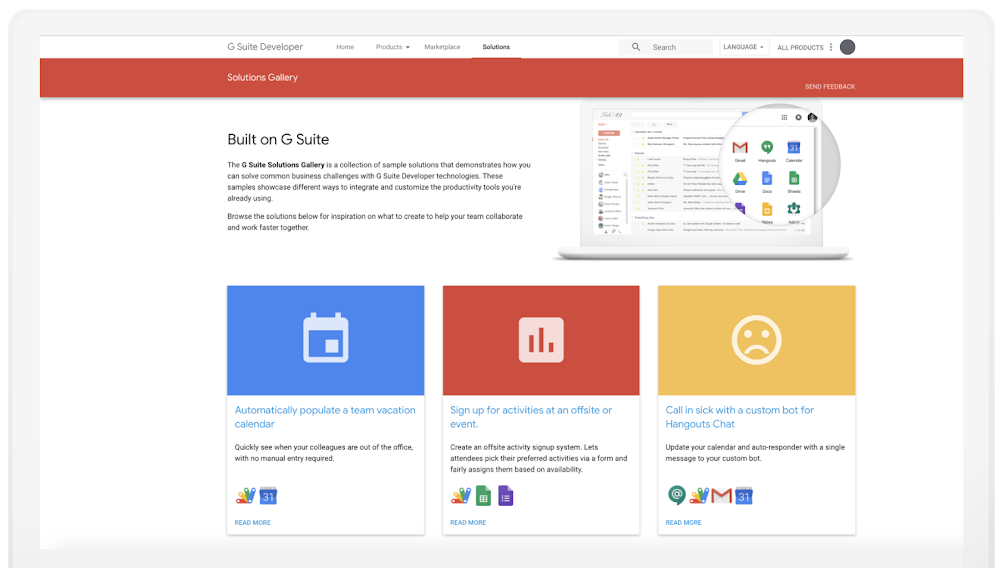
Imagine how much more you could accomplish throughout your day if you could automate monotonous workflows. With G Suite, you can. Today, we’re introducing a new resource to help you envision how to solve common business problems: the G Suite Solutions Gallery.This gallery features real-life examples of custom business workflows that you can build on G Suite, like automatically populating expense reports with a simple script. It includes guidance for G Suite developer tools, and even includes full code samples so you can start building your own today.Each solution comes with complete demo instructions for examples covering a range of integration types, like using Add-ons to extend your favorite G Suite apps like Gmail, Google Docs or Sheets, creating container-bound scripts, building chatbots and more. Use the G Suite Solutions Gallery and developer tools to solve common business problems such as:Automatically list team vacations in a shared team calendar based on keywords.Create expense reports without leaving your email inbox.“Call” in sick using a custom bot that automatically updates your work calendar.Many more solutions to choose from.If you have a solution idea, please send us your suggestions. You can also browse the full source code of all the solutions on Github. Check back in as the gallery grows to see more solutions built on top of your favorite G Suite products.
Quelle: Google Cloud Platform

Expanding virtual machine types to drive performance and efficiency

In April, we announced expanded virtual machine (VM) offerings, giving you the flexibility to choose the right machine type for your workloads without compromising on price and performance. Today, we are delighted to share additional updates to VM offerings on Google Compute Engine, with the launch of all new general-purpose VMs in beta, the general availability of compute-optimized VMs, and memory-optimized VMs in beta.General-purpose VMs with improved price-performanceCompute Engine currently offers flexible general-purpose VMs, with the ability to create custom machine types, add local storage to any predefined or custom VM, and choose from a wide range of CPU platforms.Starting today, we are adding the 2nd Generation Xeon Scalable Processors to Compute Engine’s general-purpose machine types. Currently in beta, the new general-purpose machine types (N2) offer greater than 20% price-performance improvement for many workloads and support up to 25% more memory per vCPU compared with first generation N1 machines. N2 machine types run at 2.8GHz base frequency, and 3.4GHz sustained all core turbo.N2 machine types offer a balance of compute, memory, storage and network resources, making them a great fit for most workloads, including web and application servers, enterprise applications, gaming servers, content and collaboration systems, and most databases.N2 machine types come with 2 to 80 vCPUs, 1GB to 640GB of memory, and offer up to 8GB:vCPU across both predefined or custom machine shapes so that you can create the best-fit VM for your workloads, preventing resource stranding and helping you optimize your spend. N2 machine types are currently available in us-central1, europe-west4, asia-southeast1 and will be available in most GCP regions within the next few months.Compute-optimized VMs for your most demanding applicationsIf you are running compute-heavy applications with high performance and strict latency requirements, the new compute-optimized (C2) VMs provide the highest performance per core available on Google Cloud, making them a great fit for demanding applications such as high performance computing (HPC), video encoding and massive multiplayer games.Compute-optimized VMs are now generally available in four regions; us-central1, europe-west4, asia-northeast1 and asia-east1, with expansion planned for us-west2, us-east1, and europe-west2 in the coming weeks. Customers using compute-optimized VMs have been delighted with their performance and price:“Google’s compute-optimized VM (C2) technology has enabled us to offer our customers the fastest infrastructure in WordPress today. It’s thanks to our strong partnership with Google that we were able to work closely to integrate our technology with theirs and provide the speed, security, intelligence, expertise and award-winning global support to help companies of all sizes win online with WordPress. We are excited to partner with Google Cloud on this achievement and help push the state of the art of what’s possible with WordPress digital experiences for our customers.” – Jason Cohen, Founder and Chief Technology Officer for WP Engine.“After moving one of our customers to Google Compute Engine C2 VMs we saw a 40% improvement in performance, while using less hardware. One of the critical jobs/processes took 82% less time to complete at 42% less cost.” – Dan Speck, Burwood GroupMemory-optimized VMs now in beta and SAP CertifiedWith the addition of 6TB and 12TB VMs to GCP’s memory-optimized machine types (M2), SAP customers can run their largest SAP Hana databases on GCP. Now available in beta, these VMs are the largest SAP Certified VMs available from a public cloud provider.  Not only do M2 machine types accommodate the most demanding SAP applications, they also support your favorite GCP features. For SAP systems, uptime is critical for business continuity. With live migration, you can keep your SAP systems up and running even in the face of infrastructure maintenance, upgrades, security patches, and more. And Google Cloud’s flexible committed use discounts let you migrate your growing database from a 4TB instance to the new 6TB VM while leveraging your current Memory-optimized commitments.  Getting startedIt’s easy to configure and provision the new machine types programmatically, as well as via the console. To learn more about running your C2, M2, and N2 VMs on GCP, check our machine types page and pricing information. Stay up-to-date on additional regions by visiting our available regions and zones page, and go to the GCP Console to get started.
Quelle: Google Cloud Platform

Last month today: GCP in July

You’ll find a whole selection of posts on the Google Cloud Platform (GCP) blog from July, and a few were especially popular, including supercomputer speed news, new CI/CD options, and a new Kubernetes certification. Check out what was new, whether you’re building cloud from the ground up or putting the finishing touches on a machine learning strategy.Laying the foundation for your cloudLast month saw the announcement that Elastifile, which provides scalable enterprise storage for the cloud, is now a part of Google Cloud. Elastifile will be integrated with Cloud Filestore. This means it’ll be even easier to get enterprise workloads, like those running on SAP, into GCP with native file storage compatibility. It will also simplify managing and scaling compute-intensive workloads, especially useful for companies in media, manufacturing and others where large-scale processing can benefit the business.Along with storage, database choices matter for your cloud infrastructure. One big decision for modern business is whether to run databases in containerized, distributed environments like Kubernetes. This post covers what you should consider when making this decision. You’ll get a look at the options available for running databases on GCP, including fully managed and do-it-yourself. There’s also a handy decision tree and tips for success when you are running a database on Kubernetes.Feeling the need for speedCloud TPU Pods are Google’s supercomputers built just for machine learning. They get faster in each generation of hardware—they’re now in v3—and set three new performance records last month in the MLPerf benchmark. Google Cloud is the only cloud provider that’s outperformed on-premises systems when running the large-scale, industry-standard ML training workloads: Transformer, Single Shot Detector, and ResNet-50.The Spinnaker for Google Cloud Platform solution launched last month, letting developers create end-to-end pipelines using Spinnaker on Google Cloud easily and quickly. With the new release, Spinnaker can be installed in GCP in a couple of clicks. The Spinnaker for GCP solution also integrates Spinnaker with other Google Cloud services, allowing enterprises to integrate security and compliance within CI/CD. The solution supports deployment to Google-managed runtimes, other clouds, and on-premises.School’s (not) out for summerThere’s a new choice in our GCP course catalog: theArchitecting with Google Kubernetes Engine (GKE) Specialization. It uses both lectures and hands-on labs, and in it you’ll learn the ins and outs of using Kubernetes, including how it works, how you can use it as a managed service on GCP, and how to configure a GKE environment.   That’s a wrap for July. Stay tuned for all the latest on GCP.
Quelle: Google Cloud Platform

The age of Deployed AI is here: See how Google Cloud customers transform their businesses with AI

AI continues to transform industries across the globe, and business decision makers of all kinds are taking notice. But there’s a problem: although 80% of today’s enterprises recognize that AI is critical to their future, only 14% succeed in harnessing it (source). In other words, a gap remains between the potential of AI and its ease of deployment.At Google Cloud AI, closing this gap is perhaps my most important responsibility. After years of breakthroughs, AI has stabilized with the emergence of sophisticated tools, best practices, and a rapidly growing community of builders. Finally, we’ve answered the question of what AI is. Now it’s time to ask what it can do—for you, and your business. We call it the era of Deployed AI.At the heart of Deployed AI is a vision for transforming your business. It’s a clear objective that can bring an entire organization together, aligning teams and engaging stakeholders. This diverse range of perspectives means a deeper understanding of risks and benefits, as well as the cost of change—both practical and emotional. Once deployed, success should be measurable with clear, objective metrics. This encourages an ongoing cycle of refinement, allowing you to continually optimize results while reinforcing trust with your users.Now, let’s see how some of the world’s biggest brands are using Deployed AI to make their goals possible.Unilever: Personal Marketing at a Global ScaleTake Unilever, for instance. They’re among the biggest consumer goods companies in the world, with 400 brands ranging from Dove personal care products to Ben & Jerry’s ice cream. Despite their remarkable reach, however, Unilever is a company built on social consciousness and authenticity. So when it came time to align around a Deployed AI strategy, they asked an audacious question, to put it mildly: what if it were possible to maintain true, one-to-one relationships with each of their customers?…all one billion of them?In any other era, this would have been impossible. But in the age of Deployed AI, trade-offs that were once inescapable are becoming win-wins—including the age-old tension between global reach and a personal touch. Using a broad range of consumer insights alongside Google Cloud AI tools such as translation, visual analytics, and natural language processing, Unilever is generating insights faster than ever before and gaining an entirely new understanding of what their customers care about.For example, the Cloud Vision API made it possible to understand the content of photos submitted by Closeup toothpaste customers for a campaign spanning South Asia. In addition, the Natural Language API revealed audience sentiment by analyzing social media comments referencing the campaign. Together, these insights continually reshaped the campaign, giving millions of users a genuine sense of participation.The vision paid off, and the numbers speak for themselves. The campaign reached nearly 500 million people across multiple continents, generating measurably positive uplift in brand engagement and consideration in the process. And it demonstrated Unilever’s commitment to each customer’s experience, even at a global scale.Unilever’s story demonstrates the power of a tech-savvy company putting the best of Cloud AI to use. But what about companies just beginning their journey with technologies like machine learning? Deployed AI is about bridging the expertise gap, which is why we’re continually investing in a technology stack that takes the risk out of an AI strategy—sparing you the complexity of implementation and letting you focus on how state-of-the-art tools can solve the problems that matter most to you.Meredith Corporation: Individualized Curation, Available on TapMeredith Corporation is one of the biggest names in media, with brands including People, InStyle and Martha Stewart Living, and an audience of over 175 million readers in the United States. They also own recipe website AllRecipes, where they perfected a manual review process that made content easy to classify and target based on reader preferences. Although highly effective, it was slow, costly, and took years to implement—making it near impossible to replicate for their more than 40 other brands.This challenge gave Meredith a clear objective for their Deployed AI strategy: build an automated solution with the insight of a manual curation process. Lacking the in-house expertise to do it themselves, however, they turned to Google Cloud’s AutoML Natural Language, which made it easy to generate a custom, ready-to-use content classifier with data they already had. The results weren’t just immediate, but transformative: from day one, the model matched—and sometimes exceeded—the best work of their content review team.Now, Cloud AutoML has replicated what took Meredith years to build manually, transforming the rest of their properties in a matter of months. The result is tailored content and a consistently elevated experience, impacting tens of millions of readers in a time frame impossible without AI.Making Trust a Fundamental Part of Every AI DeploymentFinally, there’s the question of trust. Users have never been more socially conscious, and that’s encouraging all of us to make our technology more fair, more accessible, and more secure. AI presents special challenges, however, with bias, privacy and transparency among the most pressing examples.These are complex problems that demand a mixture of technical, social and institutional solutions. A long journey lies ahead, but it’s one we look forward to sharing with you. We took our first step last year, with the publication of the principles that guide our work in this field. Since then, we’ve greatly expanded our efforts to solve problems and share what we’ve learned in the form of ever-evolving Responsible AI Practices.At Google Cloud, we’re committed to giving you more than technology. We’re sharing everything we’ve learned, along with the tools, insights and practices you need to deploy it responsibly.ConclusionDeployed AI is putting the power to transform your business within reach. It’s about identifying business problems that defy traditional solutions, crafting specialized AIs from Cloud AI components to solve them in ways never before possible, and establishing the results as a new standard across the enterprise. And its focus on real-world metrics means success can be continually measured and optimized in an ongoing cycle of improvement. Over time, this means an ever-growing value, user trust and business impact.Deployed AI is what’s possible when technologies like machine learning mature, and it’s why we believe the shift from the breakthroughs of AI to the applications of AI will be the most exciting chapter in its history. At Google Cloud, we’re creating a foundation that everyone can build on, regardless of industry or expertise. Let’s create something incredible together.
Quelle: Google Cloud Platform

Streaming data from Cloud Storage into BigQuery using Cloud Functions

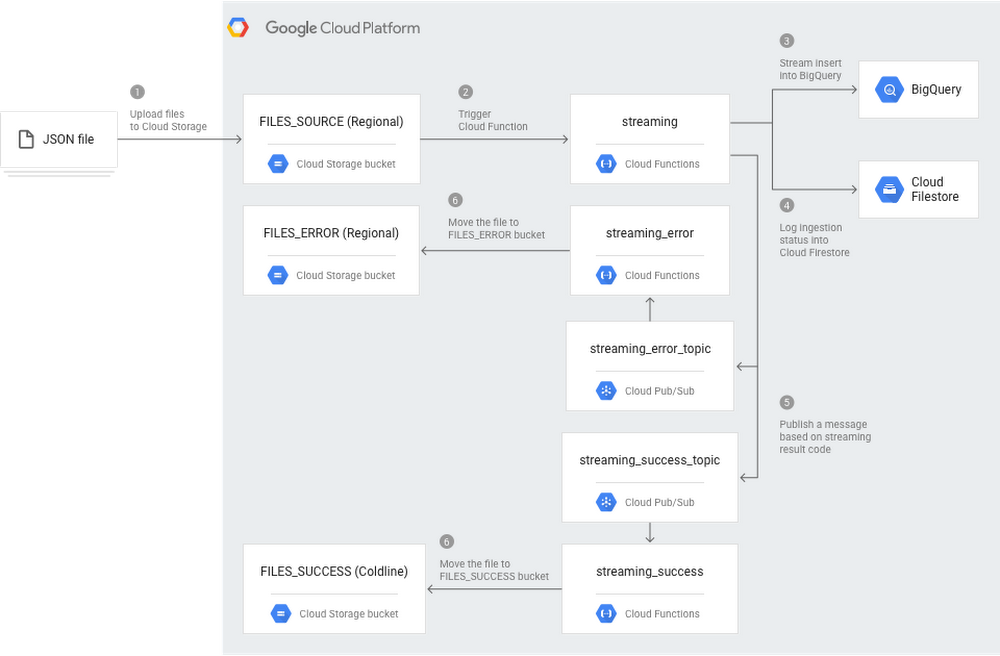
Using Cloud Storage from Google Cloud Platform (GCP) helps you securely store your data and integrate storage into your apps. For real-time analysis of Cloud Storage objects, you can use GCP’s BigQuery. There are a bunch of options for streaming data from a Cloud Storage bucket into a BigQuery table. We’ve put together a new solution guide to help you stream data quickly into BigQuery from Cloud Storage. We’ll discuss in this post how to continually copy newly created objects in Cloud Storage to BigQuery using Cloud Functions.Using Cloud Functions lets you automate the process of copying objects to BigQuery for quick analysis, allowing you near real-time access to data uploaded to Cloud Storage. This means you can get better information faster, and respond more quickly to events that are happening in your business.Cloud Functions is GCP’s event-driven, serverless compute platform, which provides automatic scaling, high availability, and fault tolerance with no servers to provision, manage, update, or patch. Streaming data using Cloud Functions lets you connect and extend other GCP services, while paying only when your app is running. Note that it’s also possible to stream data into BigQuery using Cloud Dataflow. Cloud Dataflow uses the Apache Beam framework, which provides windowing and session analysis primitives, as well as an ecosystem of source and sink connectors in Java, Python, and some other languages. However, if you’re not fluent in the Apache Beam API and you’re trying to ingest files without considering windowing or complex transformations, such as streaming small files directly into tables, Cloud Functions is a simple and effective option. You can also choose to use both Cloud Dataflow (Apache Beam) for complex ETL and large data sets, and Cloud Functions for small files and simpler transformations. How this Cloud Functions solution worksThe following architecture diagram illustrates the components and flow of a streaming pipeline created with Cloud Functions. This pipeline assumes that you’re uploading JSON files into Cloud Storage, so you’ll have to make minor changes to support other file formats.You can see in Step 1 that JSON files are uploaded to Cloud Storage. Every time a new file is added to the FILES_SOURCE bucket, the streaming Cloud Function is triggered. This function parses the data, streams inserts into BigQuery (Step 3), logs the ingestion status into Cloud Firestore for deduping (Step 4), and publishes a message in one of the two Cloud Pub/Sub topics: streaming_success_topic, if everything went right; or streaming_error_topic, if any issue has happened (Step 5). At the end, either the streaming_error or the streaming_success Cloud Functions move the JSON file from the source bucket to either FILES_ERROR bucket or FILES_SUCCESS bucket (Step 6).Using Cloud Functions means this architecture is not only simple but also flexible and powerful. Beyond lightweight scaling up and down to fit your file uploading capacity, Cloud Functions also allows you to implement custom functionalities, such as the use of Cloud Firestore.Get started by visiting the solutions page tutorial, where you can get detailed information on how to implement this type of architecture. And try GCP to explore further.
Quelle: Google Cloud Platform

AMD EPYC processors come to Google—and to Google Cloud

Today we are pleased to announce that we are using AMD EPYC processors for our internal workloads and that they will soon be available to Google Cloud customers. AMD and Google have a long history of collaboration. Our “Millionth Server,” built in 2008, was based on an AMD chip, and we are proud to be the first to use the latest AMD platform in data centers that power our products.For Google Cloud customers, we believe in more choice and less complexity. To bring the benefits of our AMD collaboration to our customers, we will soon offer new virtual machines powered by 2nd Gen AMD EPYC processors. These will be the largest general-purpose VMs we’ve ever offered. More CPU options gives you greater flexibility to choose the best VM for your workload. Whether you’re running general-purpose workloads that require a balance of compute and memory, or big compute workloads driven by memory bandwidth, the new AMD VMs come in a wide range of sizes to meet your needs. Available with 2.25 Ghz base frequency, 2.7Ghz all-core-turbo frequency, and 3.3Ghz single-core turbo frequency, EPYC processors start at 2 vCPUs and scale up to over 200 vCPUs. They will support RAM-to-vCPU ratios from 1 to 8. You will also be able to configure them as custom machine types tailored to your specific workload.We believe that many general-purpose workloads, including back-office applications and web servers, will see price-performance improvements on the new AMD VMs compared to their current configurations. Big compute workloads driven by memory bandwidth such as financial simulations, reservoir analyses, and weather modeling, can take advantage of full-socket VM sizes that provide up to 60% better platform memory bandwidth than existing instances. The new AMD VMs will be available later this year.
Quelle: Google Cloud Platform

How secure are your APIs? Apigee API security reporting can help

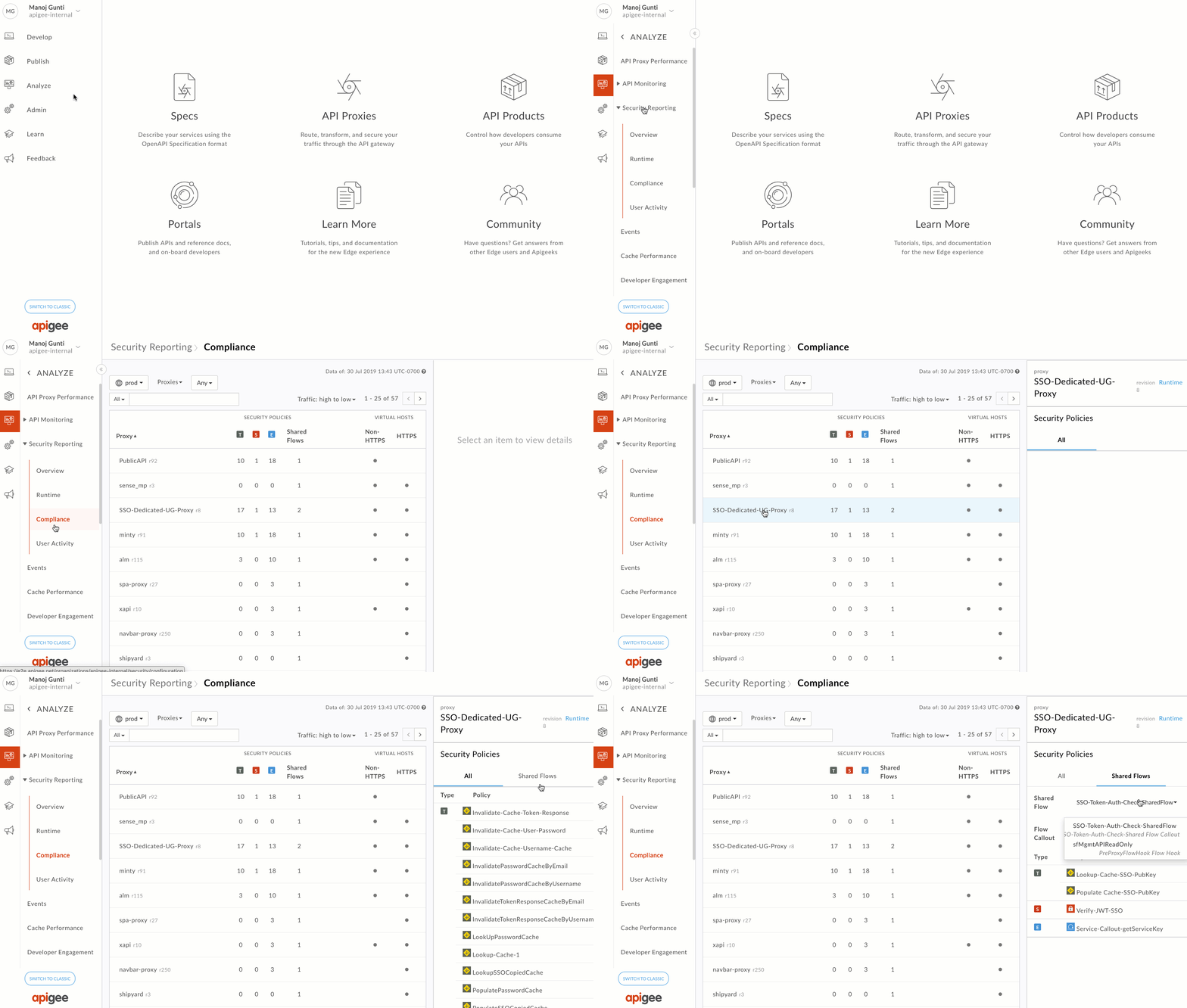
As APIs become the de facto standard for building and connecting business-critical applications, it’s important for operations teams to gain visibility into the security attributes of your APIs in order to continuously monitor and maintain the health of your API programs.  As you scale your API-powered digital initiatives, it’s important to have tools that help harness key signals from your data, which is why we’ve added a new API security reporting feature to our Apigee API management platform.This new capability provides broader, in-depth insights for operations teams to adhere to policies and compliance requirements, protect APIs from internal and external abuse, and quickly identify and resolve security incidents. Now available in beta, we’ll roll out API security reporting in phases to all Apigee Edge enterprise cloud customers over the next few weeks. Apigee API security reporting provides several core capabilities. Here’s a closer look:Security complianceAs an administrator, you can now ensure that every API across your organization adheres to your business’s security policies and compliance requirements. You can quickly review traffic, security and extension policy configurations, shared flow configurations and revisions across proxies. You can also monitor which virtual hosts and their respective ports receive HTTPS and non-HTTPS traffic.Data protectionAPI security reporting helps you protect sensitive data by providing insights into user access and behavior, letting you monitor who in your organization is accessing and exporting sensitive information, and identify suspicious behavior by analyzing patterns.Precision diagnosisAPI security reporting also lets you precisely identify where in the API value chain a security incident occurred and quickly diagnose its root cause. This significantly reduces your MTTD (mean-time-to-detect), allowing you to spend more time on problem resolution than on diagnostics. It also helps you detect anomalies in traffic patterns and identify the apps causing them, distinguish secure traffic vs. insecure traffic, and identify which apps and targets are being affected.Getting startedNow, more than ever, you need an easy way to monitor and maintain the security of your APIs. To learn more about best practices for securing APIs, download our latest eBook.  If you’re already an Apigee Edge cloud customer, check out our latest documentation to get started with API security reporting, where you’ll find a complete feature overview, guided tutorials, FAQs, and more. And if you’re not already an Apigee Edge customer, you can try it for free!
Quelle: Google Cloud Platform

Cloud IAP enables context-aware access to VMs via SSH and RDP without bastion hosts

Ever since 2011, we’ve been leveraging the BeyondCorp security model (also known as zero trust) to protect access to our internal resources. In the past few years, we’ve made it easier for you to adopt the same model for your apps, APIs, and infrastructure through context-aware access capabilities that are natively built into our cloud platform. This January, we enhanced context-aware access capabilities in Cloud Identity-Aware Proxy (IAP) to help you protect SSH and RDP access to your virtual machines (VMs)—without needing to provide your VMs with public IP addresses, and without having to set up bastion hosts. This capability is now generally available for all customers.Context-aware access: High-level architectureContext-aware access allows you to define and enforce granular access policies for apps and infrastructure based on a user’s identity and the context of their request. This can help strengthen your organization’s security posture while giving users an easier way to access apps or infrastructure resources without using a VPN client, from virtually any device, anywhere. With the general availability of context-aware access in Cloud IAP for SSH and RDP, you can now control access to VMs based on a user’s identity and context (e.g. device security status, location, etc). In addition, VMs protected by Cloud IAP don’t require any changes and no separate infrastructure deployment—simply configure IAP and access to your VM instance is automatically protected with a planet-scale load balancer, complete with DDoS protection, TLS termination, and context-aware access controls.One of our partners, Palo Alto Networks, has been using this capability to protect access to their cloud workloads. “Customers trust us with their data, so keeping it secure is our number one goal,” says Karan Gupta, SVP, Application Framework. “Context-aware access in combination with Palo Alto Networks endpoint protection enables us to control access to our infrastructure deployed in GCP following zero trust principles, helping to secure our public cloud workloads while making our work easier and keeping our costs low.”How it worksImagine you want to allow SSH access to VMs for a group of users in GCP. You can use Cloud IAP to enable access without exposing any services directly to the Internet simply by configuring its TCP forwarding feature.The Cloud IAP admin experienceThis is how it works: When a user runs SSH from the gcloud command-line tool, SSH traffic is tunneled over a TLS connection to Cloud IAP, which applies any relevant context-aware access policies. If access is allowed, the tunneled SSH traffic is transparently forwarded to the VM instance. SSH encryption happens end-to-end from gcloud command-line tool to the target VM–Cloud IAP does not terminate the SSH connection; it only forwards traffic as permitted by the access policies. Remote Desktop Protocol (RDP) works similarly. As an administrator, all you have to do is configure access to the VM instances from the Cloud IAP IP subnet; your VM instances don’t need public IP addresses or dedicated bastion hosts. Beyond SSH, it’s also possible to set up “port forwarding” style access to any fixed TCP port on your VMs via Cloud IAP for access from the administrator’s client machine (for example, access to a SQL database for admin operations). Getting startedControlling SSH and RDP access to VMs with Cloud IAP brings context-aware access to your backend systems. To get started, navigate to the admin console, check out the documentation for step-by-step instructions, and read our new guide on establishing internet connectivity for private VMs. You can also use a plugin for Microsoft’s Remote Desktop Connection Manager that adds “Connect server via Cloud IAP” option to the context menu, making it easier to connect to your Windows VMs in GCP.
Quelle: Google Cloud Platform