Advancing the medical imaging field with cloud-based solutions at RSNA

The healthcare industry is increasingly embracing the cloud, and to help, we’ve developedhealthcare andlife sciences solutions that make it easier for organizations to transition to cloud technologies. Today, at the annual meeting of the Radiological Society of North America (RSNA), we’re excited to share the ways we’re enabling our customers and partners, through managed DICOM services, analytics, and AI, to make advances toward their clinical and operational goals in medical imaging.At RSNA, we’ll be showcasing a number of end-to-end solutions and partner offerings. Specifically, we’ll be demonstrating solutions that enable de-identification of data in DICOM images and HIPAA-supported deployments so that our customers and partners can focus on their core business—not on managing and implementing infrastructure. Sharing the work of our customers and partnersMore than a dozen customers and partners will be joining us this week to give live demos, host lightning talks, and share their innovations at RSNA. Some of the topics include:Disaster recovery and vendor neutral archiving solutions running on Google Cloud.Google Cloud as an enabler for next-generation PACS solutions.A real-world evidence platform on Google Cloud.A zero-footprint teleradiology solution. Machine learning to optimize workflow solutions and reduce annual costs.You can find a full agenda below. Stop by booth #11318 in the North Hall Level 2 in the AI showcase to see these solutions in action.Click to enlargeAdvancing research and AI in radiologyThe importance and impact of AI in radiology has been rapidly expanding over the past few years—as can be seen with the growing size of the AI Showcase at RSNA. As an “AI first” company, we are committed to growing the ecosystem of AI developers, fostering new talent, and advancing research. Through Kaggle, and together with RSNA, we have hosted a number of medical imaging AI-based competitions to help encourage AI-based innovation in areas of medical need.Last year, we hosted an AI competition, where over 1400 teams participated in building algorithms to detect a visual signal for pneumonia, one of the top 15 leading causes of death in the United States. Earlier this year, we launched another healthcare AI competition in collaboration with RSNA. For this challenge, Kaggle participants built algorithms to detect acute intracranial hemorrhage and its subtypes. This year’s competition drew 1,345 teams, 1,787 individuals across those teams, and over 22,000 submissions. By supporting these competitions, we hope to inspire more AI researchers to build algorithms and models that positively impact the healthcare community.Visit us at RSNAIf you’re planning to attend RSNA, we’d love to connect! Stop by booth #11318 in the North Hall Level 2 in the AI Showcase to say hello and learn more about how we’re working with customers, partners and patients to engineer a healthier world together. You’re invited to join our corporate symposium “Journey to the Cloud.” A number of our customers and partners will be on hand to share their experiences using Google Cloud to drive innovation in the PACS industry, enable real world evidence, and accelerate of new imaging solutions. The session is scheduled for Dec 3 at 9am CT (room S102AB, South Building, Level 1).For a full list of Google Cloud activities, partners, demos, and presentations at RSNA, please review the Google Cloud guide to RSNA 2019.We look forward to seeing you in Chicago!
Quelle: Google Cloud Platform

Exploring container security: Day one Kubernetes decisions

Congratulations! You’ve decided to go with Google Kubernetes Engine (GKE) as your managed container orchestration platform. Your first order of business is to familiarize yourself with Kubernetes architecture, functionality and security principles. Then, as you get ready to install and configure your Kubernetes environment (on so-called day one), here are some security questions to ask yourself, to help guide your thinking.How will you structure your Kubernetes environment? What is your identity provider service and source of truth for users and permissions?How will you manage and restrict changes to your environment and deployments? Are there GKE features that you want to use that can only be enabled at cluster-creation time?Ask these questions before you begin designing your production cluster, and take them seriously, as it’ll be difficult to change your answers after the fact. Structuring your environmentAs soon as you decide on Kubernetes, you face a big decision: how should you structure your Kubernetes environment? By environment, we mean your workloads and their corresponding clusters and namespaces, and by structure we mean what workload goes in what cluster, and how namespaces map to teams. The answer, not surprisingly, depends on who’s managing that environment. If you have an infrastructure team to manage Kubernetes (lucky you!), you’ll want to limit the number of clusters to make it easier to manage configurations, updates and consistency. A reasonable approach is to have separate clusters for production, test, and development. Separate clusters also make sense for sensitive or regulated workloads that have substantially different levels of trust. For example, you may want to use controls in production that would be disruptive in a development environment. If a given control doesn’t apply broadly to all your workloads, or would slow down some development teams, segment them out into separate clusters and give each dev team or service its own namespace within a cluster.If there’s no central infrastructure team managing Kubernetes–if it’s more “every team for itself”—then each team will typically run its own cluster. This means more work and responsibility for them enforcing minimum standards—but also much more control over which security measures they implement, including upgrades. Setting up permissionsMost organizations use an existing identity provider, such as Google Identity or Microsoft Active Directory, consistently across the environment, including for workloads running in GKE. This allows you to manage users and permissions in a single place, avoiding potential mistakes like accidentally over-granting permissions, or forgetting to update permissions as users’ roles and responsibilities change.What permissions should each user or group have in your Kubernetes environment? How you set up your permission model is strongly tied to how you segmented your workloads. If  multiple teams share a cluster, you’ll need to use Role-Based Access Control (RBAC) to give each team permissions in their own namespaces (some services automate this, providing a self-service way for a team to create and get permissions for its namespace). Thankfully, RBAC is built into Kubernetes, which makes it easier to ensure consistency across multiple clusters, including different providers. Here is an overview of access control in Google Cloud. Deploying to your Kubernetes environmentIn some organizations, developers are allowed to deploy directly to production clusters. We don’t recommend this. Giving developers direct access to a cluster is fine in test and dev environments, but for production, you want a more tightly controlled continuous delivery pipeline. With this in place, you can set up steps to run tests, ensure that images meet your policies, scan for vulnerabilities, and finally, deploy your images. And yes, you really should set up these pipelines on day one; it’s hard to convince developers who have always deployed to production to stop doing so later on. Having a centralized CI/CD pipeline in place lets you put additional controls on which images can be deployed. The first step is to consolidate your container images into a single registry such as Container Registry, typically one per environment. Users can check images into a test registry, and once tests pass and they’re promoted to the production registry, push them to production.We also recommend that you only allow service accounts (not people) to deploy images to production and make changes to cluster configurations. This lets you audit service account usage as part of a well-defined CI/CD pipeline. You can still give someone access if necessary, but in general it’s best to follow the principle of least privilege when granting service account permissions, and ensure that all administrative actions are logged and audited. Features to turn on from day oneA common day-one misstep is failing to enable certain security features that you might need down the road at cluster-creation time, because you’ll have to migrate your cluster once it’s up and running to turn them on. There are some GKE security features that you can’t turn on in an existing cluster that aren’t turned on by default, for example private clusters and Google Groups for GKE. Rather than trying to make a cluster you’ve used to experiment with these different features production-ready,  a better plan is to create a test cluster, make sure its features work as intended, resolve issues, and only then make a real cluster with your desired configurations. As you can see, there’s a lot to keep in mind when setting up GKE. Keep up to date with the latest advice and day two to-dos with the GKE hardening guide.
Quelle: Google Cloud Platform

How Cloud AI is shaping the future of retail—online and in-store

Technology has played a key role in retail for decades, from early innovations like barcode scanning and digital point of sale devices, to the global frontier of modern logistics. Through it all, however, the fundamentals remain the same: retailers generate huge quantities of data, face unpredictable environments, and need to continually adapt to the ever-evolving needs of the customer. Throw in the chaos of Black Friday and Cyber Monday, and you’ve got one of the most complex enterprise challenges in the world.It’s also a challenge tailor-made for AI: a technology that thrives on big data, adapts to change fluidly, and can deliver personalized experiences at scale. With the holiday rush upon us, let’s take a look at how two Cloud AI customers—3PM for online shoppers and Tulip for in-store—are helping make retail more efficient, more personal, and more trustworthy.Tulip is helping brands across the world bring the flexibility and personalization of e-commerce to their in-store experiences. Online, 3PM continuously tracks millions of sellers across a range of e-commerce marketplaces, helping to turn the tide against predatory practices like counterfeit products and trademark infringement.3PM: Safeguarding online marketplaces at a global scaleTrust is the foundation of every retail experience, and that’s especially true online. With the proliferation of online marketplaces like Amazon, eBay, and Walmart.com, however, trademarks, copyrighted content, and other brand assets are often spread across too many places to be effectively monitored.Particularly disconcerting is the fast-growing world of counterfeit products. It’s not just knock-off sneakers and handbags, either. Fraudulent supplements, prescription drugs, and even baby food are readily available online, presented in convincing detail intended to fool customers and could pose a danger to consumer health. Small merchants and global brands alike have found it difficult to contain counterfeiting, largely due to its decentralized nature. This calls for a solution that lies outside marketplaces. 3PM Solutions saw an opportunity to help. By combining the power of advanced analytics with data at a global scale, 3PM’s suite of tools can detect counterfeit goods automatically, monitor a brand’s reputation over time, and help the brand understand its customers more deeply.But getting such an ambitious vision off the ground presented some significant technical challenges for 3PM. Online marketplaces routinely change the format and structure of their listings, quickly confounding hand-written rules and filters. To make matters worse, the content within those listings is notoriously unreliable. For example, counterfeiters often intentionally misspell brand and product names to keep their goods under the radar. It’s a level of complexity that calls for a particularly flexible solution that’s capable of ingesting massive quantities of data, while also evolving as the nature of that data changes.These challenges prompted 3PM to migrate to Google Cloud Platform, bringing the company’s data and infrastructure—and, more importantly, a state-of-the-art AI toolkit—into a single environment.Google Cloud’s flexibility helped 3PM implement a creative, agile development process. The company’s developers designed a TensorFlow-based image classifier and trained it on billions of examples, forming the basis of a self-serve tool that lets brands accurately detect improper use of product photography, logos, and other trademarks. They built custom machine-learning models to intelligently analyze product listings. These models can look past the basics like  image and title to incorporate a wide range of data points to detect subtle features correlated with fraud that rule-based systems—not to mention humans—would miss. 3PM even used the Cloud Translate API to transcend language barriers automatically.Tulip: Bringing digital personalization to the in-store experienceOf course, brick-and-mortar remains fundamental to the identity of countless brands, with 80% of all sales still taking place in physical stores. Nevertheless, the speed, flexibility, and extreme personalization of e-commerce is influencing customer expectations everywhere—even when shopping in person—and retailers are scrambling to keep up.Tulip helps retailers keep up with these demands with a suite of powerful mobile apps that gives retail workers the power of the digital world anywhere in their store, whether they’re looking up products, managing customer information, checking out shoppers, or communicating with customers. Tulip helps physical stores establish deeper relationships with their patrons based on their preferences, behaviors, and purchases—just as they would online—and it’s changing the way global brands do business.A major challenge in any retail application is forecasting. Whether it’s an unexpected fashion craze or an annual event like Black Friday, retail’s surges and lulls can make traditional allocation of compute resources extremely challenging. “Because we had to scale for peak demand, we had to buy capacity up front, which sat idle much of the time when sales demand was lower,” explains Jeff Woods, director of software for infrastructure at Tulip. “It became difficult and expensive. We were constantly asking the vendor to waive arbitrary limits. We had to use massive instances, and it was difficult to scale down.”After migrating to Google Cloud, Tulip could deploy on an infrastructure capable of scaling to any size at a moment’s notice—and only pay for what they used. In the process, they also gained access to some of the world’s most advanced machine learning technologies. Now, wIth their data, infrastructure, and AI tools in one place, the stage was set for Tulip to build an entirely new level of intelligence into their solutions.Tulip’s solutions use a set of custom TensorFlow models running on AI Platform to identify customer insights and sales opportunities based on data from a customer’s in-store mobile applications. This drives recommendations on when to connect with customers and how to engage them with highly personal and relevant communications. Tulip’s solution is a textbook example of what makes Deployed AI so powerful: using previously unseen patterns in large quantities of data to solve a clearly defined business challenge, all at the speed of retail. “Every day, Tulip collects millions of data points from customer interactions across its channels,” says Ali Asaria, Tulip’s founder and CEO. “By integrating Google machine learning and big data products into our core platform, we can now use that data to provide intelligent insights and recommendations to retail associates.”ConclusionJust a few years ago, AI seemed too expensive and complex for companies like 3PM and Tulip. In both cases, however, moving to Google Cloud has demonstrated this technology’s affordability, interoperability, and ease of use. And the results have been transformative.Whether the crowds are in stores or online, companies like Tulip and 3PM are demonstrating the power—and sometimes, the necessity—of using AI to make every retail interaction safer and more engaging. It’s another example of Deployed AI in action: using state-of-the-art technology to overcome age-old business challenges.
Quelle: Google Cloud Platform

Forrester names Google Cloud a Leader in the New Wave for Computer Vision Platforms

We’re proud to announce that Forrester has named Google Cloud as a Leader in its report, The Forrester New Wave™: Computer Vision (CV) Platforms Q4, 2019. We believe Forrester’s report validates Google Cloud’s AI ​strategy, and echoes the feedback we’ve heard from customers: Google Cloud offers powerful, flexible, open, and easy-to-use AI building blocks and solutions to parse unstructured content and enable intelligent process automation.Google Cloud offers the full gamut of computer vision building blocks and prepackaged solutions for your organization.Parse and structure your scanned documents with the Document Understanding AI solution and OCR productsDerive insights from your images and videos with our pre-trained Vision API, Vision Product Search, and Video Intelligence APIIntegrate computer vision models in your mobile apps with the Firebase MLKit Train and deploy high-quality custom machine learning models with minimal  effort and machine learning expertise with AutoML Vision, AutoML Video, and the Cloud AI PlatformIntegrating these capabilities enabled our customers and partners to implement intelligent process automation solutions. From document understanding and OCR for procure-to-payment automation, to automated assembly line defect detection, and automated medical imagery analysis for radiologist assistance, Google Cloud is your platform for digital transformation. In this report, Google Cloud received the highest score in the current offering category among the vendors evaluated. Google Cloud was also the only provider to receive the highest possible score of “differentiated” across all 10 Forrester evaluation criteria: Data, Capabilities, Pre-Trained Models, Development, Deployment, Solutions, Ease of Use, Vision, Roadmap, and Market Approach.Some other highlights from Forrester’s research show that Google Cloud:Enables more personas to build a wider, better range of computer vision solutions. Google’s offerings span the full CV solution development lifecycle and enable everyone to easily annotate data, build powerful custom CV models, leverage a wide range of powerful retrained CV models, and scale CV applications across a host of edge devices.Is the platform to pick, that can do the most for the many. From business users to developers and data scientists, Google has powerful CV tools that all of them can use.We are honored to be a leader in this Forrester Wave™, and look forward to continuing to innovate and partner with you on your digital automation journey. Download the full Forrester New Wave™: Computer Vision Platforms, Q4 2019 report here.To learn more about Google Cloud, visit our website, and sign up for a free trial.
Quelle: Google Cloud Platform

How AutoML Vision is helping companies create visual inspection solutions for manufacturing

We consistently hear from our customers that they need new ways to apply the latest technologies, such as AI, to improve efficiency. One area that AI has proven to be particularly beneficial is in helping to automate the visual quality control process for manufacturing customers. These customers tell us they want AI solutions that help them make quality control and inspections more efficient, to improve overall quality. But, there are many factors that make it difficult to prevent the distribution of damaged products. And the later a defect is caught in the manufacturing process, the more costly it is to fix or replace. Visual inspection helps manufacturing customers identify defects early and at a lower cost, and we’re seeing many innovative ways it’s helping our customers revolutionize their processes. Chip making made more efficientOne example of a customer using AI to transform their manufacturing process is GlobalFoundries, a leader in the semiconductor manufacturing industry. The company used AutoML Vision to build a visual inspection solution that can detect random defects in wafer map and scanning electron microscope (SEM) images, which are essential pieces for semiconductor manufacturing. A wafer map shows the performance of a semiconductor device, while an SEM’s images, which are created with a focused beam of electrons, can be used to closely examine a wafer.“Google Cloud AutoML Vision made it easy for our subject matter experts to quickly learn how to navigate and then train the AI,” Dr. DP Prakash, Global Head of AI XR Innovation at GlobalFoundries explained. “In our factory leading the initiative, 40% of the manual inspection workload has already been successfully shifted to the visual inspection solution we built based on AutoML.” GlobalFoundries’ visual inspection solution integrates AutoML Vision into their in-house content management system, and includes SEM image acquisition, image and sample defect management, defect prediction visualization, and product quality report generation among its features. AutoML Vision reads in the images of wafers and sample defects, and trains customized models to detect these defects. The trained model will be used to detect defects in new incoming product images. When evaluating technologies, GlobalFoundries was impressed that AutoML Vision could successfully classify 80% of the images based on a limited amount of training data in the initial pass itself. This fast path to high accuracy let GlobalFoundries quickly move to production, start realizing benefits, and scale up. To capture and control process defects in semiconductor factories, GlobalFoundries deployed hundreds of models in its factories. AutoML Vision’s data and model management features help refresh the data continuously and efficiently, giving the company visibility into all those models. GlobalFoundries also achieved similar success in their lithography process—where a pattern is transferred onto a chip. In the conventional method, due to the practical constraints of time and cost in high volume manufacturing environments, only a sample of the wafers produced are typically inspected for systematic defect patterns. The new visual inspection solution developed with AutoML, however, increases the validation rate to 95% of wafers, reducing waste, and improving quality and customer satisfaction.Revolutionizing manufacturing processesSiemens is another company using AutoML Vision to change the way they manage the inspection process. “Siemens leveraged Google’s domain expertise in AI technology to create Factory AI service, which revolutionized our manufacturing with automated visual inspections,” said Tigran Bagramyan, Intrapreneur and Data Scientist, Siemens. “We use AutoML Vision to quickly build prototypes and push them to production on the factory floor. AutoML Vision helps us concentrate on use cases and customer value rather than complexity of AI development.” Meanwhile, LG CNS leverages AutoML Vision Edge to create manufacturing intelligence solutions that detect defects in everything from LCD screens and optical films, to automotive fabrics on the assembly line. AutoML Vision Edge improved defect detection accuracy by 6% and reduced the time to design and train their ML models from seven days to just a few hours. AutoML Vision lets customers train high-quality defect detection models, deploy models, and run inference on production lines. We look forward to supporting customers as they continue to find innovative new ways to deploy AI.To learn more about how you can use our vision products for visual inspection and other use cases, check out Google Cloud Vision AI.
Quelle: Google Cloud Platform

You can cook turkey in a toaster oven, but you don't have to

When I was in college and couldn’t make it home for the Thanksgiving holiday, I would get together with other students in the same situation and do the next best thing: cook a traditional Thanksgiving feast of roast turkey, mashed potatoes and gravy, stuffing, and green beans by ourselves. In a dorm room. Using the kitchen equipment we had available: a toaster oven and a popcorn popper. The resulting dinner wasn’t terrible, but it didn’t hold a candle to the meal my family was enjoying back home, made with the benefit of an oven, high-BTU range, food processor, standing mixer—you get the idea.Software development teams are sometimes in a similar situation. They need to build something new and have a few tools, so they build their application using what they have. Like our dorm-room Thanksgiving dinner, this can work, but it is probably not a good experience and may not get the best result.Today, with cloud computing, software development teams have a lot more resources available to them. But sometimes teams move to the cloud but keep using the same old tools, just on a larger scale. That’s like moving from a toaster oven to a wall of large ovens, but not looking into how things like convection or microwave ovens, broilers, sous-vide cooking, instant pots, griddles, breadmakers, or woks can help you make a meal.In short, if you’re an application developer and you’ve moved to the cloud, you should really explore all the new kinds of tools you can use to run your code, beyond configuring and managing virtual machines.Like the number of side dishes on my parents’ holiday table, the number of Google Cloud Platform products you might use can be overwhelming. Here are a few you might want to look at first:App Engine Standard Environment is a serverless platform for web applications. You bring your own application code and let the platform handle the web server itself, along with scaling and monitoring. It can even scale to zero, so if there are idle periods without traffic, you won’t be paying for computer time you aren’t using.Some of the code you need might not be an application, but just a handler to deal with events as they happen, such as new data arriving or some operation being ready to start. Cloud Functions is another serverless platform that runs code written in supported languages in response to many kinds of events. Cloud Run can do similar tasks for you, with fewer restrictions on what languages and binaries you can run, but requiring a bit more management on your part.Do you need regular housekeeping tasks performed, such as generating daily reports or deleting stale data? Instead of running a virtual machine just so you can trigger a cron job, you can have Cloud Scheduler do the triggering for you. If you want to get really fancy (like your aunt’s bourbon pecan pie), you can implement it with another serverless offering such as Cloud Functions, at specified intervals.Instead of installing and managing a relational database server, use Cloud SQL instead. It’s reliable and secure, and handles backups and replication for you.Maybe you don’t need (or just don’t want to use) a relational database. Cloud Firestore is a serverless NoSQL database that’s easy to use and that will scale up or down as needed. It also replicates your data across multiple regions for extremely high availability.After Thanksgiving dinner, you may feel like a blob. Or you may just need to store blobs of data, such as files. But you don’t want to use a local filesystem, you want replicated and backed up storage. Some teams put these blobs into general purpose databases, but that’s not a good fit and can be expensive. Cloud Storage is designed to store and retrieve blob-format data on demand, affordably and reliably.These products are great starting points in rethinking what kind of infrastructure your application could be built on, once you have adopted cloud computing. You might find they give you a better development experience and great outcomes relative to launching and managing more virtual machines. Now if you’ll excuse me, dinner’s ready!
Quelle: Google Cloud Platform

Stackdriver Logging comes to Cloud Code in Visual Studio Code

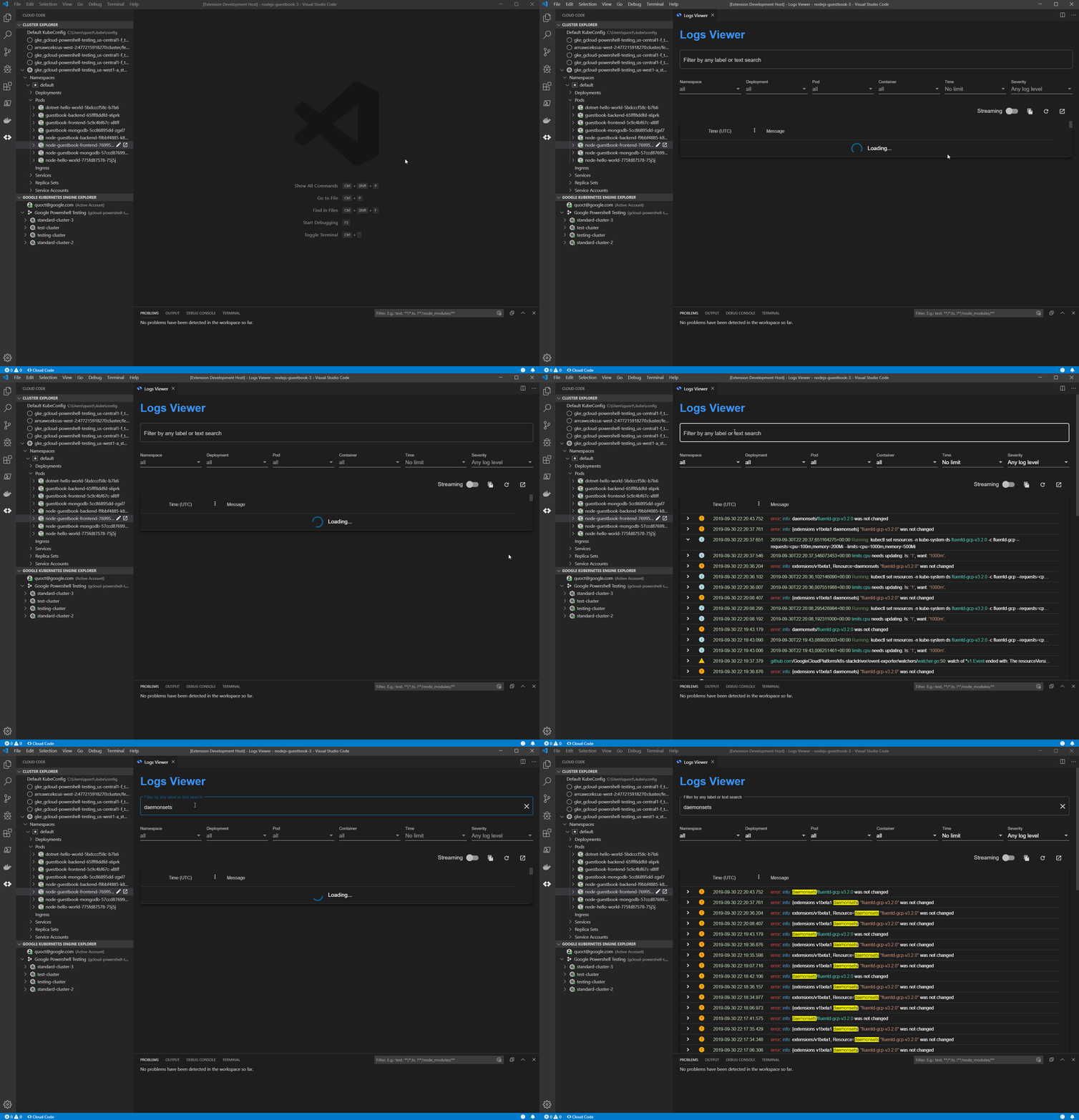
A big part of troubleshooting your code is inspecting the logs. At Google Cloud, we offer Cloud Code, a plugin to popular integrated development environments (IDEs) to help you write, deploy, and debug cloud-native applications quickly and easily. Stackdriver Logging, meanwhile, is the go-to tool for all Google Cloud Platform (GCP) logs, providing advanced searching and filtering as well as detailed information about them. But deciphering logs can be tedious. Even worse, you need to leave your IDE to access Stackdriver Logging. Now, with the Cloud Code plugin, you can access your Stackdriver logs in the Visual Studio Code IDE directly! The new Cloud Code logs viewer helps you simplify and streamline the diagnostics process with three new features:Integration with Stackdriver Logging A customizable logs viewerKubernetes-specific filtering  View Stackdriver logs in VS CodeWith the new Cloud Code logs viewer you can access your Stackdriver logs in VS Code directly. Simply open the logs viewer and Cloud Code displays all your Stackdriver logs. You can edit the filters just like you do in Stackdriver, and if you would like to see more detailed information you can easily return to Stackdriver Logging from the IDE with your filters in place.In contrast to kubectl logs, Stackdriver logs are natively integrated with Google Cloud. Learn more about Stackdriver Logging here. Improved log exploration The new logs viewer provides a structured logs viewing experience that has several new features including: severity filters, colorized output, streaming capabilities, and timezone conversions. The new logs viewer presents an organized view of logs and lets you filter and search your logs from within VS Code. Think of the logs viewer as your first stop for all of your logs without having to leave your IDE.  The logs viewer will supports kubectl logs.Kubernetes-specific filtering Kubernetes logs are complex. The new logs viewer lets you filter on Kubernetes-specific elements including: namespace, deployment, pod, container, and keyword. This allows you to easily see logs for specific pod or all the logs from a given deployment, helping you so you can navigate complex logs more effectively.In addition to manual filtering, you can access the logs viewer from the Cloud Code resource browser and use the tree view to filter your logs. This way, you can locate a resource with the context around it. The tree view shows status and context information that can help you find important logs such as unhealthy or orphaned pods.Get started Accessing Stackdriver Logs in VS Code with Cloud Code brings your logs closer to your code, with advanced filtering options that help you stay focused and in your IDE. To learn more, check out this guide to getting started with the Log Viewer. If you are new to Cloud Code or Stackdriver Logging, start by learning how to install Cloud Code and set up Stackdriver. If you are already using Cloud Code and Stackdriver Logging, there are no prerequisites to get started—just open the new logs viewer with Cloud Code and you’re ready to go!
Quelle: Google Cloud Platform

Understanding Google Cloud Armor’s new WAF capabilities

Protecting applications exposed to the internet is an increasingly difficult job. Since we launched Google Cloud Armor last December, it has helped enterprises protect themselves and their users with a native solution that protects big and small applications from Distributed Denial of Service (DDoS) and targeted web attacks with custom security policies enforced at the edge of Google’s network, at Google-scale.Last week, we announced new web-application firewall (WAF) capabilities, now available in beta. With this release, Google Cloud Armor is expanding the scope of protection it provides for securing your applications and other workloads from DDoS and targeted web-based attacks. It can also help you meet compliance requirements from internal security policies as well as external regulatory requirements. Specifically, Google Cloud Armor now lets you create security policies or expand existing ones to enforce:Geo-based access controlsPre-configured WAF rules, and Custom L7 filtering policies using custom rulesVisibility into the usage and effectiveness of security controls as well as the protected applications is essential to security operations. Google Cloud Armor now sends findings to Cloud Security Command Center (Cloud SCC) to alert defenders of potential Layer 7 attacks. This is in addition to the rich set of telemetry that it already sends to Stackdriver Logging and Stackdriver Monitoring.Google Cloud Armor overviewGoogle Cloud Armor mitigates DDoS attacks and protects applications from the web’s most common attacks while allowing you to create custom L7 filtering policies to enforce granular access controls on public-facing applications and websites. Google Cloud Armor is deployed at the edge of Google’s network and tightly coupled with our global load balancing infrastructure. As a result, Google Cloud Armor helps you solve your most pressing application security and compliance needs at any scale, blocking unwelcome or malicious traffic at the edge of the network, far upstream of your VPCs or other infrastructure.What’s newThe following capabilities are now available in beta.Custom rules To ensure the safe operation and availability of protected applications, security controls need to be context-sensitive and tailored to the unique needs of individual applications. With Cloud Armor custom rules, you can now create rules with advanced match conditions to filter incoming traffic across a variety of attributes and parameters from Layers 3 through 7. To get started, you can find the full language specification and sample expressions in the security policy rules language reference.Custom rules can be as simple or complex as dictated by the security and business needs of your applications. Take, for example:This is an example rule that blocks incoming traffic that matches each of the conditions:From the United States, with a user agent that contains the phrase “Bad Bot,” and contains a cookie named “discount” with a value of “ab1d8732”Geo-based access controlsThere are times when you may need to limit access to an application to certain countries—whether it is for regulatory compliance, copyright licensing, or another business need. With Google Cloud Armor, you can now configure security policies to create allow lists or deny lists based on the country code of the client request attempting to reach your application. This ensures that you will only receive traffic from and serve content to users in specific countries. You can also use source geography in combination with other attributes in Cloud Armor’s custom rules language to apply fine-grained control over what can be accessed, by whom, and from where.Pre-configured WAF rules (SQLi & XSS)Google Cloud Armor now includes pre-configured WAF rules to protect applications from the web’s most common attack (e.g. OWASP Top 10 Risks), making it easier for you to configure and operate a web application firewall and meet your compliance and security needs. Today, Cloud Armor WAF rules protect you from the web’s most common attack types—SQL Injection and Cross-Site Scripting—with more pre-configured WAF rules on the way. We built these pre-configured WAF rules by implementing the signatures and sub-signatures described in the open source ModSecurity Core Rule Set for SQLi and XSS. In the WAF rule tuning guide, we also describe how to finetune the preconfigured rules to optimize on sensitivity levels and customize them on a per protected-application basis. Over time, we’ll introduce additional rules from the ModSecurity CRS to make it easier to protect your application from the OWASP Top 10 risks and beyond.Surfacing findings in the Cloud Security Command CenterGoogle Cloud Armor now automatically sends findings to Cloud SCC to alert you to suspicious Layer 7 traffic patterns. Organizations with Cloud SCC enabled will now receive real-time notifications of two events:Allowed Traffic Spike: A sudden increase in the volume of Layer 7 requests being allowed through an existing Google Cloud Armor security policy on a per backend service basis.Increasing Deny Ratio: A sudden increase in the ratio of traffic that is being denied compared to the total traffic targeting a particular backend service.Together these findings can alert application owners and incident responders of potential Layer 7 attacks while they are still ramping up. With early notice, incident responders can begin to investigate and triage earlier, deploying mitigating controls sooner to protect against an attack before it impacts the availability of your application. Next stepsWith the beta release of this rich set of WAF capabilities, Google Cloud Armor now enables enterprises of any size to easily protect your public facing applications while satisfying your risk and compliance needs. In addition, the new Google Cloud Armor telemetry in Cloud SCC helps to accelerate incidence detection and response to ensure the security and availability of mission-critical applications. Finally, the combination of Google Cloud Armor with Google Cloud Load Balancing lets you deploy to and customize Google’s global edge infrastructure to protect your applications against the web’s most common attacks, provide granular Layer 7 access controls, and defend against volumetric, protocol and application-level DDoS attacks.Google Cloud Armor WAF capabilities are publically available. To get started, navigate to Network Security -> Cloud Armor in the Google Cloud Console. Learn more: Google Cloud Armor product pageGoogle Cloud Armor documentationCustom Rules Language referenceWAF Rule Tuning Guide
Quelle: Google Cloud Platform

Google Kubernetes Engine or Cloud Run: which should you use?

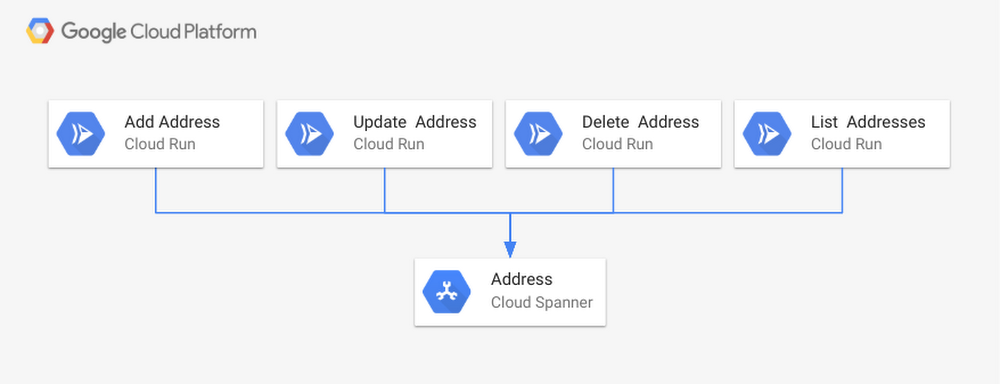
When it comes to managed Kubernetes services, Google Kubernetes Engine (GKE) is a great choice if you are looking for a hybrid container orchestration platform that offers advanced scalability and configuration flexibility. GKE gives you complete control over every aspect of container orchestration, from networking, to storage, to how you set up observability—in addition to supporting hybrid application use cases. However, if your application does not need that level of cluster configuration and monitoring, then fully managed Cloud Run might be the right solution for you.Fully managed Cloud Run is an ideal serverless platform for containerized microservices that don’t require advanced Kubernetes features like namespaces, co-location of containers in pods (sidecars) or node allocation and management.Why Cloud Run?The managed serverless compute platform Cloud Run provides a number of features and benefits: Easy deployment of microservices. A containerized microservice can be deployed with a single command without requiring any additional service-specific configuration.Simple and unified developer experience. Each microservice is implemented as a Docker image, Cloud Run’s unit of deployment.Scalable serverless execution. A microservice deployed into managed Cloud Run scales automatically based on the number of incoming requests, without having to configure or manage a full-fledged Kubernetes cluster. Managed Cloud Run scales to zero if there are no requests, i.e., uses no resources.Support for code written in any language. Cloud Run is based on containers, so you can write code in any language, using any binary and framework.Cloud Run is available in two configurations: as a fully managed Google Cloud service, and as Cloud Run for Anthos (this option deploys Cloud Run into Anthos GKE cluster). If you’re already using Anthos, Cloud Run for Anthos can deploy containers into your cluster, allowing access to custom machine types, additional networking support, and GPUs to enhance your Cloud Run services. Both managed Cloud Run services and GKE clusters can be created and managed completely from the console as well as from the command line. The best part is you can easily change your mind later, switching from managed Cloud Run to Cloud Run for Anthos or vice versa without having to reimplement your service.A Cloud Run use caseTo illustrate these points, let’s take a look at an example use case, a service that adds, updates, deletes and lists addresses.You can implement this address management service by creating one containerized microservice for each operation. Then, once the images have been created and registered in a container registry, you can deploy them to managed Cloud Run with a single command. After executing four commands (one deployment for each microservice), the service is up and running on a completely serverless platform. The following figure shows the deployment using Cloud Spanner as the underlying database.For use cases such as this one, managed Cloud Run is a great choice as the address management service does not require complex configurations as supported by Kubernetes. Nor does this address management service need 24/7 cluster management and operational supervision. Running this address management service as containers in managed Cloud Run is the better production workload strategy.As a managed compute platform, managed Cloud Run supports essential configuration settings: the maximum concurrent requests a single container receives, the memory size to be allocated to the container as well as request timeout can be configured. No additional configurations or management operations are required.The right tool for the jobBoth managed Cloud Run and GKE are powerful offerings  for different use cases. Make sure to understand your functional and non-functional service requirements like ability to scale to zero or ability to control detailed configuration before choosing one over the other. In fact, you might want to use both at the same time. An enterprise might have complex microservice-based applications that require advanced configuration features of GKE, and some that do not, but that still want to take advantage of Cloud Run’s ease of use and scalability.To learn more about Cloud Run, visit our website and follow the quickstart.
Quelle: Google Cloud Platform

Retailer concerns, opportunities for Black Friday/Cyber Monday: New research

The shelves are stocked, the ads are running, and retail executives everywhere are readying their stores and systems for the long-awaited start of holiday shopping–Black Friday and Cyber Monday, the busiest time in retail.  As the former CMO and chief digital officer at Neiman Marcus Group, and now Google Cloud’s head of retail, I know firsthand how these two single days can affect revenue, growth, and brand loyalty. For retailers that perform well, Black Friday and Cyber Monday can bring in millions of dollars and thousands of new customers. But for those who don’t, let’s just say that consumers (and shareholders) have long memories. Black Friday and Cyber Monday are truly the Super Bowl or World Cup of retail. Retailers spend 10 months conditioning their teams and systems to handle the pressures of the big event, because that’s when the stakes are highest, and all eyes are on them. These two iconic shopping days have expanded far beyond their original 24-hour period, with many retailers pushing out promotions the entire week of Thanksgiving—and some the entire month of November. With longer campaigns comes even more uncertainty around when shopping “peaks” are expected to hit. Retailers must be ready to scale at any moment, since product popularity and viral success could happen at any time.At Google Cloud, we recently commissioned The Harris Poll to survey more than 200 U.S. retail executives, gauging their expectations for this year’s holiday shopping season and what they’re doing to prepare. Here are the top trends we discovered.1. Retailers are predicting even more digital sales Retailers have been seeing sales move from in-store to online for many years, and this year the trend continues. Survey respondents expect digital sales to account for about half of their overall sales this holiday weekend, with 26% coming from their websites and 22% coming from their apps. This is higher than the regular season store vs. online mix for most retailers, proving that consumers like to do their last-minute holiday shopping online. Nearly half (46%) of the retail executives in our survey anticipate that online traffic this Black Friday and Cyber Monday will be significantly higher this year compared to last. In particular, shoppers are taking to mobile even more for product discovery, especially as they shop in-store. In the past two years, mobile searches for “best deals” have grown more than 90% and searches around “rewards apps” and “Black Friday deals” are up 200%, according to recent Google data. This rise in online traffic also echoes data from the National Retail Federation, which predicts holiday retail sales this year are set to increase between 3.8 and 4.2%, and online sales to increase between 11 and 14%, as compared to 2018. As digital sales become a bigger part of overall sales, retailers will increasingly use traffic growth and website performance as a gauge of success. In fact, when survey respondents were asked how they’ll measure Black Friday and Cyber Monday outcomes, 55% pointed to traffic growth–just below the traditional sales volume metric (60%) and just above customer satisfaction (54%).2. Retailers are working to minimize the impact of website downtimeWith the stakes so high, it’s not surprising that retailers are spending time preparing their staff, stores, and infrastructure for peak demand. More than 4 in 5 (81%) of survey respondents say they take special measures to prepare for Black Friday and/or Cyber Monday, and a big part of these preparations is making sure their tech infrastructure is ready to display, process, and fulfill customer orders.There are many different touch points in a customer’s experience with a retailer, but it often starts or ends with a company’s website. Whether that customer is using the site to view a promotion, shop for ideas, place an order, or check the status of an order, this experience is a make-or-break moment. A June Retail Systems Research report, sponsored by Google, illuminated the impact that a slow or unavailable website can have on customer loyalty. When asked “Have you ever left a website because it’s too slow?” 91% of respondents said they had—and 30% of shoppers said they would think twice before using that retailer again. A website that crashes or stalls is a problem anytime of year, but it’s particularly challenging during Black Friday and Cyber Monday, when traffic surges and competition for consumer dollars is at an all-time high. From the Harris Poll survey, one in ten retail executives (10%) reported that their company’s website experienced an outage during Black Friday/Cyber Monday last year, and 40% said they experienced an outage within the past three years. That’s a lot of lost revenue—and potential negative impact to brand perception. This year, retailers expect even higher volumes of traffic. Survey respondents expect to see a 38% surge, on average, during Black Friday and Cyber Monday compared to their company’s normal online traffic.3. Retailers are prepared, but not fully confidentRetailers understand the stakes and have been preparing for Black Friday and Cyber Monday in many ways, from increasing their cloud capacity (66% of respondents), offering additional fulfillment options (61%), or spacing out offers and promotions to balance traffic (53%). Nearly nine in ten respondents (86%) said their company has a clear system that maps each process or system with its potential to degrade website performance.All this preparation has given respondents a certain level of confidence in their ability to perform during the holidays. However, many are still not fully confident and express areas of concern:Only half (52%) of respondents said they were very confident in their company’s overall peak readiness.Less than half said they were very confident in their website speed (42%) and scalability (45%) going into Black Friday and Cyber Monday. More than 80% said they were at least somewhat concerned about the efficacy of their supply chain during Black Friday and Cyber Monday, with two in five (44%) saying they were very concerned.These responses aren’t particularly surprising. With so many different channels to cover, and so many different failure points to consider, it would be surprising if anyone was completely confident. But what is surprising is that nearly a quarter of respondents (24%) do not have a plan in place should their website go down during this time. Being fully prepared means having a game plan for when things go wrong.At Google Cloud, we’ve worked with some of the biggest retailers in the business to make sure they’re ready to perform during the big event. For many, that means early capacity planning, identifying potential reliability issues early on, and working side-by-side with their IT and engineering teams in a war room during game day, just in case something does go wrong. We’ve seen a big increase in cloud consumption with our top retailers year-over-year, as well as significant growth in the number of retailers utilizing our white-glove services offering. This kind of partnership and prep work can be the difference between stellar sales numbers or creating an event that damages a retailer’s brand for years to come. Find more information on Google Cloud for retail.Research Method The survey was conducted online within the United States by The Harris Poll on behalf of Google from October 14-29, 2019, among 203 retail executives aged 21 years or older, employed full-time, part-time, or self-employed full-time, who work in the retail industry with a title of director level or higher, specifically with a role in IT, operations and production, strategy and business development, inventory management, supply chain, or ecommerce at companies with at least $5 million in annual revenue. The data are not weighted, and therefore are only representative of the individuals surveyed.
Quelle: Google Cloud Platform