5 favorite tools for improved log analytics

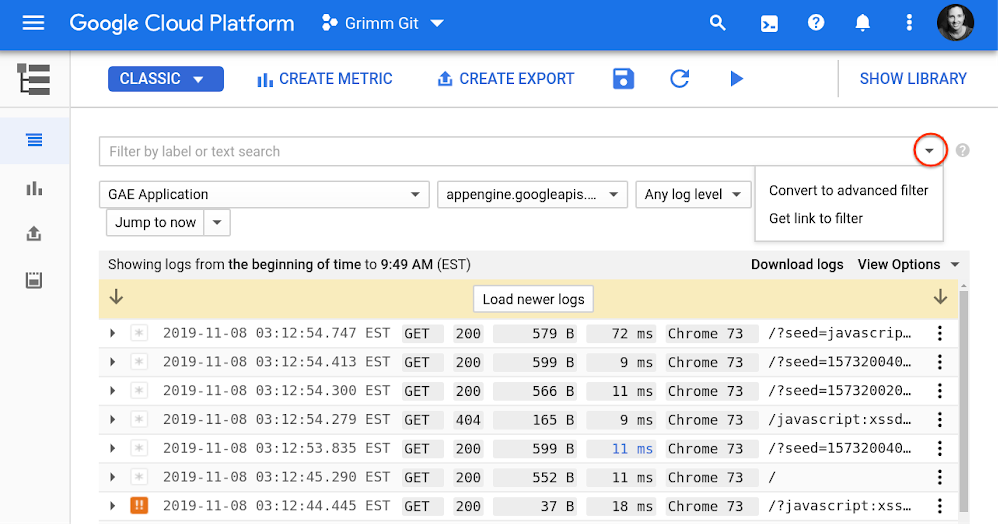
Stackdriver Logging, part of our set of operations management tools at Google Cloud, is designed to manage and analyze logs at scale to help you troubleshoot your hybrid cloud environment and gain insight from your applications. But the sheer volume of machine-generated data can pose a challenge when searching through logs. Through our years of working with Stackdriver Logging users, we’ve identified the easiest ways and best practices to get the value you need from your logs. We’ve collected our favorite tips for more effective log analysis and fast troubleshooting, including a few new features to help you quickly and easily get value from your logs: saved searches, a query library, support for partition tables when exporting logs to BigQuery, and more.1. Take advantage of the advanced query languageThe default basic mode for searching Stackdriver logs is using the drop-down menus to select the resource, log, or severity level. Though this makes it incredibly easy to get started with your logs, most users gravitate toward the advanced filter to ask more complex queries, as shown here:Some powerful tools in this advanced query mode include:Comparison operators:=           # equal!=          # not equal> < >= <=   # numeric ordering:           # “has” matches any substring in the log entry fieldBoolean operators: By default, multiple clauses are combined with AND, though you can also use OR and NOT (be sure to use upper case!)Functions: ip_in_net() is a favorite for analyzing network logs, like this:    ip_in_net(jsonPayload.realClientIP, “10.1.2.0/24″)Pro tip: Include the full log name, time range, and other indexed fields to speed up your search results. See these and other tips on speeding up performance.New queries library: We’ve polled experts from around Google Cloud to collect some of our most common advanced queries by use case including Kubernetes, security, and networking logs, which you can find in a new sample queries library in our documentation. Is there something different you’d like to see? Click the “Send Feedback” button at the top of the Sample Queries page and let us know.2. Customize your search resultsOften there is a specific field buried in your log entries that is of particular interest when you’re analyzing logs. You can customize the search results to include this field by clicking on a field and selecting “Add field to summary line.” You can also manually add, remove, or reorganize fields, or toggle the control limiting their width under View Options. This configuration can dramatically speed up troubleshooting, since you get the necessary context in summary. See an example here:3. Save your favorite searches and custom search results in your personal search libraryWe often hear that you use the same searches over and over again, or that you wish you could save custom field configurations for performing future searches. So, we recently launched a new feature that lets you save your searches, including the custom fields in your own library.You can share your saved searches with users who have permissions on your project by clicking on the selector next to Submit and then Preview. Click the Copy link to filter and share it with your team. This feature is currently in beta, and we’ll continue working on the query library functionality to help you quickly analyze your logs.4. Use logs-based metrics for dashboarding and alertingNow that you’ve mastered advanced queries, you can take your analysis to the next level with real-time monitoring using logs-based metrics. For example, suppose you want to get an alert any time someone grants access to an email address from outside your organization. You can create a metric to match audit logs from Cloud Resource Manager SetIamPolicy calls, where a member not under “my-org.com” domain is granted access, as shown here:With the filter set, simply click Create Metric and give it a name.To alert if a matching log arrives, select Create Alert From Metric from the three-dot menu next to your newly created user-defined metric. This will open a new alerting policy in Stackdriver Monitoring. Change the aggregator to “sum” and the threshold to 0 for “Most recent value” so you’ll be alerted any time a matching log occurs. Don’t worry if there’s no data yet, as your metric will only count log entries since it was created.Additionally, you can add an email address, Slack channel, SMS, or PagerDuty account and name, and save your alerting policy. You can also add these metrics to dashboards along with custom and system metrics.5. Perform faster SQL queries on logs in BigQuery using partitioned tablesStackdriver Logging supports sending logs to BigQuery using log sinks for performing advanced analytics using SQL or joining with other data sources, such as Cloud Billing. We’ve heard from you that it would be easier to analyze logs across multiple days in BigQuery if we supported partitioned tables. So we recently added this partitioned tables option that simplifies SQL queries on logs in BigQuery.When creating a sink to export your logs to BigQuery, you can either use date-sharded tables or partitioned tables. The default selection is a date-sharded table, in which a _YYYYMMDD suffix is added to the table name to create daily tables based on the timestamp in the log entry. Date-sharded tables have a few disadvantages that can add to query overhead:Querying multiple days is harder, as you need to use the UNION operator to simulate partitioning.BigQuery needs to maintain a copy of the schema and metadata for each date-named table.BigQuery might be required to verify permissions for each queried table.When creating a Log Sink, you can now select the Use Partitioned Tables option to make use of partitioned tables in BigQuery to overcome any issues with date-sharded tables.Logs streamed to a partitioned table use the log entry’s timestamp field to write to the correct partition. Queries on such ingestion-time partitioned tables can specify predicate filters on the _PARTITIONTIME or _PARTITIONDATE pseudo column to limit the amount of logs scanned. You can specify a range of dates using a WHERE filter, like this: WHERE _PARTITIONTIME BETWEEN TIMESTAMP(“20191101″) AND TIMESTAMP(“20191105″)Learn more about querying partitioned tables.Find out more about Stackdriver Logging, and join the conversation directly with our engineers and product management team.
Quelle: Google Cloud Platform

Shrinking the time to mitigate production incidents – CRE life lessons

Your pager is going off. Your service is down and your automated recovery processes have failed. You need to get people involved in order to get things fixed. But people are slow to react, have limited expertise, and tend to panic. However, they are your last line of defense, so you’re glad you prepared them for handling this situation.At Google, we follow SRE practices to ensure the reliability of our services, and here on the Customer Reliability Engineering (CRE) team, we share tips and tricks we’ve learned from our experiences helping customers get up and running. If you read our previous post on shrinking the impact of production incidents, you might remember that the time to mitigate an issue (TTM) is the time from when a first responder acknowledges the reception of a page to the time users stop feeling pain from the incident. Today’s post dives deeper into the mitigation phase, focusing on how to train your first responders so they can react efficiently under pressure. You’ll also find templates so you can get started testing these methods in your own organization.Understanding unmanaged vs. untrained responsesEffective incident response and mitigation requires effective technical people and proper incident management. Without it, teams can end up working on fixing technical problems in parallel instead of working together to mitigate the outage. Under these circumstances, actions performed by engineers can potentially worsen the state of the outage, since different groups of people may be undoing each other’s progress. This total lack of incident response management is what we referred to as “unmanaged.”Check out the Site Reliability Workbook for a real example of the consequences of the lack of proper incident management, along with a structure to introduce that incident management to your organization.Solving the problem of the untrained responseWhat we’ll focus on here is the problem that arises when the personnel responding to the outage are managed under a properly established incident response structure, but lack the training to effectively work through the response. In this “untrained” response, the response is coordinated and those responding know and understand their roles, but they lack the technical preparedness to troubleshoot the problem and identify the mitigation path to restore the service. Even if the engineers were once prepared, they can lose their edge if the service has a very low number of pages or if the on-call shifts for an individual are widely spaced in time.Other causes could be fast-paced software development or new service dependencies. Those can lead to the on-call engineers being unfamiliar with the tools and procedures needed to work through an outage. They know what they are supposed to be doing, but they just don’t know how to do it.How can we fix the untrained response to minimize the mean time to mitigation (MTTM)?Teaching response teams with hands-on activitiesThe way humans can cope with sudden changes in the environment, such as those introduced by an emergency, and have a measured response is by establishing mental models that help with pattern recognition. Psychologists call this “expert intuition,” and it helps when identifying underlying commonalities in situations that we have never faced before: “Hmm, I don’t recognize this specifically, but the symptoms we’re seeing make me think of X.”The best way to gain knowledge and, in turn, establish long-term memory and expert intuition, isn’t through one-time viewings of documents or videos. Instead, it’s through a series of exercises that include (but are not limited to) low-stakes struggles. These are situations with never-before-seen (or at least rarely seen) problems, in which failure to solve them will not have a severe impact on your service. These brain challenges help the learning process by practicing memory retrieval and increasing the neuro pathways that access memory, thus improving analytical capacity.At Google, we use two types of exercises to help our learning process: Disaster Recovery Testing (DiRT) and Wheel of Misfortune.DiRT, or how to get dirty The disaster recovery testing we perform internally at Google is a coordinated set of events organized across the company, in which a group of engineers plan and execute real and fictitious outages for a defined period of time to test the effective response of the involved teams. These complex, non-routine outages are performed in a controlled manner, so that they can be rolled back as quickly as possible by the proctors should the tests get out of hand.To ensure consistent behavior across the company, there are some rules of engagement that the coordinating team publishes, and every participating team has to adhere to. These rules include:Prioritizations, i.e., real emergencies take precedence over DiRT exercisesCommunication protocols for the different announcements and global coordinationImpact expectations: “Are services in production expected to be affected?”Test design requirements: all tests must include a revert/rollback plan in case something goes wrongAll tests are reviewed and approved by a cross-functional technical team, different from the coordinating team. One dimension of special interest during this review process is the overall impact of the test. It not only has to be clearly defined, but if there’s a high risk of affecting production services, the test has to be approved by a group of VP-level representatives. It is paramount to understand if a service outage is happening as a direct result of the test being run, or if something is out of control and the test needs to be stopped to fix the unrelated problem.Some examples of practical exercises include disconnecting complete data centers, disruptively diverting the traffic headed to a specific application to a different target, modifying live service configurations, or bringing up services with known bugs. The resilience of the services is also tested by “disabling” people who might have knowledge or experience that isn’t documented, or removing documentation, process elements, or communication channels.Back in the day, Google performed DiRT exercises in a different way, which may be more practical for companies without a dedicated disaster testing team. Initially, DiRT comprised a small set of theoretical tests done by engineers working on user-facing services, and the tests were isolated and very narrow in scope: “What would happen if access to a specific DNS server is down?” or “Is this engineer a single point of failure when trying to bring this service up?”How to start: the basicsOnce you embrace the idea that testing your infrastructure and procedures is a way to learn what works and what does not, and use the failures as a way of growing, it is very tempting to go nuts with your tests. But doing so can easily create too many complications in an already complex system.To avoid the initial unnecessary overhead of interdependencies, start small with service-specific tests, and evolve your exercises, analyzing which ones provide value and which ones don’t. Clearly defining your tests is also important, as it helps to verify if there are hidden dependencies: “Bring down DNS” is not the same as “Shut down all primary DNS servers running in North America data centers, but not the forwarding servers.” Forwarding rules may mask the fact that all the DNS servers are down but the clients are sending DNS queries to external providers.Over the years, your DiRT tests will naturally evolve and increase in size and scope, with the goal of identifying weaknesses in the interfaces between services and teams. This can be achieved, for instance, by failing services in parallel, or by bringing down entire clusters, buildings, geographical domains, cloud zones, network layers, or similar physical or logical groupings.What to test: human learningAs we described earlier, technical knowledge is not everything. Processes and communications are also fundamental in reducing the MTTM. Therefore, DiRT exercises should also test how people organize themselves and interact with each other, and how they use the processes that have previously been established for the resolution of emergencies. It’s not helpful to have a process to purchase fuel for a long-running generator working during an extensive power outage if nobody knows the process exists, or where it is documented.Once you identify failures in your processes, you can put in place a remediation plan. Once the remediation plan has been implemented and a fix is in place, you should make sure the fix is effective by testing it. After that, expand your tests and restart the cycle. If you plan to introduce a DiRT-style exercise in your company, you can use this Test Plan Scenario template to define your tests.Of course, you should note that these exercises can produce accidental user-facing outages, or even revenue loss. During a DiRT exercise, as we are operating on production services, an unknown bug can potentially bring an entire service to a point in which recovery is not automatic, easy, or even documented.We think the learning value of DiRT exercises justifies the cost in the long term, but it’s important to consider whether these exercises might be too disruptive. There are, fortunately, other practices that can be used without creating a major business disruption. Let’s describe the other one we use at Google, and how you can try it.Spinning the Wheel of MisfortuneA Wheel of Misfortune is a role-playing scenario to test techniques for responding to an emergency. The purpose of this exercise is to learn through a purely simulated emergency, using a traditional role-playing setup, where engineers walk through the steps of debugging and troubleshooting. It provides a risk-free environment, where the actions of the engineers will have no effects in production, so that the learning process can be reinforced through low-stakes struggles.The use of scenarios portraying both real and fictitious events also allow the creation of complete operational environments. These scenarios require the use of skills and bits of knowledge that might not be used otherwise, helping the learning process by exposing the engineers to real—but rarely occurring—patterns to help build a complete mental model.If you have played any role-playing game, you probably already know how it works: a leader such as the Dungeon Master, or DM, runs a scenario where some non-player characters get into a situation (in our case, a production emergency) and interact with the players, who are the people playing the role of the emergency responders.Running the scenarioThe DM is generally an experienced engineer who knows how the services work and interact in order to respond to the operations requested by the player(s). It is important that the DM knows what the underlying problem is, and the main path to mitigate its effects. Understanding the information the consoles and dashboards would present, the way the debugging tools work, and the details of their outputs all add realism to the scenario, and will avoid derailing the exercise by providing information and details that are not relevant to the resolution.The exercise usually starts with the DM describing how the player(s) becomes aware of the service breakage: an alert received through a paging device, a call from a call-center support person, an IM from a manager, etc. The information should be complete, and the DM should avoid holding back information that otherwise would be known during the real scenario. Information should also be relayed as it is without any commentary on what it might mean.From there, the player should be driving the scenario: They should give clear explanations of what they want to do, the dashboards they want to visualize, the diagnostic commands they want to run, the config files they want to inspect, and more. The DM in turn should provide answers to those operations, such as the shape of the graphs, the outputs of the different commands, or the content of the files. Screenshots of the different elements (graphs, command outputs, etc.) projected on a screen for everybody to see should be favored over verbal descriptions.It is important for the DM to ask questions like “How would you do that?” or “Where would you expect to find that information?” Exact file system paths or URLs are not required, but it should be evident that the player could find the relevant resource in a real emergency. One option is for the player to do the investigation for real by projecting their laptop screen to the room and looking at the real graphs and logs for the service.In these exercises, it’s important to test not only the players’ knowledge of the systems and their troubleshooting capacity, but also the understanding of incident command procedures. In the case of a large disaster, declaring a major outage and proceeding to identify the incident commander and the rest of the required roles is as important as digging to the bottom of the root cause.The rest of the team should be spectators, unless specifically called in by the DM or the player. However, the DM should exercise veto power for the sake of the learning process. For example, if the player declares the operations lead is another very experienced engineer and calls them in, with the goal of unloading all the troubleshooting operations, the DM could indicate that the experienced engineer is trapped inside a subway car without cell phone reception, and is unable to respond to the call.The DM should be literal in the details: If a page has a three-minute escalation timeout and has not been acknowledged after the timeout, escalate to the secondary. The secondary can be a non-player who then calls the player on the phone to inform them about the page. The DM should also be flexible in the structure. If the scenario is taking too long, or the player is stuck on one part, allow suggestions from the audience, or provide hints through non-player observations.Finally, once the scenario has concluded, the DM should state clearly and affirmatively (if so) that the situation is fixed. Allow some time at the end for debriefing and discussion, explaining the background story that led to the emergency and indicating the contributors to the situation. If the scenario was based on a real outage, the DM can provide some factual details of the context, as they usually help understand the different steps that led to the outage.To make the process of bootstrapping the exercises easier, check out the Wheel of Misfortune template we’ve created that can help you with your Wheel of Misfortune preparation.Putting it all togetherThe people involved in incident response directly affect the time needed to recover from an outage, so it’s important to prepare teams as well as systems. Now that you’ve seen how some testing and learning methods work, try them out for yourself. In the next few weeks, try running a simple Wheel of Misfortune with your team. Choose (or write!) a playbook for an important alert, and walk through it as if you were solving a real incident. You might be amazed at steps that seem obvious that need documenting.Check out these resources to learn more:SRE workbookDisaster Recovery Testing TemplateWheel Of Misfortune Template
Quelle: Google Cloud Platform

Simplified data transformations for machine learning in BigQuery

Building machine learning models on structured data commonly requires a large number of data transformations in order to be successful. Furthermore, those transformations also need to be applied at the time of predictions, usually by a different data engineering team than the data science team that trained those models. Keeping the set of transformations consistent between training and inference can be quite hard because of differences in toolsets between the two teams. We’re announcing some new features in BigQuery ML that can help preprocess and transform the data with simple SQL functions. In addition, because BigQuery automatically applies these transformations at the time of predictions, the productionization of ML models is greatly simplified.In a 2003 book on exploratory data mining, Dasu and Johnson observed that 80% of data analysis is spent on cleaning the data. This hasn’t changed with machine learning. Here at Google Cloud, we often observe that in our machine learning projects, a vast majority of the time is spent getting the data ready for machine learning. This includes tasks such as:Writing ETL pipelines to get the data from various source systems into a single place (a data lake)Cleaning the data to correct errors in the data collection or extractionConverting the raw data in the data lakes into a format that makes it possible to join datasets from different sourcesPreprocessing the data to remove outliers, impute missing values, scale numerical columns, embed sparse columns, and moreEngineering new features from the raw data using operations such as feature crosses to allow the ML models to be simpler and converge faster Converting the joined, preprocessed, and engineered data into a format, such as TensorFlow Records, that’s efficient for machine learningReplicating this series of data processing steps in the inference system, which might be written in a different programming languageProductionizing the training and prediction pipelinesTaking advantage of a data warehouse with built-in machine learningA large part of machine learning projects consists of data wrangling and moving data around. Instead of writing custom ETL pipelines for each project to move data into a data lake, and task every ML project with having to understand the data and convert it into a joinable form, we recommend that organizations build an enterprise data warehouse (EDW). If the EDW is cloud-based and offers separation of compute and storage (like BigQuery does), any business unit or even external partner can access this data without having to move any data around. All that’s needed to access the data is an appropriate Identity and Access Management (IAM) role.With this type of EDW, data engineering teams can write the ETL pipelines once to capture changes in source systems and flush them to the data warehouse, rather than machine learning teams having to code them piecemeal. Data scientists can focus on gaining insights from the data, rather than on converting data from one format to another. And if the EDW provides machine learning capabilities and integration with a powerful ML infrastructure such as AI Platform, you can avoid moving data entirely. On Google Cloud, when you train a deep neural network model in BigQuery ML, the actual training is carried out in AI Platform—the linkage is seamless.For example, to train a machine learning model on a dataset of New York taxicab rides to predict the fare, all we need is a SQL query (see this earlier blog post for more details):Productionizing with scheduled queriesOnce the model has been trained, we can determine the fare for a specific ride by providing the pickup and dropoff points:This returns:If you use a cloud-based, modern EDW like BigQuery that provides machine learning capabilities, much of the pain associated with data movement goes away. Note how the query above is able to train an ML model simply off a SELECT statement. This takes care of the first three pain points we identified at the beginning of this article. Productionizing the training of the ML model and carrying out batch predictions is as simple as scheduling the above two SQL queries, thus greatly reducing the pain point associated with productionization. The BigQuery ML preprocessing and transformation features we’re announcing today address the rest of the obstacles, allowing you to carry out data munging effectively, train machine learning models quickly, and carry out predictions without fear of training-serving skew. Preprocessing in BigQuery MLA data warehouse stores the raw data in a way that is applicable to a wide variety of data analysis tasks. For example, dashboards commonly depict data in the data warehouse, and data analysts commonly carry out ad hoc queries. However, a common requirement when training machine learning models is to not train on the raw data, but to filter out outliers, and carry out operations such as bucketizing and scaling in order to improve trainability and convergence.Filtering can be carried out in SQL using a WHERE clause, like this:Once we determine the operations necessary to clean and correct the data, it is possible to create a materialized view:Because materialized views are currently in alpha in BigQuery, you might choose to use a logical view or export the data to a new table instead. The advantage of using a materialized view in the ML context is that you can offload the problem of keeping the data up to date in BigQuery. As new rows are added to the original table, cleaned-up rows will appear in the materialized view.Similarly, scaling can be implemented in SQL. For example, this code does a zero-norm of the four input fields:It is possible to store these scaled data in the materialized view, but because the mean/variance will change over time, we do not recommend doing this. The scaling operation is an example of ML preprocessing operations that require an analysis pass (here, to determine the mean and variance). Because the results of the analysis pass will change as new data is added, it is better to perform preprocessing operations that require an analysis pass as part of your ML training query. Note also that we are taking advantage of convenience UDFs defined in a community GitHub repository.BigQuery provides out-of-the-box support for several common machine learning operations that do not require a separate analysis pass through the data. For example, here’s an example of bucketizing the inputs, knowing the latitude and longitude boundaries of New York:Note that now the fields are categorical and correspond to the bin that the pickup and dropoff points correspond to:Limiting training-serving skew using TRANSFORMThe problem with training a model as shown above is that productionization becomes quite hard. It is no longer as simple as sending the latitudes and longitudes to the model. Instead, we also have to remember and replicate the preprocessing steps in the prediction pipeline:This is why we’re announcing support for the TRANSFORM keyword. Put all your preprocessing operations in a special TRANSFORM clause, and BigQuery ML will automatically carry out the same preprocessing operations during prediction. This helps you limit training-serving skew.The following example shows computing GIS quantities, carrying out the extraction of features from a timestamp, doing a feature cross, and even concatenating the various pickup and dropoff bins (very complex preprocessing, in other words):The prediction code remains very straightforward and simple and does not have to replicate any of the preprocessing steps:Enjoy these new features!Get started:Find a list of preprocessing functions in the documentation.The queries in this post can be found in these two notebooks on GitHub. Try them out from an AI Platform notebook or from Colab.To learn more about BigQuery ML, try this quest in Qwiklabs.Check out chapter 9 of BigQuery: The Definitive Guide for a thorough introduction to machine learning in BigQuery.
Quelle: Google Cloud Platform

Last month today: November on GCP

November brought lots of news and tips, while cloud practitioners gathered at Next UK. It was, dare we say, a brimming cornucopia of cloud technology. Here’s a quick look at last month’s highlights from around Google Cloud Platform (GCP).Paving the path to cloudIn November, we announced the acquisition of CloudSimple, which provides a secure, dedicated environment to run VMware workloads in the cloud. This makes it easier for businesses running all kinds of apps on VMware to easily migrate those workloads to the cloud. Enterprise customers want simple, flexible ways to migrate their workloads, so we’re excited to bring this option to you.Cloud Run became generally available last month, making it easier for developers to write code for cloud apps in any language, using any binary, in a fully managed way. It’s both natively serverless and based on containers. The announcement covered both Cloud Run, which is a serverless execution environment for running stateless HTTP-driven containers, and Cloud Run for Anthos, which lets you deploy Cloud Run apps to an Anthos GKE cluster on-prem or in Google Cloud. Our Bare-Metal Solution became available at Next UK, giving Google Cloud users another option for easy cloud migration. It’s designed for those on-prem apps that might be holding back cloud migration, such as Oracle databases. Bare Metal Solution consists of all the infrastructure you need to run specialized workloads, connected with a dedicated, low-latency interconnect to all native Google Cloud services. And here’s a wrapup of all the news from the Next UK show.Ever-easier development for cloudDevelopers creating Kubernetes-native apps can now use Skaffold, an automation tool that helps build and manage container images across registries, update Kubernetes manifests, and redeploy apps when code changes. Skaffold is the underlying engine of Cloud Code, and it lets you focus on code changes and see them reflected right away in your cluster. Data science platform Kaggle now integrates with AutoML products to help its more than 3.5 million community members learn and apply machine learning. Google’s AutoML is a suite of products that lets users build custom ML models for problems in data, vision, natural language, structured data and more. This new integration means Kaggle users can access the AutoML SDK directly from Kaggle Notebooks—and start using ML models without a large and intimidating upfront time investment.What’s new on the shelves at Google CloudThe newly introduced Network Intelligence Center can monitor, verify, and optimize your network across the cloud and on-prem data centers. Network operations teams often work with fragmented tools and legacy systems to understand network health, which becomes especially problematic when operating in a multi-cloud environment. Network Intelligence Center is designed for simpler, comprehensive network monitoring, with four modules to start: connectivity tests, network topology, performance dashboard, and firewall metrics and insights.Our Contact Center AI platform became generally available last month, letting you add personalized customer care to your services. Two features of Contact Center AI, Virtual Agent and Agent Assist (which just became generally available), both improve the customer experience while increasing operational efficiency. Virtual Agent lets you offer customers 24/7 access to immediate, conversational self-service, while Agent Assist helps live agents with continuous support in real time, including call transcription and recommendations for workflows and more.That’s a wrap for November! Till next time, keep up with us on Twitter.
Quelle: Google Cloud Platform

Google Cloud Platform is now FedRAMP High authorized

At Google Cloud, we’re committed to providing public sector agencies with technology to help improve citizen services, increase operational effectiveness, and better meet their missions. We  build our products with security and data protection as core design principles, and we regularly validate these products against the most rigorous regulatory requirements and standards.  To that end, we are proud to announce that Google Cloud Platform (GCP) has received FedRAMP High authorization to operate (ATO) for 17 products in five cloud regions, and we’ve expanded our existing FedRAMP Moderate authorization to 64 products in 17 cloud regions. This means that public sector agencies now have the ability to run compliant workloads at the highest level of civilian classification.How FedRAMP certification worksFedRAMP is a U.S. government-wide program that provides a standardized approach to security assessment, authorization, and continuous monitoring for cloud products and services offered to US federal government agencies. Most federal agency cloud deployments and service models, other than certain on-premises private clouds, must meet FedRAMP requirements at the appropriate (Low, Moderate, or High) risk impact level. While Google Cloud already maintains an authorization for both GCP and G Suite at the Moderate impact level, achieving High status on GCP means we can provide greater access to technology for our most security-sensitive customers. And while the FedRAMP ATO is required for federal agencies, it is also a security benchmark for other industries, including financial services, health, and manufacturing. If you’re a GCP customer, you can enjoy the benefit of a FedRAMP High-authorized infrastructure at no additional cost and without any change in your services. Obtaining FedRAMP High required documenting at length how our infrastructure and platforms help our customers keep their data safe. We carefully translated the principles of our BeyondCorp model, including zero-trust networking, that we have implemented at Google into the NIST 800-53r4 security controls, which were then documented and assessed by a third-party organization. As part of this process, we also completed FIPS 140-2 L1 overall and L3 physical FIPS validation of the internal version of Google’s Titan Security Key authenticator. We worked closely with the FedRAMP Joint Authorization Board to document Google’s monitoring, patching, and vulnerability scanning infrastructure in order to meet the rigorous continuous monitoring requirements of FedRAMP High. Receiving a FedRAMP High ATO means we can support agency missions that require some of the highest levels of data protection for unclassified workloads. These could include health care delivery, emergency response, space operations, and many others. Supporting the public sector with cloud innovationThese new certifications reflect our continued investment and support for customers in the U.S. public sector, and is another example of momentum we’re seeing as government agencies move to the cloud. For example, we recently teamed up with researchers from NASA-FDL to help identify life beyond earth with our machine-learning capabilities, and the Library of Congress team spoke at Google Cloud Next ‘19 on how they’re making books accessible to the visually impaired. We are also helping the U.S. Air Force modernize its modeling and simulation training infrastructure.  At the state and local level, the State of Arizona plans to migrate thousands of employees and contractors to G Suite to improve security and collaboration. It anticipates millions of dollars in cost savings over the next three years. And New York City Cyber Command is partnering with Google Cloud to automate and speed log analysis and other initiatives to protect New Yorkers from malicious cyber activity, while also safeguarding data privacy on mobile devices and across public WiFi networks. Welcoming new public sector leadersToday’s news reinforces our commitment to the public sector. Earlier this year, I joined Google Cloud to lead our public sector efforts. We’ve also added Brent Mitchell to lead Google Cloud’s state and local government strategy, and Lesta Brady to head up our federal civilian sales strategy. And we recently announced a new Global Public Sector organization within Google Cloud, with a charter of engaging with public sector customers worldwide—and have welcomed new leaders in Canada, EMEA, and Latin America into this organization. Finally, I’m excited today to announce that long-time Googler and Chief Internet Evangelist Vint Cerf and his group of technology specialists will be joining my team to bring their expertise to public sector customers globally. His team will continue to evangelize the potential of the internet and the solutions it can enable, which is critically important for public sector decision-makers to understand as part of the delivery of their services. We look forward to continuing to help federal, state, and local government agencies innovate, and will pursue additional global certifications to meet their needs. You can learn more here about our public sector work.
Quelle: Google Cloud Platform

Announcing the GA of Data Fusion, the bridge to data analytics

Building dependable, flexible data integration to gather the data your business needs, and preparing it for data analytics, is an essential step toward successful big data analytics. But traditional data processing and DIY ETL processes are complex and time-consuming, slowing down data analysis. At Google Cloud, our aim is to radically simplify data integration and ingestion processes to accelerate time to insights. Code-free development of ETL and ELT data pipelines is here. We’re announcing the general availability of Cloud Data Fusion, a managed, cloud-native data ingestion and integration service that can bring the capabilities of a seasoned data engineer to any team—whether they know a little code or none at all.Data Fusion equips developers, data engineers, and business analysts to easily build and manage ETL and ELT pipelines to cleanse, transform and blend data from a broad range of sources. You can skip the expertise bottlenecks and focus instead on learning from your data. Built on the open source project CDAP, Data Fusion’s open core ensures portability for users across hybrid and multi-cloud environments. CDAP’s broad integration with on-premises and public cloud platforms helps Data Fusion users easily access Google Cloud’s big data and analytics tools, like BigQuery.Data Fusion lets Vodafone deliver BI modernization in weeks, not quartersVodafone is rethinking data and analytics as they move from complex BI to actionable insights. With Cloud Data Fusion, the company is successfully modernizing BI stack operations across global markets.“Modernizing the BI stack for 26 operating countries is complex and challenging,” says Osman Peermamode, director of business intelligence and analytics at Vodafone Group. “Cloud Data Fusion is one of the fundamental and critical building blocks to BI modernization. With Data Fusion, we are able to quickly aggregate data from various sources, cleanse and blend without code, and standardize pipelines for faster delivery of projects. It not only improves productivity but has also provided agility to transform multiple markets quickly. Additionally, we are now able to access data loads and reports faster; 25 minutes runtime today vs. 36 hours previously. Finally, Data Fusion lineage capability has provided much-needed insights into the quality of KPIs. We are very excited to partner with Google Cloud and the Data Fusion team to make our BI transformation a success.”Google Cloud customers use Data Fusion to build modern data warehouses and support their BI transformation in cloudWe have been listening to Data Fusion beta users, and now, Data Fusion is generally available, along with the features that our users asked for. Here are some of the new capabilities we are launching in Data Fusion:Secure access to on-premises data with private IPEncryption of data at-rest with Customer Managed Encryption Keys (CMEK) VPC Service Controls for preventing data exfiltrationField-level data lineage in AlphaExpanded connector ecosystemGetting to know Data FusionData Fusion can make it much easier to build pipelines and bring all your data together. Here’s more detail about the recently launched features. Securely access on-premises data with Private IPSecuring the movement of data should be easy. With private service access in Data Fusion, you can lock down an instance to run entirely on private IP-only compute resources not accessible through the public internet. Instances can now connect to on-premises resources, such as RDBMS, securely over a private network. This means you no longer have to make prohibitive networking changes to access your data from Data Fusion.Encryption of data at rest with Customer Managed Encryption Keys Encryption of data at rest is foundational to any data protection strategy. Google Cloud Platform (GCP) encrypts data at rest using Google’s default encryption keys. In addition to providing encryption by default, Data Fusion now supports Customer Managed Encryption Keys (CMEK) for even greater levels of control across all user data in supported storage systems. You can read CMEK-encrypted data as a source, and will also be able to specify CMEK keys for encrypting all data written by Data Fusion to supported services on GCP. VPC Service Controls for preventing data exfiltrationThe requirement for the protection of sensitive data is higher than ever. VPC Service Controls allows GCP users to define a security perimeter around platform resources in order to protect private data and mitigate exfiltration risks. With this in mind, we’re happy to announce you can now add Data Fusion instances to your service perimeter and run pipelines in a VPC Service Controls environment. Field-level data lineage, now in AlphaField-level lineage allows enterprises to simplify critical tasks, such as root cause analysis of data errors, analyze the impact of changes, and seamlessly govern their data. It also serves as a key enabler for compliance and regulatory reporting by allowing you to trace data as it flows through, at a granular level, including the transformations that were performed on individual fields.Expanded connector ecosystemThis Data Fusion release also includes new connectors that can help you integrate your data from a variety of relational databases (SAP Hana, Teradata), NoSQL stores (MongoDB) and SaaS applications (Salesforce, Google Analytics 360, etc).No matter where you stand, you’re now ready for data analytics on the cloud! What are you waiting for? Check out the Data Fusion Quickstart Guide and build your first pipeline today.
Quelle: Google Cloud Platform

Gartner names Google Cloud a Leader in Operational Database Management Systems

We’re pleased to announce that Gartner has named Google Cloud a Leader in its 2019 Magic Quadrant report for Operational Database Management Systems (OPDBMS). This news reflects what we hear from our customers: that Google Cloud databases are flexible, open, and easy to use. These include our fully compatible managed services for popular database engines like MySQL, PostgreSQL, SQL Server and Redis, and scalable cloud-native relational and non-relational databases like Cloud Spanner, Cloud Bigtable, and Cloud Firestore, plus fully managed partner services like MongoDB Atlas, Elastic, and Redis Enterprise. You can also run proprietary database workloads on Google Compute Engine or via our Bare Metal Solution.Enterprises databases in productionWe’ve heard great stories from our customers about their use of Google Cloud databases to run their businesses with ease and flexibility. Our database products meet varying needs for scalability and power.Gaming company Bandai Namco Entertainment needed fast scalability, a global network, and real-time analytics to serve users its Dragon Ball Legends game. They were initially considering sharded MySQL to handle the scale, but opted for Cloud Spanner. Because it’s strongly consistent, fully managed, and scales seamlessly, Cloud Spanner supported the game’s rollout and allowed millions of worldwide players to compete without downtime. And media leader The New York Times found our Cloud Firestore database service as they built a truly real-time collaboration tool that lets multiple writers and editors make changes in docs at the same time, keeping track of what’s newest. Cloud Firestore is designed for just this type of task, since it supports offline and real-time sync. E-commerce brand analytics and protection company 3PM Solutions empowers global brands to manage, protect, and grow revenue by using Google Cloud Platform services such as Cloud Bigtable. Using Google Cloud, they’ve been able to analyze 160 million customer reviews of more than 2 million sellers in less than four hours. Learn more about Google Cloud’s databases, check out customer stories, and read the Gartner report here.  Gartner 2019 Magic Quadrant for Operational Database Management Systems – November 25, 2019, Merv Adrian, Donald Feinberg, Henry Cook. Gartner does not endorse any vendor, product or service depicted in its research publications, and does not advise technology users to select only those vendors with the highest ratings or other designation. Gartner research publications consist of the opinions of Gartner’s research organization and should not be construed as statements of fact. Gartner disclaims all warranties, express or implied, with respect to this research, including any warranties of merchantability or fitness for a particular purpose.
Quelle: Google Cloud Platform

Better bandit building: Advanced personalization the easy way with AutoML Tables

As demand grows for features like personalization systems, efficient information retrieval, and anomaly detection, the need for a solution to optimize these features has grown as well. Contextual bandit is a machine learning framework designed to tackle these—and other—complex situations.With contextual bandit, a learning algorithm can test out different actions and automatically learn which one has the most rewarding outcome for a given situation. It’s a powerful, generalizable approach for solving key business needs in industries from healthcare to finance, and almost everything in between.While many businesses may want to use bandits, applying it to your data can be challenging, especially without a dedicated ML team. It requires model building, feature engineering, and creating a pipeline to conduct this approach.Using Google Cloud AutoML Tables, however, we were able to create a contextual bandit model pipeline that performs as good or better than other models, without needing a specialist for tuning or feature engineering.A better bandit building solution: AutoML TablesBefore we get too deep into what contextual bandits are and how they work, let’s briefly look at why AutoML Tables is such a powerful tool for training them. Our contextual bandits model pipeline takes in structured data in the form of a simple database table, uses the contextual bandit and meta-learning theories to perform automated machine learning, and creates a model that can be used to suggest optimal future actions related to the problem. In our research paper, “AutoML for Contextual Bandits”—which we presented at the ACM RecSys Conference REVEAL workshop—we illustrated how to set this up using the standard, commercially available Google Cloud product.As we describe in the paper, AutoML Tables enables users with little machine learning expertise to easily train a model using a contextual bandit approach. It does this with:Automated Feature Engineering, which is applied to the raw input dataArchitecture Search to compute the best architecture(s) for our bandits formulation task—e.g. to find the best predictor model for the expected reward of each episodeHyper-parameter Tuning through searchModel Selection where models that have achieved promising results are passed onto the next stageModel Tuning and EnsemblingThis solution could be a game-changer for businesses that want to perform bandit machine learning but don’t have the resources to implement it from scratch. Bandits, explainedNow that we’ve seen how AutoML Tables handles bandits, we can learn more about what, exactly, they are. As with many topics, bandits are best illustrated with the help of an example. Let’s say you are an online retailer that wants to show personalized product suggestions on your homepage.You can only show a limited number of products to a specific customer, and you don’t know which ones will have the best reward. In this case, let’s make the reward $0 if the customer doesn’t buy the product, and the item price if they do.To try to maximize your reward, you could utilize a multi-armed bandit (MAB) algorithm, where each product is a bandit—a choice available for the algorithm to try. As we can see below, the multi-armed bandit agent must choose to show the user item 1 or item 2 during each play. Each play is independent of the other—sometimes the user will buy item 2 for $22, sometimes the user will buy item 2 twice earning a reward of $44.The multi-armed bandit approach balances exploration and exploitation of bandits.To continue our example, you probably want to show a camera enthusiast products related to cameras (exploitation), but you also want to see what other products they may be interested in, like gaming gadgets or wearables (exploration). A good practice is to exploit more at the beginning, when the agent’s information about the environment is less accurate, and gradually adapt this policy as more knowledge is gained.Now let’s say we have a customer that’s a professional interior designer and an avid knitting hobbyist. They may be ordering wallpaper and mirrors during working hours and browsing different yarns when they’re home. Depending on what time of day they access our website, we may want to show them different products.The contextual bandit algorithm is an extension of the multi-armed bandit approach where we factor in the customer’s environment, or context, when choosing a bandit. The context affects how a reward is associated with each bandit, so as contexts change, the model should learn to adapt its bandit choice, as shown below.Not only do you want your contextual bandit approach to find the maximum reward, you also want to reduce the reward loss when you’re exploring different bandits. When judging the performance of a model, the metric that measures reward loss is regret—the difference between the cumulative reward from the optimal policy and the model’s cumulative sum of rewards over time. The lower the regret, the better the model.How contextual bandits on AutoML Tables measures upIn “AutoML for Contextual Bandits” we used different data sets to compare our bandit model powered by AutoML Tables to previous work. Namely, we compared our model to the online cover algorithm implementation for Contextual Bandit in the Vowpal Wabbit library, which is considered one of the most sophisticated options available for contextual bandit learning.Using synthetic data we generated, we found that our AutoML Tables model reduced the regret metric as the number of data blocks increased, and outperformed the Vowpal Wabbit offering.We also compared our model’s performance with other models on some other well-known datasets that the contextual bandit approach has been tried on. These datasets have been used in other popular work in the field, and aim to test contextual bandit models on applications as diverse as chess and telescope data. We consistently found that our AutoML model performed well against other approaches, and was exceptionally better than the Vowpal Wabbit solution on some datasets.Contextual bandits is an exciting method for solving the complex problems businesses face today, and AutoML Tables makes it accessible for a wide range of organizations—and performs extremely well, to boot. To learn more about our solution, check out “AutoML for Contextual Bandits.” Then, if you have more direct questions or just want more information, reach out to us at google-cloud-bandits@google.com.The Google Cloud Bandits Solutions Team contributed to this report: Joe Cheuk, Cloud Application Engineer; Praneet Dutta, Cloud Machine Learning Engineer; Jonathan S Kim, Customer Engineer; Massimo Mascaro, Technical Director, Office of the CTO, Applied AI
Quelle: Google Cloud Platform

Unique Identifier helps troubleshooting VPC Service Controls perimeter

VPC Service Controls is a powerful tool to help mitigate the risk of cloud data breaches stemming from stolen credentials, compromised clients, malicious insiders, and misconfigured IAM policies. It allows admins to define policies and enforce security perimeters that segment and isolate resources of multi-tenant services such as Cloud Storage, BigQuery, and Stackdriver Logging. VPC Service Controls secures communication across three network interfaces of such resources: internet, VPC networks, and service backend paths. Managing a powerful and centrally configured policy requires admins to understand the impact of the policy on specific service interactions. Today, we are making it easier to understand and debug denials caused by VPC Service Controls with the VPC Service Controls Unique Identifier. This feature allows Google Cloud users to easily communicate errors that arise from VPC Service Controls denials to security admins, and lets admins quickly correlate the denied requests to corresponding Cloud Audit Log entries. This helps admins resolve access issues quickly while controls to mitigate exfiltration risks remain in place.  Configuring and troubleshooting VPC Service ControlsWhen you use VPC Service Controls, you define service perimeters that protect the Google Cloud services used in specific projects under your organization. Service perimeter configurations include: 1. Protected services (i.e. BigQuery, Cloud Storage, etc.) 2. Protected projects including the network projects identifying authorized networks3. Access Levels that define the IP ranges and identities of clients outside the perimeter that can access resources within the perimeter.When VPC Service Controls denies an incoming data access request, a 403 error message is shown and a Cloud Audit Log entry is generated. Now, with Unique Identifier, we are making it easier to connect the 403 error message to the relevant Cloud Audit Log entry to help customers troubleshoot VPC Service Controls faster.Here’s how it works:1. When users are denied access by VPC Service Controls, the 403 error messages now include a unique identifier (UID) that does not expose the underlying policy details to the potentially unauthorized or compromised client.2. Users communicate with security admins about their issue and include the UID.3. Security admins use Stackdriver Logging and search for the UID.4. Because the UID is used, only relevant log entries are displayed, which now contain links to the relevant VPC Service Controls perimeter and Access Levels pages.5. Security admins fix the issue by updating the VPC Service Controls perimeter or access level configurations.VPC Service Controls Unique Identifier helps you efficiently communicate, debug, and resolve issues associated with VPC Service Controls denials with minimal effort—helping ensure your users have access to the data they need while mitigating the risks of a data breach.To learn more about VPC Service Controls, check out our documentation.
Quelle: Google Cloud Platform

Keep a better eye on your Google Cloud environment

Monitoring, managing and understanding your cloud environment can be a challenging task for large-scale organizations. We built Google Cloud Asset Inventory so IT, security, and ops admins can get easy visibility into their Google Cloud Platform (GCP) environment. Cloud Asset Inventory is a fully managed metadata inventory service that offers various services to access GCP assets and see asset history. Two new features can make it even easier for you to do continuous asset monitoring and deep asset analysis across your GCP assets. Real-time notification feature for continuous monitoringCloud Asset Inventory now brings the real-time notification feature to beta, letting you do real-time config monitoring. For example, you can get notifications as soon as a firewall rule is changed for your web front end, or if an IAM policy binding in your production project has changed. The notifications are sent through Cloud Pub/Sub, from where you can then trigger actions. The example diagram below shows you how to monitor an IAM policy and trigger actions using Cloud Asset Inventory. In this scenario, a Gmail account was added to an IAM policy, which is generally against organizational security policy. If real-time notifications are set up on that IAM policy, Cloud Asset Inventory will send a Cloud Pub/Sub message containing the new change as soon as the change occurs. You can then write Cloud Functions to trigger an email notification, as well as directly revert the change back. You can see the IAM policy’s previous state by getting the change history of the IAM policy through the existing Cloud Asset Inventory export history feature.Native BigQuery export feature for in-depth asset analysisGiven high demand from customers, and the popularity of the related open source tool, we’ve launched native BigQuery export support in Cloud Asset Inventory. You can directly export your asset snapshots and write to a BigQuery table using the same API or CLI. This enables lots of in-depth asset analysis, asset validation, and rule-based scannings. One of our customers from Paypal has been a longtime Cloud Asset Inventory customer, and recently got a chance to adopt the BigQuery export feature. Here’s how they’ve been using it:“With the adoption of GCP and all of the associated services, Paypal was drowning in unorganized data. With multiple organizations and thousands of projects, we needed a method to gain insight and control of our cloud usage,” says Micah Norman, cloud engineer at Paypal. He initially created a Python application that queried all of the relevant APIs individually and stored the results in CloudSQL and BigQuery. This application worked well, but since Paypal has such a large number of assets, the entire job took about three hours per run. “The release of the Asset Export API allowed me to cut out nearly half of the code,” says Norman. “No longer did I have to query multiple APIs for each project. Now, with a simple bash script of around 60 lines, I was able to collect all of the relevant data in seconds. The remaining code primarily dealt with reading the resulting data and storing it correctly in CloudSQL and BigQuery.”With the most recent release of the Asset Export API, Norman was able to write directly to BigQuery from the Asset Export API, thus eliminating 40% of the remaining code. The only code remaining was rewritten in Go, and supported the collection of data external to GCP, such as G Suite data. Analysis is supported using SQL to denormalize the collected information to support reporting, auditing, and compliance efforts.Here’s a look at how the table looks in BigQuery with Cloud Asset Inventory data:For example, you can easily query the following common questions in BigQuery:1. Find the quantity of each asset type:2. Find Cloud IAM policies containing Gmail accounts as a member:With the broad resource and policy coverage from Cloud Asset Inventory, plus the powerful query capability of BigQuery, in-depth inventory analysis has gotten so much easier. Read more about how to analyze your asset data in BigQuery.Try these new real-time notifications and BigQuery export features for better inventory management, monitoring, and deep analysis.
Quelle: Google Cloud Platform



