9 ways to back up your SAP systems in Google Cloud

At the heart of every modern business is data. Use it right, and you open the door to emerging technologies that’ll help you compete. But as you continue to innovate and invest in your technology, the data that’s created and produced becomes even more critical to protect from loss and outages. For SAP customers using new systems like S/4HANA, including backup and storage design as part of your overall business continuity planning rings particularly true. Reasons for data loss and outages can be physical or logical. In this blog post, we’ll focus on protecting against physical outages, like those caused by data center failures or environmental disasters, so your business is ready for anything.Technology 101: How backups work in the SAP ecosystemEach of your SAP deployments has unique Recovery Point Objective (RPO) and Recovery Time Objective (RTO) requirements, which influence your entire backup strategy and toolset. You can think of RPO as your backup operations: The more capabilities you have here, the further back your recovery point goes. RTO refers to the time it takes for your systems to recover and get back online. Most of the time, a trade-off is made between the overall cost of backup operations and the cost of time due to lost data.A typical SAP workload consists of virtual machines (VMs) running databases and application- servers on disks. There is a dedicated boot disk for the operating system (OS), and most of the remaining disks are used for applications. Because of this, we recommend that all of our SAP customers allocate a separate disk, like Persistent Disk, for all files and data that aren’t part of your OS. This makes systems easily replaceable and moveable and simplifies data capture and storage processes. Backup strategies for SAP customers leveraging the cloudThe core principle for backup solutions is to segregate backup data copies from the primary storage location. But, in an on-premises setting, data has only one place to go: the in-house storage unit. The good news is that, as more SAP workloads have moved to the cloud on HANA, you now have multiple cloud-based backup solutions that are flexible, scalable, and self-manageable. Persistent disk snapshotsPersistent disk snapshots are fast and cost-effective. You can specify the storage location for snapshots as regional or multi-regional. In an SAP HANA database running on Google Cloud, you can store backup folders on separate persistent disks to capture and replicate the database server independently.Machine images (Beta)A Google Compute Engine resource, machine images store all the configuration, metadata, permissions, and data needed from disks to create a VM instance. Machine images are ideal resources for disk backups as well as instance cloning and replication.Shared file storage SAP systems can use shared file storage (for example, Google Cloud Filestore or Elastifile) to fulfill any high availability and disaster recovery requirements. Shared file systems can be combined with appropriately chosen Cloud Storage buckets (multi-region, dual region) to ensure availability of data backups across zones and regions.HANA Backint agent for Cloud Storage (Beta)For SAP HANA database backup, Google Cloud offers customers a free, SAP-certified, and application-aware Cloud Storage Backint agent for SAP which would eliminate the need for backing up with persistent disks. Third-party network storageThird-party network file system (NFS) solutions offer a backup of all relevant file system volumes of an SAP instance for both the application and database layers with scheduled snapshots, which are stored in Cloud Storage. For SAP HANA, this solution is only suitable for hosting backup and share volumes.Third-party backup agents and managed servicesThese solutions offer advanced technical features that enable rapid backup and recovery times, because third-party providers do not rely on database-level incremental backups. For enterprise-scale SAP landscapes, this reduces storage sizes. A word of advice, though: Stick to SAP HANA certified backup solutions.SAP HANA data snapshotSAP HANA databases can also create data snapshots independently, using native SQL. This doesn’t require certification, but it is a highly complex technique since some systems need to be deactivated before snapshots can be taken.SAP HANA stop/start snapshot of secondary HANA instanceThis solution is suitable for non-production cases where cost considerations supersede RPO requirements. Creating snapshots involves using a smaller standby instance in an SAP HANA system replication setup. You can also take this instance offline and make a complete VM snapshot for point-in-time recoverability.Snapshot and disk deallocationIf cost is a high priority, Google Cloud offers services that enable you to allocate a persistent disk in time for a snapshot and deallocate it once the backup is complete. A cloud-based infrastructure will allow you to create disks for backup on an as-needed and pay-as-you-use basis.While we wish we could say data loss and disasters will never happen, the reality is that the next outage or triggering event is just around the corner. For businesses rapidly modernizing and transforming in a digital landscape, like SAP customers migrating to HANA, protecting your data will determine whether you are able to compete in an unpredictable, complex, and dynamic business environment. From persistent disk snapshots to machine images, Google and SAP’s cloud solutions work seamlessly together to provide an ecosystem of customizable solutions.Explore your HA optionsWe’ve only scratched the surface when it comes to understanding the many ways Google Cloud supports and extends backup and recovery for your SAP instances. For an even deeper dive, read our white paper, “SAP on Google Cloud: Backup strategies and solutions.”
Quelle: Google Cloud Platform

Introducing Java 11 on Google Cloud Functions

The Java programming language recently turned 25 years old, and it’s still one of the top-used languages powering today’s enterprise application customers. On Google Cloud, you can already run serverless Java microservices in App Engine and Cloud Run. Today we’re bringing Java 11 to Google Cloud Functions, an event-driven serverless compute platform that lets you run locally or in the cloud without having to provision servers. That means you can now write Cloud Functions using your favorite JVM languages (Java, Kotlin, Groovy, Scala, etc) with our Functions Framework for Java, and also with Spring Cloud Functions and Micronaut!With Cloud Functions for Java 11, now in beta, you can use Java to build business-critical applications and integration layers, and deploy the function in a fully managed environment, complete with access to resources in a private VPC network. Java functions will scale automatically based on your load. You can write HTTP functions to respond to HTTP events, and background functions to process events sourced from various cloud and GCP services, such as Pub/Sub, Cloud Storage, Firestore, and more.Click to enlargeFunctions are a great fit for serverless application backends for integrating with third-party services and APIs, or for mobile or IoT backends. You can also use functions for real-time data processing systems, like processing files as they are uploaded to Cloud Storage, or to handle real-time streams of events from Pub/Sub. Last but not least, functions can serve intelligent applications like virtual assistants and chat bots, or video, image and sentiment analysis.Cloud Functions for Java 11 exampleYou can develop functions using the Functions Framework for Java, an open source functions-as-a-service framework for writing portable Java functions. You can develop and run your functions locally, deploy them to Cloud Functions, or to another Java environment.An HTTP function simply implements the HttpFunction interface:Add the Functions Framework API dependency to the Maven pom.xml:Then add the the Function Maven plugin so you can run the function locally:Run the function locally:You can also use your IDE to launch this Maven target in Debugger mode to debug the function locally.To deploy the function, you can use the gcloud command line:Alternatively, you can also deploy with the Function Maven plugin:You can find the full example on GitHub. In addition to running this function in the fully managed Cloud Functions environment, you can also bring the Functions Framework runtime with you to other environments, such as Cloud Run, Google Kubernetes Engine, or a virtual machine.Third-party framework supportIn addition to our Functions Framework for Java, both the Micronautframework and the Spring Cloud Function project now have out-of-the-box support for Google Cloud Functions. You can create both an HTTP function and background function using the respective framework’s programming model, including capabilities like dependency injection.MicronautThe Micronaut team implemented dedicated support for the Cloud Functions Java 11 runtime. Instead of implementing Functions Framework’s HttpFunction interface directly, you can use Micronaut’s programming model, such that a Helloworld HTTP Function can simply be a Micronaut controller:You can find a full example of Micronaut with Cloud Functions and its documentation on GitHub.Spring Cloud FunctionsThe Google Cloud Java Frameworks team worked with the Spring team to bring Spring Cloud GCP project to help Spring Boot users easily leverage Google Cloud services. More recently, the team worked with the Spring Cloud Function team to bring you Spring Cloud Function GCP Adapter. A function can just be a vanilla Java function, so you can run a Spring Cloud Function application on Cloud Functions without having to modify your code to run on Google Cloud.You can find a full example of a Spring Cloud Function with Cloud Functions on GitHub.JVM LanguagesIn addition to using the latest Java 11 language features with Cloud Functions, you can also use your favorite JVM languages, such as Kotlin, Groovy, and Scala, and more. For example, here’s a function written with Kotlin:Here’s the same function with Groovy:You can take a deeper dive into a Groovy example, and otherwise, find all the examples on GitHub (Kotlin, Groovy, Scala).Try Cloud Functions for Java 11 todayCloud Functions for Java 11 is now in beta, so you can try it today with your favorite JVM language and frameworks. Read the Quick Start guide, learn how to write your first functions, and try it out with a Google Cloud Platform free trial. If you want to dive a little bit deeper into the technical aspects, you can also read this article on Google Developers blog. If you’re interested in the open-source Functions Framework for Java, please don’t hesitate to have a look at the project and potentially even contribute to it. We’re looking forward to seeing all the Java the functions you write! Special thanks to Googlers Éamonn McManus, Magda Zakrzewska‎, Sławek Walkowski, Ludovic Champenois, Katie McCormick, Grant Timmerman, Ace Nassri, Averi Kitsch, Les Vogel, Kurtis Van Gent, Ronald Laeremans, Mike Eltsufin, Dmitry Solomakha, Daniel Zou, Jason Polites, Stewart Reichling, and Vinod Ramachandran. We also want to thank Micronaut and Spring Cloud Function teams for working on the Cloud Functions support!
Quelle: Google Cloud Platform

Zero-trust remote admin access for Windows VMs on Compute Engine

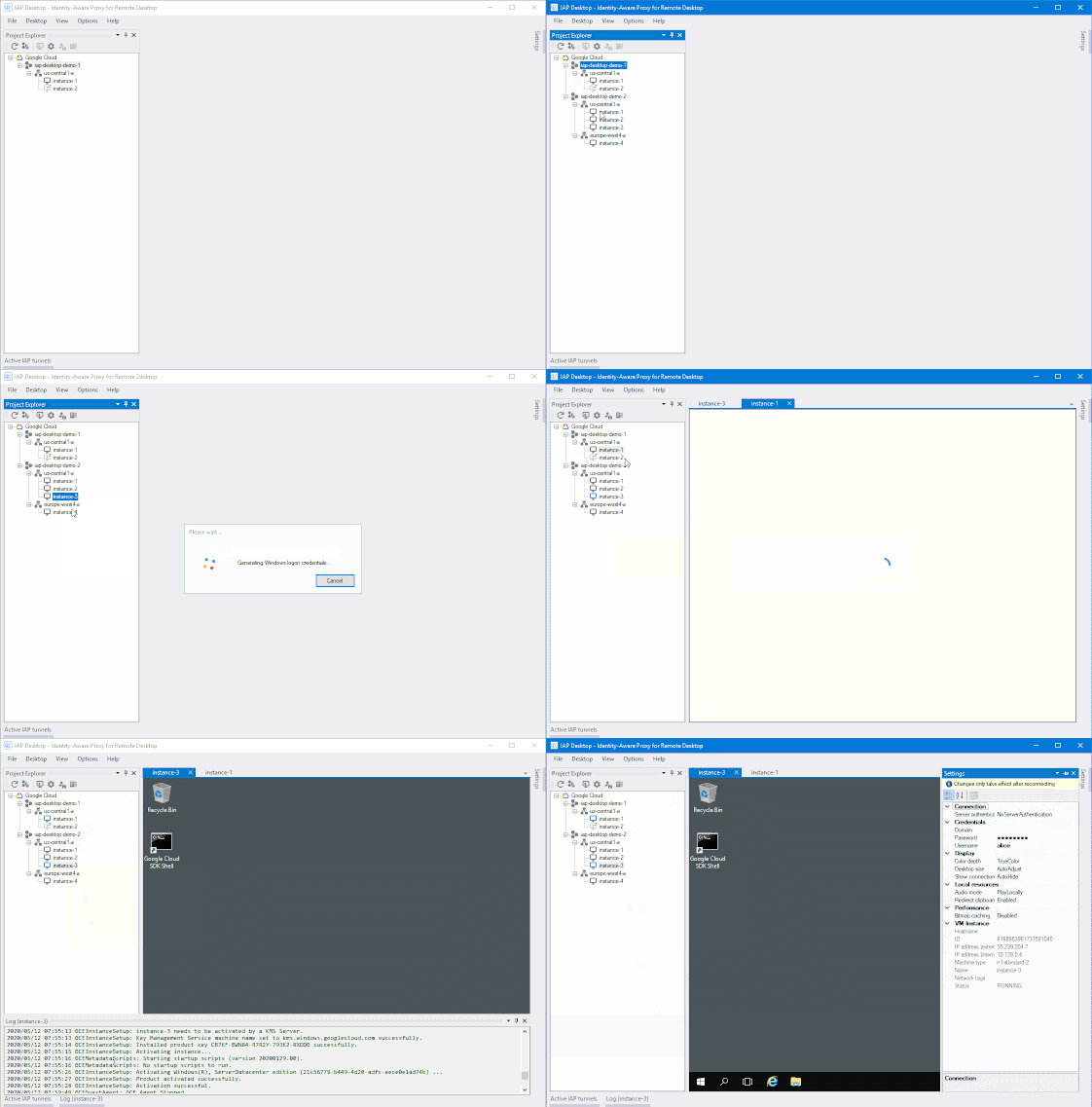
It’s more important than ever for IT administrators to be able to securely access resources from wherever they are. Exposing VM instances to the public internet can be risky, potentially giving bad actors a direct access path to your network. But solutions such as VPN tunnels or jump (bastion) hosts to access these systems can be cumbersome and may not provide the precise access control admin tasks demand.To help solve this dilemma, we’re introducing a new open-source tool to help Windows users and administrators to access and manage Windows VMs running in Compute Engine—conveniently and securely. IAP Desktop is a Windows application that allows you to manage multiple Remote Desktop Protocol (RDP) connections to Windows VM instances running on Google Cloud. IAP Desktop, builds on our existing Identity-Aware Proxy service, which can help you control access to your applications and VMs running on Google Cloud. IAP works by verifying a user’s identity and the context of a request to determine if that user should be allowed to access an application or a VM. All RDP connections are automatically encrypted and tunneled via IAP so you can access VM instances that don’t expose RDP publicly or even have a public IP address. Specifically, IAP Desktop uses IAP TCP forwarding to tunnel RDP connections. But IAP Desktop is more than just a Remote Desktop client: It also provides an overview of and quick access to all your VM instances across your Google Cloud projects. You can also access common functions, like generating Windows credentials or viewing logs, with a single click.You can download IAP Desktop on our GitHub page. Give it a try, we hope it makes it easier to manage your Windows instances on Google Cloud. And, if you’d like to implement simple, secure remote access to applications, check out our BeyondCorp remote access offering.
Quelle: Google Cloud Platform

Burst data lake processing to Dataproc using on-prem Hadoop data

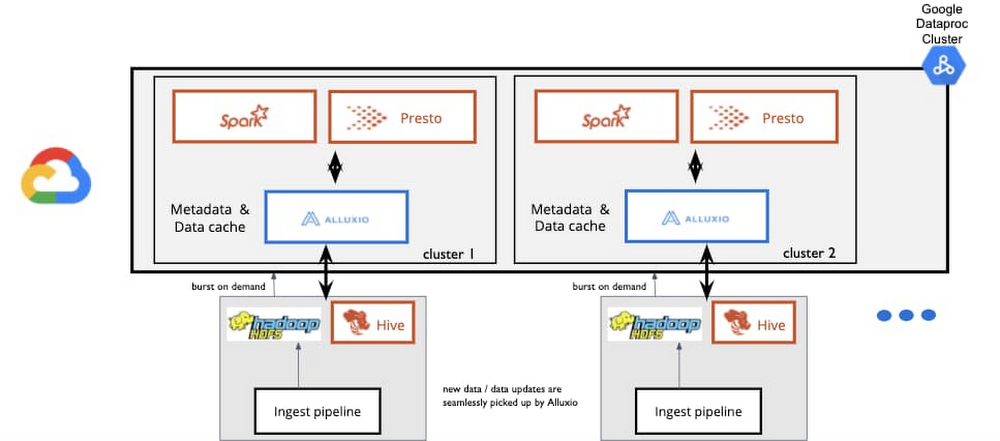
Many companies have data stored in a Hadoop Distributed File System (HDFS) cluster in their on-premises environment. As the amount of stored data grows, and the number of workloads coming in from analytics frameworks like Apache Spark, Presto, Apache Hive, and more grow, this type of fixed on-premises infrastructure becomes costly and causes latency in data processing jobs. One method to tackle this problem is to use Alluxio, an open source data orchestration platform for analytics and AI applications, to “burst” workloads to Dataproc, Google Cloud’s managed service for Hadoop, Spark, and other clusters. You can enable high performance for data analytics across a hybrid environment by mounting on-premises data sources into Alluxio and save on costs in your private data center without copying data. Zero-copy hybrid bursting to DataprocAlluxio integrates with both your private computing environment on-premises and with Google Cloud. Workloads can burst to Google Cloud on-demand without moving data between computing environments first. This allows for high data analytics performance with low I/O overhead.For example, you may use a compute framework like Spark or Presto for your on-prem data stored in HDFS. By bursting that data to Google Cloud with Alluxio, you’re able run the related analytics in the cloud on-demand, without the time and resource-intensive process of migrating large amounts of data to the cloud. Even then, after data is transferred to Cloud Storage, it is hard to access near real-time data as on-prem data pipelines and source systems change and evolve. With a data orchestration platform, you can selectively migrate data on-demand and seamlessly make updated data accessible in the cloud without the need to persist all data to Cloud Storage.We hear from customers that they find this especially helpful for enterprises in financial service, healthcare, and retail as they want to store and mask sensitive data on-prem and burst masked data and machine learning or ETL jobs to Google Cloud. A typical architecture may look something like this:How a large national retailer uses burst processingA leading retailer that balances physical and digital stores moved to a zero-copy hybrid solution powered with Alluxio and Google Cloud as their on-premises data center became increasingly overloaded with the amount of data coming in. They wanted to take advantage of Google Cloud’s scalability, but couldn’t persist data into the cloud due to security concerns. So they added Alluxio to burst their Presto workloads to Google Cloud to query large datasets that before wouldn’t have been able to move to the cloud. Before Alluxio, they manually copied large amounts of data at times three to four more than required for the jobs to run. Once those jobs completed, they had to delete that data, which made use of compute in Google Cloud very inefficient. By moving to Alluxio, they saw a vast improvement in query performance overall and were able to take advantage of the scalability and flexibility of Google Cloud. Here’s how their architecture looks:Using a zero-copy hybrid burst approach for better costs and performanceWe see some common challenges that users face with on-prem Hadoop or other big data workloads:Hadoop clusters are running beyond 100% CPU capacityHadoop clusters can’t be expanded due to high load on the master NameNode Compute capacity is not enough to offer the desired service-level agreement (SLA) to ad-hoc business users, and there’s no separation between SLA and non-SLA workloadsInfrequent and bursty analytics, such as a compute-intensive job for generating monthly compliance reports, compete for scarce resourcesCost containment is a problem at scaleOperational costs of self-maintained infrastructure adds to the total cost of ownership, with indirect costs related to salaries of the IT staffUsing the cloud to meet these challenges allows for independent scaling and on-demand provisioning of both compute and storage, the flexibility to use multiple compute engines (the right tool for the job), and reduced overload on existing infrastructure by moving ephemeral workloads.To learn more about the zero-copy hybrid burst solution, register for the upcoming tech talkhosted by Alluxio and the Google Cloud Dataproc team on Thursday, May 28.
Quelle: Google Cloud Platform

Cloud Functions, meet VPC functionality

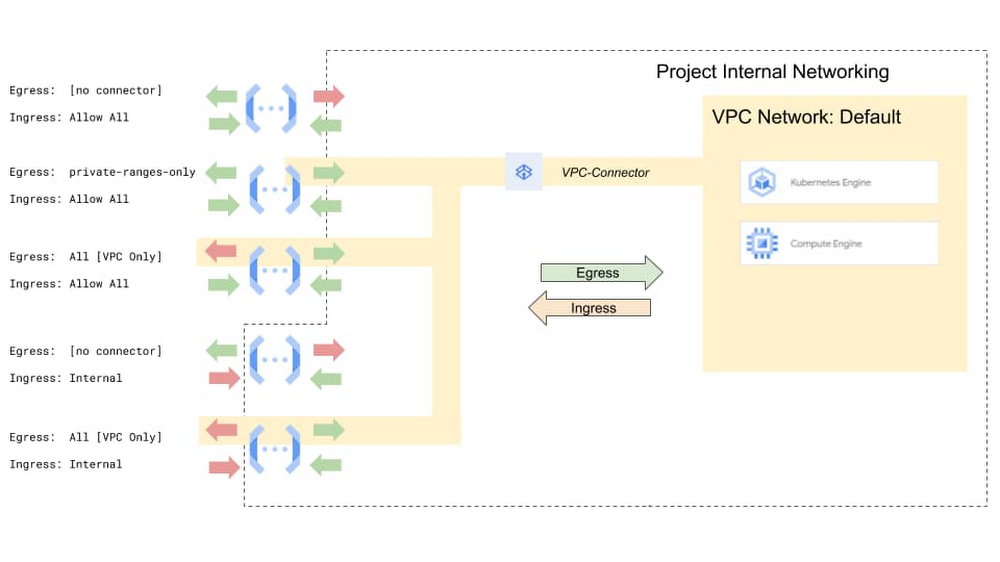
You probably don’t think of advanced VPC networking features and developer-friendly serverless platforms as things that typically play well together, but increasing numbers of organizations want to use serverless platforms in more traditional IT environments. Here at Google Cloud, we want you to have your serverless cake and eat it too, so are announcing support for new networking controls for Google Cloud Functions, including ingress settings and VPC service controls. Serverless VPC Access has been generally available since December, 2019, allowing Cloud Functions to reach into the private IP space of VPC networks. This allows you to route all or internal-only egress traffic to the connected VPC. Today we are extending that with the support of ingress settings, which allows you to control what traffic reaches your Cloud Functions, allowing you to run “private” Cloud Functions. We also support integrating Cloud Functions with VPC Service Controls and organization policies to control the movement of your company’s data.Click to enlargeIngress settings and VPC Service ControlsWith the release of Serverless VPC Access, we provided an egress path from functions to services running in a VPC (e.g.,  stateful services running on VMs without public IP addresses or services such as Memorystore). Now with support for ingress settings, you have more control over which network requests can reach your functions.By default, ingress settings allow traffic to a function from any VPC in your project, or from any internet source. Per function, you can now set ingress to `internal-only`, which excludes any network requests not originating from internal sources inside the same project.If you want to be more prescriptive about what traffic can reach your functions, you can set up a more explicit perimeter using VPC Service Controls. You can then use ingress and egress settings and the new Organization Policy service to prevent data exfiltration.You can then combine these network settings in various ways to address a variety of use cases:Create a function that can only be called within your VPC network – One of the key uses for network settings is to create a function that can be invoked only by clients within your given project or VPC network, for instance invoking your function from a Compute Engine VM within your VPC network. Here’s an example of how to create such a function.Configure a function to connect to private services on a VPC network – Some services are not built to be hardened to the public internet, and rely on network security to control access. You may want your function to be able to reach a service running in your VPC on your own VM or cluster, or a managed service such as Cloud Memorystore. See this example of connecting functions to Redis for rate-limiting.Manage function egress with VPC firewalls and NAT – You can use network egress settings to enforce the same security policies and firewall rules applied to the compute instances in the VPC — simply route all traffic through the VPC. If you want all traffic from functions to appear to come from a specific stable IP address, this traffic routing directive can be combined with Cloud NAT.Create a security perimeter to protect from Data Exfiltration – Prevent functions from accidentally sending any data to unwanted destinations.Organization policiesThe above use cases show there are many ways to use specific combinations of ingress and egress settings. But for some use cases, such as to protect from data exfiltration, it is important to reduce or remove human error that comes from repeatedly and manually applying resource configurations—especially when your organization already has a defined standard. To address this, Cloud Functions now supports organization policies, which can be applied to Cloud Functions network settings. This lets organizations set strict security policies with proper separation of concerns, while allowing developers to use serverless infrastructure and the flexibility and rapid development it provides.VPC Connector and Service Controls in actionMultinational insurance provider AXA is an early user of Cloud Functions’ new VPC Connector and VPC Service Controls capabilities, which have emerged as a very useful enabler for creating secure serverless services. Working with Google Cloud Premier Partner Wabion, AXA is using these capabilities for  two very important requirements:VPC-SC for Cloud Functions protects data streams used in GCP against data exfiltration by restricting access to perimeter-secured services only. “Using this functionality, we can ensure that sensitive data cannot be moved to unauthorized services, platforms or GCP projects,” says Felix Jost, GCP Engineering Lead, AXA. “With appropriate organizational policies configured, the policies can be managed on the whole AXA GCP organization to ensure security.”VPC Connector for Cloud Functions enables internal connection to on-premises services. “This allows building hybrid scenarios on serveless services to ensure maximum flexibility and scalability and seamless integration with other automated flows,” Jost says.We continue to see customers adopt serverless compute platforms like Cloud Functions, and we’re committed to ensuring the serverless workloads you write are first-class citizens of your production Google Cloud environment. To get started with VPC service controls on Cloud Functions please checkout the getting started guide.
Quelle: Google Cloud Platform

Dell Technologies Cloud OneFS for Google Cloud, now generally available

Storage is the foundation for many enterprises’ tech infrastructures, and it needs to deliver scale and high-performance. Today, we’re announcing that Dell Technologies OneFS for Google Cloud is now generally available and ready for production use. This collaboration between Google Cloud and Dell Technologies helps organizations migrate high-scale and enterprise business-critical file-based workloads to Google Cloud. You can now use the power and scale of the OneFS storage technology together with the economics, capabilities, and simplicity of Google Cloud.OneFS for Google Cloud—powered by the Isilon OneFS file system from Dell Technologies—is a highly versatile scale-out storage solution that speeds up access to large amounts of data while reducing cost and complexity. It is flexible and lets you strike the right balance between large capacity and high-performance storage, enabling enterprise and high-performance file-based workloads. This new offering combines scale, performance and enterprise-class data management features to support file workloads as large as 50 petabytes in a single file system, all while maintaining data integrity and performance.Organizations seeking to migrate their demanding file-based workloads can now take advantage of Google Cloud’s analytics and compute services without having to make changes or adjustments to their applications. Applications running in Google Cloud now have high-performance, scalable access to file data including multi-protocol support via NFS, SMB, and HDFS. To validate this, Enterprise Strategy Group (ESG) performed a performance-based technical review, achieving 200 GB/s on a 2 PB sized OneFS for Google Cloud file system. Furthermore, data migration is simplified with the built-in SyncIQ data replication capabilities, facilitating migration between cloud and on-premises OneFS clusters.Structured pricing and performance tiers make OneFS accessible for a wide variety of workloads and budgets. Combined with Google Cloud’s core capabilities, it enables key enterprise and commercial HPC applications, such as AI/ML, genomics processing for life sciences, video editing and rendering for media and entertainment, telemetry data processing for the automotive industry, and electronic design automation.Billing and support integration for OneFSIn addition, management and operations is easier with deep OneFS integration into Google Cloud. Beyond the marketplace and networking integrations, which let you deploy and access OneFS file systems from your applications, OneFS is also integrated directly into the Google Cloud Console, billing, and support. Console integration means that storage admins and operations teams are able to provision, run, scale, and manage Isilon OneFS clusters from the same user interface used to manage all Google Cloud services. With integrated billing, OneFS storage usage is included directly in your Google Cloud bill. Google Cloud Support integration ensures that you can contact Google through familiar channels and have a single point of contact for issues. These integrations mean not only do your applications migrate to Google Cloud more easily, but your operations teams can depend on the workflows they already have in place, bringing easier overall management for your solution.Dell Technologies and Google Cloud are committed to supporting your most mission-critical file-based workloads and are excited to enable our customers with these new storage options. OneFS for Google Cloud is available in the us-east4 (Ashburn, Northern Virginia, U.S.), australia-southeast1 (Sydney), and asia-southeast1 (Singapore) regions, with additional regions coming soon.To get started or for more information, visit Dell Technologies Cloud OneFS in the Google Cloud Marketplace.
Quelle: Google Cloud Platform

Predicting the cost of a Dataflow job

The value of streaming analytics comes from the insights a business draws from instantaneous data processing, and the timely responses it can implement to adapt its product or service for a better customer experience. “Instantaneous data insights,” however, is a concept that varies with each use case. Some businesses optimize their data analysis for speed, while others optimize for execution cost. In this post, we’ll offer some tips on estimating the cost of a job in Dataflow, Google Cloud’s fully managed streaming and batch analytics service. Dataflow provides the ability to optimize a streaming analytics job through its serverless approach to resource provisioning and management. It automatically partitions your data and distributes your worker code to Compute Engine instances for parallel processing, optimizes potentially costly operations such as data aggregations, and provides on-the-fly adjustments with features like autoscaling and dynamic work rebalancing. The flexibility that Dataflow’s adaptive resource allocation offers is powerful; it takes away the overhead of estimating workloads to avoid paying for unutilized resources or causing failures due to the lack of processing capacity. Adaptive resource allocation can give the impression that cost estimation is unpredictable too. But it doesn’t have to be. To help you add predictability, our Dataflow team ran some simulations that provide useful mechanisms you can use when estimating the cost of any of your Dataflow jobs. The main insight we found from the simulations is that the cost of a Dataflow job increases linearly when sufficient resource optimization is achieved. Under this premise, running small load experiments to find your job’s optimal performance provides you with a throughput factor that you can then use to extrapolate your job’s total cost. At a high level, we recommend following these steps to estimate the cost of your Dataflow jobs: Design small load tests that help you reach 80% to 90% of resource utilizationUse the throughput of this pipeline as your throughput factorExtrapolate your throughput factor to your production data size and calculate the number of workers you’ll need to process it allUse the Google Cloud Pricing Calculator to estimate your job costThis mechanism works well for simple jobs, such as a streaming job that moves data from Pub/Sub to BigQuery or a batch job that moves text from Cloud Storage to BigQuery. In this post, we will walk you through the process we followed to prove that throughput factors can be linearly applied to estimate total job costs for Dataflow.  Finding the throughput factor for a streaming Dataflow jobTo calculate the throughput factor of a streaming Dataflow job, we selected one of the most common use cases: ingesting data from Google’s Pub/Sub, transforming it using Dataflow’s streaming engine, then pushing the new data to BigQuery tables. We created a simulated Dataflow job that mirrored a recent client’s use case, which was a job that read 10 subscriptions from Pub/Sub as a JSON payload. Then, the 10 pipelines were flattened and pushed to 10 different BigQuery tables using dynamic destinations and BigQueryIO, as shown in the image below.The number of Pub/Sub subscriptions doesn’t affect Dataflow performance, since Pub/Sub would scale to meet the demands of the Dataflow job. Tests to find the optimal throughput can be performed with a single Pub/Sub subscription.The team ran 11 small load tests for this job. The first few tests were focused on finding the job’s optimal throughput and resource allocation to calculate the job’s throughput factor. For the tests, we generated messages in Pub/Sub that were 500 KB on average, and we adjusted the number of messages per topic to obtain the total loads to feed each test. We tested a range of loads from 3MB/s to 250MB/s. The table below shows five of the most representative jobs with their adjusted parameters:All jobs ran in machines: n1-standard-2, configuration (vCPU/2 = worker count)In order to ensure maximum resource utilization, we monitored the backlog of each test using the backlog graph in the Dataflow interface. We recommend targeting an 80% to 90% utilization so that your pipeline has enough capacity to handle small load increases. We considered 86% to 91% of CPU utilization to be our optimal utilization. In this case, it meant a 2.5MB/s per virtual CPU (vCPU) load. This is job #4 on the table above. In all tests, we used n1-standard-2 machines, which are the recommended type for streaming jobs and have two vCPUs. The rest of the tests were focused on proving that resources scale linearly using the optimal throughput, and we confirmed it.Using the throughput factor to estimate the approximate total cost of a streaming jobLet’s assume that our full-scale job runs with a throughput of 1GB/s and runs five hours per month. Our throughput factor estimates that 2.5MB/s is the ideal throughput per worker using the n1-standard-2 machines. To support a 1GB/s throughput, we’ll need approximately 400 workers, so 200 n1-standard-2 machines.We entered this data in the Google Cloud Pricing Calculator and found that the total cost of our full-scale job is estimated at $166.30/month. In addition to worker costs, there is also the cost of streaming data processed when you use the streaming engine. This data is priced by volume measured in gigabytes, and is typically between 30% to 50% of the worker costs. For our use case, we took a conservative approach and estimated 50%, totaling $83.15 per month. The total cost of our use case is $249.45 per month.Finding the throughput factor for a simple batch Dataflow jobThe most common use case in batch analysis using Dataflow is transferring text from Cloud Storage to BigQuery. Our small load experiments read a CSV file from Cloud Storage and transformed it into a TableRow, which was then pushed into BigQuery in batch mode. The source was split into 1 GB files. We ran tests with file sizes from 10GB to 1TB to demonstrate that optimal resource allocation scales linearly. Here are the results of these tests:These tests demonstrated that batch analysis applies autoscaling efficiently. Once your job finds an optimized resource utilization, it scales to allocate the resources needed to complete the job with a consistent price per unit of processed data in a similar processing time.Let’s assume that our real scale job here processes 10TB of data, given that our estimated cost using resources in us-central1 is about $0.0017/GB of processed data. The total cost of our real scale job would be about $18.06. This estimation follows this equation: cost(y) = cost(x) * Y/X, where cost(x) is the cost of your optimized small load test, X is the amount of data processed in your small load test, and Y is the amount of data processed in your real scale job. The key in this and the previous examples is to design small-load experiments to find your optimized pipeline setup. This setup will give you the parameters for a throughput factor that you can scale to estimate the resources needed to run your real scale job. You can then input these resource estimations in the Pricing Calculator to calculate your total job cost. Learn more in this blog post with best practices for optimizing your cloud costs.
Quelle: Google Cloud Platform

Celebrating a decade of data: BigQuery turns 10

Editor’s note: Today we’re hearing from some of the team members involved in building BigQuery over the past decade, and even before. Our thanks go to Jeremy Condit, Dan Delorey, Sudhir Hasbe, Felipe Hoffa, Chad Jennings, Jing Jing Long, Mosha Pasumansky, Tino Tereshko, and William Vambenepe, and Alicia Williams.  This month, Google’s cloud data warehouse BigQuery turns 10. From its infancy as an internal Google product to its current status as a petabyte-scale data warehouse helping customers make informed business decisions, it’s been in a class of its own. We got together to reflect on some of the technical milestones and memorable moments along the way, and here are some of the moments through the years:Applying SQL to big data was a big deal.When we started developing BigQuery, the ability to perform big data tasks using SQL was a huge step. At that time, either you had a small database that used SQL, or you used MapReduce. Hadoop was just emerging then, so for large queries, you had to put on your spelunking hat and use MapReduce.Since MapReduce was too hard to use for complex problems, we developed Sawzall to run on top of MapReduce to simplify and optimize those tasks. But Sawzall still wasn’t interactive. We then built Dremel, BigQuery’s forerunner, to serve Google’s internal data analysis needs. When we were designing it, we aimed for high performance, since users needed fast results, along with richer semantics and more effective execution than MapReduce. At the time, people expected to wait hours to get query results, and we wanted to see how we could get queries processed in seconds. That’s important technically, but it’s really a way to encourage people to get more out of their data. If you can get query results quickly, that engenders more questions and more exploration.Our internal community cheered us on.Dremel was something we had developed internally at Google to analyze data faster, in turn improving our Search product. Dremel became BigQuery’s query engine, and by the time we launched BigQuery, Dremel was a popular product that many Google employees relied on. It powered data search beyond server logs, such as for dashboards, reports, emails, spreadsheets, and more. A lot of the value of Dremel was its operating model, where users focused on sending queries and getting results without being responsible for any technical or operational back end. (We call that “serverless” now, though it didn’t have a term back then.) A Dremel user put data on a shared storage platform and could immediately query it, any time. Faster performance was an added bonus.We built Dremel as a cloud-based data engine, similar to what we had done with App Engine, for internal users. We saw how useful it was for Google employees, and wanted to use those concepts for a broader external audience. To build BigQuery into an enterprise data warehouse, we kept the focus on the value of serverless, which is a lot more convenient and doesn’t require management overhead. In those early days of BigQuery, we heard from users frequently on StackOverflow. We’d see a comment and address it that afternoon. We started out scrappy, and really closely looped in with the community. Those early fans were the ones who helped us mature and expand our support team. We also worked closely with our first hyperscale customer as they ramped up to using thousands of slots (BigQuery’s unit of computational capacity), then the next customer after that. This kind of hyperscale has been possible because of Google’s networking infrastructure. This infrastructure allowed us to build a shuffler that used disaggregated memory into Dremel. The team also launched two file formats, and inspired external emulation for other developers. ColumnIO inspired the column encoding of open-source Parquet, a columnar storage format. And the Capacitor format used a columnar approach that supports semistructured data. The idea of using a columnar format for this type of analytics work was new, but popular, in the industry back then. Tech concepts and assumptions changed quickly.Ten years ago in the data warehouse market, high scalability meant high cost. But BigQuery brought a new way of thinking about big data into a data warehouse format that could scale quickly at low cost. The user can be front and center and doesn’t have to worry about infrastructure—and that’s defined BigQuery from the start. Separating storage and processing was a big shift. The method ten years ago was essentially just to throw compute resources at big data problems, so that users often ran out of room in their data warehouse, thus running out of querying ability. In 2020, it’s become much cheaper to keep a lot of data in a ready-to-query store, even if it isn’t queried often.Along the way, we’ve added lots of features to BigQuery, making it a mature and scalable data warehousing platform. We’ve also really enjoyed hearing from BigQuery customers about the projects they’ve used it for. BigQuery users have run more than 10,000 concurrent queries across their organization. We’ve heard over the years about projects like DNA analysis, astronomical queries, and more, and we see businesses across industries using BigQuery today.We also had our founding engineering team record a video celebrating BigQuery’s decade in data, talking about some of their memorable moments, naming the product, and favorite facts and innovations—plus usage tips. Check it out here:What’s next for data analytics?Ten years later, a lot has changed. What we used to call big data is now, essentially, just data. It’s an embedded part of business and IT teams.When we started BigQuery, we asked ourselves, “What if all the world’s data looked like one giant database?” In the last 10 years, we’ve come a lot closer to achieving that goal than we had thought possible. Ten years from now, will we still even need different operational databases and data warehouses and data lakes and business intelligence tools? Do we still need to treat structured data and unstructured data differently… isn’t it all just “data”? And then, once you have all of your data in one place, why should you even need to figure out on your own what questions to ask? Advances in AI, ML and NLP will transform our interactions with data to the level that we cannot fully imagine today. No matter what brave new world of data lies ahead, we’ll be developing and dreaming to help you bring your data to life. We’re looking forward to lots more exploration. And you can join the community monthly in the BigQuery Data Challenge.We’re also excited to announce the BigQuery Trial Slots promotional offer for new and returning BigQuery customers. This lets you purchase 500 slots for $500 per month for six months. This is a 95% discount from current monthly pricing. This limited time offer is subject to available capacity and qualification criteria and while supplies last. Learn more here. To express interest in this promotion, fill out this form and we’ll be in touch with the next steps.We’re also hosting a very special BigQuery live event today, May 20, at 12PM PDT with hosts Felipe Hoffa and Yufeng Guo. Check it out.
Quelle: Google Cloud Platform

Anthos in depth: exploring a bare-metal deployment option

We recently shared how organizations are modernizing their applications with Anthos, driving business agility and efficiency in exciting new ways. But while some of you want to run Anthos on your existing virtualized infrastructure, others want to eliminate the dependency on a hypervisor layer, to modernize your applications while reducing costs. A new option to run Anthos on bare metal later this year will let you do just that. Anthos on bare metal is a deployment option to run Anthos on physical servers, deployed on an operating system provided by you, without a hypervisor layer. Anthos on bare metal will ship with built-in networking, lifecycle management, diagnostics, health checks, logging, and monitoring. Additionally it will support CentOS, Red Hat Enterprise Linux (RHEL), and Ubuntu—all validated by Google. With Anthos on bare metal, you can use your company’s standard hardware and operating system images, taking advantage of existing investments, which are automatically checked and validated against Anthos infrastructure requirements. We are also extending our existing Anthos Ready Partner Initiative to include bare metal solutions. This will include reference architectures on how to integrate Anthos with many datacenter technologies such as servers, networking, and storage using our Anthos Ready partner qualification process.Reduce cost and complexityOver the years, virtualization has helped organizations increase the efficiency of their physical servers, but it has also introduced additional cost and management complexity. With containers becoming mainstream, there’s an opportunity to reduce the costs associated with licensing a hypervisor, while also reducing the architecture and management overhead of operating hundreds of VMs. That’s on top of the efficiencies that Anthos already brings to the table, even when it’s installed in a virtual machine. Anthos can simplify your application architecture, reduce costs, and decrease time spent learning new skills. In fact, the recent Forrester Total Economic Impact report found that Anthos enables a 40% to 55% increase in platform operations efficiency.Run closer to the hardware for better performanceMission critical applications often demand the highest levels of performance and lowest latency from the compute, storage, and networking stack. By removing the latency introduced by the hypervisor layer, Anthos on bare metal lets you run even computationally intensive applications such as GPU-based video processing, machine learning, etc., in a CAPEX and OPEX effective manner. This means that you can access all the benefits of Anthos—centralized management, increased flexibility, and developer agility—for your most demanding applications. Unlock new use cases for edge computingIn general, running your applications closer to your customers reduces latency and improves their experience. The availability of Anthos on bare metal servers lets you extend Anthos to new locations such as edge locations and telco sites. Our telco and edge partners welcome the advent of a bare metal option, as it allows them to run Anthos on specialized edge hardware. At the same time, you can still manage any applications you deploy to Anthos edge locations through the Google Cloud Console, complete with integrated monitoring and policy enforcement. You can also apply consistent policies and enforce them across all locations of application deployments. Visit Anthos at the Edge solutions page and learn more about how Anthos on bare metal is also helping customers with applications deployed at the edge locations. We developed Anthos to help all organizations to tackle multi-cloud, taking advantage of modern cloud-native technologies like containers,  serverless, service mesh, and consistent policy management; both in the cloud or on-premises. Now, with the option of running Anthos on bare metal, there are even more ways to enjoy the benefits of this modern cloud application stack. Learn more by downloading the Anthos under the hood ebook and get started on your modernization journey today!
Quelle: Google Cloud Platform

Audiobahn: Use this AI pipeline to categorize audio content–fast

Creating content is easier than ever before. Many applications rise to fame by encouraging creativity and collaboration for the world to enjoy: think of the ubiquity of online video uploads, streaming, podcasts, blogs and comment forums, and much more. This variety of platforms gives users the freedom to post original content without knowing how to host their own app or website.Since new applications can become extremely popular in a matter of days, however, managing scale becomes a real challenge. While application creators wish to maximize new users and content, keeping track of that content is complex. The freedom to post their own content empowers creators, but it also creates an administration challenge for the platform. This forces organizations providing the platform to straddle between protecting the creator and the user: How can they ensure that creators have the freedom to post what they wish, while ensuring that the content they are displaying to users is appropriate for their audience? This isn’t a black-and-white issue, either. Different audience segments may react differently to the same content. Take music, for example. Some adults may appreciate an artist’s freedom to use explicit language, but that same language may be inappropriate for an audience of children. For podcasts, the problem is even more nuanced. An application needs to consider both the problem of ensuring that a listener feels safe as well as how to manage this moderation. While a reviewer only needs to spend three minutes listening to a song to determine if it’s appropriate, they may need to listen for 30 minutes to an hour—or more—to gauge the content of a podcast. Providing content that serves both audiences is an important task that requires careful management. In this blog, we’ll look more closely at the challenges that scaling presents, and how Google Cloud can help providers scale efficiently and responsibly.The challenge of scalabilityPlatforms rarely have a scalable model for evaluating or triaging content uploads to their site—especially when they can receive multiple new posts per second. Some rely on users or employees to manually flag inappropriate content. Others may try to sample and evaluate a subset of their content at regular intervals. Both of these methods, however, are prone to human error and potentially expose their users to toxic content. Without a workable solution for dealing with this firehose of content, some organizations have had to turn off commenting on their sites or even disable user new uploads until they catch up on evaluating old posts. The problem becomes even more complex when evaluating different forms of input. Written text can be screened and passed through machine learning (ML) models to extract words that are known to be offensive. Audio, however, must first be transcribed in a preprocessing step to convert it to text by applying various machine learning algorithms. These algorithms utilize deep learning to predict the written text, given their knowledge of grammar, language, and overall context of what’s being said. Because of this, transcription models typically prefer a sequence of speech which is more common in everyday usage. However, since profane words or sentences occur less often, the speech-to-text model may not prefer them, thus highlighting the complexity of audio content moderation. The solutionTo help platform providers manage content at scale, we combined a variety of Google Cloud products, including the Natural Language API and Jigsaw’s Perspective API, to create a processing pipeline to analyze audio content and a corresponding interface to view the results. This fosters a safe environment for content consumers and lets creators trust that they can upload their content and collaborate without being incorrectly shut down.Click to enlargeStep 1: Upload the audio contentThe first step of the solution involves uploading an audio file to Cloud Storage, our object storage product. This upload can be performed directly, either in Cloud Storage from the command-line interface (CLI) or web interface, or from a processing pipeline, such as a batch upload job in Dataflow. This upload is independent of our pipeline.In our architecture, we want to begin performing analysis whenever new files are uploaded, so we’ll set up notifications to be triggered whenever there’s a new upload. Specifically, we’ll enable an object finalize notification to be sent whenever a new object is added to a specific Cloud Storage bucket. This object finalize event triggers a corresponding Cloud Function, which will allow us to perform simple serverless processing, meaning that it scales up and down based on the resources that it needs to run. We use Cloud Functions here because they are fully managed, meaning we don’t have to provision any infrastructure, and they are triggered based on a specific type of event. In this function, our event is the upload to Cloud Storage. There are many different ways to trigger a Cloud Function, however, and we use them multiple times throughout this architecture to decouple the various types of analysis that we will perform. Step 2: Speech-to-text analysisThe purpose of the first Cloud Function is to begin the transcription process. Because of this, the function sends a request to the Speech-to-Text API, which immediately returns a job ID for this specific request. The Cloud Function then publishes the job ID and name of the audio file to Cloud PubSub. This lets us save the information for later, until the transcription process is complete, and lets us queue up multiple transcription jobs in parallel.Step 3: Poll for transcription results To allow for multiple uploads in parallel, we’ll create a second Cloud Function that checks whether transcription jobs are complete. The trigger for this Cloud Function is different from the first. Since we’re not using object uploads as notifications in this case, we’ll use Cloud Scheduler as the service to call the function to make it begin. Cloud Scheduler allows us to execute recurring jobs at a specified cadence. This managed cron job scheduler means that we can request the Cloud Function to run at the same time each week, day, hour, or minute, depending on our needs. For our example, we’ll have the Cloud Function run every 10 minutes. After it pulls all unread messages from PubSub it iterates through them to extract out each job ID. It then calls the Speech-to-Text API with the specified job ID to request the transcription job’s status. If the transcription job isn’t done, the Cloud Function republishes the job ID and audio file name back into PubSub so that it can check the status again the next time it’s triggered. If the transcription job is done, the Cloud Function receives a JSON output of the transcription results and stores them in a Cloud Storage bucket for further analysis. The next two steps involve performing two types of machine learning analysis on the transcription result. Each creates separate Cloud Functions that are triggered by the object finalize notification generated from uploading the transcription to Cloud Storage. Step 4: Entity and sentiment analysisThe first step calls the Natural Language API to perform both entity and sentiment analysis on the written content. For entity analysis, the API looks at various segments of text to extract out the various subjects that may be mentioned in the audio clip and groups them into known categories—“Person,” “Location,” “Event,” and much more. For sentiment analysis, it rates the content on a scale of -1 to 1 to determine if certain subjects are spoken about in a positive or negative way. For example, suppose we have the API analyze the phrase “Kaitlin loves pie!” It will first work to understand what the text is talking about. This means that it will extract out both “pie” and “Kaitlin” as entities. It will then look to categorize them as particular nouns and generate the corresponding labels of “Kaitlin” as “Person” and “pie” as “Other.” The next step is to understand the overall attitude or opinion conveyed by the text. For this specific phrase, “pie” would generate a corresponding high sentiment score, likely between 0.9 and 1, due to the positive attitude conveyed by the verb “loves.” The output from this phrase would indicate that it’s a person speaking favorably about a noun.Going back to our pipeline, the Cloud Function for this step calls the Natural Language API to help us better understand the overall content of the audio file. Since it’s time-consuming for platforms to listen to all uploaded files in their entirety, the Natural Language API helps generate a quick initial check of the overall feeling of each piece of content so users can understand what is being spoken about and how. For example, the output from “Kaitlin loves pie!” would let a user quickly identify that the spoken content is positive and probably OK to host on their platform.In this step, the Cloud Function begins once the transcription is uploaded to Cloud Storage. It then reads the transcription and sends it to the Natural Language API with a request for both sentiment and entity analysis. The API returns the overall attitude and entities described in the file, broken up into logical chunks of text. The Cloud Function then stores this output in Cloud Storage in a new object to be read later.  Step 5: toxicity analysisThe next Cloud Function invokes the Perspective API, also when the transcription is uploaded to Cloud Storage, meaning that it runs in parallel with the previous step. This API analyzes both chunks of text and individual words and rates their corresponding toxicity. Toxicity can refer to explicitness, hatefulness, offensiveness, and much more. While toxicity is traditionally used for small comments to enable conversations on public forums, it can be used for other formats as well. For an example, let’s look at the case of an employee trying to moderate an hour-long podcast that contains some dark humor. It can be difficult to absorb longform content like this in a digestible format. So, if a user flags the podcast’s humor as offensive it would require a moderator on the platform to listen to the entire file to decide if the content is truly presented in an offensive manner, or if it was playful, or even flagged by accident. Given the amount of podcasts and large audio files on popular sites, listening to each and every piece of flagged content would take a significant amount of time. This means that offensive files may not be taken down in a swift manner and could continue to offend other users. Similarly, some content might include playful humor that may seem insulting but could be innocuous. To help with this challenge, the Cloud Function analyzes the text to generate predictions about the content. It reads in the transcription from Cloud Storage, calls the Perspective API, and supplies the text as input. It then receives back predictions on the toxicity for each chunk of text, and stores it in a new file in Cloud Storage. With this, the analysis is complete. To understand the full context, we come to the final piece of the solution: the user interface (UI).Click to enlargeThe user interfaceThe UI is built on top of App Engine, which allows us to deploy a fully managed application without managing servers ourselves. Under the hood, the UI simply reads in the produced output from Cloud Storage and presents it in a user-friendly fashion that’s easy to digest and understand.The UI first allows users to view a list of the file names of each transcription in Cloud Storage. After selecting a file, a moderator can see the full audio transcription divided into logical, absorbable pieces. Each piece of text is then sorted based on its level of toxicity, as generated by the Perspective API, or by the order it appears in the file. Alongside the text is a percentage that indicates the probability that it contains toxic content. Users can filter the results based on the generated toxicity levels, and for quick consumption, organizations can choose a certain threshold above which they should manually review all files. For instance, a file that contains scores that are all less than 50% may not need an initial review, but a file containing sections consistently rating above 90% probably warrants a review. This allows moderators to be more proactive and purposeful when looking at audio content, rather than waiting for users to flag content or needing to listen to the whole piece. Each piece of text also contains a pop-up that indicates the results from the Natural Language API. It shows the various attitudes and subjects of each piece of content, presenting the user with a quick summary of what the content is about. OutcomeWhile this architecture uses Google Cloud’s pre-trained Speech-to-Text API and Natural Language API, you can customize it with more advanced models. As one example, the Speech-to-Text API can be augmented by including in the speech context configuration option. The speech context provides an opportunity to include hints, or expected words, that may be included in the audio. By including known profanity or other inappropriate words, clients can customize their API requests with these hints to help provide context when the model is determining the transcription.Additionally, suppose, for example, that your platform is interested in flagging certain types of content or is aware of certain subjects that you want to categorize in certain ways. Perhaps you want to know about political comments that may be present in an audio segment. With AutoML Natural Language, you can train your custom model against specific known entities, or use domain-specific terms. The advantage here is similar to the Natural Language API: It doesn’t require a user to have machine learning expertise—Google Cloud still builds the model for you, now with your own data.If you want to supply your own model for more custom analysis, you can use TensorFlow or transferred learning. The upside is that your model and analysis will be custom to your use cases, but it doesn’t leverage Google Cloud’s managed capabilities, and you have to maintain your own model over time. The pipeline we demonstrated in this blog enables organizations to moderate their content in a more proactive manner. It lets them understand the full picture of audio files, so they know what topics are being discussed, the overall attitude of those topics, and the potential for any offensive content. It drastically speeds up the review process for moderators by providing a full transcript, with key phrases highlighted and sorted by toxicity, rather than having to listen to a full file when making a decision. This pipeline touches all phases of the content chain—platforms, creators, and users—helping us all have a great user experience while enjoying all the creative work available at our fingertips. To learn more about categorizing audio content, check out this tutorial, concept document, and source code.
Quelle: Google Cloud Platform