Setting SLOs: observability using custom metrics

If you’ve embarked on your site reliability engineering (SRE) journey, you’ve likely started using service-level objectives (SLOs) to bring customer-focused metrics into your monitoring, perhaps even utilizing Service Monitoring as discussed in “Setting SLOs: a step-by-step guide.” Once you’re able to decrease your alert volume, your oncallers are experiencing less operational overhead and are focused on what matters to your business—your customers. But now, you’ve run into a problem: one of your services is too complex and you’re unable to find a good indicator of customer happiness using Google Cloud Monitoring-provided metrics.This is a common problem, but not one without a solution. In this blog post, we’re going to look at how you can create service-level objectives for services that require custom metrics. We will utilize the help of service monitoring again, but this time, instead of setting SLOs in the UI, we will look at using infrastructure as code with Terraform. Exploring an example service: stock traderFor this example, we have a back-end service that processes stock market trades for buying and selling stocks. Customers submit their trades via a web front end, and their requests are sent to this back-end service for the actual orders to be completed. This service is built on Google Compute Engine. Since the web front end is managed by a different team, we are going to be responsible for setting the SLOs for our back-end service. In this example, the customers are the teams responsible for the services that interact with the back-end service, such as the front-end web app team.This team really cares that our service is available, because without it customers aren’t able to make trades. They also care that trades are processed quickly. So we’ll look at using an availability service-level indicator (SLI) and a latency SLI. For this example, we will only focus on creating SLOs for an availability SLI—or, in other words, the proportion of successful responses to all responses. The trade execution process can return the following status codes: 0 (OK), 1 (FAILED), or 2 (ERROR UNKNOWN). So, if we get a 0 status code, then the request succeeds.Now we need to come up with what metrics we are going to measure and where we are going to measure them. However, this is where the problem lies.There’s a full list of metrics provided by Compute Engine.You might think that instance/uptime shows how long the VM has been running, so it’s a good metric to indicate when a back-end service is available. This is a common mistake, though—if a VM is not running, but no one is making trades, does that mean your customers are unhappy with your service? No. What about the opposite situation: What if the VM is running, but trades aren’t being processed? You’ll quickly find out the answer to that by the number of angry investors at your doorstep. So using instance/uptime is not a good indicator of customer happiness here. You can look at the Compute Engine metrics list and try to justify other metrics like instance/network, instance/disk, etc. to represent your customer happiness, but you’d most likely be out of luck. While there are lots of metrics available in Cloud Monitoring, sometimes custom metrics are needed to gain better observability into our services. Creating custom metrics with OpenCensusThere are various ways that you can create custom metrics to export to Cloud Monitoring, but we recommend using OpenCensus for its idiomatic API, open-source flexibility and ease of use. For this example, we’ve already instrumented the application code using the OpenCensus libraries. We’ve created two custom metrics using OpenCensus: one metric that aggregates the total number of responses with /OpenCensus/total_count and another one, /OpenCensus/success_count, that aggregates the number of successful responses.So now, the availability SLI will look like this:The proportion of /OpenCensus/success_count to /OpenCensus/total_count measured at the application level.Once these custom metrics are exported, we can see them in Cloud Monitoring:Setting the SLO with TerraformWith application-level custom metrics exported to Cloud Monitoring, we can begin to monitor our SLOs with Service Monitoring. Since we are creating configurations, we want to source-control them so that everyone on the team knows what’s been added, removed or modified. There are many ways to set your SLO configurations in Service Monitoring, such as using gcloud commands, Python and Golang libraries, or using a REST API. But in this example, we will be utilizing Terraform and the google_monitoring_slo resource. Since this is configuration-as-code we can take advantage of a version control system to help track our changes, perform rollbacks, etc. Here’s what the Terraform configuration looks like:Let’s explore the main components:resource “google_monitoring_slo” allows us to create a Terraform resource for Service Monitoring.goal = 0.999 sets an SLO target or goal of 99.9%rolling_period_days = 28 sets a rolling SLO target window of 28 daysrequest_based_sli is the meat and potatoes of our SLI. We want to specify an SLI that measures the count of successful requests divided by the count of total requests.good_total_ratio allows us to simply compute the ratio of successful or good requests to all requests. We specify this number by providing two TimeSeries monitoring filters for what constitutes a good_service_filter. In this case, “/opencensus/success_count” is joined with our project identification and resource type. You want to be as precise as you can with your filter so that you only end up with one result. Then do the same for the total_service_filter, which filters for all your total requests.Once the Terraform configuration is applied, the newly created SLO is in the Service Monitoring dashboard for our project (as shown in the figure below). We can even make changes to this SLO at any time by editing our Terraform configuration and re-applying it-simple!Setting a burn-rate alert with TerraformOnce we’ve created our SLO, we will need to create burn-rate alerts to notify us when we’re close to exhausting the error budget. The google_monitoring_alert_policy resource can do this:Let’s explore the main components:conditions determine what criteria must be met to open an incident.filter = “select_slo_burn_rate” is the filter we will use to create SLO burn-based alerts. It takes two arguments: the target SLO and a lookback period.threshold is the error budget consumption rate. If a service uses a burn rate of 1, this means that it is consuming the error budget at a rate that will completely exhaust the error budget by the end of the SLO window.notification_channels will use existing notification channels when the alerting policy is triggered. You can create notification_channels with Terraform, but here we’ll use an existing one.documentation is the information sent when the condition is violated to help recipients diagnose the problem.Now that you’ve looked at how to create SLOs out of the box with service monitoring, and how to create SLOs for custom metrics to get better observability for your customer-focused metrics, you’re well on your way to creating quality SLOs for your own services. You can learn more about the Service Monitoring API to help you accomplish other tasks such as setting windows-based alerts and more.
Quelle: Google Cloud Platform
Enabling hybrid deployments with Cloud CDN and Load Balancing

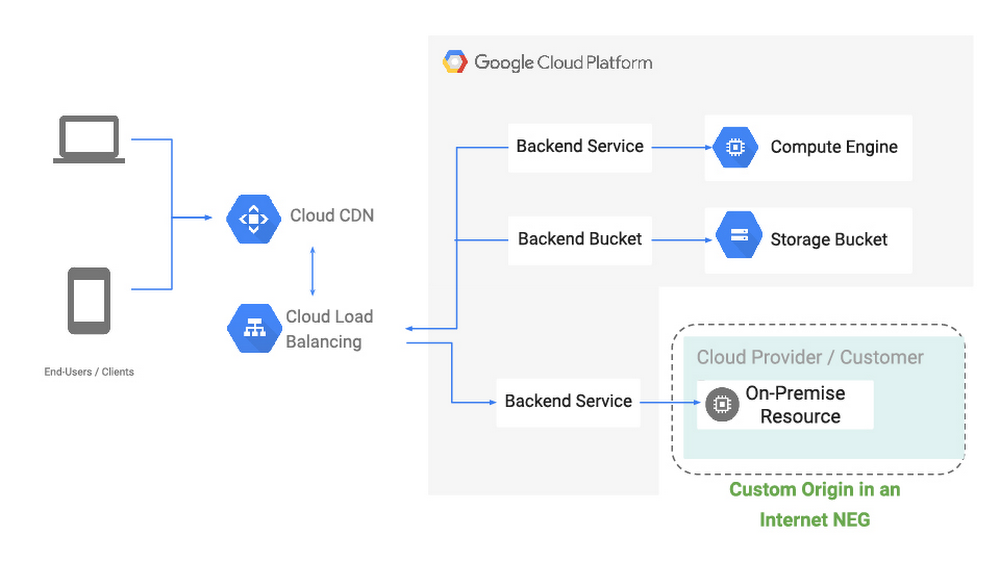
Like many Google Cloud customers, you probably have content, workloads or services that are on-prem or in other clouds. At the same time, you want the benefit of high availability, low latency, and convenience of a single anycast virtual IP address that HTTP(S) Load Balancing and Cloud CDN provide. To enable these hybrid architectures, we’re excited to bring first-class support for external origins to our CDN and HTTP(S) Load Balancing services, so you can pull content or reach web services that are on-prem or in another cloud, using Google’s global high-performance network. Introducing Internet Network Endpoint GroupsA network endpoint group (NEG) is a collection of network endpoints. NEGs are used as backends for some load balancers to define how a set of endpoints should be reached, whether they can be reached, and where they’re located. This new hybrid configuration that we’re discussing today are the result of new internet network endpoint groups, which allow you to configure a publicly addressable endpoint that resides outside of Google Cloud, such as a web server or load balancer running on-prem, or object storage at a third-party cloud provider. From there, you can serve static web and video content via Cloud CDN, or serve front-end shopping cart or API traffic via an external HTTP(S) Load Balancer, similar to configuring backends hosted directly within Google Cloud.With internet network endpoint groups, you can:Use Google’s global edge infrastructure to terminate your user connections closest to where users are.Route traffic to your external origin/backend based on host, path, query parameter and/or header values, allowing you to direct different requests to different sets of infrastructure.Enable Cloud CDN to cache and serve popular content closest to your users across the world.Deliver traffic to your public endpoint across Google’s private backbone, which improves reliability and can decrease latency between client and server.Protect your on-prem deployments with Cloud Armor, Google Cloud’s DDoS and application defense service, by configuring a backend service that includes the NEG containing the external endpoint and associating a Cloud Armor policy to it.Endpoints within an internet NEG can be either a publicly resolvable hostname (i.e., origin.example.com), or the public IP address of the endpoint itself, and can be reached over HTTP/2, HTTPS or HTTP.Let’s look at some of the hybrid use cases enabled with internet NEGs:Use-case #1: Custom (external) origins for Cloud CDNInternet NEGs enable you to serve, cache and accelerate content hosted on origins inside and outside of Google Cloud via Cloud CDN, and use our global backbone for cache fill and dynamic content to keep latency down and availability up.This can be great if you have a large content library that you’re still migrating to the cloud, or a multi-cloud architecture where your web server infrastructure is hosted in a third-party cloud, but you want to make the most of Google’s network performance and network protocols (including support for QUIC and TLS 1.3). Use-case #2: Hybrid global load balancingPicking up and moving complex, critical infrastructure to the cloud safely can take time, and many organizations choose to perform it in phases. Internet NEGs let you make the most of our global network and load balancing—an anycast network, planet-scale capacity and Cloud Armor—before you’ve moved all (or even any) of your infrastructure.With this configuration, requests are proxied by the HTTP(S) load-balancer to services running on Google Cloud or other clouds to the services running in your on-prem locations that are configured as an internet NEG backend to your load-balancer. With Google’s global edge and the global network, you are able to deal elastically with traffic peaks, be more resilient, and protect your backend workloads from DDoS attacks by using Cloud Armor. In this first launch of  internet NEG, we only support a single non-GCP endpoint. A typical use-case is where this endpoint points to a load-balancer virtual IP address on premises. We are also working on enabling multiple endpoints for internet NEG and health-checking for these endpoints.  We will continue to offer new NEG capabilities, including support for non GCP RFC-1918 addresses as load-balancing endpoints. What’s next?We believe hybrid connectivity options can help us meet you where you are, and we’re already working on the next set of improvements to help you make the most of Google’s global network, no matter where your infrastructure might be. You can dive into how to set up Cloud CDN with an external origin or how internet network endpoint groups work in more detail in our Load Balancing documentation. Further, if you’d like to understand the role of the network in infrastructure modernization, read this white paper written by Enterprise Strategy Group (ESG). We’d love your feedback on these features and what else you’d like to see from our hybrid networking portfolio.
Quelle: Google Cloud Platform

Compute Engine explained: Choosing the right machine family and type

Editor’s note: This is the first in a multi-part series to help you get the most out of your Compute Engine VMs.Have you ever wondered whether you’re using the best possible cloud compute resource for your workloads? In this post, we discuss the different Compute Engine machine families in detail and provide guidance on what factors to consider when choosing your Compute Engine machine family. Whether you’re new to cloud computing, or just getting started on Google Cloud, these recommendations can help you optimize your Compute Engine usage.For organizations that want to run virtual machines (VMs) in Google Cloud, Compute Engine offers multiple machine families to choose from, each suited for specific workloads and applications. Within every machine family there is a set of machine types that offer a prescribed combination of processor and memory configuration.General purpose – These machines balance price and performance and are suitable for most workloads including databases, development and testing environments, web applications, and mobile gaming.Compute-optimized – These machines provide the highest performance per core on Compute Engine and are optimized for compute-intensive workloads, such as high performance computing (HPC), game servers, and latency-sensitive API serving.Memory-optimized – These machines offer the highest memory configurations across our VM families with up to 12 TB for a single instance. They are well-suited for memory-intensive workloads such as large in-memory databases like SAP HANA and in-memory data analytics workloads.Accelerator-optimized – These machines are based on the NVIDIA Ampere A100 Tensor Core GPU. With up to 16 GPUs in a single VM, these machines are suitable for demanding workloads like CUDA-enabled machine learning (ML) training and inference, and HPC. General purpose familyThese machines provide a good balance of price and performance, and are suitable for a wide variety of common workloads. You can choose from four general purpose machine types:E2 offers the lowest total cost of ownership (TCO) on Google Cloud with up to 31% savings compared to the first generation N1. E2 VMs run on a variety of CPU platforms (across Intel and AMD), and offer up to 32 vCPUs and 128GB of memory per node. E2 machine types also leverage dynamic resource management, which offers many economic benefits for workloads that prioritize cost savings.N2 introduced the 2nd Generation Intel Xeon Scalable Processors (Cascade Lake) to Compute Engine’s general purpose family.  Compared with first-generation N1 machines, N2s offer a greater than 20% price-performance improvement for many workloads and support up to 25% more memory per vCPU.N2D VMs are built on the latest 2nd Gen AMD EPYC (Rome) CPUs, and support the highest core count and memory of any general-purpose Compute Engine VM.  N2D VMs are designed to provide you with the same features as N2 VMs including local SSD, custom machine types, and transparent maintenance through live migration.N1s are first-generation general purpose VMs and offer up to 96 vCPUs and 624GB of memory . For most use cases we recommend choosing one of the second-generation general purpose machine types above. For GPU workloads, N1 supports a variety of NVIDIA GPUs (see this table for details on specific GPUs supported in each zone). For flexibility, general purpose machines come as predefined (with a preset number of vCPUs and memory), or can be configured as custom machine types. Custom machine types allow you to independently configure CPU and memory to find the right balance for your application, so you only pay for what you need.Let’s take a closer look at the general purpose machine family:E2 machine typesE2 VMs utilize dynamic resource management technologies developed for Google’s own services that make better use of hardware resources, driving down costs and passing the savings on to you. If you have workloads such as web serving, small-to-medium databases, and application development and testing environments that run well on N1 but don’t require large instance sizes, GPUs or local SSD, consider moving them to E2.Whether comparing on-demand usage TCO or leveraging committed use discounts, E2 VMs offer up to 31% improvement in price-performance as illustrated below, across a range of benchmarks. E2 pricing already includes sustained use discounts and E2s are also eligible for committed use discounts, bringing additional savings of up to 55% for three-year commitments.Disclaimer: Results are based on Google Cloud’s internal benchmarking, using comparable sized VMs (16 vCPUs) for all instance types.N2 machine typesN2 machines run at 2.8GHz base frequency, and 3.4GHz sustained all-core turbo, and offer up to 80 vCPUs and 640GB of memory. This makes them a great fit for many general purpose workloads that can benefit from increased per core performance, including web and application servers, enterprise applications, gaming servers, content and collaboration systems, and most databases.Whether you are running a business critical database or an interactive web application, N2 VMs offer you the ability to get ~30% higher performance from your VMs, and shorten many of your computing processes, as illustrated through a wide variety of benchmarks. Additionally, with double the FLOPS per clock cycle compared to previous-generation Intel Advanced Vector Extensions 2 (Intel AVX2), Intel AVX-512 boosts performance and throughput for the most demanding computational tasks.N2 instances perform 2.82x faster than N1 instances on AI inference of a Wide & Deep model using Intel-optimized Tensorflow, leveraging new Deep Learning ( DL) Boost instructions in 2nd Generation Xeon Scalable Processors. The new DL Boost instructions extend the Intel AVX-512 instruction set to do with one instruction which took three instructions in previous generation processors.Disclaimer: Results are based on Google Cloud’s internal benchmarking, using comparable sized VMs (16 vCPUs) for all instance types.N2D machine typesN2D VMs provide performance improvements for data management workloads that leverage AMD’s higher memory bandwidth and higher per-system throughput (available with larger VM choices), with up to 224 vCPUs, making them the largest general purpose VM on Google Compute Engine. N2D VMs offer savings of up to 13% over comparable N-series instances.N2D machine types are suitable for web applications, databases, workloads, and video streaming.  N2D VMs can also offer a performance improvement for many high-performance computing workloads that would benefit from higher memory bandwidth.The benchmark below illustrates a 20-30% performance increase across many workload types with up to 2.5X improvements for benchmarks that benefit from N2D’s improved memory bandwidth, like STREAM, making them a great fit for memory bandwidth-hungry applications.Disclaimer: Results are based on Google Cloud’s internal benchmarking, using comparable sized VMs (16 vCPUs) for all instance types.N2 and N2D VMs offer up to 20% sustained use discounts and are also eligible for committed use discounts, bringing additional savings of up to 55% for three-year commitments.Compute-optimized (C2) familyCompute-optimized machines focus on the highest performance per core and the most consistent performance to support real-time applications performance needs. Based on 2nd Generation Intel Xeon Scalable Processors (Cascade Lake), and offering up to 3.8 GHz sustained all-core turbo, these VMs are optimized for compute-intensive workloads such as HPC, gaming (AAA game servers), and high-performance web serving.Compute-optimized machines produce a greater than 40% performance improvement compared to the previous generation N1 and offer higher performance per thread and isolation for latency-sensitive workloads. Compute-optimized VMs come in different shapes ranging from 4 to 60 vCPUs, and offer up to 240 GB of memory. You can choose to attach up to 3TB of local storage to these VMs for applications that require higher storage performance. As illustrated below, compute-optimized VMs demonstrate up to 40% performance improvements for most interactive applications, whether you are optimizing for the number of queries per second or the throughput of your map routing algorithms. For many HPC applications, benchmarks such as OpenFOAM indicate that you can see up to 4X reduction in your average runtime.Disclaimer: Results are based on Google Cloud’s internal benchmarking, using comparable sized VMs (16 vCPUs) for all instance types.C2 VMs offer up to 20% sustained use discounts and are also eligible for committed use discounts, bringing additional savings of up to 60% for three-year commitments.Memory-optimized (M1, M2) familyMemory-optimized machine types offer the highest memory in our VM family. With VMs that range in size from 1TB to 12TBs of memory, and offer up to 416 vCPUs, these VMs offer the most compute and memory resources of any Compute Engine VM offering. They are well suited for large in-memory databases such as SAP HANA, as well as in-memory data analytics workloads.  M1 VMs offer up to 4TB of memory, while M2 VMs support up to 12TB of memory.M1 and M2 VM types also offer the lowest cost per GB of memory on Compute Engine, making them a great choice for workloads that utilize higher memory configurations with low compute resources requirements. For workloads such as Microsoft SQL Server and similar databases, these VMs allow you to provision only the compute resources you need as you leverage larger memory configurations.With the addition of 6TB and 12TB VMs to Compute Engine’s memory-optimized machine types (M2), SAP customers can now run their largest SAP HANA databases on Google Cloud. These VMs are the largest SAP certified VMs available from a public cloud provider. Not only do M2 machine types accommodate the most demanding and business critical database applications, they also support your favorite Google Cloud features. For these business critical databases, uptime is critical for business continuity. With live migration, you can keep your systems up and running even in the face of infrastructure maintenance, upgrades, security patches, and more. And Google Cloud’s flexible committed use discounts let you migrate your growing database from a 1TB-4TB instance to the new 6TB VM while leveraging your current memory-optimized commitments.  M1 and M2 VMs offer up to 30% sustained use discounts and are also eligible for committed use discounts, bringing additional savings of up to >60% for three-year commitments.Accelerator-optimized (A2) familyThe accelerator-optimized family is thelatest addition to the Compute Engine portfolio. A2s are currently available via our alpha program, with public availability expected  later this year. The A2 is based on the latest NVIDIA Ampere A100 GPU and was designed to meet today’s most demanding applications such as machine learning and HPC. A2 VMs were the first NVIDIA Ampere A100 Tensor Core GPU-based offering on a public cloud.Each A100 GPU offers up to 20x the compute performance compared to the previous generation GPU and comes with 40GB of high-performance HBM2 GPU memory. The A2 uses NVIDIA’s HGX system to offer high-speed NVLink GPU-to-GPU bandwidth up to 600 GB/s. A2 machines come with up to 96 Intel Cascade Lake vCPUs, optional Local SSD for workloads requiring faster data feeds into the GPUs, and up to 100Gbps of networking. A2 VMs also provide full vNUMA transparency into the architecture of underlying GPU server platforms, enabling advanced performance tuning.For very demanding compute workloads, the A2 has the a2-megagpu-16g machine type, which comes with 16 A100 GPUs, offering a total of 640GB of GPU memory and providing up to 10 petaflops of FP16 or 20 petaOps of int8 CUDA compute power in a single VM, when using the new sparsity feature.Getting the best out of your computeChoosing the right VM family is the first step in driving efficiency for your workloads. In the coming weeks, we’ll share other helpful information including an overview of our intelligent compute offerings, OS troubleshooting and optimization, licensing, and data protection, to help you optimize your Compute Engine resources.  In addition, be sure to read our recent post on how to save on Compute Engine. To learn more about Compute Engine, visit our documentation pages.
Quelle: Google Cloud Platform

Build your cloud skills at Next ‘20 OnAir: No-cost training opportunities

Every week throughout Google Cloud Next ‘20 OnAir, we’re focusing on a different theme to help you grow your cloud skills through a series of guided hands-on labs, talks by Google Cloud’s technical experts, and competitions. Guided hands-on labsIf you’re new to Google Cloud, or brushing up on the basics, join us for Cloud Study Jam every Wednesday during which Google Cloud experts will review relevant cloud training and certification resources, lead you through hands-on labs, and answer your questions live. The sessions will be hosted in Americas and Asia Pacific-friendly times. By participating in the labs featured in our Cloud Study Jam sessions, you’ll also be working towards earning your firstskill badge on Qwiklabs. Digital skill badges allow you to demonstrate your growing Google Cloud-recognized skillset and share your progress with your network. You can earn the badges by completing a series of hands-on labs, leading up to a final assessment challenge lab, to test your skills.Here’s a taste of what to expect from the Cloud Study Jam sessions:Infrastructure sessions On July 29, our Cloud Study Jam events will be all about infrastructure. Hands-on labs will focus on cloud environment provisioning, introducing cloud monitoring best practices, configuring networking, and more. In these value-packed sessions, you’ll also learn how to best prepare for Google Cloud certifications such as the Associate Cloud Engineer and the highest-paying IT certification for the past two years, Professional Cloud Architect. Application modernization sessions Explore how to modernize your applications using Kubernetes on August 26. Participate in hands-on labs that demonstrate how Google Kubernetes Engine (GKE) can be used to perform workload orchestration and effortlessly run continuous delivery pipelines. You’ll also have a chance to learn about the Google Cloud Professional Cloud DevOps Engineer certification. AI sessionsDive into Google Cloud AI on September 2 and learn how to address real-world challenges at scale. See how AI can enable businesses to continue interacting with their customer base through the use of virtual agents in hands-on labs. Understand why certification matters and how you can take the next steps on this path. You’ll also have the opportunity to get your machine learning questions answered by Lak Lakshmanan, Head of Data Analytics and AI Solutions at Google Cloud. Related ArticleYour Next ‘20 OnAir journey starts here: Resources and session guides available nowGoogle Cloud Next ‘20 OnAir, running from Jul 14 to Sep 8, offers nine full weeks of programming to help you solve your toughest business…Read ArticleTalks with Google Cloud’s technical expertsEvery Friday starting on July 24, you can participate in Google Cloud Talks by DevRel. Ask Google Cloud Developer Relations team members your questions on Google Cloud solutions including machine learning, AI, serverless, app modernization, and more. The team will also provide a summary of each week’s topic and deliver technical talks to supplement the week’s programming. Talks by DevRel will be hosted in Americas and Asia Pacific-friendly times. We’ll also have details soon on the sessions running in Japan. CompetitionsJoin our weekly Cloud Hero game to take your skills to the next level. Each game will have a collection of labs relevant to that week’s theme. You can pick and choose which hands-on labs to do, or try them all. Play with other attendees and compete to see yourself on the leaderboard. The weekly game link and its access code will be released on Tuesdays at 9 am PDT here. Ready to get started? Register for our Cloud Study Jam sessions. You can also find our full schedule of training opportunities on the Learning Hub.
Quelle: Google Cloud Platform

Your gcloud command-line questions answered in printable cheat sheet

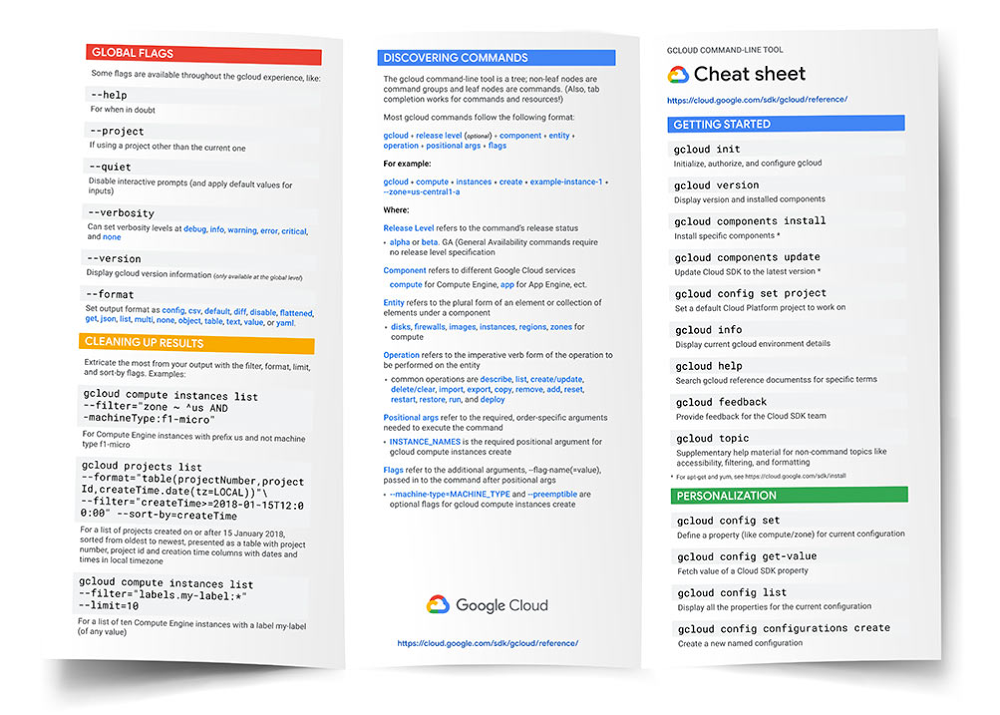
If you have a Google Cloud environment, you’ve probably spent some time with the gcloud command-line tool, the primary command-line tool for creating and managing Google Cloud resources. But with over 2,000 commands, it can be a little overwhelming to get started with its multitude of flags, filters, and formats. Fear not for the gcloud command-line tool cheat sheet is now here to help guide the way! It’s a handy tool to stow in your proverbial knapsack or actual back pocket as you start out with the Cloud SDK, helping you recognize command patterns and find useful gcloud commands, to get you on your way. The gcloud command-line tool cheat sheet is available as a one-page sheet, an online resource, and quite fittingly, a command itself, gcloud cheat-sheet.We’ve organized the gcloud command-line tool cheat sheet around common command invocations (like creating a Compute Engine virtual machine instance), essential workflows (such as authorization and setting properties for your configuration), and core tool capabilities (like filtering and sorting output). This list of useful commands, all neatly packed into a single double-sided page, is ready to be downloaded and printed. As a bonus, the cheat sheet also includes a quick rundown of how gcloud commands are structured, enabling you to easily discover commands beyond the confines of this pithy list.Whether you’re new to the gcloud command-line tool and need a good starting point, or are a seasoned user and need a map to situate yourself, the gcloud command-line tool cheat sheet is a nifty companion as you traverse the expansive landscape of Google Cloud. You can access the cheat sheet online, or download the printable PDF. Or if you’ve already got the latest version of Cloud SDK installed, give the cheat sheet a whirl right now with gcloud cheat-sheet. We hope you find it to be a useful resource!
Quelle: Google Cloud Platform

Ask questions to BigQuery and get instant answers through Data QnA

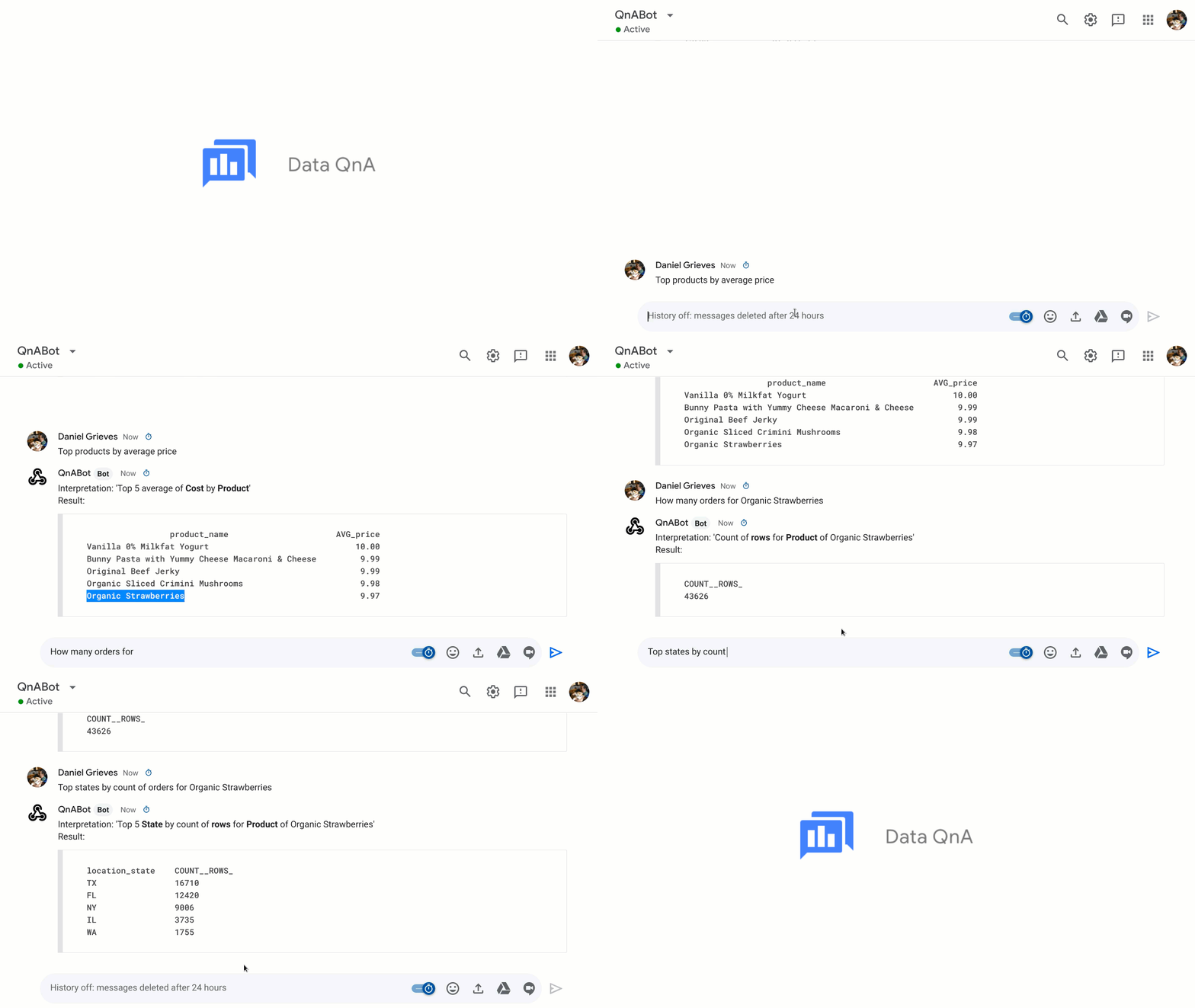
Today, we’re announcing Data QnA, a natural language interface for analytics on BigQuery data, now in private alpha. Data QnA helps enable your business users to get answers to their analytical queries through natural language questions, without burdening business intelligence (BI) teams. This means that a business user like a sales manager can simply ask a question on their company’s dataset, and get results back that same way.We built Data QnA to make it easier for non-technical users to access the data insights they need through natural language understanding techniques—all while maintaining the business’s governance and security controls. Data QnA is based on the Analyza system developed here at Google Research. Analyza uses semantic parsing for analyzing and exploring data using conversation, i.e., doing entity and intent recognition, then mapping to the underlying business datasets. Data QnA enables anyone to conversationally analyze petabytes of data stored in BigQuery and federated data sources. Data QnA can be embedded where users work, including chatbots, spreadsheets, BI platforms (such as Looker), and custom-built UIs. As part of this private alpha, we are rolling out support in English, and look forward to working with our customers to determine demand for regional localization.In most enterprises, when business users need data, they request a dashboard or report from the BI team, and it can take days, or even weeks, for the already overloaded team to respond. When the users get those answers, they are often not able to get an answer to the next question, as that would require yet another report. Self-service access to analytics when users need it, without requiring deep technical knowledge, can improve productivity and business outcomes dramatically. With the help of Data QnA, you’re able to put BigQuery data right in front of the user, in the context of their business workflows. “With Data QnA, Google Cloud is making a long term play at democratizing data insights for non-technical users,” said Mike Leone, Senior Analyst, ESG. “This self-service model will not only speed up the pace of innovation and digital transformation for businesses, but also help optimize overhead costs by saving valuable time and increasing the productivity of BI teams.”“At Veolia, we were taking weeks responding to ad hoc analytics requests from our business partners. This was reducing the time we could spend on higher value activities,” said Fabrice Nico, Data and Robotic Manager at Veolia. “We at the BI team have since enabled self-service access to BigQuery data by asking questions in natural language. The Google service, through Sheets and chatbots, is going to free up our time significantly, and enable our business partners to execute faster through natural language-based analytics.”How Data QnA worksData QnA enables self-service analytics for business users on BigQuery data as well as federated data from Cloud Storage, Bigtable, Cloud SQL, or Google Drive. Users can ask free-form text questions, like: “What was the growth of product xyz last month?” and get answers interactively. Data QnA is natively available through Google Sheets and BigQuery UI. Data QnA API can be used to embed it in other interfaces. In addition, you can integrate Data QnA into experiences built with Google Dialogflow. Data QnA enforces all underlying customer-defined data access policies, automatically restricting access of data to the right users.We’ve heard from customers, analysts and partners about Data QnA’s benefits, including self-serve analytics, increased BI team productivity, and saved time for both business users and IT teams.Data QnA allows users to formulate free-form text analytical questions, with auto-suggested entities while users type a question. Then, both an English interpretation and the SQL query are returned with the answer. “Did-you-mean” clarifications are returned if a question is ambiguous. When using the BigQuery Web UI, Data QnA also enables data analysts to formulate SQL queries using natural language questions.In addition, Data QnA has a management interface for data owners or admins to define business terms for underlying data, allowing business users to use the language they understand—initially just English, with more to come depending on demand. The interface also reports questions asked by the users along with the answers and SQL query, enabling the data owners to improve the service for their users.Getting started with Data QnAData QnA is available at no additional cost for BigQuery customers. All underlying queries and storage are charged as per the customer’s BigQuery costs. Access in Sheets is through its Connected Sheets feature, which is included in G Suite Enterprise, G Suite Enterprise for Education, and G Suite Enterprise Essentials, and Data QnA is included for no additional cost. Data QnA is available for BigQuery data in the U.S. and EU, with support for more regions to follow.You can work with the following Google Cloud partners to get started: Accenture, Deloitte, EPAM, Mavenwave (an Atos company), SADA, and Wipro.”We’re eager to put Data QnA to work with our customers to help accelerate their self-serve analytics initiatives,” says Arnab Charkaborty, Head of Applied Intelligence, US West at Accenture. “Data QnA is effectively drawing a straight line between all the business apps our customers use everyday and their data in BigQuery so anyone—no matter their level of data literacy—can ask questions in natural language without leaving that environment. That’s data democratization at its finest!” To learn more about the technology behind Data QnA and to see a few demos, register to watch our Next OnAir session: Data QnA: How Veolia democratizes access to BigQuery, available starting August 11.
Quelle: Google Cloud Platform

Introducing Active Assist: Reduce complexity, maximize your cloud ROI

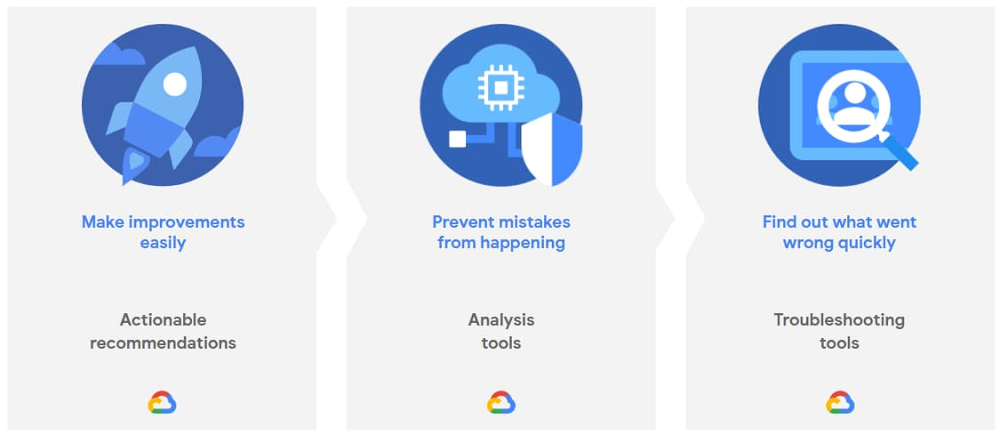
There’s huge value to running in the cloud. That’s why we continue to see cloud adoption grow year over year. But running more applications in the cloud means more systems to manage—and more complexity. In fact, nearly half of C-level executives cited complexity as the factor that will have the most negative impact on cloud computing’s ROI over the next five years1. That’s because complexity causes many problems: added waste, reduced security, and increased administrative toil to name just three. All of these things make your day harder and reduce your cloud ROI. That’s why we’re announcing Active Assist, a portfolio of intelligent tools and capabilities to help actively assist you in managing complexity in your cloud operations. Active Assist extends the core concepts we initially introduced with Policy Intelligence at Next ‘19 and applies them to the rest of Google Cloud. It leverages data, machine learning, automation, and intelligence, to bring “Google magic” to you, so you can enjoy a simpler, smarter cloud experience into your day-to-day operations. Active Assist’s portfolio will help you with three key activities: making proactive improvements to your cloud with smart recommendations, preventing mistakes from happening in the first place by giving you better analysis, and helping you figure out why something went wrong by using intuitive troubleshooting tools. With Active Assist as your sidekick, these tasks become simple and fast, helping you shift your time from administration to things like innovation.Through these troubleshooting and analysis tools, and actionable recommendations, Active Assist’s core aim is to  make it easy for you to maximize the value you get from the cloud, and actually includes some capabilities you may already be familiar with: In-context, actionable recommendations from across the Google Cloud Console to help you optimize with minimal effort. As well as the Recommendation Hub, which lets you see your recommendations in one place. That being said, you can also pull insights and recommendations directly from the Recommender API. This lets you incorporate them into your organization’s existing processes and workflows, to help you optimize cost and close security gaps easily. Check out our blog on Recommenders for more information. Automation like autoscaling and auto healing for your compute instances, so that your workloads always have the right amount of resources, and remain healthy and reliable while running. Analysis tools like Connectivity Tests and Network Topology in Network Intelligence Center, which let you analyze the impact of configuration changes before you apply them.If something’s gone wrong, troubleshooting tools like Policy Troubleshooter in Policy Intelligence help you quickly identify and remediate the problem.  In addition to these existing capabilities, we’ll continue to add more functionality to the Active Assist portfolio with contributions from across Google Cloud teams who are working on security, compute, networking, data, cost and billing, and more. In fact, if you’re interested in testing out new capabilities before they’re made publicly available, be sure to fill out the form to join our Active Assist Trusted Tester Group.Simply put, whether it’s sizing your compute and storage resources, securing your identities, configuring your networks, or maximizing your billing discounts, Active Assist’s mission is to add intelligence into your operations by integrating it directly into your daily tasks. Rather than hunting down these tools and recommendations individually, Active Assist alerts you directly within your workspace, and surfacing context-sensitive recommendations specific to the task at hand. Square, the San Francisco-based financial services, merchant services aggregator, and mobile payment company, has been using Active Assist and is seeing major benefits:Active Assist’s Policy Troubleshooter is going to make my life so much easier. I can’t begin to tell you how I’ve suffered from generic error messages in the past. Policy Troubleshooter is exactly what we need to quickly find, understand, and fix policy misconfigurations. Paul Friedman, Sr. Security Engineer, SquareOur goal with Active Assist is to make sure we help you manage the challenges that arise with cloud complexity, so you can optimize your cloud everywhere while saving time and focusing more on improving your business operations. To facilitate that, we want to make sure you can make the changes and improvements you need quickly, clearly, and easily. We’ve got a lot that can help you today, and even more planned for the future—so stay tuned! If you want to learn more about what’s included (and what’s new in) Active Assist, be sure to attend our upcoming Google Cloud Next ‘20: OnAir session, CMP100: Cloud is Complex. Managing it Shouldn’t Be. Or you can also visit our Active Assist web page, too.1. Deloitte Consulting
Quelle: Google Cloud Platform

Hewlett Packard Enterprise GreenLake for Anthos now generally available

Today, we’re excited to announce the next step in our partnership with Hewlett Packard Enterprise (HPE): the general availability of HPE GreenLake for Anthos.  As you look to move to hybrid cloud at your own pace and on your own terms, HPE GreenLake for Anthos enables you to seamlessly build, run, and manage services on premises and in the cloud with our hybrid and multi-cloud platform. You can deploy containers on demand without having to manage the underlying infrastructure on premises. Now more than ever, you can choose how you want to consume your IT infrastructure.Google Cloud’s Anthos: A modern application platform for your businessThe Anthos platform is an ideal approach to an increasingly hybrid and multi-cloud world. Anthos lets you build, deploy, and manage applications anywhere in a secure, consistent manner. The platform lets you modernize existing applications running on virtual machines as well as deploy cloud-native apps on containers, all while providing a consistent development and operations experience across deployments, reducing operational overhead, and improving developer productivity.HPE Greenlake for Anthos: The best of both worldsHPE GreenLake for Anthos combines the simplicity, agility, and cost-effectiveness of Google’s container hosting and management across hybrid and multi-cloud environments with the security, performance, and control of HPE’s on-premises architecture. HPE GreenLake for Anthos provisions and integrates hardware, software, and services to create an on-premises Anthos solution that is consumed as a cloud-like service.HPE GreenLake for Anthos enables a service-oriented architecture that makes the most of the benefits of container technologies. Start with the capacity you need today and grow your infrastructure as your applications require, using Anthos’ cluster lifecycle capabilities and HPE GreenLake’s active capacity management. Anthos Config Management delivers a gitops approach for managing clusters and simplifying many administrative tasks, freeing up your IT team to focus on delivering real business value.HPE is a build, sell and services partner of Google Cloud allowing HPE to be your single point of contact, providing advisory and professional services, managing capacity, billing, and supporting the entire stack. HPE Greenlake’s pay-per-use billing model means you consume the capacity you need—no more and no less. At the same time, HPE proactively monitors usage and provisions additional available capacity ahead of demand, which reduces the risk of investing too much or too little in your IT infrastructure. You get a scalable solution that simplifies your Anthos experience and makes it easier to understand current and future costs.“At Hewlett Packard Enterprise, our mission is to help customers accelerate their digital transformation and modernization strategy with HPE GreenLake cloud services that are self-service, pay per use, all managed for them and available in the environment of their choice from the edge to the cloud,” said Keith White, SVP and GM of HPE GreenLake Cloud Services. “As a trusted Google partner, we are pleased to offer HPE GreenLake for Anthos to provide our joint customers choice and the cloud experience on premises that best meets their needs and provides the greatest positive outcomes for their business.”Anthos is available with three HPE solutions: HPE SimpliVity hyperconverged infrastructure, HPE Nimble Storage dHCI, and HPE Synergy composable infrastructure. For customers who want to build and run their own environment, HPE offers HPE Reference Architectures for Anthos GKE deployed on premises. All offerings enable hybrid Dev/Test environments, so you can develop and deploy anywhere—in multiple public clouds as well as on premises.Help simplify IT and make modernization easier—-on premises or in the cloud—with hybrid cloud solutions seamlessly built on Google Cloud’s Anthos with HPE’s proven technology and services.Learn more about our partnership with HPE by visiting cloud.google.com/hpe.
Quelle: Google Cloud Platform

Last month today: June in Google Cloud

In June, we welcomed summer in the northern hemisphere, and we heard stories of struggle, protest, and perseverance. Our most-read stories reflected these realities, with many people still working and learning remotely.Growing cloud infrastructure, virtually and physicallyGoogle Kubernetes Engine (GKE) clusters will soon be able to scale past the current limits, up to 15,000 nodes, offering a way for enterprises to run internet-scale services, simplify infrastructure management, speed up batch processing, and absorb large spikes in resource demands. See how Bayer Crop Science uses GKE to decide which seeds to advance in its research and development pipeline.We celebrated the launch of Google Cloud’s new Jakarta region (asia-southeast2) virtually last month. It’s the first Google Cloud region in Indonesia—one of the fastest growing economies in the world—and ninth in Asia Pacific. Users in this region can enjoy lower latency access to data and apps running on Google Cloud.Working (and playing) at homeAs the pandemic moved the idea of having cloud-based devices from nice-to-have to a must-have, companies of all sizes rapidly shifted to a more versatile way of working by quickly deploying Chromebooks as a remote work solution. The VP of the Chrome OS shares his optimistic perspective of the future of computing as business leaders have had to accelerate their digital transformation and reimagine the way we work.Google Meet, available for free to anyone with an email address, added new features last month, including availability on the Nest Hub Max and layout improvements so you can see up to 16 participants and content being shared. We also announced a number of new Meet features we’re working on including tile layouts with up to 49 participants, background blur and replace, hand raising, breakout rooms, Jamboard integration, and more. All remote work and no remote play isn’t any fun. Last month, we announced that our Google Maps Platform gaming solution is now open to all mobile game developers to create immersive real-world games. You can now quickly build mobile games with Google Maps Platform using the Maps SDK for Unity and the Playable Locations API, so your game can include real-world locations and gameplay. There are already some fun real-world games created that include hatching dinosaurs, birdwatching, and more.Learning new things at home, for grownups and kidsAs summer began for many students last month, we announced new Meet features for educators, slated to launch later this year. More than 140 million educators and students use G Suite for Education, and new features are designed to improve moderation capabilities and engagement in remote or hybrid learning environments. These new features include knocking interface updates, hand raising, attendance tracking, and many more.Our Google Cloud training and certifications team also brought several new initiatives out last month, including Google Cloud skill badges, new certification prep learning journeys, and remote certification exam availability. You can get the first month of the certification prep training at no cost, and 30 days of unlimited Qwiklabs access too.If you’re looking for more ways to learn this summer, check out our Next ‘20: OnAir lineup, starting July 14. New content from customers and Google experts arrives each week, with themed weeks so you can pick your favorite topics, from application modernization to data analytics.That’s a wrap for June. Till next month, keep in touch on Twitter.
Quelle: Google Cloud Platform

New research on how Google Cloud certifications are transforming careers and businesses

Getting the most from cloud technologies means organizations need the right talent with the right combination of skills. However, 86 percent of IT leaders report that the shortage of cloud computing skills will slow down their 2020 cloud projects. To find the cloud skills they need, companies are increasingly turning to industry-recognized certifications: 93 percent of IT decision-makers around the world agree that certified employees provide added value above and beyond the cost of certification. To further measure the impact our portfolio of Google Cloud certifications have on individuals and businesses, we commissioned an independent third-party research organization to conduct a survey of 1,789 recent Google Cloud certified individuals. You can dig deeper into the results of the survey in this report. Here are some of the highlights, which showcase how industry-recognized Google Cloud certifications help individuals validate their cloud expertise, elevate their careers, and transform businesses with Google Cloud technology. Google Cloud certifications help individuals build expert, real-world cloud skills that businesses needTo become Google Cloud certified, you must prove your ability to build strong cloud solutions and your knowledge of business use-cases you’ll encounter day-to-day in a real job. Google Cloud certifications give individuals confidence in their mastery of cloud skills with 87 percent of survey participants more confident about their cloud skills and 83 percent able to prove cloud competency to recruiters. Moreover, 78 percent of respondents were satisfied with how accurately Google Cloud certifications validated their skills for a particular role.Certifications help with promotions, raises, and career changesThe majority of those who pursued a certification did so with the intention to increase opportunities in their current job, which materialized for most. More than 1 in 4 Google Cloud certified individuals took on more responsibilities or leadership roles while almost 1 in 5 received a raise.Furthermore, 30 percent of Google Cloud certified individuals applied for a new role, of which 70 percent received at least one job offer while 42 percent of applicants received two or more job offers. Certified individuals help organizations modernize faster and increase business impact 71 percent of Google Cloud Certified individuals report becoming certified enabled or will enable their employer to get more business, increase work with existing customers, or help scale up their business. If you’re interested in learning more about Google Cloud certifications, register for our free “Why certify?” Cloud Study Jam session at Next ‘20: OnAir on July 15. Ready to start preparing for your certification? Sign up here to receive a six-week learning path designed to help you get ready for the certification most suited to your role.
Quelle: Google Cloud Platform