Anomaly detection using streaming analytics & AI

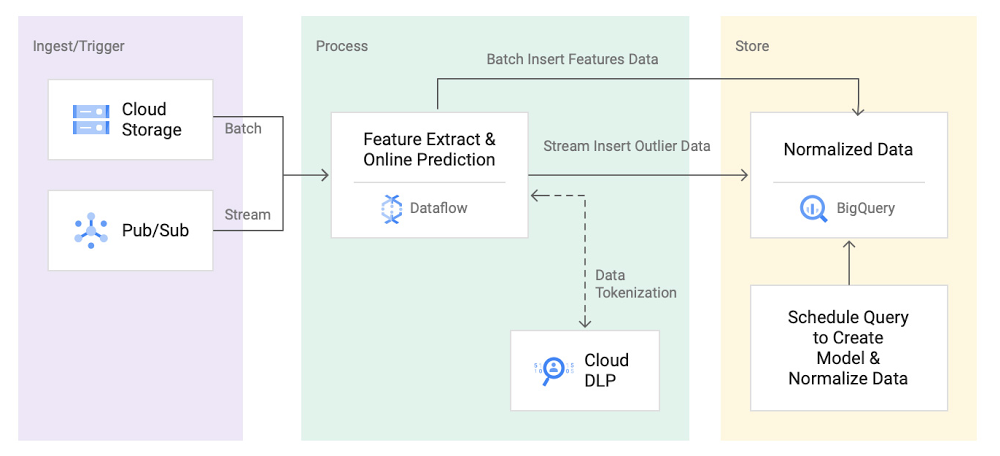
An organization’s ability to quickly detect and respond to anomalies is critical to success in a digitally transforming culture. Google Cloud customers can strengthen this ability by using rich artificial intelligence and machine learning (AI/ML) capabilities in conjunction with an enterprise-class streaming analytics platform. We refer to this combination of fast data and advanced analytics as real-time AI. There are many applications for real-time AI across businesses, including anomaly detection, video analysis, and forecasting. In this post, we walk through a real-time AI pattern for detecting anomalies in log files. By analyzing and extracting features from network logs, we helped a telecommunications (telco) customer build a streaming analytics pipeline to detect anomalies. We also discuss how you can adapt this pattern to meet your organization’s real-time needs.How anomaly detection can help your businessAnomaly detection allows companies to identify, or even predict, abnormal patterns in unbounded data streams. Whether you are a large retailer identifying positive buying behaviors, a financial services provider detecting fraud, or a telco company identifying and mitigating potential threats, behavioral patterns that provide useful insights exist in your data. Enabling real-time anomaly detection for a security use caseFor telco customers, protecting their wireless networks from security threats is critical. By 2022, mobile data traffic is expected to reach 77.5 exabytes per month worldwide at a compound annual growth rate of 46%. This explosion of data increases the risk of attacks from unknown sources and is driving telco customers to look for new ways to detect threats, such as using machine learning techniques.  A signature-based pattern has been the primary technique used by many customers. In a signature based pattern, network traffic is investigated by comparing against repositories of signatures extracted from malicious objects. Although this technique works well for known threats, it is difficult to detect new attacks because no pattern or signature is available. In this blog, we walk through building a machine learning-based network anomaly detection solution by highlighting the following key components:Generating synthetic data to simulate production volume using Dataflow and Pub/Sub.Extracting features and real time prediction using Dataflow. Training and normalizing data using BigQuery ML’s built-in k-means clustering model.De-identifying sensitive data using Dataflow and Cloud DLP.Figure 1: Reference Architecture For a Real-Time Anomaly Detection SolutionGenerating synthetic NetFlow log using Dataflow and Pub/Sub Let’s start with synthetic data generation, which maps to the Ingest/Trigger section in figure 1. For illustrative purposes, we simulated NetFlow log by using an open source data generator pipeline. Figure 2: Pipeline Publishing Synthetic NetFlow Log Data at 250k msg/secIn figure 2, you can see that this pipeline of simulated data is publishing data at 250k elements/sec. Extracting features and tokenizing sensitive data using Dataflow and Cloud DLPWe have open sourced an anomaly detection pipeline that aggregates and ingests 150 GB of data in a 10-minute window. First, we find the subnet of the destination IP, dstSubnet. After that, to extract some basic features, we aggregate data by both destination subnets and subscriber ID. Using Apache Beam transforms, this pipeline first converts JSON messages to a Row type and then aggregates data using the schema. As you can see from the Feature Extraction Using Beam Schema Inferring snippet, you can extract sample features by using built-in Apache Beam Java SDK aggregation transforms, such as Min, Max and ApproximateUnique functions.The subscriberId values in our dataset might contain PII, such as IMSI numbers. In order to avoid storing PII as plain text to BigQuery, we used Cloud DLP to de-identify IMSI numbers. We picked deterministic encryption where data can be de-identified (or tokenized) and re-identified (or de-tokenized) using the same CryptoKey. To minimize the frequency of calls to the Cloud DLP service and to fit within the limitations of DLP message size(0.5 MB), we built a microbatch approach by using Apache Beam’s state and timer API. This sample code shows how the request is buffered and emitted based on a batch size and an event time trigger. To meet concurrent requests for our data volume, we increased the default Cloud DLP API quota limit to 40,000 API calls per minute.Figure 3: Anomaly detection pipeline in DataflowTrain and normalize data using BigQuery MLWe then train and normalize data in BigQuery, as seen as the Store component in figure 1. To handle large volumes of daily data (20 TB), we used ingestion-time partitioned tables and clustering by the subscriberID and dstSubnet field. Storing data in a partitioned table allows us to quickly select training data using filters for days (e.g. 10 days) and a group of subscribers (e.g. users from organization X).We used the k-means clustering algorithm in BigQuery ML to train a model and create clusters. Since BigQuery ML enables training models by using standard SQL, to automate overall model creation and training processes, we used stored procedures and scheduled queries. We were able to create a k-means clustering model in less than 15 minutes for a terabyte-scale dataset. After experimenting with multiple cluster sizes, our model evaluation suggested that we used four. Next, we normalized the data by finding a normalized distance for each cluster.Realtime outlier detection using DataflowThe final step in our journey is to detect outliers, which is step 4 in the reference architecture in figure 1. To detect outliers in real-time, we extended the same pipeline used for feature extraction. First, we feed the normalized data to the pipeline as a side input. Now that we have normalized our data available from the pipeline, we find the nearest centroid by calculating the distance between the centroid and input vector. Lastly, to find outliers, we calculate how far the input vector is from the nearest centroid. If the distance is three standard deviations above the mean, as indicated in this diagram, we output those data points as outliers in a BigQuery table. To test if our model can successfully detect an anomaly, we manually published an outlier message. For the subscriber ID ‘000000000000000’, we used a higher number of transmission, 150000 bytes, and receiving, 40000 bytes, than the usual volumes. We then query the outlier table in BigQuery and we can see that subscriber ID is stored in a de-identified format, as expected, because of the chosen Cloud DLP transformation. To retrieve our original data in a secure Pub/Sub subscription, we use this data re-identification pipeline. As shown in figure, our original outlier subscriber ID (00000000000000000) is successfully re-identified.Insights appliedThe insights identified in an advanced, real-time pipeline are only as good as the improvement they enable within an organization. To make these insights actionable, you can enable dashboards for data storytelling, alerts for exception-based management, and actions for process streamlining or automatic mitigation. For anomaly detection, the anomalies identified can be immediately available in Looker as dashboard visualizations or used to trigger an alert or action when an anomalous condition is met. In the case of anomaly detection, you can use an action to create a ticket in a ticketing system for additional investigation and tracking.Figure 4: Looker dashboard to monitor outliers and take actionsSummaryReal-time AI solutions have the biggest impact when approached with the end-goal in mind (How will this help us meet our business goals?) and the flexibility to adapt as needs change (How do we quickly evolve as our goals, learnings, and environment change?). Whether you are a security team looking to better identify the unknown or a retailer hoping to better spot positive buying trends, Google Cloud has the tools required to turn that business need into a solution.In this blog, we showed you how you can build a secure, real-time anomaly detection solution using Dataflow, BigQuery ML and Cloud DLP. Although finding anomalies using well-defined probability distribution may not be completely accurate to solve adversarial use cases, it’s important to perform further analysis to confidently identify any security risks. If you’d like to give it a try, you can refer to this github repo for a reference implementation.
Quelle: Google Cloud Platform
Building scalable web applications with Firestore — new reference guide

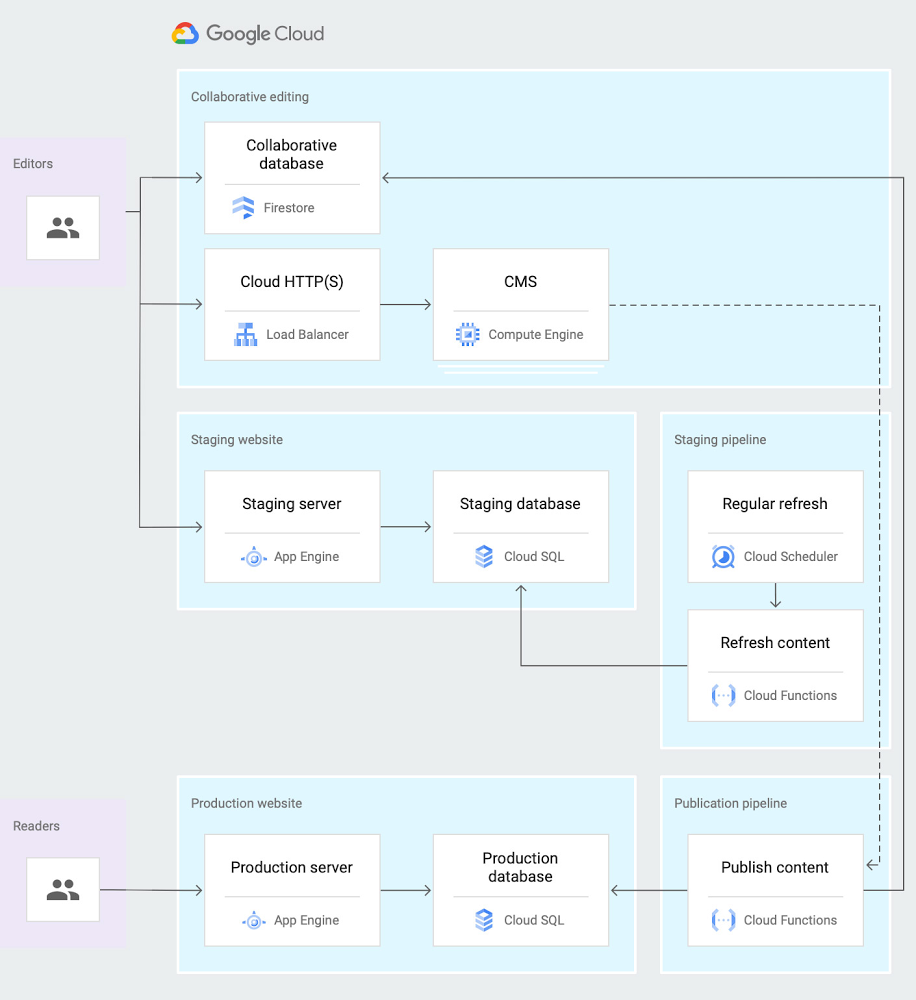
If you’ve been building and maintaining large web or mobile apps, you’ve probably heard of Firestore, Google’s scalable, serverless document database. But perhaps you’ve also wondered precisely how Firestore matches up to other Google Cloud database products. To help you understand Firestore’s core strengths, we’ve recently published a new reference guide that explains Firestore’s differentiating features like real-time updates, offline data persistence, and transactions.Firestore particularly shines in cases where you care both about scale and speed of development. If you need to quickly build an application that you expect to serve a large amount of traffic, then Firestore is a powerful option to consider.For example, we’ve recently heard that Google Cloud customers are using Firestore to rapidly build and deploy new applications in response to the abrupt and unforeseen disruptions caused by the COVID-19 crisis. By placing Firestore as a front end for their mainframe database system, government agencies can avoid slowdowns and downtimes under the suddenly increasing loads. Healthcare agencies can develop mobile apps with Firestore to keep the public informed, support initial virus self-diagnosis, and allow residents to contact health officials.This newly published guide provides reference architectures for real-world use cases in retail, media, telecommunications, gaming, and internet of things (IoT). For example, the guide describes an architecture for a collaborative content editing system, as shown in the diagram below. Media leader The New York Times chose the Firestore database service as they built a truly real-time collaboration tool that lets multiple writers and editors make changes in docs at the same time, keeping track of the newest updates. Firestore is designed for just this type of task, since it supports offline and real-time sync.Click to enlargeCheck out the new Firestore guide for all the details and next steps for building your own scalable solutions using Firestore.Hear from the product team and other customers at Google Cloud Next ‘20: OnAir on what’s new and how they are innovating with Firestore in these sessions: DBS215: Simplify Complex Application Development Using Cloud FirestoreDBS202: NYT: Building a Real-Time Collaborative Editor with Firestore
Quelle: Google Cloud Platform

Introducing the Google Cloud Security Showcase

Security is at the heart of any cloud journey. On the one hand, as you adopt cloud services and move workloads to the cloud, you need to make sure you’re conforming to your established security policies. On the other hand, you can take advantage of new capabilities, use new tools, and help improve your security posture. We’ve had many conversations with our users to understand the most pressing security use cases they want to address in their cloud environments, and shared our expertise on how we can help. With the Google Cloud Security Showcase we want to share these insights with everyone.The Google Cloud Security Showcase is a video resource that’s focused on solving security problems and helping you create a safer cloud deployment. The showcase currently has almost 50 step-by-step videos on specific security challenges or use cases—complete with actionable information to help you solve that specific issue—so there’s sure to be something for every security professional. In this blog we’ll highlight some of these use cases and example videos across major security domains to show what the Google Cloud Security Showcase is and how it can help you. Topic: infrastructure securityThe videos in this section show how you can take advantage of key features in Google Cloud’s secure-by-design infrastructure.How can I isolate my containerized workloads?Topic: network securityThe videos in this area describe how to use Cloud products to define and enforce your perimeter and allow for network segmentation, remote access, and DoS defense.How do I protect my web applications against DDoS attacks?Other examples from this topic include How do I implement Hierarchical Firewall Policies? and How do I use Packet Mirroring to manage network traffic and detect anomalies?Topic: endpoint securityThe videos in this section demonstrate how to use Cloud controls that help secure endpoints and prevent device compromise with device hardening, device management, and patch and vulnerability management.How do I configure my G Suite deployment to best protect my devices?Other examples from this topic include How do I manage Windows 10 devices within my organization? and How can I secure user data with ephemeral mode on a Chrome Enterprise device?Topic: data securityThe videos here detail how you can employ data discovery, data governance, and native controls that help prevent loss, leakage, and exfiltration.How can I protect the confidentiality of workloads while they’re processed?Other examples from this topic include How can I protect my GCP VMs from rootkits and bootkits? and How do I protect data in GCP using my own externally stored encryption keys?Topic: identity and access managementThe videos here detail ways you can use our platforms to manage and secure employee, partner, and customer identities, and their access to apps and data, both in the cloud and on-premises.How do I protect my high-risk users with the advanced protection program?Other examples from this topic include How do I add authentication and identity management to my apps? and How do I control access to web apps and VMs?Topic: application securityThe videos on this topic detail how to better protect your applications with application testing, scanning, and API security features.How can I catch web app vulnerabilities before they are pushed into production?Other examples from this topic include How do I control which third-party apps have access to my data? and How do I use reCAPTCHA Enterprise to protect my website from fraud?Topic: security monitoring and operationsThe videos in this section describe how to monitor for malicious activity, handle security incidents, and support your operational processes for preventing, detecting, and responding to threats.How do I manage threats inside and outside Google Cloud Infrastructure?Other examples from this topic include How do I manage misconfigurations in Google Cloud resources? and How do I investigate a phishing attack with Chronicle?Topic: Governance, risk, and complianceVideos here show how our controls, tools, and certifications can help support governance and compliance processes, including audits and risk assessments and compliance reporting.How can Assured Workloads for Government help me meet regulatory compliance requirements?Other examples from this topic include How can I control how long data is retained? and How do I make sure my Google Cloud deployment meets Center for Internet Security (CIS) benchmarks?These examples just scratch the surface of what’s available. We hope the security showcase makes it easier for IT admins and developers to protect your organization while saving time and effort. For the rest of the use-case-based security videos, check out our YouTube playlist.
Quelle: Google Cloud Platform

Fast Restart: A powerful new tool to help improve SAP HANA uptime

There are plenty of things in life where “good enough” is a worthy goal. But if you’re a SAP administrator, you know that “good enough” simply isn’t when it comes to reducing system downtime and achieving faster restart times on your business-critical SAP HANA environments.Of course, when you’re pursuing perfection, some tactics are better than others, especially when you’re dealing with tight budgets and an overworked IT staff. That’s why we’re spotlighting a powerful technique that uses existing SAP HANA capabilities to help slash your database restart times. It’s an approach that most SAP admins can implement in minutes—and it complements Google Cloud’s existing arsenal of tools and tactics for maximizing SAP system availability.Using persistent memory to help reduce HANA restart timesRestart times have always been a concern for SAP HANA, which—like any in-memory database—can take a long time to load resident data back into memory from persistent storage. Whether you’re talking about process restarts, system crashes, or planned maintenance, it’s common for HANA restarts to take an hour or longer. The process of reading data from disk back into memory accounts for virtually all of this downtime.Beginning with SAP HANA 2 SPS3, SAP has supported the use of persistent memory (PRAM) to help reduce restart times. This approach employs a method to store columnstore fragments into a filesystem, backed by persistent memory like Intel Optane DC Persistent Memory. It’s a tempting option for any organization where SAP HANA plays a business-critical role—and where the idea of losing access to HANA for an hour or more is enough to give any SAP admin some sleepless nights.There’s a lot of value in maximizing HANA uptime. But there’s also value in adopting technology that’s flexible, scalable, and engineered to support innovation. Let’s look at another option that can help maximize HANA system availability and that organizations can adopt to achieve these goals.Fast Restart: A valuable new way to combat HANA downtimeBeginning with HANA 2.0 SPS4, SAP has supported a method, dubbed Fast Restart, that offers many of the same benefits as PRAM. Fast Restart is a more limited solution than one using persistent memory, but it also has a major advantage: Customers can implement it on virtually any current host system, without sacrificing performance or flexibility.In a nutshell, Fast Restart uses TMPFS—a long-established Unix facility for creating virtual filesystems—to store HANA database columns in DRAM. This means Fast Restart won’t survive a full VM restart, but it will keep a database intact and in-memory when a process restart or planned maintenance knocks down a HANA instance. And that still covers a lot of situations where Fast Restart can turn an hour-long ordeal into a hiccup that users are unlikely to notice.Who should be using Fast Restart? The short answer is simple: Almost everybody who runs SAP HANA 2 SPS4+, whether on-premises or in the cloud, should seriously consider it. Most of the time, adopting Fast Restart is as simple as knowing it’s available; the implementation process is relatively straightforward and low-risk.For most SAP administrators, the process of implementing Fast Restart includes just three steps:Map out and understand the host environment’s non-uniform memory access (NUMA) topology. This is a critical preparatory step since HANA is designed to self-optimize its memory access and process allocation based on its own reading of a system’s NUMA topology, and setting up TMPFS for HANA will require a similar understanding of how HANA recognizes and uses system memory.Create and mount the TMPFS filesystem. This includes creating and naming the required number of directories, setting mount options, updating fstab, and checking the resulting filesystem to confirm that it will function properly.Configure HANA to use Fast Restart. This includes some fairly simple changes to the HANA global INI parameters, and then deciding whether to store specific Column tables or partitions into the persistent memory space or to change the default for all new tables.When you’re ready to implement Fast Restart on your own HANA systems, be sure to review the SAP documentation for Fast Restart for a deeper dive into the setup process and to understand the requirements for using Fast Restart.Fast Restart by the numbers: A night-and-day differenceYou may be wondering just how much of a difference Fast Restart can make during an event such as a HANA process restart. We were curious, too, so we set up a simple comparison test to get some hard numbers.First, we generated a fairly typical HANA environment, including data in 40 Tables with a total volume of 2.74TB, configured for preload. We then measured the time elapsed from HANA startup invocation to all preload tables being loaded in memory—first by provisioning a memory-optimized virtual server using Compute Engine, but without Fast Restart:Compute Engine M1 memory-optimized serverStartup invocation: 11:41:47Finished preload: 12:22:05IO Speed: Approx. 1.17GB/sTotal time elapsed for startup: 40 minutesAnd then we measured the same startup time, elapsed on the same virtual server, using Fast Restart:Startup invocation: 11:12:32Finished preload: 11:13:09IO Speed: approx. 28MB/sTotal time elapsed for startup: 1 minuteIt’s hard to envision better performance, given the time SAP HANA needs simply to load its own binaries and to read checksum information required to validate the in-memory data. And while the process might take as long as 4 to 5 minutes depending on your exact HANA configuration, the difference in startup times speaks for itself.Fast Restart on Google Cloud: One tool among many to protect HANA uptimeFast restart is a great option for any organization that runs SAP HANA, whether you’re running HANA on Google Cloud, using legacy on-premises systems, or another cloud provider. But keep in mind that using Fast Restart raises an important question: What can you do to minimize downtime in cases where Fast Restart isn’t capable of closing the gap on its own—for example, when it’s necessary to shut down a host VM for planned maintenance or due to unplanned issues?This is where the value of a multi-faceted availability strategy comes into play. For organizations running SAP HANA on Google Cloud, that means interlocking high availability solutions such as:Live Migration, which moves a running HANA instance seamlessly to a new VM prior to beginning scheduled maintenance, without the need for administrator monitoring or intervention.Host Auto Restart, which allows Compute Engine to restart a VM instance automatically on a different host. This offers the ability to quickly restart an affected application, typically through the use of customer-supplied startup scripts.High-availability database support, most notably Google Cloud’s support for synchronous SAP HANA system replication and for SAP HANA host auto-failover.Google Cloud’s approach to high availability by design, which allows SAP HANA users to leverage a redundant, global infrastructure to deploy applications across multiple zones and regions—capabilities that can accommodate stringent availability targets.As we said, “good enough” is rarely good enough when it comes to maintaining the availability of your business-critical SAP HANA systems. Fast Restart is an important, and sometimes overlooked, tool for helping to improve your system availability. But the best approach to availability is one that relies on many solutions working in unison, which is exactly why Fast Restart can be such a valuable tool for organizations already running SAP HANA on Google Cloud.Learn more about SAP on Google Cloud.
Quelle: Google Cloud Platform

New multi-region configurations for Spanner in Asia and Europe

Cloud Spanner is Google Cloud’s massively scalable relational database service. A core tenet of Spanner’s vision has been ensuring high availability of applications with external strong consistency. In support of this, we’ve launched two new multi-regions of Spanner that offer 99.999% availability: the Asia multi-region (asia1) and the Europe multi-region (eur5). More multi-regions allow you to deliver a high-quality, unified customer experience to users around the world while ensuring high availability.Multi-region configurations offer benefits that include:99.999% availability: Spanner’s multi-region architecture supports high business continuity and offers protection against region failures. The new asia1 and eur5 multi-regions provide an even higher availability in comparison to regional Spanner instances (99.999% versus 99.99%) without compromising on the scale insurance or strong consistency guarantees of Spanner.Data distribution: Spanner automatically replicates your data between regions with strong consistency guarantees. This allows you to serve a global customer base by co-locating data with compute near your users to provide low-latency data access..External consistency: Even though Spanner automatically shards the data across multiple machines and replicates across geographically distant locations, you can still use Spanner as if it were a database running on a single machine. Transactions are guaranteed to be serializable, and the order of transactions within the database is the same as the order in which clients observe the transactions to have been committed. Spanner has seen strong momentum in Asia in a variety of industries such as financial services, retail, healthcare, media and entertainment, and gaming. The new asia1 region will enable companies in that region to launch new digital services with the performance and availability their consumers expect and enable high business continuity. How new Spanner regions enable high availability and scalabilityWe’ve heard from Fukuoka Financial Group (FFG), a premier banking and financial company in Japan, about their selection and use of Spanner. “For our digital-native banking system currently under development, we needed a database that can scale seamlessly based on demand, offers external strong consistency, good performance and has extremely high availability for us to deliver an unmatched experience to our consumers,” says Masaaki Miyamoto, managing director, Zero Bank Design Factory Co., Ltd. (a subsidiary of FFG). “We found Spanner to be the only relational database that meets our needs. We are glad that now Spanner offers an Asia multi-regional configuration that delivers 99.999% availability SLA, enabling us to build applications for high-business continuity with infinite scale. Accenture is supporting us to develop our banking system.”A Spanner multi-region consists of a minimum of three regions and five replicas; Spanner today supports multi-regions with five, seven, or nine replicas in an instance configuration. In addition to read-write replicas and read-only replicas, multi-regions support a witness region that uses a witness replica. A witness replica does not serve reads, but does participate in voting to commit writes, thus helping achieve quorum for writes. Asia1 multi-region has five replicas and the witness region is located in asia-northeast2 (Seoul).The asia1 multi-region is configured as follows:asia-northeast1 (Tokyo) as default leader asia-northeast2 (Osaka) as secondary regionasia-northeast3 (Seoul) as witness regionMercari, an ecommerce company, and Merpay, its mobile payments division, have found success building apps with Spanner.  “We started using Spanner for our new mobile payment service Merpay in 2018 and since then we have expanded its use in other business units in the organization,” says Singo Ishimura, GAE Meister at Mercari, Inc. “Spanner’s strong consistency, high availability and its ability to seamlessly scale has allowed us to focus on building the business logic in our applications instead of worrying about the operations and management of the database. We at Mercari/Merpay are excited about the recent launch of the Spanner Asia multi-region, as we now have options to run workloads that need the five 9s of availability offered by the Spanner multi-regional configuration.” The new Europe multi-region (eur5) will enable customers in regulated industries like financial services to retain local copies of data and provide 99.999% availability for their workloads. The eur5 multi-region, similar to eur3, has five replicas, with the witness in europe-west4 (Netherlands). The eur5 configuration details are as follows:europe-west2 (London) as default leadereurope-west1 (Belgium) as secondary regioneurope-west4 (Netherlands) as witness region We’ve heard from Google Cloud partner Accenture Japan about their experience onboarding customers to Spanner.“A distributed database that scales write access, not only read access, is a key component to achieve digital transformation,” says Keisuke Yamane, managing director, Accenture Technology, Intelligent Software Engineering Services at Accenture Japan Ltd. “We are seeing a great demand for Spanner because of its unique characteristics of both a distributed database and a relational database. This Asia multi-regional configuration announced will lead to greater use of Spanner in regulated industries like the financial sector, such as Zero Bank Design Factory Inc., life science sector, and others. Accenture will accelerate our clients’ digital transformation based on our MAINRI platform that fully utilizes Google Cloud, including Spanner.”The new multi-region configurations can be easily accessed using the Spanner API, user interface (UI) or command line interface (CLI), as part of the instance creation workflow. For more information, review the documentation and the configuration details panel in the UI.Learn moreTo get started with Spanner, create an instanceor try it out with a Spanner Qwiklab.
Quelle: Google Cloud Platform

New best practices to help automate more secure Cloud deployments

Organizations move to the cloud for many reasons, from improved efficiency, to ease of management, to better security. That’s right, one of the most important benefits of moving to the cloud is the opportunity to establish a robust baseline security and compliance posture. But it doesn’t just magically happen. While you can depend on Google Cloud’s secure-by-design core infrastructure, built-in product security features, and advanced security tools, you also need to configure cloud deployments to meet your own unique security and compliance requirements. We believe that a big part of our shared responsibility for security is to help make meeting these requirements easier. That’s why this week we launched our Google Cloud security best practices center, a new web destination that delivers world-class security expertise from Google and our partners. This expertise, in the form of security blueprints, guides, whitepapers, and more, can help you accelerate your move to cloud while prioritizing security and compliance. And with downloadable, deployable templates and code, it can help you automate more secure deployment of services and resources.Blueprints: Helping you automate more secure deploymentsAs part of this new resource center, we’re publishing a comprehensive new security foundations blueprint to provide curated, opinionated guidance and accompanying automation to help you build security into your starting point for your Google Cloud deployments. The security foundations blueprint was developed based on our customer experience and covers the following topics:Google Cloud organization structureAuthentication and authorizationResource hierarchy and deploymentNetworking (segmentation and security)LoggingDetective controlsBilling setupThe blueprint itself includes both a detailed best practices guide and deployable assets in the form of customizable Terraform build scripts that can be used to stand up a Google Cloud environment configured per the guidance. This joins other newly published blueprints with the same goal of best-practice security posture automation for specific apps or workloads.The PCI on GKE blueprint contains reference architectures and a set of Terraform configurations and scripts that demonstrate how to bootstrap a PCI environment in Google Cloud. The core of this blueprint is a sample Online Boutique application, where users can browse items, add them to a shopping cart, and make purchases. This blueprint enables you to quickly and easily deploy workloads on Google Kubernetes Engine (GKE) that align with the Payment Card Industry Data Security Standard (PCI DSS) in a repeatable, supported, and secure way. The blueprint also includes a PCI DSS 3.2.1 mapping for the solution and a PCI Compliance whitepaper, which provides an independent, third-party assessment of the blueprint performed by Coalfire, Google’s PCI DSS auditor.The Google Cloud Healthcare Data Protection Toolkit is an automation framework for deploying Google Cloud resources to store and process healthcare data, including protected health information (PHI) as defined by the US Health Insurance Portability and Accountability Act (HIPAA). It provides an example of how to configure Google Cloud infrastructure for data storage, analytics, or application development and includes many of the security and privacy best-practice controls recommended for healthcare data, such as configuring appropriate access, maintaining audit logs, and monitoring for suspicious activities.The Anthos security blueprints provide prescriptive information and instructions for achieving a set of security postures when you create or migrate workloads that use Anthos clusters. There are currently individual blueprints for enforcing policies, enforcing locality restrictions for clusters on Google Cloud, and auditing and monitoring for deviation from policy. Each blueprint includes an implementation guide and deployable assets (custom resource definition files and Terraform templates and scripts). These blueprints are additive, so you can apply multiple blueprints to your environments. Get startedVisit our Google Cloud security best practices center today to learn more about how to accelerate your cloud migration and improve your security posture. We also have a couple NextOnAir sessions that deal with blueprints and are worth checking out: Master Security and Compliance in the Public Cloud and Enhance Your Security Posture and Run PCI Compliant Apps with Anthos. Then, listen to our recent GCP Podcast on blueprints to hear about the current offerings and future plans. And keep checking back for the latest additions to the center as we continue to add and update content from Google Cloud experts and our partners.
Quelle: Google Cloud Platform

Performance and cost optimization best practices for machine learning

Cloud computing provides the power and speed needed for Machine Learning (ML), and allows you to easily scale up and down. However, this also means that costs may spin out of control if you don’t plan ahead, which is especially fraught now, given that businesses are particularly cost conscious. To use Google Cloud effectively for ML, then, it’s important to follow best practices to optimize for performance and costs. To help you do just that, we published a new set of best practices—based on our experience working with advanced ML customers—on how you can enhance the performance and decrease the costs of your ML workloads on Google Cloud, from experimentation to production. The guide covers various Smart Analytics and Cloud AI services in different phases of the ML process, as illustrated in the diagram below, namely: Experimentation with AI Platform NotebooksData preparation with BigQuery and DataflowTraining with AI Platform TrainingServing with AI Platform PredictionOrchestration with AI Platform PipelinesClick to enlargeWe also provide best practices for monitoring performance and managing the cost of ML projects with Google Cloud tools. Are you ready to optimize your ML workloads? Check out the Machine Learning Performance and Cost Optimization Best Practices to get started.Acknowledgements: We’d like to thank Andrew Stein (Product Manager, Cloud Accelerators), Chad Jennings (Product Manager, BigQuery), Henry Tappen (Product Manager, Cloud AI), Karthik Ramachandran (Product Manager, Cloud AI), Lak Lakshmanan (Head of Data Analytics and AI Solutions), Mark Mirchandani (Developer Advocacy, Cost Management), Kannappan Sirchabesan (Strategic Cloud Engineer, Data and Analytics), Mehran Nazir (Product Manager, Dataflow), and Shan Kulandaivel (Product Manager, Dataflow) for their contributions to the best practice documentation.
Quelle: Google Cloud Platform

Logs-based Security Alerting in Google Cloud: Detecting attacks in Cloud Identity

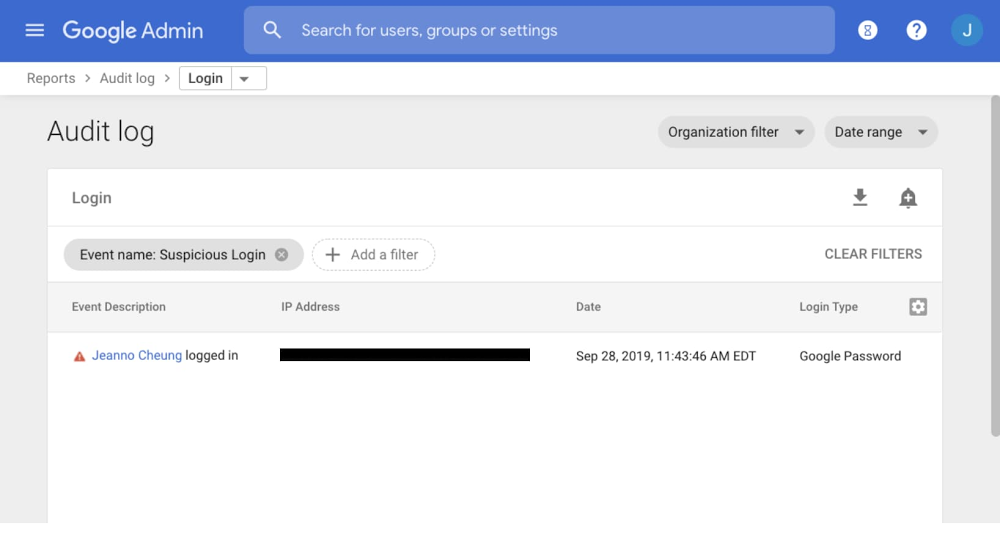
Shifting from an on-premise model to a cloud-based one opens up new opportunities when it comes to logging and securing your workloads.In this series of blog posts, we’ll cover some cloud-native technologies you can use to detect security threats and alert on logs in Google Cloud. The end result will be an end-to-end logs-based security alerting pipeline in Google Cloud Platform (GCP). We’ll start with a look into alerting on Cloud Identity logs in the Admin Console.Cloud IdentityCustomers use Cloud Identity to provision, manage, and authenticate users across their Google Cloud deployment. Cloud Identity is how the people in your organization gain a Google identity, and it’s these identities that are granted access to your Google Cloud resources.Now think about this: What if a rogue actor gets admin access in Cloud Identity and starts adding users to Google Groups? What if one of those groups is assigned privileged access within GCP? Cloud Identity logs can provide visibility into these situations and serve as your first line of defense against authentication and authorization-based attacks.Cloud Identity logsCloud Identity logs track events that may have a direct impact on your GCP environment. Relevant logs include:Admin audit log: track actions performed in the Google Admin Console. For example, you can see when an administrator added a user to your domain or changed a setting.Login audit log: track when users sign in to your domainGroups audit log: track changes to group settings and group memberships in Google GroupsOAuth Token audit log: track third-party application usage and data access requestsSAML audit log (G Suite/Cloud Identity Premium only): view your users’ successful and failed logins to SAML applicationsThe core information in each log entry is the event name and description. Cloud Identity logs track a large number of predefined “events” that can occur in your deployment. For example, the Login audit logs track “Failed Login” and “Suspicious Login” events. Failed Login happens every time a user fails to login. Suspicious Login happens if a user logged in under suspicious circumstances, such as from an unfamiliar IP address. The number of events Cloud Identity tracks is quite large, and these events can be explored in the Reports > Audit log section of the Admin Console.Setting alerts in Cloud IdentityTo detect threats and respond to potential malicious activity in a timely manner, you can alert on events in Cloud Identity logs. A good first line of defense is setting up alerts in the Admin Console. When you create an alert, you specify a filter and a list of recipients who will get an email when this alert is triggered. Let’s explore some potentially useful alerts.Example 1: Alerting on login eventsIn this scenario, let’s say a user has unknowingly had their Google credentials stolen, and a malicious actor is trying to use them to sign in as the user from outside the company network. Cloud Identity will see that this user is trying to sign in from an unfamiliar IP address and log it as a Suspicious Login event. Let’s create an alert for this situation so we can take action if we think a user account has been compromised.From the Reports > Audit log section of the Admin Console, choose the type of log you want to create an alert for. Once you’re viewing Login audit logs, create a filter for logs with the “Suspicious Login” event name.You can create an alert by pressing the bell-shaped button in the top right corner of the console. You supply a list of recipients who will be notified by email every time this alert is triggered. In our example, “security@example.com” would receive an email alert if there’s a Suspicious Login. The notified users can then take action to mitigate the security concern.You can create alerts for other Login audit events in the same way. For example, the “Leaked Password” event type is logged when we detect compromised credentials and requires a password reset, and the Government-Backed Attack event type is logged when we believe government-backed attackers have tried to compromise a user account. Alerting on these events and others can help you be aware of and react to login-related security threats.Example 2: Alerting on changes to groupsWe recommend that Google Cloud enterprise customers handle IAM permissioning by first assigning users to groups, and then listing these groups as members of IAM Roles. This way, deprovisioning Google Cloud access is as easy as removing a user from a group in Cloud Identity.Of course, if deprovisioning IAM permissions is as easy as removing a user from a group, then provisioning access is as easy as adding them to a group. This could be dangerous if malicious users are added to a group with privileged, wide-reaching access in GCP.There are four potential roles that can add a user to a group in Cloud Identity, depending on your settings:Super Admin (through the Admin Console)Group Admin (through the Admin Console)Group Owner (through Google Groups)Group Manager (through Google Groups)Let’s look at a scenario to illustrate how we can use Cloud Identity logs to help mitigate these risks. Bob is a Security Lead at Company A. The Cloud Identity Super Admin has assigned him as a group manager for the Google Group “security-admin@example.com”, meaning he can add or remove members of his team to this group. This group is assigned powerful roles in GCP to carry out break-glass administrative actions surrounding security.Let’s suppose that, in one way or another, a malicious actor has gotten access to Bob’s credentials, signed in as Bob, and has silently started adding users to the security-admin group. Now all of these rogue users have privileged access in our GCP organization. Not good!To mitigate a scenario like Bob’s, you should set up alerts for group membership modification in the Admin Console. We can set up these alerts to trigger if modifications are made by group managers in Google Groups or by admins in the Admin Console.To audit Group actions taken in Google Groups, we go to the Reports > Audit log > Groups section of the Admin Console. Here, we can see audit logs of actions taken on Groups. Then, we can filter on the “User added to a group” event name and specify the group name, for example a sensitive group like “security-admin@example.com”.After that, we can create a reporting rule so that a static list of recipients is automatically emailed when this log appears.The details for our new reporting rule are available in the Admin Console under Security > Rules > Security Admin Group Modification.Google Groups isn’t the only way to add someone to a group. An admin could also potentially do this within the Admin Console, which would be tracked in an Admin audit log. In the same way we created an alert to trigger based on an event in a Groups audit log, we can filter for Groups-related events in the Admin audit logs.Next stepsCloud Identity logs help track many different events that you can use for security alerting. Once your organization is aware of these logs, you can brainstorm alerts that make sense for your use cases. For example, as you configure settings in Cloud Identity, you can make sure the settings stay that way by alerting if Admin audit logs ever show that a specific Cloud Identity setting is changed.Setting alerts on Cloud Identity logs in the Admin Console is a good first step towards a more secure Google Cloud deployment. However, we can only go as far as the built-in Admin Console features allow us to. The next post in this series will look at how to get Cloud Identity logs into Cloud Logging on GCP so that you can analyze, export, and store them just like any other GCP log. This will allow for even more granular Cloud Identity log analysis and alerting.
Quelle: Google Cloud Platform

Compute Engine explained: Picking the right licensing model for your VMs

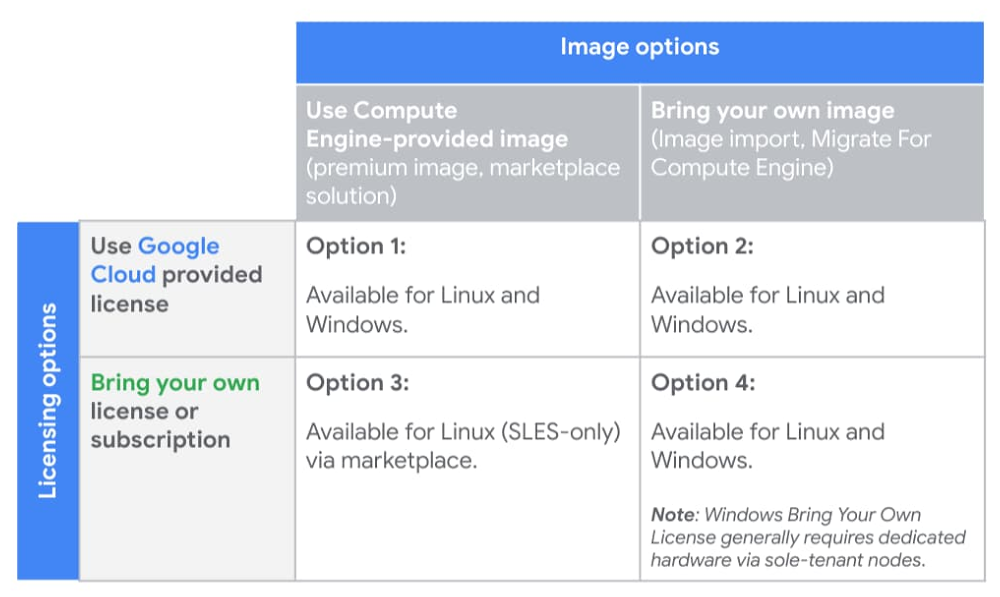
We recently posted a guide to choosing the right Compute Engine machine family and type for your workloads. Once you’ve decided on the right technical specs, you need to decide how to license it appropriately, what kind of image to use—and evaluate tradeoffs between your options. This is an important process as licensing decisions can add a layer of complexity to future operational or architectural decisions. To support your cloud journey, Compute Engine provides licensing flexibility and compliance support through various licensing options, as illustrated in the table below:Let’s take a closer look at the four available licensing options, and their respective benefits and considerations. For specific questions around your licenses or software rights, please work with your legal team, license reseller, or license provider.Option 1: Google Cloud-provided image and licenseArguably, the most straightforward option is to purchase new licenses from Google Cloud. For your convenience, Compute Engine provides prebuilt images that have pay-as-you-go licenses attached. This approach can help minimize licensing agreements and obligations, and enable you to take advantage of pay-as-you-go billing for elastic workloads. In addition, using Google Cloud’s premium Compute Engine images and licensing relieves you of a lot of operational burden, as Google Cloud:Provides ongoing updates and patches to base imagesManages license reporting and complianceSimplifies your support model by leveraging Google for your software support needsPremium images and licenses for Compute Engine are available for both Linux and Windows workloads. To ensure proper license reporting and compliance, you are automatically billed based on usage for all VMs created with these images.For customers that don’t already have a Microsoft Enterprise Agreement or Red Hat Cloud Access licenses, this model allows you to take advantage of Google Cloud’s relationships with third-party software vendors for pay-as-you-go licenses that scale with your workload, and offer premium support. This allows you to pay for exactly what you need when your workloads spike, rather than paying a predetermined amount through fixed third-party contracts.For pay-as-you-go licenses, Compute Engine offers the following premium images with built-in licensing:Red Hat Enterprise Linux (RHEL and RHEL for SAP)SUSE Linux Enterprise Server (SLES and SLES for SAP)Microsoft Windows ServerMicrosoft SQL ServerWith the exception of Microsoft SQL Server, all licenses associated with these images are charged in one-second increments, with a one-minute minimum. SQL Server images are also charged in one-second increments, but have a 10-minute minimum. To see additional pricing details, visit the premium images pricing documentation.Option 2: Bring your own image with Google Cloud-provided licensesIf you want to import your own images, but still wish to use pay-as-you-go licenses provided by Google Cloud, Compute Engine lets you import your virtual disks or import your virtual appliances and specify a license provided by Compute Engine to attach to the image. This model lets you bring a custom image to Compute Engine, ensure the proper Compute Engine drivers are installed, and use a Compute Engine pay-as-you-go license. Similar to Compute Engine premium images, all images created through this import process will have the appropriate license(s) attached. VMs created using these images are billed automatically to help ensure correct license reporting and compliance.Some of the benefits of using your own image with Google Cloud licensing include:You can use your own custom imageGoogle Cloud manages license reporting and complianceSimplified support by leveraging Google for your vendor software support needsThis option, available for both Linux (RHEL) and Windows workloads, helps reduce licensing agreements and complexity, and lets you take advantage of pay-as-you-go billing for elastic workloads.Option 3: Google Cloud-provided image with bring your own license or subscriptionIf you want to use an image from Google Cloud but want to bring your own licenses or subscriptions, that’s an option too. You can choose SUSE Linux Enterprise Server with your own subscription (BYOS) support from the Google Cloud Marketplace, allowing you to spin up your own images while taking advantage of any licensing agreements or subscriptions you may have with your Linux operating system vendor. To use BYOS, sign up for a license on the vendor’s website when you deploy the solution. Under this model, the vendor bills you directly for licensing, and Google Cloud bills you separately for infrastructure costs.This option is not available for Windows Server or SQL Server, as both require you to bring your own image when you bring your own licenses. Additional details on bringing your own Windows licenses is covered below.In short, with a Google Cloud-provided image plus your own license or subscription, you can:Use a Google Cloud Marketplace solution with pre-installed software packagesReuse existing licensing agreementsPay Google Cloud only for infrastructure costsOption 4: Bring your own image and your own licenseLastly, you can bring eligible licenses to Google Cloud to use with your own imported images. With this option, you can import your virtual disks or virtual appliances, specifying a ‘Bring Your Own License’ (BYOL) option. Like other BYOL or BYOS options, images created using this option are only billed for infrastructure. This option supports customers with eligible Red Hat Enterprise Linux or Windows Server and other Microsoft application (e.g., SQL Server) licenses. For Red Hat Enterprise Linux, you can import your RHEL images using the image import tool and specify your own licenses. You can run these workloads on either multi-tenant VMs or single-tenant VMs on Compute Engine sole-tenant nodes.For Windows licenses, you can import your own image using the same image import tooling. For customers running Microsoft application servers with Software Assurance (which includes SQL Server, but not the underlying OS), you can bring your licenses using License Mobility. However, for Windows OS licenses, regardless of whether or not you have Software Assurance, you are restricted to running your BYOL Windows Server or BYOL Desktop OS on dedicated hardware, available on Compute Engine sole-tenant nodes or Google Cloud VMware Engine.Sole-tenant nodes allow you to launch your instances onto physical Compute Engine servers that are dedicated exclusively to your workloads while providing visibility into the underlying hardware to support your license usage and reporting needs. When running on sole-tenant nodes, there are different host maintenance configurations to help support your physical server affinity licensing restrictions, while still ensuring you receive the latest host updates. Additional details on these options can be found in the sole-tenant node documentation.There are several benefits to using your own image with your own license or subscription:Save on licensing costs by reusing existing investments in licensesTake advantage of unlimited virtualization rights for your per-physical-core licenses by using CPU overcommit on sole-tenant nodesLeverage Compute Engine tooling for licensing reporting and complianceHowever, before going down this path, consider the following:Although Compute Engine provides support and tooling on sole-tenant infrastructures, you’re responsible for license activation, reporting and compliance.Windows Server BYOL requires the use of dedicated hardware, in the form of Compute Engine sole-tenant nodes.Sole-tenant nodes provide maintenance policy configurations for you to adjust the maintenance behavior to best comply with your licensing requirements.The licensing low-downChoosing the right image and licensing options for a given workload depends on a variety of factors, including the operating system or application that you’re running, and whether or not you have existing licenses, images or vendor relationships that you want to take advantage of. We hope this blog post helps you make sense of all your options. For more on licensing pricing, check out these resources:See the estimated costs of your instances and Compute Engine resources when you create them in the Google Cloud Console.Estimate your total project costs with the Google Cloud Pricing Calculator.View and download prices from the Pricing Table in the Cloud Console.Use the Cloud Billing Catalog API for programmatic access to SKU information.Gauge your costs with Premium Image PricingFor detailed information on licensing Microsoft workloads on Google Cloud, please reference this guide authored by SoftwareOne.
Quelle: Google Cloud Platform

The best of Google Cloud Next ’20: OnAir's Security Week for technical practitioners

Hello security aficionados! This is your week for Google Cloud Next ’20: OnAir. There is a ton of content related to security coming out this week across a wide range of topics and audiences. With that in mind, here are some sessions that I think are particularly useful for security professionals and technical practitioners:Take Control of Security with Cloud Security Command Center: Guillaume Blaquiere from Veolia, along with Kyle Olive and Andy Chang from Google Cloud demonstrate how to prevent, detect, and respond to threats in virtual machines, containers, and more using Cloud Security Command Center.Authentication for Anthos Clusters: Google’s Richard Liu and Pradeep Sawlani show you how to authenticate to Anthos clusters, including how to integrate with your identity providers using protocols such as OIDC and LDAP.Minimizing Permissions Using IAM Recommender: Find out how Uber developed automation to minimize permissions org-wide from Uber’s Senior Cloud Security Engineer Sonal Desai, along with Cloud IAM Product Manager Abhi Yadav.Check out our full Security Session Guide for a look at everything going on this week. In addition to sessions, our weekly Talks by DevRel series is a great companion to the conference. Join our host Kaslin Fields for our security technical practitioner-focused recap, Q&A, and deep dive sessions by Sandro Badame and Stephanie Wong on Friday August 7th at 9 AM PST. For folks in Asia-Pacific, I will be hosting the APAC edition with our APAC team on Friday at 11 AM SGT.If you want hands-on technical experience, we also have security-focused Study Jams available this week:HTTP Load Balancer with Cloud ArmorHands-on Lab: User Authentication: Identity-Aware ProxySecurity Week has something for everyone, so be sure to take a look at the full security session catalog for sessions that cover more, including security, compliance, and handling sensitive data.Beyond this week, we also have a lot of exciting security learning opportunities coming over the rest of the summer. Application Modernization Week (starting on August 24th), in particular, has some interesting security-related sessions:Secrets in Serverless – 2.0: Discover all the secrets about how to store secrets for Serverless workloads from my DevRel colleague and Cloud Secrets Product Manager Seth Vargo.Evolve to Zero Trust Security Model‎ with Anthos Security: Find out how you can protect your software supply chain with Binary Authorization and Anthos.Anthos Security: Modernize Your Security Posture for Cloud-Native Applications: Learn all the Cloud Native security tools that GKE and Anthos make available from GKE Security Engineer Greg Castle and Senior Product Manager Samrat Ray.Security touches many different areas and practitioners need to be constantly learning, so check back on the blog every Monday from now until the first week of September for session guides, and be on the lookout for sessions, demos, and Study Jams in other weeks as well!
Quelle: Google Cloud Platform