Announcing Google Cloud Public Sector Summit, a free global digital event: Dec. 8-9

2020 has been a year of rapid change, unexpected challenges and new frontiers. In the face of this, government agencies, local leaders, and educational institutions worldwide have been challenged to reinvent their engagement with citizens, the way they accomplish their missions, and how they educate students. Despite its challenges, the pandemic has proven to be a crucible for rapid innovation and progress. Government and academic leaders have done heroes’ work, in some cases consolidating years’ worth of digital transformation into just days and weeks. They’ve spun up testing centers, unemployment websites, new citizen-facing call centers and digital classrooms, in some cases overnight, all while maintaining continuity of government services.At Google Cloud, we’re privileged to work side-by-side with our public sector customers during this time, as they respond to—and gradually begin to recover from—COVID-19. The pandemic has been a reminder of the incredible power of public and private sector partnership, and the positive impact we make together. With that spirit in mind, I’m thrilled to announce our first-ever Google Cloud Public Sector Summit. We invite all of our public sector customers across the globe to join us for a special, two-day virtual event, Dec. 8-9, where we’ll share lessons learned throughout this year and discuss the future of digital service. Here’s what you can expect at the Google Cloud Public Sector Summit:Hear from industry leaders: Join our keynotes and breakout sessions to hear industry experts discuss the latest trends and get a glimpse into the future of public sector work.Gather insights from your peers: Attend breakout sessions where government and education leaders will share their successes around fulfilling critical missions, scaling IT services, and building cultures of innovation. Engage with Google experts and partners: Request time for you or your team to engage live with Google solution experts and Google partners. Learn about Google’s purpose-built solutions for education and government: Hear about our security and compliance offerings and other solutions, including our student success platform, citizen services, workforce collaboration, cyber analytics, and more.The Google Cloud Public Sector Summit begins Dec. 8. Register today, at no cost, on the Public Sector Summit event website.
Quelle: Google Cloud Platform

Understand production performance with Cloud Profiler history view

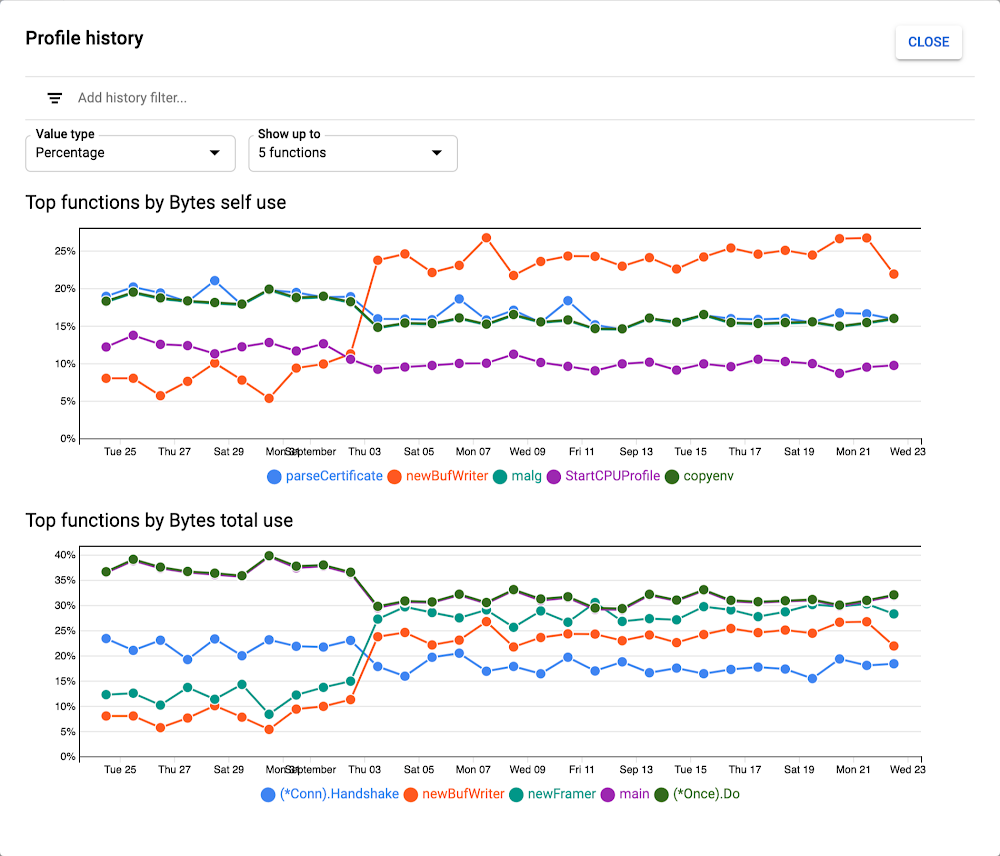
Cloud Profiler is a favorite of Google Cloud customers thanks to the insight that it provides into the performance of your production code. You can use this knowledge to reduce and shorten outages, improve performance, and optimize compute spend—always a popular topic! Profiler has always provided the ability to view and compare CPU and memory performance over time through time filters and the comparison feature. Now, Profiler lets you view the performance of a single function or a group of functions over time.You can access this using the history view button, which displays the new function history view window that shows the relative resource consumption of the most resource hungry functions within a given service.You can use the history view feature to do a number of different things:Intuitively understand the performance trends of the most resource-intensive functions over timeDiscover unintended resource usage changes. Large-scale or complex code changes can have unintended resource usage implications. Looking at the history view, you can verify that your code changes didn’t introduce unintended performance or resource usage changes.Verify the performance impact of recent code changes.Rapidly find the root cause of an outage of severe performance regression. If a service has stalled due to high CPU or memory consumption, looking at the history of each function’s resource consumption will provide insight into when and what parts of the code recently started using more resources.Characterize how a codebase’s performance changes due to external factors such as usage spikes (this can also be visualized with Profiler’s weight filter) or known changes in usage patterns.Profiler history view is available immediately as a preview for all users. Read more about how to use this feature.If you are new to Profiler, our Quickstart or codelab can help you get started.
Quelle: Google Cloud Platform

Turn any Dataflow pipeline into a reusable template

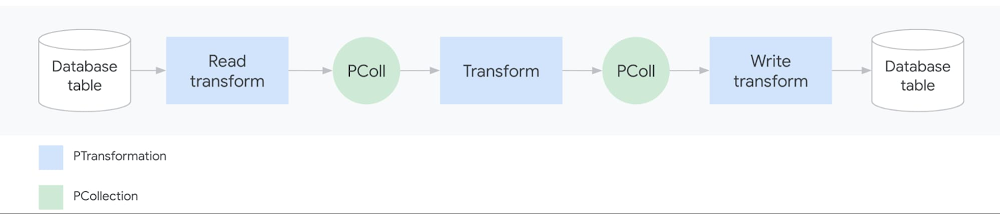
As data analysis grows within an organization, business teams need the ability to run batch and streaming jobs and leverage the code written by engineers. But re-running existing code often requires setting up a development environment and making slight code changes, which is challenging for people without a programming background.With this challenge in mind, we recently introduced Dataflow Flex Templates, which make it even easier to turn any Dataflow pipeline into a reusable template that anyone can run. Existing classic templates let developers share batch and streaming Dataflow pipelines via templates so everyone can run a pipeline without a development environment or writing code. However, classic templates were rigid for a couple of reasons:First, since the Dataflow pipeline execution graph is permanently fixed when the developer converts the pipeline into a shareable template, classic templates could then only be run to accomplish the exact task the developer originally had in mind. For example, choosing a source to read from, such as Cloud Storage or BigQuery, had to be determined at the template creation stage and could not be dynamic based on a user’s choice during template execution. So developers sometimes had to create several templates with minor variations (such as whether the source was Cloud Storage or BigQuery). Second, the developer had to select the pipeline source and sink from a limited list of options because of classic templates’ dependency on the ValueProvider interface. Implementing ValueProvider allows a developer to defer the reading of a variable to whenever the template is actually run. For example, a developer may know that the pipeline will read from Pub/Sub but wants to defer the name of the subscription for the user to pick at runtime. In practice, this means that developers of external storage and messaging connectors needed to implement Apache Beam’s ValueProvider interface to be used with Dataflow’s classic templates.The new architecture of Flex Templates effectively removes both limitations, so we recommend using Flex Templates moving forward.Flex Templates bring more flexibility over classic templates by allowing minor variations of Dataflow jobs to be launched from a single template and allowing the use of any source or sink I/O. Since the execution graph is now built dynamically when the template is executed (instead of during the template creation process), minor variations can be made to accomplish different tasks with the same underlying template, such as changing the source or sink file formats. Flex Templates also remove the ValueProvider dependency, so any input and output source can be used.Next, we’ll offer a developer’s guide to why and how to create custom Flex Templates.Why sharing Dataflow pipelines has been challengingAn Apache Beam pipeline commonly reads input data (from the source), transforms it (using transforms like ParDo) and writes the output (to the sink):A simple Dataflow pipelinePipelines can be significantly more sophisticated, with multiple input sources, series of chained transforms (DAG of steps), and multiple output sinks. Once an Apache Beam pipeline is constructed, it can be deployed and executed in various runners such as Dataflow, Spark, Flink or Direct Runner (for local runs). Templates are a Dataflow-specific feature that makes it easier to re-run pipelines on the Dataflow runner.But what exactly does “running a pipeline” mean? When you run a Dataflow pipeline, the Apache Beam SDK executes the code locally and builds an execution graph converting the sources, sinks and transforms into nodes. The execution graph object is then translated (serialized) into JSON format and submitted to the Dataflow service. Finally, the Dataflow service performs several validations (API, quota and IAM checks), optimizes the graph, and creates a Dataflow job to execute the pipeline.Sharing a Java-based Dataflow pipeline before TemplatesPrior to Dataflow templates, it was challenging for developers to share pipelines with coworkers. In the past, a developer would start by creating a development environment (with the JDK, Apache Beam SDK, and Maven or Gradle typically installed for Java or Python, and pip typically installed for Python), write the code, build a binary artifact (fat JAR with dependencies or Python equivalent) and share the artifact either through an artifactory or Cloud Storage. Users would then set up local runtime environments and fetch the binary into their individual environments for execution. If the pipeline was written in Java, the runtime environment would need Java JRE installed; if the pipeline was Python-based, all Python packages the developer used would need to be installed. Finally, when the user ran the pipeline, an execution graph would get generated and sent to the Dataflow service to run the pipeline on cloud. There were several points where something could break in these steps, and creating a runtime environment was a non-trivial task for users without a technical background. Even scheduling pipelines on a VM (using cron) or third-party schedulers needed a similar runtime environment to exist, complicating the automation process.Sharing Dataflow pipelines with classic templatesSharing a Dataflow pipeline with classic templatesClassic templates significantly improve the user experience for rerunning Dataflow pipelines. When the developer runs the pipeline code in the development environment, the pipeline now gets converted into a Dataflow template stored on Cloud Storage. The staged template consists of the translated JSON execution graph along with dependencies (pipeline artifacts and third-party libraries). The execution graph is permanently fixed and the user cannot change the shape of the DAG. Once the Cloud Storage bucket permissions have been adjusted to share with users, they can invoke the pipeline while passing in any required parameters directly via a gcloud command, a REST API, or the Dataflow UI in Google Cloud Console. Users no longer need to build and configure a runtime environment. Cloud Scheduler can also be used to easily trigger the pipeline to be run on a regular schedule without the need of a runtime environment.Sharing Dataflow pipelines with Flex TemplatesSharing a Dataflow pipeline with Flex TemplatesSimilar to classic templates, with Flex Templates staging and execution are still separate steps. However, the runnable pipeline artifact that gets staged is different; instead of staging a template file in Cloud Storage, developers now stage a Docker image in Google Container Registry.Additionally, a developer does not need to run the pipeline to create a Flex Template. Instead, the developer packages the pipeline code/binaries, including dependencies, into a Docker image and stores it in Container Registry, then creates a template spec file stored in Cloud Storage.Four steps in the developer workflowThe staged image is built using a Google-provided base image and contains the pipeline artifacts with dependencies and environmental variables:Components inside the Flex Template Docker imageThe Docker image does not contain the JSON serialized execution graph. For Java-based pipelines, the image contains the JAR file; for Python pipelines, the image contains the Python code itself. Only when a user actually runs the Flex Template does the graph construction phase start within a new container and the execution graph is constructed based on the parameters the user provides at runtime. This allows for execution graphs to be dynamically constructed based on final input parameters from the user.The file in Cloud Storage is not the Flex Template, but rather the template spec file. This spec file contains all of the necessary information to run the job, such as the Container Registry image location, SDK language, metadata such as the name and description of the template and any required or optional parameters the template needs. Similar to classic templates, regex can be used to validate the input parameters provided by the user.Users can execute the Flex Template using a gcloud command, calling the REST API, or using the Dataflow UI in Google Cloud Console referring to a template spec file stored in Cloud Storage and providing required parameters. Automating and scheduling a recurring job can also be done via Cloud Scheduler or Terraform (support for Airflow is under development).Comparing classic vs. Flex TemplatesThe following table summarizes the similarities and differences between classic and Flex templates:Create your first Dataflow Flex TemplateIf you are new to Dataflow templates, we recommend starting with our Google Cloud-provided templates for moving data between systems with minimal processing. These are production-quality templates that can be easily run from the Dataflow UI in Google Cloud Console.If you want to automate a task that is not in the provided templates, follow our Using Flex Templates guide. The tutorial walks you through a streaming pipeline example that reads JSON-encoded messages from Pub/Sub, transforms message data with Beam SQL, and writes the results to a BigQuery table.You can also review the source code for the Google-provided templates and review our examples for generating random data, decompressing data in Cloud Storage, analyzing tweets, or doing data enrichment tasks like obfuscating data before writing it to BigQuery.Finally, when you’re ready to share the Flex Template with users, the Google Cloud Console UI provides an option to select a Custom Template and then asks for a Cloud Storage path of its location:Creating a custom template from Google Cloud ConsoleLearn more about Dataflow on our site, and check out our presentation on Flex Templates at Beam Summit.Thanks to contributors to the design and development of the new release of Dataflow Flex Templates, in no particular order: Mehran Nazir, Sameer Abhyankar, Yunqing Zhou, Arvind Ram Anantharam, Runpeng Chen, and the rest of the Dataflow team.
Quelle: Google Cloud Platform
A deeper dive into Confidential GKE Nodes—now available in preview

The benefits of containers and Kubernetes over traditional on-premises architectures are well-documented and understood. But when considering moving to the cloud, organizations want controls to limit risk and potential exposure of their data.In July, we announced the availability of the Confidential Computing product family, whose  breakthrough technology encrypts data in-use—while it is being processed—without any code changes to the application. We also introduced Confidential VMs as the first member of that product family, which perform at levels comparable to VMsA few weeks back we announced the upcoming launch of Confidential Google Kubernetes Engine (GKE) Nodes in preview. Today, as we kick off cybersecurity month, we are rolling out the preview for Confidential GKE Nodes. With Confidential GKE Nodes you can achieve encryption in-use for data processed inside your GKE cluster, without significant performance degradation. Built on Confidential VMs, which utilize the AMD Secure Encrypted Virtualization (SEV) feature, Confidential GKE Nodes encrypt the memory of your nodes and the workloads that run on top of them with a dedicated per-Node instance key that is generated and managed by the AMD Secure Processors, which is embedded in the AMD EPYC™ processor. These keys are generated by the AMD Secure Processor during node creation and reside solely within it, making them unavailable to Google or any VMs running on the host. This, combined with other existing solutions for encryption at rest and in-transit, and workload isolation models such asGKE Sandbox, provides an even deeper and multi-layer defense-in-depth protection against data exfiltration attacks. Confidential GKE Nodes also leverage Shielded GKE nodes to offer protection against rootkit and bootkits, helping to ensure the integrity of the operating system you run on your Confidential GKE Nodes.Enabling Confidential GKE NodesWhen creating a new cluster, you can enable Confidential GKE Nodes by specifying the –enable-confidential-nodes option:After you create a Confidential GKE cluster, all the nodes and node pools you create will be confidential.You can verify that your cluster is using Confidential GKE Nodes by using the describe command:gcloud beta container clusters describe [CLUSTER_NAME]If Confidential GKE Nodes are enabled, the output of the command will include these lines:confidentialNodes:enabled: trueEnabling applications to run with Confidential GKE NodesYou may be wondering what you need to change in your application to leverage Confidential GKE Nodes? The answer is nothing! Google’s approach to confidential computing is to enable an effortless lift and shift for existing applications so that all GKE workloads you run today can run on Confidential GKE Nodes without any code changes. Optionally, if you use a GitOps model for storing your application configurations, you can use the cloud.google.com/gke-confidential-nodes nodeSelector to declaratively  ensure that your sensitive workloads can only be scheduled on Confidential GKE Nodes. This can be useful later on if you want to demonstrate to auditors that your workloads ran exclusively on Confidential GKE nodes:Tune in to our latest Google Cloud Security Talks to learn more about confidential computing, and other areas of cloud security.Related ArticleExpanding Google Cloud’s Confidential Computing portfolioGoogle Cloud Confidential Computing is now GA and including Confidential GKE Nodes.Read Article
Quelle: Google Cloud Platform

Why build apps on a cloud-native database like MongoDB Atlas?

IT departments today are being challenged to adopt new and far more strategic roles within the organizations they serve. As more businesses turn to technology as a competitive differentiator, IT is being challenged to step away from its traditional focus on running infrastructure and to step up as a strategic business function—delivering software and services that support innovation and create compelling customer experiences.Modern, cloud-native applications are critical to this transformation. The cloud allows IT organizations to retire legacy applications and infrastructure, and to deliver software that is far more resilient and scalable—without sacrificing usability and performance.The legacy database: a weak link in the cloud-native chainAs businesses migrate to managed infrastructure and cloud-native apps, on-prem legacy database systems have emerged as a serious barrier to scalability and performance. As a result, more businesses are turning to new database options such as MongoDB Atlas that are designed to meet the demands of modern, cloud-native environments.Here’s the problem in a nutshell: Legacy databases were designed for environments where data came in small, tidy packages and where scalability wasn’t a major requirement. That makes these systems a poor fit for cloud-native applications that are built to scale and that drive massive amounts of data.JSON-based document databases like MongoDB, on the other hand, are very well-suited for modern application development methods: teams can store data in a format not unlike the objects in their code, allowing them to work quickly and efficiently. And as a managed database-as-a-service solution, MongoDB Atlas gives IT organizations an alternative to the cost and complexity of an on-premises, legacy system.AutoTrader UK builds a future on MongoDB AtlasAutoTrader UK is a great example of an IT organization that’s using MongoDB Atlas on Google Cloud to modernize its legacy databases in favor of a fully managed, database-as-a-service platform. AutoTrader UK relied heavily on Oracle and SQL Server but began using MongoDB in its own data centers so that its development teams could move faster. After migrating to MongoDB Atlas, the company retained all of the advantages of its self-managed MongoDB environment, but shed the operational and infrastructure complexity. This was a critical move for a company built almost entirely on the value of its business data, and where scalability and resource management posed especially pressing challenges.To release new features faster, AutoTrader UK launched multiple initiatives to improve team efficiency and agility, including migrating entirely to the cloud and moving off legacy databases. Their team already had experience with and enjoyed using various Google Cloud services like Dataflow and BigQuery, which helped fuel their decision to migrate entirely to Google Cloud – replacing their Oracle database with Cloud SQL – and MongoDB Atlas. As Russell Warman, Head of Infrastructure at AutoTrader put it: “From a business perspective, migrating to Google Cloud Platform means we can get ideas up and running quickly, enabling us to build brilliant new products, helping us to continue to lead in this space.”The company’s developers now roll out new products far more quickly and with greater confidence, and the company has since made big strides in decommissioning its on-premises data center. This brought IT’s legacy management burden under control, along with infrastructure and related costs.Just as important, the move to MongoDB Atlas and Cloud SQL set the stage for AutoTrader UK to compete and win with software. The company’s development team pushed over 36,000 releases live in a year including more than 450 releases in a single day. With nearly 270 apps deployed in the public cloud today, AutoTrader UK maintains a 99.79% release success rate and 99.99% availability for its core search functionality.The benefits of MongoDB Atlas MongoDB Atlas brings together capabilities that are critical to a modern, cloud-native, microservice-aligned database architecture, including:Developer productivity: MongoDB Atlas is a non-relational database that employs a JSON-based document data model. MongoDB documents map naturally to an object-oriented programming model, which makes it intuitive and easy to work with using any object-oriented language. This flattens the learning curve when a dev team builds applications with MongoDB Atlas. Many developers find MongoDB especially flexible as fields can vary from document to document and data structure can be easily changed over time.Scalability: MongoDB Atlas allows IT to deploy right-sized applications as a matter of course; it scales up or down instantly and on demand, without risking application downtime. By relying on sharding, MongoDB Atlas avoids issues with hardware bottlenecks while also minimizing the complexity that often crops up at scale. MongoDB Atlas users can also select from a number of sharding strategies based on the workloads and query patterns they need to serve.Availability and uptime: Running an application in the public cloud usually offers better availability from the get-go compared to an on-premises environment. This is because of the massive investments providers such as Google Cloud make to replicate their infrastructure across multiple geographical regions, and to gain other capabilities that very few businesses have the resources to duplicate.Building on these capabilities, MongoDB Atlas deploys every database cluster as a self-healing replica set that fails over automatically when necessary. MongoDB Atlas will automatically provision replica set members across multiple availability zones within a region—a critical safeguard against the most common, localized failures that create the greatest risk for most businesses. And when a MongoDB Atlas instance fails, the system recovers instantly and automatically in most cases.Automation: “Keeping the lights on” is a massive source of waste and frustration when teams deal with legacy database systems. MongoDB Atlas automates key tasks during provisioning and configuration, maintenance, and disaster recovery processes so teams don’t waste time on mundane maintenance and upkeep. It also employs automated monitoring and alerting to help teams detect and troubleshoot performance issues before they affect your applications or user experience.A modern database designed to adaptBy integrating within a modern, cloud-native app environment, MongoDB Atlas gives developers the freedom to architect and re-architect applications as an organization’s business needs change—without the risk of outgrowing a legacy database solution or of enduring a forced product upgrade to accommodate growth. Leaving behind a legacy database and moving to MongoDB Atlas can be a big step towards achieving this goal.Learn more about MongoDB Atlas on Google Cloud.Watch Vadim Supitskiy, Forbes’ CTO chat with Lena Smart, MongoDB CISO about how Forbes set digital innovation standards with MongoDB and Google Cloud.Related ArticleHow our customers are using MongoDB Atlas on Google Cloud PlatformOpen-source cloud databases can run workloads quickly. MongoDB Atlas on GCP brings you combined billing, management and ease of use.Read Article
Quelle: Google Cloud Platform

How Anthos convinced one executive that the future is multi-cloud

David “Mac” McDaniel, Qwinix’s Director of Cloud Professional Services and a Google Cloud Certified Fellow, has always had his finger on the pulse of the cloud evolution. With more than 30 years in the tech industry, Mac knew the power of cloud would transform nearly every area of business. Cloud’s ability to lower costs, reimagine how products are brought to market, and empower technologists was clear to Mac. However, that sentiment didn’t extend to multi-cloud technology at first.“I was skeptical at first that hybrid and multi-cloud technology was just additional cost but it later made me a cloud convert,” Mac recalled. “The cloud world has evolved from a ‘put it all in one place’ mentality to providing what’s best for customers with hybrid and multi-cloud technology. The focus is now providing the best service for the value, which is what actually matters to businesses.” Anthos is a modern application platform that provides enterprises a consistent development and operations experience across hybrid and multi-cloud environments. Mac has already seen how the platform has enabled his enterprise clients to modernize their existing applications, build new ones, and securely run them anywhere.One of the biggest transformations Mac saw in terms of Anthos revolutionizing how they worked was with one of their clients that was a Fortune 500 pharmaceutical company. The pharmaceutical company has highly regulated workloads and many legacy applications, which meant they didn’t want to migrate these regulated workloads to the cloud because of the impact it would have on the applications. Every change to an application must go through rigorous, expensive validation and verification. With Mac’s guidance, the organization was able to jumpstart their Anthos journey. Qwinix installed Anthos to reduce the operational cost of maintaining legacy applications and operating those systems. The next phase of their journey will include using Migrate for Anthos to containerize workloads and deploy them on the Anthos on-prem solution. This has reduced the likelihood of the company having to change the application.“Anthos has such universal applicability and is a game-changing product,” Mac said. “I’m also really excited to see the new functionalities being added like hybrid AI capabilities for Anthos.” Start learning about cloud architecture and Anthos with our no-costCloud OnBoard series. Interested in getting more in-depth, hands-on cloud architecture training?Check outour Google Kubernetes Engine webinar on October 9.Related ArticleAnthos—driving business agility and efficiencyYour architecture should give you the agility and flexibility to weather change—or even take advantage of it. That’s why we expanded Anth…Read Article
Quelle: Google Cloud Platform

IDC’s research findings on the end-user experience running Windows applications on Google Cloud

Editor’s note: In this blog post, we hear from Sriram Subramanian, Research Director, Infrastructure Systems, Platforms and Technologies Group from IDC. Google commissioned Sriram to research the motivating strategic factors for moving and modernizing Windows workloads to the cloud. What he found is that Google Cloud proves to be an ideal platform for Windows Server-based applications. For more on this, tune in to the on-demand webinar on this topic.Line of Business (LOB) applications and workloads are critical to the success of an enterprise. Therefore, the continuous availability of enterprise applications is of paramount importance. Windows Server-based workloads constitute no small share of those enterprise workloads. IDC’s Server Workloads Tracker shows that about 45% of servers shipped worldwide in 2019 were based on the Windows Server operating system. Two primary Windows Server workloads are business applications built using the .NET framework on the Windows operating system and database applications using SQL Server. Both rely on underlying infrastructure platforms for performance, security, and availability. They also tend to be composed of tightly coupled components. For example, in a standard three-tier model-view-controller (MVC) application, the “controller” is strongly tied to the database backend, as are the “view” and “model” components. In a Windows Server context, the SQL Server database backend depends on the storage cluster to ensure high availability and data consistency (for example, active-active or active-passive), and that involves a complicated storage cluster setup. These requirements often complicate moving Window-server based applications to public cloud environments. IDC recently interviewed end users as part of a study commissioned by Google Cloud. The study was aimed at understanding the end-user experience running Windows applications on Google Cloud. In this study, we found that enterprise customers find Google Cloud to be an optimized platform for Windows Server-based workloads, for a variety of reasons.Platform for application modernizationSurvey participants were unequivocal that Google Cloud provides a reliable platform for modernizing Windows-based workloads. Almost all participants indicated beginning with the “lift and shift” pattern to migrate Windows applications to Google Cloud. However, after migrating applications to Google Cloud, participants were able to leverage cloud-based services such as Cloud SQL and Managed Active Directory, and cloud-native technologies such as Google Kubernetes Engine (GKE) and Knative, to refactor or rearchitect Windows applications on Google Cloud. Google Cloud’s solutions also include migration tools such as Migrate for Compute Engine and Migrate for Anthos, which make migrating Windows applications to VMs on Google Cloud or containers on GKE easier. Respondents also indicated that they turned to Google Cloud’s technology partners for application migration and modernization. They also had plans to replace components of Windows applications with Linux-based services, with the eventual goal of moving completely off Windows. They found the combination of Windows .NET Core, Kubernetes, and Linux on Google Cloud provided a strong foundation for modernizing Windows applications. Technology capabilitiesSurvey respondents found running Windows applications on Google Cloud easy due to its  enterprise-ready core technology capabilities. These include its VM sizing, platform/networking performance, platform security, AI/ML and data analytics capabilities, and modern infrastructure constructs. When Windows-based applications are migrated to public cloud infrastructure, end users typically provision virtual instances comparable to their on-premises servers, which often results in inefficient resource allocation on the public cloud. Google Cloud allows for custom VM sizes, enabling respondents to fine-tune virtual instance sizes to provide an optimal price-performance ratio. Respondents also found security capabilities such as Managed Service for Microsoft Active Directory (AD) to enable easier deployment, management, and high availability of services across multiple regions. They also found that data analytics capabilities such as BigQuery allow them to leverage analytics without any operational overhead. Cost optimizations Survey respondents found that Google Cloud provides cost savings in both the near- and the long- term. For example, the Bring Your Own License (BYOL) model for SQL Server enables end users to utilize existing licenses, providing significant cost savings. One respondent observed a nearly 40% cost saving by moving SQL Server instances to Google Cloud from another public cloud service provider. Respondents also leveraged capabilities such as Custom VM sizing to fine-tune their cloud resources. ChallengesRespondents also indicated challenges migrating workloads to Google Cloud, which you can learn about in the InfoBrief. Google Cloud is actively working to address these challenges and customers should not be deterred from considering Google Cloud for running and modernizing Windows-based workloads.SummaryIn total, survey respondents found Google Cloud to be an optimized platform for running Windows-based workloads. IDC recommends taking a workload-centric, multi-phased approach to migrating workloads to public cloud infrastructure, and to migrating Windows Server workloads to Google Cloud. Such an approach enables end users to mitigate common challenges with adopting public cloud infrastructure. It also enables end users to optimize their resource consumption on public cloud and eventually migrate business-critical/mission-critical applications to the public cloud as well. For more details, read the IDC InfoBrief, “Modernize your Windows Server Workloads using Google Cloud Platform,” or view the accompanying webinar.
Quelle: Google Cloud Platform

Troubleshooting your apps with Cloud Logging just got a lot easier

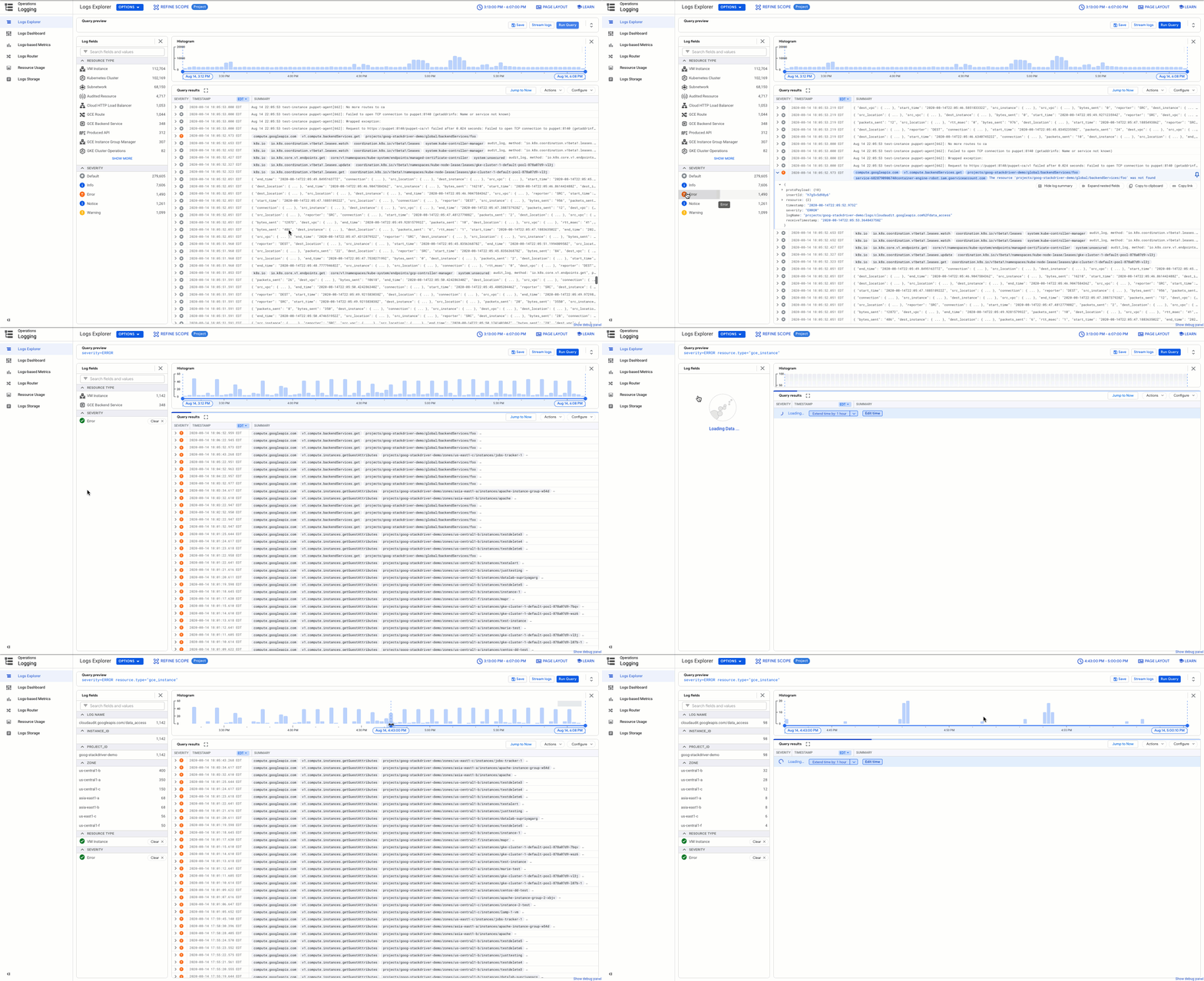
In Cloud Logging, we understand that logging is a critical part of what it takes for you to operate reliable applications and infrastructure on Google Cloud. We’ve added new features to help you more easily store, find and control your logs.Today, we’re announcing a new default logging experience: Logs Explorer. Previously known as Logs Viewer Preview, Logs Explorer provides new tools for you to better understand and analyze your logs during the troubleshooting process. We’re not getting rid of the classic Logs Viewer though—you can now access it as Legacy Viewer, and it will remain available as we add new features to Logs Explorer.In addition to a new name, Logs Explorer includes new features designed to reduce the time you spend analyzing logs as you troubleshoot code, and to improve visibility into your Google Cloud environment.Interactive queries with Log FieldsLog Fields provides a summary of your logs and insights into your next query. Log Fields include relevant metadata including resource type, severity, log name and service-specific information such as cluster name for Google Kubernetes Engine (GKE) or Cloud Function name. For example, you can answer questions like “What services are actively generating logs in my project?” or “Do I have a lot of errors in my logs and if so, which service is generating the errors?” The Log fields component can also adjust your query because every time you click a field value, the value is added to the query, which narrows the displayed results accordingly.Find anomalies with histograms Using the histogram view, you can analyze log volume over time. The histogram reflects the results returned from each query and can help you detect anomalies in your logs over time. When you’re troubleshooting, histograms can help you spot spikes in errors or drop-offs in your request log volume. Using the histogram, you can refine the query and narrow the result set to the time range you selected.Monitor your logs with the Logs DashboardDashboards help you make sense of what’s happening in your environment. Using the Logs Dashboard, you can review log distribution over time, broken by severity for the top resource types in your project.Each row of charts in the dashboard includes one resource type. The right-hand charts display the distribution of all the logs produced by the resource while the left-hand charts display the breakdown of errors. To query for the logs described in the chart, you can click on any of the bars in the chart and drill down to the logs. Using the logs dashboard is another quick way to find your logs.Gain new insights with Suggested Queries and Query LibraryThe query library makes it easier for you to find logs without building the same query or saving your favorite queries in a personal document or site. With the query library, you to can view and run queries in four ways:Recent queries – View and (re)run queries that you ran in the past.Saved queries – Save queries for future reference and then when you need them again, you can view and run, or edit and run those queries.Shared queries – Collaborate and share queries with other users in your project.Suggested queries – View and run queries automatically suggested for you by Cloud Logging based on your logs.Search across your logs with Logs BucketsUsing Logs Buckets and Log Views, you can centralize or subdivide logs based on your needs and set the appropriate access permissions. You can use Log Views to set IAM permissions to control who views which logs in a specific Log Bucket. Check out this recent blog post to learn more about four common use cases for log buckets including centralizing all your logs for your organization in a single project in Cloud Logging, and decentralizing your GKE multi-tenant cluster logs into separate projects/log buckets. View organization and folder-level logsYou apply organizational policies and other policies and services at different points within the resource hierarchy. You can now find these logs in the Logs Explorer, which makes it easier to understand what’s happening in your organization. For example, by selecting your organization from the project/organization drop-down, you can understand what IAM and organization policies have been added to your organization by viewing the SetIamPolicy and SetOrgPolicy audit logs.Learn more about Cloud LoggingIf you haven’t already, get started with the Log Explorer, learn more about Cloud Logging with our new qwiklab and join the discussion on our mailing list. Also, be sure to watch our Cloud Operations Spotlight session at Next OnAir. As always, we welcome your feedback.
Quelle: Google Cloud Platform

Google Cloud migration made easy

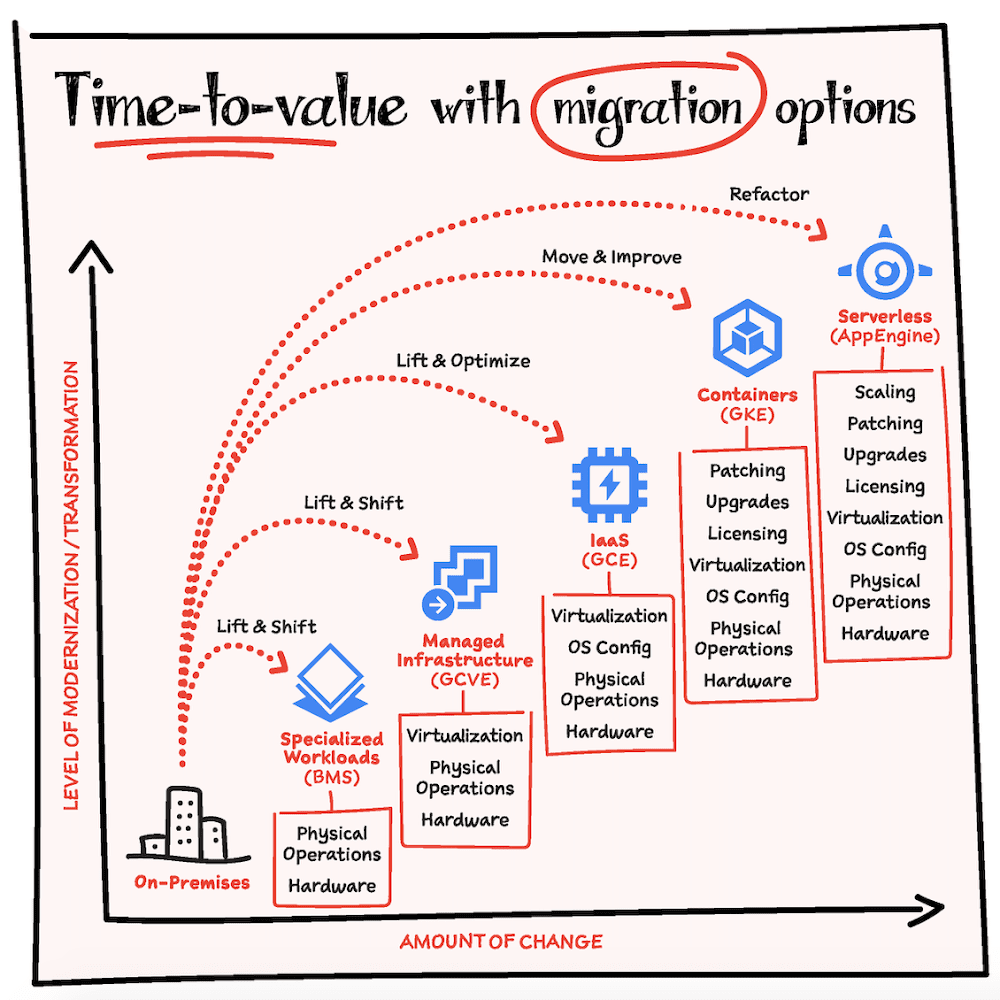
At Google Cloud, we believe that effective integration of public cloud capabilities is fundamental to an enterprise’s digital transformation journey. A well-designed digital transformation strategy should do much more than keep you competitive… instead, it should position you to excel by untethering IT staff from low value, labor-intensive tasks, allowing them to focus on innovation and high-impact projects.In most cases migration to cloud is the first step to digital transformation because it offers a quick, simple path to cost savings and enhanced flexibility. In this article we’ll focus on migration of on-premise or public cloud hosted infrastructure into Google Cloud.Honestly, there is no single right answer when embarking on digital transformation and planning a corresponding migration strategy. Every transformation will have its own nuances and unique considerations. It’s about understanding the pros and cons of the options and making the decisions accordingly. Where to begin?Understanding your starting point is essential to planning and executing a successful application migration strategy. Take a comprehensive approach, including not only technical requirements, but also consideration of your business goals (both present and future), any critical timelines, and your own internal capabilities. Depending on your situation you might fall in any of the below categories as it relates to time-to-value. There is no one size fits all approach to migration but the key here is to know that whichever path you choose, there is always a way to build on top of that and continue to take more advantages of the cloud in an incremental fashion. Should you migrate to Google Cloud?To determine whether your application can and should migrate to cloud, begin by asking yourself the following questions:Are the components of my application stack virtualized or virtualizable?Can my application stack run in a cloud environment while still supporting any and all licensing, security, privacy, and compliance requirements?Can all application dependencies (e.g. 3rd party languages, frameworks, libraries, etc.) be supported in the cloud? If the answer is “no” for any of the above questions, it is recommended to evaluate whether it is feasible to replace those application components with a cloud offering. If not, it is recommended to leave those components on-premises during the initial phase of your digital transformation, while you focus on the migration of your other application components. If retention on-premises is no longer viable (e.g. if you must completely shut down your datacenter) or if you want to increase proximity to cloud resources, then taking advantage of Google Cloud’s Bare Metal Solution, or shifting to a colocation facility (colo) adjacent to the appropriate cloud region are recommended alternatives. Which migration path is right for you? As you embark on your transformation journey, we recommend considering five key types of migration to Google Cloud:Migrating to Google Cloud managed servicesMigrating to containers on Google Kubernetes Engine (GKE) or AnthosMigrating to VMs (“Lift and Shift”) on GCE (Google Compute Engine)Migrating to Google Cloud VMware EngineMigrating to the Google Cloud Bare Metal SolutionHere are some example scenarios:If you are dealing with aggressive timelines “lift and shift” might be a good choice to gain immediate infrastructure modernization via relocation to cloud. And you can follow up with additional modernization at a later time.If you seek to take immediate advantages from moving to cloud but are still under a constrained time and skills then “lift and optimize” is a great choice. Using compute virtual machines or VMware engine in the cloud you use the same virtualized familiar environment but can now take advantage of cloud elasticity and scale.If you are seeking to immediately leverage the full benefits of cloud (e.g. elasticity, scale, managed services), it may be most efficient to modernize more aggressively (e.g. by adopting container technology) in conjunction with migration. “Move and improve” and “refactoring” are great fit in this situation but know that it will take a bit longer to execute this strategy due to some changes required in the current apps to make them container friendly and/or severless.The following decision tree will help you decide which path is right for your application.Common use casesUse case 1: Hybrid Cloud BurstSet up the connectivity between on-premise and cloud using the cloud interconnect.Create a cloud landing zone, this includes creating the project and the resources such as Google Compute Engine (GCE), Google Kubernetes Engine (GKE), Google Cloud VMware Engine (GCVE) or Anthos.Then lift and shift or lift and optimize from on-premise to cloud in the appropriate resource. At this point you are ready to send the traffic bursts or excess traffic to Google Cloud to lower the stress on the existing data center.Use case 2: Modernize with AnthosEstablish network connectivity to GCP using cloud interconnect.Create cloud landing zone.Then, Lift-&-Shift Workloads to free up capacity on-prem.Build Anthos on-prem landing zone.Then, modernize Apps both on-prem and in the cloud.Use case 3: Land, Expand, RetireEstablish network connectivity to GCP using cloud interconnect.Create cloud landing zone.Then, migrate all workloads.Finally, retire Data Center once complete. Iterate through hardware retirement as needed.Use case 4: DR Site promotionEstablish network connectivity to GCP using cloud interconnect.Create cloud landing zone.You are then ready to duplicate all workloads in Cloud.Then, swap user connectivity to Cloud as PRIMARY.Finally, retire co-lo all at once.ConclusionWhether you are starting or in the middle of your digital transformation journey, Google Cloud meets you wherever you are and makes it easy for you to move towards a more flexible and agile infrastructure. Hopefully these steps act as a starting point in your journey and make your digital transformation journey easier. Here is an entire video series on Cloud Migration that walks you through how to get started.For more resources on migration checkout this whitepaper and this solution guide.For more #GCPSketchnote and similar cloud content follow me on twitter @pvergadia and keep an eye out on thecloudgirl.devRelated Article13 sample architectures to kickstart your Google Cloud journeyThe 13 most popular application architectures on Google Cloud, and how to get started.Read Article
Quelle: Google Cloud Platform

Security-at-scale: 10 new security and management controls

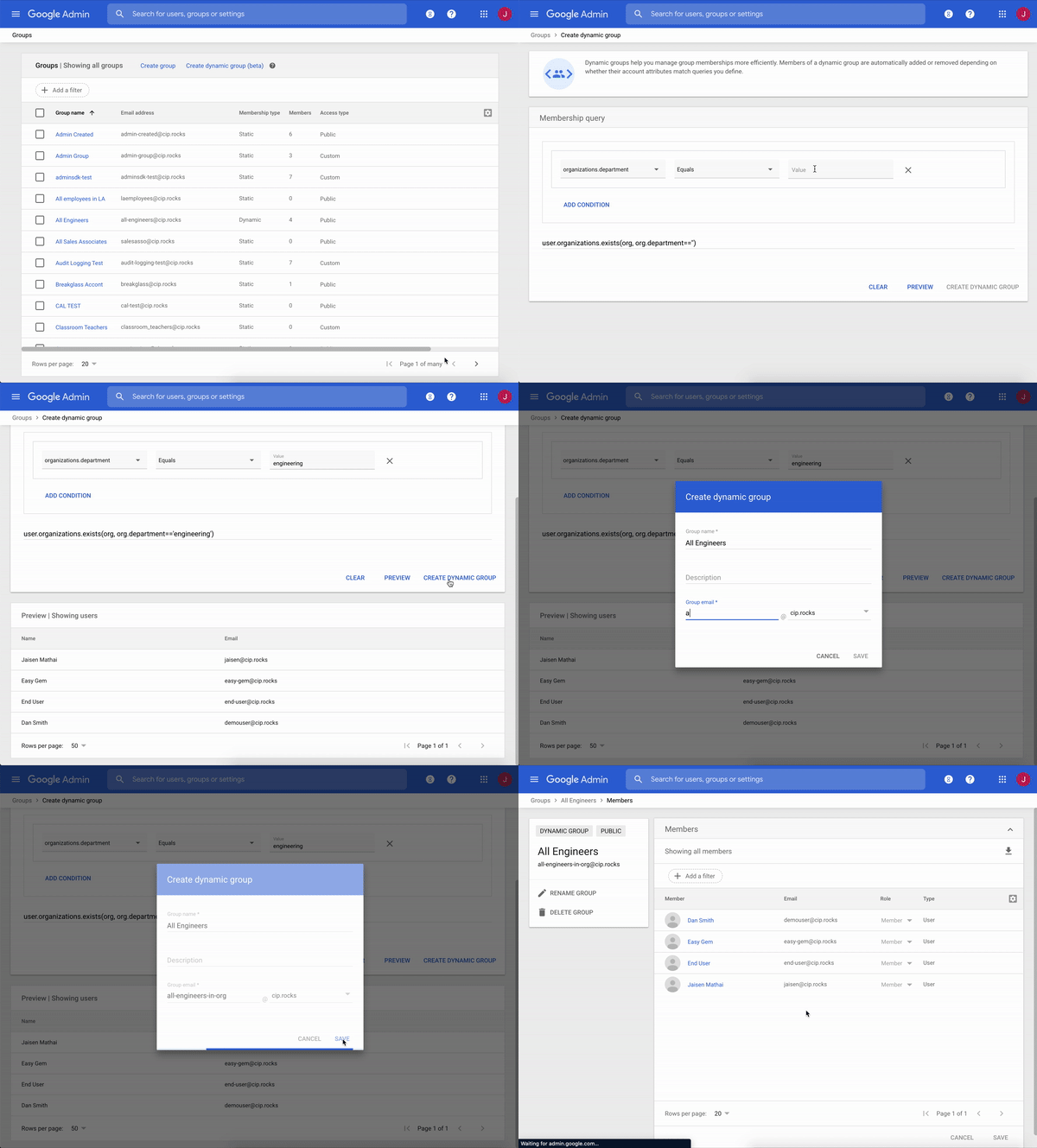
With so many people working remotely, it’s imperative that the tools we use to stay productive are secure. Already this year we have worked to strengthen security for our customers and help make threat defense more effective. Today, we’re sharing new advancements that provide robust controls, enable automation, and simplify managing security-at-scale with both G Suite and Google Cloud Platform. Enabling extensibility through APIsFirst, let’s take a look at enabling extensibility with APIs with the general availability of both Cloud Identity groups API and service account API access for Cloud Identity customers. We recognize that some Google Cloud customers rely heavily on groups but are not G Suite administrators. We are now enabling programmatic access to manage groups without requiring admin roles with Cloud Identity groups API. With this feature, we’ve expanded access to non-admin service accounts and users as group owners and managers.  Further, you can programmatically manage groups using service accounts without needing to grant domain-wide delegation or use admin impersonation with service account API access. Hand-in-hand with this feature is service accounts as members, in general availability, which natively supports service accounts in groups without changing group settings, and indicates if a member is a service account. These features also allow for more accurate visibility into actions taken by service accounts; now, audit logs will show the service account as the actor as opposed to an impersonated user via domain-wide delegation. “Before API access without domain wide delegation, we required many Group Admin accounts to manage the capability. We are now able to limit access to only those who absolutely need it, helping us to strengthen our security posture.” – Woolworths Next, we’re adding to G Suite’s Vault API with the general availability of Count API. This API enables you to see the number of messages, files, or other data items that match a search query. Since this functionality can help you estimate the size of an export, Count API helps you ensure a successful export by reducing the likelihood of export errors due to size.Saving time and effort with group membership automationWe’re helping Cloud Identity customers save time and effort with new automation in group membership. Complete automation of group membership is possible with dynamic groups, now in beta. By simply utilizing the appropriate user attributes in a membership query, you can create groups whose membership is automatically kept up-to-date.We’re also introducing membership expiration for Cloud Identity in beta, which allows you to set a time-based expiration on group membership to automatically revoke group membership once the specified time period has passed. This can be especially useful to allow engineers to debug in production for a limited time, or grant temporary contractors or vendors time-based access to resources, for example.Adding controls to enhance securityWe want our customers to feel empowered with all of the controls they need to customize security according to their organization’s needs. Here are some ways that we’re giving you even greater control to meet your security objectives when managing groups. With security groups for Cloud Identity, now in beta, you can add security labels to groups to differentiate between groups used for access control and those only used for email or other communication. This labeling helps you ensure that security groups cannot contain any groups from outside of your organization or email-only groups.  Next, to give you more control in managing groups, we launched the beta of groups in GCP console in May. With this feature, we’ve simplified creating groups, adding users, and assigning permission. You can try it here.Use visibility and insights to strategically prioritize your security effortsHaving visibility into the access and data within your organization is a critical step in protecting it. Taking that a step further, having insights to act upon helps you strategically prioritize your security efforts.First, let’s talk about the visibility you’ll gain with indirect membership visibility & hierarchy APIs, now in beta for Cloud Identity. To help you easily visualize group membership, this feature allows you to view all direct and indirect members of a group, view all direct and indirect memberships of a user, and find paths from a user to a group. In addition, with a new check API, you can identify if an account is a member of a given group or not. You’ll get all of the information you need to create visualization of complex group structures and hierarchies. Having this kind of membership visibility can help you make decisions about who to add to or remove from your groups.Next, we’re helping you take visibility to the next level with actionable insights that help you keep your organization’s data safe. We’re happy to announce that we are rolling out the general availability of data protection insights in the next couple weeks to help you identify the top sensitive data types for your organization. Beyond just being able to see what sensitive data your organization is dealing with, we’re helping you prioritize and focus your data protection efforts. Data protection insights will be available to G Suite Business customers, in addition to the G Suite Enterprise customers.With these tools, we are giving organizations the ability to manage security-at-scale more effectively and securely, while saving time and effort. To help you navigate the latest thinking in cloud security, explore the latest installment of our Google Cloud Security Talks, on-demand now.
Quelle: Google Cloud Platform