Librephone: Neue Informationen zu freiem Android-Betriebssystem der FSF
Die Free Software Foundation erklärt, wie es beim neuen freien Smartphone-Betriebssystem Librephone weitergehen soll. (FSF, Smartphone)
Quelle: Golem

Die Free Software Foundation erklärt, wie es beim neuen freien Smartphone-Betriebssystem Librephone weitergehen soll. (FSF, Smartphone)
Quelle: Golem

Der langjährige Serienchef Marc-Alexis Cote verlässt Ubisoft. Die Zukunft von Assassin’s Creed liegt nun beim neuen Studio Vantage. (Assassin's Creed, Ubisoft)
Quelle: Golem
We’re thrilled to announce that we’re breathing new life into the Docker Model Runner community, and we want you to be a part of it! Our goal is to make it easier than ever for you to contribute, collaborate, and help shape the future of running AI models with Docker.
From a Limited Beta to a Universe of Possibilities
When we first announced Docker Model Runner, it was in its beta phase, exclusively available on Docker Desktop and limited to Apple and Nvidia hardware. We received a ton of valuable feedback, and we’ve been hard at work making it more accessible and powerful.
Today, we’re proud to say that Docker Model Runner is now Generally Available (GA) and can be used in all versions of Docker! But that’s not all. We’ve added Vulkan support, which means you can now run your models on virtually any GPU. This is a huge leap forward, and it’s all thanks to the incredible potential we see in this project and the community that surrounds it.
Making Contributions a Breeze
We’ve listened to your feedback about the contribution process, and we’ve made some significant changes to make it as smooth as possible.
To start, we’ve consolidated all the repositories into a single, unified home. This makes it much easier to find everything you need in one place.
We have also invested a lot of effort in updating our documentation for contributors. Whether you’re a seasoned open-source veteran or a first-time contributor, you’ll find the information you need to get started.
Your Mission, Should You Choose to Accept It
The success of Docker Model Runner depends on you, our amazing community. We’re calling on you to help us make this project the best it can be. Here’s how you can get involved:
Star our repository: Show your support and help us gain visibility by starring the Docker Model Runner repo.
Fork and Contribute: Have an idea for a new feature or a bug fix? Fork the repository, make your changes, and submit a pull request. We’re excited to see what you come up with!
Spread the word: Tell your friends, colleagues, and anyone else who might be interested in running AI models with Docker.
We’re incredibly excited about this new chapter for Docker Model Runner, and we can’t wait to see what we can build together. Let’s get to work!
Learn more
Check out the Docker Model Runner General Availability announcement
Visit our Model Runner GitHub repo! Docker Model Runner is open-source, and we welcome collaboration and contributions from the community!
Get started with Docker Model Runner with a simple hello GenAI application
Quelle: https://blog.docker.com/feed/
Models are advancing quickly. GPT-5, Claude Sonnet, Gemini. Each release gives us more capabilities. But most real work isn’t solved by a single model.
Developers are realizing they need a system of agents: different types of agents working together to accomplish more complex tasks. For example, a researcher to find information, a writer to summarize, a planner to coordinate, and a reviewer to check accuracy.
The challenge is that today, building a multi-agent system is harder than it should be. Context doesn’t flow cleanly between agents. Tools require custom integration. Sharing with a teammate means sending instructions and hoping they can re-create your setup.
That’s the problem cagent solves.
In this blog, we’ll walk you through the basics, how to create a multi-agent AI system in minutes, and how cagent makes this possible.
What’s a multi-agent system?
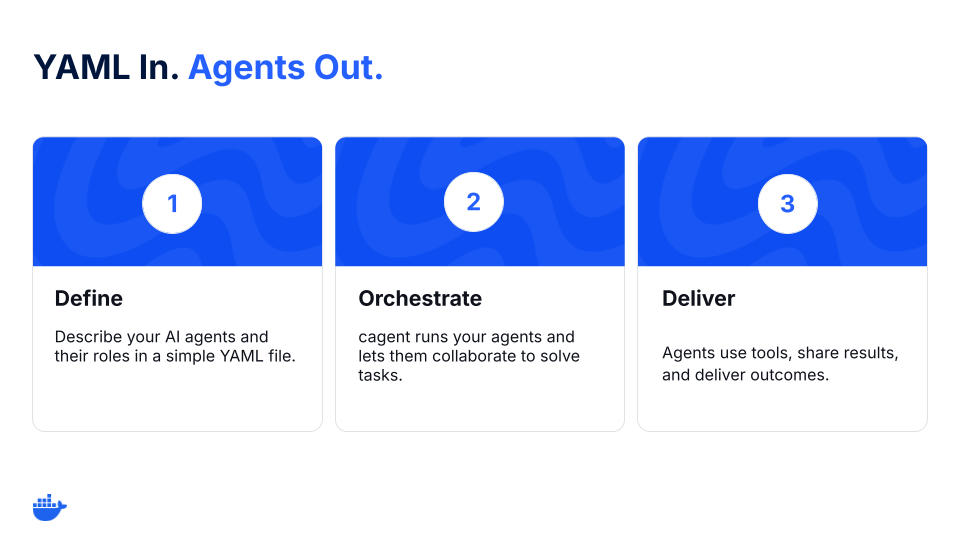
A multi-agent system is a coordinated group of AI agents that collaborate to complete complex tasks. Using cagent, you can build and run these systems declaratively, no complex wiring or reconfiguration needed.
Meet cagent: The best (and open source) way to build multi-agent systems
Figure 1: cagent workflow for multi-agent orchestration.
cagent is an open-source tool for building agents and a part of Docker’s growing ecosystem of AI tools.
Instead of writing glue code to wire up models, tools, and workflows, describe an agent (or a team of agents) in a single YAML file:
Which model the agent uses (OpenAI, Anthropic, Gemini, or a local one)
What its role or instructions are
Which tools it can use (like GitHub, search, or the filesystem)
And, if needed, which sub-agents it delegates to
This turns agents into portable, reproducible artifacts you can run anywhere and share with anyone.
Multi-agent challenges that cagent is solving
Create, run, and share multi-agent AI systems more easily with cagent.
Orchestrate agents (and sub-agents) more easily – Define roles and delegation (sub-agents). cagent manages calls and context.
Let agents use tools with guardrails – Grant capabilities with MCP: search, GitHub, files, databases. Each agent gets only the tools you list and is auditable.
Use (and swap) models – OpenAI, Anthropic, Gemini, or local models through Docker Model Runner. Swap providers without rewriting your system.
Treat agents like artifacts – Package, version, and share agents like containers.
How to build a multi-agent system with Docker cagent
Here’s what that looks like in practice.
Step 1: Define your multi-agent system
version: "2"
agents:
root:
model: anthropic/claude-sonnet-4-0
instruction: |
Break down a user request.
Ask the researcher to gather facts, then pass them to the writer.
sub_agents: ["researcher", "writer"]
researcher:
model: openai/gpt-5-mini
description: Agent to research and gather information.
instruction: Collect sources and return bullet points with links.
toolsets:
– type: mcp
ref: docker:duckduckgo
writer:
model: dmr/ai/qwen3
description: Agent to summarize notes.
instruction: Write a concise, clear summary from the researcher’s notes.
Step 2: Run the YAML file
cagent run team.yaml
The coordinator delegates, the researcher gathers, and the writer drafts. You now have a functioning team of agents.
Step 3: Share it on Docker Hub
cagent push ./team.yaml org/research-writer
Now, anyone on your team can run the exact same setup with:
cagent run docker.io/org/research-writer
That’s a full multi-agent workflow, built and shared in under 5 minutes.
First principles: Why cagent works
These principles keep cagent an easy-to-use and customizable multi-agent runtime to orchestrate AI agents.
Declarative > imperative. Multi-agent systems are mostly wiring: roles, tools, and topology. YAML keeps that wiring declarative, making it easy to define, read, and review.
Agents as artifacts. Agents become portable artifacts you can pull, pin, and trust.
Small surface area. A thin runtime that does one job well: coordinate agents.
What developers are building with cagent
Developers are already exploring different multi-agent use cases with cagent. Here are some examples:
1. PR and issue triaging
Collector reads PRs/issues, labels, failing checks
Writer drafts comments or changelogs
Coordinator enforces rules, routes edge cases
2. Research summarizing
Researcher finds and cites sources
Writer produces a clean summary
Reviewer checks for hallucinations and tone
3. Knowledge routing
Router classifies requests
KB agent queries internal docs
Redactor strips PII before escalation
Each one starts the same way: a YAML file and an idea. And they can be pushed to a registry and run by anyone.
Get started
cagent gives you the fastest path forward to build multi-agent systems. It’s open-source, easy to use, and built for the way developers already work. Define your agents, run them locally, and share them, all in a few lines of YAML.
YAML in, agents out.
Run the following to get started:
brew install cagent
cagent new
cagent run agent.yaml
Learn more
Get the technical details from our cagent documentation.
We’d love to hear what you think. Join us in the Docker Community Slack.
Dive into more topics about AI and Docker.
Subscribe to the Docker Navigator Newsletter.
Quelle: https://blog.docker.com/feed/
Starting today, Amazon Elastic Compute Cloud (Amazon EC2) M8g instances are available in AWS Europe (Paris), Asia Pacific (Osaka), AWS Canada (Central), and AWS Middle East (Bahrain) regions. These instances are powered by AWS Graviton4 processors and deliver up to 30% better performance compared to AWS Graviton3-based instances. Amazon EC2 M8g instances are built for general-purpose workloads, such as application servers, microservices, gaming servers, midsize data stores, and caching fleets. These instances are built on the AWS Nitro System, which offloads CPU virtualization, storage, and networking functions to dedicated hardware and software to enhance the performance and security of your workloads. AWS Graviton4-based Amazon EC2 instances deliver the best performance and energy efficiency for a broad range of workloads running on Amazon EC2. These instances offer larger instance sizes with up to 3x more vCPUs and memory compared to Graviton3-based Amazon M7g instances. AWS Graviton4 processors are up to 40% faster for databases, 30% faster for web applications, and 45% faster for large Java applications than AWS Graviton3 processors. M8g instances are available in 12 different instance sizes, including two bare metal sizes. They offer up to 50 Gbps enhanced networking bandwidth and up to 40 Gbps of bandwidth to the Amazon Elastic Block Store (Amazon EBS). To learn more, see Amazon EC2 M8g Instances. To explore how to migrate your workloads to Graviton-based instances, see AWS Graviton Fast Start program and Porting Advisor for Graviton. To get started, see the AWS Management Console.
Quelle: aws.amazon.com
Amazon Route 53 Profiles now supports AWS PrivateLink. Customers can now access and manage their Profiles privately, without going through the public internet. AWS PrivateLink provides private connectivity between VPCs, AWS services, and on-premises applications, securely over the Amazon network. When Route 53 Profiles is accessed via AWS PrivateLink, all operations, such as creating, deleting, editing, and listing of Profiles, can be handled via the Amazon private network. Route 53 Profiles allows you to define a standard DNS configuration, in the form of a Profile, that may include Route 53 private hosted zone (PHZ) associations, Route 53 Resolver rules, and Route 53 Resolver DNS Firewall rule groups, and apply this configuration to multiple VPCs in your account. Profiles can also be used to enforce DNS settings for your VPCs, with configurations for DNSSEC validations, Resolver reverse DNS lookups, and the DNS Firewall failure mode. You can share Profiles with AWS accounts in your organization using AWS Resource Access Manager (RAM). Customers can use Profiles with AWS PrivateLink in regions where Route 53 Profiles is available today, including the AWS GovCloud (US) Regions. For more information about the AWS Regions where Profiles is available, see here. To learn more about configuring Route 53 Profiles, please refer to the service documentation.
Quelle: aws.amazon.com
AWS for Fluent Bit announces version 3.0.0, based on Fluent Bit version 4.1.0 and Amazon Linux 2023. Container logging using AWS for Fluent Bit is now more performant and more feature-rich for AWS customers, including those using Amazon Elastic Container Services (Amazon ECS) and Amazon Elastic Kubernetes Service (Amazon EKS). AWS for Fluent Bit enables Amazon ECS and Amazon EKS customers to collect, process, and route container logs to destinations including Amazon CloudWatch Logs, Amazon Data Firehose, Amazon Kinesis Data Streams, and Amazon S3 without changing application code. AWS for Fluent Bit 3.0.0 upgrades the Fluent Bit version to 4.1.0, and upgrades the base image to Amazon Linux 2023. These updates deliver access to the latest Fluent Bit features, significant performance improvements, and enhanced security. New features include native OpenTelemetry (OTel) support for ingesting and forwarding OTLP logs, metrics, and traces with AWS SigV4 authentication—eliminating the need for additional sidecars. Performance improvements include faster JSON parsing, processing more logs per vCPU with lower latency. Security enhancements include TLS min version and cipher controls, which enforce your TLS policy on outputs from AWS for Fluent Bit for stronger protocol posture. You can use AWS for Fluent Bit 3.0.0 on both ECS and EKS. On ECS, update the FireLens log-router container image in your task definition to the 3.0.0 tag from the Amazon ECR Public Gallery. On EKS, upgrade by either updating the Helm release or setting the DaemonSet image to the 3.0.0 version. The AWS for Fluent Bit image is available in the Amazon ECR Public Gallery and in the Amazon ECR repository. You can also find it on GitHub for source code and additional guidance.
Quelle: aws.amazon.com
Starting today, Amazon Elastic Compute Cloud (Amazon EC2) M7i instances powered by custom 4th Gen Intel Xeon Scalable processors (code-named Sapphire Rapids) are available in the Europe (Milan) region. These custom processors, available only on AWS, offer up to 15% better performance over comparable x86-based Intel processors utilized by other cloud providers. M7i deliver up to 15% better price-performance compared to M6i. M7i instances are a great choice for workloads that need the largest instance sizes or continuous high CPU usage, such as gaming servers, CPU-based machine learning (ML), and video-streaming. M7i offer larger instance sizes, up to 48xlarge, and two bare metal sizes (metal-24xl, metal-48xl). These bare-metal sizes support built-in Intel accelerators: Data Streaming Accelerator, In-Memory Analytics Accelerator, and QuickAssist Technology that are used to facilitate efficient offload and acceleration of data operations and optimize performance for workloads. To learn more, visit Amazon EC2 M7i Instances. To get started, see the AWS Management Console.
Quelle: aws.amazon.com

Der Wera Adventskalender 2025 mit 28 Werkzeug-Überraschungen war bei Amazon noch nie günstiger und eignet sich perfekt als Geschenk. (Technik/Hardware, Amazon)
Quelle: Golem

Der Test von TP-Link bestätigt auch den angestrebten Datendurchsatz. Wi-Fi 8 legt einen Schwerpunkt auf die Stabilität von WLAN-Verbindungen. (WLAN, Netzwerk)
Quelle: Golem






