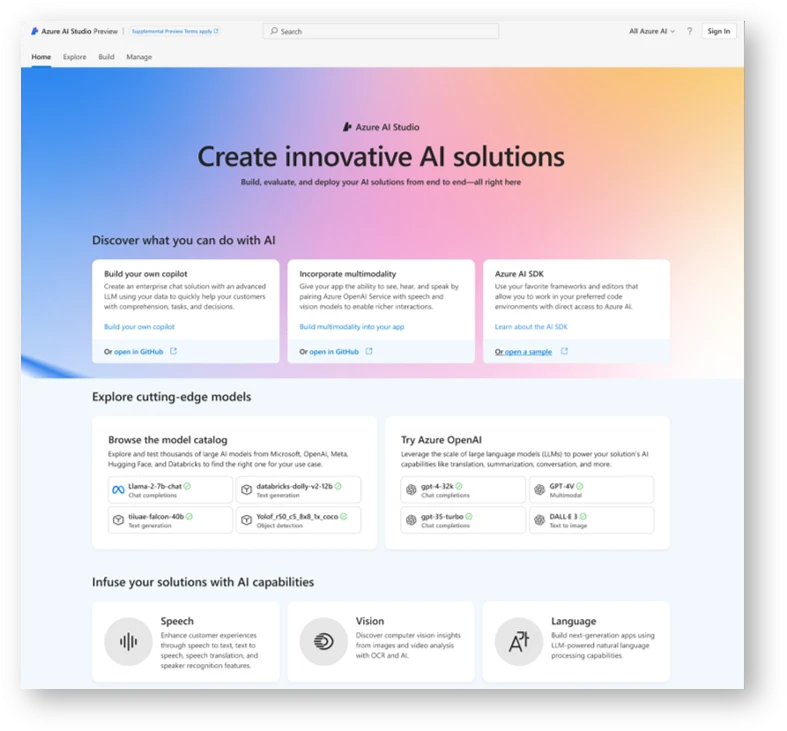
3 ways Microsoft Azure AI Studio helps accelerate the AI development journey  

The generative AI revolution is here, and businesses across the globe and across industries are adopting the technology into their work. However, the learning curve for your own AI applications can be steep, with 52% of organizations reporting that a lack of skilled workers is their biggest barrier to implement and scale AI.1 To reap the true value of generative AI, organizations need tools to simplify AI development, so they can focus on the big picture of solving business needs. Microsoft Azure AI Studio, Microsoft’s generative AI platform, is designed to democratize the AI development process for developers, bringing together the models, tools, services, and integrations you need to get started developing your own AI application quickly.  

“Azure AI Studio improved the experience for creating AI products. We found it mapped perfectly to our needs for faster development and time to market, and greater throughput, scalability, security, and trust.” 
Denis Yarats, Chief Technology Officer and Cofounder, Perplexity.AI 

Azure AI Studio (preview)

Develop generative AI applications and custom copilots in one platform

Learn more

1. Develop how you want   

The Azure AI Studio comprehensive user interface (UI) and code-first experiences empower developers to choose their preferred method of working, whether it’s through a user-friendly, accessible interface or by diving directly into code. This flexibility is crucial for rapid project initiation, iteration, and collaboration—allowing teams to work in the manner that best suits their skills and project requirements.  

The choice for where to develop was important for IWill Therapy and IWill CARE, a leading online mental health care provider in India, when they started using Azure AI Studio to build a solution to reach more clients. IWill created a Hindi-speaking chatbot named IWill GITA using the cutting-edge products and services included in the Azure AI Studio platform. IWill‘s scalable, AI-powered copilot brings mental health access and therapist-like conversations to people throughout India.

The comprehensible UI in Azure AI Studio made it easy for cross functional teams to get on the same page, allowing workers with less AI development experience to skill up quickly.  

“We found that the Azure user interface removed the communication gap between engineers and businesspeople. It made it easy for us to train subject-matter experts in one day”. 
Ashish Dwivedi, Co-founder and COO, iWill Therapy

Azure AI Studio allows developers to move seamlessly between its friendly user interface and code, with software development kits (SDKs) and Microsoft Visual Studio code extensions for local development experiences. The Azure AI Studio dual approach caters to diverse development preferences, streamlining the process from exploration to deployment, ultimately enabling developers to bring their AI projects to life more quickly and effectively. 

2. Identify the best model for your needs   

The Azure AI Studio model catalog offers a comprehensive hub for discovering, evaluating, and consuming foundation models, including a wide array of leading models from Meta, Mistral, Hugging Face, OpenAI, Cohere, Nixtla, G42 Jais, and many more. To enable developers to make an informed decision about which model to use, Azure AI Studio offers tools such as model benchmarking. With model benchmarking, developers can quickly compare models by task using open-source datasets and industry-standard metrics, such as accuracy and fluency. Developers can also explore model cards that detail model capabilities and limitations and try sample inferences to ensure the model is a good fit. 

The Azure AI Studio integration of models from leading partners is already helping customers streamline their development process and accelerating the time to market for their AI solutions. When Perplexity.AI was building their own copilot, a conversational answer engine named Perplexity Ask, Azure AI Studio enabled them to explore various models and to choose the best fit for their solution.  

“Trying out large language models available with Azure OpenAI Service was easy, with just a few clicks to get going. That’s an important differentiator of Azure AI Studio: we had our first prototype in hours. We had more time to try more things, even with our minimal headcount.”  
Denis Yarats, CTO and Cofounder, Perplexity.AI 

Generate solutions faster with azure openai service

Learn more

3. Streamline your development cycles

Prompt flow in Azure AI Studio is a powerful feature that streamlines the development cycle of generative AI solutions. Developers can develop, test, evaluate, debug, and manage large language model (LLM) flows. You can now monitor their performance, including quality and operational metrics, in real-time, and optimize your flows as needed. Prompt flow is designed to be effortless, with a visual graph for easy orchestration, and integrations with open-source frameworks like LangChain and Semantic Kernel. Prompt flow also facilitates collaboration across teams; multiple users can work together on prompt engineering projects, share LLM assets, evaluate quality and safety of flows, maintain version control, and automate workflows for streamlined large language model operations (LLMOps). 

When Siemens Digital Industries Software wanted to build a solution for its customers and frontline work teams to communicate with operations and engineering teams in real-time to better drive innovation and rapidly address problems as they arise, they looked to Azure AI Studio to create their own copilot. Siemens developers combined Microsoft Teams capabilities with Azure AI Studio and its comprehensive suite of tools, including prompt flow, to streamline workflows that included prototyping, deployment, and production. 

“Our developers really like the UI-first approach of prompt flow and the ease of Azure AI Studio. It definitely accelerated our adoption of advanced machine learning technologies, and they have a lot of confidence now for ongoing AI innovation with this solution and others to come.”  
Manal Dave, Advanced Software Engineer, Siemens Digital Industries Software

Get started with Azure AI Studio  

The ability to choose between UI and code, plus the Azure AI Studio model choice and developer tools are just some of the ways AI Studio can help you accelerate your generative AI development. Helping customers achieve more is at the heart of everything we do, and we’re excited to share new ways Azure AI Studio can help you build your own copilots and other AI apps during Microsoft Build.  

Check out some of the upcoming sessions:  

Learn more about how Azure AI Studio can help you build production-ready AI solutions.  

Get started, build with Azure AI Studio.

Register for Microsoft Build and check out the upcoming Azure AI Studio session on building your own copilot.

1 The Business Opportunity of AI (microsoft.com)
The post 3 ways Microsoft Azure AI Studio helps accelerate the AI development journey   appeared first on Azure Blog.
Quelle: Azure
Bringing generative AI to Azure network security with new Microsoft Copilot integrations

Today we are excited to announce the Azure Web Application Firewall (WAF) and Azure Firewall integrations in the Microsoft Copilot for Security standalone experience. This is the first step we are taking toward bringing interactive, generative AI-powered capabilities to Azure network security.

Copilot empowers teams to protect at the speed and scale of AI by turning global threat intelligence (78 trillion or more security signals), industry best practices, and organizations’ security data into tailored insights. With the growing cost of security breaches, organizations need every advantage to protect against skilled and coordinated cyber threats. To see more and move faster, they need generative AI technology that complements human ingenuity and refocuses teams on what matters. A recent study shows that:

Experienced security analysts were 22% faster with Copilot.

They were 7% more accurate across all tasks when using Copilot.

And, most notably, 97% said they want to use Copilot the next time they do the same task.

Azure network security

Protect your applications and cloud workloads with network security services

Explore solutions

Generative AI for Azure network security

Azure WAF and Azure Firewall are critical security services that many Microsoft Azure customers use to protect their network and applications from threats and attacks. These services offer advanced threat protection using default rule sets as well as detection and protection against sophisticated attacks using rich Microsoft threat intelligence and automatic patching against zero-day vulnerabilities. These systems process huge volumes of packets, analyze signals from numerous network resources, and generate vast amounts of logs. To reason over terabytes of data and cut through the noise to detect threats, analysts spend several hours if not days performing manual tasks. In addition to the scale of data there is a real shortage of security expertise. It is difficult to find and train cybersecurity talent and these staff shortages slow down responses to security incidents and limit proactive posture management. 

With our announcement of Azure WAF and Azure Firewall integrations in Copilot for Security, organizations can empower their analysts to triage and investigate hyperscale data sets seamlessly to find detailed, actionable insights and solutions at machine speeds using a natural language interface with no additional training. Copilot automates manual tasks and helps upskill Tier 1 and Tier 2 analysts to perform tasks that would otherwise be reserved for more experienced Tier 3 or Tier 4 professionals, redirecting expert staff to the hardest challenges, thus elevating the proficiency of the entire team. Copilot can also easily translate threat insights and investigations into natural language summaries to quickly inform colleagues or leadership. The organizational efficiency gained by Copilot summarizing vast data signals to generate key insights into the threat landscape enables analysts to outpace adversaries in a matter of minutes instead of hours or days.

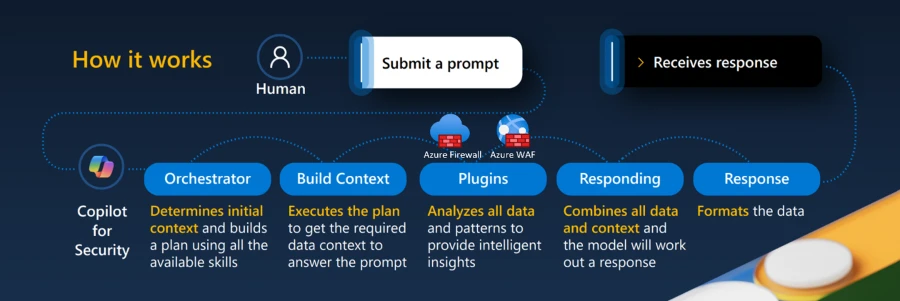
How Copilot for Security works with the Azure Firewall and Azure WAF plugins.

Azure Web Application Firewall integration in Copilot

Today, Azure WAF generates detections for a variety of web application and API security attacks. These detections generate terabytes of logs that are ingested into Log Analytics. While the logs give insights into the Azure WAF actions, it is a non-trivial and time-consuming activity for an analyst to understand the logs and gain actionable insights.

The Azure WAF integration in Copilot for Security helps analysts perform contextual analysis of the data in minutes. Specifically, it synthesizes data from Azure Diagnostics logs to generate summarization of Azure WAF detections tailored to each customer’s environment. The key capabilities include investigation of security threats—including analyzing WAF rules triggered, investigating malicious IP addresses, analyzing SQL Injection (SQLi) and Cross-site scripting (XSS) attacks blocked by WAF, and natural language explanations for each detection.

By asking a natural-language question about these attacks, the analyst receives a summarized response that includes details about why that attack occurred and equips the analyst with enough information to investigate the issue further. In addition, with the assistance of Copilot, analysts can retrieve information on the most frequently offending IP addresses, identify top malicious bot attacks, and pinpoint the managed and custom Azure WAF rules that have been triggered most frequently within their environment.

A sneak peek at the Azure WAF integration in Copilot for Security.

Azure Firewall integration in Copilot

Azure Firewall intercepts and blocks malicious traffic using the intrusion detection and prevention system (IDPS) feature today. However, when analysts need to perform a deeper investigation of the threats that Azure Firewall catches using this feature, they need to do this manually—which is a non-trivial and time-consuming task. The Azure Firewall integration in Copilot helps analysts perform these investigations with the speed and scale of AI.

The first step in an investigation is to pick a specific Azure Firewall and see the threats it has intercepted. Analysts today spend hours writing custom queries or navigating through several manual steps to retrieve threat information from Log Analytics workspaces. With Copilot, analysts just need to ask about the threats they’d like to see, and Copilot will present them with the requested information.

The next step is to better understand the nature and impact of these threats. Today, analysts must retrieve additional contextual information such as geographical location of IPs, threat rating of a fully qualified domain name (FQDN), details of common vulnerabilities and exposures (CVEs) associated with an IDPS signature, and more manually from various sources. This process is slow and involves a lot of effort. Copilot pulls information from the relevant sources to enrich your threat data in a fraction of the time.

Once a detailed investigation has been performed for a single Azure Firewall and single threat, analysts would like to determine if these threats were seen elsewhere in their environment. All the manual work they performed for an investigation for a single Azure Firewall is something they would have to repeat fleet wide. Copilot can do this at machine speed and help correlate this information with other security products integrated with Copilot to better understand how attackers are targeting their entire infrastructure.

A sneak peek at the Azure Firewall integration in Copilot for Security.

Looking forward

The future of technology is here, and users will increasingly expect their network security products to be AI enabled; and Copilot positions organizations to fully leverage the opportunities presented by the emerging era of generative AI. The integrations announced today combine Microsoft’s expertise in security with state-of-the-art generative AI packaged together in a solution built with security, privacy, and compliance at its heart to help organizations better defend themselves from attackers while keeping their data completely private.

Getting access

We look forward to continuing to integrate Azure network security into Copilot to make it easier for our customers to be more productive and be able to quickly analyze threats and mitigate vulnerabilities ahead of their adversaries. These new capabilities in Copilot for Security are already being used internally by Microsoft and a small group of customers. Today, we’re excited to announce the upcoming public preview. We expect to launch the preview for all customers for Azure WAF and Azure Firewall at Microsoft Build on May 21, 2024. In the coming weeks, we’ll continuously add new capabilities and make improvements based on your feedback.

Please stop by the Copilot for Security booth at RSA 2024 to see a demo of these capabilities today, express interest for early access, and read about additional Microsoft announcements at RSA.
The post Bringing generative AI to Azure network security with new Microsoft Copilot integrations appeared first on Azure Blog.
Quelle: Azure
Microsoft Cost Management updates—April 2024

Whether you’re a new student, a thriving startup, or the largest enterprise—you have financial constraints, and you need to know what you’re spending, where it’s being spent, and how to plan for the future. Nobody wants a surprise when it comes to the bill, and this is where Microsoft Cost Management comes in. 

We’re always looking for ways to learn more about your challenges and how Microsoft Cost Management can help you better understand where you’re accruing costs in the cloud, identify and prevent bad spending patterns, and optimize costs to empower you to do more with less. Here are a few of the latest improvements and updates based on your feedback: 

Savings plan role-based access control roles 

Advisor updates 

Pricing updates 

Feedback opportunity for commitment savings design

What’s new in Cost Management Labs

New ways to save money with Microsoft Cloud

New videos and learning opportunities

Documentation updates

Let’s dig into the details. 

Savings plan role-based access control roles   

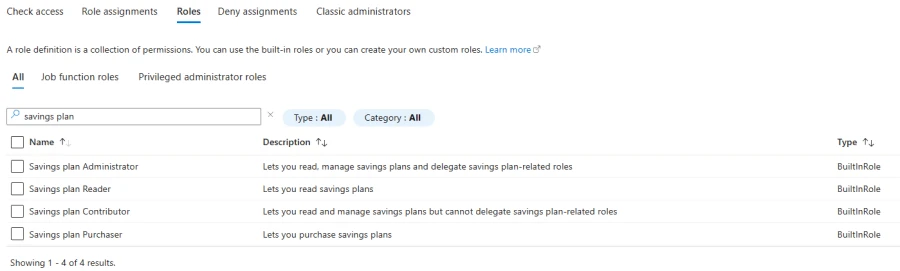
Azure savings plan for compute allows organizations to lower eligible compute usage costs by up to 65% (off listed pay-as-you-go rates) by committing to an hourly spend for 1 or 3 years. We understand that they are a valuable way for you to optimize your cloud expenses. To give you more flexibility over their management—we are happy to announce the general availability of four new role-based access control roles:

Savings plan administrator 

Savings plan purchaser 

Savings plan contributor  

Savings plan reader

Learn more about the permissions needed to view and manage savings plans. 

Advisor updates 

Label removal 

In the Azure portal, Azure Advisor currently shows potential aggregated cost savings under the label “Potential yearly savings based on retail pricing” on pages where cost recommendations are displayed (as shown in the image below.) This aggregated savings estimate at the top of the page will be removed from the Azure portal on September 30, 2024. However, you can still evaluate potential yearly savings tailored to your specific needs by following these steps.  

Note: All individual recommendations and their associated potential savings will remain available. 

Cost optimization workbook update

With the cost optimization workbook in Advisor, you can find ways to reduce waste and get the most value from your cloud spending. We are pleased to announce the addition of databases and sustainability insights under Usage optimization as shown below.  

For more information, refer to this cost optimization workbook article. 

Pricing updates on Azure.com 

We’ve been working hard to make some changes to our Azure pricing experiences, and we’re excited to share them with you. These changes will help make it easier for you to estimate the costs of your solutions. 

We’re thrilled to announce the launch of both Microsoft Copilot for Security and Azure Modeling and Simulation Workbench, complete with new pricing pages and calculators to streamline your cost estimations. Additionally, Azure API Management is officially generally available. 

Our AI offerings have expanded with Azure AI Document Intelligence now providing pricing details for Disconnected Container’s new prebuilt and customer extraction stock-keeping units (SKUs), and Azure AI Content Safety enhancing its free and standard instances with the new “Prompt Shields” and “Groundedness” features. Azure AI Search is upgrading its storage offerings, so check out the pricing page for more details. 

We’ve retired select offers to refine our portfolio and focus on delivering the most value to our customers. This includes the Azure Data Lake Storage Gen 1 offer for Storage Accounts, the graphics and rendering application licensing offers for Azure Batch, and the Azure real-time operating system offer. 

We’ve also added the pricing and offer information of many new capabilities across various services. Starting with Linux Virtual Machines, we’ve added the new NC H100 v5 SKU to our lineup, as well as updated Red Hat Enterprise Linux software pricing for the Linux OS. Azure SQL Database now includes pricing for next-generation General Compute SKUs for Single Database, and also pricing for its new elastic jobs agent feature. Azure Databricks saw the addition of pricing for two new workloads: “Model Training” and “Serverless Jobs.” We’ve also introduced Azure Virtual Desktop for Azure Stack HCI pricing on Azure Virtual Desktop. Across both the pricing pages and the calculator, Microsoft Fabric now shows pricing for the new “Mirroring” feature, Azure Communication Services now shows pricing and offer info for its “Advanced Messaging” SKU, and Microsoft Defender for Cloud includes pricing for the new “Defender for APIs” capability. Lastly, Application Gateway for Containers pricing has been added to the Application Gateway pricing page and calculator. 

We’re constantly working to improve our pricing tools and make them more accessible and user-friendly. We hope you find these changes helpful in estimating the costs for your Azure solutions. If you have any feedback or suggestions for future improvements, please let us know! 

Feedback opportunity for commitment savings design 

If you have experience managing Reservations or Savings Plans to reduce costs in Azure portal, we would appreciate your feedback on a new design concept for commitment savings. We are looking for participants for a 60-minute 1:1 interview and usability walkthrough. Please complete this survey to help us determine if you are eligible. 

What’s new in Cost Management Labs 

With Cost Management Labs, you get a sneak peek at what’s coming in Microsoft Cost Management and can engage directly with us to share feedback and help us better understand how you use the service, so we can deliver more tuned and optimized experiences. Here are a few features you can see in Cost Management Labs: 

Currency selection in Cost analysis smart viewsView your non-USD charges in USD or switch between the currencies you have charges in to view the total cost for that currency only. To change currency, select “Customize” at the top of the view and select the currency you would like to apply. Currency selection is not applicable to those with only USD charges. Currency selection is enabled by default in Cost Management Labs.    

Recent and pinned views in the cost analysis previewShow all classic and smart views in cost analysis and streamline navigation by prioritizing recently used and pinned views.    

Forecast in Cost analysis smart viewsShow your forecast cost for the period at the top of Cost analysis preview.    

Charts in Cost analysis smart viewsView your daily or monthly cost over time in Cost analysis smart views.      

Change scope from menuAllow changing scope from the menu for quicker navigation. 

Of course, that’s not all. Every change in Microsoft Cost Management is available in Cost Management Labs a week before it’s in the full Azure portal or Microsoft 365 admin center. We’re eager to hear your thoughts and understand what you’d like to see next. What are you waiting for? Try Cost Management Labs today. 

New ways to save money in the Microsoft Cloud 

Here are some updates that will likely help you optimize your costs: 

Generally Available: Index Advisor in Azure Cosmos DB helps optimize your index policy for NoSQL queries 

General availability: Semantic caching with vCore-based Azure Cosmos DB for MongoDB   

General availability: HNSW vector index in vCore-based Azure Cosmos DB for MongoDB  

Azure Red Hat OpenShift April 2024 updates 

Public preview: Filtered vector search in vCore-based Azure Cosmos DB for MongoDB  

New videos and learning opportunities 

We have added several new videos to our Microsoft Cost Management YouTube channel to help you manage your Microsoft Customer Agreement (MCA) account and reduce your costs. We encourage you to watch them and learn more. 

A new video on Intelligent FinOps in Azure for cost control on Microsoft Mechanics YouTube channel.  

FinOps and Azure! Understanding what FinOps is and why we care. 

An article on cost allocation and its importance for optimization: Cost allocation is imperative for cloud resource optimization.

Want a more guided experience? Start with the Control Azure spending and manage bills with Microsoft Cost Management and Billing training path. 

Documentation updates 

Here are a few documentation updates you might be interested in: 

New: Azure billing meter ID updates

Update: Save on select VMs in Poland Central for a limited time 

Update: Create an Enterprise Agreement subscription

Update: EA Billing administration on the Azure portal 

Update: Onboard to the Microsoft Customer Agreement (MCA) 

Update: Azure product transfer hub

Update: Ingest cost details data

Update: Understand cost details fields

Update: Permissions to view and manage Azure savings plans

Update: Azure savings plan recommendations

Update: Get started with Cost Management for partners 

Update: Get started with your Enterprise Agreement billing account 

Update: Programmatically create Azure subscriptions for a Microsoft Customer Agreement with the latest APIs

Update: Pay your Microsoft Customer Agreement Azure or Microsoft Online Subscription Program Azure bill

Want to keep an eye on all documentation updates? Check out the Cost Management and Billing documentation change history in the azure-docs repository on GitHub. If you see something missing, select Edit at the top of the document and submit a quick pull request. You can also submit a GitHub issue. We welcome and appreciate all contributions! 

What’s next? 

These are just a few of the big updates from last month. Don’t forget to check out the previous Microsoft Cost Management update blogs. We’re always listening and making constant improvements based on your feedback, so please keep the feedback coming. 

Follow @MSCostMgmt on X and subscribe to the Cost Management YouTube channel for updates, tips, and tricks. You can also share ideas and vote up others in the Cost Management feedback forum. 
The post Microsoft Cost Management updates—April 2024 appeared first on Azure Blog.
Quelle: Azure
Start your AI journey with Microsoft Azure Cosmos DB—compete for $10K

With every potential AI advancement lies a hidden challenge: a weak data foundation that can lead to wasted resources, hinder decision making, and make it difficult to innovate. Enter Azure Cosmos DB, a database for the era of AI that provides the speed, scalability, and reliability needed to power the next generation of intelligent applications. Azure Cosmos DB is a pivotal component for creating intelligent solutions—like OpenAI’s ChatGPT—that get to market faster and deliver exceptional user experiences.

In this blog, we’ll not only reveal the wealth of learning resources we offer to get skilled on Azure Cosmos DB, but how by doing so you can take home part of a $10,000 prize in our Microsoft Developers AI Learning Hackathon.

Build your AI apps

Microsoft Developers AI Learning Hackathon

Join now

Is your interest piqued? Then let’s get into it.

Azure Cosmos DB is a critical component to build your AI app

Azure Cosmos DB plays a crucial role in powering AI-enabled intelligent applications, offering several indispensable benefits:

Build scalable applications. Fuel your apps with high-performance, distributed computing over massive volumes of NoSQL and vector data. Azure offers several options to fit your needs: Start small and pay only for what you use with serverless functions, or explore the free tier of Azure Cosmos DB, which is ideal for developing, testing, and running small production workloads.

AI-ready. Azure Cosmos DB simplifies AI apps by storing and querying vectors and data efficiently using a serverless vector database. It supports copilot apps with NoSQL data, and will be able to generate queries by asking questions using natural language. It also makes it easy to bring your data to Microsoft Azure OpenAI models.

Real-time apps. Azure Cosmos DB powers personalized and intelligent applications and AI models with real-time data, ingested and processed at any scale with <10 millisecond (ms) latency. It works with languages and frameworks of your choice, such as Python, Node.js, and Java.

Secure and highly available. Stay compliant with enterprise-ready, multi-layer security across data and apps, get industry-leading, service-level-agreement-backed 99.999% availability for NoSQL data, and easily recover and restore critical data with flexible options for continuous backup and point-in-time restore.

Gain real-world experience with a chance at big prizes

The Microsoft Developers AI Learning Hackathon is an exciting opportunity for developers to explore the world of AI and build innovative applications using Azure Cosmos DB. Whether you’re a seasoned developer or a curious newcomer, this hackathon welcomes participants of all backgrounds and skill levels.

By taking part, you’ll gain valuable experience working with cutting-edge Microsoft Azure AI tools and learn from Microsoft experts through workshops and mentorship sessions. You also have the optional challenge of leveraging Azure Cosmos DB for MongoDB to integrate AI into your or your team’s application. The top contenders will split $10,000 in prizes and walk away with recognition in the developer community.

The Microsoft Developers AI Learning Hackathon is already in full swing, but AI app submissions will be accepted until 5:00 PM PDT on June 17, 2024, with winners announced on July 1, 2024! 

Kick off your Azure Cosmos DB learning journey

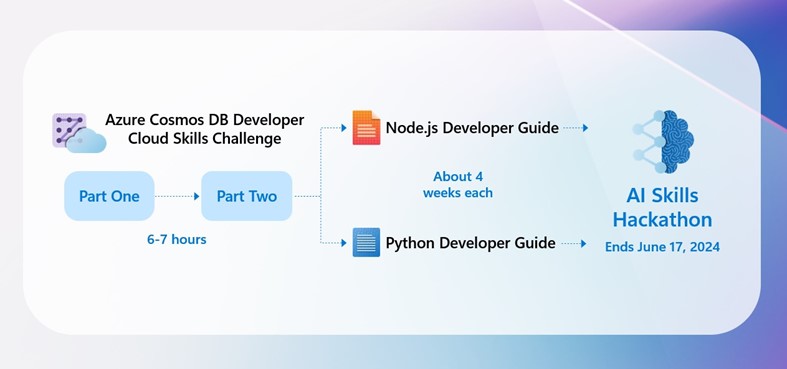
Before you can unleash your creativity with Azure Cosmos DB for a shot at that prize money, there are a few prerequisites to complete in order to join the hackathon. Let’s take a look at the roadmap to take you from AI novice to AI authority.

Azure Cosmos DB Developer Cloud Skills Challenge

As a run-up to the event, we’ve created a pair of free Azure Cloud Skills Challenges to walk you through the basics of Azure OpenAI Service and Azure Cosmos DB, and eventually how to build an AI copilot with Azure Cosmos DB for MongoDB.

Azure Cloud Skills Challenges are part interactive learning sprint, part good-natured competition between you and peers around the globe. These immersive, gamified experiences are a blend of hands-on exercises, tutorials, and assessments to ensure a well-rounded learning experience.

Part one of the Azure Cosmos DB Developer Cloud Skills Challenge consists of four modules and can be completed in under three hours. This challenge is where you’ll be introduced to Azure OpenAI Service, Azure Cosmos DB, and learn the basics for building copilots and natural language solutions.

Part two walks you through building an AI copilot with Azure Cosmos DB for MongoDB, a fully managed MongoDB-compatible database that seamlessly integrates with the Microsoft Azure ecosystem. This part of the challenge can be completed in under four hours.

After completing both challenges—which are available now through June 18, 2024—you’ll earn a badge which must be submitted to join the hackathon.

GitHub Azure OpenAI developer guides

You know all about GitHub—it’s part version control system, part social network, part collaboration platform for building software together. This central hub for development projects not only fosters a collaborative environment where developers can learn from each other, but also is your next stop on the road to entering the Microsoft Developers AI Learning Hackathon.

After conquering both parts of the Azure Cosmos DB Developer Cloud Skills Challenge, you should have a solid foundation of understanding the tools and techniques to start building an AI-enabled app. But these two GitHub Azure OpenAI developer guides—one for Python, one for Node.js—are all-inclusive resources that take you step by step through the process of building an intelligent app.

Depending on your preferred language, you must complete at least one of the free developer guides to take part in the hackathon. Each guide takes about four weeks to complete.

Join Microsoft Reactor to engage with developers live

Looking for a little facetime with an Azure expert to ask questions and seek guidance? Join us for a free, live Microsoft Reactor event that will go into detail on everything covered in the Azure Cosmos DB Developer Cloud Skills Challenge. This two-part webinar provides practical insights and valuable experiences to help you build intelligent, AI-enabled apps efficiently on Azure.

The “Learn to Build Your Own AI Apps with Azure Cosmos DB” livestream starts at 9:00 AM PDT on May 1, 2024, with part two continuing at the same time on May 15, 2024. Participation is not required to join the hackathon but is highly recommended!

Take advantage of these all-new Azure Cosmos DB training modules

But wait, there’s more! We’ve also just launched a new self-paced learning path that supplements both the Azure Cosmos DB Developer Cloud Skills Challenge and the GitHub Azure AI developer guides. Over the course of four lessons—under four hours total—you’ll learn how to implement and migrate to vCore-based Azure Cosmos DB for MongoDB, manage a cluster, and build your own AI copilot with Azure Cosmos DB for MongoDB and Azure OpenAI.

Register today and start hacking!

Ready to push the boundaries of what’s possible? Don’t miss out on this exciting opportunity to level up your AI skills, network with fellow developers, and potentially win big! Head over to the Microsoft Developers AI Learning Hackathon page to register and get started today.

About Azure Cosmos DB

Azure Cosmos DB is a fully managed and serverless distributed database for modern app development, with SLA-backed speed and availability, automatic and instant scalability, and support for open-source PostgreSQL, Azure Cosmos DB for MongoDB, and Apache Cassandra. Try Azure Cosmos DB for free here. To stay in the loop on Azure Cosmos DB updates, follow us on X, YouTube, and LinkedIn.
The post Start your AI journey with Microsoft Azure Cosmos DB—compete for $10K appeared first on Azure Blog.
Quelle: Azure

Cassidy founder Justin Fineberg champions AI accessibility

Leveraging Microsoft Azure OpenAI Service to make generative AI more accessible for everyday business

Justin Fineberg will be speaking at Build 2024

Justin Fineberg’s career trajectory took a pivotal turn when he encountered the transformative potential of AI. The year was 2020 and Fineberg had received early access to the beta version of OpenAI’s GPT-3:

“The moment I began working with GPT-3, I realized we were at the cusp of a new era in technology. It was like discovering a new language that could unlock endless possibilities.”
Justin Fineberg, CEO/Founder, Cassidy

Azure OpenAI Service

Build your own copilot and generative AI applications.

Learn more

AI at the intersection of creativity and technology

Originally, Fineberg considered a career in film.

“I kind of saw myself as a filmmaker when I was younger: building a great product is in many ways about telling a great story. And that kind of ties back to my background in film.” 
Justin Fineberg, CEO/Founder, Cassidy

In 2022, Fineberg decided to leave his job as a product manager at Blade to team up with his long-time collaborator and engineer, Ian Woodfill. Woodfill’s understanding of the no-code space and Fineberg’s passion for accessible AI solutions led them to start Cassidy, which provides easy ways to build custom generative AI for business organizations.

Today, Fineberg has more than 400,00 followers across social platforms—and that number is expected to grow. After all, AI is on the rise. A recent article in Forbes reported that AI market size is expected to reach $407 billion by 2027 with an annual growth rate of 37.3% from 2023 to 2030. With a growing contingent of individuals—and businesses—adopting AI, Fineberg is seeking to bridge the gap between complex AI technologies and practical business applications. By focusing on user-friendly interfaces and seamless integration, Cassidy aims to make AI an integral part of business workflows, empowering users to harness its potential without being AI experts themselves.

Leveraging Microsoft Azure OpenAI Service

Justin leveraged Azure OpenAI Service to bridge the gap between advanced AI technologies and practical, everyday applications. His mission with Cassidy is to put powerful AI tools in the hands of those who could benefit from them the most, regardless of their technical expertise. By leveraging Azure OpenAI Service, Cassidy simplifies the integration of advanced AI capabilities for companies, enabling them to automate tasks and enhance productivity without the need for coding or deep tech knowledge.

Azure OpenAI Service stands out for its comprehensive suite of AI models, which Fineberg utilizes to drive Cassidy’s capabilities.

“Azure OpenAI Service democratizes access to these powerful tools, making it easier for innovators across sectors to leverage AI in their projects.”
Justin Fineberg, CEO/Founder, Cassidy

The service’s breadth ensures that whether a user is looking to automate customer service, generate unique marketing content, or develop novel applications, they have the necessary tools at their disposal.

Ease of integration is at the heart of Cassidy—which aims to streamline the development process and allow creators to focus on their vision rather than the complexities of technology. The ability to integrate with Azure’s ecosystem was a game-changer for Cassidy, allowing Fineberg to scale and enhance the company’s offerings with greater ease.

Fineberg sees Azure OpenAI Service playing a pivotal role in shaping the AI landscape. Its continuous evolution, with updates and additions to its AI model offerings, ensures that users have access to the latest advancements in AI technology.

“Azure OpenAI Service is not just a platform for today; it’s a platform that’s evolving with the future of AI. Choosing Azure OpenAI Service wasn’t just about accessing advanced AI models; it was about ensuring reliability, scalability, and security for our users. As businesses grow and their needs evolve, the service’s infrastructure is designed to scale alongside them, ensuring that AI capabilities can expand in tandem with user requirements. The scalability of Azure OpenAI Service has been instrumental in supporting Cassidy’s growth. It ensures that as our user base expands, we can maintain performance and reliability without skipping a beat.”
Justin Fineberg, CEO/Founder, Cassidy

Four bits of AI advice from Justin Fineberg:

Embrace curiosity: Approach AI with a mindset of curiosity. Since it’s still fresh for most, there’s no real “expertise” yet—just a wide-open space for exploration and discovery. Approach AI with an open mind and see where your curiosity leads you. 

Prioritize the low-hanging fruit: Focus on what AI can do easily and effectively right now. Don’t let the current limitations distract you—AI technology is advancing fast. Keep up to date with new developments while continuously prioritizing the most powerful opportunities available today.

Prioritize user-friendly design: AI tools should be accessible and easy to use for everyone, not just experts.

Share use cases: Don’t be shy about how you’re using AI in your work and business. Let’s learn together. 

Learn more about Justin’s use of Azure OpenAI Service when he speaks at Build 2024.

Our commitment to responsible AI

At Microsoft, we‘re guided by our AI principles and Responsible AI Standard along with decades of research on AI, grounding, and privacy-preserving machine learning. A multidisciplinary team of researchers, engineers, and policy experts reviews our AI systems for potential harms and mitigations—refining training data; filtering to limit harmful content, query- and result-blocking sensitive topics; and applying Microsoft technologies like Azure AIContent Safety, InterpretML, and Fairlearn. We make it clear how the system makes decisions by noting limitations, linking to sources, and prompting users to review, fact-check, and adjust content based on subject matter expertise.

Get started with Azure OpenAI Service 

Apply for access to Azure OpenAI Service by completing this form. 

Learn about Azure OpenAI Service and the latest enhancements. 

Get started with GPT-4 in Azure OpenAI Service in Microsoft Learn. 

Read our partner announcement blog, empowering partners to develop AI-powered apps and experiences with ChatGPT in Azure OpenAI Service. 

Learn how to use the new Chat Completions API (in preview) and model versions for ChatGPT and GPT-4 models in Azure OpenAI Service.

Learn more about Azure AI Content Safety.

The post Cassidy founder Justin Fineberg champions AI accessibility appeared first on Azure Blog.
Quelle: Azure






